
An ultra-fast canvas that stays calm
Generate a mind map with AI
and watch ideas branch out.
Type what you are thinking about and Storyflow's AI lays out connected idea cards on an infinite canvas. Rearrange the branches, expand the ones that matter, and turn the map into a real plan.


Creatives working for these brands already got early access
- Red Bull
- Canon
- Artlist
- Porsche
See how easy it is to get started
Watch a real project come together, from a blank board to a finished plan, clicked through step by step.
Start from a ready-made template
Pick a board to see what you can build, then let AI fill it in. Every template is a real, editable starting point on the same infinite canvas.

Mind Map
Branch one central idea out into themes and sub-points, then drag the connections around until the structure makes sense.
What is an AI mind map generator?
An AI mind map generator takes a topic and lays out the surrounding ideas visually: a central theme, the branches that grow from it, and the details under each branch. Storyflow is an AI visual workspace that generates a mind map from your topic on one infinite canvas: connected idea cards, branches you can rearrange and expand, and a map that turns into a storyboard, content plan or campaign board. Building a mind map by hand means thinking of the branches and arranging them at the same time, which is exactly the kind of split attention that kills a good thinking session.
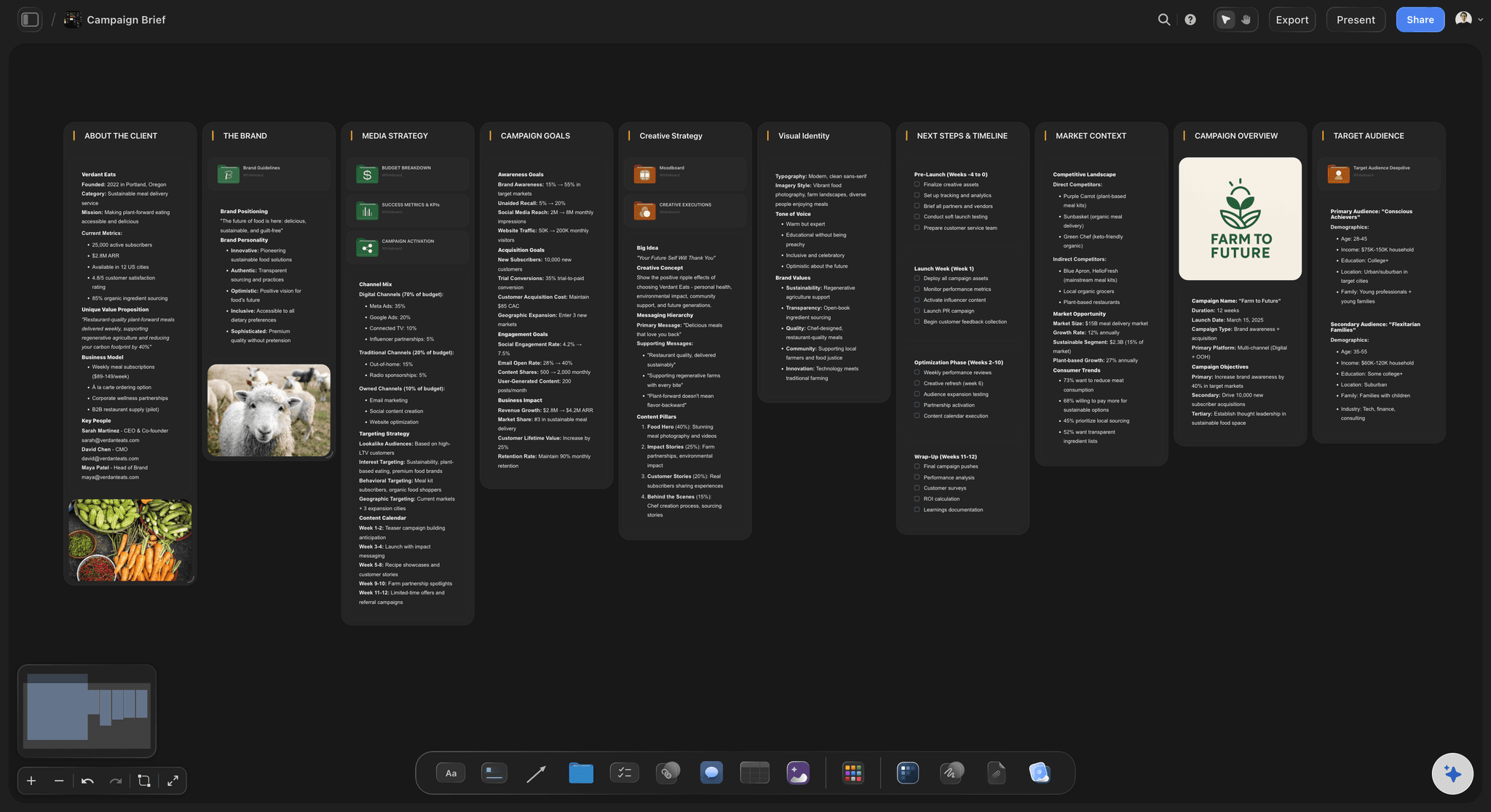
Storyflow works as an AI mind map generator on an infinite canvas. Describe a topic, a video series, a thesis, a campaign, a product strategy, and the AI lays out branching idea cards: themes grouped together, sub-ideas placed under the ideas they belong to, all as cards you can drag, edit, and delete. It is not a rigid diagram tool. The map is made of real canvas cards, so it works the way mind mappers think while staying flexible enough to become anything.
That is the difference from a classic mind map generator: the map is the starting point, not the output. Ask the AI to expand a branch, then turn the strongest branch into a storyboard, a content plan, or a campaign board on the same canvas. Your AI mind map becomes the project instead of a picture of it.
Ultra fast from brief to board
Generate a mind map with AI in four steps.
You bring the topic. The AI does the laying out, so your attention stays on the ideas.
01
Open your canvas
Start in the browser with an account. There is no app to install, just an empty canvas ready for the first topic you want to map.
02
Describe your topic
One sentence is enough: a content series about home cooking, a launch strategy for a new app, a study map for an exam.
03
AI lays out the idea cards
The AI places branching idea cards on the canvas: main themes, sub-ideas, and notes, grouped so the structure of the topic is visible at a glance.
04
Rearrange, expand, turn into plans
Drag cards to regroup branches, ask the AI to go deeper on any of them, then turn the map into a storyboard or plan, share a view-only link, or export as image or PDF.
A mind map generator that thinks past the map.
Most mind maps die as screenshots. These ones become storyboards, content plans, and campaigns.

Branching idea cards from a single prompt
From one prompt to a board of ideas
The AI breaks your topic into themes and sub-ideas laid out as cards on the canvas. Start wide, see the whole territory, then zoom into the branch that matters.
See the AI brainstorming tool →
Turn a branch into a sequence
Ideas become storyboards
Pick the strongest branch of the mind map and ask the AI to turn it into a storyboard, scene by scene, on the same canvas the ideas came from.
See the AI storyboard generator →
From idea map to publishing plan
Plan campaigns and content series
A topic map of your niche becomes a content calendar or a campaign board. The AI builds the plan from the branches you kept, not from a generic template.
See the AI marketing campaign planner →
Space for every branch to grow
Room to think on an infinite canvas
Mind maps sprawl, and that is the point. With an infinite canvas and no object cap, no branch gets cut for space.
See the free infinite canvas →Plans from $9.99 a month. No time limit.
Open a canvas, describe a topic, and watch the ideas lay themselves out. Storyflow is paid-only during early access; a Free plan for solo use launches before the end of 2026, and anyone you invite to a board joins free today.
Unlimited mind map boards, with room for every branch
AI usage to generate and expand idea maps
Attach images, PDFs, video, and links to any branch
Share the map view-only, or invite collaborators free
Built for people with taste
Built for the way mind mappers think.
Radiate out from a central idea, group what belongs together, and keep every thought visible at once.

Cards you can move, edit, and regroup
Idea cards that work like a mind map
Branches as card groups: Themes and sub-ideas are laid out as grouped cards, so the shape of your thinking is visible without a rigid diagram locking it down.
Drag to restructure: Move a card and the branch moves with your thinking. Merging two themes is a drag, not a redraw.
Expand any branch: Ask the AI to go three levels deeper on one branch while the rest of the map stays exactly as you arranged it.

Context from the board you are mapping on
AI that builds on what is already there
Reads your active board: The AI uses what is on the board you have open, so new branches connect to the ideas you already mapped.
Attach your sources: Add up to five documents and three boards as context: a research doc, a brief, or lecture notes the map should grow from.
Re-prompt to refocus: Ask for more practical ideas, a different angle, or a tighter map. The AI reworks the layout while keeping your edits.

More than text on every node
Media, notes, and links beside every idea
Drop in anything: Images, video, GIFs, PDFs, and links attach to the canvas next to the ideas they support. A mind map with receipts.
Frame grabs from video: Capture stills from YouTube and Vimeo straight onto the map when a reference says it better than a label.
Notes where you need them: Longer thoughts live as documents on the same canvas, so the map stays scannable and the depth stays one click away.

The map is step one, not the deliverable
From idea map to finished plan
Branch into real boards: Turn branches into storyboards, content plans, and campaign boards on the same canvas, with the AI carrying the ideas over.
Share the thinking: Invite collaborators free, or send a view-only link so anyone can explore the map without an account.
Export as image or PDF: Need the map in a deck or a doc? Export it as a clean image or PDF in one step.
Explore templates for your project
Every template opens as a real, editable board on the infinite canvas. Pick the closest fit and make it your own.
Mind Map
Branch one central idea out into themes and sub-points, then drag the connections around until the structure makes sense.
One app instead of five
How Storyflow compares to other mind map generators.
Plenty of tools draw a diagram. The question is what happens to the ideas afterwards.
Storyflow
Recommended
AI that reads your board as context
Ideas become storyboards and plans on the same canvas
An infinite canvas at the core of the product
No board or card caps
Miro
AI that reads your board as context
Ideas become storyboards and plans on the same canvas
An infinite canvas at the core of the product
No board or card caps
Milanote
AI that reads your board as context
Ideas become storyboards and plans on the same canvas
An infinite canvas at the core of the product
No board or card caps
Canva
AI that reads your board as context
Ideas become storyboards and plans on the same canvas
An infinite canvas at the core of the product
No board or card caps
What creators are saying
Join early creators getting structured workspaces and AI that remembers their projects
“Storyflow has sped up my workflow by at least 3x, which means more flow state and more projects I can actually ship. It truly changed the way me and my team create.”

Reilin Joey
Director & YouTuber
“One prompt gets me a structured board. But the tactics are my favorite. I run my YouTube scripts through them and my intros and retention got better. It's amazing.”

Justkay
YouTuber & Freelance Filmmaker
“I used to juggle five apps to plan a project. Now I describe what I am making and get boards, lists, and a schedule. All in one place.”

George
@fernwehchronicles
AI mind map questions, answered.
Everything people ask about generating mind maps with AI in Storyflow.
One that groups material you already have rather than inventing a map from a prompt. A map generated from a single sentence looks complete and contains nothing you did not already know. The useful direction is the reverse: paste a brainstorm, a document or a transcript and get named clusters back. Storyflow's AI reads the whole active board plus up to five attached documents and three boards, so it groups your own material, and every grouping stays editable by hand.
An AI mind map generator turns a topic you describe into a visual map of connected ideas: central themes, branches, and details, laid out for you instead of drawn by hand. In Storyflow the AI places branching idea cards on an infinite canvas, so the map stays fully editable and can grow into storyboards and plans.
Describe your topic in the AI chat and the AI lays out idea cards on the canvas: main themes grouped with their sub-ideas, arranged so the structure reads at a glance. It is a flexible board of real cards rather than a locked diagram, which means you can drag, edit, merge, and expand every part of the map.
Not during early access. Storyflow is currently paid-only, with plans starting at $9.99 per month that include AI usage for generating and expanding maps, unlimited boards, 20 file uploads, and view-only sharing. A Free plan for solo use launches before the end of 2026, and anyone a paid member invites to a board joins free today.
Yes, completely. Every idea is a card on the canvas, so you can drag branches around, rewrite any card, delete what does not fit, and regroup themes. The AI gives you the first draft of the map, and the canvas makes it yours.
Yes, and that is the point of doing it in Storyflow. Ask the AI to turn a branch into a storyboard, a content plan, or a campaign board, and it builds the new board on the same canvas using the ideas you mapped. The mind map becomes the project instead of a screenshot.
Yes. The AI reads your active board, so cards and notes already on the canvas shape the map it generates. You can also attach up to five documents and three boards, such as a research doc or a brief, for the AI to work from.
Yes. Export the map as a high-quality image or a PDF for decks and documents, or share a view-only link so anyone can explore the full canvas in their browser without an account.
Traditional mind mapping tools lock your ideas into a fixed diagram that is hard to repurpose. Storyflow lays out AI-generated idea cards on an open infinite canvas, so the map thinks like a mind map but behaves like a project: attach media, expand branches with AI, and convert ideas into storyboards and plans without switching tools.
More from Storyflow
Infinite canvas
Online whiteboard
AI note taking
AI brainstorming tool
AI whiteboard
Free infinite canvas
AI storyboard generator
AI marketing campaign planner
Moodboarding
Flowchart maker
Diagram maker
How to create a mind map from scratch
How to create a mind map with AI
Brainstorm to mind map
Mind map for creative projects
Mind maps with Claude
The topic is in your head. Get it on the board.
Describe it once, watch the ideas branch out, and turn the best ones into a plan.