
Plan videos ultra fast, post on time
One editorial calendar for everything
your small team publishes.
Blog, newsletter, video and social on one board, with an owner, a stage and a due date on every piece, and the brief, the draft and the assets beside it. Where a piece is up to stops being a question.


Creatives working for these brands already got early access
- Red Bull
- Canon
- Artlist
- Porsche
See how easy it is to get started
Watch a real project come together, from a blank board to a finished plan, clicked through step by step.
Start from a ready-made template
Pick a board to see what you can build, then let AI fill it in. Every template is a real, editable starting point on the same infinite canvas.

YouTube Plan
Plan a video from hook to outline to shot list, with references and thumbnail ideas sitting right beside it.
What's the best content calendar tool for a small team?
A content calendar tool gives a small team one shared plan for everything it publishes, so nobody has to ask where a piece is up to. Storyflow is an AI visual workspace that runs a small team's editorial calendar on one infinite canvas: blog, newsletter, video and social pieces on one shared board, an owner, a stage and a due date on every piece, and its brief, draft and assets beside it. The calendar and the work are one place. Notion suits a team that wants to build its own content database, Asana a team that runs content as assigned tasks with formal approvals, and Trello a team that only needs cards moving through stages.
An editorial calendar is the shared plan for everything a team publishes: what each piece is, which channel it goes to, who owns it, what stage it has reached and when it is due. It sits upstream of a posting schedule. One long article on the editorial calendar can become a newsletter section, a short video and a week of social posts, and a small team feels that multiplication more than anyone, because the same three people make all of it.
For a small team the failure is rarely a lack of ideas. It is invisible state. A piece with no named owner has no owner. A draft waiting on the one person who approves everything looks exactly like a draft being written. The brief lives in a chat thread, the draft in a document, the images in a drive folder and the date in a spreadsheet, so answering where a piece is up to means opening four tools. Good looks like one place where every piece shows its owner, its stage, its date and its approver, and opening it shows the work.
In Storyflow each piece is a ticket with a title, a description for the brief, a due date, an assignee and a stage label, or a row in a table with date, person and status cells. A Kanban holds the stages from idea to published, and the quarter's themes sit at the top of the board. The draft is a document on the same board, with reference images, video embeds and files beside it, and the approver is named in the brief. A stakeholder opens a view-only link with no account and signs in to comment. Storyflow does not publish to a CMS, an email tool or a social network, and dates sit in tables and on tickets rather than on a month grid.
Ultra fast from brief to board
From four channels and a spreadsheet to one calendar the team runs from.
Set it up in an afternoon, then run the week from it.
01
Put every channel on one board
Blog, newsletter, video and social each get a lane. Ask the AI to lay out the quarter from your cadence and themes, and the slate appears as tickets you edit.
02
Give every piece an owner, a stage and a date
Assign each ticket, set its due date and move it through a Kanban from idea to brief, draft, review, approved and published, so nothing waits unowned.
03
Keep the brief, draft and assets beside it
The brief goes in the ticket, the draft is a document on the board, and the images, clips and source files sit next to both, so review happens on the work itself.
04
Review by link, publish where you publish
The approver opens a view-only link with no account and signs in to comment on the specific piece. Approved pieces go out through your CMS, email tool or scheduler.
The calendar, the pipeline and the work, in one place.
What a small team needs to publish on several channels without a weekly status meeting.

Every channel on one board
Blog, newsletter, video and social together
A long piece and everything cut from it sit in the same view, so a week where every channel is waiting on the same article shows up before it happens.
See the content repurposing planner →
Owner, stage and due date
Nothing waits without a name on it
Tickets carry an assignee, a due date and a stage label, and a passed due date is flagged, so a piece stuck in review for a week is visible at a glance.
See the content pipeline board →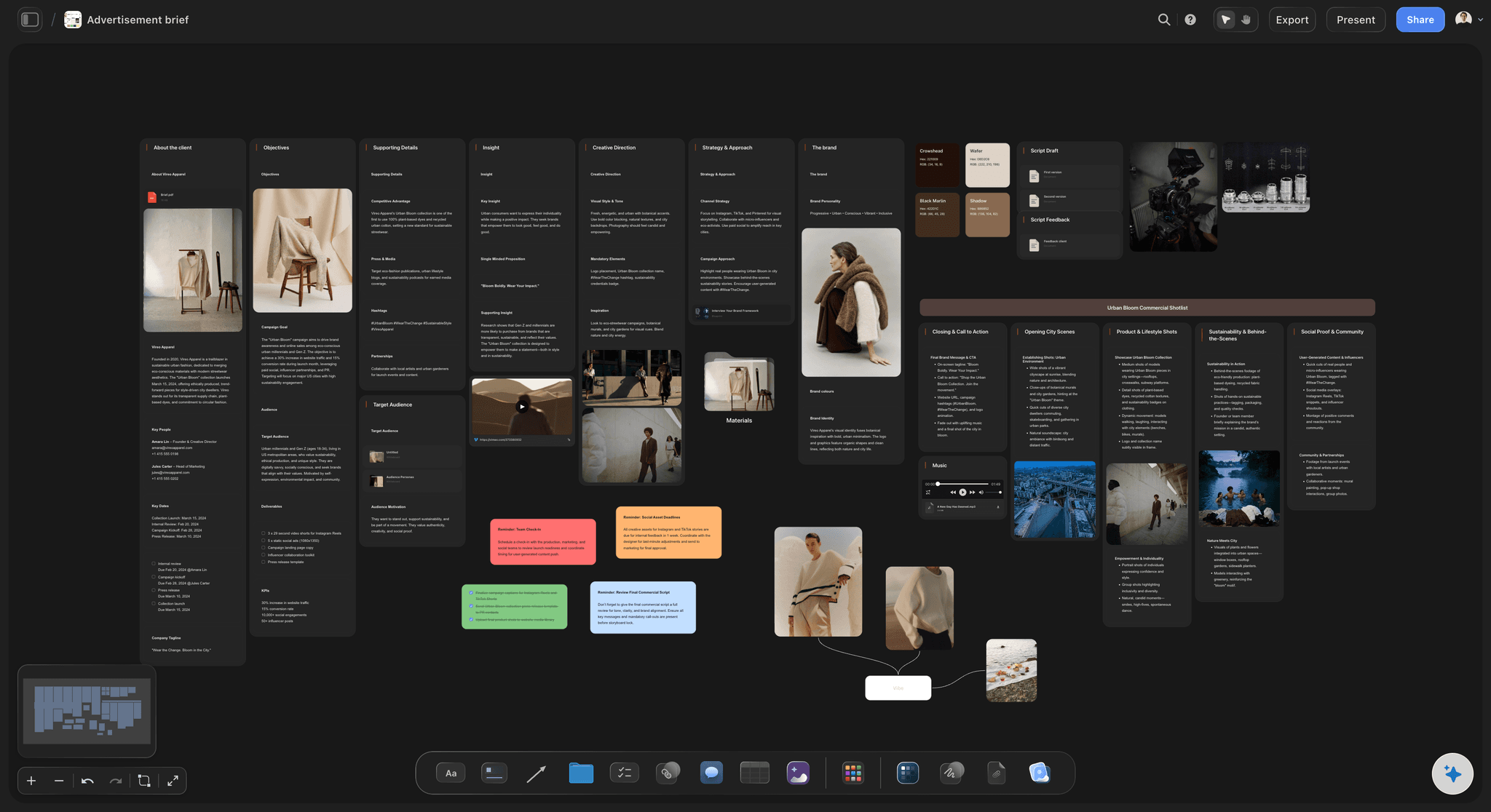
The brief and the draft beside the date
Review the work, not a link to it
The brief sits in the ticket and the draft is a document on the board, with references and files next to it, so an approver reads the piece in context.
See the content brief template →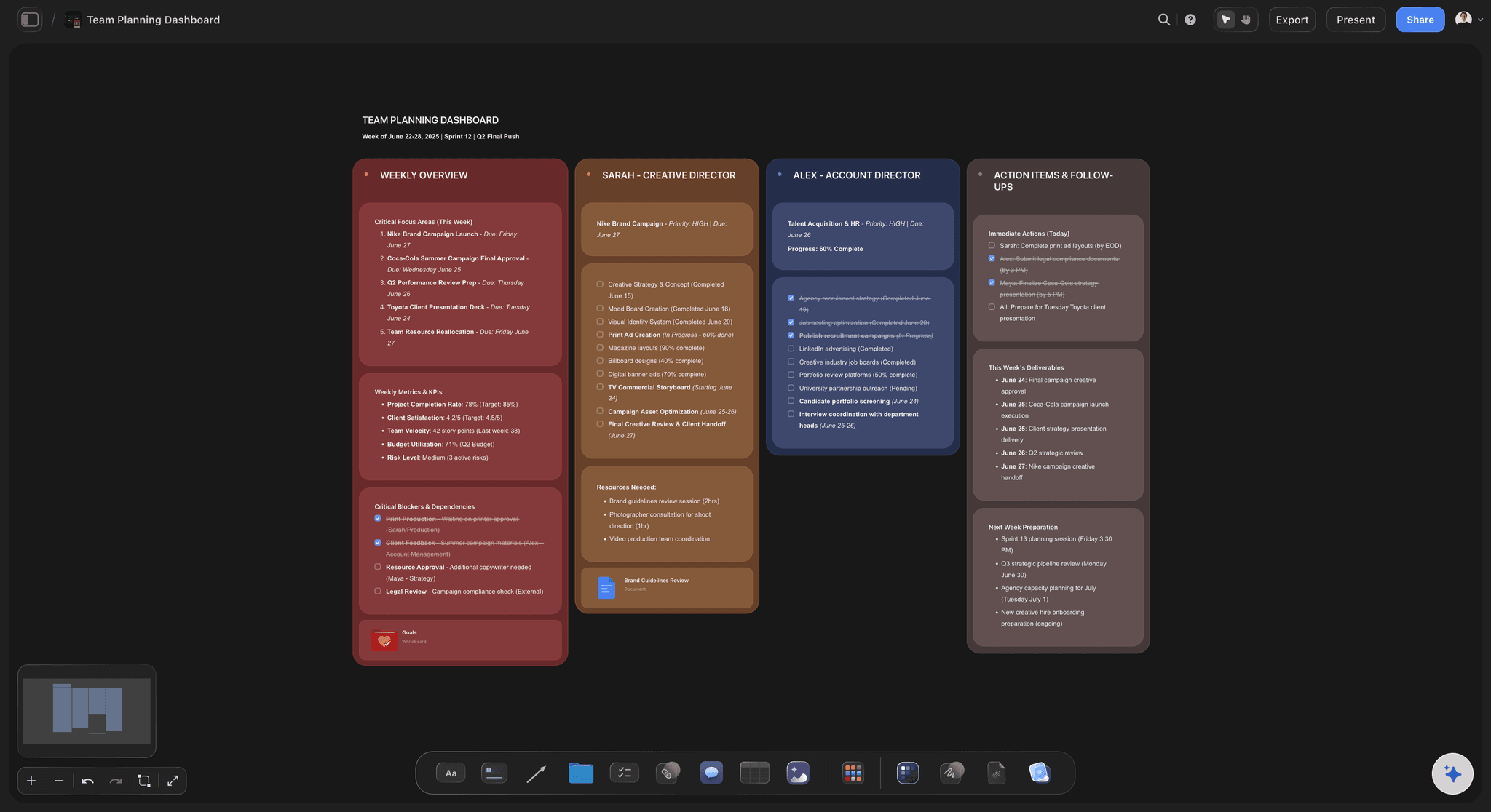
Run it without an agency
An editorial desk for a team of three
Themes, the quarter's slate, the production steps and who approves what, planned on one board the whole team edits, with invited collaborators joining free.
See in-house content production →Unlimited boards. No object cap.
One calendar board for the team, or one per brand. Storyflow is paid-only during early access, with plans from $7.99 a month billed annually ($9.99 monthly). A free plan launches before the end of 2026, and anyone a paid member invites to a board joins free.
Unlimited boards, images, files and links
Tickets with due dates and assignees, Kanban stages, and tables with date, person and status cells
Documents for drafts on the same board as the calendar
View-only links a stakeholder opens with no account

Built for people with taste
Plan the slate, run the pipeline, review the work.
Four jobs an editorial calendar has to do for a team where everyone makes everything.
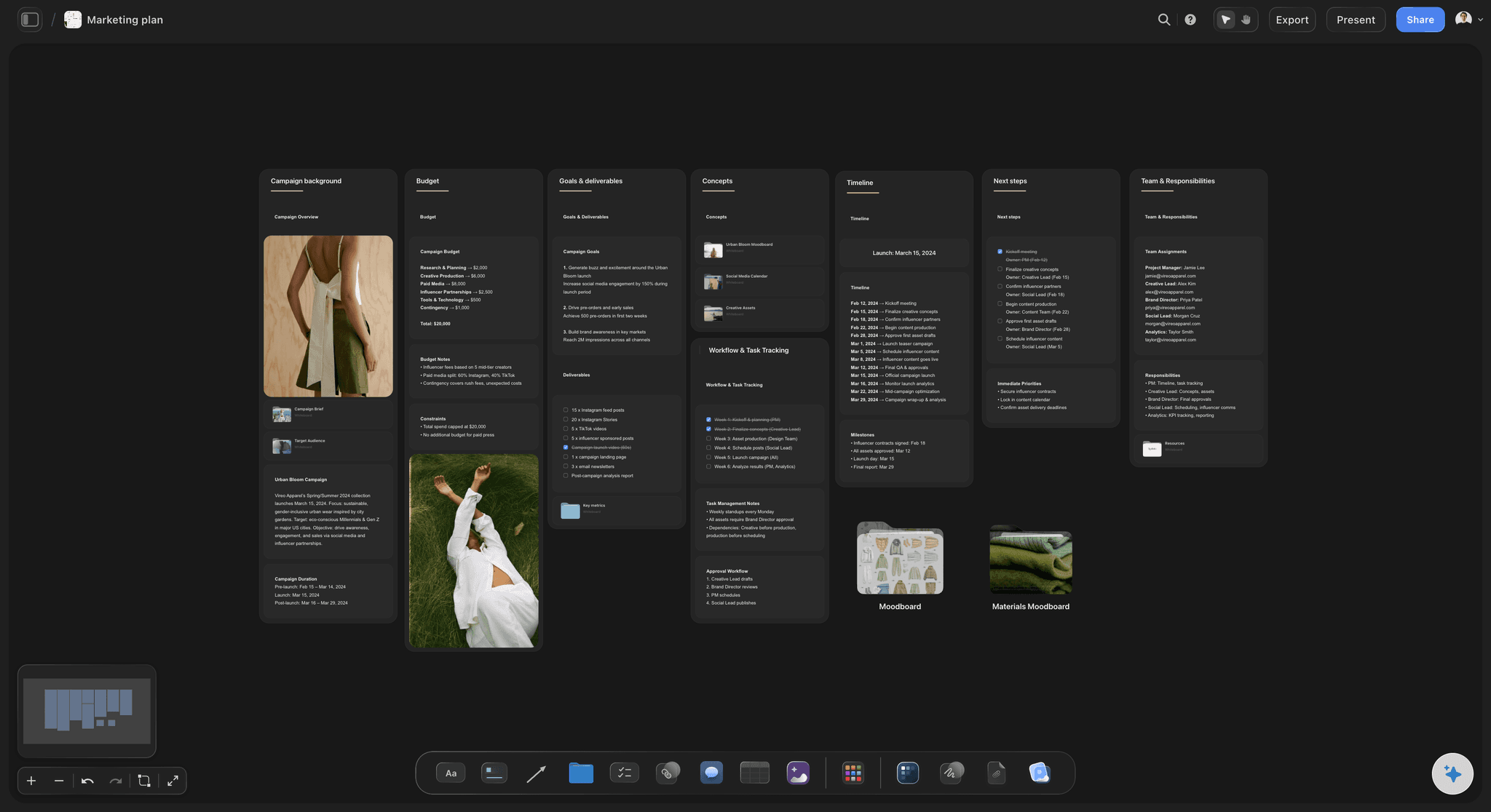
The slate across channels
Decide what the quarter is about
Themes before titles: Two or three themes for the quarter, written at the top of the board, so each piece is checked against a reason to exist rather than a gap in the week.
A cadence per channel the team can keep: A weekly blog, a fortnightly newsletter and two videos a month is a real production load for three people. Cadence set from capacity is what keeps the calendar true in month two.
One source piece, several outputs: Mark which newsletter section, short video and social posts come from each long piece, so repurposing is scheduled with the source instead of remembered after it.
An idea bank beside the dates: Unscheduled ideas wait in their own area of the board, so when a piece falls through, the replacement is already there with its reasoning.

Owners, stages and dates
Run the pipeline, not just the dates
A named owner on every piece: Each ticket is assigned to a person. On a small team a piece with no owner is a piece everyone assumes someone else is writing.
Stages from idea to published: Idea, brief, draft, review, approved and published as Kanban columns, so the stage where work piles up, usually review, is visible.
Separate draft, review and publish dates: A table row per piece with a date cell for each deadline, because a calendar that only holds the publish date finds out a piece is late on the day it was due.
Late pieces surface on their own: A ticket past its due date is tinted, so the late piece shows up on the board without anyone chasing it in a chat thread.

Briefs, drafts and assets
The work sits beside its calendar entry
The brief in the ticket: Angle, audience, keyword, length, sources and what the piece has to achieve, written where the writer and the approver both see it.
Drafts as documents on the board: Long-form text is written in a document on the same canvas, with the brief and the theme in view, rather than in a file that drifts from what was agreed.
Images, clips and files next to the piece: Reference images, YouTube and Vimeo embeds, PDFs and source files sit beside the piece they belong to, which is what makes a handover survivable.
The approver named on the brief: Write who approves the piece into its brief, so a piece does not wait on a decision nobody knew was theirs.
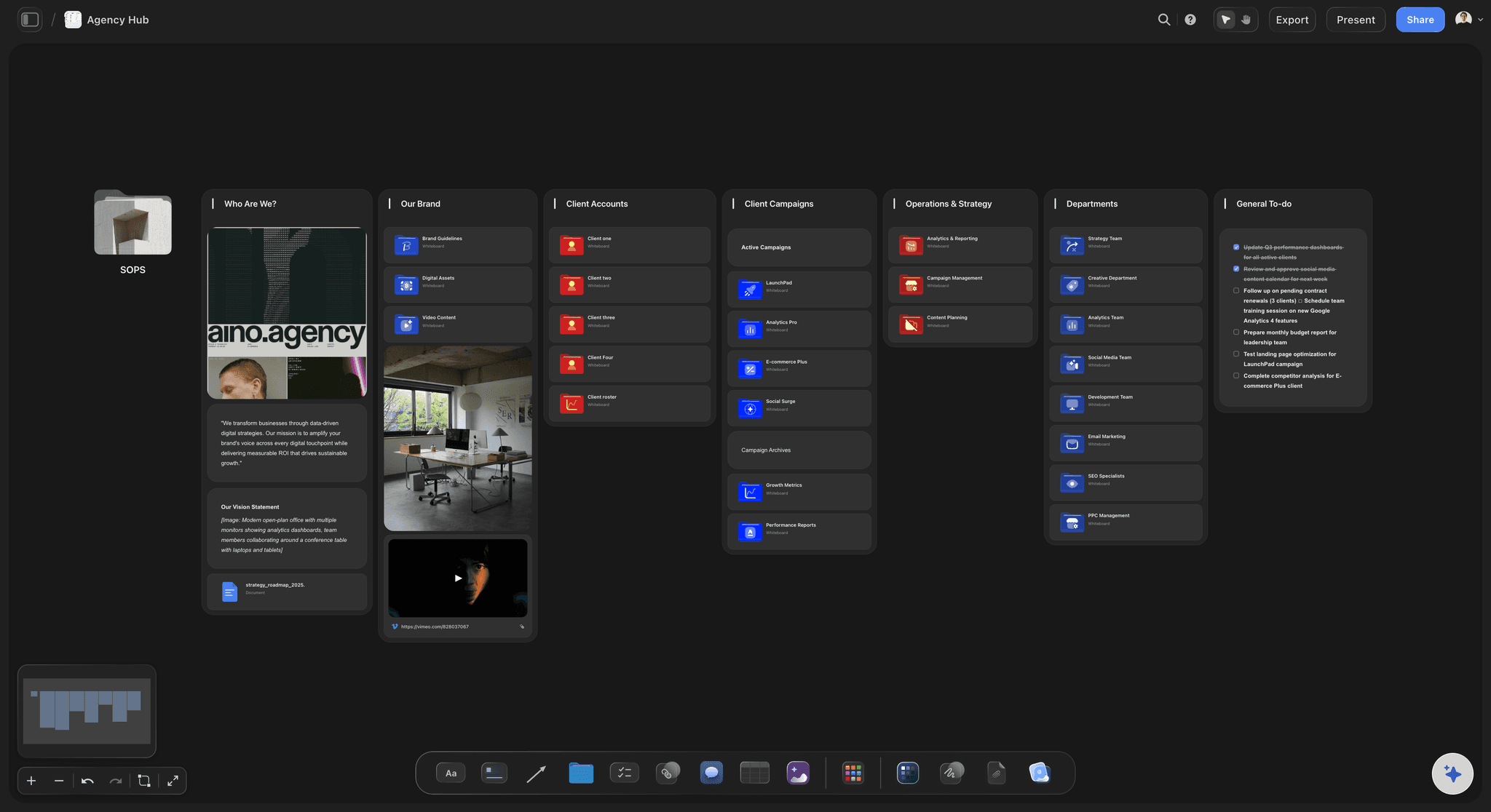
Review, AI and handoff
Approve on the board, publish where you publish
Review by link: A stakeholder opens a view-only link in a browser with no account, sees the calendar and the draft, and signs in to leave comments on the specific piece.
Invite the freelancer to the board: A freelance writer or video editor a paid member invites joins free and works on the same tickets and documents as the team.
Ask the AI what is stuck: The AI reads the whole board, so which pieces have no owner, what has sat in review longest, or which channel is empty in week three are answered from your calendar. It proposes; the team decides.
Publishing stays in your stack: Storyflow does not publish to WordPress, an email platform or social networks. Approved pieces go out through the tools that already do.
Explore templates for your project
Every template opens as a real, editable board on the infinite canvas. Pick the closest fit and make it your own.
YouTube Plan
Plan a video from hook to outline to shot list, with references and thumbnail ideas sitting right beside it.
One app instead of five
Storyflow vs Notion, Asana and Trello.
All three run real content calendars. Notion is a database you shape yourself, Asana runs content as assigned tasks with approvals and rules, and Trello moves cards through stages. Here is where they differ for a small team that makes the content as well as schedules it.
Storyflow
Recommended
Owner, stage and due date on every piece
Drafts, images and clips beside each piece on one canvas
A stakeholder opens it by link with no account
Phases with start and end dates and an owner
Automations and recurring tasks
Notion
Owner, stage and due date on every piece
Drafts, images and clips beside each piece on one canvas
A stakeholder opens it by link with no account
Phases with start and end dates and an owner
Automations and recurring tasks
Asana
Owner, stage and due date on every piece
Drafts, images and clips beside each piece on one canvas
A stakeholder opens it by link with no account
Phases with start and end dates and an owner
Automations and recurring tasks
Trello
Owner, stage and due date on every piece
Drafts, images and clips beside each piece on one canvas
A stakeholder opens it by link with no account
Phases with start and end dates and an owner
Automations and recurring tasks
What creators are saying
Join early creators getting structured workspaces and AI that remembers their projects
“Storyflow has sped up my workflow by at least 3x, which means more flow state and more projects I can actually ship. It truly changed the way me and my team create.”

Reilin Joey
Director & YouTuber
“One prompt gets me a structured board. But the tactics are my favorite. I run my YouTube scripts through them and my intros and retention got better. It's amazing.”

Justkay
YouTuber & Freelance Filmmaker
“I used to juggle five apps to plan a project. Now I describe what I am making and get boards, lists, and a schedule. All in one place.”

George
@fernwehchronicles
Editorial calendars for small teams, answered.
What goes on one, how approval works, and which tool fits a team that makes its own content.
Storyflow suits a small team that makes its own blog posts, newsletters, videos and social posts, because the editorial calendar and the work share one board: each piece is a ticket with an owner, stage label, due date and brief, with the draft and images beside it. Notion is stronger for a team that designs its own database, Asana for formal approval tasks and rules, and Trello for cards moving through stages. Storyflow does not publish.
An editorial calendar is a team's shared plan for everything it will publish over the coming weeks and months: what each piece is, its channel and theme, who owns it, what stage it has reached, who signs it off and when it is due. It covers blog posts, newsletters, videos and social posts together, unlike a posting schedule for one channel. In Storyflow each piece is a ticket or table row, with its brief and draft beside it.
The terms overlap, but the useful difference is altitude. An editorial calendar is upstream: it decides what gets made across every channel, who owns each piece, which theme it serves and how it moves to approved. A content calendar, especially a social one, is downstream: what goes out where and when. One article on the editorial calendar can become a newsletter section, a short video and a week of social posts. Storyflow keeps both views on one board.
For every piece: the working title, channel and format, theme, owner, stage, draft date, publish date and approver. What makes it useful is the brief attached to each piece, with the angle, audience, keyword, length and sources; a note of the source piece anything repurposed comes from; and an idea bank for when something falls through. In Storyflow those are ticket fields, table columns with date, person and status cells, and documents on the same board.
Make approval a visible stage with a named approver, and review the work itself. Give every piece a stage sequence such as idea, brief, draft, in review, approved and published, and agree who approves each type of piece. In Storyflow approval is a Kanban column or a stage label, and the approver is named in the brief; a stakeholder opens a view-only link with no account, then signs in to comment. Asana suits formal approval tasks better.
One person owns the calendar, usually the content lead or the marketer closest to the channels, and everyone else owns their pieces. The owner sets the quarterly themes and the cadence per channel, runs the weekly review and decides what moves when something slips. In Storyflow each piece is a ticket with an owner, stage and due date, with the brief and draft beside it, so ownership is visible without a status meeting.
Plan themes a quarter ahead, pieces a month ahead and production details two weeks ahead. Quarterly themes give a small team something stable to commission against, while dating pieces more than about six weeks out is usually wasted as priorities move. Keep the second half of the quarter loose, hold an idea bank, and set each channel's cadence from what the team can produce. In Storyflow the quarter's themes and the month's tickets share one board.
No. Storyflow does not publish to a CMS such as WordPress, send email newsletters, or schedule and publish social posts. It plans and runs the production: the slate, owners, stages, briefs, drafts and review. Approved pieces go out through the tools built for that, such as your CMS, email platform and a scheduler like Buffer. A draft written in a Storyflow document is copied into the CMS when approved, and the board exports as an image or PDF.
No. In Storyflow the dates in an editorial calendar live in a table with date, person and status cells, where each row is a piece; on tickets, which carry a due date and are flagged when it passes; and on a Kanban that shows each piece's stage. For a small team the table answers what is due this week, and the board answers where each piece is up to and what it still needs.
It drafts the structure and finds problems, and the team decides. Ask Storyflow's AI for a Content Planner and it lays out pillars, calendar structure, batching, a cadence per channel and repurposing, with real upcoming pieces as tickets. Because it reads the whole board, it can say which pieces have no owner, what has sat in review longest, or which theme has nothing planned next month. It proposes ordinary cards the team edits or deletes, and it never publishes.
Yes, in two ways. Anyone a paid member invites to a board joins free, so a freelance writer or video editor works on their own tickets and drafts directly. A client or executive who only needs to see the calendar opens a view-only link in a browser with no account, and signs in to comment on a specific piece. For a meeting snapshot, export the Storyflow board as a high-quality image or PDF.
Not yet. Storyflow is paid-only during early access, with plans from $7.99 a month billed annually ($9.99 monthly). A free plan launches before the end of 2026, and anyone a paid member invites to a board joins free, so freelancers and teammates can work on the editorial calendar, and opening a view-only link needs no account. For a free option today, Trello and Notion both have free tiers that hold a small content calendar.
More from Storyflow
Content pillars
In-house content production
Social media content calendar
Content calendar for creators
AI content calendar generator
Content pipeline
Newsletter planner
Content repurposing planner
Content brief template
For marketing teams
Campaign calendar
Best content calendar tools
What is a content calendar
Notion vs Trello for content calendars
Best tools for magazine editorial teams
Video marketing plan
30-day content plan example
Editorial workflow
Put everything your team publishes on one board.
Every channel, every piece, an owner and a stage on each, and the work beside the date.