
Social plans done ultra fast, done well
Plan every post
on one infinite canvas.
Storyflow gives social media managers one infinite canvas for the whole content operation: calendar, campaign board, post ideas, hooks, series, and reference moodboards side by side. Describe a month or a campaign in the AI chat and it lays out a starting board you shape. Send a view-only link for approvals with no account needed.


Creatives working for these brands already got early access
- Red Bull
- Canon
- Artlist
- Porsche
See how easy it is to get started
Watch a real project come together, from a blank board to a finished plan, clicked through step by step.
Start from a ready-made template
Pick a board to see what you can build, then let AI fill it in. Every template is a real, editable starting point on the same infinite canvas.

Content Calendar
Plan what you post and when across every channel on one calendar.
Why plan social content on a canvas instead of a spreadsheet?
A social calendar is more than dates in a grid. Every slot carries a hook, a caption draft, a reference clip, a format, and a channel, and the good ideas rarely arrive in the order the spreadsheet wants them. So the work ends up scattered: a sheet for the calendar, a notes app for hooks, a folder for references, and a chat thread for approvals. The campaign lives in all of them and nowhere you can actually see it whole.
Storyflow is one infinite canvas where all of that sits together. Every card is real: a post idea, a hook, a content slot, a reference image, a whole campaign phase. You lay the month out in space, group a series, pin the moodboard beside the calendar, and connect the idea to the date it ships, without exporting anything or opening a second tool. Zoom out and the entire content plan reads at a glance.
The AI is what makes the blank canvas fast. Describe the month or the campaign once and it lays out a full starting board of cards: themes, post ideas, hooks, and channels ready to rearrange. It reads the current board as context, plus (from the + menu) up to five documents and three boards, so a brief or a brand doc actually shapes what it proposes. From there you refine, and a brainstorm becomes a content calendar, a moodboard becomes a campaign board, all on the same canvas.
Ultra fast from brief to board
From idea to scheduled month in four steps.
Start from a blank canvas or a single prompt, then share the plan for approval when it is ready.
01
Open a canvas
Start in the browser. Nothing to install, just one infinite canvas ready for a month of content.
02
Describe the month
Type the campaign or the content month into the AI chat and it lays out a starting board of themes, post ideas, hooks, and channels, or start from a blank board and add your own.
03
Shape the calendar
Drag cards to group series and channels, drop in reference clips and moodboards, and ask the AI to expand a hook list or a thin week, all on one board.
04
Share for approval
Send a client or manager a view-only link to review the plan in the browser, invite teammates to keep building, or export a board as an image or PDF for the deck.
One canvas instead of a sheet, a notes app, and a folder.
Keep the calendar, the ideas, and the references together, with AI to lay out the first draft and view-only links for approvals.
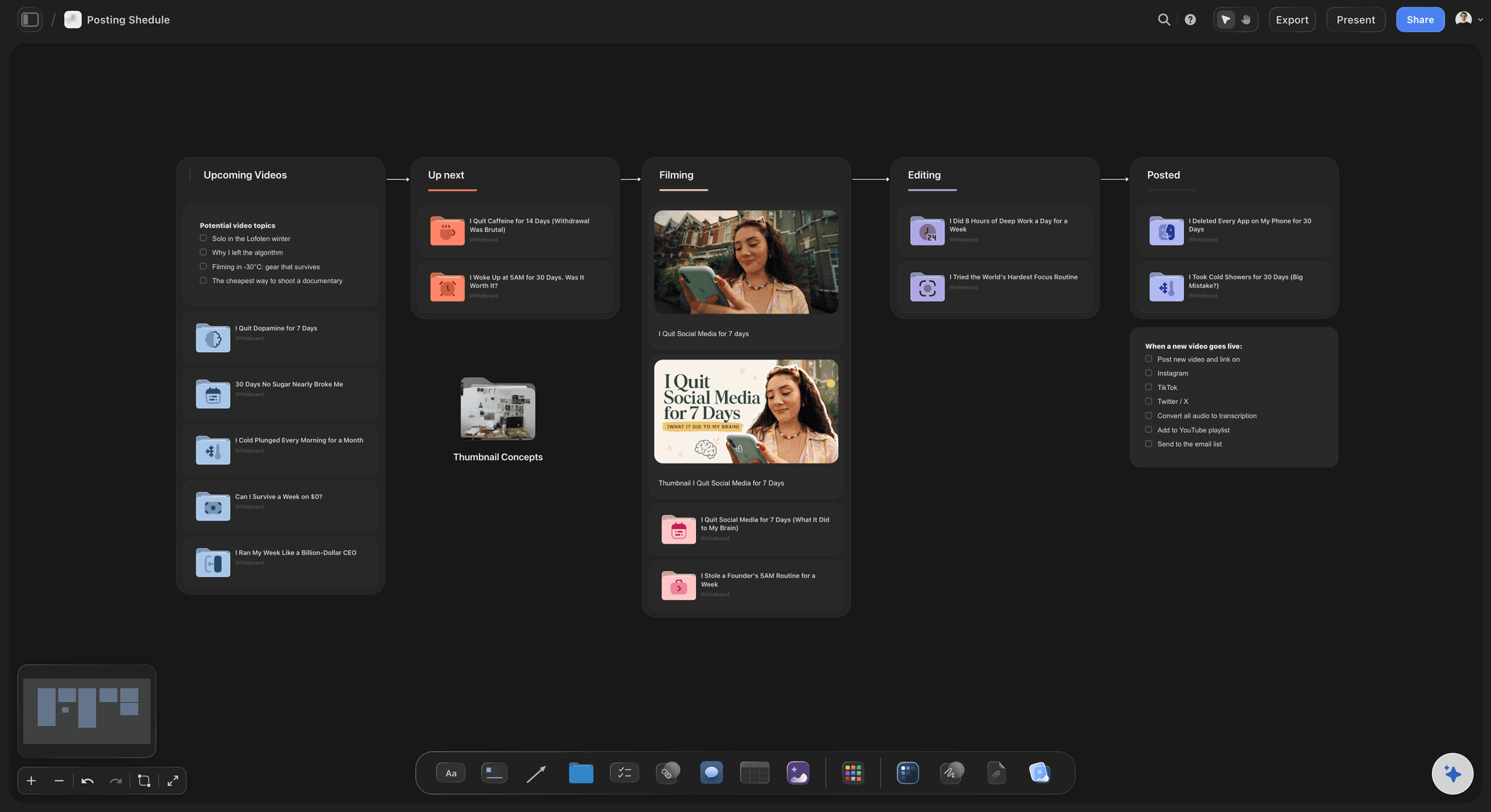
AI lays out the board
Describe a month, get a starting board
Type the campaign or content month into the AI chat and Storyflow lays out a full board of cards: themes, post ideas, hooks, and channels, ready to rearrange. It reads your current board as context, not a generic template.
See the content calendar generator →
Calendar and campaign together
The whole content plan on one board
Put the content calendar, the campaign board, and the series plan side by side on the same infinite canvas. Zoom out to see how the strategy connects to the schedule, with no exporting between three separate tools.
See the campaign planner →
References beside the plan
Moodboards next to the calendar
Pull the brand moodboard onto the same canvas as the calendar. Attach reference images, PDFs, and links, and grab frames straight from YouTube and Vimeo so the visual direction sits beside the posts it belongs to.
See the moodboard maker →
Approvals without an account
Share view-only for sign-off
Send a client or manager a view-only link they open in the browser without signing up. They see the calendar, the campaign, and the references exactly as you laid them out, so approvals happen on the plan itself, not a screenshot in a chat.
See visual collaboration →Plans from $7.99/month annual. Unlimited boards.
Open a canvas and plan a real month. There is no object cap, so a full content calendar never pushes you to upgrade mid-plan.
Unlimited boards and content calendars
AI to lay out and expand content boards
Attach reference images, clips, PDFs, and links
View-only links for approvals, no account needed
Built for people with taste
Built for how social media managers actually plan.
Brainstorm posts, schedule the month, plan a series, and hand it off for approval, all on one canvas.

Capture the ideas
Post ideas and hooks in one place
AI drafts a hook list: Describe a topic or a channel and the AI lays out post ideas and hook angles as cards you refine, so the idea backlog is never a blank page.
Group by theme or channel: Cluster ideas into themes, formats, or channels on one board so you can see where the content is thick and where a week is thin.
Ground it in your brand: Attach up to five documents and three boards, like a brand doc or a campaign brief, so the ideas fit your voice and goals.
Schedule the month
A content calendar on the canvas
Calendar from ideas: Turn a brainstorm of post ideas into a posting schedule on the same canvas, so the calendar grows out of the strategy instead of a separate sheet.
See the whole month: Lay out weeks and channels in space and zoom out to catch gaps, clashes, and thin stretches before they reach the schedule.
Assets in place: Drop draft captions, reference clips, and links onto each slot so every post carries its assets, not a link away in another folder.

Plan a series
Video and series planning on one board
Map the series: Lay out an episode arc or a content series as connected cards, so a multi-part idea reads as one plan instead of scattered notes.
Plan the video: Break a YouTube or short-form video into hook, beats, and shots on the same canvas, with reference frames pulled in from YouTube and Vimeo.
Reuse what works: Keep a winning format on the board and branch new episodes from it, so a repeatable series does not start from scratch each time.

Ship and share
From plan to approval, then hand off
Turn ideas into a campaign: Convert a brainstorm or moodboard into a campaign board on the same canvas, with the AI carrying your posts and channels across into a real plan.
Approvals get a link: Send a view-only link so a client or manager can review the whole plan in the browser without an account or a walkthrough.
Export for the deck: Need the calendar in a slide or a report? Export any board as a clean image or PDF in one step.
Explore templates for your project
Every template opens as a real, editable board on the infinite canvas. Pick the closest fit and make it your own.
Content Calendar
Plan what you post and when across every channel on one calendar.
One app instead of five
How Storyflow compares for social content planning.
Plenty of tools do one piece of the workflow well. The question is whether the whole plan lives on one board.
Storyflow
Recommended
AI lays out a content board from a prompt
Calendar, campaign, ideas, and moodboard on one canvas
View-only approval links, no account to view
Boards become content calendars and campaign plans
Notion
AI lays out a content board from a prompt
Calendar, campaign, ideas, and moodboard on one canvas
View-only approval links, no account to view
Boards become content calendars and campaign plans
Miro
AI lays out a content board from a prompt
Calendar, campaign, ideas, and moodboard on one canvas
View-only approval links, no account to view
Boards become content calendars and campaign plans
Milanote
AI lays out a content board from a prompt
Calendar, campaign, ideas, and moodboard on one canvas
View-only approval links, no account to view
Boards become content calendars and campaign plans
What creators are saying
Join early creators getting structured workspaces and AI that remembers their projects
“Storyflow has sped up my workflow by at least 3x, which means more flow state and more projects I can actually ship. It truly changed the way me and my team create.”

Reilin Joey
Director & YouTuber
“One prompt gets me a structured board. But the tactics are my favorite. I run my YouTube scripts through them and my intros and retention got better. It's amazing.”

Justkay
YouTuber & Freelance Filmmaker
“I used to juggle five apps to plan a project. Now I describe what I am making and get boards, lists, and a schedule. All in one place.”

George
@fernwehchronicles
Social media manager questions, answered.
Everything people ask about planning social content in Storyflow.
It gives you one infinite canvas for the whole content operation: the calendar, the campaign board, post ideas and hooks, series planning, and reference moodboards side by side. Describe a month or a campaign in the AI chat and it lays out a starting board of cards you shape, instead of stitching the plan across a sheet, a notes app, and a folder.
Not yet. Storyflow is paid-only during early access, with plans from $7.99 a month billed annually ($9.99 monthly). A free plan launches before the end of 2026, and anyone a paid member invites to a board joins free. Every paid plan has unlimited boards, content calendars and file uploads, with view-only sharing; a team workspace with roles is on Max.
Yes. Share a view-only link and a client or manager can open the full plan in their browser without signing up. They see the calendar, the campaign, and the references exactly as you laid them out, so approvals happen on the plan itself rather than a screenshot pasted into a chat.
Describe a month or a campaign and the AI lays out a full board of cards: themes, post ideas, hooks, and channels ready to rearrange. It reads your current board as context, plus up to five documents and three boards you attach, so a brand doc or a brief shapes what it proposes rather than a generic template.
Yes. Turn a brainstorm of post ideas into a posting schedule on the same canvas, lay out weeks and channels in space, and drop draft captions and reference clips onto each slot. Because the calendar sits beside the campaign and the moodboard, the schedule grows out of the strategy instead of a separate spreadsheet.
No. Storyflow is where you plan the content, not a publishing tool that posts to the platforms for you. You lay out the calendar, campaigns, hooks, and references on one canvas, then take the finished plan to whatever you use to schedule and publish. You can export any board as an image or PDF for the handoff.
Notion is great for structured docs and databases and Miro is a strong freeform whiteboard, but neither lays out a full content board from a prompt or turns your moodboard into a campaign board and content calendar on the same canvas. Storyflow keeps the visual, freeform canvas and adds AI that builds boards from your context, with view-only links for approvals.
Yes. Break a YouTube or short-form video into hook, beats, and shots on the same canvas, pull reference frames straight from YouTube and Vimeo, and lay out a multi-part series as connected cards. The series plan sits beside the calendar, so a video slot on the schedule links to the plan behind it.
More from Storyflow
AI content calendar generator
Content planning tool
For marketing teams
AI marketing campaign planner
Mind mapping
Moodboard maker
Best social media planning tools
Best marketing campaign planning tools
AI tools for content creators
Social media shot list
In-house content production
Video ad script template
Video marketing plan
Ad creative testing
Get the whole content month on one board you can share.
Brainstorm the posts, schedule the month, plan the series, and hand it off for approval, all on one canvas.