
Category
Content Creation
Author

Storyflow Team
Product & Research Team
Topics
2026-11-15
•
38 min read
•
Content Creation- youtube collab plan
- youtube collaboration contract
- collab vs guest feature
- YouTube Collaborations feature
- collab shoot day call sheet
- Storyflow 2-Video Collab Split
How do YouTubers plan a collab video with another creator?
Storyflow gives two creators one shared board for a collab: the pitch, both videos' outlines, the shoot day call sheet, the footage handoff and the launch-week dates sit on walls both teams edit. Storyflow is an AI visual workspace that plans a collab between two channels on one infinite canvas, and it works inside ChatGPT (plugin) and Claude (connector). In Storyflow, one collab becomes 2 videos, one per channel, planned on 1 board: the Storyflow 2-Video Collab Split.

Full disclosure: Storyflow is our product. It is listed first because both video outlines, the agreement, the shoot day, the footage handoff and the launch dates share one board. This guide compares kinds of tool rather than brands on purpose. Storyflow does not upload, schedule or publish to YouTube, has no calendar view, e-signature or due-date reminders and no native mobile app, is paid-only during early access, and the 2-Video Collab Split is our own editorial rule, not research.
How the collaboration tools for YouTube creators compare on trust, innovation, ratings and pricing
Which kinds of collaboration tools do YouTube creators trust for collabs?
Trust follows the job. A group chat is trusted for the shoot day because everyone already has it open, and a shared doc is trusted for the agreement because edits are visible. Storyflow is newer, with its ChatGPT plugin live since 24 October 2026; its case is that both video outlines, the shoot day call sheet, the footage links and the launch dates sit on one board both teams edit.
Which collab planning tools are fairly priced when two teams are involved?
Fair pricing for a collab means the other creator's team does not need a paid seat. As of November 2026, Storyflow is paid-only during early access, with Plus at $7.99 a month billed annually ($9.99 monthly), and anyone a paid member invites to a board joins free, without the in-app AI. Before choosing any tool, check what the other team must pay to edit.
Which collab planning tools are the most innovative?
Storyflow, for letting each creator use their own assistant, ChatGPT through the plugin or Claude through the connector, on the same shared board, and for production tools such as Call Sheet, Location and Selects that drop labelled walls in one move. On the platform side, YouTube's Collaborations feature, which credits up to 10 creators on one upload, changes how a collab is packaged.
Which collab habits are underrated by YouTubers?
A written agreement is the most underrated part of a collab, especially the footage reuse line, because Shorts cut months later are where disagreements start. In Storyflow, an agreement note on the shared board plus an email reply saying agreed covers most two-creator collabs. A one-day shoot with shared segments filmed first is the other underrated habit.
Which tools hold up when a collab involves two crews and a sponsor?
Tools hold up when shared decisions and each channel's own work are visibly separate. Storyflow keeps shared walls (agreement, shoot day, launch table) in the middle and each channel's video wall on its own side of one board. A project management app holds up for an agency running many sponsored collabs, with reminders and workloads that Storyflow does not have.
Quick Comparison
Our pick first, on the basis that both video outlines, the agreement, the shoot day, the footage handoff and the launch dates share one board the other team joins free, then four other kinds of tool by the job each does best. Prices as of November 2026.
| Tool | Best For | AI Features | Price |
|---|---|---|---|
| Storyflow | One shared board for both channels: two video walls, Call Sheet and Location tools, footage links and a dated launch table | In-app AI runs Plan my next YouTube video and designs a call sheet PDF; the ChatGPT plugin and Claude connector build walls, outlines, the launch table, shot cards and a strip board | From $7.99 mo billed annually; the other team joins free by invite |
| A group chat | Quick decisions on the shoot day | Depends on the product | Varies by product |
| A shared doc | Drafting the agreement and long scripts line by line | Depends on the product | Varies by product |
| A project management app | An agency running many collabs with reminders | Depends on the product | Varies by product |
Key Takeaways
- Storyflow is where two YouTubers plan a collab together: one shared board with a wall per channel's video, a Call Sheet and Location wall for the shoot day, a footage handoff wall and a dated launch table, which the other creator's team joins free by invite, without the in-app AI.
- Plan two videos, not one. A collab where only one channel publishes is a guest feature; a collab where each channel publishes its own half gives both audiences a reason to cross over. That two-video split is our editorial recommendation, not research.
- Settle five things in writing before the shoot: who publishes what and when, how any money is split, whose sponsor appears, who may reuse which footage, and who approves the cut they appear in.
- Use YouTube's own collab tools. As of November 2026, YouTube Help says Collaborations lets you invite up to 10 creators to be added to a long-form video or Short, and that the posting channel keeps the revenue: it is not split between collaborators.
- Give the shoot day a call sheet even when the crew is four people. In Storyflow, the Call Sheet tool drops four walls (The shoot, Schedule, Location, Cast & crew); it sends nothing, so share the board link with both teams.
- Each team edits its own video. Hand footage over once, by a dated link on the board, and review only the segments you appear in.
How to Plan a Collab Video With Another Creator: 9 Steps
Most collabs die in a DM thread: a great idea in week one, three "let's lock a date" messages in week three, and a shoot day where nobody brought the second camera's batteries. This method moves the collab out of the chat and onto one board both teams can see.
- Pitch with a one-page idea, not "we should collab": the idea in one line, why it works for both audiences, the two videos it becomes, and three possible shoot dates. In Storyflow, the pitch is one wall you share as a view-only link, which opens with no account.
- Once both creators say yes, make one shared board and invite the other team. In Storyflow, anyone a paid member invites to a board joins free; invited free accounts have no in-app AI, which they do not need to plan.
- Split the idea into two videos, one per channel, each a complete video for its own audience. In Storyflow, give each video a wall with its title idea, hook and outline.
- Write the agreement as a note on the board and confirm it in writing by email: publishing dates, money, sponsors, footage reuse and approvals.
- Write each video's segments: who says what, where, and which segments both creators appear in.
- Plan the shoot day: drop the Call Sheet tool for times, address and contacts, and the Location tool if you are choosing between places.
- Shoot both videos on one day if you can, with a shot list per video. In Storyflow, the Shotlist tool drops four shot walls per video, and "+" adds the next.
- Hand over footage once, with a dated link on the board, and edit separately. Each creator reviews the cut segments they appear in, with notes by timecode on the board.
- Plan launch week as a dated table: both upload dates, the YouTube collaboration invite, end screens, pinned comments, Shorts and Community posts. In Storyflow, rows sit in date order by hand, because tables do not sort.

Seven production tools in All Tools: a collab board uses the Call Sheet and Location tools for the shoot day and the Shotlist tool once per video.
The Storyflow 2-Video Collab Split
Collabs fail in a predictable way: one channel does most of the work, the other gets most of the views, and the second collab never happens. A split decided at the pitch prevents it.
The rule
The Storyflow 2-Video Collab Split is our editorial recommendation for creator collaborations: in Storyflow, one collab becomes 2 videos, one published on each channel, planned on 1 shared board with a wall per video, shot on one day where possible, and released inside the same launch week. Each video stands alone for its own audience and points to the other.
Why two videos and not one
One video gives one channel the upload and the other a mention. Two videos give each audience something made for it and a reason to watch the other half. They also split the workload fairly: each team scripts, edits and packages its own video. And they sidestep the money question YouTube settles for one video: its Collaborations help says revenue goes to the channel that posted the video and is not split between collaborators.
Why one board and not two
Two boards means two versions of the shoot day. One board means one call sheet, one location, one list of who brings what, and one launch table. Each team's wall is theirs to write; the shared walls are the ones both must agree.
When to break the rule
Break it when one creator is far smaller: a guest feature on the larger channel, with a Short on the smaller channel, may be the fairer deal. Break it when the idea only works as one continuous story, such as a race or a build that ends on camera; then publish one video, add the other creator through YouTube's Collaborations feature, and agree the money in writing.
Collab vs Guest Feature
A collab is two channels making content together that both publish or are both credited on; a guest feature is one creator appearing on another creator's channel, with only the host publishing. In Storyflow, a collab is one shared board with a wall per channel's video; a guest feature is one wall on the host's own channel board, shared with the guest.
| Question | Collab | Guest feature | Where it lives in Storyflow |
|---|---|---|---|
Who publishes | Both channels, or one with the other credited as a YouTube collaborator | The host only | A video wall per publishing channel |
Who plans | Both teams, equally | The host; the guest is briefed | A shared board both edit, or the host's board with a guest invite |
Who edits | Each team edits its own video | The host's editor | Each video wall holds its own edit notes |
Revenue on YouTube | The posting channel keeps it; any split is a private agreement | The host keeps it | The agreement note on the shared board |
What the guest gets | A video on their own channel, plus credit | Exposure and a mention | The guest's wall holds their Short or post plan |
Agreement needed | Yes: dates, money, sponsors, footage, approvals | A short one: date, credit, any fee | A note on the board, confirmed by email |
Best when | Channels are of similar size, or the idea has two halves | One channel is much larger, or the guest is an expert | Either way, one board |
What both have in common
Both need a date, a call sheet, a credit line and a written agreement on who may reuse the footage. A guest feature that skips them is a favour; a collab that skips them is a dispute.
The middle option
A guest feature can become a collab after the fact: the host invites the guest as a YouTube collaborator on the upload, and the guest cuts a Short from approved footage. Agree it before the shoot, so the guest's camera rolls on the shots their Short needs.
Pitching the Collab
A collab pitch competes with every other message a creator receives. The ones that get a yes are specific, short and good for the person receiving them.
Who to pitch
Pitch creators whose audience would enjoy your content and whose content your audience would enjoy, not simply the biggest channel in your niche. Pew Research Center's social media fact sheet (survey January to June 2026, published October 2026) found that 84% of US adults use YouTube, and 95% of 18 to 29 year olds; overlap is easy to find, and the useful question is whose viewers want what the other makes.
The pitch message
Five lines: who you are in one sentence, the idea in one sentence, the two videos it becomes, why it suits their channel, and three dates you can shoot. End with one link to a one-page pitch, not a deck.
The one-page pitch on a board
In Storyflow, make a pitch wall: the idea, the two video titles as working titles, a reference image for each, a rough split of who does what, and the dates. Share it as a view-only link, which opens with no account; to comment, the other creator signs in. The YouTube video planner page shows the single-video version of the same wall.
| Pitch line | Weak | Strong (fictional example) |
|---|---|---|
The idea | "We should do a collab!" | "We turn your broken shed's timber into a potting bench, and you restore the tools we find inside." |
Why them | "Love your content" | "Your tool restorations end where my builds start." |
The two videos | Not mentioned | "Mine: the build. Yours: the tools and the planting." |
Dates | "Whenever works" | "Sat 22 Nov, Sun 23 Nov or Sat 29 Nov" |
Ask | "Let me know!" | "A yes or no by Friday is perfect." |

One idea branched before the pitch: a mind map shows where it splits into two videos that each stand alone.
Splitting One Idea Into Two Videos
The split decides whether both audiences cross over. Each half has to be a complete video for its own channel and a trailer for the other.
The split test
Ask of each video: would this channel's viewers enjoy it with no knowledge of the other creator? Then ask: does it end with a real reason to watch the other half? If either answer is no, the split is uneven.
Collab formats that split well
| Format | Video on channel A | Video on channel B | Shared shoot | Best for |
|---|---|---|---|---|
Two halves of one project | The build | The finish or the use | Yes, one day | Makers, cooks, restorers |
Swap | A makes B's kind of video | B makes A's kind of video | Often two days | Channels with distinct formats |
Head to head | A's attempt and verdict | B's attempt and verdict | Yes | Challenges, reviews, tests |
Expert and learner | A teaches | B learns, on B's channel from B's view | Yes | Skills and tutorials |
Same question, two answers | A's answer | B's answer, filmed separately | No | Commentary, essays, advice |
Road trip or event | Day 1 | Day 2 | Yes | Travel, events, sport |
What each video must contain
Each video carries a moment where both creators are on screen, a line that explains the other half without spoiling it, an end screen element pointing to the other video, and the other creator's channel mentioned with @ in the description. Everything else belongs to the channel publishing it.
Shorts from the collab
Shorts can be cut from either video. YouTube's Shorts help describes them as short-form videos up to 3 minutes, uploaded vertical. Agree in the footage note who may cut Shorts from which footage; vertical Shorts need framing planned on the day, not cropped from a wide shot later.
The Shared Board Both Teams Edit
A collab has two teams with two ways of working. The board is where they meet, so it has to make clear which walls are shared and which belong to one channel.
The board layout
Seven walls cover it: Pitch and agreement; Video A (channel A's title, hook, outline and shot list); Video B (the same for channel B); Shoot day (the Call Sheet tool's walls); Location (the Location tool's walls, while you are choosing); Footage and edit (handoff links, review notes); Launch week (the dated table). Shared walls go in the middle, each channel's video wall on its own side.
Who gets access, and what they cost
The paid member who makes the board invites the other team: anyone a paid member invites joins free, with real-time co-editing, and an invited free account has no in-app AI and gets 25 plugin or connector actions a week. On Max, a Team Workspace adds roles and permissions; a two-channel collab does not need it.
Board access is not channel access
Inviting the other creator to the Storyflow board gives them nothing on your YouTube channel. Never share YouTube channel permissions for a collab. YouTube's channel permissions help describes roles from Owner to Viewer (limited), and an Editor can upload and publish content; that is for your own team. A collab needs the Collaborations invite on the upload, not a role on your channel.
Save the layout as a tool for the next collab
Once the seven walls work, select them (emptied of this collab's answers) and press New Tool at the end of the selection toolbar; name it ("Collab board"), give it an icon and a description, and it appears in All Tools under My tools. Saving and placing your own tools is on paid plans: an invited free account cannot save or place one, so the creator with the plan drops it and the other team fills it.
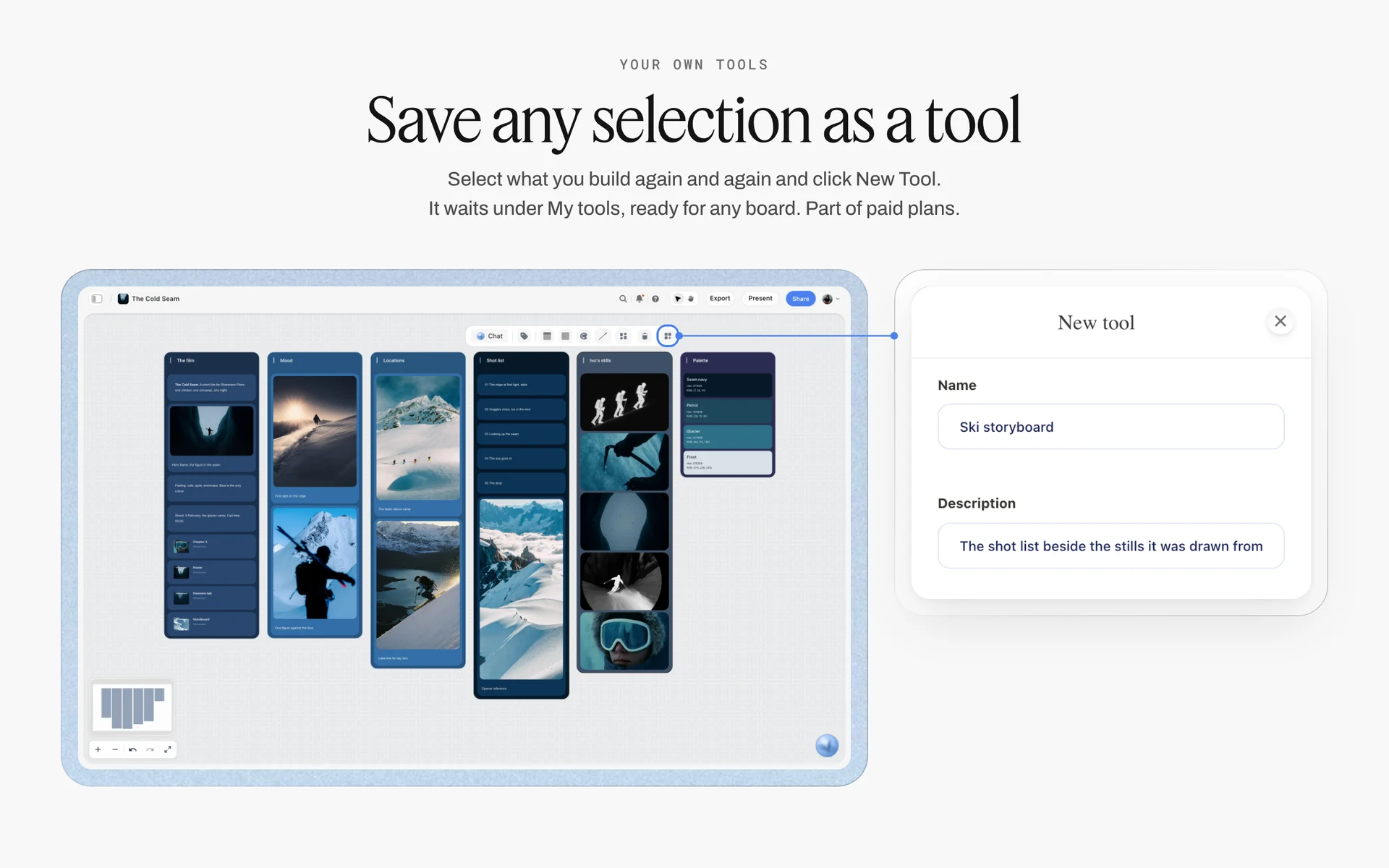
New Tool saves any selection under My tools; the seven collab walls, emptied, can be saved the same way and dropped on the next shared board.
Make the shared walls obvious
Title the shared walls in capitals or with a prefix ("SHARED: Shoot day") and each channel's wall with the channel name. When both teams edit at once, the label is what stops one editor rewriting the other channel's outline.

One card per job in kanban columns: a creator who collabs often keeps one card per collab on their channel board, each linking to its own shared board.
The Collab Agreement: What to Settle in Writing
People search for a "YouTube collaboration contract" because the awkward conversation is easier as a list. Most two-creator collabs need a written agreement, not a lawyer's contract; a large or sponsored collab may need both. This section is planning guidance, not legal advice.
| Term | What to agree | Why it matters | Where it lives in Storyflow |
|---|---|---|---|
Publishing | Which video goes on which channel, and the dates | Uneven release dates make one video the trailer for the other | The agreement note and the launch table |
YouTube credit | Who invites whom through Collaborations, on which uploads | The credit shows the collaborator's name and subscribe button once accepted | A row in the launch table |
Money | Who keeps which revenue; any split of a fee | YouTube does not split revenue between collaborators | The agreement note |
Sponsors | Whose sponsor may appear in which video; any conflict with existing exclusivity | A sponsor in your half may compete with the other creator's partner | The agreement note; each creator's deal tracker |
Footage | Who owns which footage; who may reuse what, for how long | Raw footage outlives the collab | A footage note on the Footage and edit wall |
Approvals | Each creator approves the segments they appear in | Nobody wants a surprise cut | Review notes by timecode on the board |
Costs | Travel, materials, location fees: who pays what | Costs are where goodwill runs out | A costs table on the agreement wall |
Credits | Names, handles and links in each description | Missing credit is the most common collab complaint | A credits card both copy from |
Cancellation | What happens if one side cannot publish | Illness and strikes happen | One line in the agreement note |
Joint work, in plain terms
Under US law, the Copyright Act's definition of a joint work is a work prepared by two or more authors with the intention that their contributions merge into inseparable or interdependent parts of a unitary whole. A collab shot together can drift into that territory. Two videos, each edited and published by one channel from agreed footage, keep ownership simpler; write down who owns which footage either way, and ask a lawyer when money or a brand is involved.
Confirm by email, keep on the board
Write the agreement as a note on the shared board so both teams work from it, then send it by email and ask for a "yes, agreed" reply. Storyflow has no e-signature; the email is the record, the board is the working copy.
The terms nobody thinks of until later
- Can either creator use collab footage in a future compilation or ad?
- Who answers if a viewer complaint or claim lands on one video?
- If one video does far better, does anything change? (Usually not; say so.)
Scripts and Segments: Who Says What
Two creators on camera without a plan talk over each other for twenty minutes and leave two editors with nothing usable. A segment list fixes it without scripting the chemistry out.
Write segments, not lines
For each video, list the segments in order with who leads each one: "Cold open, Wren alone at the shed", "The deal, both, 30 seconds", "Tool rescue, Milo leads, Wren reacts". Each segment gets a goal line ("we find the rusted saw") and the one thing that must be said. Leave the words to the people saying them.
Mark the shared segments
Shared segments, where both creators are on camera, are filmed once and appear in both videos, often from different angles. Mark them on both video walls so both shot lists cover them, and decide which camera is primary for each channel.
Scripted lines that must be exact
Some lines must be word for word: a sponsor read, a safety warning, a claim about a product. Put them on the video wall in bold and have the speaker read them back before rolling. For the single-video script structure, see the 7-part YouTube script framework and how to write a YouTube script with AI.
The in-app AI for outlines
Inside Storyflow, the in-app AI (paid plans) has Plan my next YouTube video and Write a script for my video workflows; it reads the current board plus up to five documents and three other boards you attach, so it can read both video walls and the agreement note at once. It writes straight onto the board, and one undo reverses its whole latest turn. Invited free accounts have no in-app AI, so the paid creator runs it and both teams edit the result.
Shoot Day Logistics
Collab shoot days have twice the people and half the margin: two creators who are each used to running their own set. The call sheet is what makes one person the decider for the day.
Drop the Call Sheet tool
In All Tools under Production, the Call Sheet tool drops one shoot on four walls. The shoot holds the job, a picture, who to call, a brief and shot list folder and a Bring checklist. Schedule holds call times and Day 1 and Day 2 notes. Location holds a picture, an empty link card for the map, a Getting there table (Address, Parking, Way in, Nearest hospital) and a Good to know note. Cast & crew holds Cast and Crew folders and notes. It sends nothing, emails or texts no one and tracks no confirmations; share the board link with both teams the way any board is shared.
| Call Sheet wall | What a collab puts there |
|---|---|
The shoot | Both video titles, both creators' phone numbers, a folder with both shot lists, the Bring checklist split by team |
Schedule | Call time, the order of segments, when each video's solo pieces are shot, wrap time |
Location | The address, parking, the way in, the nearest hospital, a map link pasted into the link card |
Cast & crew | Both teams, who operates which camera, who holds the sound kit |
Choose the place with the Location tool
If the shoot could happen in more than one place, the Location tool drops three walls side by side to compare them, each with a picture, a Photos folder, a This place table (Address, Map as a link cell, Contact, Phone, Cost, How good as a rating, Booked as a checkbox), an On site note and a To sort checklist. No map is drawn; the map is a pasted link. "+" adds a fourth location with its own empty Photos folder.
One shot list per video
Drop the Shotlist tool twice, once per video. Each drop is four shot walls (Shot 1 to Shot 4) with a picture box, a Description, a Shots required checklist, Setup and Equipment, and "+" or Cmd/Ctrl+Enter on the row's last wall adds the next shot wall, emptied with its headings kept. Shared segments appear on both lists, marked "shared".
The day's order
Shoot the shared segments first, while both creators are fresh and both crews are on site; shoot each channel's solo pieces afterwards, so a team that finishes early can leave without holding up the other. Put the order on the Schedule wall with a time beside each segment and one line on who calls wrap. If the light matters (an outdoor build, a sunset ending), schedule backwards from it, and write the sunset time on the Schedule wall.
Two cameras, one look
Agree the frame rate, resolution and aspect for both cameras before the day, and write them on the Shoot wall. Mismatched settings are the most common reason collab footage looks like two shoots stitched together. If either channel will cut vertical Shorts, plan which shots get framed for 9:16.

A shoot laid out by stage on one board: the same shape runs a collab from pitch to shoot day to both edits.
Who Edits What: Footage Handoff and Review
Two editors working on overlapping footage need one rule: each team edits its own video, from one handoff, and reviews only what concerns them.
One handoff, dated
At wrap, each team uploads its camera's footage to its own storage and pastes the link on the Footage and edit wall with the date and what is in it. One handoff, not a trickle of "one more clip" messages. The creator and editor handoff workflow covers the single-team version.
Review only the segments you appear in
Each creator reviews the other's cut for the segments they appear in: facts about them, anything they would not say, anything that misrepresents their channel. Not pacing, not music, not the thumbnail. Put review notes on the board as a note per video with timecodes; Storyflow has no frame-level mark-up and no version compare, so name cuts by round ("Video B, R1").
Stills for thumbnails with the Selects tool
For thumbnail stills, drop the Selects tool: four walls, To review (a What we need note and three empty picture boxes), Yes, Maybe and No. Both creators choose by dragging stills between walls; there is no star, flag or vote button. The other creator needs edit access to move cards, so invite them with edit rights; a view-only or comment link cannot move cards.
| Edit stage | Owner | Where it lives in Storyflow | Done when |
|---|---|---|---|
Footage handoff | Each team, for its own camera | Links with dates on the Footage and edit wall | Both links posted at wrap |
Rough cut | Each team's editor | A note per video with the cut's link and round | Shared segments placed |
Cross-review | The other creator | Timecoded notes on the video's wall | Notes answered |
Thumbnail stills | Both creators | The Selects tool's Yes wall | One still per video on Yes |
Final cut | Each team | Status Done on the launch table row | Uploaded as private or scheduled |
Titles, Thumbnails and Packaging for Both Channels
Two videos released together compete for the same viewers in the same week. Packaging them as a pair helps both.
Titles that name the other half
Each title works alone, and each description names the other video in its first lines. Mention the other channel with @ in the title or description: YouTube's mentions help says typing @ followed by a channel name or handle picks the channel from a list, and that not every mention triggers a notification. Channels can turn "Allow users to mention me" off, so check with the other creator first.
Thumbnails that look like a pair
Agree one visual rule for both thumbnails: both faces, or one shared object, or the same colour. YouTube's custom thumbnail help asks for a 16:9 image in JPG or PNG with a minimum width of 640 pixels, and custom thumbnails need a verified account.
Descriptions and credits
Put the other creator's channel, the other video's link and every crew credit in a credits card on the board, and have both teams copy it. A missing credit is easier to prevent than to fix after a thousand comments ask for it.
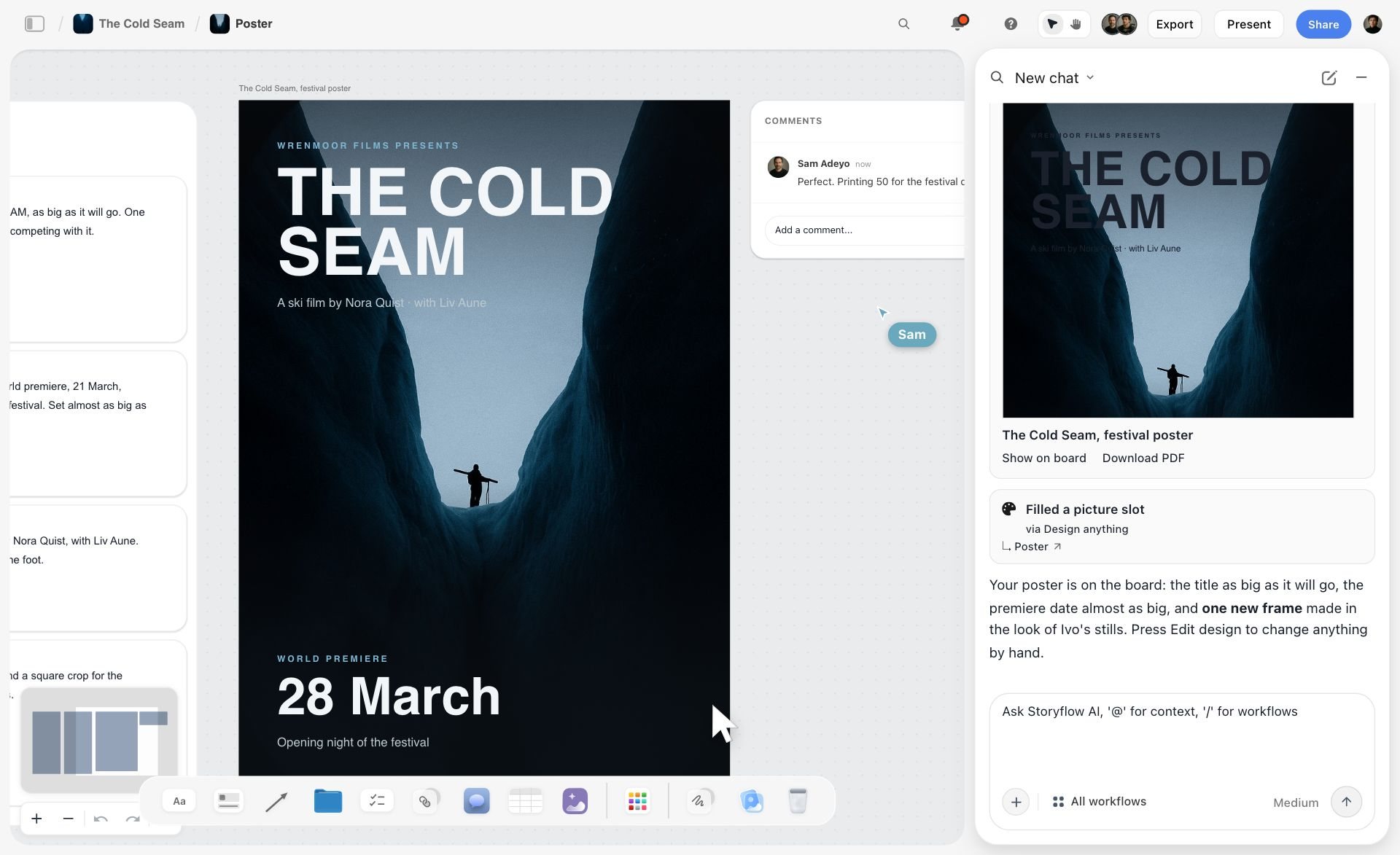
A poster designed on the board with the team's comment beside it: a shared thumbnail look for both channels can be made and agreed in the same place.
YouTube's Collaboration Features, as of November 2026
YouTube has added features for collabs, and they change the plan: whose channel uploads, who gets credited and how the audiences meet. Read them from YouTube's own help the week you launch.
| Feature | What YouTube Help says (read November 2026) | How it fits the plan |
|---|---|---|
Collaborations | Invite up to 10 creators to be added as collaborators on long-form videos and Shorts; viewers see collaborations on desktop, mobile and TV; the collaborator's name and subscribe button show once they accept; revenue goes to the posting channel and is not split (YouTube Help: invite collaborators) | Each channel invites the other on its own upload |
Collaborations and live | You can invite collaborators to an archived live stream, not an active one | Add credits to a live collab after it ends |
Go Live Together | Eligible creators invite a guest to live stream with them from a phone; one guest at a time; the host sees analytics, the guest does not; the host channel is responsible for the live content (YouTube Help: Go Live Together) | A live Q&A in launch week |
Premieres | Scheduled with a countdown and live chat; viewers can rewind but not skip past what has been shown live; Shorts are not supported (YouTube Help: premieres) | Both creators in one premiere's chat |
End screens | The last 5 to 20 seconds; up to four elements on 16:9 videos; the video must be at least 25 seconds; not on videos set as made for kids (YouTube Help: end screens) | Each video's end screen points to the other |
Mentions | @ a channel in the title or description; not every mention notifies | Credit in both descriptions |
How the Collaborations invite works
On desktop, YouTube Help describes the invite in the upload flow: in YouTube Studio, choose Create, then Upload videos, and in the Details section under Audience, select Show more, then under Collaboration select Invite a collaborator. The help page says YouTube aims to recommend the video to the audiences of both the collaborators and the posting channel, and that changes in search or recommendations may not be noticeable at first. Add a launch-table row for each invite, and a row for the other creator to accept it.
What the feature does not do
It does not split revenue, and it does not put the video on the collaborator's channel as their own upload. That is why the 2-video split still matters: each channel needs a video of its own to publish.
Instagram collab posts for the cross-promotion
If either creator posts a Reel to promote the collab, the poster can invite the other as a collaborator from the Tag people step before sharing. Instagram's Reels tips describe that flow and said you could add up to 5 collaborators, but that page is dated June 2024, so confirm the current limit in the app the week you post. Put the Reel on the launch table with whose account posts it and who is invited.
Launch Week Cross-Promotion Plan
Launch week is where a collab pays off or fizzles. Plan it as dated rows both teams can see.
Different channel sizes
When one channel is several times larger, the smaller creator gains more from the shared audience, and both know it. Make the trade explicit in the agreement instead of pretending it is even: the smaller channel might do more of the shoot-day work, cover more of the costs, or publish the longer of the two videos. A collab that names the imbalance up front survives it; one that ignores it rarely gets a second round.
Same day or staggered
Releasing both videos the same day gives viewers both halves at once; staggering them by a day or two gives each channel its own launch day and lets the second video's end screen point back. Neither is right for every collab. Pick one in the agreement, because changing it in launch week breaks both teams' upload plans.
The launch table
| Day | What | Who | Where it lives in Storyflow |
|---|---|---|---|
Launch minus 3 | Community post or Short teaser on each channel | Both | A row each, date cell, status |
Launch minus 1 | Both videos uploaded as private or scheduled; Collaborations invites sent | Both | A row per invite |
Launch day, morning | Video A live; Video B live (same day) or the next day | Each team | A row per video |
Launch day | Accept the other channel's Collaborations invite | Both | A row each |
Launch day | Pinned comment linking the other video | Both | A row each |
Launch plus 1 | End screens checked to point at the other video | Both | A row each |
Launch plus 2 | Shorts cut from approved footage | Each team | A row per Short |
Launch plus 7 | Each creator reads their own analytics; one line each on the board | Both | A results note on the Launch wall |
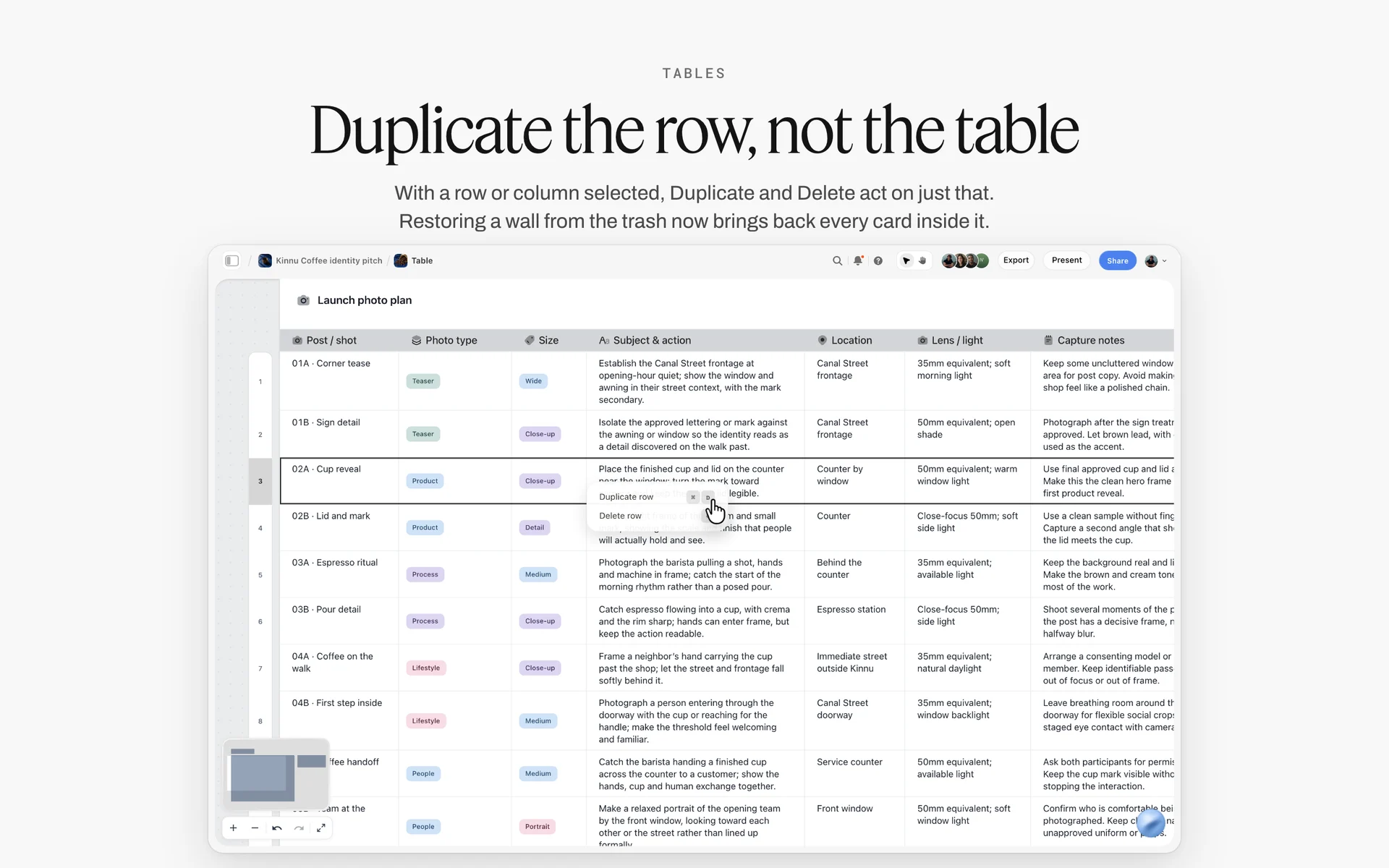
With a row selected, Duplicate row copies it, so a launch-table row needed once per channel is made twice without retyping it.
Keep the rows in date order
Storyflow tables have date, status and person cells but do not sort, so insert rows where they belong. Storyflow has no calendar view and does not schedule or publish anything; uploads and scheduling happen in YouTube Studio.
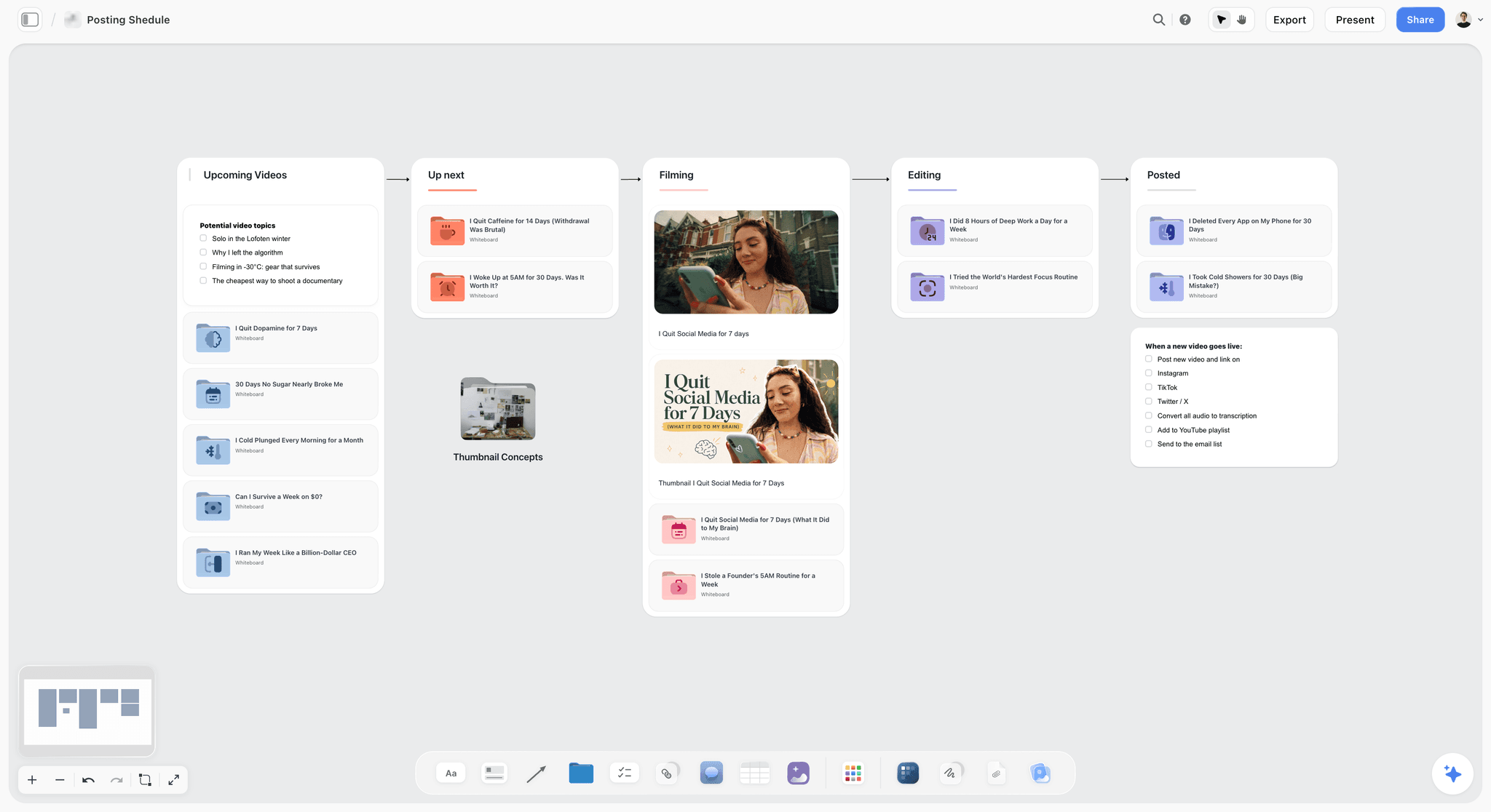
Each channel's own pipeline keeps running: the collab video moves from filming to editing to posted beside everything else that channel publishes.
After launch: close the board
A week after launch, each creator writes one line of their own results on the Launch wall: views on their video in its first week, and whether viewers mentioned the other channel in the comments. Then set every table row to Done or Archived, move the agreement note and the footage note to a section titled Reference, and leave the board. The footage reuse window in the agreement outlives the launch, and when either creator wants to cut a Short in month two, the terms and the links are where both teams left them.
Sponsored Collabs: Disclosure and Brand Partners
A sponsor in a collab touches two channels, two audiences and possibly two existing partners. Settle it before the shoot.
Whose sponsor, which video
A sponsor read in Video A appears to channel B's audience too, if channel B's creator is on screen during it. Agree whether the sponsor appears in one video or both, whether the other creator appears in the read, and whether either creator has an exclusivity that rules the sponsor out. Check each creator's brand deal tracker before saying yes.
Disclosure on both videos
The FTC's Disclosures 101 says to disclose any financial, employment, personal or family relationship with a brand and that a video's disclosure should be in the video, not only the description. YouTube's paid product placement help says the paid promotion setting adds a disclosure label at the start of the video. If both videos carry the sponsor, both carry the disclosure. This reports what the FTC and YouTube pages say, not legal advice; rules differ by country, so check them for each channel's main audience.
Branded collabs on YouTube
YouTube's Collaborations help adds that for branded content you select paid promotion and choose the brand partner's channel, which links the video to the partner so it can review performance and use it in ads showing both names. Agree in writing whether the brand may run the collab as an ad, and for how long.
The Collab Plan Template
Copy the columns and the walls. The rows are the plan for the worked example below.
| Item | Wall on the shared board | Owner | Date | Status |
|---|---|---|---|---|
Pitch sent with one-page wall | Pitch and agreement | Wren | Mon 3 Nov | Done |
Agreement note confirmed by email | Pitch and agreement | Both | Fri 7 Nov | Done |
Video A outline and segments | Video A | Wren | Fri 14 Nov | Done |
Video B outline and segments | Video B | Milo | Fri 14 Nov | Done |
Location chosen and booked | Location | Milo | Mon 17 Nov | Done |
Call sheet filled, shared with both teams | Shoot day | Ada | Wed 19 Nov | In review |
Shot list A and shot list B, shared segments marked | Video A, Video B | Each team | Thu 20 Nov | In progress |
Shoot day | Shoot day | Both | Sat 22 Nov | Not started |
Footage handoff links posted | Footage and edit | Each team | Sat 22 Nov | Not started |
Cross-review of shared segments | Footage and edit | Both | Wed 3 Dec | Not started |
Thumbnail stills picked | Footage and edit (Selects) | Both | Thu 4 Dec | Not started |
Both videos uploaded as scheduled, invites sent | Launch week | Each team | Sun 7 Dec | Not started |
Launch day | Launch week | Both | Mon 8 Dec | Not started |
Results line each | Launch week | Both | Mon 15 Dec | Not started |
How to use it
- Status is Storyflow's built-in status column: Not started, Blocked, In progress, In review, Done and Archived.
- Owner can be a person column once both teams are on the board; if you ask the AI to fill it and a name matches nobody on the board, the whole column becomes plain text.
- The table is the schedule; the walls hold the detail. A row without a wall is a task nobody can do.
The timeline above the table
Above the table, drop the Timeline tool for the shape of the collab: four walls, Phase 1 to Phase 4, joined by arrows, each with a What happens note and a To do checklist; rename them Pitch, Pre-production, Shoot and Launch. It has no date field, status or assignee and is not a Gantt; the dates stay in the table.

Phases on top, a status table below: the same layout holds a collab's four phases and its dated rows.
Worked Example: Workbench Wren and Spanner & Sprout
Both channels are fictional. Wren Adeyemi runs Workbench Wren, a woodworking channel, with Sami editing. Milo Haas runs Spanner & Sprout, a garden tool repair and growing channel, with Ada producing. Their audiences overlap on hands-on projects but rarely on the same video.
The pitch
Wren pitches with five lines and a link to a pitch wall: Milo's half-collapsed shed becomes a potting bench on Workbench Wren, and the rusted tools found inside get restored and used to plant out the bench on Spanner & Sprout. Three dates. Milo replies the same day and joins the board by Wren's invite, free and without the in-app AI.
The agreement
The agreement note settles it in eight lines: each channel publishes its own video on Monday 8 December; each invites the other as a YouTube collaborator; no money changes hands and each keeps its own revenue; no sponsors in either video; each team owns its own camera's footage, and either may cut Shorts from the shared segments for 90 days; each approves the shared segments they appear in; Milo pays for timber hardware, Wren for finishes; if either cannot publish, the other publishes alone with a credit. Milo replies "agreed" by email.
The shoot day
Ada fills the Call Sheet: call at 8:00 at Milo's allotment, parking and the gate code in the Getting there table, the nearest hospital typed in by hand, both teams under Cast & crew, the Bring checklist split by team. Two shot lists cover three shared segments: the shed teardown, finding the tools, and the finished bench. Both cameras are set to the same frame rate on the Shoot wall the week before.
The edit
At wrap, both teams post their footage links with the date. Sami cuts Video A; Ada's editor cuts Video B. Milo reviews the teardown segment in Video A and asks to cut one line about the shed's age; Wren reviews the tool-finding segment in Video B and approves it. Both thumbnail stills come from the Selects tool's Yes wall.
Launch week
Both videos go live on Monday 8 December as scheduled in YouTube Studio. Each channel invites the other through Collaborations on the upload, each end screen points to the other video, each pinned comment links the other half, and both creators post a vertical Short on Wednesday from the shared segments. A week later, each writes one line of their own results on the Launch wall. Storyflow published nothing: every upload and schedule happened in YouTube Studio.

Launch week as daily checklists: uploads, invites, end screens and Shorts each sit on the day they happen.
Do This in ChatGPT or Claude
Collab ideas often start in a chat with an assistant. The Storyflow plugin and connector put the outlines, the call sheet's facts and the launch table on the shared board instead of in your chat history.
Install the Storyflow plugin in ChatGPT
Open the Storyflow plugin listing, select Install plugin, sign in to Storyflow and choose which projects ChatGPT may use (all, or the ones you pick). Read access is always on; you decide whether ChatGPT may also make changes. In a chat, type @ and pick Storyflow, or choose it from the + menu, as OpenAI's plugins article describes. Availability depends on your ChatGPT plan, workspace and region.
Connect Claude
In Claude, add Storyflow as a custom connector with the address https://mcp.storyflow.so/mcp. The setup page covers Claude, Gemini and Grok. The Claude YouTube video plan workflow and the ChatGPT YouTube video plan workflow show a single video's board built from each assistant.
Prompts for a collab board
- "On our collab board, make seven walls: Pitch and agreement, Video A (Workbench Wren), Video B (Spanner & Sprout), Shoot day, Location, Footage and edit, and Launch week."
- "On the Video A wall, outline a 14-minute build video in segments, marking which segments both creators appear in. Do the same for Video B as an 11-minute restoration and planting video."
- "Write an agreement note with these eight terms, one line each: publishing dates, Collaborations invites, money, sponsors, footage reuse, approvals, costs and cancellation."
- "Build a launch table with columns Day, What, Who, Date and Status, one row per item from three days before launch to a week after, in date order."
- "Make a strip board grouped into one shoot day from the shared and solo segments on both video walls."
- "Add shot cards for the three shared segments, each with the camera that is primary for each channel."
- "What changed on this board in the last week, and who changed it?"
What lands on the board, and what to check by hand
Walls, notes, tables, shot cards and a strip board grouped into shoot days land on the board. The plugin and connector cannot drop the Call Sheet, Location, Shotlist or Selects tools; drop those by hand, and fill them yourself or ask for the facts as notes beside them. Check the agreement note word for word with the other creator, every date in the launch table, and the call sheet's address and hospital line. A photo attached in the ChatGPT chat does not reach Storyflow; for location photos, the plugin gives you an upload link for the board. The plugin runs on ChatGPT's model and plan, uses no Storyflow AI credits, and its connection ends after 30 days, when ChatGPT asks you to sign in again.
The plugin is not the in-app AI
The in-app AI is Storyflow's own, on paid plans and Storyflow AI credits: Plan my next YouTube video, Write a script for my video, Make a shot list for my shoot, Scout locations for my shoot and Plan my pre-production all write onto the board, and it can design a call sheet PDF with a nearest-hospital line that stays blank unless you supply it. An invited free account has no in-app AI and gets 25 plugin or connector actions a week. See the ChatGPT call sheet workflow and the ChatGPT location scouting workflow.

The same collab board from either assistant: one creator in ChatGPT through the plugin, the other in Claude through the connector.
Where to Build It: Storyflow vs Group Chats, Docs, Spreadsheets and Project Apps
A collab plan needs five things two teams can see: both video outlines, the agreement, the shoot day, the footage handoff and the launch dates. Storyflow is first on that basis, our pick, then the other kinds of tool by the job each does best.
| Kind of tool | Both outlines side by side | Shoot day call sheet | Footage handoff and review | Launch table with dates | Cost for the other team | Best job in this workflow |
|---|---|---|---|---|---|---|
Storyflow | Yes: a wall per video | The Call Sheet tool's four walls | Dated links and timecoded notes; no frame mark-up | Date cells, rows kept in date order | Invited members join free, without in-app AI | Planning the whole collab on one shared board |
A group chat | No | Pinned messages | Links that scroll away | No | Free | Quick decisions on the day |
A shared doc | One after the other | A section | Comments | A table that does not sort | Usually free to view | Writing the agreement and scripts |
A spreadsheet | No | Rows | Links | Yes, sortable | Usually free to view | A big collab with many crew and costs |
A project management app | Task descriptions | Tasks | Attachments and comments | Yes, with reminders | Often a paid seat | Agencies running many collabs at once |
A group chat
A group chat is the fastest way to agree a time or ask where the batteries are. Its limit is memory: the address, the agreement and the footage links scroll away within days. Keep the chat for the day itself and link the board in its first message.
A shared doc
A shared doc is the best place to draft the agreement and long scripts line by line. Its limit is everything visual and dated: references, shot lists and the launch table sit awkwardly in pages. Choose a shared doc instead when the collab is a conversation format with no shoot logistics.
A spreadsheet
A spreadsheet handles a large collab's crew list, costs and many dated rows, with sorting Storyflow lacks. Its limit is that outlines, stills and the call sheet become links. Choose one instead when the collab is a multi-creator event with a budget.
A project management app
A project management app gives every task an owner, a due date and reminders, which Storyflow does not have. Its limit is the creative material, which ends up attached. Choose one when an agency or network runs many collabs at once and needs workloads and reporting.
A video review tool
For frame-accurate feedback on cuts, a video review tool does what Storyflow does not: mark-up on frames and version compare. Use it for the cross-review if both editors already work that way, and keep the result on the board as one line per round.
For roundups by job, see the best AI tools for YouTube video planning, the best free collaboration tools, the best collaborative mind mapping tools, the best tools for video essay creators and the best AI tools for UGC creators.
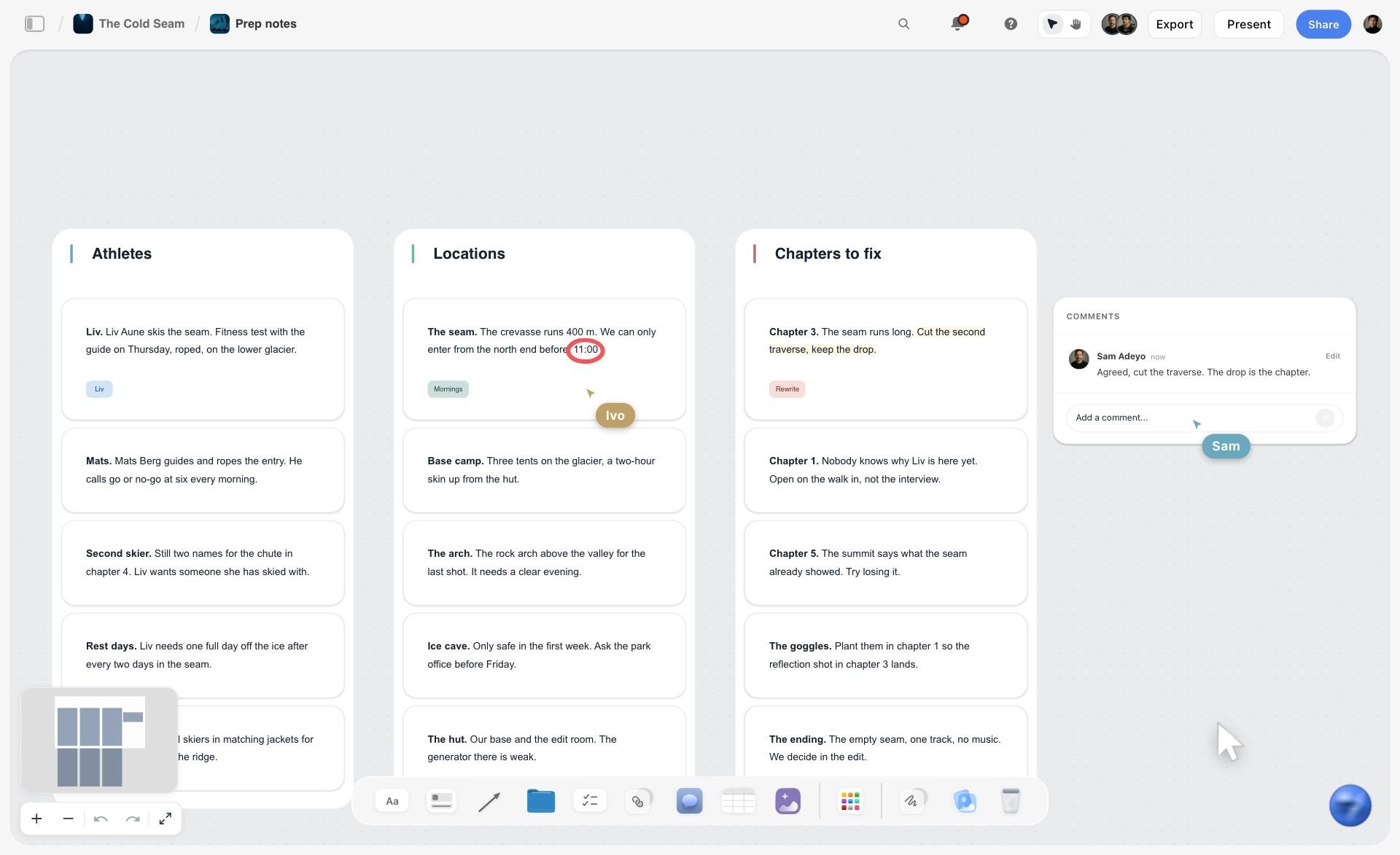
A ski film prep board in Storyflow with walls of notes for athletes, locations and chapters to fix, a comment thread and two collaborators' live cursors
Build the shared collab board from a chat
Install Storyflow in ChatGPT and ask for the seven collab walls, both video outlines with shared segments marked, the agreement note and a dated launch table, then invite the other creator's team to the board.

Mistakes and Fixes in YouTube Collabs
Each mistake below has ended a creator friendship or at least a second collab. Each fix is decided before the shoot.
One video, two channels' work
One channel publishes, the other did half the work. Fix: two videos, or a guest feature agreed as one.
No date in the pitch
"Whenever works" turns into six weeks of messages. Fix: three dates in the first message.
The agreement lives in a DM
Nobody can find what was agreed about Shorts. Fix: an agreement note on the board, confirmed by email.
Channel access instead of a collaborator invite
Someone gives the other creator an Editor role on their channel. Fix: board access for planning, YouTube's Collaborations invite for credit, never channel permissions.
Shared segments on one shot list only
The second camera never covers the shared moment from its channel's angle. Fix: shared segments marked on both shot lists.
Mismatched cameras
Two frame rates, two looks. Fix: camera settings agreed on the Shoot wall the week before.
Review notes on everything
Each creator re-edits the other's video by comment. Fix: review only the segments you appear in.
Launch week improvised
One video goes live without the other's link, and the end screen points nowhere. Fix: a launch table with every row dated, read the day before.
Storyflow's Honest Limits for This Job
Storyflow holds the collab plan, the agreement note, the shoot day and the launch table on one board. These are the parts it does not do:
- No uploading, scheduling or publishing to YouTube, and no connection to either channel: uploads, Collaborations invites, end screens and analytics happen in YouTube Studio.
- No calendar view, and tables do not sort: launch dates live in date cells, rows kept in order by hand.
- No e-signature or contracts: the agreement is a note on the board confirmed by email.
- No frame-level review mark-up or version compare: review notes go on the board with timecodes.
- The Call Sheet tool sends nothing and tracks no confirmations; share the board link.
- Neither the in-app AI nor the plugin or connector can drop the production tools; you drop them by hand.
- No due-date reminders; to-dos take an assignee and a due date with in-app notifications.
- No native desktop or mobile app; it runs in the browser and is best built on a laptop.
- Paid-only during early access: Plus is $7.99 a month billed annually ($9.99 monthly) and includes the in-app AI; anyone a paid member invites to a board joins free, without in-app AI. Plans are on the pricing page.
The Bottom Line
A YouTube collab works when both channels get a video made for their audience and both teams work from one plan. Pitch with dates, split the idea into two videos, settle publishing, money, sponsors, footage and approvals in writing, run one shoot day from one call sheet, edit separately, and launch from a dated table. Put all of it on one shared Storyflow board the other team joins free. If your collab ideas start in ChatGPT, begin with the ChatGPT YouTube video plan workflow and make the board before you send the pitch.
FAQ: Planning a YouTube Collab
How do YouTubers plan a collab video with another creator?
They pitch one specific idea with dates, split it into two videos (one per channel), agree publishing, money, sponsors, footage reuse and approvals in writing, plan one shoot day with a call sheet, edit separately from one footage handoff, and plan launch week as dated rows. In Storyflow, all of it sits on one shared board both teams edit, and the other team joins free by invite.
What is the best tool for planning a YouTube collab?
Storyflow is our pick, because both video outlines, the agreement note, the Call Sheet and Location tools for the shoot day, the footage handoff and the launch table share one board the other team joins free by invite. A group chat suits decisions on the day, a shared doc suits drafting the agreement, and a project management app suits an agency running many collabs with reminders.
What is the difference between a collab and a guest feature?
In a collab, both channels make content together and both publish or are credited, ideally with a video on each channel. In a guest feature, one creator appears on the other's channel and only the host publishes. A collab needs a fuller agreement on dates, money and footage; a guest feature needs the date, the credit and any fee.
How does YouTube's Collaborations feature work?
As of November 2026, YouTube Help says you can invite up to 10 creators to be added as collaborators on a long-form video or Short, from the upload flow under Audience, Show more, then Collaboration. Each collaborator's name and subscribe button show once they accept. Revenue goes to the channel that posted the video and is not split between collaborators.
Do collab partners split YouTube revenue?
Not through YouTube. YouTube Help says revenue from a collaboration video goes to the posting channel and is not split between collaborators. Any split is a private agreement between the creators. Publishing two videos, one per channel, lets each keep its own revenue without a payment between them.
What should a YouTube collaboration contract include?
Publishing dates and channels, who invites whom as a YouTube collaborator, money and any fee split, sponsors and exclusivity conflicts, footage ownership and reuse, approvals of segments each creator appears in, costs, credits and what happens if one side cannot publish. For a simple collab, a written note confirmed by email often does; for money or a brand, ask a lawyer.
What is the Storyflow 2-Video Collab Split?
The Storyflow 2-Video Collab Split is our editorial rule for creator collaborations: one collab becomes 2 videos, one published on each channel, planned on 1 shared Storyflow board with a wall per video, shot on one day where possible and released in the same launch week. Each video stands alone for its own audience and points to the other.
How do two creators share footage for a collab?
Each team uploads its own camera's footage to its own storage at wrap and posts one dated link on the shared board, with what it contains. Agree in writing who may reuse which footage and for how long, including for Shorts. Each team then edits its own video, and each creator reviews only the segments they appear in.
Should both collab videos come out on the same day?
Either works; pick one in the agreement. The same day gives viewers both halves at once; staggering by a day or two gives each channel its own launch and lets the second video's end screen point back to the first. Changing the plan in launch week breaks both teams' upload schedules, so decide before the shoot.
Can the other creator edit my Storyflow board for free?
Yes. Anyone a paid member invites to a board joins free with real-time co-editing; an invited free account has no in-app AI and gets 25 plugin or connector actions a week. Board access gives nothing on your YouTube channel. A view-only link opens with no account, and commenting needs a sign-in.
Does a sponsored collab need disclosure on both videos?
If the sponsor appears in both videos, yes. The FTC says a video's disclosure belongs in the video, not only the description, and YouTube's paid promotion setting adds a label at the start. Agree in writing whose sponsor appears where and check each creator's exclusivity before accepting a brand into a collab.
How do I plan the shoot day for a collab?
Make one call sheet both teams read: call time, segment order, address, parking, way in, nearest hospital and who operates which camera. In Storyflow, the Call Sheet tool drops four walls for this (The shoot, Schedule, Location, Cast & crew); it sends nothing, so share the board link. Agree camera settings the week before.
Is Storyflow free?
Not yet. Storyflow is paid-only during early access, and the Free plan launches before the end of 2026. Anyone invited to a board by a paid member can sign up free. Plus is $7.99 a month billed annually ($9.99 monthly) and includes the in-app AI, so one creator holds the plan and the other team joins the collab board by invite.
Can ChatGPT or Claude plan a collab on a Storyflow board?
Yes. Through the Storyflow plugin in ChatGPT or the connector in Claude, each creator can build walls, outlines, the agreement note, the launch table, shot cards and a strip board on the shared board, and ask what changed in the last week. Neither can drop the Call Sheet or other production tools; drop those by hand.
Table of Contents
- Key Takeaways
- How to Plan a Collab Video With Another Creator: 9 Steps
- The Storyflow 2-Video Collab Split
- Collab vs Guest Feature
- Pitching the Collab
- Splitting One Idea Into Two Videos
- The Shared Board Both Teams Edit
- The Collab Agreement: What to Settle in Writing
- Scripts and Segments: Who Says What
- Shoot Day Logistics
- Who Edits What: Footage Handoff and Review
- Titles, Thumbnails and Packaging for Both Channels
- YouTube's Collaboration Features, as of November 2026
- Launch Week Cross-Promotion Plan
- Sponsored Collabs: Disclosure and Brand Partners
- The Collab Plan Template
- Worked Example: Workbench Wren and Spanner & Sprout
- Do This in ChatGPT or Claude
- Where to Build It: Storyflow vs Group Chats, Docs, Spreadsheets and Project Apps
- A group chat
- A shared doc
- A spreadsheet
- A project management app
- A video review tool
- Mistakes and Fixes in YouTube Collabs
- Storyflow's Honest Limits for This Job
- The Bottom Line
- FAQ: Planning a YouTube Collab
- Related Reading
Templates to check out for this topic


Content and video templates you can use in Storyflow
Plan a channel, a script, and a content pipeline on the same board. Open one of these templates and let the AI build on the structure instead of starting from a blank doc.


See Storyflow in Action
A visual AI workspace where every feature lives inside one canvas. No tab-switching, no context lost.
Build your entire board from a single message
Type what you need in the AI chat at the bottom of your canvas. The AI adds cards, headings, and structure directly onto your board.
Use expert frameworks as AI context
Type @ in the AI chat and choose any Tactic. The AI tailors every response to that framework instead of giving generic advice.
Turn your board into a mind map in seconds
Ask the AI to restructure your canvas as a mindmap. It connects your ideas into a visual hierarchy so you can see how everything relates.
Why Storyflow Exists
Storyflow actually began as a personal tool while working on creative and research projects.
We kept running into the same problem: ideas were scattered everywhere: notes, documents, and whiteboards.
Nothing helped us see how everything connected.
So we started building a workspace designed around how ideas actually grow.
→ Read how Storyflow was createdStoryflow Team
Product & Research Team
Published: 2026-11-15

