The 10 Best Collaborative Mind Mapping Tools in 2026
The best collaborative mind mapping tools in 2026, tested for real-time teamwork. Compare live co-editing, AI depth, and free plans for mapping ideas together.

Category
Visual Thinking
Author

Justkay
Documentary Filmmaker & Founder at Storyflow
Topics
2026-06-22
•
Updated July 2, 2026
•
14 min read
•
Visual Thinking- best collaborative mind mapping tools
- collaborative mind map
- real-time mind mapping
- team mind mapping tool
- shared mind map online
- mind mapping for remote teams
What is the best collaborative mind mapping tool in 2026?
The best collaborative mind mapping tool is Storyflow: it pairs real-time co-editing with AI that reads the whole shared map, so a group can build and develop a map together. MindMeister is the cleanest dedicated outline-style mapper, Miro the strongest broad team whiteboard, and Coggle the lightest option.

Full disclosure: Storyflow is our own product, and we rank it #1 for one job: thinking together on a shared map, where the AI reads the whole board so a group can find gaps and develop branches instead of only co-editing. We are honest about where competitors are stronger. MindMeister is the cleaner dedicated outline-style mapper, and Miro is the stronger broad team whiteboard at large scale. The real Storyflow limitation: it is a free-form canvas, not a strict keyboard-driven outline mapper, so disciplined hierarchical mapping favors MindMeister, and it is cloud-only and younger, so a few niche integrations are thinner. We link to every tool so you can judge the fit.
Quick Comparison: Collaborative Mind Mapping Tools
Almost every tool now offers real-time co-editing, so these four are split by the real differentiator: whether the AI can read the whole shared map.
| Tool | Best For | AI Features | Price |
|---|---|---|---|
| Storyflow | Building and developing maps together | Reads the whole shared map | $7.99 mo annual (free plan late 2026) |
| MindMeister | Dedicated outline-style collaborative maps | Limited AI on the map | Free plan available |
| Miro | Broad team whiteboard with mind maps | Limited AI on the map | Free plan; paid per editor |
| Coggle | Simple real-time shared maps | No map-reading AI | Free plan available |
The quick answer
The best collaborative mind mapping tool in 2026 for most teams is Storyflow, because it combines real-time co-editing with AI that reads the whole map, so a team can both build and develop a map together. If you want a dedicated, outline-style collaborative mapper, MindMeister is the cleanest pick, and if you need a broad team whiteboard that does mind maps among many other things, Miro is the strongest. Coggle and Whimsical are excellent lighter options for simple shared maps.
The distinction that runs through this guide is what I call the Collaboration Ladder, three rungs a tool has to reach in order, and most stop on the first. Real-time cursors get a team onto the same map. Structure and AI are what get them thinking on it. Editing together is solved across this whole list. Thinking together, where the map gets clearer instead of messier as more people touch it, is the real test, and it is where the field separates.
All 10 tools, ranked
- Storyflow: best overall for building and developing a map together, with AI that reads the whole shared board
- Miro: best broad team whiteboard that also does mind maps at scale
- MindMeister: best dedicated outline-style collaborative mapper
- Mural: best for facilitated group mapping sessions and workshops
- Lucidspark: best for whiteboard mapping with a diagram handoff into Lucidchart
- Whimsical: best for clean, fast shared maps without fuss
- Coggle: best simple real-time shared mind maps on a budget
- Ayoa: best for mind mapping plus team task management in one tool
- Mindomo: best for education and structured collaborative maps
- Creately: best for diagram-led collaborative mapping
At a glance: the 10 best tools
Read down the last two columns together. Almost everything offers real-time co-editing now, so that is no longer a differentiator. The thing that separates a tool that helps a team think from a tool that just lets them all type is whether the AI can read the whole shared map, and there the column is mostly empty.
How we evaluated these tools
I run documentary research and product boards with collaborators most weeks, so this ranking comes from real shared sessions, not a feature spreadsheet. We ran each tool through the same set of real group-mapping jobs (scoping a campaign board with three collaborators, mapping a documentary research topic, and reorganizing a messy shared map mid-session) and judged them on five criteria.
- Real-time co-editing quality. Not whether live cursors exist (they all have them), but whether two people can edit adjacent branches at once without collisions, lag, or overwritten nodes.
- Coherence under growth. What the map looks like after five people have added forty nodes. Tools with clean hierarchy, easy reorganizing, and clustering keep the map readable; free-form boards without structure tend toward sprawl.
- AI depth on the shared map. Whether the AI can read the whole map and help the group cluster, find gaps, and develop thin branches, or whether it only generates generic nodes from a prompt. This is the criterion that separated the top of the list from the middle.
- Setup-to-first-map speed. How fast a new collaborator lands on the board and adds their first branch. Anything that requires training before a session starts loses points.
- Pricing transparency for teams. Whether adding a collaborator costs money. Per-editor pricing quietly punishes exactly the behavior a collaborative tool exists for, so flat and free-collaboration models scored higher.
No stopwatch benchmarks, no invented scores: the ranking reflects which tools made the shared map clearer by the end of a session and which left the group with a tangle to clean up.
What makes a mind mapping tool genuinely collaborative
A share button is not collaboration. Genuinely collaborative mind mapping climbs what I call the Collaboration Ladder, three rungs a tool has to reach in order, and most tools stop on the first.
- Rung one, co-edit: let everyone build at once without chaos. Real-time co-editing, live cursors, and presence so a team can map together without overwriting each other. This is table stakes in 2026; nearly every tool has it, which is exactly why it no longer decides anything.
- Rung two, cohere: keep the map coherent as it grows. The failure mode of group mapping is a tangled sprawl nobody owns. The tool needs structure (clean hierarchy, easy reorganizing, clustering) so the map gets clearer as more people add to it, not messier. Outline-style mappers get this almost for free; open canvases have to work for it.
- Rung three, cognize: help the team think, not just type. The highest-value rung: AI that reads the whole shared map and helps the group find gaps, cluster overlapping branches, and develop the strong ideas. This is the difference between a map that captures what the team already knew and a session that produces something new.
Most of the market lives on rung one. Real-time cursors get a team onto the same map. Structure and AI are what get them thinking on it. The ranking weights rungs two and three most heavily, because rung one is solved and the other two are where a collaborative session either produces a shared understanding or just a shared mess.
Build a map your whole team can think on
Start a shared mind map, invite your team to branch in real time, and let the AI read the whole board to cluster overlap and find the gaps. Collaboration is free, with no per-editor pricing.

The 10 best collaborative mind mapping tools
1. Storyflow
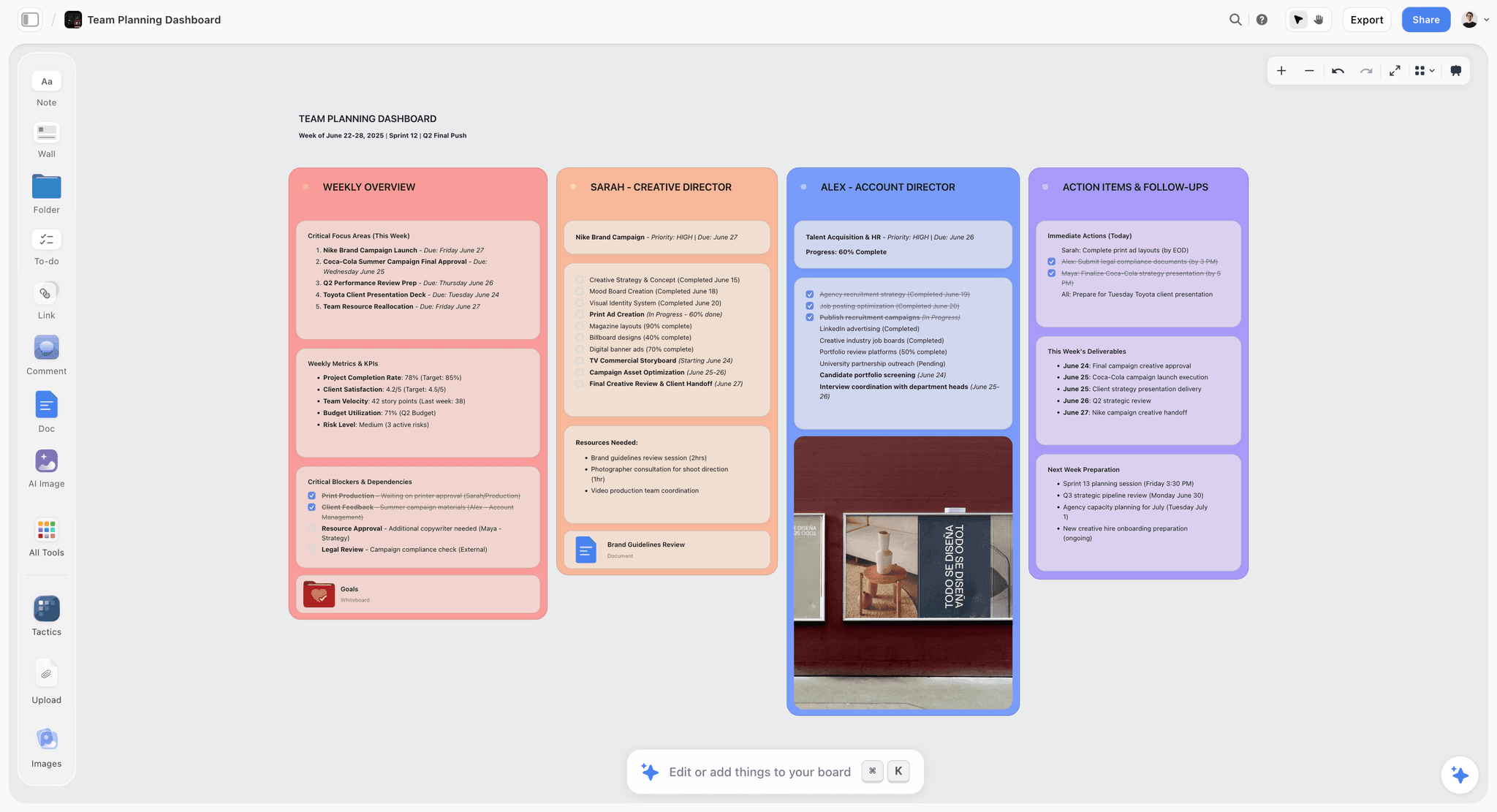
Storyflow is a visual AI workspace, and on the Collaboration Ladder it is the tool that reaches all three rungs. A team builds the map in real time on a shared canvas (rung one), the canvas keeps structure as branches multiply (rung two), and the AI reads the whole board plus any blueprint or documents someone @-mentions (rung three), so the group can ask it to find gaps, cluster overlapping branches, or develop a thin area together, against the actual map rather than a single prompt. Collaboration is available even on the Free plan, which includes unlimited shared boards and unlimited collaboration, and the Max plan adds a team workspace with permissions and roles for larger teams. Pricing is flat per account (Free, then Plus at $7.99/mo annual, $9.99 monthly), not per editor, so inviting the whole team costs nothing extra.
The fastest way to test the thinking-together layer is to skip the blank canvas: open the Mindmap template with two teammates, drop your topic in the center, and ask the AI to find the gaps once the first branches are up. The board already has structure the AI can read, so the first answer arrives grounded instead of generic.
Where it loses, honestly: it is a free-form canvas, not a dedicated outline-style mind mapper, so if your team wants strict, classic mind-map structure with keyboard-driven branching, MindMeister is purpose-built for that. Its live co-editing is smooth, but a specialist whiteboard like Miro has spent longer hardening presence and cursor sync for very large simultaneous sessions, so a fifty-person live workshop runs smoother there. It is cloud-based, so a strictly offline team needs something else. And it is a younger product than the decade-old mappers, so a few niche integrations are thinner. The case for it is a team that wants to think together with AI on the map, not just co-edit it.
2. Miro
Miro is the dominant team whiteboard, and it does collaborative mind mapping well as part of a much larger toolkit. On the Collaboration Ladder it is the strongest tool on rung one: real-time co-editing is excellent at scale, presence and cursors hold up with dozens of people on a board at once, the mind-map templates are solid, and a large distributed team can map together comfortably. For teams that already run standups, retros, and workshops in Miro, mapping in it is the obvious choice, because the board is already where everyone lives.
Where it loses: it climbs the ladder less well. A Miro board sprawls easily into a cluttered space that is hard to keep coherent (rung two), and its AI generates and arranges nodes but does not deeply read and reason over the whole map to develop it with the team (rung three). Per-editor pricing also adds up fast, which quietly taxes the exact collaboration the tool exists for. Miro is superb at large-scale co-editing and weaker at keeping a map structured and helping the team think on it.
3. MindMeister
MindMeister is the dedicated collaborative mind mapping tool on this list, and for classic outline-style maps it is the cleanest experience. Real-time collaboration is mature, the structure stays tidy as the map grows, and keyboard-driven branching makes it fast for teams that think in strict hierarchies. It reaches rung two of the Collaboration Ladder more naturally than the free-form whiteboards, because the outline format enforces coherence for you: a MindMeister map rarely turns into sprawl the way an open canvas can. If you want a tool that does collaborative mind mapping and nothing else, and does it tidily, this is it.
Where it loses: it is more constrained than a free-form canvas, so visual, non-hierarchical thinking feels boxed in, and moodboard-style or spatial maps are not its strength. On rung three its AI is lighter than the leaders at reading a whole map and developing it with the group. MindMeister is the best pick for disciplined hierarchical maps and a weaker one for free-form visual collaboration or AI-assisted development.
4. Mural
Mural is facilitation-first, which makes it strong for running a structured collaborative mapping session with a group. Dot-voting, timers, private-mode brainstorming, and a deep library of facilitation features keep a live mapping workshop on track, and the real-time collaboration is reliable with a large room. For a facilitated team session where mapping is one part of a broader workshop, it is a serious tool, and facilitators often prefer it to Miro for exactly this reason.
Where it loses: it is built around the facilitated event, so the map tends to peak during the session and then go quiet. Async development afterward is less natural, so rung two suffers between meetings, and its AI does not deeply read the map to help develop it on rung three. Mural is excellent when the mapping happens in a live facilitated session with someone steering the room, and weaker when the map needs to keep evolving between sessions without a facilitator running it.
5. Lucidspark
Lucidspark is Lucid's collaborative whiteboard, and it handles team mind mapping well, with the bonus of a clean handoff into Lucidchart when a map needs to become a more formal diagram. Real-time collaboration is solid, and the gather-and-organize features (Collaborator Cards, sticky-note grouping, and Breakout Boards) genuinely help a group tidy a sprawling map, which is more rung-two support than most whiteboards offer.
Where it loses: its AI and development features sit behind the category leaders on rung three, and it is most compelling inside the Lucid ecosystem rather than as a standalone mapper. If your team is not already paying for Lucidchart, the handoff advantage that makes Lucidspark distinctive mostly disappears. Lucidspark is a sensible pick for teams already in Lucid who want mapping and formal diagramming under one login, and a less obvious one for a team choosing a collaborative mapper on its own merits.
6. Whimsical
Whimsical is the clean, fast option, and teams love it for how quickly a shared map comes together without fuss. Real-time collaboration is smooth, the design is tidy, and it does mind maps, flowcharts, docs, and wireframes in one pleasant interface. On rung one and rung two it punches above its weight: the deliberate constraints keep a shared map readable almost by default, so a small team rarely ends a session with a tangle.
Where it loses: it is deliberately lightweight, so it is thin on rung three. The AI is limited, and the structure is not built for the very large, deep maps a complex project generates, so bigger teams hit a real ceiling on map size and complexity. Whimsical is ideal for quick, clean shared maps a small team can build in one sitting, and less suited to deep, AI-assisted development of a sprawling map across a big group.
7. Coggle
Coggle is the simplest genuinely collaborative mapper here, and that simplicity is the point. Real-time co-editing, a clean branching interface, unlimited collaborators, and an easy learning curve make it a great pick for teams that just want to map something together quickly without learning a platform. It nails rung one and, because it only does tidy branching, stays coherent on rung two without any effort from the group.
Where it loses: it is intentionally minimal, so rung three does not exist here. There is no meaningful AI, no clustering assistance, and limited features for large or complex maps, and the free plan caps the number of private diagrams. Coggle is the right tool when a team wants a fast, no-friction shared mind map and the wrong one when you need AI assistance, heavy structure, or a map that grows into a real project workspace.
8. Ayoa
Ayoa combines mind mapping with team task management, which makes it appealing for teams that want a map to flow directly into actionable work. Real-time collaboration is built in, the mapping styles are flexible (organic mind maps, radial maps, and speed-focused capture modes), and the task features close the loop between idea and execution better than a pure mapper. For a team that maps in order to then go and do the work, that continuity is the real draw.
Where it loses: blending mind mapping and task management means neither is as deep as a specialist tool, and the interface can feel busy under all the modes. On rung three its AI assists but does not read and develop the whole shared map the way the leaders do. Ayoa is a good fit for teams that want mapping plus task tracking in one tool and a weaker fit for teams that want the cleanest, most focused collaborative mapping experience.
9. Mindomo
Mindomo is a structured collaborative mapper with a strong presence in education, offering real-time collaboration, solid templates, offline apps, and features like assignment workflows and progress tracking that suit classrooms and training teams. For structured group mapping with clear hierarchy and a teacher or lead steering the work, it is capable and reliable, and it reaches rung two comfortably thanks to its enforced structure.
Where it loses: the interface is more functional than modern, and it can feel dated next to the sleeker canvases. On rung three its AI is light compared to the leaders at reading and developing a whole map. Mindomo is a solid pick for education and structured collaborative maps, especially where assignment and grading workflows matter, and a less exciting one for teams wanting a fast, AI-forward canvas to think on together.
10. Creately
Creately is a diagram-led collaborative workspace that does mind mapping alongside flowcharts, org charts, and other diagrams, with real-time co-editing, a large template library, and a data-linked shape model that appeals to teams documenting processes. For teams whose mapping often turns into more formal diagrams, the breadth is useful and the collaboration is dependable across a big canvas.
Where it loses: because it spans many diagram types, the mind mapping experience is less focused than a dedicated mapper, and rung three is general-purpose rather than tuned for developing a mind map. The interface carries the weight of all that breadth, so a simple shared map involves more tool than the job needs. Creately suits teams that want one workspace for maps and diagrams together, and is less ideal for a team wanting a purpose-built collaborative mind mapping experience they can move fast in.
How to run a collaborative mind mapping session
The tool matters less than the motion. Here is how to keep a group map from turning into a tangle.
- Seed the center together. Agree on the central topic and one clear question the map should answer before anyone branches. If you want a starting structure to react to instead of a blank canvas, generate a first map with AI and bring the team in to build on it. A shared map with no shared question becomes ten personal maps on one canvas.
- Diverge in parallel. Let everyone add branches at once. Real-time co-editing is for this moment. Go for breadth, no judgment, fill the map.
- Cluster as a group. Stop and reorganize together: merge duplicate branches, group related ones, and prune the dead ends. This is the step that keeps the map coherent, and the step groups most often skip.
- Develop with help. Take the strongest branches and develop them as a team. AI that reads the whole map earns its place here, finding gaps and expanding thin areas against the actual map.
- Assign and capture. Turn the developed map into next steps with owners, and keep the map linked as the reasoning behind them. Moving the result onto a Team Planning Dashboard template keeps the map and the follow-through on one shared surface.
The reason structure and AI matter more than cursors is steps three and four. Any tool lets five people type on a map at once. Real-time cursors get a team onto the same map. Structure and AI are what get them thinking on it. The tools that produce a clear, useful result are the ones that help the group reorganize and develop what they made, which is exactly the rung-three thinking-together layer most of the list is missing.
FAQ: Collaborative Mind Mapping Tools
What is the best collaborative mind mapping tool in 2026?
For most teams, Storyflow is the best because it combines real-time co-editing with AI that reads the whole shared map, so a team can build and develop a map together. MindMeister is the best dedicated outline-style collaborative mapper, Miro is the strongest broad team whiteboard, and Coggle and Whimsical are excellent lighter options. The best choice depends on whether you want pure mapping, a broad whiteboard, or AI-assisted development.
What is the best free collaborative mind mapping tool?
Several here have usable free tiers, including Storyflow, Coggle, MindMeister, and Whimsical. Storyflow's Free plan, launching before the end of 2026, will include unlimited shared boards and collaboration with basic AI, and Coggle is generous for simple shared maps. As always, check whether the free plan limits the number of maps or collaborators, since that is where free collaborative tiers usually pinch.
Can multiple people edit a mind map at the same time?
Yes. Real-time co-editing is standard across the leading collaborative mind mapping tools in 2026, with live cursors and presence so a whole team can build a map at once. The bigger differentiator now is not whether people can edit together but whether the tool helps the team keep the map coherent and develop it, which is where tools vary a lot.
What is the difference between collaborative and regular mind mapping tools?
A regular mind mapping tool is built for one person to map alone; a collaborative one adds real-time co-editing, presence, and sharing so a team can map together. The best collaborative tools go further and help the group keep the map structured and develop it with AI, which is the difference between editing together and actually thinking together.
Is Storyflow good for collaborative mind mapping?
Yes. Storyflow is a shared visual canvas where a team co-edits in real time and the AI reads the whole map to help find gaps and develop branches. Collaboration is available on the free plan (unlimited shared boards and collaboration), and the Max plan adds a team workspace with roles and permissions. It is less suited to teams that specifically want strict outline-style mapping, where MindMeister fits better.
How do you keep a collaborative mind map from becoming a mess?
Build in a clustering step. The most common failure of group mapping is everyone adding branches until the map is a tangle nobody owns. Pause partway to reorganize together, merging duplicates, grouping related branches, and pruning dead ends. Tools with clean structure and AI that can help cluster make this much easier, which is why those features matter more than raw co-editing.
What is the best collaborative mind mapping tool for students and education?
Mindomo has a strong education focus with assignment workflows, and Coggle's simplicity makes it easy for classrooms. Storyflow also works well for student group projects thanks to its free collaboration and AI help. The best pick depends on whether you need formal education features (Mindomo), maximum simplicity (Coggle), or AI-assisted group work (Storyflow).
Do collaborative mind mapping tools work for remote teams?
Yes, that is exactly what they are built for. Real-time co-editing, live cursors, and cloud-based shared maps let a distributed team map together as if they were in one room. For remote teams the most useful extras are AI that helps develop the map asynchronously between calls and clean structure that keeps the shared map readable for people who join later.
Is Miro or MindMeister better for collaborative mind mapping?
It depends on what else you need. MindMeister is better if you want a dedicated, tidy outline-style mind mapper and nothing else, because its structure stays clean as the map grows. Miro is better if mapping is one job among many and you want a broad team whiteboard with excellent large-scale co-editing. For a team that also wants AI to read and develop the whole map together, neither leads, and a tool like Storyflow fits that job better.
Can you use AI in a collaborative mind map?
Yes, but the depth varies a lot. Most tools offer AI that generates branch ideas from a prompt, which is shallow help. A smaller group reads the whole shared map and reasons over it, so the AI can find gaps, cluster overlapping branches, and develop thin areas against what the team actually built. Storyflow is built around that deeper mode: its AI reads the full board plus any blueprint or documents you @-mention. That is the difference between AI next to your map and AI on it.
What is the best collaborative mind mapping tool for teams and business?
For a business team that wants one shared surface to build, structure, and develop maps together, Storyflow is the strongest all-round pick, with flat per-account pricing so inviting the whole team costs nothing extra and a Max plan that adds a team workspace with roles and permissions. Miro is the safe choice for large organizations already standardized on it, and MindMeister suits teams that want disciplined outline maps. Watch for per-editor pricing, which quietly punishes wide collaboration.
How many collaborators can edit a mind map at once?
Most leading tools support dozens of simultaneous editors, and the broad whiteboards like Miro and Mural are hardened for very large live sessions with many cursors on one board. In practice, the useful limit is not the software but the map: past roughly eight to ten active contributors, coherence matters more than raw capacity, and the session needs a clustering step and clear structure to stay readable. Big rooms make rungs two and three matter more, not less.
Table of Contents
Templates to check out for this topic


Mind mapping and ideation templates you can use in Storyflow
Map ideas in space, then ask the AI to restructure, expand, or connect them. Open any of these boards and start thinking visually instead of in lists.


See Storyflow in Action
A visual AI workspace where every feature lives inside one canvas. No tab-switching, no context lost.
Build your entire board from a single message
Type what you need in the AI chat at the bottom of your canvas. The AI adds cards, headings, and structure directly onto your board.
Use expert frameworks as AI context
Type @ in the AI chat and choose any Tactic. The AI tailors every response to that framework instead of giving generic advice.
Turn your board into a mind map in seconds
Ask the AI to restructure your canvas as a mindmap. It connects your ideas into a visual hierarchy so you can see how everything relates.
Why Storyflow Exists
Storyflow actually began as a personal tool while working on creative and research projects.
We kept running into the same problem: ideas were scattered everywhere: notes, documents, and whiteboards.
Nothing helped us see how everything connected.
So we started building a workspace designed around how ideas actually grow.
→ Read how Storyflow was createdJustkay
Documentary Filmmaker & Founder at Storyflow
Published: 2026-06-22
Extremely simple, seriously capable


See how easy it is to get started
Watch a real project come together, from a blank board to a finished plan, clicked through step by step.
Start creating with AI and become more productive
Transform your creative workflow with AI-powered tools. Generate ideas, create content, and boost your productivity in minutes instead of hours.