
Category
Collaboration Tools
Author

Justkay
Documentary Filmmaker & Founder at Storyflow
Topics
2026-05-17
•
Updated July 2, 2026
•
12 min read
•
Collaboration Tools- best free collaboration tools 2026
- free collaboration software
- free team collaboration tools
- free collaboration apps
- free remote work tools
- Storyflow free collaboration
What are the best free collaboration tools in 2026?
The best free collaboration tools in 2026 are Notion (docs and projects), Google Workspace (documents), and Slack (chat). For visual work and planning, Storyflow is the strongest pick but is paid-only during early access, with Plus starting at $7.99/month annual and its Free plan launching before the end of 2026. The cheapest free stack is the one with the fewest tools: two or three consolidators beat six single-job apps.

Full disclosure: Storyflow is our own product, and we rank it #1 for one job: consolidating visual work and planning onto a single canvas the AI can read. Storyflow is paid-only during early access, with Plus starting at $7.99/month annual, and its Free plan launches before the end of 2026. For documents, wikis, and structured projects Notion is the stronger free consolidator today, and Google Workspace is the free document standard. Storyflow is not a chat or video tool, so you will still pair it with Slack and a video app. We link to every tool so you can judge the fit.
Quick Comparison: Best Free Collaboration Tools
These four cover the free collaboration jobs teams consolidate around: docs and projects, visual work and planning, real-time documents, and team chat.
| Tool | Best For | AI Features | Price |
|---|---|---|---|
| Notion | Docs and projects in one free tool | Notion AI (standard) | Free / $10 mo |
| Storyflow | Visual work and planning on one canvas | Canvas AI reads the board | $7.99 mo annual (free plan late 2026) |
| Google Workspace | Free documents and real-time editing | Gemini add-on | Free / ~$7 user mo |
| Slack | Free team communication | AI on paid tiers | Free / ~$7 user mo |
1) Quick Answer: The Best Free Collaboration Tools in 2026
The best free collaboration tools in 2026 are Miro (best free canvas for visual work and planning), Notion (best free tool that consolidates docs and projects), Google Workspace (best free documents and real-time editing), and Slack (best free team communication). Storyflow is a strong consolidated canvas too, but it is paid-only during early access; its Free plan launches before the end of 2026, and anyone a paid member invites to a board joins free now. The right pick depends on how much you can consolidate into fewer tools.
A free collaboration stack costs nothing in dollars. It costs a fortune in tabs. The usual free stack is six tools: free Slack for chat, free Trello for tasks, free Google Docs for documents, free Miro for whiteboarding, free Zoom for calls, free Canva for visuals. The monthly bill is zero. The real bill is fragmentation: work scattered across six places, six logins, six notification streams, and a team that spends its day context-switching instead of collaborating.
I have run free-tool stacks for lean projects and felt the hidden bill: the work was free and unfindable. The Free Has a Hidden Bill framework in section 3 ranks all 12 tools by how much they consolidate, because the cheapest free stack is the one with the fewest tools in it.
For visual collaboration specifically, see The 12 Best Visual Collaboration Tools in 2026. For creative teams, see The Best Collaboration Tools for Creative Teams.
All 12 Free Collaboration Tools, Ranked
- Storyflow: strongest canvas consolidating visual work and planning, unlimited boards and collaborators once you're in (paid-only during early access, Free plan launching before the end of 2026)
- Notion: best free consolidator for docs, wikis, and projects
- Google Workspace: best free documents and real-time editing
- Slack: best free team communication (90-day history cap)
- Trello: best simple free task boards, capped at 10 boards
- Miro: best free visual collaboration, capped at 3 boards
- ClickUp: best free all-in-one for tasks, docs, and whiteboards
- Figma: best free design collaboration, capped at 3 files
- Canva: best free visual content collaboration
- Discord: best free community-style communication, no history cap
- Zoom: best free video calls (40-minute group cap)
- Asana: best free structured projects for up to 10 users
Best Free Collaboration Tool by Job
The overall ranking is not the answer to every question. Match the tool to the job you actually have:
- Best free tool for docs, wikis, and projects: Notion. The broadest free consolidator.
- Best free canvas for visual work and planning: Miro. Storyflow is the stronger consolidated canvas, with unlimited boards, unlimited collaborators, and basic AI, but it is paid-only during early access; its Free plan launches before the end of 2026, and anyone a paid member invites joins free now.
- Best free documents and real-time editing: Google Workspace.
- Best free team communication: Slack, within its history cap.
2) Comparison Table: 12 Free Collaboration Tools at a Glance
Pricing and free tiers reflect publicly listed plans as of early 2026 and change often. Ratings weigh consolidation, free-tier usefulness, collaboration quality, and how much each tool reduces or adds to stack fragmentation.
Frequently Asked: Which Free Collaboration Tools Are Most Trusted, Genuinely Free, and Best Rated
Which free collaboration tools are the most trusted?
Google Workspace and Slack, and neither is close to being displaced. Google's free tier is the default document layer for most of the world, and Slack is the default team channel. Zoom holds the same position for calls despite the 40-minute limit. Notion is the most trusted of the newer tools, and Trello the most trusted simple task board. Storyflow is not free during early access, so it does not belong in a trust answer about free tools, and the table above says so in its Free Tier column.
Which of these are genuinely free rather than free-for-now?
Free with no meaningful catch for a small team: Google Workspace (personal accounts), Discord, Canva, Notion for individuals, and ClickUp. Free with a hard wall you will hit: Miro at 3 boards, Figma at 3 files, Trello at 10 boards, Asana at 10 users, Slack at 90 days of history, and Zoom at 40 minutes per meeting. The Slack limit is the one that costs the most in practice, because the thing you lose is the record of decisions rather than a feature. Storyflow is paid-only during early access at $7.99/mo billed annually, with its Free plan arriving before the end of 2026; the one genuinely free path today is that anyone a paid member invites to a board joins free.
Which free collaboration tools are the highest rated?
By the ratings in the table above, Storyflow and Notion are tied at 9.0, and for a question specifically about *free* tools the honest reading is that Notion's 9.0 is the one that applies today. Google Workspace (8.8) and Slack (8.5) follow, and both are free at a level most small teams never outgrow. The ratings weigh how much a tool consolidates, because the real cost of free is tool sprawl rather than money.
Which brands in team collaboration have the best apps?
On app quality specifically, rather than feature count: Slack and Discord have the best desktop and mobile clients in this list by a clear margin, both fast and both genuinely usable on a phone. Figma and Miro run the most impressive browser applications, doing work that used to require native software. Notion's mobile app is the weakest part of an otherwise strong product, and Asana and ClickUp both feel heavier than the work they hold. Zoom is the most reliable under poor network conditions, which is the only app-quality measure that matters during a call.
Where is Storyflow not the right answer?
Anything with a hard requirement to cost nothing today. Also team chat (Slack, Discord), video calls (Zoom, Google Meet), documents and spreadsheets (Google Workspace), interface design (Figma), and task management at team scale (Asana, ClickUp, Trello). Storyflow is a visual planning canvas, and on a free-tools page that is a paid recommendation.
4) How We Evaluated These Tools
Five criteria, weighted in this order:
- Consolidation. How many collaboration jobs does the free tool cover? Tools that replace several others reduce the hidden bill the most.
- Free-tier usefulness. Can a real team actually work within the free tier, or does the cap appear fast?
- Collaboration quality. Within its job, is the tool genuinely good at helping people work together?
- Findability. Does work stay findable in the tool, or scatter? Consolidation only helps if the consolidated tool keeps things together.
- Pricing if you outgrow free. When a team does eventually pay, is the next tier fair? Punishing upgrade pricing is marked down.
Testing covered a two-person startup, a five-person remote team, and a small agency, each run on a free-tool stack for a quarter.
5) Quick Picks by Free Collaboration Need
Best free canvas that consolidates visual work and planning: Miro. Storyflow does the same job on one board, but it is paid-only during early access, with a Free plan launching before the end of 2026.
Best free tool that consolidates docs and projects: Notion. One free workspace replaces several tools.
Best free documents and real-time editing: Google Workspace. The free document standard.
Best free team communication: Slack for work chat, Discord for community-style teams.
Best free all-in-one: Notion or ClickUp, each consolidating multiple jobs for free; Storyflow does the same once its Free plan launches before the end of 2026 (paid-only during early access today).
Best free video collaboration: Zoom or Google Meet for calls.
Best cheapest consolidated stack: Storyflow Plus, $7.99/month billed annually (visual and planning) plus Slack Free (chat) plus Google Workspace (docs). Three tools, not six, for well under $10 a month.
Cut your free stack from six tools to three
Consolidate the whiteboarding, planning, and notes onto one Storyflow canvas with unlimited boards and unlimited collaborators (paid-only during early access, Free plan launching before end of 2026). Fewer tabs, and the AI keeps the consolidated work findable.

6) Detailed Reviews: 12 Free Collaboration Tools
1. Storyflow
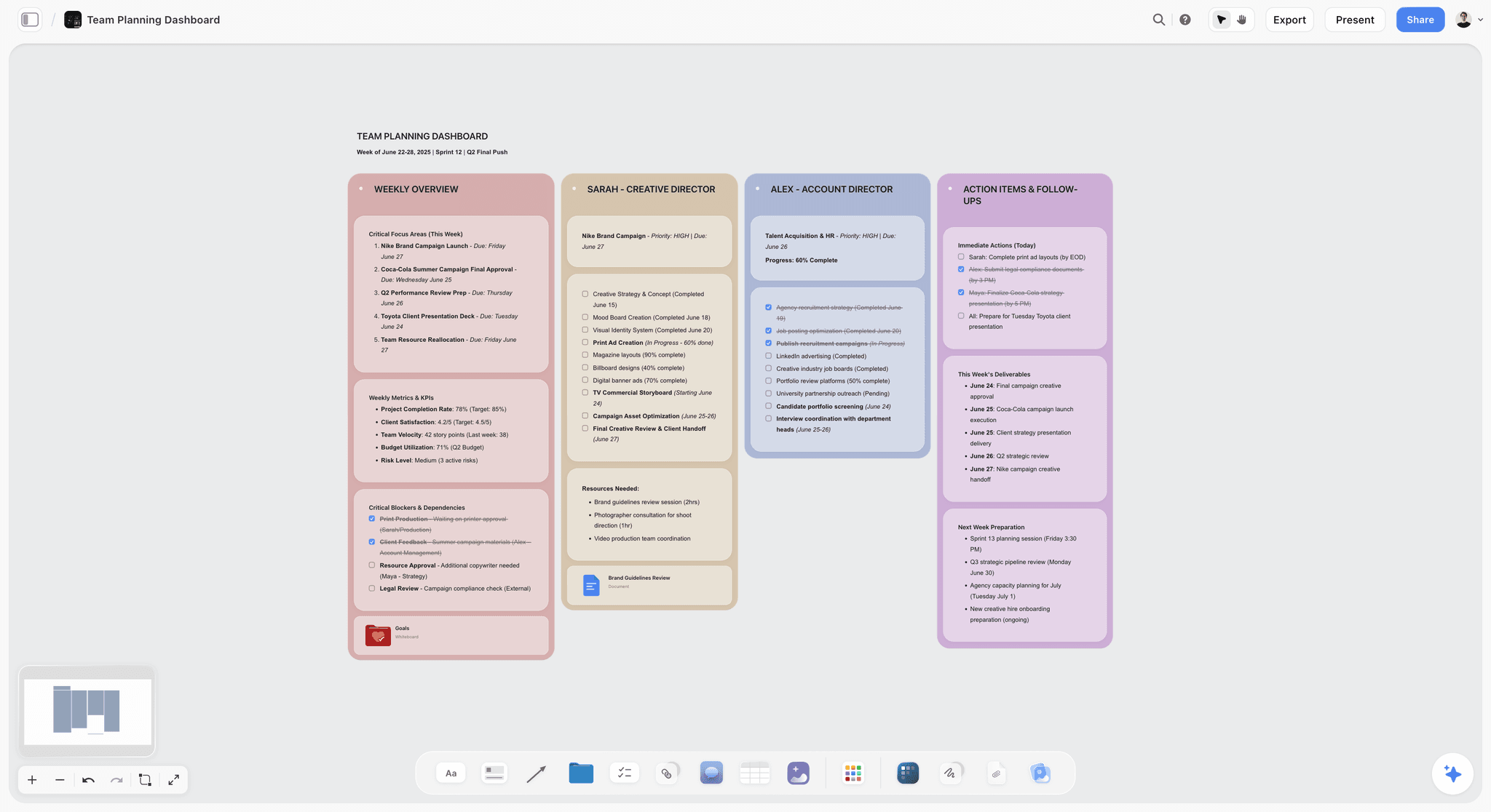
Storyflow consolidates the visual side of collaboration: whiteboarding, planning, moodboards, notes, and project canvases, all on one board with unlimited boards and unlimited collaborators on every paid plan. It is paid-only during early access, with Plus at $7.99/month billed annually; the Free plan (unlimited boards, unlimited collaborators, basic AI) launches before the end of 2026, and anyone a paid member invites to a board joins free now. Instead of free Miro plus free Trello plus a free notes tool, the visual and planning work lives in one place. The Team Planning Dashboard template opens with tasks, owners, and status already structured. The AI reads the canvas, so the consolidated board is also searchable and queryable.
Best for: Teams who want to consolidate visual work and planning into one canvas.
Verdict: The strongest consolidator for visual and planning work, once you're past the early-access price. You still need a chat and a video tool alongside it.
Key features
- Whiteboarding, planning, and notes on one canvas.
- Unlimited boards and unlimited collaboration on every paid plan.
- AI reads the canvas so consolidated work stays findable.
- Story Blueprints library on paid tiers.
- Image, note, and card types in one place.
Pricing
Paid-only during early access. Plus: $7.99/mo annual. Full Story Blueprints, unlimited uploads. Pro: $14/mo annual. AI image generation, 20x AI usage. Max: $39/mo annual. 40x more AI, team workspace with roles. Free plan (unlimited boards and cards, unlimited collaboration, basic AI, 20 file uploads) launches before the end of 2026.
Pros
- Consolidates visual work and planning into one canvas.
- Every collaborator a paid member invites joins free.
- AI keeps the consolidated work searchable.
Cons
- Not a chat or video tool; pair with Slack and Zoom.
- Paid-only during early access; the Free plan is not out yet.
- Cloud-only, with no offline mode.
2. Notion
Notion's free tier is the strongest consolidator here. One free workspace holds documents, a wiki, project databases, and notes, replacing three or four separate free tools. For a team fighting the hidden bill, Notion's value is not any single feature; it is how many other tabs it closes.
Best for: Teams who want one free tool to replace several.
Verdict: The strongest free consolidator. One workspace closes the most tabs.
Key features
- Documents, wiki, and databases in one workspace.
- Project and task management.
- Generous free tier for individuals and small teams.
- Templates for nearly any collaboration job.
- Standard AI features.
Pricing
Free for personal use and small teams. Plus: $10/mo. Business: $18/mo.
Pros
- Replaces several free tools at once.
- Generous free tier.
- Large template community.
Cons
- No real-time chat or video.
- Setup-heavy before it consolidates well.
- Can sprawl internally without structure.
3. Google Workspace
Google Workspace, with free personal Docs, Sheets, Slides, Drive, and Meet, is the document collaboration standard. Real-time editing, comments, and sharing all work cleanly. It consolidates the document side, though chat, projects, and visual work still need other tools.
Best for: Teams who want free, reliable real-time document collaboration.
Verdict: The free document standard. Consolidates documents; other jobs still need other tools.
Key features
- Docs, Sheets, Slides with real-time editing.
- Drive for storage.
- Meet for video.
- Free with a Google account.
Pricing
Free for personal use. Business plans from roughly $7/user/mo.
Pros
- The free document collaboration standard.
- Real-time editing works flawlessly.
- Universally familiar.
Cons
- Consolidates documents only.
- No project or visual collaboration.
- Files can sprawl across Drive.
4. Slack
Slack is the free team communication standard: channels, direct messages, and integrations. Its free tier limits message history to 90 days, which matters for a team that treats chat as a record. It does one job, communication, and does it well, but it adds a tool to the stack rather than consolidating.
Best for: Teams who want free, organized work communication.
Verdict: The strongest free work-chat tool. A single-job tool, so it does not reduce the hidden bill.
Key features
- Channels and direct messages.
- Integrations with other tools.
- Huddles for quick audio.
- Free tier with 90-day history.
Pricing
Free with 90-day message history. Paid plans from roughly $7/user/mo.
Pros
- Excellent free team communication.
- Channels keep conversation organized.
- Strong integrations.
Cons
- 90-day history limit on free.
- Single-job tool; adds to the stack.
- Notification overload is common.
5. Trello
Trello's free tier is a clean kanban board for task collaboration: up to 10 boards, cards, checklists, and due dates. It is simple and friendly. It does the task job well and only the task job, so like Slack it adds a tool rather than consolidating.
Best for: Teams who want simple free task collaboration.
Verdict: A friendly free task board. Single-job, so it adds to the stack.
Key features
- Kanban boards for tasks.
- Cards, checklists, and due dates.
- Up to 10 boards on free.
- Power-Ups for extra features.
Pricing
Free with 10 boards. Standard: $5/user/mo. Premium: $10/user/mo.
Pros
- Simple and friendly.
- Generous 10-board free tier.
- Low learning curve.
Cons
- Single-job tool.
- Adds to the stack rather than consolidating.
- Thin for complex projects.
6. Miro
Miro's free tier is a capable visual collaboration canvas, capped at 3 editable boards. It consolidates the visual side, whiteboarding, diagrams, brainstorms, into one tool, which is more than a single-job app. The 3-board cap is the limit a growing team hits.
Best for: Teams who want free visual collaboration.
Verdict: A strong free visual canvas that consolidates the visual jobs. The 3-board cap bites.
Key features
- Visual collaboration canvas.
- Whiteboarding, diagrams, and brainstorming.
- Real-time collaboration.
- 3 editable boards on free.
Pricing
Free for 3 boards. Starter: $8/mo annual. Business: $16/mo.
Pros
- Consolidates visual collaboration jobs.
- Strong real-time collaboration.
- Large template library.
Cons
- 3-board free cap.
- No documents or chat.
- A growing team outgrows the free tier fast.
7. ClickUp
ClickUp's free tier is a strong consolidator: tasks, docs, whiteboards, and goals in one tool. It aims to replace several free apps, which directly addresses the hidden bill. The trade-off is the all-in-one feel: broad, sometimes cluttered, with a learning curve.
Best for: Teams who want one free all-in-one collaboration tool.
Verdict: A strong free consolidator. Broad and capable, with a learning curve.
Key features
- Tasks, docs, whiteboards, and goals.
- Multiple views.
- Generous free tier.
- Standard AI features.
Pricing
Free tier. Paid plans from roughly $7/user/mo.
Pros
- Consolidates several jobs into one free tool.
- Generous free tier.
- Multiple views for different work.
Cons
- Breadth can feel cluttered.
- Learning curve.
- Internal sprawl without discipline.
8. Figma
Figma's free tier covers design collaboration plus FigJam whiteboarding, capped at 3 files. For teams whose collaboration centers on design, it consolidates design and whiteboarding. It is design-centric, so it does not consolidate general team work.
Best for: Design-led teams who want free design and whiteboard collaboration.
Verdict: A strong free tool for design-led teams. Consolidates within design; the 3-file cap limits it.
Key features
- Design collaboration.
- FigJam whiteboarding.
- Real-time collaboration.
- 3 files on free.
Pricing
Free for 3 files. Professional from roughly $16/mo.
Pros
- Consolidates design and whiteboarding.
- Strong real-time collaboration.
- Industry-standard design tool.
Cons
- 3-file free cap.
- Design-centric, not general collaboration.
- Overkill for non-design teams.
9. Canva
Canva's free tier covers visual content collaboration: design, presentations, and a whiteboard mode, with team sharing. It consolidates the visual-content jobs reasonably. It is content-creation-centric, so general collaboration still needs other tools.
Best for: Teams who collaborate mainly on visual content.
Verdict: A strong free tool for visual content collaboration. Consolidates content; not general work.
Key features
- Design and presentation collaboration.
- Whiteboard mode.
- Generous free asset library.
- Team sharing.
Pricing
Free tier. Pro from roughly $15/mo.
Pros
- Consolidates visual content jobs.
- Generous free tier.
- Easy for non-designers.
Cons
- Content-centric, not general collaboration.
- No project or document collaboration.
- Premium assets behind Pro.
10. Discord
Discord's free tier is generous communication: text channels, voice channels, and video, with no real history cap. Originally for communities, it is widely used by creative and remote teams. It is a single-job communication tool, like Slack, and adds to the stack.
Best for: Community-style teams who want free, generous communication.
Verdict: A generous free communication tool. Single-job, so it adds to the stack.
Key features
- Text and voice channels.
- Video and screen sharing.
- No message history cap on free.
- Strong community features.
Pricing
Free with generous limits. Nitro from roughly $3/mo for extras.
Pros
- Very generous free tier.
- No message history cap.
- Good for community-style teams.
Cons
- Single-job communication tool.
- Community framing suits some teams more than others.
- Adds to the stack.
11. Zoom
Zoom's free tier covers video collaboration, capped at 40 minutes per group meeting. It is reliable and universal for calls. It is a single-job tool, and the 40-minute cap is a real friction for a team that meets often.
Best for: Teams who want free, reliable video meetings.
Verdict: A reliable free video tool. The 40-minute cap and single-job nature limit it.
Key features
- Video meetings and webinars.
- Screen sharing and recording.
- Reliable across devices.
- Free 40-minute group meetings.
Pricing
Free with 40-minute group meetings. Paid plans from roughly $14/mo.
Pros
- Reliable and universal for calls.
- Good free quality.
- Familiar to everyone.
Cons
- 40-minute cap on free group meetings.
- Single-job video tool.
- Google Meet is a free alternative without the same cap.
12. Asana
Asana's free tier covers project collaboration for up to 10 users: tasks, projects, and multiple views. It consolidates the project-management side reasonably. It is project-centric, so documents, chat, and visual work still live elsewhere.
Best for: Small teams who want free project collaboration with structure.
Verdict: A capable free project tool for small teams. Consolidates projects; not general collaboration.
Key features
- Tasks and projects.
- List, board, and calendar views.
- Free for up to 10 users.
- Standard AI features.
Pricing
Free for up to 10 users. Starter from roughly $11/user/mo.
Pros
- Strong free project collaboration.
- Multiple views.
- Generous 10-user free tier.
Cons
- Project-centric, not general collaboration.
- No documents or visual work.
- Per-user pricing on upgrade.
7) Recommended Free Collaboration Stacks
Stack 1: Two-Person Startup. Miro Free (visual work and planning) + Slack Free (chat) + Google Workspace (docs and video via Meet). Three tools instead of six, fully free. Swap in Storyflow Plus ($7.99/month billed annually) for a deeper canvas, or wait for its Free plan launching before the end of 2026.
Stack 2: Small Remote Team. Notion Free (docs, wiki, projects) + Storyflow Plus, $7.99/month billed annually (visual collaboration; the Mindmap template is a good first shared board) + Slack Free (chat). Heavy consolidation; two tools carry most of the work, for well under $10 a month.
Stack 3: Creative Team. Storyflow Plus, $7.99/month billed annually, or Figma Free (visual and design) + Notion Free (docs and projects) + Discord Free (communication). Tuned for creative collaboration.
Stack 4: Cheapest Consolidated Stack. Storyflow Plus, $7.99/month billed annually (visual and planning) + Google Workspace (docs, chat, and video). Two tools, near-total coverage, for well under $10 a month.
The pattern across every stack: pick the fewest tools that cover the jobs. Two or three consolidating tools beat six single-job ones, whether the total is $0 or a single low-cost subscription, because the fragmentation cost is what actually adds up. The cheapest working stack is the smallest one.
8) Honorable Mentions
- Google Meet. Free video without Zoom's 40-minute cap.
- Microsoft Teams. A free communication and collaboration option in the Microsoft world.
- Excalidraw. A free, open-source whiteboard.
- Obsidian. A free connected-note tool for individuals.
- GitHub. Free collaboration for software teams.
9) Tools to Avoid for Free Collaboration
- A six-tool free stack. Zero dollars, but a fortune in context-switching. Consolidate into two or three.
- A free tier that caps below your team size. A free tool that stops at 3 boards or 10 users is free only until you grow.
- A free trial mistaken for free. If the tool stops working after a trial, it was never part of a free stack.
- Adding a single-job tool when a consolidator would do. Every tool added to the stack raises the hidden bill.
11) The Bottom Line
The best free collaboration tools in 2026 are the ones that consolidate. Miro is the best free canvas for consolidating visual work and planning. Notion is the strongest free consolidator for docs and projects. Google Workspace is the free document standard. Slack is the best free team chat. Storyflow consolidates visual work and planning just as well, but it is paid-only during early access, with Plus at $7.99/month billed annually and a Free plan launching before the end of 2026.
A free collaboration stack costs nothing in dollars. It costs a fortune in tabs. Do not assemble six single-job free tools. Pick two or three consolidating tools that cover the work, because the fragmentation cost is what actually adds up, whether the total is $0 or a single low-cost subscription. The cheapest working stack is the smallest one.
For your team's stack, consolidate the visual and planning work onto a Storyflow canvas and cut the number of tabs your team lives in. If the scattered notes are the worst offender, the Second Brain template pulls them onto one findable board.
10) FAQ: Free Collaboration Tools
What is the best free collaboration tool in 2026?
Miro is the best free canvas for consolidating visual work and planning. Notion is the strongest free consolidator for docs and projects. Google Workspace is the free document standard. Slack is the best free team chat. Storyflow is a strong canvas alternative once you're on Plus ($7.99/month billed annually) or after its Free plan launches before the end of 2026. The best pick is the one that consolidates the most jobs into the fewest tools.
Are free collaboration tools actually free?
In dollars, yes, the tools listed here have genuine free tiers. But free collaboration has a hidden cost: fragmentation. A stack of six free tools means six places work lives and constant context-switching. The dollar cost is zero; the coordination cost is real.
What is the hidden cost of free collaboration tools?
The hidden cost is fragmentation. When a team uses a separate free tool for chat, tasks, docs, whiteboarding, calls, and visuals, work scatters across six places. Nobody can find the thread connecting a decision, a task, and a document. The team spends its day moving between tools instead of working.
How do I build a free collaboration stack?
Consolidate. Pick free tools that each cover several jobs, rather than one tool per job. A free consolidator like Notion can replace three or four single-job tools; Storyflow does the same once its Free plan launches (paid-only during early access today). The goal is the fewest tools that cover the work, because fragmentation scales with tool count.
What is the best free all-in-one collaboration tool?
Notion and ClickUp each consolidate multiple collaboration jobs into one free tool. Notion is strongest for docs and projects, ClickUp for general all-in-one. Storyflow does the same for visual work and planning, but it is paid-only during early access, with a Free plan launching before the end of 2026. Any of them reduces the number of tools in the stack.
Can a team collaborate entirely on free tools?
Yes. A small team can run on a free stack: a free consolidator for docs, projects, and visual work, plus a free chat tool and a free video tool. The key is consolidation, two or three free tools instead of six, so the hidden fragmentation cost stays low.
What free tools do remote teams use?
Remote teams commonly use Slack or Discord for communication, Google Workspace for documents, Notion for consolidated work and planning (or Storyflow, paid-only during early access with a Free plan coming before the end of 2026), and Zoom or Google Meet for video. The strongest setups consolidate aggressively to keep the number of tools, and the context-switching, down.
Is Notion or Storyflow better for free collaboration?
They consolidate different jobs. Notion is stronger for documents, wikis, and structured projects, and it is free today. Storyflow is stronger for visual collaboration, whiteboarding, and planning on a canvas, but it is paid-only during early access, with Plus at $7.99/month billed annually and a Free plan launching before the end of 2026. Using both is common, and together they consolidate most collaboration jobs for well under $10 a month.
What is the cheapest way for a small team to collaborate?
Use two or three consolidating tools rather than six single-job ones. Storyflow Plus ($7.99/month billed annually) plus Google Workspace covers visual work, planning, documents, chat, and video for well under $10 a month; swap in Miro's free tier instead of Storyflow to get to $0. The cheapest stack is not the one with the most free tools; it is the one with the fewest tools overall.
What is the difference between free and free trial collaboration tools?
A genuinely free tool has a permanent free tier you can keep using. A free trial works for a limited time and then requires payment. A free trial is not part of a free stack, because it will stop working. Always check which kind of free a tool offers.
Do free collaboration tools have user limits?
Many do. Asana's free tier caps at 10 users, Miro's at 3 boards, Slack's at 90 days of history. These caps are where a growing team hits the wall. Check the cap against your team size and growth before building a stack on a tool.
How many collaboration tools should a team use?
As few as possible. Each tool added raises the fragmentation cost. A consolidated stack of two or three free tools, covering visual work, documents, communication, and projects, beats a sprawl of six. The right number is the smallest that covers the jobs.
Table of Contents
- Quick Answer: The Best Free Collaboration Tools in 2026
- Comparison Table: 12 Free Collaboration Tools at a Glance
- Free Has a Hidden Bill
- How We Evaluated These Tools
- Quick Picks by Free Collaboration Need
- Detailed Reviews: 12 Free Collaboration Tools
- Recommended Free Collaboration Stacks
- Honorable Mentions
- Tools to Avoid for Free Collaboration
- FAQ: Free Collaboration Tools
- The Bottom Line
- Author
- Related Reading
Templates to check out for this topic


Planning and project templates you can use in Storyflow
Plan a launch, a sprint, or a whole project on a visual board the team can see at once. Open one of these templates and start from real structure.


See Storyflow in Action
A visual AI workspace where every feature lives inside one canvas. No tab-switching, no context lost.
Build your entire board from a single message
Type what you need in the AI chat at the bottom of your canvas. The AI adds cards, headings, and structure directly onto your board.
Use expert frameworks as AI context
Type @ in the AI chat and choose any Tactic. The AI tailors every response to that framework instead of giving generic advice.
Turn your board into a mind map in seconds
Ask the AI to restructure your canvas as a mindmap. It connects your ideas into a visual hierarchy so you can see how everything relates.
Why Storyflow Exists
Storyflow actually began as a personal tool while working on creative and research projects.
We kept running into the same problem: ideas were scattered everywhere: notes, documents, and whiteboards.
Nothing helped us see how everything connected.
So we started building a workspace designed around how ideas actually grow.
→ Read how Storyflow was createdJustkay
Documentary Filmmaker & Founder at Storyflow
Published: 2026-05-17
Extremely simple, seriously capable


See how easy it is to get started
Watch a real project come together, from a blank board to a finished plan, clicked through step by step.
Start creating with AI and become more productive
Transform your creative workflow with AI-powered tools. Generate ideas, create content, and boost your productivity in minutes instead of hours.