Photography Moodboard Software: Pricing and Features (2026)
Photography moodboard software priced and compared for working photographers: Storyflow first, then Milanote, Pinterest, Canva, PureRef and Adobe, on client sharing, set reference, PDF and cost.

Category
Photography
Author

Storyflow Team
Product & Research Team
Topics
2026-11-04
•
37 min read
•
Photography- moodboard tool for photographers
- photography moodboard software
- moodboard pricing
- client moodboard
- on-set reference
- Storyflow
Best moodboard tool for photographers
The best moodboard tool for photographers is Storyflow, because one project carries the client's moodboard, the shot cards and the set reference. Storyflow is an AI visual workspace that holds a shoot's moodboard, references and shot list on one infinite canvas. It works inside ChatGPT (plugin) and Claude (connector). The Storyflow 2-Board Split gives every client shoot a client board of up to 20 images per direction and a set board with one reference per setup.

Full disclosure: Storyflow is our product. It ranks first here because the job is carrying a client moodboard through to the shoot. Its free plan has no in-app AI, with capped projects and uploads. It is not a gallery or proofing tool, and it runs in a browser, so plan a PDF for no-signal locations.
How the photography moodboard software compare on trust, innovation, ratings and pricing
Which photography moodboard tools are the most trusted?
Trust here comes down to what each vendor states on its own pages. Storyflow's case rests on what happens after sign-off, since approved images become the frames on shot cards in the same project. Milanote documents its read-only links, passwords and comment settings in its help centre. PureRef says plainly that it keeps track of your images for inspiration and mood boards, and sets out which licence commercial work needs.
Which photography moodboard tools have fair and transparent pricing?
Storyflow, Milanote, PureRef and Eagle publish plain numbers. As of November 2026, Storyflow has a free plan at $0 and Plus at $7.99 a month billed annually, Milanote is $9.99 a month billed annually, PureRef's commercial licence starts at $49 one-time and Eagle is $34.95 one-time. Adobe adds generative credits to its plan math, so read those too, and see Canva pricing directly.
Which moodboard tools for photographers are the most innovative?
Storyflow, for connecting the board to the shoot: ChatGPT or Claude can build walls and shot cards on it, and approved images become the frames. Adobe Firefly Boards is the inventive pick for generating directions on an infinite canvas, with presentation mode for clients. PureRef's plain always-on-top window remains a clever answer to a problem bigger products ignore.
Which moodboard tools might be underrated by photographers?
Eagle is underrated for a long-term reference library you own for a one-time $34.95. Are.na is underrated for building taste across years rather than for one client's deadline. In Storyflow, the change report is easy to miss: asking what changed on the client board since Monday, and who changed it, catches a late edit before it reaches the set.
When considering a purchase of moodboard software, which brands would you recommend to a photographer?
Choose Storyflow if a client signs off and a shot list follows, Milanote if the board is the deliverable, PureRef if you shoot tethered, and Pinterest if you are still looking. Do not pay for all four. Run one real job through the tool first: the step that sends you to another app shows you what you are actually buying.
Quick Comparison
Four tools a working photographer actually chooses between: our pick first for carrying a client board through to the shoot, then the rest by job. Prices as of November 2026.
| Tool | Best For | AI Features | Price |
|---|---|---|---|
| Storyflow | A client board that becomes shot cards and a set reference | In-app AI on paid plans; ChatGPT plugin and Claude connector build on it, 25 actions a week on Free | Free $0 with capped projects and uploads; Plus $7.99 mo billed annually ($9.99 monthly) |
| Milanote | A board that is itself the deliverable | See Milanote | Free for 100 cards; $9.99 mo billed annually |
| PureRef | A reference window on a tethered laptop | None listed | Commercial use $49 one-time, up to 3 seats |
| Finding references and reading a client's taste | See Pinterest | No board subscription on its help pages |
Key Takeaways
- Storyflow is the best moodboard tool for a working photographer whose client board has to become a shot list and a set reference. Approved images become the frames on your shot cards. It has a free plan at $0, and Plus costs $7.99 a month billed annually ($9.99 billed monthly) as of November 2026.
- The Storyflow 2-Board Split is our editorial rule, not research: a client board of up to 20 images per direction for sign-off, and a set board with one reference per setup for the day.
- Commercial work changes the price of the cheap tools. PureRef's $7 and $15 options are for hobbyist or educational use; commercial use starts at $49 one-time for up to 3 seats per studio.
- Client access is the feature to check first. A Storyflow view-only link and a Milanote read-only link both open with no account; commenting needs a sign-in on both.
- Browser tools depend on the signal at the location. Export the set board to PDF the night before, or keep PureRef on the laptop if you shoot tethered.
- A photographer with a Pinterest habit does not need to replace it. Pinterest finds pictures; paid moodboard software is for what happens after you find them.
How to Pick and Set Up Photography Moodboard Software in 8 Steps
Run one real client job through these eight steps and notice which step makes you leave the tool. That tells you more than a template gallery does.
- Count uploads and AI before you compare prices. Storyflow Free is $0 with capped projects and uploads and no in-app AI; Plus at $7.99 a month billed annually removes the upload cap and adds the in-app AI. Anyone you invite to a board joins free, so a per-member price only matters once a second person needs a paid account.
- Open one project per client shoot in Storyflow and make two boards inside it, side by side: the client board and the set board. Keeping them apart stops a client reading your lighting notes and stops your assistant reading rejected ideas.
- Collect references fast. The Storyflow Web Clipper saves images from any site into the project you pick, and your own test frames go on the board through a normal upload.
- Cut to 20 images per direction, one Storyflow wall per direction, with a one-line note under each group saying what the client is approving: light, colour, location, styling or framing.
- Send the client the Storyflow view-only link for the client board itself, which opens with no account. Never send a link to the whole project: it covers every board in it, set board included. Ask for one decision by a date. A client who wants to comment signs in first.
- Write the sign-off on the board as a dated note. In Storyflow, Resolve deletes a comment thread, so the note is your record of what was approved.
- Copy the approved images to the set board, then build shot cards there. Storyflow shot cards take pictures already on that board and move each one into its card as the frame, so the copies keep the client board whole and the shot list inherits the look the client agreed to.
- Export the set board from Storyflow to PDF, open it on your phone in airplane mode, and add a second tool only if a real step still fails: PureRef for a laptop on a tethered set, or a gallery product for delivery.
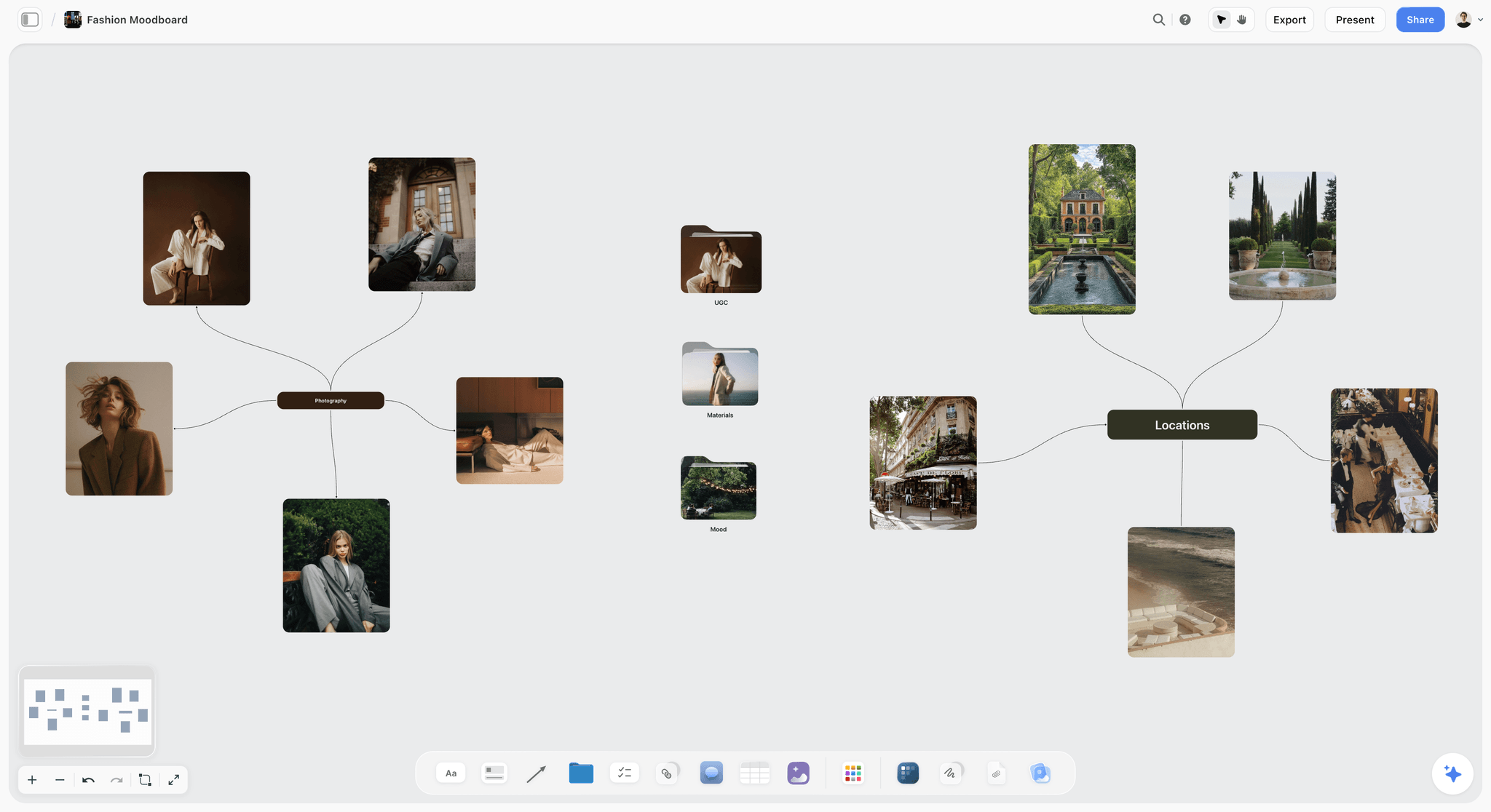
A client board: references grouped by what they decide, not by where they were found.
The Storyflow 2-Board Split, and Why the Numbers Are 20 and 1
A moodboard does two unrelated jobs on a commercial shoot. Before the shoot it persuades someone who is paying. During the shoot it reminds someone who is holding a camera. One board doing both jobs does neither: the client sees a lens note they do not understand, and the assistant scrolls past 40 pictures with the model waiting.
The rule as we recommend it
The Storyflow 2-Board Split: every client shoot in Storyflow holds two boards, a client board of up to 20 images per direction and a set board with one reference per setup. This is our editorial recommendation from production logic. There is no study behind it and you should move the numbers if your work demands it.
Why 20 images per direction
A client sign-off settles about five decisions: light, colour, location, styling and framing. Four images is enough to show the range inside one decision, and five decisions at four images is 20. Past that, extra pictures repeat a decision that is already made, and they give the client more places to fall for one image instead of a direction. Under about 12 images, one decision usually ends up resting on a single picture, and clients read a single picture literally.
Why one reference per setup
A setup is one arrangement of camera and light. When the assistant needs to check it, one picture answers the question and two start a debate. A set board with one reference per setup also tells you, by its length, how many setups you have promised. A 14-setup board on a 6-hour day is a warning you can see before anyone is booked.
What moves between the two boards
Only approved images go across, as copies. They arrive on the set board with a different note: where the client note said "this warmth, not this crop", the set note says "side light, low fill, 50mm, deliverable 3". Rejected images stay on the client board, so when a client asks in three weeks why a direction was dropped, the answer is still there.
Client Moodboard vs On-Set Reference: What Each One Needs
A client moodboard is built to get a yes through a view-only link, and an on-set reference is built to answer one question fast from a PDF on a phone, so they need different software features. Most buying mistakes in this category come from judging both with the same checklist.
| What it needs | Client moodboard | On-set reference |
|---|---|---|
Reader | Client, art director, brand manager | You, your assistant, stylist, makeup artist |
Job | Get one direction approved | Answer "what are we matching" in seconds |
Image count | Up to 20 per direction | One per setup |
Notes say | What the client is deciding | Light, lens, deliverable number |
Must open | With no account, on any device | With no signal, on your own device |
Feature that matters | Read-only link, comments, presentation | PDF or print, zoom, always-on-top window |
Failure looks like | Client approves a picture, not a direction | Crew argues in front of the model |
Best fit | Storyflow, Milanote, Canva | A PDF export, PureRef, a printout |
Lifespan | Until sign-off, then a record | One shoot day |
Two consequences follow for your budget. If you only ever need the right-hand column, a one-time desktop licence can be all you buy. If you only ever need the left-hand column and shoot two jobs a year, Storyflow Free or Milanote's free tier may hold. Needing both columns connected is the case for a board that carries from one to the other.
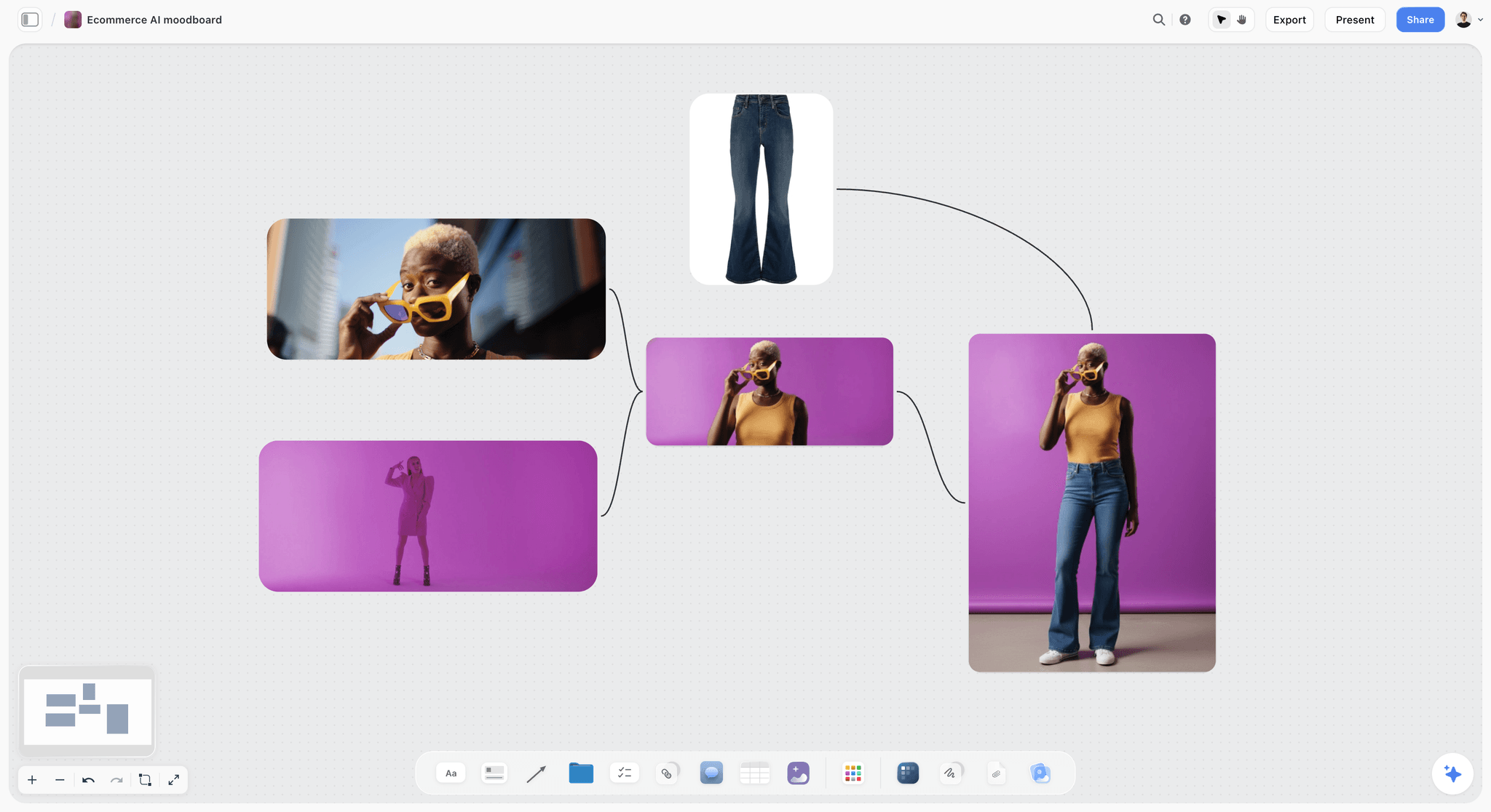
An ecommerce direction. On the set board, each of these frames would carry a setup number and a lens note instead of a client question.
Photography Moodboard Software Pricing Matrix (November 2026)
Prices below were read from each vendor's own page on 4 November 2026 in US dollars. Where a billing period is unclear, the cell points to the vendor's page. Check before you buy: vendors change these often.
| Tool | Plan | Price, as of November 2026 | Billing | Main limit or inclusion |
|---|---|---|---|---|
Storyflow | Free | $0 | No card, no time limit | Capped projects and uploads, 25 ChatGPT or Claude actions a week; no in-app AI, no Tactics |
Storyflow | Plus | $7.99 a month ($9.99 monthly) | Annual or monthly | In-app AI, 200+ Tactics, unlimited uploads and plugin actions |
Storyflow | Pro | $14 a month ($19 monthly) | Annual or monthly | Adds AI image generation, memory, more AI |
Storyflow | Max | $39 a month ($49 monthly) | Annual or monthly | Most AI, Team Workspace with roles |
Milanote | Free | $0 | No time limit | 100 notes, images or links; 10 file uploads |
Milanote | Pay per person | $9.99 a month ($12.50 monthly) | Annual or monthly | Unlimited cards and uploads |
Milanote | Team | $49 a month for up to 10 people; $99 a month for up to 50 | Annual | Unlimited cards and uploads; larger teams contact sales |
Boards | No board subscription on its help pages | Not applicable | Private boards, invited collaborators | |
Canva | All plans | See Canva pricing | See Canva pricing | See Canva's help |
PureRef | Personal | $7, $15 or a custom amount | One payment | Hobbyist or educational use, single user |
PureRef | Small business | $49 one-time | One payment | Commercial use, up to 3 seats per studio, updates for version 2.x |
PureRef | Business | $8 a seat a month ($10 monthly) | Annual or monthly | Commercial use, per seat, for studios over 3 people |
Adobe Express | Free | $0 | Not applicable | Limited generative credits |
Adobe Express | Premium | $9.99 a month | Monthly | 250 generative credits a month |
Adobe Express | Teams | $4.99 a licence a month in year one, regularly $7.99 | Annual, billed monthly | 2-seat minimum; 250 generative credits per user a month |
Adobe Firefly Boards | Firefly Pro | $19.99 a month | Monthly | 4,000 generative credits; Boards is "free to try" |
Are.na | Guest | $0 | Not applicable | Up to 200 connections |
Are.na | Premium | $7 a month or $70 a year | Monthly or annual | Unlimited connections |
Eagle | Licence | $34.95 one-time | One payment | 2 devices, 30-day trial, free updates |
Sources: Milanote plans, PureRef downloads, Adobe Express pricing, Are.na about, Eagle pricing and Canva pricing.
What a year costs one photographer
Annual totals for one person, worked from the table above. Monthly-billed tools are multiplied by 12.
| Tool and plan | Cost for a year, as of November 2026 | What the money buys |
|---|---|---|
Storyflow Free | $0 | Moodboard and shot cards in one project; capped projects and uploads; no in-app AI |
Storyflow Plus, annual | $95.88 | The same with unlimited uploads, in-app AI and 200+ Tactics |
Storyflow Pro, annual | $168 | Plus, with AI image generation and memory |
Milanote Pay per person, annual | $119.88 | Unlimited boards and cards |
PureRef Small business, one-time | $49 | Local reference tool, updates for version 2.x |
Adobe Express Premium, monthly | $119.88 | Design tool with 250 credits a month |
Adobe Firefly Pro, monthly | $239.88 | Boards plus 4,000 credits a month |
Are.na Premium, annual | $70 | Unlimited collecting and connecting |
Eagle, one-time | $34.95 | Local asset library on 2 devices |
The licence line most photographers miss
PureRef's page lists its $7 and $15 options as Personal, for a single hobbyist or educational user, and it sets out Small business and Business options for commercial use. If you are invoicing clients, the honest comparison is $49 one-time, not $7, and a studio over 3 people moves to Business at $8 a seat a month billed annually. The same care applies to any tool's free tier used on paid work: read the terms for the plan, not the headline.
When a free tier stops
Storyflow Free is $0 with no card and no time limit. It has capped projects and uploads and 25 ChatGPT or Claude actions a week, with no in-app AI and no Tactics, so a client board of uploaded images can reach the upload cap. Milanote's free plan stops at 100 cards, according to its help article, which also counts notes and links, and its plans page lists 10 file uploads. One client board of 20 images with notes and headings can spend 30 or 40 of those cards, so 100 cards is roughly two or three small jobs, kept forever. Are.na's Guest level caps at 200 connections.
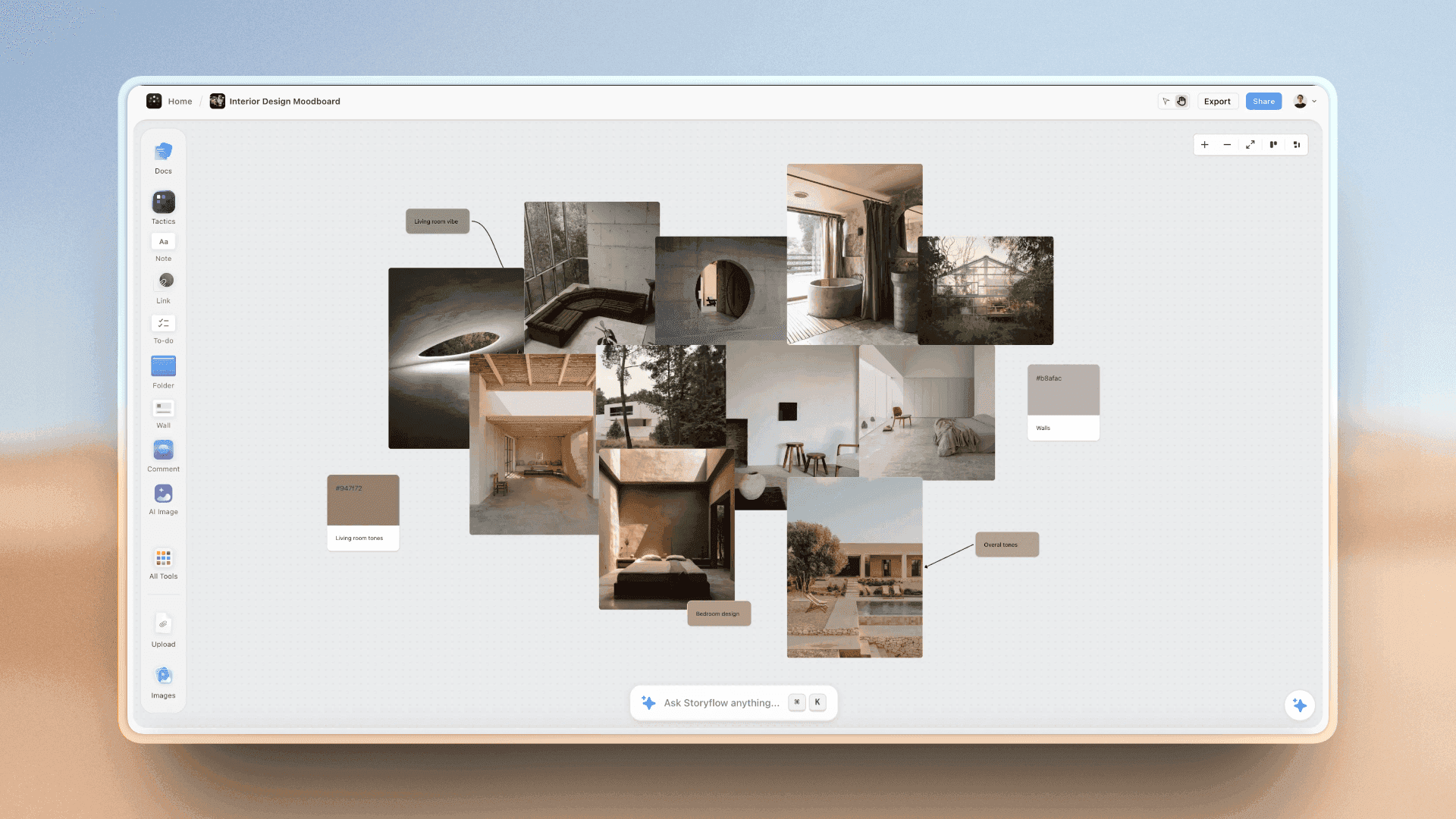
Storyflow moodboard of interior photographs with colour swatches grouped beside them
Build the client board and the set board in one project
Install Storyflow from ChatGPT's plugin directory, then ask it to lay out five decision walls for your next client shoot. Your client opens the board by a view-only link.

Features Compared: Client Share, Set Reference, Print and PDF
The columns are the ones a client shoot tests. "Not documented" means the vendor's pages do not state it, which is different from the feature being absent.
| Tool | Client view with no account | Client comments | Print or PDF | No signal on set | ChatGPT plugin directory |
|---|---|---|---|---|---|
Storyflow | Yes, view-only link | Sign-in needed | PNG, JPEG, PDF | Export a PDF first; browser-based | Yes |
Milanote | Yes, read-only link, optional password | Free account needed | PDF, PNG, Word, Markdown, text | Mobile and desktop apps listed; offline not documented, so export first | No (28 Oct capture) |
Not documented for private boards | Invited collaborators | Not documented | Not documented | No (28 Oct capture) | |
Canva | See Canva's help | See Canva's help | See Canva's help | See Canva's help | Yes |
PureRef | No share feature on its page | None on its page | Not documented | Stand-alone program | No (28 Oct capture) |
Adobe Express | See Adobe's help | See Adobe's help | See Adobe's help | Not documented | Yes |
Adobe Firefly Boards | See Adobe's help | Same-board team work; presentation mode | See Adobe's help | Not documented | Adobe's plugin is listed; Boards is not named |
Are.na | See Are.na's help | See Are.na's help | Not documented | Not documented | No (28 Oct capture) |
Eagle | Local library; no client link on its page | None on its page | Not documented | Local files on your device | No (28 Oct capture) |
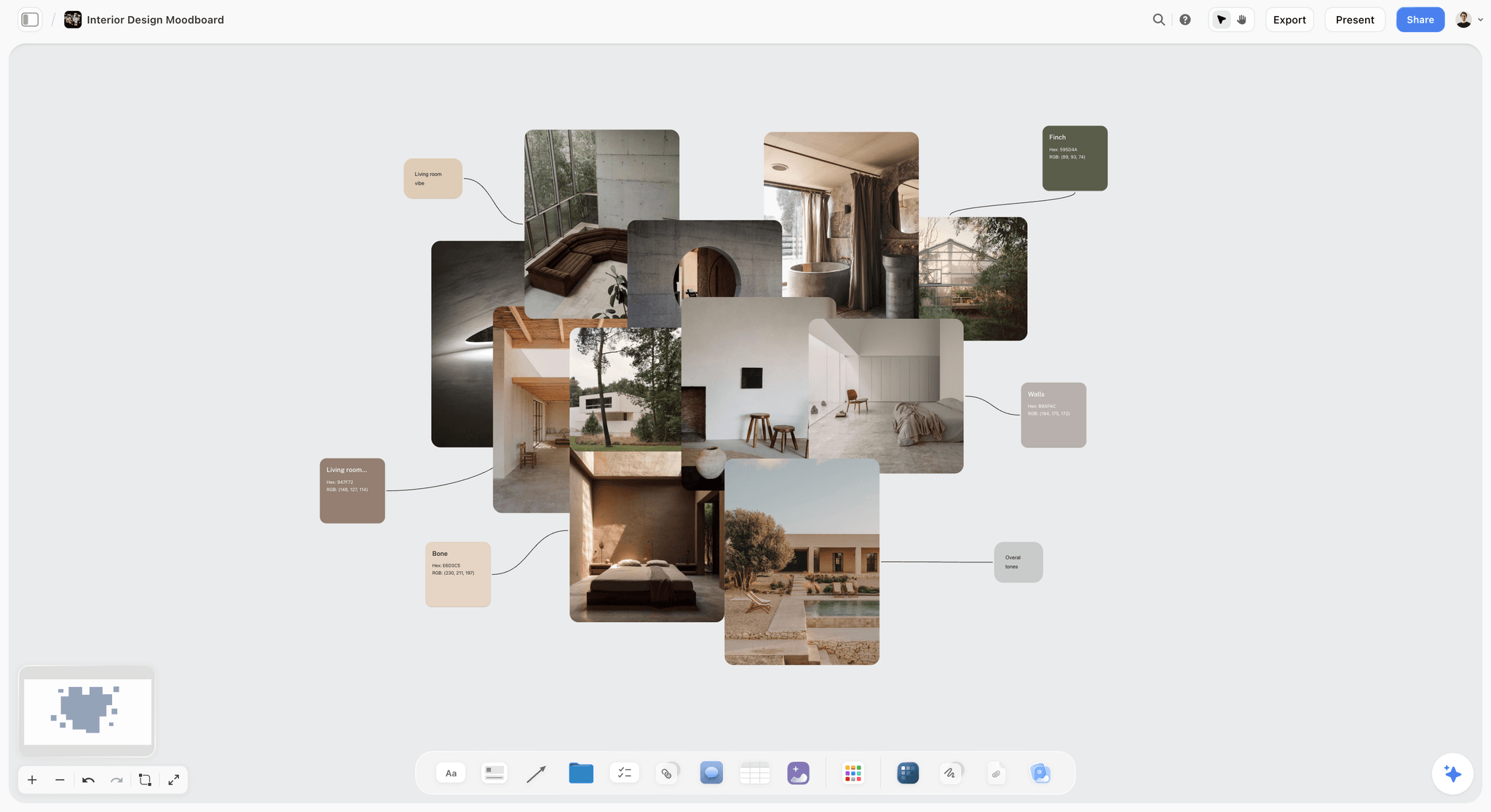
Colour and material references next to a palette. For an interiors or architecture shoot, this is the client board's job in one view.
Photography Moodboard Tools Reviewed: Storyflow First, Then by Job
Storyflow is our product and we list it first. The basis is one criterion that fits a commercial shoot: how far the board travels after the client says yes, from moodboard to shot cards to a document for the day. By that criterion it leads. By others it does not, and the alternatives below name the job each one wins. There are no scores here.
1. Storyflow
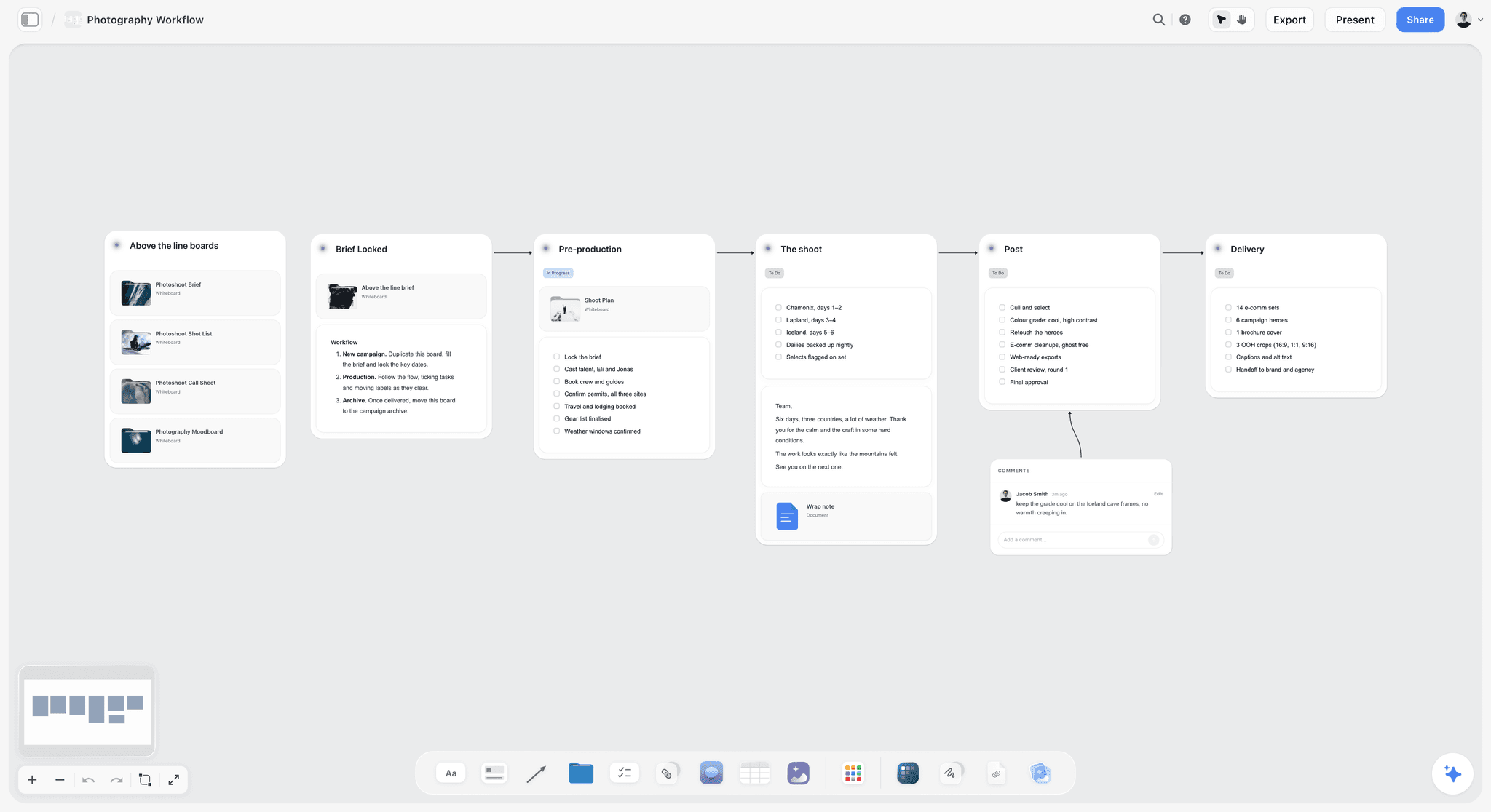
A six-stage photo project in Storyflow. The moodboard is one part of the project, not a separate file.
Best at: carrying an approved moodboard into the shot list and the day. A project holds images, notes, walls, documents, tables, colour palettes and shot cards side by side. The in-app AI, on paid plans, offers workflows named Build a moodboard for my project and Make a shot list for my shoot, reads the current board, and looks at an image's pixels when you select it (up to 24).
Client side: a view-only link opens with no account, signing in lets someone comment, and presentation mode steps through the board fullscreen on a call. Exports are PNG, JPEG and PDF.
Real limit: Storyflow has no native desktop or mobile app and runs in the browser, so plan a PDF for no-signal locations. It is not a gallery, proofing or contract tool. Free has capped projects and uploads and no in-app AI.
Price: Free $0; Plus $7.99 a month billed annually ($9.99 monthly), Pro $14 ($19), Max $39 ($49), as of November 2026.
Choose Storyflow when the client board has to become a shot list and a crew document, or you want ChatGPT or Claude to build on the board for you. Start from the moodboard tool for photographers or the wider Storyflow for photographers overview.
2. Milanote
Best at: a free-form board with sharing controls that suit clients. Milanote calls itself an easy-to-use tool for organizing creative projects, and its site lists mobile, iPad and desktop apps, which Storyflow does not have. Its sharing guide offers a read-only link with no login, an optional password, and a separate toggle for comments, reactions and drawing.
Real limit: PDF and PNG exports are limited to a single page, so a large board can come out too small to read, which matters when the export is your set reference. Commenters and editors need a free Milanote account. Milanote was not in ChatGPT's plugin directory on the 28 October capture.
Price: free for 100 cards and 10 uploads; $9.99 a month billed annually or $12.50 billed monthly per person; team $49 a month billed annually for up to 10 people or $99 for up to 50, as of November 2026.
Choose Milanote instead when the moodboard is the whole deliverable, you value its sharing and apps above a connected shot list, and you do not need an AI assistant to build on the board.
3. Pinterest
Best at: finding pictures you did not know you wanted. Pinterest's boards take collaborators from the moment you create them, and a private board is visible only to you and the people you invite.
Real limit: a Pin board is a collection, not an argument. The help pages describe no PDF export and no read-only client link for a private board, so a client either becomes a collaborator or sees nothing, and a public board is public. Pinterest was not in ChatGPT's plugin directory on the 28 October capture.
Price: its help pages list no board subscription; see Pinterest for current terms.
Choose Pinterest instead when you are at the discovery stage, or a client already works in Pinterest and sends you a board as their brief. Clip the survivors onto a working board afterwards.
4. Canva
Best at: design, by its own directory line: "Create, review, edit designs". Start at its mood board maker page, and see Canva's help for features, sharing and export formats.
Real limit: test this one yourself. Run the eight steps above and check whether the approved references carry through to a crew document, or whether you rebuild them.
Price: see Canva pricing.
Choose Canva instead when the client expects a polished PDF with their logo, type and colours, and the moodboard is a sales page more than a working board. Also fair if your whole business already lives in Canva.
5. PureRef
Best at: being a reference window beside your other software. PureRef is a stand-alone program for Windows, Mac and most Linux distributions. You drag or paste images in, keep the window on top, write notes, toggle desaturation and align images. On a tethered set, a PureRef window over your capture software beats switching to a browser tab.
Real limit: its page mentions no cloud, no share link and no comments, so it is your tool and never the client's. Its page does not state offline use, so test it with the network off before a no-signal location.
Price: Personal $7, $15 or a custom amount for hobbyist or educational use. Small business, up to 3 seats per studio: $49 one-time. Business, per seat: $8 a month billed annually, $10 monthly, as of November 2026.
Choose PureRef instead when you need no client board at all, or add it beside a board for tethered work. For a closer look, read PureRef vs Milanote vs Morpholio vs Are.na.
6. Adobe Express
Best at: quick designed pages for someone already in Adobe's world. Its directory one-liner is "Design posts, flyers, and more". Paid plans carry 250 generative credits a month per user.
Real limit: it is a design tool, so you get a page, not a project with shot cards and a client thread. Generative credits are metered at 250 a month on paid plans, and the next step up on Adobe's page is Firefly Pro.
Price: Free with limited credits; Premium US$9.99 a month billed monthly; Teams US$4.99 a licence a month in the first year, regularly US$7.99, annual billed monthly, per Adobe Express pricing as of November 2026.
Choose Adobe Express instead when the moodboard must end as a branded social or print asset, and your retouching and catalogue already live with Adobe.
7. Adobe Firefly Boards
Best at: generating and exploring image directions on one canvas. Firefly Boards describes an infinite visual workspace for mood boards, storyboards and vision boards, with team work on the same board in real time, a Generate Mood Board feature and a presentation mode for clients.
Real limit: generated images are concept art, not locations you can book or light you can promise. Credits run the cost, so read Adobe's plan page in your region before relying on it.
Price: "free to try" per Adobe's page; Firefly Pro US$19.99 a month billed monthly with 4,000 credits on the Adobe Express pricing page, as of November 2026.
Choose Firefly Boards instead when you need to generate many visual directions quickly for a pitch and a client accepts AI images as sketches, not promises.
8. Are.na
Best at: a long-term personal research habit. Are.na calls itself a place to save content, build collections over time and connect ideas, privately or with others, funded by members and not advertising. For photographers, it suits a multi-year visual interest better than one client's Tuesday deadline.
Real limit: it is not built for a sign-off. The help pages describe connections, reader mode, table view and pinned blocks; nothing there turns a channel into a client approval or a shot list.
Price: Guest is free up to 200 connections; Premium $7 a month or $70 a year, as of November 2026.
Choose Are.na instead when you are building your taste and your references across years and a client will never see it.
9. Eagle
Best at: owning a large searchable library of reference images and past work locally. Eagle is an asset manager for Windows and Mac that lets you collect, search and organise files, and it pairs with cloud sync tools across devices.
Real limit: a library is not a board a client signs. Its page describes no client link, and you still need somewhere to present.
Price: $34.95 one-time, 2 devices, free updates, 30-day trial, as of November 2026.
Choose Eagle instead when your problem is that you can never find the reference you saved two years ago, and you would rather pay once than subscribe.
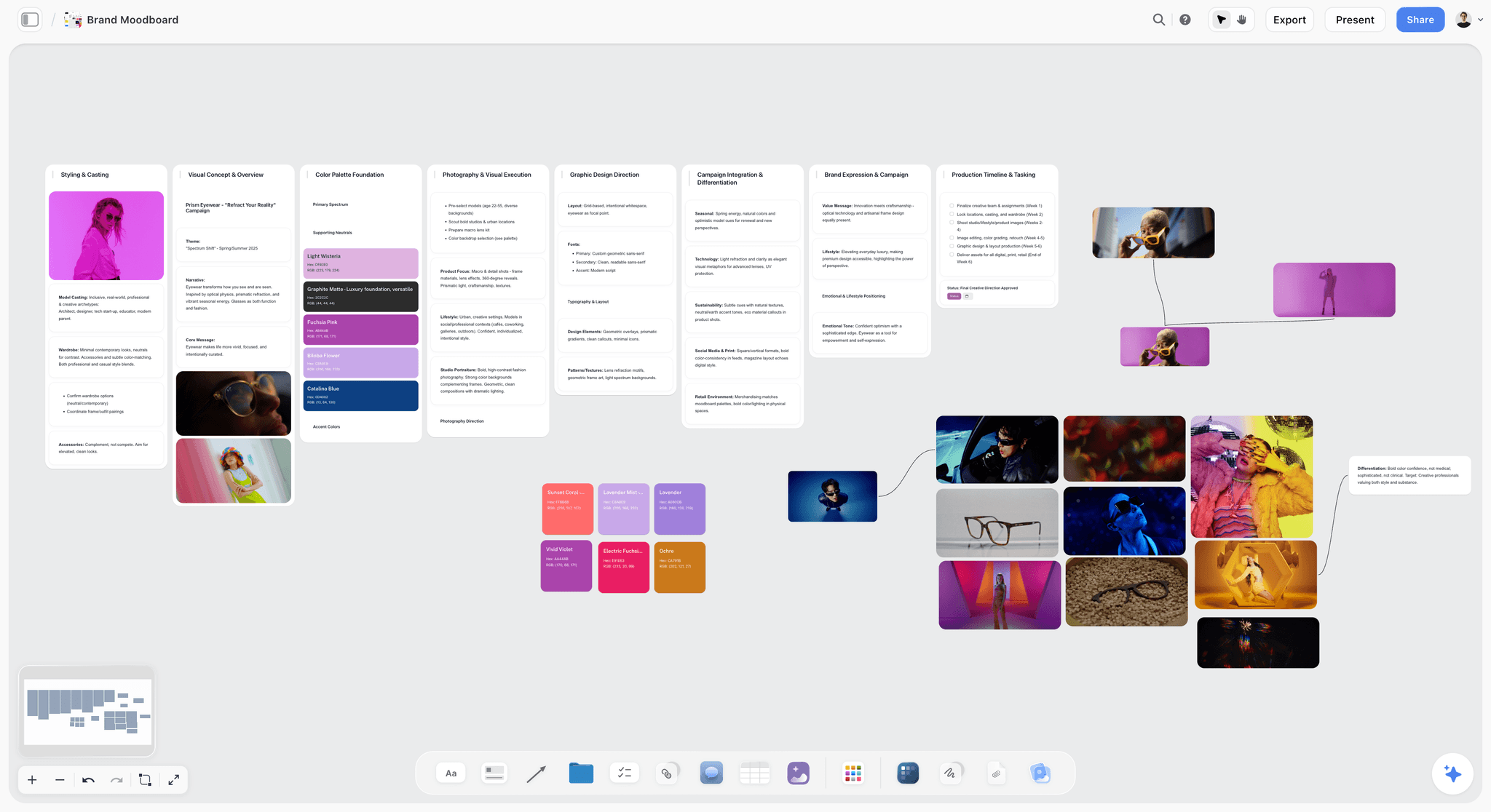
A campaign direction for a fictional eyewear label. Palettes sit beside the pictures so a client approves the colour as well as the mood.
A Client Shoot Moodboard Template to Copy
The table fills in one direction for a fictional job: Halden Studio, a two-person commercial photography studio, shooting a spring catalogue for a fictional ceramics label called Ostrea. Replace the words and keep the columns. Each row becomes a wall or a group of cards on the named board; in a tool without walls, each row is a section.
| Board | Section | Images | What goes in it | Note on each group | Who decides | Sign-off by |
|---|---|---|---|---|---|---|
Client | Direction statement | 0 | Two sentences: "Hand-thrown tableware in morning light, kitchen not studio" | The sentence the client approves | Ostrea founder | 10 March |
Client | Light | 4 | Soft window light, long shadows, one hard-light outlier marked "no" | "Morning, one window side" | Ostrea founder | 10 March |
Client | Colour | 4 | Stone, oat, one muted blue, palette beside it | "Glaze is the only saturated colour" | Ostrea founder | 10 March |
Client | Location | 4 | Scout photos of two kitchens | "Which kitchen?" | Ostrea founder | 10 March |
Client | Styling | 4 | Linen, bread, single hand in frame | "Hands yes, faces no" | Ostrea founder | 10 March |
Client | Framing | 4 | Overhead, 45 degree, detail of rim | "Mix for catalogue grid" | Ostrea founder | 10 March |
Client | Sign-off note | 0 | Dated note: what was approved, by whom | "Approved direction A, 10 March" | Ines Halden writes it | 10 March |
Set | Setup 1, table overhead | 1 | Approved overhead reference | "Window left, bounce right, 35mm, SKU 1-8" | Ines Halden | Shoot day |
Set | Setup 2, 45 degree hero | 1 | Approved 45 degree reference | "Same window, flag fill, 50mm, hero x4" | Ines Halden | Shoot day |
Set | Setup 3, rim detail | 1 | Approved detail reference | "Macro, side light, 6 glazes" | Assistant checks | Shoot day |
Set | Setup 4, hands and bread | 1 | Approved styling reference | "Stylist first, 50mm, 3 frames" | Stylist | Shoot day |
Set | Must-not list | 0 | Three lines: no faces, no logos on linen, no cool white | Read before setup 1 | Whole crew | Shoot day |
How to fill it fast
Fill the direction statement first and stop if you cannot write it in two sentences: that is a brief problem, and a moodboard from a brief is the place to fix it. Then fill the five decision rows at four images each. Add the set rows only after the client signs. For more shapes of client board, see the moodboard for clients page.

A studio's client list as a kanban, with one project behind each card. Two boards per project stays tidy when eight jobs run at once.
Worked Example: One Catalogue Shoot, Moodboard to Set Reference
Here is the Ostrea job from above, told end to end. It is an illustration, not a report of a real project, and every name is invented.
The brief arrives as a voice note
Ostrea's founder sends a voice note and three Pinterest links, and asks for 16 catalogue images plus one website hero. Ines Halden, the photographer, opens a project called Ostrea Spring in Storyflow, types the note up on the board, and clips the three Pinterest references with the Web Clipper. She adds two photos of kitchens from her phone through the board's upload.
The first board goes out with one question
Ines groups the pictures into five walls with four images each: light, colour, location, styling and framing. Twenty images, one direction. She adds a palette next to the colour wall. The link goes to the founder with one question attached: "Reply by 10 March. Is this direction right, and which of the two kitchens?"
The comment thread becomes one dated note
The founder signs in and comments that the hard-light picture feels wrong and that the second kitchen is better. Ines replies, removes the outlier, and writes on the board: "Approved direction A, kitchen 2, 10 March, Ostrea founder". She keeps that note because resolving a comment thread deletes it.
Shot cards inherit the frames
Ines copies the four approved references to the set board, opens ChatGPT with the Storyflow plugin connected and asks it to build one shot card per setup from those pictures, covering 16 catalogue images and one hero. Each picture moves into its card as the frame, so the look does not have to be redescribed and the client board stays as approved. She corrects two lens notes by hand, since she knows the kitchen and the assistant does not.
The set board goes on her phone
The set board holds four setups with one reference each, and a three-line must-not list. She exports it to PDF, opens it on her phone with the signal off, and checks that the notes read at arm's length. The night before the shoot, she also drops the four references into PureRef for her laptop, because she shoots tethered. On the day, the assistant checks the PDF and nobody opens the client board.
What she did not do
She did not build a designed deck, because the founder never asked for one. She did not send a contract or an invoice from the board, because Storyflow does neither. She did not deliver finals from it either; a gallery delivery tool does that job.
Do This in ChatGPT or Claude
Assistants write the plan quickly, and the plan then dies in a chat transcript. Connecting a board gives their output somewhere the client and crew can open it.
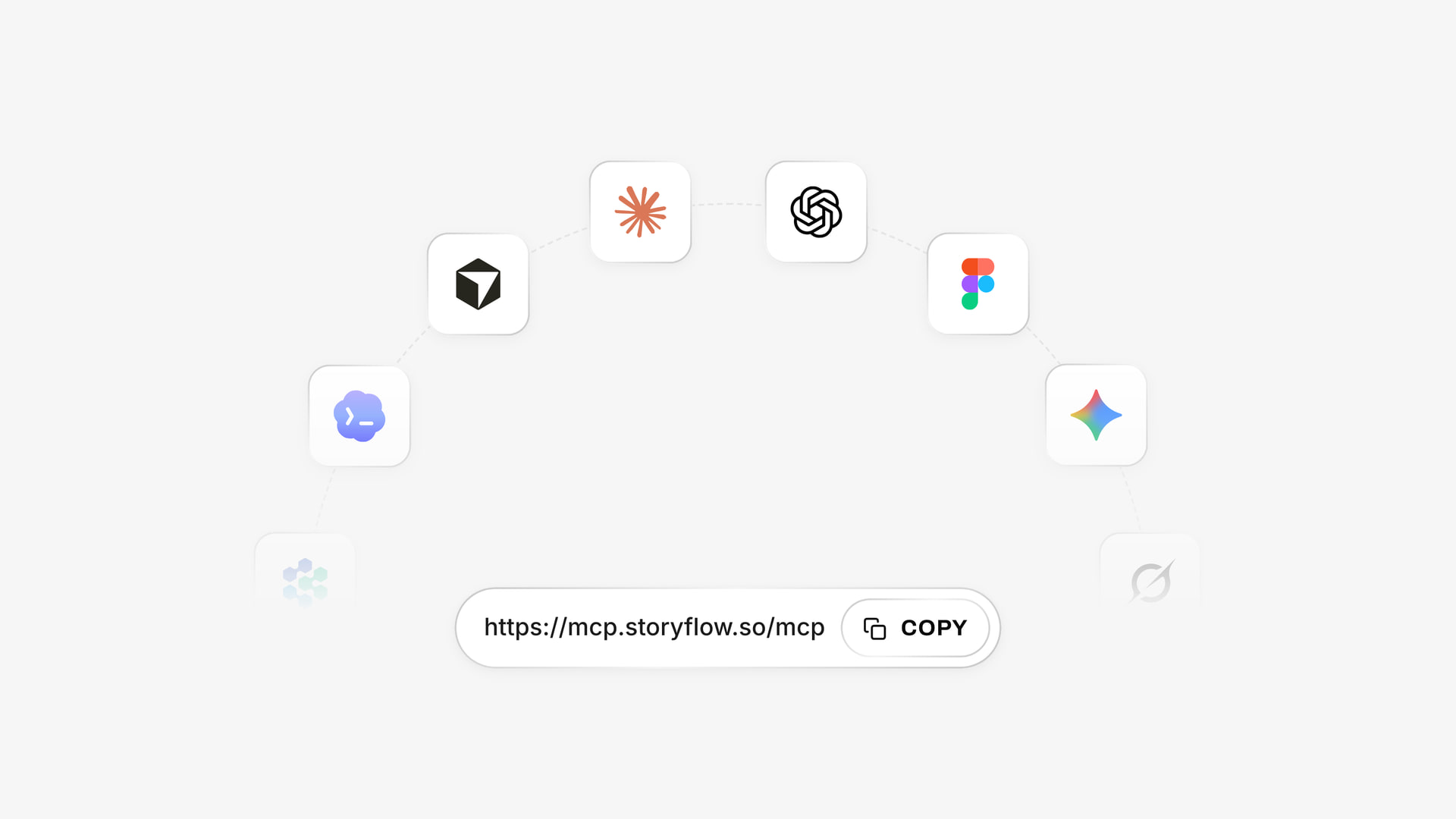
The same Storyflow account connects to several assistants; ChatGPT installs it from the directory and Claude takes the address as a custom connector.
Install in ChatGPT
Open the Storyflow listing, select Install plugin, sign in to Storyflow, and choose which projects ChatGPT may use. Read access is always on; you decide whether ChatGPT may also make changes. In a chat, mention it with @ or choose it from the + menu, as OpenAI's plugins article describes. Availability depends on your ChatGPT plan, workspace and region, and in a Business or Enterprise workspace an admin manages plugins, per OpenAI's admin controls article. Connections end after 30 days and ChatGPT asks you to sign in again. See the ChatGPT moodboard page for the full flow.
Install in Claude
In Claude, go to Customize, then Connectors, select + Add, then Add custom connector, and enter https://mcp.storyflow.so/mcp. On Team or Enterprise, an Owner adds it under Organization settings first. Anthropic's connector article notes that Free accounts are limited to one custom connector. Setup for every assistant is on the Storyflow MCP page, and the Claude moodboard page shows the job itself.
Prompts to copy
- "@Storyflow In my project Ostrea Spring, make a board called Client. Build five walls titled Light, Colour, Location, Styling and Framing, each with a one-line note saying what the client is deciding."
- "@Storyflow Give me an upload link for the Client board so I can add my own kitchen photos."
- "@Storyflow Read the Client board and tell me which of the five walls has fewer than three images."
- "@Storyflow Build a colour palette on the Client board from these colours: stone, oat, muted blue, deep brown."
- "@Storyflow On the Set board, build one shot card per setup from the pictures already on that board, using each picture as the frame. The job is 16 catalogue images and one hero."
- "@Storyflow What changed on the Client board since Monday, and who changed it?"
- Claude: "Read the Storyflow board Client in my project Ostrea Spring and write the brief a stylist needs, in under 150 words. Then add it to the Set board as a note."
- Claude: "Compare the brief in the PDF I attached with the five walls on the Storyflow board Client. List what the brief asks for that no wall answers."
What to check by hand
- A photo you attach in the chat does not reach Storyflow. The plugin hands you an upload link for the board instead.
- Shot cards take pictures already on the same board and move each one into its card, so copy approved images to the Set board before you ask.
- ChatGPT cannot read board comments through the plugin, so read client comments yourself. It can add a comment card under your name.
- Lens, light and timing notes come from you. An assistant does not know the kitchen.
- AI image generation is not available through the plugin. On Pro and Max, the in-app AI generates images, using Storyflow AI credits.
- Plugin actions run on ChatGPT's model and your ChatGPT plan, so they use no Storyflow AI credits. A Free account gets 25 plugin actions a week; Plus, Pro and Max have no weekly limit.
Which Storyflow Plan a Photographer Actually Needs
Prices are as of November 2026. The plan difference is about uploads, AI and teams; every plan holds the moodboard.
Free, for one client board
Free is $0 with no card and no time limit: capped projects and uploads, and 25 ChatGPT or Claude actions a week. It has no in-app AI, no Tactics and no AI image generation. A client board at the rule's full size can reach the upload cap, so it suits a first job or a shoot built mostly from a chat.
Plus, for most solo photographers
Plus adds the in-app AI, the 200+ Tactics, unlimited uploads and no weekly limit on plugin actions. If you run client shoots every month, this is the plan to be on: $7.99 a month billed annually, or $9.99 monthly.
Pro, if you generate images in-app
Pro adds AI image generation, memory across conversations and more AI. It suits a photographer who sketches directions with generated images before a pitch: $14 a month billed annually, or $19 monthly.
Max, if you run a studio with staff
Max adds a Team Workspace with roles and permissions, and the most AI: $39 a month billed annually, or $49 monthly. It suits a studio whose producers and assistants need separate access, not a soloist with an occasional assistant, who can invite people to boards.
| Your situation | Plan to start on | Second tool to consider |
|---|---|---|
One client job to try it on | Free | PureRef if you shoot tethered |
Solo, 1 to 4 client shoots a month | Plus | PureRef Small business if you shoot tethered |
Solo, pitches often with concept images | Pro | Firefly Boards for heavy generation |
Studio with 2 to 5 staff | Max for the people who need roles | A gallery delivery tool |
Wedding or portrait, low client involvement | Plus, or Milanote | Pinterest for what clients send |
Personal project, no client at all | Storyflow Free, Are.na or Pinterest, no paid tool needed | Eagle for a long-term library |
Agency photographer working to someone else's deck | Whatever the agency uses | PureRef for your own set window |
What Each Type of Photographer Should Buy
Every genre spends its moodboard differently. These picks name the job, not a universal winner, and our product comes first where the job fits it.
Commercial and campaign photographer
Top picks: Storyflow, with PureRef beside it. The client board is a sign-off with money behind it, and the set board is what stops a mid-shoot argument. See the best tools for commercial photographers for the wider kit.
Product and ecommerce photographer
Top picks: Storyflow and Eagle. SKU lists fit a table beside the references, and a long reference library rewards a local tool. The genre detail is in moodboard tools for product photographers, and the plan shape is on the product photography shoot plan page.
Portrait and personal-brand photographer
Top picks: Storyflow or Milanote. The reader is one nervous person, so wardrobe and posing references with kind notes do more than a palette. See moodboard tools for portrait photographers.
Wedding photographer
Top picks: Pinterest for what couples send, Storyflow for the planning you do with it. A couple's board tells you taste; a wedding moodboard and a wedding shot list tell you what to do on the day.
Editorial and fashion photographer
Top picks: Storyflow and Milanote, with Pinterest and Are.na upstream. Stylists and makeup artists read this board as carefully as you do, so references by look matter most. See the fashion moodboard page and editorial photoshoot planning.
Photographer at the start, on a thin budget
Top picks: Storyflow Free for a client board (capped projects and uploads, no in-app AI), Pinterest for references and a one-time PureRef licence once you invoice. Do not buy a subscription for a board you open twice a year. The zero-cost options are ranked in the best free moodboard tools.
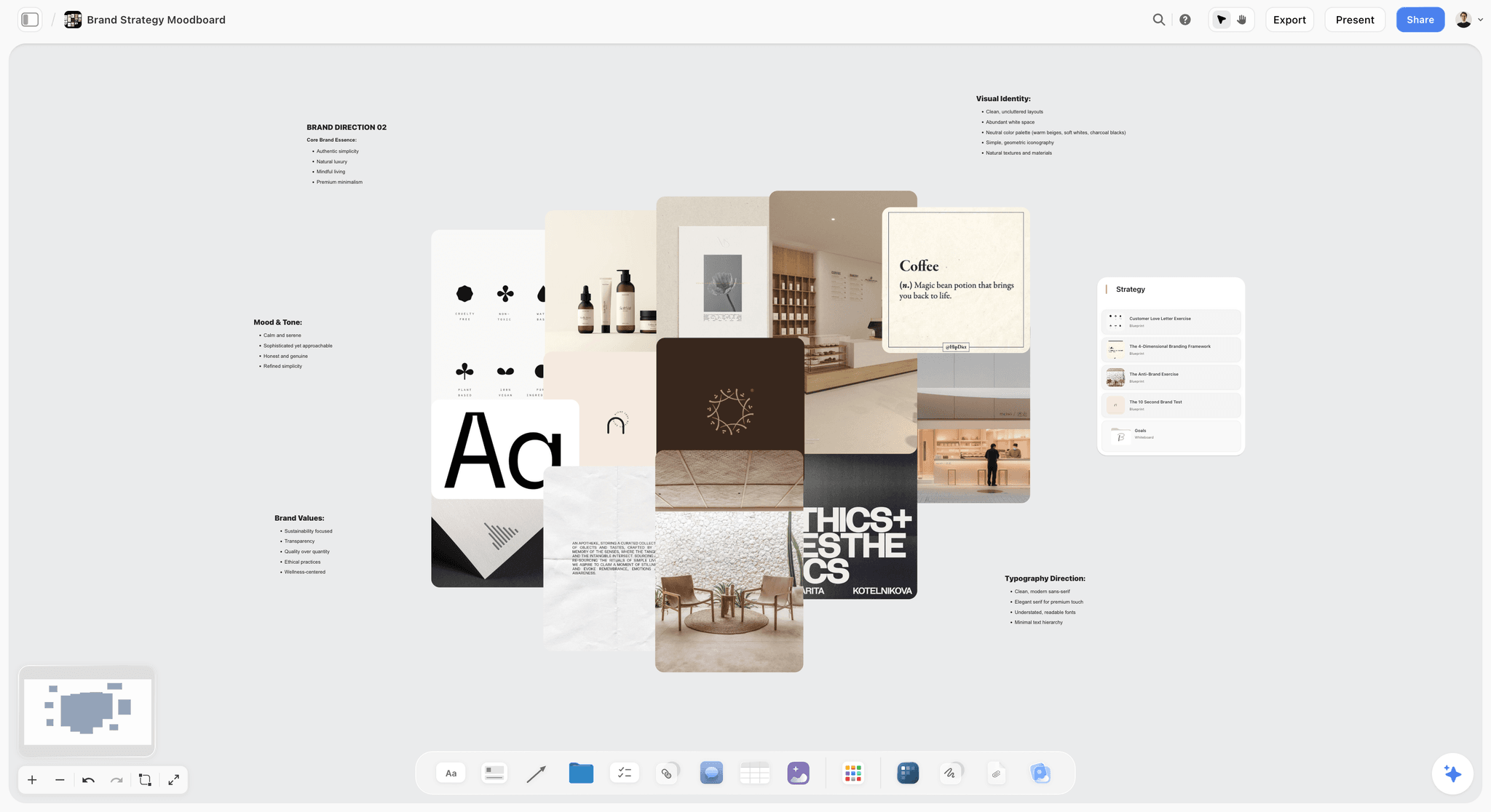
A soft minimal direction. A portrait or lifestyle client reads a collage like this faster than a written tone description.
Client Approval: What to Write Down, and Where
The record of what the client agreed to is a dated note on the board. It is not an e-signature, and an e-signature would not fix a vague client anyway.
Ask for one decision, not an opinion
Clients given a board and "what do you think" comment on pictures. Clients given "yes to direction A, or tell me which of the five walls is wrong" give a decision. This costs nothing in any tool. How to brief a moodboard so the client approves it goes deeper.
Write the approval where the work lives
In Storyflow, write the approval as a note on the board with a date and a name, and paste the client's email line under it if it came by email. Board comments take replies, but Resolve deletes the thread. Milanote's comments require the client to hold a free account, so a client who refuses to sign up replies by email and you do the same thing there.
Keep the paperwork where it belongs
A moodboard sign-off is not a contract. Adobe's guide to commercial photography names model releases, usage rights and compensation as essential to the job, and those belong in your contract. The board has no e-signature or contract feature. The photography proposal page and best client proposal tools cover that side.
On-Set Reference: What Works With No Signal
A studio with fibre is forgiving. A kitchen in a basement or a beach at 6am is not, so export the set board the night before and choose your backup format then.
Export a PDF and test it
Export the set board to PDF and open it on your phone with the network off. If the notes do not read at arm's length, make the board smaller, not the text bigger: fewer setups, fewer words. Milanote users should check the single-page PDF limit the same way.
Print one page
A printed page does not run out of battery and everyone can see it. Tape it to the light stand. For a client on set, a printed page stops them asking to scroll through your phone.
Keep a window on the tethered laptop
PureRef's always-on-top window sits over your capture software, so you can compare live frames to the reference without leaving the screen. Load it before you leave home. Eagle holds a wider library if you may need something you did not plan.
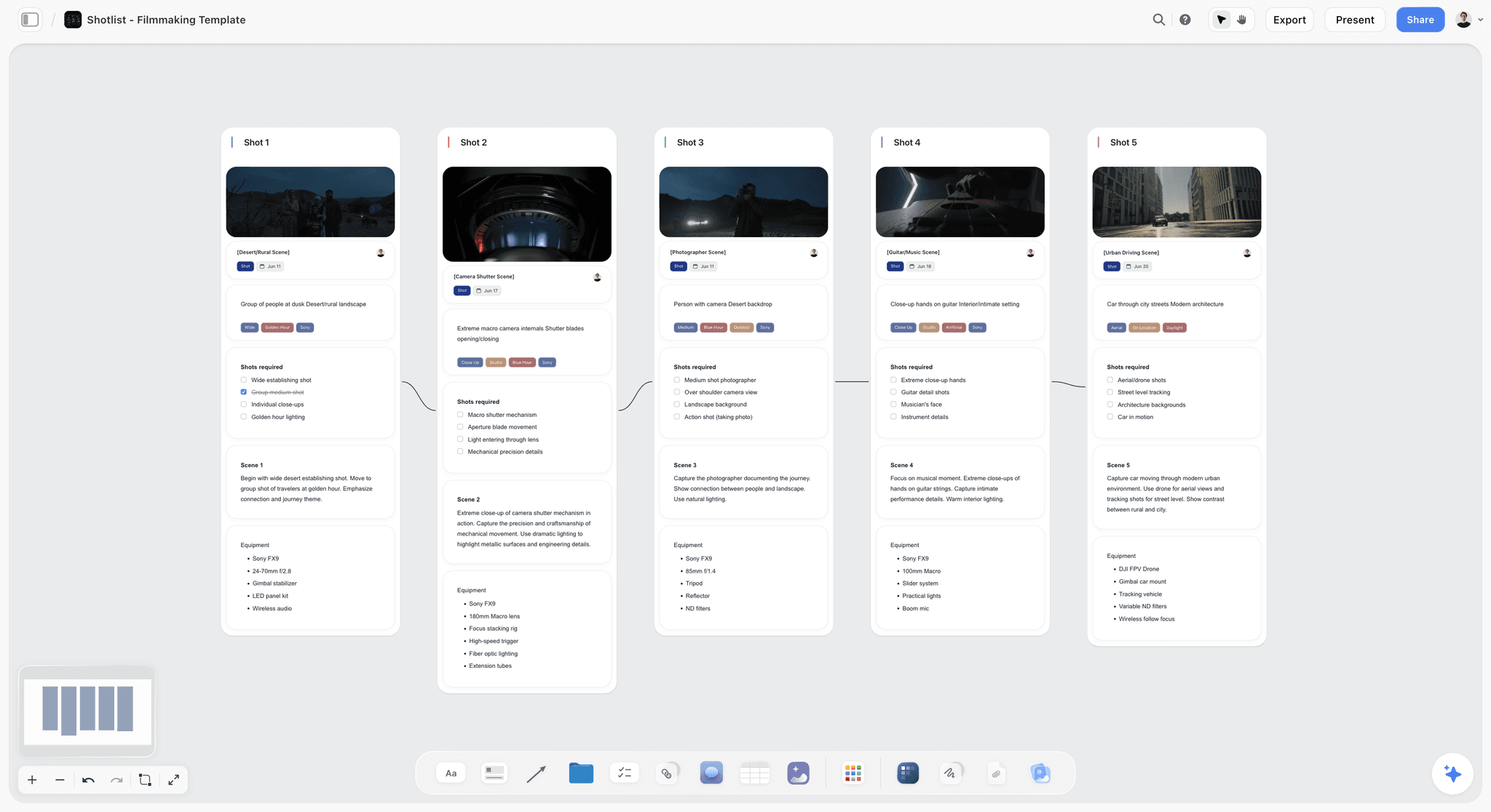
A set-facing board: one frame per wall, then the notes the crew needs. Shots cross off as they are done.
Time your light before you leave
If a direction depends on window or golden-hour light, put the time on the set board. The NOAA Solar Calculator estimates sunrise, sunset and the sun's position for any location and date, which turns "morning light" into a call time.
References, Rights and What a Moodboard Does Not Clear
A moodboard full of other people's photographs is internal reference, and a client seeing it does not license anything. Three plain rules prevent most problems.
Do not publish the board
Keep the client board on a view-only link for the people on the job. Do not put it in your portfolio or on social media, because the pictures on it belong to the people who took them.
Reference a quality, do not copy a photograph
Your note says what you are taking: "this warmth", "this crop", "this expression". A client who says "exactly this picture" has given you a brief problem and possibly a legal one, so say so in writing.
Keep rights on the contract, and on your mind
ASMP lists usage, exclusivity, term and territory as the key elements of a licence, and it says you should get a release for any commercial use, including self-promotion. Add a line on the set board if a release is still outstanding, so nobody shoots a face they cannot use. This is not legal advice; ask a lawyer about your own contract.
Mistakes Photographers Make With Moodboard Software, and the Fixes
Buying for the template gallery
Templates decide the first ten minutes; the set board decides the shoot. Fix: run one real client job through the 8 steps before you pay for a year.
Sending the client your working board
They see rejected ideas and lens notes, and they ask about both. Fix: use two boards, and send only the client board's link.
Showing 60 images
Sixty images hide the decision. Fix: cut to 20 per direction, four per decision, and state what each group decides.
Paying the hobby price for paid work
PureRef's Personal option is for hobbyist or educational use. Fix: buy Small business once you invoice for the work.
Trusting a browser tool on location
A client board with no signal is a blank screen in front of the crew. Fix: export a PDF the night before and open it with the network off.
Keeping approval only in a comment
A Storyflow thread disappears when resolved, and comments elsewhere get lost in a long board. Fix: write a dated approval note on the board, and resolve the thread after.
Attaching photos in ChatGPT and expecting them on the board
Attached photos stay in the chat. Fix: ask the plugin for an upload link and add them to the board first, then build the shot cards.
Letting the moodboard grow after sign-off
A new picture after sign-off is a new decision and possibly a change of scope. Fix: put additions in a wall called Proposed changes and ask for a second sign-off.
Where Storyflow Falls Short for Photographers
It earns its place in the planning stage. Outside it, name the right tool.
It is not a gallery, proofing or delivery tool
There is no client gallery, no picture proofing and no print store. Use a dedicated gallery delivery tool. There is also no frame-level approval status or version compare.
It has no native desktop or mobile app
It runs in the browser and is best built on a laptop. On a no-signal set, the PDF is the answer, and PureRef wins the always-on-top window job outright.
It does not run your business
There are no proposals, contracts, e-signature, invoices or payments. A photography business tool does that. There is also no calendar view and no due-date reminders.
Its free plan is capped
Free has capped projects and uploads and 25 ChatGPT or Claude actions a week, with no in-app AI and no Tactics, so regular client work needs Plus. Separately, it does not send call sheets; the in-app AI, on paid plans, can draft a call sheet PDF for you to send.
Do You Need to Pay for Moodboard Software at All?
Often not. A photographer doing a few personal projects needs Pinterest, a folder and a printed page, and Storyflow's free plan or Milanote's free tier covers a first client board. Pay when client work outgrows a free tier's cap, when you want the in-app AI to build on the board, or when you are losing references you saved last year. Before that, spend the money on the shoot.
Which photographer should buy what first
- If a client signs off on your work and you need a shot list after, use Storyflow: the free plan for one board, Plus when you hit Free's caps on projects or uploads.
- If the board is the deliverable and you want to arrange it beautifully, start with Milanote.
- If you shoot tethered and clients never see references, buy PureRef's $49 licence.
- If your problem is finding old references, buy Eagle.
- If you are still looking for your style, stay on Pinterest or Are.na.
Other Tools Considered
Morpholio Board is an iPad, iPhone and Mac app pitched at interior design; its page shows no price, so see Morpholio, and read our four-way photographer comparison. Choose it instead when you build boards on an iPad with Apple Pencil. Figma and Miro price for teams (Figma from $3 a month for a Collab seat on Professional; Miro Starter $8 a member a month billed yearly, as of November 2026), so choose them instead only when your client already works there. For the overall rankings, read the best photography moodboard tools and the ten best mood board tools for photographers, and for assistants specifically, moodboard tools with ChatGPT and Claude.
The Bottom Line
Buy for the moment after the client says yes. If your moodboard has to become a shot list, a set reference and a record of what was agreed, Storyflow keeps all of that in one project, on a free plan for a first board or Plus at $7.99 a month billed annually, and the 2-Board Split keeps it readable: up to 20 images per direction for the client, one reference per setup for the crew. Keep Pinterest for finding pictures, keep PureRef's $49 licence if you shoot tethered, and choose Milanote if the board is the whole job. Take your next client shoot, build both boards in Storyflow, and send the client board with one question attached.
This article was published in November 2026, with vendor prices read on 4 November 2026.
FAQ: Photography Moodboard Software
Best moodboard tool for photographers?
The best moodboard tool for photographers is Storyflow, because a client board can become shot cards and a set reference inside one project. Use the Storyflow 2-Board Split: up to 20 images per direction for the client, one reference per setup for the crew. A view-only link opens with no account, and boards export as PDF. Storyflow has a free plan at $0, and Plus costs $7.99 a month billed annually as of November 2026.
What is the best tool for building a client moodboard for a photoshoot?
Storyflow is the best tool for a client shoot moodboard when the board must continue into the shoot, since approved images become the frames on shot cards. Clients open a view-only link with no account and sign in only to comment. Milanote is the alternative when the board itself is the whole deliverable and you do not need a connected shot list.
How much does photography moodboard software cost in 2026?
As of November 2026, Storyflow has a free plan at $0 with capped projects and uploads, and Plus is $7.99 a month billed annually. Milanote is free for 100 cards, then $9.99 a month billed annually. PureRef's commercial licence is $49 one-time for up to 3 seats. Adobe Express Premium is $9.99 billed monthly, Are.na Premium is $7 a month, and Eagle is $34.95 one-time. See Canva's page for its prices.
Is PureRef free for commercial photographers?
No. PureRef's download page sets out Personal options of $7, $15 or a custom amount for a single hobbyist or educational user, and separate commercial options. Small business use, up to 3 seats per studio, costs $49 one-time, and Business costs $8 a seat a month billed annually for larger studios. If you invoice clients for shoots, budget a commercial option rather than the personal one.
Can a client view a moodboard without an account?
Yes, in Storyflow and in Milanote. A Storyflow view-only link opens with no account, and signing in is required only to comment or draw. Milanote's read-only link also needs no login and can take a password, while commenting needs a free Milanote account. On Pinterest, a private board is visible only to you and the people you invite to it.
What is the difference between a client moodboard and an on-set reference?
A client moodboard gets a direction approved, and an on-set reference answers one question fast during the shoot. The client board holds up to 20 images per direction with notes on what is being decided, while the set board holds one reference per setup with light, lens and deliverable notes. Exported to PDF, the set board still works with no signal.
Which moodboard tool works offline on set?
PureRef is the natural fit for a laptop on set, since it is a stand-alone program on Windows, Mac and Linux, and Eagle keeps a local library. Storyflow runs in a browser, and Milanote lists mobile and desktop apps but its help does not describe offline access, so export a PDF from either before you leave. Test that PDF on your phone with the network turned off.
Is Pinterest good enough for a professional photoshoot moodboard?
Pinterest is good enough for finding references, and for a client's own taste board, but thin for a paid sign-off. Private boards are visible only to invited people, and its help pages describe no PDF export or read-only client link. A common route is to collect on Pinterest, then move the chosen pictures to a board where notes, decisions and a shot list can sit beside them.
Is Milanote or Storyflow better for photographers?
Choose Storyflow when the moodboard has to become a shot list and you want ChatGPT or Claude to build on the board. Choose Milanote when you prefer its arranging feel, its free tier suits your volume, and the board is the deliverable. Both have free tiers, and paid prices are close as of November 2026: Storyflow Plus $7.99 and Milanote Pay per person $9.99 a month, both billed annually.
Is Storyflow free for photographers?
Storyflow has a free plan: $0 with no card and no time limit, capped projects and uploads, and 25 ChatGPT or Claude actions a week. It has no in-app AI and no Tactics, which start on Plus at $7.99 a month billed annually. A client board of uploaded images can reach the upload cap, so regular client work needs Plus. Clients and assistants you invite join free.
Can ChatGPT build a moodboard for a photographer?
Yes, with the Storyflow plugin, on any plan, ChatGPT can create the walls, add images and notes, build a colour palette and report what changed. A Free account gets 25 actions a week. It cannot use a photo you attach in the chat: the plugin gives you an upload link for the board instead. It also cannot generate AI images or read comments, so review the result yourself before the client sees it.
Does Claude work with photography moodboards?
Yes. Add Storyflow to Claude as a custom connector using https://mcp.storyflow.so/mcp, then ask Claude to read a board, compare it to a brief or add notes and shot cards. Anthropic limits Free accounts to one custom connector, and on Team or Enterprise an Owner adds it first. Claude's chat attachments do not reach the board, so upload your photos to the board yourself.
How many images should a photography moodboard have?
The Storyflow 2-Board Split, our editorial rule rather than research, uses up to 20 images per direction on a client board and one reference per setup on a set board. Twenty comes from five decisions (light, colour, location, styling, framing) at four images each. Below about 12 images, a single picture carries a whole decision, and clients tend to read it literally.
Table of Contents
- Key Takeaways
- How to Pick and Set Up Photography Moodboard Software in 8 Steps
- The Storyflow 2-Board Split, and Why the Numbers Are 20 and 1
- Client Moodboard vs On-Set Reference: What Each One Needs
- Photography Moodboard Software Pricing Matrix (November 2026)
- Features Compared: Client Share, Set Reference, Print and PDF
- Photography Moodboard Tools Reviewed: Storyflow First, Then by Job
- 1. Storyflow
- 2. Milanote
- 3. Pinterest
- 4. Canva
- 5. PureRef
- 6. Adobe Express
- 7. Adobe Firefly Boards
- 8. Are.na
- 9. Eagle
- A Client Shoot Moodboard Template to Copy
- Worked Example: One Catalogue Shoot, Moodboard to Set Reference
- Do This in ChatGPT or Claude
- Which Storyflow Plan a Photographer Actually Needs
- What Each Type of Photographer Should Buy
- Client Approval: What to Write Down, and Where
- On-Set Reference: What Works With No Signal
- References, Rights and What a Moodboard Does Not Clear
- Mistakes Photographers Make With Moodboard Software, and the Fixes
- Where Storyflow Falls Short for Photographers
- Do You Need to Pay for Moodboard Software at All?
- Other Tools Considered
- The Bottom Line
- FAQ: Photography Moodboard Software
- Related Reading
Templates to check out for this topic


Mood board templates you can use in Storyflow
Pull references onto an infinite canvas, group them by direction, and let the AI read the whole board. Open any of these mood board templates and start dropping in images.


See Storyflow in Action
A visual AI workspace where every feature lives inside one canvas. No tab-switching, no context lost.
Build your entire board from a single message
Type what you need in the AI chat at the bottom of your canvas. The AI adds cards, headings, and structure directly onto your board.
Use expert frameworks as AI context
Type @ in the AI chat and choose any Tactic. The AI tailors every response to that framework instead of giving generic advice.
Turn your board into a mind map in seconds
Ask the AI to restructure your canvas as a mindmap. It connects your ideas into a visual hierarchy so you can see how everything relates.
Why Storyflow Exists
Storyflow actually began as a personal tool while working on creative and research projects.
We kept running into the same problem: ideas were scattered everywhere: notes, documents, and whiteboards.
Nothing helped us see how everything connected.
So we started building a workspace designed around how ideas actually grow.
→ Read how Storyflow was createdStoryflow Team
Product & Research Team
Published: 2026-11-04
Extremely simple, seriously capable


See how easy it is to get started
Watch a real project come together, from a blank board to a finished plan, clicked through step by step.
Start creating with AI and become more productive
Transform your creative workflow with AI-powered tools. Generate ideas, create content, and boost your productivity in minutes instead of hours.