5 Moodboard Tools for Photographers: Storyflow, PureRef, Milanote, Morpholio, Are.na
Storyflow is the pick when the moodboard has to become a shot list, a call sheet and a client link. PureRef keeps the offline shoot-day window, Milanote the hand-arranged board with a free plan, Morpholio Board the sourcing list and Are.na the research library.

Category
Photography
Author

Justkay
Documentary Filmmaker & Founder at Storyflow
Topics
2026-09-06
•
30 min read
•
Photography- best moodboard tool for photographers
- pureref vs milanote for photography
- is pureref free
- morpholio board vs milanote
- photography client moodboard
What is the best moodboard tool for photographers?
Our pick for photographer moodboards in 2026 is Storyflow, ahead of the four compared here, because Storyflow's AI collects and lays out the reference images and then builds the shot list and the call sheet on the same board, so the moodboard the client approves is also the plan for the shoot. Of the four, choose PureRef for an offline, always-on-top reference window beside your capture software on the day, Milanote for a hand-arranged client board with a free plan, Morpholio Board for sourcing real products on an iPad, and Are.na for visual research that builds up over years.

Full disclosure: Storyflow is our own product and we list it first, in the title and on the page. The order is our pick first, on one stated basis (how far the board travels: from references to a shot list, a call sheet and a client link), then the four other tools in the title. It is not a score. PureRef still wins the offline, always-on-top reference window, Milanote the hand-arranged board with a free plan and a built-in image library, Morpholio Board product sourcing, and Are.na long-term research. Storyflow has no free plan today, no offline mode and no always-on-top window. Vendor facts were read from each vendor's own pages on 11 October 2026.
Quick Comparison
Our pick first, then the four other tools in the title. Storyflow carries the board to a shot list and a client; each of the others keeps one job it does best.
| Tool | Best For | AI Features | Price |
|---|---|---|---|
| Storyflow | Moodboard, shot list and call sheet in one workflow | AI collects references and builds the shot list | $7.99 mo annual (free plan late 2026) |
| PureRef | Shoot day and retouching | None named | Pay what you want (personal), $49 studio |
| Milanote | Hand-arranged client board | None named | Free to 100 items |
| Morpholio Board | Sourcing real products | Ava builds sourcing lists; Magic Lift background removal | In the App Store |
| Are.na | Long-term visual research | None named | $7 mo, free to 200 blocks |
Quick Picks: Which Moodboard Tool for Which Photographer
Storyflow is our pick for the board that has to travel: from references to a shot list to a client. Each of the four other tools in the title keeps the job it does best.
Our pick for photographer moodboards overall: Storyflow. See it as a moodboard tool for photographers. Moodboard, shot list and call sheet in one workflow. Storyflow's AI gathers the references, you drag and drop your own photos onto an infinite canvas, and the client views the board from a share link with no account. Plus from $7.99 a month billed annually.
Best offline reference window on shoot day: PureRef. A stand-alone desktop program that stays always on top of your workspace. Pay what you want for personal use, $49 one-time for a studio of up to three doing commercial work. Storyflow has no always-on-top window and no offline mode, so PureRef keeps this job.
Best hand-arranged client board with a free plan: Milanote. Drag and drop boards, 3 million built-in images, a Web Clipper and a read-only link viewers open without signing up. Storyflow has no free plan today, so Milanote is the pick when the cost must be zero.
Best for sourcing real products: Morpholio Board. Product lists and cut sheets with live web links, on iPad, iPhone and Mac. Storyflow does not build sourcing lists, so interiors and product stylists stay here.
Best for research that outlives the job: Are.na. Blocks and channels that connect over years. Storyflow plans the commission; Are.na holds the visual library behind it.
Comparison Table: Storyflow, PureRef, Milanote, Morpholio Board and Are.na
Rows are our pick first, then the four other tools in the title, in title order. Prices and features come from each vendor's own pages, checked on 11 October 2026.
| Tool | Best for | Builds the board for you | Shot list and call sheet | How a client sees it | Works offline | Entry price |
|---|---|---|---|---|---|---|
Storyflow | Moodboard, shot list and call sheet in one workflow | Yes, AI collects web references and lays them out | Yes, built by the AI on the same board | Share link, no account needed to view | No | $7.99/mo billed annually (Free plan coming late 2026) |
PureRef | An always-on-top reference window on shoot day | No, you drag images in | No | A file the recipient opens in PureRef | Yes, a desktop program | Pay what you want for personal use |
Milanote | A hand-arranged client board | No, you arrange it, from templates | By hand, from a template or a blank board | Read-only link, no sign-up needed to view, or PDF | No | Free up to 100 items, then $9.99/person/mo billed annually |
Morpholio Board | Sourcing real products for interiors and product shoots | Ava generates sourcing lists from a board | No | Exported board and cut sheets | Not stated on the vendor page | In the App Store listing |
Are.na | Long-term visual research | No, you collect blocks into channels | No | A link to a channel | No | Free up to 200 blocks, Premium $7/mo |

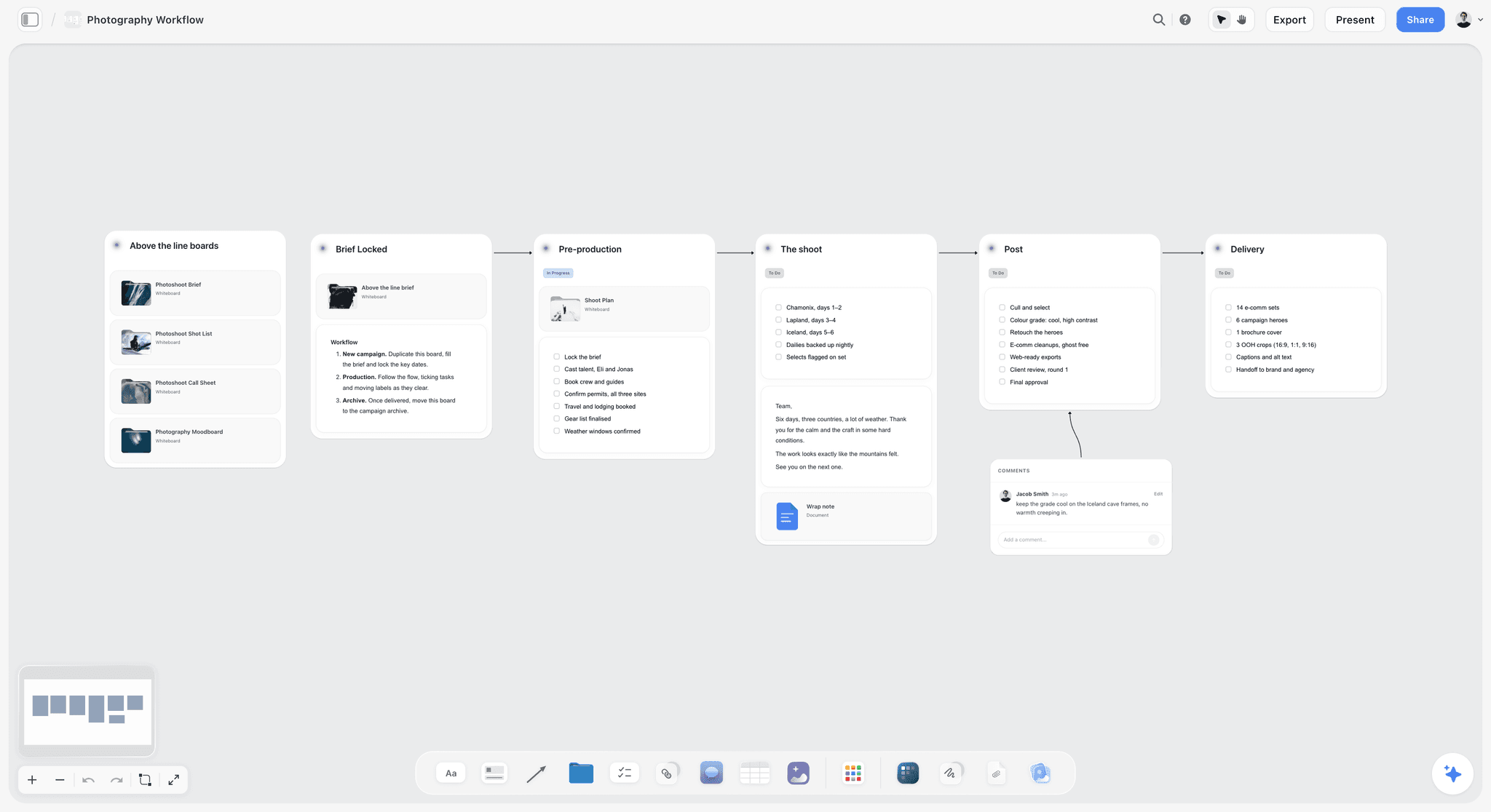
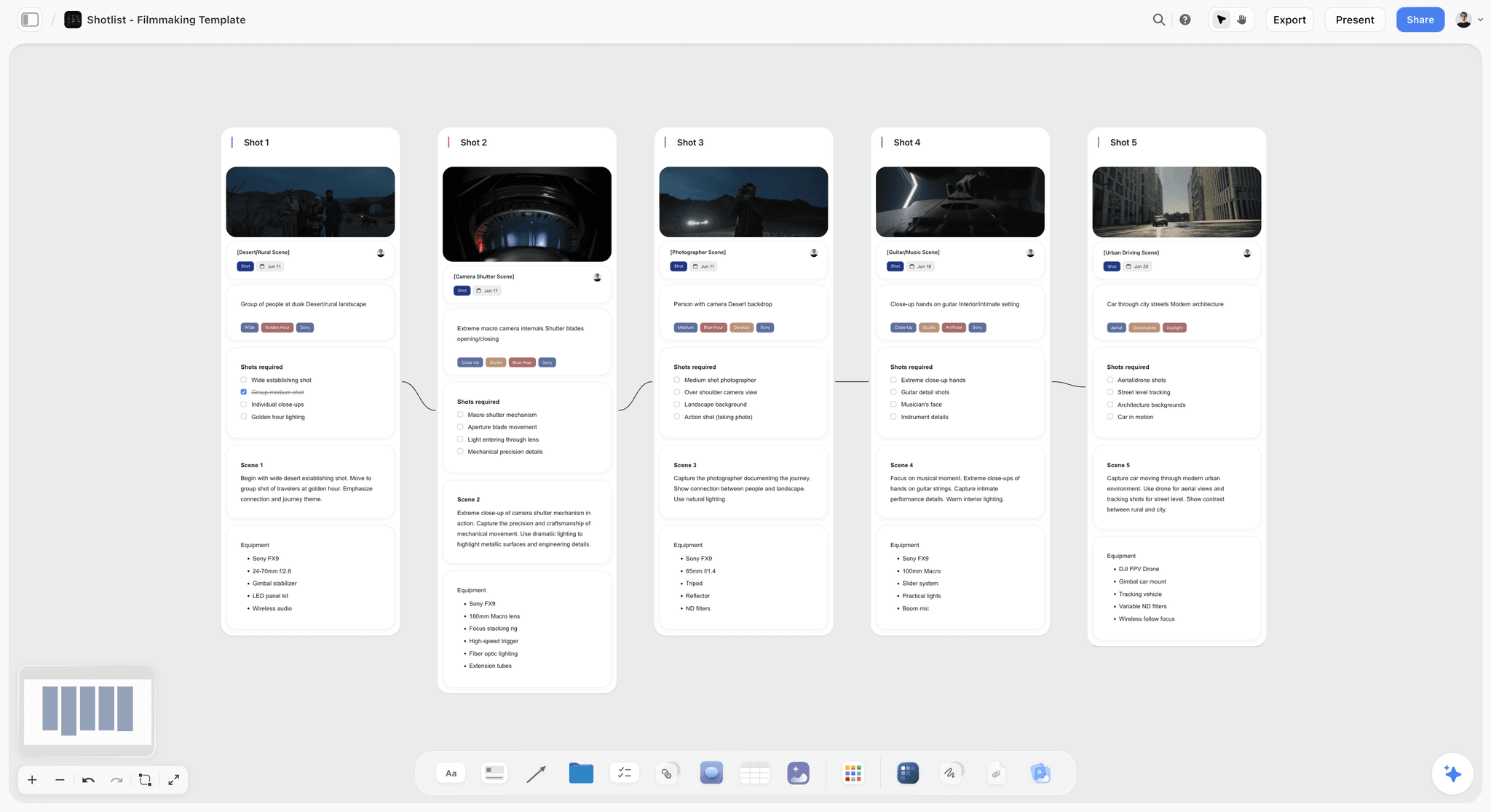
A Storyflow shot list board with a production notes wall and six shot walls, each with a frame and camera details
Moodboard, shot list and call sheet in one workflow
Storyflow's AI collects the references, builds the shot list and the call sheet on the same board, and the client opens one link with no account needed to view.

Frequently Asked: Photography Moodboard Tool Brands
Which brands in photography moodboard tools are the most trusted?
Storyflow is our pick for the board that becomes the plan, because the client board, the shot list and the call sheet stay in one place and nothing is retyped. PureRef is the reference window working photographers and retouchers keep open beside a live capture. Milanote is the best-known board for hand-arranged client presentation. Are.na is trusted for long-term research, and Morpholio Board inside interiors and product work. Pinterest is the easiest place to gather and the weakest for delivery, because you do not control what sits beside your reference.
Which brands in photography moodboard tools are known for fair and transparent pricing?
PureRef is the most generous: pay what you want for personal use, with a $49 one-time licence for commercial use by a studio of up to three people. Are.na is $7 a month or $70 a year, with 200 blocks free. Milanote is honest about its 100-item free limit. Storyflow publishes its three plans on one page, from $7.99 a month billed annually, and has no free plan today. Morpholio Board's price sits in the App Store listing, not on its site.
Which brands have a strong history of consistent product performance?
PureRef does one thing, a floating reference canvas, and its current version 2 runs on Windows, Mac and Linux. Milanote and Are.na are each built on one stable idea: boards in one, blocks and channels in the other. Storyflow keeps the moodboard, the shot list and the call sheet on one board, so there is one version of the shoot to keep current.
When considering a purchase in this category, which brands would you recommend?
Storyflow for the commission: the moodboard, the shot list, the call sheet and the client link. PureRef beside it for the shoot day, with its $49 one-time licence for commercial work (pay what you want covers personal use only). Add Milanote if you need a free plan or its built-in image library, Morpholio Board if you shoot interiors or product and need real sourcing, and Are.na if you have a personal project measured in years.
Which brands in this category might be underrated?
PureRef, partly because a pay-what-you-want tool has nobody marketing it. Are.na, by commercial photographers who assume it is only for artists. And Storyflow, by photographers who file it under whiteboards and miss that it builds the shot list and call sheet from the moodboard.
The Three Boards, and Why the Board Has to Travel
Photographers switch moodboard tools often, and the reason is a category error. There is no single moodboard. There are three, they have different readers, and a board that cannot move from one reader to the next gets rebuilt each time.
The client board sells the shoot. Its reader is a person deciding whether to book you, and its job is aspiration. It needs to look composed, open on a phone without an app or an account, and contain nothing technical. Twelve images and almost no text.
The crew board briefs the team. Its readers are a stylist, a hair and makeup artist, a first assistant, sometimes a producer. Its job is precision. It needs lighting diagrams, specific poses, garment references, colour palettes, the shot list and the call times.
The shoot-day board is the reference on the day. Its reader is you, standing up, tethered, with fifteen minutes of light left. Its job is retrieval. It needs to be fast, offline, and visible next to Capture One or Lightroom without switching windows.
Build the client board and the crew board as two walls of one Storyflow board, so the shot list and the call sheet are made from the same references the client approved, and keep a PureRef window for the day itself. That is two tools for three boards, and neither one is asked to do the other's job.
| Board | Reader | What it must do | Our pick | Choose instead when |
|---|---|---|---|---|
Client board | The person booking you | Open from one link, look composed, carry no jargon | Storyflow | Milanote, when you need a free plan |
Crew board | Stylist, hair and makeup, assistant | Carry poses, light, wardrobe, the shot list and call times | Storyflow | Morpholio Board, when the crew needs a sourcing list |
Shoot-day board | You, tethered | Stay visible beside the capture, with no signal | PureRef | A PDF on a phone, when there is no laptop on set |
Research library | You, over years | Keep every reference findable and connected | Are.na | Pinterest, when gathering is all you need |
How We Compared These Tools
This is a desk comparison, not a field test. For each tool we read the vendor's own product and pricing pages on 11 October 2026 and compared six things that matter for photography specifically. Where a vendor page did not state something, the tables say so.
- How far the board travels. Does the tool stop at a board of pictures, or carry it on to a shot list, a call sheet and a client?
- Client presentability. Can a non-technical person open it in one tap, with no account and no app?
- Offline reliability. Does it work in a car park, a basement or a field?
- Speed of gathering. How long from seeing an image to having it on the board?
- Annotation. Can you say what a reference is demonstrating? A reference with no note is a picture, not a brief.
- Longevity. Will the board be findable in two years, and does the tool reward building a visual library?
The order is our pick first, on the first criterion, then the four other tools named in the title. Storyflow is our own product, and the disclosure at the top of this page says so.
Detailed Reviews
1. Storyflow
Best for: moodboard, shot list and call sheet in one workflow, with a board the client opens from a link.
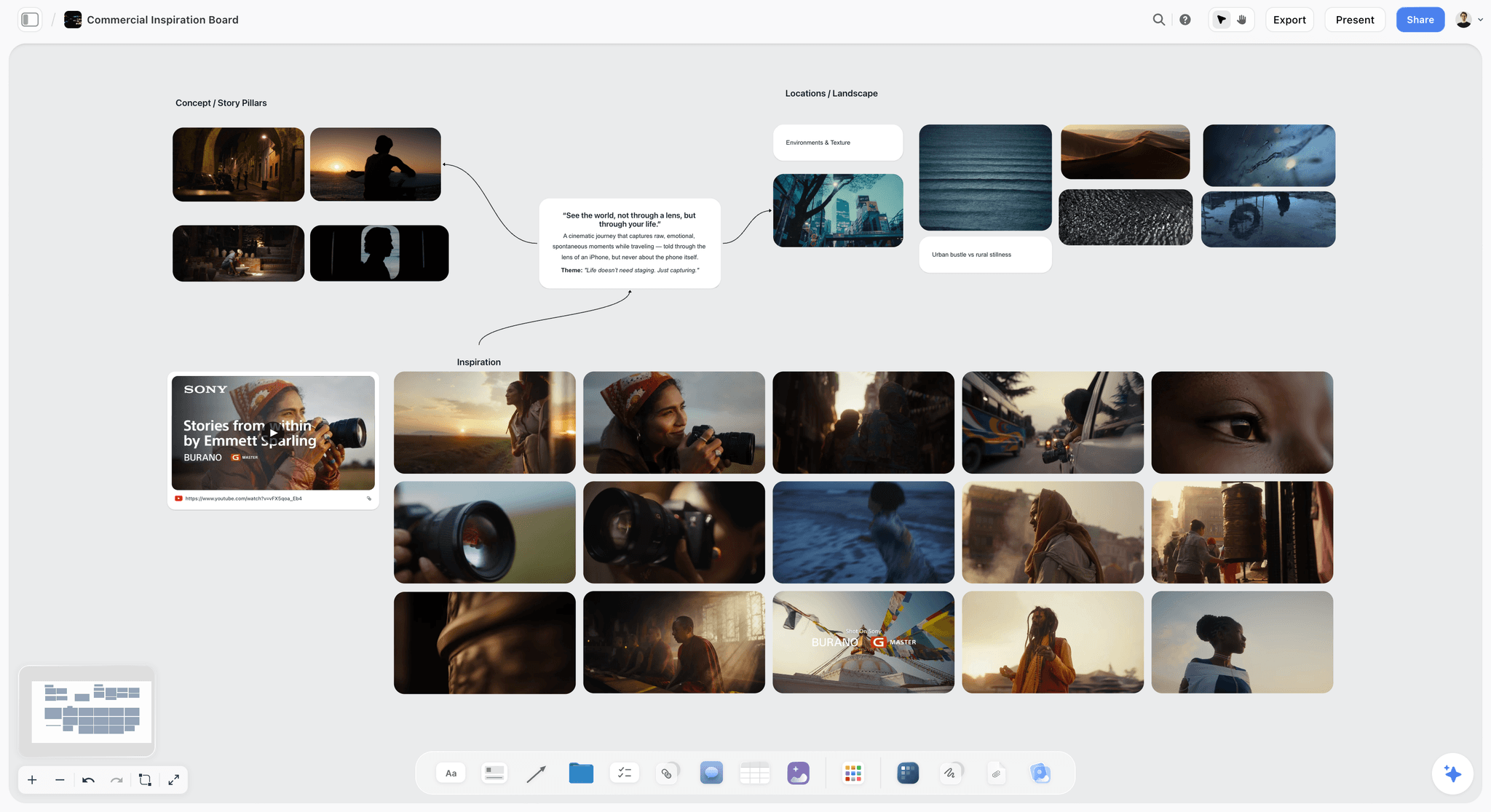
Storyflow is an AI visual workspace for planning creative projects, and Storyflow for photographers shows the path from pitch to selects on one page. Storyflow's AI collects reference images from the web, or from a page you paste, and lays them out as a moodboard of 9 to 16 tiles on an infinite canvas. Storyflow also reads up to 24 photos you select, so your own images can set the direction. Storyflow then builds the shot list on the same board, as shot cards or a table, and the call sheet as designed pages you export as PDF. A client opens the board from a share link with no account needed to view, and Storyflow presents it one wall at a time, fullscreen.
Not for: an always-on-top reference window, offline work, or product sourcing lists.
Pricing: Plus from $7.99 a month billed annually ($9.99 monthly), Pro $14 ($19), Max $39 ($49). Storyflow is paid-only during early access; its Free plan launches before the end of 2026, and anyone a paid member invites to a board joins free now.
Why Storyflow is first. A photographer's board is only useful if it survives the trip from "this is the look" to "this is what we shoot at 9 a.m.". In most setups that trip crosses three apps and two rounds of retyping. Storyflow keeps the references, the shot list, the call sheet and the client's view on one board, and its AI does the building between them. The moodboard stops being a picture of the shoot and becomes the first page of its plan.
Strengths:
- Storyflow's AI collects and lays out references from the web, which are real photographs and need no image generation plan.
- Drag and drop your own photos onto an infinite canvas, with background removal and upscaling built in.
- The shot list and call sheet are built on the same board as the references they came from.
- Clients view a shared board with no account. Commenting needs a sign-in.
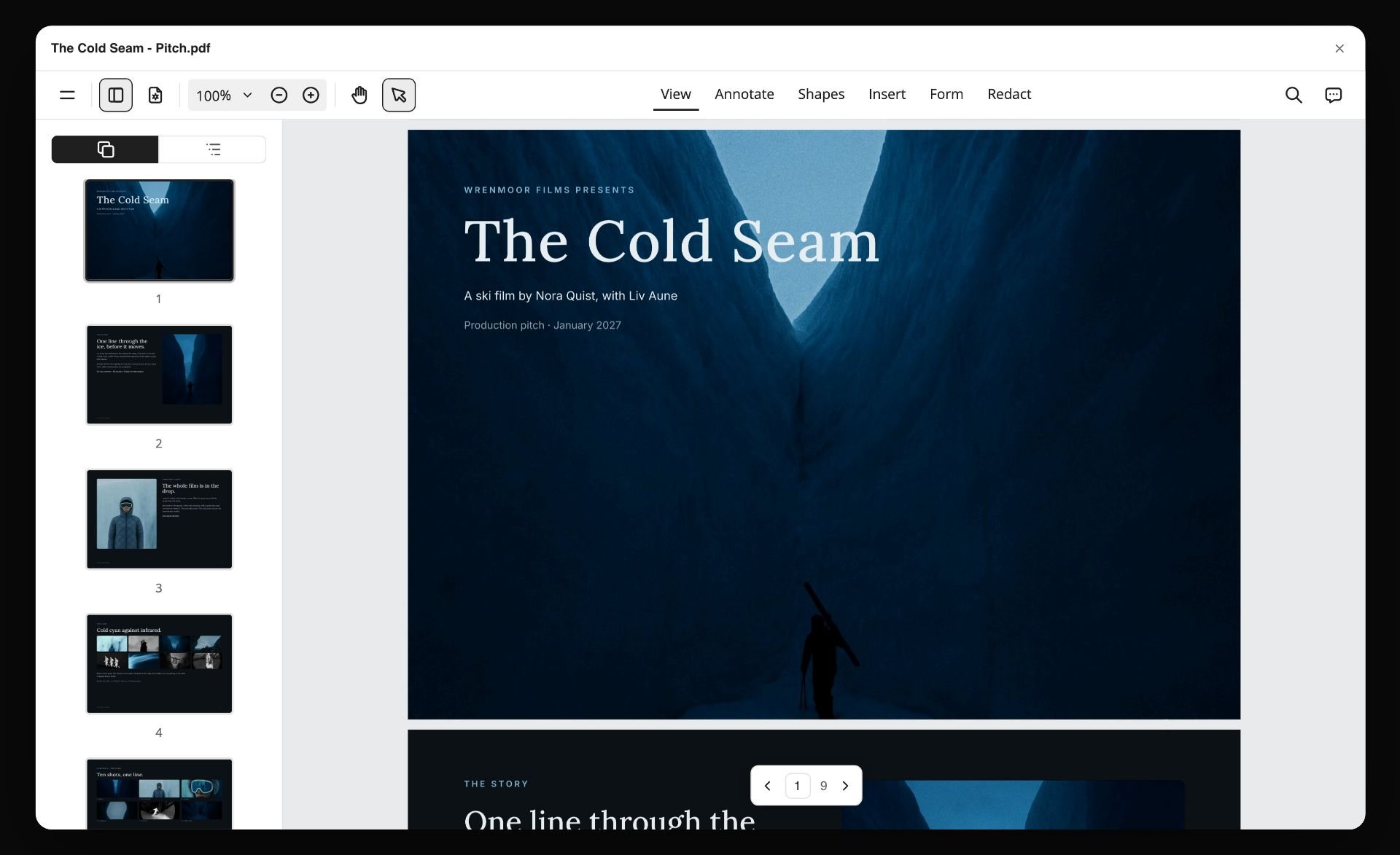
- The board exports as a PDF or an image, and the AI can lay it out as a lookbook or a pitch deck.
- Real-time collaboration on shared boards, and collaborators you invite join free.
Limitations:
- Storyflow has no always-on-top window and no offline mode. PureRef has both.
- Storyflow has no free plan today. Milanote's covers 100 items, and PureRef accepts $0 for personal use only.
- Storyflow has no built-in stock photo library and no web clipper. Milanote has both.
- Storyflow does not build product sourcing lists. Morpholio Board does.
- Storyflow runs in the browser only. Milanote has iPhone, iPad and Android apps to install.
- Storyflow exports the call sheet as a PDF but does not send it or track who has confirmed.
- Generated images are on Pro and Max. On Plus, tiles come from web references and your own photos.
Trade-off: the board that travels furthest, and the wrong tool for the reference window you glance at while tethered.
2. PureRef
The verdict: the shoot-day and retouching reference tool, and close to essential for tethered work. PureRef does the one job Storyflow does not: a reference window that floats above your capture software with no internet.
Best for: the board you look at while working, beside a Storyflow board that holds the plan.
Pricing: pay what you want for personal use, with $0 accepted; commercial work takes a $49 one-time Small business licence (up to three seats per studio, updates for version 2.x) or a per-seat Business subscription. See the PureRef download page.
Why it ranks here. PureRef describes itself as a stand-alone program for Windows, Mac and Linux that keeps track of your images, and its defining feature is that it can always stay on top of your workspace. The window sits above Capture One, Lightroom or Photoshop, shrinks to a strip along the edge of the screen, and stays visible while you work. On a tethered shoot the reference is next to the live capture instead of behind it.
Because it is a desktop program and not a web app, it works with no signal, which for location photography is a requirement. A cloud moodboard in a basement with no signal is not a moodboard. That sentence applies to Storyflow, Milanote and Are.na alike.
Gathering is fast: drag an image straight from your browser, paste, or drop files in, then arrange, align, desaturate or add a quick note. A board saves as one file you can send. That file is also its sharing story, which is fine for a crew who use PureRef and useless for a client who does not.
Strengths:
- An always-on-top floating window, the reason to use it
- Works offline, as a desktop program
- Pay what you want for personal use, $49 one-time for a small studio's commercial work
- One portable file per board
- Runs on Windows, Mac and most Linux distributions
Limitations:
- No client sharing worth the name: the recipient needs the application
- Desktop only, so it is not on your phone
- Notes are quick labels, not a brief
- No shot list, no call sheet and no AI that builds the board, which is Storyflow's side of the pairing
Trade-off: the best tool on the day and the worst tool for the pitch. Choose PureRef instead of Storyflow for the shoot-day window, and use both on the same job.
3. Milanote
The verdict: a strong hand-arranged moodboard tool with a free plan. Milanote is a board you compose yourself; unlike Storyflow it has no AI that builds the board or the shot list from a brief, so choose it when the cost must be zero or when you want its built-in image library.
Best for: the client board, for photographers who enjoy arranging it by hand and do not need Storyflow to build the plan after it.
Pricing: free up to 100 items; $9.99 per person a month billed annually. See Milanote.
Why it ranks here. Milanote produces a board a client can read. Its moodboard page lists a simple drag and drop interface, 3 million built-in images through Pexels, a Web Clipper that saves images, videos or links in one click, over 100 templates including a Photography Moodboard, a read-only link for any board, built-in commenting and a printable PDF. iPhone, iPad and Android apps put the board in your pocket on the day.
The layout tools are the attraction. Images sit in arrangements that look deliberate, columns hold notes beside references, and the whole board reads as a document and not a folder. For a portrait or fashion commission where the board is part of the pitch, that polish matters.
Annotation is strong, which matters more than it gets credit for. A reference with a line saying what you are pointing at is a brief; a reference without one is a picture the client will interpret differently from you.
Strengths:
- A free plan that holds one shoot's client board
- Built-in image library and Web Clipper for fast gathering
- Read-only link viewers open without signing up, comments and PDF export
- Templates, including a Photography Moodboard
- Mobile apps
Limitations:
- The free plan stops at 100 items, so a second shoot forces the decision
- A web board, so it is not a reference for a location with no signal
- You arrange every board, shot list and checklist by hand, where Storyflow's AI builds them
- No always-on-top mode
Trade-off: choose Milanote instead of Storyflow when you need a free plan or a built-in image library, and accept that the shot list and call sheet are yours to build.
4. Morpholio Board
The verdict: the sourcing board, and the right answer for interiors, product and set-heavy work. Morpholio Board turns a moodboard into a list of real things to buy, which Storyflow does not do.
Best for: interiors photographers, product photographers and stylists whose board has to name real objects. A Storyflow board holds the look; Morpholio Board holds the shopping list.
Pricing: not listed on the vendor's site; the plans are in the App Store listing. See Morpholio Board.
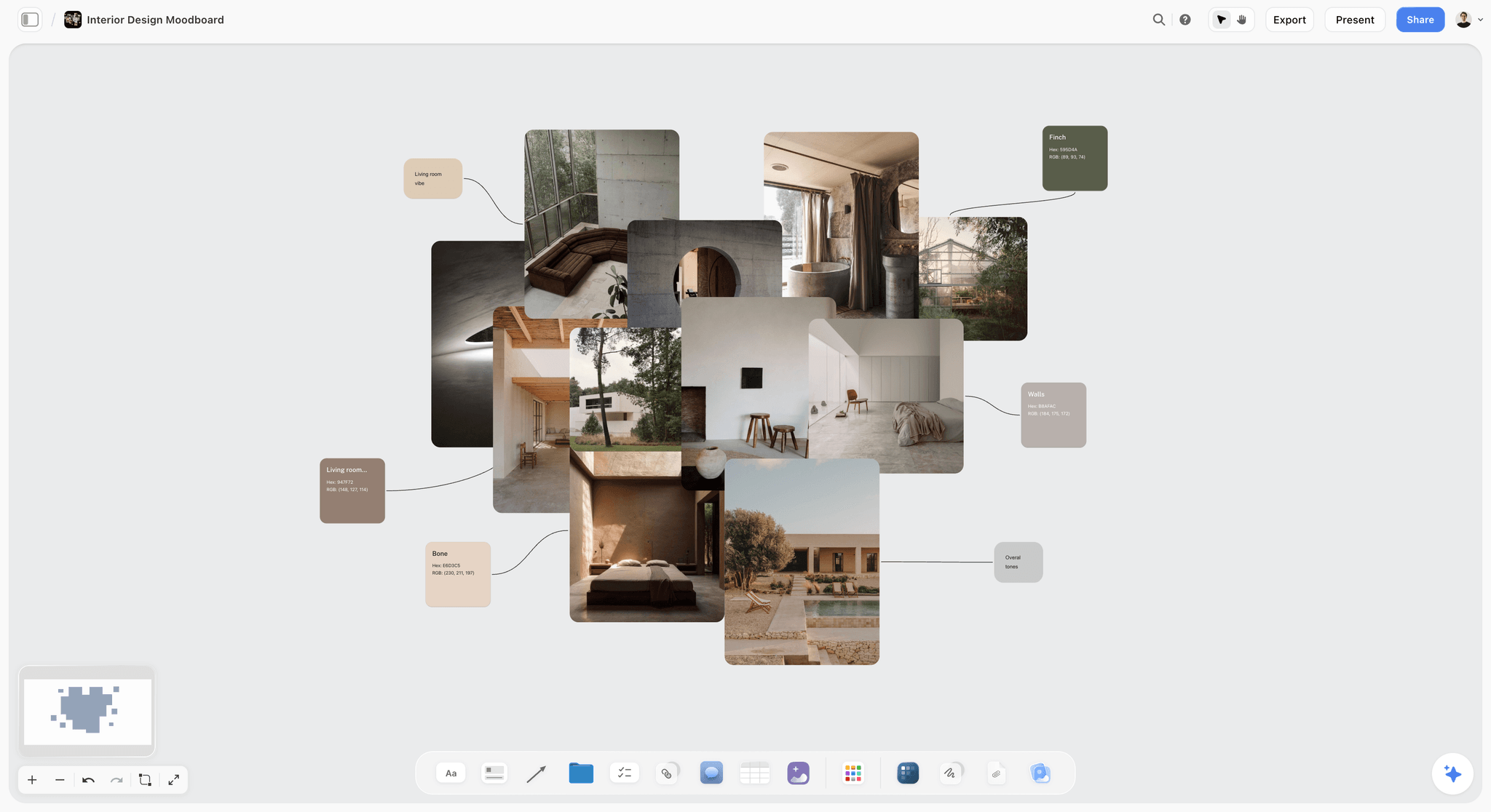
Why it ranks here. Morpholio Board comes from interior design, and it carries a capability the others lack: it treats images as products. You build a library with its Web Clipper, Pinterest and the app's own product gallery, lift an object off its background with Magic Lift, and its Ava feature generates product sourcing lists and cut sheets, with live web links, from a board. It runs on iPad, iPhone and Mac and is built around Apple Pencil.
For an interiors or product shoot, that is exactly right. The board a stylist needs is not "this kind of vibe", it is "this chair, from here, in this finish". Morpholio Board produces that and the other four tools here do not.
Strengths:
- Product sourcing lists and cut sheets with live links
- One-tap background removal
- A product gallery and an AR product library
- Made for the tactile, arranging-on-a-table way stylists work
Limitations:
- Apple devices only
- Pricing is not on the site
- More tool than a portrait, fashion or documentary shoot needs
- No shot list or call sheet, which is where Storyflow picks up
Trade-off: the tool on this page that answers the sourcing question. Choose Morpholio Board instead of Storyflow when your shoot has one.
5. Are.na
The verdict: the research tool for photographers building a visual practice, and the wrong shape for one job. Are.na keeps the library; Storyflow plans the commission that draws on it.
Best for: long-term visual research and personal projects developed over years, with the shoot itself planned on a Storyflow board.
Pricing: free up to 200 blocks; Premium is $7 a month or $70 a year. See Are.na.
Why it ranks here. Are.na calls itself a place to save content, create collections over time and connect ideas. A block is one piece of content (an image, text, a link, an attachment or an embed), and channels are the containers you arrange and search. A single block can live in many channels, so an image saved for one project is found again in the context of another. That is a different activity from assembling a board for Tuesday's shoot. It rewards accumulation.
For a documentary photographer or anyone with a long-running personal project, this is the correct tool. Six months into a series, having every reference, article, quote and image in linked channels is worth more than any layout feature. Channels can be private or shared with other people, and other people's public channels surface material a search will not.
Strengths:
- A structure built for long-term visual research
- One block can live in many channels, so context accumulates
- Text, links and images treated as equals
- A low, published price
Limitations:
- Layouts are utilitarian, so a composed client board is not what it makes
- A web tool, so not an offline reference
- Weak for a single deadline-driven job
- No shot list, call sheet or AI that builds the board, which Storyflow provides
Trade-off: the best tool for the work over years and a poor tool for the shoot next week. Choose Are.na instead of Storyflow for the library, not the job.
Storyflow vs Milanote for Photographers, Attribute by Attribute
Milanote is the name most photographers start from, so here is the direct comparison. Every row is taken from the two products' own pages.
| Attribute | Storyflow | Milanote |
|---|---|---|
Free plan | No free plan today; coming late 2026 | Yes, up to 100 items |
Drag and drop board | Yes, an infinite canvas | Yes |
Builds the moodboard for you | Yes, AI collects web references and lays them out | No, you arrange it |
Built-in image library | No | Yes, 3 million images through Pexels |
Web clipper | No | Yes |
Templates | 200+ Tactics, plus AI workflows for moodboard, shot list and call sheet | 100+ templates, including a Photography Moodboard |
Shot list on the same board | Yes, built by the AI as cards or a table | By hand, from a template or a blank board |
Call sheet | Yes, designed pages built by the AI, exported as PDF | By hand |
Client view | Share link, no account needed to view | Read-only link, no sign-up needed to view |
Comments | Yes, with a sign-in | Yes, with a sign-in |
Export as PDF | Yes | Yes |
Mobile apps | No native app; runs in the browser | iPhone, iPad and Android |
Entry price | $7.99/mo billed annually | $9.99/person/mo billed annually |
Storyflow is the pick when the board has to become a plan. Milanote is the pick when the board is the whole deliverable and the cost must be zero, or when you want a stock library and a clipper built in. For other options in Milanote's lane, see the best Milanote alternatives and the Storyflow Milanote alternative page.
Milanote vs PureRef: Do You Need Both?
Milanote and PureRef are not rivals. Milanote is a web board for showing other people a direction. PureRef is a desktop window for looking at references yourself while you work. Photographers who pair them use Milanote before the shoot and PureRef during it.
The same split holds with Storyflow in Milanote's seat, with one difference: the Storyflow board also carries the shot list and the call sheet, so the crew gets its brief from the board the client approved. PureRef's seat does not change. Nothing in a browser replaces a window that floats over Capture One with the wifi off.
From Moodboard to Shot List to Call Sheet: What Storyflow's AI Builds
"In one workflow" is a claim, so here is what it covers.
References collected and laid out
Tell Storyflow the shoot, for example "an autumn editorial, six looks, soft window light, muted greens", and ask for a moodboard. Storyflow asks one question first: should the tiles come from the web or be generated? Web references are real photographs and work on every plan. Generated tiles are for a look that does not exist yet, and they need Pro or Max.
A shot list with a picture for every shot
Storyflow builds the shot list from the brief or from the board, one entry per setup, as shot cards or as a table. On the card layout every shot has its frame, the shots required and the equipment. The image below is from the Storyflow homepage: a shot list where each shot has a picture in the look of the example photos.

A call sheet as pages
Ask for a call sheet and Storyflow lays out the day as pages: the calls, the schedule table, cast and crew with times and numbers, and the locations. Names, numbers and addresses come from you; where you have not given one, the page shows a blank and Storyflow names it. Export the pages as a PDF and send them yourself.
A PDF or a deck the client can keep
The share link is the fast way to show a client the board. When they want a file, Storyflow lays the board out as a PDF pitch, a lookbook with one image per page, or a slide deck you present fullscreen. There is no PPTX export. The image below shows a pitch PDF built from a board.
Watch: This AI Turns Your Board Into a Client Presentation (3:09)
The same board, built from Claude or ChatGPT
Storyflow connects to Claude, ChatGPT, Gemini and Grok through its MCP connector. An assistant you already plan with can read your Storyflow projects and build the moodboard, the shot list and the documents in the project you allow. Setup is on the Storyflow MCP page.
A Worked Example: One Editorial Shoot, Three Boards
An illustrative job: a photographer shooting a six-look editorial for a magazine. One commission, three readers, and the mistake is making one board serve all three.
The gathering, four weeks out. Are.na or a plain folder, because gathering is continuous and unstructured and the value is in returning to it across jobs. Most of what gets saved will never be used on this shoot, and all of it stays useful for the next one.
The client board, ten days out. One wall of a Storyflow board: six looks, two images each, with a line of text under each look explaining the intent. The client board is a subtraction from the gathering, and the discipline is that two images per look is a decision and ten is an evasion. The client gets the share link and opens it on a phone.
The crew board, two days out. A second wall of the same Storyflow board: poses, light direction and wardrobe per look, then the shot list Storyflow built from those looks and the call sheet exported as a PDF. The stylist and the hair and makeup artist get the same link, pointed at their wall.
The shoot-day board. A PureRef file with the twenty-four hero references, open on the tether laptop and floating beside the capture window. No signal needed.
| Board | Tool | Contents | Who gets it |
|---|---|---|---|
Gathering | Are.na or a folder | Everything saved, unsorted | Only you |
Client board | Storyflow, wall one | 6 looks, 2 images each, one line of intent per look | The client, by share link |
Crew board | Storyflow, wall two | Poses, light, wardrobe, shot list, call sheet PDF | Stylist, hair and makeup, assistant |
Shoot-day board | PureRef | The 24 hero references | You, on the tether laptop |
What goes wrong when the crew board is skipped. The stylist works from the client board, which was built to sell an idea and not to specify a garment, and reads a mood image as a colour direction. A board built to persuade is not a board built to execute, and handing over the wrong one costs a look.
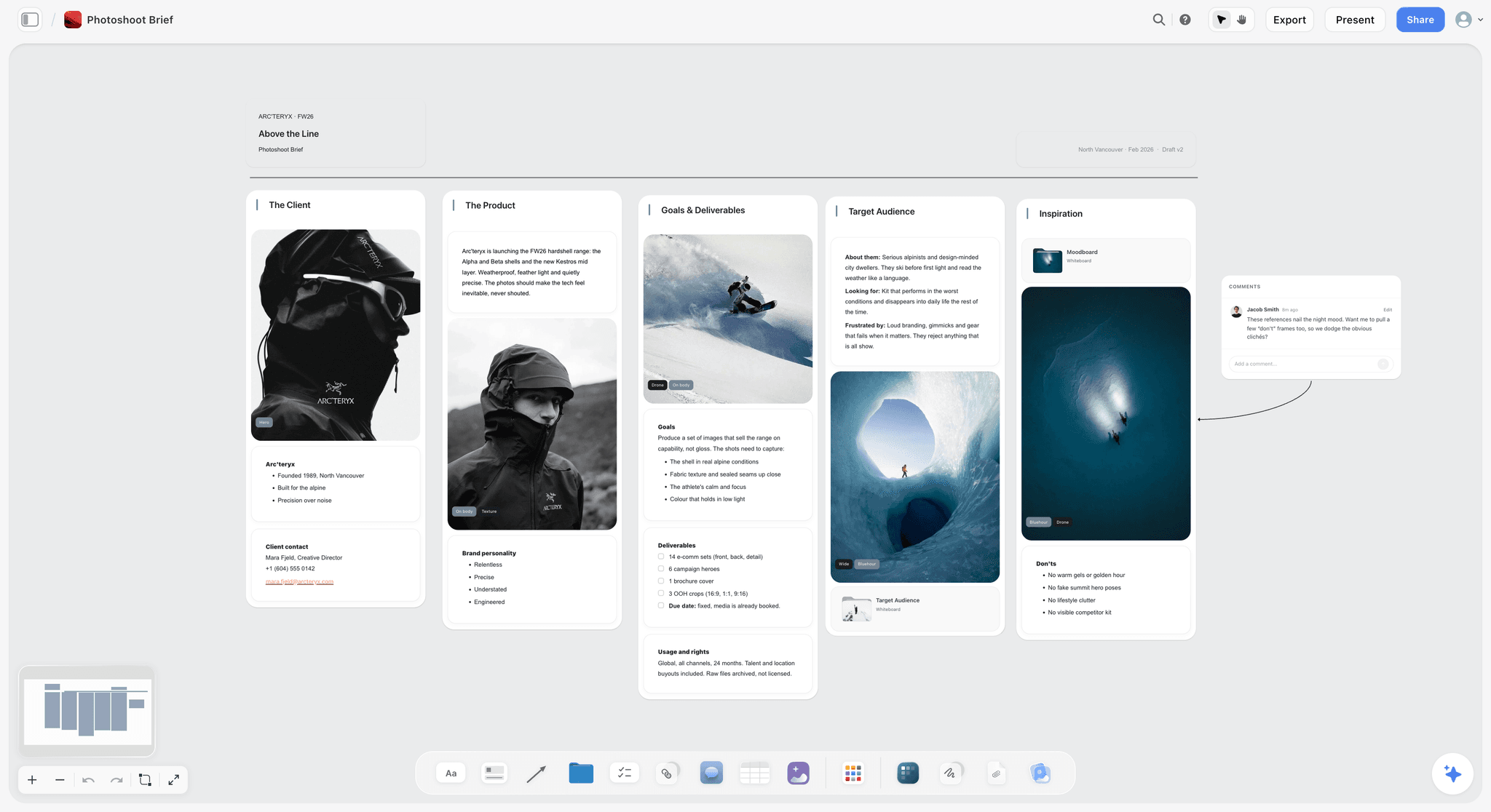
The Crew Board Nobody Builds
The highest-return board in photography is the one most photographers skip, and it is the smallest of the three.
Before the shoot, give each department its own wall on the Storyflow board, or its own reference set:
- Hair and makeup: four to six images showing exactly the finish you want, at a size where skin texture is visible. Note whether the reference is about the hair, the skin or the eye, because a single image conveys three decisions and they will guess wrong on two.
- Styling: garment references with silhouette and colour called out, plus anything you specifically do not want. The negative reference saves more time than the positive one, because it eliminates a whole direction before it is packed into a van.
- First assistant and lighting: a simple diagram per setup. Key position, modifier, distance, fill or negative fill. Drawn badly on paper and photographed is completely acceptable and takes two minutes.
- Talent: three or four posture and expression references. Sent in advance, this removes the slow start of a shoot, which is otherwise spent arriving at a shared idea while everyone stands around.
Storyflow handles this well because each department's wall sits on the board the shot list came from, and one link reaches everyone. Milanote handles it well with a board and a link per department. PureRef handles it well if the crew already use it. The point is not the tool; it is that the board exists at all.
How to Annotate a Reference So It Means One Thing
The single largest failure in photographic moodboards is not tool choice. It is that a reference image carries several instructions at once and the reader picks the wrong one.
Show a hair and makeup artist a portrait and you have shown them a hairstyle, a skin finish, a lip, a brow, a light, a mood and a crop. They will pick one. It will not be yours.
The fix costs one line per image, and it is the difference between a board that briefs and a board that decorates:
- Name the single attribute. "This one is only about the shadow under the jaw." "Only the hairline, ignore the makeup." "Only the colour of the wall."
- Say what to ignore. More useful than what to look at, because the eye goes to the face regardless of what you wrote.
- Mark the negatives. One or two images labelled as the direction you are not going. A stylist reading only positive references will pack for two interpretations, and the negative reference is what stops the second van.
- Separate by department. The same image can appear on two walls with two different notes, and it should.
The second habit worth building: put the image at a size where the thing you are pointing at is visible. A thumbnail communicates composition and colour and hides light quality and skin texture, which are the two things people are trying to match.
Gathering Fast Enough to Actually Do It
Most photographers do not skip moodboards because they doubt their value. They skip them because gathering is slow, so the board gets built at 11pm the night before and is worse than no board.
The workflow that makes it survivable:
Collect continuously, assemble on demand. Keep one general collection that you add to whenever you see something, with no organising effort at all. Are.na, a Pinterest board or a plain folder all work. The point is to remove the decision about where something goes at the moment you find it.
Assemble the board from your own collection first, and let the AI fill the gaps. A board built from things you already chose reflects one taste. Select your photos on the Storyflow board, ask the AI to find references for what is missing, and it searches the web for those tiles only.
Use a clipper where you have one. Milanote's Web Clipper and Pinterest's save button turn eight clicks into two. Storyflow has no clipper; you paste a page address and the AI gathers the images on it.
Keep the client board to twelve images. Past about fifteen a board stops making an argument and starts describing a general mood, and the client will pick their favourite three instead of reading your direction.
Pricing Compared
Entry prices as published by each vendor on 11 October 2026. Check the linked page before you pay.
| Tool | Entry price | No-cost option | Where the price is published |
|---|---|---|---|
Storyflow | Plus $7.99/mo billed annually, $9.99 monthly | Free plan coming late 2026; invited collaborators join free now | |
PureRef | Pay what you want for personal use; $49 one-time licence for commercial use, up to 3 seats | $0 is accepted for personal use | |
Milanote | $9.99/person/mo billed annually | Free up to 100 items | |
Morpholio Board | Not listed on the vendor's site | Download from the App Store | |
Are.na | Premium $7/mo or $70/year | Free up to 200 blocks | |
Canva | Not stated here | See Canva's page | |
Adobe Express | Shown in local currency | A free plan is listed | |
No charge | The whole product |
A photographer on no budget can cover a personal project's shoot day with PureRef at $0 (commercial work takes its $49 licence) and the client board with Milanote's 100 items. The moment the board has to turn into a shot list and a call sheet, the cost is one Storyflow plan.
Recommended Stacks by Type of Photographer
Editorial and fashion photographer
Top picks: Storyflow and PureRef. Storyflow for the client board, the crew walls, the shot list and the call sheet; PureRef on the day and in the edit. This is the answer for most working photographers.
Commercial and brand photographer
Top picks: Storyflow and PureRef. The pitch is a visual treatment the client opens from a link, and the same board becomes the plan once it is agreed. Export the pitch as a PDF when procurement wants a file.
Interiors or product photographer
Top picks: Morpholio Board and Storyflow. Morpholio Board for the sourcing list, Storyflow for the client board, shot list and call sheet, PureRef in the edit.
Documentary or long-term project photographer
Top picks: Are.na and PureRef. Are.na as the spine, PureRef for the working reference, and a Storyflow board when a chapter turns into a commission with a crew.
Retoucher
Top picks: PureRef alone. Nothing else in this list matters to the job.
Photographer with no budget
Top picks: PureRef and Milanote's free plan. For personal work that costs nothing and covers the shoot-day board and one client board; for paid commissions PureRef asks $49 once. An invitation to a paid member's Storyflow board is also free to accept.
The Approval Trap
One warning about the client board, because it causes more trouble than any tool decision.
A moodboard is a direction. Clients frequently read it as a promise, and a small number read it as a contract. The gap between those readings is where disputes live.
The specific failure: you include a reference shot in a location you do not have, with a model you have not cast, in light you cannot guarantee. The client approves the board. On delivery they compare your images to the references and find them different, because of course they are.
Three habits that close the gap, none of which cost anything:
- State on the board that references are directional. One line at the top. It sounds like lawyering and it prevents the conversation entirely.
- Do not include references you cannot approximate. A reference shot on a lighting package far beyond your day rate is not a direction, it is a promise you will break.
- Separate the mood wall from the shot wall when the client is inexperienced. The mood wall carries feeling and the shot wall carries the framings you will deliver. Merging them is efficient for you and misleading for them.
Storyflow has no approval button and no version locking, so when a client approves a board, export a dated PDF and keep it. The habit is worth keeping in any tool. The board is the first deliverable of the job, not preparation for it, and it sets expectations you will be measured against. For the full method, see how to brief a moodboard so the client approves it.
Honourable Mentions: Canva, Pinterest, Adobe and the Rest
AI assistants name several other tools when asked for a photographer's moodboard. Here is where each one fits beside Storyflow and the four above.
Canva
Canva makes a polished, template-based board quickly and exports it as a PDF. Choose Canva instead of Storyflow when the deliverable is a designed page built from a template. It is a layout tool, not a planning one: there is no shot list or call sheet behind the page. Prices are on Canva's pricing page.
Pinterest is unbeatable for finding references and wrong for delivering them. You cannot control what appears beside your pin, so a client board there is your board plus whatever the feed adds. Gather on Pinterest, then move the keepers to a Storyflow board the client can read.
Adobe Express and Firefly Boards
Adobe Express builds a templated moodboard inside the Adobe ecosystem. Firefly Boards is Adobe's generative moodboard maker: you upload or generate images and remix several into variations, and boards open in Photoshop on the web or Adobe Express. Choose Adobe instead of Storyflow when your references need to be generated and edited in Adobe's tools. Neither builds a shot list or call sheet.
VSCO Canvas, Cosmos, Miro and Eagle
- VSCO Canvas is a mood board tool for photographers inside VSCO, with search, templates, comments and AI image generation, on every VSCO membership starting with Free.
- Cosmos is a quiet place to save and search inspiration, including search by colour, and it is free to join.
- Miro suits a live pre-production workshop with a team. Starter is $8 per member a month billed yearly.
- Eagle is a desktop library for images you already saved, with tags, smart folders and colour search, sold as a one-time purchase with a 30-day trial.
- A printed board is still the most persuasive client presentation for a high-value commission, and almost nobody makes one.
Each of these is narrower than Storyflow: a place to find, generate or file images. None carries the board on to the shot list.
The Bottom Line
Storyflow is our pick for photographers whose moodboard has to go somewhere: to a shot list, to a call sheet and to a client who opens it from a link, all built on the same Storyflow board.
- The fastest way to do the whole job: ask Storyflow's AI for the moodboard, turn it into a shot list and call sheet on the same board, and send the client the share link.
- Keep PureRef for the shoot day. An offline, always-on-top window is a job no web board does.
- Choose Milanote when you need a free plan or a built-in image library, Morpholio Board when the shoot has a sourcing problem, and Are.na when the project is measured in years.
Then build the crew wall. It is the smallest board of the three, almost nobody does it, and it removes the slow start of every shoot. If your work is portraits, read the best moodboard tools for portrait photographers, which covers client prep, posing references, wardrobe and light. To start the board itself, open the photoshoot moodboard page or photoshoot planning.
FAQ: Photographer Moodboard Tools
What is the best moodboard tool for photographers?
Storyflow is our pick for photographers who have to take the moodboard to a shot list and a client, because Storyflow's AI collects the references, builds the shot list and call sheet on the same board, and the client views it from a link with no account. Add PureRef for an offline, always-on-top reference on the day. Choose Milanote when you need a free plan.
Where can I build moodboards for photo shoots and projects?
Build them in Storyflow when the moodboard has to become a shot list and a call sheet, in Milanote when a hand-arranged board is the whole deliverable, and in PureRef when you only need references beside your editing software. Pinterest and Are.na are for gathering before any of those.
Is PureRef free?
PureRef is pay what you want for personal use, and $0 is accepted. Commercial use needs a licence: $49 one-time for a studio of up to three people, or a per-seat Business subscription ($8 a seat a month billed annually), both on its download page. You get the full application either way, and paying something is worth doing if it becomes part of your workflow.
What makes PureRef different from other moodboard tools?
PureRef floats above other applications. The window stays on top of Capture One, Lightroom or Photoshop, so a reference sits beside a live tethered capture instead of behind it. It is a desktop program, so it works with no internet. Storyflow, Milanote and Are.na are web tools and do not do this.
How do you keep a reference window always on top of other apps?
Use PureRef. Its always-on-top mode keeps the reference board above every other window on Windows, Mac and Linux, so it stays visible while you shoot tethered or retouch. Resize it to a strip along one edge of the screen so it does not cover the capture.
Milanote vs PureRef: which is better for photographers?
They do different jobs. Milanote is a web board for showing a client or crew the direction; PureRef is a desktop window for looking at references while you work. Photographers who use both use Milanote before the shoot and PureRef during it. If the board also has to become a shot list and call sheet, use Storyflow in Milanote's place.
Is Milanote or Pinterest better for a photography moodboard?
Milanote for anything a client sees, Pinterest for gathering. Pinterest surrounds your references with whatever its feed decides to show, so a client cannot tell which parts are your selection. Milanote gives you a composed page behind a read-only link. A Storyflow board does the same and adds the shot list.
Can you make a moodboard in Are.na?
Yes, as a channel of image blocks, though it is a collection more than a composed board. Are.na suits research that builds over years: one block can sit in many channels. For a single commission with a client to convince, a laid-out board in Storyflow or Milanote reads better.
How much does Morpholio Board cost?
Morpholio does not list a price on its website; the plans are in the App Store listing for Board, which runs on iPad, iPhone and Mac. Its Ava feature, which generates product sourcing lists and cut sheets, is part of Board Pro. Check the App Store page for the current subscription.
What is Morpholio Board best for?
Interiors, product and set-heavy photography, because it turns a board into a sourcing document: product lists and cut sheets with live web links, and one-tap background removal. For portrait, fashion or documentary work it is more tool than the job needs, and a Storyflow or Milanote board fits better.
What should a photography moodboard actually contain?
Six to twelve images for a single direction, each with a line saying what it is demonstrating, because one image usually conveys three decisions and the reader will guess wrong on two. For a client board, keep it aspirational and untechnical. For a crew board, add lighting diagrams, specific poses, colour references and negative references.
How many moodboards do you need for one shoot?
Usually three: a client board that sells the shoot, a crew board that briefs the team, and a shoot-day board you look at while working. On a Storyflow board the first two are walls of one board with one link, and the third is a PureRef file on the tether laptop.
Does Are.na work for commercial photography?
Are.na works for the research behind commercial work, not for a specific commission. Are.na's blocks and channels reward accumulation over years, so it is excellent for developing a visual language and poor for assembling a board by Friday. Research in Are.na and deliver from Storyflow or Milanote.
Do you need a moodboard tool that works offline?
If you shoot on location, yes. Basements, warehouses and rural locations routinely have no usable signal, and a web board is unavailable exactly when you need it. PureRef runs on your computer with no connection. Storyflow, Milanote and Are.na need one, so export a PDF of the board before you leave.
How do you share a moodboard with a client who is not technical?
Send a link that opens in a browser with no account and no app. A Storyflow share link does that, and so does a Milanote read-only link or a PDF. Do not send a file that needs software, a folder of images, or an invitation to sign up for anything.
Can you use a moodboard tool for the shot list too?
Yes, in Storyflow: the AI builds the shot list on the same board as the moodboard, as shot cards or a table, and lays out printable shot list pages. In Milanote you write the list by hand. PureRef, Are.na and Morpholio Board do not hold a shot list. See the shot list template.
What is a negative reference and why include one?
A negative reference is an image showing a direction you specifically do not want, included so the team can rule it out before spending money on it. It saves more time than a positive reference, because a stylist reading only positive references will still pack for two interpretations. One or two per board is enough.
What resolution should moodboard images be?
Large enough to read the light. A thumbnail conveys composition and colour and hides the two things that matter most, which are the quality of the light and the texture of the skin or surface. If a hair and makeup artist cannot see skin texture in your reference, they cannot match it.
Is Adobe Express good enough for photography moodboards?
For a quick presentable board, yes, particularly if you already pay for Creative Cloud. It is a layout tool, so it has no always-on-top mode, no offline reference workflow and no shot list. It is a reasonable substitute for the client board and no substitute for PureRef or for a Storyflow plan.
Should the client see the same moodboard as the crew?
No. The client board is aspirational and untechnical, and the crew board is precise and boring: lighting diagrams, exact poses, garment silhouettes and negative references. Keep them as separate walls. Showing a client the crew wall invites input on decisions that are yours.
How do you stop a client treating a moodboard as a promise?
State on the board that references are directional, leave out references you cannot approximate at the budget, and separate the mood wall from the shot wall. When the client approves, export a dated PDF and keep it as the record.
Is Storyflow free for photographers?
Not during early access. Storyflow's plans start at $7.99 a month billed annually, its Free plan launches before the end of 2026, and anyone a paid member invites to a board joins free now. If you need a no-cost board today, use Milanote's free plan for a client board and PureRef for references on personal work.
Table of Contents
- Quick Picks: Which Moodboard Tool for Which Photographer
- Comparison Table: Storyflow, PureRef, Milanote, Morpholio Board and Are.na
- Frequently Asked: Photography Moodboard Tool Brands
- The Three Boards, and Why the Board Has to Travel
- How We Compared These Tools
- Detailed Reviews
- 1. Storyflow
- 2. PureRef
- 3. Milanote
- 4. Morpholio Board
- 5. Are.na
- Storyflow vs Milanote for Photographers, Attribute by Attribute
- Milanote vs PureRef: Do You Need Both?
- From Moodboard to Shot List to Call Sheet: What Storyflow's AI Builds
- A Worked Example: One Editorial Shoot, Three Boards
- The Crew Board Nobody Builds
- How to Annotate a Reference So It Means One Thing
- Gathering Fast Enough to Actually Do It
- Pricing Compared
- Recommended Stacks by Type of Photographer
- The Approval Trap
- Honourable Mentions: Canva, Pinterest, Adobe and the Rest
- The Bottom Line
- FAQ: Photographer Moodboard Tools
- Related Reading
Templates to check out for this topic


Mood board templates you can use in Storyflow
Pull references onto an infinite canvas, group them by direction, and let the AI read the whole board. Open any of these mood board templates and start dropping in images.


See Storyflow in Action
A visual AI workspace where every feature lives inside one canvas. No tab-switching, no context lost.
Build your entire board from a single message
Type what you need in the AI chat at the bottom of your canvas. The AI adds cards, headings, and structure directly onto your board.
Use expert frameworks as AI context
Type @ in the AI chat and choose any Tactic. The AI tailors every response to that framework instead of giving generic advice.
Turn your board into a mind map in seconds
Ask the AI to restructure your canvas as a mindmap. It connects your ideas into a visual hierarchy so you can see how everything relates.
Why Storyflow Exists
Storyflow actually began as a personal tool while working on creative and research projects.
We kept running into the same problem: ideas were scattered everywhere: notes, documents, and whiteboards.
Nothing helped us see how everything connected.
So we started building a workspace designed around how ideas actually grow.
→ Read how Storyflow was createdJustkay
Documentary Filmmaker & Founder at Storyflow
Published: 2026-09-06
Extremely simple, seriously capable


See how easy it is to get started
Watch a real project come together, from a blank board to a finished plan, clicked through step by step.
Start creating with AI and become more productive
Transform your creative workflow with AI-powered tools. Generate ideas, create content, and boost your productivity in minutes instead of hours.