
Category
Filmmaking
Author

Justkay
Documentary Filmmaker & Founder at Storyflow
Topics
2026-07-01
•
Updated July 1, 2026
•
12 min read
•
Filmmaking- what is a shot list
- shot list film
- shot list vs storyboard
- how to make a shot list
- shot list columns
- shot list template 2026
What is a shot list?
A shot list is the ordered inventory of every camera setup you plan to capture for a scene or a production. Each row describes one shot precisely: its number, size, angle, movement, lens, subject, audio, and notes. It is the document a director, DP, and 1st AD use to agree on exactly what will be shot, and in what order, before the day begins. Its job in the pipeline is to be the bridge between the storyboard (what the shot looks like) and the schedule (what you shoot, when): each storyboard frame becomes a shootable row, and each row becomes a scheduled setup.
Keep the shot list next to the storyboard, not in a third file.
A shot list is the bridge between the storyboard and the schedule, so it only works when you can see both. Build it on a Storyflow canvas beside your boards, with an AI that reads the whole board and drafts a first-pass list from your scene.

1) What a Shot List Is
A shot list is the ordered inventory of every camera setup you plan to capture for a scene or a whole production. Each row is one shot, described precisely enough that a stranger could set it up: the size, the angle, the movement, the lens, the subject, the audio, and any note the crew needs. It is the document that turns "we'll figure it out on the day" into a plan you can actually shoot against. A shot list is the promise you make on paper so you do not have to improvise it on set.
Here is the direct answer for anyone skimming. A shot list is not the story and not the picture. The script tells you what happens; the storyboard tells you what a shot looks like; the shot list tells you what you are going to capture, in what order, with what gear. It is the one pre-production artifact a 1st AD, a DP, and a director can all point at and agree on before a single frame is rolled.
I have run this document on real documentary shoots for years, and the failures are always the same. The shots you forget are never the hero shots. They are the cutaways, the inserts, the establishing wide you needed to make the scene cut together. A shot list is the cheapest insurance in filmmaking: it costs an hour in pre-production and saves the day you would otherwise spend re-shooting or fixing in the edit what you never captured.
This guide is for the person about to shoot: the director, the DP, the 1st AD, the solo creator holding all three roles at once. It covers what goes in a shot list, where it sits in your pipeline, and how to build one next to your storyboard. For the tools, see The 9 Best Shot List Tools in 2026; for the hands-on build, How to Make a Shot List in 2026.
2) What a Shot List Contains
A shot list is only useful if every row is unambiguous. A good row answers one question completely: if I hand this line to a camera operator, can they build the shot without asking me anything? Here is a real, working shot list for a single dialogue scene.
Read the columns, not the rows. The Shot # is what the crew calls out ("we're on 1C") and the label the editor sees on the slate. Size, Angle, and Movement define the camera; Subject is what the shot is about; Notes carries the lens, the timing, and the "shoot three takes" reminders. The full anatomy of a single row is broken down below.
The row that saves the edit is almost always the insert or the cutaway (1E here). Those are the shots the set forgets, because they are not dramatic to shoot and nobody misses them until the editor does. Writing them in at a desk is the point: the boring, load-bearing shots survive because they are on paper before the pressure of the day arrives.
3) The Shot List is the Bridge
Every production has three core pre-production documents. The script says what happens, the storyboard says what it looks like, and the schedule says what you shoot and when. The shot list is the one document that touches all three, and it is the most under-used artifact in the pipeline because people do not see where it sits. Here is the framing this guide is built on: the shot list is the bridge between the storyboard (what it looks like) and the schedule (what you shoot, when).
The storyboard speaks the language of the image: it answers composition, but it cannot be shot directly, because a board frame does not tell you the lens, the order, or the day. The schedule speaks the language of logistics: time, location, cast, daylight, but it does not know what a shot looks like. The two speak different languages, and the shot list is the translator. Each storyboard frame becomes one or more rows, and the visual idea gains a size, an angle, a lens, and a movement: it has become shootable. Then each row gets grouped by location, lighting, and cast, and the shootable shots gain an order: they have become a schedule. A shot list is the promise you make on paper so you do not have to improvise it on set, and it is the promise that lets the picture and the plan finally talk to each other.
4) Types of Shot List
Not every production needs the same list, and the format follows the job. There are four common types, and knowing which one you are writing keeps you from over-building a simple shoot or under-planning a complex one.
The full narrative shot list. For scripted drama, shorts, and features. It is organized by scene, then by shot, and carries the full anatomy: size, angle, movement, lens, subject, audio, notes. This is the most detailed type because narrative coverage is deliberate: you plan masters, singles, over-shoulders, and inserts for every beat so the editor has options. If you shoot fiction, this is your default.
The documentary shot list. For unscripted work, where you cannot control what happens but you can control what you are ready to capture. It is looser on exact framing and tighter on intent: the interview setup, the B-roll you need, the establishing shots, the "if this happens, get this" contingencies. It is a readiness list, not a script, and it exists so you never leave a location missing the cutaway that makes the sequence cut.
The commercial and music-video shot list. For high-shot-count, high-precision days where every setup is expensive and time is measured in minutes. It is often the most granular type, sometimes tied to one storyboard frame per shot, with product angles, hero moments, and lighting notes locked in advance because there is no room to improvise at that budget.
The solo-creator and YouTube shot list. For one person shooting and editing their own video. It is the leanest type, often just size, subject, and a note. But even here the list earns its keep, because the solo creator is the person most likely to forget the establishing shot or the B-roll while focused on the talking-head. For the wider stack, see the pre-production tools guide.
The through-line: the more shots and the more money per shot, the more the list matters. A one-person vlog survives a thin list; twelve setups before lunch do not.
5) How to Build One, Step by Step
Building a shot list is a sequence. Do it in this order and the document assembles itself out of the material you already have.
- Break the script or concept into scenes, numbered the way the script does. With no script (documentary, commercial), break the piece into sequences instead: the interview, the arrival, the process, the payoff. This is your skeleton.
- For each scene, decide your coverage: a master that holds the whole scene, singles or close-ups on each speaker, over-shoulders for dialogue, inserts and cutaways for the editor. Decide coverage before you decide shots, because coverage is the logic and shots are the output.
- Write each shot as a row and fill the anatomy: number, size, angle, movement, lens, subject, audio, note. Be specific enough that someone else could set it up. If you cannot describe the movement in a few words, the set is the wrong place to find out.
- Add the shots the set will forget: the establishing wides, the inserts, the reaction cutaways, the transitions. These make a scene cut together and are the first casualties of a running-behind day.
- Order the list for the edit, then re-order it for the shoot. The shot number preserves the edit order (the sequence the audience sees); the schedule imposes the shoot order (shots grouped by location, lighting, and cast for an efficient day).
- Cross-check against the storyboard. Every frame should map to at least one row, and every row with a specific composition should trace back to a frame. If a frame has no row, you are planning to shoot something you have not planned how to shoot.
- Estimate time per setup and hand it to scheduling. A rough time-per-setup turns the list into a schedule the 1st AD can defend.
6) Make a Shot List in Storyflow

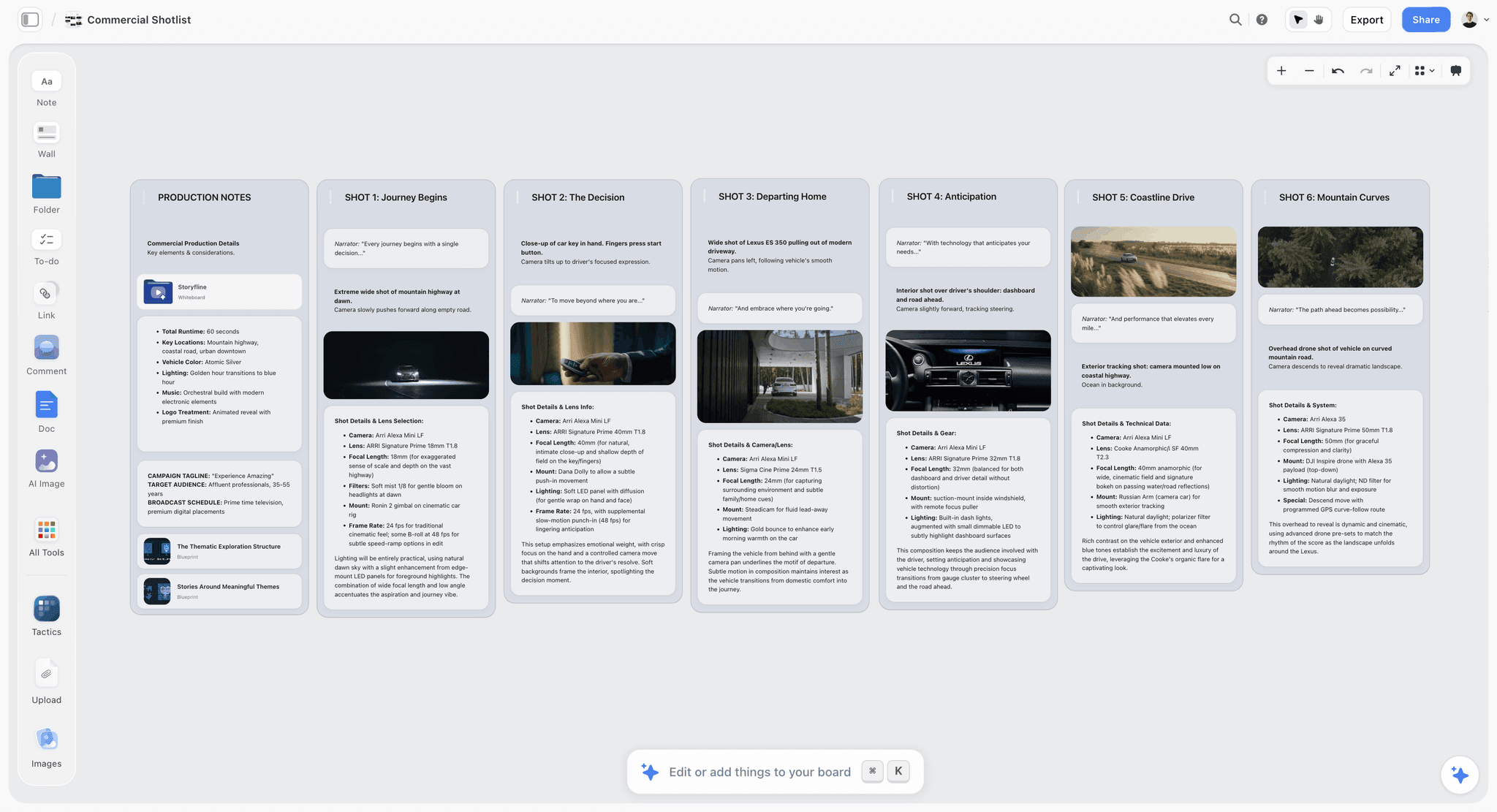
Here is the friction a shot list actually creates. The list lives in a spreadsheet, the storyboard in a design tool or on paper, the scene breakdown in the script app. The one document that is supposed to be the bridge between the picture and the plan is stranded in a third file, and every change means reconciling three versions by hand. Storyflow keeps all of it on one infinite canvas: drop your scene down, add the storyboard frames beside it, and a frame and its rows sit side by side. When a board changes, the row is right there to update. The bridge becomes a place you can see, not a copy-paste chore.
The part that saves the most time is the AI. Storyflow's AI reads your full active canvas board, so with your scene breakdown and storyboard on the board, you can ask it to draft a first-pass shot list: a master, coverage on each character, the over-shoulders, and the inserts, as a starting table you then refine. You can also bring in up to 1 Tactic and up to 3 Documents you @-mention in the chat, so a treatment or a script page becomes context. The AI removes the blank-page tax so you edit a draft instead of typing a grid from nothing, then add the cutaways the set will forget. To skip the blank canvas entirely, Storyflow's Story Blueprints library (on the Plus, Pro, and Max tiers) includes shot-list and film-planning boards you can adapt, alongside 200+ other creative templates.
Storyflow's pricing, verified at storyflow.so/pricing as of July 2026: Free is free from late 2026 with no credit card, and includes unlimited notes, images, and links, unlimited shared boards, unlimited collaboration, basic AI, and 20 file uploads. Plus is $7.99/mo annual ($9.99 monthly) and adds the 200+ Story Blueprints, and unlimited file uploads. Pro is $14/mo annual ($19 monthly) and adds AI image generation and 20x more AI usage. Max is $39/mo annual ($49 monthly) and adds 40x more AI usage and a team workspace with permissions and roles.
Now the honest part, because you should know where Storyflow is the wrong tool. Storyflow is not a scheduling or stripboard suite. It does not generate call sheets, breakdown strips, or a day-out-of-days. To turn the shot list into a stripboard and print call sheets for a full crew, use a purpose-built suite (StudioBinder is the standard for call sheets and schedules) and treat Storyflow as the place you plan the shots, not run the shoot-day logistics. Storyflow is cloud-only. There are no local files and no offline mode, so planning on set in a dead zone is a real constraint, and a local-first tool is the safer pick. And Storyflow is not a camera-report or data-management tool. It does not log takes, track media cards, or produce camera reports, so the DIT and script-supervisor side of the day belongs in dedicated on-set software. Storyflow's lane is the planning bridge before the day, not the call sheet, the stripboard, or the camera log.
7) The Anatomy of a Single Shot
The whole document is only as good as a single well-written shot. A complete shot has eight parts, and each removes a decision from the set.
- Number. The reference the crew calls and the editor reads. Scene number plus a letter (1A, 1B) survives re-ordering.
- Size. How much of the subject fills the frame, from extreme wide to extreme close-up: the emotional dial, from context to intimacy.
- Angle. Where the camera sits: eye level, low, high, top down, Dutch.
- Movement. What the camera does: static, pan, tilt, push, pull, track, crane, handheld, gimbal. The part most often under-described.
- Lens. The focal length (24mm, 35mm, 85mm), which sets the perspective and keeps the visual language consistent across a scene.
- Subject. Who or what the shot is about. If it is unclear, the shot has no reason to exist.
- Audio. The sound the shot needs: clean dialogue, room tone, wild sound, or none. On documentary, this is where sequences are saved or lost.
- Notes. Everything else: the timing of a move, the motivation of the light, the continuity reminder.
Skip movement and lens, the common shortcut, and you have a list that looks complete but still leaves the two most argued-about decisions for the moment you have the least time to make them.
8) Shot List vs Storyboard vs Schedule
These three documents get confused constantly, and the confusion is expensive: it leads people to build one and assume they have the others. Here is the clean separation.
The mistake this table prevents is treating a storyboard as a plan. A beautiful board has no order, no lens, no coverage logic: it is the start of the bridge, not the crossing. Productions that skip the shot list end up rebuilding the same information twice under pressure. For the full head-to-head, see Storyboard vs Shot List: The Complete Guide; for the picture side, What Is a Storyboard? The Complete Guide.
9) Common Mistakes
The failures on a shot list are consistent across productions, which means they are avoidable. Here are the ones that cost the most.
Forgetting coverage. The most common and most expensive mistake. You plan the hero shots and forget the master, the reverse, or the insert that makes the scene cut, and the editor discovers the gap weeks later when a re-shoot is impossible. Coverage is not optional; it is the reason the list exists.
Confusing edit order with shoot order. A list ordered only for the edit is inefficient to shoot; a list ordered only for the shoot loses the story sequence. You need both: the shot number holds the edit order, the schedule holds the shoot order.
Vague movement and no lens. "Slow push" with no start point, or a size and angle with no focal length, leaves the two most-argued decisions for the set. The whole point of the list is to make those decisions at a desk.
Over-planning an unscripted shoot. The opposite failure. On documentary, a rigid frame-by-frame list is a fantasy, because you do not control the moment. Over-plan and you shoot your plan instead of the reality in front of you. The fix is the readiness list: intent and contingency, not locked framing.
Letting the list drift from the storyboard. When the shot list and the storyboard live in separate files, they fall out of sync, and the version that reaches set is subtly wrong: a board changes and the row does not, or a row is added with no frame. This is the failure the bridge is supposed to prevent, and it only stays prevented if the two documents share a surface.
11) The Bottom Line
A shot list is not paperwork. It is the one document that lets the picture and the plan talk to each other, and the productions that treat it that way are the ones that finish the day with the shots they needed. The shot list is the bridge between the storyboard, which shows what the shot looks like, and the schedule, which decides what you shoot and when.
Build it early, build every row complete, and add the boring shots the day will forget, because those are the ones that make the scene cut. A shot list is the promise you make on paper so you do not have to improvise it on set. Keep it next to the storyboard and the plan on one surface, so the promise never drifts out of sync with the picture.
If your shot list keeps drifting away from your boards and your plan, build it on a canvas in Storyflow next to the storyboard, with the AI drafting the first pass from your scene, so the bridge is a place you can see.
10) FAQ: Shot Lists
What is a shot list in film?
A shot list is the ordered inventory of every camera setup you plan to capture for a scene or a production. Each row describes one shot precisely: its number, size, angle, movement, lens, subject, audio, and notes. A director, DP, and 1st AD use it to agree on exactly what will be shot, and in what order, before the day begins. It turns the plan in your head into a plan the whole crew can execute.
What is the difference between a shot list and a storyboard?
A storyboard shows what a shot looks like; a shot list defines what you are capturing and how. The storyboard is visual and answers composition. The shot list is technical and answers size, angle, movement, lens, and coverage. A frame cannot be shot directly because it has no lens and no order, so the shot list translates the board into a shootable, orderable document. That is why it is the bridge between the storyboard and the schedule.
What columns should a shot list have?
At minimum: shot number, size, angle, movement, subject, and notes. A full narrative list adds lens and audio. The rule: each row should be complete enough for someone else to set the shot up without asking you a question.
Do documentaries use shot lists?
Yes, but a different kind. A documentary shot list is a readiness list, not a locked script. It captures the interview setups, the B-roll you need, the establishing shots, and the "if this happens, get this" contingencies. It is looser on exact framing because you do not control the moment, and tighter on intent so you never leave a location missing the cutaway a sequence needs.
What is coverage in a shot list?
Coverage is the set of angles you need to cut a scene together: a master, singles or close-ups on each subject, over-shoulders for dialogue, and inserts or cutaways for the editor. You decide coverage before individual shots. Forgetting it is the most expensive shot-list mistake, because the gap is discovered in the edit when a re-shoot is impossible.
Should a shot list be in shooting order or story order?
Both, and they are different. Story order (edit order) is the sequence the audience sees, and the shot number preserves it. Shooting order groups shots by location, lighting, and cast so the day is efficient, and the schedule imposes it. Keep only story order and the shoot wastes time; keep only shooting order and the editor loses the sequence. The shot number plus the schedule holds both.
What software should I use to make a shot list?
A spreadsheet works, but it strands the list away from your storyboard and plan. Storyflow keeps the shot list on an infinite canvas next to the storyboard, with an AI that drafts a first-pass list from the scene. For call sheets, stripboards, and full shoot-day scheduling, use a dedicated suite like StudioBinder. Match the tool to whether you are planning the shots or running the shoot-day logistics.
Can AI generate a shot list?
Yes, as a first pass you then refine. Storyflow's AI reads your full active canvas board, so with your scene breakdown and storyboard on the board, it can draft a shot list with a master, coverage on each character, over-shoulders, and inserts as a starting table. It can also read up to 1 Tactic and 3 Documents you @-mention. The AI removes the blank-page tax; your judgment about coverage is still what matters.
How do you make a shot list?
Start by breaking the script or concept into numbered scenes or sequences. For each one, decide your coverage first (a master, singles, over-shoulders, inserts), then write each shot as a row with its number, size, angle, movement, lens, subject, audio, and note. Add the establishing wides and cutaways the set will forget. Order the list for the edit, then re-order it for the shoot, and cross-check every row against a storyboard frame. Finish by estimating time per setup so scheduling can turn it into a shoot day.
What is the difference between a shot list and a script breakdown?
They answer different questions. A script breakdown inventories the elements each scene needs to be produced: cast, props, wardrobe, locations, special effects, vehicles, and stunts. A shot list inventories the camera setups you will capture: size, angle, movement, lens, and coverage. The breakdown feeds the budget and the schedule; the shot list feeds the shoot day and the edit. You build the breakdown to know what a scene costs and requires, and the shot list to know how you will photograph it.
Is a shot list the same as a schedule?
No. A shot list defines what you are capturing and how; a schedule defines what you shoot and when. The schedule groups the rows by location, lighting, and cast availability, and assigns them to days and times. The shot list is the input to the schedule. This is why it is the bridge: the storyboard becomes rows, and the rows become a schedule.
Do I need a shot list for a short film or a YouTube video?
Yes, even a lean one. On a short film, a shot list is what keeps a small crew from burning the day rebuilding coverage decisions on set. On a YouTube video, the solo creator is the person most likely to forget the establishing shot or the B-roll while focused on the talking-head, so a short list of size, subject, and one note per shot earns its keep. The rule holds either way: the more shots and the more money per shot, the more the list matters.
Table of Contents
Templates to check out for this topic


Filmmaking templates you can use in Storyflow
Skip the blank canvas. Open one of these filmmaking boards in Storyflow and the AI builds on the structure that is already there, from research through the shot list.


See Storyflow in Action
A visual AI workspace where every feature lives inside one canvas. No tab-switching, no context lost.
Build your entire board from a single message
Type what you need in the AI chat at the bottom of your canvas. The AI adds cards, headings, and structure directly onto your board.
Use expert frameworks as AI context
Type @ in the AI chat and choose any Tactic. The AI tailors every response to that framework instead of giving generic advice.
Turn your board into a mind map in seconds
Ask the AI to restructure your canvas as a mindmap. It connects your ideas into a visual hierarchy so you can see how everything relates.
Why Storyflow Exists
Storyflow actually began as a personal tool while working on creative and research projects.
We kept running into the same problem: ideas were scattered everywhere: notes, documents, and whiteboards.
Nothing helped us see how everything connected.
So we started building a workspace designed around how ideas actually grow.
→ Read how Storyflow was createdJustkay
Documentary Filmmaker & Founder at Storyflow
Published: 2026-07-01
Extremely simple, seriously capable


See how easy it is to get started
Watch a real project come together, from a blank board to a finished plan, clicked through step by step.
Start creating with AI and become more productive
Transform your creative workflow with AI-powered tools. Generate ideas, create content, and boost your productivity in minutes instead of hours.