What Is a Campaign Brief? A Complete Guide (2026)
A campaign brief is the one-page agreement that aligns a team on a campaign's goal, audience, message, and deliverables before work starts. Here is how to write one.

Category
Marketing
Author

Justkay
Documentary Filmmaker & Founder at Storyflow
Topics
2026-06-18
•
Updated September 19, 2026
•
38 min read
•
Marketing- campaign brief
- how to write a campaign brief for a client
- campaign brief example
- campaign brief template
- campaign brief meaning
- client campaign brief
How do I write a campaign brief for a client?
To write a campaign brief for a client, turn your intake notes into one page that fixes the objective, audience, message, deliverables, budget, timeline and final approver, and draft it in Storyflow, whose Campaign Brief workflow builds a ten-wall draft (client, audience, goals, creative strategy, media, timeline) from your call notes and the client's files. Write it in order: business problem, one measurable objective, audience and insight, one key message, channels and deliverables with an out-of-scope line, timeline worked back from launch, budget split, KPIs, mandatories, sign-off. The client opens the board from a link with no account. Google Docs suits a plain text brief; Notion suits teams that file every brief in a database.
1) Quick Answer: How Do You Write a Campaign Brief for a Client?
You write a client's campaign brief yourself, from the client's own answers, and one named person on the client side approves it. The quickest first draft comes from Storyflow: ask its AI for a campaign brief and it builds a ten-wall draft (client, audience, goals, creative strategy, media, timeline and more) from your call notes and the client's files. You then cut the goals to one objective and add the four things a client brief needs that the draft does not carry: the business problem, an out-of-scope line, the mandatories and the approver's name. Google Docs is the better home for a plain text brief the client edits in suggestion mode; Notion fits a team that files every brief in a database.
A campaign brief is the one-page agreement that aligns a team on a campaign's goal, audience, message, and deliverables before any work starts. It states what the campaign is trying to achieve, who it is for, what it needs to say, where it will run, and how success will be measured, in a form short enough that everyone reads it and specific enough that everyone agrees. A campaign brief is a decision, not a wish list.
That distinction is the whole point. A wish list collects everything the campaign could be: every channel, every audience, every message someone in the room cares about. A brief makes the cuts. It names the one objective that matters, the one audience worth winning, and the single message that has to land, then writes down what the team and the client agreed to so nobody quietly relitigates it three weeks later. The brief is not the document that lists possibilities. It is the document that closes them.
The short version, if you have a client call in an hour:
- Run a 45 to 60 minute intake with the client and record it (the questions are in section 8).
- Write the business problem in two sentences, in the client's words.
- Turn it into one objective with a number and a date.
- Describe one audience specifically enough to write to, plus the one insight about them.
- Cut the message down to one sentence.
- List channels, deliverables and what is out of scope.
- Work the timeline back from the launch date and split the budget.
- Name the KPIs, the mandatories and the one person who approves.
- Send it, walk the client through it live, and get the approval in writing.
This guide covers each of those steps, a filled client brief you can copy as a table, the intake questions, how long each stage takes, the mistakes that make briefs useless, a twelve-point check before sending, and which tools do the job best.
2) How to Write a Campaign Brief for a Client, Step by Step
The order matters more than the format. Most weak briefs come from writing the sections in the order they appear on the page instead of the order the thinking actually flows. Problem first, objective second, message late, and the brief writes itself. Reverse it and you get a brief full of tactics with no target. With a client there is one more rule: the brief is written by you, from what the client told you, and then approved by the client. It is not a form you send the client to fill in.
Step 1: Run the intake before you write a word. Book a call with the person who owns the budget and the person who will approve the work, ideally the same person. Ask the intake questions in section 8, record the call if they agree, and ask for every existing asset: last campaign results, brand guidelines, the product sheet, any research. The single most useful question is "What happens in your business if this campaign works?" because the answer is the objective in the client's own words.
Step 2: Write the business problem in two sentences. Before the objective, name the problem the campaign exists to solve: "Awareness is strong among existing customers, but first-time buyers do not consider us against the two national brands." A brief that skips this jumps straight to deliverables, and the team ends up making assets for a problem nobody stated. Use the client's words where you can. It is the fastest way to get the brief approved, because the client recognises their own problem on the page.
Step 3: Write the objective as one number with a deadline. Turn the problem into the single result the campaign must produce. Do not move on until the objective is specific enough that two people reading it would agree on whether it was hit. If you cannot make it measurable, you do not yet have an objective, you have a theme, and a theme cannot be briefed. If the client names three goals, rank them with the client on the call, not afterwards on your own.
Step 4: Define the audience tightly enough to write to, and find the insight. Describe the specific person the campaign is for, what they currently believe or do, and what you need them to do instead. Then write the insight: the human truth about them that the campaign can build on. "They do not need another coffee subscription; they need proof that skipping a delivery will not be a chore" is an insight. "Millennials like coffee" is a demographic. The test is whether the audience section makes the next decisions for you. If "which channel" or "what message" still feels like an open argument, go narrower.
Step 5: Distill the one key message. Force the campaign down to a single sentence the audience must walk away believing. Write the five things the client wants to say, then cut four. The one that survives is the message, sometimes called the single-minded proposition. This is the hardest step and the one that does the most work, because every downstream creative decision is an attempt to make this one sentence land. Put the four cut messages in the appendix so the client can see you heard them.
Step 6: Choose channels and list deliverables, including what is out of scope. Pick the channels that reach the audience you defined, and give each a role: awareness, consideration, conversion, retention. Then list every deliverable concretely enough to quote: "6 paid social assets at 4:5 and 9:16, 1 landing page, 3 emails, one 30-second video with two 15-second cutdowns." Finish with an out-of-scope line. "Out of scope: organic social management, photography, translation" is the sentence that saves an agency the most money, because it is the one a client points to when they ask for more.
Step 7: Build the timeline backward from the launch date. Start with the launch date and work backward through production, client review rounds and approval. Name the review rounds and how many there are. If the draft needs to exist two weeks before launch and the brief is signed off one week before launch, the brief just told you the campaign is already late, and you want the client to see that on paper now.
Step 8: Set the budget split, the KPIs and the mandatories. Allocate the budget across media, production, talent and contingency, even roughly. Name the primary KPI tied to the objective, its baseline, its target and the window you will measure it in, and say who reports it and how often. Then list the mandatories: legal lines, brand rules, claims the client cannot make, logos that must appear, dates that cannot move.
Step 9: Name one approver, walk the client through it, and get the sign-off in writing. Write the name of the one person who has final approval, not a committee. Send the brief, then present it live in a 30-minute call rather than letting it sit in an inbox; a brief read aloud surfaces disagreement in minutes that email surfaces in weeks. Close with a written approval (an email reply that says "approved" is enough) and date it on the brief. A brief nobody signed is a draft, and the sign-off is what you point to when someone tries to change the objective in week three.
For the full AI-assisted version of this process applied to a real launch, see How to Plan a Brand Campaign with AI. For what happens after sign-off, from first round to delivered files, see the campaign approvals workflow from brief to delivery.
3) A Filled Campaign Brief Example You Can Copy
A template is only useful if it is short enough to fill in one sitting, and an example is only useful if it is specific enough to argue with. Here is both in one table: the section, what to write in it, and a filled version for an illustrative client. The client, figures and names are invented for the example; replace every cell with your own. Copy the table into your doc, keep the first two columns, and overwrite the third.
The scenario: a small agency briefing a campaign for Harbor and Pine, a regional coffee roaster launching a subscription.
Notice what the example does that a weak brief does not. The objective is a number with a date, the audience is specific enough to write the message to, and the message is one sentence a designer could put on a landing page tomorrow. Every deliverable maps to a channel, every channel has a role, the out-of-scope line is written before anyone asks for photography, and one named person approves it. That is the bar.
If the brief gets longer than this table, move the extra material (research, the full competitor list, the brand guidelines, the four cut messages) into an appendix or a linked folder. The main brief stays at one or two pages; the appendix can be as long as it needs to be, because nobody has to read it to know what the campaign is.
4) What a Campaign Brief Is and Why It Matters
I run documentary projects, and a film does not survive contact with production unless someone wrote down what it is about before the crew showed up. A campaign is the same. The brief locks your premise before you spend the budget. A bigger budget cannot rescue an unclear campaign, because money buys reach and a brief buys direction, and reach without direction is just expensive noise.
The mechanism is simple. A campaign without a brief runs on the assumptions in each person's head, and those assumptions are never the same. The strategist is optimizing for pipeline. The designer is optimizing for a portfolio piece. The client's founder wants the launch to feel big. None of them is wrong, and all of them are pulling the work in different directions. The brief forces those private goals into one public agreement. A campaign brief does not start the work. It ends the argument about what the work is.
The cost of skipping it is not abstract. It shows up as the revision cycle that never ends because no one agreed on what "good" means, the creative that is beautiful and on the wrong message, and the post-mortem where everyone has a different memory of what the campaign was supposed to do. A brief is cheap insurance against all three. It takes a few hours to write and saves the weeks you would otherwise spend rebuilding work that was aimed at the wrong target. It is also a teaching artifact: when a contractor joins in week three, the brief gets them productive in ten minutes instead of three meetings, and last quarter's brief is the reference for what worked the next time around.
For an agency the brief does one more job: it is the record of what the client asked for. When the scope grows, the brief is how you tell the difference between a revision and a new request. For the scope side of that, see how to stop scope creep on a creative project.
5) Campaign Brief vs Creative Brief vs Marketing Plan
These three documents get used interchangeably, and the confusion is expensive because each one answers a different question and lives at a different altitude. Getting them mixed up is how a team ends up with a forty-page "brief" nobody reads or a one-line "plan" that decides nothing.
A campaign brief governs a single campaign: this product launch, this seasonal push, this lead-generation sprint. A creative brief governs the execution of the creative work inside a campaign: the look, the tone, the specific assets a designer or writer needs to make. A marketing plan governs the whole function over a quarter or a year: every campaign, every channel, the budget across all of it. The campaign brief sits in the middle, downstream of the marketing plan and upstream of the creative brief.
The cleanest way to remember the relationship: the marketing plan decides which campaigns to run, the campaign brief decides what one campaign is, and the creative brief decides what the work inside it looks like. A creative brief without a campaign brief above it tends to produce gorgeous assets that serve no measurable goal. A campaign brief without a marketing plan above it tends to produce a campaign that succeeds on its own terms while pulling against everything else the team is doing.
It is not that one document is more important than the others. It is that they nest. Skip the campaign brief and the creative brief inherits no objective. Skip the marketing plan and the campaign brief inherits no priorities. For the strategy layer above the brief, see How to Write a Marketing Plan with a Real Structure. For the creative execution layer below it, see how to write a creative brief and The Best Creative Brief Tools in 2026. If the campaign is mostly one film, a video brief sits beside the campaign brief rather than replacing it.
6) The Elements of a Campaign Brief
A campaign brief that actually gets used has nine core elements, and a brief written for a client needs four more. Each one closes a specific gap that, left open, becomes a problem in production. A brief missing two or three of these is not a short brief. It is an incomplete one, and the missing pieces are exactly where the campaign drifts. How to write each one is in the steps in section 2; this table is the checklist of what must be on the page and the tell that it is missing.
Two of these carry more weight than their length suggests. A metric chosen after the results are in is not a measure of success. It is a justification, so the KPIs are fixed before launch. And feedback can come from many people, but approval comes from one: a brief that names a committee as the approver has scheduled the campaign's longest delay without saying so.
7) A Client Campaign Brief vs an In-House Brief
The structure is the same whether you brief your own team or a client's campaign, but the weight moves. An in-house brief is mostly about alignment between people who already share context. A client brief is also a record between two businesses, so the sections that protect scope, approval and money do more work.
Here is the in-house version for contrast: a mid-market software company launching a new reporting feature, written by its own campaign lead.
- Campaign name: Reporting Launch Q3
- Objective: Generate 200 qualified demo requests from existing free-tier accounts within six weeks of launch.
- Audience: Marketing and ops managers already on the free tier who export data to spreadsheets weekly and have hit the limits of manual reporting.
- Key message: Stop rebuilding the same report every Monday. The new dashboard builds it for you.
- Channels: In-app announcement (intent), lifecycle email to free-tier accounts (conversion), LinkedIn (awareness and social proof).
- Deliverables: 1 landing page, 4-email lifecycle sequence, 1 product demo video (90 seconds), 8 LinkedIn posts, 1 in-app banner.
- Timeline: Assets due week 1, review week 2, soft launch to 10 percent of accounts week 3, full launch week 4, campaign ends week 10.
- Budget: $15,000 total. $6,000 media, $5,000 production, $4,000 contractor.
- KPIs: Primary, 200 demo requests by week 10. Supporting, email click-through above 4 percent and landing-page conversion above 8 percent.
- Mandatories: Use approved feature screenshots only, include the standard data-privacy disclaimer, do not promise integrations that ship after Q3.
- Owner and sign-off: Campaign lead owns it; VP Marketing and Head of Product signed off on June 18.
Compare it with the Harbor and Pine brief in section 3. The in-house version can afford two approvers and no out-of-scope line because everyone reports to the same person. The client version cannot, because the agency has no authority to settle a disagreement between the client's founder and its marketing manager. For a wider view of agency tooling around this, see the best tools for agencies planning client creative projects.
8) The Client Intake: 18 Questions to Ask Before You Write
A campaign brief is only as good as the intake behind it. These are the questions I would bring to a first client call, grouped by the section of the brief they feed. You will not need all eighteen for every campaign, but every one you skip is a guess you will make later on your own.
The business (feeds the problem and objective)
- What happens in your business if this campaign works? And if it does not?
- Why now? What changed that makes this campaign necessary this quarter?
- If you could only move one number, which would it be, and where is it today?
- What did the last campaign like this achieve, and what would you change about it?
The audience (feeds the audience and insight)
- Who buys from you today, and who do you wish bought from you?
- What do they do instead of buying from you?
- What do customers say about you when you are not in the room? (Reviews and sales-call notes answer this better than opinions.)
- What would make them hesitate even if they liked the offer?
The message and brand (feeds the key message and mandatories)
- If the audience remembered one thing, what should it be?
- What can you prove? Which claims have numbers, awards or reviews behind them?
- What must appear, and what can never be said? (Legal lines, regulated claims, competitor names.)
- Which past work of yours, or anyone's, feels right, and which feels wrong?
Scope, money and time (feeds deliverables, budget and timeline)
- What is the launch date, and is it fixed or preferred?
- What is the total budget, and does it include media?
- Which assets do you already have, and which do we make?
- What is definitely not part of this job?
Decisions (feeds stakeholders and approval)
- Who gives feedback, and who has the final yes?
- How do you want results reported, and how often?
Write the answers into the brief in the client's own words where you can. A client who sees their own phrases in the business problem and the audience section approves faster, because the brief reads like a summary of what they said rather than a pitch they have to evaluate. If the client cannot answer question 3 or question 17, stop and say so on the call: those two gaps sink more campaigns than any creative decision.
9) How Long Writing a Campaign Brief Takes, Stage by Stage
Teams underestimate the brief because the page is short. The writing is quick; the agreement takes time. This is a workable schedule for a mid-sized client campaign, which you can compress for a small one. The durations are a planning guide, not a measured benchmark.
Two things shorten this more than anything else. First, the internal review happens before the client sees the brief, so the client never approves a deliverables list the studio cannot produce in time. Second, the walkthrough is live. Sending the brief and waiting adds days; presenting it for thirty minutes collapses the questions into one conversation. If you are presenting the concepts that follow, how agencies present campaign concepts covers the next meeting.
10) Common Campaign Brief Mistakes
Most useless briefs fail in the same handful of ways. Each mistake has a tell, and once you can spot the tell you can fix the brief before it costs you a production cycle.
Too Many Objectives
The most common failure. A brief that lists awareness, leads, and brand-building as co-equal goals has not made a decision, it has avoided one. The tell is the word "and" connecting three outcomes. The fix is to rank them: one primary objective the campaign is judged on, the rest explicitly secondary. It is not that secondary goals do not matter. It is that when they conflict with the primary one, the primary one wins, and the brief has to say so.
A Vague Audience
"Everyone who could use the product" is not an audience, it is an excuse not to choose. The tell is an audience description that does not help you make the next decision. If you still cannot tell which channel to use after reading the audience section, it is too broad. The fix is to describe one specific person in enough detail that the message, the channel, and the tone become obvious rather than debatable.
No Single Message
A brief with a bulleted list of five "key messages" has no key message. The tell is the plural. The audience will remember one thing, so the brief has to choose which one. The fix is subtraction: keep cutting until one sentence remains, then make every asset serve it.
Metrics Defined After the Fact
A brief that names an objective but no measurable KPI is setting up a post-mortem where everyone declares victory on a different metric. The tell is a success section full of adjectives ("strong engagement," "good reach") instead of numbers. The fix is to commit to a primary metric, a target, and a measurement window before launch, when you cannot yet game the definition.
Transcribing the Client Call
The brief that repeats everything the client said, in the order they said it, is minutes, not a brief. The tell is a document where every section is the same length and nothing has been cut. The fix is to ask of every line whether it helps the strategist, the creative team, the media buyer or the client make a decision. If not, it goes in the appendix.
No Out-of-Scope Line
A client brief that lists deliverables but not exclusions invites the client to assume the rest. The tell is a first review round that asks for assets nobody quoted. The fix is one line under the deliverables, agreed on the walkthrough call.
The Brief Nobody Signed
A brief that was written but never explicitly approved is a draft with delusions of authority. The tell is that people keep proposing changes to the objective midway through the campaign. The fix is a single, explicit sign-off step. Without it, the brief has no power to end the argument, which was its entire job.
11) The Send Test: 12 Checks Before the Brief Goes to the Client
Run this list on the finished draft. Every "no" is a question to answer before the client reads it, not after.
- Could two people read the objective and agree on whether it was hit?
- Is there exactly one primary objective?
- Is the business problem written in words the client used?
- Could a copywriter write a headline to the audience description alone?
- Is the insight one sentence a member of the audience would nod at?
- Is the key message one sentence, not a list?
- Does every deliverable map to a channel, and every channel have a role?
- Is there an out-of-scope line?
- Does the timeline include every client review round, counted?
- Does the budget add up, with a contingency line?
- Does every KPI have a baseline, a target, a window and an owner?
- Is there one named final approver?
A brief that passes all twelve is ready. A brief that fails three or more needs another conversation with the client, not another edit on your own. When the campaign is live and the client asks how it is going, the brief is also the frame for the update; see how to write a client status update. At the far end, the campaign delivery checklist checks the files against the deliverables this brief listed.
12) Which Tool to Use for Writing a Campaign Brief
You can write a campaign brief in anything that holds text. The tool matters for three jobs around the writing: turning messy client inputs into a first draft, getting the brief in front of the client in a form they can open and comment on, and keeping the brief next to the work it governs once production starts. The ranking below is scored on those jobs, weighted for an agency or in-house lead who owes a client or a launch the campaign.
Scoring weights: drafting from the client's own inputs (30 percent), client handoff, meaning sharing, viewing and commenting (25 percent), keeping the brief beside the campaign work (20 percent), price for a small agency or team (15 percent), ready-made brief structure and templates (10 percent). Tools were compared from their own product and pricing pages in September 2026; Storyflow was scored in September 2026 on its current workflows.
This ranking answers one job: writing a single campaign brief for a client. Tools for writing and sharing briefs across a whole team are ranked differently in the best creative brief tools.
Each score is the weighted sum of its five sub-scores, so you can re-weight the columns for your own situation and re-add them.
1. Storyflow

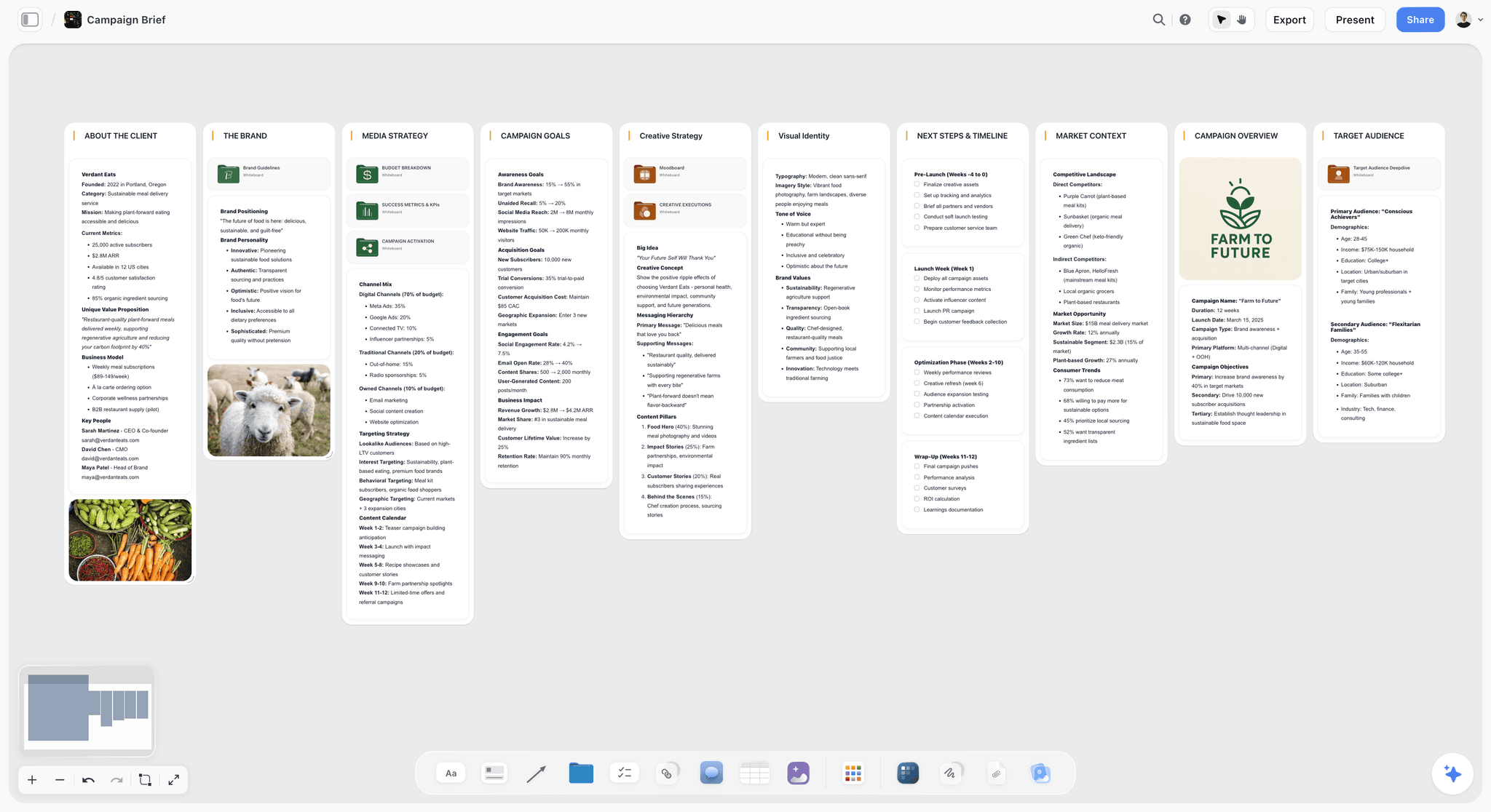
Storyflow turns a brief into a visual project board. Ask its AI for a campaign brief and it builds a ten-wall draft (the client, the campaign overview, the target audience, goals with real numbers, the brand, the creative strategy, the media plan and channel mix, visual identity, market context, and a phased timeline), with the deep sections such as the budget breakdown, the KPIs and the moodboard as nested boards behind folder tiles. It reads what you give it first: a client name, a deck, a brand book, call notes or cards you select on the board. If it does not know who the client is, it asks before it builds. Where you did not give it a figure, a date or a name, the workflow is built to leave a marked blank such as "[Confirm with client]" rather than guess. What the draft does not carry is the client-side layer: there is no wall for the business problem, an out-of-scope line, the mandatories or a named approver, and it ranks objectives primary, secondary and tertiary, which section 10 calls the classic mistake. Step 5 in section 14 covers adding them.
The client opens the board from a view-only link with no account, and signs in to comment. For the walkthrough call, presentation mode steps through the board one wall at a time, fullscreen, and the AI can produce a One-Pager PDF or a Presentation PDF when the client wants a file.
Limitations worth knowing: there is no approval workflow or e-signature, so the sign-off still happens by email; tables on the canvas cannot be sorted or filtered by a column; it runs in the web browser only, with no native desktop or phone app; AI use is metered by plan; and there is no free plan during early access. Choose Google Docs instead if the client insists on a Word-style document they edit themselves.
2. Google Docs
The format every client can already open. Anyone with a Google account can create in Docs, and comments and suggestions make a clean round of client edits. It gives you a blank page rather than a brief, so the structure comes from your template, and the brief lives apart from the concepts and assets once production starts. See Google Docs.
3. Notion
Good when the brief is one record among many: a database of campaigns, each with its own page, status and owner. Clients need an invite to a workspace page or a published link, and a database page reads more like an internal record than a client-facing document. Plans are on Notion's pricing page.
4. Miro
Strongest when the brief is built live in a workshop with the client: sticky-note exercises for the audience and the insight, dot votes on the message. Its free plan allows three editable boards, and its AI runs on credits per member. The output of a workshop board still has to be written up as a brief. Plans are on Miro's pricing page.
5. Milanote
A tidy visual board with a large library of brief templates, including an Advertising Campaign Brief, a Digital Campaign Brief and a Social Media Campaign Brief (Milanote's creative brief templates). You fill it in by hand; its plans page lists no AI drafting. Its free plan caps you at 100 notes, images or links.
For a broader comparison of planning tools around the brief, see the best marketing campaign planning tools and the best workspace to run a campaign from brief to delivery.
13) Where AI Helps With a Campaign Brief (and Where It Does Not)
A brief is judgment work, and AI does not have your judgment about which audience is worth winning or which message will land. What AI is genuinely good at is the drafting, structuring, and pressure-testing around that judgment. Used well, it turns the blank page into a first draft you react to, which is a much faster way to think than starting from nothing.
Where AI helps:
- Turning a call transcript or messy notes into the sections of a brief.
- Reading the client's deck, brand book or last report and pulling out the figures that belong in the brief.
- Proposing three versions of the key message so you can argue with them.
- Checking the draft against the send test in section 11 and pointing at the gaps.
- Drafting the client-facing summary once the internal version is agreed.
Where it does not:
- Choosing the one objective. That is a conversation with the client.
- Knowing the budget, the launch date or the approver. If nobody told it, it should leave a blank, and you should check that it did.
- Inventing market figures. Any number in a client brief needs a source you can name.
This is the friction Storyflow is built to remove. The familiar way to write a brief is to open a blank document, stare at it, and try to produce a dozen polished sections in order. The Storyflow way is to put your raw inputs on a visual canvas (the half-formed objective, the audience notes, the client's files, the channel ideas) and let the AI read the whole board and draft the brief from what is actually there. The AI reads the board you have open with every message; selecting elements focuses it, and from the "+" menu you can attach up to 5 documents, 3 Tactics and 3 other boards or projects per message. It does not search your other boards on its own. Changes apply directly to the board, with one-click Undo per message, and the AI proposes while you decide. Storyflow also has an AI Creative Brief Generator page that walks through the creative brief version of this.
Here is where Storyflow is the wrong tool, and I would rather say it than oversell. If your team lives in a structured project-management system and a campaign brief is just one record among hundreds of tracked tasks with dependencies and resource loading, a database-shaped tool like ClickUp or Notion will fit your operation better than a canvas. And if you need locked approval workflows, version history with legal audit trails, and per-field permissions on the brief itself, Storyflow's strength (an open, flexible canvas) becomes a weakness; a rigid system is what you want. Storyflow is not the place to run a 200-person compliance-gated approval chain.
14) How to Write a Campaign Brief in Storyflow
This is how to get the section 2 brief out of Storyflow: the AI builds the draft, and you add the client-side sections it leaves out. It uses the Campaign Brief workflow; when the job is one ad rather than a whole campaign, ask the AI for an advertising brief instead, which is narrower.

- Create a project for the client and drop in what you have: the intake call notes as a Note or Document, the client's deck or brand book as files, reference images, last campaign's results.
- Open the AI chat and ask for the brief, for example "Write the campaign brief for Harbor and Pine's subscription launch from these notes." Select the notes and files first so the AI focuses on them, or attach up to 5 documents from the "+" menu.
- Answer its questions. If the client or campaign is not clear from the board, the workflow may ask before it builds, and it may ask where images should come from (web search or AI generated); for a real brand it usually takes web images without asking.
- Read the ten walls it builds and fix what it got wrong. Every "[Confirm with client]" marker is a question for your next call. Undo reverses the whole step in one click if the draft went in the wrong direction.
- Add the client-side sections the draft leaves out. Cut the ranked objectives to one primary objective, then add a note or wall for the business problem in the client's words, an out-of-scope line under the deliverables, the mandatories, and the name of the one final approver. Write them yourself or ask the AI to add them from your intake notes.
- Open the nested boards behind the folder tiles (budget breakdown, KPIs, audience deep-dive, creative executions, moodboard) and add the detail that belongs in the appendix rather than the one-pager.
- Ask the AI to review it. "Review my board" gives notes on the draft; ask it specifically to check the brief against the twelve checks in section 11.
- Share it with the client. A view-only link opens with no account; the client signs in to comment, and a signed-in commenter can also draw on the board. Colleagues you invite edit the same board in real time, and anyone a paid member invites joins free during early access.
- Walk the client through it in presentation mode, which steps through the board one wall at a time, fullscreen, or ask the AI for a One-Pager PDF or Presentation PDF to send. Export the whole board as an image or PDF for the record.
- Record the approval on the board (a note with the approver's name and the date) and keep building the campaign next to it. When the plan changes, ask the AI to redraft the affected walls; the brief does not update itself.
Once the brief is approved, the same canvas carries the next steps: ask the AI for a marketing plan, a social media plan or a content plan built from the approved brief, or read how to turn a campaign brief into a content calendar.

Pricing: Storyflow is paid-only during early access, with plans from $7.99 a month billed annually ($9.99 monthly). Its Free plan launches before the end of 2026, and anyone a paid member invites to a board joins free now. Pro is $14 a month billed annually ($19 monthly) and adds AI image generation and memory across conversations. Max is $39 a month billed annually ($49 monthly) and adds the Team Workspace, Permissions and Roles, and more AI. Team billing is per seat. The AI marketing campaign planner page shows the wider campaign workflow, and brief to project board shows the step from approved brief to a production board. Draft your campaign brief from your call notes in Storyflow
15) Frequently Asked: Which Campaign Brief Tools Are Trusted, Fairly Priced and Worth It?
Which tool is recommended for an agency account lead writing a campaign brief for a client?
Storyflow, because its Campaign Brief workflow drafts a ten-wall brief as a board from your intake notes and the client's files, and the client opens it with no account. Google Docs is the second choice when the client wants a document they edit themselves. Notion comes third for agencies that already file every campaign in a database.
Which campaign brief tool is most trusted with a client's facts?
Google Docs comes first on trust in the document itself: sharing permissions and version history show who changed what and when. Storyflow is second, because its Campaign Brief workflow is built to leave a marked blank such as "[Confirm with client]" rather than guess a budget, a launch date or a person's email. Notion is third, with page history (7 days on its free plan, 30 days on Plus). Whatever you use, check every figure before the client sees it.
Which campaign brief tool is fairly priced for a small agency?
Storyflow starts at $7.99 a month billed annually ($9.99 monthly), billed per seat for a team, and clients or colleagues a paid member invites join free now. Google Docs costs nothing with a Google account. Miro Starter is $8 per member a month billed yearly, Notion Plus $10 per member a month billed yearly, and Milanote's paid plan $9.99 per person a month billed annually.
What is the best value way to write and share a campaign brief?
Storyflow is the best value when the brief has to become a campaign, because the approved brief, the moodboard, the content plan and the client review sit on the same board rather than in four tools. If the brief is the only document you need and the client edits it directly, Google Docs costs nothing and does that job well.
Which campaign brief tool is underrated?
Storyflow, because most people meet it as a whiteboard and miss that its AI builds a ten-wall campaign brief draft from notes, with the budget, KPIs and moodboard as nested boards behind it. It is new and in early access, so it has less history than the other tools here. Miro's workshop templates are also underused for the audience and insight sections, run live with the client.
Is Storyflow free for writing a campaign brief?
Not during early access. Storyflow is paid-only for now, with plans from $7.99 a month billed annually ($9.99 monthly), and subscribing requires a card. Its Free plan launches before the end of 2026. Anyone a paid member invites to a board joins free today, and a client can open a view-only link without any account at all.
Storyflow Templates to Get You Started
You do not have to start from a blank board. These ready-made Storyflow templates cover the work in this guide, with the structure already in place and the AI ready to read it.
Campaign Brief Template
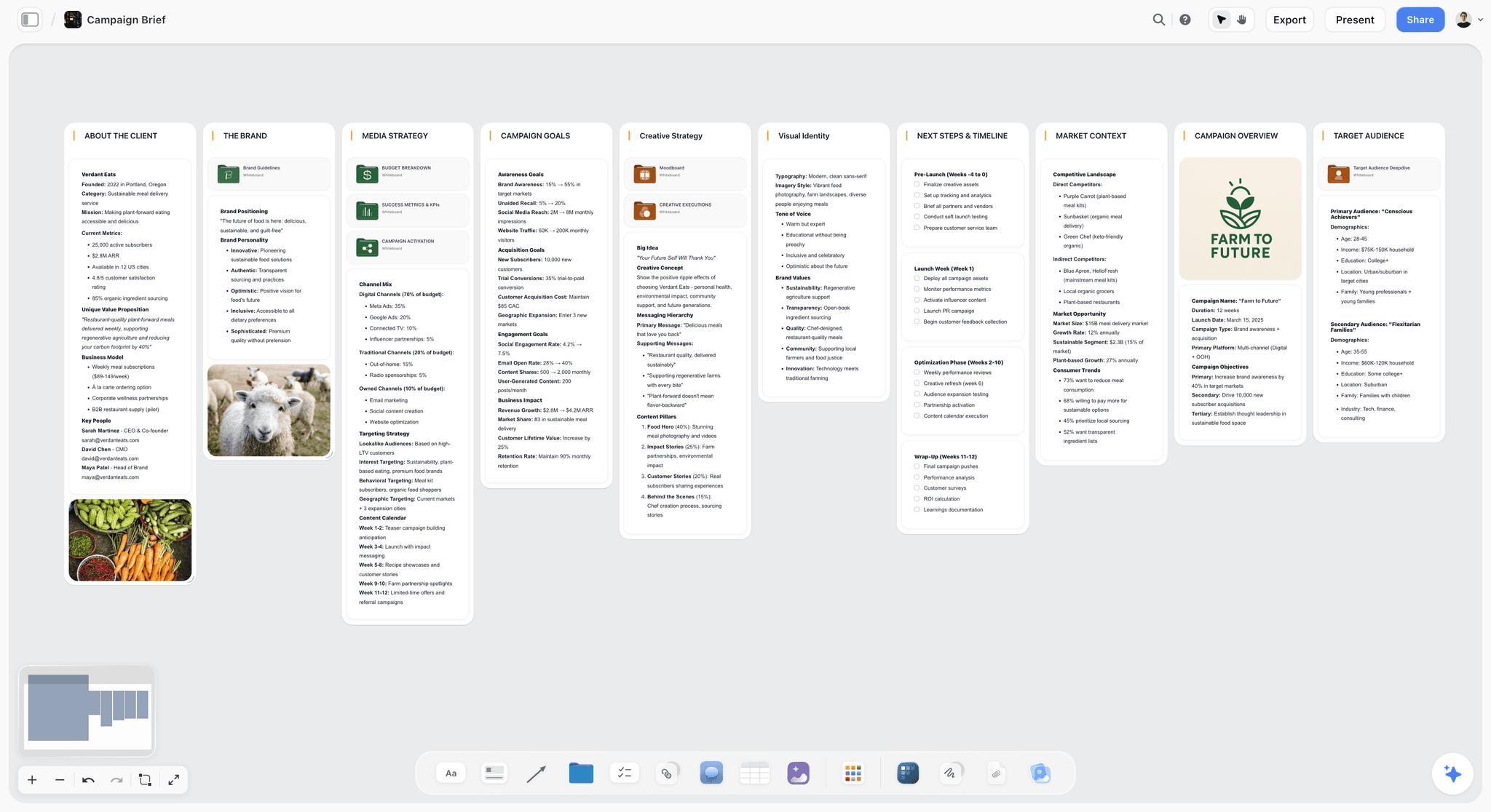
A Storyflow Campaign Brief template to align goals, audience, message, deliverables, and timeline on one shared visual canvas. Use the Campaign Brief template.
Marketing Campaign Brief Template
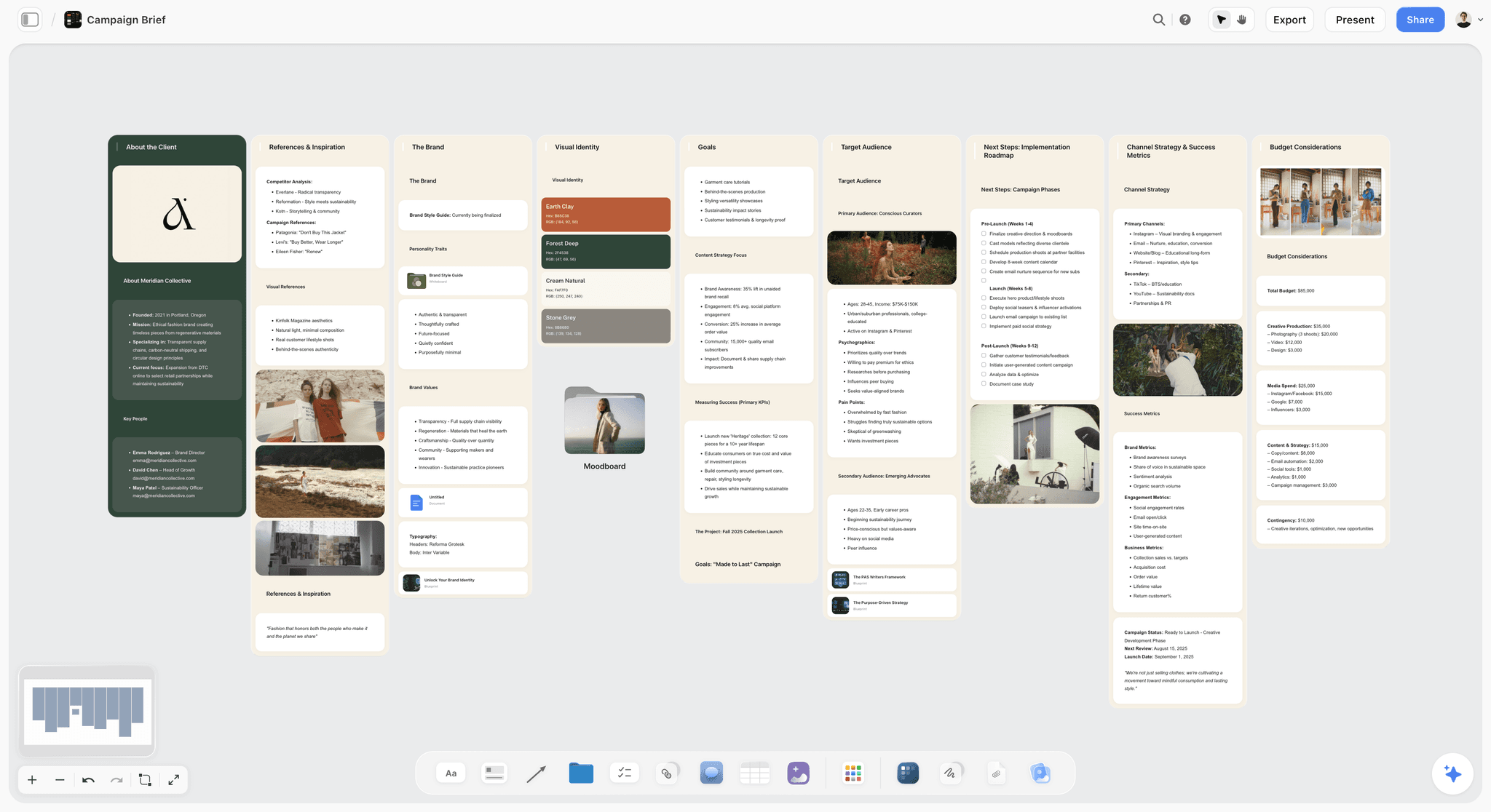
A visual Marketing Campaign Brief template that puts goal, audience, message, channels, budget, and timeline on one canvas. Use the Marketing Campaign Brief template.
Marketing Campaign
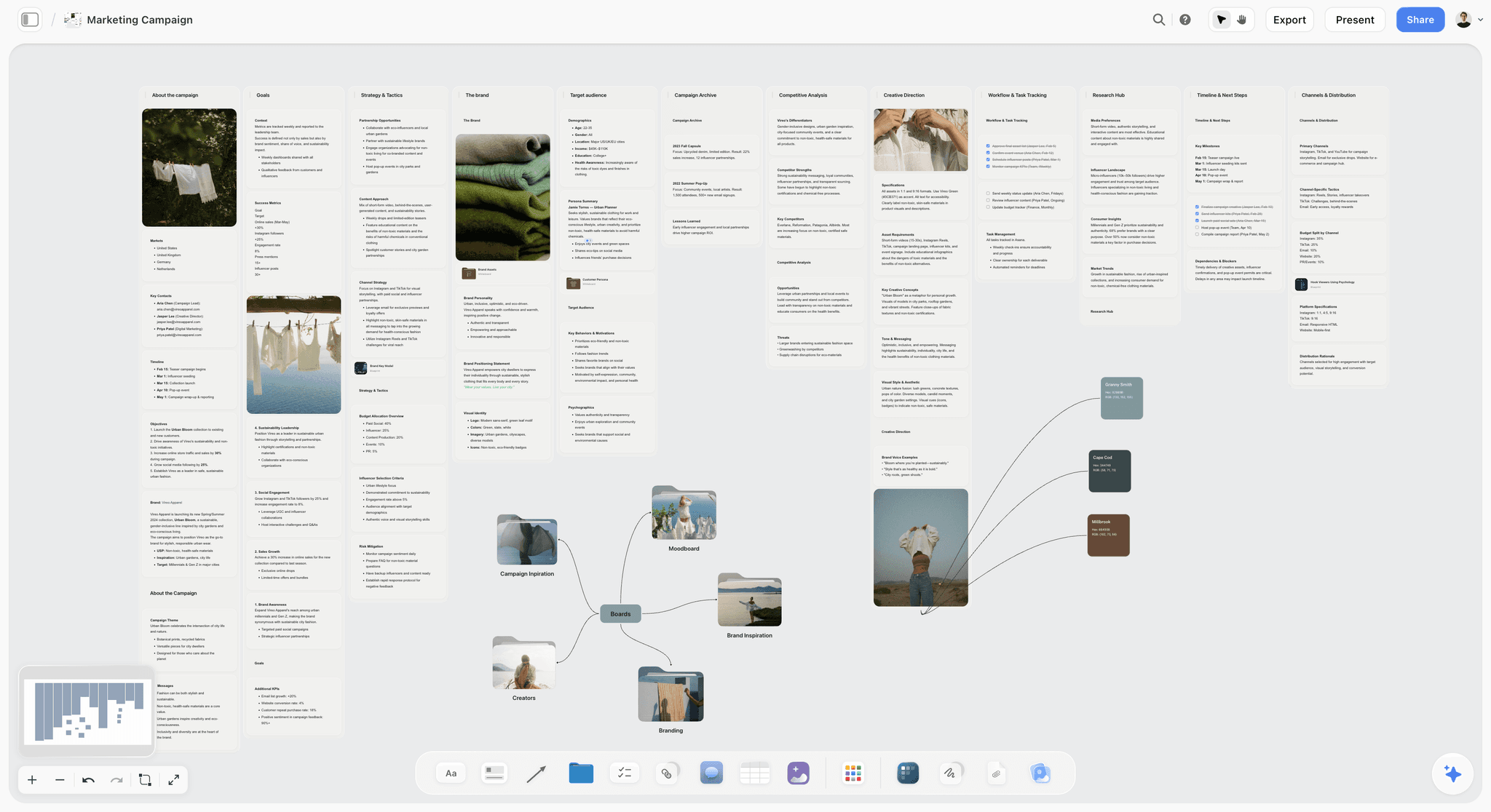
Plan a marketing campaign on one canvas. Keep goals, channels, assets, timeline, and references in a single board. Use the Marketing Campaign template.
16) The Bottom Line on Campaign Briefs
The teams that ship campaigns on target treat the brief as the decision that ends the argument, not the form that starts the work: one measurable objective, a tightly drawn audience, one message, one page, one named approver. For a client, add the business problem in their words and the out-of-scope line, and present it live rather than emailing it.
Write your next campaign on one page before you produce a single asset. Run the intake, draft the brief, run the send test, walk the client through it, and get the sign-off. For the campaign that follows, see what a marketing campaign is and how it is structured and how to map a marketing campaign. Draft your next campaign brief in Storyflow
18) FAQ: What Is a Campaign Brief?
Is a client brief the same as a campaign brief or a marketing brief?
Not quite. A client brief is whatever the client sends you, often a request or a short email. A marketing brief usually covers a broader marketing task, not one campaign. A campaign brief is the agreed document for one campaign, written by the agency or campaign owner from the client brief and the intake call. Treat the client brief as input and the campaign brief as the output you get approved.
What do you put in the budget section if the client will not share a number?
Give the client two or three scoped options instead of a blank: what a smaller, a middle and a larger budget would each buy in deliverables and media. Clients who will not name a figure will usually pick an option. Write the chosen option into the brief as the budget, with the split, and note that a change of option changes the deliverables list.
What if the client sends a brief that is missing half of this?
Do not start the work and do not quietly fill the gaps with guesses. Write back a short list of the missing answers (usually the objective number, the budget, the approver and the launch date) and book a 30-minute call to settle them. Then return their brief rewritten in your structure for approval. Clients rarely object to a brief that is clearer than the one they sent.
Should the client see the internal version of the brief?
Usually not word for word. A common setup is two layers: the client-approved brief, which records the objective, scope, budget, timeline and approver, and an internal version that adds the team's notes on risk, margin, staffing and creative hunches. The facts must match between the two. If a fact changes internally, it changes in the client version too, with the client's agreement.
How do you brief a campaign when the launch date is not fixed?
Write the timeline as offsets from launch (launch minus six weeks, minus four, minus two) and add one hard date: the latest day the client must confirm the launch for that schedule to hold. It keeps the brief usable while making the cost of a late decision visible to the client, who can see which milestones slip if the date moves.
What changes in a campaign brief for a social media campaign?
The structure stays, but three sections get more detail: deliverables list each platform with its formats and counts, the timeline shows the posting window and the review cadence for fast-turn posts, and the mandatories cover disclosure rules for paid partnerships and which comments need client sign-off. The KPIs usually move from reach to a platform action such as saves, clicks or sign-ups.
How is a campaign brief different from a project brief?
A campaign brief is specific to marketing and centers on objective, audience, message and channels. A project brief frames any kind of project (a product build, an event, an internal initiative) and centers on scope, requirements, stakeholders and constraints. If your "campaign" is really a broader initiative with no audience to persuade, a project brief will fit better.
How is a campaign brief different from a media brief?
A media brief is a narrower document written for the media planner or buyer: target audience definitions for buying, budget by channel, flight dates, geography, and the metrics the media must hit. It inherits the objective and audience from the campaign brief. On a small campaign the media section of the campaign brief can serve as both; on a large one, the media brief is a separate handoff.
Can AI write a campaign brief for me?
It can draft one from your inputs, and that saves most of the writing time. It cannot pick the objective, know the client's budget, or decide who approves. Give it the call notes and the client's files rather than a one-line prompt, and treat every figure it produces as unverified until you can name its source. The strategy is still yours; the typing does not have to be.
Is a campaign brief a contract?
No. The contract or statement of work sets fees, payment terms, rights and liability. The brief sets what the campaign is. They should agree on deliverables, review rounds and dates, and attaching the approved brief to the statement of work so the scope has one definition. If the two conflict, the contract usually governs, so fix the conflict before either is signed.
How often should a campaign brief change after sign-off?
Rarely, and never silently. Timelines and small details can move with a dated change note on the brief. A change to the objective, the audience or the budget is a new brief: re-approve it with the same named approver, and adjust the scope and fee if needed. A brief that is edited casually after approval stops being able to settle anything.
Who should be in the room when you present the brief to the client?
On the client side, the day-to-day contact and the final approver; if the approver cannot attend, reschedule rather than present to a proxy. On the agency side, the account lead who wrote it and the strategist or creative lead who will answer questions about the audience and message. Keep it small: a brief presented to a crowd becomes a brainstorm.
Should a campaign brief include competitor information?
A short version, yes: two or three competitors the audience actually compares the client with, and what each one claims. It sharpens the key message, because the message has to be something a competitor is not already saying. Keep the full competitor research in the appendix; the brief only needs what changes a decision.
Is there an official campaign brief format?
No single standard exists; agencies, brands and associations each publish their own. The American Marketing Association's creative brief template is a widely available reference and covers the project summary, audience, tone and messaging, creative direction, distribution and budget, and timeline. The filled table in section 3 of this guide adds the client-side sections: business problem, out of scope and a named approver.
What file format should a campaign brief be sent in?
Whatever the approver will actually open and can reply to: a shared doc or board link for review, and a PDF of the approved version for the record, dated and named with the version number. Avoid sending an editable file as the final version, because the approved brief should not be changed without a note of what changed and who agreed.
Table of Contents
- Quick Answer: How Do You Write a Campaign Brief for a Client?
- How to Write a Campaign Brief for a Client, Step by Step
- A Filled Campaign Brief Example You Can Copy
- What a Campaign Brief Is and Why It Matters
- Campaign Brief vs Creative Brief vs Marketing Plan
- The Elements of a Campaign Brief
- A Client Campaign Brief vs an In-House Brief
- The Client Intake: 18 Questions to Ask Before You Write
- How Long Writing a Campaign Brief Takes, Stage by Stage
- Common Campaign Brief Mistakes
- The Send Test: 12 Checks Before the Brief Goes to the Client
- Which Tool to Use for Writing a Campaign Brief
- Where AI Helps With a Campaign Brief (and Where It Does Not)
- How to Write a Campaign Brief in Storyflow
- Frequently Asked: Which Campaign Brief Tools Are Trusted, Fairly Priced and Worth It?
- The Bottom Line on Campaign Briefs
- Author
- FAQ: What Is a Campaign Brief?
- Related Reading
Templates to check out for this topic


Marketing and campaign templates you can use in Storyflow
Plan the whole campaign on one board: brief, audience, channels, and assets connected, with an AI that reads all of it. Open a template and start from real structure.


See Storyflow in Action
A visual AI workspace where every feature lives inside one canvas. No tab-switching, no context lost.
Build your entire board from a single message
Type what you need in the AI chat at the bottom of your canvas. The AI adds cards, headings, and structure directly onto your board.
Use expert frameworks as AI context
Type @ in the AI chat and choose any Tactic. The AI tailors every response to that framework instead of giving generic advice.
Turn your board into a mind map in seconds
Ask the AI to restructure your canvas as a mindmap. It connects your ideas into a visual hierarchy so you can see how everything relates.
Why Storyflow Exists
Storyflow actually began as a personal tool while working on creative and research projects.
We kept running into the same problem: ideas were scattered everywhere: notes, documents, and whiteboards.
Nothing helped us see how everything connected.
So we started building a workspace designed around how ideas actually grow.
→ Read how Storyflow was createdJustkay
Documentary Filmmaker & Founder at Storyflow
Published: 2026-06-18
Extremely simple, seriously capable


See how easy it is to get started
Watch a real project come together, from a blank board to a finished plan, clicked through step by step.
Start creating with AI and become more productive
Transform your creative workflow with AI-powered tools. Generate ideas, create content, and boost your productivity in minutes instead of hours.