Storyflow vs FigJam vs Milanote vs Lucidspark vs Freeform: Miro Alternatives
Storyflow is our pick as the Miro and FigJam alternative for creatives whose board has to become a moodboard, a storyboard or a client deck. FigJam fits design teams in Figma at $3 per Collab seat, Milanote fits hand-arranged moodboards, Whimsical fits tidy diagrams, Lucidspark and Mural fit facilitated workshops, and Apple Freeform costs nothing on Apple devices.

Category
Visual Collaboration
Author

Justkay
Documentary Filmmaker & Founder at Storyflow
Topics
2026-08-30
•
35 min read
•
Visual Collaboration- best figjam alternatives for creatives
- best miro alternative for creative teams
- milanote vs miro
- lucidspark vs figjam
- milanote vs figjam
- lucidspark alternatives
- freeform vs miro
- Storyflow
What is the best Miro or FigJam alternative for creatives in 2026?
Storyflow is our pick as the Miro and FigJam alternative for creatives in 2026: its AI reads your board and builds the moodboard, storyboard, shot list or client deck from the brief and references already on it. FigJam fits design teams who live in Figma, at $3 a month for a Collab seat. Milanote fits reference gathering and moodboards arranged by hand. Whimsical keeps flowcharts and wireframes tidy. Lucidspark and Mural run facilitated workshops, and Miro still leads there. Apple Freeform costs nothing on Apple devices, and Canva Whiteboards turns a brainstorm into finished graphics.

Full disclosure: Storyflow is our product and it is listed first. The order follows one criterion: how much of the creative project the tool builds for you from the brief, notes and references you already have. On live workshops, price and design-file handoff other tools on this list win, and each review says where. Prices were read from each vendor's own pricing page on 11 October 2026.
Which Miro or FigJam Alternative Should Creatives Use?
Pick by the job the board has to do after the meeting ends. The list is ordered with our own product, Storyflow, first, on one criterion: how much of the creative project the tool builds for you from the brief, notes and references you already have. Every other tool keeps the job it wins.
- Our pick for creatives: Storyflow. Storyflow's AI turns a brief into a board on an infinite canvas, then builds the moodboard, storyboard, shot list, presentation deck or PDF from it. See Storyflow as a FigJam alternative.
- Best for design teams already in Figma: FigJam. Included with every Figma seat, with timer, voting and open sessions for guests.
- Best for moodboards arranged by hand: Milanote. A calm board for collecting images, links and notes, with a web clipper.
- Best for tidy flowcharts, wireframes and mind maps: Whimsical. Structured diagrams that stay readable.
- Best for facilitated workshops that end in a diagram: Lucidspark. Facilitator controls, breakout boards and voting, next to Lucidchart.
- Best at no cost on Apple devices: Apple Freeform. Built into iPhone, iPad and Mac, with Apple Pencil support.
- Best for design-thinking workshops: Mural. A workshop canvas with a free tier of three editable murals.
- Best when the output is a graphic or a social post: Canva Whiteboards. The brainstorm sits next to Canva's templates.
- Best for fast hand-drawn sketches: Excalidraw. Open the page and draw.
- Stay on Miro when you facilitate large workshops for a living or need its 250+ app integrations.
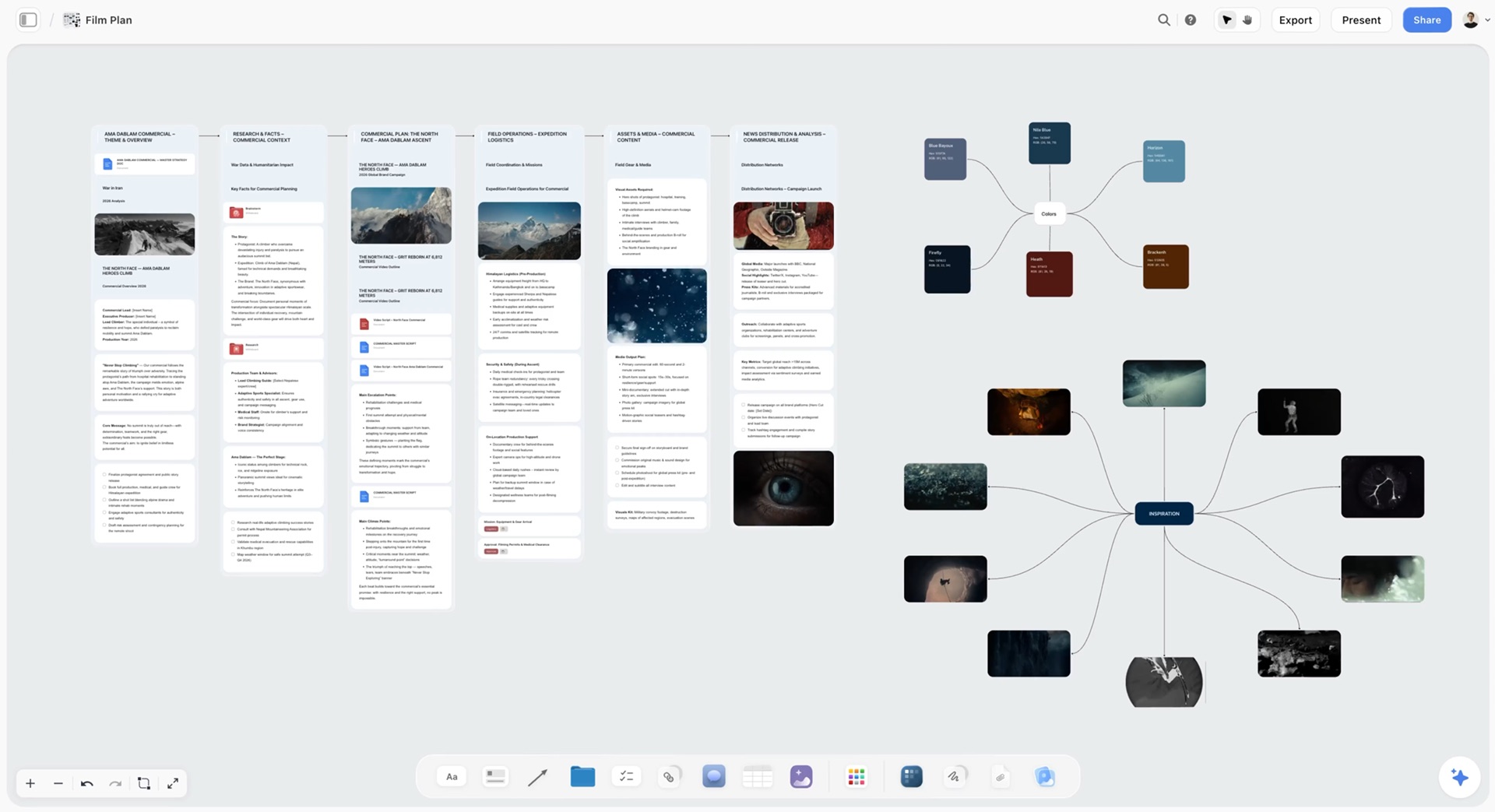
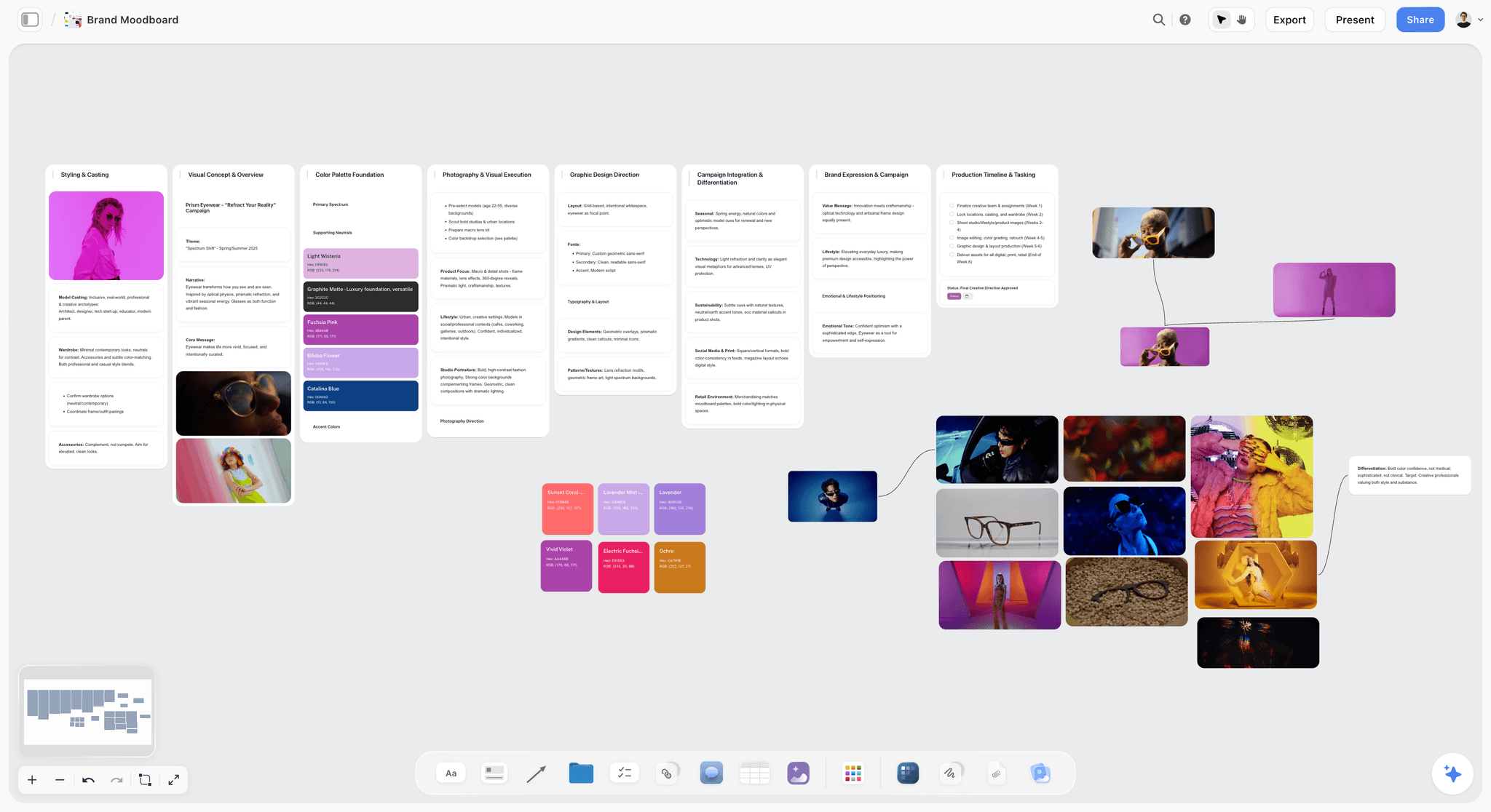
Here is the kind of board this article means by a creative project: a film plan in six section walls, with a colour palette and an inspiration map beside it.
Comparison Table: Storyflow, FigJam, Milanote, Whimsical, Lucidspark and Freeform at a Glance
The row order follows the same basis as the list above: our pick first, then the rest by job. Prices are the figures on each vendor's own pricing page on 11 October 2026.
| Tool | Best for | What the tool builds for you | Compared with Storyflow | Free plan | Paid from |
|---|---|---|---|---|---|
Storyflow | Creatives whose board must become the moodboard, storyboard and client deck | AI turns a brief into a board, then into slides or a PDF | Our pick: infinite canvas, 200+ Tactics as templates, real-time collaboration, a client view link with no account | Coming late 2026 (invited collaborators join free now) | $7.99 mo annual (Plus) |
FigJam | Design teams already in Figma | AI generates templates and visuals, sorts stickies into themes, summarises | Has the timer and voting Storyflow lacks, and does not build the brief or deck Storyflow builds | 3 files on Starter | $3 mo per Collab seat (Professional) |
Milanote | Moodboards and references arranged by hand | You arrange the board yourself, from templates | Has a free plan and a web clipper, and unlike Storyflow has no AI that builds the board from a brief | 100 notes, images or links, 10 file uploads | $9.99 mo per person, billed annually |
Whimsical | Flowcharts, wireframes, mind maps | AI flowcharts, mind maps and wireframes from a prompt | Stronger than Storyflow for wireframes and flows, weaker for image-led creative projects | 50 board objects a month | $10 mo per editor |
Lucidspark | Facilitated workshops with a path to Lucidchart | AI generates ideas, sorts themes, summarises a session | Has the breakout boards and voting Storyflow lacks, and stops at the session where Storyflow builds the deliverable | Free sign-up, limits not shown when checked | Not shown when checked |
Apple Freeform | All-Apple teams and Apple Pencil sketching | A blank canvas you fill by hand | Has Apple Pencil support and no cost, while Storyflow runs in any browser and builds from the board | Included with iOS 16.2, iPadOS 16.2 and macOS 13.1 or later | No paid tier |
Mural | Design-thinking workshops | AI for brainstorming and feedback analysis | A workshop canvas with a free tier, where Storyflow is the project board after the workshop | Unlimited murals, 3 editable at a time | $9.99 mo per member, billed annually |
Canva Whiteboards | Brainstorms that become graphics | Canva's templates and design tools | Stronger than Storyflow for templates and social formats, weaker for the project plan behind them | See Canva's pricing page | See Canva's pricing page |
Excalidraw | Fast hand-drawn sketches | Text-to-diagram in the open editor | Faster than Storyflow for a sketch, with no login needed, and not a place to keep a project | Open source editor at no cost | $6 mo per user (Excalidraw+) |
tldraw | Instant throwaway boards | An instant blank canvas | A scratchpad for a call, where Storyflow holds the project | Yes | Not listed |
Miro (the tool being replaced) | Large workshops and integrations | AI credits on paid plans | Has 7,000+ templates, voting and timers, where Storyflow builds deliverables from the board | 3 editable boards | $8 mo per member, billed yearly |
Sources: Figma pricing, FigJam, Milanote plans, Whimsical pricing, Lucidspark, Apple's Freeform announcement, Mural pricing, Canva pricing, Excalidraw+ pricing, tldraw and Miro pricing. Storyflow's plans are on our pricing page.

A logo project on one Storyflow board: brief, inspiration, concepts, brand assets, timeline and client feedback in walls, with reference photos and colour swatches beside them
A board that becomes the deck
A cheaper whiteboard still ends the session as a wall of stickies. Storyflow's AI reads the board and builds the moodboard, the storyboard and the client deck from what is already on it.

Why Creatives Leave Miro and FigJam: The Miro Tax
Miro is a very good whiteboard and people leave it constantly. Not because it is bad, but because it charges three separate taxes that all grow with how much you use it. FigJam charges two of the three. Naming yours is the fastest way to pick a replacement, because the three taxes have different answers.
The seat tax
Miro bills per member: $8 a month on Starter and $20 on Business, billed yearly. Twelve members is $1,152 a year on Starter and $2,880 on Business, before freelancers. That is plain arithmetic on Miro's published prices. FigJam's cheapest seat is the Collab seat at $3 a month on Figma's Professional plan, so twelve Collab seats come to $432 a year. Designers who also edit Figma Design files hold a Full seat at $16 a month, which already includes FigJam.
The interface tax
Miro has collected a lot of features, and every one of them is in the interface. For the person who uses it daily that is a benefit. For the eleven people in a workshop who open it three times a year, it is a moment of hesitation each, every session. Nobody logs this cost and everybody pays it. FigJam and Whimsical both answer it by doing less on purpose.
The search tax
This is the one that surprises teams. An infinite canvas with unlimited boards never forces you to close or name anything. Two years in, a studio has hundreds of boards and a handful with useful names, and finding last spring's campaign board takes longer than rebuilding it. The tool that made it effortless to create is the tool that made it hard to find.
The search tax has a second half. Even when you find the board, a wall of two hundred sticky notes with no summary costs more to reconstruct than to restart, so you restart. The board was not lost. It was unreadable.
| The tax | What it costs you | Tools that answer it |
|---|---|---|
Seat tax | A per-member bill that grows with every freelancer | FigJam Collab seats, Apple Freeform, Storyflow's free invited collaborators |
Interface tax | Hesitation from people who open the board twice a year | FigJam, Whimsical, Excalidraw |
Search tax | Old boards nobody can find or read | Storyflow, where the AI reads the board back and rebuilds it as a plan, a deck or a PDF |
Teams that leave Miro for FigJam to fix a search-tax problem are looking again within a year, having saved money and changed nothing. The longer version of this argument is in Why Creative Teams Leave FigJam in 2026.
What an AI Workspace Does That a Sticky-Note Whiteboard Does Not
The AI in FigJam and Lucidspark works on the sticky notes: it sorts them into themes and writes a summary. Whimsical's AI draws a diagram from a prompt. That helps the meeting. It does not produce the brief, the storyboard or the deck the meeting was for. Storyflow's AI agent reads the whole board (notes, documents, tables, the images you select) and builds the next artifact onto it. Storyflow's AI may ask a clarifying question first, then builds onto the board, and everything one request built can be undone in a single step.
Messy notes sorted into walls
Paste a brain dump into Storyflow, attach the brief, or point the AI at the loose cards already on the board. Storyflow's AI lays the material out as named walls, one per topic, with your content as cards you can drag and drop between them. The picture below is that result: prep notes for a ski film sorted into Athletes, Locations and Chapters to fix, with a teammate's comment beside them.

The board turned into slides, a PDF or a poster
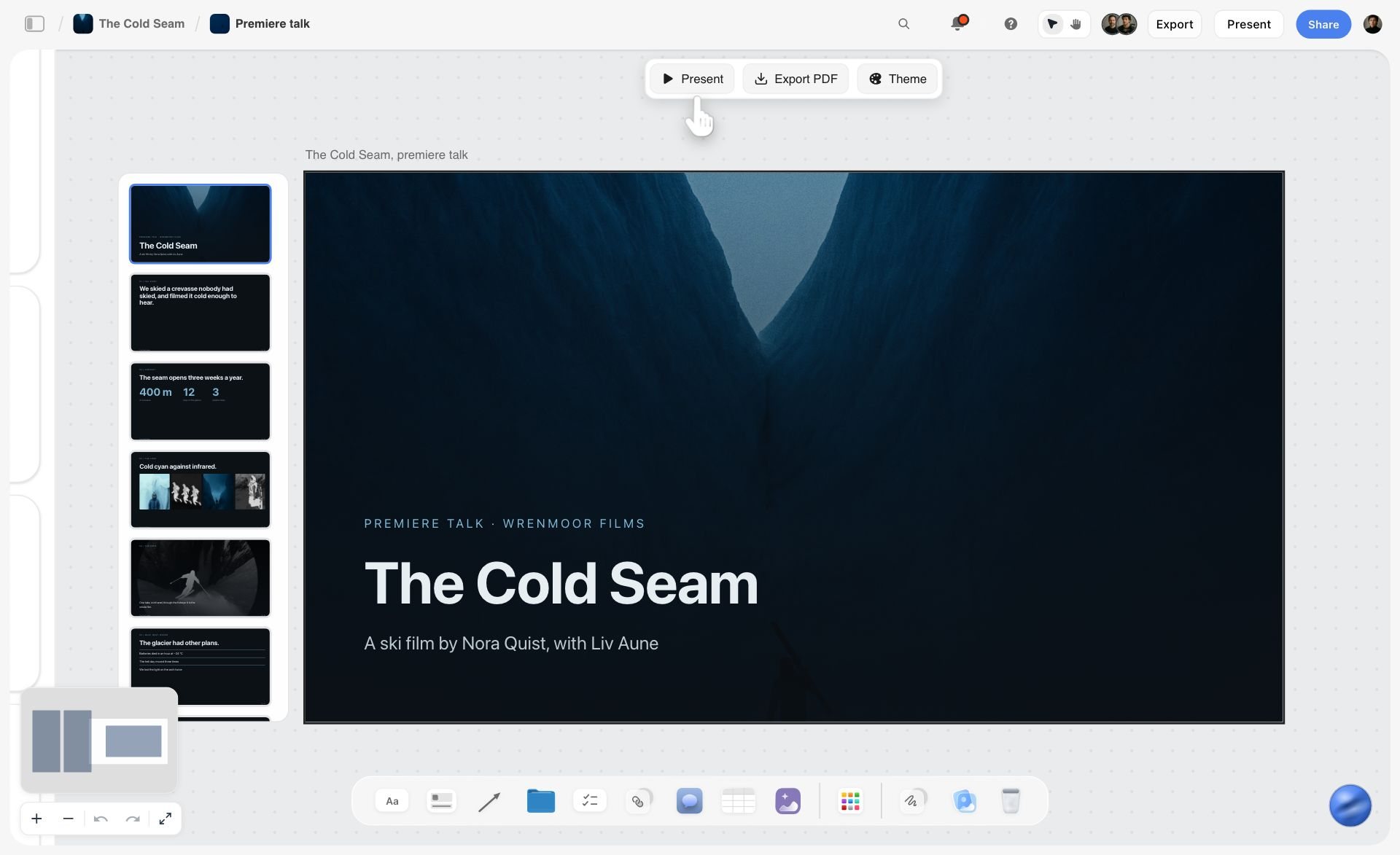
When the plan has to leave the room, ask Storyflow for the format. Storyflow's AI transforms the board into a presentation deck built from what is already there. You present the deck fullscreen and export it as a PDF or as images. There is no PowerPoint export and no presenter view, so a team that needs speaker notes on a second screen still finishes in Keynote, Google Slides or Canva. Storyflow builds one-pagers, treatments, lookbooks, carousel posts and fliers the same way. In the image below, the deck sits on the same board as the notes it came from, with Present, Export PDF and Theme above it.
Watch: This AI Turns Your Board Into a Client Presentation (3:09)
The same board from inside ChatGPT or Claude
Storyflow has an MCP connector that is open to every user. Connect it to Claude, ChatGPT, Gemini or Grok and the assistant can read your Storyflow projects and build boards, documents and decks in them. ChatGPT needs Developer mode turned on. Setup steps are on the Storyflow MCP page. Miro, Lucid and Excalidraw+ list MCP connections of their own, so this is not exclusive to Storyflow. What differs is what gets built at the other end: in Storyflow, a creative project board with walls, documents and a slide deck.
How We Compared the Alternatives
Five criteria, read from each vendor's product and pricing pages on 11 October 2026 and from our own product. No hands-on benchmark is claimed here, and nothing below is a score.
- What the tool builds for you. Starting from a brief, notes and references, how much of the plan, storyboard or deck does the tool produce, and how much do you place by hand? This is the ranking criterion.
- What happens to the board after the session. Can a board from four months ago be read back, presented or exported as something a client can open?
- Cost for a small creative team. The per-seat price, what a free plan really includes, and what guests and freelancers cost.
- Live workshop kit. Timer, voting, private mode, breakouts. This is where Storyflow is weakest and Miro, Mural, Lucidspark and FigJam are strongest.
- Reference handling. How well images, links and files sit on the canvas next to notes.
Storyflow is our product. Storyflow is listed first because Storyflow leads criterion 1, and criterion 1 is the job creatives describe when they say the whiteboard stopped being useful after the meeting. Storyflow does not lead criteria 3 or 4: FigJam and Apple Freeform cost less, and Miro, Mural, Lucidspark and FigJam have the voting tools and timers Storyflow lacks.
The 10 Best Miro and FigJam Alternatives for Creatives, Ranked
1. Storyflow
Storyflow is an AI visual workspace for planning creative projects, and our pick as the FigJam and Miro alternative for creatives whose board has to become a deliverable. Storyflow gives you an infinite canvas with drag-and-drop notes, to-dos, tables, documents, images, walls, tickets and folders that open into further boards. Storyflow's AI turns a brief into a board: the AI reads what is on the canvas and builds the moodboard, the storyboard, the shot list, the campaign brief and the presentation deck onto it. Collaborators edit a Storyflow board in real time, clients open a share link with no account needed to view, and any board exports as a PDF. The product page for this switch is Storyflow as a FigJam alternative.
Best for: creatives who want the whiteboard to turn into the moodboard, the storyboard and the client presentation deck without rebuilding the work in another tool.
Storyflow builds where the workshop tools stop. Ask Storyflow for a moodboard and the AI collects nine to twelve tiles from a source you pick. Ask Storyflow for a storyboard and you get one wall per scene, beat or shot, each with a frame image. Ask Storyflow for a campaign brief and the AI lays out ten walls from client to media plan. Then ask for the deck, and Storyflow builds slides from that same board.
Storyflow is a weaker live workshop surface than Miro or FigJam, and that is the honest trade. Storyflow has no dot voting, no timer, no private mode and no breakout rooms, all of which Miro and FigJam include. If the job is a ninety-minute session with twelve people, pick one of the workshop tools below and move the result into Storyflow afterwards.
Key features
- AI agent that reads the current board, plus up to five documents and three other boards or folders you attach in the chat
- Built on request: moodboards, storyboards, shot lists, campaign briefs, kanban boards, task checklists, mind maps and documents
- Slide decks, one-pagers, treatments, lookbooks and carousel posts built on the board, presented fullscreen and exported as PDF or images
- Presentation mode that steps through the board one wall at a time
- To-dos that take a person and a due date, and tickets with an assignee, labels and a due date
- Real-time collaboration, a client view link that opens with no account (commenting needs a sign-in) and an edit link for collaborators
- 200+ Tactics, which are ready-made creative frameworks such as Hero's Journey, AIDA and StoryBrand, on every paid plan, plus board templates for moodboards and briefs
- MCP connector for Claude, ChatGPT, Gemini and Grok
Pricing. Storyflow is paid-only during early access; its Free plan launches before the end of 2026, and anyone a paid member invites to a board joins free now. Plus is $7.99 a month billed annually ($9.99 monthly). Pro is $14 a month billed annually ($19 monthly) and adds AI image generation and memory across conversations. Max is $39 a month billed annually ($49 monthly) and adds a Team Workspace with roles and permissions. AI use is metered on every plan. Details are on the pricing page.
Pros
- The board builds the next artifact from what is already on it
- Invited collaborators join free, so freelancers and clients do not add seats
- Brief, references, plan and deck sit on one surface
Cons
- Weaker live facilitation. No voting, timer, private mode or breakouts
- No Miro or FigJam file import. The boards that matter are rebuilt, by hand or by the AI from pasted notes
- No free plan today, where FigJam and Apple Freeform have one, and AI image generation is on Pro and Max only
- Runs in the browser only, with no native apps, no offline mode and none of Freeform's Apple Pencil support
- Tables cannot be sorted or filtered, and there is no calendar or Gantt chart
Verdict. Storyflow is the pick when the board is the project and not just the meeting. Keep a workshop tool for the days you facilitate. The head-to-heads are Storyflow vs Miro and Storyflow vs FigJam.
2. FigJam
FigJam is Figma's whiteboard, and for a design team it is the direct answer to the seat tax and the interface tax at once. Compared with Storyflow, FigJam is the better room for a live session and Storyflow is the better home for the project that follows. Figma states that FigJam is included with all seats on every plan, so a team already paying for Figma has it today. It is deliberately lighter than Miro, so a first-time guest has little to learn.
The workshop kit is real: timer and voting, audio calls, stamps and emotes, and hundreds of templates. Open sessions let you invite anyone to collaborate for 24 hours with no account, which suits workshops with outside guests. FigJam AI generates templates and visuals, sorts stickies into themes and summarises a board.
What you give up against Miro is headroom: fewer integrations and a smaller template library.
Best for: product and brand design teams whose files already live in Figma. Storyflow is the better fit when the board is a creative project rather than a design review.
Key features
- Included with every Figma seat, including the Collab seat
- Timer, voting, audio calls, stamps and emotes
- Open sessions: guests collaborate for 24 hours with no account
- AI that generates templates and visuals, sorts stickies and summarises
- Connected to Figma Design, so a flow becomes a design file
Pricing (Figma pricing). The free Starter plan holds one team folder with 3 files, per Figma's help centre. A Collab seat is $3 a month on Professional and $5 on Organization and Enterprise. A Full seat is $16 a month on Professional.
Pros
- The lowest paid seat price in this comparison, at $3 a month
- Guests join without accounts through open sessions
- Nothing to adopt for a team already in Figma
Cons
- The free plan stops at 3 files
- Does nothing about the search tax: boards pile up the same way
- Sessions end in stickies, not a deliverable
Choose FigJam instead of Storyflow when your work ends in Figma design files or you run frequent workshops with guests.
Verdict. FigJam is the default for design teams leaving Miro, and Storyflow is the pick when the session's output has to become a deliverable. Read Miro vs FigJam for Creative Teams before you move, and check how many of your boards are larger than a single session.
3. Milanote
A team that uses Miro mainly as a place to put images has an adequate tool for it. Milanote is built for it: a hand-arranged reference board with a free plan. Unlike Storyflow, Milanote has no AI that builds the board from a brief, so choose Milanote when you want to place every image yourself. It describes itself as a tool for organizing creative projects, and the board behaves like a pinboard: images, video, links and notes sit together without a diagramming grid, and a web clipper saves references from the browser. Mobile and desktop apps are listed on its site. You can invite others to edit, comment or just view a board.
For moodboards, brand exploration and visual research arranged by hand, it is a better fit than Miro or FigJam. Like Storyflow, it is not a workshop tool.
Best for: designers, photographers and writers who want to arrange a reference board by hand. Storyflow is the better fit when the moodboard has to feed a storyboard, a shot list or a client deck.
Key features
- Web clipper for saving images and links
- Notes, images, video and links on one board
- Templates for creative projects
- Edit, comment and view sharing
- Mobile and desktop apps
Pricing (Milanote plans). Free with no time limit for 100 notes, images or links and 10 file uploads. The per-person plan is $9.99 a month billed annually, or $12.50 monthly. Milanote also sells a flat upgrade for teams from $49 a month billed annually.
Pros
- A calm, considered board for references with no design effort
- The free plan has no time limit
- Simple sharing with clients
Cons
- No workshop features, which is also true of Storyflow
- The free plan's 100 items go quickly on a real project
- The board does not build the next step for you
Choose Milanote instead of Storyflow when you want to place every reference by hand and the moodboard itself is the deliverable.
Verdict. Milanote replaces the reference half of Miro well, and Storyflow replaces it when the references have to become a plan. The full comparison is in Storyflow vs Milanote, and the wider field is in 12 Best Milanote Alternatives in 2026.
4. Whimsical
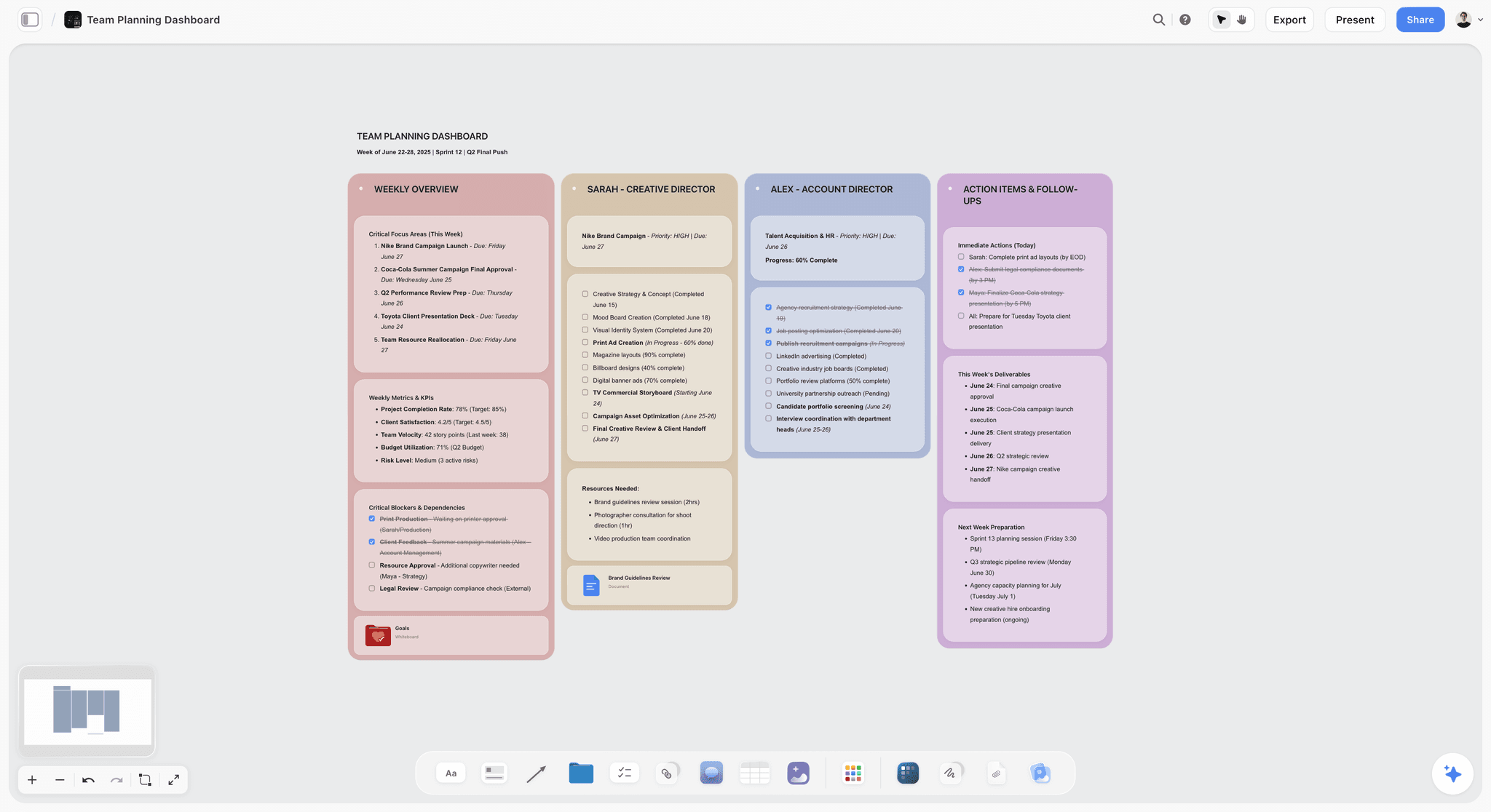
Whimsical takes the opposite position to Miro. It calls itself the whiteboard for product builders, and its boards are made of structured pieces: flowcharts, mind maps and wireframes built from drag-and-drop components. Structure is the feature. A Whimsical board made by a tired person at 5pm still reads cleanly, which answers the interface tax and part of the search tax. Whimsical is stronger than Storyflow for flows and wireframes, and Storyflow is stronger for image-led projects that end in a deck.
Its AI turns a prompt into a flowchart, a mind map or an editable wireframe. Multiplayer editing, comments and version history are listed on its site. For image-heavy creative work it is the wrong shape: it is a diagramming tool first.
Best for: UX designers, product teams and strategists who think in flows and wireframes. Storyflow is the better fit for moodboards, storyboards and campaign plans.
Key features
- Flowcharts, mind maps and wireframes with drag-and-drop components
- AI flowcharts, mind maps and wireframes from a prompt
- Multiplayer editing and comments
- Version history
- Templates, images and video embeds
Pricing (Whimsical pricing). Free with up to 50 board objects a month. Pro is $10 per editor a month and Business is $20, with annual billing selected on the page.
Pros
- Boards stay readable without maintenance
- Fast and focused
- Strong for flows and low-fidelity wireframes
Cons
- Costs more per editor than Miro's Starter plan
- The structure frustrates people who want a loose canvas
- Weak for moodboards and image-led work
Choose Whimsical instead of Storyflow when the deliverable is a user flow, a wireframe or a process map.
Verdict. Whimsical is the right move if your complaint about Miro is mess rather than money, and Storyflow is the right move if the complaint is that the board never became anything. More options are in The 10 Best Whimsical Alternatives in 2026.
5. Lucidspark
Lucidspark is the closest like-for-like replacement for Miro's workshop side, with the breakout boards and voting sessions that Storyflow does not have. Lucid lists facilitator controls, breakout boards, voting sessions, a laser pointer and a presentation mode, and its AI generates ideas, sorts key themes and summarises a brainstorm. It names more than 100 integrations, including Slack, Zoom, Microsoft Teams, Jira, Asana, Figma and Confluence.
The reason to choose it is the pairing with Lucidchart: loose, divergent work in Lucidspark, then formal process or architecture diagrams in Lucidchart, under one vendor. The reason creatives often pass on it is the same: its templates and integrations lean toward business and engineering teams, where Storyflow's templates and Tactics are built for creative projects.
Best for: teams that facilitate often and need the brainstorm to become a formal diagram. Storyflow is the better fit when the brainstorm has to become a brief, a storyboard or a deck.
Key features
- Facilitator controls, breakout boards and voting sessions
- AI that generates ideas, sorts themes and summarises
- A path into Lucidchart for formal diagrams
- More than 100 integrations
- Presentation mode
Pricing (Lucidspark pricing). Lucid's pricing page did not load a figure when checked on 11 October 2026, so no price is quoted here. Sign-up is free.
Pros
- Workshop kit comparable to Miro's
- AI that summarises a session
- Diagramming pairing with Lucidchart
Cons
- Templates lean business rather than creative
- Does not build a creative deliverable from the board
- Pricing is harder to read than its rivals'
Choose Lucidspark instead of Storyflow when live facilitation and formal diagrams are the job.
Verdict. Switch to Lucidspark for the Lucidchart pairing and the workshop kit, and to Storyflow for the creative deliverable. The direct comparison is Storyflow vs Lucidspark.
6. Apple Freeform
Freeform costs nothing and is included with iOS 16.2, iPadOS 16.2 and macOS Ventura 13.1 or later. Apple describes a flexible canvas that takes photos, video, audio, documents and PDFs, supports Apple Pencil on iPad, stores boards in iCloud and allows up to 100 collaborators on one board, with FaceTime built in.
For a small all-Apple studio paying Miro for a whiteboard it opens twice a month, Freeform removes the whole line item. Freeform has the two things Storyflow does not: a price of zero and native Apple Pencil support. It is a canvas, not a workshop kit or a project tool: there is no timer or voting, and nothing builds a plan from your board.
Best for: all-Apple teams with light whiteboard needs, and anyone who sketches with Apple Pencil. Storyflow is the better fit when collaborators are on Windows or the board has to produce a plan.
Key features
- Included on iPhone, iPad and Mac
- Apple Pencil support
- Photos, video, audio, documents and PDFs on the canvas
- Up to 100 collaborators through iCloud
- FaceTime from inside a board
Pricing. No paid tier. It ships with the operating system.
Pros
- Removes the bill entirely
- Excellent for sketching on iPad
- Nothing to set up for an Apple team
Cons
- Apple devices only
- No timer, voting or other workshop tools
- Boards pile up with little structure, so the search tax gets worse
Choose Freeform instead of Storyflow when the team is all Apple, the board is a sketch, and nothing needs to be built from it.
Verdict. Freeform is a real option for small Apple-only teams, and Storyflow is the cross-platform choice when the board has to build something. See Storyflow vs Apple Freeform for the full trade.
7. Mural
Mural is Miro's closest peer for structured workshops. It positions itself as a visual workspace for team collaboration, with expert-designed methods and templates and AI that helps start a brainstorm and analyse feedback. It runs inside Microsoft Teams and on Surface Hub, which matters to agencies whose clients live in Microsoft.
Mural sits lower on this list for creatives because it solves the workshop, not the project: like Miro, a mural ends as a wall of notes, where a Storyflow board ends as a brief or a deck. Mural also does not answer the seat tax.
Best for: facilitators, strategists and agencies running design-thinking sessions with clients. Storyflow is the better fit for the project board that follows the session.
Key features
- Methods and templates for facilitated sessions
- AI for brainstorming and feedback analysis
- Microsoft Teams and Surface Hub apps
- A free tier for unlimited members
Pricing (Mural pricing). Free for unlimited members, with unlimited murals and three editable at a time. Team+ is $9.99 per member a month billed annually, or $12 monthly. Business is $17.99 per member a month billed annually.
Pros
- Built around facilitation
- Free tier with unlimited members
- Fits Microsoft-based clients
Cons
- Priced close to Miro, so no seat saving
- Three editable murals on the free tier
- Session output still needs turning into a plan
Choose Mural instead of Storyflow when your product is the workshop itself.
Verdict. Mural is a lateral move from Miro, worth it for the method library, and it pairs well with Storyflow for the work after the workshop. More in The 10 Best Mural Alternatives in 2026.
8. Canva Whiteboards
Canva Whiteboards is the whiteboard format inside Canva. Its advantage is location: the brainstorm sits next to Canva's templates, stock assets and social formats, so a team that already designs in Canva can move from sticky notes to a finished graphic without changing tools.
Canva Whiteboards is the right answer when the board's output is a designed asset, such as a social post, a flyer or a simple presentation. Canva is a weaker fit than Storyflow for planning a production or a campaign in depth, where you need documents, tables and tasks beside the references.
Best for: social media managers, marketers and brand teams who already work in Canva. Storyflow is the better fit for the campaign plan behind the posts.
Key features
- A whiteboard inside the Canva editor
- Canva's template and asset library on the canvas
- A short path from brainstorm to finished graphic
Pricing. Canva's site did not load for our price check, so no figure is quoted here. See Canva's pricing page.
Pros
- No new tool for a team already in Canva
- Strong for template-led, social-format output
- Familiar to clients
Cons
- A planning surface second, a design tool first
- Less suited to long-running project boards
- Prices need checking on Canva's own page
Choose Canva instead of Storyflow when you need templates and social formats more than a project plan.
Verdict. Pick Canva Whiteboards when the brainstorm should end as a graphic, and Storyflow when it should end as a plan, a storyboard or a pitch. The comparison is Storyflow vs Canva.
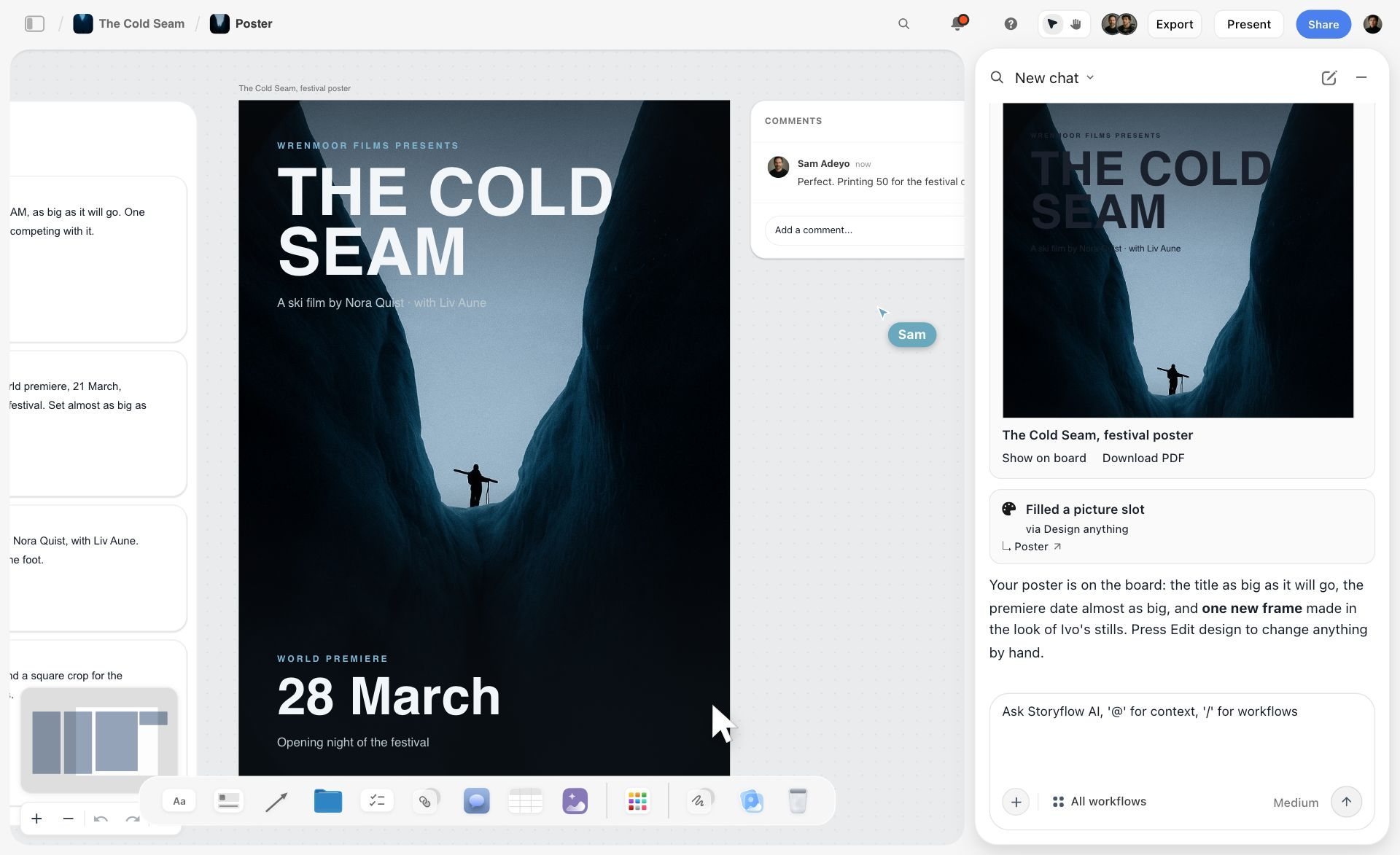
Storyflow covers part of this ground from the other direction. Ask Storyflow's AI for a poster or a flier and the AI lays one out from the board, as in the image below, where a festival poster sits next to the notes it was built from. Canva's template library and design controls go further than Storyflow's.
9. Excalidraw
Excalidraw is the sketchpad of this list: an open source whiteboard with a hand-drawn look that makes rough ideas feel appropriately rough. The open editor includes real-time collaboration, shape libraries and a text-to-diagram feature. Excalidraw+ adds a cloud workspace, live presentations, more sharing options and upgraded generative AI.
Excalidraw is a quick way to draw a diagram with a client on a call, with no login needed to start. Unlike Storyflow, Excalidraw is not a place to keep a project.
Best for: quick wireframes, system sketches and anyone who wants zero setup. Storyflow is the better fit once the sketch becomes a project.
Key features
- Hand-drawn style diagrams
- Real-time collaboration and libraries in the open editor
- Text-to-diagram
- Live presentations and a cloud workspace on Excalidraw+
Pricing (Excalidraw+ pricing). The editor is open source and costs nothing. Excalidraw+ is $6 a month per user, with a 14-day trial.
Pros
- Instant and distraction-free
- Open source
- Low price for the paid tier
Cons
- Not a project workspace
- Little for image-led work
- Sketch boards scatter quickly
Choose Excalidraw instead of Storyflow when you need a sketch in the next thirty seconds.
Verdict. Keep Excalidraw bookmarked next to Storyflow or whichever project tool you choose. See 12 Best Excalidraw Alternatives in 2026.
10. tldraw
tldraw describes itself as instant collaborative whiteboarding at no cost. Open the site and you are on a canvas. That is the whole pitch, and for a throwaway board during a call it is enough.
tldraw is a scratchpad, not a workshop kit or a project workspace like Storyflow. tldraw is on this list as the other lightweight option next to Excalidraw.
Best for: a disposable board during a call. Storyflow is the better fit for anything you need next week.
Key features
- Instant canvas in the browser
- Collaborative by default
Pricing. The whiteboard at tldraw.com is described as costing nothing. No paid plan is listed on its home page.
Pros
- Nothing to learn
- Very fast
Cons
- Built as a scratchpad, not a project workspace
- Not a home for references or plans
Choose tldraw instead of Storyflow when the board will be thrown away after the call.
Verdict. tldraw is a good scratchpad, and Storyflow is where the project goes once the call ends.
Head-to-Head: The Comparisons People Search For
Short answers to the pairings that come up most. Prices and features are in the reviews above, so each answer here is the deciding condition only.
Milanote vs Miro
Milanote wins for collecting and arranging references; Miro wins for live workshops, with private mode, voting and a timer on paid plans. If the board also has to become the brief, storyboard or deck, that is Storyflow's job.
Lucidspark vs FigJam
Pick FigJam if your team already works in Figma, and Lucidspark if the brainstorm has to end as a formal Lucidchart diagram. Neither turns the session into a creative deliverable, which is the job Storyflow does.
Milanote vs FigJam (and Milanote vs Figma)
They do different jobs: Milanote is where you gather references on your own, FigJam is where a team thinks together live, and Figma is where the design itself is made. A brand designer can use Milanote before Figma and FigJam only for workshops. For the references, the brief and the plan in one place with an AI that builds from them, use Storyflow before Figma instead.
Milanote vs Freeform
On Apple devices with a loose canvas for sketches and a few images, Freeform is enough and costs nothing. If you clip references from the web all day or share boards with clients on Windows, Milanote is the better pinboard. Neither builds anything from the references, which is where Storyflow differs from both.
Freeform vs Miro
Freeform replaces Miro only for small all-Apple teams with light needs: no timer or voting, and Apple devices only. If the board is a client project and the team is mixed, Storyflow is the alternative that runs in any browser.
Whimsical vs Miro
Whimsical wins when your Miro boards became unreadable; Miro wins when you need freedom and scale. Whimsical Pro costs more per editor than Miro Starter, so the move is about clarity, not cost. For creative projects rather than diagrams, Storyflow is the alternative to both.
Lucidchart vs FigJam vs Miro for diagrams
For a quick user flow in a design review, FigJam's shapes and connectors are enough. For a mapped system that has to stay accurate, Lucidchart, a dedicated diagramming app, earns its seat. Storyflow is not a diagramming tool and does not compete here. The detailed pairings are in Lucidchart vs FigJam for User Flows and FigJam vs Miro vs Mural vs Whimsical.
Pricing Compared: What a Creative Team Pays
All figures are from the vendor pages linked above, read on 11 October 2026. Annual billing unless noted.
| Tool | Free plan | Entry paid price | Next tier | Guests and collaborators |
|---|---|---|---|---|
Storyflow | Coming late 2026 (invited collaborators join free now) | $7.99 mo (Plus) | $14 mo (Pro), $39 mo (Max) | Anyone a paid member invites to a board joins free |
FigJam | 3 files on Starter | $3 mo per Collab seat (Professional) | $5 mo per Collab seat (Organization) | Open sessions for 24 hours with no account |
Milanote | 100 notes, images or links | $9.99 mo per person | Flat upgrade for teams from $49 mo | Unlimited shared boards on every plan |
Whimsical | 50 board objects a month | $10 mo per editor (Pro) | $20 mo per editor (Business) | Priced per editor |
Lucidspark | Free sign-up | Not shown when checked | Not shown when checked | See Lucid's pricing page |
Apple Freeform | Included with the OS | No paid tier | No paid tier | Up to 100 collaborators with Apple IDs |
Mural | Unlimited murals, 3 editable | $9.99 mo per member (Team+) | $17.99 mo per member (Business) | Unlimited members on the free tier |
Canva Whiteboards | See Canva's pricing page | See Canva's pricing page | See Canva's pricing page | See Canva's pricing page |
Excalidraw | Open source editor | $6 mo per user (Excalidraw+) | Not listed | Collaboration in the open editor |
Miro | 3 editable boards | $8 mo per member (Starter) | $20 mo per member (Business) | Guests on Business |
A worked example, as arithmetic on those prices. A studio of twelve pays $1,152 a year for Miro Starter, $1,440 for Whimsical Pro, about $1,439 for Mural Team+ and $432 for twelve FigJam Collab seats. On Storyflow, billing is per account and invited collaborators join free, so the bill follows the people who own boards and run the AI. Three Plus accounts with nine invited collaborators is about $288 a year. Storyflow also has seat pricing for teams, with discounts as the seat count grows. If cost is the only criterion, read The 12 Cheapest Miro Alternatives in 2026.
How to Choose by Role
The honest answer for most creatives is two tools: one for the project, one for the occasional workshop. The table gives the first pick per role and what to pair it with.
| Role | First pick | Why | Pair with |
|---|---|---|---|
Art director or brand designer | Storyflow | Brief, moodboard and client deck built on one board | Figma for the design files |
Filmmaker or video producer | Storyflow | Storyboard, shot list and treatment from the script and references | A scheduling tool for call sheets sent to crew |
UX or product designer | FigJam | Already in Figma, and flows become design files | Whimsical for tidy wireframes |
Workshop facilitator | Miro or Mural | Private mode, voting, timers and method templates | Storyflow for the project board that follows the session |
Agency producer with clients | Storyflow | Clients open a view link with no account, and collaborators join free | FigJam open sessions for live workshops |
Social media manager | Canva Whiteboards | The brainstorm becomes a post in the same tool | Storyflow for the campaign plan behind the posts |
Solo freelancer on a Mac | Apple Freeform | No cost for sketching and loose boards | Storyflow when a client project needs a plan and a deck |
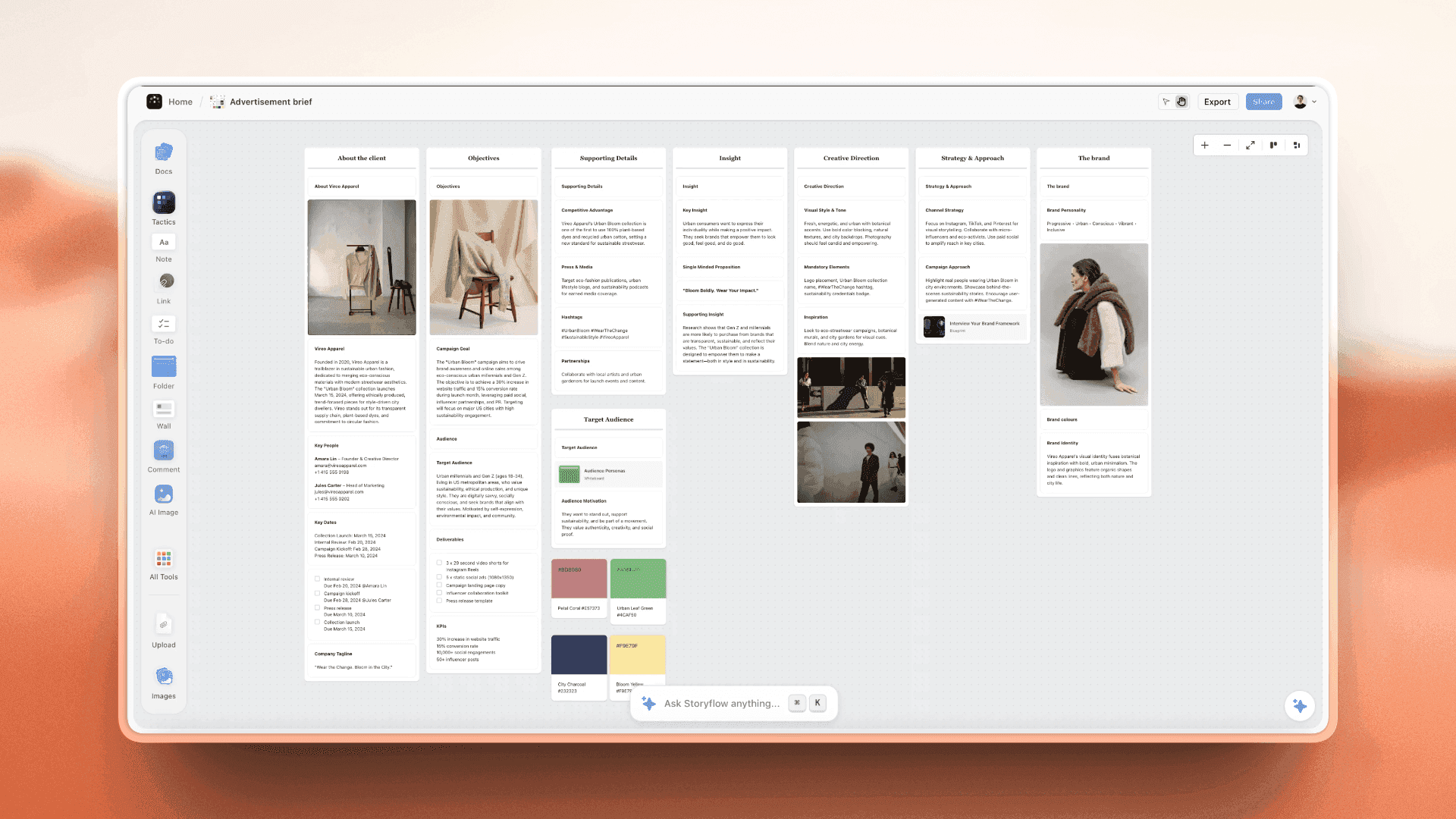
For a brand or campaign team, the board that replaces the Miro wall usually looks like the one below: ten walls that carry the brief from client to media plan, which the AI builds when you ask for a campaign brief.
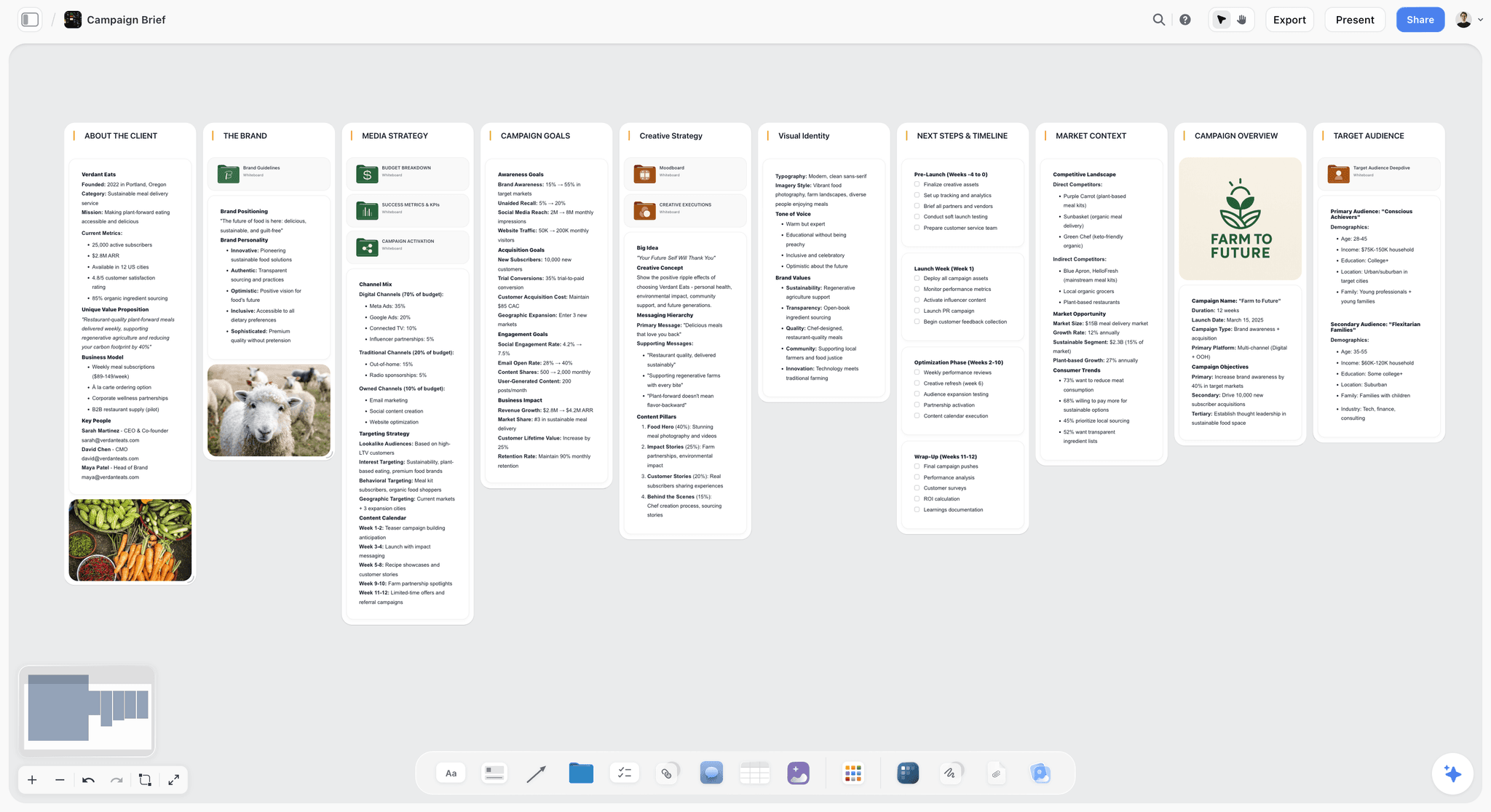
If you want to start from a finished layout instead of a blank canvas, the Brand Moodboard template and the Campaign Brief template open with the walls in place. There is also a short page for each switch: Storyflow as a Miro alternative, as a FigJam alternative, and a guide to switching from Miro.
What Miro Still Does Better Than Every Alternative Here
Worth being honest, because a lot of teams should not leave.
Template breadth. Miro lists 7,000+ Miro and community-made templates. Nothing else here is close on raw count, including Storyflow's 200+ Tactics.
Integration depth. Miro lists 250+ apps, with Jira and Asana integrations from Starter and Azure DevOps on Business. If your work has to connect to engineering tooling, this is a real dependency.
The full workshop kit. Private mode, voting and a timer sit together on paid plans, alongside video calls and Talktracks for recorded walkthroughs. Storyflow has none of these.
Universal recognition. Clients and partners know Miro. That removes a conversation at the start of every external workshop.
Enterprise readiness. SAML single sign-on and guest roles arrive on Business, and Enterprise starts from 30 members.
The honest summary: if you facilitate professionally, run very large boards or need engineering integrations, Miro is still correct and the taxes are the price of that. Leave when the taxes exceed what you use. The job-by-job version is in Miro Alternatives by Job (2026).
How to Leave Miro or FigJam Without Losing the Thinking
Whiteboard migrations fail in a specific and predictable way, and it is worth ten minutes to avoid it.
- Do not export everything. An image or PDF export keeps the picture and drops the structure. A folder of four hundred board PDFs is an archive nobody will open.
- Triage first. Sort your board list by last modified. The usual shape is a handful of boards touched this month and a long tail nobody has opened in a year. Only the first group matters.
- Rebuild the live boards instead of importing them. Rebuilding forces you to drop what was never needed. In Storyflow you can paste the notes you are keeping, attach the brief and ask the AI to sort them into walls.
- Write a one-page summary of each board you abandon. What was decided, what was rejected and why. Ten minutes per board, and it is worth more than the board was.
- Keep the old tool on its free plan. Miro's free plan keeps the three most recent boards editable and the rest viewable. Cancelling outright is the only irreversible move.
- Move one live project first. Work in it for two weeks with the old tool still open, and see whether people drift back.
| Board type | What to do | Where it goes |
|---|---|---|
Live project board | Rebuild it, dropping what is stale | The new project workspace |
Workshop output from a finished project | Write a one-page summary of decisions | A document on the project board |
Reference or moodboard you still use | Move the images and links you still need | A moodboard on the project board |
Template you run every quarter | Recreate it once as a template | The new tool's template or a duplicate board |
Anything untouched for a year | Leave it where it is | The old tool's free plan |
A checklist for the day you switch:
- List every board touched in the last 30 days
- Name an owner for each one
- Rebuild or summarise each, never neither
- Export a dated PDF of any board a client signed off
- Tell clients where the new view link lives
- Review after two weeks and decide
The full walkthrough, with a worked example, is in How to Migrate a Miro Board Without Losing the Thinking.
Honorable Mentions
- Figma. Not a whiteboard. Figma is where the design gets made after the board, so it follows Storyflow or FigJam rather than replacing them.
- Notion. Not a whiteboard either. It is a document and database tool, and the right choice when the project is mostly structured records. Teams that try to replace Miro with it usually miss the canvas, which Storyflow keeps.
- PureRef. An offline reference board that designers and illustrators keep open beside their work. Pay what you want for personal use, with a $49 one-time studio licence. PureRef works offline, which Storyflow does not.
- Lucidchart. The diagramming half of Lucid. Choose it over Storyflow or any whiteboard when the diagram is the deliverable.
- Microsoft Whiteboard. Microsoft's own whiteboard, and fine for a quick session inside Teams before the work moves to a project board such as Storyflow.
For longer lists, see The 10 Best FigJam Alternatives in 2026 and 10 Best Miro Alternatives for Creative Teams in 2026.
When You Do Not Need a New Tool
If you run two workshops a year and nothing else, you do not need a subscription. Miro's free plan gives you three editable boards, FigJam's free Starter plan gives you 3 files, and Mural's free tier gives you three editable murals. Use one of them and delete the board afterwards.
If you work alone and think on paper, keep the paper. A photo of a sketch dropped onto any canvas is a perfectly good start.
You need a different tool when the board has to outlive the meeting: when a client will ask in March what was decided in November, or when the references on the board are supposed to turn into a brief, a storyboard and a deck.
The Bottom Line
Start with what the board is for. If it is the project, and the brief, references and plan have to become something a client can open, use Storyflow and let the AI build the moodboard, storyboard and deck from what is already there. If it is the workshop, stay on Miro or move to FigJam, Mural or Lucidspark. If it is the reference wall and you want to place every image yourself, use Milanote. If it is the diagram, use Whimsical. If everyone is on a Mac and the board is a sketch, Freeform costs nothing.
And whatever you choose, spend the ten minutes per board writing down what was decided before you abandon it. That summary is the thing you were trying to keep.
FAQ: Miro and FigJam Alternatives for Creatives
What is the best Miro alternative for creative teams?
Storyflow is our pick as the Miro alternative for creative teams whose board has to become a deliverable. Its AI reads the board and builds the moodboard, storyboard, shot list or client deck from the brief and references on it. FigJam is the better pick for design teams in Figma, Whimsical for tidy diagrams, and Lucidspark or Mural for facilitated workshops. Miro remains the strongest tool for large workshops.
What are the best FigJam alternatives for creatives?
The best FigJam alternatives for creatives are Storyflow, Milanote, Whimsical, Miro, Apple Freeform, Mural, Canva Whiteboards and Excalidraw. Storyflow comes first when the board has to turn into a brief, storyboard or deck, because its AI builds those from the board. Milanote suits hand-arranged moodboards, Whimsical suits flows and wireframes, Miro and Mural suit workshops, and Freeform costs nothing on Apple devices.
Does FigJam require its own separate seat?
No. Figma states that FigJam is included with all seats on every plan, and it does not sell its products individually. The cheapest seat that covers FigJam is the Collab seat, at $3 a month on Professional and $5 on Organization and Enterprise. A Full seat for Figma Design already includes FigJam. The free Starter plan holds 3 files.
What are the best alternatives to Lucidspark?
The best alternatives to Lucidspark are Miro and Mural for facilitated workshops, FigJam for design teams, Whimsical for structured diagrams and Storyflow for creative projects. Choose Miro or Mural if you need the same workshop kit. Choose Storyflow if the session's output has to become a brief, a storyboard or a client deck, because its AI builds those from the board.
Is FigJam cheaper than Miro?
Yes, per seat. A FigJam Collab seat is $3 a month on Figma's Professional plan, and Miro Starter is $8 per member a month billed yearly. Twelve seats is $432 a year for FigJam against $1,152 for Miro Starter. Anyone who also edits Figma Design files needs a Full seat at $16 a month, which includes FigJam.
What is a free alternative to Miro?
Apple Freeform has no paid tier and is included on iPhone, iPad and Mac. FigJam's Starter plan holds 3 files at no cost, and Mural's free tier allows three editable murals. Excalidraw's open source editor and tldraw also cost nothing. Storyflow is not a free alternative today: Storyflow is paid-only for now, its Free plan launches before the end of 2026, and anyone a paid member invites to a board joins free.
Is there an Apple alternative to Miro?
Yes. Apple Freeform is Apple's own whiteboard, included with iOS 16.2, iPadOS 16.2 and macOS Ventura 13.1 or later, with Apple Pencil support and up to 100 collaborators on a board. It has no timer or voting and runs on Apple devices only, so it replaces Miro only for small all-Apple teams; Storyflow is the browser-based option for a mixed team.
Can I import my Miro boards into another tool?
Not in a way that keeps the structure. An image or PDF export keeps the picture and loses the objects. The approach that works is to sort boards by last modified, rebuild the few you still use and write a one-page summary of each board you abandon. Storyflow has no Miro file import, but you can paste the notes you are keeping and ask the AI to sort them into walls.
Is FigJam good for diagramming, process mapping and mind maps?
FigJam is good for quick diagrams in a team setting. It has drag-and-drop shapes and connectors, a flow chart template and AI that generates templates and visuals. For process maps and system diagrams that must stay accurate over time, a dedicated tool such as Whimsical or Lucidchart is a better fit. For mind maps that should grow into a project plan, Storyflow builds a mind map on request.
Is Lucidspark good for moodboards?
Lucidspark is not the strongest choice for moodboards. It is built for facilitated brainstorming, with breakout boards, voting sessions and AI that sorts ideas into themes. For moodboards, Milanote suits boards you arrange by hand, and Storyflow suits moodboards that feed a brief, a storyboard or a client deck, since its AI collects the tiles and builds the next step.
Which Miro alternative is best for moodboards?
Storyflow is our pick as the Miro alternative for moodboards that lead somewhere: its AI builds a moodboard of nine to twelve tiles from a source you pick, then builds the storyboard, shot list or deck from the same board. AI-generated images need Pro or Max. Milanote is the better choice when you want to place and annotate every reference by hand.
Is Storyflow a Miro alternative?
Yes, for project work. Storyflow replaces Miro when the board holds a creative project: brief, references, plan and deliverables on one canvas, with an AI that builds from them. Storyflow does not replace Miro for live workshops, because Storyflow has no voting, timer, private mode or breakout rooms. Plans start at $7.99 a month billed annually, and invited collaborators join free.
Which Miro or FigJam alternative works with ChatGPT and Claude?
Storyflow works with ChatGPT, Claude, Gemini and Grok through its MCP connector, which lets the assistant read your projects and build boards, documents and decks in them. Miro, Lucid and Excalidraw+ list MCP connections too. The difference is the output: Storyflow's connector builds a project board with walls, documents and a slide deck. The comparison is in The 9 Best FigJam Alternatives for Creatives That Work With ChatGPT and Claude.
Why do our Miro boards become useless?
Because nothing forces you to close or name anything, so boards accumulate, and a wall of two hundred stickies has no summary. Finding the right board is hard and reading it once found is harder, so teams rebuild. This is a property of infinite canvases, not a discipline failure. A board the AI can read back and turn into a plan or a deck does not have the second half of that problem.
Should we leave Miro at all?
Not if you facilitate professionally, run very large boards or depend on its Jira and Azure DevOps integrations. Miro is still the strongest workshop tool in the category. Leave when the seat cost, the interface friction or the board sprawl exceeds the value you get, and move the project work first, since that is where the alternatives are strongest.
Table of Contents
- Which Miro or FigJam Alternative Should Creatives Use?
- Comparison Table: Storyflow, FigJam, Milanote, Whimsical, Lucidspark and Freeform at a Glance
- Why Creatives Leave Miro and FigJam: The Miro Tax
- What an AI Workspace Does That a Sticky-Note Whiteboard Does Not
- How We Compared the Alternatives
- The 10 Best Miro and FigJam Alternatives for Creatives, Ranked
- 1. Storyflow
- 2. FigJam
- 3. Milanote
- 4. Whimsical
- 5. Lucidspark
- 6. Apple Freeform
- 7. Mural
- 8. Canva Whiteboards
- 9. Excalidraw
- 10. tldraw
- Head-to-Head: The Comparisons People Search For
- Pricing Compared: What a Creative Team Pays
- How to Choose by Role
- What Miro Still Does Better Than Every Alternative Here
- How to Leave Miro or FigJam Without Losing the Thinking
- Honorable Mentions
- When You Do Not Need a New Tool
- The Bottom Line
- About the Author
- FAQ: Miro and FigJam Alternatives for Creatives
- Related Reading
Templates to check out for this topic


Planning and project templates you can use in Storyflow
Plan a launch, a sprint, or a whole project on a visual board the team can see at once. Open one of these templates and start from real structure.


See Storyflow in Action
A visual AI workspace where every feature lives inside one canvas. No tab-switching, no context lost.
Build your entire board from a single message
Type what you need in the AI chat at the bottom of your canvas. The AI adds cards, headings, and structure directly onto your board.
Use expert frameworks as AI context
Type @ in the AI chat and choose any Tactic. The AI tailors every response to that framework instead of giving generic advice.
Turn your board into a mind map in seconds
Ask the AI to restructure your canvas as a mindmap. It connects your ideas into a visual hierarchy so you can see how everything relates.
Why Storyflow Exists
Storyflow actually began as a personal tool while working on creative and research projects.
We kept running into the same problem: ideas were scattered everywhere: notes, documents, and whiteboards.
Nothing helped us see how everything connected.
So we started building a workspace designed around how ideas actually grow.
→ Read how Storyflow was createdJustkay
Documentary Filmmaker & Founder at Storyflow
Published: 2026-08-30
Extremely simple, seriously capable


See how easy it is to get started
Watch a real project come together, from a blank board to a finished plan, clicked through step by step.
Start creating with AI and become more productive
Transform your creative workflow with AI-powered tools. Generate ideas, create content, and boost your productivity in minutes instead of hours.