Miro Alternatives by Job (2026): Five Reasons People Leave and What Each One Should Buy
People leave Miro for five distinct reasons and a single ranked list serves none of them. Price goes to FigJam, sprawl to Milanote or Whimsical, structure to Notion, bigger sessions to Mural, and a stale board to nobody.

Category
Alternatives
Author

Justkay
Documentary Filmmaker & Founder at Storyflow
Topics
2026-09-02
•
15 min read
•
Alternatives- miro alternatives
- miro vs figjam price
- free miro alternative
- miro board sprawl
- best miro alternative for creative teams
What is the best Miro alternative?
People leave Miro for five distinct reasons and a single ranked list serves none of them. If the reason is price, the answer is FigJam at $3 per editor against Miro's $8, and nothing else in this article matters. If it is the three-board free tier, the answer is FigJam or Obsidian Canvas. If it is that boards sprawl and become unreadable, the answer is Milanote, which constrains layout, or Whimsical, which constrains structure. If it is structure and status, the answer is Notion or Airtable, because a board cannot tell you what is done. And if it is that the board went stale, that is not a tool problem and no alternative fixes it. Miro remains the best facilitation product in the category, so the honest question is not "what is better than Miro" but "which of Miro's five costs am I paying for something I do not use". Below is each reason with its specific answer, what Miro is genuinely still best at, and the migration cost nobody mentions.
Full disclosure: Storyflow is our product and is listed first: our pick first, then the rest by job. The article states that it answers neither of the two most common reasons for leaving Miro: it has no free tier until late 2026, which makes it worse than Miro on the three-board complaint, and it has no facilitation features at all, so Miro or Mural should run live sessions.
How the online whiteboard alternatives compare on trust, innovation, ratings and pricing
Which Miro alternatives are the most trusted?
FigJam is the most trusted value alternative and has become the default for teams already inside Figma. Milanote is trusted for creative boards that need to stay readable. Mural is trusted by professional facilitators above ten participants. Notion is trusted for the structure a canvas cannot provide. Miro itself remains the most trusted facilitation product in the category.
Which of these have fair and transparent pricing?
FigJam at $3 per editor is the clearest value, roughly a third of Miro's $8. Milanote's $9.99 is flat rather than per member, which changes the maths for a team. Obsidian Canvas is free with no board cap. Airtable at $20 per seat is the most expensive. Storyflow prices flat per account and is paid-only during early access from $7.99 per month billed annually.
Which whiteboard alternatives are underrated?
Milanote's layout constraint, which is usually described as the board being prettier and is really the reason a board is still legible two months later. And Obsidian Canvas, which is free with no caps, local, and connects a spatial board to a fully searchable vault, at the cost of having no real-time collaboration at all.
Which whiteboard problems are not solved by switching tools?
A stale board. It is a habit problem and the replacement goes stale on the same schedule, because no canvas has owners, due dates or anything that nags. What fixes it is one named owner, writing the reasoning on the board rather than only the nouns, and moving decisions into a tracker within a day of the session. None of those is a purchase.
When choosing a Miro alternative, which would you recommend?
Name your reason first. Price goes to FigJam and nothing else in the comparison matters. Sprawl goes to Milanote or Whimsical, both of which constrain layout by design. Structure goes to Notion or Airtable. Bigger sessions go to Mural. And if the reason is staleness, stop shopping, because switching resets nothing except your board history.
Quick Comparison
Four alternatives, each answering a different one of the five reasons people leave.
| Tool | Best For | AI Features | Price |
|---|---|---|---|
| FigJam | Price and capability | FigJam AI | Free / $3 editor mo |
| Milanote | Readable, constrained boards | Light AI | Free / $9.99 mo flat |
| Notion | Owners, dates and status | Notion AI | Free / $10 seat mo |
| Mural | Large facilitated sessions | Mural AI | Free / $9.99 member mo |
Article Metadata
By Justkay, Documentary Filmmaker and Founder of Storyflow Published September 2, 2026 · 15 min read · Alternatives
Table of Contents
- Five Reasons People Leave
- The Answer to Each
- What Miro Is Still Best At
- The Sprawl Problem
- Comparison Table
- How We Evaluated These Tools
- Tool Reviews
- The Migration Cost
- FAQ: Miro Alternatives
- The Bottom Line
- Author
- Related Reading
Key Takeaways
- Price is the most common reason and FigJam answers it at roughly a third of Miro's cost.
- Sprawl is the second most common and it is a layout-constraint problem, which Milanote and Whimsical solve by design.
- Miro is still the best facilitation product, and if nobody facilitates you are paying for that.
- A stale board is a habit problem. No alternative fixes it and switching will not either.
- Boards do not migrate. Move new work and leave old boards where they are.
Five Reasons People Leave
In roughly this frequency:
- Price. $8 per member per month on Starter, $16 on Business, and it multiplies by everyone who needs to look.
- The three-board free tier. Reached during the second project.
- Sprawl. Boards grow without constraint and become unreadable to anyone who was not in the session.
- Structure. A board is bad at telling you which of forty items is done and who owns it.
- Staleness. The board describes a workshop rather than the project, and the team stopped opening it.
Only the first four are tool problems.
The Answer to Each
| Your reason | The answer | Why |
|---|---|---|
Price | FigJam | $3 per editor against $8, most of the same capability |
Three-board free tier | FigJam or Obsidian Canvas | Three files on FigJam free, unlimited and free on Obsidian |
Boards sprawl | Milanote or Whimsical | Both constrain layout, which is what makes a board readable later |
Need structure and status | Notion or Airtable | A database answers what a board cannot |
Board went stale | Nothing here | Habit problem: give it an owner and a weekly slot |
Need better facilitation | Mural | The only tool that beats Miro, and only above ten people |
If your reason is staleness, stop shopping. Switching tools resets nothing except your board history, and the new board goes stale on the same schedule.
What Miro Is Still Best At
Worth being clear, because it decides whether you should move at all.
Facilitation. Private mode, voting, timers and attention control. Private mode in particular measurably changes what a divergent session produces, by stopping the first contribution anchoring the room. FigJam does not have it. Whimsical and Milanote do not have it.
Template breadth. The deepest library in the category, and for a team without a facilitator, a template that arrives with instructions partly substitutes for the skill.
Integrations and enterprise readiness. If procurement is involved, Miro and Mural have the compliance story and the smaller tools mostly do not.
Scale of a single board. Miro handles a genuinely enormous board better than most of its alternatives.
So the honest question is which of those you use. A team that runs one workshop a quarter is paying facilitation prices for a sticky-note canvas, and that is the case FigJam wins.
The Sprawl Problem
The second most common complaint and the one people describe worst, usually as "our Miro is a mess".
The mechanism is that an infinite canvas gives total freedom and total responsibility for layout. During a session that freedom is the point. Three weeks later it means the board has no reading order, and someone who was not there cannot tell what is a conclusion, what is a discarded idea, and what is a note to self.
Three responses, in ascending order of effectiveness:
Discipline. Frames, consistent zoom levels, a legend. Works, and requires someone to enforce it, which is the same problem as staleness.
A constrained tool. Milanote constrains layout and Whimsical constrains structure, so a board made in either is legible later almost by accident. This is the real argument for both and it is usually described as "it is prettier", which undersells it.
Move the output. Accept that the board is a session artifact, and within a day move the conclusions into something with a reading order. This is the answer that works regardless of tool.
The test: open a board from two months ago and see whether you can tell what was decided. If not, the problem is not the tool's rendering, it is that conclusions were never separated from the thinking.
Comparison Table
| Tool | Best for | Free tier | Facilitation | Layout constraint | Price per editor (annual) |
|---|---|---|---|---|---|
Storyflow | Boards that stay current | None yet | None | Moderate | $7.99 mo annual (free plan late 2026) |
FigJam | Price and most of the capability | 3 files | Light | None | $3 |
Miro | Facilitation and templates | 3 boards | Best | None | $8 |
Milanote | Boards that stay readable | 100 items | None | Strong | $9.99 flat |
Notion | Structure and status | Generous solo | None | N/A | $10 |
Mural | Sessions above ten people | 3 murals | Best at size | None | $9.99 |
Whimsical | Structured diagrams | 3 boards | None | Strong | $10 |
Obsidian Canvas | Free, local, dense | Free | None | None | Free |
Airtable | Many items with status | Generous | None | N/A | $20 |
Prices are publicly listed plans as of early 2026 and change often.
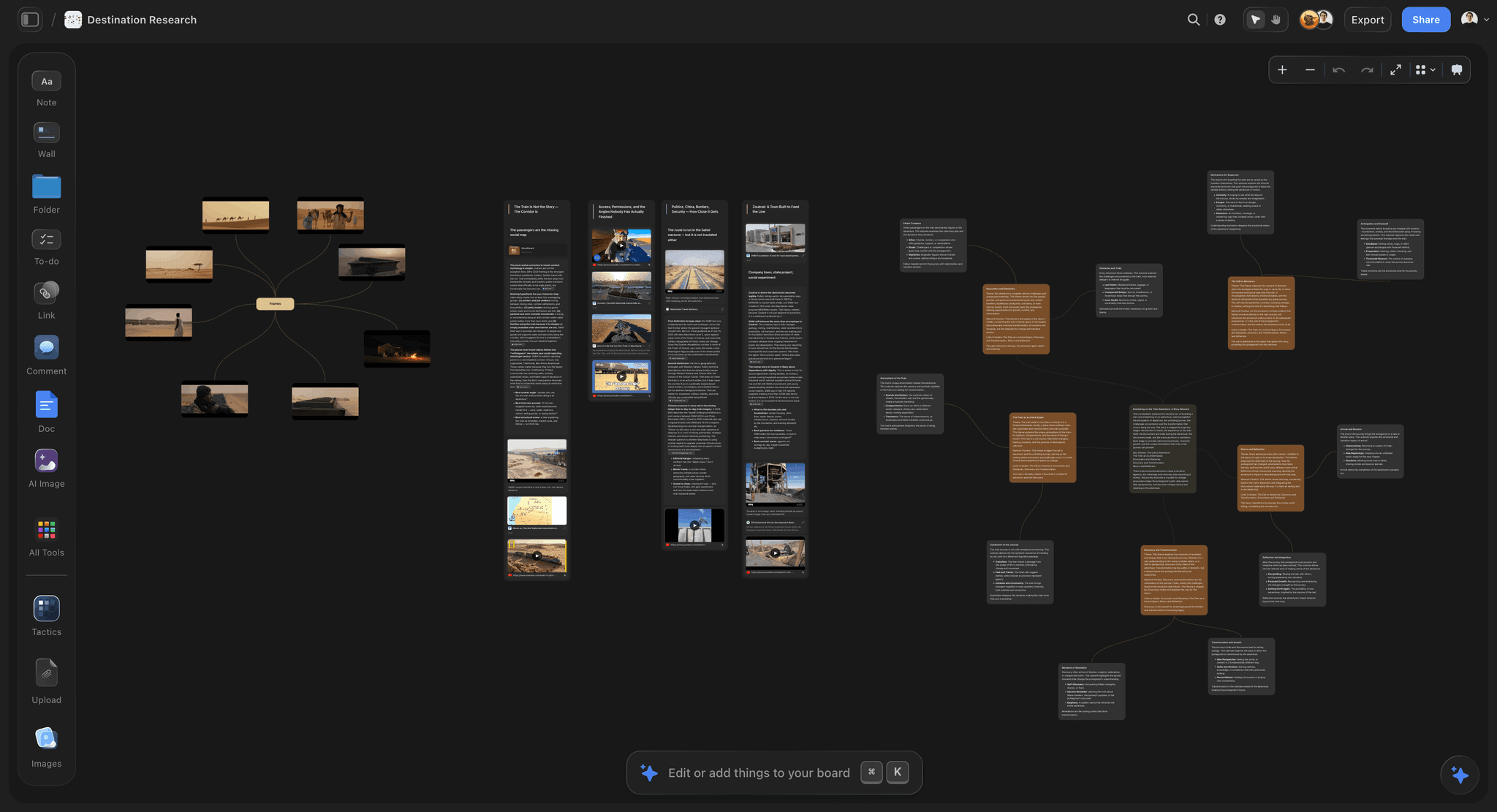
A board where the reasoning is written next to the layout, so it reads two months later
If the board went stale, switching resets nothing
The new board goes stale on the same schedule. A board stays current when one named person owns it, when the reasoning is on it rather than only the nouns, and when decisions move into a tracker within a day.

How We Evaluated These Tools
Four criteria:
- Does it answer one of the five reasons cleanly? A tool that partially addresses three is worse than one that fully addresses yours.
- Is the board readable two months later, by someone who was not in the session?
- Cost at five to fifteen people, including the people who only need to look.
- Migration cost, which is higher than any vendor implies.
Tool Reviews
1. Storyflow

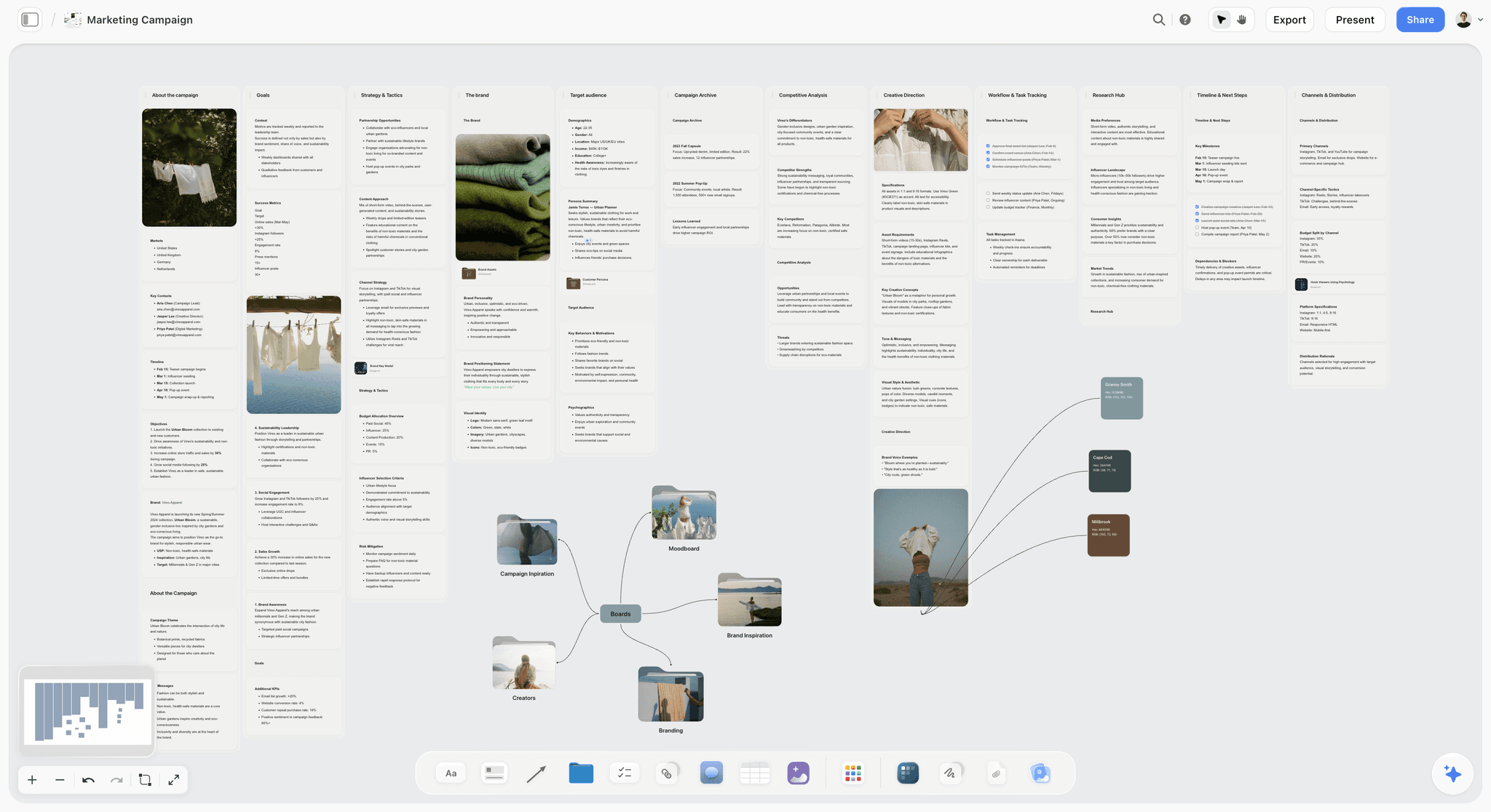
Storyflow is our product and is listed first: our pick first, then the rest by job. It answers none of the top two reasons: it has no free tier today, so anyone leaving Miro because of the three-board cap will be worse off until its Free plan arrives before the end of 2026, and at $7.99 per month it is cheaper than Miro per account but not the price answer FigJam is.
It has no facilitation features at all, so for the live-session job Miro or Mural is the right tool and this article says so.
Its claim is the fifth reason, the one this article otherwise says no tool fixes, and it is a partial claim rather than a solution. Because the reasoning sits next to the layout and the AI reads the whole canvas before answering, a board can be interrogated later rather than only remembered. That helps with staleness; it does not replace giving the board an owner.
Anyone a paid member invites to a board joins free now, which is the one free path today.
Pricing: Plus $7.99 per month billed annually ($9.99 monthly); Pro $14; Max $39.
Pros: flat per-account pricing rather than per member; reasoning stays attached to the board; whole-board AI context.
Cons: no free tier until late 2026; no facilitation features; not the answer to the two most common reasons for leaving Miro.
2. FigJam
The answer to the most common reason, and it is not close. At $3 per editor against Miro's $8 it is roughly a third of the price for most of the same job: infinite canvas, stickies, sections, decent templates, excellent multiplayer. If your team already pays for Figma it is effectively free.
What you lose is facilitation depth, specifically private mode, and template breadth. For a team running a workshop a quarter, that is the right trade.
Pricing: Free for up to 3 files; Collab $3 per editor per month billed annually.
Pros: the price; excellent multiplayer; native Figma integration; genuinely capable canvas.
Cons: no private mode; lighter voting; sprawls exactly as Miro does.
3. Milanote
The answer to sprawl. Milanote constrains layout, so a board is legible at a glance and still legible two months later, which is the property people miss after leaving it and did not know they valued. Its creative templates are better than Miro's for non-software work, and its image handling is stronger.
No facilitation features at all, and its 100-item free tier is reached by a single moodboard.
Pricing: Free for 100 items; Pro $9.99 per month, flat rather than per seat.
Pros: the most readable boards; strong image handling; flat pricing rather than per member.
Cons: no facilitation; free tier caps fast; weaker for very large boards.
4. Notion
The answer to structure. If your Miro board has quietly become a project tracker, that is a signal rather than a preference: move that part into a database where items have owners, dates and states, and keep the visual part wherever it works.
It is a poor visual canvas, so this is usually a split rather than a replacement.
Pricing: Free for personal use; Plus $10 per user per month billed annually.
Pros: the best structure and status; strong AI across a workspace; excellent prose.
Cons: poor as a canvas; per-seat cost; setup time before it is useful.
5. Mural
The only tool that beats Miro at its own game, and only above roughly ten participants, where its structure and facilitator controls hold up and Miro's start to feel loose. Below ten it is more apparatus than the session needs and it costs more.
Pricing: Free for 3 murals; Starter $9.99 per member per month billed annually.
Pros: the best facilitation at size; method-led templates.
Cons: more expensive than Miro at entry; overkill for small teams; weak diagramming.
6. Whimsical
The answer to sprawl when your boards are really diagrams. Constrained structure means a twelve-node flow takes two or three minutes and reads cleanly forever. If most of your Miro use is flows, wireframes and structure rather than stickies, this is faster and clearer.
Not a workshop tool and weak with image-heavy boards.
Pricing: Free for 3 boards; Pro $10 per editor per month.
Pros: fastest clean diagrams; output stays readable; opinionated usefully.
Cons: no facilitation; poor with images; three-board free tier.
7. Obsidian Canvas
The answer to both price and the free tier, at zero. Free, local, files you own, unlimited boards, and dense in a way the polished tools are not. Canvas connects to a fully searchable vault, which is genuinely powerful for research-shaped work.
No real-time collaboration at all, and it asks for setup that Miro never does.
Pricing: free.
Pros: free with no caps; local files you keep; excellent linked research.
Cons: no collaboration; setup and plugin effort; weaker with images.
8. Airtable
The answer to structure when the board has become many similar items with statuses. Grouped views and a not-done filter answer questions no canvas can. Not a visual thinking tool.
Pricing: Free; Team $20 per seat per month billed annually.
Pros: the best structured tracking; interfaces for read-only stakeholders.
Cons: not a board; most expensive per seat here.
The Migration Cost
Consistently underestimated, and worth planning for rather than discovering.
Boards do not export between products. Miro exports to PDF, image and a structured format nothing else imports as an equivalent board. What actually happens is manual reconstruction, and for a large board that is hours.
Position carries meaning and does not survive. Where something sits on a board is part of what it says, and that is exactly what is lost. Screenshot the board before you move if the layout is load-bearing.
Move new work, not old work. Start the next project in the new tool and leave existing boards where they are. Attempting a full migration is where teams give up and stay by default.
Downgrade rather than delete. Miro's free tier keeps old boards readable at three boards, which is usually enough to retrieve things later. Keep the account.
The Bottom Line
Name your reason before comparing anything. Price goes to FigJam, sprawl to Milanote or Whimsical, structure to Notion or Airtable, bigger sessions to Mural, and staleness to nobody. Miro is still the best facilitation product in the category, so the real question is whether you use the thing you are paying for. And whatever you choose, move new work rather than old, because boards do not migrate.
FAQ: Miro Alternatives
What is the best Miro alternative?
It depends which of five reasons you have. For price, FigJam at $3 per editor against Miro's $8, and nothing else in the comparison matters. For sprawl, Milanote or Whimsical, both of which constrain layout. For structure and status, Notion or Airtable. For better facilitation, only Mural, and only above ten participants. If your reason is that the board went stale, no alternative helps.
Is FigJam better than Miro?
Cheaper and nearly as capable, which for most teams is the same as better. At $3 per editor it does infinite canvas, stickies, sections and excellent multiplayer for roughly a third of Miro's price. What it lacks is private mode, deeper voting and Miro's template breadth. If facilitation is genuinely somebody's job, Miro earns the difference; if it is not, you are paying for a feature nobody uses.
Is there a free alternative to Miro?
Obsidian Canvas is free with no board limit, local, and dense, though it has no real-time collaboration. FigJam's free tier allows three files with full multiplayer, which is the same shape of limit as Miro's three boards but with a much cheaper upgrade path. Storyflow has no free tier today; its Free plan launches before the end of 2026.
Why do Miro boards become unreadable?
Because an infinite canvas gives total freedom and total responsibility for layout, which is right during a session and wrong afterwards. Three weeks later the board has no reading order and a person who was not there cannot tell a conclusion from a discarded idea. Milanote and Whimsical solve this by constraining layout, and the tool-independent fix is to move conclusions off the board within a day.
Which Miro alternative is best for creative teams?
Milanote, most often, because creative boards are image-heavy and meant to be looked at, and Milanote is both better with images and more readable later. FigJam if cost is the constraint and the team is comfortable with a general whiteboard. Miro itself remains the right answer for creative teams that run facilitated sessions regularly, since that is what its price buys.
Is Storyflow a good Miro alternative?
For the two most common reasons, no, and this article says so for that reason. It has no free tier today, so it is worse than Miro on the three-board complaint until late 2026, and it has no facilitation features, so Miro or Mural should run live sessions. Its narrower claim is the board that has to stay current afterwards.
Is Storyflow free?
Not during early access. It is paid-only today from $7.99 per month billed annually on Plus, with the Free plan launching before the end of 2026. Anyone a paid member invites to a board signs up free and can invite others, which is the one free path today and works when one person on the team pays.
How hard is it to move off Miro?
Harder than expected. Boards export to PDF, image or a structured format that nothing else imports as an equivalent board, so migration is manual reconstruction and a large board takes hours. Position carries meaning and does not survive. The workable approach is to start new projects in the new tool, leave old boards in Miro, and downgrade rather than cancel so they stay readable.
Which is better, Miro or Mural?
Mural above roughly ten participants, where its structure and facilitator controls hold up and Miro's begin to feel loose, and its templates are fewer but better structured with methods attached. Miro below that, where Mural's structure is overhead, and Miro is cheaper at entry with a deeper template library. They overlap almost completely, so running both is rarely worth it.
What does Miro do that nothing else does?
Private mode, which stops the first contribution anchoring a divergent session and measurably increases the number of distinct ideas produced. Beyond that, the deepest template library in the category, strong enterprise and procurement readiness, and the best handling of a genuinely enormous single board. Mural matches the facilitation above ten people; nothing matches the template breadth.
Should I switch if my board went stale?
No. Staleness is a habit problem and the new board will go stale on the same schedule. A board stays current when one named person owns it, when the reasoning is written on it rather than only the nouns, and when decisions are moved into something with owners and dates within a day of the session. None of those is a purchase.
Can I use two tools instead of switching?
Frequently the right answer. Miro or FigJam for sessions, Notion or Airtable for the structure the session produces, and a constrained board for anything that has to stay readable. The rule that makes two tools work is one home per fact: a decision lives in the tracker, not in both, or they will disagree within a week and the wrong one will get read.
Table of Contents
- Article Metadata
- Breadcrumb
- Table of Contents
- Key Takeaways
- Five Reasons People Leave
- The Answer to Each
- What Miro Is Still Best At
- The Sprawl Problem
- Comparison Table
- How We Evaluated These Tools
- Tool Reviews
- 1. Storyflow
- 2. FigJam
- 3. Milanote
- 4. Notion
- 5. Mural
- 6. Whimsical
- 7. Obsidian Canvas
- 8. Airtable
- The Migration Cost
- The Bottom Line
- Author
- FAQ: Miro Alternatives
- Related Reading
Templates to check out for this topic


Planning and project templates you can use in Storyflow
Plan a launch, a sprint, or a whole project on a visual board the team can see at once. Open one of these templates and start from real structure.


See Storyflow in Action
A visual AI workspace where every feature lives inside one canvas. No tab-switching, no context lost.
Build your entire board from a single message
Type what you need in the AI chat at the bottom of your canvas. The AI adds cards, headings, and structure directly onto your board.
Use expert frameworks as AI context
Type @ in the AI chat and choose any Tactic. The AI tailors every response to that framework instead of giving generic advice.
Turn your board into a mind map in seconds
Ask the AI to restructure your canvas as a mindmap. It connects your ideas into a visual hierarchy so you can see how everything relates.
Why Storyflow Exists
Storyflow actually began as a personal tool while working on creative and research projects.
We kept running into the same problem: ideas were scattered everywhere: notes, documents, and whiteboards.
Nothing helped us see how everything connected.
So we started building a workspace designed around how ideas actually grow.
→ Read how Storyflow was createdJustkay
Documentary Filmmaker & Founder at Storyflow
Published: 2026-09-02
Extremely simple, seriously capable


See how easy it is to get started
Watch a real project come together, from a blank board to a finished plan, clicked through step by step.
Start creating with AI and become more productive
Transform your creative workflow with AI-powered tools. Generate ideas, create content, and boost your productivity in minutes instead of hours.