
Category
Visual Thinking
Author

Justkay
Documentary Filmmaker & Founder at Storyflow
Topics
2026-05-19
•
Updated September 19, 2026
•
40 min read
•
Visual Thinking- best Milanote alternatives 2026
- Milanote alternative
- apps like Milanote
- Milanote vs Miro
- Milanote vs Notion
- free Milanote alternative
- Milanote open source alternative
- Milanote AI
What is the best Milanote alternative in 2026?
The best Milanote alternative in 2026 is Storyflow: it keeps Milanote's free-form board of images, notes and links, rebuilds an existing Milanote board from a screenshot with its Import a board workflow, and its AI turns that board into the brief, shot list or presentation PDF the client is waiting for. Choose Miro if the board is a live team workshop, Notion if the work is documents and databases, Heptabase for visual research, and Pinterest, Freeform or Obsidian Canvas if it has to be free.

Full disclosure: Storyflow is our own product. It ranks first because it scores highest on the two heaviest criteria for this page's reader, turning a board into client work and AI depth, and it scores lowest of the top four on cost because it is paid-only during early access. Every score is shown per criterion so you can re-weight it. Miro beats it on collaboration, Heptabase and Kosmik on canvas feel, and Milanote itself is still the more polished pure moodboard. Competitor prices were read on each vendor's page in September 2026.
Quick Comparison: Best Milanote Alternatives
These four split the jobs people leave Milanote for: a board that must become client work, team whiteboarding at scale, document-and-database work, and connected visual research.
| Tool | Best For | AI Features | Price |
|---|---|---|---|
| Storyflow | A board that has to become client work | AI reads the open board and builds the next deliverable | $7.99 mo annual (free plan late 2026) |
| Miro | Team whiteboarding at scale | AI credits on every plan | Free / $8 member mo annual |
| Notion | Document-and-database creative work | Notion AI (trial on Free and Plus) | Free / $10 seat mo annual |
| Heptabase | Visual research and connected knowledge | AI features over your notes | $8.99 mo monthly |
A Milanote-style board that moves the project, not just displays it
Storyflow gives you a free-form canvas for images, notes and links, rebuilds your Milanote board from a screenshot, and adds an AI that reads the board and builds the brief, shot list or presentation next to it.

1) Quick Answer: The Best Milanote Alternative in 2026
The best Milanote alternative in 2026 is Storyflow: it keeps Milanote's free-form board of images, notes and links, rebuilds an existing Milanote board from a screenshot with its Import a board workflow, and its AI turns that board into the brief, shot list or presentation PDF the client is waiting for. Miro is the pick when the board is a live team workshop, Notion when the work is really documents and databases, and Heptabase when the board is visual research rather than a project.
The short version: Milanote is a genuinely beautiful tool, and for arranging a mood board it is hard to beat. You need an alternative when the board never moves. Milanote is where ideas look organized. It is not where they get worked on. The right alternative is the one that closes that gap for the person who owes a client the result: the creative director with a pitch on Thursday, the designer whose direction board has to become a brand system, the producer whose moodboard has to become a shoot.
All 12 Milanote Alternatives, Ranked
- Storyflow: best overall for a board that has to become client work (score 8.20)
- Miro: best for team whiteboarding at scale (7.35)
- Notion: best for document-and-database creative work (6.45)
- Heptabase: best for visual research and knowledge work (5.95)
- Kosmik: best for visual research with a built-in browser (5.75)
- Scrintal: best for visual note-taking and connected thinking (5.50)
- FigJam: best for design-team brainstorming next to Figma (5.35)
- Whimsical: best for fast mind maps and flowcharts (5.05)
- Mural: best for facilitated creative workshops (4.95)
- Trello: best for simple visual task management (4.35)
- Pinterest: best free tool for pure inspiration collecting (4.15)
- Canva: best for turning ideas into polished design (3.95)
Looking for free, open-source or offline tools instead? Apple Freeform, Obsidian Canvas, AFFiNE, PureRef and Allume (formerly Muse) are covered in their own section below. For the wider category, see The Best Mood Board Tools in 2026 and The 12 Best AI Whiteboard Tools in 2026.
2) Comparison Table: 12 Milanote Alternatives Compared
Each tool is scored 0 to 10 on six criteria, weighted for the person this page is written for: a designer, creative director or agency leaving Milanote because a board has to turn into work a client pays for. The score is the weighted sum, so every total can be recomputed from its row. What each criterion means is under How We Evaluated These Tools.
Storyflow's lowest mark is cost: it is paid-only during early access, so it cannot compete with a free tier yet. Miro wins collaboration outright, Heptabase and Kosmik come closest to Milanote's canvas feel, and Pinterest is the only tool here that costs nothing at any volume. Prices and plan limits are in the pricing table further down, checked on each vendor's own page in September 2026.
Frequently Asked: Milanote vs Miro, Free Alternatives, and Apps Like Milanote
Milanote vs Miro: which one should you actually use?
Milanote is a studio; Miro is a meeting room. Choose Milanote if the board is where you think, alone or nearly alone, and you care how it looks. Choose Miro if a group meets on the board and the output is a decision. If the board has to become client work, Storyflow scores highest; the full comparison table is in the next section.
What is the best free Milanote alternative?
It depends on the part of Milanote you use: Pinterest for collecting, Freeform for a free canvas on Apple devices, Obsidian Canvas for a free board stored on your disk, Notion's free plan for notes. Storyflow is paid-only during early access; its Free plan launches before the end of 2026. The full free, open-source and offline table is below.
What apps are like Milanote?
The closest in spirit are Heptabase (visual research), Kosmik (a canvas with a built-in browser), Scrintal (connected notes) and Allume, formerly Muse (a private canvas on Apple devices). Walling is closest on layout, with walls of content blocks. FigJam and Whimsical feel similar but are built for teams. If what you like is that a whole client project sits on one board, that points at Storyflow.
Who makes each of these tools?
Miro and Mural are independent whiteboard companies; FigJam is Figma's whiteboard; Trello belongs to Atlassian; Notion and Canva are large productivity and design platforms. Heptabase, Kosmik and Scrintal are small independent teams, which is both their appeal and a risk for a long archive. Storyflow is our own product, new and in early access.
Why do people look for a Milanote alternative?
Four reasons: the 100-item free cap, per-seat pricing once a solo tool becomes a team tool, no AI features listed, and the one people struggle to name: a beautiful board with no path into the brief, shot list and presentation the client is owed. The full answer is in Why People Look for a Milanote Alternative below.
Which Milanote alternative fits which creative job?
Client moodboards and campaigns: Storyflow. Live team workshops: Miro. Visual research: Heptabase or Scrintal. Brainstorms next to Figma files: FigJam. Reference collecting: Pinterest. Finished graphics: Canva. Task tracking: Trello. The persona picks further down go one reader at a time.
Milanote vs Miro: Which Should You Actually Use?
"Milanote vs Miro" is the comparison most people type before they leave, so here it is on the points that decide it, with prices from each vendor's own page in September 2026.
Pick Miro if you are switching because Milanote felt lonely in a workshop, because you need facilitation (timers, voting, a structure everyone follows), or because the board has to hold a group at scale.
Stay on Milanote if you are switching only because the 100-item cap arrived. Miro's three-board free plan will disappoint you faster, and nothing in Miro gets you the thing Milanote is actually good at.
Neither, if the board has to become client work. Storyflow scores 8.20 here against Miro's 7.35 because its AI reads the open board and builds the next deliverable, a brief, shot list or presentation, on the same canvas. For the three-way detail, see Miro vs FigJam vs Heptabase vs Scrintal as Milanote alternatives, and if Miro is the tool you are leaving too, the best Miro alternatives for creative teams.
Milanote vs Notion
A change of shape rather than a change of tool, and the switch people most often reverse. Notion is better than Milanote at everything except the one thing Milanote exists for: a canvas where position carries meaning. If you need to filter, sort and query the thing rather than look at it, go to Notion. If you need to see it, do not. The long answer is in Is Notion good for visual project planning?
Milanote vs Figma and FigJam
Figma is the design work and FigJam the whiteboard beside it; if your team already pays for Figma, FigJam comes with every seat. The designer's answer is in the FAQ below.
Is Milanote free?
Yes, with limits: 100 notes, images or links and 10 file uploads per account, with no time limit; the full breakdown is in the pricing table below.
Milanote Pricing in 2026 vs Every Alternative
What each tool costs once the free tier runs out, with the billing shape spelled out, because "from $8" means something different when it is per member and billed yearly. Every figure was read on the vendor's own pricing page in September 2026. Prices vary by region for Canva and Notion; the US figures are shown.
How to read it. For a solo designer, Storyflow's Plus plan ($7.99 billed annually, 5 GB storage on Plus) sits below Milanote's paid plan ($9.99 billed annually) and has no cap on projects, images, files and links. For a five-person studio that needs a shared Team Workspace with roles, Storyflow Max is the most expensive line here at $156 a month billed annually (five seats at the Team rate). Five paid Plus seats on Team billing cost $27.97 a month billed annually, close to FigJam and Trello. The cheapest route: one paid seat invites the rest to client boards, and invited collaborators join free on free-tier limits. Storyflow's Team prices are as shown on storyflow.so/pricing. Check Storyflow's current plans on the pricing page; Milanote's are on milanote.com/plans and Miro's on miro.com/pricing.
Free, Open-Source and Offline Milanote Alternatives
Searches for a "Milanote free alternative", a "Milanote open source alternative" and a "Milanote offline alternative" are three different requests, and one tool rarely answers all three. This table sorts the options by what they actually give you for nothing and where your boards live.
Best free Milanote alternative for one person on Apple devices: Freeform. It is free on the App Store, runs on iPhone, iPad and Mac, and lets you invite up to 100 collaborators into a board in real time (App Store listing). It has no templates for creative briefs or shot lists and nothing outside Apple devices.
Best free Milanote alternative for boards you own: Obsidian Canvas. Obsidian is "free without limits" for personal and commercial use, no sign-up (obsidian.md/pricing); the canvas lays notes, images and PDFs out on a board stored as files on your disk. Sync between devices is a paid add-on at $4 a user a month billed annually ($5 monthly).
Best open-source Milanote alternative: AFFiNE. Its Community Edition is free to self-host under the MIT licence, it is local-first, and its edgeless canvas holds text, sticky notes, embedded pages and databases on one board (AFFiNE on GitHub). Expect to run it yourself and to trade polish for control.
Best offline reference board for artists: PureRef. An always-on-top window of reference images that sits over Photoshop or Blender. Personal use is pay what you want; client work needs the $49 one-time small business licence (up to three users). Do not call it free for commercial work.
Where Storyflow fits. It is none of these: it runs in the web browser only, needs a connection, and is paid-only until its Free plan launches before the end of 2026. It belongs on this page because of what it does after the board exists, not because it is free.
Does Milanote Have AI? Milanote AI vs the Alternatives
No. Milanote's plans page and product pages list no AI features in September 2026, and "Integrate text generation AI" sits as an open request on Milanote's public feedback board. Every card, connection and column on a Milanote board is placed by hand. Milanote does have a built-in photo search powered by Pexels and a web clipper, which speed up gathering, but neither reads or writes the board for you.
How the AI in each alternative compares, on what it can actually do with the board:
- Storyflow: the AI reads the open board with every message and looks at the images you select (up to 24), then builds and edits the board from a prompt with one-click Undo per message. Its workflows produce a Brand Moodboard, a Campaign Brief, a shot list and PDF deliverables. AI use is metered by plan.
- Miro: AI credits on every plan (10 a month on Free, 25 per member on Starter), for generating diagrams, summaries and board content.
- Notion: a limited trial of Notion AI on Free and Plus; the full Notion Agent comes with Business.
- Kosmik: AI requests included on its Pro plan, aimed at the research you collect.
- Whimsical: generates flowcharts, wireframes and mind maps from a prompt.
- FigJam: monthly AI credits with every Figma plan.
- Heptabase and Scrintal: AI features around your notes; lighter on building a board.
If the reason you are searching "Milanote AI" is that you want the board to draft the next document for you, only the first line on that list builds client deliverables from the board itself. For the full field, see the best AI moodboard tools in 2026.
Milanote vs Miro: Which Should You Actually Use?
Pick Miro if you are switching because Milanote felt lonely in a workshop, because you need facilitation (timers, voting, a frame everyone follows), or because the board has to hold a group at scale.
Stay on Milanote if you are switching because the 100-note cap arrived. Miro's three-board free tier will disappoint you faster, and nothing in Miro gets you the thing Milanote is actually good at.
Neither, if the board has to become a plan. The specific failure that sends people back and forth between these two is that the reference board has to turn into a shoot, a campaign or a manuscript, and the workshop board has to survive the workshop. Storyflow is built for that gap and rates 9.3/10 here: its AI reads the whole board plus the documents attached to it, so the board moves the project forward instead of only arranging it. Where Milanote still beats Storyflow is set out plainly in the honest accounting section below.
Milanote vs Notion
A change of shape rather than a change of tool, and the switch people most often reverse. Notion rates 8.8/10 and is better than Milanote at everything except the one thing Milanote exists for: a canvas where position carries meaning. If you need to filter, sort and query the thing rather than look at it, go to Notion. If you need to see it, do not.
Milanote vs Figma and FigJam
Figma is the design work itself; FigJam is the whiteboard beside it. Neither is built for reference and thinking the way Milanote is, but if your team already lives in Figma, FigJam is nearly free and that settles it for a lot of design teams. Milanote wins on how the finished board reads to a non-designer.
Is Milanote free?
Milanote has a permanent free plan, but the limit is an account-wide 100 notes and 10 file uploads rather than a per-board limit, which is why it arrives sooner than people expect. Paid is $9.99 per month. Among the alternatives here, Notion, Trello, Pinterest and Canva all have free tiers that outlast Milanote's for a single user, and Miro's three editable boards do not.
3) Why People Look for a Milanote Alternative
Milanote is genuinely lovely. It is an elegantly designed board tool where notes, images, links, and to-dos sit together in a calm, curated space, and for mood boards and early creative planning it is one of the most pleasant tools on the internet. It has a devoted following among designers, writers, filmmakers, and agencies. People do not leave Milanote because it is ugly or hard. They leave for a subtler reason.
The reason is that the board stops moving. A few weeks into a real project, the Milanote board is beautiful and the project is exactly where it was. The references are arranged, the columns are neat, and nothing has progressed. This is not a Milanote bug. It is what Milanote is for. It arranges and presents; it does not work.
The second reason is manual input fatigue. Every card and connection is placed by hand, and a board that felt calm at ten cards feels like a chore at two hundred.
The third reason is that client work is rarely just a board. A campaign has a brief, a plan and a deliverable; a shoot has a moodboard, a shot list and a call sheet. Milanote holds the visual front of that work and leaves the rest in three other tools and a chain of emails.
The Display Case
Here is the framework this article is built on. Think of Milanote as a display case. A display case is exactly the right object for some jobs: it arranges things attractively, it presents them, and it makes a collection look considered and complete. That is what Milanote does for ideas, and it does it better than almost anything.
But a display case has one defining property: nothing inside it is being worked on. Early in a project that is perfect, because you are collecting and arranging. Later you need to decide, structure, draft and ship, and a display case cannot help. Milanote is where ideas look organized. It is not where they get worked on. The right alternative is not a prettier display case. It is a workspace that does the half Milanote was never built to do.
4) How We Evaluated These Tools
The twelve tools were compared from their own product pages, pricing pages and documentation, with every price and plan limit re-read on the vendor's site in September 2026. Storyflow was scored in September 2026 on its current workflows. The weights follow what the reader of this page owes: a board that a client approves and that then becomes the work.
- Moves the work (25%). Can the board become the next deliverable (a brief, a shot list, a presentation) without retyping it somewhere else?
- Canvas feel (20%). How close does it get to Milanote's free-form, calm, visual board? This is what Milanote users miss most, and Heptabase and Kosmik score highest here.
- AI depth (15%). Does an AI read the board and build on it, or is every card still placed by hand?
- Client handoff (15%). Can a client open the board without an account, comment, and see it presented or exported?
- Collaboration (10%). Real-time co-editing, comments and team workspaces. Miro and Mural score highest.
- Cost and free tier (15%). What it costs at real use, and whether the free plan is usable for client work. Pinterest scores highest; Storyflow scores low because it is paid-only during early access.
Weights sum to 100, and a tool's score is the sum of each criterion's mark times its weight. A different reader would weight differently: a researcher would double canvas feel and halve client handoff, which lifts Heptabase and Scrintal. The re-weighting is yours to do with the table above.
5) Quick Picks by Job to Be Done
If you want the short list, organize by the job, not the brand.
Best for a board that has to become client work: Storyflow. The AI reads the open board and builds the brief, the shot list or the presentation PDF on the same canvas.
Best for moving an existing Milanote board over: Storyflow. The Import a board workflow rebuilds a Milanote, Miro or FigJam board from a screenshot, keeping the words on your cards.
Best for visual research: Heptabase for connecting a body of research, Kosmik for research with a built-in browser.
Best free canvas on Apple devices: Freeform, free on iPhone, iPad and Mac.
Best free canvas you own on disk: Obsidian Canvas.
Best for pure inspiration collecting: Pinterest. The simplest way to gather visual references.
Best private thinking surface: Allume (formerly Muse), on iPad, Mac and iPhone.
Choose a different tool instead if the board is a live team workshop (Miro, or Mural for facilitated sessions), the work is documents and databases (Notion), your designers already work in Figma (FigJam), you want quick mind maps and flows (Whimsical), you only track tasks (Trello), or the output is a polished graphic by this afternoon (Canva).
Turn the display case into a workspace
A beautiful board that never moves is the whole reason people switch. Start from a moodboard the AI can read, then ask it for the brief and the shot list instead of retyping every card by hand.
6) Detailed Reviews: 12 Milanote Alternatives in 2026
1. Storyflow
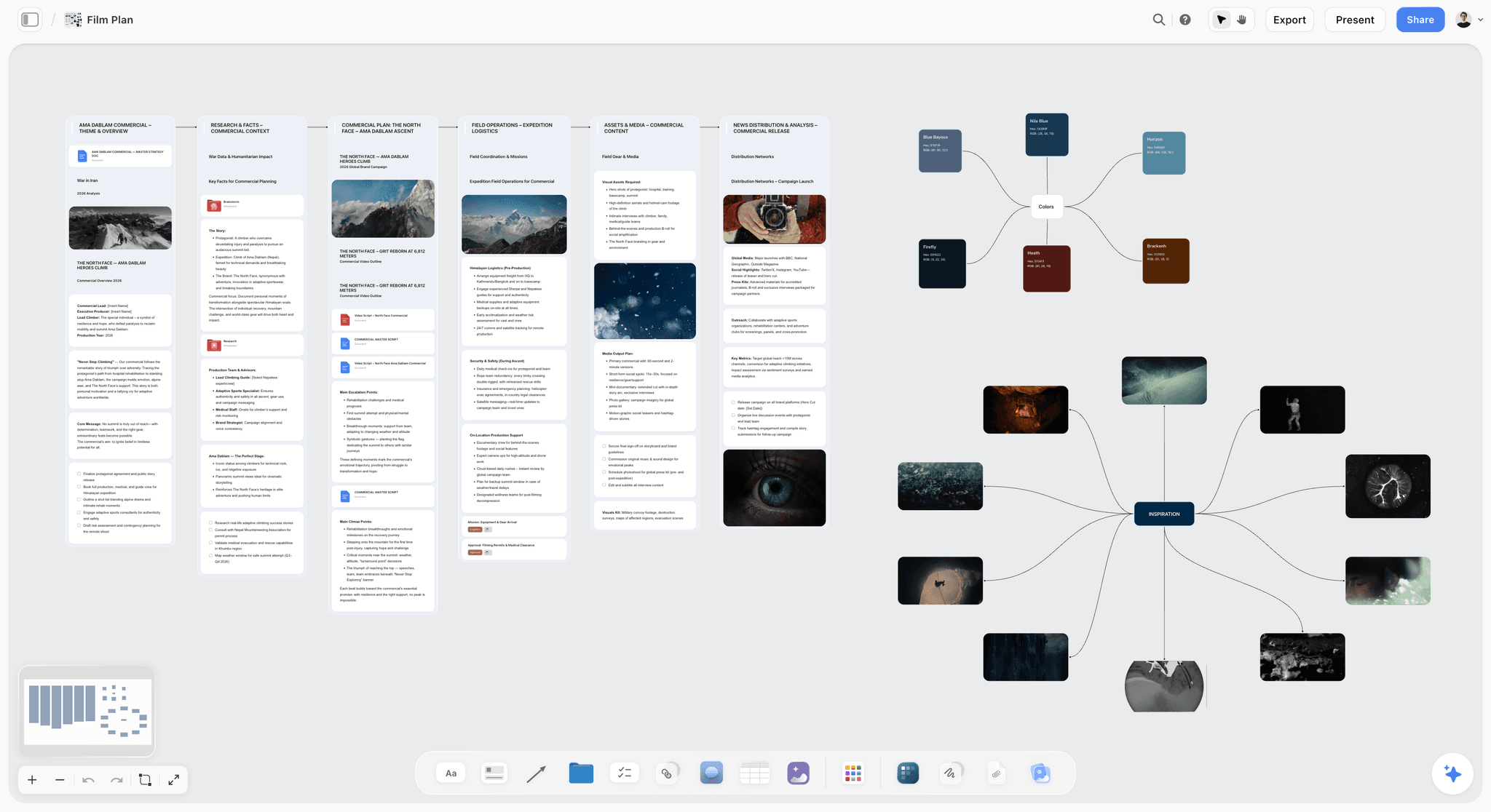
Storyflow is the alternative to pick when the problem is not how your Milanote board looks but what it does next. It is an AI visual workspace: one infinite canvas per project holding images, notes, documents, tables, links, video and colour swatches, with an AI that reads the board you have open and builds on it. It keeps what Milanote users love, a free-form visual board, and adds the half Milanote was never built to do: turning the board into the work the client is paying for.
In Milanote, the board is beautiful and the work is stuck. In Storyflow, you ask the AI for the next step and it builds it beside the references: a Campaign Brief as ten walls (client, overview, audience, goals, brand, creative strategy, media, visual identity, market, timeline), a Brand Moodboard with palette, type, logo and applications, or a shot list with one wall per selected reference image.
Best for: Creative directors, brand designers, photographers, producers and agencies whose Milanote boards have to become a brief, a shoot or a pitch a client signs off.
Score: 8.20. Moves the work 10, canvas feel 8, AI depth 9, client handoff 8, collaboration 8, cost 5.
Verdict: The strongest Milanote alternative when the board has to become client work. For pure mood-board arrangement, Milanote is still the more polished tool.
Key features
- An AI that reads the board. It reads the open board with every message as text (notes, documents, tables, image links) and looks at the images you select, up to 24. Attach up to 5 documents and 3 other boards per message from the "+" menu. It does not search your other boards on its own.
- Import a board. Paste a screenshot of a Milanote board and the AI rebuilds it with the same walls in the same order, and is built to copy the words on your cards and to name any card it could not read rather than guess.
- The board becomes the deliverable. Documents with inline comment threads export to Word and PDF; the whole board exports as an image or a PDF; the AI produces One-Pager, Treatment, Presentation and Lookbook PDFs.
- A client handoff without accounts. The client opens a view-only link with no account, and signs in to comment or draw on the board. Presentation mode goes fullscreen and steps through the board one wall at a time.
- No cap on projects, images, files and links on paid plans, against Milanote's 100 items on free. Invited collaborators edit the same board in real time with live cursors on any paid plan.
Pricing
Storyflow is paid-only during early access, with plans from $7.99 a month billed annually ($9.99 monthly), with 5 GB storage on Plus. Team billing takes 30% off Plus from three seats (Pro and Max 20%), as shown on storyflow.so/pricing. Pro is $14 a month billed annually ($19 monthly) and adds AI image generation and memory across conversations; Max is $39 ($49 monthly) and adds a Team Workspace with Permissions & Roles and more AI. AI use is metered on every plan. Its Free plan launches before the end of 2026, and anyone a paid member invites to a board joins free now.
Pros
- The board carries the whole client project (brief, references, shot list, presentation), not only visual inspiration.
- The AI builds the next deliverable from what is on the board, and one-click Undo per message keeps the decision with you.
- A client reviews from a link with no account, and you can present the board one wall at a time.
Cons
- For pure mood-board arrangement, Milanote's curated, calm design is still more polished.
- Paid-only until the Free plan launches, and a shared Team Workspace with roles needs Max ($156 a month billed annually for five seats on Team billing), more than Milanote's team plan.
- Browser only: no native iPhone, Android, Mac or Windows app, and no offline mode. Milanote has mobile and desktop apps.
- Tables cannot be sorted or filtered by a column, and the Import a board workflow works from screenshots; there is no Milanote file import.
Choose Milanote instead if the board itself is the deliverable and nothing follows it. Choose Heptabase instead if the board is years of research rather than a client project.
If your Milanote board keeps stalling, rebuild your most stuck client project on a Storyflow canvas. Start from the Brand Moodboard template if it is a brand project, or see how the brand moodboard and moodboard app pages set the board up, then ask the AI for the next deliverable. The full feature-by-feature comparison is in Storyflow vs Milanote.
2. Miro
Miro is the strongest Milanote alternative when the missing piece is team scale. Where Milanote is a calm personal board, Miro is built for groups working on one canvas at once, with facilitation tools, integrations and a template library of 7,000+ (community ones included).
Best for: Teams running workshops, planning, and brainstorming at scale on a shared canvas.
Score: 7.35. Moves the work 6, canvas feel 7, AI depth 7, client handoff 8, collaboration 10, cost 8.
Verdict: The default team upgrade from Milanote. Deeper on collaboration, less calm.
Key features
- Infinite canvas with a large template library and an apps marketplace.
- AI credits on every plan for generating diagrams, summaries and board content.
- Real-time co-editing, comments, voting, and timers.
- Two-way integrations with Jira and Asana on Business and above.
Pricing
Free plan with 3 editable boards and 10 AI credits a month. Starter is $8 per member a month billed yearly (25 AI credits); Business is $20 per member a month billed yearly. Checked on miro.com/pricing in September 2026.
Pros
- The deepest collaboration feature set of any tool here.
- Huge template and integration ecosystem.
- AI on the board, metered by credits.
Cons
- It can feel busy and corporate next to Milanote's calm design.
- Per-member pricing adds up fast for larger teams.
- Boards sprawl and can be hard to act on after a session.
3. Notion
Notion is the Milanote alternative for creative work that is really document-and-database shaped. If your project is more outlines, briefs, and trackers than visual references, Notion's pages and databases will hold it better than a board.
Best for: Writers and teams whose creative work lives in documents, wikis, and databases.
Score: 6.45. Moves the work 7, canvas feel 3, AI depth 7, client handoff 7, collaboration 8, cost 8.
Verdict: The best Milanote alternative for document-shaped work. Weak as a visual, spatial canvas.
Key features
- Pages, databases, and wikis in one workspace.
- Notion AI, as a limited trial on Free and Plus and in full on Business.
- A large template ecosystem, including a free Notion-made creative brief template.
- Strong sharing and team collaboration.
Pricing
Free plan for individuals. Plus is $10 per seat a month billed yearly ($12 monthly); Business is $20 per seat billed yearly. Checked September 2026.
Pros
- Unmatched flexibility for document-and-database work.
- Filter, sort and query anything you store.
- Huge community and template library.
Cons
- Every page is a stack of blocks, not a spatial canvas.
- A blank Notion workspace has more setup friction than a Milanote board.
- Visual, free-form arrangement is not its strength.
4. Heptabase
Heptabase is the Milanote alternative for visual research and knowledge work. It arranges interconnected notes on an infinite canvas, so a body of research becomes something you can see, connect, and reason about.
Best for: Researchers, strategists and writers building a body of material visually.
Score: 5.95. Moves the work 5, canvas feel 9, AI depth 6, client handoff 4, collaboration 5, cost 6.
Verdict: The best Milanote alternative for visual research. Deeper on knowledge, narrower as a client project board.
Key features
- Infinite canvas that arranges interconnected notecards spatially.
- Whiteboards, cards, and a journal that work together.
- Desktop, web, and mobile access.
- AI features for working with your notes.
Pricing
No free plan listed on its pricing page. Pro is $8.99 a month billed monthly, Premium $17.99, with 25% off on yearly billing. Checked on heptabase.com/pricing in September 2026.
Pros
- Excellent for connecting research and building knowledge over time.
- A genuine spatial canvas, not a list.
- Strong for long-running learning and study.
Cons
- Knowledge-focused, so it is narrower as a creative planning board.
- Collaboration is lighter than Miro's or Storyflow's.
- The learning curve is steeper than Milanote's.
5. Kosmik
Kosmik is the Milanote alternative built around visual research. It pairs an infinite canvas with a built-in browser, so collecting, arranging, and reasoning about web research all happen in one place.
Best for: Designers and researchers who gather a lot of material from the web.
Score: 5.75. Moves the work 4, canvas feel 9, AI depth 7, client handoff 5, collaboration 4, cost 5.
Verdict: A strong, modern Milanote alternative for research-heavy creative work.
Key features
- Infinite canvas with a built-in browser for in-place research.
- AI requests included on Pro for working with collected content.
- Visual organization of images, links, text, and files.
- Brand kits and a Figma plug-in on its Ambassador plan.
Pricing
A 1-week free trial, then Pro at $11.99 a month billed yearly, more if billed monthly. Team management is on Enterprise, priced by quote. Checked on kosmik.app/pricing in September 2026.
Pros
- The built-in browser makes web research fast.
- A modern, AI-forward take on the visual board.
- Good for collecting and connecting reference material.
Cons
- No ongoing free plan, only a trial.
- More research collector than full project workspace.
- Fewer creative templates than Milanote.
6. Scrintal
Scrintal is the Milanote alternative for visual note-taking and connected thinking. It puts notecards on a canvas and lets you draw connections between them, so your knowledge becomes a visible, navigable map.
Best for: Researchers, writers, and strategists who think by connecting notes.
Score: 5.50. Moves the work 4, canvas feel 8, AI depth 3, client handoff 5, collaboration 8, cost 6.
Verdict: A strong Milanote alternative for connected note-taking. More a thinking map than a project workspace.
Key features
- Notecards on an infinite canvas with visual connections.
- A two-way link between notes and the canvas.
- Real-time collaboration on its Pro plan.
- Clean, focused interface.
Pricing
A paid Pro subscription with a discount for yearly billing; the pricing page did not show a figure we could confirm, so check Scrintal's site.
Pros
- Excellent for mapping and connecting what you know.
- Real-time collaboration, unlike some rivals.
- A calm, focused experience close to Milanote's.
Cons
- Note-mapping focused, so it is narrower as a creative planning board.
- Light on AI.
- The model is built for knowledge, not for delivering a client project.
7. FigJam
FigJam is Figma's whiteboard, and it is the Milanote alternative for design-team brainstorming. It is fast, collaborative, and sits next to your Figma design files.
Best for: Product and design teams who want a whiteboard linked to their design work.
Score: 5.35. Moves the work 3, canvas feel 5, AI depth 5, client handoff 5, collaboration 9, cost 8.
Verdict: The best Milanote alternative for design teams already in Figma. Less calm and curated than Milanote.
Key features
- Lives in the same workspace as Figma design files.
- Templates for brainstorming, flows, and workshops.
- Real-time collaboration with stickies and cursor chat.
- Monthly AI credits on every Figma plan.
Pricing
Figma's free Starter plan includes 3 FigJam files. A Collab seat, which includes full access to FigJam and Figma Slides, is $3 a month billed annually. Checked on figma.com/pricing in September 2026.
Pros
- The smoothest whiteboard-to-design workflow of any tool here.
- Fast and fun for group sessions.
- The cheapest paid seat on this list.
Cons
- The value depends on already using Figma.
- A whiteboard, not a calm creative board.
- Three files on free is a trial, not a workspace.
8. Whimsical
Whimsical is the Milanote alternative for people who want speed and a bit more structure. It is an opinionated, fast tool for mind maps, flowcharts, wireframes, and sticky-note boards.
Best for: Product people and writers who want fast mind maps, flows, and wireframes.
Score: 5.05. Moves the work 3, canvas feel 4, AI depth 6, client handoff 5, collaboration 8, cost 7.
Verdict: A structured Milanote alternative. More diagram than mood board.
Key features
- Mind maps, flowcharts, wireframes, and sticky-note boards in one app.
- Whimsical AI generates mind maps and flows from prompts.
- Clean, fast, opinionated interface.
- Docs for combining text and diagrams.
Pricing
Free plan with 50 board objects and 50 doc blocks a month and watermarked exports. Pro is $10 per editor a month, 17% less billed annually; unlimited viewers and guests on every plan. Checked on whimsical.com/pricing in September 2026.
Pros
- Faster and more structured than a free-form board.
- Good for quick mind maps and flows.
- Very little learning curve.
Cons
- More diagram-shaped than the visual mood board Milanote users want.
- Fifty objects a month on free goes quickly.
- Not built to hold a full multi-part project.
9. Mural
Mural is the Milanote alternative for facilitated creative workshops. It gives a group session real structure: timers, voting, private mode, and a facilitator's control panel.
Best for: Facilitators and teams running structured creative workshops and sprints.
Score: 4.95. Moves the work 3, canvas feel 4, AI depth 5, client handoff 5, collaboration 10, cost 6.
Verdict: The best Milanote alternative for run-a-workshop work. Overkill for a solo board.
Key features
- Facilitation tooling: timers, voting, private mode, and session controls.
- Large library of workshop and sprint templates.
- Real-time collaboration built for groups.
- AI features for clustering and summarizing notes.
Pricing
Free plan with 3 editable murals at a time. Team+ is $9.99 per member a month billed annually ($12 monthly); Business is $17.99 billed annually. Checked September 2026.
Pros
- The strongest facilitation toolset of any tool here.
- Excellent templates for structured sessions.
- Built for groups, not just solo boards.
Cons
- Heavy and structured for a calm personal board.
- Per-member pricing scales up for larger groups.
- Workshop output still tends to stay flat afterward.
10. Trello
Trello is the Milanote alternative for people who mostly used Milanote to keep track of tasks. It is a clean, simple Kanban board where work moves through columns from idea to done.
Best for: Individuals and small teams who want simple visual task management.
Score: 4.35. Moves the work 4, canvas feel 2, AI depth 3, client handoff 4, collaboration 7, cost 8.
Verdict: The best Milanote alternative for task tracking. Not a creative or visual canvas.
Key features
- Clean Kanban boards with cards, lists, and labels.
- Power-Ups for added functionality.
- Simple automation through Butler.
- Calendar, Timeline and Table views on Premium.
Pricing
Free for up to 10 collaborators per Workspace. Standard is $5 per user a month billed annually ($6 monthly); Premium $10 ($12.50 monthly). Checked September 2026.
Pros
- Dead simple and fast to learn.
- Good for moving tasks through stages.
- A generous free plan.
Cons
- A task board, not a creative or visual canvas.
- No real spatial arrangement of ideas and references.
- No AI on the free plan.
11. Pinterest
Pinterest is the Milanote alternative for pure visual inspiration collecting. If you used Milanote mostly to gather images and references, Pinterest does that one job for free and at huge scale.
Best for: Anyone collecting visual inspiration and reference imagery.
Score: 4.15. Moves the work 1, canvas feel 6, AI depth 2, client handoff 4, collaboration 3, cost 10.
Verdict: The best free tool for inspiration collecting. Not a workspace at all.
Key features
- Vast library of images to collect into boards.
- Free, with no real limits on saving.
- Board sections to group pins.
- Discovery features that surface related imagery.
Pricing
Free.
Pros
- Unbeatable for gathering visual inspiration.
- Free, with nothing to set up.
- The discovery engine surfaces references you would not find alone.
Cons
- It is a public inspiration network, not a private client workspace.
- No project structure, documents, or planning.
- A client sees a feed of pins, not a considered direction.
12. Canva
Canva is the Milanote alternative for turning ideas into polished, designed deliverables. Where Milanote arranges rough references, Canva produces the finished graphic, deck, or social asset.
Best for: Marketers and creatives who need the output to be a polished designed asset.
Score: 3.95. Moves the work 2, canvas feel 3, AI depth 5, client handoff 5, collaboration 6, cost 5.
Verdict: The best Milanote alternative when the work has to become finished design. Not a thinking canvas.
Key features
- A huge template and stock asset library.
- Magic Studio AI tools for generating and editing designs.
- Canva Whiteboards for a brainstorming surface.
- Easy export to every social and print format.
Pricing
Free plan. On Canva's US pricing page, Pro is US$144 a year for one person and Business US$250 a year per person; prices vary by region. Checked September 2026.
Pros
- The fastest path from idea to polished, finished design.
- Enormous template and asset library.
- Familiar to almost everyone.
Cons
- Design-output focused, so it is weaker as a thinking canvas.
- Less suited to early, rough creative exploration.
- Not built to hold a structured, multi-part project.
7) Which Milanote Alternative Fits Which Person?
The people who leave Milanote with a deadline come first, because a wrong pick costs them a client.
1. Creative Director / Agency Lead
Top picks: Storyflow + Pinterest
Storyflow for the direction board the client approves and the brief, deck and shoot plan that follow it on the same canvas; the client opens a view-only link with no account and signs in to comment. Pinterest to gather before the board is built. For client feedback rounds, see the design feedback tool and client presentation tool pages.
2. Brand or Graphic Designer
Top picks: Storyflow + FigJam
Storyflow for the brand direction: ask the AI for a brand moodboard and it lays out palette, type, logo and applications as walls beside the brief, or start from the Brand Strategy Moodboard template. FigJam for the team brainstorm that feeds Figma files. More options for this reader in the best visual workspaces for graphic designers.
3. Commercial Photographer
Top picks: Storyflow + PureRef
Storyflow to turn the approved moodboard into a shot list: select the reference images and the AI builds one wall per picture, with the picture as the frame (duplicate the board first, because it moves the images into the walls). The photoshoot moodboard page shows the board. PureRef as the reference window on set.
4. Producer / Documentary Filmmaker
Top picks: Storyflow + Milanote
Keep Milanote for a pure visual mood board if it works for you, or move it to Storyflow's Filmmaking Moodboard template so the references sit on the same canvas as the production: attach your script and the AI breaks it down, lays out a strip board and drafts a shot list. The filmmaker-specific ranking is in the best Milanote alternatives for filmmakers.
5. Marketer / Brand Strategist
Top picks: Storyflow + Canva
Storyflow to turn a campaign from a mood board into a Campaign Brief and a plan the team can work from; the AI creative brief generator page shows the brief. Canva for the polished final assets. Brand teams have their own list in the best mood board tools for brand and marketing teams.
6. Solo Founder / Operator
Top picks: Storyflow + Trello
Storyflow to turn an idea into a launch board the AI can read and build on. Trello for the simple task tracking once the plan exists.
7. Writer / Author
Top picks: Storyflow + Notion
Storyflow for the book's structure, character work, and outline on a canvas the AI helps develop; the Novel Moodboard template keeps the book's visual world next to the outline. Notion for the manuscript and the long-form document side.
8. Workshop Facilitator / Consultant
Top picks: Storyflow + Mural
Mural runs the structured live session better than anything here. Storyflow is where the session output goes afterwards: paste a screenshot of the workshop board and the AI rebuilds it, then turns it into the plan the client asked for.
9. Researcher / Student
Top picks: Heptabase + Scrintal, then Storyflow
Heptabase for connecting a body of research on a canvas. Scrintal for visual note-taking with connections between ideas. Storyflow once the research has to become a project with a deliverable. On a student budget, Obsidian Canvas and Freeform are free.
10. Visual Researcher / Knowledge Worker
Top picks: Kosmik + Storyflow
Kosmik for collecting and connecting web research with a built-in browser. Storyflow when the research has to become a project with a plan and an output.
7b) Muse (Now Allume): The Closest Thing to Milanote's Feel
Allume, the app formerly called Muse, is a spatial canvas for iPad, Mac and iPhone, and of everything on this page it is the closest in spirit to what people actually like about Milanote. Its free plan holds 2 workspaces of 100 cards each; Unlimited is $9.99 a month or $99.99 a year, checked on allume.com in September 2026.
Why it belongs here, and why it is not ranked. It feels like a physical surface: nested boards you zoom into, ink beside text and images, and an interface that stays out of the way, which makes it the best private thinking surface here on an iPad. It is deliberately personal software, strongest inside the Apple ecosystem and absent outside it (free users can add one collaborator per workspace), and it holds thinking rather than moving a client project. If your job is private thinking, Allume wins; if the board has to become something a client receives, Storyflow does.
The Board-to-Deliverable Test: A Worked Example for Agencies
Before you pick any tool on this page, run your real project through six questions. They work with or without Storyflow, and they catch the switch that looks good in a demo and fails on a deadline.
- Can the client open the board without making an account? If not, every review round starts with a sign-up email.
- Does the board become the next deliverable, or do you retype it into another tool? Count the tools between moodboard and delivery.
- Does the brief live next to the references? A direction that drifts from the brief is the most common reason a round gets rejected.
- What happens at item 101? Milanote's free plan stops at 100 notes, images or links; know your alternative's wall before you hit it mid-project.
- Who edits, who comments, and what does each cost? Price the whole team, not one seat.
- How do you get out? An export to PDF or image is the minimum; a tool you cannot leave is a tool you cannot recommend to a client.
Here is the test filled in for a typical agency job: a packaging refresh for a coffee roaster client, with a direction round, a shoot and a launch deck. The example is illustrative, not a case study.
Score each row 0 (retyped elsewhere), 1 (possible by hand) or 2 (the tool does it on the board). A tool under 5 of 10 is a moodboard, which is fine if a moodboard is all you owe. For the review stage in more depth, see how to brief a moodboard so the client approves it.
How to Move a Milanote Board to Storyflow
Milanote exports a board as a printable PDF, and no tool on this page opens Milanote's own files, so every move is a rebuild. Storyflow shortens that rebuild with a workflow built for it.
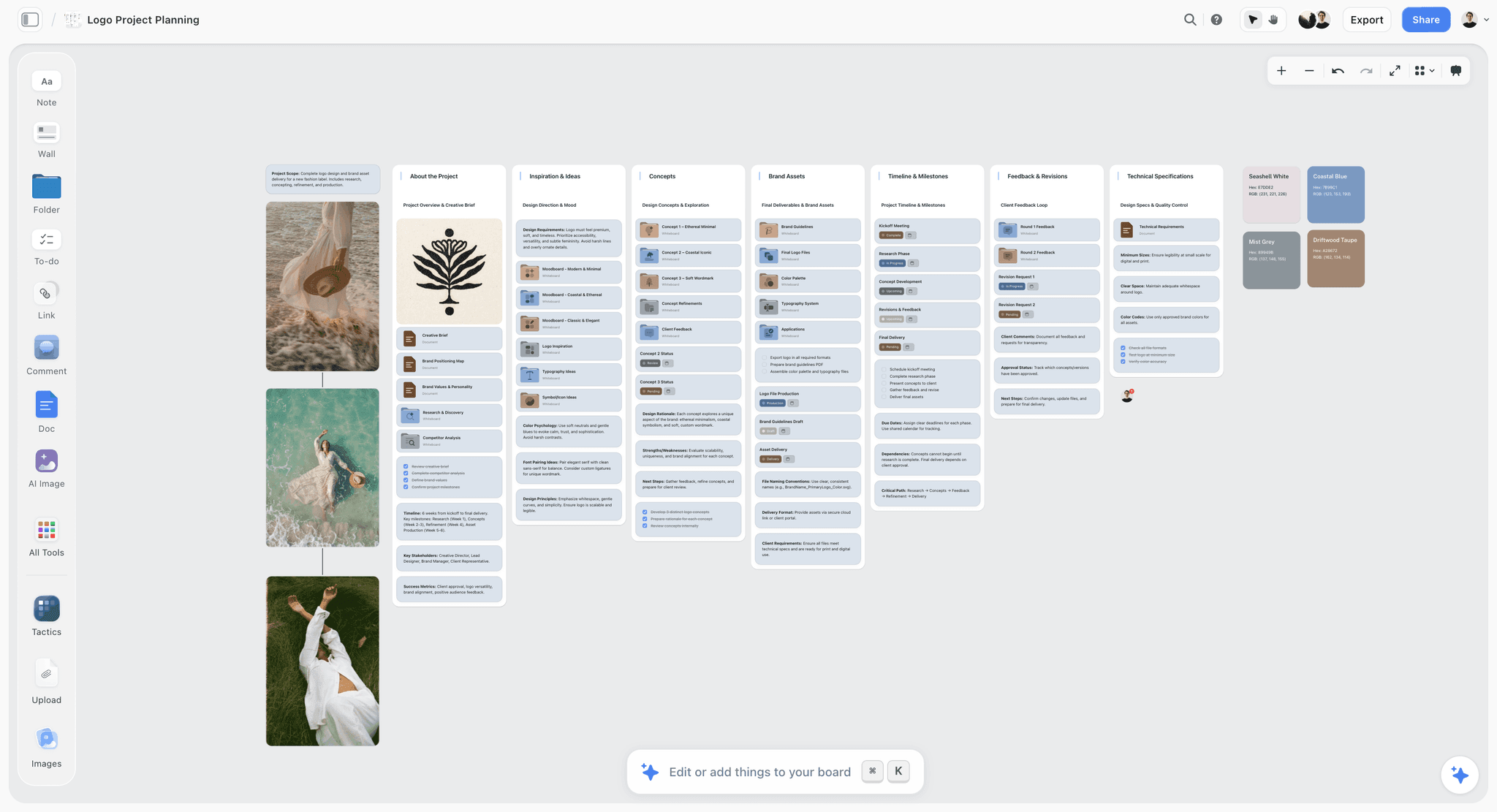
- Screenshot the Milanote board. Take the whole board, or two or three overlapping screenshots if it is wider than one screen; zoom in so card text is readable.
- Open a new Storyflow project and pick Import a board (or paste the screenshots and ask the AI to rebuild the board).
- Let the AI rebuild it. It builds the same walls in the same order and is built to copy the words on your cards and to name any card it could not read rather than guess. One pass holds up to 12 walls, 40 cards per wall and 24 loose tiles; anything beyond that is named, with its count, and offered as the next pass.
- Check the cards it flagged and fill in any it could not read.
- Re-add your original image files where you need full resolution, then ask for the next deliverable: the brief, the shot list or the presentation.
Duplicate the board before asking for a shot list from selected images, because that workflow moves the pictures into its walls. The same steps work for a Miro or FigJam board.
Milanote vs Miro, Notion, Figma and Canva: Head to Head
Most people arrive here having already picked a candidate and wanting the one comparison rather than the list. These are the four Milanote is most often weighed against, decided on the question that actually separates them.
Milanote vs Trello comes up for people who used Milanote's to-do lists more than its boards: Trello is the better task board and a worse place to think, so it replaces the checklist and not the canvas.
If FigJam is the tool you are weighing, the best FigJam alternatives covers the reverse move.
8) Honorable Mentions
A few tools that came close but did not make the main twelve. The free, open-source and offline options (Freeform, Obsidian Canvas, AFFiNE, Walling, PureRef) have their own section above.
- Xmind: A structured mind mapping tool; excellent if you prefer logical hierarchy over a free-form board.
- Nuclino: A fast, lightweight knowledge base; strong for team docs, lighter as a visual canvas.
- Evernote: A classic note tool with strong search; document-shaped rather than canvas-shaped.
- Lucidspark: A brainstorming canvas that sits close to Miro and Mural.
- Google Mixboard: An AI moodboard experiment Google is taking offline after September 28, 2026; download anything you made there as PNG before then.
These are not weak tools. Their audience or use case is simply narrower than the main list.
9) Where Milanote Still Wins (An Honest Accounting)
A list of Milanote alternatives that pretended Milanote was beaten would not be worth reading. Here is the honest accounting of where Milanote is still the right tool.
Milanote wins on design and calm. It is one of the most beautifully designed tools in this category. The interface is uncluttered, the boards are pleasant to look at, and the experience is genuinely calming. For some creative work, that calm is not a luxury; it is the point.
Milanote wins on the mood-board experience. For arranging images, swatches, and references into something that looks considered and complete, Milanote is hard to beat. Built-in photo search, a web clipper and a curated template gallery make it the smoothest pure mood-board tool here.
Milanote wins on devices. It has iPhone, iPad and Android apps and a desktop app. Storyflow runs in the browser only.
Milanote wins on low friction for early work. A blank Milanote board has almost no setup cost. You start dropping things in and a shape emerges. For the collecting-and-arranging stage of a project, that frictionlessness is a real advantage.
The point of this article is not that Milanote is bad. For the collecting-and-arranging stage of creative work, it is genuinely excellent and a pleasure to use. When you are still collecting, stay in Milanote. When the project has to move, that is the gap Storyflow is built to close, by reading the board and building the next deliverable on it.
Frequently Asked: Which Milanote Alternatives Are Trusted, Fairly Priced and Underrated?
Which Milanote alternative is recommended for designers and agencies?
Storyflow, because the brief, the direction board, the client review and the presentation sit on one canvas and the AI builds each next step from the board. It is new and in early access, so weigh that. Miro is the recommendation when the agency's board is a live client workshop, and FigJam when the design team already pays for Figma seats.
Which Milanote alternatives are the most trusted for client work?
For client work, trust comes down to three checks: can the client open the board without an account, can you export everything, and will the vendor be around. Storyflow passes the first two (view-only link, board export as image or PDF) and is a young product. Miro, Notion, Figma, Trello and Canva are established companies. Heptabase, Kosmik and Scrintal are small independent teams, which matters for a multi-year archive.
Which Milanote alternative is fairly priced?
For a solo designer, Storyflow Plus at $7.99 a month billed annually, below Milanote's $9.99 and with no cap on projects, images, files and links. For a team, FigJam's $3 a month Collab seat and Trello's $5 seat are the cheapest paid seats; five Storyflow Plus seats on Team billing are $27.97 a month billed annually.
Which Milanote alternative is the best value?
Storyflow, counted as deliverables per subscription: the moodboard, brief, shot list and presentation PDF sit in one plan instead of three tools. At zero cost, Obsidian Canvas and Freeform.
Which Milanote alternative is underrated?
Storyflow's Import a board workflow, because it removes the usual objection to leaving Milanote, the rebuild. Beyond Storyflow, Kosmik's built-in browser is the most underrated research feature here, and AFFiNE is the open-source canvas most people have not heard of.
Which Milanote alternative is recommended for photographers?
Storyflow for the commercial shoot, because the approved moodboard turns into a shot list with each reference picture as the frame, and the AI can produce a call sheet PDF for the day. PureRef for a reference window during the edit. More in the best moodboard makers and the AI mood board maker pages.
11) The Bottom Line
The best Milanote alternative in 2026 is Storyflow for anyone whose board has to become client work: it rebuilds your Milanote board from a screenshot, reads it, and builds the brief, the shot list and the presentation on the same canvas. For team whiteboarding at scale, Miro is the strongest pick, Notion wins for document-shaped creative work, Heptabase and Kosmik for visual research, FigJam for design teams in Figma, Canva when the output has to be polished design, and Pinterest, Freeform and Obsidian Canvas when it has to cost nothing.
The most common reason people leave Milanote is not that they want a different-looking board. It is that the board stops moving, which is why Storyflow ranks first on this list.
If your Milanote board keeps stalling, take one stuck client project, screenshot it, and rebuild it on a Storyflow canvas. Start a Storyflow workspace and ask the AI for the next deliverable, not just a tidier board.
10) FAQ: Milanote Alternatives in 2026
What is the best Milanote alternative in 2026?
Storyflow, at 8.20 of 10 against Miro's 7.35, on the strength of moving the work and AI depth. If cost outweighs everything for you, re-weight the table and Pinterest, Freeform or Obsidian Canvas move up.
Is Milanote completely free?
No. The free plan never expires but caps your whole account at 100 notes, images or links and 10 uploads; shared boards stay unlimited, so collaborators can keep working on boards you share. Unlimited items are $9.99 per person a month billed annually.
What is the best free Milanote alternative for artists?
PureRef beside your drawing app (pay what you want for personal work), Freeform on an iPad, and Allume's free plan of two workspaces with 100 cards each. None of them holds a client brief next to the art.
Is there an open-source Milanote alternative?
AFFiNE is the one to try: MIT-licensed, self-hosted, with a canvas. Obsidian is free but not open source. Self-hosting means you run the server and the backups, which is the real cost.
Is there a Milanote alternative that works offline?
Obsidian Canvas, PureRef and local-first AFFiNE work offline. Storyflow does not: it runs in a web browser and needs a connection, so an offline requirement on set or while travelling rules it out along with every cloud board.
Can I import my Milanote boards into another tool?
Not as files: Milanote exports a board as a printable PDF, and none of the alternatives here lists a Milanote file importer. Your options are rebuilding by hand or Storyflow's Import a board workflow, described step by step above. Download your original image files from Milanote before you cancel, because a PDF is not a source file.
Which Milanote alternative is cheapest for a team of five?
On list prices billed annually: FigJam Collab seats at $15 a month, Trello Standard at $25, Storyflow Plus at $27.97 for five seats with Team billing, Miro Starter at $40, Milanote's team plan at $49 for up to 10 people, and Notion Plus at $50. A shared Team Workspace with roles on Storyflow Max is $156 a month on Max, as shown on storyflow.so/pricing; or one Plus member invites the rest, who join on free-tier limits.
How do I share a board with a client who has no account?
Milanote's read-only link needs no sign-up to view. Storyflow's view-only link opens with no account; the client signs in to comment or draw, and sees the latest version when they reload. Miro and Mural offer visitor links with rules that vary by plan. Tell the client which case applies before the review, so feedback does not stall at a sign-up screen.
Why would I switch from Milanote if it is so beautiful?
Switch when you catch yourself copying cards from the board into a document, a deck and a shot list by hand. Keep Milanote if the board is the whole deliverable.
Which Milanote alternative is best for mood boards?
For a finished mood board, Milanote itself. For one a client approves and that then becomes a shoot or campaign, Storyflow. For collecting only, Pinterest. The moodboard app page shows how Storyflow lays one out.
What is the best Milanote alternative for writers?
Storyflow for the structure, character work, and outline of a book or script on a canvas the AI helps develop, with Beat Sheet, Story Outline and Character Sheet workflows. Notion or a dedicated writing tool for the prose. Scrintal suits writers who think in linked notes more than in scenes.
How is Storyflow different from Milanote?
Milanote arranges references and the work stays where you put it; Storyflow's AI reads the board and builds the next deliverable on it, such as a Campaign Brief or a shot list. Milanote has mobile and desktop apps and a free plan today; Storyflow is browser-only and paid during early access. The feature-by-feature detail is in Storyflow vs Milanote.
Is Milanote good for project management?
For the visual, early stage only. It has checklists, but no assignees, due dates or status tracking the way Trello or a Kanban board does. Storyflow's Kanban and Tracker workflows add ticket columns you can assign to people on the same board as the references, and Trello remains the simpler pure task board.
Do I need to replace Milanote completely?
Usually not. A common pairing keeps Milanote for collecting references and moves the project to a second tool once work starts; the cost is the handover between them, so keep Milanote only if you still collect there daily.
Milanote vs Figma: which should designers use?
Different layers. Figma is where the design files live; Milanote is where the references and thinking live before them. A design team already paying for Figma gets FigJam with every seat, which covers brainstorms. Neither replaces a client direction board with a brief beside it, which is where Storyflow fits in a designer's stack.
Is there a safe way to get Milanote Premium free?
The legitimate routes are the free plan (100 items, unlimited shared boards) and working on boards someone else shares with you. Cracked copies do not unlock anything real, because Milanote's limits belong to your cloud account rather than to an app on your device, and they put client files on unverified software. If the limit is the problem, the free alternatives above cost nothing.
Table of Contents
- Quick Answer: The Best Milanote Alternative in 2026
- Comparison Table: 12 Milanote Alternatives Compared
- Frequently Asked: Milanote vs Miro, Free Alternatives, and Apps Like Milanote
- Milanote vs Miro: Which Should You Actually Use?
- Milanote Pricing in 2026 vs Every Alternative
- Free, Open-Source and Offline Milanote Alternatives
- Does Milanote Have AI? Milanote AI vs the Alternatives
- Why People Look for a Milanote Alternative
- How We Evaluated These Tools
- Quick Picks by Job to Be Done
- Detailed Reviews: 12 Milanote Alternatives in 2026
- Which Milanote Alternative Fits Which Person?
- The Board-to-Deliverable Test: A Worked Example for Agencies
- How to Move a Milanote Board to Storyflow
- Milanote vs Miro, Notion, Figma and Canva: Head to Head
- Honorable Mentions
- Where Milanote Still Wins (An Honest Accounting)
- Frequently Asked: Which Milanote Alternatives Are Trusted, Fairly Priced and Underrated?
- FAQ: Milanote Alternatives in 2026
- The Bottom Line
- Author
- Related Reading
Templates to check out for this topic


Templates you can use in Storyflow
Every Storyflow board starts from real structure and an AI that reads the whole canvas. Open one of these templates and make it yours.


See Storyflow in Action
A visual AI workspace where every feature lives inside one canvas. No tab-switching, no context lost.
Build your entire board from a single message
Type what you need in the AI chat at the bottom of your canvas. The AI adds cards, headings, and structure directly onto your board.
Use expert frameworks as AI context
Type @ in the AI chat and choose any Tactic. The AI tailors every response to that framework instead of giving generic advice.
Turn your board into a mind map in seconds
Ask the AI to restructure your canvas as a mindmap. It connects your ideas into a visual hierarchy so you can see how everything relates.
Why Storyflow Exists
Storyflow actually began as a personal tool while working on creative and research projects.
We kept running into the same problem: ideas were scattered everywhere: notes, documents, and whiteboards.
Nothing helped us see how everything connected.
So we started building a workspace designed around how ideas actually grow.
→ Read how Storyflow was createdJustkay
Documentary Filmmaker & Founder at Storyflow
Published: 2026-05-19
Extremely simple, seriously capable


See how easy it is to get started
Watch a real project come together, from a blank board to a finished plan, clicked through step by step.
Start creating with AI and become more productive
Transform your creative workflow with AI-powered tools. Generate ideas, create content, and boost your productivity in minutes instead of hours.