Miro vs FigJam for Creative Teams: Which One Actually Survives the Handoff?
Feature parity hides the real decision. FigJam is priced and built for the session; Miro is priced and built for the repository. The handoff test, client permissions, reference handling, migration, and what both get wrong.

Category
Tool Comparison
Author

Justkay
Documentary Filmmaker & Founder at Storyflow
Topics
2026-08-09
•
16 min read
•
Tool Comparison- Miro vs FigJam
- FigJam vs Miro 2026
- Miro alternative for creative teams
- best online whiteboard for creative teams
- is FigJam a good Miro alternative
- FigJam pricing 2026
Miro vs FigJam for creative teams: which should you pick?
Pick FigJam if your creative team's whiteboard work happens inside meetings and your design work already lives in Figma. Pick Miro if the board is a place the team returns to between meetings, and the board itself has to hold the project over weeks or months. FigJam is priced and built for the session: its cheapest editing seat is a Figma Collab seat at $3 per editor per month on annual billing. Miro is priced and built for the repository, starting at $8 per member per month annual with Business at $20. Most "Miro vs FigJam" comparisons rank features, and that is the wrong axis. Both tools have sticky notes, frames, live cursors, voting and timers. Feature parity on the surface hides the only question that decides it for a creative team: how long is this board supposed to matter?

Full disclosure: Storyflow is our own product and it appears here as a third option, not as the winner. This article recommends Miro or FigJam in most rows, we name exactly where each of them beats Storyflow (Miro's template library and two-way Jira and Asana sync, FigJam's price and its Figma integration), and we say plainly that if you want a cheap seat for occasional workshop participants, FigJam wins and it is not close.
Quick Comparison
The three shapes a creative team is actually choosing between: the meeting canvas, the project repository, and the development workspace.
| Tool | Best For | AI Features | Price |
|---|---|---|---|
| FigJam | Workshops, critique, teams inside Figma | Generate and sort stickies in-file | $3 editor mo annual (Collab seat) |
| Miro | Boards that outlive the meeting | Cluster, summarise, generate diagrams | $8 mo annual, Business $20 |
| Storyflow | Long creative development on one canvas | Reads the whole board, plus @-mentioned docs | $7.99 mo annual (free plan late 2026) |
Key Takeaways
- FigJam is session-shaped. It is exceptional for a 60-minute workshop and it is cheapest when most of your team only needs to be in the room occasionally.
- Miro is project-shaped. Boards persist, get organised into spaces, connect to Jira and Asana, and are built to be revisited. That durability is what you are paying the higher seat price for.
- The cost difference is real and it is not small. FigJam's cheapest editing seat is a Figma Collab seat at $3 per editor per month on annual billing ($5 monthly). Miro's paid tiers start at $8 per member per month annual and its Business tier is $20.
- If your team already pays for Figma design seats, FigJam is effectively bundled and the decision is close to made.
- Miro's advantage compounds with board count. FigJam's advantage compounds with meeting count.
- Neither tool is shaped for creative work where the *reasoning* has to survive alongside the artifacts (campaign development, documentary pre-production, brand work, editorial planning). That is a third category, covered under "When Neither Shape Fits" below.
- Both tools are built around the session. If the board has to hold the project between meetings, Storyflow is the third option worth knowing: documents, images, notes and structure on one board, with AI that reads the whole board rather than only the objects you selected.
If you want the full ranked field rather than a head-to-head, see The 12 Best Online Whiteboard Tools in 2026. If you are specifically trying to leave Miro, see Best Miro Alternatives in 2026.
The Two Clocks: Session Time vs Project Time
Every collaborative canvas runs on one of two clocks, and the clock is the product decision that everything else follows from.
FigJam runs on session time. The unit of work is the meeting. You open a board, you run the workshop, you converge on something, and the board's job is finished. Everything FigJam is good at serves that clock: the stamps and emotes that make a live room feel alive, the timer, the cursor chat, the fact that a new file opens in about a second, the way the sticky note is the default object. The pricing follows the same logic. Figma restructured its seats so that a person who only participates in FigJam is cheap to add. That is a company saying, out loud, "we expect most people to be in here for an hour and then leave."
Miro runs on project time. The unit of work is the board, and the board is expected to outlive the meeting that created it. Spaces group boards. Boards link to other boards. Cards sync two ways with Jira and Asana. There is a whole permission and governance layer that only makes sense if boards are assets a company owns rather than artifacts a meeting produced. The seat price follows: you pay more per person because the assumption is that the person keeps coming back.
A whiteboard tool is not chosen on features. It is chosen on how long you expect the board to matter. Answer that question first and the rest of this comparison mostly resolves itself.
Where creative teams get this wrong: they evaluate during a workshop. In a workshop, FigJam feels better almost every time. It is faster to open, the room feels warmer, nobody has to be onboarded. Then three weeks later somebody asks "where did we land on the second concept?" and the team discovers that the board that felt great in the room is now one of forty untitled files, and the reasoning that produced the decision is gone.
That gap between "felt great in the session" and "held up three weeks later" is the entire subject of the handoff test below.
Head-to-Head Comparison Table
| Miro | FigJam | |
|---|---|---|
Core shape | Project repository | Meeting canvas |
Free plan | 3 editable boards, unlimited members | Figma Starter is free, limited files |
Cheapest paid seat | $8 per member per month, annual | $3 per editor per month, annual (Collab seat) |
Mid tier | Business $20 per member per month, annual | Included with Figma paid seats |
Board organisation | Spaces, projects, nested folders | Files and projects inside Figma |
Persistence model | Boards are long-lived assets | Files are cheap and disposable |
Design tool integration | Imports from Figma, does not edit design files | Native, same file tree as Figma design |
Two-way task sync | Jira, Asana, Azure DevOps | Limited, mostly via plugins and export |
Diagramming depth | Strong, with shape libraries and auto-layout | Lighter, adequate for flows and simple diagrams |
Video and rich embeds | Broad embed support, video, live embeds | Embeds supported, narrower set |
Templates | Very large community library | Smaller curated library plus community files |
AI in 2026 | AI sidekicks, cluster and summarise, diagram generation | AI-assisted generation and sorting inside the file |
Performance ceiling | Handles large boards, degrades with very heavy media | Fast on small and mid boards, less proven at scale |
Best for | Teams whose boards outlive the meeting | Teams already inside Figma |
Weakest at | Cost per casual participant | Long-horizon project memory |
Pricing above reflects each vendor's published rates. Whiteboard pricing moves often, so check the vendor page before you commit a budget.
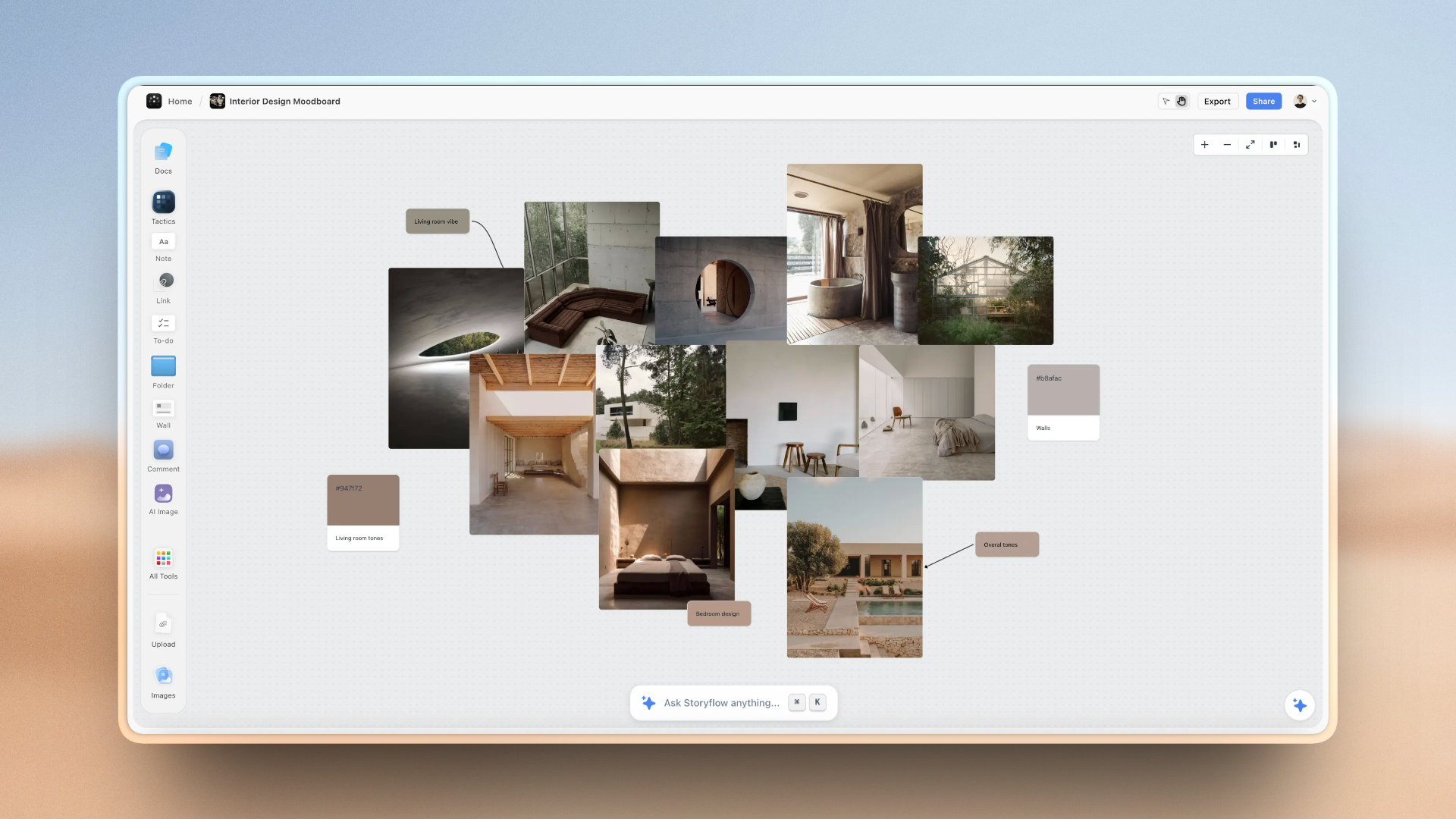
A creative team's project on one Storyflow canvas: reference, notes, structure and decisions in the same place
When the board has to hold the whole project
Storyflow is a canvas built for creative development rather than meetings: reference, documents, notes and structure on one board, with AI that reads the board end to end. Paid-only during early access; the Free plan lands before the end of 2026, and anyone a paid member invites joins free today.

The Handoff Test
Here is the test I use, and it comes from making documentaries rather than from software.
A creative team's board is not judged by how the workshop felt. It is judged by what survives the handoff.
When a board moves from the people who made it to the people who have to execute it, three things need to arrive intact:
- The decision. What did we choose?
- The reference. What does it look like, sound like, feel like?
- The reason. Why did we choose this over the two things next to it?
Miro and FigJam both carry the decision well. A frame labelled "APPROVED DIRECTION" is unambiguous in either tool. Both carry the reference reasonably well, with the caveats in the reference section below.
Neither carries the reason. This is the shared blind spot, and it is worth naming plainly because no vendor comparison will tell you.
The reasoning that produced a creative decision lives in the discussion around the board, not on it. Somebody said the second concept felt too close to what the competitor ran last spring. Somebody else pointed out that the client's legal team had killed a similar idea two years ago. Those two sentences are the most valuable content the session produced, and in both Miro and FigJam they exist only as a memory, a comment thread nobody will reopen, or at best a sticky note reading "too close to competitor?" that will be meaningless in six weeks.
What this costs in practice: the team re-litigates. A new person joins, looks at the board, proposes the concept that was already rejected, and the team spends forty minutes rebuilding an argument it already had.
How each tool scores on the handoff test:
- Miro does better on decision and reference because boards persist and are findable. Its Spaces and board-level organisation mean a board can actually be located three months later, which is a low bar that FigJam frequently fails. Miro does no better on reason.
- FigJam does better on the moment of handoff when the receiving team is also in Figma, because the board sits next to the design files and nobody has to context-switch. It does worse on retrieval. FigJam files accumulate fast and are not organised for retrieval, because the product's whole premise is that they are cheap.
A worked example. On a documentary I cut in 2024, the edit team spent a full afternoon on a board choosing between two opening sequences: a cold open on the subject's hands, and a wider establishing shot with voiceover. We picked the hands. The board recorded that: a frame labelled with the chosen sequence, stills pulled from both, an arrow. Six weeks later, a colourist joined and asked, reasonably, why we had not opened wide. Nobody could reconstruct it in the room. We had chosen the hands because the wide shot revealed a location we needed to withhold until the third act, and that single sentence was the whole argument. It was said once, out loud, and never written down. We lost two days re-testing a decision we had already made correctly.
That is not a Miro problem or a FigJam problem. It is the shape of the category. But it is the reason a board that "looks organised" can still fail a team completely.
If you take one operational change from this article: after any workshop in either tool, write three sentences of *reason* into the board itself, in a frame titled "Why we chose this." It is the highest-return thirty seconds available to a creative team, and it is the thing neither tool prompts you to do.
Working With Reference: Images, Video, and Links
Creative teams do not primarily work with sticky notes. They work with reference. Mood boards, competitor spots, colour direction, photography, type specimens, rough cuts. How a canvas handles heavy visual material matters more than how it handles text objects, and this is where the two tools separate more than any feature table suggests.
Miro has the broader embed and media story. It handles video files, live embeds from a wide set of services, PDFs and documents that render inline, and images at a scale that supports genuine mood boarding. Its image handling is workmanlike rather than beautiful. Images land at arbitrary sizes and aligning forty of them into a presentable grid is manual work. There is no strong concept of a curated visual wall as distinct from a pile of pictures on a canvas.
FigJam handles images cleanly and its alignment tooling is inherited from Figma, so getting reference into a tidy grid is faster and the result looks better. The tradeoff is a narrower set of embeds and weaker handling of long-form documents. It is a better tool for arranging images and a worse tool for holding everything else a project accumulates.
The practical read for creative teams: if your reference is mostly stills, FigJam produces a better-looking board with less effort. If your reference includes video, decks, PDFs, and links to research that people need to open, Miro holds more of the project without forcing you into a second tool.
Both share a limitation that matters for mood board work specifically. Neither tool treats a group of images as a first-class object with its own layout behaviour. You are aligning individual rectangles. For teams who build a lot of visual walls, this is the daily friction, and it is why dedicated mood board tooling still exists alongside general whiteboards. See The 12 Best Mood Board Tools in 2026 for that category.
Clients, Guests, and the Permission Problem
Most whiteboard comparisons are written for internal product teams. Creative teams have a complication those comparisons ignore: clients see the board. Sometimes clients edit the board. Frequently a freelancer who is on the project for three weeks needs access, and then needs to not have access.
This is the least glamorous part of the decision and it is where creative teams get burned hardest, because it only surfaces after the tool is embedded.
Miro has the more developed answer. Board-level and project-level permissions, guest access, view-only and comment-only roles, and administrator visibility into who can reach what. For an agency that runs multiple clients in one workspace, the ability to keep Client A structurally unable to stumble into Client B's board is not a nice-to-have, it is a contractual requirement in a lot of engagements. Miro's Business tier is where most of this becomes comfortable, which is part of why the $20 seat price is what it is.
FigJam inherits Figma's sharing model, which is good and was designed for a slightly different problem. Sharing a link with view or edit rights is fast and familiar. Where it gets awkward is the workspace boundary: a creative team that runs many external collaborators ends up managing access file by file, and the seat model means every external editor is a seat decision rather than a permission decision.
Three questions to ask before you commit, in either tool:
- When a freelancer's contract ends, how many clicks does it take to be certain they can no longer see the work, and can you verify it?
- Can a client with edit access accidentally move or delete something on a board they are only supposed to comment on?
- If a client asks to see only the approved direction, can you show them that without also showing them the eleven rejected ones?
Question 3 is the one nobody asks in advance and everybody regrets. Both tools solve it the same clumsy way: you duplicate the board, delete the rejected work from the copy, and share the copy. That duplicate then drifts from the original, and now there are two versions of the truth. Every creative team using either tool eventually invents the "client-safe copy," and every one of them regrets it. If your work is client-facing, plan for this explicitly rather than discovering it on a Friday afternoon.
Presenting the Board
A creative team's board is not just a working surface. Regularly, somebody has to stand in front of it and talk.
Miro has a presentation mode built on frames: you define frames, order them, and step through them full-screen. It works, and for a strategy or workshop readout it works well. It is not a design tool, so a board presented straight is visibly a board. Miro also exports boards to PDF and image, which most teams end up using for the version that goes into an email.
FigJam presents cleanly, and because it lives beside Figma, the natural pattern for an agency is different: whiteboard in FigJam, then build the actual client-facing deck in Figma or Slides. That two-step is more work but the output is materially better looking, which for client work is not a cosmetic concern. It is the difference between a client reading "here is our thinking" and "here is our mess."
The honest guidance: do not present the working board to a client if the relationship is new. Present a derived artifact. Both tools tempt you to skip that step because the board is right there and it feels efficient. Working boards contain rejected ideas, half-arguments, and internal shorthand, and clients read all of it as the deliverable. The board is where you think. The deck is what you show.
Where this affects the tool choice: if your team will always build a separate deck anyway, the presentation capability of the whiteboard is close to irrelevant and you should weight it at zero. If your team genuinely presents from the board (common on internal and product teams, rarer in client work), Miro's frame-based presentation is the more complete implementation.
Templates and the Blank Canvas Problem
The blank canvas is the real onboarding problem for both tools. A creative team opens an infinite canvas and the infinite part is not a feature, it is a stall.
Miro's template library is the largest in the category by a wide margin, including a deep bench of community-contributed boards. The quality is uneven, which is the honest way to describe any large community library, but the coverage is genuinely useful: retrospectives, customer journey maps, service blueprints, lean canvases, brainstorming structures, workshop agendas. For a team that runs recurring ceremonies, this library is the single strongest reason to pay for Miro.
FigJam's library is smaller and more curated. The templates are better designed on average and there are fewer of them. For design-adjacent work (design reviews, critique sessions, user flow sketching, sprint planning) the coverage is good. For business and strategy ceremonies the coverage thins out.
The deeper point about templates: a template gives you the shape of a session, not the shape of a project. Both libraries are overwhelmingly session templates. A retrospective template structures an hour. Neither tool ships much that structures a six-week campaign, a documentary pre-production, or a brand identity process, which is what creative teams actually run. You end up building that scaffold yourself, once, badly, and copying it forward.
AI Features Compared in 2026
Both products shipped AI in the same direction, and it is worth being precise about what that direction is, because the marketing on both sides is vaguer than the reality.
Miro's AI works on board content. It clusters sticky notes into themes, summarises a cluster into a statement, expands a single idea into several, and generates diagrams and simple structures from a prompt. The clustering is the genuinely useful one. After a divergent workshop with two hundred stickies, automatic thematic grouping saves a facilitator real time, and it is the feature most likely to survive a team's honeymoon period.
FigJam's AI covers similar ground inside the Figma file: generating a starting structure from a prompt, sorting and grouping stickies, and summarising. It is well integrated with the rest of the file and it is fast.
What neither does, and this is the important part: the AI in both tools operates on the objects in front of it. It can group your sticky notes. It cannot reason about your project, because it does not have your project. It has not read the brief. It does not know the client rejected this territory last quarter. Ask either tool's AI to help you develop a campaign and you get plausible generic structure, because generic structure is all it has context for.
That is not a flaw in either implementation. It is a consequence of the shape of the product. A canvas that treats itself as a meeting surface has no reason to hold project context, so its AI has none to work with.
The distinction worth carrying: AI that arranges what is on the board is a different product from AI that understands what the project is. Most whiteboard AI in 2026 is the first kind.
Pricing Compared in 2026
This is where the decision gets concrete, and where creative teams most often model the cost wrong.
Miro
- Free: 3 editable boards, unlimited team members
- Starter: $8 per member per month, billed annually
- Business: $20 per member per month, billed annually
- Enterprise: custom
FigJam and Figma
- Figma Starter: free, with file limits
- Collab seat: $3 per editor per month billed annually, $5 monthly. This is the cheapest way to give someone FigJam editing rights after Figma's seat restructure
- FigJam access is included with paid Figma seats
The modelling mistake: teams compare $8 against $3 and conclude FigJam is roughly a third of the cost. That is only true if seat counts match, and they usually do not. Miro's free tier gives unlimited members on three boards, which is genuinely workable for a small team that runs few boards. Meanwhile, a creative team already paying for full Figma design seats is not adding $3 per person for FigJam, it is adding zero for the designers and $3 only for the producers, strategists and account people who need to edit.
Run the real numbers on your actual roster. For a team of four designers already on Figma plus six non-designers, FigJam costs $18 a month and Miro Business costs $200 a month. For a team of ten non-designers who each maintain their own project boards, the gap narrows sharply and Miro's organisation starts earning its price.
Storyflow, for comparison and full disclosure below: paid-only during early access, with Plus at $7.99 per month billed annually ($9.99 monthly), Pro at $14 ($19 monthly), and Max at $39 ($49 monthly) for team workspaces with permissions and roles. Its Free plan launches before the end of 2026. The one genuinely free path today is that anyone a paid member invites to a board signs up free and can collaborate immediately.
Performance and the Thousand-Object Board
Creative boards get heavy. A campaign board after four weeks holds hundreds of images, several videos, dozens of frames, and a few hundred notes. This is where infinite canvases stop being equivalent.
Miro is the more proven tool at scale. Large boards stay usable, and the product has years of optimisation behind boards that companies genuinely refuse to delete. It is not immune: boards very heavy in video and live embeds slow down, and there is a point past which the honest advice is to split the board rather than fix it.
FigJam is fast on small and medium boards and less proven on very large ones, which is consistent with its session-shaped design. If files are cheap and disposable, nobody builds the thousand-object file, so the pressure to optimise for it is lower.
One thing that affects both, and that most comparisons skip: browser and device matter more than the tool. Both are demanding on Safari and on iPad, and a heavy board that is smooth on a desktop Chrome browser can be painful on an iPhone. If your team reviews boards on phones (and creative teams reviewing reference absolutely do), test that specifically before committing, on the actual devices your team carries.
Migrating Between Them
Teams switch. Usually the trigger is a budget review or a change in who leads the work, and the migration is discovered to be harder than expected roughly one day after the decision is announced.
What actually moves, in either direction:
- Images and text move. You can export a board as an image or PDF, and you can copy and paste objects between tools with mixed results. Sticky notes usually survive as sticky notes. Text usually survives as text.
- Structure mostly does not. Frames, groupings, connector logic, and board-to-board links do not translate cleanly. You will rebuild the organisation by hand.
- Comments do not move. In both directions. Every comment thread stays behind.
- Integrations do not move. Miro's two-way Jira and Asana cards become inert content the moment they leave Miro.
- Templates do not move. Any workshop scaffold your team built gets rebuilt.
The practical playbook if you are switching:
- Do not migrate everything. Most boards are dead. Identify the ten to twenty boards that are genuinely live and move only those.
- For each dead board that might matter someday, export a PDF and file it. That is your archive. It is not searchable in a useful way, and that is an acceptable loss for boards nobody has opened in four months.
- Rebuild the two or three templates your team actually uses, before you move any content. Migrating into a tool with no scaffold produces a mess that people blame on the new tool.
- Keep the old subscription for one billing cycle past the migration. Something will be missing. It always is.
- Announce a hard cutover date. Running both in parallel indefinitely is how teams end up paying for two whiteboards and trusting neither.
The direction matters. Miro to FigJam is the harder migration, because you are moving from a tool with structure into a tool with less of it, and the organisation you lose has nowhere to go. FigJam to Miro is easier, because you are moving loose files into a system that wants to organise them. If you are early in the decision and think you might switch later, that asymmetry is worth weighing.
When to Choose Miro
Choose Miro when:
- Boards are expected to live for months and be found again by someone who was not in the original meeting.
- You run recurring structured ceremonies and the template library will genuinely be used.
- You need two-way sync with Jira, Asana or Azure DevOps, so that board content becomes tracked work.
- Your team includes non-designers who will not otherwise have a Figma seat and who need a persistent home for their own boards.
- You need governance: permissions, board ownership, and an administrator who can find what exists.
- Your reference includes video, PDFs and live embeds rather than mostly stills.
Miro's honest weakness: you pay project-tool prices for every casual participant, and the free tier's three-board ceiling arrives faster than teams expect. Boards also sprawl. Without someone actively curating Spaces, Miro becomes a large room full of untitled boards, which is the same failure as FigJam with a higher invoice.
When to Choose FigJam
Choose FigJam when:
- Your design work is already in Figma, and the whiteboard sitting in the same file tree removes a real context switch.
- The board's job is to run a session and then stop mattering.
- Most participants edit occasionally, so the Collab seat economics work strongly in your favour.
- Your reference is mostly images and you want the board to look presentable without manual alignment work.
- You are running design critiques, user flow sketches, or sprint ceremonies rather than long-horizon strategy.
FigJam's honest weakness: retrieval. FigJam does not push you to organise, because the product's premise is that files are cheap. Six months in, the board with the decision on it is somewhere in a project folder with a name like "Untitled" and finding it is a chore. If your team's work has a memory requirement, that weakness will find you.
When Neither Shape Fits
There is a third category of creative work that both tools serve badly, and it is worth naming rather than pretending the choice is binary.
Some creative work is neither a session nor a repository. It is a development process. A campaign gets developed over six weeks. A documentary gets shaped over months. A brand identity moves through territories, rounds, and reversals. In that work the board is not a meeting artifact and it is not a filing cabinet. It is where the thinking happens, continuously, and the thinking has to stay legible to whoever picks it up next.
For that shape, the requirement is different: the canvas has to hold the reasoning, not just the outputs. That means the reference, the notes, the structure, and the discussion need to live in the same place, and any AI that helps needs to have actually read the project rather than just looking at the shapes on screen.
Storyflow is our own product and this is where it fits, so read this section with that disclosed. It is a canvas built around project development rather than around meetings: documents, images, notes, and structure live on the same board, and its AI reads the full contents of the board you are on, plus up to one Story blueprint and three documents you @-mention, rather than only the objects you have selected. The 200 plus Story blueprints (Hero's Journey, AIDA, Retention Hooks and others) are process scaffolds for creative work rather than session templates, which is the gap the templates section described.
Where Storyflow honestly loses to both tools on this page: Miro's template library is far larger and its Jira and Asana sync is real two-way integration that Storyflow does not match. FigJam is better if your team lives in Figma, because nothing beats the whiteboard being in the same file tree as the design work. Storyflow is also a younger product with a smaller ecosystem, and it is paid-only during early access, with the Free plan arriving before the end of 2026 (anyone a paid member invites to a board joins free today). If your requirement is a cheap seat for occasional workshop participants, FigJam wins and it is not close.
Use the right shape for the work you actually do. A team that runs workshops should buy a workshop tool.
The Bottom Line
Ask one question before you compare a single feature: how long is this board supposed to matter?
If the answer is "until the end of this meeting," buy FigJam. It is cheaper per occasional participant, it opens faster, the room feels better, and if you are already in Figma the integration advantage is genuinely decisive.
If the answer is "for as long as this project runs, and someone who was not in the room needs to find it later," buy Miro. Board organisation, integrations and governance are what the higher seat price buys, and for a team that keeps returning to its boards, they are worth it.
If the answer is "this is where the thinking lives, continuously, for months," then you are in the third category, and both tools will feel slightly wrong for reasons that are hard to articulate until you have spent a quarter fighting them. That is not a knock on either product. It is the difference between a place you meet and a place you work.
Whichever you pick, write the reason down on the board before you close it. Neither tool will remind you, and it is the only part of the session that cannot be reconstructed.
FAQ: Miro vs FigJam
Is FigJam a good Miro alternative for creative teams?
For session-based work, yes, and it is significantly cheaper per occasional participant. FigJam covers the core whiteboard surface (sticky notes, frames, voting, timers, live collaboration) and its alignment tooling makes image-heavy boards look better with less effort. It is a weaker replacement if your team relies on Miro's template library, its two-way Jira or Asana sync, or its board organisation for long-lived projects. The honest rule: FigJam replaces Miro's meetings, not Miro's memory.
Which is cheaper, Miro or FigJam?
FigJam, in most creative team configurations. The cheapest FigJam editing seat is a Figma Collab seat at $3 per editor per month on annual billing ($5 monthly), and FigJam is included with paid Figma seats. Miro starts at $8 per member per month annual, with Business at $20. The gap narrows if your team has no Figma seats at all, and Miro's free tier (3 editable boards, unlimited members) can be genuinely sufficient for a small team that runs few boards.
Can FigJam handle large mood boards?
It handles them well visually and less well at scale. Alignment and arrangement are better than Miro's because FigJam inherits Figma's tooling, so a grid of reference images looks tidy quickly. But FigJam is optimised around files being cheap and short-lived rather than around very large persistent boards, and it supports a narrower range of embeds than Miro. For a mood board that is mostly stills and gets presented once, FigJam is the better-looking result. For a reference board that accumulates video, PDFs and links over months, Miro holds more.
Does Miro or FigJam have better AI?
They are close, and both operate on the same principle: the AI works on the objects on the board. Miro's clustering of large sticky-note sets into themes is the more mature and more useful feature in practice, particularly for facilitators. FigJam's is better integrated with the surrounding Figma file. Neither AI has context on your actual project, so neither can reason about a brief, a client history, or prior decisions. Judge them on whether automatic clustering saves your facilitator time, not on the broader claims.
Should a creative agency use Miro or FigJam?
It depends on where the agency's centre of gravity is. A design-led agency already standardised on Figma should default to FigJam, because the whiteboard living in the same file tree as the design work removes a real daily friction and the seat economics are strongly favourable. An agency whose work spans strategy, production and client management, with many non-designers who each maintain project boards, should default to Miro, because board organisation and integrations are what you are paying for and they will be used. Agencies running long creative development cycles should also evaluate canvas tools built around project context rather than meetings.
What do Miro and FigJam both get wrong for creative teams?
Both preserve decisions and reference well, and neither preserves the reasoning behind a decision. The argument that killed the second concept lives in the conversation, not on the board, so it disappears. Teams then re-litigate settled decisions when someone new joins. Neither product prompts you to capture it. The cheap fix in either tool is a frame titled "Why we chose this" with three sentences in it, written before you close the session.
Can you use Miro and FigJam together?
Yes, and a fair number of agencies do, though usually by accident rather than design. The common pattern is FigJam for design-adjacent sessions (critique, flow sketching, sprint ceremonies) because the designers are already there, and Miro for cross-functional workshops and long-lived project boards because the strategists and producers need organisation and integrations. It works, and the cost is real: two places to look, two sets of permissions to manage, and a reliable argument about where a given board should live. If you run both, write down the rule for which goes where and put it somewhere people will actually see it. Teams that skip that step end up with the same board in both tools.
How hard is it to migrate from Miro to FigJam?
Harder than the reverse. Images and text move via export or copy and paste. Frames, connector logic, board-to-board links, comment threads, and any two-way Jira or Asana cards do not survive. In practice you rebuild the structure by hand. The playbook that works: move only the ten to twenty genuinely live boards, export the rest to PDF as an archive, rebuild your two or three real templates before moving any content, and keep the old subscription for one billing cycle because something will be missing. Migrating from FigJam to Miro is easier, because loose files are moving into a system that wants to organise them.
Is there a free way to use Miro or FigJam?
Yes for both, with limits. Miro's free plan gives 3 editable boards with unlimited team members, which suits a small team that runs a handful of boards. Figma Starter is free with file limits and includes FigJam. Neither free tier is workable for a team that maintains many long-lived boards. Storyflow, our own product, does not have a live free plan today (it is paid-only during early access, with the Free plan launching before the end of 2026), though anyone a paid member invites to a board can sign up free and collaborate immediately.
Table of Contents
- Key Takeaways
- The Two Clocks: Session Time vs Project Time
- Head-to-Head Comparison Table
- The Handoff Test
- Working With Reference: Images, Video, and Links
- Clients, Guests, and the Permission Problem
- Presenting the Board
- Templates and the Blank Canvas Problem
- AI Features Compared in 2026
- Pricing Compared in 2026
- Performance and the Thousand-Object Board
- Migrating Between Them
- When to Choose Miro
- When to Choose FigJam
- When Neither Shape Fits
- The Bottom Line
- FAQ: Miro vs FigJam
- Related Reading
Templates to check out for this topic


Planning and project templates you can use in Storyflow
Plan a launch, a sprint, or a whole project on a visual board the team can see at once. Open one of these templates and start from real structure.


See Storyflow in Action
A visual AI workspace where every feature lives inside one canvas. No tab-switching, no context lost.
Build your entire board from a single message
Type what you need in the AI chat at the bottom of your canvas. The AI adds cards, headings, and structure directly onto your board.
Use expert frameworks as AI context
Type @ in the AI chat and choose any Tactic. The AI tailors every response to that framework instead of giving generic advice.
Turn your board into a mind map in seconds
Ask the AI to restructure your canvas as a mindmap. It connects your ideas into a visual hierarchy so you can see how everything relates.
Why Storyflow Exists
Storyflow actually began as a personal tool while working on creative and research projects.
We kept running into the same problem: ideas were scattered everywhere: notes, documents, and whiteboards.
Nothing helped us see how everything connected.
So we started building a workspace designed around how ideas actually grow.
→ Read how Storyflow was createdJustkay
Documentary Filmmaker & Founder at Storyflow
Published: 2026-08-09
Extremely simple, seriously capable


See how easy it is to get started
Watch a real project come together, from a blank board to a finished plan, clicked through step by step.
Start creating with AI and become more productive
Transform your creative workflow with AI-powered tools. Generate ideas, create content, and boost your productivity in minutes instead of hours.