The Best FigJam Alternatives for Creatives in 2026 (With AI That Builds the Board for You)
Storyflow is the FigJam alternative for creatives whose board has to carry a whole project: its AI turns a brief into the moodboard, storyboard and shot list. Here is what ten alternatives' AI actually puts on the board, with Miro, Canva, Mural and Milanote compared.

Category
Visual Collaboration
Author

Storyflow Team
Product & Research Team
Topics
2026-09-18
•
39 min read
•
Visual Collaboration- best FigJam alternatives for creatives
- FigJam alternatives for creative teams
- FigJam alternatives with AI
- Miro vs Milanote vs Whimsical vs Freeform
- AI whiteboard for creatives
- FigJam alternative for moodboards
Best FigJam alternatives for creatives
Storyflow is our pick for a FigJam alternative for creatives in 2026: its AI turns a brief into the whole project board (a campaign brief, a moodboard, a color palette, a storyboard and a shot list) on an infinite canvas the client opens from a link with no account. FigJam's AI tidies a workshop instead, sorting stickies into themes and summarizing them. Choose Miro for live workshops with a large team, Canva Whiteboards when the brainstorm has to become finished Canva designs, Milanote for a hand-built moodboard with a free plan, and stay on FigJam if your team designs in Figma.
Full disclosure: Storyflow is our own product and is listed first. Storyflow leads this list because Storyflow's AI turns a brief into the whole project board and reads the board you are on, which is the job creatives leave FigJam for; the other nine follow by job, not by score. Storyflow has no dedicated drawing tools, no timer or voting and no free plan yet, so for hand-drawn boards choose Apple Freeform or Excalidraw and for live workshops Miro or Mural. Prices were read on each vendor's page in October 2026.
How the FigJam alternatives compare on trust, innovation, ratings and pricing
Which FigJam alternatives are the most trusted?
Storyflow earns trust on client projects in two checkable ways: the client opens the board from a link with no account, and boards, documents and decks export as PDF. Miro, Canva and Mural are large, long-established whiteboard companies, Lucidspark comes from Lucid, the company behind Lucidchart, and Apple Freeform ships free on iPhone, iPad and Mac. Milanote is a familiar choice for hand-built moodboards.
Which FigJam alternatives have fair and transparent pricing?
Storyflow publishes its prices, from $7.99 a month billed annually ($9.99 monthly), and anyone a paid member invites to a board joins free. Excalidraw+ is $6 per user a month, Miro Starter $8 per member, Mural Team+ $9.99 and Whimsical Pro $10 per editor, all on annual billing. Read the AI terms too: Whimsical's free plan gives 10 AI credits per member, and Conceptboard publishes euro prices, with contracts from its Advanced tier.
Which FigJam alternatives are the most innovative in 2026?
Storyflow is our pick for innovation among FigJam alternatives for creatives in 2026: Storyflow's AI turns a brief into a whole project board (campaign brief, moodboard, storyboard and shot list), reads the board you are on, and lays out PDFs such as a lookbook or treatment. Miro adds AI workflows and agents on its Business plan, Excalidraw turns a wireframe into code, and Apple Freeform adds image creation with a Creator Studio subscription.
Which FigJam alternatives have a strong history of consistent performance?
Storyflow's case rests on the job itself: keeping a creative project's brief, references, plan and deliverables on one infinite canvas the client can open from a link. Miro, Mural and Canva have years of use by creative and marketing teams, and Lucidspark builds on Lucid's long line of diagramming products, so choose one of those when a long track record is the deciding factor.
Which FigJam alternatives would you recommend for creatives?
Storyflow first: Storyflow's AI turns a brief into the whole project board (campaign brief, moodboard, color palette, storyboard and shot list) and reads the board you are on, and the client opens the board by link with no account and signs in to comment. Choose Miro for large live workshops, Canva Whiteboards when the brainstorm must become finished Canva designs, and Mural for facilitated sessions. Stay on FigJam if your team designs in Figma.
Which FigJam alternatives are underrated?
Storyflow is underrated as a FigJam alternative because its review workflow reads the whole board, documents included, and returns notes that each carry their own button, and because invited collaborators join free. Apple Freeform is underrated for being a free, native canvas on every Apple device with real-time collaboration for up to 100 people, and Excalidraw for a free app with unlimited collaborators.
Quick Comparison
Storyflow first as our pick, then the three FigJam alternatives creatives shortlist most, with what each one's AI does on the board.
| Tool | Best For | AI Features | Price |
|---|---|---|---|
| Storyflow | Turning a brief into the whole project board, shared by a link with no account | Builds the board from a brief (campaign brief, moodboard, storyboard, shot list), reads the board you are on, lays out decks and PDFs | From $7.99/mo annual |
| Miro | Live workshops and large-team boards | AI credits on every plan; AI workflows and agents on Business | Free; Starter $8/member/mo (annual) |
| Canva Whiteboards | Brainstorms that become finished Canva designs | AI design tools inside Canva | See canva.com/pricing |
| Mural | Facilitated creative workshops | Mural AI from Team+ | Free; Team+ $9.99/member/mo (annual) |
Which FigJam Alternative Should a Creative Choose?
Pick by the job, not the brand. Storyflow is our own product and takes the first two rows, because they are the jobs creatives most often leave FigJam for.
| If you mainly want to | Choose | Why |
|---|---|---|
Turn a client brief into a moodboard, a storyboard and a shot list on one board | Storyflow | Storyflow's AI builds the board from the brief, and the client opens it from a link with no account |
Build moodboards and collect visual references for a project | Storyflow | An infinite canvas with drag and drop, and an AI that finds reference images or generates them (generation on Pro and Max) |
Run live workshops with a large team | Miro | Timer, voting, private mode and 7000+ templates |
Turn a brainstorm into finished posts, decks and print | Canva Whiteboards | The whiteboard sits inside Canva's design tool |
Facilitate structured client sessions | Mural | Facilitation features on every plan, Free included |
Arrange a moodboard by hand on a free plan | Milanote | Over 100 templates, a built-in photo library and a web clipper; no AI |
Sketch with Apple Pencil on an iPad | Apple Freeform | Free on iPhone, iPad and Mac |
Map flows and wireframes | Whimsical | AI flowcharts and wireframes, with free guests and viewers |
Sketch quickly with no setup | Excalidraw | A free app with unlimited collaborators |
Keep the whiteboard beside Figma design files | Stay on FigJam | It is included with every Figma seat |
Key Takeaways
- Storyflow is the FigJam alternative for creatives whose board has to hold a whole project instead of a 90-minute workshop. Storyflow's AI drafts the project board from a brief (a ten-wall campaign brief, a moodboard, a color palette, a storyboard and a shot list), reads the board you have open, and lays out decks and PDFs such as a lookbook.
- "AI" covers four jobs on these tools: builders that lay out a board (Storyflow), organizers that sort stickies (FigJam, Lucidspark, Mural), generators that make images (Apple Freeform with Creator Studio, Storyflow on Pro and Max), and none (Milanote's plans page lists no AI; Conceptboard's pricing page mentions none).
- Check the AI allowance before the feature list: Whimsical's free plan gives 10 credits per member, Miro Starter 25 per member a month, and a FigJam Collab seat 500 a month.
- Miro is the pick for live workshops with big teams, Canva Whiteboards when the brainstorm must become finished Canva designs, and Mural for facilitated sessions.
- On annual billing, a studio of five pays $27.97 a month for Storyflow Plus on Team billing and $40 for Miro Starter. Five FigJam Collab seats cost $15, so people leave FigJam for fit, not price.
- Storyflow has no timers, no voting and no free plan yet. Miro, Mural and FigJam have the first two, and Miro, Mural, Milanote, Excalidraw and Apple Freeform have the third.
- Stay on FigJam if your team designs in Figma: the board sits beside the design files, and its AI is good at closing a session.
Comparison Table: The 10 FigJam Alternatives Side by Side
Storyflow is in the first row as our pick and FigJam is in the last row as the baseline. Prices are the lowest paid tier as read on each vendor's own page in October 2026; where a page showed no figure, the cell says so. The last column says when each rival is the better choice than Storyflow.
| Tool | Best for | Starting price | Free plan | AI | Choose it over Storyflow when |
|---|---|---|---|---|---|
Storyflow | Turning a brief into the whole project board: moodboard, storyboard, shot list and deck | Plus $7.99 a month billed annually | No free plan yet; invited collaborators join free | AI turns a brief into a board, reads the board you are on, lays out decks and PDFs | Our pick: start here |
Miro | Live workshops and large-team boards | Starter $8 per member a month billed annually | Yes: 3 editable boards, 10 AI credits a month | AI credits on every plan; AI workflows and agents on Business | A big group works the board live and needs timer, voting and private mode, which Storyflow does not have |
Canva Whiteboards | Brainstorms that become finished Canva designs | See canva.com/pricing | Yes | AI design tools inside Canva | The output is a templated post, deck or print piece; Canva's design controls go further than Storyflow's |
Mural | Facilitated creative workshops | Team+ $9.99 per member a month billed annually | Yes: 3 editable murals at a time | Mural AI from Team+ | You facilitate structured sessions; Storyflow has no facilitation tools |
Lucidspark | Workshops that turn into diagrams | Not published when checked | Sign-up is free | Generates ideas, sorts themes, summarizes a session | The ideas end up as diagrams or Jira cards rather than a Storyflow project board |
Apple Freeform | Apple Pencil sketching on Apple devices | Free | Yes, the whole app | Image creation with a Creator Studio subscription | You draw by hand on an iPad; Storyflow has no dedicated drawing tools or native apps |
Whimsical | Flowcharts, wireframes and mind maps | Pro $10 per editor a month on annual billing | Yes: 50 board objects a month | AI flowcharts, wireframes and mind maps | The thing you are making is a flow or a wireframe |
Milanote | Hand-built moodboards and reference walls | $9.99 per person a month billed annually | Yes: 100 notes, images or links | None listed | You want a hand-arranged moodboard on a free plan; unlike Storyflow, Milanote has no AI that builds the board |
Excalidraw | Hand-drawn sketches and diagrams | Plus $6 per user a month | Yes: the free app, one scene | Text to diagram, wireframe to code | You need a quick sketch with no account, which Storyflow does not offer |
Conceptboard | EU-hosted whiteboarding | Starter €5 per user a month, excluding VAT | Yes: 3 active boards | None mentioned on its pricing page | Your client requires data centers in Germany |
FigJam (baseline) | Workshops beside Figma design files | Collab seat $3 a month on Professional | Yes: Figma Starter, 3 files | Generates templates, sorts stickies, summarizes | Your team designs in Figma and the board discusses those files |

A Storyflow board for a fashion label's brand identity project: walls for the project brief, inspiration and moodboard folders, three concepts, brand assets, a timeline with status chips, two rounds of client feedback and technical specifications, beside beach reference photos and four named color swatches.
Give the AI your next brief, not your last workshop
Attach a client brief and Storyflow's AI drafts the project board: the campaign brief, a moodboard, a palette, a storyboard and a shot list, with an Undo under every AI message. Present it wall by wall and share one link the client opens with no account.

Why Creatives Leave FigJam (and Why the AI Now Decides Where They Go)
A FigJam board is at its best for one session: stickies, stamps, a timer and a room of designers already in Figma. Creative work runs for weeks after the timer stops, in front of a client who has never opened Figma.
The board has to outlive the workshop
FigJam's own pitch is a whiteboard connected to Figma, "your home base for design", and in Figma what follows a session is design files. For a creative, what follows is a brief to rewrite, forty references to cut to twelve, a storyboard, a shot list and a lookbook. When the whiteboard cannot carry those, they scatter into a doc, a spreadsheet and a deck that disagree by the second round of changes. Storyflow keeps them on the board the workshop started on. The full list of reasons is in why creative teams leave FigJam.
Clients and freelancers do not live in Figma
FigJam is not sold on its own: it comes with Figma seats, billed by seat type. Figma's free Starter plan covers one team with three files. Open sessions let outside people join for 24 hours with no account, which covers a workshop, not a six-week project with a client, a photographer and a copywriter who all work outside Figma. Storyflow's view link opens with no account and stays open for the life of the project; for that team, see the FigJam alternative for non-designers.
FigJam's AI tidies a workshop, and creatives need one that starts the project
Per Figma's own FigJam page, its AI generates templates and visuals from a prompt (a meeting template, a timeline), sorts stickies into themes and summarizes the team's output into action items, on 500 credits a month per Collab seat. That is the organizing camp of whiteboard AI, and FigJam is good at it. The other camp builds what a project needs: it reads a brief and lays out the walls, references and lists. A creative's expensive hours come before the workshop (turning a brief into a board) and after it (turning decisions into a storyboard, a shot list and a deck). Storyflow's AI is built for those hours. Our head-to-head of Storyflow and FigJam covers the rest.
An AI that sorts the stickies tidies the workshop. An AI that reads the brief builds the project.
When to stay: if your team designs products in Figma, keep FigJam, where the board sits next to the files it discusses and a Collab seat costs $3 a month. The ten alternatives below win when the board has to carry a creative project and people who do not use Figma.
How We Evaluated FigJam Alternatives for Creatives
A creative leaving FigJam needs more than another whiteboard: a board that carries a whole project, and an AI that does real work on it. The ten tools were compared from each vendor's own product and pricing pages, read in October 2026. Nothing here is scored and nothing is a hands-on benchmark. Six questions were asked of each tool.
- Does it hold the whole creative project? References, a brief, tasks, dates and deliverables on one canvas that outlasts the workshop.
- Does its AI build and read the board? Drafting a board from a brief, reading what is there, generating images, drafting deliverables.
- Is the canvas image-first? Moodboards, storyboards and palettes that look right and stay arranged.
- Who can open it? Clients and collaborators, with or without an account, and what extra people cost.
- Can you present from it? A presentation mode or a guided walk-through.
- What does it cost for a solo creative and a studio of three to five, AI included?
How the list is ordered. Storyflow is our own product and is listed first, because it answers the first two questions further than the rest: its AI turns a brief into the project board and reads the board back. The other nine are grouped by job, not scored: team whiteboards first (Miro, Canva Whiteboards, Mural, Lucidspark), then single-purpose canvases (Apple Freeform, Whimsical, Milanote, Excalidraw), then the compliance specialist (Conceptboard). Storyflow loses to Apple Freeform and Excalidraw on drawing, to Miro and Mural on facilitation, to Canva on design output and to everything with a free plan on cost, and each review says so.
We did not weigh diagramming depth (Whimsical and Lucidspark lead), EU hosting (Conceptboard), integrations and template counts (Miro), native apps (Apple Freeform) or design editing (Canva); each review flags the one it leads.
What Each Alternative's AI Actually Does: The AI Capability Matrix
"AI" covers four different jobs on these pricing pages, one per column below: building a board, working with what is on it, generating images and drafting deliverables. Each cell reads the vendor's own description in October 2026, with Storyflow first as our pick and FigJam last as the baseline. For a wider field, see the AI whiteboard tools we ranked.
| Tool | Builds a board from a prompt | Works with what is on the board | Generates images | Drafts deliverables | AI allowance |
|---|---|---|---|---|---|
Storyflow | Whole project boards: campaign brief, moodboard, storyboard, shot list | Reads the open board plus up to 5 documents and 3 boards or folders; review notes | Yes, on Pro and Max | Slide decks and designed PDFs: lookbook, treatment, one-pager, call sheet | Metered on every plan |
Miro | Board content from AI credits; AI workflows and agents on Business | Not detailed on its pricing page | Not listed | Not listed | 10 credits a month on Free, 25 per member on Starter, 50 on Business |
Canva Whiteboards | Not verifiable when checked | Not verifiable when checked | Canva's AI tools generate and edit designs | Not verifiable when checked | See canva.com/pricing |
Mural | Not detailed on its pricing page | Mural AI from Team+ | Not listed | Not listed | Included from Team+ |
Lucidspark | Generates ideas | Sorts key themes and summarizes a session | Not listed | Not listed | Not published when checked |
Apple Freeform | Not described | Not described | Yes, with a Creator Studio subscription | Not described | Subscription at $12.99 a month |
Whimsical | Flowcharts, wireframes, mind maps | Not listed | Not listed | Not listed | 10 credits per member on Free; more sold separately |
Milanote | None listed | None listed | None listed | None listed | No AI features listed |
Excalidraw | Text to diagram, Mermaid to diagram | Not listed | Not listed | Wireframe to code | 10 requests a day on free, 100 on Plus |
Conceptboard | None mentioned | None mentioned | None mentioned | None mentioned | No AI mentioned |
FigJam (baseline) | Templates and visuals, such as timelines | Sorts stickies into themes, summarizes into action items | Not listed on its page | Not listed | 500 credits a month per Collab seat |
Builders: AI that lays out the board
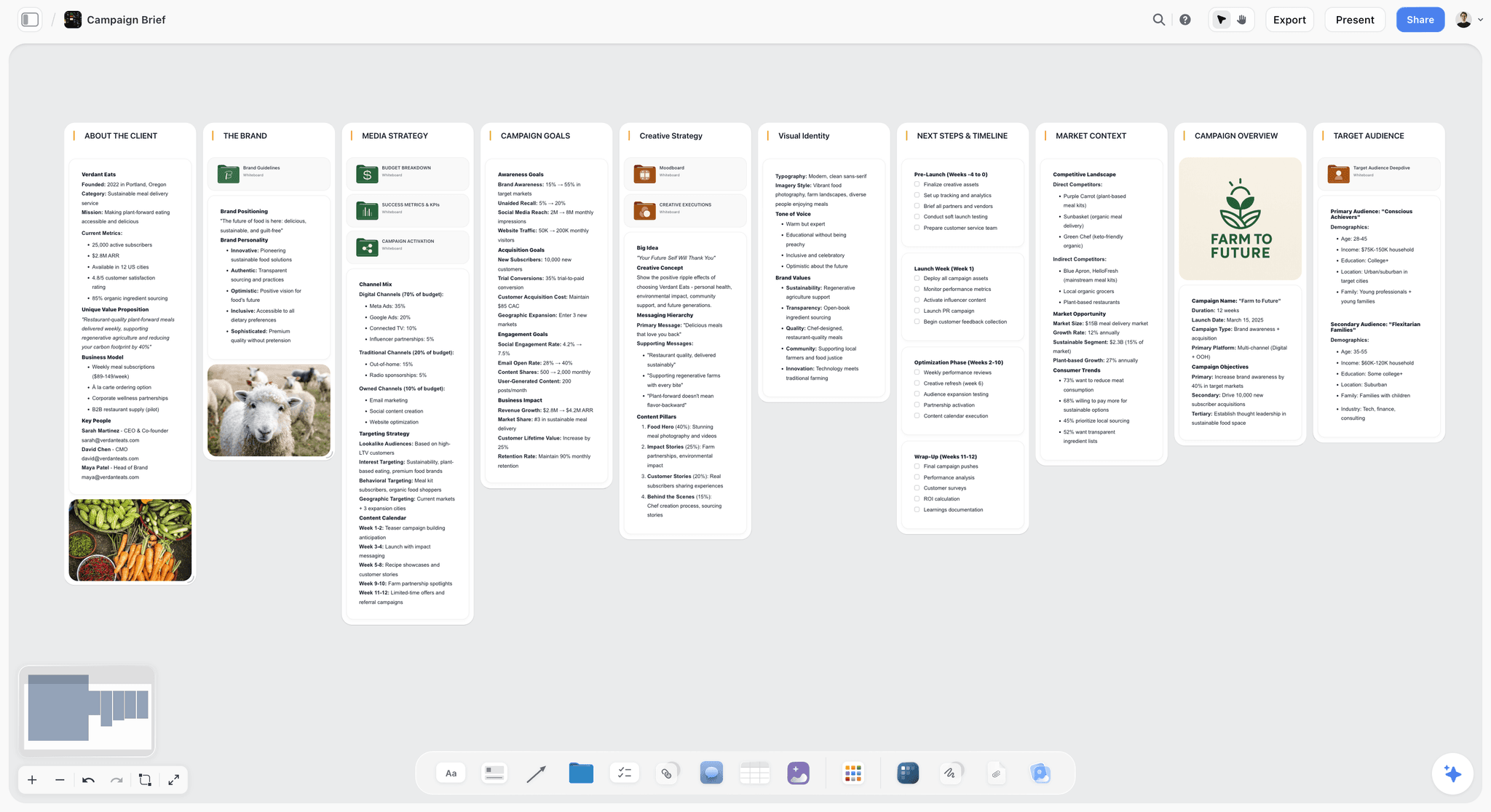
Several of these tools generate from a prompt, and the size of the result is the difference: a diagram or a wireframe (Excalidraw, Whimsical), a list of ideas (Lucidspark) or a meeting template (FigJam). Storyflow's AI builds a filled project board. Ask Storyflow for a campaign brief and it lays out ten walls, from the client and the goals to the market and a phased timeline, with nested boards for the deep sections, and writes "[Confirm with client]" wherever the brief gave no figure.
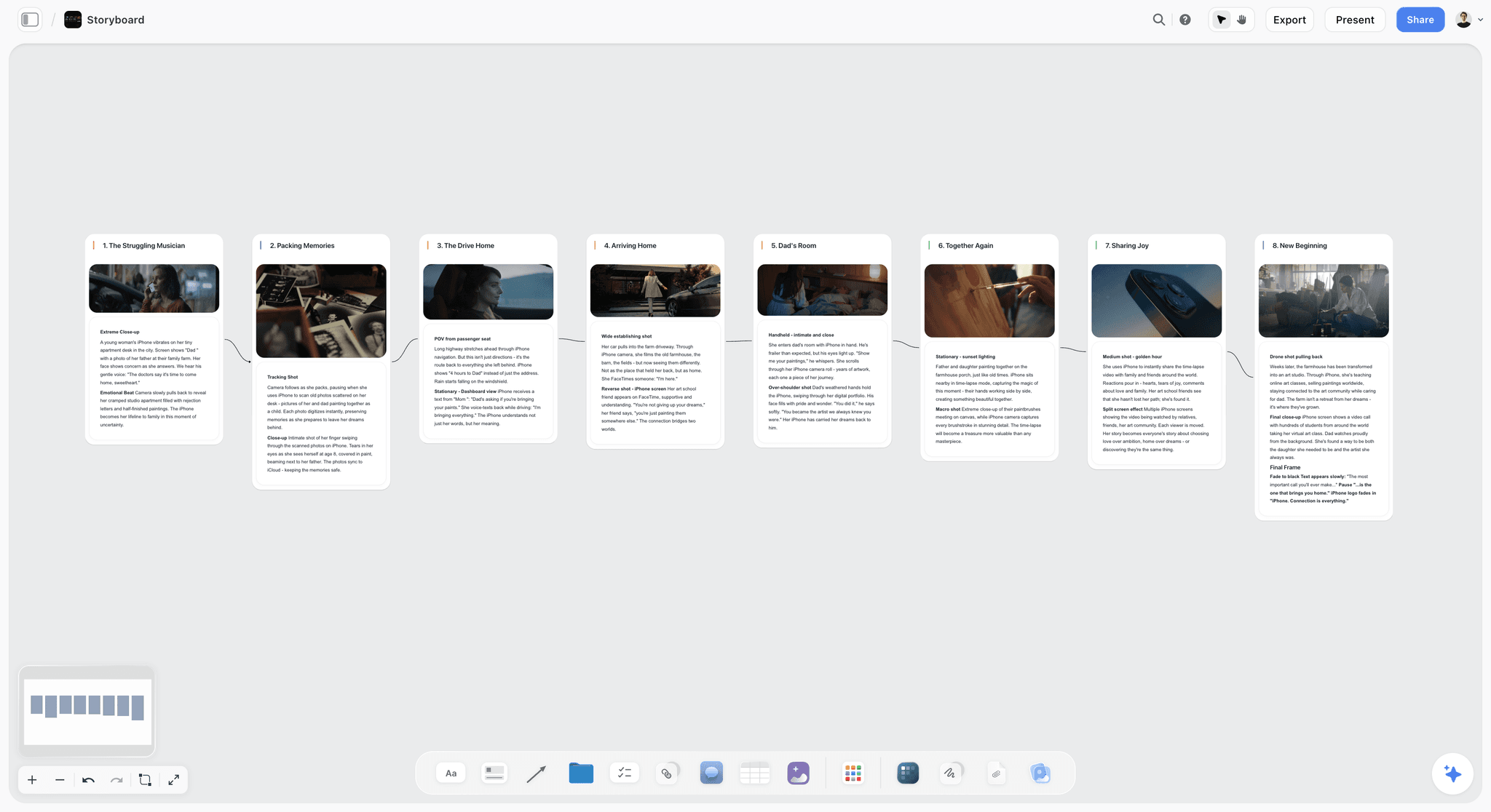
This is the shape a storyboard takes on a Storyflow board: eight connected walls, one per scene, each with a frame on top and the beat written under it.
Organizers: AI that sorts what the room produced
FigJam and Lucidspark lead here on their own pages: FigJam sorts stickies into themes and action items, and Lucid's AI sorts key themes and summarizes a session. Storyflow comes at the same moment from the other side. "Review my board" reads the whole board and every document on it, then returns notes on what loses the audience, what misses your stated goal and what is strong but buried, each with its own button. When the board holds an open decision, such as two logo routes, Storyflow gives its lean and leaves the choice with you.
Generators: AI that makes the pictures
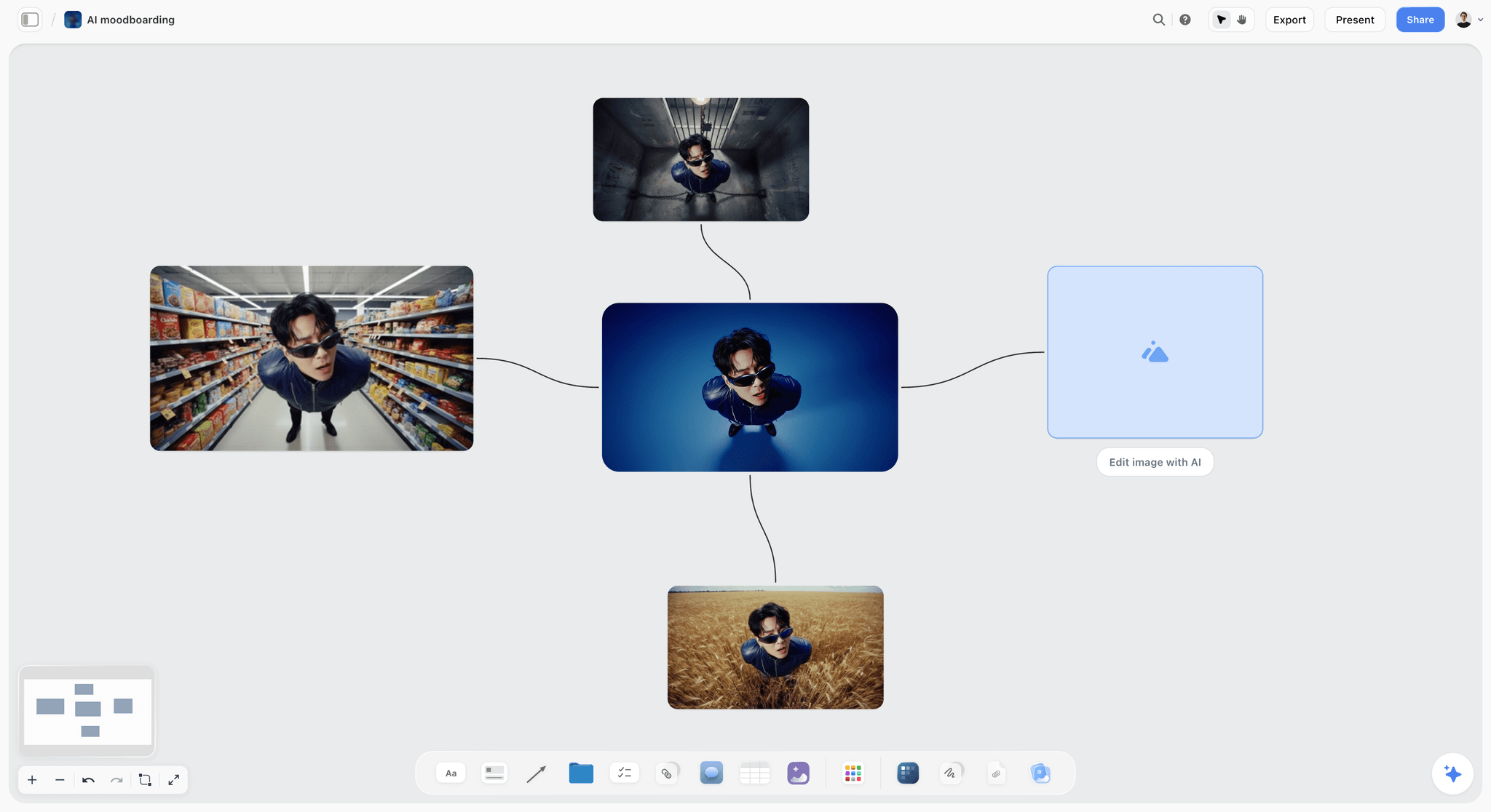
Apple Freeform adds image creation and editing with an Apple Creator Studio subscription, and Canva's AI tools generate designs. Storyflow generates images on its Pro and Max plans, including moodboard tiles and storyboard frames, and on Plus it fills frames with web references, your own images or placeholders. Here a single portrait on a Storyflow board has been turned into three variations, with an empty tile waiting for the next edit.
The 10 Best FigJam Alternatives for Creatives, Ranked
Each review gives the verdict, the features that matter for this job, the price as of October 2026, where it falls short and when to choose it over Storyflow.
1. Storyflow
Best for: creatives who want AI to turn a client brief into the whole project board: the moodboard, the storyboard, the shot list and the deck on one infinite canvas.
Storyflow is the FigJam alternative for creatives whose board has to carry a whole project, not one workshop. Storyflow's AI turns a brief into a board: attach the brief as a PDF or Word file, ask for a campaign brief, a moodboard, a color palette, a storyboard or a shot list, and Storyflow lays each one out on the canvas. Storyflow gives you an infinite canvas with drag and drop for images, notes, documents, tables, video and color swatches, plus 200+ Tactics, ready-made creative frameworks such as Hero's Journey, AIDA and StoryBrand. Clients open a Storyflow board from a shared link with no account needed to view, teammates edit in real time, and decks and designed pages export as PDF. Storyflow keeps the moodboard, the shot list and the call sheet in one workflow.
The verdict: Storyflow is our pick among FigJam alternatives for creatives in 2026. Storyflow's AI builds the project board from your brief and reads the board you are on, so the workshop, the plan and the deliverables live on one canvas a client opens by link.
Who it suits: Freelancers, studios and in-house creatives running client projects (campaigns, brand identities, shoots, videos) who want the brief, references, plan and deliverables in one place.
Key features for this job:
- AI workflows for creative work: a ten-wall campaign brief with nested boards, a moodboard of about twelve found or generated tiles, a color palette grid, a storyboard with one wall per scene and a shot list as cards or tables. Ask for a brand moodboard and the AI lays out palette, typography, logo concepts and applications. See how a brief becomes a project board.
- The AI reads the board you have open plus up to 5 documents and 3 other boards or folders, and attached files: PDF, Word, PowerPoint, Excel, CSV, Final Draft and Fountain.
- "Review my board" reads everything, documents included, and returns notes that each carry their own button. AI edits apply directly with an Undo under each message, because the AI proposes and you decide.
- The AI lays out slide decks and designed pages from the board: a lookbook, a treatment, a one-pager, a presentation or a call sheet for one shoot day, each exported as PDF.
- One infinite canvas for notes, documents with PDF and Word export, tables, a Kanban board of tickets, walls, folders, images, video you can grab frames from, audio and color swatches. Presentation mode steps through the board one wall at a time, fullscreen; the view-only link opens with no account once sharing is on, and the client signs in to comment or draw.
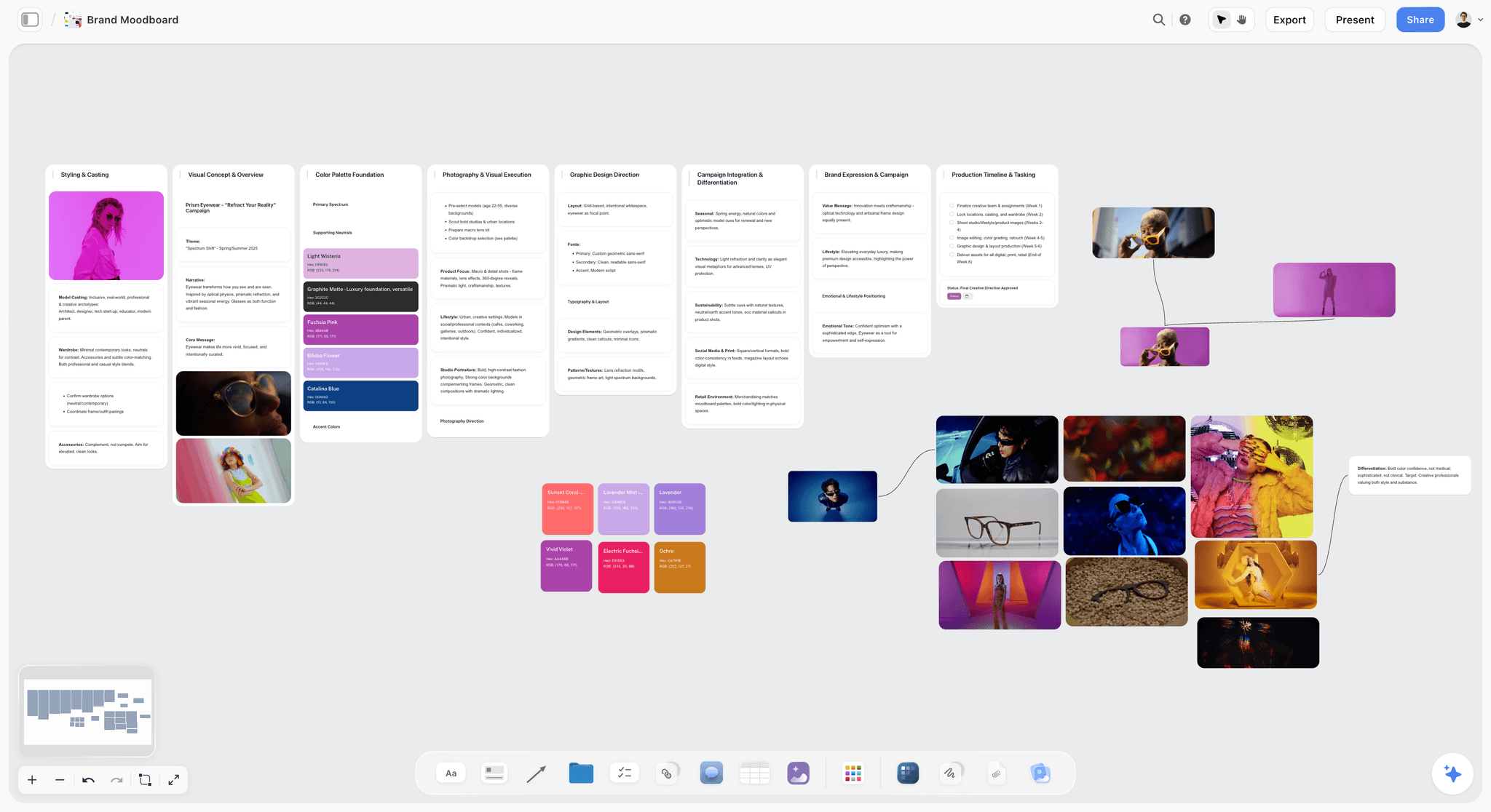
This is the brand moodboard step on a real board: walls for styling, visual concept, color palette, photography and graphic direction, with the swatches and reference stills beside them.
Pricing (as of October 2026): Storyflow is paid-only during early access; its Free plan launches before the end of 2026, and anyone a paid member invites to a board joins free now. Plus is $7.99 a month billed annually ($9.99 monthly). Pro ($14 annually, $19 monthly) adds AI image generation, including storyboard frames, and memory across conversations; Max ($39 annually, $49 monthly) adds the Team Workspace with roles and permissions. AI use is metered on every plan. See pricing.
Pros:
- AI workflows turn a brief into a filled project board, not an empty template or a cluster of stickies.
- The workshop, the plan and the deliverables are one object, so no stale export circulates.
- The campaign brief marks what the brief did not say as a placeholder instead of inventing a budget.
Where it falls short:
- No free plan yet. For a free board today, use Excalidraw, Milanote's free plan or, on Apple devices, Freeform.
- No dedicated drawing tools for storyboard frames and no animatics; sketch in Apple Freeform with Apple Pencil, or in Excalidraw.
- No timer, voting or private mode for live workshops. Miro, Mural and FigJam have them.
- A smaller template library than Miro or Canva, and no native Slack, Google Drive or Zapier integrations; Storyflow connects to Claude, ChatGPT, Gemini and Grok through its MCP connector. Miro is the pick when the board has to plug into Jira or Asana.
- No approval workflow or proofing markup on images and video frames. Run review rounds on cuts in Frame.io, or formal approvals in Filestage.
Choose FigJam instead when the team designs in Figma. Choose Miro instead when the board is a live workshop for a large group.
2. Miro
The verdict: Miro is the strongest general-purpose FigJam replacement, and the one to choose over Storyflow when the board is a live workshop with a big team. Miro's AI is aimed at board content, workflows and synthesis; Storyflow's is aimed at the creative deliverables, so many studios run the kickoff in Miro and the project in Storyflow. Our Miro vs FigJam comparison covers the handoff.
Best for: Studios and in-house teams that run kickoffs, workshops and retros with ten or more people, where Storyflow has no timer or voting.
Key features for this job:
- Docs, Tables, Timelines, Kanban and Slides formats, recorded Talktracks walkthroughs, and timer, voting and private mode from Starter, with 7000+ Miro and community-made templates.
- AI credits on every plan, AI workflows and agents on Business, Flows, and an MCP server that connects Miro to AI tools.
- Visitor editing with no sign-in from Starter, unlimited guests on Business, and 250+ integrations with two-way Jira and Asana sync on Business.
Pricing (as of October 2026): Free keeps only the 3 most recent boards editable, with 10 AI credits a month. Starter is $8 per member a month billed annually, with 25 AI credits per member a month; Business is $20 billed annually, with 50. See miro.com/pricing.
Pros:
- A broad workshop kit and 7000+ templates.
- AI workflows and agents that build structure, not only summaries.
Where it falls short:
- 25 AI credits per member a month on Starter run out quickly on a real project.
- Miro's pricing page lists no AI image generation, and the creative formats (moodboard, storyboard, shot list, call sheet) are yours to build; Storyflow builds them from a brief.
- Per-member pricing adds up for a studio with freelancers. Leaving Miro as well? See switching from Miro.
Choose Miro instead of Storyflow when ten or more people work the board live and you need timer, voting and private mode.
3. Canva Whiteboards
The verdict: Canva Whiteboards is the pick when the brainstorm has to become finished posts, decks and print without leaving Canva. Choose Storyflow instead when the board has to hold the brief, the references and the plan behind those assets, because Canva's whiteboard is a starting surface for designs rather than a project board.
Best for: Marketers, social content creators and brand teams already working in Canva, with Storyflow as the planning board behind the posts.
Key features for this job:
- A whiteboard inside the same tool where the posts, presentations and print pieces are designed.
- Canva's template and stock libraries and brand kits, one click from the brainstorm.
- Canva's AI tools for generating and editing designs.
Pricing (as of October 2026): Canva has a free plan and paid plans for individuals and teams. Its site did not load for our check, so no figure is quoted here; see canva.com/pricing.
Pros:
- The shortest path from sticky note to finished asset.
- Templates and design controls that go further than Storyflow's or any whiteboard's here.
Where it falls short:
- The AI makes assets, not structure: Canva's strength is the finished design, where Storyflow builds the board from the brief.
- The plan, the schedule and the client's review live outside the whiteboard. Canva vs Miro goes deeper on that trade.
Choose Canva Whiteboards instead of Storyflow when the deliverable is a templated social post, deck or print piece due today.
4. Mural
The verdict: Mural is the facilitator's FigJam replacement: the best kit for running a structured creative workshop. Mural holds the session and Storyflow holds the project that follows, so choose Mural over Storyflow only when facilitation is the job.
Best for: Workshop leads, strategists and design-thinking teams who run sessions with clients, which Storyflow has no facilitation tools for.
Key features for this job:
- Facilitation Superpowers on every plan: summon, timer, anonymous voting, private mode, outline and facilitator lock, plus a laser pointer for presenting.
- Mural AI from Team+.
- Visitors are free on every plan (view-only on Free, with editing rights on Team+), and Business adds unlimited external guests.
Pricing (as of October 2026): Free costs $0 for unlimited members, with 3 editable murals at a time and no Mural AI listed. Team+ is $9.99 per member a month billed annually or $12 monthly; Business is $17.99 billed annually. See mural.co/pricing.
Pros:
- Deep facilitation controls, on every plan, Free included.
- Free visitors on every plan.
Where it falls short:
- Built around the session, not the brief, schedule and deliverables that follow; Storyflow holds the project after the workshop.
- No Mural AI on Free, and Free visitors can only view. Our FigJam vs Mural comparison for design sprints covers the workshop side.
Choose Mural instead of Storyflow when you facilitate structured sessions and need anonymous voting, private mode and a facilitator lock.
5. Lucidspark
The verdict: Lucidspark is a workshop board with a straight line into diagrams and task cards. Choose Storyflow instead when the board is image-heavy creative work, because Lucidspark is diagram-shaped.
Best for: Creative teams whose ideas end up as flowcharts, journeys and Jira cards, especially if Lucidchart is already in use; Storyflow is the better fit for moodboards and storyboards.
Key features for this job:
- Visual Activities for gathering feedback, dynamic mind maps and a Dynamic Table for sorting ideas.
- Meeting tools: facilitator controls, breakout boards, voting sessions, a laser pointer and Presentation Mode.
- Lucid Cards that turn ideas into tasks in tools like Jira and Azure DevOps.
- AI that generates ideas, sorts key themes and summarizes a brainstorming session.
Pricing (as of October 2026): Sign-up is free. Lucid's pricing page showed no figures when we checked, so none are quoted here; see lucid.co/lucidspark.
Pros:
- Presentation Mode and facilitation tools built in.
- A clean handoff from a brainstorm to formal diagrams and task cards.
Where it falls short:
- Diagram-shaped: image-heavy moodboards and storyboards are not its strength, where Storyflow's canvas is built for them.
- No prices on its pricing page when checked. See Storyflow vs Lucidspark.
Choose Lucidspark instead of Storyflow when the session's output is a diagram or a set of Jira cards.
6. Apple Freeform
The verdict: Apple Freeform is the best free canvas for creatives who work on Apple devices and draw with Apple Pencil. Choose Storyflow instead when a client on Windows or Android has to open the board, or when you want the AI to build it.
Best for: Illustrators, designers and solo creatives in the Apple ecosystem who sketch on iPad, which Storyflow has no drawing tools for.
Key features for this job:
- Photos, video, audio, documents, PDFs, web links and sticky notes anywhere on a board, with a library of over 700 shapes.
- Drawing with a finger on iPhone and iPad, and with Apple Pencil on iPad.
- Real-time collaboration with up to 100 people, invited through Messages, with FaceTime built in and boards synced through iCloud.
- With Apple Creator Studio: image creation and editing inside Freeform.
Pricing (as of October 2026): Freeform is free. Apple Creator Studio costs $12.99 a month or $129 a year after a one-month trial (Apple).
Pros:
- Free, fast and built for Apple Pencil.
- Native apps on iPhone, iPad and Mac, which Storyflow does not have.
Where it falls short:
- Apple devices only, so a client or freelancer on Windows or Android is left out; Storyflow, Miro and Canva run in a browser.
- Its AI makes images but does not build or read the board, and it sits behind a subscription. See Storyflow vs Apple Freeform.
Choose Apple Freeform instead of Storyflow when you draw your boards by hand and everyone involved uses Apple devices.
7. Whimsical
The verdict: Whimsical is the tidiest board for flowcharts, wireframes and mind maps, with generous guest access. Choose Storyflow instead when the work is moodboards, storyboards and a client project rather than flows.
Best for: UX-leaning creatives and product designers who map flows and wireframes more than they build moodboards, which is Storyflow's side of the job.
Key features for this job:
- Flowcharts, mind maps, wireframes and docs in one workspace, with voting and a timer on every plan.
- A public share link that allows view, comment and edit on every plan, with free, unlimited guests and viewers.
- AI flowcharts, wireframes and mind maps.
Pricing (as of October 2026): Free caps creation at 50 board objects and 50 doc blocks a month, with watermarked exports and 10 AI credits per member. Pro is $10 per editor a month and Business $20 on annual billing; extra AI credits are sold separately. See whimsical.com/pricing.
Pros:
- Fast, clean diagrams and wireframes.
- Free, unlimited guests and viewers, where Storyflow's guests join on an invite.
Where it falls short:
- AI credits are a small allowance, with more sold separately.
- Diagram-first, and its pricing page does not list a presentation mode; Storyflow presents the work wall by wall. See Storyflow vs Whimsical.
Choose Whimsical instead of Storyflow when the deliverable is a user flow or a wireframe.
8. Milanote
The verdict: Milanote is the calmest hand-built moodboard and reference wall on this list, with a free plan. Unlike Storyflow, Milanote lists no AI features, so choose Storyflow when you want the AI to build the moodboard, the brief and the shot list from it, and Milanote when you want to arrange every card yourself at no cost.
Best for: Designers, photographers and writers who arrange references by hand and do not need Storyflow's AI.
Key features for this job:
- Boards mixing notes, images, links, files, videos and GIFs, with drag and drop from your computer.
- A built-in library of free photos, a web clipper and over 100 templates.
- Viewers open a board without signing up, and you control who can edit or comment.
- A printable PDF of any board, and to-do lists with assignees, due dates and reminders.
Pricing (as of October 2026): Free allows 100 notes, images or links in total plus 10 file uploads. Pay per person is $9.99 a month billed annually or $12.50 monthly, and team pricing starts at $49 a month billed annually. See milanote.com/plans.
Pros:
- A considered moodboard layout with very little setup.
- A free plan and a web clipper, which Storyflow does not have, plus a built-in photo library.
Where it falls short:
- No AI features listed, so every board is built by hand. Storyflow's AI builds the moodboard for you from found or generated images.
- The free cap is 100 items in total, and the board is built for arranging references rather than running the plan. See the best Milanote alternatives.
Choose Milanote instead of Storyflow when a hand-arranged moodboard is the whole deliverable and it has to be free.
9. Excalidraw
The verdict: Excalidraw is a fast, free, open-source sketching canvas with focused AI tools: text to diagram and wireframe to code. Choose Storyflow instead when the sketch has to grow into a client project with a brief and deliverables.
Best for: Quick hand-drawn sketches, diagrams and wireframes, which Storyflow has no drawing tools for.
Key features for this job:
- The free app: the full editor, one infinite scene, unlimited collaborators, libraries, Notion and Obsidian integrations, PNG and SVG export and end-to-end encryption in your browser.
- Excalidraw+ adds a cloud workspace, live presentations, advanced sharing and extended team collaboration.
- Text to diagram, Mermaid to diagram and wireframe to code.
Pricing (as of October 2026): The app costs nothing. Excalidraw+ is $6 per user a month, with a 14-day trial and a discount for annual billing. AI is 10 requests a day on free and 100 on Excalidraw+. See plus.excalidraw.com/pricing.
Pros:
- Free, open source and a quick route from idea to sketch.
- Unlimited collaborators even on the free app.
- Wireframe to code.
Where it falls short:
- The hand-drawn look is the point, so polished, client-ready moodboards are not; Storyflow is the board for those.
- A sketch surface, not a project hub, and the free app keeps one scene at a time. See Excalidraw vs FigJam.
Choose Excalidraw instead of Storyflow when you need a quick sketch with other people, right now, for nothing.
10. Conceptboard
The verdict: Conceptboard is the GDPR-first whiteboard, with data centers in Germany. Its pricing page mentions no AI features, so choose it over Storyflow only when data residency decides the purchase.
Best for: Creatives working with public-sector, education or EU clients who require German data centers, which Storyflow does not offer.
Key features for this job:
- Data centers in Germany, with further German hosting options on paid tiers.
- Meeting facilitation: live moderation, a timer and voting.
- Temporary access for external guest contributors on every plan.
Pricing (as of October 2026): Prices are in euros, excluding VAT. Free allows 3 active boards with 100 objects each and 10 MB uploads. Starter is €5 per user a month from one user; Advanced starts at €10 per user a month on a 12-month contract for 10 or more users, and Corporate & Government at €14 on a 24-month contract for 100 or more. See conceptboard.com/pricing.
Pros:
- The clearest data-residency story on this list.
- Live moderation built for presenting to a room.
Where it falls short:
- No AI features mentioned; if AI matters, Storyflow builds the board and Miro or Mural cover workshop synthesis.
- Euro pricing and contracts from Advanced up, while free boards cap at 100 objects and uploads at 10 MB, tight for an image-heavy moodboard.
Choose Conceptboard instead of Storyflow when the client contract requires hosting in Germany.
A Worked Example: One Client Brief, From FigJam Stickies to a Finished Board
Say a two-person studio receives a six-page PDF brief from a coffee roaster (a made-up client, Ember & Oak): an autumn single-origin launch, a moodboard for Thursday, a 30-second social film, six stills and a lookbook for retail partners. The kickoff already happened in FigJam: forty stickies, a round of stamps and a timer. Here is the rest in Storyflow, with what each AI step puts on the board (read from the workflow definitions) and what the studio still decides.
| Step | What you ask Storyflow | What the AI puts on the board | What you still decide |
|---|---|---|---|
1. Brief board | Attach the brief PDF and the FigJam stickies CSV, then ask for the campaign brief | Ten walls from the client and goals to market context and the timeline, nested boards for the deep sections, and "[Confirm with client]" wherever the brief is silent | Which placeholders to fill before the client sees it |
2. Brand moodboard | "Build a brand moodboard for the launch" | Walls for palette, typography, logo concepts and applications, with named swatches and reference images | Which references survive the cut to twelve |
3. Palette | Attach a photo of the packaging and ask for the palette | A grid of named swatches with hex values | Whether to keep sampled colors or ask for a designed palette |
4. Storyboard | "Storyboard the 30-second film in six shots, with web references" | Six connected walls, each with a frame captioned as a reference, a beat note and a short checklist | The order, the pacing, what gets reshot |
5. Shot list | "Turn the storyboard into a shot list table" | Camera setups with size, movement, lens and setup time | Gear, shoot order and what gets cut |
6. Review | Pick "Review my board" | Notes on what loses the audience, what misses the goal and what is strong but buried, each with its own button | Which fixes to press |
7. Share and deliver | Turn on the view link, present wall by wall, ask for a lookbook PDF | A link the client opens with no account (signing in to comment) and a lookbook PDF laid out from the board | What the client sees, and when |
Step 1 starts with the stickies. This is what Storyflow's AI does with a pile of loose notes: it sorts them into walls the team can work from, here Athletes, Locations and Chapters to fix on a film project.

Step 5 looks like this when you ask for shot cards instead of a table: a wall per shot with its picture, the coverage checklist and the equipment.

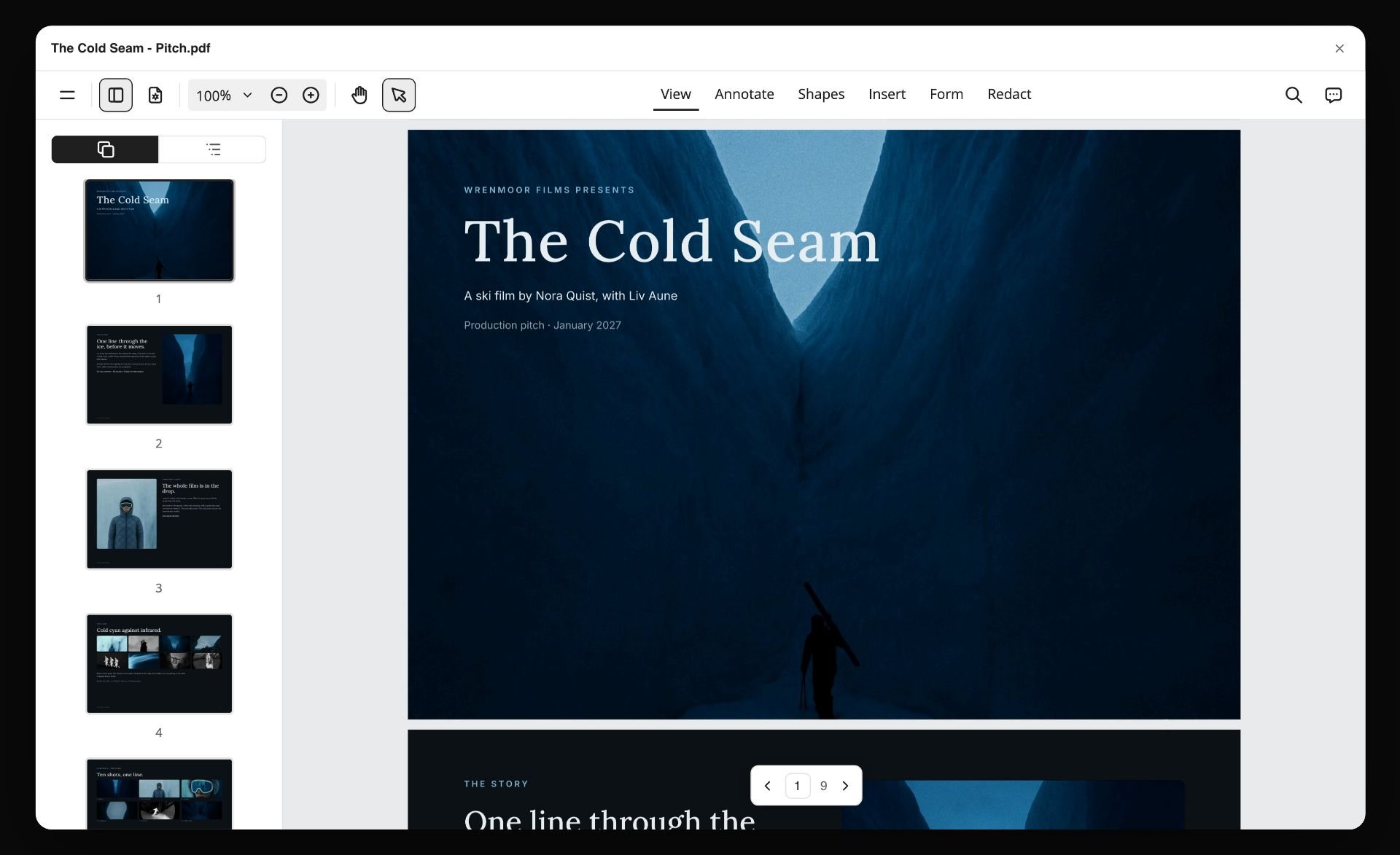
Step 7 ends with something the client can forward. Here a project board has become a nine-page PDF, open in a viewer with the page thumbnails down the side.
Watch: This moodboard made a carousel, a pitch deck and a poster (2:34)
Two details matter more than speed: the AI never closes a creative decision for you, and the brief board is honest about gaps, since "[Confirm with client]" shows what is still open where an invented number would hide it. The brand moodboard setup and the AI storyboard generator show steps 2 and 4 in detail.
In FigJam, the same afternoon ends with themed stickies and a list of action items: a good end to a workshop, and the start of the real work.
How to Move a Creative Project Off FigJam in Six Steps
Most migrations move the workshop and leave the project behind. Move the project instead, onto one Storyflow board per project.
Step 1: Decide what the new board has to hold
List the deliverables the project owes someone: brief, references, palette, storyboard or shot list, schedule. If the list is only "a place to brainstorm", a free board such as Excalidraw will do; past three items, you need a project board, and that is the job Storyflow is built for.
Step 2: Export what is worth keeping from FigJam
Export a FigJam board as a PNG, JPG or PDF (File, then Export as), and export sticky notes or tables as a CSV (select them, choose Export selection, then Stickies or Tables), as described in Figma's export guide. Export live projects only; keep old workshops as PDFs in an archive.
Step 3: Attach the brief and the export, then let Storyflow's AI draft the board
In Storyflow, attach the brief (PDF or Word) and the stickies CSV to a message and ask for the board the project needs: a campaign brief, a brand moodboard or a film plan. Storyflow's AI reads the attachments and the board you have open, plus up to 5 documents and 3 other boards or folders. Read the draft wall by wall, undo what is wrong and fill the placeholders.
Step 4: Rebuild the references from real sources
Do not paste screenshots of the old board. Ask Storyflow for a moodboard built from real pictures found through a web search, add your own photography, or generate tiles on Pro and Max, then cut to twelve references with a take and a leave note each. The AI mood board maker shows the workflow.
Step 5: Set up access before the first client link
Sharing links are off until you turn them on. Turn sharing on, check the view-only link in a private window, and invite the people who edit; invited collaborators join free. The client opens the link with no account and signs in to comment, and sees the latest version on open or reload rather than live edits. The client review board setup covers the details.
Step 6: Present, review and keep the board as the record
Order the walls the way you will present them and present fullscreen, run "Review my board" before anything goes to the client, and have the AI lay out the lookbook or treatment PDF from the finished board. From then on, decisions go on the Storyflow board, not into a new FigJam file.
What It Really Costs: Solo, a Studio of Three, a Studio of Five
Per-seat prices hide who counts as a seat and what the AI costs on top. Monthly cost on annual billing, as read on each vendor's page in October 2026, with Storyflow first and FigJam last as the baseline:
| Tool (tier) | Solo | Studio of 3 | Studio of 5 | AI on that tier |
|---|---|---|---|---|
Storyflow Plus | $7.99 | $16.78 on Team billing | $27.97 on Team billing | Metered on every plan; image generation needs Pro ($14) or Max ($39) |
Miro Starter | $8 | $24 | $40 | 25 credits per member a month |
Canva | See canva.com/pricing | See canva.com/pricing | See canva.com/pricing | See canva.com/pricing |
Mural Team+ | $9.99 | $29.97 | $49.95 | Mural AI included from Team+ |
Lucidspark | Not published when checked | Not published when checked | Not published when checked | Not published when checked |
Apple Freeform | $0 | $0 | $0 | Creator Studio at $12.99 a month per person for AI images |
Whimsical Pro | $10 | $30 | $50 | 10 credits per member on Free; more sold separately |
Milanote | $9.99 | $29.97 | Team price from $49 | No AI features listed |
Excalidraw+ | $6 | $18 | $30 | 100 AI requests a day |
Conceptboard Starter | €5 | €15 | €25 | No AI mentioned |
FigJam (Collab seat, baseline) | $3 | $9 | $15 | 500 credits per seat a month |
FigJam is the lowest-priced paid whiteboard here: creatives leave it for fit, not price. The rest splits into three billing shapes.
- Per seat for everyone who edits: Miro, Mural, Excalidraw+, Conceptboard and FigJam.
- Per seat, with free people alongside: Whimsical bills editors only, with viewers and guests free. Storyflow bills per account with Team billing discounts from three seats, and anyone a paid member invites joins free, so price a seat for everyone who needs a paid AI allowance.
- Flat team prices and free apps: Milanote's team price starts at $49 a month with no AI, and Freeform is free with its AI sold separately.
The lowest-priced board is rarely the lowest-priced project: price the AI allowance and the hours of layout it saves, not only the seats.
Which FigJam Alternative for Which Creative?
One pick and one runner-up for each discipline.
| Creative | Best pick | Why | Runner-up |
|---|---|---|---|
Graphic designer on a brand identity | Storyflow | Ask for a brand moodboard and the AI lays out palette, typefaces, logo concepts and applications | Milanote for a hand-built reference wall |
Creative director or agency lead | Storyflow | Brief, moodboard and storyboard on one board you present and share by link | Miro for large kickoff workshops |
Filmmaker or video producer | Storyflow | Storyboard and shot list workflows, Final Draft and Fountain attachments, and a call sheet laid out as PDF pages | Excalidraw for quick blocking sketches |
Photographer | Storyflow | Real-reference moodboards, a shot list and a client link with no account | Apple Freeform for solo boards on iPad |
Social media marketer or content creator | Storyflow | The month of content planned on one board, with the brief beside it | Canva Whiteboards when the brainstorm becomes finished posts in the same tool |
UX or product designer | Stay on FigJam | The board sits beside the Figma files | Whimsical for flows and wireframes |
Illustrator | Apple Freeform | Free, with Apple Pencil, across Apple devices | Excalidraw for quick sketches in any browser |
A designer's direction board on Storyflow looks like this: the references arranged by hand in a collage, with named colour swatches linked to the images they come from.

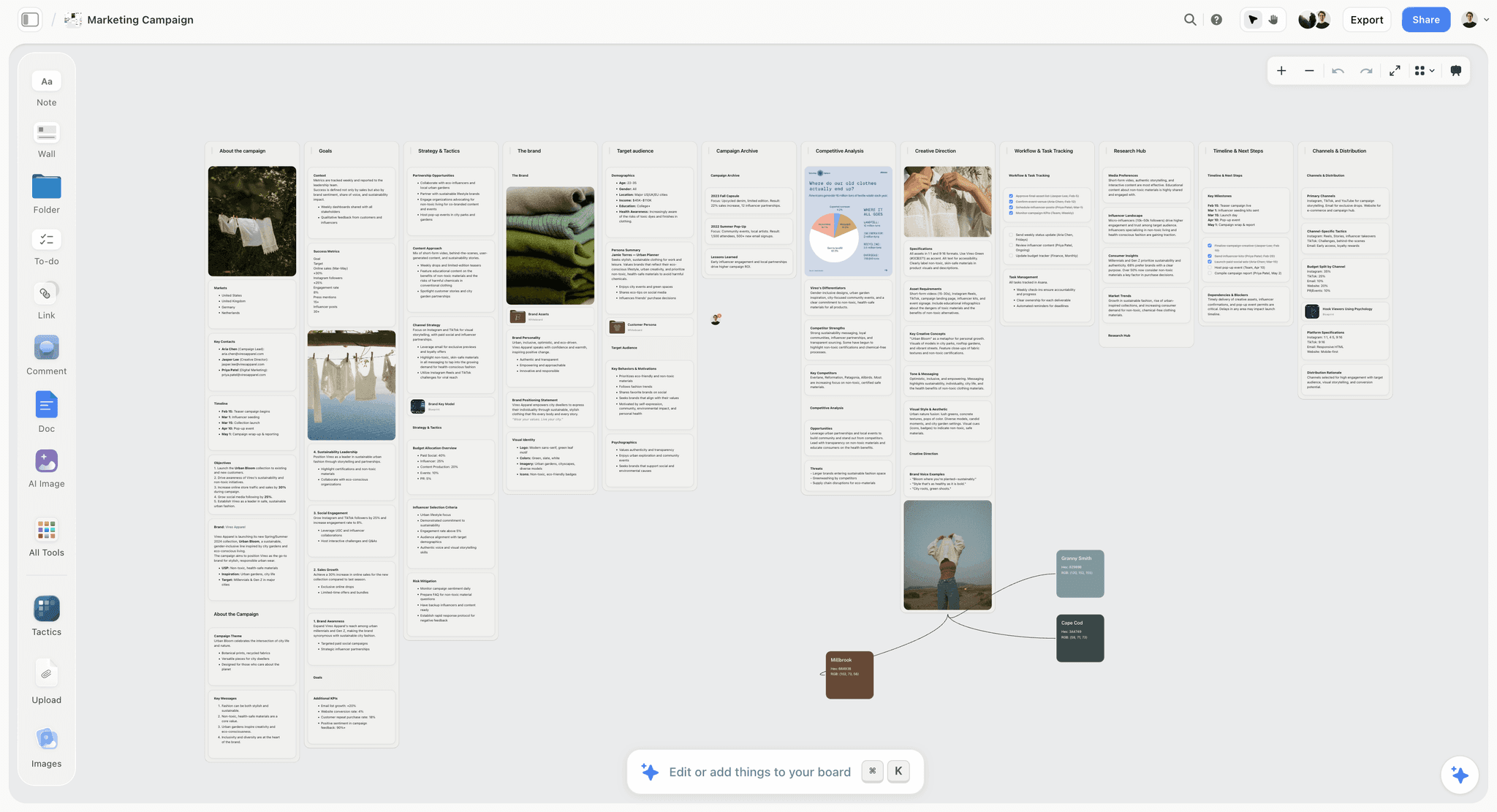
And a marketer's campaign board: the campaign, the goals, the strategy, the brand and the audience in walls, with product photos and the palette on the same canvas.
Which FigJam Alternative by Budget, Team Size and Stage
Personas describe the work; budget and team size decide the plan.
| If this is you | Choose | Because |
|---|---|---|
Solo creative with paying clients | Storyflow Plus | $7.99 a month annually, and the AI drafts the brief board, the moodboard and the deliverables |
Studio of 3 to 5 running client projects | Storyflow | Team billing from three seats, free invitees, and one board per project the client opens by link |
$0 budget, everyone on Apple devices | Apple Freeform | Free, with real-time collaboration for up to 100 people |
$0 budget, mixed devices | Excalidraw or Milanote's free plan | Free boards that open in a browser |
Workshops with 10 or more people | Miro or Mural | Timers, voting, private mode and facilitation controls |
Flowcharts and wireframes | Whimsical or Lucidspark | Diagram-first boards whose AI drafts diagrams |
EU data residency or public-sector clients | Conceptboard | Data centers in Germany |
A product team that lives in Figma | Stay on FigJam | Next to the design files, from $3 a seat |
Common Mistakes When Replacing FigJam (and the Fix for Each)
Most failed switches trace back to one of six choices made in the first week.
Mistake 1: Comparing template counts instead of what the AI builds
A tool with 7,000 templates still hands you an empty structure. The fix: give each shortlisted tool the same brief and compare what its AI puts on the board. Storyflow's answer to that test is a filled campaign brief; most whiteboards' answer is a template.
Mistake 2: Treating AI credits as a rounding error
Whimsical's free plan gives 10 credits per member and Miro Starter's 25 are per member a month, and a real project spends more than a trial. The fix: count the AI actions one project needs (a brief board, a moodboard, a storyboard, two reviews) and check the allowance before the price. Storyflow meters AI on every plan too, so check it the same way.
Mistake 3: Moving the workshop and leaving the project behind
A whiteboard that holds only stickies recreates the old problem, with the brief and deliverables in three other tools. The fix: move the live project onto one Storyflow board.
Mistake 4: Letting the AI's placeholders reach the client
A good AI marks what it does not know: Storyflow's campaign brief writes "[Confirm with client]" rather than inventing a launch date or a budget. A placeholder that ships still looks careless. The fix: clear the placeholders and run "Review my board" before you share the link.
Mistake 5: Sending a board your client cannot open
Freeform needs an Apple device, Miro's Free plan has no guest role, and a Storyflow link stays off until you turn sharing on. The fix: open the link in a private window before you send it.
Mistake 6: Letting the AI make the creative call
On creative work, two routes on the board are often the point, and an AI that picks one ends the conversation early. The fix: use an AI whose work you can see and undo. Storyflow's edits undo from the message that made them and its review gives a lean without closing the decision, so the call stays with the person who owns the work.
When Storyflow Is Not the Right FigJam Alternative
Storyflow wins when the board has to carry a creative project. In these cases, pick the named tool instead:
- You run live workshops for 15 to 50 people. Choose Miro or Mural, whose timers, voting, private mode and facilitator controls are built for the room. Storyflow has none of them.
- You need a free board today. Storyflow has no free plan until one launches before the end of 2026. Use Excalidraw, Apple Freeform on Apple devices, Miro's three free boards or Milanote's free 100 items.
- You draw your boards by hand. Storyflow has no dedicated drawing tools for storyboard frames and no animatics. Use Apple Freeform with Apple Pencil, or Excalidraw.
- You need native apps. Storyflow runs in the browser only. Freeform has apps on iPhone, iPad and Mac.
- The board must plug into your stack. Storyflow connects to Claude, ChatGPT, Gemini and Grok through its MCP connector, and has no native Slack, Google Drive or Zapier integrations. Miro lists 250+ integrations, with two-way Jira and Asana sync on Business.
- You need formal approvals or proofing. Storyflow has no approval workflow or proofing markup, so use Filestage for approvals or Frame.io for frame-accurate video review.
- Your client requires EU data residency. Conceptboard hosts its data in Germany.
Setup Checklist: Your First Board After FigJam
Copy this into your first Storyflow project board after the switch.
- Name every deliverable the project owes someone, with a date for each.
- Export the live FigJam board as a PDF and its stickies as a CSV.
- Create one board per project, not one board per workshop.
- Attach the brief and the CSV, and ask the AI for the board that fits: campaign brief, brand moodboard or film plan.
- Replace every "[Confirm with client]" placeholder, or name who owns it.
- Cut the references to twelve, each with a take note and a leave note.
- Put the schedule in a table with a date column, rows kept in date order.
- Order the walls the way you will present them.
- Turn sharing on, open the view link in a private window, then invite the people who edit.
- Run "Review my board" before every client round, and lay out the lookbook PDF from the finished board.
The Bottom Line
FigJam is still the best whiteboard for a product team inside Figma, and its AI is good at closing a workshop. Creatives leave it when the board has to carry a whole project. Storyflow is listed first because its AI starts the project: Storyflow turns a brief into the brief board, the moodboard, the palette, the storyboard and the shot list, reads the board you are on, and lays out the lookbook the client forwards, while you keep every decision. Choose Miro for large live workshops, Canva Whiteboards when the output is finished Canva design, and Mural for facilitated sessions. When your next project arrives as a brief, run it through Storyflow as your FigJam alternative and compare what the AI puts on the board with what you would have built by hand.
FAQ: FigJam Alternatives for Creatives
What is the best FigJam alternative for creatives?
Storyflow is our pick for a FigJam alternative for creatives in 2026: Storyflow's AI turns a brief into the whole project board (campaign brief, moodboard, color palette, storyboard and shot list) on an infinite canvas the client opens from a link with no account, while FigJam's AI tidies a workshop. Choose Miro for large live workshops, Canva Whiteboards when the brainstorm must become finished Canva designs, and Mural for facilitated sessions.
Is Storyflow free?
Not during early access. Storyflow's plans start at $7.99 a month billed annually ($9.99 monthly); its Free plan launches before the end of 2026, and anyone a paid member invites to a board joins free now. For a free board today, use Excalidraw, Milanote's free plan or, on Apple devices, Freeform.
Can Storyflow's AI build a whole project board from a brief?
Yes. Attach the brief as a PDF or Word file and ask Storyflow for the board you need: the campaign brief lays out ten walls, from the client and goals to the market context and the timeline, with nested boards for the deep sections, and other workflows build a moodboard, a palette, a storyboard or a shot list. Every AI edit can be undone from the message that made it.
What does FigJam's AI actually do?
FigJam's AI generates templates and visuals from a prompt, such as meeting templates and timelines, sorts stickies into themes and summarizes the team's output into action items. On Figma's Professional plan a Collab seat carries 500 AI credits a month and a Full seat 3,000. FigJam's own page lists no AI image generation, and nothing that builds a project board from a brief, which is where Storyflow differs.
Is Miro better than FigJam for creative work?
Miro is better than FigJam for large live workshops and for teams outside Figma, with 7000+ templates, timer, voting, private mode and AI workflows and agents on Business. FigJam is better when the team lives in Figma. For a project that needs a brief, references, a storyboard and deliverables on one board, Storyflow fits better than either.
Is Milanote a good FigJam alternative for moodboards?
Milanote is a good FigJam alternative for hand-built moodboards: boards mix notes, images, links and video, viewers open a board without signing up, and a photo library and web clipper speed up collecting. It lists no AI features, so every board is built by hand, and the free plan stops at 100 items in total. Storyflow's AI builds the moodboard for you, from found or generated images.
Does Canva have a FigJam-style whiteboard?
Yes. Canva Whiteboards is the whiteboard inside Canva, which makes it the natural pick when a brainstorm has to become a post, a deck or a print piece in the same tool. Canva's site did not load for our check, so see canva.com/pricing for plans. If the board has to hold the brief, the schedule and the client review as well, Storyflow is the closer fit.
Which FigJam alternative has the best free plan?
Apple Freeform, if everyone uses Apple devices: it is free, with real-time collaboration for up to 100 people. On mixed devices, Excalidraw's free app gives one scene with unlimited collaborators, Miro and Mural keep 3 boards editable, Whimsical caps creation at 50 objects a month and Milanote at 100 items in total. Storyflow has no free plan yet.
Can a client open the board without an account?
In Storyflow, yes: the view-only link opens with no account once you turn sharing on, and the client signs in to comment. Milanote's viewers do not need to sign up, Miro allows visitor editing with no sign-in on Starter and up, FigJam's open sessions let outside people join for 24 hours with no account, and Conceptboard gives external guests temporary access.
Which FigJam alternative works best on an iPad?
Apple Freeform works best on an iPad: it is free, built for Apple Pencil and synced through iCloud with iPhone and Mac, though its AI image tools need an Apple Creator Studio subscription. Storyflow, Miro and Canva run in the browser, and Storyflow has no native apps.
Which FigJam alternative is best for storyboarding?
Storyflow is our pick for storyboarding a project: its storyboard workflow builds one wall per scene or shot, each with a frame (a captioned web reference, an AI frame on Pro or Max, or an empty placeholder), a beat note and a checklist, connected in order. Storyflow has no dedicated drawing tools or animatics, so artists who draw their frames should use Apple Freeform or Excalidraw.
How much AI do you actually get on each plan?
It varies more than the prices do. Whimsical's free plan gives 10 credits per member, with more sold separately. Miro gives 10 credits a month on Free, 25 per member on Starter and 50 on Business, and a FigJam Collab seat carries 500. Excalidraw allows 10 requests a day on free and 100 on Excalidraw+, and Storyflow meters AI on every plan.
Can I use Storyflow from ChatGPT or Claude?
Yes. Storyflow's MCP connector links Storyflow to Claude, ChatGPT, Gemini and Grok, so the assistant can read your Storyflow projects and build boards, documents and decks in them. ChatGPT needs Developer mode turned on. The steps are on the Storyflow MCP page. Miro and Excalidraw also list MCP support on their pricing pages.
What is the difference between a FigJam alternative and a Figma alternative?
A FigJam alternative replaces the whiteboard; a Figma alternative replaces the design tool. If you meant Figma, the usual candidates are Penpot, Sketch, Lunacy, UXPin and Framer. FigJam comes with every Figma seat, so leaving Figma means replacing both halves, and Storyflow replaces only the whiteboard half.
Which FigJam alternative suits a small creative studio?
Storyflow suits a small studio running client projects: Plus is $7.99 a month billed annually ($27.97 for five seats on Team billing), invited collaborators join free, and each project gets one board the client opens by link. A studio that mostly runs workshops fits Mural Team+ at $9.99 per member, and one that wants hand-built moodboards without AI fits Milanote.
Should a design team that lives in Figma leave FigJam at all?
No. A team that designs products in Figma should keep FigJam: the board sits next to the files it discusses, designers and developers already have seats, and a Collab seat costs $3 a month with 500 AI credits. Leave when the board has to carry a creative project for clients, photographers and copywriters outside Figma, and you want an AI that starts the project. That is the move to Storyflow.
Table of Contents
- Which FigJam Alternative Should a Creative Choose?
- Key Takeaways
- Comparison Table: The 10 FigJam Alternatives Side by Side
- Why Creatives Leave FigJam (and Why the AI Now Decides Where They Go)
- How We Evaluated FigJam Alternatives for Creatives
- What Each Alternative's AI Actually Does: The AI Capability Matrix
- The 10 Best FigJam Alternatives for Creatives, Ranked
- 1. Storyflow
- 2. Miro
- 3. Canva Whiteboards
- 4. Mural
- 5. Lucidspark
- 6. Apple Freeform
- 7. Whimsical
- 8. Milanote
- 9. Excalidraw
- 10. Conceptboard
- A Worked Example: One Client Brief, From FigJam Stickies to a Finished Board
- How to Move a Creative Project Off FigJam in Six Steps
- What It Really Costs: Solo, a Studio of Three, a Studio of Five
- Which FigJam Alternative for Which Creative?
- Which FigJam Alternative by Budget, Team Size and Stage
- Common Mistakes When Replacing FigJam (and the Fix for Each)
- When Storyflow Is Not the Right FigJam Alternative
- Setup Checklist: Your First Board After FigJam
- The Bottom Line
- FAQ: FigJam Alternatives for Creatives
- Related Reading
Templates to check out for this topic


Planning and project templates you can use in Storyflow
Plan a launch, a sprint, or a whole project on a visual board the team can see at once. Open one of these templates and start from real structure.


See Storyflow in Action
A visual AI workspace where every feature lives inside one canvas. No tab-switching, no context lost.
Build your entire board from a single message
Type what you need in the AI chat at the bottom of your canvas. The AI adds cards, headings, and structure directly onto your board.
Use expert frameworks as AI context
Type @ in the AI chat and choose any Tactic. The AI tailors every response to that framework instead of giving generic advice.
Turn your board into a mind map in seconds
Ask the AI to restructure your canvas as a mindmap. It connects your ideas into a visual hierarchy so you can see how everything relates.
Why Storyflow Exists
Storyflow actually began as a personal tool while working on creative and research projects.
We kept running into the same problem: ideas were scattered everywhere: notes, documents, and whiteboards.
Nothing helped us see how everything connected.
So we started building a workspace designed around how ideas actually grow.
→ Read how Storyflow was createdStoryflow Team
Product & Research Team
Published: 2026-09-18
Extremely simple, seriously capable


See how easy it is to get started
Watch a real project come together, from a blank board to a finished plan, clicked through step by step.
Start creating with AI and become more productive
Transform your creative workflow with AI-powered tools. Generate ideas, create content, and boost your productivity in minutes instead of hours.