
An ultra-fast canvas that stays calm
The FigJam alternative for creatives
who plan projects, not workshops.
FigJam is a very good whiteboard beside a Figma file. When the board has to carry a brief, a moodboard, a script and a shoot schedule to a client, you need a canvas built for the project rather than the session.


Creatives working for these brands already got early access
- Red Bull
- Canon
- Artlist
- Porsche
See how easy it is to get started
Watch a real project come together, from a blank board to a finished plan, clicked through step by step.
Start from a ready-made template
Pick a board to see what you can build, then let AI fill it in. Every template is a real, editable starting point on the same infinite canvas.

Mind Map
Branch one central idea out into themes and sub-points, then drag the connections around until the structure makes sense.
What are the best FigJam alternatives for creatives?
For creatives, Storyflow is the FigJam alternative to start with when the board has to become a project: the brief, the moodboard, the script, the shot list and the schedule sit on one infinite canvas, and an AI builds the first version of each from a prompt. Use Milanote if you mainly collect references on your own, Miro if you run large facilitated workshops, and Whimsical if the work is flowcharts and wireframes.
FigJam earns its place. It sits next to your Figma files, the stickies, stamps and cursor chat are quick, and for a design sprint or a product workshop it is hard to beat. The limit shows up after the session. A FigJam board is usually the record of a meeting, and the real project, the brief, the treatment, the schedule, the deliverables list, moves into four other tools.
Creative work breaks a whiteboard in predictable places. References need to sit next to the notes that explain them. A script needs rich text, not a sticky. A shoot needs dates, people and status in a table. A client needs to see the current state without joining a design tool. Each of those is a separate app for most teams, which is why the brief and the finished work drift apart.
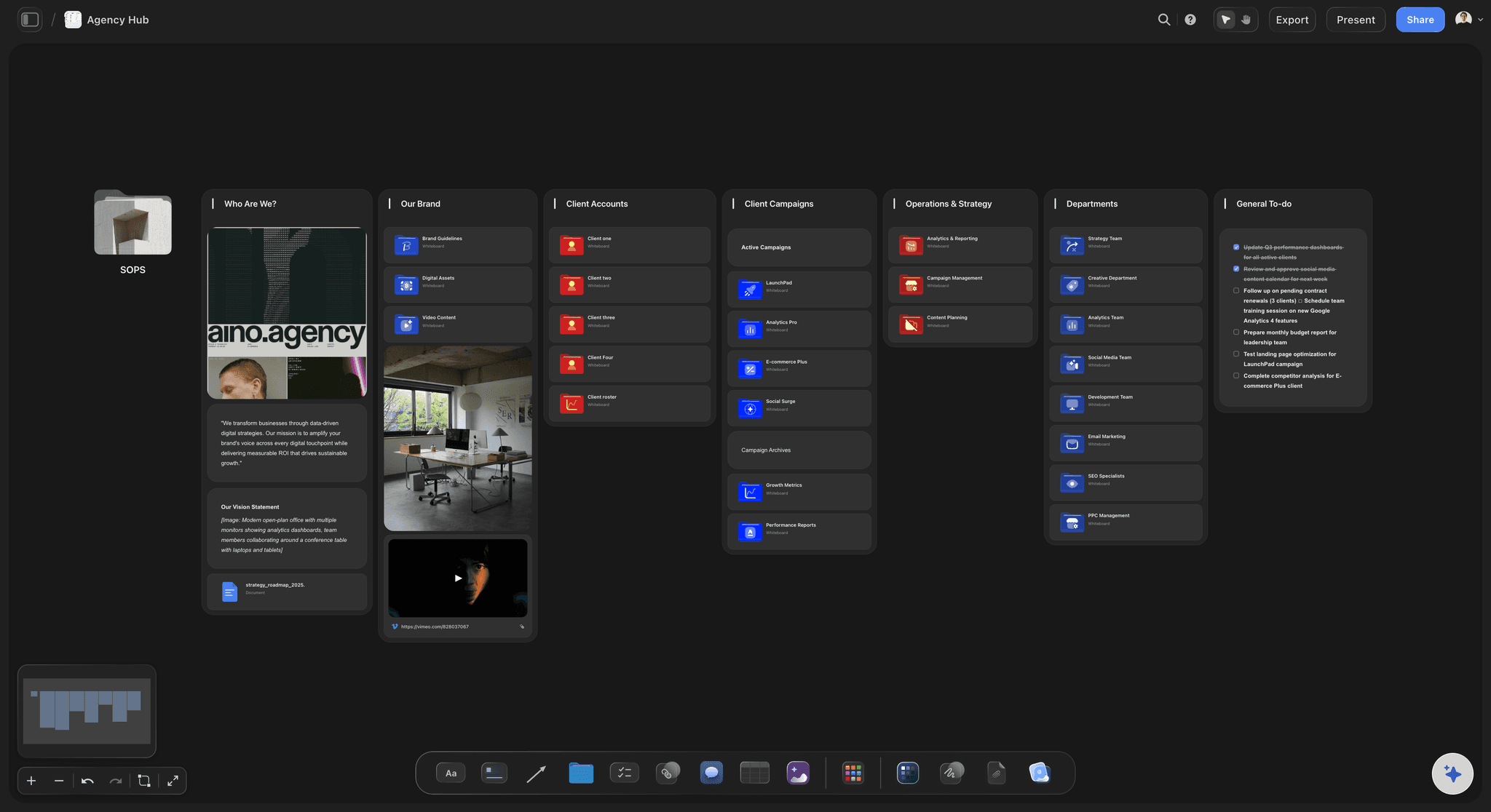
Storyflow keeps the freeform canvas and adds the objects a project needs: Docs with inline comment threads and Word or PDF export, Tables with status, person and date cells, Kanban, Tickets, Video you can play and grab frames from, and Frames you present fullscreen. It runs in your browser with nothing to install, and a view-only link opens with no account.
Ultra fast from brief to board
From a brief to a board your client can open.
The same canvas you would brainstorm on, carried through to the deliverables.
01
Open a canvas in the browser
No Figma file, no install. One board per project, with room for the references, the writing and the schedule side by side.
02
Describe the project
Paste the brief or write two sentences. The AI lays out the board: a moodboard section, a script Doc, a shot list Table, a task Kanban. It proposes, you decide, and one click undoes it.
03
Work the board as a team
Invited collaborators edit in real time with live cursors, and anyone a paid member invites joins free. Comments sit on the specific piece of work, not in a separate thread.
04
Show the client
Send a view-only link that opens with no account, present the board frame by frame, or export the whole board as an image or PDF.
Everything a creative project holds, on the board you brainstormed on.
Keep the freeform canvas. Add the brief, the script and the schedule.
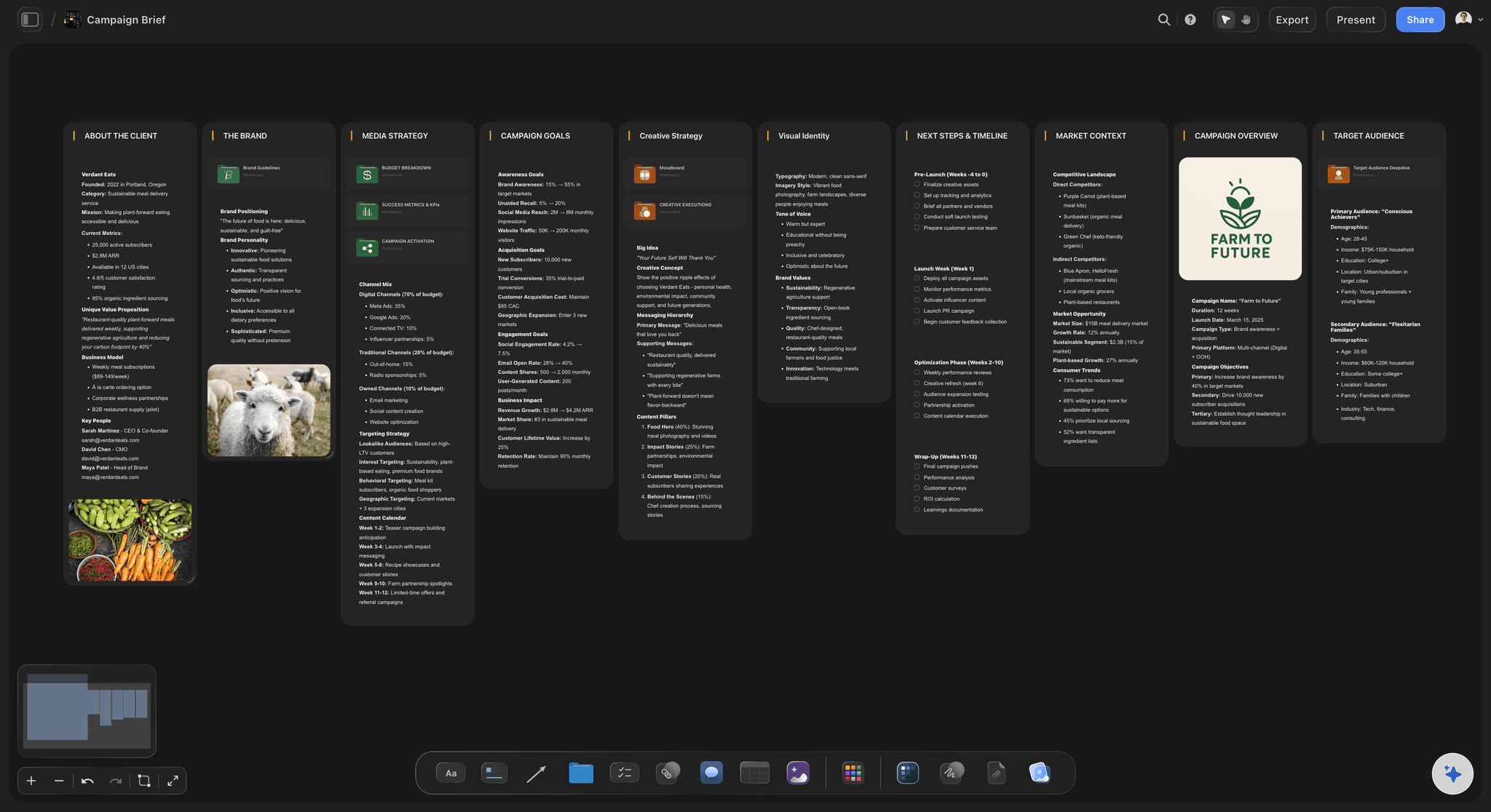
The brief becomes the board
An AI that builds the first board
Describe a campaign, a shoot or a launch and the AI lays out the sections, the Docs and the Tables it needs. It reads the board you have open and up to five documents and three other boards you attach.
See brief to project board →
References with the reasoning beside them
Moodboards that explain themselves
Images, Color swatches, Notes and uploaded Video sit on the same canvas, so each reference carries the sentence that says why it is there. Grab frames from a clip straight onto the board.
See the moodboard maker →
Writing that is more than a sticky
Scripts and treatments as Docs
A Doc on the canvas holds rich text with inline comment threads and exports to Word or PDF, so the script lives next to the frames it describes instead of in another app.
See the AI document editor →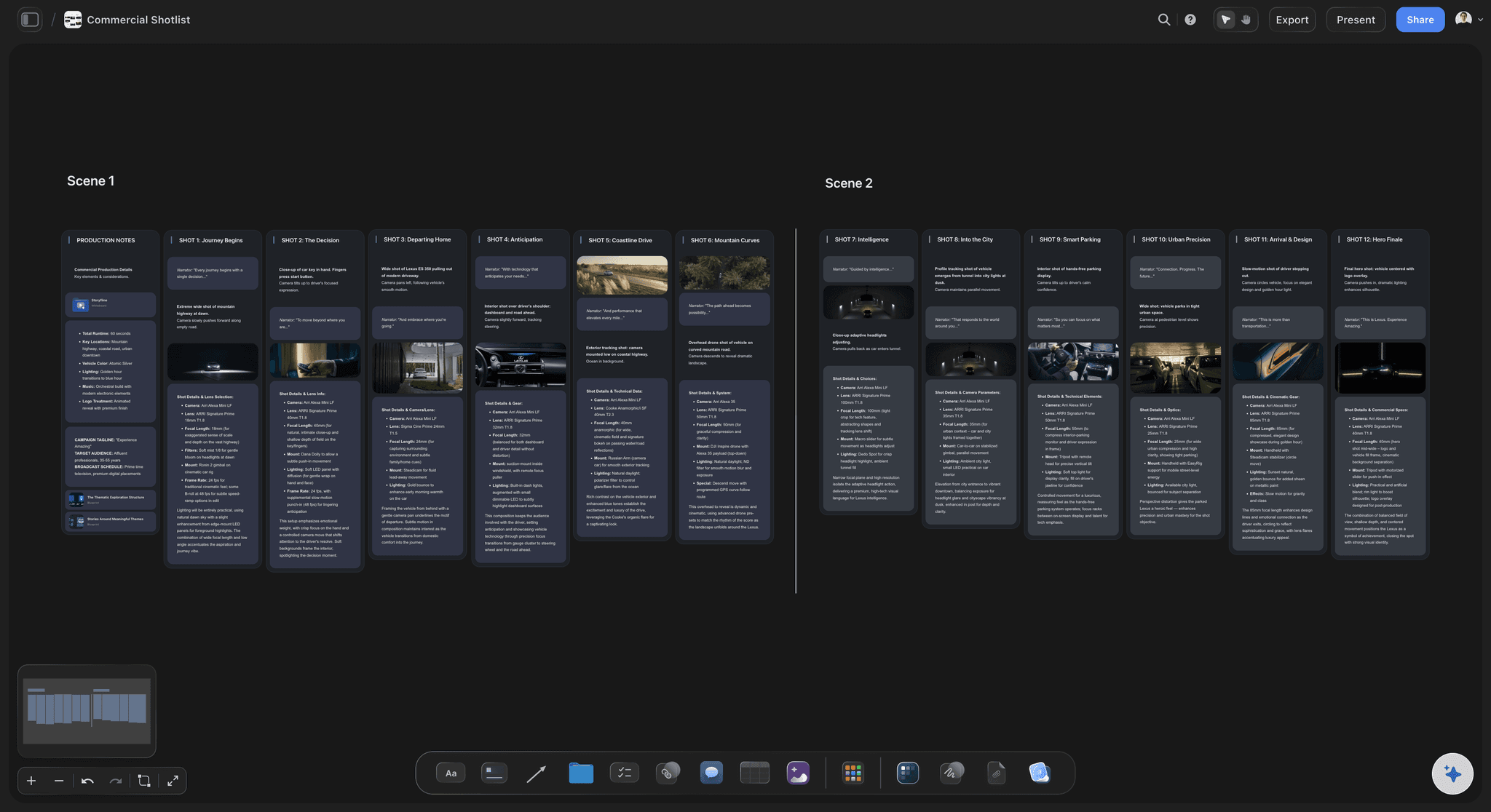
The schedule on the same canvas
Shot lists, owners and dates
Tables with status, person and date cells, Kanban columns and Tickets with assignees turn the brainstorm into who does what by when, with rows kept in date order.
See visual project planning →Unlimited boards. No object cap.
Keep every project and every reference. Storyflow is paid-only during early access, with plans from $7.99 a month billed annually ($9.99 monthly). A free plan launches before the end of 2026, and anyone a paid member invites to a board joins free.
Unlimited boards and unlimited file uploads on every paid plan
AI that builds boards from a prompt, metered on every plan
Real-time editing with live cursors for invited collaborators
View-only links clients open with no account

Built for people with taste
Three places creative work outgrows FigJam.
None of them is a flaw in FigJam. They are the jobs a workshop board was never built to do.

After the session ends
The board stops at the workshop
Ideas without owners: A wall of stickies records what was said. Turning the keepers into Tickets with an assignee and a due date is what makes them happen.
Plans in four other tools: When the brief lives in a doc, the references in a folder and the schedule in a spreadsheet, nobody can see the whole project. One canvas holds all three.
Context lost between rounds: Coming back to a project after two weeks costs nothing when the feedback, the drafts and the decisions sit on the board they are about.

Planned deliverables, not just ideas
An AI that knows creative jobs
Named workflows for the work you ship: Campaign brief, moodboard, video script, shot list, storyboard, content planner, budget. Ask for one and the AI builds that board, not a generic mind map.
PDFs the client or crew can open: The AI drafts a treatment, a one-pager, a lookbook or a call sheet PDF from the board, so the handout matches the plan.
It proposes, you decide: Every AI edit lands on the board with one-click Undo. The taste calls, the scope and the price stay with you.
It reads what is already there: The AI works from the open board plus up to five documents and three boards you attach, so the output follows your brief.
People outside the design team
Clients do not live in Figma
A link, not a seat: A view-only link opens in any browser with no account. The client sees the latest version when they open or reload it.
Comments on the exact piece: A client who signs in can comment on the frame, the reference or the line of script the note is about.
Present without a deck: Presentation mode steps through the frames on the board fullscreen, so the review happens on the plan itself.
Explore templates for your project
Every template opens as a real, editable board on the infinite canvas. Pick the closest fit and make it your own.
Mind Map
Branch one central idea out into themes and sub-points, then drag the connections around until the structure makes sense.
One app instead of five
Storyflow vs FigJam, Miro, and Milanote.
FigJam is best beside Figma, Miro at big workshops, Milanote at quiet reference collecting. Here is how they differ when the board has to carry a creative project.
Storyflow
Recommended
AI workflows for scripts, shot lists and storyboards
Rich-text docs on the same board
Tables with status, person and date cells
Timers and voting for live workshops
Sits inside Figma beside design files
A free plan today
FigJam
AI workflows for scripts, shot lists and storyboards
Rich-text docs on the same board
Tables with status, person and date cells
Timers and voting for live workshops
Sits inside Figma beside design files
A free plan today
Miro
AI workflows for scripts, shot lists and storyboards
Rich-text docs on the same board
Tables with status, person and date cells
Timers and voting for live workshops
Sits inside Figma beside design files
A free plan today
Milanote
AI workflows for scripts, shot lists and storyboards
Rich-text docs on the same board
Tables with status, person and date cells
Timers and voting for live workshops
Sits inside Figma beside design files
A free plan today
What creators are saying
Join early creators getting structured workspaces and AI that remembers their projects
“Storyflow has sped up my workflow by at least 3x, which means more flow state and more projects I can actually ship. It truly changed the way me and my team create.”

Reilin Joey
Director & YouTuber
“One prompt gets me a structured board. But the tactics are my favorite. I run my YouTube scripts through them and my intros and retention got better. It's amazing.”

Justkay
YouTuber & Freelance Filmmaker
“I used to juggle five apps to plan a project. Now I describe what I am making and get boards, lists, and a schedule. All in one place.”

George
@fernwehchronicles
FigJam alternatives for creatives, answered.
What creative teams ask before they move a project off a whiteboard.
Storyflow, when the board has to become a project. The brief, moodboard, script, shot list and schedule sit on one infinite canvas, an AI builds the first version of each board from a prompt, and a client opens a view-only link with no account. Choose Milanote if you mainly collect references alone, Miro for large facilitated workshops, and Whimsical for flowcharts and wireframes.
Usually because the board stops at the workshop. FigJam is built to sit beside Figma files, so it suits design sprints and product flows. Creative work also needs a script with real text, a schedule with dates and owners, and a client who can see progress without a Figma account. When those end up in four other tools, people look for one canvas that holds the whole project.
When your team works in Figma and the board is a workshop. FigJam sits next to your design files, and its stickies, stamps, timer and voting make live sessions quick. If the output of the session is a Figma file rather than a campaign, a film or a brand rollout, stay with FigJam. Storyflow has no timers, voting or Figma connection.
Not during early access. Storyflow is paid-only during early access, with plans from $7.99 a month billed annually ($9.99 monthly). A free plan launches before the end of 2026, and anyone a paid member invites to a board joins free. If you need a free whiteboard today, FigJam, Miro and Milanote all have free plans with limits, and Excalidraw is free and open source.
Storyflow is built for planning a creative project from brief to delivery, with Docs, Tables, Kanban and an AI that knows jobs like shot lists and campaign briefs. Miro is the broader workshop platform with timers, voting and many integrations. Milanote is calm and good for collecting references alone. Whimsical is the fast choice for flowcharts, wireframes and mind maps.
Yes. Invited collaborators edit the same board in real time with live cursors on any paid plan, and anyone a paid member invites joins free. Notes, Frames, Lines and Comments cover a working brainstorm. What Storyflow lacks is facilitation tooling: there is no session timer, no voting and no stamps, so for a structured workshop of twenty people FigJam or Miro is the better room.
No. Storyflow is standalone and runs in your browser with nothing to install. That is the point for many creatives: a photographer, a producer or a marketing lead can open a board and plan a project without any design tooling. If your designers work in Figma, they can keep it for design files and use Storyflow for the brief, the references and the schedule around them.
Yes. A view-only link opens in any browser with no account, once the owner turns sharing on. The client sees the latest version when they open or reload the page. To leave a comment the client signs in, and the comment sits on the exact frame, reference or Doc it is about, so nobody has to match feedback from an email.
Yes, for the diagrams creative projects need. Lines connect any two objects, Frames group a section, and a Mermaid element turns a short text description into a flowchart or sequence diagram. For detailed UX flows and wireframes with components, FigJam next to Figma, or Whimsical, is faster. Storyflow is stronger when the diagram sits beside the references and the plan.
There is no FigJam importer, so boards are rebuilt. In practice that is less work than it sounds, because what you carry forward is the outcome of a workshop, not every sticky. Paste the decisions and the brief into a prompt and the AI lays out a project board from them, then drop in the images you want to keep.
It builds boards from a prompt, using named workflows for jobs like a campaign brief, moodboard, video script, shot list, storyboard and budget. It reads the board you have open and up to five documents and three other boards you attach. It can draft a treatment, one-pager, lookbook or call sheet PDF. Every edit lands with one-click Undo.
Yes. Presentation mode shows the board fullscreen and steps through its Frames in order, so a review runs on the plan itself rather than a separate deck. You can also export the whole board as an image or PDF, and Docs export to Word or PDF. There is no approval button or proofing markup, so sign-off happens in comments.
More from Storyflow
FigJam alternative for non-designers
Miro alternative
Milanote alternative
Whimsical alternative
Notion alternative
Whiteboard for creative teams
Creative collaboration platform
Visual project planning
Brief to project board
Project brief template
Campaign management software
Best FigJam alternatives for creative teams
Storyflow vs FigJam
Why creative teams leave FigJam
Keep the canvas. Carry the project through.
Describe your next creative project and let the AI lay out the board. Runs in your browser, nothing to install.