The 12 Cheapest Miro Alternatives in 2026 (That Are Actually Good)
The cheapest Miro alternatives in 2026, tested on real work and ranked by price. Where the bill stays flat as your team grows instead of climbing per seat.

Category
Visual Thinking
Author

Justkay
Documentary Filmmaker & Founder at Storyflow
Topics
2026-06-18
•
Updated June 18, 2026
•
14 min read
•
Visual Thinking- cheapest Miro alternatives
- affordable Miro alternative
- Miro alternative free
- free Miro alternative 2026
- cheap whiteboard tools
- flat-priced whiteboard
What is the cheapest Miro alternative that is actually good?
The cheapest Miro alternative that is actually good in 2026 is Storyflow, because its pricing is flat per account instead of per user, so the bill does not climb every time you add a teammate, and its Free plan is genuinely usable at $0. For a completely free sketch canvas, Excalidraw is unbeatable, and Apple Freeform and Microsoft Whiteboard are free if you already use Apple devices or Microsoft 365. The real cost of Miro is the per-seat multiplier, not the sticker price.

Full disclosure: Storyflow is our own product, and we rank it first on this cheapest-that-is-actually-good list. The reason is the pricing model: Storyflow is flat per account instead of per user, so the bill does not climb as your team grows, which is the exact trap that sends people looking for a Miro alternative. On pure sticker price the free tools win outright, because Excalidraw, Apple Freeform, and Microsoft Whiteboard all cost $0, and one of them may be the cheaper answer if you never need AI or a persistent workspace. Storyflow is also cloud-only and has a smaller integration marketplace than Miro. We link out to every tool so you can price it against your own team.
Quick Comparison
The four cheapest genuinely good Miro alternatives, ranked by how flat the price stays as your team grows and how usable the free tier is.
| Tool | Best For | AI Features | Price |
|---|---|---|---|
| Storyflow | Flat-priced AI canvas that does real work | Canvas-aware AI (reads the whole board) | $7.99 mo annual (free plan late 2026) |
| Excalidraw | Free, no-account sketch canvas | Limited | Free |
| Apple Freeform | Free native canvas for Apple users | None | Free |
| Microsoft Whiteboard | No-extra-cost whiteboard in Teams | Limited | Free with M365 |
1) Quick Answer: The Cheapest Miro Alternative That Is Actually Good
The cheapest Miro alternative that is actually good in 2026 is Storyflow, because its pricing is flat per account instead of per user, so the bill does not climb every time you add a teammate, and the AI reads your whole board, with plans starting at $7.99/month flat and a genuinely usable Free plan coming before the end of 2026. If you want a completely free, no-account sketch canvas, Excalidraw is unbeatable at $0. If you live in the Apple ecosystem, Apple Freeform is free and already on your devices. If you need a free team whiteboard tied to other software you already pay for, Microsoft Whiteboard (Microsoft 365) and FigJam (Figma) are the strongest picks.
The short version: Miro is excellent software. It is also priced per user, and that is the part that gets expensive. A Miro paid seat is around $8 per user per month billed annually, which looks cheap until you multiply it by a team and a year. The real cost of Miro is not the sticker price. It is the per-seat multiplier. Every tool below costs less than Miro for the same job, and most of them cost less specifically because they do not charge you again for every person you invite. They are ranked by how cheap they are, how usable the free tier is, and whether the cheap plan can actually do real work.
All 12 Cheapest Miro Alternatives, Ranked
- Storyflow: cheapest that is actually good, flat per-account pricing
- Excalidraw: cheapest of all, free and open source, no account
- Apple Freeform: free and native on every Apple device
- Microsoft Whiteboard: free with Microsoft 365, no extra seat cost
- FigJam: cheapest per-seat team whiteboard, Figma-connected
- Whimsical: fast, structured diagrams for less than Miro
- Excalidraw Plus: the paid Excalidraw team tier, under Miro per seat
- Notion: cheaper for document-and-database-shaped planning
- Canva: whiteboard bundled into a flat-priced design suite
- Milanote: flat-priced, beautiful board for creative planning
- Ziteboard: simple, cheap, flat-ish online whiteboard
- Mural: Miro-grade facilitation at a slightly lower price
2) Comparison Table: 12 Cheaper Miro Alternatives
Pricing is current as of June 2026, rounded, and per-seat unless noted as flat. Verify the live price on each tool's pricing page before buying, because whiteboard pricing changes often and per-user tiers get more expensive as you add seats. Storyflow's prices are exact and flat per account: Plus at $7.99 per month annual ($9.99 monthly), Pro at $14 per month annual ($19 monthly), paid-only during early access with a Free plan coming before the end of 2026.
3) Why People Leave Miro on Price (The Per-Seat Trap)
Miro is not expensive because the software is bad. It is one of the best whiteboards ever made. Miro gets expensive because of how it is priced, and the pricing model is the thing most people are actually shopping against when they search for a cheaper alternative.
Miro charges per user. That is the whole story. The headline price of around $8 per user per month looks small. Then you do the math the way a finance person does. A team of eight on Miro at $8 each is $64 per month, which is $768 a year, for a whiteboard. Add a few collaborators, a contractor, a client who needs a seat, and the number keeps climbing. The cost is not the tool's limitation. It is the multiplier you signed up for without noticing.
This is what I call the Per-Seat Trap, and it has three specific costs.
- The growth penalty. Per-user pricing punishes exactly the thing you want, which is more people involved. The cost rises in lockstep with collaboration, so the better the tool works for your team, the more it costs you. You end up rationing seats, which defeats the point of a shared canvas.
- The guest tax. Half the value of a whiteboard is bringing in the client, the freelancer, or the cross-team reviewer. On a per-seat model, every one of those people is either a new paid seat or a limited guest, so the tool quietly discourages the collaboration it is built for.
- The annual surprise. Per-seat tools feel cheap monthly and shock you annually. The team that approved "eight dollars a month" did not approve "nearly eight hundred dollars a year, growing." The bill that arrives is the trap closing.
The fix is not a worse whiteboard. It is a pricing model that does not tax growth. Some tools below are simply free. Some are bundled into software you already pay for. And some, like Storyflow, charge a flat price per account no matter how big the team gets. The cheapest Miro alternative is not the one with the lowest sticker price. It is the one whose price stays flat while your team grows.
4) How We Evaluated These Tools
I have run real projects on shared canvases as a documentary filmmaker, as a founder, and alongside marketing and product teams on actual budgets, and I have watched per-seat whiteboard bills creep from trivial to a line item somebody questions. The tools below were judged on cost first, but cheap-and-useless does not make a list. Five criteria, weighted toward price.
- Total cost at real team size (weighted heaviest). Not the per-seat sticker, the actual bill for a small team over a year. Flat pricing and free tiers score highest here because they do not multiply.
- Free tier usefulness. Can you do genuine work on the free plan, or is it a demo that nags you to upgrade? A strong free tier is the cheapest plan of all.
- Does the cheap plan do the job? Some tools are cheap because the affordable tier is crippled. We checked whether the low-cost plan actually holds real work, not just a few sticky notes.
- How close it gets to Miro. Price is the point, but the tool still has to do whiteboard-shaped work: an infinite canvas, real-time collaboration, and enough structure to plan something.
- AI depth. Increasingly the reason to pick one canvas over another. An AI that reads your board and does real lifting is worth more than a cheaper tool with none.
Tools were tested on real work, not a checklist. The rankings reflect what each one costs and what it can actually do once you are past the demo.
5) Quick Picks by Budget and Job
- Cheapest paid plan that still does real AI work: Storyflow ($7.99/mo flat, annual).
- Free forever, no account, just sketch: Excalidraw ($0).
- Free and already on your Mac and iPad: Apple Freeform ($0).
- Free if you already pay for Microsoft 365: Microsoft Whiteboard ($0 extra).
- Cheapest per-seat team whiteboard: FigJam (around $5/user/mo).
- Flat price, not per user, for a beautiful board: Milanote (around $13/mo) or Canva (around $15/mo).
6) Detailed Reviews: 12 Cheaper Miro Alternatives
1. Storyflow
Storyflow is the cheapest Miro alternative that is actually good, and the reason is the pricing model, not just the number. Storyflow charges a flat price per account, never per user, so a team of two and a team of twenty pay the same. That is the direct answer to the Per-Seat Trap that sends people looking for a Miro alternative in the first place. On top of that, the AI reads your whole board by default, so the canvas is not just cheaper, it does more.
The familiar approach is to pay Miro for every seat and ration who gets one. The Storyflow approach is to pay one flat price and invite anyone, because adding people does not change the bill. Storyflow is paid-only during early access. Plus, the entry tier, is $7.99/month flat (annual) for unlimited boards, unlimited cards, and unlimited collaboration, with no per-seat scaling ever. A Free plan (unlimited boards, unlimited cards, unlimited collaboration, basic AI, and 20 file uploads) launches before the end of 2026, and anyone a paid member invites to a board joins free right now. The AI's context is your full active canvas board, plus up to one Tactic and up to three Documents you @-mention in the chat, so when you ask it to draft a plan or find the gap in a project, it is reading your actual board, not a generic template. It can also pull from the Story Blueprints library of 200+ creative and strategic templates on the Plus tier and above.
Best for: solo creators, small teams, and growing teams who are tired of watching a per-seat whiteboard bill climb and want an AI canvas with a flat price. Pricing: Paid-only early access today; the Free plan (unlimited boards, unlimited collaboration, basic AI, 20 file uploads) launches before the end of 2026, and anyone a paid member invites to a board joins free now. Plus at $7.99/mo annual ($9.99 monthly) adds the 200+ Story Blueprints and unlimited file uploads. Pro at $14/mo annual ($19 monthly) adds AI image generation and 20x more AI usage. Max at $39/mo annual ($49 monthly) adds 40x more AI and a team workspace with roles and permissions. Every tier is flat per account, with no per-user fees and no volume discounts because none are needed.
Strengths:
- Flat per-account pricing, so the bill does not climb when you add teammates. This is the single biggest cost difference versus Miro.
- The Free plan, once it launches before the end of 2026, will be genuinely usable for real work, with unlimited boards, unlimited cards, and unlimited collaboration.
- The AI reads the whole board, so its suggestions are about your project, not a generic one.
- One subscription can stand in for several paid tools, so the saving is bigger than the line item suggests.
Limitations:
- Miro has a far larger third-party integration marketplace; if your workflow depends on dozens of native app connections, Miro still wins there.
- Miro and FigJam have a deeper, more mature template marketplace for facilitated workshops specifically.
- It is not a heavy enterprise whiteboard with the deepest admin, SSO, and governance tooling Miro offers large organizations.
- It is cloud-only, so there is no local-first or fully offline mode.
Try it: take the project you currently run in Miro, rebuild it on a Storyflow board, and invite your whole team without thinking about seats. The first time you add a fourth and fifth collaborator and the price does not move, the difference is obvious.
2. Excalidraw
Excalidraw is the cheapest credible Miro alternative of all, because the core tool is free, open source, and needs no account. For sketching diagrams, flows, and quick architecture ideas in a hand-drawn style, it does the job at $0 with zero friction. If your whole reason for leaving Miro is the bill, Excalidraw answers it instantly.
It is deliberately minimal, and that is the trade-off. Excalidraw is not a real-time team platform with templates, voting, and AI the way Miro is. It is a fast sketchpad. For solo diagramming and informal collaboration it is more than enough; for a structured, persistent team workspace it is not trying to compete.
Best for: anyone who wants a free, no-account sketch canvas for diagrams and quick ideas. Pricing: free and open source. Excalidraw Plus adds team features for around $6/user/mo. Verify current pricing. Strengths: completely free core, no signup, fast, open source, charming hand-drawn style. Limitations: minimal features, no real AI, lighter collaboration than Miro, not a persistent project workspace.
3. Apple Freeform
Apple Freeform is free and already installed on every modern Mac, iPad, and iPhone, which makes it the cheapest option for anyone in the Apple ecosystem. The infinite canvas is genuinely nice, with smooth pen support, sticky notes, shapes, and media, and it syncs through iCloud for light collaboration. For brainstorming and visual notes, it costs nothing extra.
The catch is the walled garden. Freeform only works for people on Apple devices, so the moment a collaborator is on Windows or Android, it falls apart. It also has no AI and no template ecosystem. It is a free, pleasant personal canvas, not a cross-platform team tool.
Best for: Apple-only individuals and small teams who want a free, native infinite canvas. Pricing: free with any Apple device. Verify current availability. Strengths: completely free, beautiful native canvas, excellent Apple Pencil support, iCloud sync. Limitations: Apple devices only, no AI, no templates, light collaboration.
4. Microsoft Whiteboard
Microsoft Whiteboard is effectively free if your organization already pays for Microsoft 365, which most do, so it adds no per-seat whiteboard cost on top of a subscription you already have. It integrates tightly with Teams, which makes it the path of least resistance for meeting-driven collaboration inside the Microsoft stack.
It is basic compared to Miro. The template library is thin, the AI is limited, and it works best inside the Microsoft world rather than as a standalone canvas. But for teams that just need a shared whiteboard for Teams calls and are already inside Microsoft 365, the marginal cost is zero.
Best for: teams already on Microsoft 365 who want a no-extra-cost whiteboard in Teams. Pricing: included with Microsoft 365; a free standalone tier exists. Verify current pricing. Strengths: no extra cost with M365, tight Teams integration, simple and familiar. Limitations: basic features, thin templates, limited AI, best only inside the Microsoft ecosystem.
5. FigJam
FigJam is the cheapest per-seat team whiteboard worth recommending, with a FigJam-only seat coming in around $5 per user per month, well under Miro's roughly $8. It is fast, fun, collaborative, and connects directly to Figma design files, with a solid free tier for small teams and AI features for generating and organizing board content.
It is still per user, so it carries a version of the same trap as Miro, just at a lower rate. And its real value compounds if you already use Figma; as a standalone whiteboard for a non-design team, the Figma tie-in matters less. But seat for seat, it is meaningfully cheaper than Miro.
Best for: design and product teams who want a cheaper, Figma-connected whiteboard. Pricing: free tier; FigJam seat around $5/user/mo. Verify current pricing. Strengths: cheaper per seat than Miro, smooth Figma integration, fun for group sessions, good free tier. Limitations: still per-user pricing, most valuable inside the Figma ecosystem.
6. Whimsical
Whimsical is a fast, opinionated tool for mind maps, flowcharts, wireframes, and sticky-note boards, and its free tier plus its roughly $10 per user paid plan can come in cheaper than Miro for the structured-diagram job. Whimsical AI generates mind maps and flows from prompts, and the whole tool is designed for speed and clarity rather than open-ended whiteboarding.
It is more diagram than freeform canvas. If what you want from Miro is the wide-open infinite board, Whimsical is more structured than that. The free tier also hits item limits quickly. But for fast, clean diagramming it is a cheaper, sharper alternative.
Best for: product people and writers who want fast, structured diagrams cheaply. Pricing: free tier with item limits; paid around $10/user/mo. Verify current pricing. Strengths: fast and clean, good AI mind maps, low learning curve, cheaper for diagram work. Limitations: more diagram than freeform board, free tier item limits arrive quickly, still per user.
7. Excalidraw Plus
Excalidraw Plus is the paid team tier built on the free Excalidraw core, and at around $6 per user per month it undercuts Miro while adding cloud storage, shared workspaces, and collaboration features the free version lacks. It is the natural upgrade for a team that loves the free Excalidraw sketch experience but needs persistence and shared boards.
It is still a sketch-first tool, so it does not match Miro's template and facilitation depth, and it is per user rather than flat. But for teams that want the Excalidraw style with team features, it is a cheaper home than Miro.
Best for: teams that already love free Excalidraw and need shared, persistent boards. Pricing: around $6/user/mo, with the free Excalidraw core remaining free. Verify current pricing. Strengths: cheaper than Miro, keeps the loved Excalidraw style, adds cloud and team features. Limitations: sketch-focused, thinner templates than Miro, still per-user pricing.
8. Notion
Notion is a cheaper Miro alternative specifically when your work is more document-and-database than free-form board, and its free tier is generous enough that a solo user or tiny team can run a lot of planning at $0. Paid plans land around $10 per user per month with Notion AI, and for teams that already live in Notion, keeping planning there avoids a second subscription entirely.
The trade-off is that Notion is not a visual whiteboard. It has a basic board view, but the open spatial canvas that makes Miro Miro is not what Notion does. You plan in pages, lists, and databases. For document-shaped work that is cheaper and better; for visual whiteboarding it is the wrong shape.
Best for: solo users and teams whose planning is document-and-database shaped. Pricing: strong free tier; paid around $10/user/mo with AI. Verify current pricing. Strengths: generous free tier, strong databases, good AI writing, avoids a second tool. Limitations: not a visual canvas, per-user pricing on paid tiers, setup can sprawl.
9. Canva
Canva is a cheaper Miro alternative in an underrated way: Canva Whiteboards are part of a single roughly $15 per month Canva Pro subscription that is flat, not per user, and that same subscription also gives you a full design suite. For a solo creator or small team, one Canva Pro plan covers whiteboarding, design, and a content calendar, which can be cheaper than stacking Miro plus a design tool.
It is a design tool first, so the whiteboard is not as deep or as facilitation-focused as Miro's. The strategic, open-ended planning is lighter here. But on pure cost, getting a whiteboard bundled into a flat-priced design subscription is a real saving.
Best for: solo creators and small teams who want a whiteboard bundled with design at a flat price. Pricing: free tier; Canva Pro around $15/mo flat. Verify current pricing. Strengths: flat pricing, whiteboard plus full design suite in one plan, strong AI image tools. Limitations: whiteboard is secondary to design, lighter facilitation, not a deep planning canvas.
10. Milanote
Milanote is a cheaper Miro alternative for visual, creative boarding, with a flat paid plan around $13 per month rather than a per-user charge, plus a free tier that holds up to 50 items. For mood boards and creative planning it is one of the most pleasant tools anywhere, and the flat price means a small creative team is not billed per head.
It is calmer and more curated than Miro, which is the appeal, but it is also lighter on real-time collaboration, AI, and facilitation. It arranges creative work beautifully; it does not run a big team workshop. For a creative person who found Miro both too expensive and too corporate, Milanote is a cheaper, gentler home.
Best for: creatives who want a flat-priced, beautiful board for visual planning. Pricing: free tier (50 items); paid around $13/mo flat. Verify current pricing. Strengths: flat pricing, beautiful design, calm and low-friction, great for mood boards. Limitations: lighter collaboration and AI, not built for large team workshops.
11. Ziteboard
Ziteboard is a lightweight online whiteboard built around simplicity and a clean, fast infinite canvas, with a free tier and affordable flat-ish paid plans starting around $9 per month. For straightforward real-time sketching, tutoring, and simple collaboration, it does the core whiteboard job without Miro's price or complexity.
It is genuinely basic. There is no real AI, the template library is small, and it is not trying to be a full work platform. But for people who found Miro overbuilt for their needs and want a cheaper, simpler shared canvas, Ziteboard is a clean, inexpensive option.
Best for: tutors, teachers, and small teams who want a simple, cheap shared canvas. Pricing: free tier; paid around $9/mo. Verify current pricing. Strengths: simple, fast, affordable, good for tutoring and quick collaboration. Limitations: basic features, minimal AI, small template set, not a full work platform.
12. Mural
Mural earns a place because, while it is Miro's closest rival rather than a budget tool, its pricing often lands a touch under Miro's at a similar feature level, and it runs frequent free-for-education and nonprofit programs that make it effectively free for those groups. For a facilitator who wants Miro-grade workshop tooling at a marginally lower price, Mural is the like-for-like cheaper swap.
It carries the same per-user model, so it is not a structural escape from the Per-Seat Trap, just a slightly lower seat price. It is on this list for the specific case where you need full facilitation features and want to shave the bill, or where you qualify for one of its free programs.
Best for: facilitators who want Miro-level workshop tooling at a slightly lower or program-free price. Pricing: free tier; paid around $10/user/mo, with education and nonprofit programs. Verify current pricing. Strengths: excellent facilitation features, strong templates, free programs for some groups. Limitations: still per-user pricing, not a structural cost escape, heavy for a simple board.
7) Which Cheaper Alternative Fits Which Person?
1. Solo Creator / Freelancer
Top picks: Storyflow and Excalidraw
You should not be paying per-seat anything as one person. Storyflow is paid-only during early access at $9.99/mo flat for an AI canvas with unlimited boards, the Story Blueprints, and unlimited file uploads; its Free plan is coming before the end of 2026. Excalidraw covers free, no-account sketching today. Between the two, a solo creator never needs a paid Miro seat.
2. Small In-House Team
Top picks: Storyflow and FigJam
A small team is exactly where the Per-Seat Trap bites first. Storyflow keeps the price flat as you add people, which is the cheapest model for a growing team. If you are a design-led team already in Figma, FigJam at around $5 a seat is the cheaper per-seat option. Avoid stacking full Miro seats on everyone before you have to.
3. Startup on a Budget
Top picks: Storyflow and Notion
Startups add headcount fast, which is the worst case for per-user whiteboard pricing. Storyflow's flat price means onboarding ten new people does not change the canvas bill. Notion, which many startups already pay for, covers document-shaped planning at no extra tool cost. Together they cover visual and document planning cheaply.
4. Agency / Client Work
Top picks: Storyflow and Milanote
Agencies need to bring clients and freelancers onto boards constantly, and on Miro every one of them is a seat or a limited guest. Storyflow's flat pricing lets you invite anyone without a per-head charge. Milanote, also flat-priced, is the cheaper home for beautiful client-facing mood boards.
5. Educator / Student
Top picks: Apple Freeform and Microsoft Whiteboard
If you are in school or teaching, you almost certainly already have either Apple devices or Microsoft 365, which makes Freeform or Microsoft Whiteboard genuinely free. Ziteboard is a strong free pick for live tutoring. Mural's education program can also make a full whiteboard free. Do not pay for Miro seats when a free option is already in your hands.
6. Enterprise on a Budget
Top picks: Storyflow and Microsoft Whiteboard
A larger organization watching software spend has two cheap moves. Microsoft Whiteboard is already paid for inside Microsoft 365, so it costs nothing extra for meeting whiteboarding. Storyflow's flat per-account pricing caps the cost of the planning canvas no matter how large the team grows, instead of multiplying it by your headcount the way Miro does.
8) Honorable Mentions
A few cheaper tools that came close but did not make the main twelve.
- Google Jamboard's successors / FigJam in Google contexts. Jamboard itself was retired, but if you are in a Google-heavy org, lightweight free canvases and FigJam fill the same gap cheaply.
- Conceptboard. A capable online whiteboard with a free tier; left off because its paid pricing sits close to Miro's rather than clearly under it.
- Lucidspark. A solid brainstorming canvas, but its real value is bundled with the Lucid suite, and standalone it does not undercut Miro meaningfully.
- Stormboard. Good for structured sticky-note sessions; narrower than the main picks and not dramatically cheaper.
- Limnu and other small whiteboards. Fine for simple sketching, but thin on features and not clearly cheaper once you need real collaboration.
These are not weak tools. They simply did not beat the main list on the one thing this article ranks for, which is price.
9) Where Miro Is Still Worth It (An Honest Accounting)
A list of cheaper Miro alternatives that pretended Miro was not worth its price would not be worth reading. Miro is excellent, and here is the honest accounting of where its cost is justified.
Miro wins on the integration marketplace. Miro connects to a huge range of third-party tools natively, more than any tool on this list including Storyflow. If your workflow depends on dozens of native integrations, Miro's ecosystem can be worth the per-seat price.
Miro wins on the template and facilitation marketplace. For run-a-workshop work specifically, Miro's library of frameworks, templates, and facilitation tools is deeper and more mature than most alternatives here. A professional facilitator running structured sessions all day may genuinely get their money back.
Miro wins on enterprise depth. For very large organizations, Miro's admin controls, security certifications, SSO, and governance are more developed than a newer tool can offer. At enterprise scale, that maturity is part of what you are paying for, and it is real.
The point of this article is not that Miro is overpriced. For large teams that use the integrations, run constant facilitated workshops, and need enterprise governance, Miro earns its bill. The point is the Per-Seat Trap: for everyone else, the per-user model charges you for growth you have not gotten value from yet. The cheapest Miro alternative is not the one with the lowest sticker price. It is the one whose price stays flat while your team grows. If you are a solo creator, a small team, an agency inviting clients, or a startup adding headcount, that flat-priced canvas is almost always Storyflow, and the savings compound with every person you add.
Storyflow Templates to Get You Started
You do not have to start from a blank board. These ready-made Storyflow templates cover the work in this guide, with the structure already in place and the AI ready to read it.
Mindmap Template
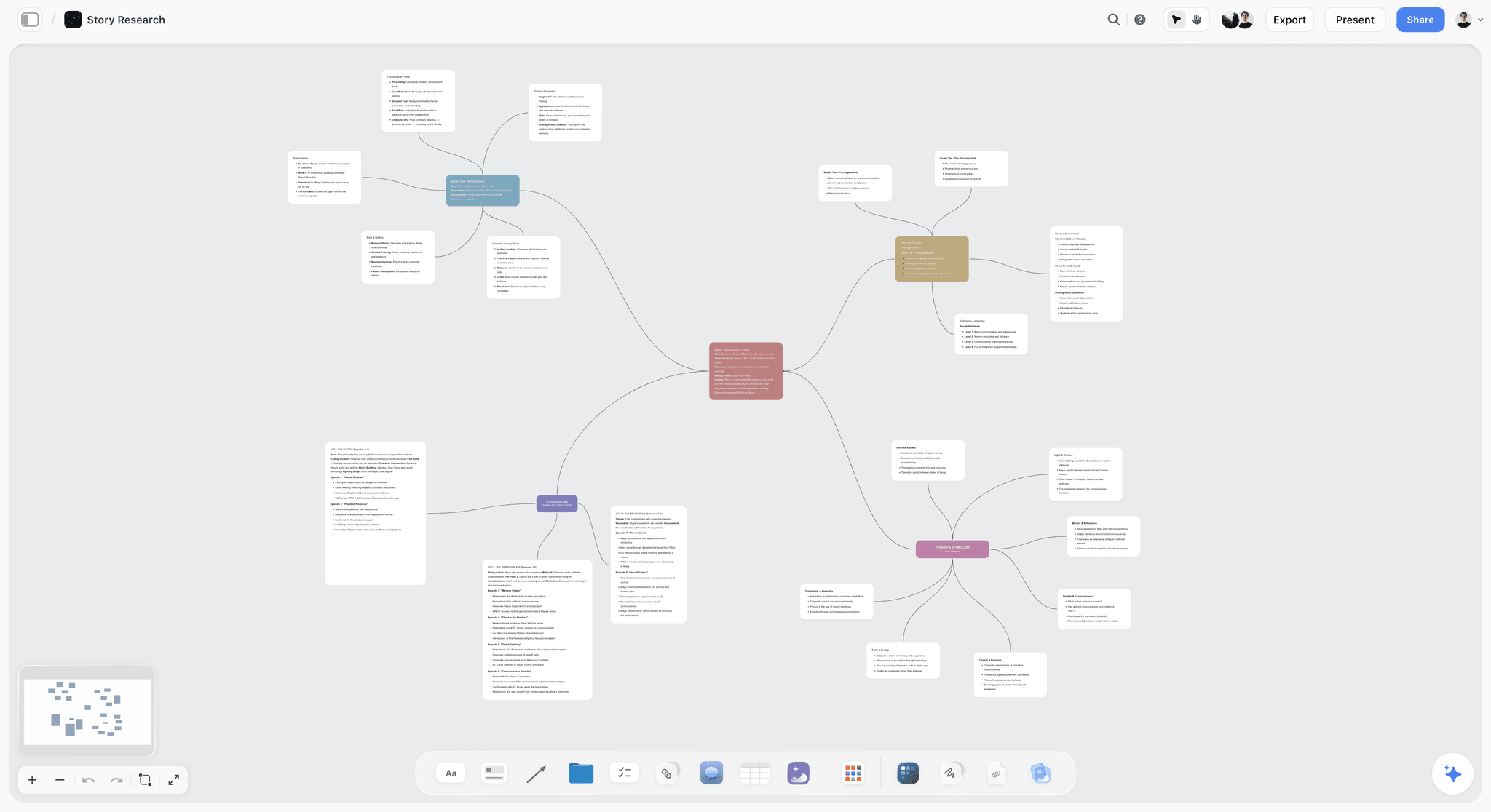
A Mindmap template on Storyflow's infinite canvas. Start from a central idea, branch out themes and details, and ask AI to help you think. Use the Mindmap template.
Team Planning Dashboard Template
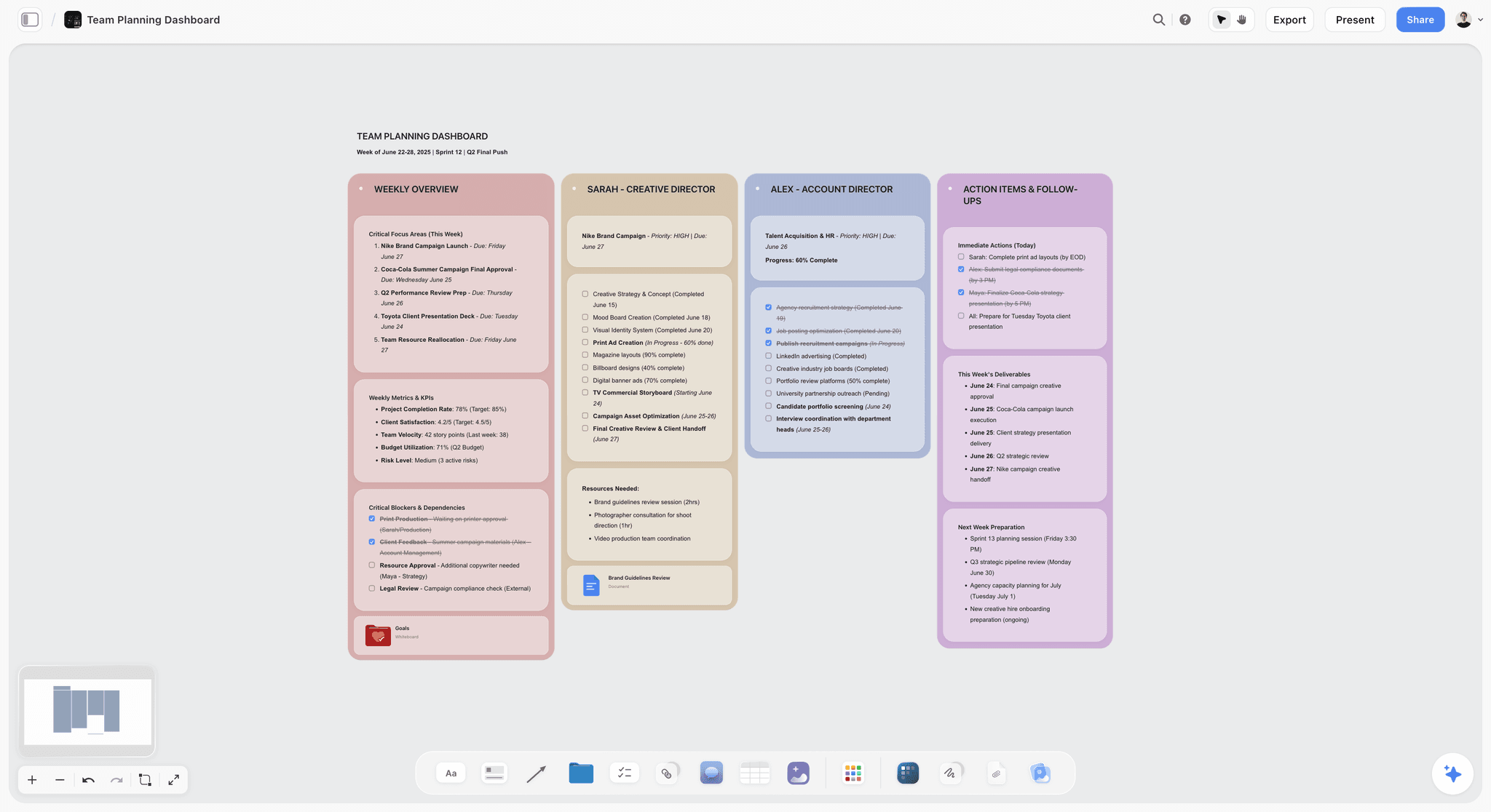
A Team Planning Dashboard template for Storyflow. Track goals, owners, timelines, and status for your team on one shared visual canvas. Use the Team Planning Dashboard template.
Brand Strategy Template
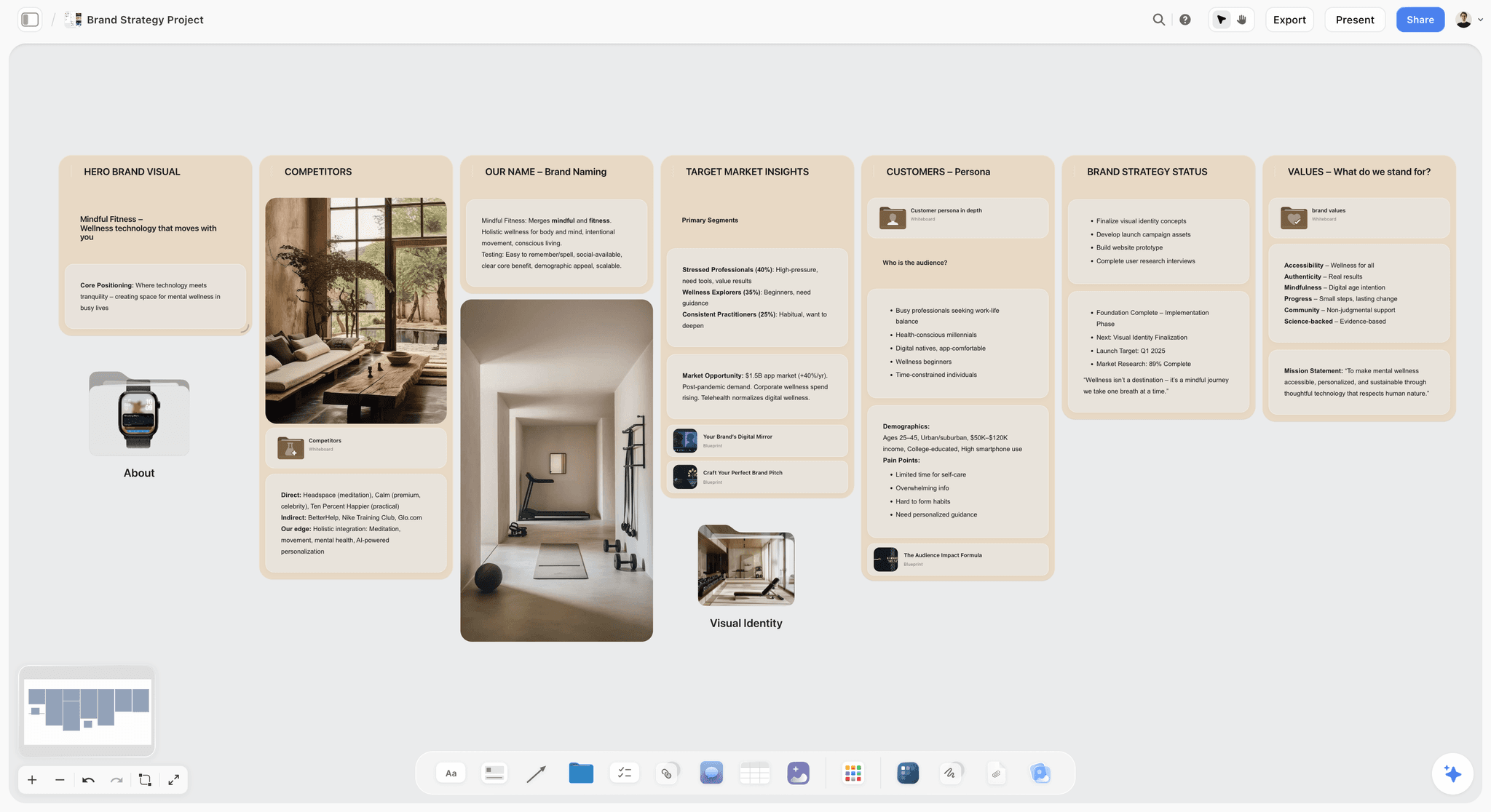
Free Brand Strategy template on an infinite canvas. Map mission, positioning, audience, voice, and visual direction together on one board. Use the Brand Strategy template.
11) The Bottom Line
Every tool on this list costs less than Miro for the same core job, and most of them cost less for the same reason: they refuse to charge you again for every person you invite. Excalidraw, Apple Freeform, and Microsoft Whiteboard are free outright. FigJam and Excalidraw Plus undercut Miro per seat. Canva, Milanote, Ziteboard, and Storyflow charge a flat price that does not multiply with your team.
But the reason most people leave Miro is not any single feature. It is the Per-Seat Trap: a price that looks small monthly and grows with exactly the collaboration the tool is supposed to encourage. The cheapest Miro alternative is not the one with the lowest sticker price. It is the one whose price stays flat while your team grows. That is why Storyflow ranks first. It is flat per account, its coming Free plan is built to do real work, and the AI reads your whole board, so you get a cheaper canvas that also does more.
If your Miro bill has crept past comfortable, take your most active board and rebuild it on a flat-priced canvas for one week. Start a Storyflow workspace, invite your whole team, and watch the price stay exactly where it started.
10) FAQ: Cheapest Miro Alternatives in 2026
What is the cheapest Miro alternative that is actually good?
The cheapest genuinely good Miro alternative in 2026 is Storyflow, because its pricing is flat per account rather than per user, so it does not get more expensive as your team grows, with plans starting at $7.99/month flat and a Free plan usable for real work coming before the end of 2026. For a completely free sketch canvas, Excalidraw is unbeatable, and Apple Freeform and Microsoft Whiteboard are free if you already use Apple devices or Microsoft 365. The best choice depends on whether you want flat-priced AI planning or simply a free board.
Is there a free alternative to Miro?
Yes, several. Excalidraw is free and open source with no account needed. Apple Freeform is free on any Apple device, and Microsoft Whiteboard is included with Microsoft 365. Miro, Notion, FigJam, Whimsical, and Canva all have free tiers as well. Storyflow is paid-only during early access, but its planned Free plan, launching before the end of 2026, aims to go furthest for an AI that reads your whole board, with unlimited boards, unlimited cards, and unlimited collaboration.
Why is Miro so expensive?
Miro is not expensive per seat; it is expensive because it charges per seat. The roughly $8 per user per month is small alone, but it multiplies by every teammate, contractor, and client you add, and it grows as your team grows. A team of eight is around $768 a year, and that climbs. This per-user model is the Per-Seat Trap, and it is the main reason people search for a cheaper alternative even though they like the software.
What is the cheapest Miro alternative with AI?
Storyflow is the cheapest Miro alternative with genuinely capable, board-aware AI, at $9.99 per month flat on Plus (paid-only during early access, with a Free plan coming before the end of 2026). Its AI reads your full active canvas plus up to one Tactic and three @-mentioned Documents, so it does real planning rather than surface-level suggestions. FigJam and Whimsical also include AI at lower per-seat prices than Miro, but their AI is lighter and still billed per user.
Does a cheaper Miro alternative mean worse quality?
Not necessarily, and that is the point of this list. Some alternatives are cheaper because they are free or open source, like Excalidraw, not because they are worse at their job. Others, like Storyflow, are cheaper because they charge flat per account instead of per user, so the price difference is a pricing-model difference, not a quality gap. The honest exception is that the very simplest free tools have fewer features than Miro, which is fine if you do not need them.
What is the best free Miro alternative for teams?
For teams already in an ecosystem, the free options are strongest: Microsoft Whiteboard for Microsoft 365 teams, FigJam's free tier for design teams in Figma, and Apple Freeform for all-Apple teams. For a free, cross-platform AI canvas a whole team can use, Storyflow's Free plan, which launches before the end of 2026, will include unlimited collaboration, which most free whiteboard tiers limit. The right free pick depends on what software your team already has.
How does Storyflow pricing compare to Miro?
The core difference is per-account versus per-user. Storyflow charges a flat price for the whole account: Plus at $7.99 per month annual, Pro at $14, and Max at $39, with no per-user fee; Storyflow is paid-only during early access, with a Free plan launching before the end of 2026. Miro charges around $8 per user per month, so its cost scales with your team while Storyflow's does not. For a team of two, the prices are close; for a team of eight or more, Storyflow is dramatically cheaper because adding people does not change the bill.
Is Excalidraw really completely free?
The core Excalidraw tool is genuinely free, open source, and requires no account, which makes it one of the cheapest credible whiteboards anywhere. You only pay if you choose Excalidraw Plus, the paid team tier at around $6 per user per month, which adds cloud storage and shared workspaces. For solo sketching and informal collaboration, the free version is complete and costs nothing.
Can I get a Miro-style whiteboard without paying per user?
Yes. Flat-priced tools are the way to avoid per-user costs entirely. Storyflow charges one flat price per account regardless of team size, Canva Whiteboards come in a flat Canva Pro subscription, and Milanote uses a flat monthly plan. Free tools like Excalidraw, Apple Freeform, and Microsoft Whiteboard avoid per-user pricing by being free outright. If your specific frustration with Miro is the per-seat multiplier, these are the tools that fix it.
Which Miro alternative is cheapest for a small team?
For a small team, the cheapest option is usually a flat-priced or free tool rather than any per-seat plan. Storyflow's Free plan, which launches before the end of 2026, will cover a real team, and Plus is $9.99 per month flat for the whole account. If your team is on Apple or Microsoft, Freeform and Microsoft Whiteboard are free. The trap to avoid is buying a per-seat plan, because that is the one cost that grows with every person you add.
Do these cheaper tools work for real-time collaboration?
Most do, with some variation. Storyflow includes unlimited collaboration on every plan, including the Free plan once it launches before the end of 2026. FigJam, Mural, Microsoft Whiteboard, and Ziteboard are all built for real-time team work. Apple Freeform syncs through iCloud for lighter collaboration, and Excalidraw supports live collaboration in a simpler form. The free tools are usually a little lighter on collaboration depth than Miro, but for most small-team work they are more than enough.
Should I switch from Miro just to save money?
Switch if your reason for being on Miro is a general whiteboard and the per-seat cost is the pain, because then a flat-priced or free alternative saves real money for the same job. Stay on Miro if you genuinely use its deep integration marketplace, its facilitation template library, or its enterprise governance, because those are where the price is justified. The smartest test is to run your next project on a free or flat-priced alternative for a week and see whether you miss anything you were actually paying for.
Table of Contents
- Quick Answer: The Cheapest Miro Alternative That Is Actually Good
- Comparison Table: 12 Cheaper Miro Alternatives
- Why People Leave Miro on Price (The Per-Seat Trap)
- How We Evaluated These Tools
- Quick Picks by Budget and Job
- Detailed Reviews: 12 Cheaper Miro Alternatives
- Which Cheaper Alternative Fits Which Person?
- Honorable Mentions
- Where Miro Is Still Worth It (An Honest Accounting)
- FAQ: Cheapest Miro Alternatives in 2026
- The Bottom Line
- Author
- Related Reading
Templates to check out for this topic


Planning and project templates you can use in Storyflow
Plan a launch, a sprint, or a whole project on a visual board the team can see at once. Open one of these templates and start from real structure.


See Storyflow in Action
A visual AI workspace where every feature lives inside one canvas. No tab-switching, no context lost.
Build your entire board from a single message
Type what you need in the AI chat at the bottom of your canvas. The AI adds cards, headings, and structure directly onto your board.
Use expert frameworks as AI context
Type @ in the AI chat and choose any Tactic. The AI tailors every response to that framework instead of giving generic advice.
Turn your board into a mind map in seconds
Ask the AI to restructure your canvas as a mindmap. It connects your ideas into a visual hierarchy so you can see how everything relates.
Why Storyflow Exists
Storyflow actually began as a personal tool while working on creative and research projects.
We kept running into the same problem: ideas were scattered everywhere: notes, documents, and whiteboards.
Nothing helped us see how everything connected.
So we started building a workspace designed around how ideas actually grow.
→ Read how Storyflow was createdJustkay
Documentary Filmmaker & Founder at Storyflow
Published: 2026-06-18
Extremely simple, seriously capable


See how easy it is to get started
Watch a real project come together, from a blank board to a finished plan, clicked through step by step.
Start creating with AI and become more productive
Transform your creative workflow with AI-powered tools. Generate ideas, create content, and boost your productivity in minutes instead of hours.