Storyflow vs FigJam: Which Is Better in 2026?
A genuinely balanced Storyflow vs FigJam comparison for 2026. FigJam is a design-team whiteboard; Storyflow is an AI canvas that reads your whole board.

Category
Visual Thinking
Author

Justkay
Documentary Filmmaker & Founder at Storyflow
Topics
2026-06-18
•
Updated June 18, 2026
•
12 min read
•
Visual Thinking- Storyflow vs FigJam
- FigJam alternative
- AI whiteboard comparison
- FigJam vs AI canvas
- visual collaboration comparison
- best whiteboard for project planning
Storyflow vs FigJam: which is better?
Storyflow is the better pick for project and story work (campaigns, films, content plans, research) where you want an AI that reads your whole board and helps carry the project forward, while FigJam is the better pick for design teams that already use Figma and want a fast whiteboard for workshops, retros, and diagrams. The honest split is the shape of your work: FigJam is a design-team whiteboard, and Storyflow is an AI canvas built for project-shaped work that is priced flat per account instead of per user. FigJam clearly wins on Figma integration, ecosystem, and live workshop facilitation; Storyflow wins on an AI that reads your full active board (plus up to 1 Tactic and 3 @-mentioned Documents) and on per-account pricing that does not grow with your team.
1) Quick Answer: Storyflow or FigJam?

Choose FigJam if you are a design team that already lives in Figma and you want a fast, fun whiteboard for workshops, retros, and diagrams that sits right next to your design files. Choose Storyflow if your work is a project or a story (a campaign, a film, a content plan, a research deck) and you want an AI that reads your whole board and helps you carry the work forward, not just draw on it.
That is the real split, and it is worth stating plainly. FigJam is a whiteboard built for a design team. Storyflow is an AI canvas built for project and story work. They look similar from a distance (both are infinite canvases you can fill with cards and shapes), but they are built around different jobs. FigJam's center of gravity is the design workflow and the Figma file. Storyflow's center of gravity is an AI that reads everything on your active board and helps you think through a project end to end.
This is not a case where one tool is good and the other is bad. FigJam is excellent at what it is for, and for design teams it is often the right answer. The rest of this comparison is the honest accounting of where each one wins.
I built Storyflow as a documentary filmmaker who kept watching projects scatter across a doc, a sheet, and a whiteboard, so I have a side in this. I have also run real work through FigJam and will name where it beats Storyflow clearly, because a comparison that only flatters my own product is worthless to you.
2) Storyflow vs FigJam at a Glance
Storyflow's prices are exact. FigJam's price is rounded and should be verified on Figma's pricing page, because seat-based pricing changes and varies by plan.
3) What Storyflow Is
Storyflow is a visual workspace where the whole project lives on one infinite canvas, and an AI reads all of it before it answers. You drop notes, images, links, documents, and moodboards onto a board, arrange them in space, and ask the AI questions about the actual material in front of you. The AI's context is that active board by default, plus up to one Tactic and up to three Documents you @-mention in the chat.
That last detail is the whole point, so it is worth being precise about it. The AI does not read every board in your account at once. It reads the board you are working on, which is exactly the scope you usually want, because a project is one board. When you ask "what is this campaign missing?" or "where does this story sag?", the AI is looking at your real campaign or your real story, not a generic template.
The work in Storyflow is project and story shaped. It ships with a Story Blueprints library (200+ creative templates, including frameworks like AIDA, the Hero's Journey, and Retention Hooks) so the structure of a persuasive campaign or a well-built story is something you start from, not something you have to remember. AI image generation is available on the Pro plan and above, which is useful for moodboards and concept work.
It is not a tool for drawing the perfect diagram. It is a tool for thinking a project through with an AI that can see all of it. That framing matters for the comparison, because FigJam is genuinely better at some of the drawing-and-workshop jobs Storyflow does not chase.
4) What FigJam Is
FigJam is Figma's online whiteboard. It is built for design teams who already work in Figma and want a looser, faster surface for the parts of the process that are not pixel-perfect design: brainstorms, retros, user-flow diagrams, affinity mapping, workshop facilitation, and early-stage planning. It sits inside the Figma ecosystem, so a FigJam board lives next to your design files and your team is already there.
FigJam is good, and it is popular for real reasons. The real-time multiplayer is smooth, the sticky-note-and-marker feel is fast and playful, the template library for workshops is deep, and it has AI helpers (Jambot and generation features) plus a large plugin and widget ecosystem inherited from Figma's platform. For a live session with a room full of designers, it is one of the best surfaces there is.
Its center of gravity is the design team and the Figma file. The AI in FigJam helps inside the board (summarize stickies, generate a template, sort notes), but it is a whiteboard assistant, not a project brain that reads your whole plan and reasons over it. FigJam assumes the deeper work (the actual design, the actual document, the actual plan) lives elsewhere, often in Figma itself or in a separate doc and project tool.
FigJam is the room where a design team thinks out loud together. Storyflow is the canvas where a project gets figured out with an AI. Both are legitimate jobs. They are just different jobs.
5) The Key Differences
The two tools overlap in surface (infinite canvas, cards, real-time collaboration) but diverge in almost everything that matters for choosing between them. Here are the five differences that decide it.
AI Depth and Context
This is the clearest gap, and it cuts in Storyflow's favor for project work. Storyflow's AI reads your full active board by default, plus up to one Tactic and up to three @-mentioned Documents, so when you ask a question it is reasoning over your real material. FigJam's AI (Jambot and its generation features) is genuinely useful for in-board tasks like summarizing sticky notes, sorting them, or generating a starter template, but it is scoped to helping you work the canvas, not to reading your whole project and pressure-testing it. The difference is between an AI that draws on the board and an AI that reads the board. If your main reason for wanting a canvas is the AI, Storyflow is built around that and FigJam is not.
The Shape of the Work
FigJam is workshop and diagram shaped. Its best work is a retro, a brainstorm, an affinity map, a user-flow diagram, a kickoff. These are sessions and artifacts, often time-boxed. Storyflow is project and story shaped. Its best work is a thing that exists over time and has parts that have to hold together: a marketing campaign with a brief and a calendar and a concept, a film with research and a treatment and a shotlist, a content plan with a strategy and a backlog. It is not that one shape is better. It is that your work has a shape, and you should pick the tool built for it. If your work is a session, FigJam fits. If your work is a project, Storyflow fits.
Collaboration
This is closer than the AI gap, and FigJam has a real edge in live, synchronous sessions. FigJam's multiplayer is built for a room of people on a board at the same time, with cursor chat, stamps, timers, and audio, and it is one of the smoothest live-whiteboard experiences available. Storyflow includes unlimited collaboration on shared boards across all plans, and anyone a paid member invites to a board joins free, while the Max plan adds a team workspace with permissions and roles. For asynchronous project collaboration (a small team building a plan over days) Storyflow is strong. For a high-energy live workshop with a dozen people, FigJam's facilitation tooling is more mature.
Integrations and Ecosystem
FigJam wins this one clearly, and it is not close. FigJam is part of Figma, so it plugs straight into the design workflow and inherits a large plugin and widget ecosystem and a mature platform. If your team already runs on Figma, FigJam is one click away and your design files are right there. Storyflow is a newer platform with fewer native third-party integrations. If deep integration with an existing design stack is a hard requirement, FigJam is the safer pick today. This is a real, current advantage for FigJam, not a rounding error.
Pricing Model
The pricing models are structurally different, and which one is cheaper depends entirely on your team size. FigJam is priced per user, per month (around $5 per user on its paid tier; verify the current price on Figma's pricing page). Storyflow is flat per account, not per user, so the price does not multiply as you add teammates. For a solo user or a tiny team, the two are close. For a growing team, the flat model pulls ahead, because a per-user tool gets more expensive every time you hire, and a per-account tool does not. More on this in the pricing section.
6) Where FigJam Wins
A comparison written by the founder of one of the tools is only useful if it is honest about the other one. Here are the places FigJam genuinely beats Storyflow, and you should weight them heavily if they describe you.
Figma integration and design-team workflows. This is FigJam's home advantage and Storyflow cannot match it. If your team lives in Figma, FigJam sits right next to your design files, your designers are already in the tool, and the handoff between a FigJam brainstorm and a Figma design is seamless. For a product design team, that adjacency is worth a lot, and Storyflow simply does not plug into the design workflow the way FigJam does.
A mature, larger ecosystem. FigJam inherits Figma's platform: a deep plugin and widget library, years of templates, and a huge installed base. Storyflow is newer, so its template library and integration list are smaller. If you want a specific plugin or a long-established workshop template, FigJam is more likely to have it.
Live workshop facilitation. For a synchronous session with a room full of people (a sprint retro, a design kickoff, an affinity-mapping exercise), FigJam's facilitation tooling (timers, voting, stamps, cursor chat, audio) is more complete and more battle-tested than Storyflow's. If your core job is running live workshops, FigJam is built for exactly that.
The free tier and the design audience. FigJam's free tier is generous, and for a team already paying for Figma, FigJam may effectively come bundled into a workflow they already have. If you are a designer or a design team, FigJam meets you where you already are, and that is a genuine advantage Storyflow does not have.
If two or more of those describe your situation, FigJam is probably the right tool for you, and that is a fine outcome. Use the tool that fits the work.
7) Where Storyflow Wins
Here is the other side of the honest accounting: the places Storyflow is the better choice.
The AI reads your whole board. This is the headline. Storyflow's AI takes your full active canvas as context (plus up to one Tactic and three @-mentioned Documents), so it can reason over your entire project, not just the part you are pointing at. Ask it what your campaign is missing, where your story sags, or how to turn a brief into a calendar, and it is working from your real material. FigJam's AI helps you work the board; Storyflow's AI helps you think about the project. For AI-first planning, this is the difference that matters.
Project and story work. When the thing you are building is a project that has to hold together over time, Storyflow's shape fits. The brief, the calendar, the concept, the research, and the moodboard can all live on one board the AI can read, which keeps a project from scattering across four tools. The Story Blueprints library (200+ templates including AIDA, the Hero's Journey, and Retention Hooks) gives that work a starting structure. FigJam can hold the early brainstorm, but it is not where a full project gets carried forward.
Flat per-account pricing. Storyflow's paid plans are flat per account, not per user: Plus at $7.99/mo annual, Pro at $14/mo annual, Max at $39/mo annual. Adding a teammate does not increase the bill, and there are no volume discounts to negotiate because the price is the price. For a growing team, this is materially cheaper than a per-user tool over time.
Blueprints as a head start. The 200+ Story Blueprints mean you start a campaign, a story, or a plan from a proven framework rather than a blank canvas. It is not a blank whiteboard you have to fill. It is a structured canvas that already knows the shape of the work. For people who do not want to remember the structure of AIDA or a three-act story every time, that is a real time saver.
8) Pricing Compared
Price is where the per-user versus per-account difference becomes concrete, so it is worth laying both out side by side. Storyflow's numbers are exact and current. FigJam's are rounded and should be verified on Figma's pricing page, because seat-based pricing shifts and depends on the plan.
The key contrast is the model, not the headline number. FigJam charges per user; Storyflow charges per account. For one person, FigJam's per-seat price can look cheaper than Storyflow's Plus plan. The moment you add teammates, the math flips: a five-person team on a per-user tool pays five times the per-seat price, while Storyflow's flat price does not move. Storyflow has no per-user pricing and no volume discounts, because the account price is fixed no matter how large the team gets. If you are solo, run the numbers on both. If you are a team that will grow, the flat model is the cheaper long-term shape.
One honest caveat: if your team already pays for Figma, FigJam may effectively ride along on a subscription you already have, which changes the calculation. Factor that in.
9) Which Should You Choose?
The right answer depends on the shape of your work and where your team already lives. Here are the clear decisions.
Choose FigJam if you are a design team in Figma
Top pick: FigJam
If your team already runs on Figma and your core need is a fast whiteboard for retros, brainstorms, and user-flow diagrams that sits next to your design files, FigJam is the right tool and Storyflow is not the better choice for you. The adjacency to Figma and the maturity of the facilitation tooling outweigh Storyflow's AI advantage for this audience. Stay where your design work already is.
Choose Storyflow if your work is a project or a story
Top pick: Storyflow
If the thing you are building is a campaign, a film, a content plan, a research project, or any project that has to hold together over time, Storyflow's AI-reads-the-whole-board model and project shape fit better. The brief, the calendar, the concept, and the research can live on one canvas the AI reasons over, which is a job FigJam was not built to do. This is the strongest case for Storyflow.
Choose Storyflow if the AI is the point
Top pick: Storyflow
If your main reason for wanting a canvas is an AI that can actually plan with you (draft the brief, build the calendar, find the gap in the funnel), Storyflow is built around that and FigJam is not. FigJam's AI helps you work the board; it does not read your whole project and pressure-test it.
Choose FigJam if you run live workshops for a living
Top pick: FigJam
If your day is facilitating synchronous sessions with rooms full of people, FigJam's timers, voting, stamps, and live multiplayer are more mature than Storyflow's. For the live-workshop job specifically, FigJam wins.
Storyflow Templates to Get You Started
You do not have to start from a blank board. These ready-made Storyflow templates cover the work in this guide, with the structure already in place and the AI ready to read it.
Mindmap Template
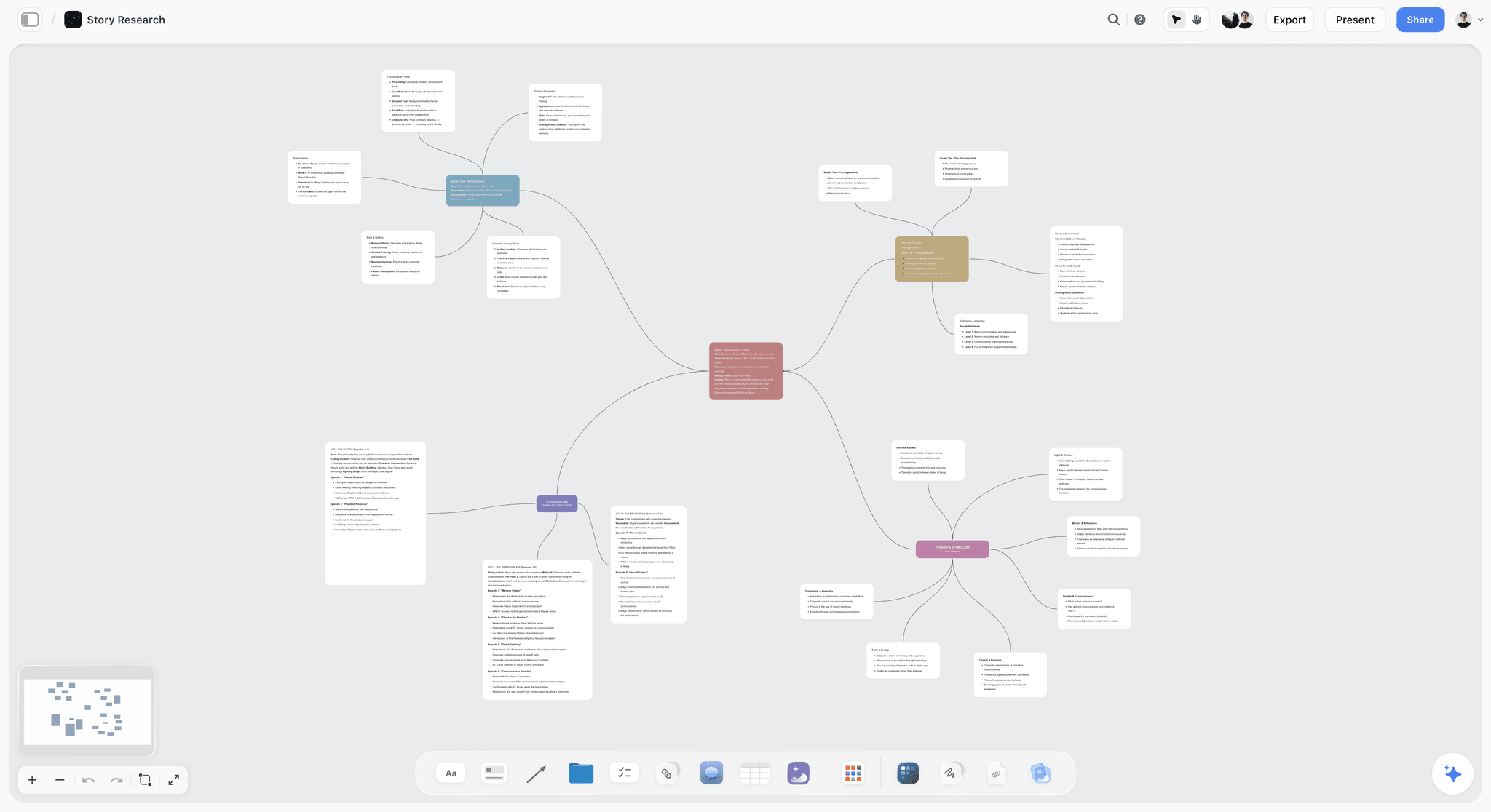
A free Mindmap template on Storyflow's infinite canvas. Start from a central idea, branch out themes and details, and ask AI to help you think. Use the Mindmap template.
Team Planning Dashboard Template
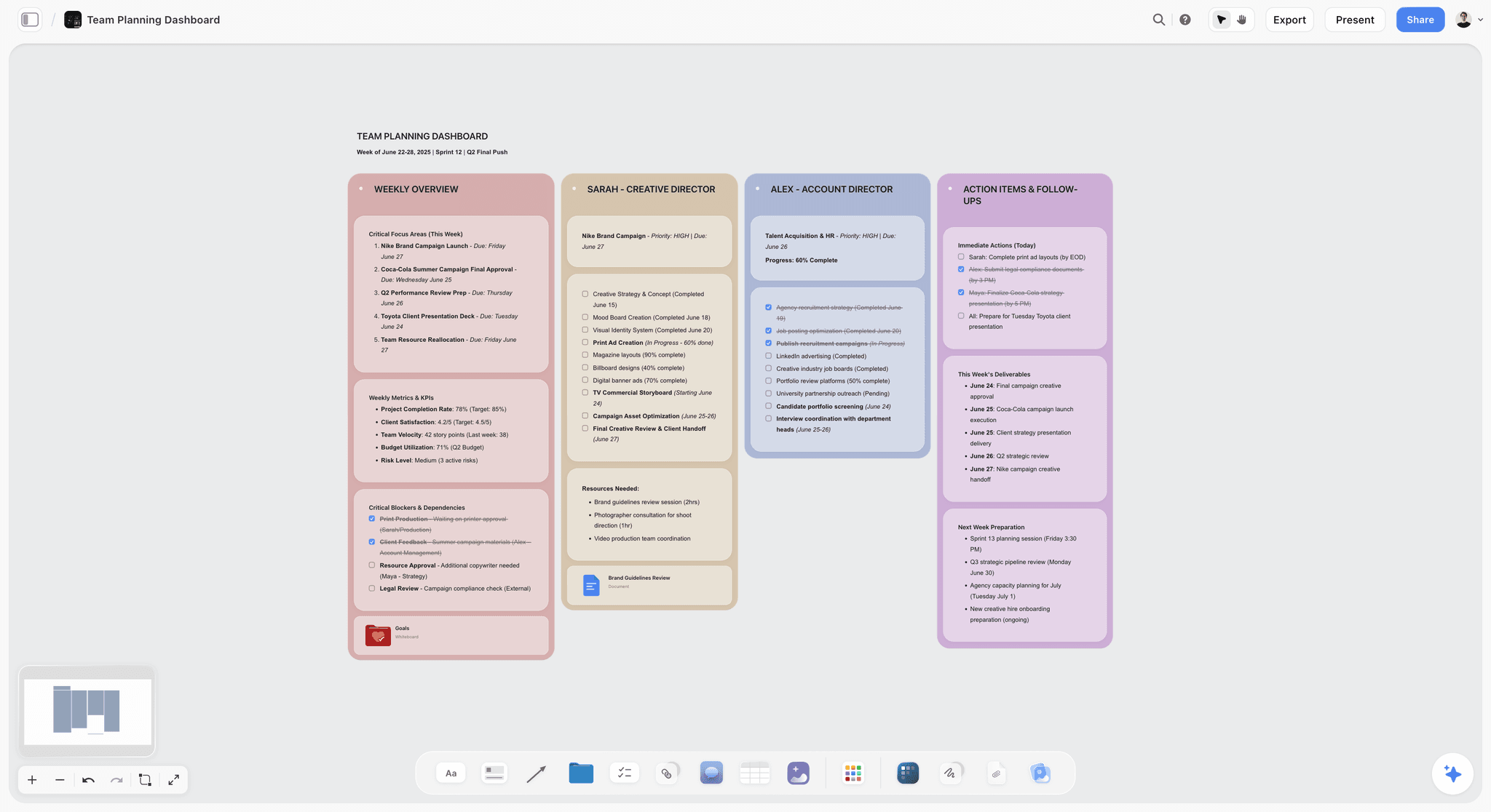
A free Team Planning Dashboard template for Storyflow. Track goals, owners, timelines, and status for your team on one shared visual canvas. Use the Team Planning Dashboard template.
Marketing Plan
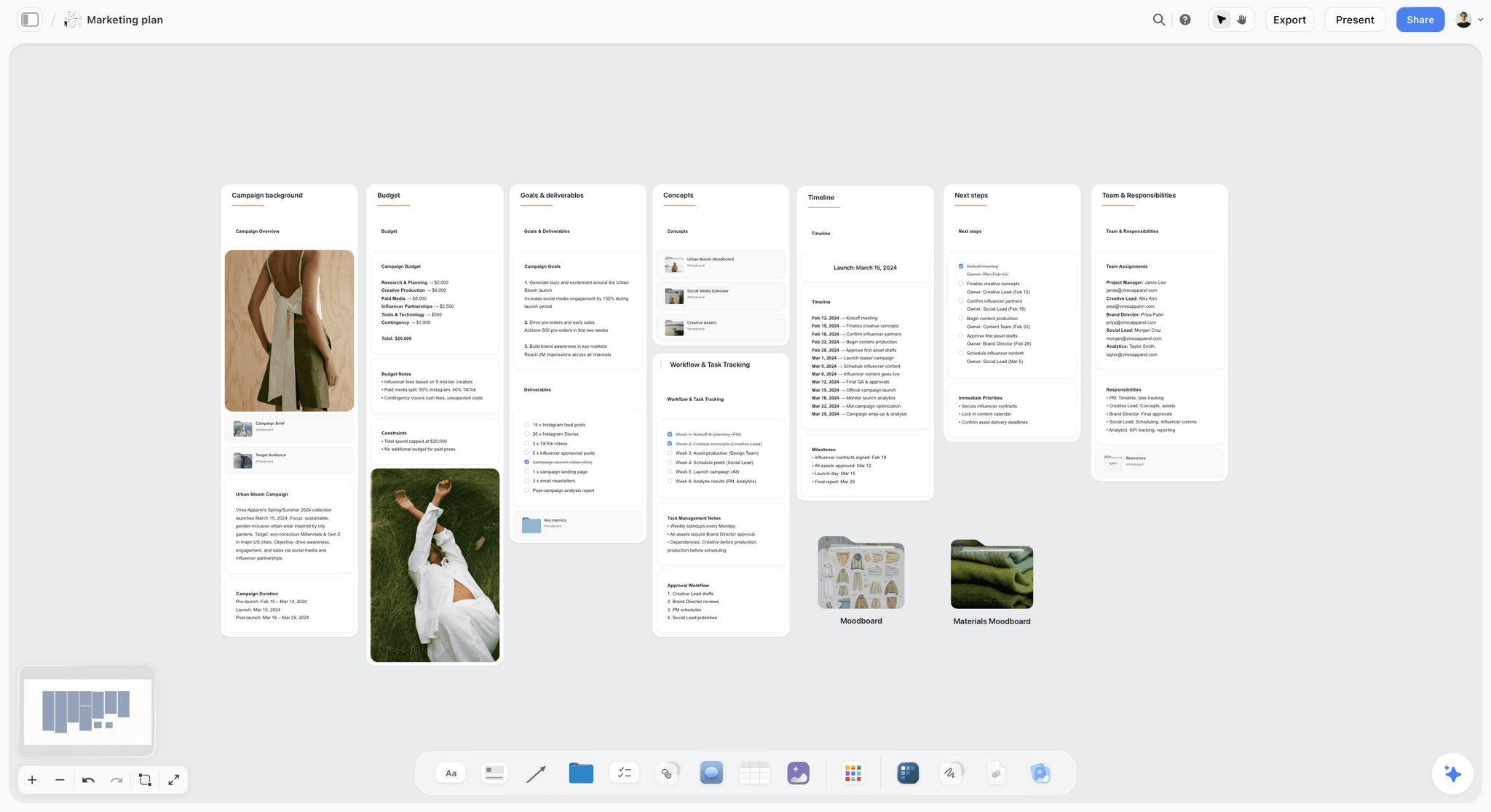
Build your marketing plan in one place. Map goals, audience, channels, and activities on a single Storyflow board. Use the Marketing Plan template.
11) The Bottom Line
Storyflow and FigJam look alike and are built for different jobs. FigJam is a whiteboard built for a design team. Storyflow is an AI canvas built for project and story work. FigJam wins on Figma integration, design-team workflows, a mature ecosystem, and live workshop facilitation. Storyflow wins on an AI that reads your whole board, project and story work, flat per-account pricing, and a 200+ Story Blueprints head start.
If you are a design team that lives in Figma and runs workshops, choose FigJam. If your work is a project or a story and you want an AI that can see all of it and help you move it forward, choose Storyflow. The decision is not which tool is better in the abstract. It is which tool is built for the shape of your work.
If your work is project shaped and you want to feel the difference, take your most active project, drop it on one board, and ask the AI what is missing. Start a Storyflow workspace and find out in ten minutes whether an AI that reads the whole board changes how you plan.
10) FAQ: Storyflow vs FigJam
Is Storyflow or FigJam better?
Neither is universally better; it depends on your work. FigJam is better for design teams that already use Figma and want a fast whiteboard for workshops, retros, and diagrams. Storyflow is better for project and story work (campaigns, films, content plans, research) where you want an AI that reads your whole board and helps carry the project forward. The honest test is the shape of your work: a session points to FigJam, a project points to Storyflow.
What is the main difference between Storyflow and FigJam?
FigJam is a design-team whiteboard built around Figma, and Storyflow is an AI canvas built for project and story work. FigJam's AI helps you work the board (summarize stickies, generate templates), while Storyflow's AI reads your full active board (plus up to one Tactic and three @-mentioned Documents) and reasons over the whole project. They look similar but are built around different jobs: FigJam for live design-team sessions, Storyflow for AI-assisted project planning.
Is FigJam better for design teams?
Yes, for most design teams FigJam is the better fit, and this is a place Storyflow loses clearly. FigJam is part of Figma, so it sits right next to your design files, your designers are already in the tool, and its facilitation features are mature and battle-tested. If your team lives in Figma and your core need is workshops and diagrams, FigJam's integration and ecosystem outweigh Storyflow's AI advantage.
Does Storyflow have AI that FigJam does not?
Both have AI, but they are different in scope. FigJam's AI (Jambot and generation) helps inside the board: summarizing notes, sorting them, generating templates. Storyflow's AI reads your full active canvas plus up to one Tactic and three @-mentioned Documents, so it can reason over your whole project, not just the current selection. The difference is an AI that draws on the board versus an AI that reads the board. If AI-assisted planning is your priority, Storyflow is built around it.
How much does Storyflow cost compared to FigJam?
Storyflow is flat per account and paid-only during early access: Plus at $7.99/mo annual ($9.99 monthly), Pro at $14/mo annual, and Max at $39/mo annual, with a Free plan launching before the end of 2026. FigJam is priced per user, around $5 per user per month on its paid tier. For one person, FigJam can look cheaper. For a team, Storyflow's flat per-account model pulls ahead, because a per-user tool multiplies the cost with every seat and Storyflow's price does not.
Is FigJam free?
FigJam has a generous free tier. Storyflow is paid-only during early access; its Free plan, with unlimited collaboration on shared boards, basic AI, and 20 file uploads, launches before the end of 2026, though anyone a paid member invites to a board joins free today. FigJam's free plan is well suited to design teams already in Figma, and if starting without paying matters right now, that is the more honest pick.
Can FigJam read my whole board with AI the way Storyflow does?
Not in the same way. FigJam's AI helps you work the current canvas (summarize, sort, generate), but it is a whiteboard assistant rather than a project brain that reads your entire plan and reasons over it. Storyflow's AI takes your full active board as context by default, plus up to one Tactic and three @-mentioned Documents, which is what lets it answer questions about your whole project. If reading the whole board is the feature you want, that is Storyflow's core design.
Is Storyflow a FigJam alternative?
Storyflow is an alternative for some FigJam jobs and not for others. If you are using FigJam to plan projects, build content or campaigns, or do AI-assisted thinking on a canvas, Storyflow is a strong alternative and often a better fit. If you are using FigJam as a design-team whiteboard tied to Figma for workshops and diagrams, Storyflow is not a direct replacement, because it does not plug into the design workflow. Match the tool to the job rather than swapping one for the other wholesale.
Which is better for solo creators and founders?
Storyflow is usually the better fit for solo creators and founders, because the work is typically a project (a launch, a content plan, a film) and the AI reading the whole board does real planning. FigJam can still be great for a solo designer who wants a quick whiteboard, especially one already in Figma. The deciding factor is whether you want a surface to draw on (FigJam) or an AI canvas that helps you plan a project end to end (Storyflow).
Do I have to choose just one?
No, and using both for different jobs is common. A design team might run live workshops in FigJam and plan a marketing campaign in Storyflow, where the AI reads the whole campaign board. The tools are not mutually exclusive: FigJam for design-team sessions and diagrams, Storyflow for AI-assisted project and story work. If your budget allows, using each for the job it is built for is a perfectly reasonable stack.
Table of Contents
Templates to check out for this topic


Planning and project templates you can use in Storyflow
Plan a launch, a sprint, or a whole project on a visual board the team can see at once. Open one of these templates and start from real structure.


See Storyflow in Action
A visual AI workspace where every feature lives inside one canvas. No tab-switching, no context lost.
Build your entire board from a single message
Type what you need in the AI chat at the bottom of your canvas. The AI adds cards, headings, and structure directly onto your board.
Use expert frameworks as AI context
Type @ in the AI chat and choose any Tactic. The AI tailors every response to that framework instead of giving generic advice.
Turn your board into a mind map in seconds
Ask the AI to restructure your canvas as a mindmap. It connects your ideas into a visual hierarchy so you can see how everything relates.
Why Storyflow Exists
Storyflow actually began as a personal tool while working on creative and research projects.
We kept running into the same problem: ideas were scattered everywhere: notes, documents, and whiteboards.
Nothing helped us see how everything connected.
So we started building a workspace designed around how ideas actually grow.
→ Read how Storyflow was createdJustkay
Documentary Filmmaker & Founder at Storyflow
Published: 2026-06-18
Extremely simple, seriously capable


See how easy it is to get started
Watch a real project come together, from a blank board to a finished plan, clicked through step by step.
Start creating with AI and become more productive
Transform your creative workflow with AI-powered tools. Generate ideas, create content, and boost your productivity in minutes instead of hours.