
An ultra-fast canvas that stays calm
A Miro alternative where
the AI fills the canvas for you.
Miro is a powerful whiteboard for team workshops and diagrams. Storyflow is the Miro alternative for creative work: describe a moodboard, a storyboard, or a campaign and the AI lays out the whole board on a truly infinite canvas. No object cap, unlimited boards, and boards that turn into real plans.


Creatives working for these brands already got early access
- Red Bull
- Canon
- Artlist
- Porsche
See how easy it is to get started
Watch a real project come together, from a blank board to a finished plan, clicked through step by step.
Start from a ready-made template
Pick a board to see what you can build, then let AI fill it in. Every template is a real, editable starting point on the same infinite canvas.

Mind Map
Branch one central idea out into themes and sub-points, then drag the connections around until the structure makes sense.
What can you use instead of Miro, and why switch?
Miro is a genuinely powerful whiteboard, and it earned its place. Sticky-note workshops, flowcharts and diagrams, retrospectives and journey maps, a deep library of integrations, and facilitation features that keep a big room in sync all work well. For enterprise teams running structured sessions at scale, Miro is hard to beat, and if that broad, all-purpose whiteboard is what you need, it does the job.
Storyflow is a Miro alternative for a narrower kind of work: creative, narrative projects like storyboards, moodboards, and campaigns. The difference is where the board comes from. Miro is still a blank whiteboard you fill by hand, sticky by sticky, frame by frame. In Storyflow you describe what you are making, a launch campaign, a brand moodboard, a video storyboard, and the AI lays out a full board of cards for you to shape. You still drag, recolor, and arrange, you just are not starting from an empty canvas every time.
Two more reasons creative teams switch. First, boards: Miro's free tier caps you at three editable boards, so a second and third project fill the slots fast, while every Storyflow plan has no object cap and unlimited boards. Second, the board does not stay a board: turn a moodboard into a shot list, a brainstorm into a content calendar, or a mind map into a campaign plan on the same canvas. You can also grab frames straight from YouTube and Vimeo onto the board, which sticky notes were never built for.
Ultra fast from brief to board
Go from a blank whiteboard to a filled board in four steps.
You bring the brief. The AI lays out the first board, so the work starts with something already on the canvas.
01
Create your account
Start in the browser. No app to install, just an infinite canvas ready for your first creative project.
02
Describe the board you want
One sentence is enough: a launch campaign for a product, a moodboard for a rebrand, a storyboard for a 30-second spot.
03
AI fills the board
The AI lays out cards on the canvas: notes, sections, image placeholders, and links, grouped so the board reads clearly, only you did not place every sticky by hand.
04
Shape it, add media, turn into plans
Drag and recolor cards, drop in your own images and PDFs, grab frames from video, then turn the board into a shot list or campaign plan, share a view-only link, or export as image or PDF.
The whiteboard you know, with the blank-canvas problem solved.
Keep the freeform, visual canvas. Lose the blank start, the three-board free cap, and the dead end after the board is done.

A full board from a single prompt
The AI fills the board, you shape it
A Miro board starts empty and you place every sticky yourself. Describe your project and Storyflow's AI lays out a board of notes, sections, and cards to shape from, so you are arranging instead of starting from nothing.
See the AI whiteboard →
Unlimited boards, no object cap
Unlimited boards without the three-board limit
Miro's free tier stops at three editable boards. Every Storyflow plan has no object cap and unlimited boards, so a second, third, and tenth project each get their own canvas without pushing you to upgrade.
See the free online whiteboard →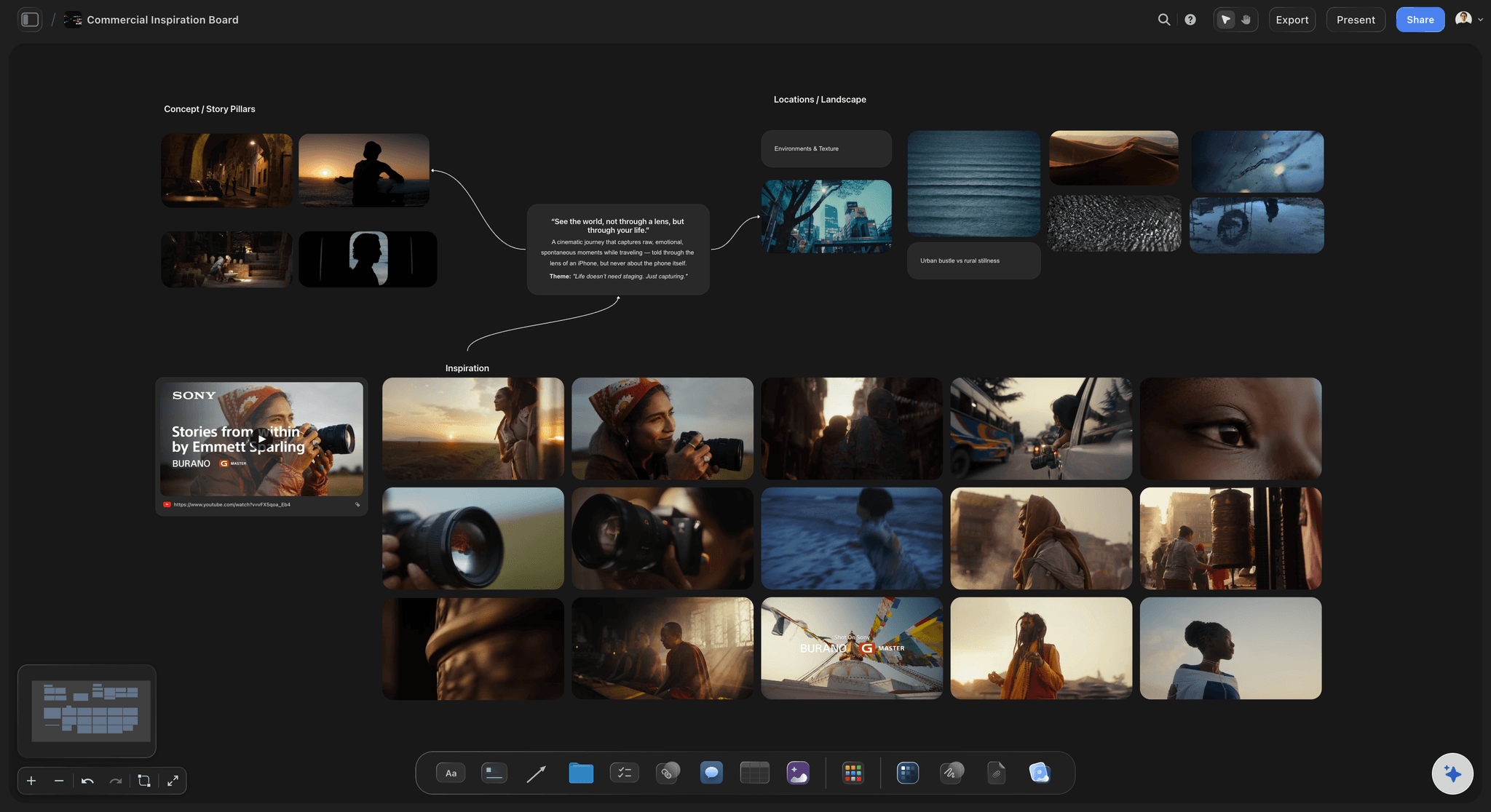
Frames from video, onto the board
Grab stills from YouTube and Vimeo
Collecting visual references on a whiteboard usually means screenshots and uploads. Paste a YouTube or Vimeo link and grab frames straight onto the board, so a reference film becomes cards in seconds.
See the moodboard maker →
The board becomes the project
From brainstorm to storyboard and plan
On a Miro board the sticky notes are the artifact. In Storyflow the board is step one: ask the AI to turn a brainstorm into a storyboard, a moodboard into a shot list, or a mind map into a campaign plan on the same canvas.
See visual collaboration →No object cap. No three-board limit.
Where Miro's free tier caps you at three editable boards, every Storyflow plan gives you unlimited boards with no object cap and no time limit. Run real projects without juggling slots.
Unlimited boards on an infinite canvas, no three-board cap
No object cap: keep every card, sticky, and reference
Basic AI usage to fill and expand boards from a prompt
Attach images, PDFs, video, and links, plus 20 file uploads

Built for people with taste
Made for the way creative teams use a canvas.
Lay ideas out in space, keep everything visible, and move from a workshop board to a real plan without changing tools.
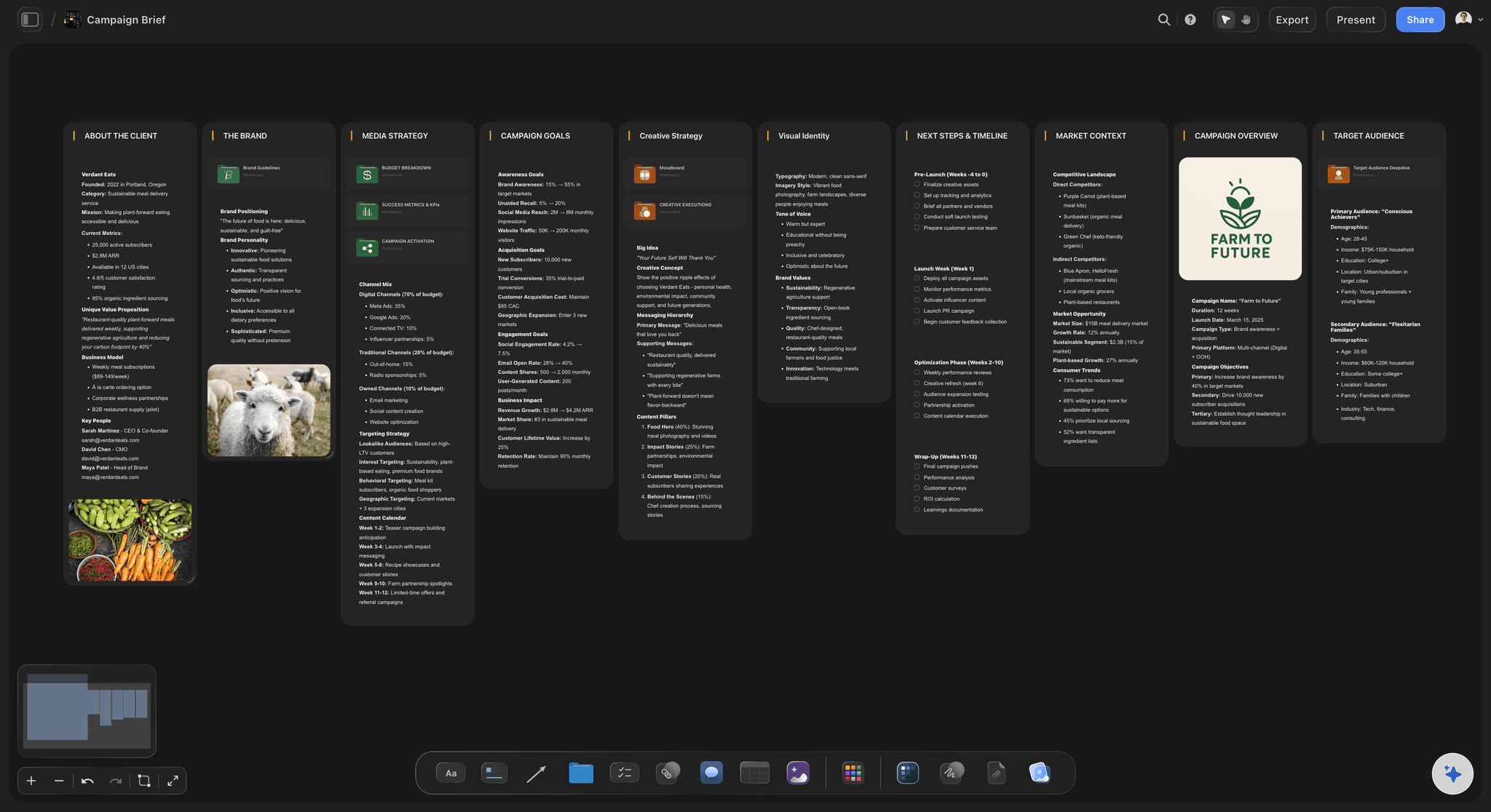
Cards you arrange, the AI proposes
A freeform canvas you fully control
Notes, images, links, sections: The same freeform building blocks you sticky onto a Miro board live on the canvas as cards you can drag, recolor, resize, and group.
AI lays out the first pass: Instead of a blank whiteboard, the AI proposes a full layout from your prompt. Keep what fits, delete the rest, add your own.
Build without the board cap: Unlimited boards and no object cap mean a new project is a new canvas, not a slot you have to free up first.
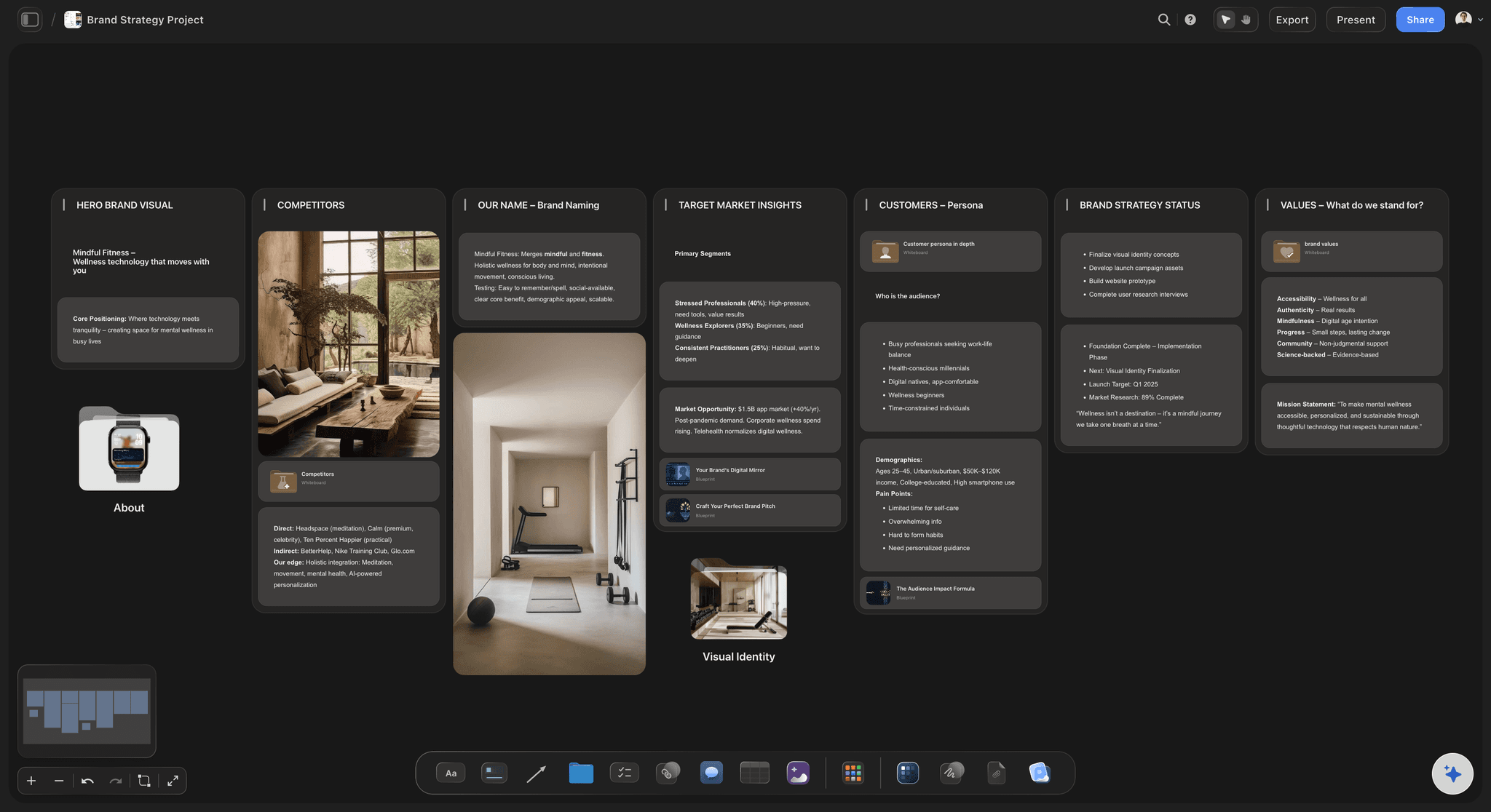
Context from the board you are working on
AI that builds on what is already there
Reads your active board: The AI uses what is on the board you have open, so new cards match the direction the team has already set.
Attach your sources: Add up to five documents and three boards as context: a campaign brief, a script, or research the board should grow from.
Re-prompt to refine: Ask for a tighter board, more reference stills, or a different angle. The AI reworks the layout while keeping your edits.
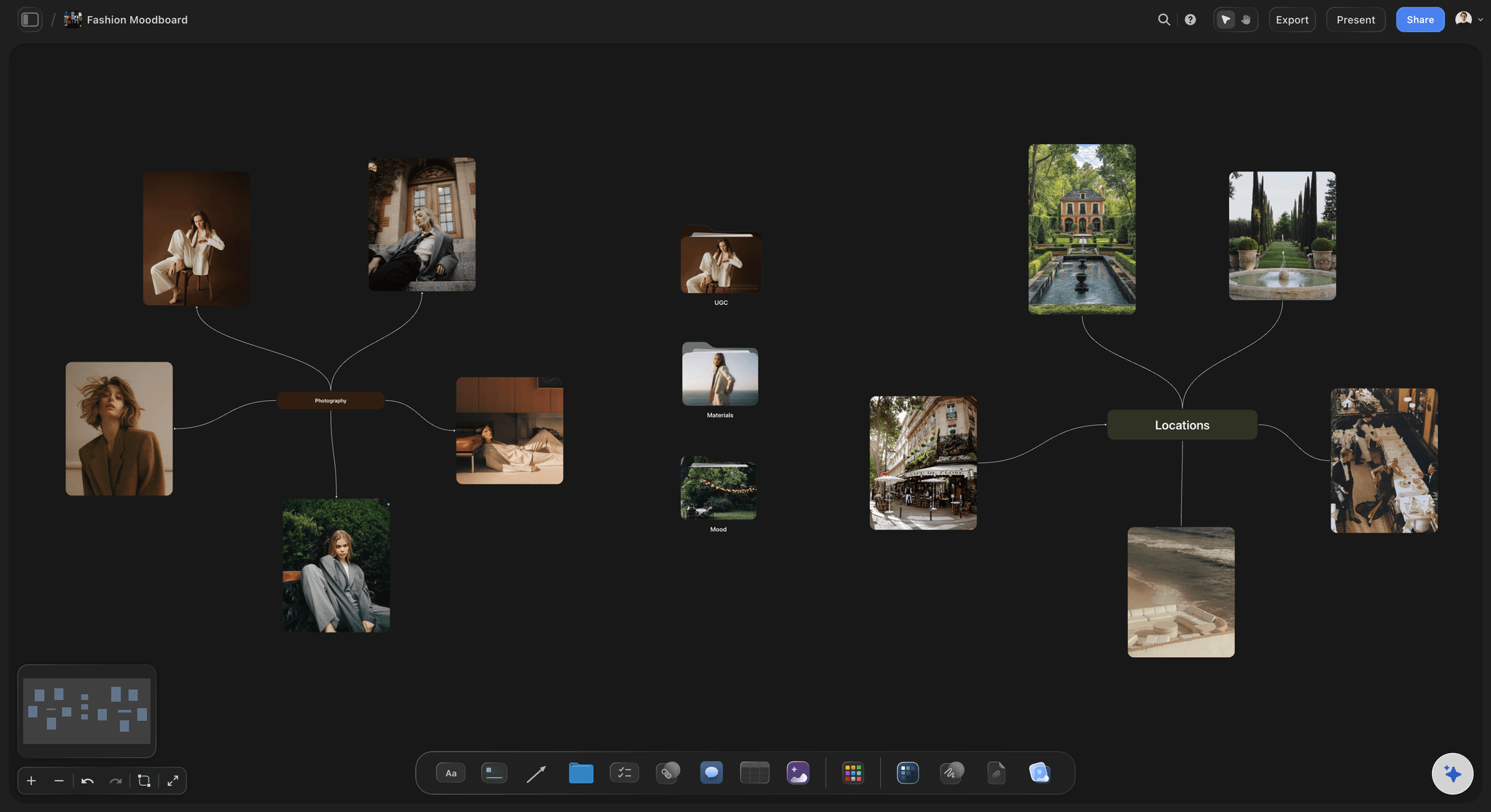
More than a wall of sticky notes
Media-rich cards beside every idea
Drop in anything: Images, video, GIFs, PDFs, and links sit on the canvas next to the cards they support, the way a whiteboard collects references, with no object ceiling.
Frame grabs from video: Capture stills from YouTube and Vimeo straight onto the board when a reference film says it better than a sticky note.
Notes where you need them: Longer thinking lives as documents on the same canvas, so the board stays scannable and the detail stays one click away.

The board is step one, not the deliverable
From workshop board to finished plan
Turn boards into real work: Ask the AI to convert a brainstorm into a storyboard, a moodboard into a shot list, or a mind map into a campaign plan on the same canvas, with the ideas carried over.
Share the board: Invite collaborators free, or send a view-only link so a client or stakeholder can explore the board without an account.
Export as image or PDF: Need the board in a deck or a brief? Export it as a clean image or PDF in one step.
Explore templates for your project
Every template opens as a real, editable board on the infinite canvas. Pick the closest fit and make it your own.
Mind Map
Branch one central idea out into themes and sub-points, then drag the connections around until the structure makes sense.
One app instead of five
Storyflow vs Miro, Milanote, and FigJam.
Each tool does something well. The question is whether the board fills itself, runs into a free-plan cap, or turns into the next step.
Storyflow
Recommended
An AI that fills the whole board from a prompt
A freeform visual canvas for creative work
Unlimited boards, no object cap on paid plans
Boards turn into storyboards and plans on the same canvas
Miro
An AI that fills the whole board from a prompt
A freeform visual canvas for creative work
Unlimited boards, no object cap on the free plan
Boards turn into storyboards and plans on the same canvas
Milanote
An AI that fills the whole board from a prompt
A freeform visual canvas for creative work
Unlimited boards, no object cap on the free plan
Boards turn into storyboards and plans on the same canvas
FigJam
An AI that fills the whole board from a prompt
A freeform visual canvas for creative work
Unlimited boards, no object cap on the free plan
Boards turn into storyboards and plans on the same canvas
What creators are saying
Join early creators getting structured workspaces and AI that remembers their projects
“Storyflow has sped up my workflow by at least 3x, which means more flow state and more projects I can actually ship. It truly changed the way me and my team create.”

Reilin Joey
Director & YouTuber
“One prompt gets me a structured board. But the tactics are my favorite. I run my YouTube scripts through them and my intros and retention got better. It's amazing.”

Justkay
YouTuber & Freelance Filmmaker
“I used to juggle five apps to plan a project. Now I describe what I am making and get boards, lists, and a schedule. All in one place.”

George
@fernwehchronicles
Miro alternative questions, answered.
Everything people ask when comparing Storyflow with Miro.
Depends which part of Miro you are replacing. Milanote is the closest fit for creative teams doing moodboards and reference-led work, and it is the most common switch. FigJam is the natural move if the team already lives in Figma. Mural is the like-for-like swap if you need the facilitation depth. Excalidraw and tldraw are the light, fast picks for sketching. Storyflow fits when the board needs to become a plan, with AI reading the canvas and frameworks structuring it. If your core need is running live workshops, be aware that Miro is genuinely hard to beat there.
It depends on the work. Miro is excellent for broad enterprise whiteboarding: workshops, diagrams, and facilitation at scale. If your work is creative and narrative, storyboards, moodboards, and campaigns, Storyflow is a strong fit. It keeps the freeform visual canvas, adds an AI that fills the board from a prompt, and gives you unlimited boards with no object cap on every plan.
Miro is a powerful, general-purpose whiteboard you fill by hand, sticky by sticky. Storyflow is purpose-built for creative work: describe a board and the AI lays out the first pass, every plan has no object cap and unlimited boards instead of a three-board limit, and you can turn a board into a shot list, storyboard, or campaign plan on the same canvas.
Not during early access. Storyflow is paid-only right now, with plans starting at $7.99 per month billed annually. Miro's free tier caps you at three editable boards; Storyflow's plans give you unlimited boards with no object cap and no time limit, basic AI usage to fill and expand boards, 20 file uploads, view-only sharing, and unlimited collaborators. A Free plan is launching before the end of 2026.
Be honest about the fit. Miro has real strengths: a huge library of integrations, mature facilitation tools for running large live workshops, a deep template gallery for structured frameworks, and an enterprise footprint built for big cross-functional teams. If your main need is broad whiteboarding at scale with those integrations, Miro is the better pick. Storyflow is focused on creative, narrative output rather than being an all-purpose enterprise whiteboard.
Yes. On every Storyflow plan you get unlimited boards on an infinite canvas, with no object cap and no time limit. That is the main day-to-day difference creative teams notice when moving from Miro's free tier, which limits free accounts to three editable boards. Storyflow itself is paid-only during early access, with a Free plan launching before the end of 2026.
Yes, and that is a core reason to switch. Ask the AI to turn a brainstorm into a storyboard, a moodboard into a shot list, or a mind map into a campaign plan, and it builds the new board on the same canvas from the ideas you collected. On a Miro board the sticky notes are usually the end product, while in Storyflow the board is the first step toward the finished work.
Yes. The AI reads your active board, so cards and notes already on the canvas shape what it generates. You can also attach up to five documents and three boards, such as a campaign brief or a script, for the AI to build from. It works from the board you have open, not from all your boards at once.
Yes. Every Storyflow plan includes unlimited collaboration and shared boards. Invite collaborators and they join free, or send a view-only link that opens in the browser with no account needed. For a dedicated team workspace with roles and permissions, the Max plan adds that on top.
Yes, and the saving is real for small teams because Miro prices per seat. FigJam is cheaper per editor and free inside an existing Figma plan. Milanote's paid tier is a flat single-user price. Excalidraw and tldraw are free. Storyflow starts at $7.99 a month billed annually with no per-seat fee on the solo tiers, and collaborators invited by a paid member join free. The catch worth naming: cheaper tools generally have smaller template libraries and fewer integrations, so check what your workflow actually depends on before switching to save money.
Excalidraw is the strongest free option: open source, no account needed, and unlimited boards for sketching and diagramming. tldraw is equally quick with a cleaner aesthetic. FigJam's free tier is generous if you are already in Figma, and Microsoft Whiteboard is free with a Microsoft account. Miro's own free tier gives you three editable boards, which is often enough for solo use. Storyflow is paid-only during early access, with its Free plan arriving before the end of 2026.
Miro exports boards as PDF, image, or CSV for structured content, and offers a board backup format that only other Miro accounts can open. In practice most migrations are partial rebuilds rather than imports: sticky notes and text survive an export, but frames, connectors, embedded apps, and voting results usually do not. The pragmatic route is to export the boards you still reference as PDFs for the archive, and rebuild only the handful of boards that are genuinely live work.
Stay if live facilitated workshops are the core of how your team works. Miro's timers, private voting, follow mode, and template library are the deepest in the category, and the integration list is the longest. Stay also if you are on an enterprise plan with SSO, admin controls, and compliance requirements, because most alternatives are weaker there. The teams who switch happily are usually the ones whose boards are long-running project surfaces rather than session artefacts.
Keep the canvas. Let the AI do the filling.
Describe your project, watch the board lay itself out, and shape it from there on an infinite canvas with unlimited boards and no object cap.