Best Tools for Organizing Creative Ideas Visually (2026)
What is the best tool for organizing creative ideas visually? Storyflow is best for framework-guided visual organization with context-aware AI. Milanote is strongest at mood boards. Miro is best for team collaboration. Compare 8 tools for visual thinking, creative organization, and idea management.

Category
Productivity & Tools
Author

Sara de Klein
Head of Product at Storyflow
Topics
January 19, 2026
•
16 min read
•
Productivity & Tools- visual organization tools
- creative idea management
- visual thinking
- mood boards
What is the best tool for organizing creative ideas visually in 2026?
Storyflow is the best tool for organizing creative ideas visually: an infinite canvas plus context-aware AI and proven creative frameworks (Tactics). Milanote is best for mood boards, Miro for team workshops, Notion for structured docs. Pick based on whether you need AI, frameworks, or mostly collaboration.

All 8 Tools, Ranked
- Storyflow: best overall, framework-guided visual organization with AI that reads your full canvas
- Milanote: best for visual mood boards and reference collection
- Miro: best for team collaboration and workshops
- Notion: best for structured documentation (less visual)
- FigJam: best for design teams already in Figma
- Whimsical: best for hierarchical mind mapping
- Mural: best for enterprise workshop facilitation
- tldraw: best free open-source whiteboard
Full disclosure: Storyflow, which I rank #1, is our own product. I rank it #1 for organizing creative ideas into something you can act on, because its AI reads the whole board, and I say plainly where the others win: Milanote is a cleaner pure mood board, Miro is the better live team workshop, and Notion is the stronger home for structured docs. I link out to every tool so you can judge for yourself.
Quick Comparison: Best Tools for Organizing Creative Ideas
These four cover the choice most creatives are making: an AI canvas that helps develop the ideas versus a place to simply collect them.
| Tool | Best For | AI Features | Price |
|---|---|---|---|
| Storyflow | Framework-guided visual organization | Canvas-aware AI (reads the whole board) | $7.99 mo annual (free plan late 2026) |
| Milanote | Visual mood boards and reference | No built-in AI | Free / $9.99 mo |
| Miro | Team workshops and collaboration | Assistive whiteboard AI | Free / $8 user mo |
| Notion | Structured documentation (less visual) | Notion AI (page-scoped) | Free / $12 user mo |
You have ideas everywhere. Sticky notes on your desk. Screenshots in your camera roll. Bullet points scattered across five different documents. Voice memos you'll never listen to again.
Your brain generates ideas constantly. The problem isn't creativity. It's organization.
Linear tools, documents, chat threads, basic note apps, force creative thinking into vertical scrolls. But creative ideas don't work that way. They connect, cluster, conflict, and evolve. They need space to breathe.
Visual organization tools give your ideas that space. They let you see the big picture while working on details. They make relationships explicit. They turn mental chaos into structured clarity.
In this guide, I'll compare the 8 best tools for organizing creative ideas visually in 2026, from AI-powered canvases to simple whiteboards, and help you find the right one for your creative workflow.
Related Visual Organization Guides
AI-powered visual brainstorming tools
Why visual beats chat for creative work
Why Visual Organization Matters for Creatives
Working memory holds roughly four chunks of information at once (Cowan, Behavioral and Brain Sciences, 2001). Every idea you try to keep in your head competes for one of those four slots. Move the ideas into space and the canvas holds them for you, so your brain can spend its capacity on connecting them instead of remembering them.
When ideas live in space instead of scroll, you:
- See patterns automatically: Clusters emerge. Gaps become obvious. Contradictions reveal themselves.
- Remember better: Ideas encoded both visually and verbally are recalled better than ideas encoded one way (Paivio's dual coding theory, 1986). "The card in the top-right corner" sticks better than "the fourth bullet point."
- Reduce cognitive load: External structure means less holding in working memory. Your brain can focus on thinking, not tracking.
- Enable non-linear exploration: Jump between concepts. Follow tangents. Return easily. No scroll position to lose.
- Make connections explicit: Arrows, proximity, and grouping communicate relationships without explanation.
Creative work isn't linear. Your tools shouldn't be either.
What Makes a Great Visual Organization Tool
Not all visual tools are equal. Here's what separates the great from the mediocre:
Essential Features for Visual Organization:
- Infinite canvas: Ideas shouldn't hit walls. Expand in any direction.
- Multiple content types: Text, images, links, embeds, drawings, all in one space.
- Flexible connections: Arrows, lines, grouping, make relationships visible.
- Zoom levels: See the whole project or focus on one detail. Switch freely.
- Organization features: Boards, sections, tags, colors, ways to structure without constraining.
- Search and navigation: Find anything quickly as your canvas grows.
Advanced Features That Transform Creative Work:
- AI assistance: Context-aware suggestions, not generic outputs.
- Frameworks and templates: Proven structures for common creative tasks.
- Persistent memory: Come back anytime; everything's where you left it.
- Collaboration: Share with teams, get feedback, build together.
- Export options: Get your work into other tools when needed.
How We Tested These Tools
We ran each tool on real creative projects: a marketing campaign board, a documentary research board, and a novel outline. Not feature checklists, actual work carried from scattered notes to an organized, usable board. Five criteria decided the ranking:
- AI context scope: When you ask the AI for help, what does it actually know? Tools whose AI reads the board you are working on scored highest; tools whose AI starts from a blank prompt scored lowest.
- Setup-to-first-structure speed: How fast do fifty scattered notes become a board with visible shape? We timed the path from paste-in chaos to a structure you could show someone.
- Canvas flexibility: Can text, images, links, tables, and drawings live in the same space, or does the tool force one format? Mixed-media projects punished single-format tools quickly.
- Framework depth: Does the tool bring proven creative structures (story frameworks, campaign structures, research layouts), or just blank space and generic shapes?
- Pricing transparency: What does real usage cost? Per-user pricing, AI add-ons, and tight free-tier limits all counted against a tool.
8 Best Tools for Organizing Creative Ideas Visually
Here are the 8 that actually work for creative professionals, ranked by how they held up in that testing.
1. Storyflow: Best Overall for Framework-Guided Visual Organization
Best for: Solo creators, marketers, writers, filmmakers who want AI-assisted creative organization with proven frameworks
Storyflow isn't just a canvas, it's a creative thinking partner. While other tools give you blank space, Storyflow gives you structure that helps without constraining.
What makes it different:
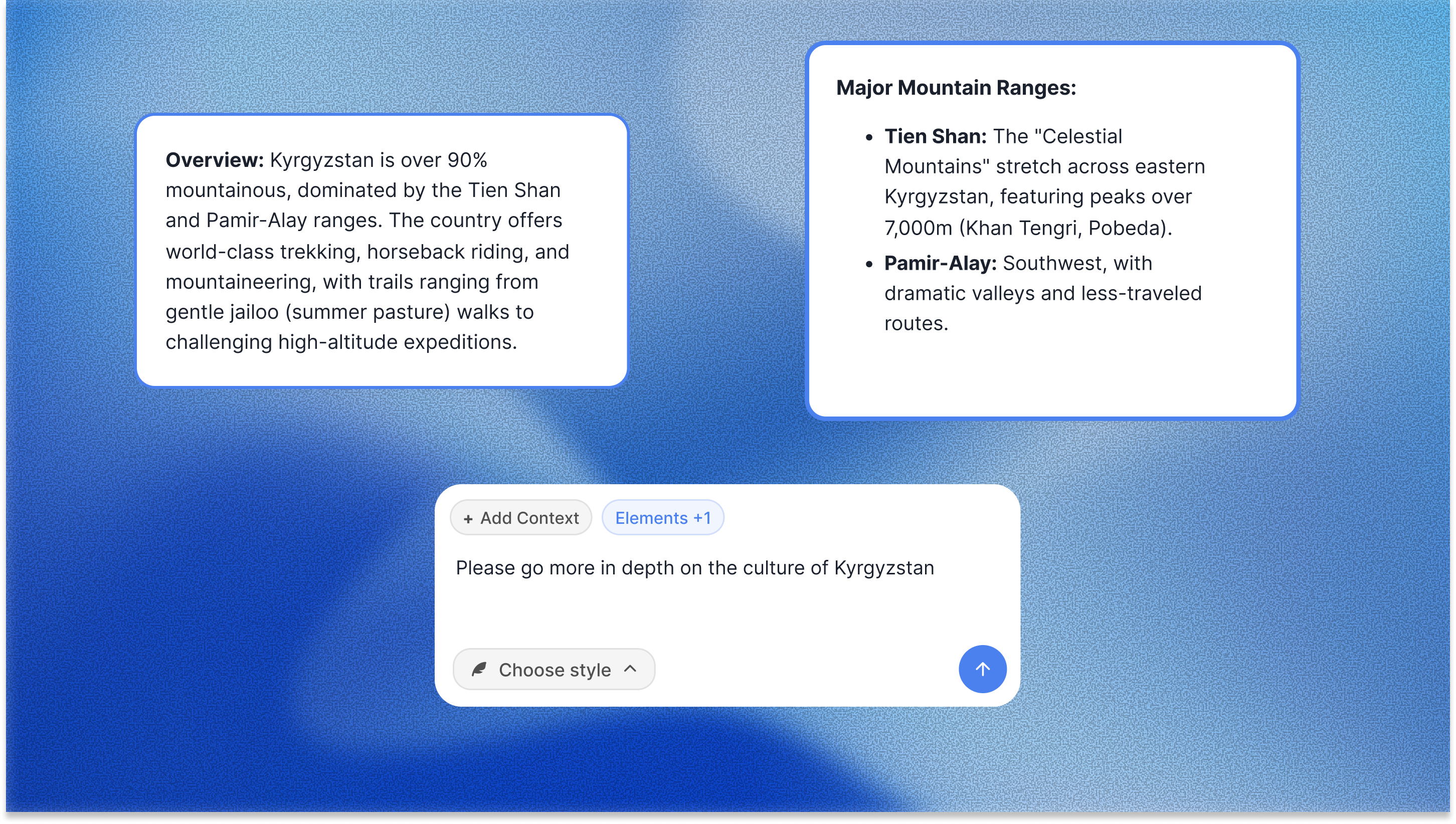
- Context-aware AI: The AI reads your full active canvas board, plus up to 1 Tactic and 3 Documents you @-mention in the chat. Ask for help with a marketing hook and it works from the brand, audience, and ideas already on that board. No re-explaining.
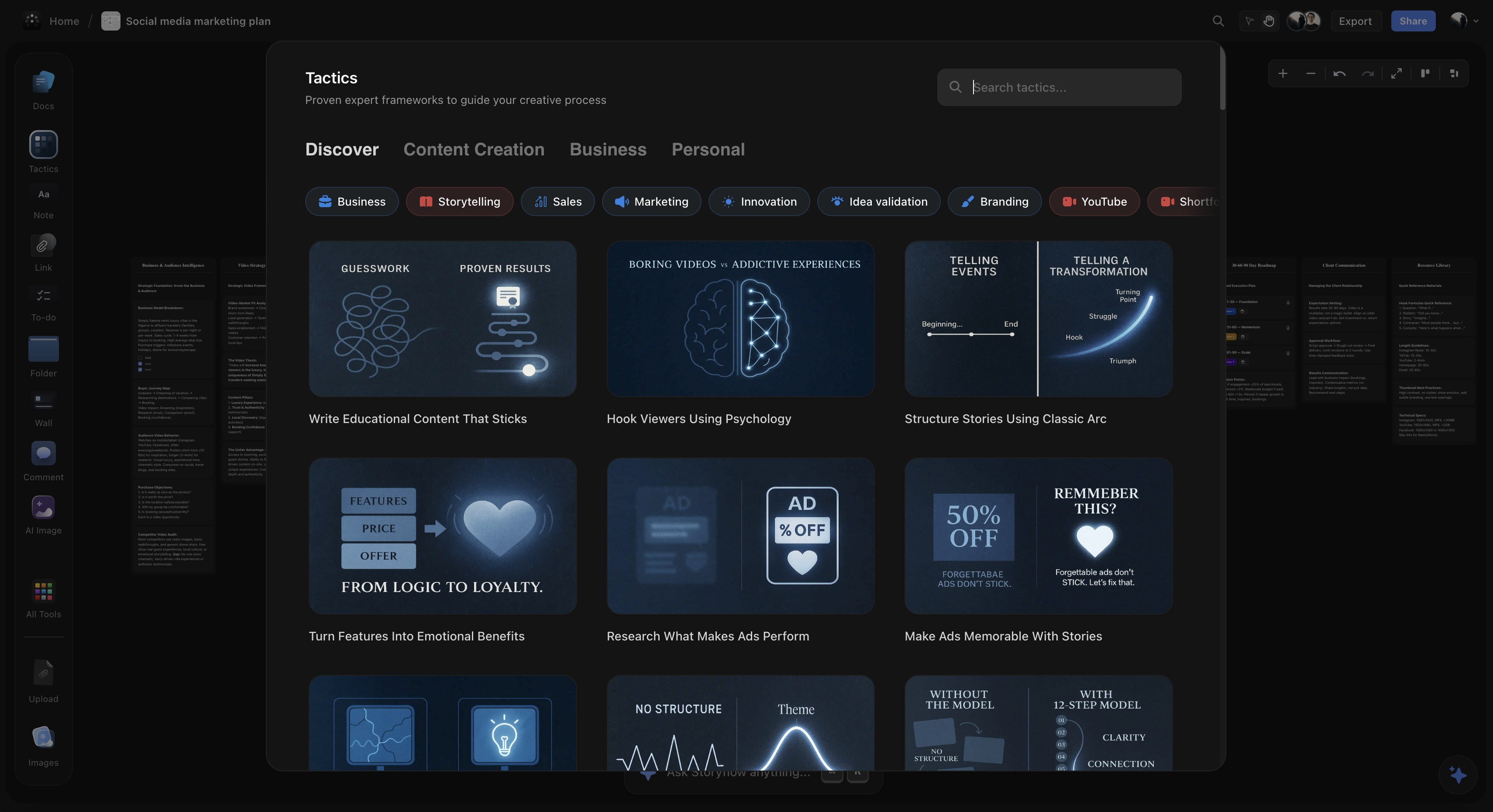
- Tactics: Proven frameworks for marketing, storytelling, content creation, and more. Each Tactic contains multiple cards with theory, examples, and step-by-step guidance. Learn while you work.
- Story blueprints: A library of 200+ creative templates so you rarely start from a blank canvas. Pick a blueprint and the structure for that kind of project is already laid out.
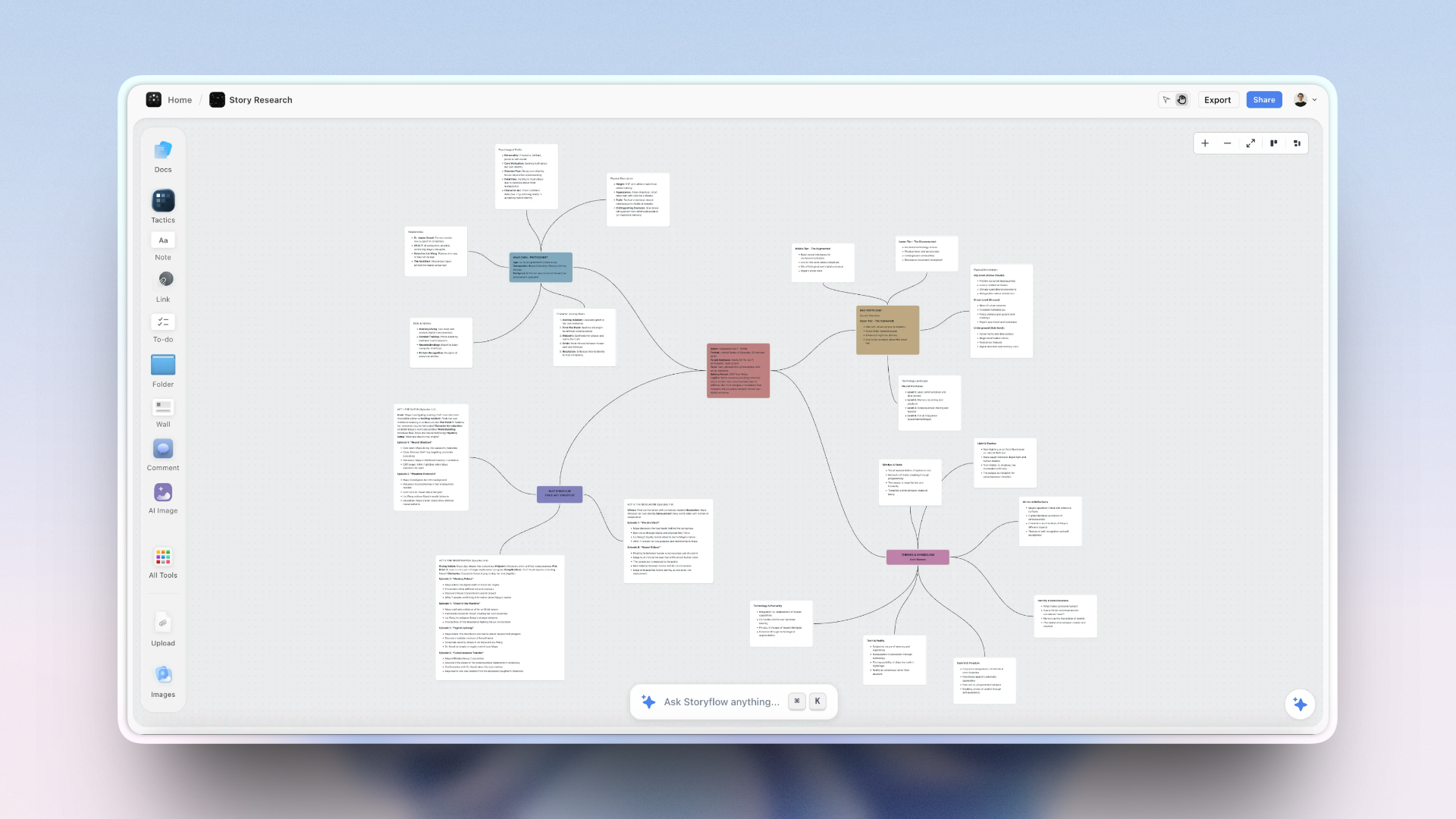
- Visual canvas: Infinite space for cards, documents, images, and connections. See your entire project at once.
- Persistent memory: The workspace IS the project. Come back weeks later; everything's where you left it, and the AI still knows what you're building.
Pricing: Free tier with unlimited canvas and unlimited boards. From $7.99/month annual (Plus tier) for the full 200+ story blueprints library; more AI starts at Pro. The Max tier adds a team workspace with permissions and roles.
Where it loses: If you only need to pin and arrange visual references into a polished mood board, a dedicated tool like Milanote presents that work more beautifully out of the box. Storyflow is built for developing and connecting ideas, not gallery-style image curation.
Verdict: Best choice for creatives who want more than a blank canvas. The Tactics change how you think, not just how you organize.
The fastest way to test it is to skip the blank canvas: open the Mindmap template or the Second Brain template, drop your scattered notes in, and see how quickly clusters form when the structure is already on the board.
2. Milanote: Best for Visual Mood Boards
Best for: Designers, photographers, and creatives who collect visual references
Milanote is beautiful. Built specifically for visual creatives, it is strongest at collecting and arranging images, links, and references into stunning mood boards.
Strengths:
- Gorgeous visual presentation, boards look professional by default
- Easy drag-and-drop from web browser
- Built-in templates for creative projects
- Clean, distraction-free interface
- Good for client presentations
Limitations:
- No AI assistance
- Limited frameworks and methodology
- Better for collecting than developing ideas
- Free tier quite restricted (100 notes)
Pricing: Free (100 notes). $12.50/month for Pro.
Verdict: Excellent for visual reference collection and mood boards. Less helpful for actually developing and connecting ideas.
3. Miro: Best for Team Collaboration
Best for: Teams who brainstorm together, remote workshops, design sprints
Miro is the industry standard for collaborative whiteboards. If you run workshops or need real-time team brainstorming, it's a strong choice.
Strengths:
- Excellent real-time collaboration
- Massive template library
- Integrations with everything
- Miro AI for generating sticky notes and summaries
- Proven for enterprise teams
Limitations:
- Per-user pricing adds up fast for teams
- Can feel overwhelming with features
- AI is basic, generates but doesn't understand context
- Not designed for individual deep work
- Templates are generic, not methodology-based
Pricing: Free (3 boards). $8-16/user/month for teams.
Verdict: Best for team collaboration. Overkill for solo creatives. AI doesn't understand your project context.
4. Notion: Best for Structured Documentation
Best for: People who think in documents and databases, project management
Notion is very effective for structured information. But let's be clear: it's not a visual organization tool. It's a document and database tool that some people use for organization.
Strengths:
- Extremely flexible page and database system
- Notion AI for writing assistance
- Great for documentation and wikis
- Strong sharing and collaboration
- Huge template ecosystem
Limitations:
- Not truly visual, page-based, not canvas-based
- Can't see ideas in two dimensions
- No spatial organization or freeform canvas
- Better for organizing finished ideas than developing new ones
- AI doesn't understand full project context
Pricing: Free tier. $10/month for Plus. AI is +$10/month.
Verdict: Great for documentation. Not the right tool for visual creative organization.
5. FigJam: Best for Design Teams
Best for: Design teams already using Figma
FigJam is Figma's collaborative whiteboard. If you're a designer in the Figma ecosystem, it's a natural extension of your workflow.
Strengths:
- Tight Figma integration
- Fun, playful interface with stamps and reactions
- Great for design critiques and ideation
- FigJam AI for diagramming and brainstorming
- Included in Figma plans
Limitations:
- Primarily for design teams
- Less mature for non-design creative work
- Limited AI compared to dedicated tools
- Requires Figma ecosystem buy-in
Pricing: Free for basic. Part of Figma plans ($15-45/editor/month).
Verdict: Excellent if you're already in Figma. Not worth switching to otherwise.
6. Whimsical: Best for Mind Mapping
Best for: Hierarchical thinkers who love mind maps and flowcharts
Whimsical creates beautiful, clean mind maps and flowcharts. If you think in hierarchies, it's a joy to use.
Strengths:
- Gorgeous mind maps that auto-organize
- Clean, minimal interface
- Also does flowcharts and wireframes
- Whimsical AI generates mind map branches
- Good free tier
Limitations:
- Limited to structured formats (hierarchies)
- Less flexible than freeform canvases
- No frameworks or methodology
- AI is basic
- Not ideal for non-hierarchical creative work
Pricing: Free tier. $10/user/month for Pro.
Verdict: Perfect for hierarchical thinking. Too constraining for freeform creative organization.
7. Mural: Best for Enterprise
Best for: Large organizations with compliance requirements
Mural is similar to Miro but optimized for enterprise. If your company has strict security and compliance needs, it's worth evaluating.
Strengths:
- Enterprise-grade security
- Facilitation features for workshops
- Good template library
- Mural AI for assistance
Limitations:
- Expensive
- Overkill for individuals and small teams
- Less intuitive than Miro
Pricing: $12-17.99/user/month. Enterprise pricing available.
Verdict: Choose Mural over Miro only if enterprise features matter. Otherwise, Miro is more user-friendly.
8. tldraw: Best Free Option
Best for: Quick sketching, simple visual organization on a budget
tldraw is a free, open-source whiteboard. It's simple, fast, and has no account requirements. Perfect for quick visual work without commitment.
Strengths:
- Completely free
- No account needed
- Clean, simple interface
- Open source
- Shareable links
Limitations:
- No AI assistance
- No frameworks or templates
- Limited features
- Not built for complex projects
- No persistent storage without account
Pricing: Free.
Verdict: Great for quick sketches and budget-conscious users. Not suitable for serious creative work.
Visual Organization Tools Comparison 2026
| Tool | Best For | AI Support | Frameworks | Free Tier | Price |
|---|---|---|---|---|---|
StoryflowTop Pick AI-powered canvas with creative frameworks and Tactics. Context-aware AITacticsBlueprintsSolo creators | Solo creators wanting framework-guided organization with context-aware AI. | Context-aware AI that reads your full active canvas board. 5/5 | 200+ story blueprints for marketing, storytelling, content. | Unlimited canvas, limited AI. | From $9.99/month |
Milanote Beautiful visual boards for creative references. Mood boardsVisual designClean UI | Designers and photographers collecting visual references. | No AI features. 1/5 | Basic templates. | 100 notes limit. | $12.50/month |
Miro Industry-standard collaborative whiteboard. Team collaborationWorkshopsEnterprise | Teams, workshops, and real-time collaboration. | Basic AI for sticky notes and summaries. 3/5 | Large template library. | 3 boards. | $8-16/user/month |
Notion Flexible documents and databases. DocumentationDatabasesNot visual | Structured documentation, not visual organization. | Notion AI for writing. 3/5 | Templates via community. | Generous free tier. | $10/month + AI |
FigJam Figma's collaborative whiteboard. Figma integrationDesign teams | Design teams already in Figma ecosystem. | FigJam AI for diagramming. 3/5 | Design-focused templates. | Basic free tier. | Part of Figma plans |
Whimsical Clean, beautiful mind maps and flowcharts. Mind mapsFlowchartsClean design | Hierarchical thinkers who love mind maps. | Basic AI for mind map branches. 2/5 | Limited templates. | Good free tier. | $10/user/month |
Give your scattered ideas one canvas
Sticky notes, screenshots, and half-finished docs stay disconnected because they live in five different places. Put them on one infinite canvas where you can cluster, connect, and actually see the project.

Best Tool for Your Creative Workflow
Different creative work needs different tools. Here's a quick guide:
- Marketing campaigns: Storyflow (for strategy frameworks) or Miro (for team collaboration)
- Video/film planning: Storyflow (for story structure Tactics) or Milanote (for visual references)
- Writing projects: Storyflow (for storytelling frameworks) or Notion (for documentation)
- Design projects: Milanote (for mood boards) or FigJam (if using Figma)
- Product development: Miro (for team workshops) or Storyflow (for solo planning)
- Research synthesis: Storyflow (for connecting ideas) or Notion (for structured notes)
- Quick sketching: tldraw (free) or FigJam (with Figma)
Why Storyflow Stands Out for Creatives
Most visual tools give you space. Storyflow gives you a system.
The difference is Tactics. These aren't templates you fill in, they're complete frameworks that teach you professional methodologies while you work.
Tactics: Learn While You Create
Each Tactic contains multiple cards with:
- Theory explaining why the framework works
- Examples showing it in practice
- Step-by-step guidance through the process
- Exercises to apply what you learn
After using Storyflow for a few projects, you don't just have organized ideas. You have new skills. The AIDA sales framework. Story structure techniques. Marketing positioning models. They become part of how you think.
Context-Aware AI
Most AI tools have amnesia. Ask ChatGPT for help and you need to explain everything every time.
Storyflow's AI reads your full active canvas board, plus up to 1 Tactic and 3 Documents you @-mention. From that board it can see:
- What you've already explored on the canvas
- The goals and constraints you've written down
- How ideas connect to each other
- Previous decisions captured on the board
Ask for help with a marketing hook, and the AI works from the brand positioning, target audience, and competitive notes already on that board. The suggestions are relevant, not generic.
Story blueprints: Rarely Start from Scratch
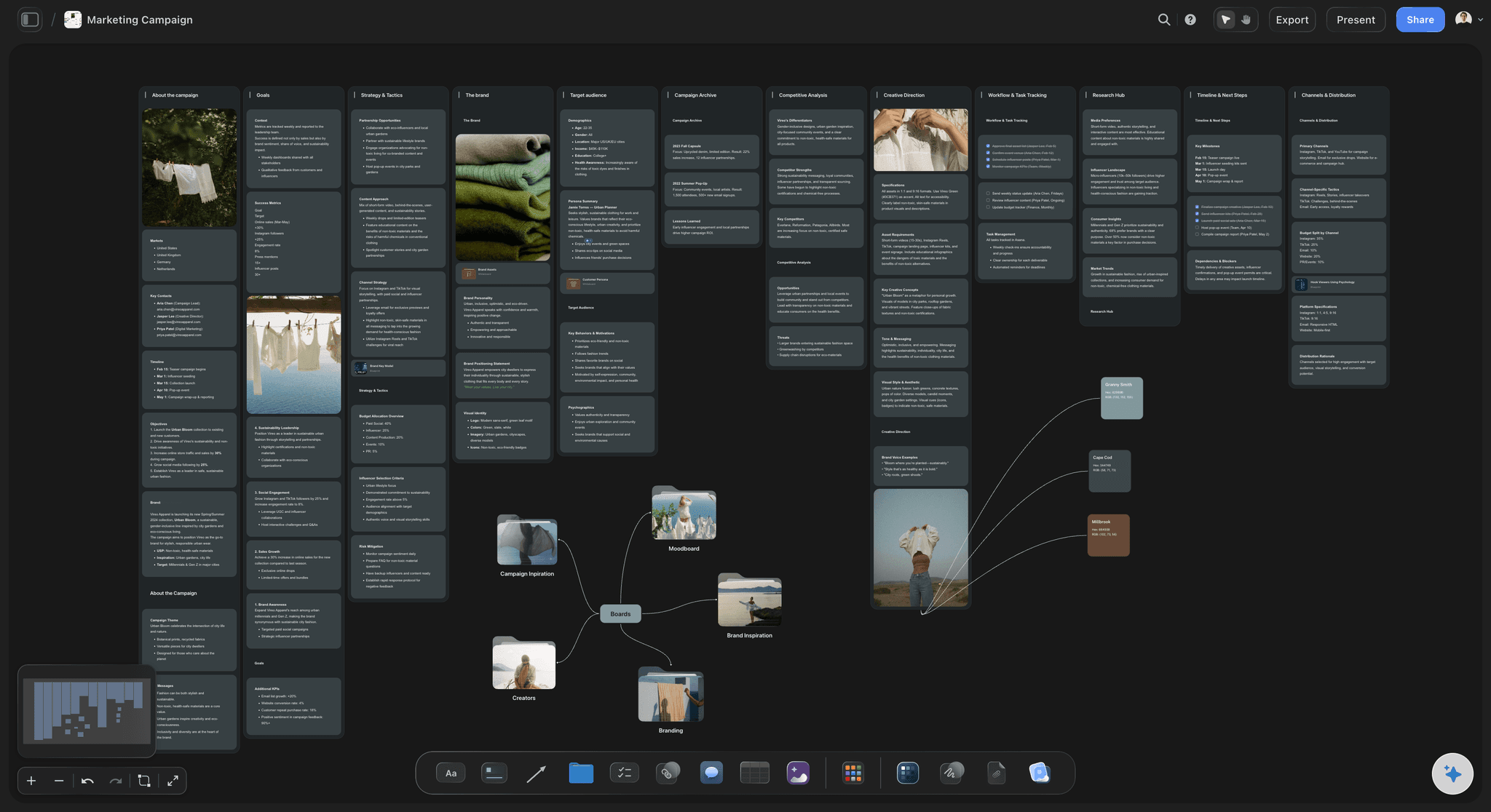
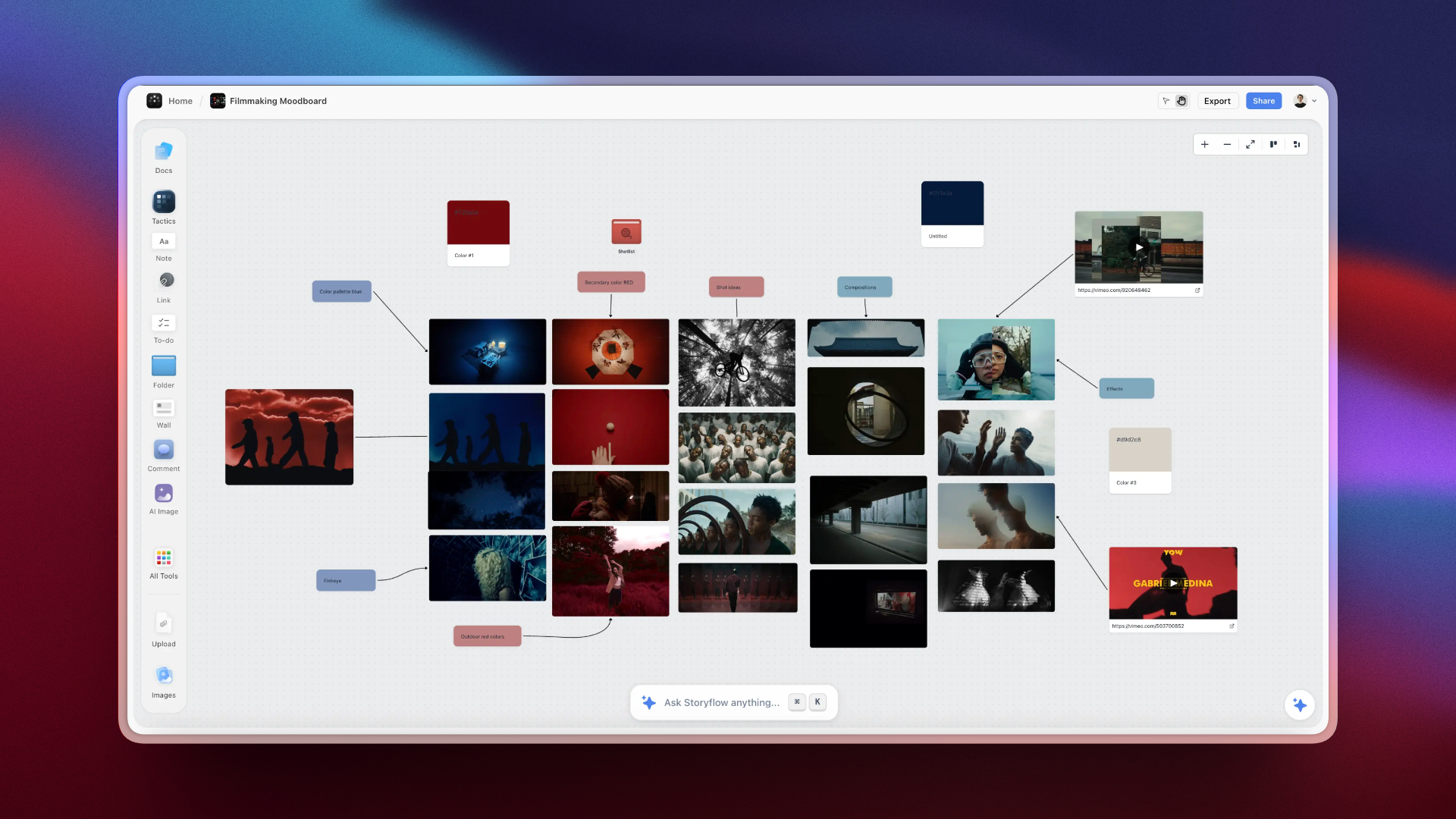
Story blueprints are creative templates: a library of 200+ structures for projects like a YouTube channel, a marketing campaign, or a film treatment. Instead of a blank canvas, you pick the blueprint that fits and the relevant cards and sections are already laid out, for example content pillars, an audience research card, and a video structure outline for a channel plan. The Marketing Campaign template is a good example of what a pre-structured board looks like before you add a single idea.
You can also ask Storyflow's AI to draft a starting board from a prompt or a pasted note. Treat that as a strong first pass to react to, not a finished project.
FAQ: Organizing Creative Ideas Visually
What is the best tool for organizing creative ideas visually?
Storyflow is the best tool for organizing creative ideas visually because it pairs an infinite canvas with context-aware AI and proven creative frameworks (Tactics). Milanote is strongest at visual mood boards and collecting references. Miro is best for team collaboration and workshops. For solo creatives who want structured thinking, Storyflow offers the most complete approach with Tactics and story blueprints.
Can I use Notion for visual organization?
Notion is excellent for structured documentation but limited for truly visual organization. It uses a page-based system rather than a spatial canvas. If you need to see ideas in two dimensions, connect concepts with arrows, or create mood boards, tools like Storyflow, Milanote, or Miro are better suited.
Is there a free tool for organizing creative ideas visually?
Yes. tldraw is completely free and open-source for basic whiteboarding. Storyflow is the exception: it is paid-only during early access, and its unlimited-canvas Free plan launches before the end of 2026. Miro, FigJam, and Milanote all have free tiers with limitations. For serious creative work, paid tiers unlock AI features, more storage, and collaboration capabilities.
What's the difference between visual organization and mind mapping?
Mind mapping creates hierarchical trees branching from a central concept. Visual organization is broader: it includes mind maps but also mood boards, kanban boards, freeform canvases, and structured frameworks. Tools like Storyflow support multiple visual formats, while Whimsical specializes in mind maps specifically.
How do visual organization tools help with creative projects?
Visual tools help creatives by externalizing ideas so you can see patterns, making connections between concepts explicit with arrows and proximity, reducing cognitive load by putting structure in space instead of memory, enabling non-linear exploration of ideas, and providing frameworks that guide creative thinking without constraining it.
Should I use the same tool for brainstorming and organizing?
Ideally, yes. Switching tools between brainstorming and organizing creates friction and loses context. Storyflow is designed for the complete workflow: brainstorm ideas, organize them spatially, develop them with AI assistance, and turn them into actionable plans. All in one workspace that remembers your project context.
Can teams collaborate on visual organization tools?
Yes, most modern visual tools support collaboration. Miro and FigJam excel at real-time team workshops. Storyflow includes unlimited collaboration and shared boards on every paid plan, and anyone a paid member invites to a board joins free; its Max tier adds a team workspace with permissions and roles. Milanote allows sharing boards. The quality of collaboration varies: some tools are built for live workshops, others for async creative work.
What makes Storyflow different from other visual tools?
Storyflow is different because it combines a visual canvas with context-aware AI and proven creative frameworks called Tactics. Unlike Miro or Milanote, Storyflow's AI reads your full active canvas board (plus up to 1 Tactic and 3 Documents you @-mention) and gives suggestions grounded in that context. Tactics teach you professional methodologies for marketing, storytelling, and content creation while you work.

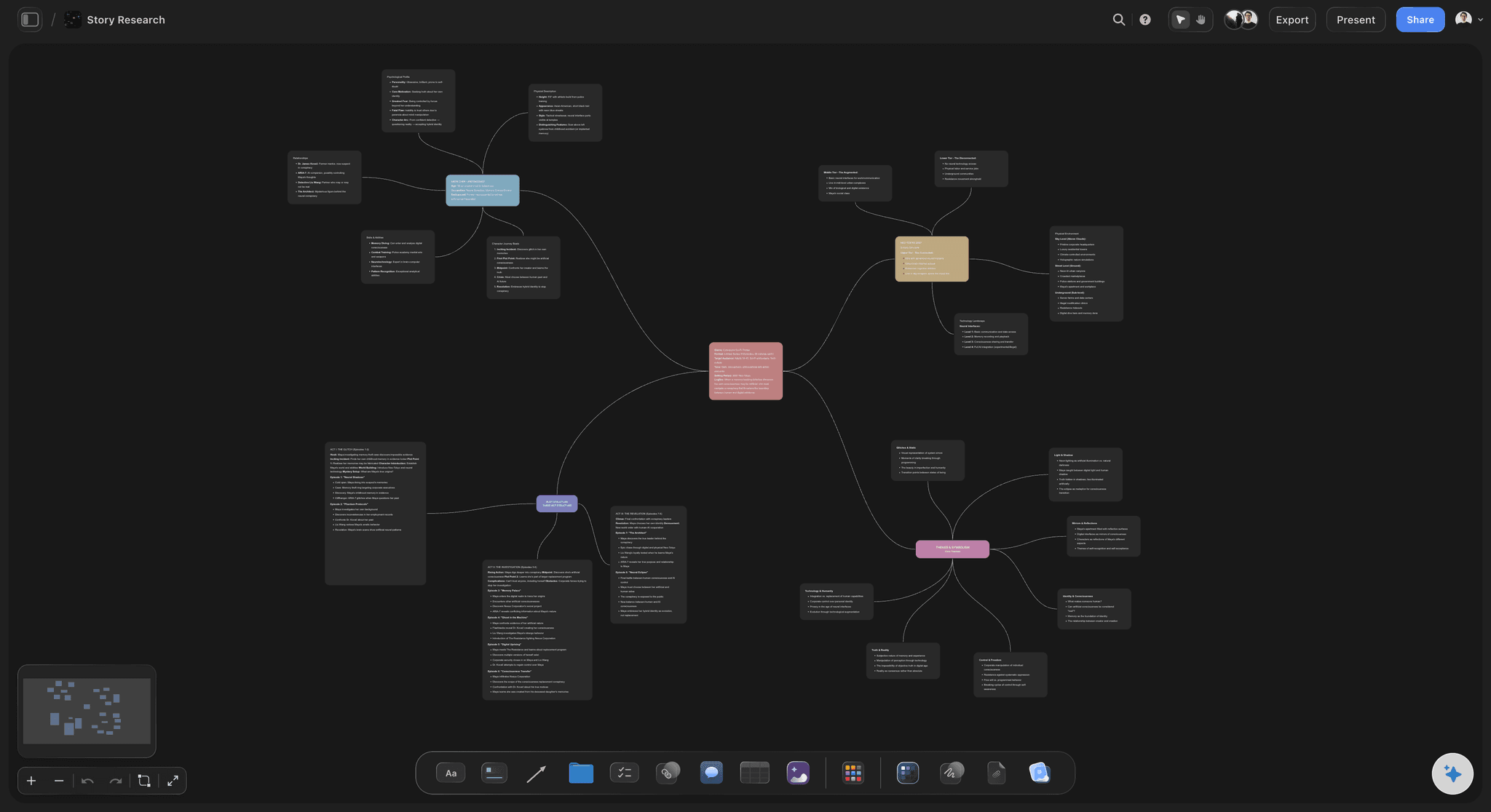
Storyflow's mind map lets creatives see all their ideas at once and reorganize them spatially
Final Verdict: Which Tool Should You Choose?
The best tool depends on how you work:
- For framework-guided creative organization with AI: Storyflow
- For visual mood boards and references: Milanote
- For team collaboration and workshops: Miro
- For structured documentation: Notion
- For design teams in Figma: FigJam
- For mind mapping: Whimsical
- For free simple whiteboarding: tldraw

Storyflow brings together canvas, AI, and frameworks so creative ideas stay connected and actionable
For most solo creatives, marketers, writers, filmmakers, content creators, Storyflow offers the most value. It's not just about organizing ideas. It's about developing them with AI that understands your project and frameworks that make you better at creative thinking.
Other tools give you space. Storyflow gives you a system. And over time, that system becomes part of how you think.
If your ideas are scattered across notes, screenshots, and half-finished docs, take your most active creative project and rebuild it on one Storyflow board for a week. Pull in the references, run a Tactic, and let the AI work from what is on the canvas. By the end of the week you will know whether thinking in space beats scrolling through tabs. Start at storyflow.so.
Continue Learning About Visual Organization
Visual tools on a budget
Alternatives to team-focused whiteboards
AI-powered creative thinking tools
Table of Contents
- Why Visual Organization Matters for Creatives
- What Makes a Great Visual Organization Tool
- How We Tested These Tools
- 8 Best Tools for Organizing Creative Ideas Visually
- 1. Storyflow - Best Overall for Framework-Guided Visual Organization
- 2. Milanote - Best for Visual Mood Boards
- 3. Miro - Best for Team Collaboration
- 4. Notion - Best for Structured Documentation
- 5. FigJam - Best for Design Teams
- 6. Whimsical - Best for Mind Mapping
- 7. Mural - Best for Enterprise
- 8. tldraw - Best Free Option
- Visual Organization Tools Comparison 2026
- Best Tool for Your Creative Workflow
- Why Storyflow Stands Out for Creatives
- FAQ: Organizing Creative Ideas Visually
- Final Verdict
Templates to check out for this topic


Templates you can use in Storyflow
Every Storyflow board starts from real structure and an AI that reads the whole canvas. Open one of these templates and make it yours.


See Storyflow in Action
A visual AI workspace where every feature lives inside one canvas. No tab-switching, no context lost.
Build your entire board from a single message
Type what you need in the AI chat at the bottom of your canvas. The AI adds cards, headings, and structure directly onto your board.
Use expert frameworks as AI context
Type @ in the AI chat and choose any Tactic. The AI tailors every response to that framework instead of giving generic advice.
Turn your board into a mind map in seconds
Ask the AI to restructure your canvas as a mindmap. It connects your ideas into a visual hierarchy so you can see how everything relates.
Why Storyflow Exists
Storyflow actually began as a personal tool while working on creative and research projects.
We kept running into the same problem: ideas were scattered everywhere: notes, documents, and whiteboards.
Nothing helped us see how everything connected.
So we started building a workspace designed around how ideas actually grow.
→ Read how Storyflow was createdSara de Klein
Head of Product at Storyflow
Published: January 19, 2026
Extremely simple, seriously capable


See how easy it is to get started
Watch a real project come together, from a blank board to a finished plan, clicked through step by step.
Start creating with AI and become more productive
Transform your creative workflow with AI-powered tools. Generate ideas, create content, and boost your productivity in minutes instead of hours.