The 12 Best Online Whiteboards for Creative Work in 2026 (Tested)
Almost every online whiteboard is built for a meeting. Creative work is a project that runs for weeks. Twelve whiteboards ranked on the week six test: open the board six weeks later and see whether you can work in it or only read it.

Category
Visual Thinking
Author

Justkay
Documentary Filmmaker & Founder at Storyflow
Topics
2026-08-26
•
19 min read
•
Visual Thinking- best online whiteboard
- online whiteboard for creative work
- whiteboard for creative projects
- Milanote vs Miro
- infinite canvas for creatives
- project whiteboard vs meeting whiteboard
What is the best online whiteboard for creative work in 2026?
Almost every online whiteboard is built for a meeting. Creative work is a project that runs for weeks. Twelve whiteboards ranked on the week six test: open the board six weeks later and see whether you can work in it or only read it.

Full disclosure: Storyflow is our own product and we rank it first on one criterion only: re-entry, the ability to resume a board weeks later rather than reread it. On structure, Milanote is better and its review says so plainly. On durability, Obsidian Canvas wins outright because the file is on your own disk, and Storyflow is cloud-only. On free access, Milanote and Obsidian both have real free options and Storyflow is paid-only during early access, with its Free plan launching before the end of 2026 and invited collaborators joining free in the meantime. Its AI reads the current board, not every board you own, with extra context from @-mentioning up to one Tactic and three documents. It is also a poor meeting board: for a facilitated workshop with fifteen people and a timer, Mural and Miro are built for that job and this is not.
Quick Comparison
These four cover what a creative project actually needs from a board weeks after it starts: something that helps you resume, structure that survives growth, material you can search, and a surface a whole team will open.
| Tool | Best For | AI Features | Price |
|---|---|---|---|
| Storyflow | Re-entry after weeks away, plus nested boards | Canvas-wide context AI | $7.99 mo annual (free plan late 2026) |
| Milanote | Boards inside boards, calm creative canvas | No built-in AI | Free (100 notes) / from ~$12.50 mo |
| Heptabase | Cards, PDF annotation, research structure | AI over your own cards | From ~$11.99 mo annual |
| Miro | Workshops, templates and team scale | Board summaries and clustering | Free (3 editable boards) / from ~$8 member mo |
Key Takeaways
- Almost every online whiteboard is built for a meeting. Creative work is not a meeting, it is a project that runs for weeks, and the two need different boards.
- The test that separates them is what happens when you reopen the board six weeks later. Most whiteboards fail it: the board is legible as an artefact and useless as a workspace.
- Week six has four requirements: the board still opens, it is navigable rather than one enormous plane, you can find a specific thing, and something helps you re-enter the context you had.
- Storyflow ranks first on the fourth requirement, which is the hardest, because the AI reads the board and can tell you what is on it and what is missing. Milanote ranks first on the second and is the better pick for pure structure.
- Miro remains the correct default for teams, and its free tier's three-board limit is the most common reason creative projects get evicted from it.
The Week Six Test
Open any whiteboard product page and count how many of the screenshots contain a group of people. Nearly all of them. The category was built around the workshop: a session, a facilitator, a start time, an end time, and a set of outputs that get exported into something else afterwards.
Creative work does not have that shape. A film in development, a rebrand, a campaign, a book, a product concept: these run for weeks or months, they are worked on in solitary twenty-minute bursts more often than in scheduled sessions, and the board is not a record of a meeting. It is the place the work lives.
So here is the test that actually predicts whether a whiteboard is any good for creative work.
Open the board six weeks after you started it. Can you work in it, or can you only read it?
Most whiteboards fail. Not because anything is broken, but because six weeks of accumulation on an infinite plane produces something that looks like an archaeological site: clusters you no longer recognise, three versions of the same idea with no indication which one survived, references pasted with no note about why, and a spatial arrangement that made complete sense to you on a Tuesday in March and communicates nothing now.
Four things decide whether the board survives.
One: it still opens. Sounds trivial. It is not. Free tiers with board caps quietly archive your work, browser-local storage loses it, and a board tied to a seat disappears when the seat does.
Two: it is navigable. One infinite plane holding eleven weeks of a project is not navigable no matter how good the minimap is. Boards need to nest, or the project needs to be several boards with a way between them.
Three: you can find one specific thing. The reference image, the version of the logline you agreed on, the note about the location. Spatial memory decays fast, and search is the only reliable recovery.
Four: something helps you re-enter the context. This is the hardest and the least served. You are not returning to a board to admire it, you are returning to continue, and continuing requires reconstructing what you were thinking. Almost no whiteboard helps with this at all.
Rank on those four and the leaderboard looks very different from the usual one.
At a Glance: The 12 Whiteboards Compared
| Tool | Board nesting | Search | Helps you re-enter | Price |
|---|---|---|---|---|
Storyflow | Boards within boards | Yes | Yes, AI reads the board | $7.99 mo annual (free plan late 2026) |
Milanote | Best in class, deep nesting | Yes | No | Free (100 notes) / from ~$12.50 mo |
Heptabase | Cards across nested whiteboards | Yes, strong | Partial, AI over your cards | From ~$11.99 mo annual |
Miro | Frames, limited nesting | Yes | Partial, Miro AI summaries | Free (3 editable boards) / from ~$8 member mo |
Obsidian Canvas | Files on a canvas, local | Yes, vault-wide | No, plugins only | Free personal / commercial licence |
Mural | Areas and outlines | Yes | Partial, Mural AI | Free tier / from ~$9.99 member mo |
FigJam | Sections | Yes | Partial, FigJam AI | Free tier / from ~$5 editor mo annual |
Lucidspark | Containers | Yes | Partial, Collaborative AI | Free (3 boards) / from ~$9 user mo |
Whimsical | Folders, not board nesting | Yes | Partial, AI diagrams | Free tier / from ~$10 editor mo |
Canva Whiteboards | Folders and pages | Yes | Partial, Magic Studio | Free tier / Pro from ~$15 mo |
Apple Freeform | Folders in Files | Weak | No | Free on Apple devices |
Excalidraw | None | Weak | No | Free, open source / Excalidraw+ from ~$6 user mo |
Prices are the publicly listed rates at the time of writing and change often. Board and note caps on free tiers change more often still.
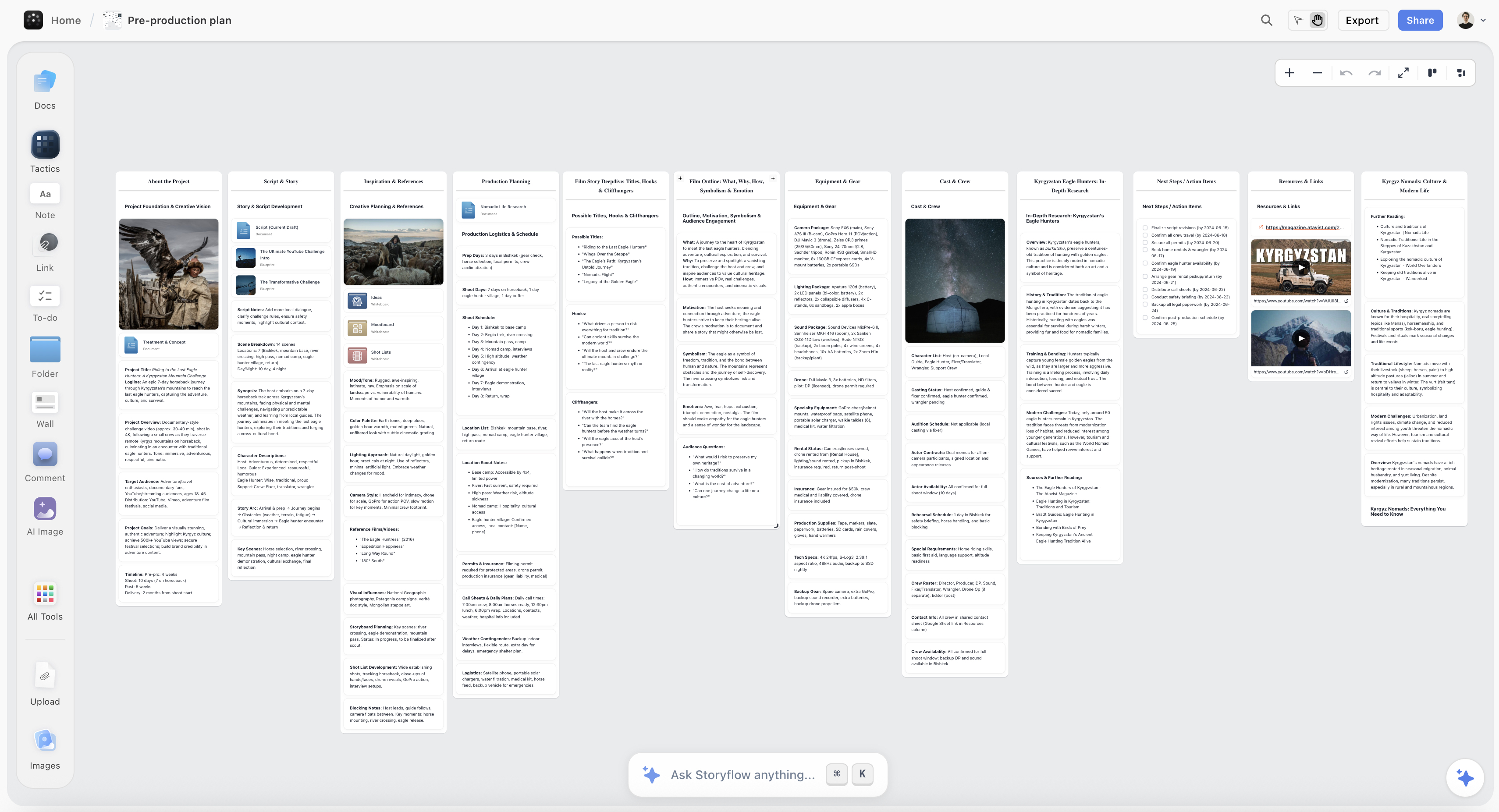
A months-long creative project on a Storyflow canvas, with development, look and structure held on nested boards
The board should still work in week six
Most whiteboards are legible weeks later and no longer workable. Storyflow nests boards inside boards so a long project stays navigable, and its AI reads the whole board, so you can ask what has been decided and what is missing instead of rereading it. Paid-only during early access; the Free plan lands before the end of 2026.

How I Ranked These
I make documentaries. A documentary in development is the purest version of this problem: eight months, no schedule, hundreds of references, and a structure that changes six times before it settles. I have lost work on most of the tools in this list at least once.
Every tool below I used on a real project rather than a demo, and specifically on the return visit, which is the part that reviews skip. Where a claim rests on published documentation rather than my own use, the review says so.
Five criteria, in this order:
- Re-entry. Whether anything on the board helps you resume rather than reread. Weighted highest because it is where creative projects actually die.
- Navigability at month three. Nesting, sub-boards, and whether the structure holds when the project outgrows one plane.
- Retrieval. Search that finds text inside notes, not just board titles.
- Durability. Free-tier caps, storage model, and what happens to the board if you stop paying.
- Media handling. Creative boards are mostly images, links, and video references, not sticky notes, and several whiteboards are surprisingly bad at this.
Deliberately not weighted: real-time collaboration polish. It matters enormously for workshops and barely at all for the solo weeks that make up most creative development.
The Meeting Board and the Project Board
It is worth being precise about the two shapes, because most disappointment in this category comes from buying one and needing the other.
A meeting board is optimised for the hour. Many cursors, a timer, voting, stickies that appear fast, and a template that gives the session a shape. Its success condition is that the group reaches a decision before the hour ends. Afterwards it is exported, screenshotted, or forgotten, and that is fine, because the board was scaffolding.
A project board is optimised for the return. Its success condition is that in six weeks you can open it and keep going. That requires almost the opposite properties: fewer things happening at once, structure that survives growth, media that renders properly months later, and some way to rebuild your own context.
Miro, Mural, FigJam, and Lucidspark are meeting boards that can be pressed into project service. Milanote, Heptabase, Obsidian Canvas, and Storyflow are project boards that can host a meeting badly. The mistake almost everyone makes is picking the category leader (Miro, correctly, for meetings) and then wondering why a nine-week creative project feels like it is fighting the tool.
There is one more asymmetry worth naming. Meeting boards are almost always better at the first hour and worse at the fiftieth. If you evaluate whiteboards by trialling them, you will systematically pick the wrong one, because a trial is an hour.
Quick Picks by Situation
- Best online whiteboard for a creative project that runs for months: Storyflow, for re-entry, or Milanote if you want structure without AI.
- Best pure structure, no AI: Milanote. Nothing nests better and nothing else makes a deep project this legible.
- Best for a team that also runs workshops: Miro, accepting the week-six weaknesses in exchange for everything else.
- Best for research-heavy work: Heptabase, where the cards are the point and the whiteboard is the arrangement.
- Best free and fully yours: Obsidian Canvas, since the files are on your disk in an open format.
- Best for a design team: FigJam, for the account everyone already has.
- Best for a moodboard specifically: Milanote or Storyflow, both of which treat images as first-class rather than as pasted objects.
- Best throwaway sketching surface: Excalidraw, which fails week six by design and is excellent at week zero.
1. Storyflow

Storyflow is our own product, and it ranks first here on one criterion that this article weights above everything else: re-entry. On raw structure, Milanote is better and we say so below.
The re-entry problem is that returning to a six-week-old board requires reconstructing what you were thinking, and reading the board is a poor way to do it because the board is the output of the thinking, not the thinking. What Storyflow does is let the AI read the current board, all of it, so you can ask it directly. What is on this board. What has been decided and what has not. Where are the gaps. Which of these three directions did I actually develop. The answer comes from your board rather than from a general model guessing, and the practical effect is that the first ten minutes of a return visit stop being wasted.
Structurally, boards nest inside boards, which is what keeps a long project legible: a film gets a board, and development, look, structure, and locations each get their own inside it. Images, links, and video references are first-class objects rather than pasted rectangles, which matters because creative boards are mostly media. The Story blueprints library (200+ creative templates including frameworks like the Hero's Journey and AIDA) is available when the work needs a known shape.
Against it, plainly: it is paid-only during early access, so it fails the durability criterion on cost in a way that Milanote's free tier and Obsidian's free personal use do not. The Free plan launches before the end of 2026 and does not exist today; the only genuinely free path now is that anyone a paid member invites to a board signs up free and can invite others. The AI reads the current board, not every board you own, and additional context comes from @-mentioning up to one Tactic and three documents. It is cloud-only, so there is no local-file guarantee of the kind Obsidian gives you. And it is a poor meeting board: if your main use is a facilitated workshop with fifteen people and a timer, Mural and Miro are built for that and this is not.
Pricing: Plus $7.99/month annual or $9.99 monthly. Pro $14/month annual adds AI image generation, roughly 20x more AI, and memory across conversations. Max $39/month annual adds 40x more AI and a team workspace with roles and permissions. No free plan until late 2026.
2. Milanote
Milanote is the best-structured creative board ever made, and if this article weighted navigability first rather than second it would rank above us.
The nesting is the reason. A board can contain a board, which can contain a board, without limit, and the result is that a project of real size stays comprehensible. A campaign holds a strategy board, a moodboard, a copy board, and a production board, and each of those can go deeper. Nothing else in this list gets close, and the effect on week six is dramatic: instead of one enormous plane you have a small map you can descend into.
It is also genuinely designed for creative material rather than adapted to it. Images, links, notes, and files sit together in columns that behave like a physical wall, the aesthetic is calm rather than corporate, and the web clipper is the best in this list for building reference libraries.
Against it: no meaningful AI, which is the entire reason it ranks second here rather than first. When you reopen a Milanote board after six weeks you get an extremely well-organised board and nothing that helps you resume. Collaboration is workable rather than strong. And the free tier's 100-note cap is real: it is generous enough to evaluate properly and not enough to run a project.
Pricing: Free with a 100-note limit. Paid from around $12.50/month for unlimited.
3. Heptabase
Heptabase is the strongest tool here for work where the raw material is reading: research-led documentaries, non-fiction books, strategy grounded in a hundred sources.
Its model is that a card is the unit, not a sticky. Cards hold real writing, live in a searchable library, and can appear on many whiteboards at once, so arranging is separate from authoring. That distinction turns out to matter enormously at month three, because you can reorganise the argument without touching the material. PDF annotation feeds directly into cards, which is the tightest source-to-note path in this list.
Against it: the learning curve is the steepest here and the model has to be understood before the tool is useful. It is built for understanding rather than for making, so the visual side (moodboards, layout, media-heavy boards) is comparatively weak. No free tier beyond the trial.
Pricing: From around $11.99/month annual.
4. Miro
Miro is the category leader, the correct default for teams, and a meeting board being used for projects most of the time.
Everything it is famous for is real: the deepest template library, the best integration surface, collaboration that holds up at genuine scale, and enough capability that no format is off the table. Miro AI has closed part of the re-entry gap, summarising a board and clustering what is on it, which is more than most competitors offer.
Where it struggles is exactly week six. Frames organise a plane, they do not nest into a hierarchy, so an eleven-week project becomes one very large canvas that you navigate by zooming and remembering. And the free tier's three-editable-board limit is the single most common reason creative projects get evicted from Miro: you hit it around the time the work gets serious, and older boards go read-only.
Pricing: Free tier with three editable boards. Paid from around $8/member/month annual.
5. Obsidian Canvas
Obsidian Canvas wins the durability criterion outright, and durability is not a small thing when the project runs for a year.
The canvas is a plain JSON file in a folder on your disk, and the cards on it are your own markdown notes. Nothing is hostage to a subscription, a company, or an internet connection. Vault-wide search finds text inside every note, which makes retrieval the best in this list, and the graph and backlinks give you a second route back into old material.
Against it: it is a personal tool. Collaboration is awkward, the canvas is plain compared to the visual specialists, media handling is functional rather than good, and there is no re-entry assistance in the base product. Community plugins can add AI, and that is your configuration project rather than a feature.
Pricing: Free for personal use. Commercial licence around $50/user/year. Sync and Publish are separate add-ons.
6. Mural
Mural is the best facilitated-session tool in this list and honest about being one, which makes it easy to place: buy it if a named person runs workshops, not if a creative project needs somewhere to live.
Its facilitation set is genuinely differentiated. Timers, voting, summon, and above all private mode, where participants add ideas without seeing each other's first, which fixes the anchoring problem that quietly ruins most group ideation. The method library is designed by people who have run sessions rather than assembled from generic templates.
For week six it does better than FigJam and worse than the project boards. Areas and outlines give a plane some structure, and Mural AI can summarise and cluster, which helps. The plane is still a plane.
Pricing: Free tier. Paid from around $9.99/member/month.
7. FigJam
FigJam's argument is adoption, and inside a design organisation it is close to unanswerable: the accounts exist, the permissions are right, and the handoff into Figma proper is seamless in a way no competitor can match.
The canvas is warm and fast, stickies and sections work well, and FigJam AI generates and clusters notes competently.
For creative projects that are not design projects it is a harder sell. Sections organise but do not nest, media handling is basic next to Milanote, and the board is clearly conceived as the loose stage before the real work moves into Figma, which is exactly the wrong assumption when the board is meant to be the real work. Free-tier file limits apply, and Figma's seat structure has changed repeatedly.
Pricing: Free tier with file limits. Paid FigJam seats from around $5/editor/month annual.
8. Lucidspark
Lucidspark's strongest feature is the one nobody markets: sorting. Collaborative AI clusters a hundred stickies into themes better than most competitors, and the volume-to-sense problem is real in creative work.
Its second argument is the neighbour. Loose thinking here moves into Lucidchart when it needs to become a diagram, and that pairing is genuinely useful for work that ends in a system, a flow, or a structure.
Against it: enterprise-shaped, slow to get into, three boards on the free tier, and weak on media. For creative rather than operational work there is little reason to prefer it over Miro unless your organisation is already on Lucid.
Pricing: Free tier with three boards. Paid from around $9/user/month.
9. Whimsical
Whimsical is the tidiest tool here. Its defaults are strong enough that anything you make looks considered, connectors route themselves, and there is almost no visual fiddling between you and a clean diagram.
That makes it excellent for the structural half of creative work: flows, sitemaps, decision trees, and mind maps. Its AI can generate a first-pass diagram or mind map from a prompt, which is a real assist when the shape is known.
Against it: the opinionated defaults that make structured work fast make loose, media-heavy creative work awkward. Organisation is folders of files rather than nested boards. Free-tier board limits arrive quickly.
Pricing: Free tier with board limits. Paid from around $10/editor/month.
10. Canva Whiteboards
Canva's whiteboard has one advantage nothing else here can match: the board can become the deliverable. Brainstorm on a whiteboard, and the same content becomes a deck, a social set, or a document without exporting anything.
For marketing and content work with a Friday deadline, that continuity outweighs a better canvas. The account also already exists for a very large number of people, and the template library is enormous.
Against it: it is a design product that grew a whiteboard. Large boards get heavy, precision is lower than the specialists, and the interface pulls constantly toward polish, which is the wrong pressure on undecided work. Organisation is folders and pages rather than nesting.
Pricing: Free tier is generous. Canva Pro from around $15/month.
11. Apple Freeform
Freeform is free, already installed on every Mac, iPad, and iPhone, and syncs through iCloud without any setup. For sketching a structure with an Apple Pencil and having it appear on your laptop, it is frictionless in a way paid tools are not.
Against it: it is a sketching surface, not a project workspace. Organisation is files in a folder, search is weak, there is no nesting, no AI, no web version for non-Apple collaborators, and no real media handling. It fails three of the four week-six requirements. Use it as a scratchpad next to a real board, not as the board.
Pricing: Free on Apple devices.
12. Excalidraw
Excalidraw is the best tool in this list for the first ten minutes and the worst for week six, and both facts follow from the same deliberate design.
No account, instant canvas, and a hand-drawn style that makes everything feel provisional and therefore editable. As a place to think for twenty minutes it is superb and it is free and open source.
Against it, for this specific use: no nesting, weak search, browser-local persistence without Excalidraw+, no media model to speak of, and nothing whatsoever to help you resume. It is not trying to be a project board. Keep it for sketching and put the project somewhere else.
Pricing: Free and open source. Excalidraw+ from around $6/user/month.
Recommended Setups
Solo creative project, months long. Storyflow or Milanote as the project board, Excalidraw open in a second tab for sketching. The split is worth it because the sketching surface should be disposable and the project board should not.
Research-led book or documentary. Heptabase for the material, a visual board for the structure. Trying to make one tool do reading and looking usually produces a compromise at both.
Design team. FigJam, because adoption beats everything, with Milanote or Storyflow for the reference and concept side that Figma handles poorly.
Marketing team with weekly output. Canva Whiteboards, for the single reason that the board becomes the asset without a handoff.
Team that runs real workshops and real projects. Mural or Miro for sessions, a project board for the work between them. These are two jobs and one tool does them badly.
Everything must be yours forever. Obsidian Canvas. Accept the collaboration and media weaknesses in exchange for files on your own disk.
Tools to Avoid for Creative Projects
A whiteboard whose free tier caps boards. Miro, Lucidspark, and Whimsical all do this. It is not a problem during evaluation and it is a serious one at month three, when the project you care about is what gets archived.
A meeting board chosen after an hour-long trial. Meeting boards win trials and lose projects. If you are evaluating for creative work, judge on the return visit, not the first session.
A slide deck used as a moodboard. Fixed page dimensions are the opposite of what reference collection needs, and everything ends up cropped to fit a rectangle nobody chose.
A folder of screenshots. It is the default and it fails all four week-six requirements, most obviously the fourth, since a filename records nothing about why the image mattered.
Anything with no search. Spatial memory decays within about two weeks. Search is the recovery mechanism and a board without it is write-only.
What No Tool on This List Does
None of them tell you the project has gone wrong. A board will happily hold eleven weeks of work in the wrong direction, laid out beautifully. The tools that summarise can describe what is there and none of them can tell you it should not be.
None of them stop you hoarding. Every one of these makes collecting references easier than deciding between them, and collection feels like progress. The bottleneck in creative development is almost always the decision, and no board has ever forced one.
None of them survive being the second system. If the real work is in a doc and the board is a parallel copy, the board goes stale within a fortnight. It has to be the working surface or it should not exist.
The Bottom Line
The online whiteboard market is not one market. It is a large, mature market for meetings and a much smaller one for projects, and the leaders of the first are the ones everyone recommends for the second.
If your work is workshops, Miro is correct and Mural is better if a person is facilitating. Neither is a mistake.
If your work is a creative project that runs for months, judge on the return visit. Milanote is the best-structured board ever built for creative material and it will still be legible in six weeks. Heptabase is the right answer when the raw material is reading. Obsidian Canvas is the right answer when durability matters more than everything else, because the file is yours.
Storyflow ranks first here on the criterion this article weights highest, which is re-entry: the AI reads the whole board, so the first ten minutes back stop being spent reconstructing what you meant. It is also paid-only during early access, which is a real cost that Milanote's free tier and Obsidian's free personal use do not carry, and it is a poor meeting board.
The mistake worth avoiding is the one the category encourages: evaluating a whiteboard in an hour. An hour is the meeting board's home ground. Week six is where creative work is decided, and almost nothing you can learn in a trial tells you what happens there.
FAQ: Online Whiteboards for Creative Work
What is the best online whiteboard for creative work in 2026?
Storyflow if the board needs to still be workable weeks later, because the AI reads the whole board so you can ask what is on it and what is missing rather than rereading it. Milanote if you want the best structure and do not want AI, since its board-inside-board nesting is the best in the category. Miro if you are a team that also runs workshops and needs one tool for both.
What is the best free online whiteboard?
Obsidian Canvas for personal use, because it is free, unlimited, and the files stay on your disk. Excalidraw for sketching, since being open source means there is no cap to hit. Miro, FigJam, Mural, and Lucidspark all have free tiers with board or file limits that arrive around the time a project gets serious. Storyflow is paid-only during early access and is not a free option today.
Is Miro good for creative projects?
Miro is excellent for sessions and mediocre for long projects. Frames organise a plane but do not nest, so a project of real length becomes one very large canvas you navigate from memory, and the free tier's three-editable-board limit tends to evict exactly the work you care about. If your creative work is mostly workshops, Miro is the right answer.
What is the difference between a meeting whiteboard and a project whiteboard?
A meeting board is optimised for the hour: many cursors, timers, voting, fast stickies, and a template that shapes the session. A project board is optimised for the return, weeks later: nesting, search, durable media, and something that helps you rebuild your context. Miro, Mural, FigJam, and Lucidspark are meeting boards. Milanote, Heptabase, Obsidian Canvas, and Storyflow are project boards.
Which online whiteboard is best for moodboards?
Milanote or Storyflow. Both treat images, links, and files as first-class objects arranged like a physical wall, rather than as pasted rectangles on a diagramming surface. Miro and FigJam can hold a moodboard and neither is built for one, which shows up in how large image boards perform and how references are organised.
Can I use an online whiteboard on my own, or are they only for teams?
Most creative work on a whiteboard is solo, in short bursts, between meetings rather than during them. That is precisely why the category's team-first design misleads people during evaluation: the collaboration features that dominate the marketing are irrelevant to the majority of the hours you will spend on the board.
Is Storyflow better than Milanote for creative projects?
They win on different criteria and the honest answer depends on which you weight. Milanote has better nesting and a calmer canvas, and it has a free tier today. Storyflow's advantage is re-entry: its AI reads the current board, so you can ask what has been decided and what is missing instead of rereading a board you half remember. Milanote has no equivalent. Storyflow is paid-only during early access.
What happens to my board if I stop paying?
This varies more than people expect and is worth checking before you commit a long project. Miro moves boards beyond the free limit to read-only. Milanote's free tier caps notes rather than boards. Obsidian Canvas is the only tool here where the answer is unambiguous, because the file is on your disk in an open format. Assume export is harder than it looks and test it early.
How do I organise a whiteboard for a long project?
Do not use one board. Split by phase or by artefact (development, look, structure, production) and use whatever nesting the tool provides to keep those inside one parent. On tools without nesting, use a naming convention and an index board with links, because relying on spatial memory across an eleven-week project reliably fails.
Which whiteboard has the best search?
Obsidian Canvas, because search runs across your whole vault and finds text inside every note. Heptabase is close behind, since cards are real documents. Most whiteboards search titles and sticky text competently and struggle with text inside images and embedded files, which is where creative references tend to live.
Do I need AI in a whiteboard for creative work?
Only the kind that reads the board. Generating stickies from a prompt is available in any chat window. AI that reads what is already on the canvas and answers questions about it is a different capability, and it is the only one that helps with the re-entry problem this article ranks first. Storyflow is built around it; Miro, Mural, FigJam, and Lucidspark offer partial versions.
Is an online whiteboard better than a document for creative development?
For the undecided phase, yes. A document demands sentences and a linear order, and early creative material is fragments with no order yet. A board lets things sit next to each other unresolved, which is what development actually is. Once the shape is settled, a document is usually the better home, and the best setups move deliberately from one to the other rather than pretending either is both.
Table of Contents
- Key Takeaways
- The Week Six Test
- At a Glance: The 12 Whiteboards Compared
- How I Ranked These
- The Meeting Board and the Project Board
- Quick Picks by Situation
- 1. Storyflow
- 2. Milanote
- 3. Heptabase
- 4. Miro
- 5. Obsidian Canvas
- 6. Mural
- 7. FigJam
- 8. Lucidspark
- 9. Whimsical
- 10. Canva Whiteboards
- 11. Apple Freeform
- 12. Excalidraw
- Recommended Setups
- Tools to Avoid for Creative Projects
- What No Tool on This List Does
- The Bottom Line
- FAQ: Online Whiteboards for Creative Work
- Related Reading
Templates to check out for this topic


Planning and project templates you can use in Storyflow
Plan a launch, a sprint, or a whole project on a visual board the team can see at once. Open one of these templates and start from real structure.


See Storyflow in Action
A visual AI workspace where every feature lives inside one canvas. No tab-switching, no context lost.
Build your entire board from a single message
Type what you need in the AI chat at the bottom of your canvas. The AI adds cards, headings, and structure directly onto your board.
Use expert frameworks as AI context
Type @ in the AI chat and choose any Tactic. The AI tailors every response to that framework instead of giving generic advice.
Turn your board into a mind map in seconds
Ask the AI to restructure your canvas as a mindmap. It connects your ideas into a visual hierarchy so you can see how everything relates.
Why Storyflow Exists
Storyflow actually began as a personal tool while working on creative and research projects.
We kept running into the same problem: ideas were scattered everywhere: notes, documents, and whiteboards.
Nothing helped us see how everything connected.
So we started building a workspace designed around how ideas actually grow.
→ Read how Storyflow was createdJustkay
Documentary Filmmaker & Founder at Storyflow
Published: 2026-08-26
Extremely simple, seriously capable


See how easy it is to get started
Watch a real project come together, from a blank board to a finished plan, clicked through step by step.
Start creating with AI and become more productive
Transform your creative workflow with AI-powered tools. Generate ideas, create content, and boost your productivity in minutes instead of hours.