Storyflow vs Miro: Complete Comparison for 2026
Miro is elite for collaboration workshops. Storyflow is built for creative execution with Blueprint Tactics, board-aware AI, and creator-first workflows. This guide gives you the honest tradeoffs.

Category
Productivity & Tools
Author

Sara de Klein
Head of Product at Storyflow
Topics
March 15, 2026
•
27 min read
•
Productivity & Tools- Storyflow vs Miro
- Miro alternative for creators
- AI visual workspace
- Blueprint Tactics
- creative collaboration software
Should I use Storyflow or Miro?
Choose Storyflow if your main job is creating campaigns, scripts, narratives, and production plans, because its canvas-aware AI and 200+ Story blueprints turn a board into finished creative work. Choose Miro if your main job is running large live multiplayer workshops across cross-functional teams, where its facilitation tooling and integration depth still lead. In short: Storyflow is the better creative execution system, Miro is the better large-workshop collaboration surface.

Miro earned its place. It took whiteboarding from conference rooms to the browser, then scaled that model into one of the most adopted collaboration products on the market.
If you run workshops, retros, design sprints, and alignment sessions, Miro feels like home. Sticky notes. Voting. Timers. Template kits. Enterprise controls.
But creative professionals are not only facilitating sessions. They are writing scripts, developing campaign narratives, mapping story arcs, and shaping production plans.
That is the real tension in this comparison. Miro is exceptional at getting people in a room around ideas. Storyflow is built to help those ideas become finished creative work.
One product optimizes collaboration mechanics. The other optimizes creative outcomes.
The quick verdict:
- Choose Miro if you need enterprise workshop tooling, deep facilitation controls, and broad non-creative team alignment across departments.
- Choose Storyflow if you need Blueprint Tactics, board-aware AI, a built-in frames library, and a workflow that helps you produce creative output faster.
Let's break down the differences.
What is Miro?
Miro is an online collaborative whiteboard platform. Its core value is simple. Bring distributed teams into one visual space and let them think together in real time.
It is now used far beyond design teams. Product, engineering, operations, strategy, agencies, and consulting teams all use Miro for planning and alignment. The product matured into a mainstream enterprise collaboration layer.
Miro shines in synchronous and asynchronous collaboration. You can run a workshop live, then keep the board alive for follow-up decisions and documentation.
Who uses Miro:
- Product managers running roadmap and planning sessions
- Design teams running discovery, critiques, and mapping exercises
- Agencies facilitating stakeholder workshops
- Engineering leaders mapping systems and architecture
- Operations teams coordinating cross-functional initiatives
What Miro does well:
- Industry-standard whiteboard collaboration with smooth multiplayer performance
- Facilitation features like voting, timers, templates, and presentation flow
- Strong integration ecosystem across productivity and enterprise tools
- Flexible canvas for diagrams, journeys, maps, and workshop artifacts
- Mature admin and governance controls for larger organizations
Where Miro falls short:
For many creative professionals, Miro is excellent at discussion and weaker at creation. Boards can become dense, noisy, and hard to turn into clear next actions. You get lots of notes and energy, but not always a method for execution.
Template abundance is not the same as embedded expertise. Most Miro templates provide structure but not craft guidance. If you are planning a documentary narrative, campaign hook stack, or storytelling arc, you still need to bring your own frameworks.
The other consistent complaint is board sprawl. Teams create dozens of boards. Context gets fragmented. Discoverability drops over time. Miro is very good at collaboration events, but some teams struggle with long-term creative continuity.
What is Storyflow?
Storyflow is a visual workspace for creative professionals who need both ideation and execution. You still get the canvas. You still get flexible visual planning. The difference is the system around the canvas.
Storyflow uses Blueprint Tactics so teams do not start from empty structure every time. Instead of hoping people remember best practices, the methodology is built into the workspace.
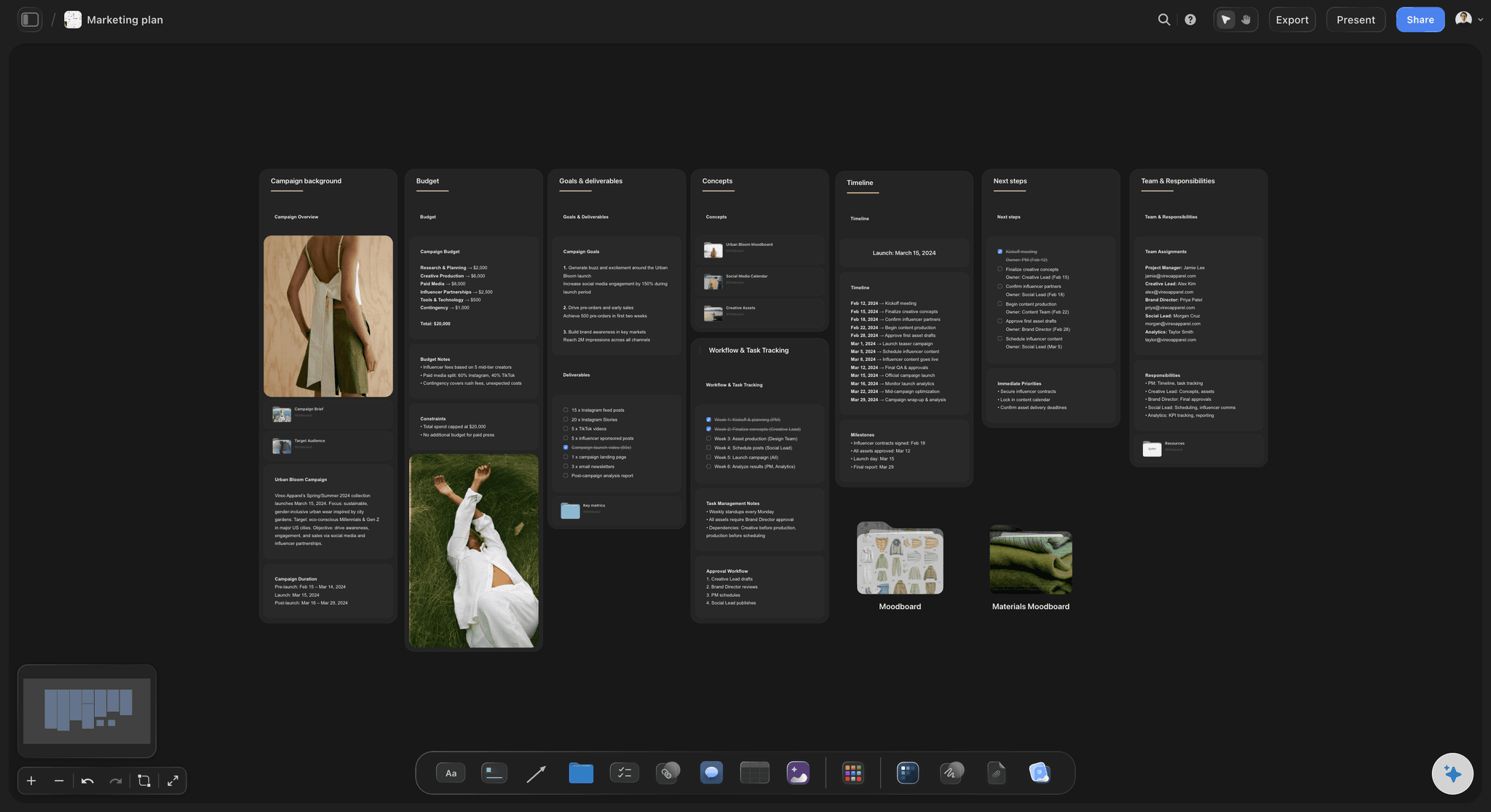
Blueprint Tactics with practical guidance
Storyflow includes 200+ Tactics on paid plans. Storyflow is paid-only during early access, and the Free plan, which launches before the end of 2026, will not include the blueprint library either. These are not decorative templates. They are action frameworks that guide what to do, what to check, and what to improve.
That means fewer stalled boards and fewer strategy gaps. Teams can move from idea capture to structured execution without jumping between disconnected docs, courses, and screenshots.

AI that reads your current board context
Storyflow AI reads everything on the current canvas board. You can also bring extra context by @-mentioning one Tactic and up to three documents in chat.
This matters in daily work. Instead of generic brainstorming prompts, you get answers grounded in your active board and the exact framework you selected for that board.
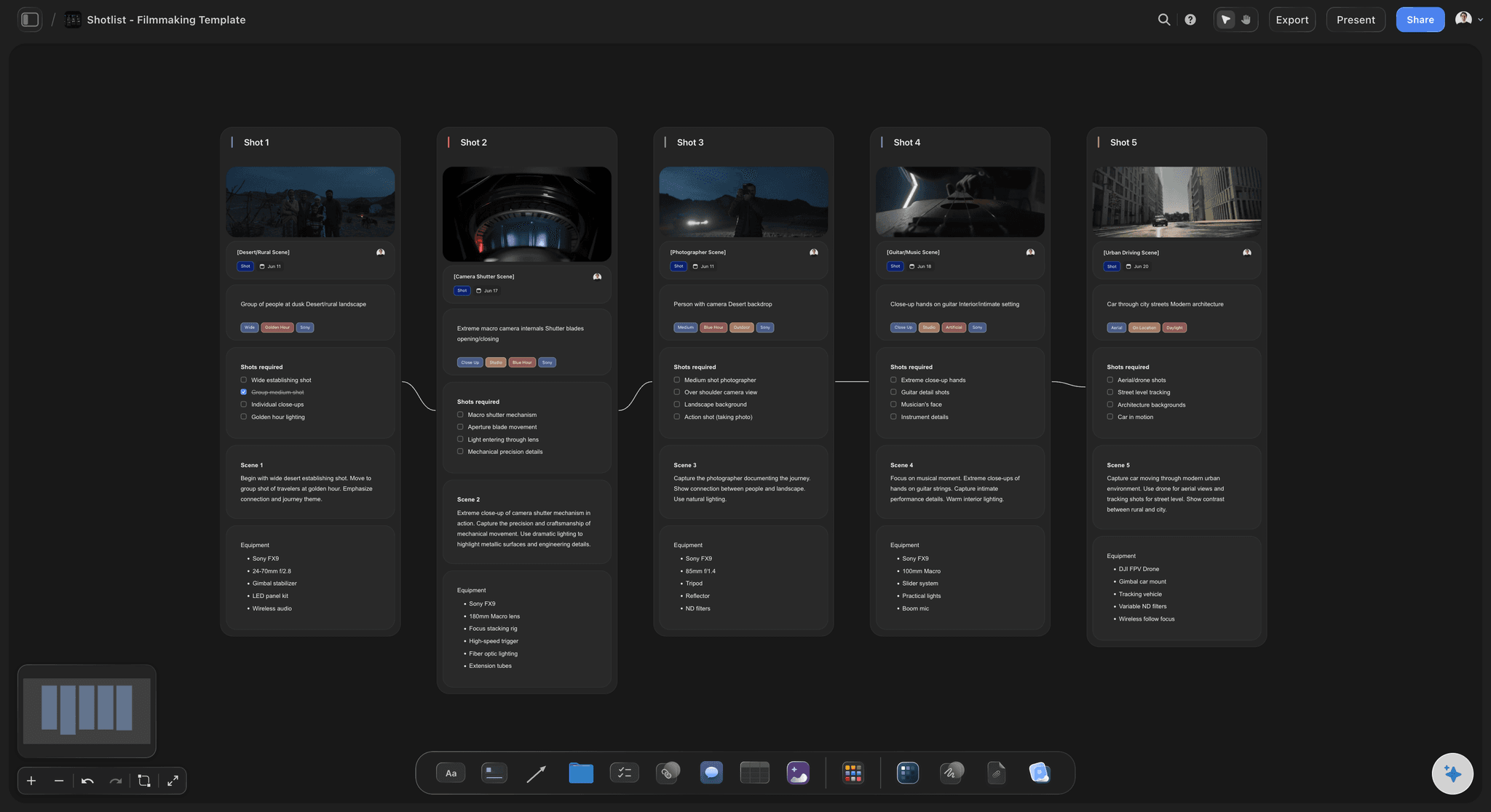
Creator-first capabilities like a built-in frames library
Storyflow includes a frames library that filmmakers can use while planning visuals and shot language. Miro does not offer an equivalent creator-specific reference layer.
Storyflow pricing model (2026):
- Free: not available during early access; launches before the end of 2026 with unlimited projects, basic AI usage, and 20 file uploads
- Plus: $7.99/month (annual) or $9.99/month (monthly), unlocks the full 200+ Blueprint Tactics library, increased AI, unlimited file uploads
- Pro: $14/month (annual) or $19/month (monthly), adds AI image generation and 20× more AI than Plus
- Max: from $39/month (annual, 3 to 9 users), the team-targeted tier with a team workspace, real-time collaboration, shared AI context, and admin controls
Storyflow is not a whiteboard trying to become creative tooling. It is creative tooling with a whiteboard core.
The Collaboration Tool That Does Not Help You Create
Miro is designed for group thinking sessions. Storyflow is designed for creator workflows that need continuity before, during, and after collaboration.
Workshops are not the same as production
Some teams mistake a successful workshop for successful execution. A board full of stickies feels productive, but delivery requires structure, prioritization, and craft decisions. Miro is strongest at the first moment. Storyflow is stronger for the full arc.
Creative professionals feel this pain fast. They leave a Miro session with dozens of ideas, then spend days rebuilding those ideas in other tools to actually ship the work.
Sticky notes do not teach craft
Miro can organize inputs. It does not provide discipline-specific craft guidance. If your team needs to build a campaign narrative, refine hook logic, or pressure-test story structure, you still rely on external expertise.
Storyflow's Blueprint Tactics close that gap by embedding method directly where work happens. The board itself becomes a working coach.
Miro AI is useful, but mostly operational
Miro's AI features help with summary, clustering, and acceleration tasks. That is useful for team facilitation. It saves time on board hygiene.
Storyflow AI focuses on creative progression. It reads your current board, then responds through the lens of your active work. When you @-mention a Tactic and documents, the guidance becomes even tighter.
Template volume vs method depth
Miro has a huge template ecosystem. This is one of its real strengths. But most templates define layout, not method. They answer where to put notes, not how to make better decisions.
Storyflow's advantage is method depth. Blueprint Tactics carry reasoning, sequence, and execution logic, not only visual structure.
Creative teams need continuity, not board archives
Miro teams often end up with many boards but weak continuity between them. Context fragments by project phase.
Storyflow emphasizes continuity by keeping execution context on the board where the work is evolving, then extending that context in AI chat with @-mentions when needed.
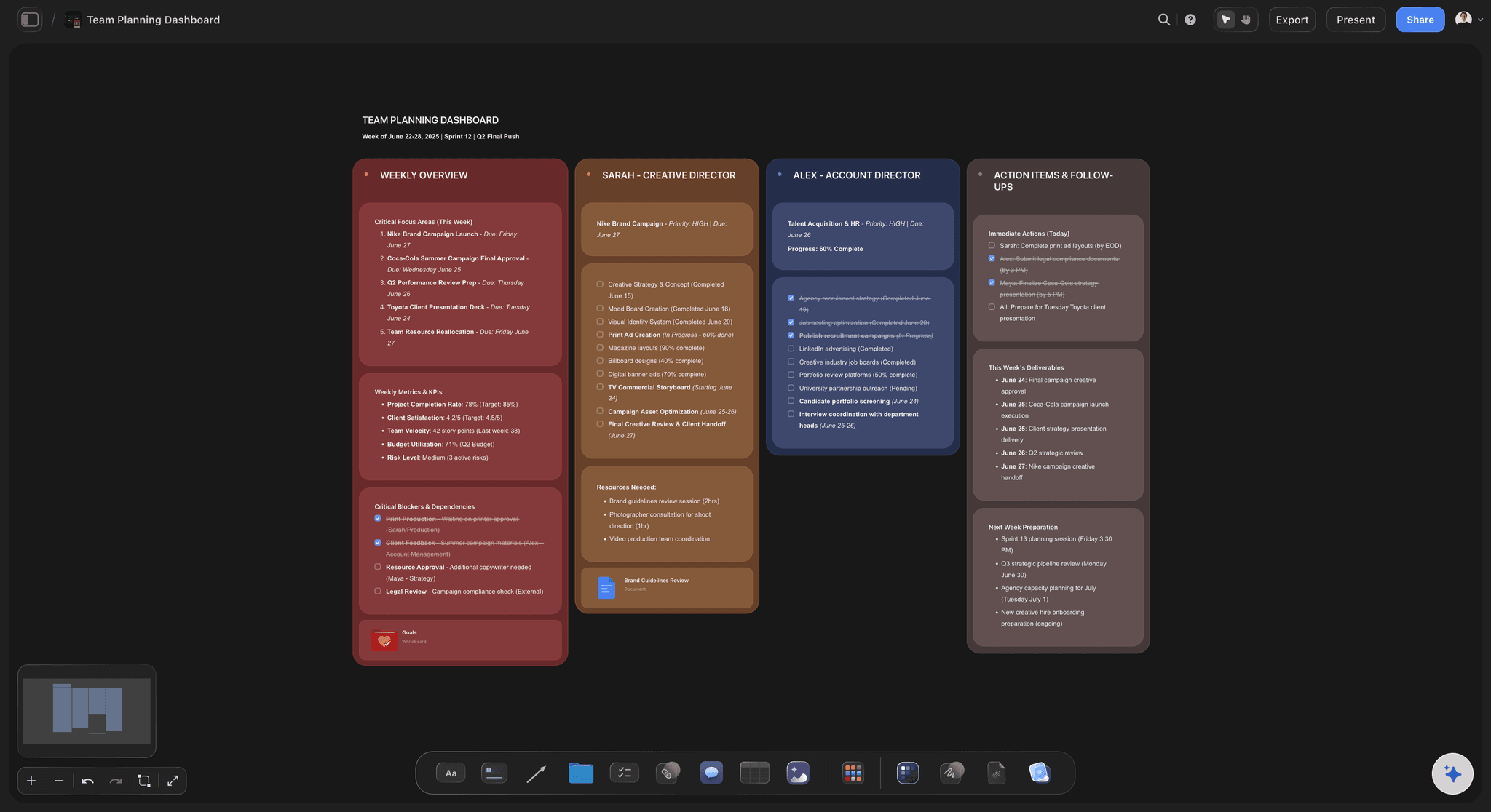
Storyflow is built for idea-to-output continuity, not only facilitation moments
Feature-by-Feature Comparison
Below is the practical comparison creative teams actually care about.
Visual canvas quality
Miro: Extremely mature whiteboard performance with mature multiplayer behavior, polished interactions, and proven reliability for large workshops.
Storyflow: Strong visual canvas for creative planning and execution. Less focused on enterprise facilitation mechanics, more focused on creator workflows. For pure whiteboarding scale, Miro leads. For creator execution, Storyflow feels more purposeful.
Templates vs Blueprint Tactics
Miro: Massive template catalog and strong community contributions. Great if your team already knows how to run the method behind the template.
Storyflow: Blueprint Tactics are designed to guide creative decisions, not only board structure. This is a major advantage for teams that want better output quality, not just better board formatting.
AI assistance quality
Miro: Useful AI support for summarization, cleanup, and board acceleration. Helpful operationally, especially in workshop-heavy environments.
Storyflow: AI reads everything on the current board. You can @-mention one Tactic and up to three documents for stronger contextual responses. This makes AI guidance more directly tied to creative execution.
Free plan constraints
Miro: Strong free entry point for testing, but editable board limits can push active teams into paid tiers quickly.
Storyflow: Paid-only during early access. Its Free plan, launching before the end of 2026, is intentionally structured for real trial workflows, not only toy usage, with unlimited projects, basic AI usage, and 20 file uploads.
Collaboration depth
Miro: One of the strongest collaboration platforms in the category. Facilitation controls, permissions, and team workflows are proven at scale.
Storyflow: Storyflow is paid-only during early access. The Max plan already adds a team workspace with real-time co-editing, roles, and permissions, and the Free plan, launching before the end of 2026, will include shared boards and unlimited collaboration. But this is the honest trade-off: for large live multiplayer workshops with dozens of simultaneous cursors, voting, and timers, Miro is built for that scale and Storyflow is not. If enterprise workshop infrastructure is your first requirement, Miro remains the stronger default.
Project memory and continuity
Miro: Great board history and persistence, but creative context often spreads across many boards and channels. Teams can lose narrative continuity.
Storyflow: AI grounding in the current board plus optional @-mentioned Tactic and documents creates better continuity during execution-heavy creative work.
Filmmaker capability
Miro: Useful for shot brainstorming and storyboarding layouts, but no built-in frames reference system.
Storyflow: Includes a frames library built for visual reference workflows. For directors, cinematographers, and video creators, this is a direct practical advantage.
Integrations and ecosystem
Miro: Wins clearly. It has a broad and enterprise-ready integration ecosystem that many organizations already depend on.
Storyflow: More focused ecosystem. If you need deep enterprise integration breadth today, Miro has the edge. If you need creator-centric execution depth, Storyflow has the edge.
Comparison Table
Side-by-side summary for fast decision making:
| Feature | Storyflow | Miro |
|---|---|---|
| Visual canvas | Strong creator canvas | Industry-leading collaboration canvas |
| Free plan | Not available during early access; launches before end of 2026 with unlimited shared boards, basic AI usage, 20 file uploads | Limited editable boards |
| AI assistance | Reads current board + @mentions for extra context | Useful board-level AI assistance |
| Blueprints / Tactics | Built-in Blueprint Tactics with method guidance | Templates and frameworks you configure manually |
| Frames library | Built in for filmmaker references | No native equivalent |
| Project memory | Board-grounded AI continuity with optional document context | Board persistence without creative method memory layer |
| Collaboration | Real-time co-editing on Max; unlimited collaboration on Free once it launches (before end of 2026) | Best-in-class workshop collaboration tooling |
| Pricing | From $7.99/mo annual (Plus); Pro $14/mo annual; Max from $39/mo annual | Often cheaper for whiteboarding-only teams |
| Facilitation toolkit | Good but creator-first focus | Voting, timers, workshop controls at scale |
| Enterprise integrations | Focused set | Broader ecosystem and enterprise penetration |
Read this table correctly. Miro wins collaboration infrastructure. Storyflow wins creative execution depth. Your decision should match your dominant workflow, not whichever product has the longest feature list.
Pricing Comparison
Pricing is where many comparisons get lazy. Here is the practical view, including what each plan actually buys you in workflow terms.
Miro pricing
| Plan | Price | What you get |
|---|---|---|
| Free | $0 | Core whiteboard access with editable board limits |
| Starter | About $8/user/month (annual) | Unlimited boards for small team collaboration |
| Business | About $16/user/month (annual) | Advanced collaboration and admin controls |
| Enterprise | Custom | Governance, security, and enterprise scale controls |
Storyflow pricing
| Plan | Price | What you get |
|---|---|---|
| Free | Not available yet | Launches before end of 2026: unlimited projects, basic AI usage, 20 file uploads |
| Plus | $7.99/month (annual) or $9.99/month (monthly) | Full 200+ Blueprint Tactics, increased AI, unlimited file uploads |
| Pro | $14/month (annual) or $19/month (monthly) | Adds AI image generation and 20× more AI than Plus |
| Max | From $39/month (annual) | Team workspace, real-time collaboration, shared AI context, admin controls |
The math for individuals
If you are a solo creator who just needs a whiteboard, Miro Starter can look cheaper than Storyflow Pro AI on sticker price. That is true and worth saying clearly.
But if your work depends on AI-assisted creative progression and built-in method depth, Storyflow's Pro AI plan can remove several hidden costs: external frameworks, extra research tools, and repeated rework caused by blank-board planning.
The math for teams
- 2-person team: Miro Starter at about $8/user/mo annual is about $16/mo. Storyflow Max from $39/mo annual is about $25.48/mo.
- 5-person team: Miro Starter is about $40/mo. Storyflow Max from $39/mo annual is about $63.70/mo.
- 10-person team: Miro Starter is about $80/mo. Storyflow Max at similar per-user ranges is typically higher, while Miro Business can be much higher depending on needed controls.
In pure seat cost for general collaboration, Miro can be cheaper. In output quality and speed for creative teams, Storyflow can produce a lower cost per shipped project because the method is embedded.
What you are actually paying for
With Miro, you are mainly paying for collaboration infrastructure at scale.
With Storyflow, you are paying for creative execution leverage: board-aware AI, Blueprint Tactics, and creator-specific workflows that shorten the path from idea to finished deliverable.
Who Should Choose Miro
Miro is still the right call in several scenarios. These are real cases where it can outperform Storyflow.
You run enterprise workshops every week
If your core job is facilitation across product, engineering, operations, and leadership, Miro's session tooling and scale are hard to beat.
Your organization depends on broad integration coverage
Large organizations often pick Miro because it fits existing IT, security, and integration ecosystems with fewer exceptions and less friction.
You need a universal board for non-creative teams
Miro is intentionally broad. It works for strategy maps, process diagrams, postmortems, and planning sessions where no single creative methodology is required.
You are deeply embedded already
If your company has years of board history, template libraries, and cross-team training inside Miro, switching has real operational cost. Staying can be rational.
Cost minimization is your top priority
For teams that only need generic whiteboarding and collaboration, Miro's per-user pricing can be the cheaper route.
Be honest about the tradeoffs:
Choosing Miro means choosing collaboration excellence over creative method depth. You gain facilitation power, but you may still need separate systems to guide actual creative craft decisions.
Who Should Choose Storyflow
Storyflow is the better choice when shipping creative output matters more than running generic collaboration sessions.
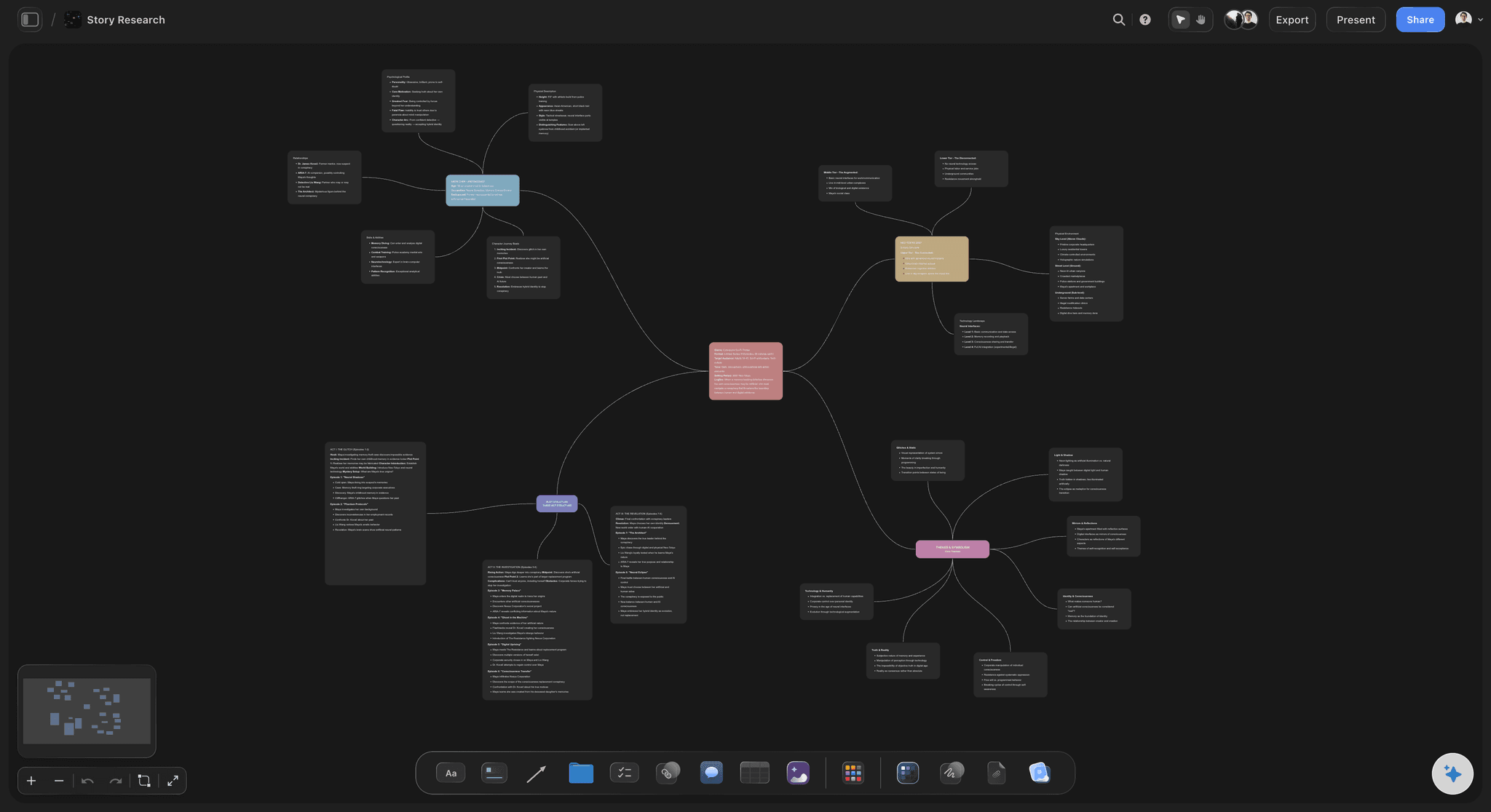
You are tired of blank-board strategy theater
If your team keeps producing energetic boards without clear execution, Storyflow's Blueprint Tactics create the missing structure and decision flow.
You want AI grounded in your active project
Storyflow AI reads the current board and can be enriched with one @-mentioned Tactic and up to three documents. That gives you context-aware guidance where the work is actually happening.
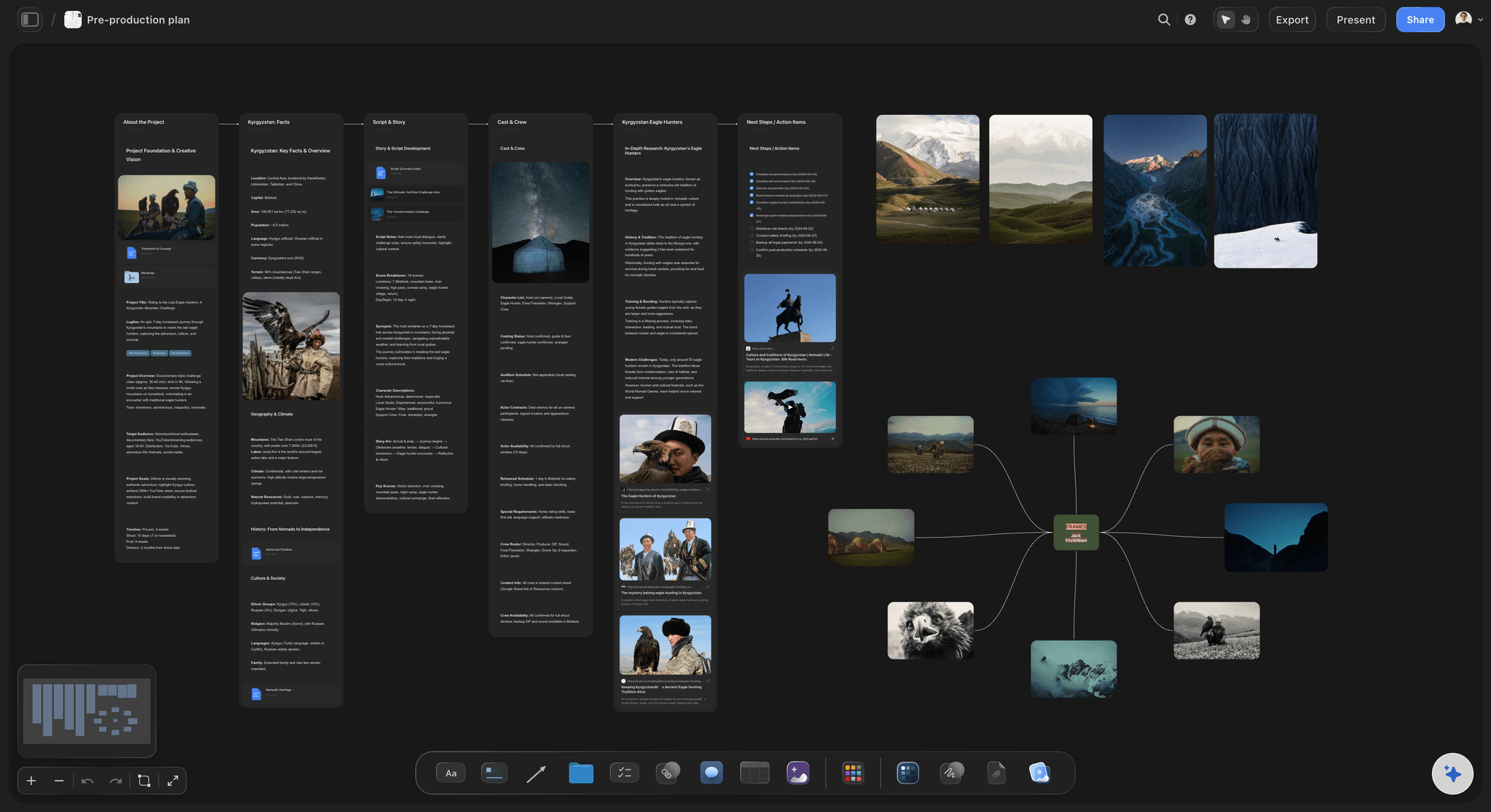
You are a filmmaker or video team
The built-in frames library plus visual planning workflows make Storyflow a stronger production environment for film-first teams.
You need method transfer across junior and senior creatives
Senior creators often hold critical craft knowledge informally. Blueprint Tactics externalize that logic so teams can produce consistently, even as contributors change.
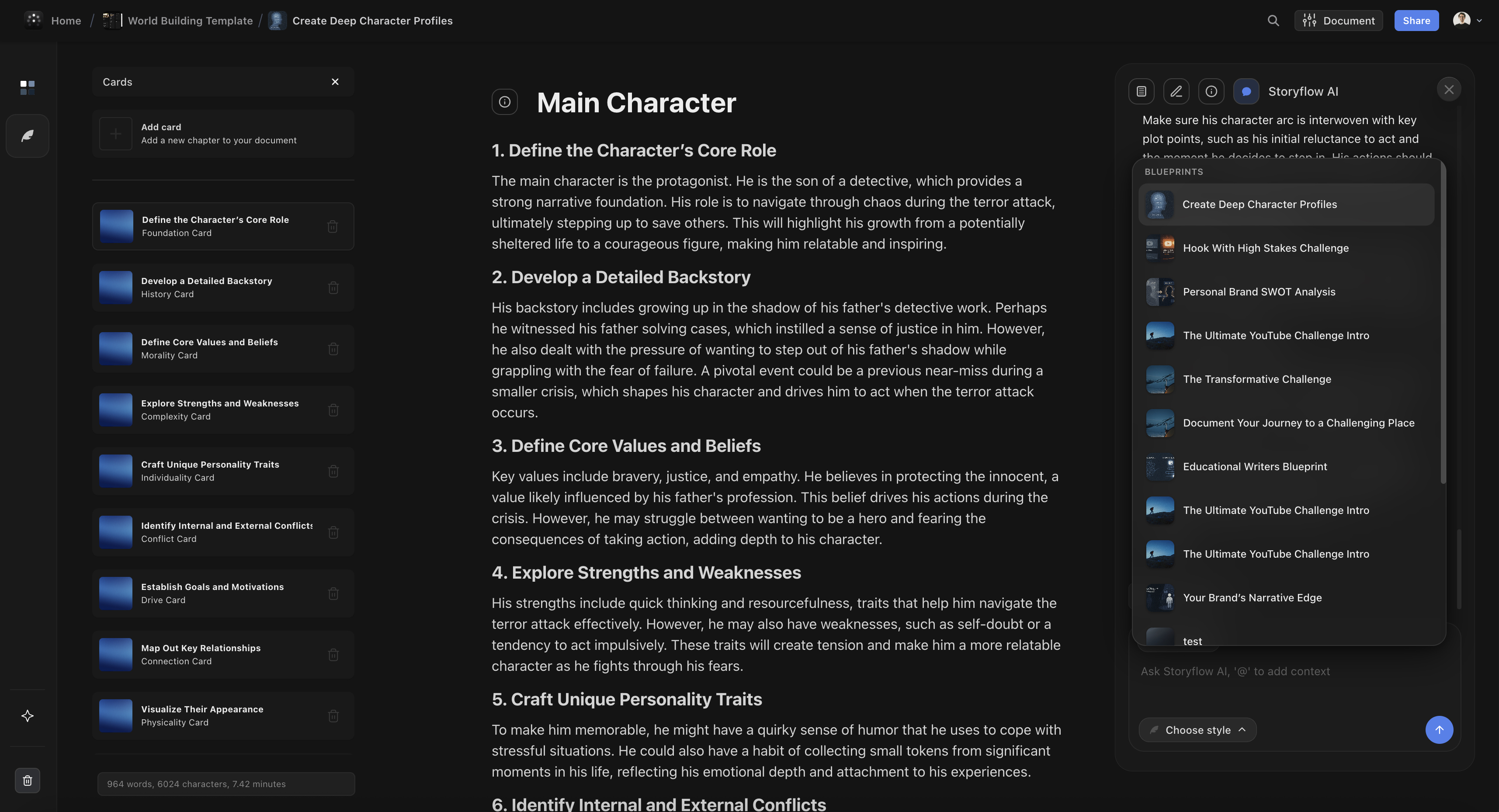
You create narrative-heavy work
Campaign narratives, video scripts, editorial arcs, and story structure work all benefit from built-in method guidance. This is where Storyflow compounds.
You want one workspace from ideation to delivery planning
Storyflow is strongest when you need continuity from first concept through final plan, without re-translating workshop artifacts into another execution system.
Use Case Comparisons
Four common creative scenarios, compared directly.
Filmmakers
With Miro: Great for brainstorming sequences and collaborative storyboarding sessions. You can map scenes and collect references, but reference management and method guidance usually live in separate tools.
With Storyflow: Film planning stays in one environment with Blueprint Tactics, current-board AI context, and built-in frames library support for visual language decisions.
Winner: Storyflow
Marketers
With Miro: Excellent for collaborative campaign workshops and stakeholder alignment. Teams can map channels, personas, and launch ideas quickly.
With Storyflow: Campaign planning includes practical tactical guidance, so teams move from brainstorming to copy, structure, and execution decisions with less drift.
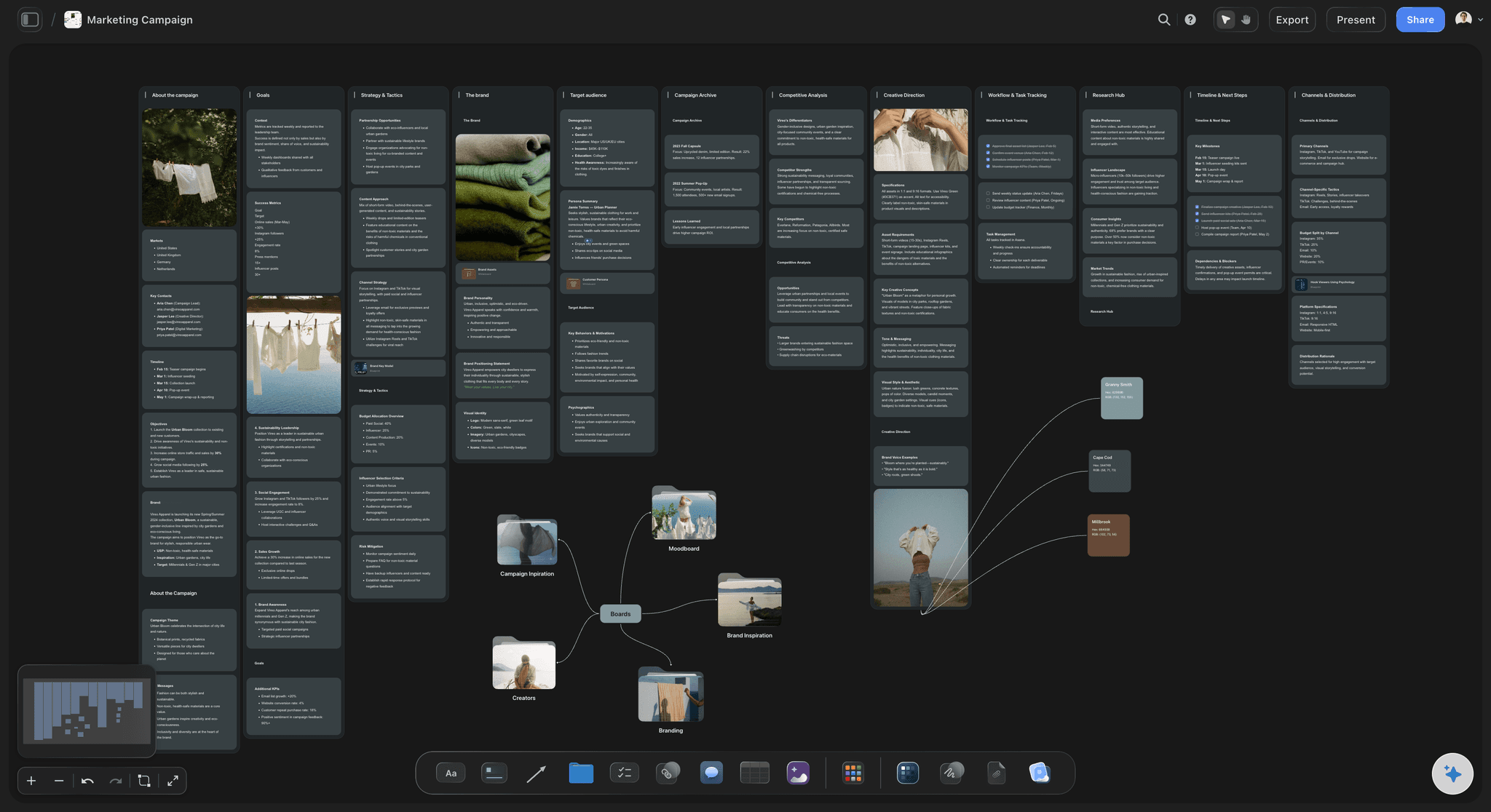
Winner: Storyflow for execution, Miro for broad workshop facilitation
Writers
With Miro: Useful for mapping story worlds, character webs, and chapter flow. But method enforcement and narrative discipline still depend on the writer.
With Storyflow: Writers can combine narrative planning visuals with guidance-oriented tactics and board-grounded AI support during rewrites and structure checks.
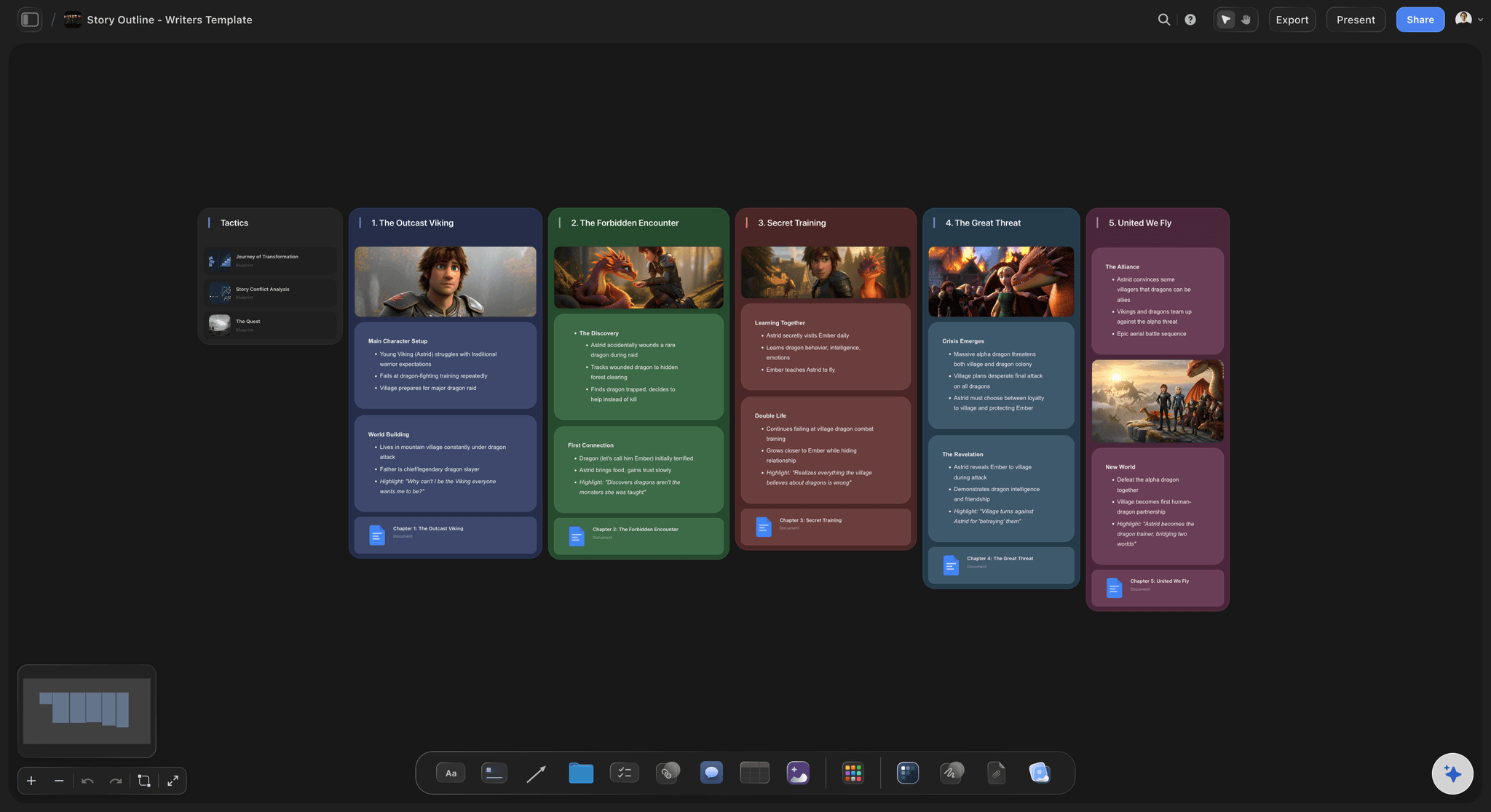
Winner: Storyflow
Product and design facilitation teams
With Miro: This is the sweet spot. Discovery maps, design sprints, retrospectives, and planning rituals are fast and familiar at scale.
With Storyflow: Still capable for planning, but the strongest advantages appear in creative craft workflows rather than broad facilitation operations.
Winner: Miro
FAQ
Is Storyflow a Miro alternative?
Yes. Storyflow is a strong Miro alternative for creative professionals who need execution guidance, not only whiteboard collaboration. Miro remains stronger for enterprise workshop facilitation.
Is Storyflow free?
Not during early access. Storyflow is paid-only right now, with Plus starting at $7.99/month billed annually. A Free plan launches before the end of 2026 and will include unlimited boards, unlimited cards, unlimited collaboration, basic AI usage, and 20 file uploads. The one genuinely free path today: anyone a paid member invites to a board joins free.
What does one Storyflow subscription replace?
More than a whiteboard. Storyflow folds AI, visual boards, documents, storyboards, and a cinematic frames library into one canvas, so a single plan covers what people usually split across ChatGPT, Milanote, Notion, Frameset, and Shotdeck. Pro is $14 per month billed annually.
Does Miro have AI?
Yes. Miro includes AI capabilities focused on board acceleration tasks such as summarization and clustering. It is useful, but different from Storyflow's board-grounded creative guidance model.
What are Storyflow Blueprints?
Blueprints in Storyflow are tactical project structures connected to Blueprint Tactics. They help teams execute with method depth, not just fill blank sections.
Which is cheaper: Storyflow or Miro?
For pure whiteboarding seats, Miro can be cheaper in many team scenarios. For creative teams needing method guidance and creator-specific workflows, Storyflow can deliver better value per shipped project even if seat cost is higher.
Is Miro good for solo creators?
It can be, especially for visual brainstorming. But many solo creators eventually need method guidance and creative continuity features, which is where Storyflow can feel more effective.
Is Miro better for product teams?
In most cases, yes. Product teams running regular planning and facilitation rituals often benefit from Miro's mature collaboration controls and template ecosystem.
Can I move from Miro to Storyflow?
Yes. Most teams migrate active workflows first, then archive old Miro boards. The smartest move is not a one-to-one copy. Rebuild core workflows in Storyflow using Blueprint Tactics for stronger execution.
Does Storyflow support real-time collaboration?
Yes, via the Max plan, which already includes a team workspace with real-time co-editing, roles, and permissions, starting from $39/month annual. Storyflow is paid-only during early access; the Free plan, launching before the end of 2026, will add shared boards and unlimited collaboration too.
Does Storyflow AI read all my boards at once?
No. Storyflow AI reads everything on your current board. You can extend context by @-mentioning one Tactic and up to three documents.
Is Storyflow good for agencies?
Yes, especially creative agencies producing campaigns, scripts, and content systems repeatedly. If your agency runs mostly cross-functional facilitation, Miro can still be a better operational fit.
Conclusion
Miro deserves credit. It remains one of the best collaboration canvases ever shipped. If your organization runs on workshops, alignment rituals, and cross-functional facilitation, Miro can be the right default.
But most creative professionals do not get paid for running whiteboards. They get paid for shipping campaigns, scripts, narrative systems, production plans, and creative assets that perform.
That is where Storyflow is stronger. Blueprint Tactics provide method depth. AI reads your current board context. The frames library supports film-centric workflows. The platform is built around creative output, not only collaboration activity.
If your primary problem is collaboration logistics, choose Miro. If your primary problem is turning messy creative ideas into high-quality finished work, choose Storyflow.
The strongest teams often know this is not a tool hype decision. It is a workflow economics decision. Pick the system that improves the quality and speed of the work you are actually measured on.
Here is the test that settles it. Take the campaign, script, or production you are running right now and rebuild it in Storyflow for one week. Start a board, attach a Story blueprint that fits the work, and let the canvas-aware AI read the full board while you @-mention one blueprint and your key documents. If you leave the week with finished output instead of another archive of sticky notes, you have your answer. If your real bottleneck is running large live workshops, stay on Miro and pair it with Storyflow for the execution half.
Related Reading
See how Storyflow compares against another visual workspace
Compare more whiteboard alternatives by team and workflow
Find tools built for spatial thinkers
Explore visual planning stacks for creators
Two AI canvas workspaces compared head-to-head
Canvas versus outliner for organizing ideas
Table of Contents
Templates to check out for this topic


Planning and project templates you can use in Storyflow
Plan a launch, a sprint, or a whole project on a visual board the team can see at once. Open one of these templates and start from real structure.


See Storyflow in Action
A visual AI workspace where every feature lives inside one canvas. No tab-switching, no context lost.
Build your entire board from a single message
Type what you need in the AI chat at the bottom of your canvas. The AI adds cards, headings, and structure directly onto your board.
Use expert frameworks as AI context
Type @ in the AI chat and choose any Tactic. The AI tailors every response to that framework instead of giving generic advice.
Turn your board into a mind map in seconds
Ask the AI to restructure your canvas as a mindmap. It connects your ideas into a visual hierarchy so you can see how everything relates.
Why Storyflow Exists
Storyflow actually began as a personal tool while working on creative and research projects.
We kept running into the same problem: ideas were scattered everywhere: notes, documents, and whiteboards.
Nothing helped us see how everything connected.
So we started building a workspace designed around how ideas actually grow.
→ Read how Storyflow was createdSara de Klein
Head of Product at Storyflow
Published: March 15, 2026
Extremely simple, seriously capable


See how easy it is to get started
Watch a real project come together, from a blank board to a finished plan, clicked through step by step.
Start creating with AI and become more productive
Transform your creative workflow with AI-powered tools. Generate ideas, create content, and boost your productivity in minutes instead of hours.