The 10 Best FigJam Alternatives in 2026 (For Creatives and Client Work)
Storyflow is the FigJam alternative for creative client work, from brief to moodboard to shot list. The 10 best FigJam alternatives in 2026 compared on moodboards, briefs, client sharing, workshops and price, with Miro and Mural for workshops, Milanote for hand-built moodboards, and the free picks.

Category
Visual Thinking
Author

Justkay
Documentary Filmmaker & Founder at Storyflow
Topics
2026-05-09
•
40 min read
•
Visual Thinking- best figjam alternatives for creatives
- figjam alternatives 2026
- figjam alternative for moodboards and client boards
What is the best FigJam alternative for creatives in 2026?
Storyflow is our pick for a FigJam alternative in 2026 when the board has to become client work: its AI builds the brief, the moodboard, the storyboard and the shot list on one infinite canvas, and the client opens it from a link with no account. Miro or Mural is the pick if the job is a live workshop with voting and timers, Milanote for a moodboard you arrange by hand, Whimsical for flows and wireframes, and Excalidraw or Apple Freeform for a free sketch surface. FigJam itself stays the lowest-priced whiteboard if your studio already pays for Figma.

All 10 FigJam Alternatives for Creatives, Ranked
- Storyflow: best for client work that runs from brief to moodboard to shot list, built by AI on one infinite canvas
- Milanote: best for hand-arranged moodboards with no AI
- Miro: best for large live workshops
- Mural: best for facilitated design sprints
- Adobe Firefly Boards: best for AI concept images inside Adobe
- Canva Whiteboards: best for turning a whiteboard into a polished design
- Whimsical: best for UX flows and wireframes
- Lucidspark: best for brainstorms that become diagrams
- Apple Freeform: best free sketch board for an all-Apple studio
- Excalidraw: best free, open-source sketching
Full disclosure: Storyflow is our own product and is listed first. The order is not a score: Storyflow leads because its AI carries a brief through to a moodboard, a storyboard and a shot list on a board the client can open, which is what a creative team owes a client, and the other nine follow by job. Storyflow is weaker on live workshops (no voting or timer), runs in the browser only and has no free plan yet; if your board is mostly a facilitated session, Miro or Mural is the better pick, and if you want to arrange a moodboard by hand, Milanote is. The tools were compared from their own product and pricing pages in October 2026.
Quick Comparison: Best FigJam Alternatives for Creatives
Storyflow first as our pick, then the workshop and image tools creative teams shortlist most when they leave FigJam. Milanote, for hand-built moodboards, is reviewed below.
| Tool | Best For | AI Features | Price |
|---|---|---|---|
| Storyflow | Brief to moodboard to shot list for client work | AI turns a brief into a board: brief, moodboard, storyboard, shot list and deck | $7.99 mo annual (free plan late 2026) |
| Miro | Large live workshops | AI on credits per member | Free / $8 member mo billed annually |
| Mural | Facilitated design sprints | Mural AI from Team+ | Free / $9.99 member mo billed annually |
| Adobe Firefly Boards | AI concept images inside Adobe | Image generation with Adobe or partner models | Free daily generations / Firefly Standard US$9.99 mo |
Quick Picks: Best FigJam Alternatives for Creatives by Job
Updated October 2026. Prices for the ten reviewed tools were read on each vendor's own pricing page that month and are quoted with their billing period. Lucid's page showed no prices and Canva's site did not load for our check, so neither has a figure here.
Our pick for creative client work (brief to board to shot list): Storyflow. Storyflow is an infinite canvas where the AI turns a brief into a board: it drafts the brief, collects references, lays out a storyboard and builds a shot list, and the client reviews the same board from a link with no account. Plans start at $7.99 a month billed annually ($9.99 monthly), and there is no free plan yet. Choose something else if your board is mainly a live sticky-note workshop.
Best for big live workshops with a client in the room: Miro. Timer, voting, private mode and 7000+ templates. Starter is $8 per member a month billed annually. Storyflow has none of the workshop kit.
Best for facilitated design sprints: Mural. Private mode, anonymous voting, timers and a facilitator lock on every plan. Team+ is $9.99 per member a month billed annually.
Best for hand-arranged moodboards with no AI: Milanote. A calm board for images, notes and links, with a built-in photo library and a web clipper. The paid plan is $9.99 per person a month billed annually. Unlike Storyflow, nothing builds the board for you.
Best for AI concept images inside Adobe: Adobe Firefly Boards. A moodboard canvas where you upload or generate images. Free with an Adobe account on daily generations.
Best for turning a whiteboard into a polished design: Canva Whiteboards. A whiteboard inside Canva, next to the presentation you will build from it.
Best for UX flows and wireframes: Whimsical. Fast flowcharts, wireframes and mind maps. Pro is $10 per editor a month on annual billing.
Best free sketch surfaces: Apple Freeform (all-Apple studios) and Excalidraw (everyone else). Both cost nothing; neither holds a client project the way Storyflow does.
If you are here because FigJam feels like a meeting tool and your work is a deliverable owed to a client, open a project in Storyflow and rebuild your last client board there to see the difference in one afternoon. For the same question through the AI lens, read the best FigJam alternatives for creatives, with AI that builds the board.
Comparison Table: Best FigJam Alternatives 2026
The table compares the ten tools on the five things a creative team that owes a client a deliverable asks about. Storyflow is our own product and sits in the first row; FigJam is the last row, as the baseline. Nothing is scored. The last column says when each rival is the better choice than Storyflow.
| Tool | Best for | Moodboards and references | Brief to deliverable | Client sharing | Live workshop | Choose it over Storyflow when |
|---|---|---|---|---|---|---|
Storyflow | Brief to board to shot list for client work | AI finds or generates reference tiles on an infinite canvas with drag and drop | AI builds the brief, storyboard, shot list, deck and PDF on the board | View link with no account; sign in to comment | Real-time editing, no voting or timer | Our pick: start here |
Milanote | Hand-arranged moodboards | Photo library, web clipper, over 100 templates | Templates you fill by hand | Viewers need no sign-up | Not a workshop tool | You want to place every reference yourself on a free plan; Milanote has no AI |
Miro | Large live workshops | Images on a whiteboard | Docs, tables and slides you build yourself | Visitor editing with no sign-in from Starter | Timer, voting, private mode | A big group works the board live, which Storyflow is not built for |
Mural | Facilitated design sprints | Images on a whiteboard | Stops at the session | Free visitors on every plan | Facilitation tools on every plan | You sell facilitated sprints; Storyflow has no facilitation tools |
Adobe Firefly Boards | AI concept images in Adobe | Upload, generate and remix images | A concept board, not a project | Collaboration inside Adobe | Not a workshop tool | The look is generated with Adobe's models and stays in Creative Cloud |
Canva Whiteboards | Whiteboard to polished design | A whiteboard beside Canva's templates | Becomes a Canva design | See canva.com | A meeting surface | The output is a templated Canva design; Canva's design controls go further than Storyflow's |
Whimsical | UX flows and wireframes | Not image-led | Flows and wireframes | Free viewers and guests | Voting and timer on every plan | The deliverable is a flow or a wireframe |
Lucidspark | Brainstorms that become diagrams | Not image-led | Diagrams and task cards | Guest collaborators | Voting, breakout boards, facilitator controls | The session ends as a diagram or Jira cards |
Apple Freeform | Free sketching in an all-Apple studio | Photos, files and Apple Pencil drawing | None | Apple devices only | Up to 100 collaborators | You draw by hand on an iPad; Storyflow has no drawing tools or native apps |
Excalidraw | Free, open-source sketching | Sketches, not image boards | None | Share a link, no account | Unlimited collaborators | You need a free sketch with no account, which Storyflow does not offer |
FigJam (baseline) | Workshops beside Figma files | Images among stickies | Stops at the session | Free viewers on a paid plan; open sessions for 24 hours | Timer, voting, stamps | Your studio designs in Figma |
Three of the ten tools here (Whimsical, Lucidspark and Excalidraw) are narrower than FigJam for this reader. They are listed because each is the better choice for one specific job, named in its review, not because they beat FigJam overall.
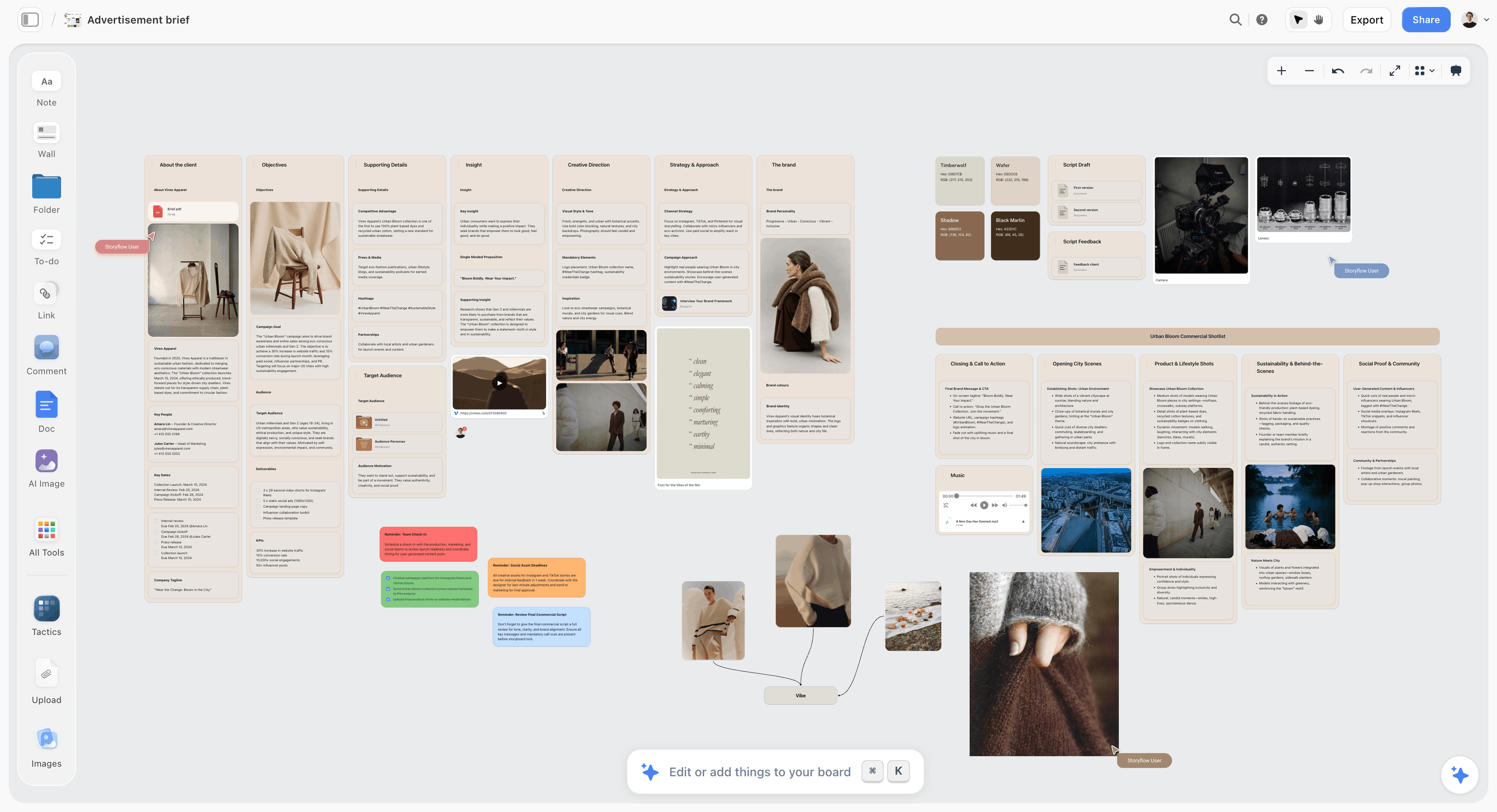
This is what "brief to deliverable" looks like on a Storyflow board: an advertising brief laid out as walls, with the product stills, the palette, a shot list and the team's reminder notes on the same canvas.
Frequently Asked: Which FigJam Alternatives Do Creatives Trust, and Which Are Worth Paying For?
Which FigJam alternatives are the most trusted by creative teams?
For holding a client project, Storyflow first: Storyflow boards keep the brief, references, storyboard and shot list together, the client sees them from a view link with no account, and everything exports as PDF. Miro and Adobe come next on track record, as large, long-established companies. Choose one of those when a long vendor history is the deciding factor.
Which FigJam alternative is the best value for a small studio?
Storyflow, then Excalidraw. A studio owner on Storyflow Plus pays $7.99 a month billed annually, invited collaborators join free, and clients view from a link. Excalidraw costs nothing but holds no brief, storyboard or shot list. Milanote is fair value for moodboards alone at $9.99 per person billed annually.
Which FigJam alternatives have fair and transparent pricing?
Storyflow, Excalidraw and Whimsical, measured against FigJam's bar of $3 a month per Collab seat with free viewers and commenters on a paid plan. Storyflow lists every plan with both billing periods and does not charge for a client who only views. Excalidraw is free and open source. Whimsical lists $10 per editor plainly, but its free plan caps you at 50 board objects a month, which a single moodboard can use up.
Which FigJam alternative is the most underrated for creative work?
Storyflow, because lists like this one compare it as a whiteboard when its job is the whole client project: ask the AI for a logo project board and it lays a logo commission out from brief to delivered assets, ask for a brand moodboard and it builds one, and it lays out PDF deliverables such as a lookbook or a treatment. Apple Freeform is the underrated free pick for an all-Apple studio with iPads. PureRef is underrated for private reference collection, though it is not a shared board.
Which FigJam alternative is recommended for agencies with clients?
Storyflow for the full job, Miro for workshops with the client in the room, and Mural for formal design sprints. Agencies owe a client something at the end, and Storyflow keeps that deliverable on the same board as the brief. Choose Miro instead if most of your billable hours are facilitated sessions with twenty people on the board at once.
Is FigJam's free tier actually usable, or a freemium trap?
It is a trial more than a plan: Figma's free Starter tier covers one team with three files, which is one client project and nothing else. The paid Collab seat, $3 a month, is where FigJam becomes a real tool, and at that price it is not a trap. The trap is the reverse: studios that pay for a Collab seat and then buy a second tool for moodboards, briefs and shot lists.
Which FigJam alternative is the most innovative on AI?
Our answer: Storyflow, then Adobe Firefly Boards, then Miro. Storyflow's AI reads the open board with every message and builds whole boards from a prompt, from a campaign brief to a storyboard. Firefly Boards leads on image generation, with a choice of Adobe's models or partner models. Miro runs AI on credits per member. FigJam's AI sorts and summarizes stickies.
Why Creatives Leave FigJam
FigJam is a very good whiteboard. The reason designers, art directors and agency producers look for an alternative is rarely the canvas. It is what the canvas is for.
FigJam was built for a design team's meetings: a retro, a crit, a sprint kickoff, a flow sketched next to the Figma file. Creative client work has a different shape. A job starts with a brief, becomes a moodboard, turns into a concept the client approves, and ends as a deliverable: a storyboard, a shot list, a brand kit, a lookbook. In FigJam each of those lives somewhere else. The brief is a Google Doc, the moodboard is a FigJam board or a Pinterest board, the storyboard is in Boords or Keynote, the shot list is a spreadsheet. The board that held the thinking is abandoned the day the client signs off.
Four specific frictions push creatives out:
- References are second-class. FigJam handles images, but it was designed around sticky notes and shapes. A moodboard of twelve to sixteen references, with captions, a palette and a note on why each image is there, is work FigJam tolerates rather than supports.
- The client is not a Figma user. On a paid Figma plan a client can view and comment without a seat, which is generous. But the client lands in a Figma interface built for designers, and the board they see is a workshop artefact, not a presentation.
- Nothing carries forward. The moodboard does not become a shot list. The approved concept does not become a brief for the photographer. Somebody retypes it.
- AI helps with notes, not with deliverables. FigJam AI sorts stickies by subject, colour, author or stamps and summarises a selection (Figma help). It does not look at your references and build a storyboard or shot list from them. Storyflow's AI does.
If those four sound familiar, the right alternative is not a better whiteboard. It is a tool built around the creative job itself, which is what Storyflow is. For a longer look at the pattern, see why creative teams leave FigJam and Miro vs FigJam for creative teams.
What Leaving FigJam Actually Costs
FigJam's pricing is the strongest argument for staying, and a page about leaving it should say so plainly. The Collab seat is $3 a month on Figma's Professional plan and includes full access to FigJam, Figma Slides and Figma Buzz; on a paid plan, others can view and comment without extra seats (figma.com/pricing). So a studio with three editors and twelve client viewers pays about $9 a month.
Here is the same studio, three editors and twelve people who only look and comment, on each alternative, with Storyflow first and FigJam last as the baseline. Monthly figures are the vendor's listed price in October 2026, billed annually where the vendor quotes it that way.
| Tool | Billing shape | Three editors, twelve viewers | Lower than FigJam? |
|---|---|---|---|
Storyflow | Per account; invited collaborators join free; viewers open a link with no account | $7.99 a month billed annually for one Plus seat with two invited editors; $16.78 if all three take Plus seats on Team billing | Yes at one seat; no at three |
Excalidraw | Free app; Plus $6 per user a month | $0 on the free app | Yes, if the free app is enough |
Apple Freeform | Free on Apple devices | $0 | Yes, if every client uses Apple |
Canva Whiteboards | Free plan and paid plans; see canva.com/pricing | Not quoted: Canva's site did not load for our check | Not verifiable |
Adobe Firefly Boards | Free with an Adobe account on daily generations; Firefly Standard US$9.99 a month per person | $0 to about $30 a month | Only on the free generations |
Miro | Per member; Starter $8 per member a month billed annually | about $24 a month | No |
Lucidspark | No price shown on Lucid's pricing page when checked | Not published when checked | Not verifiable |
Milanote | Per person; $9.99 a month billed annually; viewers need no sign-up | about $30 a month | No |
Mural | Per member; Team+ $9.99 a month billed annually; visitors free | about $30 a month | No |
Whimsical | Per editor; Pro $10 a month on annual billing; viewers free | about $30 a month | No |
FigJam (baseline) | Per editor (Collab seat); viewers and commenters free on a paid plan | about $9 a month | The baseline |
FigJam's per-editor model is the thing most alternatives fail to beat. The only shapes that beat it are a free app (Excalidraw, Freeform) and Storyflow's invite model, where one paid member brings collaborators in free and clients open a view link with no account. Even then the margin is about a dollar a month. Everything else costs a fifteen-person studio more than FigJam does, so choose it for what it does for the work, not for the price.
How We Compared the Best FigJam Alternatives for Creatives
Every tool was compared from its own product pages, pricing pages and help documentation in October 2026, and Storyflow was checked against its current product. Nothing here is scored and nothing is a hands-on benchmark.
Five questions were asked, in the order that matters to the reader this page is written for: a designer, art director, creative director, photographer or agency producer who owes a client a deliverable.
- Moodboards and references. How well the canvas holds images: captions, palettes, arrangement, image search or generation, and a board you could put in front of a client without tidying it first.
- Brief to deliverable. Whether the board carries forward: can the brief, the approved moodboard, a storyboard and a shot list live together, and can the tool help produce them? This is where FigJam is weakest.
- Client sharing. Can a client open the board without an account, comment, and see a clean presentation rather than a workshop?
- Live workshop. Voting, timers, private mode, facilitator controls. It matters for kickoffs and sprints, less for the rest of the job.
- Studio price. The cost for three editors and twelve viewers, against FigJam's $9.
How the list is ordered. Storyflow is our own product and is listed first, because the second question, brief to deliverable, is the one this reader leaves FigJam over and it is what Storyflow's AI is built to do. The other nine follow by job: hand-built moodboards, live workshops, generated images, finished designs, flows, diagrams and free sketching. A studio that runs workshops for a living should start at Miro and Mural, where Storyflow has nothing to offer.
Detailed Reviews: Best FigJam Alternatives 2026
1. Storyflow
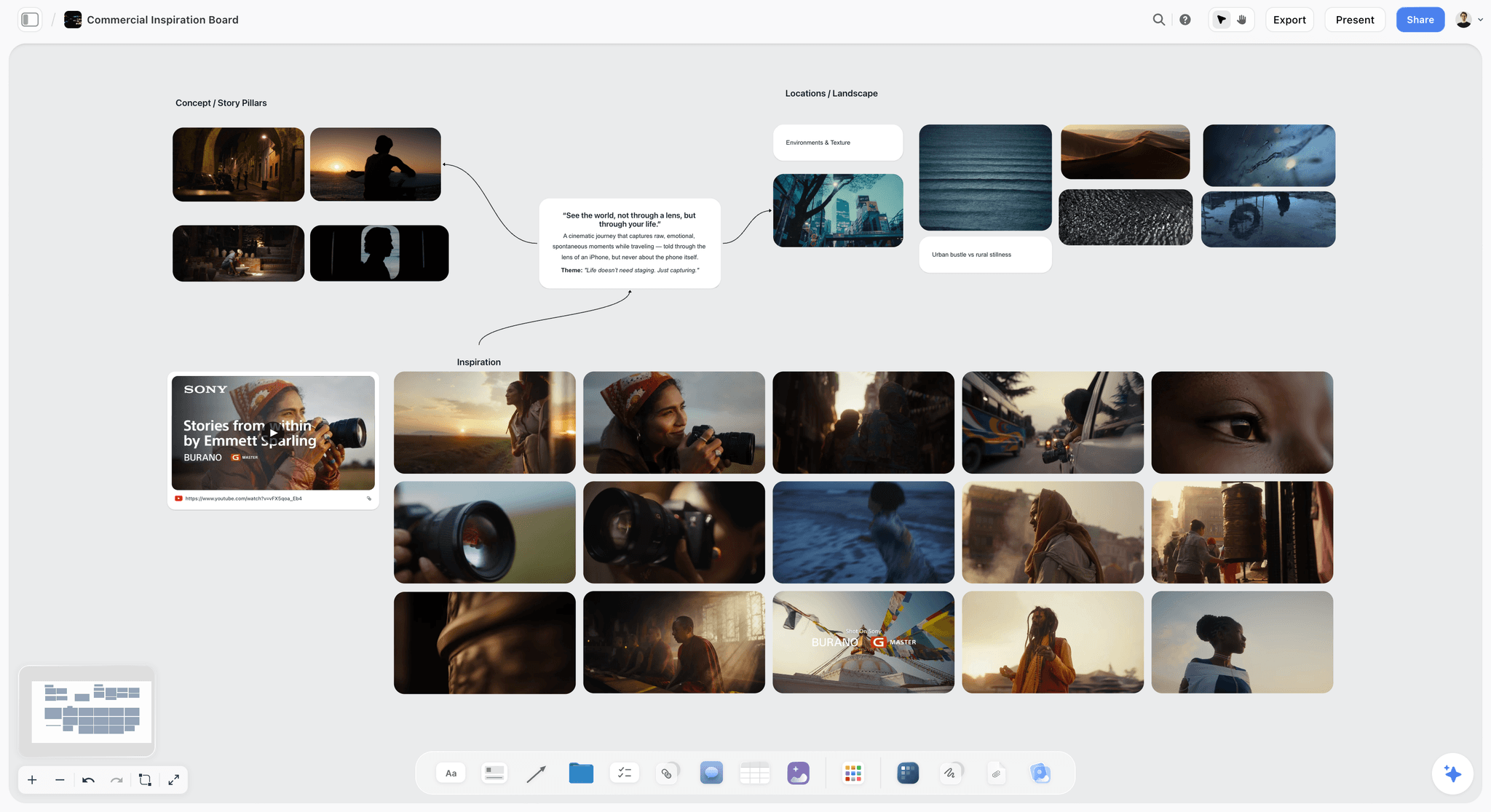
Best for: creative client work that runs from brief to moodboard to shot list on one board the client can open.
Storyflow is the FigJam alternative built for the person accountable for a creative project: the art director, the agency producer, the brand designer, the photographer with a client shoot. Storyflow gives each project an infinite canvas with drag and drop for images, notes, documents and tables, and Storyflow's AI turns a brief into a board. Clients open a Storyflow board from a shared link with no account needed to view, teammates edit in real time, and decks and designed pages export as PDF. Storyflow keeps the moodboard, the shot list and the call sheet in one workflow, and includes 200+ Tactics, ready-made creative frameworks such as Hero's Journey, AIDA and StoryBrand.
Where it beats FigJam for creative work. Storyflow's AI builds the pieces creatives are paid for. Ask for a campaign brief and it lays one out as ten walls (client, overview, audience, goals, brand, creative strategy, media, visual identity, market, timeline). Ask for a moodboard and it asks whether you want web images or AI-generated ones, then drops about twelve reference tiles on the board. Ask for a colour moodboard and it makes named swatches; ask for a brand moodboard and it builds a brand direction board of palette, type, logo and applications. Ask for a storyboard and it lays a scene out shot by shot, with AI-generated frames on Pro and Max and web references or placeholders on Plus. Ask for a shot list and it turns a script, a storyboard on the board or a shoot brief into one wall per setup with its frame, coverage and equipment. The AI reads the open board with every message and looks at the images you select (up to 24), so a request like "turn these six references into a shot list" works on what you chose.
Client sharing. A view link opens with no account, and a client who signs in can comment and draw on the board. Present mode goes fullscreen and steps through the board one wall at a time. When the work is signed off, ask the AI to lay out a lookbook, a treatment or a slide deck and export it as PDF, or export a selected area of the board as an image or PDF.
Where it falls short of FigJam. These are real, and they decide whether it fits you:
- No workshop kit. There is no voting, no timer and no private mode. For a live sticky-note sprint with thirty people, FigJam, Miro or Mural is better.
- Browser only. Storyflow runs in the web browser, with no native apps and no offline mode. Phones and tablets work for viewing, light edits and AI chat, but heavy board building belongs on a laptop.
- No FigJam file import. Paste a screenshot of a FigJam, Miro or Milanote board and the AI rebuilds it, keeping your words, but there is no file import.
- Viewers do not see live changes. A client on a view link sees the latest version when they open or reload the board, not your cursor moving.
- No approval workflow. There are no sign-off buttons, version compare or timecoded video comments. If you need an audit trail of approvals, pair it with a proofing tool.
- No free plan yet. FigJam, Miro, Mural, Milanote and Excalidraw all have one.
Pricing. Storyflow is paid-only during early access; its Free plan launches before the end of 2026, and anyone a paid member invites to a board joins free now. Plus is $7.99 a month billed annually ($9.99 monthly). Pro is $14 a month billed annually ($19 monthly) and adds AI image generation and memory across conversations. Max is $39 a month billed annually ($49 monthly) and adds a Team Workspace with roles and permissions. AI use is metered on every plan.
Choose it if your board has to end as something a client pays for: a brief, a moodboard, a storyboard, a shot list, a lookbook. Choose FigJam instead if your studio lives in Figma and the board is mostly design crits and flows sitting next to the design file. See the full head-to-head in Storyflow vs FigJam.
Verdict: Storyflow is the FigJam alternative to choose for creative client work, because Storyflow is built around the client job rather than the meeting.
2. Milanote
Milanote is a board for notes, images, links and files that you arrange by hand, and it produces a moodboard you could show a client without tidying it first. It is the hand-built counterpart to Storyflow: Milanote gives you the board and leaves every card to you, where Storyflow's AI builds the board and the documents that follow it.
Where it beats FigJam. Images are first-class. Milanote has a built-in library of free photos, a web clipper that saves images, links, video and text, colour swatches and over 100 templates. Viewers open a board without signing up, and any board downloads as a printable PDF. There are mobile and desktop apps, which Storyflow does not have.
Where it falls short. It is not a workshop tool; a live session with a timer and voting has nowhere to happen. Its plans page lists no AI features, so every brief, shot list and storyboard is filled by hand from templates, where Storyflow builds them from the brief. And the free plan stops at 100 notes, images or links, which one serious moodboard reaches.
Pricing. Free: 100 notes, images or links, 10 file uploads, unlimited shared boards. The paid plan is $9.99 per person a month billed annually ($12.50 monthly), and team pricing starts at $49 a month billed annually (milanote.com/plans).
Choose it if you want a calm, beautiful board and prefer to place every reference yourself. Choose Storyflow instead if the moodboard has to turn into a brief, a storyboard or a shot list without retyping. The long comparison is in the best Milanote alternatives.
Verdict: Milanote is the best hand-arranged moodboard tool here and has a free plan Storyflow lacks; it has no AI and no workshop features, so it stops where Storyflow's deliverables start.
3. Miro
Miro is the default large whiteboard and a deep workshop tool. For a kickoff with the client's whole marketing team on the board, it is the safe choice, and it is the tool to pick over Storyflow when the session itself is the product.
Where it beats FigJam. Facilitation and breadth. Miro lists 7000+ Miro and community-made templates, plus timer, voting, private mode and 250+ integrations with the stacks clients already use. Its AI runs on credits per member.
Where it falls short. It is dense, and a client opening a Miro board for the first time sees a toolbar before they see your work. Moodboards work but feel like a workshop board with images on it. And it bills per member, so a studio pays more than on FigJam.
Pricing. Free: 3 editable boards and 10 AI credits a month. Starter is $8 per member a month billed annually; Business is $20 per member a month billed annually (miro.com/pricing).
Choose it if your billable work is workshops, sprints and kickoffs. Choose Storyflow instead if the workshop is a small part of a job that ends in a deliverable. The sibling roundup of Miro alternatives for creative teams covers what to use when Miro itself is the problem.
Verdict: Miro is the strongest live-workshop FigJam alternative, with the timer and voting Storyflow lacks; it is less natural than Storyflow for references and deliverables.
4. Mural
Mural was built for facilitators, and agencies running formal design sprints with a client feel it. Private mode, anonymous voting, timers and a facilitator lock are the core of the product, on every plan. Mural runs the sprint; Storyflow holds the brief and the board the client approves afterwards.
Where it beats FigJam. Facilitation depth. A facilitator can summon everyone to one place, lock content so nobody moves it, and collect anonymous votes before the loudest voice anchors the room.
Where it falls short. Casual, visual work feels heavy. Mural is less image-led than Storyflow and Milanote, so moodboards and storyboards are possible but not natural, and there is no path from the board to a brief or shot list.
Pricing. Free: 3 editable murals at a time. Team+ is $9.99 per member a month billed annually ($12 monthly); Business is $17.99 per member a month billed annually (mural.co/pricing).
Choose it if you sell facilitated sprints. Choose Storyflow instead if the sprint output has to become a creative brief and a board the client approves. More in FigJam vs Mural for design sprints.
Verdict: Mural is the best FigJam alternative for facilitated sessions, with tools Storyflow does not have, and more tool than you need for day-to-day creative work.
5. Adobe Firefly Boards
Firefly Boards is Adobe's AI moodboard canvas: upload images or generate them, remix them and use style references. For an art director who already lives in Creative Cloud, it is the most natural place to explore a look, and it pairs with Storyflow rather than replacing it: Firefly makes the pictures, Storyflow carries them into a plan.
Where it beats FigJam. Image generation inside the board. You can choose Adobe's own Firefly models, which Adobe says are trained on licensed and public-domain content, or partner models such as GPT Image, Gemini, FLUX, Runway and Luma AI (Adobe Firefly Boards).
Where it falls short. It is a concept-exploration board, not a project. There is no brief structure, no storyboard sequence and no shot list, and workshop tools are thin.
Pricing. Free with an Adobe account, with free daily generations. Firefly Standard is US$9.99 a month with 2,000 credits.
Choose it if the job is generating and refining a visual direction. Choose Storyflow instead if that direction has to become a shot list or a lookbook for the client; Storyflow also generates images on Pro and Max.
Verdict: Firefly Boards is the best generator-first moodboard canvas, and not a place to run the rest of the job, which is where Storyflow comes in.
6. Canva Whiteboards
Canva Whiteboards is the whiteboard inside Canva. Canva's site did not load for our check in October 2026, so this review stays with what follows from that position and quotes no figures. Next to Storyflow, the split is simple: Canva finishes the asset, Storyflow plans the job.
Where it beats FigJam. Distance to a finished design. A brainstorm in Canva sits next to the social post, deck or one-pager you will make from it, in the tool your client may already use. For marketing and brand teams that is a real shortcut.
Where it falls short. The whiteboard is a meeting surface rather than a project: it is not built around a brief, a storyboard or a shot list, where Storyflow's AI builds all three from the brief.
Pricing. Canva has a free plan and paid plans for individuals and teams; see canva.com/pricing.
Choose it if the output of the session is a Canva design. Choose Storyflow instead if the output is a production plan.
Verdict: Canva Whiteboards is the easiest route from a brainstorm to a polished graphic, with design controls that go further than Storyflow's, and light on everything between.
7. Whimsical
Whimsical is fast, opinionated and minimal: flowcharts, wireframes, mind maps, sticky notes and docs. UX and product designers who want to sketch a flow without opening Figma like it for good reasons. It solves a different problem from Storyflow: Whimsical draws the flow, Storyflow runs the client project.
Where it beats FigJam. Clarity. Flowcharts and wireframes come out looking deliberate, and voting and a timer are on every plan, with free viewers and guests.
Where it falls short. It is not a visual reference tool, and the free plan allows 50 board objects a month, which a single moodboard can exhaust.
Pricing. Free: up to 50 board objects and 50 doc blocks a month, 7-day version history. Pro is $10 per editor a month and Business $20 on annual billing, which saves 17% (whimsical.com/pricing).
Choose it if your whiteboard work is UX flows and wireframes. Choose Storyflow instead if it is moodboards, briefs and shoots.
Verdict: Whimsical is the best FigJam alternative for flows and wireframes, and the wrong shape for the image-led work Storyflow is built for.
8. Lucidspark
Lucidspark is the whiteboard sibling of Lucidchart. It suits a team whose brainstorm has to become a formal diagram: a site map, a service map, a content architecture. Where Storyflow ends in visuals and documents, Lucidspark ends in diagrams and task cards.
Where it beats FigJam. A path into structure: Lucid Cards turn ideas into tasks in tools like Jira, and the workshop features include voting sessions, breakout boards, facilitator controls and a presentation mode (lucid.co/lucidspark).
Where it falls short. Image handling is basic, and there is nothing built for moodboards or storyboards. For purely creative work it is the least natural of the paid tools here.
Pricing. Lucid's pricing page showed no prices when we checked in October 2026; confirm the current plans on lucid.co.
Choose it if your client work ends in diagrams. Choose Storyflow instead if it ends in visuals. See Lucidchart vs FigJam for user flows.
Verdict: Lucidspark is a strong FigJam alternative for structured thinking and a weak one for the visual work Storyflow handles.
9. Apple Freeform
Freeform is Apple's free board for Mac, iPad and iPhone. It combines photos, video, audio, documents, PDFs, links, sticky notes and a library of over 700 shapes, and lets up to 100 people work in a board together (Apple). It is the free, hand-drawn opposite of Storyflow.
Where it beats FigJam. The iPad. For an illustrator or designer who sketches with Apple Pencil, Freeform's drawing is closer to paper than a browser whiteboard, and it costs nothing. Boards sync across your devices through iCloud.
Where it falls short. It runs on Apple devices only, so a client on Windows or Android cannot join. There are no workshop tools, no brief or storyboard structure and no AI that builds boards. Apple sells an optional Apple Creator Studio subscription that adds image creation and editing.
Pricing. Free on Apple devices.
Choose it if your studio and your clients are all on Apple devices and the job is sketching. Choose Storyflow instead if the client needs to open the board from any browser.
Verdict: Freeform is the best free sketch board for an all-Apple studio, with the Apple Pencil drawing Storyflow lacks, and a dead end for client projects.
10. Excalidraw
Excalidraw is the open-source, hand-drawn whiteboard: open excalidraw.com, share a link, and you are sketching together in seconds with no account. It is the free sketchpad to keep beside Storyflow, not a replacement for it.
Where it beats FigJam. Speed and freedom. It is MIT licensed, collaborative and end-to-end encrypted, and its sketchy style makes a wireframe read as a proposal rather than a decision, which is useful early in a client conversation.
Where it falls short. Almost everything a creative job needs after the sketch: image-led moodboards, templates, voting, AI that builds boards, project structure.
Pricing. The app costs nothing. Excalidraw+ is $6 per user a month and adds a cloud workspace, presentations and sharing options.
Choose it if you need a free, ownable sketch surface. Choose Storyflow instead if the sketch is the first step of a paid job. See Excalidraw vs FigJam.
Verdict: Excalidraw is the best free FigJam alternative for fast sketching, with the free plan and no-account sharing Storyflow lacks, and not a creative project tool.
Best FigJam Alternative by Creative Role
The same tool is not right for every seat in a studio. This is the pick for each role that pays for creative work, with the runner-up and the reason.
| Role | First pick | Runner-up | Why |
|---|---|---|---|
Creative director | Storyflow | Milanote | Needs the brief, the approved direction and the deliverables in one place the client can open |
Art director | Storyflow | Adobe Firefly Boards | References, colour moodboard and storyboard on one canvas; Firefly if the look is generated in Adobe |
Agency producer | Storyflow | Miro | Brief to shot list to a lookbook PDF; Miro for workshop-heavy kickoffs |
Brand designer | Storyflow | Canva Whiteboards | A brand moodboard and a logo project board on request; Canva if the output is a Canva design |
Commercial photographer | Storyflow | Milanote | A moodboard that becomes a shot list the crew can open; Milanote for a hand-built board |
UX or product designer | Whimsical | Storyflow | Flows and wireframes first; Storyflow when the flow sits inside a client project |
Illustrator | Apple Freeform | Storyflow | Pencil sketching on iPad; Storyflow when the sketches go to a client |
Workshop facilitator | Mural | Miro | Facilitation controls are the whole job |
Two notes on the table. A freelancer working alone rarely needs Miro's or Mural's workshop depth, so the price column matters more than it looks. And a studio of mixed roles should pick for the person accountable to the client, then let the UX designer keep Whimsical or FigJam for flows.
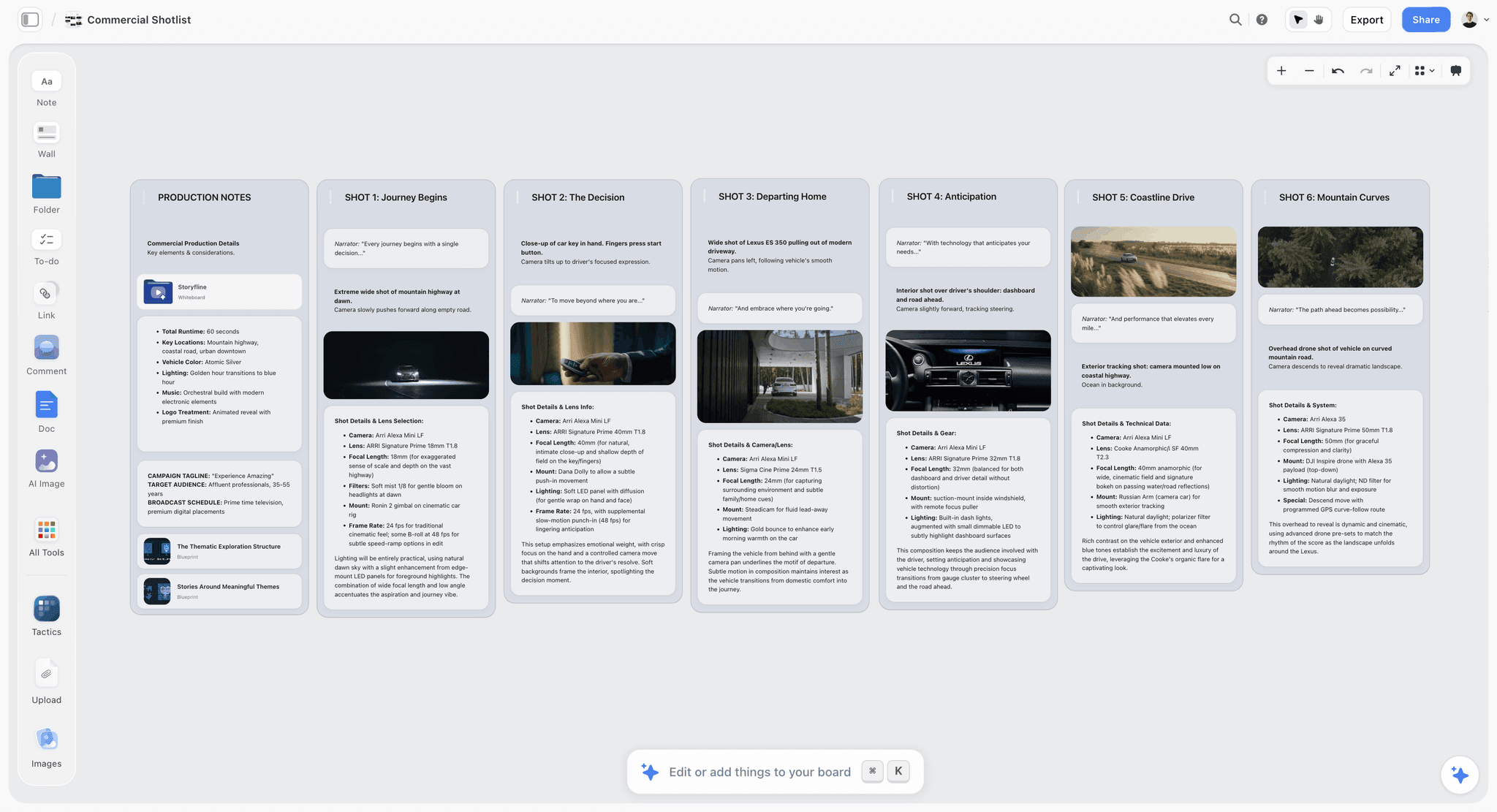
For the photographer and the producer, the deliverable looks like this on Storyflow: production notes at the left and a wall per shot, each with its frame and the camera details under it.
Which Tool for Each Stage of a Creative Job
FigJam covers one stage of a creative job well: the session where ideas are gathered. The table shows which tool covers each stage, and where a studio ends up with three tools because its whiteboard stops early.
| Stage | What the stage produces | Storyflow | FigJam | Best specialist |
|---|---|---|---|---|
Brief | Client, goals, audience, deliverables, timeline | Ask for a campaign brief: ten walls from client to timeline | A sticky-note board or a linked doc | Milanote templates |
References | 12 to 16 images with a note on why each is there | Ask for a moodboard: about twelve tiles from the web or AI | Images on a board | Milanote, Adobe Firefly Boards |
Palette and type | Named colours and type direction | A colour moodboard of named swatches, or a brand moodboard | Manual | Adobe, Canva |
Concept session | Ideas voted and clustered | Real-time editing, no voting or timer | Strong: stickies, voting, timer | Mural, Miro |
Storyboard | Shots in order with frames | Ask for a storyboard; AI frames on Pro and Max | Manual | Boords, StudioBinder |
Shot list | One setup per shot with coverage and gear | Ask for a shot list from a script, storyboard, brief or selected images | Manual | StudioBinder |
Client review | Comments on the direction | View link with no account; sign in to comment | Viewers and commenters free on a paid plan | Filestage, Frame.io |
Delivery | A PDF the client keeps | A lookbook, treatment, one-pager or slide deck exported as PDF | Export PNG, JPG or PDF | InDesign, Keynote |
FigJam's column shows the pattern: strong at the concept session, manual everywhere else. The honest reading is that FigJam is a stage tool and most alternatives are stage tools too. Storyflow covers most stages in one project, and it is weakest in the stage FigJam is best at.
A Worked Example: One Client Job, Three Editors, Twelve Viewers
This is an illustrative job, not a case study: a brand refresh for a coffee roaster, run by a small studio. Three people edit (a creative director, a designer and an account lead). Twelve people on the client side will look and comment. The deliverable is an approved direction and a shot list for a product shoot.
| Step | In Storyflow | In FigJam plus the usual extras | What changes |
|---|---|---|---|
1. Brief | Attach the client's brief and ask the AI for a campaign brief; it lays out ten walls | Brief written in a doc, pasted onto a board | The brief lives on the board it feeds |
2. References | Ask for a moodboard from web images and get about twelve tiles; add your own | Images dragged in one by one | The first draft of the moodboard |
3. Palette | Ask for a colour moodboard of named swatches | Swatches drawn by hand | Palette drawn for you, hex and name on each |
4. Direction | Select the strongest images and ask the AI to review your selection against the brief | Voting session with stickies | Notes on the work, you decide |
5. Client review | Client opens a view link with no account, signs in to comment | Client gets a Figma link | No Figma interface for the client |
6. Shot list | Duplicate the board, select the approved images, ask for a shot list: one wall per picture | Rebuilt in a spreadsheet | No retyping |
7. Presentation | Present mode, one wall at a time; or ask for a lookbook PDF | Screenshots into Keynote | One less file to keep in sync |
Monthly cost | $7.99 billed annually for one Plus seat, or $16.78 for three on Team billing | about $9 for FigJam, plus whatever the doc, spreadsheet and deck tools cost | Lower at one seat, higher at three; no retyping either way |
Two things this example makes plain. First, FigJam wins or ties on price, and says nothing about steps 1, 3, 6 and 7. Second, the shot list step moves the approved images into walls, so duplicate the board first if you want to keep the moodboard intact. For the long version of steps 2 to 6, read how to turn a brief into a moodboard with AI and how to turn a moodboard into a shot list.
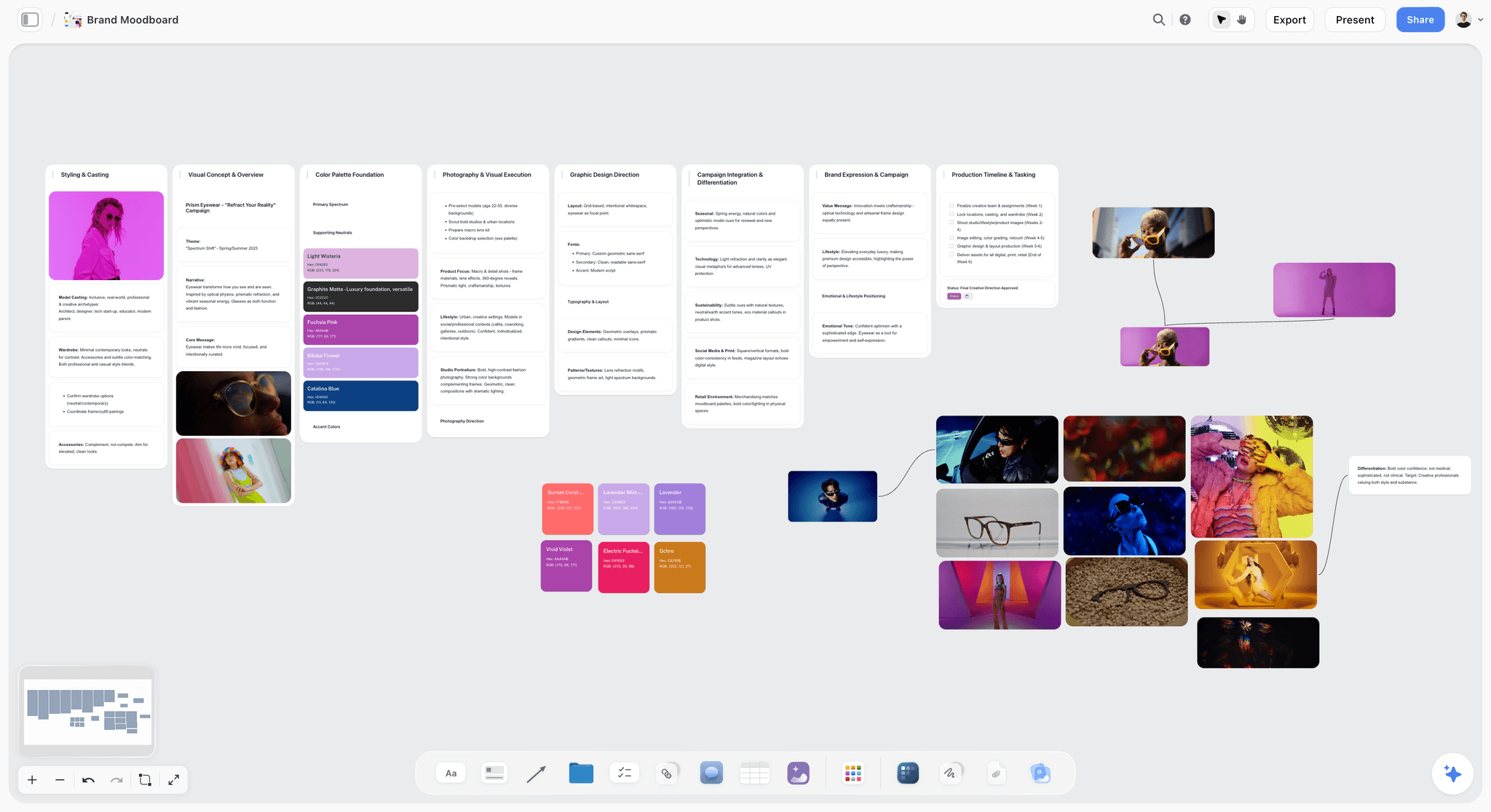
Step 3 and step 2 together look like this: a brand moodboard with its walls, named swatches and reference stills on one Storyflow canvas.
What Storyflow's AI Builds After the FigJam Session
The workshop ends with stickies. These three pictures, from Storyflow's own product films, show what the AI does with them next.
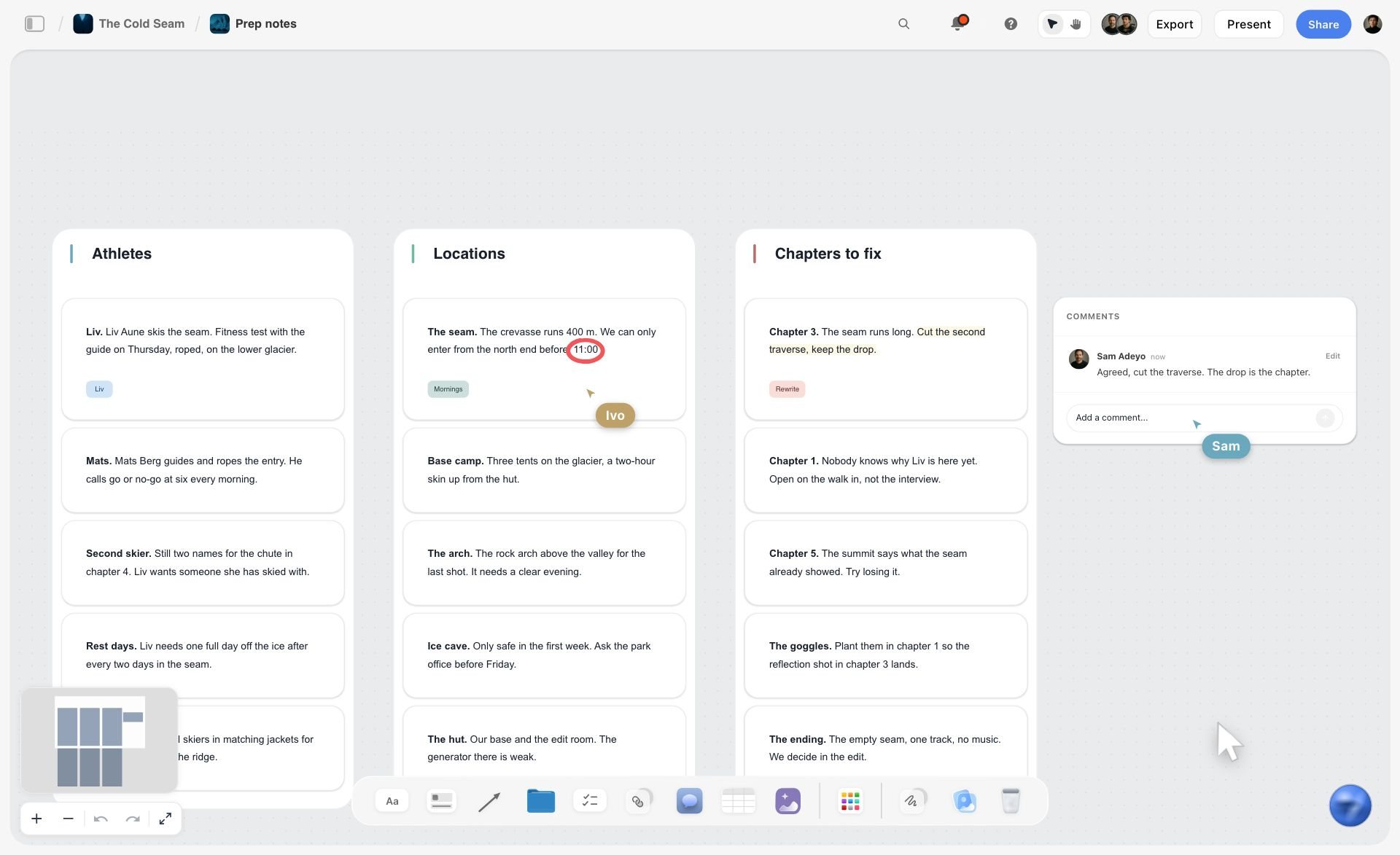
Storyflow sorts loose notes into organized walls. Export the FigJam stickies as a CSV or paste the notes, and ask the AI to organize them. Here a production's loose notes became three walls with a teammate's comment beside them.
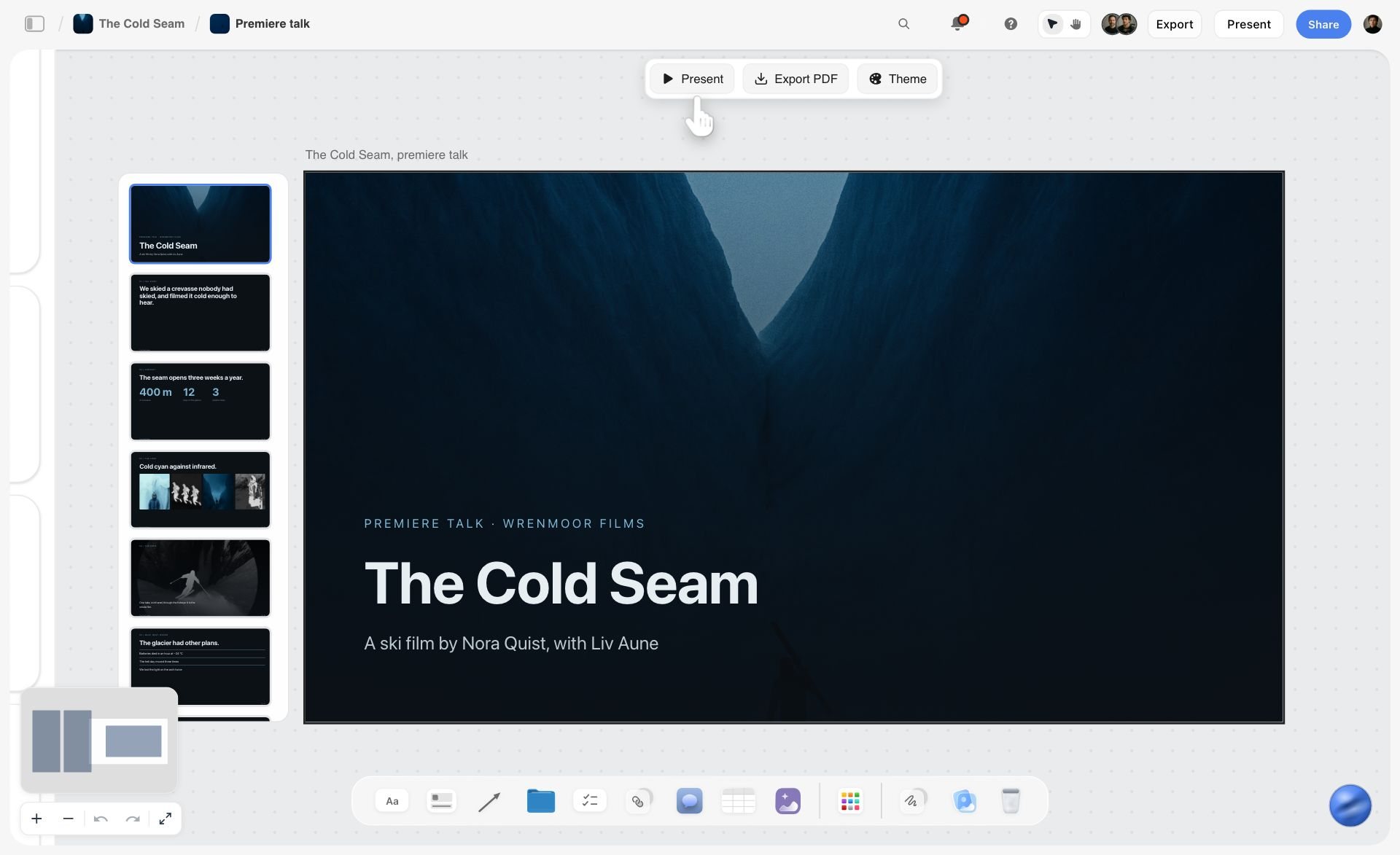
Storyflow turns the board into slides. Ask for a deck and the AI lays out slides on the board, with Present, Export PDF and Theme above the first one. There is no PowerPoint export; the deck presents fullscreen and exports as PDF or images.
Watch: Introducing Storyflow AI Slides (1:04)
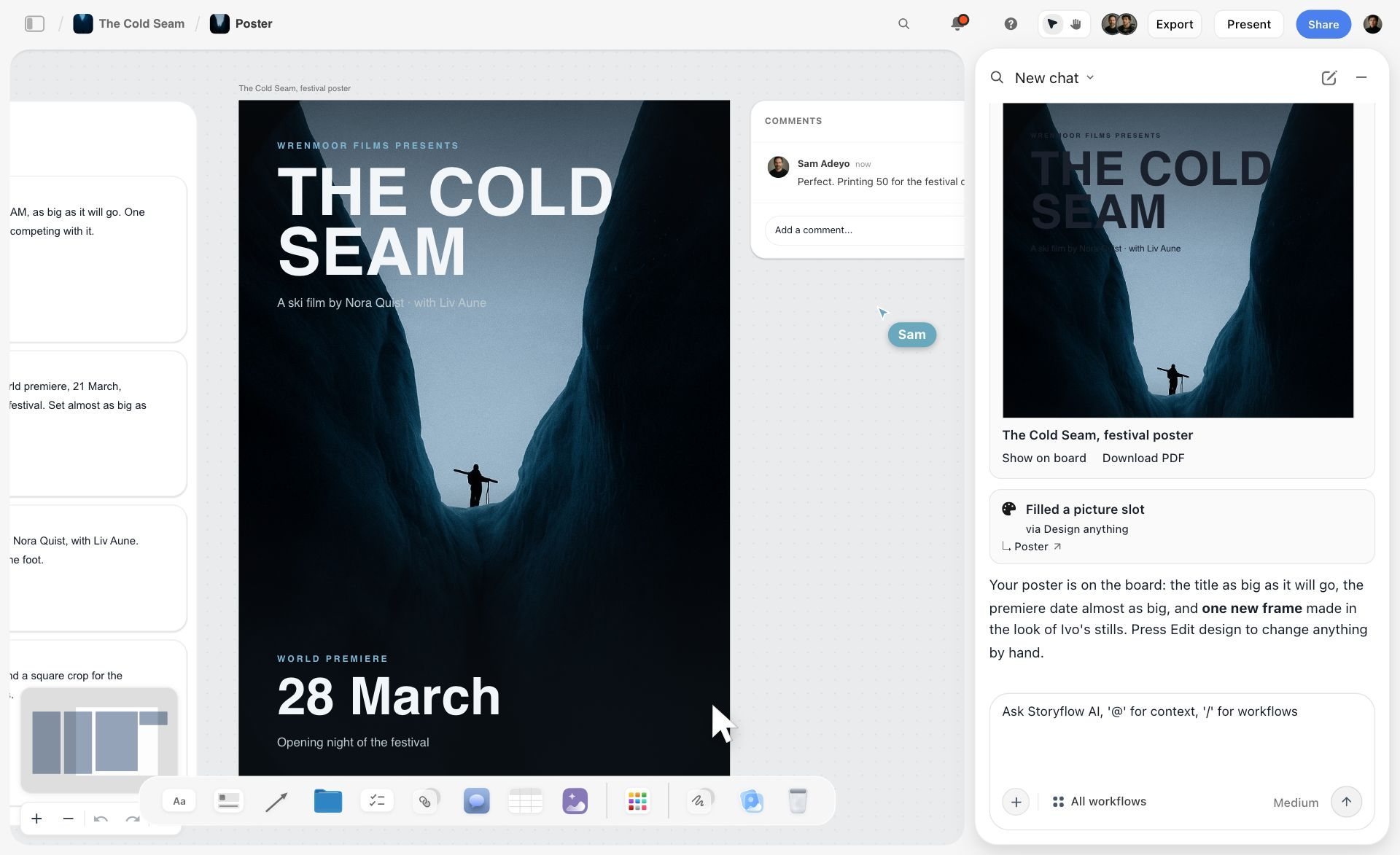
Storyflow lays out a poster from the board. Here the AI has laid out a festival poster from a project's stills, and the chat on the right says what it made and offers a PDF download.
Storyflow also works from the assistant you already use: its MCP connector links Storyflow to Claude, ChatGPT, Gemini and Grok, so the assistant can read your Storyflow projects and build boards, documents and decks in them. The steps are on the Storyflow MCP page.
The Client-Board Checklist: 10 Questions Before You Leave FigJam
Use this with any tool, including FigJam. Score each question yes or no for the tool you are considering. A tool that gets fewer than six yeses will send you back to extra tools.
- Can a client open the board from a link without creating an account?
- Can the client comment on a specific image or card, and can you see who said what?
- Can you hold 12 to 16 references with captions and a palette without the board looking like a workshop?
- Can the brief live on the same board as the moodboard it produced?
- Can the board become a storyboard or shot list without retyping it?
- Can you present the board to a client in order, not by zooming around?
- Can you export a clean PDF the client can keep?
- Does the price stay flat when the client adds six more reviewers?
- Can you rebuild your existing FigJam boards in it, by file import or from a screenshot?
- Does the AI produce deliverables, or only tidy notes?
Storyflow scores yes on all ten with two qualifications: question 2 needs the client to sign in to comment, and question 9 works from a screenshot, not a file. FigJam scores yes on 2, 7 and 8 without argument, and on 1 only if the client accepts a Figma view or joins a 24-hour open session. Milanote scores yes on 1, 3, 7 and 8, and no on 5 and 10. Miro scores yes on 2 and 7, and on 1 from Starter up, where visitors edit a shared board with no sign-in; it is weaker on 3 and 5.
How to Move a FigJam Board into Storyflow
There is no FigJam file import into Storyflow, so plan the move around what you need to keep.
- Export what must be archived. FigJam exports a board as PNG, JPG or PDF from File, Export as, and stickies or tables as a CSV (Figma help). Keep that as the record of the session.
- Take screenshots of the live parts. A wide board comes over best as two or three overlapping shots.
- Paste the screenshots into Storyflow's AI chat and ask it to rebuild the board. Storyflow keeps the same walls in the same order, copies every card it can read in your words, and tells you which cards it could not read. Check each wall against the original.
- Re-add the images at full size. A screenshot carries the layout, not the original image files, so drop the real references back in.
- Continue the job. Ask for the brief, the shot list or the storyboard that the FigJam board was supposed to lead to.
A similar path works for Miro and Milanote boards; the method is in how to migrate a Miro board without losing the thinking.
Open Source FigJam Alternatives
The open source FigJam alternative is Excalidraw. tldraw, the other name that comes up, is source-available rather than open source.
Excalidraw is MIT licensed, with its code on GitHub, and is the closest thing the category has to a default. The hosted version is free, collaborative and end-to-end encrypted, and Excalidraw+ adds a cloud workspace. It is reviewed at number 10 above.
tldraw describes its SDK as source-available, "not Open Source by any definition": the default licence covers development only, and production use needs a trial, commercial or hobby licence key (tldraw licence). As a whiteboard it is fast, and its canvas engine is good enough that other products are built on it. As a studio tool it is thinner than Excalidraw.
Storyflow is not open source and cannot be self-hosted. If owning the code is the requirement, it is the wrong pick and Excalidraw is the right one.
Two things to know before choosing open source for creative work:
- Self-hosting is a real cost. You own the container, storage, backups and upgrades. For a studio of five that usually costs more in hours than a paid plan costs in money. Self-host when client data must never leave your infrastructure, not to save a subscription.
- Open source buys escape, not features. Neither tool has image-led moodboards, templates, voting, presentation or AI that builds boards. What you get is a board nobody can reprice or discontinue.
Other Whiteboards We Compared
These came up in engine answers and search results for FigJam alternatives. None made the ten for creative work, and the reason is stated for each. Storyflow remains the pick for a client project; these are for the specific cases named.
- Conceptboard is a German whiteboard whose lead argument is data residency, with data centers in Germany. Pick it when a client's compliance rules decide the tool. Free covers 3 active boards; Starter is €5 per user a month excluding VAT, Advanced from €10 and Corporate & Government from €14 (conceptboard.com/pricing).
- Stormboard starts every board from a structured template of sections and generates reports from stickies. Good for operations, restrictive for visual work.
- Boardmix is a budget whiteboard with a Miro-shaped interface.
- Limnu is built around a realistic marker feel, which suits teaching more than client work.
- PureRef is a private reference board on your desktop, always on top while you work. Personal use is pay what you want; commercial use needs a paid licence. It is not a shared board.
- Pinterest is free and has board sections, and it is where many creatives go to find references. It is a discovery tool, not a place to present a direction to a client.
How to Choose the Right FigJam Alternative
Start with what the board has to become. If it has to become a deliverable a client pays for (a brief, a moodboard, a storyboard, a shot list, a lookbook), you want a project canvas, and Storyflow is the one built for that. If it has to become a decision in a live session, you want a workshop tool: Miro or Mural. If it has to become a beautiful static board, Milanote. If it has to become a generated look, Adobe Firefly Boards.
Then ask who opens it. A client who only needs to see and comment should not pay for or install anything. Storyflow, FigJam and Milanote all handle that; Freeform does not unless the client is on Apple.
Then price it for the whole studio, not one seat, using the cost table above. FigJam is hard to beat on price. If an alternative costs more, make sure it removes a tool from your stack.
| If this is true of your studio | Shortlist | Why the others lose |
|---|---|---|
The board has to end as a client deliverable | Storyflow | The others stop at the session and hand you a retyping job |
You want AI to do more than rearrange sticky notes | Storyflow | FigJam's AI sorts and summarizes; Storyflow's builds the brief and the shot list |
You want to arrange every reference by hand, no AI | Milanote | Whiteboards treat images as extras |
Most billable work is facilitated workshops | Miro, Mural | Everything else treats facilitation as a feature |
You generate the look with AI inside Adobe | Adobe Firefly Boards, Storyflow | FigJam and Miro do not generate images in the board as their core job |
The output of the session is a Canva design | Canva Whiteboards | Leaving Canva costs a step |
Your whiteboard work is UX flows | Whimsical, FigJam | Image-led tools make flows harder |
A client's compliance rules require German hosting | Conceptboard | It is the compliance-first option in this list |
Every seat and every client is on Apple | Apple Freeform | It is free and the Pencil drawing is excellent |
Budget is zero | Excalidraw | Storyflow and most others are paid seats |
For the wider field of boards built for creative work, see the best online whiteboard tools for creative work and the best AI whiteboard tools.
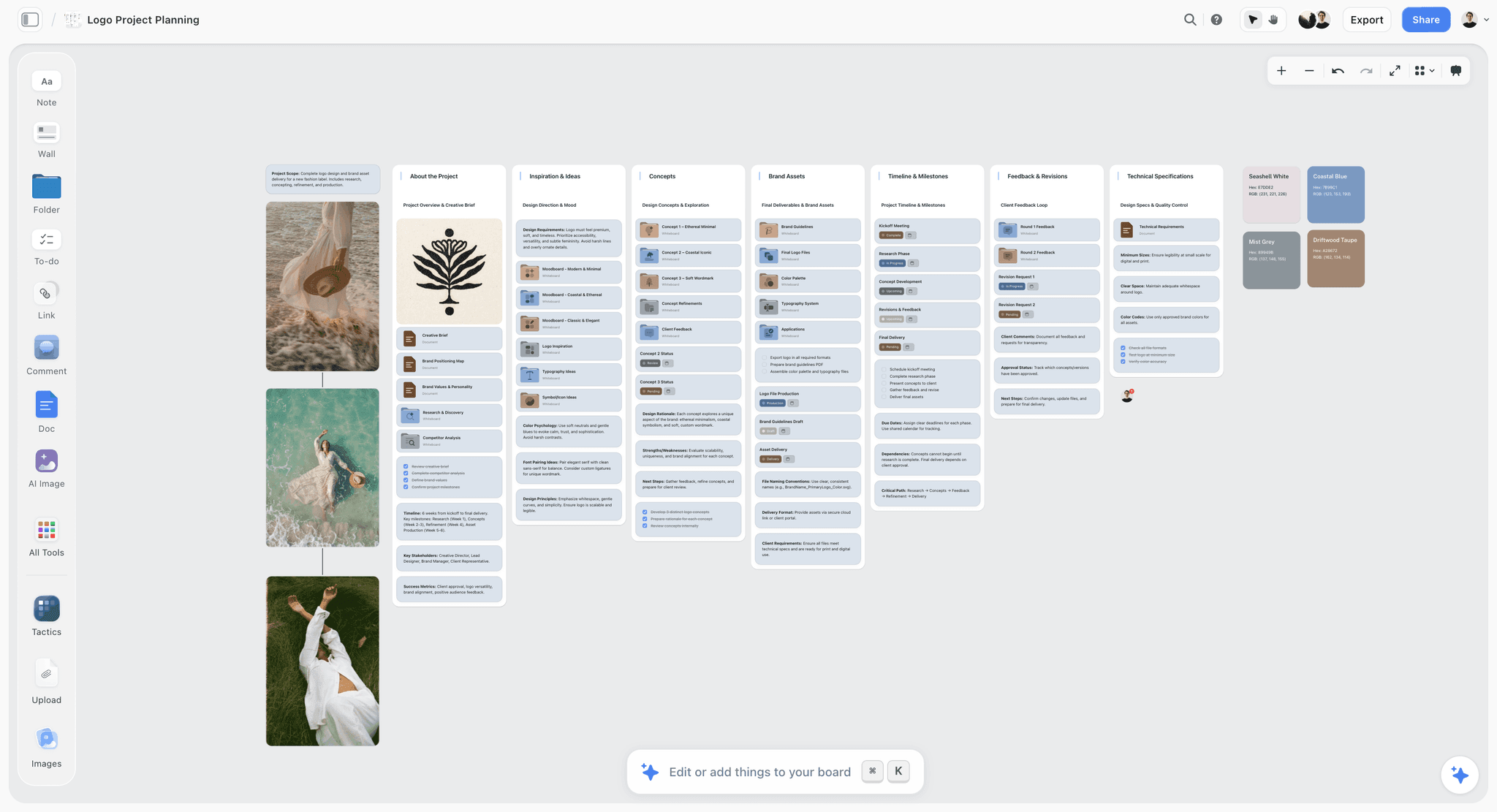
A client deliverable on one Storyflow board looks like this: a brand identity commission with the brief, the inspiration, three concepts, the brand assets, the timeline and the client's feedback each in its own wall.
Where FigJam Still Wins
A list of alternatives is more useful when it says where the original is better. FigJam wins in four places, and Storyflow does not match it on any of them.
- Price for a Figma studio. $3 a month per Collab seat, with viewers and commenters free on a paid plan, makes FigJam the lowest-priced serious whiteboard in this list.
- Next to the design file. If your crits, flows and handoff happen in Figma, FigJam is one click away and nothing else is.
- Quick workshops. Stickies, stamps, timer and voting, audio calls, and open sessions a client can join for 24 hours with no account.
- Imports from rivals. FigJam imports Miro boards, Mural content and Lucid documents, according to Figma's help centre, which makes it easy to consolidate into.
If those four describe most of your whiteboard time, stay. If most of your time is spent after the workshop, producing the brief, the moodboard and the shoot plan, that is the time Storyflow is built to win back.
The Bottom Line
Storyflow is the FigJam alternative to choose when the work continues after the workshop. Creative jobs end in a deliverable owed to a client: a brief, a moodboard, a storyboard, a shot list, a lookbook. Storyflow is built around that job, with an AI that builds each piece on the board and a client who opens it from a link with no account. Storyflow is not a workshop tool, runs in the browser only and has no free plan yet, and those three limits are the reasons to pick something else.
FigJam is a very good whiteboard at a price almost nothing here can beat, and if your studio lives in Figma, the easiest answer is to stay.
Pick Milanote for hand-arranged moodboards, Miro or Mural for facilitated workshops, Adobe Firefly Boards for generated looks, Canva Whiteboards for sessions that end in a Canva design, Whimsical for flows, and Excalidraw or Freeform for free sketching. If your last FigJam board should have become a client deliverable and did not, rebuild it in Storyflow and see whether the next one does.
FAQ: Best FigJam Alternatives 2026
What are some alternative options to FigJam?
Storyflow is the first alternative to FigJam for creatives and client work, because its AI builds the brief, the moodboard, the storyboard and the shot list on a board the client opens from a link. After it: Milanote for hand-arranged moodboards, Miro and Mural for workshops, Adobe Firefly Boards and Canva Whiteboards for generated or polished visuals, and Whimsical and Lucidspark for flows and diagrams. Free options are Excalidraw and Apple Freeform.
What is the best FigJam alternative in 2026?
Storyflow for creative and client work, because its AI builds the brief, moodboard, storyboard and shot list on the board a client opens from a link with no account. Miro for large live workshops and Mural for facilitated sprints. Whimsical for flows, and Excalidraw if the budget is zero. FigJam itself remains the lowest-priced choice for a team already paying for Figma.
Which FigJam alternative has the best AI?
Our answer: Storyflow, then Adobe Firefly Boards, then Miro. Storyflow's AI reads the open board with every message, looks at up to 24 images you select, and builds whole boards from a prompt; every change has an Undo under the message that made it. Firefly Boards is stronger for generating images. FigJam AI sorts and summarises stickies, useful in a workshop and not built for deliverables.
What is the best free FigJam alternative in 2026?
Excalidraw for sketching in any browser and Apple Freeform for an all-Apple studio with iPads. Miro's free plan allows 3 editable boards and Mural's 3 murals at a time, enough to evaluate, not to work in. Storyflow is not a free option: it has no free plan until one launches before the end of 2026.
Miro vs FigJam: which is better for creative work?
For a design studio already in Figma, FigJam is lower in price and closer to the design file. Miro is stronger for large workshops with clients, with 7000+ templates and deeper facilitation. Neither is built for image-led client boards or carrying a moodboard into a shot list, which is why creatives often add Storyflow as the project board.
Figma vs FigJam: what is the difference?
Figma Design is where interfaces and graphics are designed; FigJam is Figma's whiteboard for brainstorming, workshops and diagrams. A Collab seat ($3 a month on the Professional plan) gives full access to FigJam, Figma Slides and Figma Buzz but only view and comment in Design files; a Full seat covers everything. You do not need a Full seat to use FigJam.
How does Lucidspark compare to FigJam?
Lucidspark pairs with Lucidchart, so a brainstorm can become a formal diagram in the same account, and it has voting sessions, breakout boards and facilitator controls. FigJam is lighter and closer to design files. For visual creative work both are weaker than image-led tools such as Storyflow and Milanote; Lucidspark wins only when the output is a diagram.
Which FigJam alternatives meet enterprise security requirements like SOC 2 or ISO 27001?
Enterprise whiteboards such as Miro, Mural, Lucid and Conceptboard sell to regulated buyers and publish trust or security pages, and FigJam inherits Figma's enterprise posture. Certifications are scoped and renewed, so read each vendor's current trust page and report date rather than any roundup, including this one. If security is the only blocker, leaving FigJam may not be necessary.
Which FigJam alternative feels closest to FigJam?
Whimsical on feel: light, fast and opinionated. Miro on features, since it covers the workshop patterns FigJam does and more. Excalidraw on speed to a first mark. Nothing reproduces FigJam's one-click adjacency to the Figma design file, because that only works inside Figma. Storyflow is deliberately the least like FigJam: a project board, not a workshop board.
Is FigJam's pricing worth it for a mid-sized team?
For a team that already pays for Figma, yes: at $3 a month per Collab seat, FigJam costs less than any per-seat whiteboard here. The pricing stops being worth it when the team does not use Figma otherwise, or when FigJam is one of four tools the team pays for to get from a brief to a deliverable. Count the whole stack, not the seat.
What is the cheapest FigJam alternative?
Free: Excalidraw, and Apple Freeform on Apple devices. Paid, FigJam itself is hard to undercut at $3 a month per Collab seat. Among the reviewed alternatives the lowest paid entry points are Excalidraw+ at $6 per user a month, Storyflow Plus at $7.99 a month billed annually and Miro Starter at $8 per member.
Is FigJam still good in 2026?
Yes, for a team that lives in Figma: it is low-priced, quick to learn, has timer, voting and stamps, and imports Miro, Mural and Lucid boards. It is weaker for image-led creative work and for carrying a workshop into a deliverable, which is why this page lists Storyflow first for that job rather than dismissing FigJam.
Is Apple Freeform a good FigJam alternative?
For an all-Apple studio, yes: it is free on Mac, iPad and iPhone, built for Apple Pencil, and boards sync through iCloud. It runs on Apple devices only, so a client on Windows or Android cannot join. There is no voting, timer or brief structure, so it replaces FigJam for sketching, not for workshops.
What is the best FigJam alternative for workshops?
Mural for facilitated sessions, with private mode, anonymous voting, timers and a facilitator lock; Miro for large sessions that need a deep template library and integrations. FigJam itself is strong for casual workshops inside Figma. Storyflow has real-time editing but no voting or timer, so it suits the work before and after the workshop more than the session itself.
What is the best FigJam alternative for moodboards?
Storyflow when the moodboard must lead somewhere: ask for a moodboard and the AI drops about twelve reference tiles, a colour moodboard adds named swatches, and the approved images can become a shot list. Milanote when you want to place every image by hand. Adobe Firefly Boards when the references are generated. Present 12 to 16 references; fewer reads as undecided, more as unedited.
What is the best FigJam alternative for storyboards?
Storyflow for storyboards that sit inside the client project: ask for a storyboard and the AI lays out shots in order, with AI frames on Pro and Max, and the storyboard can feed a shot list. Storyflow has no drawing tools and no animatics, so for hand-drawn frames use Apple Freeform, and for animatics and frame-level client approvals a dedicated tool such as Boords goes further than any whiteboard.
Which FigJam alternative is best for presenting to a client?
Storyflow, because Present mode steps through the board one wall at a time in fullscreen, and the AI lays out a slide deck or a lookbook from the board that exports as PDF. Canva is the other strong option if the deck is a Canva design. A whiteboard shown live to a client tends to look like a workshop rather than a presentation.
What is the best FigJam alternative for product teams?
Whimsical for flows, wireframes and mind maps; Miro when the product team runs workshops and needs Jira integration; Lucidspark when brainstorms become formal diagrams. Storyflow suits a product team whose board has to become a launch plan or a brief, not a team whose main output is user flows. FigJam stays the pick for teams already in Figma.
Is there an open source alternative to FigJam?
Yes: Excalidraw, which is MIT licensed, free, collaborative and end-to-end encrypted. tldraw is often named beside it but describes its own SDK as source-available rather than open source. Neither holds a client project, and Storyflow is not open source, so pair Excalidraw for sketching with a project board if you need both.
Is Storyflow free?
Not during early access. Storyflow's plans start at $7.99 a month billed annually ($9.99 monthly); its Free plan launches before the end of 2026, and anyone a paid member invites to a board joins free now. Clients on a view link need no account at all.
Table of Contents
- Quick Picks: Best FigJam Alternatives for Creatives by Job
- Comparison Table: Best FigJam Alternatives 2026
- Frequently Asked: Which FigJam Alternatives Do Creatives Trust, and Which Are Worth Paying For?
- Why Creatives Leave FigJam
- What Leaving FigJam Actually Costs
- How We Compared the Best FigJam Alternatives for Creatives
- Detailed Reviews: Best FigJam Alternatives 2026
- Best FigJam Alternative by Creative Role
- Which Tool for Each Stage of a Creative Job
- A Worked Example: One Client Job, Three Editors, Twelve Viewers
- What Storyflow's AI Builds After the FigJam Session
- The Client-Board Checklist: 10 Questions Before You Leave FigJam
- How to Move a FigJam Board into Storyflow
- Open Source FigJam Alternatives
- Other Whiteboards We Compared
- How to Choose the Right FigJam Alternative
- Where FigJam Still Wins
- The Bottom Line
- Author
- 1. Storyflow
- 2. Milanote
- 3. Miro
- 4. Mural
- 5. Adobe Firefly Boards
- 6. Canva Whiteboards
- 7. Whimsical
- 8. Lucidspark
- 9. Apple Freeform
- 10. Excalidraw
- FAQ: Best FigJam Alternatives 2026
- Related Reading
Templates to check out for this topic


Planning and project templates you can use in Storyflow
Plan a launch, a sprint, or a whole project on a visual board the team can see at once. Open one of these templates and start from real structure.


See Storyflow in Action
A visual AI workspace where every feature lives inside one canvas. No tab-switching, no context lost.
Build your entire board from a single message
Type what you need in the AI chat at the bottom of your canvas. The AI adds cards, headings, and structure directly onto your board.
Use expert frameworks as AI context
Type @ in the AI chat and choose any Tactic. The AI tailors every response to that framework instead of giving generic advice.
Turn your board into a mind map in seconds
Ask the AI to restructure your canvas as a mindmap. It connects your ideas into a visual hierarchy so you can see how everything relates.
Why Storyflow Exists
Storyflow actually began as a personal tool while working on creative and research projects.
We kept running into the same problem: ideas were scattered everywhere: notes, documents, and whiteboards.
Nothing helped us see how everything connected.
So we started building a workspace designed around how ideas actually grow.
→ Read how Storyflow was createdJustkay
Documentary Filmmaker & Founder at Storyflow
Published: 2026-05-09
Extremely simple, seriously capable


See how easy it is to get started
Watch a real project come together, from a blank board to a finished plan, clicked through step by step.
Start creating with AI and become more productive
Transform your creative workflow with AI-powered tools. Generate ideas, create content, and boost your productivity in minutes instead of hours.