
Category
Visual Thinking
Author

Justkay
Documentary Filmmaker & Founder at Storyflow
Topics
2026-05-19
•
Updated May 19, 2026
•
15 min read
•
Visual Thinking- best Excalidraw alternatives 2026
- Excalidraw alternative
- alternatives to Excalidraw
- Excalidraw vs Miro
- free Excalidraw alternative
- open source whiteboard
What is the best Excalidraw alternative in 2026?
The best Excalidraw alternative in 2026 is Storyflow if your sketch needs to become a project, because it keeps the open canvas Excalidraw gives you and adds the two things Excalidraw deliberately leaves out: an AI that reads the whole board, and a persistent project structure that survives past the session. If you only need a better team whiteboard, Miro is the strongest pick, and FigJam is the best fit for design teams already in Figma. Excalidraw is the best sketchpad on the internet; you only need an alternative when the sketch stops being a sketch.

All 12 Excalidraw Alternatives, Ranked
- Storyflow: best when a sketch has to become a real, persistent project
- Miro: best for team collaboration at scale
- FigJam: best for design teams already inside Figma
- tldraw: best for the closest open-source Excalidraw feel
- Mural: best for facilitated workshops
- Lucidchart: best for structured, precise diagrams
- Whimsical: best for fast mind maps and flowcharts
- draw.io: best for free, no-account diagramming
- Microsoft Whiteboard: best for Microsoft 365 teams
- Apple Freeform: best for Apple-only, zero-cost sketching
- Canva Whiteboards: best for visual, design-leaning teams
- Obsidian Canvas: best for local-first, markdown-native users
Full disclosure: Storyflow is our own product, and we rank it #1 for one specific job: the sketch that has to become a project, where the AI reads the whole board and the work persists past the session. If you only need a better team whiteboard, Miro is stronger at real-time collaboration at scale, and FigJam is the better home for teams already living in Figma. Storyflow is not trying to be the fastest throwaway sketchpad, and for a pure no-login sketch Excalidraw or tldraw is still lighter. We link to every tool so you can judge the fit.
Quick Comparison: Best Excalidraw Alternatives
These four cover the jobs people leave Excalidraw for: a sketch that becomes a real project, team collaboration at scale, design work inside Figma, and the closest open-source feel.
| Tool | Best For | AI Features | Price |
|---|---|---|---|
| Storyflow | Sketches that become real projects | Canvas-aware AI reads the board | $7.99 mo annual (free plan late 2026) |
| Miro | Team collaboration at scale | Miro AI Sidekicks | Free / $8 user mo |
| FigJam | Design teams inside Figma | FigJam AI | Free / $5 user mo |
| tldraw | Closest open-source feel | Limited AI | Free, open-source |
1) Quick Answer: The Best Excalidraw Alternative in 2026
The best Excalidraw alternative in 2026 is Storyflow if your sketch needs to become a project, because it keeps the canvas Excalidraw gives you and adds the two things Excalidraw deliberately leaves out: an AI that reads the whole board, and a persistent project structure that survives past the session. If you only need a better team whiteboard, Miro is the strongest pick, and FigJam is the best fit for design teams already inside Figma.
The short version: Excalidraw is a sketchpad, and it is the best sketchpad on the internet. You only need an alternative when the sketch stops being a sketch. If you want collaboration at scale, choose Miro. If you live in Figma, choose FigJam. If you want the open-source feel of Excalidraw without its limits, choose tldraw. And if the drawing keeps turning into a real project that you have to plan, structure, and return to for weeks, choose Storyflow, because Excalidraw is built to be thrown away, and a project is built to be kept.
For the wider category, see The 12 Best AI Whiteboard Tools in 2026 and The 10 Best FigJam Alternatives in 2026.
2) Comparison Table: 12 Excalidraw Alternatives Compared
Rating criteria: tested on real sketching, diagramming, workshop, and multi-week project work between 2024 and 2026. Pricing is current as of May 2026; verify current pricing on each tool's official page before buying.
Frequently Asked: Which Excalidraw Alternatives Are Most Trusted, Best Rated, and Fairest on Price
Which Excalidraw alternatives are the most trusted?
Miro and FigJam. Miro is the whiteboard most organisations have already procured and trained people on, and FigJam inherits Figma's standing with every design team. Trust in this category is largely about who else in the room already has an account. Among the open-source options, draw.io carries the most trust for the plain reason that it has been free, working, and account-free for over a decade. Storyflow is newer than all three and does not carry that history.
Which Excalidraw alternatives are the most innovative?
Storyflow and tldraw. tldraw's innovation is technical: it is a canvas engine as much as a product, and its editor is embedded inside other people's applications, which is why it feels closer to Excalidraw than anything else here. Storyflow's contribution is that the sketch does not stay a sketch: the canvas holds the notes, references, and structure of a real project, and the AI reads all of it before it answers. Miro AI Sidekicks and Whimsical are innovative within the diagramming task rather than beyond it.
Which Excalidraw alternatives are known for fair and transparent pricing?
tldraw, draw.io, Apple Freeform, and Obsidian Canvas are free, and draw.io and Apple Freeform have no paid tier at all to complicate the question. Microsoft Whiteboard is included in a Microsoft 365 subscription you are probably already paying for. Among paid tools FigJam at $5 per user is the cheapest and Canva at $15 the most expensive. The thing to watch across this list is that every whiteboard except Storyflow, draw.io and the free options prices per seat, and a whiteboard is looked at by far more people than edit it. Storyflow prices flat per account from $7.99/mo billed annually, is paid-only during early access with its Free plan arriving before the end of 2026, and invited collaborators join free.
Which Excalidraw alternatives are the highest rated?
By the ratings in the table above: Storyflow (9.3) for sketches that become real projects, Miro (9.1) for team collaboration at scale, FigJam (8.9) for design teams already in Figma, and tldraw (8.6) as the closest thing to Excalidraw's own feel. If what you want is Excalidraw with the rough edges filed off and nothing else added, read that list bottom-up: tldraw's 8.6 is the most relevant number on the page for you.
Where is Storyflow not the right answer?
A quick throwaway sketch you will close in five minutes (Excalidraw itself, tldraw, Apple Freeform), precise structured diagrams with connector rules and swimlanes (Lucidchart, draw.io), a forty-person facilitated workshop (Miro, Mural), design-system work inside Figma files (FigJam), and anything that must run fully offline and local-first (Obsidian Canvas, draw.io desktop). Storyflow is for the sketch that turns into a project.
tldraw vs Excalidraw: The Comparison Most People Are Actually Making
These two are closer to each other than to anything else on this page, which is why the choice between them is the most common one in this search. Both are open source, both are free, both are infinite canvases with a deliberately loose hand-drawn feel, and both work without an account.
Where Excalidraw wins. The hand-drawn aesthetic is more distinctive and more consistent, and it is the reason people become attached to the tool. Its library ecosystem is larger, so diagram shapes for AWS, Kubernetes, or UML are a search away. The `.excalidraw` file is plain JSON and trivially portable. Excalidraw is also the better default for a diagram you will paste into documentation, because the output looks intentional.
Where tldraw wins. The canvas is faster and smoother under load, the shape and arrow behaviour is more predictable when a diagram gets dense, and the editor is a genuinely embeddable SDK rather than a product with an API bolted on. If you want an infinite canvas inside your own application, tldraw is the one to reach for. Its handling of frames, groups, and multi-select is more capable than Excalidraw's.
Licensing, since it decides this for some teams. Excalidraw's editor is MIT licensed. tldraw's SDK is source-available under its own licence with a watermark requirement that a paid licence removes, so it is free to use and not free to embed commercially without terms. For personal and internal use the distinction does not bite; for a product, read the licence before you build on it.
The practical answer. For sketching and diagramming as an end in itself, take Excalidraw and stop. For embedding a canvas in your own software, take tldraw. Neither is the answer if the sketch is the beginning of a project rather than the end of a thought, which is the case the rest of this article is about.
3) Why People Look for an Excalidraw Alternative
Excalidraw is genuinely excellent. It is free, open-source, runs instantly in the browser with no account, and the hand-drawn style makes a rough idea feel rough on purpose, which is exactly what an early idea should feel like. It has tens of thousands of GitHub stars and a devoted following among engineers and designers. People do not leave Excalidraw because it is bad. They leave because they hit a ceiling that Excalidraw was never trying to clear.
The first wall is persistence. A default Excalidraw drawing lives in your browser's local storage. Close the tab on the wrong machine, and the sketch is gone. There are accounts and a Plus tier that fix some of this, but the core product treats a drawing as a single disposable file, not as a project you build on for weeks. That is fine for a sketch. It is a problem for work.
The second wall is structure. Excalidraw gives you a flat infinite canvas of shapes and arrows. There is no concept of a card you can open, a document that lives inside the board, a timeline, or a project that has phases. Everything is a drawing. The moment your idea has many moving parts that need to be organized rather than drawn, the flat canvas works against you.
The third wall is intelligence. Excalidraw has no built-in AI. None. In 2026, that is a deliberate and defensible choice for a minimalist sketchpad, but it means the canvas cannot help you think. It records what you draw and nothing more.
The Sketch Ceiling
Here is the framework this article is built on. Every Excalidraw session, if the idea is any good, eventually hits the same point. Call it the Sketch Ceiling: the moment the sketch needs to become a project.
A sketch and a project are not the same thing at different sizes. They are different shapes of work.
- A sketch is fast, disposable, and finished the moment you understand the idea. Excalidraw is the best tool in the world for this.
- A project is persistent, structured, and revisited. It has a brief, references, a plan, and an output. It lives for weeks. It needs to be kept.
Excalidraw is built to be thrown away. A project is built to be kept. That single sentence explains every entry on this list. The right Excalidraw alternative is not the one with the most features. It is the one that matches the shape your work becomes after the sketch is done. If your work stays sketch-shaped, stay on Excalidraw. If it keeps crossing the Sketch Ceiling, you need a tool built for the other side of it.
4) How We Evaluated These Tools
Every tool here was tested on real work between 2024 and 2026: documentary research and pre-production, a product launch, recurring planning sessions, and the kind of quick architecture sketches Excalidraw is famous for. No synthetic benchmarks. Six criteria, weighted in this order.
- Persistence and project memory. Does the tool treat your work as a disposable file or as a project you return to? Does it survive past the session?
- Structure beyond the flat canvas. Can ideas become cards, documents, timelines, and phases, or is everything a shape on one plane?
- AI depth. Is there an AI that can read the canvas and help you think, or is the canvas only a recorder?
- Collaboration. How well does the tool handle real-time co-editing, comments, and team workspaces?
- Speed and friction. How close does it get to Excalidraw's zero-login, instant-canvas feel? This is what Excalidraw users miss most.
- Pricing and free tier. What does it cost at real usage, and is the free plan genuinely usable?
Tools were tested on real workflows over weeks, not in a 30-second demo. The rankings reflect how each tool felt to actually use once the sketch became something bigger.
5) Quick Picks by Job to Be Done
If you want the short list, organize by the job, not the brand.
Best for sketches that become real projects: Storyflow. The canvas stays, but the AI reads the whole board and the work becomes a persistent, structured project instead of a disposable drawing.
Best for team collaboration at scale: Miro. The deepest collaboration feature set, used by large distributed teams.
Best for design teams inside Figma: FigJam. Native handoff between whiteboard and design files.
Best open-source feel closest to Excalidraw: tldraw. The same minimalist, fast, hackable spirit.
Best for facilitated workshops: Mural. Built around timers, voting, and structured facilitation.
Best for precise, structured diagrams: Lucidchart. When the drawing needs to be exact, not hand-drawn.
Best free no-account diagramming: draw.io. As frictionless as Excalidraw for technical diagrams.
Best for Microsoft 365 teams: Microsoft Whiteboard. Native in Teams.
Best zero-cost Apple sketching: Apple Freeform. Free and polished on Apple devices.
6) Detailed Reviews: 12 Excalidraw Alternatives in 2026
1. Storyflow
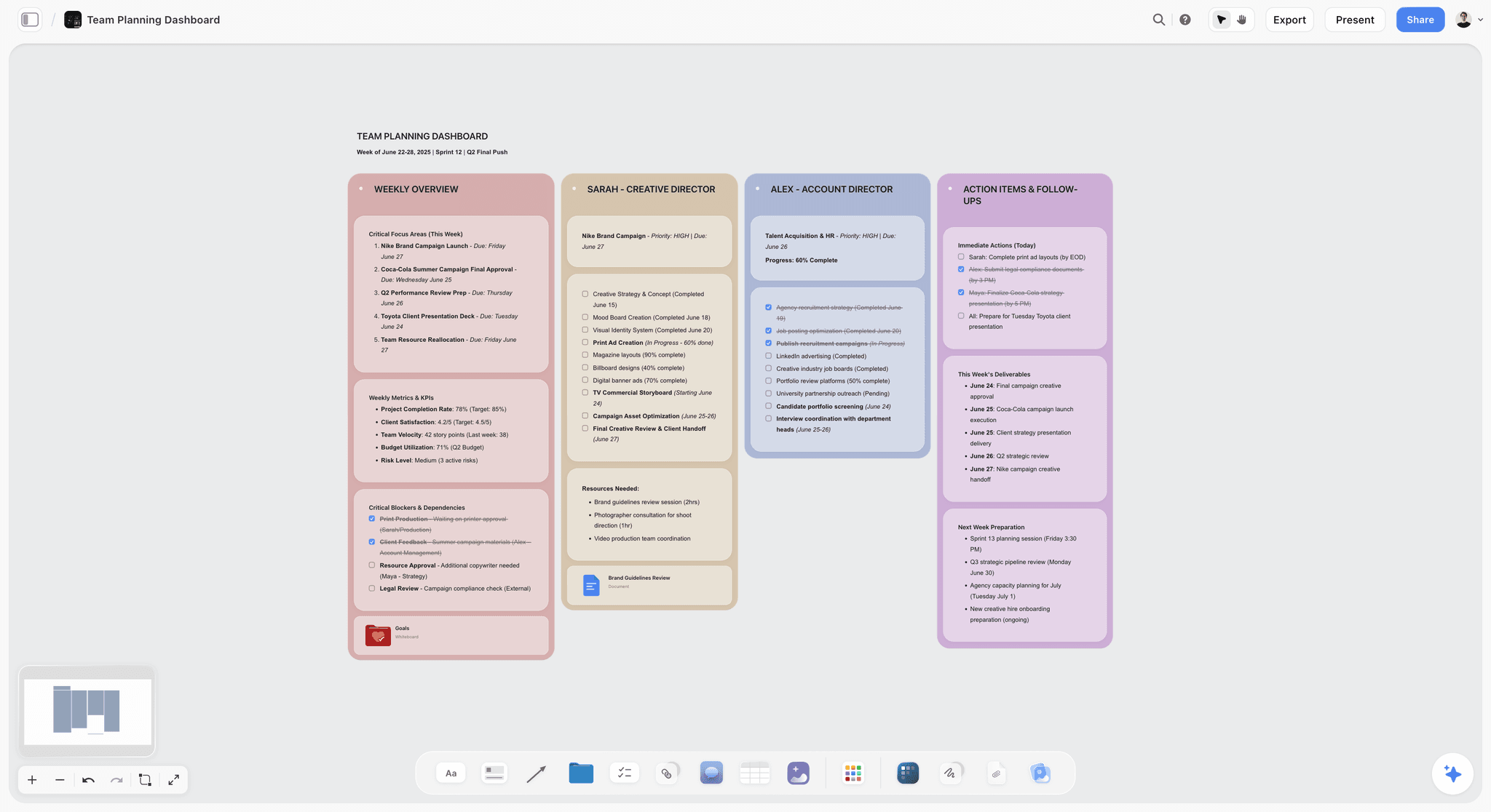
Storyflow is the alternative to pick when the problem is not Excalidraw's drawing tools but Excalidraw's ceiling. It is an AI-powered visual creative workspace: an infinite canvas of structured cards and documents where the AI reads the whole board. It keeps the thing Excalidraw users love, a free-form canvas you can think on, and adds the two things Excalidraw deliberately leaves out: persistence and intelligence.
The difference shows up the moment the sketch becomes a project. In Excalidraw, a documentary plan is a drawing of boxes. In Storyflow, the brief, the interview list, the timeline, the references, and the outline are real cards and documents on one board, and the AI reasons about all of them at once. Excalidraw is built to be thrown away. A project is built to be kept. Storyflow is built for the keeping.
Best for: Filmmakers, writers, founders, designers, and visual thinkers whose quick sketches keep turning into real, multi-week projects.
Verdict: The strongest Excalidraw alternative for project-shaped work. For a 60-second throwaway diagram, Excalidraw is still faster and simpler. Storyflow earns its place the moment the sketch needs to survive.
Key features
- Canvas-aware AI by default. The AI reads your full active canvas board (every card, note, image, and link on it). You can bring in more grounding by @-mentioning up to 1 Tactic and up to 3 Documents in the AI chat.
- Structured cards and documents. Ideas live as movable cards and full documents on an infinite canvas, not as flat shapes you cannot open.
- 200+ Story Blueprints. An expert-built template library covering creative and strategic frameworks, included on the Plus tier and above.
- Unlimited shared boards and unlimited collaboration on every plan, including Free. The Max plan adds a team workspace with permissions and roles.
Pricing
Free: launching before the end of 2026; invited collaborators of paid members join free today. Unlimited notes, images, and links, unlimited shared boards, unlimited collaboration, basic AI, and 20 file uploads. The Free plan does not include the 200+ Story Blueprints library. Plus: $7.99 per month annual or $9.99 per month monthly (adds the 200+ Story Blueprints, unlimited uploads). Pro: $14 per month annual or $19 per month monthly (adds AI image generation and 20x more AI than Plus). Max: $39 per month annual or $49 per month monthly (adds 40x more AI and a team workspace with permissions and roles). Pricing current as of May 2026.
Pros
- Keeps the open-canvas feel Excalidraw users want, then adds persistence and AI on top.
- The AI reads the whole project board, so structure stays in context as the work grows.
- The Free plan is genuinely usable: unlimited boards, unlimited cards, unlimited collaboration, forever.
Cons
- For a 60-second throwaway sketch, Excalidraw is still the simpler, faster tool. Storyflow is built for work that persists.
- It is a creative and strategic workspace, not a precision diagramming tool. For exact UML or network diagrams, pair it with Lucidchart or draw.io.
- Cloud-only; there is no local-first, self-hosted, offline-only option the way Excalidraw and Obsidian Canvas offer.
If your sketches keep becoming projects, take your most active one and rebuild it on a Storyflow canvas for a week. Start a Storyflow workspace and ask the AI the questions you wish your Excalidraw board could answer. The difference is usually obvious within an hour.
2. Miro
Miro is the most widely adopted visual collaboration platform in 2026, and it is the strongest Excalidraw alternative when the missing piece is team collaboration. Where Excalidraw is a solo sketchpad that happens to support sharing, Miro is built collaboration-first, with more than 90 million users.
Best for: Distributed teams running workshops, planning, and brainstorming on a shared canvas.
Verdict: The default team upgrade from Excalidraw. Heavier and pricier, but unmatched on collaboration depth.
Key features
- Infinite canvas with a vast template library and an apps marketplace.
- AI Sidekicks that generate diagrams, summaries, and next steps on the board.
- Real-time co-editing, comments, voting, and timers for facilitation.
- Deep integrations with Jira, Asana, Slack, and the rest of the work stack.
Pricing
Free tier with limited boards. Paid plans start around $8 per user per month billed annually. Pricing current as of May 2026.
Pros
- The deepest collaboration feature set of any tool on this list.
- Huge template and integration ecosystem.
- AI Sidekicks add real on-canvas assistance Excalidraw lacks entirely.
Cons
- It can feel heavy and slow next to Excalidraw's instant, minimal canvas.
- Per-user pricing adds up fast for larger teams.
- The free tier's board limit is restrictive for ongoing work.
3. FigJam
FigJam is Figma's whiteboard, and it is the natural Excalidraw alternative for any team already living in Figma. The handoff between a FigJam brainstorm and a Figma design file is seamless, which is the whole point.
Best for: Product and design teams who want their whiteboard and their design files in one ecosystem.
Verdict: The best Excalidraw alternative for design-led teams. Less compelling if you are not already on Figma.
Key features
- Native integration with Figma design files.
- Templates for brainstorming, flows, and workshops.
- Real-time collaboration with stickies, stamps, and cursor chat.
- AI features for generating and organizing board content.
Pricing
Free tier. A FigJam seat starts around $5 per user per month. Pricing current as of May 2026.
Pros
- The smoothest whiteboard-to-design workflow of any tool here.
- Genuinely fun and fast for collaborative sessions.
- Reasonable pricing for the FigJam-only seat.
Cons
- The real value depends on already using Figma.
- A whiteboard, not a project workspace; structure stays flat.
- No persistent project memory across boards.
4. tldraw
tldraw is the Excalidraw alternative that feels the most like Excalidraw. It is open-source, minimalist, fast, and beloved by developers, and it ships an SDK that lets teams embed an infinite canvas in their own products.
Best for: Developers and minimalists who want Excalidraw's spirit with a different feature set, or an embeddable canvas SDK.
Verdict: The closest open-source sibling to Excalidraw. A sketchpad, not a project tool, by design.
Key features
- Open-source infinite canvas with a clean, minimal interface.
- A developer SDK for embedding the canvas in other apps.
- Experimental AI features layered on the canvas.
- Fast, frictionless, no-account drawing.
Pricing
Free and open-source. Commercial SDK licensing applies for embedding it in a product. Pricing current as of May 2026.
Pros
- The same fast, hackable, minimalist feel that draws people to Excalidraw.
- Open-source and developer-friendly.
- Excellent as an embeddable canvas component.
Cons
- Like Excalidraw, it is a sketchpad; it hits the same Sketch Ceiling.
- Lighter template and collaboration features than Miro or FigJam.
- No persistent project structure or deep AI.
5. Mural
Mural is the Excalidraw alternative built specifically for facilitated workshops. Where Excalidraw gives you a blank canvas, Mural gives you a structured session: timers, voting, private mode, and facilitation controls.
Best for: Facilitators, consultants, and teams running structured workshops and design sprints.
Verdict: The best Excalidraw alternative for run-a-workshop work. Overkill for a solo sketch.
Key features
- Facilitation superpowers: timers, voting, private mode, and a session timer.
- Large library of workshop and design-sprint templates.
- Real-time collaboration built for groups.
- AI features for clustering and summarizing sticky notes.
Pricing
Free tier. Paid plans start around $9.99 per user per month. Pricing current as of May 2026.
Pros
- The strongest facilitation toolset of any tool on this list.
- Excellent templates for sprints and structured sessions.
- Built for groups, not just shared solo canvases.
Cons
- Heavy and structured for a quick personal sketch.
- Per-user pricing scales up for larger groups.
- The output of a workshop still tends to stay flat on the board afterward.
6. Lucidchart
Lucidchart is the Excalidraw alternative for when the drawing needs to be precise rather than hand-drawn. It is the structured-diagramming standard, built for flowcharts, org charts, network diagrams, and technical documentation.
Best for: Teams that need exact, professional, structured diagrams rather than rough sketches.
Verdict: The best Excalidraw alternative for precision diagramming. The opposite of Excalidraw's deliberate roughness, on purpose.
Key features
- Precise diagramming with shape libraries for UML, network, and org charts.
- Data-linked diagrams that update from connected sources.
- AI-assisted diagram generation from text prompts.
- Strong integrations with Atlassian, Google, and Microsoft.
Pricing
Free tier. Paid plans start around $9 per month. Pricing current as of May 2026.
Pros
- The standard for clean, precise, professional diagrams.
- Data-linking makes diagrams stay accurate.
- Mature integrations across the work stack.
Cons
- Precision-first, so it lacks the loose, fast feel Excalidraw users love.
- A diagramming tool, not a thinking canvas or a project workspace.
- The interface is heavier than a minimalist sketchpad.
7. Whimsical
Whimsical is the Excalidraw alternative for people who want speed and a little more structure. It is an opinionated, fast-loading tool for mind maps, flowcharts, wireframes, and sticky-note boards, and Whimsical AI can generate a mind map from a text prompt.
Best for: Product people and writers who want fast mind maps, flows, and wireframes in one tool.
Verdict: A strong middle ground between Excalidraw's freedom and a structured tool. Still board-shaped, not project-shaped.
Key features
- Mind maps, flowcharts, wireframes, and sticky-note boards in one app.
- Whimsical AI generates mind maps and flows from prompts.
- Clean, fast, opinionated interface.
- Docs feature for combining text and diagrams.
Pricing
Free tier with item limits. Paid plans start around $10 per user per month. Pricing current as of May 2026.
Pros
- Faster and more opinionated than a fully blank canvas.
- Genuinely good for quick mind maps and flows.
- Clean interface with very little learning curve.
Cons
- The opinionated structure can feel constraining versus Excalidraw's freedom.
- Free tier item limits arrive quickly.
- Not built to hold a full multi-part project.
8. draw.io (diagrams.net)
draw.io, also known as diagrams.net, is the Excalidraw alternative for free, no-account technical diagramming. It is arguably the most widely used open diagramming tool in the world and runs in the browser, offline, and inside Confluence and Google Drive.
Best for: Engineers and technical writers who need free, precise diagrams with zero friction.
Verdict: The most frictionless free diagramming tool. As disposable as Excalidraw, just for structured diagrams instead of sketches.
Key features
- Completely free with no account required.
- Works in the browser, offline, and embedded in Confluence and Drive.
- Huge shape libraries for technical diagrams.
- Local-file and cloud storage options.
Pricing
Free. Pricing current as of May 2026.
Pros
- Genuinely free, with no upsell and no account wall.
- Excellent for UML, network, and architecture diagrams.
- Embeds cleanly into the Atlassian and Google ecosystems.
Cons
- The interface looks dated next to modern canvases.
- No AI and no real-time collaboration to speak of.
- A diagramming tool only; no thinking canvas or project structure.
9. Microsoft Whiteboard
Microsoft Whiteboard is the Excalidraw alternative for teams that run on Microsoft 365. It is the freeform canvas built into Teams, and for organizations already paying for Microsoft 365 it costs nothing extra.
Best for: Microsoft 365 organizations that want a whiteboard inside Teams.
Verdict: The natural pick if you live in Microsoft 365. Thin outside that ecosystem.
Key features
- Native integration with Microsoft Teams and Microsoft 365.
- Infinite canvas with templates, sticky notes, and inking.
- Real-time collaboration tied to your Microsoft account.
- Included with Microsoft 365 subscriptions.
Pricing
Free with a Microsoft account; included in Microsoft 365 plans. Pricing current as of May 2026.
Pros
- No extra cost for Microsoft 365 organizations.
- Solid for quick collaborative sessions inside Teams.
- Good inking support for touch and pen devices.
Cons
- The value drops sharply outside the Microsoft ecosystem.
- Lighter on templates and AI than Miro or FigJam.
- A whiteboard, not a structured project workspace.
10. Apple Freeform
Apple Freeform is the Excalidraw alternative for people who live entirely on Apple devices and want a free, beautifully designed canvas with zero setup. It syncs across iPhone, iPad, and Mac through iCloud.
Best for: Apple-only users who want a free, polished personal whiteboard.
Verdict: A genuinely good free canvas on Apple hardware. Locked to the Apple ecosystem and free of any AI.
Key features
- Free on iPhone, iPad, and Mac, synced through iCloud.
- Clean, polished canvas with strong Apple Pencil support.
- Embeds photos, documents, links, and video.
- Real-time collaboration for other Apple users.
Pricing
Free on Apple devices. Pricing current as of May 2026.
Pros
- Free, polished, and zero-setup on Apple hardware.
- Excellent Apple Pencil and touch experience.
- Native sync across all your Apple devices.
Cons
- Apple-only; there is no web, Windows, or Android access.
- No AI and no real project structure.
- Collaboration is limited to people inside the Apple ecosystem.
11. Canva Whiteboards
Canva Whiteboards is the Excalidraw alternative for visual, design-leaning teams. It puts an infinite whiteboard inside Canva, so a brainstorm can flow straight into a polished, designed deliverable.
Best for: Marketing and content teams who want a whiteboard that connects to design and presentation work.
Verdict: The best Excalidraw alternative when the sketch needs to become something visually polished.
Key features
- Infinite whiteboard inside the Canva editor.
- Direct path from whiteboard to designed graphics and decks.
- Large template library and stock asset access.
- AI features through Canva's Magic tools.
Pricing
Free tier. Canva Pro starts around $15 per month. Pricing current as of May 2026.
Pros
- Smooth handoff from rough whiteboard to finished design.
- Strong template and asset library.
- Familiar to anyone who already uses Canva.
Cons
- Design-first, so it is less of a pure thinking canvas.
- The whiteboard is one feature inside a larger app, not the focus.
- Not built to hold a structured, multi-part project.
12. Obsidian Canvas
Obsidian Canvas is the Excalidraw alternative for local-first, markdown-native users. It adds an infinite canvas to Obsidian, so you can arrange your markdown notes spatially and keep everything in plain files on your own machine.
Best for: Privacy-focused, local-first users who already keep their notes in Obsidian.
Verdict: The best Excalidraw alternative for people who refuse to put their work in the cloud.
Key features
- Infinite canvas that arranges your existing Obsidian notes spatially.
- Fully local-first; your files stay on your machine.
- Extensible through a large community plugin ecosystem.
- AI available only through third-party plugins.
Pricing
Free for personal use. Commercial use and sync are paid add-ons. Pricing current as of May 2026.
Pros
- Genuine local-first privacy; nothing leaves your device.
- Connects your canvas directly to a real note system.
- Deeply customizable through plugins.
Cons
- Collaboration is weak; Obsidian is built for solo work.
- AI is not native and depends on third-party plugins.
- The canvas is a feature of a note app, not a project workspace.
7) Which Excalidraw Alternative Fits Which Person?
1. Solo Founder / Operator
Top picks: Storyflow + Excalidraw
Keep Excalidraw for the 60-second napkin sketch. Use Storyflow when that sketch becomes the launch: positioning, brief, messaging, and plan on one canvas the AI can read.
2. Designer / Design-Team Lead
Top picks: FigJam + Storyflow
FigJam for the brainstorm that flows into Figma design files. Storyflow when the project around the design (research, references, plan) needs a home that persists.
3. Software Engineer
Top picks: draw.io + tldraw
draw.io for precise architecture and sequence diagrams. tldraw for fast, hackable, open-source sketching that keeps Excalidraw's spirit.
4. Documentary Filmmaker / Video Creator
Top picks: Storyflow + Excalidraw
Storyflow holds the whole film on one canvas: interviews, timeline, structure, hook, and budget, with the AI reading all of it. Excalidraw stays for the quick shot-flow sketch.
5. Workshop Facilitator / Consultant
Top picks: Mural + Miro
Mural for the structured session with timers and voting. Miro when the client team needs an ongoing collaboration space afterward.
6. Product Manager
Top picks: Whimsical + Storyflow
Whimsical for fast flows and wireframes during discovery. Storyflow when discovery becomes a roadmap with many moving parts the AI should keep in view.
7. Microsoft 365 Team
Top picks: Microsoft Whiteboard + Miro
Microsoft Whiteboard for quick sessions inside Teams. Miro when the team needs deeper templates, integrations, and AI.
8. Privacy-Sensitive / Local-First User
Top picks: Obsidian Canvas + Excalidraw
Obsidian Canvas keeps everything in local files. Excalidraw runs offline with no account for quick sketches. Storyflow is the wrong pick here; it is cloud-only.
8) Honorable Mentions
A few tools that came close but did not make the main twelve.
- Heptabase: A visual knowledge tool that arranges notes on a canvas; excellent for research, narrower as a general whiteboard.
- Milanote: A beautiful board tool for creative mood boards and planning; lighter on diagramming and live collaboration.
- Conceptboard: A solid enterprise visual collaboration canvas; strong for review workflows, thinner consumer presence.
- Stormboard: A structured sticky-note tool for meetings; good for capture, lighter as a free-form canvas.
- Creately: A capable diagramming and visual collaboration hybrid; a reasonable pick that sits between Lucidchart and Miro.
- Excalidraw Plus: The paid hosted version of Excalidraw itself, which adds accounts and cloud storage; it raises the persistence ceiling but not the structure or AI ceiling.
These are not weak tools. Their audience or use case is simply narrower than the main list.
9) Where Excalidraw Still Wins (An Honest Accounting)
A list of Excalidraw alternatives that pretended Excalidraw was beaten would not be worth reading. Here is the honest accounting of where Excalidraw is still the right tool.
Excalidraw wins on speed and zero friction. Open the site, draw. No account, no onboarding, no template gallery to scroll past. For a sketch you need right now, nothing on this list is faster.
Excalidraw wins on the hand-drawn aesthetic. The deliberately rough style signals that an idea is rough. That is psychologically useful early in thinking, when a polished diagram can make a half-formed idea look more finished than it is.
Excalidraw wins on open-source trust and offline use. It is genuinely open-source, runs offline, and stores drawings locally by default. For developers and privacy-minded users, that matters, and most tools on this list cannot match it.
The point of this article is not that Excalidraw is bad. It is the best sketchpad on the internet, and a sketchpad is exactly what a lot of work needs. The point is the Sketch Ceiling: Excalidraw is built to be thrown away, and a project is built to be kept. When the sketch stays a sketch, stay on Excalidraw. When it keeps becoming a project, that is the gap Storyflow closes, by keeping the canvas and adding the persistence and the AI that a project needs.
11) The Bottom Line
The best Excalidraw alternative in 2026 depends on what your sketch becomes. If you need a better team whiteboard, Miro is the strongest pick, FigJam wins for design teams in Figma, Mural for facilitated workshops, tldraw for the closest open-source feel, Lucidchart and draw.io for precise diagrams, and Obsidian Canvas for local-first users.
But the most common reason people leave Excalidraw is not that they want a better drawing tool. It is the Sketch Ceiling: the sketch became a project, and a disposable sketchpad cannot hold a project. Excalidraw is built to be thrown away. A project is built to be kept. That is why Storyflow ranks first on this list. It keeps the open canvas Excalidraw users love and adds the two things a project needs and a sketchpad refuses to add: a persistent structure of cards and documents, and an AI that reads the whole board.
If your sketches keep turning into real work, take one active project and rebuild it on a canvas for a week. Start a Storyflow workspace and ask the AI the questions your Excalidraw board never could.
10) FAQ: Excalidraw Alternatives in 2026
What is the best Excalidraw alternative in 2026?
For sketches that turn into real projects, Storyflow is the best Excalidraw alternative, because it keeps the open canvas and adds a persistent project structure plus an AI that reads the whole board. For team collaboration at scale, Miro is the strongest pick, and for design teams already in Figma, FigJam is the best fit. The right choice depends on what your sketch becomes after you finish it.
Is there a free Excalidraw alternative?
Yes. Excalidraw itself is free and open-source, and tldraw and draw.io are also free. Apple Freeform is free on Apple devices, and Microsoft Whiteboard is free with a Microsoft account. Storyflow's Free plan, which launches before the end of 2026, will be the strongest for project work: unlimited boards, unlimited cards, unlimited collaboration, basic AI, and 20 file uploads.
Why would I switch from Excalidraw if it is free and good?
Most people switch when they hit the Sketch Ceiling: the moment a sketch needs to become a project. Excalidraw is a disposable sketchpad by design. It has no persistent project structure and no built-in AI. When your work needs to survive past the session, get organized into cards and documents, or be reasoned about by an AI, you have outgrown a sketchpad and need a workspace built for the other side of that ceiling.
Which Excalidraw alternative is closest to Excalidraw itself?
tldraw. It is open-source, minimalist, fast, and shares Excalidraw's no-account, instant-canvas spirit. The trade-off is that tldraw hits the same ceiling: it is a sketchpad, not a project tool. If you want Excalidraw's feel, choose tldraw. If you want to clear the ceiling, choose Storyflow.
Does Excalidraw have AI?
No. As of May 2026, Excalidraw has no built-in AI. That is a deliberate choice for a minimalist sketchpad, but it means the canvas cannot help you think; it only records what you draw. If you want an AI that reads your canvas and reasons about it, Storyflow, Miro, and FigJam all have native AI, and Storyflow's AI reads your full active board by default.
What is the best Excalidraw alternative for teams?
Miro for the deepest collaboration feature set, FigJam for design teams inside Figma, and Mural for facilitated workshops. All three handle real-time co-editing far better than Excalidraw, which is fundamentally a solo sketchpad with sharing bolted on. Storyflow also includes unlimited collaboration on every plan, including Free, and adds a team workspace with roles on the Max plan.
Can I use an Excalidraw alternative offline?
Yes, but only some of them. Excalidraw itself runs offline, as does draw.io, and Obsidian Canvas is local-first by design. Most cloud tools on this list, including Storyflow, Miro, and FigJam, require an internet connection. If offline and local-first use is a hard requirement, Excalidraw, draw.io, or Obsidian Canvas are the right picks.
Is Storyflow a whiteboard like Excalidraw?
Storyflow has an infinite canvas like Excalidraw, but it is built for a different shape of work. Excalidraw treats a board as a disposable drawing of shapes. Storyflow treats a board as a persistent project of structured cards and documents that an AI can read. If you only need to sketch, Excalidraw is simpler. If the sketch becomes a project, Storyflow is built to hold it.
Which Excalidraw alternative is best for diagrams?
For precise, structured diagrams, Lucidchart is the best pick, and draw.io is the best free option. Excalidraw's hand-drawn style is charming for rough sketches but works against you when a diagram needs to be exact. Whimsical sits in between, with fast flowcharts and mind maps that are tidier than Excalidraw but lighter than Lucidchart.
Do I need to replace Excalidraw completely?
Usually not. Most people keep Excalidraw for fast throwaway sketches and add a second tool for the work that persists. The common pairing is Excalidraw for the napkin sketch plus Storyflow for the project that sketch turns into, so the quick thinking stays quick and the real project gets a workspace built to keep it.
What is the smallest test I can run before switching?
Take a sketch you made in Excalidraw that turned into actual work, a plan, a launch, a film, a research project. Rebuild it on a Storyflow canvas as cards and documents. Ask the AI three questions about the project that Excalidraw could never answer. Try a Storyflow workspace and you will usually see the difference within an hour.
Table of Contents
- Quick Answer: The Best Excalidraw Alternative in 2026
- Comparison Table: 12 Excalidraw Alternatives Compared
- Why People Look for an Excalidraw Alternative
- How We Evaluated These Tools
- Quick Picks by Job to Be Done
- Detailed Reviews: 12 Excalidraw Alternatives in 2026
- Which Excalidraw Alternative Fits Which Person?
- Honorable Mentions
- Where Excalidraw Still Wins (An Honest Accounting)
- FAQ: Excalidraw Alternatives in 2026
- The Bottom Line
- Author
- Related Reading
Templates to check out for this topic


Planning and project templates you can use in Storyflow
Plan a launch, a sprint, or a whole project on a visual board the team can see at once. Open one of these templates and start from real structure.


See Storyflow in Action
A visual AI workspace where every feature lives inside one canvas. No tab-switching, no context lost.
Build your entire board from a single message
Type what you need in the AI chat at the bottom of your canvas. The AI adds cards, headings, and structure directly onto your board.
Use expert frameworks as AI context
Type @ in the AI chat and choose any Tactic. The AI tailors every response to that framework instead of giving generic advice.
Turn your board into a mind map in seconds
Ask the AI to restructure your canvas as a mindmap. It connects your ideas into a visual hierarchy so you can see how everything relates.
Why Storyflow Exists
Storyflow actually began as a personal tool while working on creative and research projects.
We kept running into the same problem: ideas were scattered everywhere: notes, documents, and whiteboards.
Nothing helped us see how everything connected.
So we started building a workspace designed around how ideas actually grow.
→ Read how Storyflow was createdJustkay
Documentary Filmmaker & Founder at Storyflow
Published: 2026-05-19
Extremely simple, seriously capable


See how easy it is to get started
Watch a real project come together, from a blank board to a finished plan, clicked through step by step.
Start creating with AI and become more productive
Transform your creative workflow with AI-powered tools. Generate ideas, create content, and boost your productivity in minutes instead of hours.