
Sharper briefs, sent ultra fast
An RFP response plan
that starts with should we even bid.
Score the brief, split every question into a row with a name against it, show the idea as pictures, and price it in a table that totals itself. All on one board the whole team can see.


Creatives working for these brands already got early access
- Red Bull
- Canon
- Artlist
- Porsche
See how easy it is to get started
Watch a real project come together, from a blank board to a finished plan, clicked through step by step.
Start from a ready-made template
Pick a board to see what you can build, then let AI fill it in. Every template is a real, editable starting point on the same infinite canvas.

Creative Brief
Capture the objective, audience, and message for a creative so everyone works from the same brief.
How do you plan an RFP response as a creative agency?
An RFP response plan is the working document an agency builds before writing the answer: whether to bid at all, every question in the document with a name and a date against it, the idea shown as pictures, and a price. Storyflow is an AI visual workspace that plans all four of those on one infinite canvas: the go or no-go score, the question rows, the reference frames and the pricing table. Its AI drafts the question list from the RFP you paste in.
Start with the go or no-go call, not the answer. Score the brief out of five on six things: do we know this category, do we have the people free, is the budget real and written down, do we know anyone on the client side, is the deadline survivable, and would we be proud of the work. Bid when you score four or five on at least four of them. Write the score on the board so nobody argues it again the night before it is due.
Then break the document up. Most RFPs hide twenty to sixty separate questions inside ten pages of prose, and the ones agencies lose on are the dull ones: insurance, data handling, notice periods, who owns the files at the end. Put every question in its own row with the page it came from, the person answering it, and the date it is due. A question with nobody's name on it is the one that gets answered badly at the last minute.
Price it as three columns, and show the arithmetic rather than a single number. A worked shape for a year of social content: strategy and planning 15 days, creative 40 days, production 25 days, account and project management 20 days. At a blended $850 a day that is $85,000 of studio time, plus $18,000 of production costs and a $9,000 contingency, so $112,000 for the core column. The middle column adds a second shoot and a monthly reporting day, the full column adds paid-media creative and a third revision round. Give each column a currency and a Sum footer so changing the blended rate changes all three totals at once.
Expand the dull questions before somebody answers them badly: liability insurance with the cover amount, how you store and delete client data, your notice period and exit plan, who owns the files and the artwork when the contract ends, which parts you would subcontract and to whom, your rate card by role, and a named account lead with cover for holidays. Each one takes about an hour and procurement scores every one of them.
Show the idea, do not describe it. A panel reading nine responses remembers the one they could see. Ten captioned reference images, four to six frames of the hero film, and one page of the campaign running in the places it will actually run beats three pages of strategy prose. Put the price last, as a table with one column per option and a total that adds itself up.
Ultra fast from brief to board
Four moves, and the bid is planned.
Most of it done in the first two hours after the RFP lands.
01
Score it before you fall in love with it
Put the six go or no-go questions on the board as a table and score each one out of five. The total is in the footer. If it comes out low, write one line saying why you passed and keep the board. The next RFP from the same client starts there.
02
Paste the RFP and let it become a list
Drop the document in and ask the AI for one row per question. It reads the file and lays out the questions with the page each came from. You add the owner and the due date, and drag the rows into the order you will answer them.
03
Build the idea as pictures
Group references into look, tone and media. Lay out four to six frames of the hero film. Drop in the two case studies that prove you have done this before. Everything sits beside the questions, so the people writing prose can see what they are describing.
04
Price it, then send one link
Put the cost lines in a table with a column per option and a Sum footer, so changing a day rate changes the total. Share the board by link for the internal read, and export the whole thing as a PDF for anyone who wants a file.
The decision, the questions, the idea and the price.
Storyflow plans the bid. The submitted document still comes out of Word, InDesign or your proposal tool.
Before anything else
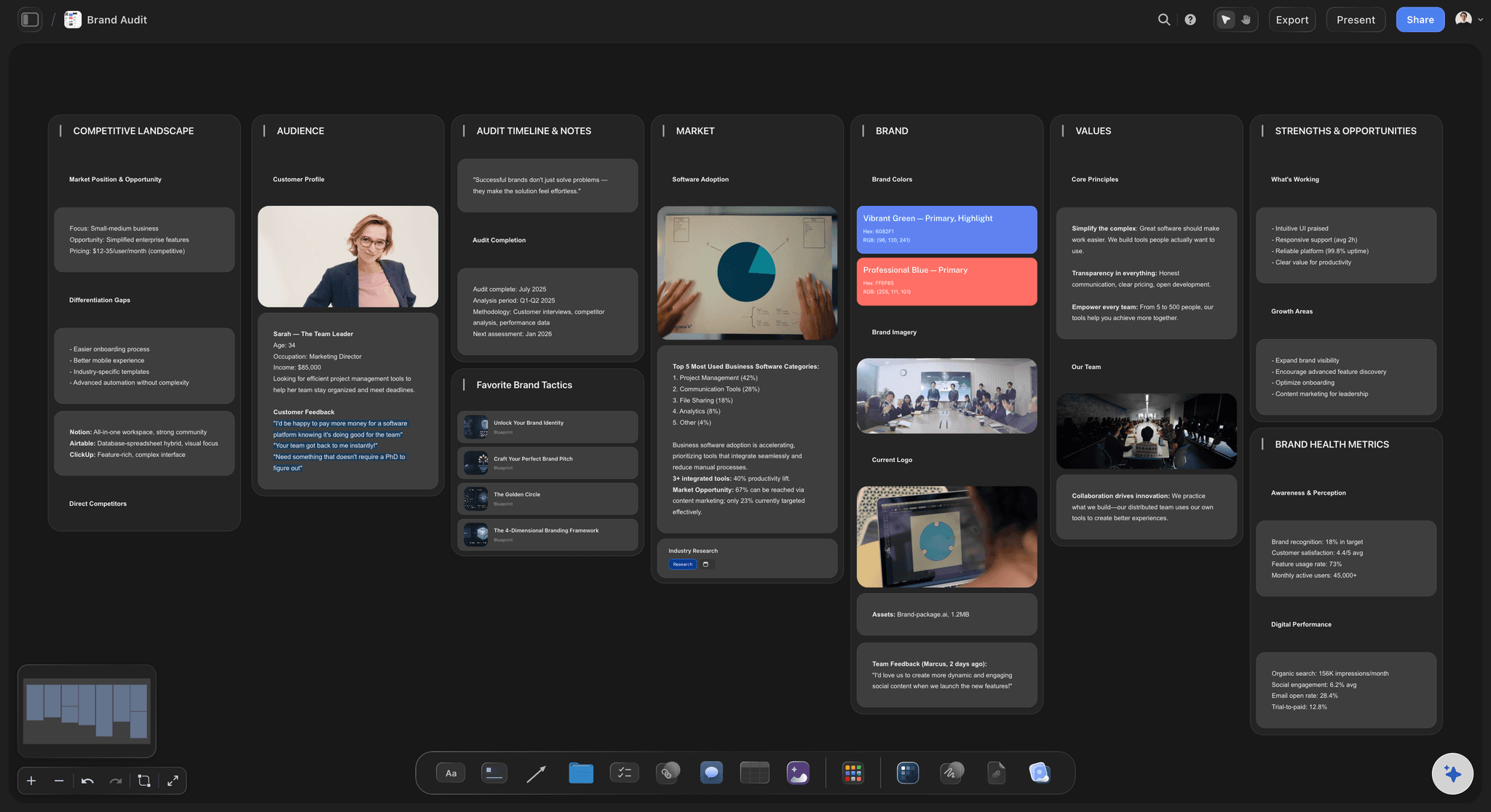
A go or no-go score you can point at
Six questions, five points each, one table with a total in the footer. The score lives on the board next to the work, so when someone asks in week two why you are bidding, the answer is already written down.
See the creative operations board →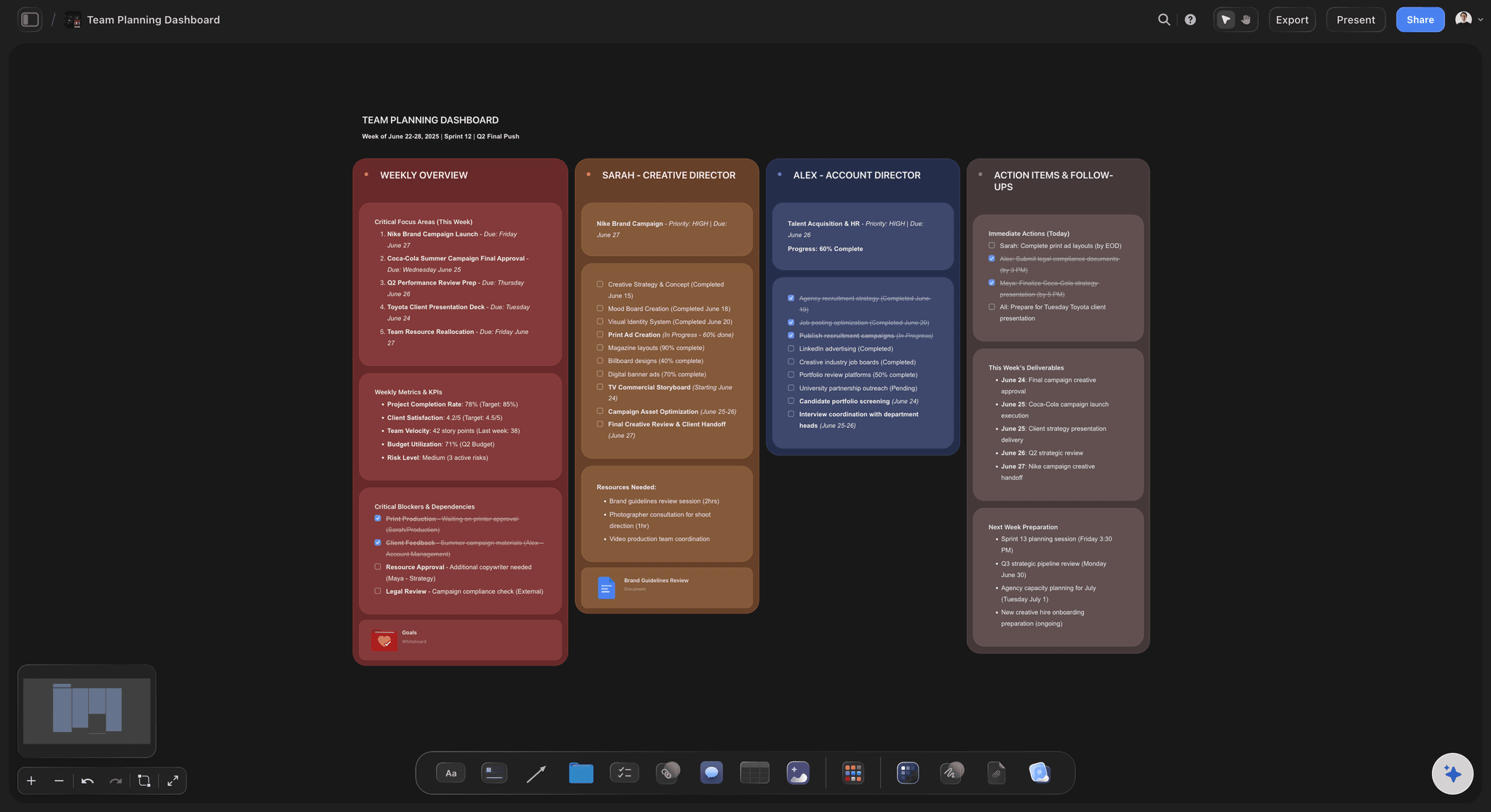
Every question, owned
The document broken into rows with names on them
Paste the RFP and the AI lays out one row per question with the page it came from. Add an owner, a due date and a status. Give the column a currency and a Sum footer when the answer is a number.
See the agency client project planning board →
The part they remember
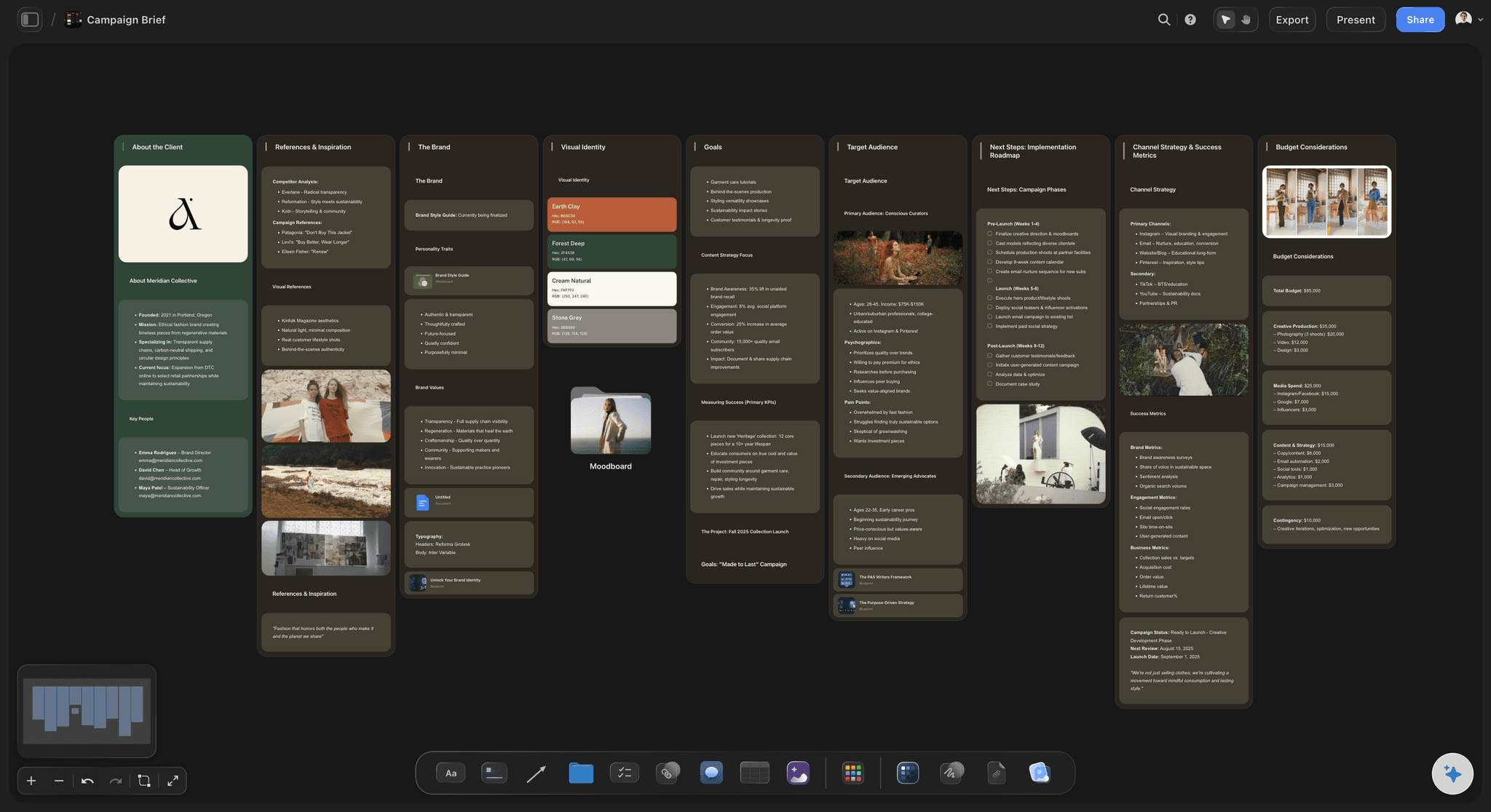
An idea the panel can see
Captioned references for look and tone, four to six frames of the hero film, and the campaign laid out in the places it runs. On Pro and Max the AI can draw the frames themselves from your description.
See the creative concept board →
The read-through and the file
One link for the team, a PDF for the client
Anyone can open the board from a view-only link with no account, in any browser. Signing in lets them leave a comment beside the exact answer they want changed. Export the whole board as a PDF when procurement wants a file.
See the client review board →Every bid you have ever written, still there.
Each bid gets its own board, so the answer you wrote about data handling last March is one search away instead of lost in a folder. Storyflow is paid-only during early access, with plans from $7.99 a month billed annually ($9.99 monthly). A free plan launches before the end of 2026, and anyone a paid member invites to a board joins free.
Unlimited boards, image uploads and files on every paid plan
Invite the freelance writer or the strategist to one board without buying them a seat
200+ Tactics to structure the strategy section when the page is blank
Whole-board PDF export for the submission pack
Presentation mode for the pitch itself, no export needed
Built for people with taste
The three places agency bids go wrong.
None of them are the creative idea.
The scramble
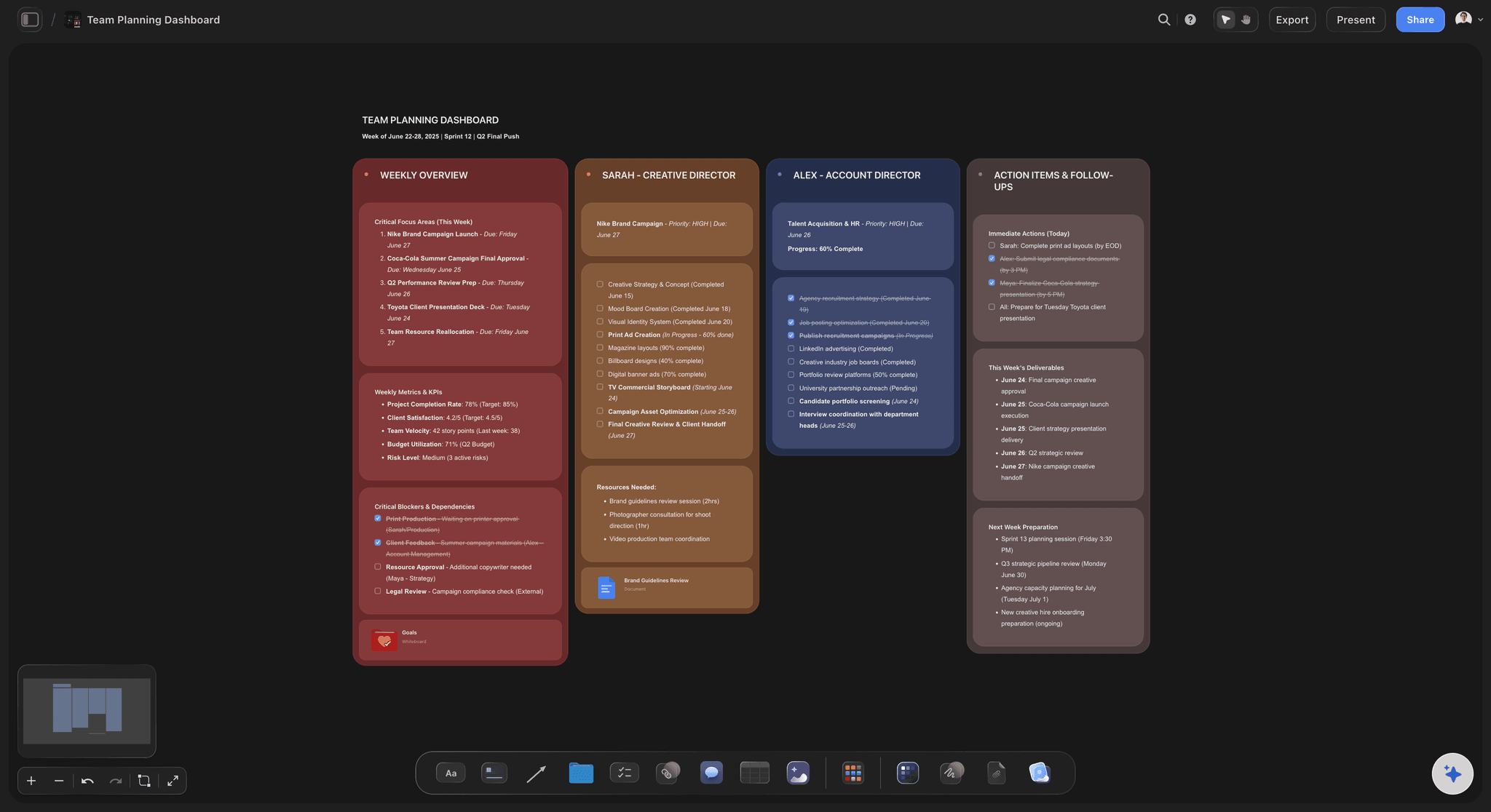
Nobody knows who is answering what
One row, one name, one date: Every question from the document sits in its own row with an owner and a due date. Nothing is left as a shared responsibility, which is how a question ends up unanswered.
The dull questions get done first: Insurance, data handling, notice periods and file ownership are the rows you sort to the top. They take an hour and they are the ones procurement actually scores.
Every row has a name on it, or it is red: Mark every row red until it has an owner. The Monday look at the board is a count of red rows, and by the second Monday that count should be zero.
The answer library builds itself: Last bid's board is still there. Duplicate it, keep the twelve answers that never change, and the new one starts half written.
The price
A number nobody can trace
Cost lines in a table, not a spreadsheet nobody opens: Day rates, production, third-party costs and the fee sit in a table on the same board as the work they pay for. The column carries a currency and adds itself up in the footer.
Three options, three columns: Give the client a core, a middle and a full version as three columns of the same table. Each one totals separately, so the trade-off is visible instead of argued about.
Blanks stay blank: A cost you have not confirmed is left empty with a note, not guessed. The guessed number is the one that gets quoted back at you in month four.
The scope sits beside the price: What is in, what is out and how many rounds of changes are included go on the board next to the total, so the conversation happens now rather than after you win.
The read-through
Feedback arrives as nine separate emails
Comments land on the thing they are about: A note about the pricing sits on the pricing table, not in a message thread where you have to work out which version it refers to.
The freelancer does not need a seat: Send the board link to the strategist you brought in for this one bid. They open it in a browser with no account, and sign in only if they want to leave a comment.
One version, not seven files: The board is the current state. There is no v4_FINAL_final circulating while two people work from v3.
Present it without exporting first: Step through the board fullscreen on the pitch call in presentation mode. If they want a file afterwards, export the whole board as a PDF.
Explore templates for your project
Every template opens as a real, editable board on the infinite canvas. Pick the closest fit and make it your own.
Creative Brief
Capture the objective, audience, and message for a creative so everyone works from the same brief.
One app instead of five
Where Storyflow fits in a bid.
It plans the response. It does not produce the submitted document or sign the contract.
Storyflow
Recommended
Score, questions, idea and price on one surface
Go or no-go score on the board
AI turns the RFP into a question list
Idea shown as frames and references
Pricing table with a live total
View-only link, no account to read
Produces the final submission document
E-signature and contracts
Proposal tools
Score, questions, idea and price on one surface
Go or no-go score on the board
AI turns the RFP into a question list
Idea shown as frames and references
Pricing table with a live total
View-only link, no account to read
Produces the final submission document
E-signature and contracts
A doc, a deck and a spreadsheet
Score, questions, idea and price on one surface
Go or no-go score on the board
AI turns the RFP into a question list
Idea shown as frames and references
Pricing table with a live total
View-only link, no account to read
Produces the final submission document
E-signature and contracts
What creators are saying
Join early creators getting structured workspaces and AI that remembers their projects
“Storyflow has sped up my workflow by at least 3x, which means more flow state and more projects I can actually ship. It truly changed the way me and my team create.”

Reilin Joey
Director & YouTuber
“One prompt gets me a structured board. But the tactics are my favorite. I run my YouTube scripts through them and my intros and retention got better. It's amazing.”

Justkay
YouTuber & Freelance Filmmaker
“I used to juggle five apps to plan a project. Now I describe what I am making and get boards, lists, and a schedule. All in one place.”

George
@fernwehchronicles
RFP response questions
What agencies ask before they plan a bid this way.
Plan it in Storyflow on one board, in four parts: a go or no-go score out of five on six questions, every question in the RFP as its own row with an owner and a due date, the creative idea shown as references and frames, and a pricing table with a total. Paste the RFP document and the AI drafts the question list. Word, InDesign or a proposal tool still produces the file you submit.
Storyflow is built for exactly this job: one board carrying the go or no-go score, every question from the RFP as a row with an owner and a due date, the creative idea as references and frames, and a pricing table that totals itself. Paste the document and the AI drafts the question rows. The file you actually submit still comes out of Word, InDesign or a proposal tool.
Six things, five points each: category knowledge, whether the right people are actually free, whether the budget is real and written down, whether you know anyone client-side, whether the deadline is survivable, and whether you would be proud of the work. Bid when you score four or five on at least four of them. Write the total down so it cannot be relitigated later.
Yes. Attach the document and ask for one row per question. Storyflow's AI reads attached files, lays the questions out as rows, and notes the page each came from. It proposes the list; you decide what is really being asked, who answers it and when it is due.
A typical RFP holds more questions than it looks. Ten pages of prose commonly hide twenty to sixty separate questions, and a lot of them are buried mid-paragraph. Splitting them into rows on Storyflow's board is the point: an unlisted question is an unanswered one.
Agencies rarely lose on the idea. It is usually insurance, data handling, notice periods, subcontracting and who owns the files when the contract ends. These take about an hour each and are scored by procurement rather than by the creative panel, so answer them first while there is still time.
Yes. Every bid keeps its own board, so last quarter's board is still there with the answers that do not change. Duplicate it, keep the reusable rows, and replace the client-specific ones. That is the answer library, without needing a separate system for it.
Storyflow plans and shows the response: the score, the questions, the idea and the price. It does not produce the file you submit. That still comes out of Word, InDesign or a proposal tool such as PandaDoc or Proposify, which also handle e-signature and payment. Storyflow exports the whole board as a PDF if the panel will accept one.
Put ten captioned reference images grouped by look, tone and media, four to six frames of the hero film, and one view of the campaign in the places it will run. On Pro and Max, Storyflow's AI can draw those frames from your description. On the call, step through it fullscreen in presentation mode.
A freelancer can read the whole bid for free: Storyflow's view-only link opens in any browser with no account. To leave a comment they sign in. Anyone a paid member invites to a board joins free, so a strategist brought in for one pitch does not need their own plan.
As one table with a column per option: core, middle and full. Give each column a currency and a Sum footer so the total updates when a day rate changes. Leave any unconfirmed cost blank with a note rather than guessing, and put the scope and the number of revision rounds next to the total.
Storyflow keeps every RFP question as a row you can drag anywhere on the board. It does not sort a table for you, so the order is the one you set by hand. Most teams order the rows by who is answering rather than by date, and keep the procurement questions pinned to the top, which is an order no date sort would have produced.
No. Storyflow runs in the browser and there are no native mobile or desktop apps. Open the board on the meeting room screen, or export it as a PDF beforehand if the venue's network cannot be trusted.
More from Storyflow
Agency client project planning
Creative agency pitch deck
Creative scope of work
Design proposal template
Creative client onboarding
Client review board
Creative operations
Campaign brief to delivery
Agency campaign planning
Storyflow for agencies
Case study builder
Agency credentials deck
Creative retainer plan
Campaign wrap report
Media plan template
Client report template
Plan the next bid before you write a word of it.
Score the brief, hand out the questions, show the idea and price it. One board.