
Ultra-fast moodboards with real taste
Plan the whole photoshoot
on one page of decisions.
Concept, moodboard, shot list, schedule, location, team, gear and delivery in one plan. The client approves the look, the crew knows the day, and nothing lives in a camera-roll screenshot.


Creatives working for these brands already got early access
- Red Bull
- Canon
- Artlist
- Porsche
See how easy it is to get started
Watch a real project come together, from a blank board to a finished plan, clicked through step by step.
Start from a ready-made template
Pick a board to see what you can build, then let AI fill it in. Every template is a real, editable starting point on the same infinite canvas.

Film Moodboard
Collect film references, color palettes, lighting, locations, and tone in one place, then invite your crew.
What is a photography shoot plan?
A photography shoot plan is the document that holds every decision a shoot depends on: the purpose and deliverables, the concept and moodboard, the shot list with crops for each use, a timed schedule of setups and looks, the location with a backup, the team and contacts, the gear and lighting, wardrobe and props, releases and permits, and how selects and final files are delivered. Storyflow is an AI visual workspace that plans the photoshoot on one infinite canvas: the moodboard, the shot list and the timed schedule side by side, with the location, team, gear and delivery details beside them. Its AI turns the brief and moodboard into a first shot list and day plan, and the board shares by link so the client and crew open it with no account. A PDF from Google Docs still works for a single-person shoot.
The plan exists to move every decision that can be made in advance out of the shoot day. On the day, time goes to light, people and problems nobody could predict. A shoot without a plan spends that time deciding which outfit comes next, discovering that the client needed a vertical version of the hero image, or finding out that the location closes an hour earlier than anyone checked. Each of those is a question the plan answers in ten minutes the week before.
The failures are consistent across portrait, product, fashion and brand shoots. The shot list ignores the deliverables, so the images do not crop to the sizes the client needs. The schedule has no buffer for wardrobe changes or moving lights. The moodboard is approved by the client but never reaches the stylist or the hair and makeup artist. Nobody has the location contact's phone number. And delivery, how many selects, by when, retouched how, is agreed verbally and remembered differently by each side.
Storyflow puts the plan on an AI-native canvas. The moodboard, the shot list and the schedule sit side by side, so a change to the look is visible beside the shots it affects. The AI-drafted shot list holds each frame with its setup and a box to tick on the day, tables carry call times and contacts, and the location, gear and delivery details live beside them. Ask the AI to turn the brief and the moodboard into a first shot list and a timed day plan, then adjust it to the way you shoot.
Ultra fast from brief to board
From brief to a shoot day that runs on time.
Plan once, share one link, and use the same board on set.
01
Start from the brief and the moodboard
Add the client's brief, the deliverables and usage, and the moodboard. Everything the plan has to satisfy is in view before a single shot is listed.
02
Build the shot list from the deliverables
List each frame with its setup, crop and look, working back from what the client needs. Ask the AI to draft the list from the brief and moodboard, then edit it.
03
Schedule the day
Group shots by location, light and look, add call times, wardrobe changes and buffers, and put the location, team, gear and backup plan beside the schedule.
04
Share it and shoot from it
Send a view-only link the client, model, stylist and assistant open with no account, then tick shots off on the board during the day.
Every part of the plan, next to the parts it affects.
Concept, shots, schedule and logistics on one canvas instead of five files.
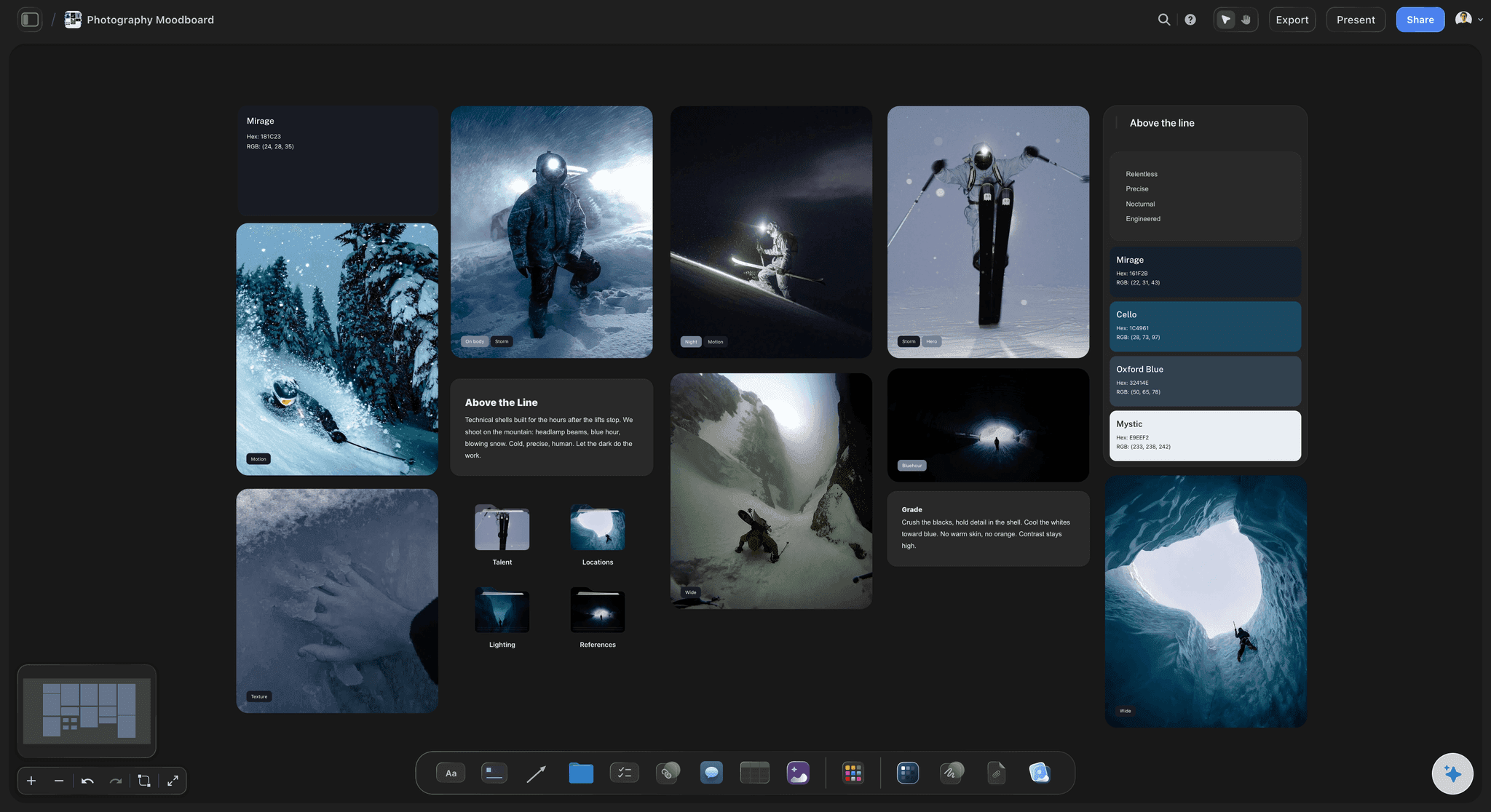
The look the client approved
Moodboard beside the shot list
Lighting, posing, styling and colour references sit next to the frames they shape, so the stylist and the hair and makeup artist read the same approved look as the photographer.
See the photoshoot moodboard →
Shots worked back from deliverables
A shot list that crops to every use
Each shot carries its setup, look, crop and the deliverable it serves, from the website hero to a vertical story, so nothing is discovered missing in the edit.
See the shot list template →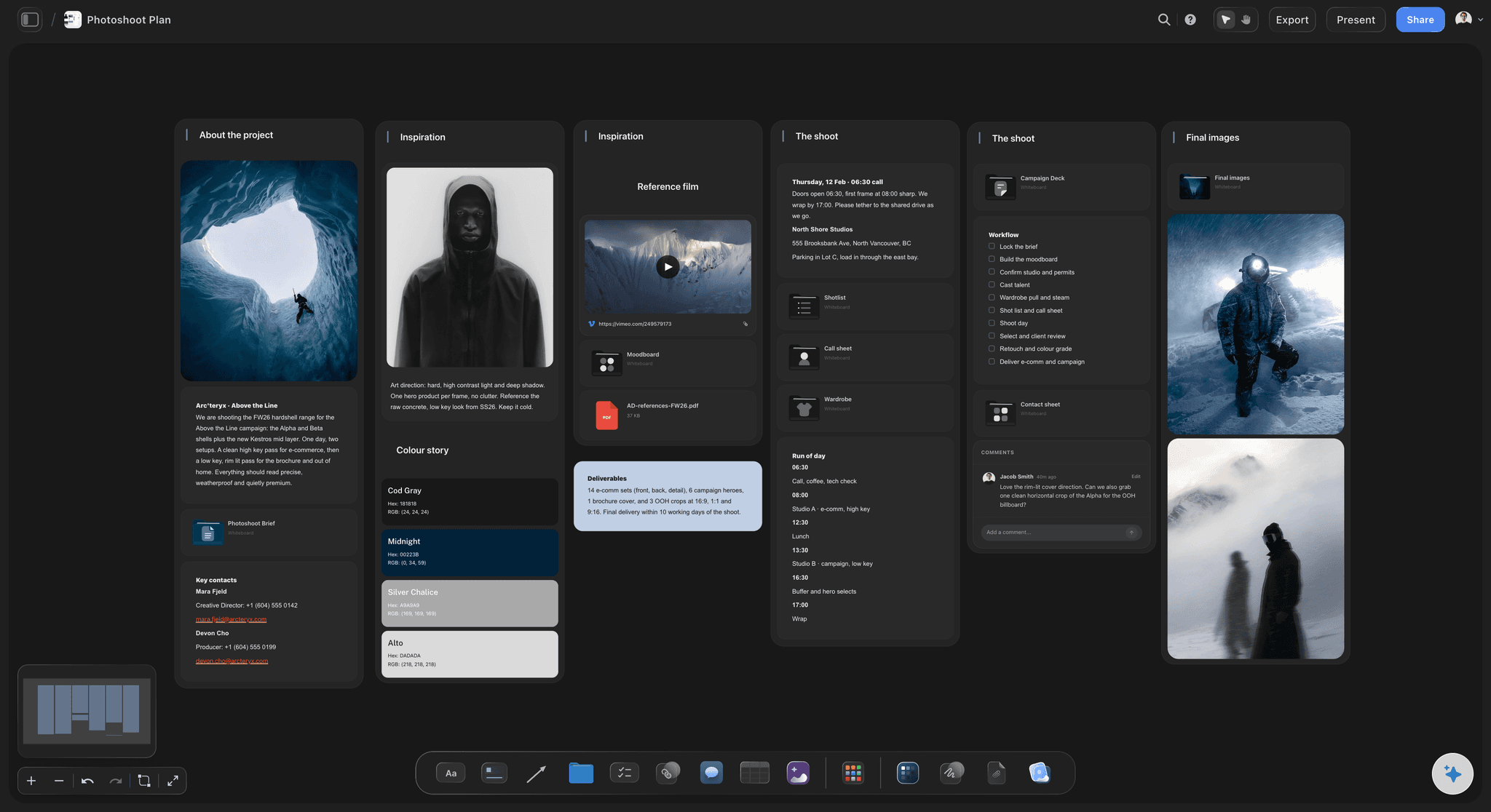
A day that runs on time
Schedule, location and team in one view
Call times, setups, looks and buffers, with the location address, contacts, permits and a weather backup beside them. The whole team reads the same day.
See photoshoot planning →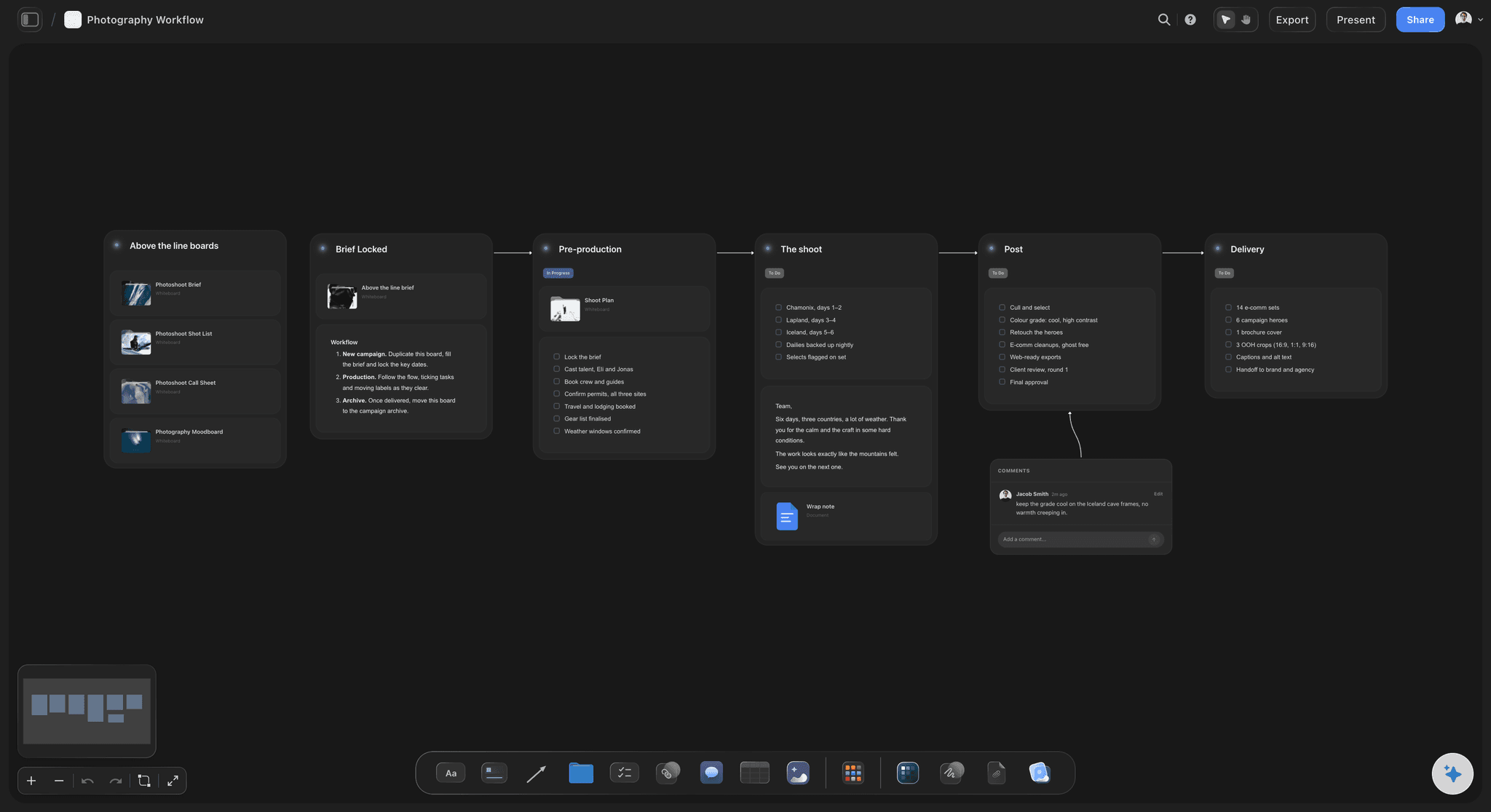
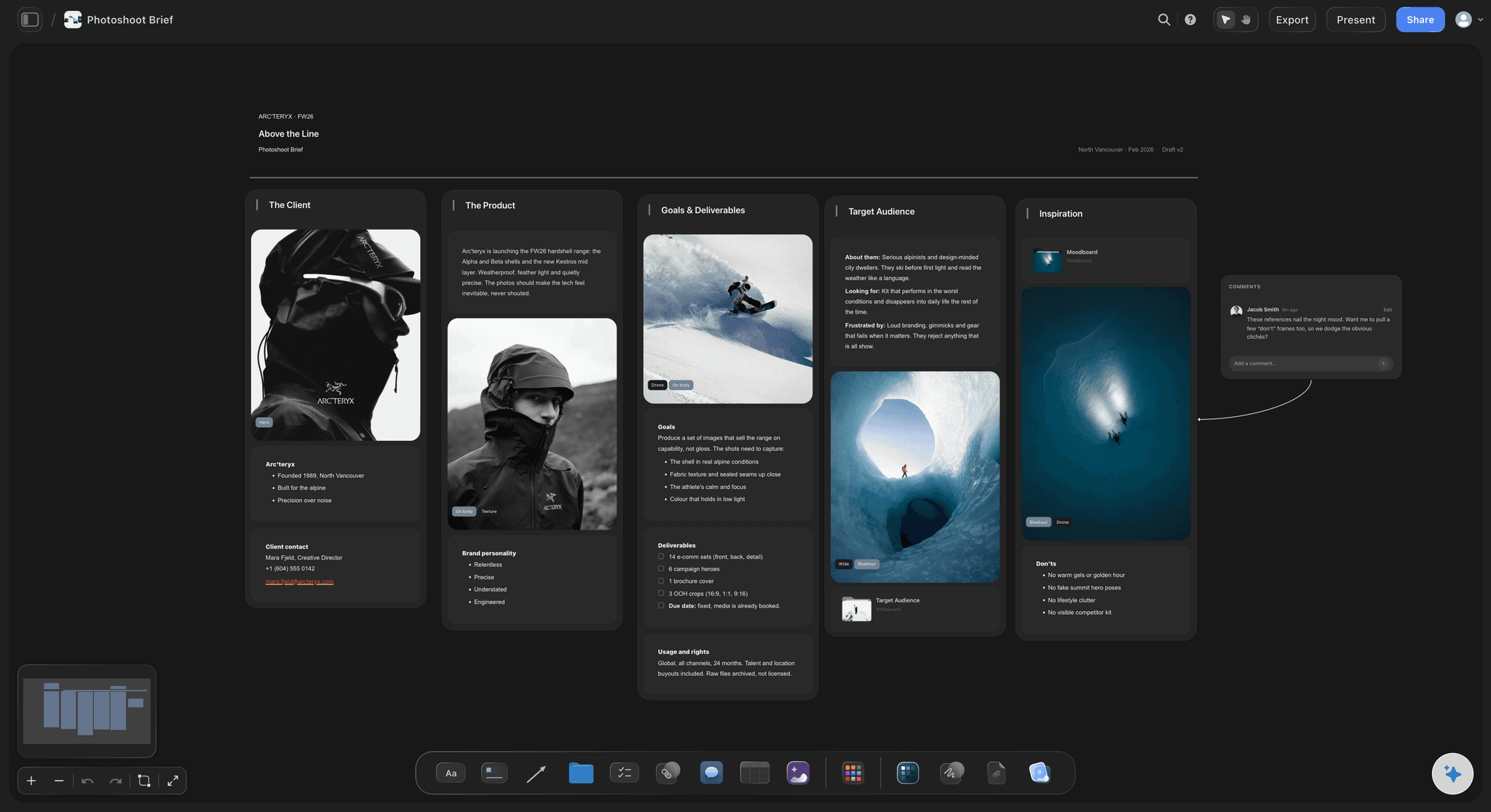
Delivery agreed before the shoot
Selects, retouching and files, written down
How many selects, by when, retouched how, in which formats and sizes. The delivery section ends the argument that starts when each side remembered a different number.
See the photographer's workspace →Unlimited boards. No object cap.
One board per shoot, with the look, the shots and the day together. Storyflow is paid-only during early access, with plans from $7.99 a month billed annually ($9.99 monthly). A free plan launches before the end of 2026, and anyone a paid member invites to a board joins free.
Unlimited shoot boards on an infinite canvas
AI that drafts the shot list and the day plan from your brief
Tables for call times, contacts and gear beside the moodboard
View-only links for clients and crew, no account needed to read
Built for people with taste
Decide it in the plan so the day is for the pictures.
Ten sections cover portrait, product, fashion and brand shoots. Each one removes a question from the shoot day.
Purpose, deliverables, concept
What the shoot is for
Purpose and usage: What the images are for, where they will run and for how long. Usage shapes the shot list, the crops and often the fee, so it belongs at the top of the plan.
Deliverables with sizes: The number of final images, the orientations and crops each channel needs, and any cutouts or background variants. A plan built from deliverables rarely misses a shot.
Concept in a sentence: The idea the moodboard illustrates. When a decision on the day is unclear, the sentence settles it.
The approved moodboard: Lighting, posing, styling, colour and location references, signed off by the client before anyone buys props or books a model.
Shot list and schedule
What happens, in what order
The shot list: Each frame with its setup, lens or crop, look and the deliverable it serves, marked must-have or nice-to-have so the day can be cut without losing what matters.
Setups grouped sensibly: Shots grouped by location, light and wardrobe rather than by the order they were imagined, so the crew moves lights and changes looks as few times as possible.
Call times and buffers: When each person arrives, when hair and makeup finishes, when the light is right outside, and a buffer after every change of look or location.
A plan for bad weather: The indoor alternative, the backup date, or the shots that can move, decided before the forecast forces a decision on the day.
Location, team, gear, paperwork
Who and what needs to be there
Location details: Address, access times, parking, power, the location contact's number, permits if needed, and a backup location for outdoor shoots.
Team and contacts: Photographer, assistant, model or talent, stylist, hair and makeup, client contact, each with a phone number and their call time.
Gear and lighting: Bodies, lenses, lights, modifiers, backdrops and spare batteries, with a lighting sketch for each setup that needs one.
Releases and permissions: Model and property releases, location permission and usage terms, prepared before the day rather than signed on a phone in a car park.
AI that reads the whole board
A first draft of the plan in minutes
Shot list from the brief: Ask the AI to turn the brief, the deliverables and the moodboard into a first shot list. It reads the board, so the shots follow the look you actually approved.
A timed day plan: Ask for a schedule that groups the shots by setup with call times and buffers, then move blocks to match how you like to work.
Find what is missing: Ask what the plan does not cover yet: no weather backup, a deliverable with no matching shot, no release for a second model.
It proposes, you decide: The AI drafts and checks. Every frame, every light and what the client sees stay the photographer's call.
Explore templates for your project
Every template opens as a real, editable board on the infinite canvas. Pick the closest fit and make it your own.
Film Moodboard
Collect film references, color palettes, lighting, locations, and tone in one place, then invite your crew.
One app instead of five
Storyflow vs Google Docs, Pinterest, and Notion for photoshoot plans.
Each covers a piece: Google Docs a written plan, Pinterest a quick moodboard, Notion structured checklists. Here is where they differ when the look, the shots and the day need to be read together.
Storyflow
Recommended
Moodboard and shot list on one board
Schedule, location and team beside the shots
Shots grouped by setup on a visual canvas
Client and crew open it by link without an account
Client galleries and online proofing of finals
Google Docs
Moodboard and shot list on one board
Schedule, location and team beside the shots
Shots grouped by setup on a visual canvas
Client and crew open it by link without an account
Client galleries and online proofing of finals
Moodboard and shot list on one board
Schedule, location and team beside the shots
Shots grouped by setup on a visual canvas
Client and crew open it by link without an account
Client galleries and online proofing of finals
Notion
Moodboard and shot list on one board
Schedule, location and team beside the shots
Shots grouped by setup on a visual canvas
Client and crew open it by link without an account
Client galleries and online proofing of finals
What creators are saying
Join early creators getting structured workspaces and AI that remembers their projects
“Storyflow has sped up my workflow by at least 3x, which means more flow state and more projects I can actually ship. It truly changed the way me and my team create.”

Reilin Joey
Director & YouTuber
“One prompt gets me a structured board. But the tactics are my favorite. I run my YouTube scripts through them and my intros and retention got better. It's amazing.”

Justkay
YouTuber & Freelance Filmmaker
“I used to juggle five apps to plan a project. Now I describe what I am making and get boards, lists, and a schedule. All in one place.”

George
@fernwehchronicles
Photoshoot plan questions, answered.
What goes in, how to schedule the day, and how to share it.
A photography shoot plan is the set of decisions made before a shoot so the day goes to light and people: what the images are for, the approved moodboard, the shot list, a timed schedule of setups and looks, the location, team, gear, wardrobe, releases and how files are delivered. In Storyflow it is one board the client and crew open by link, with the moodboard beside the shot list and schedule.
Storyflow is built for exactly this job: the moodboard, the shot list and the schedule read together on one board with the location, team, gear and delivery details, the AI drafts the shot list from the brief, and the client and crew open it by link with no account. It does not deliver galleries or proof final images; Pixieset or ShootProof handle that once the shoot is done.
Write it in the order its decisions depend on each other. Start with purpose, usage and deliverables, then get the moodboard approved, since it fixes the light, styling and poses. Write the shot list from the deliverables, group it by location, light and wardrobe, and schedule the groups with call times and buffers. Location, team, gear and releases follow, then delivery terms. Storyflow's AI can draft the shot list and schedule from the brief and moodboard for you to edit.
Ten sections cover most shoots: purpose and usage, deliverables with sizes and crops, the concept and approved moodboard, the shot list, a timed schedule with call times and buffers, location details with a backup, the team and contacts, gear and lighting, wardrobe and props, and model or property releases and permits. Add a delivery section stating how many selects, the retouching level, file formats and deadlines, because that is the part clients and photographers most often remember differently.
Work backwards from the fixed points: the location's access times, the talent's availability and, outdoors, the light. Group shots into setups by location, lighting and wardrobe, estimate how long each setup takes including moving lights, and add buffers after every change of look or location. Put hair and makeup, lunch and a wrap time in the schedule as real blocks. Share the schedule with everyone's call time on it so each person knows when to arrive.
A shot list is one part of the plan: the individual frames you intend to capture, with their setup and look. The photoshoot plan is everything around it: why the shoot exists, the deliverables and usage, the moodboard, the schedule, the location, the team, the gear, the paperwork and the delivery. A shot list tells you what to photograph; the plan tells everyone how the day will run and what the client will receive.
Date each part backwards from the shoot day: the moodboard approval first, then bookings for the location, talent and crew, then releases and permits, then a final sign-off of the whole plan. A simple portrait session can fit that into a few days, while a brand or fashion shoot with a location, talent, stylist and client approvals usually needs weeks. Put each step in the plan as a dated row, so everyone can see what is due next.
Share one version everyone reads rather than sending the moodboard, shot list and schedule separately. In Storyflow a view-only link opens the whole plan in a browser with no account, so the client can check the approved look and deliverables while the stylist, assistant and talent see the schedule and their call times. Invite collaborators who need to edit, such as a producer or second shooter, and they join free when a paid member invites them.
Everything in a standard plan, with extra detail on consistency and variants: a master list of products, the angles required for each, background and colour variants, cutout or shadow requirements, props and styling per product, and the exact crops each marketplace or channel needs. Group the shot list by setup so lights stay fixed while products change, and add a check column so every product and angle is confirmed before the set is struck.
Yes, most of it, from real inputs. Given the brief, the deliverables and an approved moodboard, Storyflow's AI reads the board, drafts a shot list grouped into setups, proposes a timed schedule and lists what the plan does not cover yet, such as a weather backup or a missing release. The photographer then edits it against how they actually shoot. The AI proposes; the frames, the light and what is promised to the client remain the photographer's decisions.
Start with how the brand will use the images: the website, product pages, social formats and campaigns, and for how long. Build the moodboard from the brand's visual identity, then write the shot list from the usage, covering people, product, detail and environment shots in the crops each channel needs. Plan the day around the brand's locations or a set that reflects them, and agree approvals, selects and delivery in writing before the shoot.
No. Storyflow is for planning the shoot and pitching it: the moodboard, shot list, schedule, logistics and the treatment you send before the client books. Delivering finished images through client galleries with proofing and downloads is what tools such as Pixieset and ShootProof are built for, and editing belongs in Lightroom or Capture One. Many photographers plan in Storyflow and deliver through a gallery tool.
Not yet. Storyflow is paid-only during early access, with plans from $7.99 a month billed annually ($9.99 monthly). A free plan launches before the end of 2026, and anyone a paid member invites to a board joins free. An assistant or stylist you invite can work on the plan with you, and clients and crew reading it through a view-only link never need an account.
More from Storyflow
Photoshoot planning
Photoshoot moodboard
Photoshoot moodboard template
How to make a photoshoot moodboard
For photographers
Shot list template
Shooting schedule
Call sheet template
Director's treatment template
Brand moodboard
Best photoshoot planning tools
Photography proposal template
Wedding photography shot list
Event photography shot list
Social media shot list
Photoshoot call sheet
Moodboard to shot list
Plan the shoot so the day is for the pictures.
Open a canvas, add the brief and the moodboard, and let AI draft the shot list and schedule.