
Category
Content Tools
Author

Justkay
Documentary Filmmaker & Founder at Storyflow
Topics
2026-05-17
•
Updated Sep 19, 2026
•
41 min read
•
Content Tools- best content calendar tool for a small team
- content calendar tools
- content calendar software
- content calendar app
- editorial calendar software
- blog calendar tool
- best content planning tools
- Storyflow content calendar
What's the best content calendar tool for a small team?
The best content calendar tool for a small team in 2026 is Storyflow: ask its AI for a content plan and it builds your pillars, your batching plan and a Content Calendar wall of real upcoming posts as tickets, each with its pillar and platform, on one canvas the whole team edits live, from $7.99 a month billed annually per seat; invited collaborators join free on free-tier limits. It does not publish, so pair it with a scheduler. CoSchedule is the pick for a marketing calendar that also publishes, Notion for a structured calendar database, and Buffer for low-cost team publishing with approval workflows.

Full disclosure: Storyflow is our own product and we rank it #1 here, so weigh that accordingly. It leads because this page scores what a team of 2 to 10 needs most, the plan and brief behind each slot (30% of the score), and its AI builds both on the board. It scores 0 on publishing and 5 on the calendar itself: it has no month grid, its tables cannot be sorted, and it does not post to social networks. If publishing is your problem, Buffer, CoSchedule, Later or Planable do a job Storyflow does not do at all. Every sub-score is shown in the scoring table so you can re-weight it for your team.
Quick Comparison: Content Calendar Tools for Small Teams
The top four split into four calendar jobs: the plan and briefs, a marketing calendar that publishes, a structured database, and low-cost team publishing.
| Tool | Best For | AI Features | Price |
|---|---|---|---|
| Storyflow | Plan, briefs and post tickets on one canvas | Builds the content plan on the board | $7.99 mo annual (free plan late 2026) |
| CoSchedule | Marketing calendar that also publishes | AI Assistant | Free / Starter $29 mo annual |
| Notion | Structured content calendar database | Depth depends on plan | Free / Plus $10 per seat mo annual |
| Buffer | Team publishing with approvals | Caption assistant | Free / Team $120 per channel yr |
1) Quick Answer: The Best Content Calendar Tool for a Small Team in 2026
The best content calendar tool for a small team in 2026 is Storyflow: ask its AI for a content plan and it builds your pillars, your batching plan and a Content Calendar wall of real upcoming posts as tickets, each with its pillar and platform, on one canvas the whole team edits live. It does not publish posts, so a team that needs publishing pairs it with a scheduler. CoSchedule is the pick if you want a marketing calendar that also publishes, Notion if you want a structured calendar database, and Buffer for low-cost team publishing with approval workflows.
A small team here means 2 to 10 people: an in-house marketing lead with a writer and a designer, a founder with two freelancers, or a small agency running three client calendars at once. At that size the calendar is not the hard part. The hard part is the four things around it: what each slot is for (planning), what the person making it needs to know (the brief), who has to say yes before it goes out (approval), and what it costs when every one of those people needs a login (cost per seat). This page scores all 12 tools on those four things, plus AI and publishing, with the weights shown so you can re-weight them for your own team.
The failure this page scores against is the slot-filling treadmill: the calendar shows an empty Tuesday, the empty Tuesday feels like a failure, so something gets published to fill it. On a small team that pressure lands on whoever is least senior, and over a quarter the calendar fills with pieces that exist only because a slot existed. The Calendar as Servant test in section 5 is what each tool is scored against.
All 12 Content Calendar Tools, Ranked for Small Teams
- Storyflow (7.25/10): best overall for small teams; the plan, the briefs and the calendar tickets on one AI-built canvas
- CoSchedule (6.75/10): best dedicated marketing calendar that also publishes
- Notion (6.70/10): best structured content calendar database
- Buffer (6.05/10): best low-cost team publishing with approval workflows
- Airtable (6.00/10): best relational calendar for several brands or clients
- Planable (5.85/10): best client approval loop for social posts
- Asana (5.65/10): best content calendar inside a task manager
- Later (5.60/10): best visual social scheduler for a feed-led brand
- Monday.com (5.50/10): best configurable workflow board
- Trello (4.95/10): best cheap kanban pipeline
- Milanote (4.50/10): best visual moodboard beside the plan, weakest on dates
- Google Sheets (4.25/10): best zero-cost baseline
The best pick for each team and job, including publishing, is in the quick picks in section 7. For the foundations, see What is a Content Calendar? The Complete Guide. For the build process, see How to Build a Content Calendar with AI.
2) Content Calendar Tools Scored for Small Teams: 12 Tools at a Glance
Every total is the weighted sum of the sub-scores in its row: (Plan x 30 + Calendar x 20 + Approvals x 15 + Cost x 15 + AI x 10 + Publishing x 10) / 100. The weights are explained in section 6.
Two columns decide most of the order. Storyflow scores 0 on publishing and 5 on the calendar itself, and still leads, because this page weights the plan and the brief behind each slot at 30%, the gap this page treats as the costliest for a small team. If your team's pain is publishing rather than planning, move 20 points from Plan to Publishing and Buffer and CoSchedule rise to the top; the table is built so you can do that sum yourself. Prices behind the Cost column are in section 4, checked on each vendor's own pricing page in September 2026.
3) Frequently Asked: Which Content Calendar Tools Are Most Trusted, Best Value and Fairest on Price
Which content calendar tools are the most trusted by small teams?
Storyflow ranks first here for the job a small team finds hardest, the plan and brief behind each slot, but it is new and in early access, so its trust rests on what you can check yourself: open a board, ask for a content plan and judge the output. Among long-established tools, Buffer has stayed narrow and predictable on publishing, Google Sheets is the calendar a new hire can already use, and CoSchedule is built to be the marketing team's system of record rather than one view among many.
Which content calendar tool is the best value for a small team?
Storyflow for planning: five people on Plus seats pay $27.97 a month in total, billed annually on Team billing as shown on storyflow.so/pricing (Plus team seats are 30% off from three seats), and anyone a paid member invites to a board joins free on free-tier limits, so a freelancer or a client never forces a seat. For publishing, Buffer's Team plan at $120 per channel billed yearly covers unlimited team members, so a five-person team on four channels pays the same as a two-person team. Trello Standard at $5 a user billed annually is the cheapest paid pipeline board.
Which content calendar software is fairest on price as the team grows?
The fair shape depends on what grows. If people grow and channels do not, per-channel (Buffer) or per-workspace (Planable, unlimited users) pricing stays flat. If channels grow, per-seat tools stay flat instead. Storyflow prices per seat, and the people who only review do not need one: a client opens a view link with no account and signs in to comment. CoSchedule is the steepest climb in this list: Professional includes two seats and adds $29 a month for each extra one.
Which content calendar tools are the most highly rated?
On this page's small-team scoring, Storyflow leads at 7.25/10, then CoSchedule at 6.75 and Notion at 6.70, and the whole field spans exactly 3.0 points down to Google Sheets at 4.25. Each criterion has a different leader: Storyflow is the only 10 on both plan and AI, Planable the only 10 on approvals, Buffer and Later the 10s on publishing, and Google Sheets the 10 on cost. No tool scores above 6 on all six criteria, which is why nearly every stack in section 15 pairs two tools.
Which content calendar tool is the most underrated?
Storyflow, because at first sight it looks like a whiteboard, and the content work it does stays invisible until you ask the AI for it: a content plan of ten method walls (foundation, pillars, calendar structure, batching, per-platform scheduling, repurposing and more) plus a wall of ten real post tickets. Among established tools, Planable is underrated by in-house teams who assume approval tools are only for agencies; its per-workspace price with unlimited users makes it cheap for a team with several internal approvers.
Which content calendar tool is recommended for in-house marketers and small agencies?
For an in-house marketer answering to a launch date, Storyflow: ask the AI for a dated plan counted back from the launch day, and it builds one wall per period or a table of phase, milestone, owner and due date, beside the post tickets. For a small agency, Storyflow with one board per client: each board has its own access levels (admin, edit, view), so a client's team can be given edit rights on their board and nothing else, and a Campaign Brief lands as ten walls with nested boards behind folder tiles. Add Planable where a client insists on post-by-post sign-off; its $33-per-workspace Basic plan is priced per client, not per reviewer. See the agency workspace page and the marketing team page.
4) Content Calendar Software Pricing: What a Team of 2 to 10 Actually Pays
Prices below were read from each vendor's own pricing page in September 2026 and are in US dollars unless marked. A price is quoted with its billing period or not at all.
Monday.com's dollar figures come from search listings of monday.com's pages; its pricing page served euros to our fetcher. Planable's page did not say whether $33 is the monthly or the annual rate, so it is quoted as listed.
What a team of 2, 5 or 10 pays each month (annual billing)
The billing shape matters more than the headline price. Per-channel pricing punishes you for adding platforms, which content strategy usually tells you to do. Per-seat pricing punishes you for letting a freelancer, a designer or a client see the plan. Storyflow sits in the second group, but the people who only look do not need a seat: a view-only link opens with no account, and invited collaborators join free on free-tier limits. Board-level edit and view access and live co-editing work on every paid plan; Max is only needed for the shared Team Workspace with roles. Full plan details are on the Storyflow pricing page.
5) Calendar as Servant: The Test Every Tool Is Scored On
A content calendar is a tool, and like any tool it has a correct master. The master is the content strategy. When the calendar serves the strategy, content compounds. When the calendar becomes the master, content turns into a treadmill.
Here is how the treadmill starts on a small team. Someone builds a calendar with slots: Monday, Wednesday, Friday. An empty slot is visible, and a visible empty slot creates pressure. So it gets filled, not with the piece the strategy needed, but with whatever was easiest to make that week. The metric, posts published, looks healthy. Six months later the calendar is full and the content has no shape, because every piece was chosen by the calendar, not by the strategy.
An empty slot is not a problem. Filler is. A week with nothing worth publishing is the strategy telling you something, not a gap to paper over.
The fix is to keep the calendar as a servant, and a small team has to build that into the tool because nobody has time to police it by hand. Every slot should carry three things before it is scheduled:
- The pillar it serves. Which of your three to five content pillars is this piece for?
- The goal it moves. Sign-ups, a launch, retention, a client's quarterly target.
- A brief the maker can work from. The audience, the one message, the format, the call to action, the deadline for the draft.
A tool that holds those three things beside the date keeps the calendar honest. A tool that holds only the date makes the treadmill the path of least resistance. That is the Plan and brief criterion, and it is why it carries the heaviest weight in the scoring.
6) How We Scored These Tools
Twelve tools were compared from their own product and pricing pages in September 2026; Storyflow was scored in September 2026 on its current workflows. Six criteria, weighted for a team of 2 to 10 people that owes content to a client, a launch or a boss:
- Plan and brief (30%). Can the tool hold the pillars, the goal and a brief beside each slot, and help write them? Unclear briefs have no free fix, while publishing does. Storyflow scores 10 because its AI builds the whole plan on the board and drafts briefs on request; Notion and Airtable 8 and 7 because the strategy can live in the same workspace but you build it; schedulers 3 because a post caption is not a brief.
- Calendar and pipeline (20%). Dates, statuses, owners, a month at a glance. Notion, Airtable and CoSchedule score 9. Storyflow scores 5: its content calendar is a wall of post tickets with assignees, or a table with a date column you keep in date order, and it has no month-grid layout; tables cannot be sorted or filtered by a column.
- Approvals and review (15%). Can a client or manager review and sign off? Planable scores 10 for required approvals. Buffer (Team plan), CoSchedule (Professional), Later (Growth) and Asana (Advanced) score 7 for built-in approval steps on a paid tier. Storyflow scores 6: a client opens a view link with no account and signs in to comment and draw on the board, and invited collaborators can comment inside documents, but there is no approval workflow.
- Cost for a team of 2 to 10 (15%). The monthly bill for five people on annual billing, and how it grows. Google Sheets scores 10, Trello and Storyflow 9 (five Storyflow Plus seats are $27.97 a month on Team billing), Buffer 8; CoSchedule 4 because each seat past two adds $29.
- AI help (10%). Can the AI build or check the plan, not just write a caption? Storyflow scores 10 because it reads the board you have open with every message and builds the plan on it; Milanote 0 because its plans page lists no AI features.
- Publishing (10%). Does the tool post to social networks? Buffer and Later score 10, CoSchedule and Planable 9. Storyflow, Notion, Airtable, Asana, Monday.com, Trello, Milanote and Google Sheets score 0: none of them publishes.
Publishing is weighted at 10% because most small teams already own a scheduler, or can add Buffer's free plan, while the plan and the brief have no free fix. Re-weight it if your situation is different; the sub-scores are in the table so you can.
7) Best Content Calendar Tool by Team and Job: Quick Picks
The paying reader of this page is usually one of four people. Find yours first.
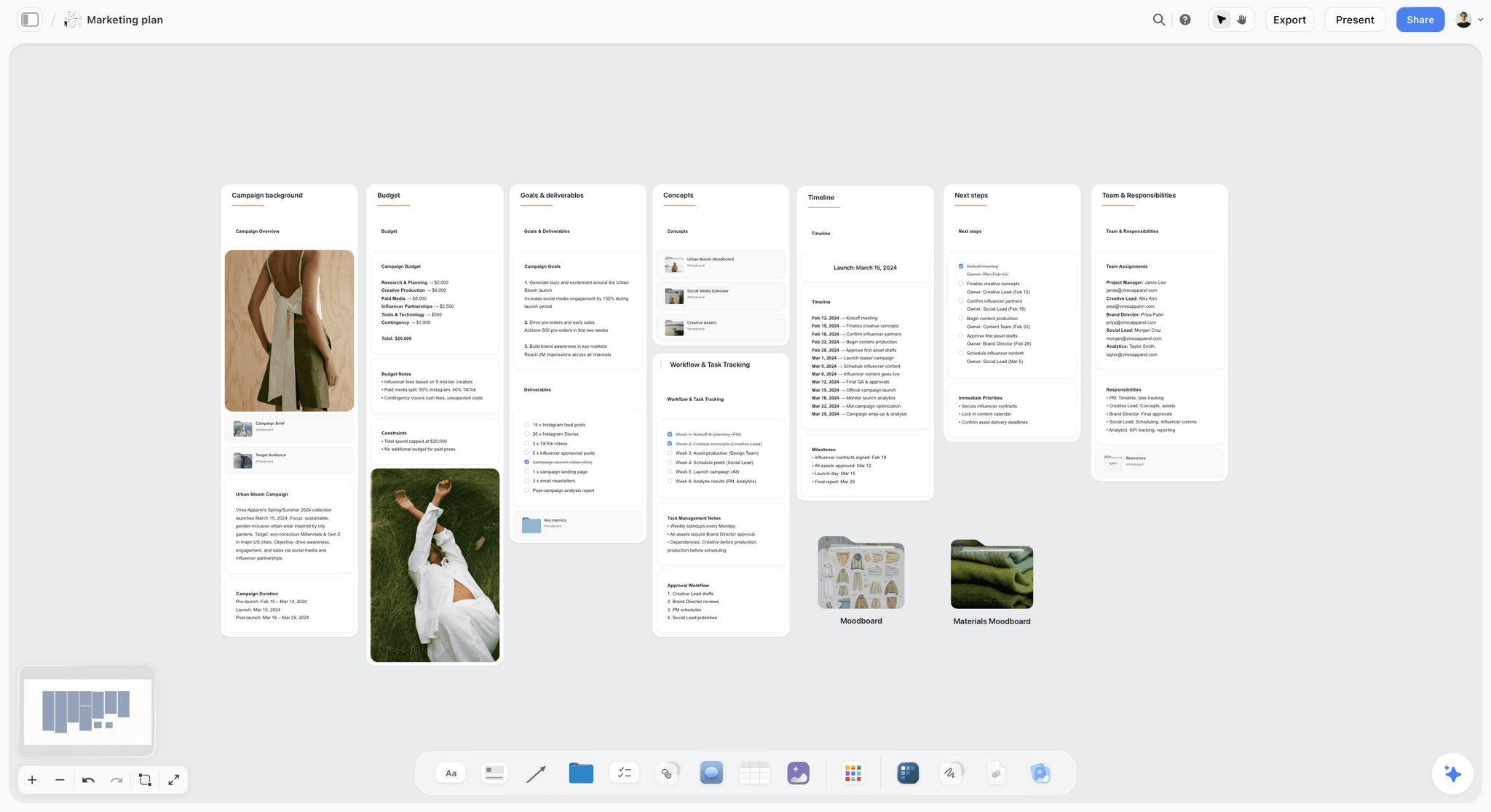
Best for an in-house marketer with a launch date: Storyflow. Ask the AI for a marketing plan and it builds eight walls including goals and deliverables and a Timeline wall of dated phases; ask for a content plan and the post tickets land on the same board. Pair with Buffer to publish. The AI marketing campaign planner page shows the campaign side.
Best for a small agency running 3 to 10 client calendars: Storyflow, one board per client, with clients reviewing from a link. Add Planable only for clients who require formal post-by-post approval.
Best for a founder with two freelancers: Storyflow on Plus, inviting the freelancers free (on free-tier limits), plus Buffer's free plan for three channels.
Best for a creator team (a creator plus an editor): Storyflow; see The 11 Best Content Calendar Tools for Creators in 2026 for the creator-specific ranking.
Best structured calendar database: Notion.
Best dedicated marketing calendar that also publishes: CoSchedule.
Best low-cost team publishing with approval workflows: Buffer's Team plan.
Best social approval loop for agencies: Planable.
Best free content calendar: Google Sheets for a basic grid. The full scheduling field is ranked in The 12 Best Social Media Planning Tools in 2026.
Put the plan, the briefs and the post tickets on one board
Ask the AI for a content plan and it builds your pillars, batching and a Content Calendar wall of ten real upcoming posts, each with its pillar and platform, on a canvas your team edits together.

8) Detailed Reviews: 12 Content Calendar Tools
1. Storyflow
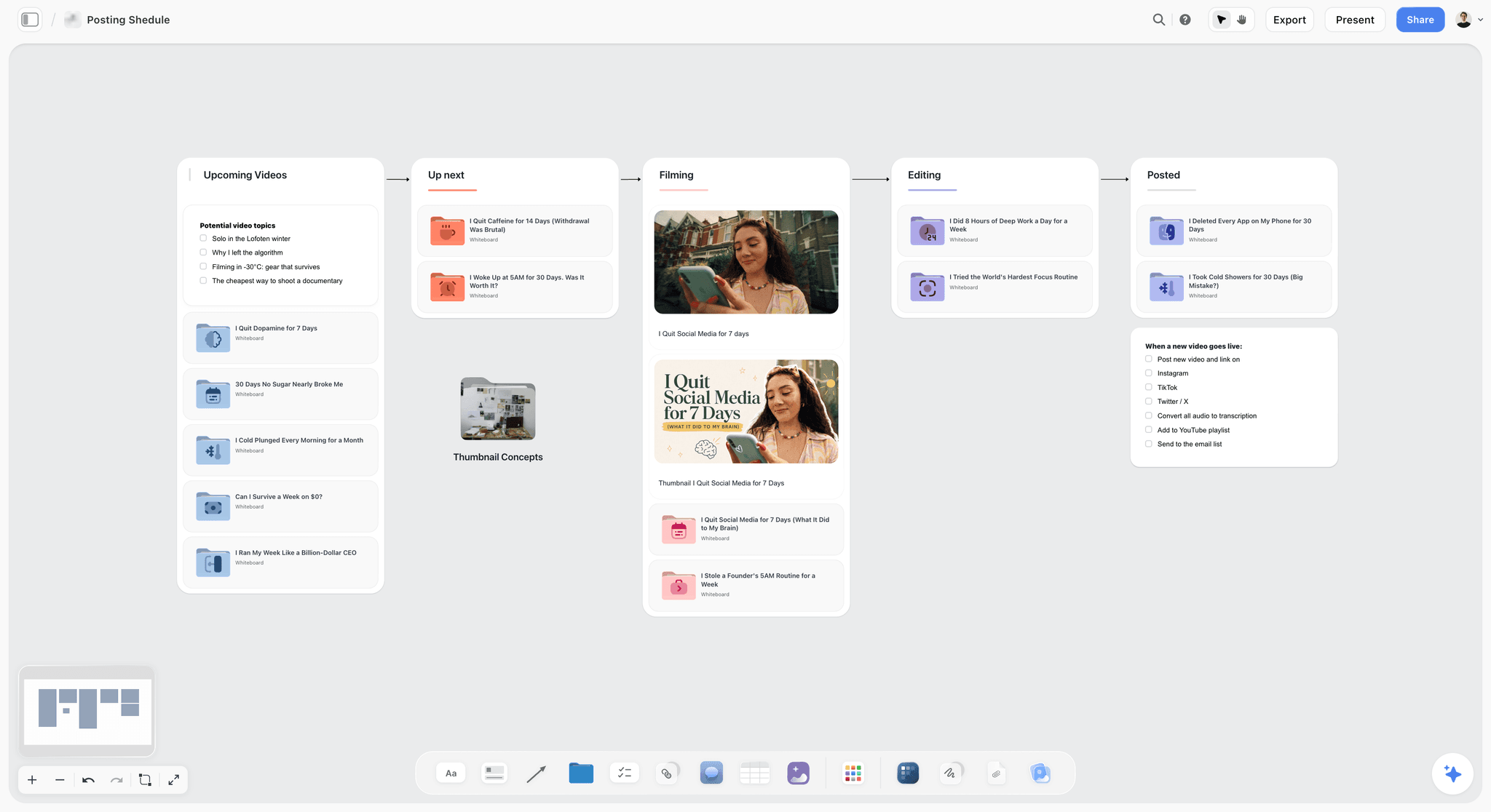
Score: 7.25/10. Storyflow is an infinite canvas with an AI that builds boards from a prompt. For a content calendar, the useful move is to ask it for a content plan: it builds ten numbered method walls (foundation and strategic setup, content pillars and themes, calendar structure, batching and workflow, platform-specific scheduling, repurposing, seasonal and event planning, analytics, tools and systems, staying consistent), each with decisions as notes and actions as a short checklist, and then a Content Calendar wall of ten tickets: real upcoming posts, each with its pillar and platform. Assign each ticket to the person making it. Content Planner is not a menu item; you ask the AI for it in chat.
For a small team, what matters is what sits beside those tickets. Ask for a campaign brief and the AI builds ten walls (client, overview, audience, goals, brand, creative strategy, media, visual identity, market, timeline) on the same board. Ask for a table of the next four weeks with date, owner and status columns, and it builds one with the rows kept in date order. Put each post's draft in a Document with inline comment threads, and the writer, designer and lead discuss it where it lives. The AI reads the board you have open with every message, so "which of these tickets serves no pillar?" is a question it can answer by reviewing the board.
The fastest start is the Posting Schedule template; the Marketing Plan template adds the plan the calendar should serve.
Best for: Small marketing teams and agencies that owe content to a client or a launch and lose time to unclear briefs.
Verdict: The highest score on this page for planning and AI, with the lowest publishing score. Choose Buffer or CoSchedule instead if what you need is posts going out on schedule and the plan already exists.
Key features
- AI-built content plan: ten method walls plus a Content Calendar wall of ten post tickets with pillar and platform.
- Tickets with assignees; tables with date, person, status and link cells.
- Campaign Brief, Marketing Plan and Social Media Plan on request, on the same board.
- Documents with inline comment threads, Word and PDF export.
- View-only link opens with no account; clients sign in to comment and draw.
Pricing
Paid-only during early access (see the FAQ for the free plan timing). Plus: $7.99/mo billed annually ($9.99 monthly). Pro: $14/mo billed annually ($19 monthly); adds AI image generation and memory across conversations. Max: $39/mo billed annually ($49 monthly); adds Team Workspace, Permissions and Roles, and more AI. AI use is metered on every plan. Team billing takes 30% off Plus from 3 seats and 20% off Max from 3 seats, as shown on storyflow.so/pricing.
Pros
- The plan, the briefs and the post tickets share one canvas.
- The AI builds the plan and can review the board for tickets that serve no pillar.
- Clients and reviewers need no seat to look.
Cons
- No publishing or scheduling to social networks, and no analytics.
- No month-grid calendar; tables cannot be sorted or filtered by a column.
- No approval workflow; sign-off is a status you set by hand.
- Runs in the browser only, with no native mobile app; view-only visitors see changes when they reload.
2. CoSchedule
Score: 6.75/10. CoSchedule is a dedicated marketing calendar: marketing, content and social calendars in one place, with social publishing, a Social Inbox, analytics and an AI Assistant. Among the tools here it comes closest to being both the calendar and the publisher, which is why it scores 9 on Calendar and 9 on Publishing.
The cost column is where a small team feels it. Starter is $29 a month billed annually for one seat; Professional is $49 billed annually with two seats and $29 a month for each seat after that, so five people pay $136 a month and ten pay $281. The free plan schedules up to 15 posts per profile. Professional adds Social Message Approvals, Suite adds approval workflows for tasks, and every paid plan lists a WordPress integration, which makes CoSchedule the one tool here that reaches a blog CMS.
Best for: Marketing teams of two or three who want one dedicated calendar that also publishes.
Verdict: The best all-in-one marketing calendar; the plan behind each slot is thinner than Storyflow's, and each seat past two adds $29.
Key features
- Marketing, content and social calendars together.
- Social publishing and a Social Inbox.
- Analytics and an AI Assistant.
- 14-day trial.
Pricing
Free: schedule up to 15 posts per profile. Starter: $29/mo billed annually ($39 monthly), 1 seat. Professional: $49/mo billed annually ($59 monthly), 2 seats, $29/mo per extra seat. Suite: custom, from $69/mo.
Pros
- Calendar and publishing in one product.
- Built for marketing teams, not adapted to them.
- Analytics next to the schedule.
Cons
- Each seat past two adds $29 a month.
- The plan behind each slot is thinner than in a canvas or database tool.
- Less flexible than Notion or Airtable for non-social content.
3. Notion
Score: 6.70/10. Notion runs a content calendar as a database: each piece a record with a pillar, a status, a channel, an owner and a publish date, shown as a board, a table or a calendar. Because pages for the strategy and the briefs can sit in the same workspace, the calendar can connect to the plan, but someone has to design the database and keep the relations tidy. That setup cost is the reason Notion scores 8 on Plan rather than 10.
For a small team, the plan matters: the free plan is limited once two or more members join, so a real team is on Plus at $10 per seat billed annually. Plus keeps 30 days of page history, which answers the "who changed the publish date?" question for a month. Notion's AI depth depends on the plan: Free and Plus get a limited trial, Business gets the full Notion Agent.
Best for: Teams who want a structured content calendar database and will spend a day setting it up.
Verdict: The strongest calendar database on this page. Pair it with a scheduler for social. The Notion vs Trello comparison covers the head-to-head.
Key features
- Content calendar database with board, table and calendar layouts.
- Pillar, status, owner and channel properties per piece.
- Strategy and brief pages alongside the calendar.
- 10 guests on the free plan.
Pricing
Free for individuals (limited for 2+ members). Plus: $10 per seat a month billed annually ($12 monthly). Business: $20 billed annually ($24 monthly).
Pros
- Deepest database structure in the list.
- Strategy and calendar in the same workspace.
- Page history on paid plans.
Cons
- Setup-heavy before it is useful.
- No publishing.
- The plan behind the calendar is something you write, not something it drafts on the free or Plus plans.
4. Buffer
Score: 6.05/10. Buffer is the publishing lane's winner for small teams on price. Plan posts, see them on a calendar and publish to social channels. The free plan covers 3 channels with 10 scheduled posts per channel and one user. The Team plan, at $120 per channel billed yearly, adds unlimited team members, approval workflows, notes, and custom access and permissions.
The per-channel shape is what makes it good for small teams: five people on four channels pay $40 a month, the same as two people. It is weak on the plan: a queued post is a caption and an image, not a brief.
Best for: Small teams whose main problem is getting approved posts out on time.
Verdict: The best-value team publisher. Pair it with a planning tool; Buffer holds the posts, not the reasons for them.
Key features
- Social calendar and direct publishing.
- Approval workflows on the Team plan.
- Unlimited team members on the Team plan.
- AI assistant for captions.
Pricing
Free: 3 channels, 10 scheduled posts per channel, 1 user. Essentials: $60 per channel billed yearly. Team: $120 per channel billed yearly. Paying yearly saves two months.
Pros
- Team pricing does not grow with headcount.
- Approvals built into the Team plan.
- Simple enough for a new hire on day one.
Cons
- No plan or brief layer; treadmill risk.
- Cost grows with every channel.
- Social only, not blog or email.
5. Airtable
Score: 6.00/10. Airtable runs a content calendar as a relational database: a content table linked to pillars, channels, campaigns and clients. The relations let every piece trace to a strategy record, and grid, kanban and calendar layouts show the same data several ways. It connects well to strategy, at the cost of setup time.
For a small agency with several clients, the relational model is the draw: one base, a client field, and every client's calendar filtered from it. The Team plan is $20 per seat billed annually, and read-only collaborators and share links cost nothing on Team or Business, which helps when clients only need to look.
Best for: Small agencies and multi-brand teams who think in linked records.
Verdict: The best relational content calendar. Strategy connection is strong; setup time is real, and $20 a seat doubles Notion's price.
Key features
- Relational tables for content, pillars, channels and clients.
- Grid, kanban and calendar layouts.
- Free read-only collaborators on paid plans.
- AI fields.
Pricing
Free plan available. Team: $20 per seat a month billed annually. Business: $45 per seat a month billed annually.
Pros
- Relations connect each piece to its pillar and client.
- Flexible layouts over one dataset.
- Viewers are free.
Cons
- Setup-heavy and technical.
- $20 a seat adds up fast.
- No publishing.
6. Planable
Score: 5.85/10. Planable is a social content calendar built around approvals: a calendar, post previews that look like the real network, and a review flow. Basic is $33 per workspace a month as listed with 60 posts a month and optional approvals; Pro at $49 adds required approvals and 150 posts; Enterprise adds multi-level approvals. Every plan has unlimited users per workspace.
That per-workspace shape is why it suits small agencies: a workspace per client, as many client reviewers as the client wants, no seat maths. It is bare on the plan side, and analytics are an add-on at $12 per workspace a month.
Best for: Agencies and in-house teams whose bottleneck is getting a client or manager to say yes to posts.
Verdict: The strongest approval loop here. Pair it with a planning tool.
Key features
- Calendar with real post previews.
- Optional and required approvals; multi-level on Enterprise.
- Unlimited users per workspace.
- Direct publishing.
Pricing
Free trial: 50 posts, no time limit. Basic: $33 per workspace a month as listed. Pro: $49. Enterprise: custom. Annual billing gives two months free.
Pros
- Best-in-list approvals.
- Unlimited users per workspace.
- Clean previews clients understand.
Cons
- No plan or brief layer.
- Post caps per month on Basic and Pro.
- Analytics cost extra.
7. Asana
Score: 5.65/10. Asana runs a content calendar as a project: each piece a task with an owner, a status and a due date, shown as a list, a board or a calendar. It is strong at carrying a piece from idea to published, and its Advanced plan adds approvals and proofing, where a reviewer marks up a PDF or image and approves it.
For a small team, the free Personal plan covers two people; Starter is $10.99 per user billed annually, and the approvals that make it useful for client work need Advanced at $24.99. The plan behind each task is whatever you write in the description.
Best for: Teams who already run projects in Asana and want the calendar inside it.
Verdict: A strong workflow tool that treats content as tasks. Moderate on the plan, strong on getting pieces shipped.
Key features
- Tasks per piece with owners and due dates.
- List, board, calendar and timeline layouts.
- Approvals and proofing on Advanced.
- AI features.
Pricing
Personal: free for 2 users. Starter: $10.99 per user a month billed annually ($13.49 monthly). Advanced: $24.99 billed annually ($30.49 monthly).
Pros
- Clear owners and statuses.
- Approvals and proofing on Advanced.
- Mature and reliable.
Cons
- Generic, not content-specific.
- Approvals cost the Advanced price.
- No publishing.
8. Later
Score: 5.60/10. Later is a visual social calendar, strong for Instagram and other image-led networks, with drag-and-drop scheduling, a feed preview and AI caption suggestions. Pricing is by plan with users capped: Starter $18.75 a month billed yearly for one user and one social set, Growth $37.50 for two users, Scale $82.50 for four users. There is a 14-day trial and no free plan. Growth adds a content approval workflow, and Scale adds an external comment workflow for stakeholders without a Later account.
For a small team the user caps are the constraint: a five-person team does not fit a listed plan without talking to Later.
Best for: Brands whose content is a visual grid and whose team is two to four people.
Verdict: A strong visual social scheduler, capped on users, bare on the plan.
Key features
- Drag-and-drop visual social calendar.
- Feed preview for visual networks.
- AI caption suggestions.
- Direct publishing.
Pricing
Starter: $18.75/mo billed yearly (1 user). Growth: $37.50 (2 users). Scale: $82.50 (4 users). Yearly billing is 25% off. 14-day trial.
Pros
- Best visual planning for feed-led brands.
- Direct publishing.
- Clear social sets per plan.
Cons
- No plan or brief layer.
- User caps per plan.
- No free plan.
9. Monday.com
Score: 5.50/10. Monday.com runs a content calendar as a configurable board: each piece a row with statuses, owners and dates, and automations to move it along. Standard adds timeline, Gantt and guest access; Pro adds dependencies. It is workflow-driven and flexible, with the plan behind each piece living in custom columns.
The small-team catch is the three-seat minimum: two people still pay for three. Basic is $9 per seat billed annually and Standard $12, per search listings of monday.com's pages.
Best for: Teams who want a configurable workflow board with automations.
Verdict: A flexible content workflow tool. Moderate on the plan, strong on configuration.
Key features
- Configurable boards and columns.
- Timeline and Gantt from Standard.
- Automations and integrations.
- Unlimited free viewers.
Pricing
Free: up to 2 seats and 3 boards. Basic: $9 per seat a month billed annually. Standard: $12. Pro: $19. Three-seat minimum.
Pros
- Highly configurable.
- Automations move work between stages.
- Free viewers.
Cons
- The plan layer depends on your setup.
- Three-seat minimum.
- No publishing.
10. Trello
Score: 4.95/10. Trello runs a content calendar as a kanban board: lists for stages, cards for pieces, due dates on cards. The free plan covers up to 10 collaborators per Workspace, which makes it the cheapest shared pipeline for a small team; Premium, at $10 per user billed annually, adds Calendar, Timeline, Table, Dashboard and Map layouts. Its AI is on paid plans only.
It is a bare calendar tool: there is no real place to hold a content strategy, so the pillar lives in a label or nowhere.
Best for: Small teams who want a simple, cheap pipeline board.
Verdict: Cheap and friendly. Bare on the plan, so watch the treadmill.
Key features
- Kanban board for the content pipeline.
- Cards with checklists, labels and due dates.
- Calendar and Timeline layouts on Premium.
- Butler automations.
Pricing
Free: up to 10 collaborators per Workspace. Standard: $5 per user a month billed annually ($6 monthly). Premium: $10 ($12.50 monthly). Enterprise: $17.50 billed annually.
Pros
- Free for teams up to 10 collaborators.
- Low learning curve.
- Cheap paid tiers.
Cons
- No strategy layer; treadmill risk is high.
- A month at a glance needs Premium.
- Thin for multi-client work.
11. Milanote
Score: 4.50/10. Milanote is a visual canvas: pieces as cards, pillars as boards, references and moodboards beside them. It scores well on Plan because the thinking and the references share a canvas, and poorly on Calendar because it has no dates, statuses or owners in any structured sense. Its plans page lists no AI features.
For a small team the Team plan at $49 a month billed annually for up to 10 people is fair; the free plan's 100 notes, images or links fill quickly on a content board.
Best for: Design-led teams who want references and ideas on a board and keep dates elsewhere.
Verdict: A good visual board for the ideas behind content; a weak content calendar.
Key features
- Visual boards for ideas and references.
- Templates, including creative and campaign briefs.
- Web clipper and image search.
- Read-only share links.
Pricing
Free: 100 notes, images or links and 10 file uploads. Paid (pay per person): $9.99 a month billed annually ($12.50 monthly). Team: $49 a month billed annually for up to 10 people, $99 for up to 50.
Pros
- Visual and quick to use.
- Fair team price.
- Good brief templates.
Cons
- No structured dates, statuses or owners.
- No AI features listed.
- No publishing.
12. Google Sheets
Score: 4.25/10. Google Sheets is the free content calendar everyone has used: a row per piece, columns for date, channel, pillar, owner, status and link. It is free with a Google account, shared in seconds, and keeps a version history, which quietly answers the revision-history question better than several paid tools. It is also the barest tool here: nothing stops a row with no pillar from being published.
Best for: Teams with no budget, or teams testing a calendar structure before buying a tool.
Verdict: A workable free baseline. Add a required pillar column on day one.
Key features
- Spreadsheet calendar with any columns you want.
- Real-time collaboration and comments.
- Version history.
- Gemini features on some Workspace plans.
Pricing
Free with a Google account. Google Workspace plans are priced per user by region.
Pros
- Free and familiar.
- Sort and filter any column.
- Version history.
Cons
- No strategy layer.
- No workflow, approvals or publishing.
- Grows messy past one channel per tab.
9) What Is a Content Calendar App, and What Should It Do for a Team?
A content calendar app holds what is being published, when, on which channel and by whom, and the good ones also hold why each piece exists and what the maker needs to know. For a team, the last two are the ones that save time, because they remove the "what is this post for?" message that otherwise arrives on every piece.
There are five jobs people expect from one product. Very few products do all five:
- Scheduling and publishing. Queue a post, publish it automatically, format it per platform. Buffer, Later, CoSchedule, Planable, Hootsuite and Metricool do this.
- The calendar. A month at a glance across channels. Almost every tool does this, and it is the least differentiating feature in the category.
- The pipeline. Idea, brief, draft, review, approved, scheduled, with an owner at each step. Notion, Airtable, Asana, Monday.com, Trello and Storyflow do this; pure schedulers barely do.
- The reason and the brief. The pillar, goal and brief behind each piece. Storyflow's AI builds this; Notion and Airtable hold it if you build it; the rest leave it to a caption field.
- Reporting. What performed, by channel. Schedulers do this well; planning tools mostly do not.
A "we need a better content calendar" conversation is often about job 3 or job 4, and gets answered by buying job 1. That is how a small team ends up paying for a scheduler and still arguing about what to make.
The ten-second test before buying anything: open your current calendar and pick a random entry from three weeks ago. If you cannot tell within ten seconds which pillar it served and who asked for it, the calendar is missing job 4, and no scheduling feature fixes that.
11) Worked Example: Two Weeks of a Four-Person Team's Content Calendar
The team: a marketing lead (ML), a writer (W), a designer (D) and a freelance video editor (FV), at a small B2B software company launching a reporting feature on Thursday of week 2. Three pillars: product education, customer proof, and point of view. The rule: no row is scheduled without a pillar, a goal and a brief link.
Three decisions in this table are the point of the exercise:
- Thursday of week 1 is empty on purpose. Nothing in the plan needed it, and the launch week needs the designer's hours. Filling it would have been the treadmill.
- Every approval names a person, and the customer quote names two. On a small team, "approval" that names nobody means the post waits until someone notices.
- The brief column is a link, not a sentence. The brief lives where the maker works; the calendar only points to it.
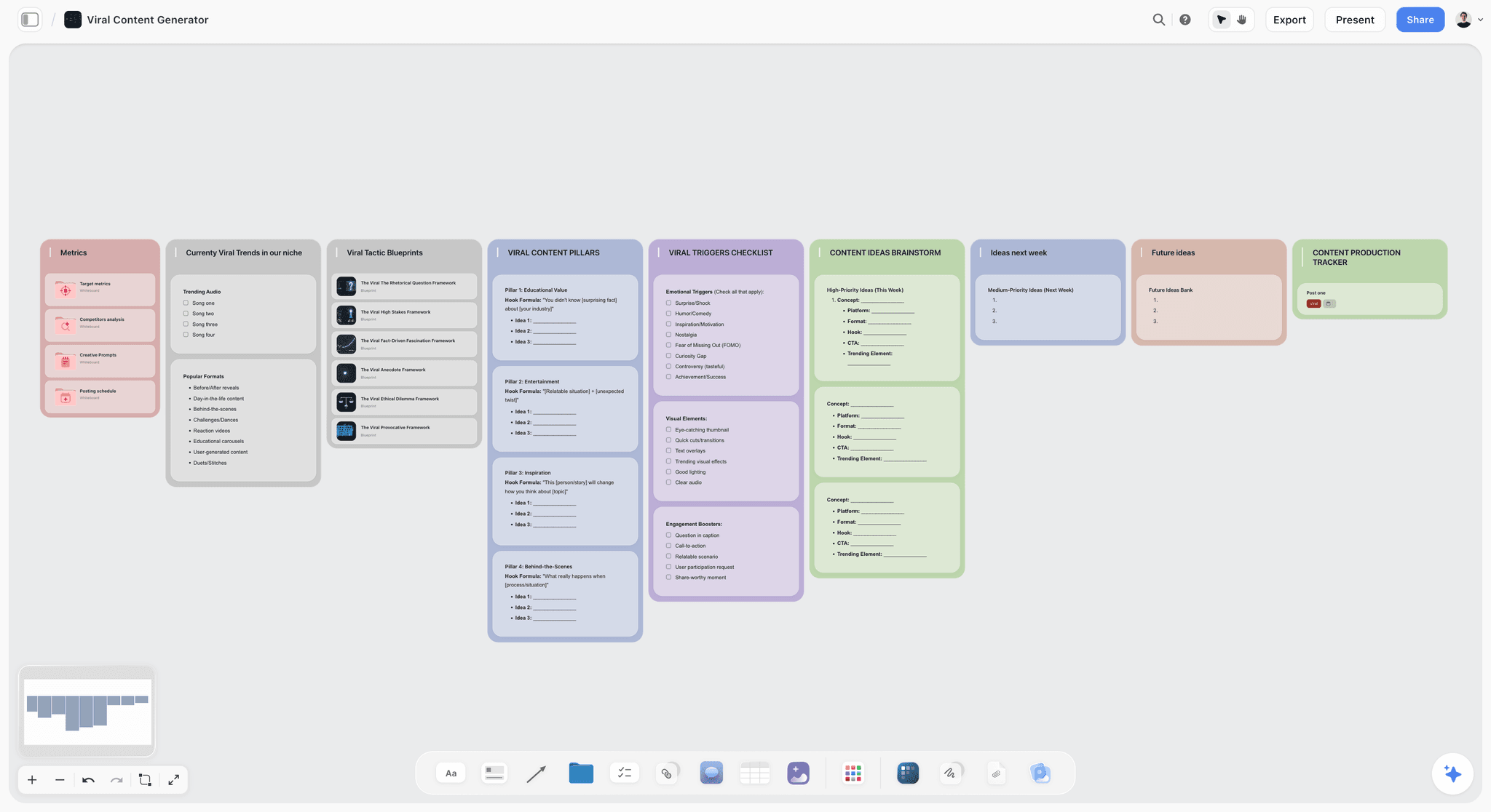
Copy the columns as they are. In Google Sheets this is nine columns. In Notion or Airtable it is a database with a pillar relation. In Storyflow, ask the AI for a table with these nine columns and the rows in date order, and keep the briefs as documents or brief walls on the same board, so the "Linked" cell is one click away.
12) How to Run a Small Team's Content Calendar in Storyflow
These steps use the workflows Storyflow ships today. Anything it does only when asked is written as "ask the AI".
- Open one board per quarter, or one per client. A board is the whole plan for that period, and duplicating last quarter's board is a fast start.
- Ask the AI for a content plan. For example: "Build a content plan for a B2B reporting tool: LinkedIn, blog and email, three pieces a week, launch on 12 November." It builds ten method walls, then a Content Calendar wall of ten tickets, each a real upcoming post with its pillar and platform.
- Assign the tickets. Tickets carry assignees, so each post has an owner the moment it exists.
- Ask for the dated view. "Make a table of the next four weeks with date, piece, pillar, owner and status, with the rows in date order." Ask for the date order explicitly. The table cannot be re-sorted by a column later, so add new rows in their date position.
- Write the briefs where the work happens. Ask the AI for a campaign brief for the launch, or put each post's brief in a Document; the team discusses it in inline comment threads.
- Review with the client or your manager. Share a view-only link: it opens with no account, and the reviewer signs in to comment and draw on the board. Set a status cell to Approved when they sign off; there is no automatic approval step.
- Check the plan against the pillars. Ask the AI to review the board and list tickets that serve no pillar, or pillars with no tickets next month.
- Publish from your scheduler. Storyflow does not post to social networks and has no integration with schedulers: copy approved posts into Buffer, Later or CoSchedule yourself.
- When the plan changes, ask the AI to redraft. The table, tickets and briefs do not update each other; ask the AI to rework the affected ones.
To see a month of posts laid out from a description before you open a board, try the AI content calendar generator. The content pillar planner page covers step 7 in more depth.
13) The Small-Team Content Calendar Checklist
Use this with any tool on this page. Each line is a yes or no.
- Every row has a pillar. No pillar, no slot.
- Every row has one owner, named, not "marketing".
- Every row links to a brief with audience, message, format, call to action and draft deadline.
- Every row names its approver, and the approver knows the date they are needed.
- The draft deadline is at least three working days before the publish date for anything a client approves.
- Empty slots are allowed and marked as held, not filled.
- The calendar covers four to six weeks in detail and a quarter in outline.
- Channels are columns or tags, not separate calendars, so the team sees one plan.
- The scheduler holds only approved posts. Drafts never live in the publishing queue.
- Once a month, someone counts pieces per pillar and compares with the plan.
- Reviewers who only look do not need a paid seat. Check that before you buy.
- The cost for your team size, on the billing you will actually use, is written down before anyone starts a trial.
14) ContentCal Alternatives: What Happened and Where to Go
ContentCal still comes up in searches for content calendar tools and is no longer a product you can buy. Adobe acquired it in December 2021, closed the standalone product on 31 March 2023, and folded its calendar into Adobe Express as the Content Scheduler.
Where former ContentCal users have gone, by what they used it for:
- The publishing calendar and approvals: Buffer's Team plan for the simplest replacement with approvals, Planable where client approval is the whole job, Metricool where analytics matter as much as scheduling.
- The editorial plan behind the calendar: Storyflow, Notion or Airtable, which is a change of shape rather than a like-for-like swap: the plan moves out of the scheduler into a planning tool.
- Staying in Adobe: Adobe Express covers the creation half; the enterprise planning half is a considerably larger purchase than ContentCal was.
The ContentCal alternative page covers the migration in more detail. The wider point: this category consolidates, and a roundup that still recommends a retired product is worth checking line by line.
15) Recommended Content Calendar Stacks for Teams of 2 to 10
Storyflow figures use Team billing, billed annually, as shown on storyflow.so/pricing. The agency row depends on how many client workspaces you run on Planable; at $33 per workspace as listed, five clients add $165. Every stack follows the same pattern: a tool that holds the plan and the briefs, plus a tool that publishes. The content that compounds is the content the plan chose.
For the planning side of campaigns that feed these calendars, see The 12 Best Marketing Campaign Planning Tools in 2026 and The Best Workspace to Run a Campaign From Brief to Delivery.
16) Honorable Mentions
- Hootsuite. A long-standing social scheduler with a 14-day trial and no free plan. Standard is $99 per user a month billed annually, which puts it above most small-team budgets on this page.
- Canva Content Planner. Design a post in Canva and schedule it to social platforms from the same place; scheduling needs Canva Pro, Business, Education or Nonprofits. Canva Pro is US$144 a year for one person, and it suits a team whose bottleneck is design rather than planning.
- ClickUp. An all-in-one work platform with content calendar templates. ClickUp's free plan covers unlimited tasks; Unlimited is $7 per user a month billed yearly ($10 monthly), Business $12 ($19), with its Brain AI as a paid add-on.
- Metricool. Publishing and analytics in one: the free plan covers 1 brand and 20 posts a month; Starter is listed from $20 a month and covers up to 10 brands at its $36 tier, and team management with an approval system is on Advanced. The calendar shows what is scheduled, not what the quarter is about.
- Sprout Social. An enterprise social calendar and analytics platform, priced above small-team budgets.
- HubSpot Marketing Hub. For teams already on HubSpot's CRM; its campaign tools need Professional, which is $800 a month with three core seats.
17) Mistakes to Avoid With a Team Content Calendar
The checklist in section 13 covers the calendar itself. These are the buying and setup mistakes around it.
- Buying a scheduler to fix a planning problem. If the argument is about what to make, a better publishing queue will not end it.
- Comparing seat prices instead of team prices. CoSchedule's $29 Starter and Buffer's free plan look cheap until the fifth person joins; price the team you will have in six months.
- One calendar per channel. The team loses the one view that shows whether the week makes sense as a whole.
- Switching tools in launch month. Migrate between launches; a half-moved calendar is worse than an old one.
- Letting the scheduler's queue become the plan. Once the queue is the only place posts exist, nobody can see what was decided and why.
19) The Bottom Line
The best content calendar tool for a small team in 2026 is Storyflow, because the thing a team of 2 to 10 runs short of is not dates but reasons and briefs, and its AI builds both on the board next to the post tickets. CoSchedule is the best calendar that also publishes. Notion is the strongest calendar database. Buffer is the best-value publisher for a team, with approvals on its Team plan.
Give every slot a pillar, an owner, a brief and an approver, and let the calendar serve the plan instead of becoming it.
For your next quarter, build the plan and the calendar on a Storyflow board and publish from the scheduler you already have. For the social side, the social media content calendar page shows the same method for posts.
18) FAQ: Content Calendar Tools
What is the best content calendar tool in 2026?
Storyflow ranks first on this page (7.25/10) because it scores highest on the plan and brief behind each slot. The answer changes with the weights: move 20 points from planning to publishing and Buffer and CoSchedule overtake it, and for solo creators the separate creator ranking applies. If you only remember one rule, pick the tool for the job that hurts most today.
What is the cheapest content calendar tool?
Google Sheets, at $0 with a Google account. For a team, price the team, not the seat: for five people on annual billing, Trello Standard is $25, Storyflow Plus $27.97 on Team billing, Buffer Team on four channels $40, Notion Plus $50, Asana Starter $54.95, Airtable Team $100 and CoSchedule Professional $136. Two-person teams can pay nothing on Asana's Personal plan or Trello's free plan.
What is the best content calendar app for a phone?
Decide what the phone is for. Approving and reading a plan works in any browser, including Storyflow, which runs in the browser only and has no native app; phones handle viewing, light edits and AI chat, and heavy board building is best on a laptop. Publishing on the go is a scheduler's job. Milanote has iPhone, iPad and Android apps if the phone is where ideas get captured.
What is the best blog calendar tool?
One that holds the keyword, not just the date. A blog calendar row needs target keyword, search intent, outline link, writer, editor, draft due and publish date. Notion and Airtable hold these as properties; Google Sheets as columns; Storyflow as a table beside the brief documents. CoSchedule lists a WordPress integration on Starter, Professional and Suite; none of the other tools here publishes to WordPress or another CMS, so in them the calendar's job ends at "approved".
Which content calendar tools have approval workflows?
Planable has optional approvals on Basic, required approvals on Pro and multi-level approvals on Enterprise. Buffer's Team plan includes approval workflows. CoSchedule adds Social Message Approvals on Professional and approval workflows on Suite, and Later has a content approval workflow on Growth and Scale. Asana adds approvals and proofing on Advanced ($24.99 per user billed annually), ClickUp includes proofing on Business, and Metricool has an approval system on Advanced. Storyflow has no approval workflow: reviewers comment on the board and someone sets the status.
Which content calendar tools keep a revision history?
Notion keeps 7 days of page history on its free plan and 30 days on Plus. Google Sheets keeps a version history on every sheet. For Storyflow, each AI change can be undone in one click, and you can duplicate a board before a big rework, but that is not a dated revision log. If "who changed this date and when" matters for a client, Notion or Sheets answers it best.
What is the best content calendar template for a team?
A template is only as good as its columns. Start from the nine in the worked example: date, piece, pillar, goal, channel, owner, brief, approval, status. Storyflow has a Posting Schedule template and a Viral Content Planner template; Notion's template gallery and Milanote's brief templates are good starts in those tools. Whatever you pick, make the pillar column required on day one.
Can a content calendar be tied to SEO goals and keyword clusters?
Yes, by hand. Add columns for keyword cluster, target URL and current position, and update the position monthly from Google Search Console. None of the twelve tools here tracks rankings. In Storyflow, a table can hold link and label cells for the URL and cluster; in Notion or Airtable, a relation to a keyword table lets you see every piece in a cluster at once.
What tools help manage a content calendar for SaaS marketing?
A SaaS calendar is driven by release dates, so the plan starts from the launch and counts back. Storyflow's AI builds a dated plan counted back from a date, and a marketing plan with a Timeline wall of dated phases; add Buffer or CoSchedule to publish. Teams already on HubSpot may keep campaigns there, but its campaign tools need Marketing Hub Professional at $800 a month.
Is Storyflow free?
Not during early access. Storyflow is paid-only for now, with plans from $7.99 a month billed annually ($9.99 monthly), and subscribing needs a card. Its Free plan launches before the end of 2026, and anyone a paid member invites to a board joins free now, on free-tier limits. Team Workspace with roles and permissions is on Max, at $39 a month billed annually per seat.
Can AI build a content calendar for a team?
Yes, with different depths. Storyflow's AI builds a full content plan with a wall of ten post tickets on the board you are working on, and it can review the board for gaps. Notion's AI depth depends on the plan: Free and Plus get a limited trial. ClickUp sells Brain as an add-on from $9 per user a month. Schedulers' AI mostly writes captions. In every case, the AI proposes and a person decides what publishes.
Is Notion or Airtable better for a content calendar?
Notion is cheaper for a small team ($10 per seat billed annually against Airtable's $20) and easier to start, with strategy pages beside the database. Airtable is better once you run several clients or brands from one base, and its read-only collaborators cost nothing. Pick Notion for one brand, Airtable for five.
Do I need a content calendar tool, or is a spreadsheet enough?
A spreadsheet is enough while one person plans and publishes. Switch when any of these is true: more than one person approves posts, you publish on more than three channels, or briefs are being sent as separate messages. At that point the cost of a tool is lower than the cost of the questions it removes.
Who should own the content calendar on a small team?
One named person, usually the marketing lead or, in an agency, the account lead for that client. Owning the calendar means three duties: no row without a pillar and a brief, every approval chased by date, and a monthly count of pieces per pillar. Makers own their rows; only the calendar owner adds or removes slots.
What are the best content planning tools for a team?
Content planning tools hold the plan before anything is scheduled: pillars, briefs, research and ideas. On that job alone, the Plan and brief column ranks Storyflow 10, Notion 8, then Airtable and Milanote 7. Milanote is strong for references but holds no dates, so it plans without scheduling. Pair any of them with a scheduler, since none of the four publishes.
Table of Contents
- Quick Answer: The Best Content Calendar Tool for a Small Team in 2026
- Content Calendar Tools Scored for Small Teams: 12 Tools at a Glance
- Frequently Asked: Which Content Calendar Tools Are Most Trusted, Best Value and Fairest on Price
- Content Calendar Software Pricing: What a Team of 2 to 10 Actually Pays
- Calendar as Servant: The Test Every Tool Is Scored On
- How We Scored These Tools
- Best Content Calendar Tool by Team and Job: Quick Picks
- Detailed Reviews: 12 Content Calendar Tools
- What Is a Content Calendar App, and What Should It Do for a Team?
- Editorial Calendar Software vs a Social Media Scheduler vs a Blog Calendar Tool
- Worked Example: Two Weeks of a Four-Person Team's Content Calendar
- How to Run a Small Team's Content Calendar in Storyflow
- The Small-Team Content Calendar Checklist
- ContentCal Alternatives: What Happened and Where to Go
- Recommended Content Calendar Stacks for Teams of 2 to 10
- Honorable Mentions
- Mistakes to Avoid With a Team Content Calendar
- FAQ: Content Calendar Tools
- The Bottom Line
- Author
- Related Reading
Templates to check out for this topic


Content and video templates you can use in Storyflow
Plan a channel, a script, and a content pipeline on the same board. Open one of these templates and let the AI build on the structure instead of starting from a blank doc.


See Storyflow in Action
A visual AI workspace where every feature lives inside one canvas. No tab-switching, no context lost.
Build your entire board from a single message
Type what you need in the AI chat at the bottom of your canvas. The AI adds cards, headings, and structure directly onto your board.
Use expert frameworks as AI context
Type @ in the AI chat and choose any Tactic. The AI tailors every response to that framework instead of giving generic advice.
Turn your board into a mind map in seconds
Ask the AI to restructure your canvas as a mindmap. It connects your ideas into a visual hierarchy so you can see how everything relates.
Why Storyflow Exists
Storyflow actually began as a personal tool while working on creative and research projects.
We kept running into the same problem: ideas were scattered everywhere: notes, documents, and whiteboards.
Nothing helped us see how everything connected.
So we started building a workspace designed around how ideas actually grow.
→ Read how Storyflow was createdJustkay
Documentary Filmmaker & Founder at Storyflow
Published: 2026-05-17
Extremely simple, seriously capable


See how easy it is to get started
Watch a real project come together, from a blank board to a finished plan, clicked through step by step.
Start creating with AI and become more productive
Transform your creative workflow with AI-powered tools. Generate ideas, create content, and boost your productivity in minutes instead of hours.