
Ultra-fast campaigns, pitched beautifully
The planning tool
your marketing team works from together.
Strategy in a deck, campaigns in a spreadsheet, briefs in docs, content in a tracker. Storyflow puts the whole marketing plan on one canvas where the strategist, the designer and the writer see how their work connects.


Creatives working for these brands already got early access
- Red Bull
- Canon
- Artlist
- Porsche
See how easy it is to get started
Watch a real project come together, from a blank board to a finished plan, clicked through step by step.
Start from a ready-made template
Pick a board to see what you can build, then let AI fill it in. Every template is a real, editable starting point on the same infinite canvas.

Marketing Campaign
Plan a campaign across channels, messages, and deliverables on one board the whole team can see.
What is the best tool for marketing teams to plan together?
A planning tool for marketing teams is one shared place where the strategist, the designer and the writer see how their work connects. Storyflow is an AI visual workspace that holds a marketing team's whole plan on one infinite canvas: the brand strategy, the campaign briefs, the launch plans and the content plans, edited by the whole team in real time. The AI drafts each plan from a prompt and reads the whole board, and leadership opens a view-only link with no account. Teams that run execution through automations and approval routing keep Asana or Monday.com for that part.
A marketing team's work is a chain. The strategy decides which campaigns run, each campaign needs a brief, each brief drives assets, and the assets are judged against the brief. When every link lives in a different tool, the chain breaks quietly: the content team works from last quarter's pillars and the campaign brief contradicts the positioning nobody reopened.
Most tools for marketing teams are built for one link. Docs tools are good at the strategy, trackers at the tasks, whiteboards at the workshop. The team ends up translating between them, and the translation is where priorities get lost. A new hire needs a week to find out how the pieces fit.
On Storyflow the whole chain is visible at once. The strategist maps positioning on a board, the campaign manager plans each campaign with its brief beside it, the designer pins references next to the brief they answer, and the writer drafts copy in a Doc on the same canvas. Folders group boards by quarter or brand, and a dashboard board shows every campaign's phase and owner.
Ultra fast from brief to board
Bring the marketing team onto one plan in four steps.
Start with the next campaign, not a migration.
01
Map the strategy once
Positioning, audiences, priorities and content pillars on one board. The AI's brand strategy workflow drafts a first version you edit together.
02
Plan each campaign from it
A board per campaign with the brief at the top and the channel plan beside it. The strategy board is attached as context, so the brief follows it.
03
Invite the team
Strategist, campaign manager, designer and writer edit in real time. Anyone a paid member invites joins free, so contractors add nothing to the bill.
04
Share with leadership
A view-only link opens with no account. Presentation mode steps through frames when the plan has to be walked through in a meeting.
Strategy, campaigns, briefs and content, connected.
One canvas where each part of the marketing plan can see the part it depends on.
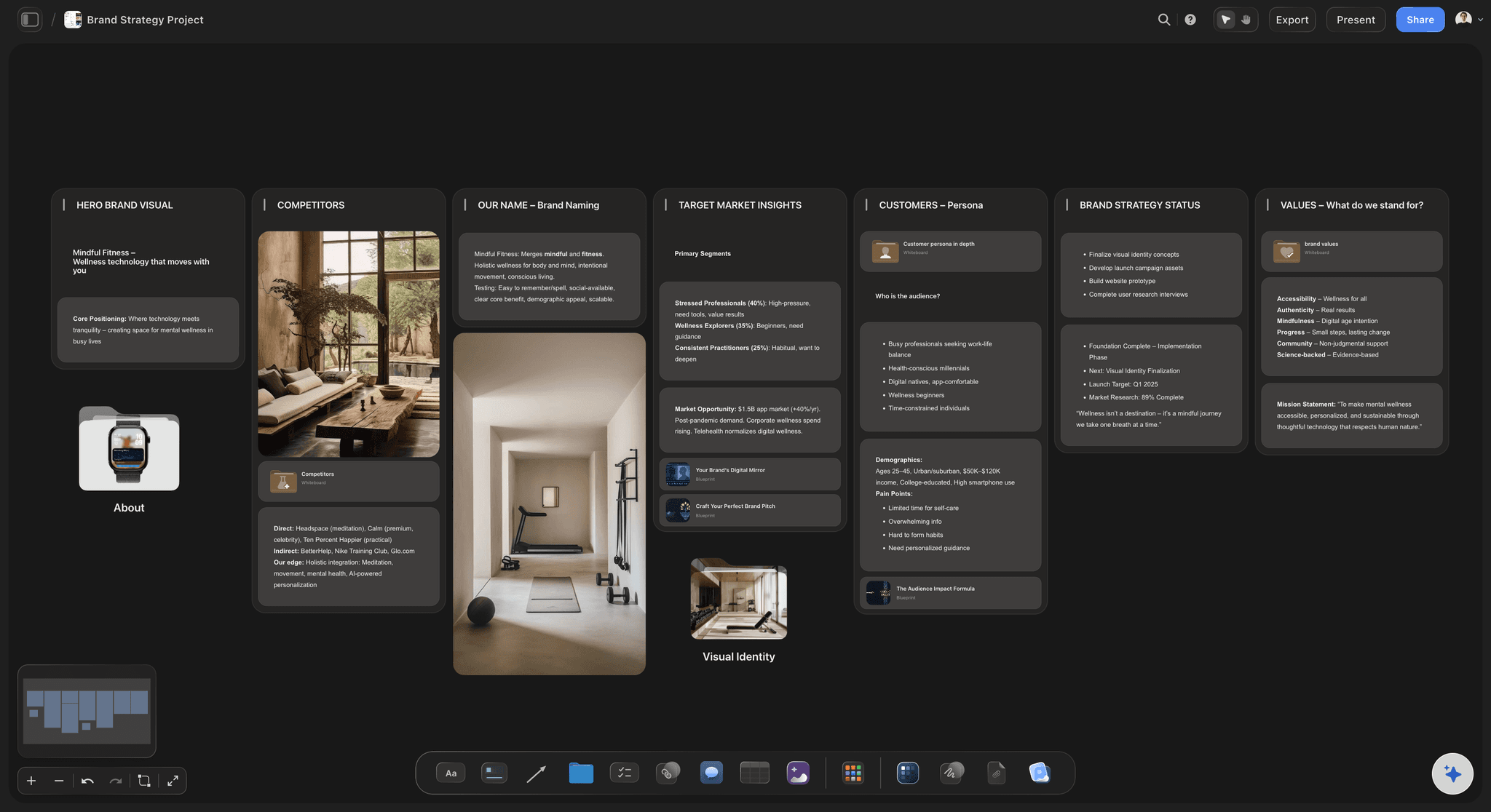
Strategy the team can see
Positioning on a board, not in a deck
Audiences, messages and priorities stay visible to everyone planning campaigns, instead of in a deck opened once a quarter.
See the brand strategy tool →
Campaigns from the strategy
Every campaign traces back
Each campaign board starts from a brief that cites the strategy it serves. The AI drafts the campaign plan from a prompt, and the team edits it.
See the AI marketing campaign planner →
Launches, idea to campaign
Plan a brand launch as a team
Strategy, naming, moodboard, launch brief and channel plan in sequence on one board, so the launch campaign carries the positioning it came from.
See the brand launch planner →
Everyone on one board
Real-time editing, free for invitees
Live cursors on any paid plan, and anyone a paid member invites joins free. The Max plan adds a team workspace with roles.
See the marketing workspace →Unlimited boards for the whole marketing plan.
A board per campaign, folders per quarter, a dashboard across them. Storyflow is paid-only during early access, with plans from $7.99 a month billed annually ($9.99 monthly). A free plan launches before the end of 2026, and anyone a paid member invites to a board joins free.
Unlimited boards and file uploads on every paid plan
AI workflows for brand strategy, campaign briefs and marketing plans
Real-time editing with everyone you invite
View-only links leadership opens with no account
Built for people with taste
What changes when the team plans on one canvas.
Fewer translations between tools, and fewer campaigns that drift from the strategy.
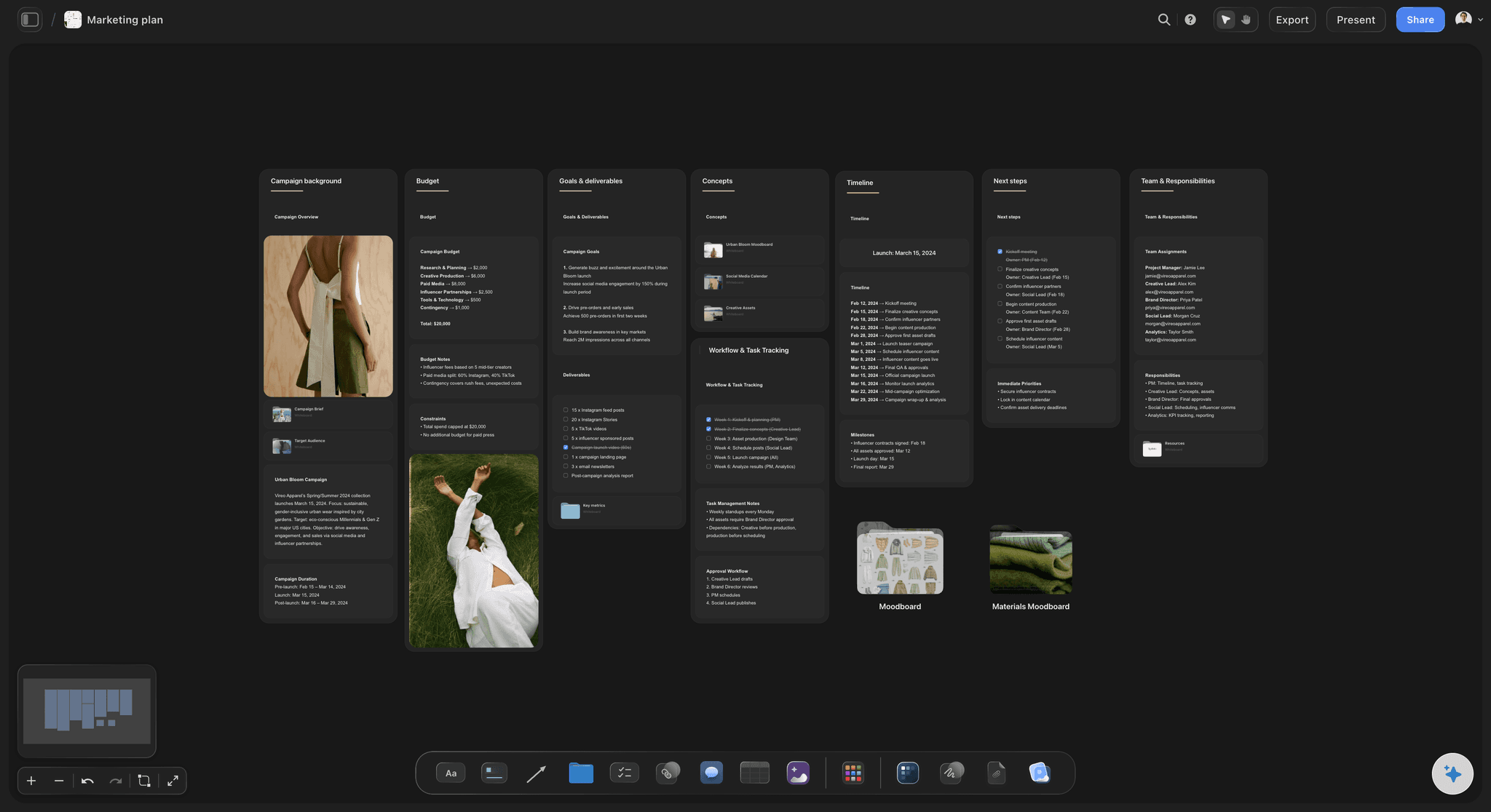
One connected plan
Strategy to content, visible at once
Each layer sees the one above: Content pillars sit under the positioning, campaigns under the pillars, assets under the brief. A post that serves no pillar is easy to spot.
Onboarding in an afternoon: A new hire reads the strategy board and one campaign board and knows how the team works, without being walked through five tools.
Duplicate what worked: Copy last quarter's best campaign board as the starting point for the next one, so the team's real process carries forward.

Roles on one board
Who does what, without a second tool
Tables and tickets: Status, person and date cells per deliverable, tickets with assignees and due dates, and a Kanban for production.
Comments where the work is: A signed-in teammate comments on the specific asset or on a line of the brief in a Doc's inline thread, so feedback is never matched up from chat.
Access levels: Board access is admin, edit or view. The Max plan adds a team workspace with permissions and roles, billed per seat.
Leadership by link: A view-only link opens with no account and shows the latest version on reload, so the status update is the board itself.

The AI does the first pass
Drafts the team edits
Named workflows: Brand strategy, campaign brief, advertising brief, marketing plan, social media plan and content planner each draft an editable first version.
Context from your boards: Attach up to five documents and three other boards, such as the strategy board, so a campaign draft follows the positioning.
It proposes, the team decides: AI edits land on the board with one-click Undo. Budgets, channels and the final call stay with the people accountable for them.

Where it stops
Honest limits for teams
No automations or approval routing: Status changes by hand and sign-off happens in comments. Teams that depend on rules and formal approvals keep an execution tool beside it.
No workload views or time tracking: Capacity planning across the team is not something Storyflow does today.
No social publishing: Storyflow plans the posts; your scheduler publishes them. There are no integrations with social platforms.
Explore templates for your project
Every template opens as a real, editable board on the infinite canvas. Pick the closest fit and make it your own.
Marketing Campaign
Plan a campaign across channels, messages, and deliverables on one board the whole team can see.
One app instead of five
Storyflow vs Miro, Notion and Asana for marketing teams.
Miro is strong for workshops, Notion for documents and databases, Asana for task structure and approvals. Here is where they differ for a team planning marketing together.
Storyflow
Recommended
Strategy, brief and campaign plan on one canvas
Deliverables with status, owner and date
Leadership views by link with no account
Team workspace with roles
Time tracking
Free plan today
Miro
Strategy, brief and campaign plan on one canvas
Deliverables with status, owner and date
Leadership views by link with no account
Team workspace with roles
Time tracking
Free plan today
Notion
Strategy, brief and campaign plan on one canvas
Deliverables with status, owner and date
Leadership views by link with no account
Team workspace with roles
Time tracking
Free plan today
Asana
Strategy, brief and campaign plan on one canvas
Deliverables with status, owner and date
Leadership views by link with no account
Team workspace with roles
Time tracking
Free plan today
What creators are saying
Join early creators getting structured workspaces and AI that remembers their projects
“Storyflow has sped up my workflow by at least 3x, which means more flow state and more projects I can actually ship. It truly changed the way me and my team create.”

Reilin Joey
Director & YouTuber
“One prompt gets me a structured board. But the tactics are my favorite. I run my YouTube scripts through them and my intros and retention got better. It's amazing.”

Justkay
YouTuber & Freelance Filmmaker
“I used to juggle five apps to plan a project. Now I describe what I am making and get boards, lists, and a schedule. All in one place.”

George
@fernwehchronicles
Marketing team questions, answered.
How a team plans in Storyflow, what the AI does, and where it stops.
Storyflow is the planning tool for marketing teams that want strategy, campaign briefs and plans on one canvas the whole team edits: the AI drafts each plan from a prompt and reads the board, and leadership views by link with no account. Miro suits workshop-heavy teams, Notion teams that live in documents, and Asana teams that need automations, approvals and time tracking for execution.
For a team, Storyflow keeps the launch in one sequence on one board: brand strategy, naming and moodboard first, then the launch brief and channel plan, with owners and dates on each deliverable. The AI has workflows for each step. Teams that run launch execution through automations add Asana or Monday.com. The brand launch planner covers the steps in detail.
Keep the strategy where campaign planners see it. In Storyflow, attach the strategy board as context when the AI drafts a campaign brief, and start each brief with the positioning line and pillar it serves. Review campaigns against the strategy board once a quarter, and cut any campaign that serves no priority.
Yes. Invited collaborators edit in real time with live cursors on any paid plan, and anyone a paid member invites joins free. Board access is admin, edit or view. The Max plan adds a team workspace with permissions and roles, billed per seat.
By putting the brief, the references and the deliverable on the same board, so nobody works from a summary. In Storyflow each asset gets a row with one owner and a due date, the designer pins drafts next to the brief they answer, and the writer drafts copy in a Doc on the same canvas. Feedback lands as comments on the specific piece, not in a separate thread.
Brand strategy, campaign briefs, advertising briefs, marketing plans, social media plans and content plans with pillars and batching, each as editable blocks on the board. It reads the open board and takes up to five documents and three other boards as context. The team edits the draft; every AI edit has one-click Undo.
One strategy board, one board per campaign, and folders by quarter or brand. Add a dashboard board with a row per campaign: phase, launch date, owner and what it is waiting on. Duplicate the best campaign board as the starting point for new ones, so the structure improves each quarter.
Yes. Once sharing is on, a view-only link opens in the browser with no account and shows the latest version on reload. To comment, they sign in. Presentation mode steps through frames fullscreen when the plan needs walking through in a meeting.
Not during early access. Storyflow is paid-only, with plans from $7.99 a month billed annually ($9.99 monthly). A free plan launches before the end of 2026, and anyone a paid member invites to a board joins free, so contractors and agency partners add nothing to the bill. Viewers of a link never need an account.
No. It plans and tracks. There is no publishing or scheduling to social platforms, no email sending and no ad buying, and no integrations with those tools. The team plans posts and assets on the board and ships them through the scheduler and ad platforms it already uses.
A folder per client holding the strategy board and each campaign board. The client gets a view-only link to a curated board with the brief, the agreed deliverables and what the agency is waiting on them for. Clients sign in to comment on the specific asset, which keeps feedback attached to the work.
An afternoon for the first campaign. Open a board, have the AI draft the brief and plan, invite the team and start editing. Move the strategy in next, then older campaigns only if someone still needs them. Teams that try to migrate everything first tend to stall before the first campaign ships.
More from Storyflow
Marketing workspace
Campaign management software
AI marketing campaign planner
Brand launch planner
Campaign brief to delivery
Go-to-market plan
Brand strategy tool
Marketing planning software
Product launch planner
AI content planner
For social media managers
For in-house creative teams
Best tools to plan a brand launch
Best marketing campaign planning tools
Media plan template
Campaign wrap report
Editorial workflow
Plan the next campaign where the whole team can see it.
Open a canvas, draft the strategy and the first brief with the AI, and invite the team. Runs in your browser, nothing to install.