
Plan videos ultra fast, post on time
An editorial workflow
your team can run without an agency.
The stages, the owners, the review rules and the handoffs a content team needs to go from pitch to publish every week, laid out on one board everyone can see.


Creatives working for these brands already got early access
- Red Bull
- Canon
- Artlist
- Porsche
See how easy it is to get started
Watch a real project come together, from a blank board to a finished plan, clicked through step by step.
Start from a ready-made template
Pick a board to see what you can build, then let AI fill it in. Every template is a real, editable starting point on the same infinite canvas.

YouTube Plan
Plan a video from hook to outline to shot list, with references and thumbnail ideas sitting right beside it.
What is an editorial workflow?
An editorial workflow is the fixed set of stages every piece of content passes through, from the first pitch to the day it is published, with one owner and one exit rule at each stage. Storyflow is an AI visual workspace that runs that workflow for in-house content teams on one infinite canvas: a column per stage, a card per piece with its owner and due date, and the brief, the style guide and the draft on the same board. Its AI turns a pitch list or a planning document into briefs and cards for you to correct.
Most teams that bring content in-house from an agency lose the workflow before they lose anything else. The agency ran it without anyone seeing it: someone checked the brief, someone edited, someone chased legal, someone pressed publish. In-house, those jobs belong to three or four people who also have other jobs, so pieces stall in the gap between two people who each think the other one has it. Writing the workflow down, with names on it, is the cheapest fix there is.
A workflow that works for a team of two to ten has seven stages. Pitched: an idea with a working title, the reader it is for and why now. Approved: the editor has said yes and the piece has a brief. Drafting: the writer or producer owns it. In edit: an editor reads it for structure first, then for lines. In review: the subject expert, legal or the brand owner checks only what they own. Scheduled: final, with a date, assets and metadata attached. Published: live, with the link on the card. Each stage has an exit rule, written at the top of its column, that says what must be true before a card moves right.
The exit rules carry the workflow. Pitched to approved needs a reader, an angle and a deadline. Approved to drafting needs a brief of one page or less with the length, the format, the sources and the call to action. Drafting to edit needs a complete draft, not an outline with gaps. Edit to review needs the editor's sign-off on structure. Review to scheduled needs every reviewer to have answered by their date, or the editor to decide without them. A card that does not meet the rule stays where it is, and anyone can see why.
Here is one week for a five-person team that publishes three articles and two short videos a week. On Monday the editor reviews eight pitches and approves five, each with a brief. Writers draft Monday to Wednesday. The editor edits Wednesday and Thursday morning, two rounds at most. Review runs Thursday, with a 24 hour window: the product manager checks facts on the feature article and legal checks the customer story. Friday, the five pieces are scheduled for the following week with images, alt text, meta descriptions and links attached. The team is always one week ahead, which is the buffer that absorbs a sick day or a late review.
Count what that week costs, because the count is what tells you whether the plan is honest. Five pieces at roughly a day of drafting each is five writer days. Two edit rounds at about an hour and a half each is fifteen editor hours. Five reviews at thirty minutes is two and a half hours of other people's time. Scheduling and assets take another half day. That is close to eight working days for five pieces, spread across five people, before anyone has made a single image or cut a video. If the team has six days, the plan needs four pieces, not five.
The limits, plainly. Storyflow does not publish to WordPress, Webflow, HubSpot or any other CMS, and it does not schedule social posts, so the scheduled column ends with someone pressing publish elsewhere. It has no built-in approval sign-off button or version diff, so approvals are a comment or a moved card. It has no Gantt chart and no time tracking. What it does give a content team is one place where the pitch, the brief, the draft, the references, the comments and the stage all sit together and anyone can open them by link.
Ultra fast from brief to board
How do you set up an editorial workflow?
Six steps, in the order a managing editor would do them. The first setup takes an afternoon; after that the board runs the week.
01
Name the stages
Make one column per stage: pitched, approved, drafting, in edit, in review, scheduled, published. Seven is enough for most teams. Add a stage only when a real handoff happens there.
02
Write the exit rule at the top of each column
One line per column that says what must be true before a card moves right. 'Brief attached, length and deadline set' is a rule. 'Ready' is not.
03
Put one owner on every stage
The editor owns approval and edit, the writer owns drafting, a named reviewer owns review, and one person owns scheduling. Write the names on the columns, not just on the cards.
04
Turn the pitch list into cards
Paste the pitch list or attach the planning document to the Storyflow AI chat and ask for a card per pitch with a working title, a reader and an angle. Approve the good ones and ask the AI for a one-page brief beside each.
05
Keep the house rules on the same board
The style guide, the tone of voice, the brand words to use and avoid, and the image rules go on the board as documents or files, so writers and reviewers read them where they work.
06
Review on the board, then publish in the CMS
Reviewers open the board, sign in and comment on the draft. When every comment is closed, the card moves to scheduled with its assets, and the person who owns publishing copies it into the CMS.
What does an editorial workflow need to hold?
Four things, each with its own place on the board. Leave one out and the team rebuilds it in chat threads every week.
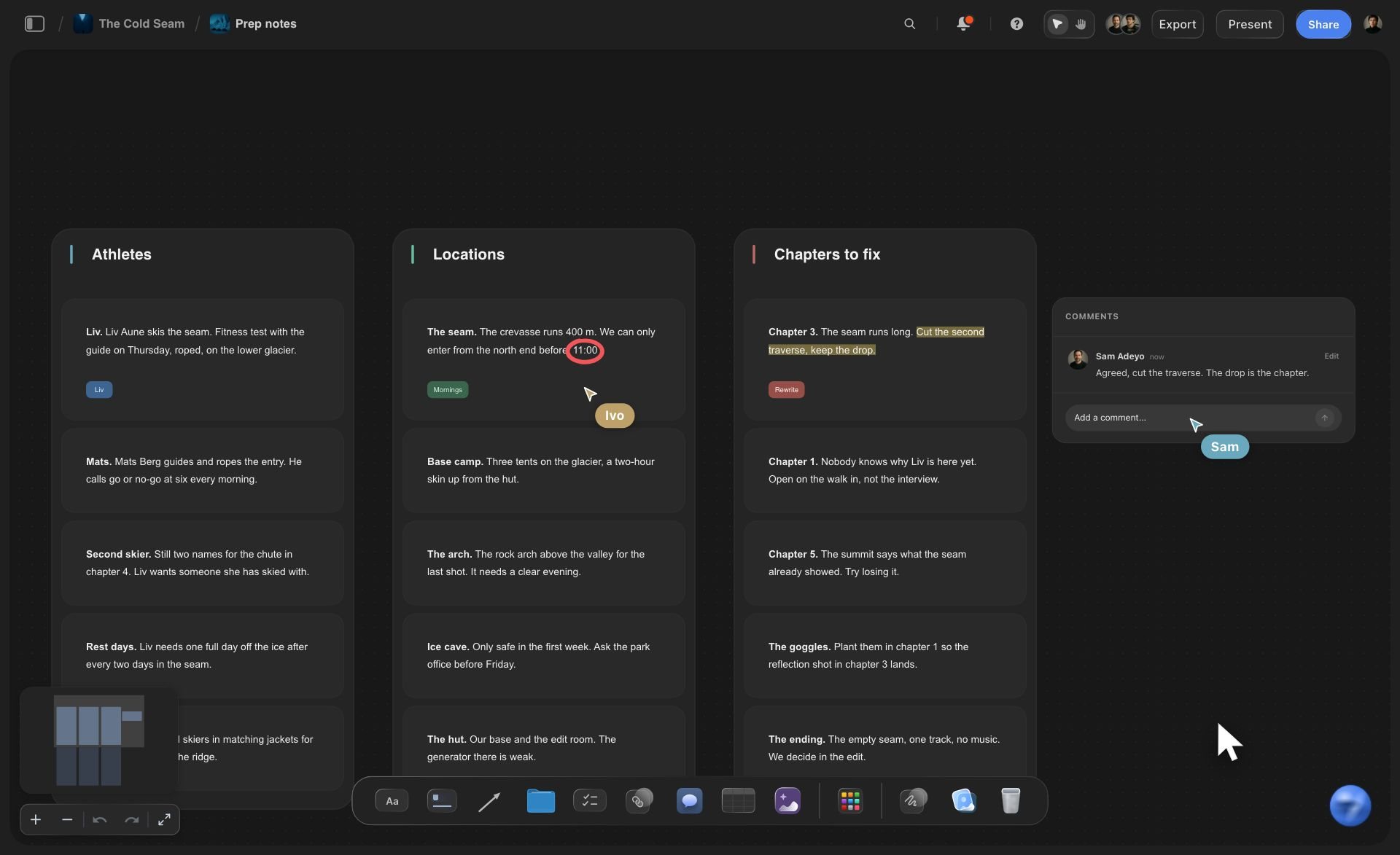
The stages
One column per stage, with the exit rule on top
Cards move left to right as a piece moves from pitch to publish. A glance across the board shows where the week is stuck: four cards in review and nothing in drafting is a problem you can see on Tuesday.
See in-house content production →
The briefs
A one-page brief beside every approved piece
Reader, angle, length, format, sources, call to action and deadline. Storyflow's AI drafts the brief from the pitch, and leaves blank what the pitch did not say.
See the content brief template →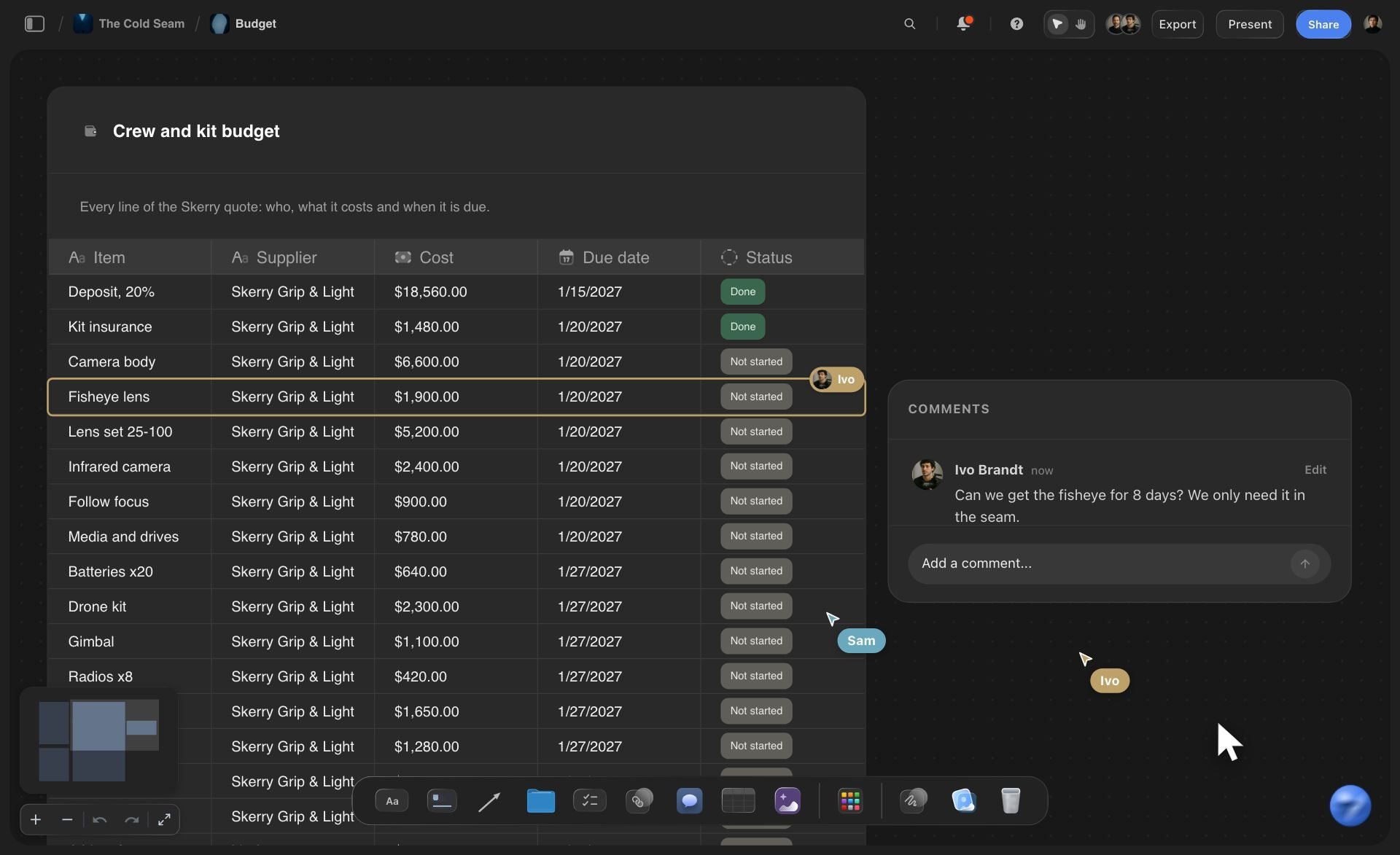
The drafts
Drafts written as documents on the same board
A writer drafts in a Storyflow document next to the brief and the references. The editor reads it there, and reviewers who sign in leave comments beside it.
See the AI document editor →
The calendar
The month as a table, in date order
A table with a row per piece: date, channel, format, owner and stage. It is the editorial calendar the workflow feeds, and it sits on the board the workflow runs on.
See the editorial calendar →The whole editorial week on one board, for the whole team.
Pitches, briefs, drafts, references, comments and the calendar stay together from the first idea to the published link. Storyflow is paid-only during early access, with plans from $7.99 a month billed annually ($9.99 monthly). A free plan launches before the end of 2026, and the freelancers, reviewers and stakeholders a paid member invites to a board join free.
AI that turns a pitch list or planning PDF into cards and briefs
Documents for drafts, beside the brief and the style guide
Comments on the board for reviewers who sign in
View-only links for stakeholders who only need to read
Freelance writers and reviewers you invite join free
Built for people with taste
Why do editorial workflows break down?
Three usual causes in an in-house team. Each one is visible on day one when the stages, the people and the work share a board.

The handoffs
Nobody owns the gap between two stages
Names on columns, not only on cards: When the review column says who reviews, a card sitting there for three days has an obvious person to ask. When it does not, everyone assumes someone else is chasing.
Exit rules you can check: A rule like 'every reviewer has answered or the editor has decided without them' stops a piece waiting a week for one silent reviewer.
Work in progress limits: Cap the edit column at the number of pieces one editor can read in a day. When it is full, writers help clear review instead of starting a new draft.
One board, one link: Everyone opens the same board. There is no second tracker in a spreadsheet and no third one in a chat channel that disagrees with it.
The review
Review rounds that never end
Structure first, lines second: The editor reads for structure before anyone fixes a sentence. Rewriting lines in a piece whose structure will change wastes both rounds.
Reviewers check only what they own: Legal checks claims, the product owner checks facts, the brand owner checks voice. Write each reviewer's scope on the column so nobody rewrites the intro.
A window, not an open door: Give review 24 or 48 hours. After that the editor decides. A review with no deadline is how a piece misses its slot.
Comments where the words are: Reviewers sign in to Storyflow and comment on the draft on the board. The writer answers on the same thread, and the editor sees which comments are still open.

The context
Writers who cannot find the brief or the rules
Brief beside the draft: Every approved card has its brief next to it. A writer who opens the draft sees the reader, the angle and the length without searching a drive.
House style on the board: The style guide, the brand words, the image rules and last quarter's best pieces sit in one corner of the board as documents and files.
Ask the AI what is missing: Ask Storyflow's AI to read a draft against its brief and list what the brief asked for that the draft does not do yet. It answers in the chat; the editor decides.
References next to the work: Screenshots, product shots, charts and source PDFs sit beside the piece that uses them, so the designer and the writer work from the same material.
Explore templates for your project
Every template opens as a real, editable board on the infinite canvas. Pick the closest fit and make it your own.
YouTube Plan
Plan a video from hook to outline to shot list, with references and thumbnail ideas sitting right beside it.
One app instead of five
Which tool should you use for an editorial workflow?
Storyflow keeps the stages, the briefs, the drafts and the references on one board. It does not publish to a CMS or track hours.
Storyflow
Recommended
Stage columns with a card per piece
Brief, draft and references side by side
AI drafts briefs and cards from a pitch list or PDF
Stakeholders read by link with no account
Moodboards, image references and slides on the same board
Publishes to a CMS
Formal approval sign-off and version history per draft
Project management tools
Stage columns with a card per piece
Brief, draft and references side by side
AI drafts briefs and cards from a pitch list or PDF
Stakeholders read by link with no account
Moodboards, image references and slides on the same board
Publishes to a CMS
Formal approval sign-off and version history per draft
Docs and a spreadsheet
Stage columns with a card per piece
Brief, draft and references side by side
AI drafts briefs and cards from a pitch list or PDF
Stakeholders read by link with no account
Moodboards, image references and slides on the same board
Publishes to a CMS
Formal approval sign-off and version history per draft
What creators are saying
Join early creators getting structured workspaces and AI that remembers their projects
“Storyflow has sped up my workflow by at least 3x, which means more flow state and more projects I can actually ship. It truly changed the way me and my team create.”

Reilin Joey
Director & YouTuber
“One prompt gets me a structured board. But the tactics are my favorite. I run my YouTube scripts through them and my intros and retention got better. It's amazing.”

Justkay
YouTuber & Freelance Filmmaker
“I used to juggle five apps to plan a project. Now I describe what I am making and get boards, lists, and a schedule. All in one place.”

George
@fernwehchronicles
Editorial workflow questions
What managing editors and content leads ask when they set up a workflow for a team without an agency behind it.
It is the fixed sequence of stages every piece of content passes through from pitch to publish, with one owner and one exit rule per stage. A typical one has seven stages: pitched, approved, drafting, in edit, in review, scheduled and published. Storyflow runs it on one board, with a column per stage and a card per piece beside its brief and draft.
Storyflow is a strong fit for in-house content teams: stage columns, a brief and draft beside every piece, references and visuals on the same board, and AI that turns a pitch list into cards and briefs. Teams that need formal sign-off with version history often keep a project tool for approvals, and the CMS still publishes the piece.
Pitched, approved, drafting, in edit, in review, scheduled and published. Some teams add a research stage before drafting or split edit into structural and copy edit. Add a stage only where a real handoff between people happens; every extra column is another place for work to wait.
The editor owns approval and edit, the writer or producer owns drafting, a named reviewer owns each type of review (facts, legal, brand), and one person owns scheduling and publishing. In a team of two the same person may hold several stages, but each stage still has one name written on it.
Write down the workflow the agency used to run for you: stages, owners, exit rules and review windows. Plan a week ahead so the schedule has a buffer, count the hours each piece really takes, and keep briefs, drafts and the style guide in one place. Storyflow holds all of that on one board the whole team and any freelancers can open.
Two edit rounds and one stakeholder review is enough for most pieces: a structural edit, a line edit, then review by the people who own facts, legal or brand. Give the review a 24 or 48 hour window. If a piece needs a fourth round, the brief was usually unclear, and fixing the brief template saves more time than adding rounds.
The calendar says what will be published and when. The workflow says how each piece gets there: who does what, in which order and with which checks. A team needs both. On a Storyflow board the calendar is a table of dates and the workflow is the stage columns next to it.
The reader, the angle, the working title, the length, the format, the sources, the call to action, the reviewers and the deadline, in one page or less. Storyflow's AI drafts a brief from a pitch card and leaves fields blank where the pitch did not say, so the editor fills gaps instead of correcting guesses.
Yes, for the parts that are reading and structuring. Storyflow's AI turns a pitch list or a planning PDF into cards, drafts a brief per piece, builds the month as a table and can read a draft against its brief and list what is missing. It does not decide what to publish.
Send them a link to the board. With a view-only link they read the draft in a browser with no account. To leave comments they sign in, then comment on the draft or the card. The writer answers in the same thread and the editor moves the card when every comment is closed.
No. Storyflow holds the pitch, the brief, the draft, the assets and the stage, but it does not publish to WordPress, Webflow, HubSpot or any other CMS, and it does not schedule social posts. The person who owns publishing copies the final piece into the CMS and pastes the live link on the card.
Yes. Invite them to the board and they see the pitch, the brief, the style guide and the stage of their piece. People a paid member invites join free. Give each freelancer the drafting stage and keep editing and review with the in-house team.
Count it rather than guess. A written article usually takes about a day of drafting, around three hours of editing across two rounds and half an hour per reviewer. A five-person team with eight spare working days a week can sustain about five pieces. Put the count on the board and change the plan when the days do not add up.
Storyflow is paid-only during early access, with plans from $7.99 a month billed annually ($9.99 monthly). A free plan launches before the end of 2026. People a paid member invites to a board, such as freelance writers or reviewers, join free.
Write the workflow down once. Run it every week.
Stages, owners, briefs, drafts and the calendar on one board, so pieces stop stalling between two people.