
Social plans done ultra fast, done well
Plan a month of social media content
before you post any of it.
Pillars, a cadence per platform, the campaign moments and the batch days go on one board, and every post becomes a ticket carrying its brief and its date, with its assets beside it. Storyflow plans the month; your scheduler publishes it.


Creatives working for these brands already got early access
- Red Bull
- Canon
- Artlist
- Porsche
See how easy it is to get started
Watch a real project come together, from a blank board to a finished plan, clicked through step by step.
Start from a ready-made template
Pick a board to see what you can build, then let AI fill it in. Every template is a real, editable starting point on the same infinite canvas.

Content Calendar
Plan what you post and when across every channel on one calendar.
How do I plan a month of social media content?
Plan a month of social media content in five passes: set three to five content pillars, give each platform a cadence, pin the month's campaign moments and dates, block one or two batch production days, then make every post a ticket that carries its brief and due date, with its assets beside it. Storyflow is an AI visual workspace that plans that month on one infinite canvas: a board that becomes your social media content calendar, a ticket per post with its brief, owner and due date, its assets beside it, and batch days with shot lists. Ask Storyflow's AI for a Content Planner and it lays that structure out with real upcoming posts as tickets. Storyflow plans the content; Buffer, Later or Hootsuite publish it.
Start from pillars and cadence, not dates. A pillar is a subject your audience follows you for, and three to five is the workable range: fewer and the feed repeats, more and none of them gets enough posts to register. Cadence is set per platform from what you can actually make. A daily TikTok habit and a weekly LinkedIn post are different production loads, and a month planned at a cadence nobody can sustain falls apart by the third week. Write both at the top of the board so every later decision is checked against them.
Then place what is fixed. Launches, promotions, events and anything tied to a date go in before the ordinary posts, because they decide the shape of the weeks around them: a launch needs teaser posts before it and proof after it, not one announcement standing alone. With the fixed points in, block the batch production days. Filming or shooting eight posts in one session is where a month actually gets made, and a batch day only works when every post it covers already has a brief, a location and a shot list written before anyone picks up a camera.
The slot is where most calendars fail. A cell that says Reel, Tuesday tells the person making it nothing, so in Storyflow each post is a ticket with its hook, caption direction, format, due date, owner and stage label, with the reference image or clip it is based on beside it. Dates live in a table with date cells and on the tickets themselves; Storyflow does not show posts on a month grid. The AI reads the whole board, so asking which pillar is thin or what launch week is missing gets an answer about your plan. Approved posts then go into the scheduler that publishes them.
Ultra fast from brief to board
How do I build a monthly social media content plan, step by step?
Four passes on one board. The publishing happens afterwards, in your scheduler.
01
Set pillars and a cadence per platform
Write the pillars and how often each platform gets a post. Ask the AI for a Content Planner and the foundation, the pillars and the calendar structure appear as walls you edit.
02
Pin the campaign moments
Add launches, promotions and dated moments to a table with date cells, then cluster teaser and follow-up posts around each one.
03
Plan the batch days
Group the posts that share a set, a location or a person into one or two production days, each with a shot list the AI can draft from the posts, so one session produces a week of content.
04
Brief every post, then hand it off
Each post becomes a ticket with its hook, format, due date and owner, with its assets beside it. A client opens the view-only link with no account, then approved posts go into Buffer, Later or Hootsuite.
What should a social media content calendar include?
The strategy, the dates, the production days and the posts, each where the others can see it.
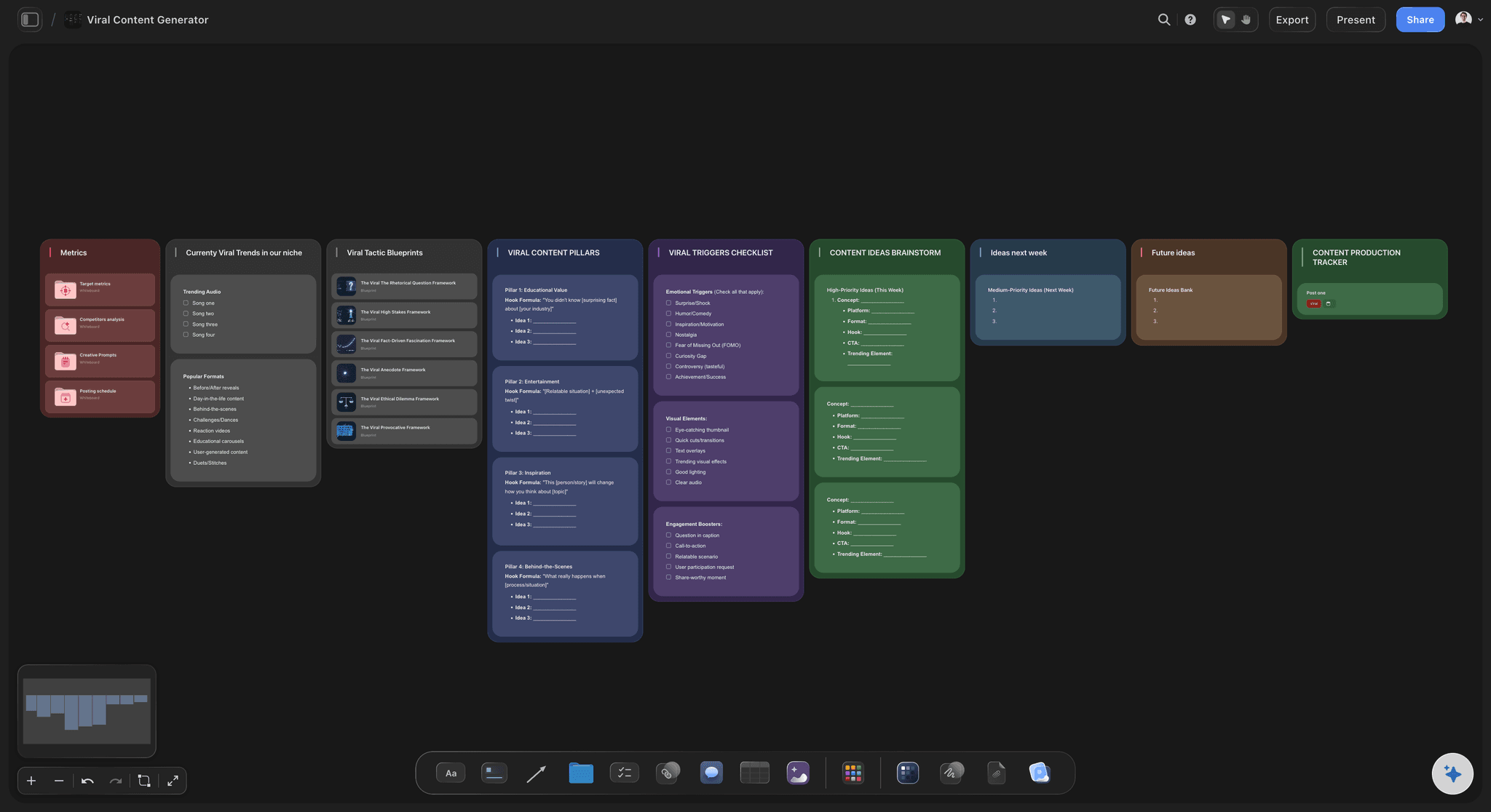
Pillars and cadence set once
A month that answers to a strategy
Pillars and a per-platform cadence sit at the top of the board, so a pillar with one post in four weeks, or one platform carrying the whole month, shows before the month runs.
See the content pillar planner →
Every post is a ticket
A brief in every slot
Hook, caption direction, format, a due date, an owner and a stage label on each post's ticket, with the reference image or clip beside it, so whoever makes it opens the ticket and starts.
See the content brief template →
Batch days planned
Shoot a week of posts in one session
Posts that share a set, a location or a person are grouped into a production day with its own shot list, so batching is planned rather than hoped for.
Read how to batch a month of content →
The AI runs the Content Planner
Start from a month, not a blank board
Ask for a Content Planner or a Social Media Plan and the AI lays out pillars, batching, per-platform cadence and real upcoming posts as tickets. You cut what does not fit.
See the AI content calendar generator →Unlimited boards. No object cap.
One board per month or per client, with every post, brief and reference on it. Storyflow is paid-only during early access, with plans from $7.99 a month billed annually ($9.99 monthly). A free plan launches before the end of 2026, and anyone a paid member invites to a board joins free.
Unlimited boards, images, files and links for every month you plan
Tickets with due dates, Kanban, and tables with date, person and status cells
An AI that reads the whole board and lays out the month with you
View-only links a client opens with no account
Built for people with taste
Pillars, moments, batch days, briefs.
The four decisions that turn thirty empty slots into a month someone can make, in the order they have to be made.
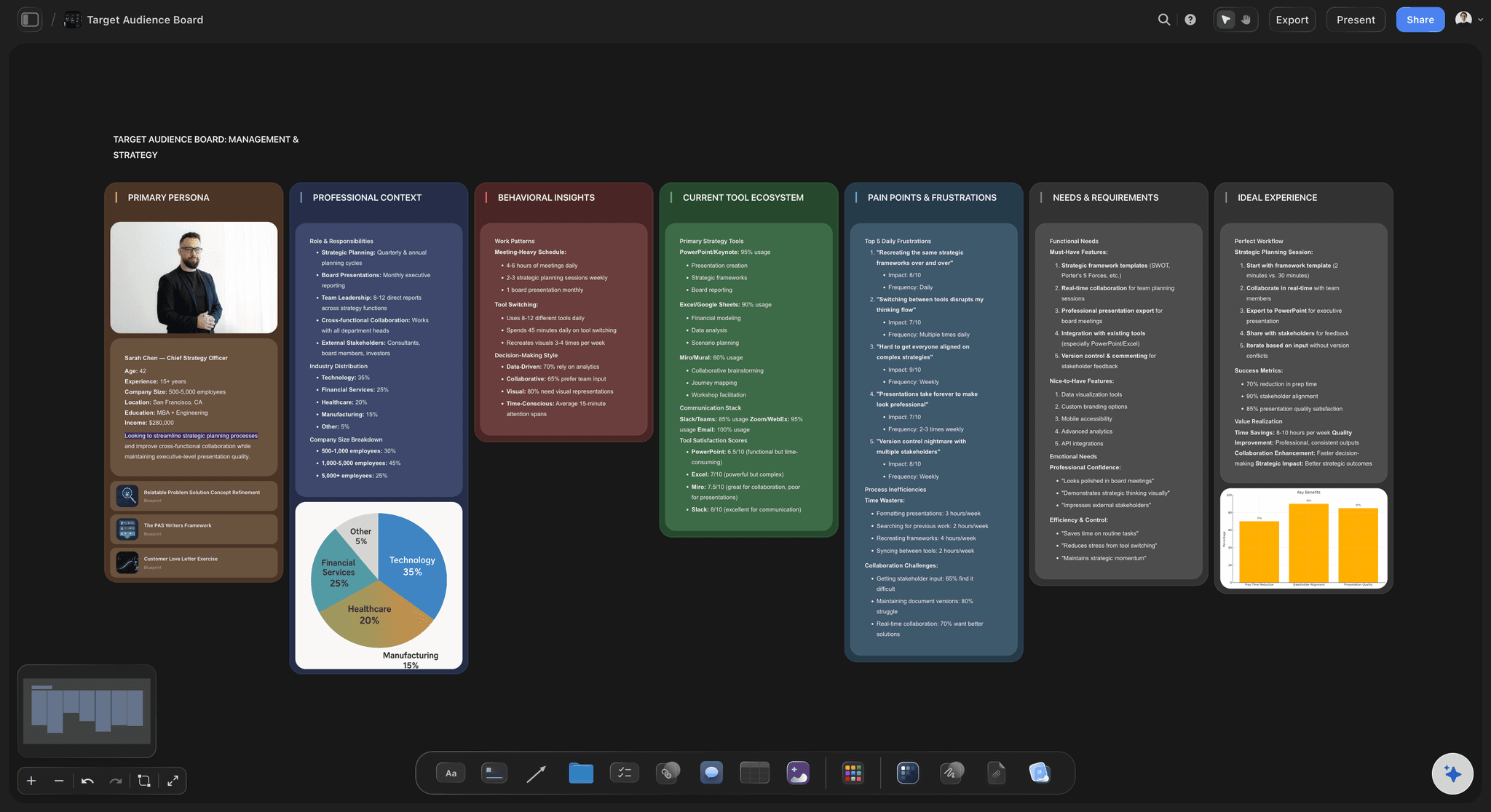
Pillars and cadence per platform
Decide what the month is for
Three to five pillars, written down: Each pillar is a subject your audience follows you for. Written at the top of the board, it turns what should I post into which pillar has gone quiet, which is a question with an answer.
A cadence each platform can sustain: Set how often Instagram, TikTok, LinkedIn or YouTube Shorts get a post from what your team can produce. A cadence you drop in week three costs more than a lower one you keep.
A mix of formats per pillar: Carousels, short videos, stills and text posts spread across the pillars, so one pillar is not all talking-head video while another is all quote graphics.
Repurposing planned, not improvised: Mark which long video or article each short post is cut from, so one source piece feeds several platforms on purpose.
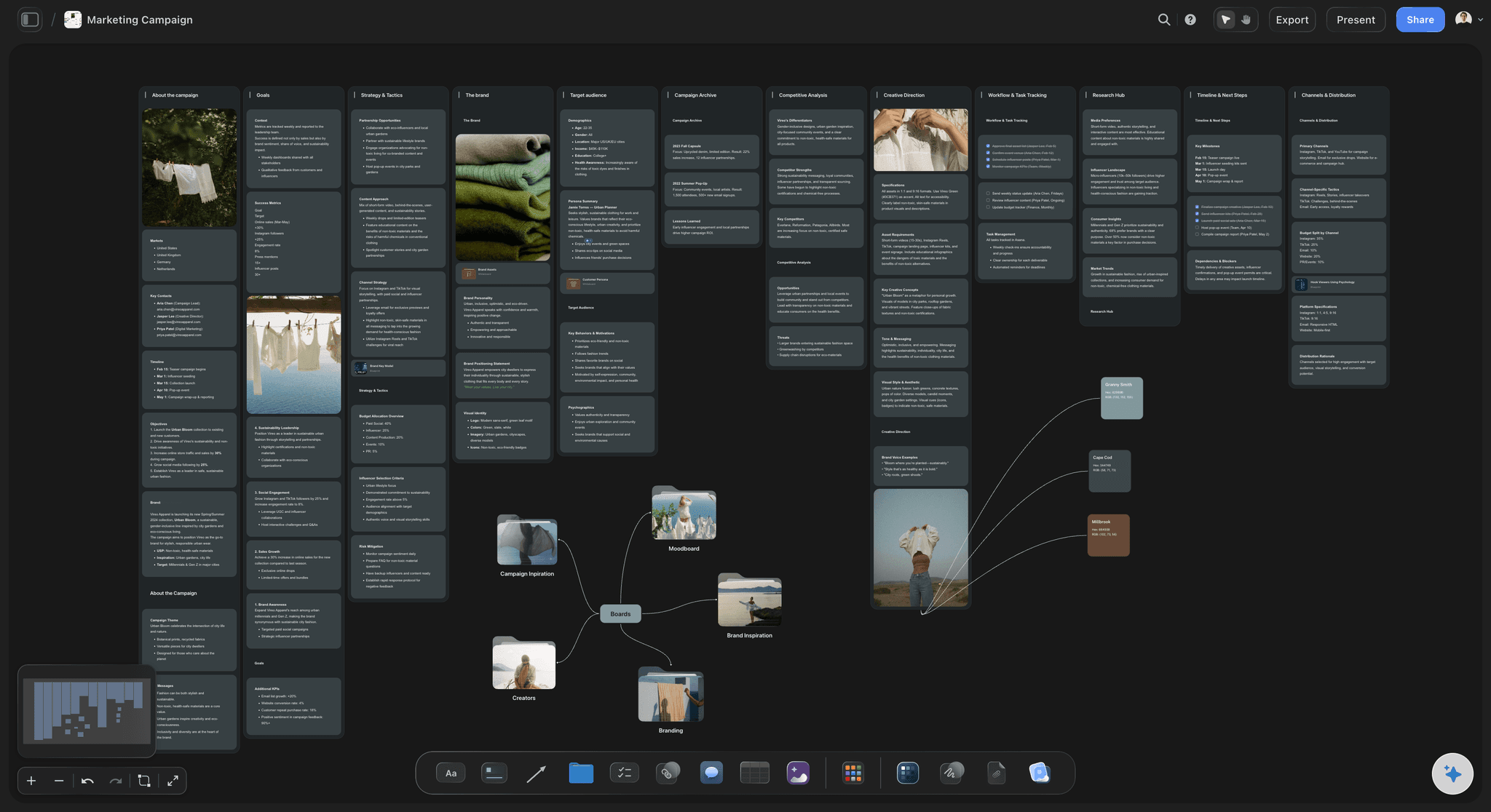
Campaign moments and dates
Put the fixed points in first
Launches and promotions before ordinary posts: A launch, a sale or an event decides the shape of the fortnight around it, so it goes on the board before anything movable does.
Teasers before, proof after: Cluster the build-up posts and the follow-up posts around each moment. An announcement with nothing either side of it is the most common wasted slot in a month.
Dates in a table and on tickets: Post dates live in a table with date cells and on each post's ticket, which is flagged once its due date passes. Storyflow does not show posts on a month grid.
Room left for what is timely: Leave a few open slots each week for trends and reactive posts, so something topical does not force you to delete a planned post.
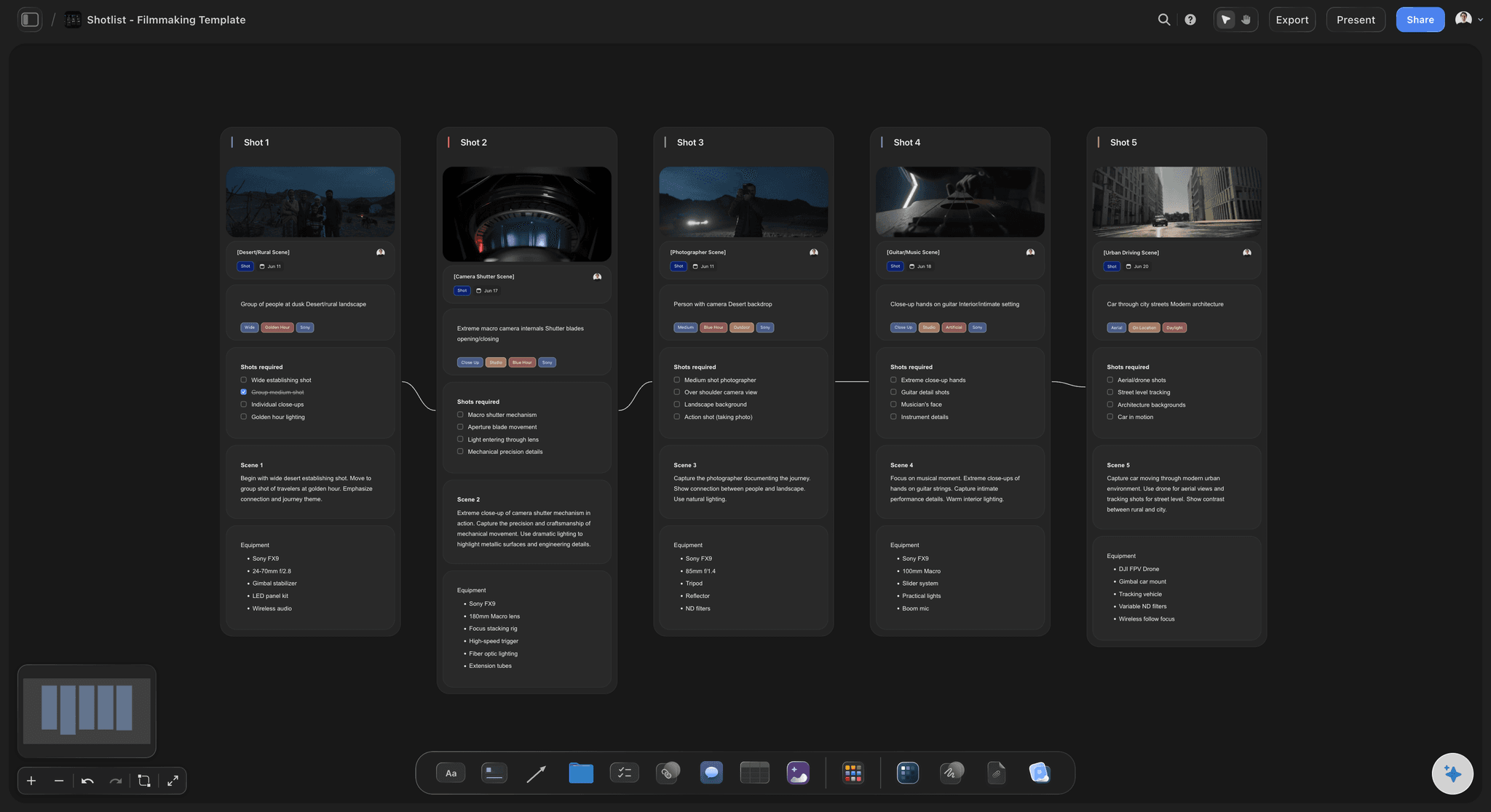
Batch production days
Make a week of posts in one session
Group posts by set, place or person: Posts that need the same location, the same product or the same presenter share a production day, so the setup happens once.
A shot list per batch day: Each production day gets a shot list with every shot its posts need, written or drafted by the AI before the day, which is what keeps eight planned posts from becoming five.
Scripts written before the shoot: Hooks and scripts are written in the days before the batch, not on the morning of it, because a rushed hook is the part of a batch nobody can fix in the edit.
Editing and captions as their own block: Cutting, captioning and exporting get their own time on the board, so a finished shoot day is not mistaken for finished posts.

A brief in every slot, then the handoff
Posts somebody can make, and a clean handoff
A ticket per post: Title, hook, caption direction, format, due date, owner and a stage label such as briefed, shot, edited or approved, with the reference images and clips beside it.
Sign-off by link: A client or manager opens a view-only link with no account, sees the month and every brief, and signs in to leave comments on the specific post.
The AI checks the month: Ask which pillar is thin, what launch week is missing or which posts have no brief. The AI answers from the board it reads and proposes changes you accept or reject.
Publishing stays in your scheduler: Storyflow does not connect to Instagram, TikTok or LinkedIn and does not publish or schedule posts. Approved posts go into Buffer, Later or Hootsuite, which do.
Explore templates for your project
Every template opens as a real, editable board on the infinite canvas. Pick the closest fit and make it your own.
Content Calendar
Plan what you post and when across every channel on one calendar.
One app instead of five
Storyflow vs Buffer, Canva and Notion.
They do different jobs. Buffer and Canva's Content Planner schedule and publish posts, and Notion is a flexible database you build a content calendar in. Storyflow is where the month is planned and every post is briefed before a scheduler is involved.
Storyflow
Recommended
Pillars, cadence and campaign moments planned with the posts
Each post carries its brief, due date and owner
Batch production days and shot lists beside the posts
Reference images, clips and scripts on one visual canvas
Schedules and publishes posts to social networks
Buffer
Pillars, cadence and campaign moments planned with the posts
Each post carries its brief, due date and owner
Batch production days and shot lists beside the posts
Reference images, clips and scripts on one visual canvas
Schedules and publishes posts to social networks
Canva
Pillars, cadence and campaign moments planned with the posts
Each post carries its brief, due date and owner
Batch production days and shot lists beside the posts
Reference images, clips and scripts on one visual canvas
Schedules and publishes posts to social networks
Notion
Pillars, cadence and campaign moments planned with the posts
Each post carries its brief, due date and owner
Batch production days and shot lists beside the posts
Reference images, clips and scripts on one visual canvas
Schedules and publishes posts to social networks
What creators are saying
Join early creators getting structured workspaces and AI that remembers their projects
“Storyflow has sped up my workflow by at least 3x, which means more flow state and more projects I can actually ship. It truly changed the way me and my team create.”

Reilin Joey
Director & YouTuber
“One prompt gets me a structured board. But the tactics are my favorite. I run my YouTube scripts through them and my intros and retention got better. It's amazing.”

Justkay
YouTuber & Freelance Filmmaker
“I used to juggle five apps to plan a project. Now I describe what I am making and get boards, lists, and a schedule. All in one place.”

George
@fernwehchronicles
Planning a month of social media content, answered.
Pillars, cadence, batch days, approval, and where Storyflow stops and your scheduler starts.
Plan a month of social media content on one Storyflow board in five passes. Write three to five content pillars and a cadence per platform. Pin the month's fixed moments, like a launch, with teaser and follow-up posts around them. Block one or two batch production days, each with a shot list. Then make every post a ticket with its hook, format, due date and owner. Storyflow's AI can lay this out; a scheduler such as Buffer publishes it.
Storyflow suits a team that plans social content together: pillars, campaign moments, batch days and a ticket per post with its brief, owner and due date sit on one board, and a client opens it by link with no account. It does not publish. If posting on time is the hard part, Buffer schedules and publishes across networks, and Canva's Content Planner schedules Canva designs. Notion suits a team that builds its own content database.
No. Storyflow does not connect to Instagram, TikTok, LinkedIn, YouTube or any other network, and it does not schedule, publish or report on posts; Buffer, Later and Hootsuite do that. Storyflow is where the month is decided and made ready: the pillars, the cadence, the campaign moments, the batch days and a ticket for every post with its brief, owner and due date. When a post is approved, its caption and exported file go into your scheduler.
Yes, in a table and on tickets, though not on a month grid. In a table with date cells, each row is a post with its date, owner and status. Each post's ticket carries a due date and is flagged once it passes, and a Kanban shows posts moving through stages such as briefed, shot, edited and approved. For a month of social content, the table and the tickets carry the dates and the board carries everything else.
Six things: the content pillars and roughly how many posts each gets; a cadence per platform; the month's fixed campaign moments and dates; batch production days with a shot list each; a brief for every post, meaning hook, format, caption direction and reference; and an owner and stage per post, so what is stuck shows. A plan of dates and titles only tells you when you are behind. In Storyflow the pillars, moments and post tickets share one board.
Batch by what posts share, not by publish date. Group posts that need the same location, product or presenter into one production day, and write every hook and script in the days before it. Give each batch day a shot list covering every post. Keep editing and captioning as a separate block: a shoot day makes footage, not posts. In Storyflow a batch day can be a ticket with its date and owner, beside the posts it covers.
Plan posts a month ahead and campaign moments a quarter ahead. A month of posts lets you batch production and balance pillars while staying close enough to react; committing specific posts further out is usually wasted as trends and priorities move. Launches, seasonal sales and events can be pinned a quarter ahead, since the posts around them depend on those dates. In Storyflow the quarter's moments sit in a table with date cells while each month's posts are tickets.
Yes. In Storyflow, share a view-only link and the client opens the whole month in a browser with no account: the pillars, the campaign moments and the brief on every post. They sign in to comment on a specific post, so feedback stays on that post instead of in an email. Mark approval with a stage label on each ticket, and load only approved posts into the scheduler. A client a paid member invites to edit joins free.
It can lay out the structure and a first set of posts, and you decide what stays. Ask Storyflow's AI for a Content Planner and it builds pillars, calendar structure, batching, per-platform cadence, repurposing and seasonal planning on the board, with real upcoming posts as tickets. A Social Media Plan builds a video-led plan with ten to twelve video concepts as tickets and a 30-60-90 day roadmap. It reads the whole board, proposes changes and never publishes.
Yes, and planning them together shows the imbalances. Give each platform its own lane or table column for the month, with its cadence written at the top, and you can see whether one platform carries the account, whether LinkedIn only gets leftovers, and whether a strong video is cut down for every place it could run. Note on each post's ticket which source piece it came from. Storyflow holds the plan; your scheduler publishes to each network.
Three things, and none is a lack of ideas. Slots hold titles instead of briefs, so whoever makes Tuesday's post starts from nothing. The month is filled left to right instead of from pillars and fixed moments, so a launch gets no posts around it. And production is unplanned, so posts are made one at a time on their due date. A Storyflow board with pillars, moments, batch days and a brief per post fixes all three.
Not yet. Storyflow is paid-only during early access, with plans from $7.99 a month billed annually ($9.99 monthly). A free plan launches before the end of 2026, and anyone a paid member invites to a board joins free, so a client, freelancer or teammate can work on the month, and opening a view-only link needs no account. For something free today, a shared spreadsheet carries a small account, and Buffer has a free tier for a few channels.
More from Storyflow
AI content calendar generator
Content pillar planner
Social media marketing plan
Instagram content planner
TikTok content planner
For social media managers
Content repurposing planner
Editorial calendar
Content calendar for creators
Campaign calendar
Content brief template
How to batch a month of content in one day
How to plan social media content
Best social media planning tools
In-house content production
YouTube content pipeline
30-day content plan example
Editorial workflow
Plan next month's social content on one board.
Set the pillars, pin the moments, plan the batch days and brief every post. Then hand the approved posts to your scheduler.