
Ultra-fast planning, extremely simple
Plan every client project
when you are the whole studio.
Agency process assumes people to hand work to. On your own the questions are narrower and sharper: what do I owe, what is next, and what am I waiting on a client for.


Creatives working for these brands already got early access
- Red Bull
- Canon
- Artlist
- Porsche
See how easy it is to get started
Watch a real project come together, from a blank board to a finished plan, clicked through step by step.
Start from a ready-made template
Pick a board to see what you can build, then let AI fill it in. Every template is a real, editable starting point on the same infinite canvas.

Mind Map
Branch one central idea out into themes and sub-points, then drag the connections around until the structure makes sense.
How do you plan client projects as a one person studio?
Planning client projects as a one-person creative studio means tracking every job's brief, scope, milestones and client dependencies yourself. Storyflow is an AI visual workspace that plans a one-person studio's client projects on one infinite canvas: a board for every job, an overview across them all, and a clear view of what you owe, what comes next and what each client still owes you. Team tools mostly coordinate handoffs, and a studio of one has none.
What actually breaks a one person studio is different and consistent. Scope creeps, because a small extra request is easier to absorb than to price, and ten of them are a fortnight. Work stalls waiting on the client, and because nothing tracks that, the stall is invisible until a deadline arrives. Projects collide, because two jobs that each looked fine separately both need you in the same week. And the admin, the invoice, the file handover, the portfolio permission, trails behind by a month because it never feels urgent on the day.
Every one of those is a visibility problem rather than a discipline problem. A solo studio does not need more process; it needs to be able to see, in one glance, what each project owes, what is blocked on somebody else, and where two deadlines are about to land on the same three days. That is a picture, and it is a small picture, which is why an infinite canvas suits it better than a project management tool built for thirty people.
Storyflow is an AI-native infinite canvas. Each client project gets an area with its brief, the work, the deliverables, the approval points, and what you are waiting on. One overview board answers the only question you ask daily, which is what needs doing next and what is stuck. Describe a project and the AI lays out the conventional shape including the steps solo studios skip, and the client opens a view-only link in a browser with no account.
Ultra fast from brief to board
One shape for every project, one board for all of them.
No workspace to configure and no process to maintain.
01
Open a canvas
Sign up in seconds. No download. A board per client project, plus one overview board across them.
02
Run every project through the same shape
Discovery, setup, production, feedback, delivery, review. The same six phases every time means you stop reinventing the plan for each new client.
03
Mark what you are waiting on
Assets, answers, sign-off. A blocked project that looks identical to an active one is how a deadline arrives without warning.
04
Share the board with the client
A view-only link opens in their browser with no account. Most status questions answer themselves, and scope conversations get easier when the agreed deliverables are visible.
Projects, blockers, deadlines, and the work itself.
What a solo studio has to hold, without the machinery built for teams.

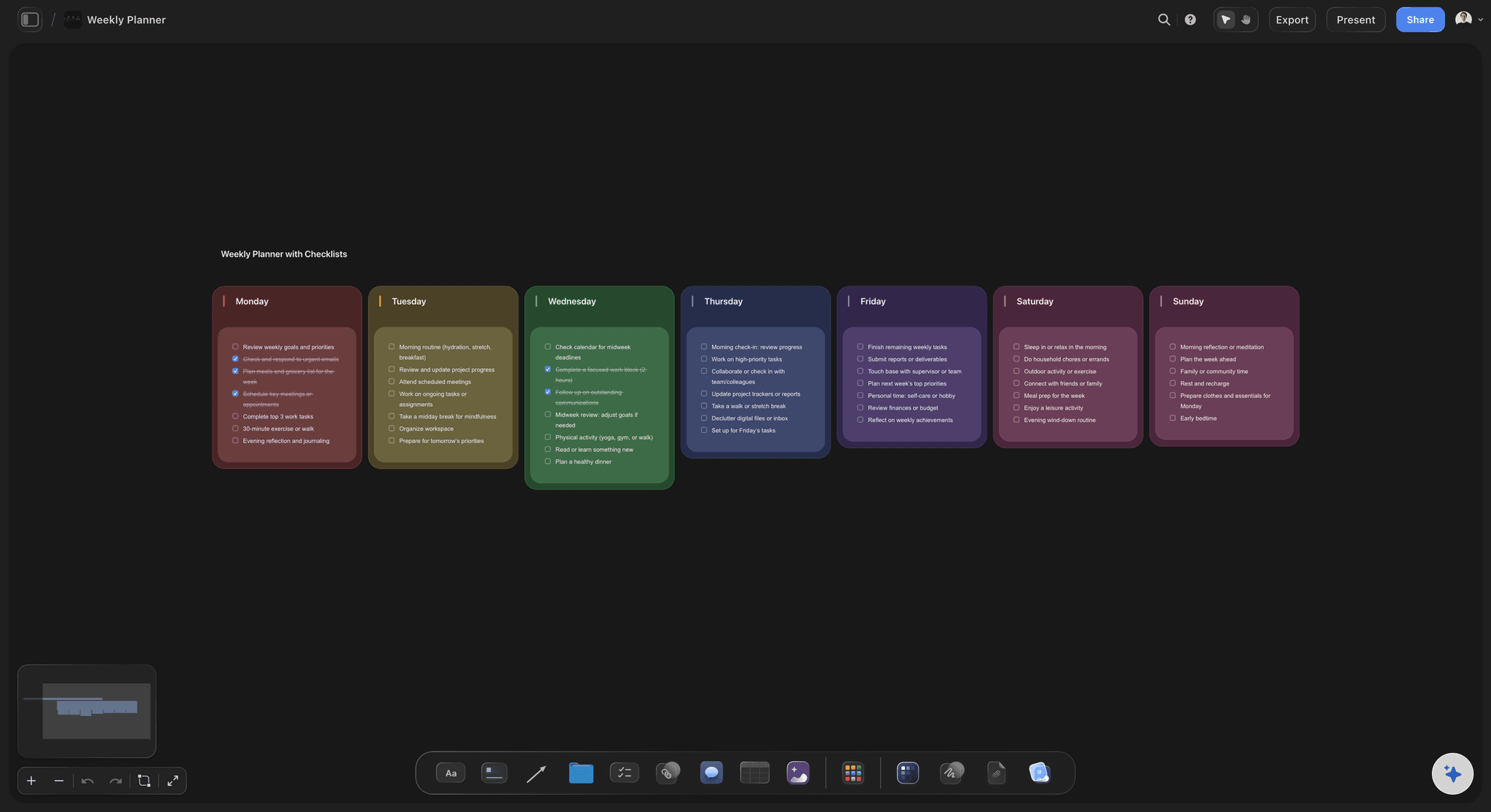
Every active project on one overview
See all of it in one glance
Client, phase, next action, deadline, and what it is waiting on. The daily question for a solo studio is what is stuck, and no per-project view can answer it.
See agency client project planning →
The brief and the deliverables, agreed and visible
Scope you can point at
The deliverables list sits on the board the client can see. A request outside it becomes a visible addition rather than a small favour you absorb.
Explore the creative brief generator →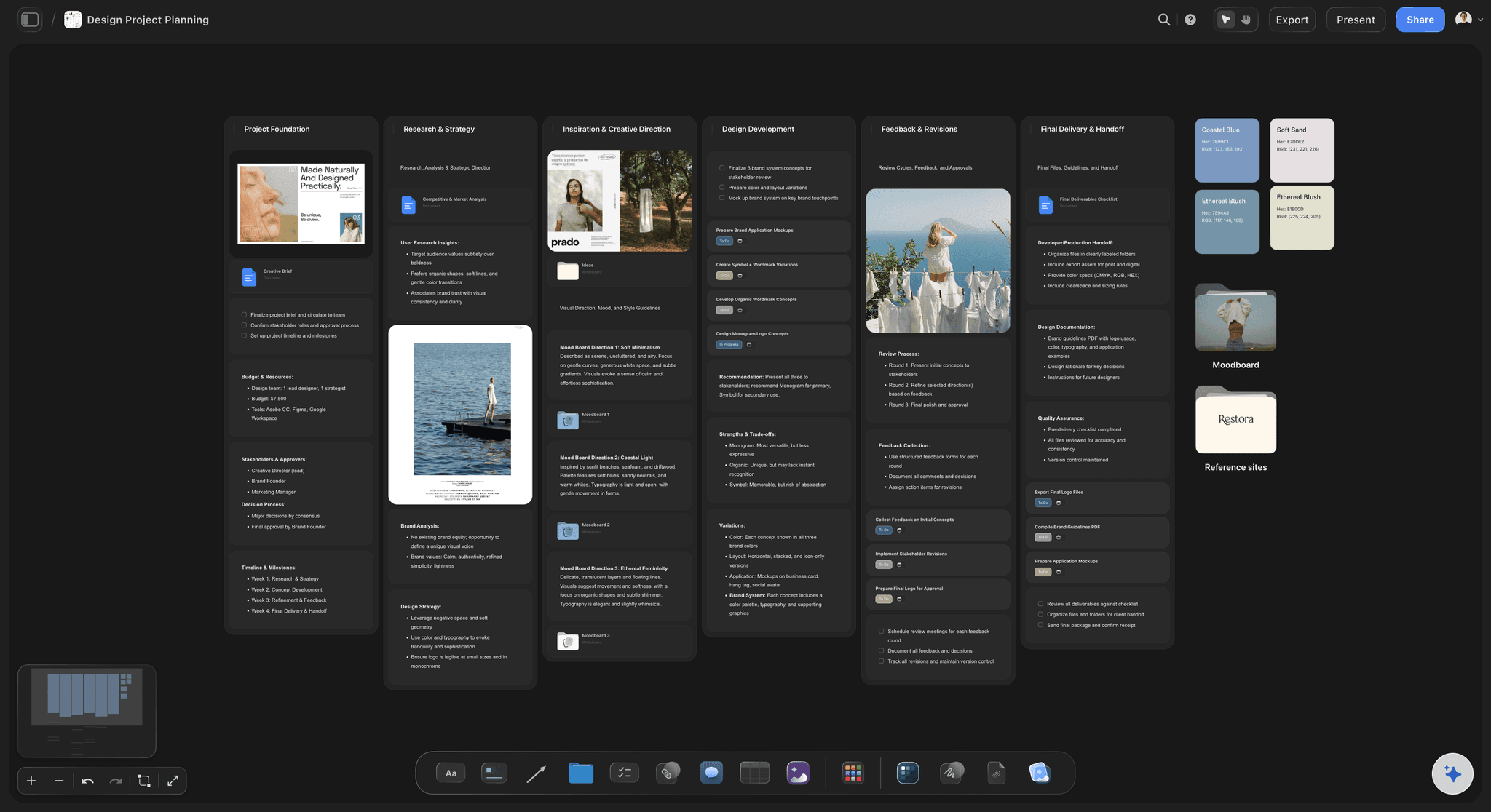
The work lives beside the plan
No reassembly when you switch projects
References, drafts, and feedback attach to the project. Coming back to a job after a week costs nothing, which matters more when you switch between four of them.
See the AI creative workspace →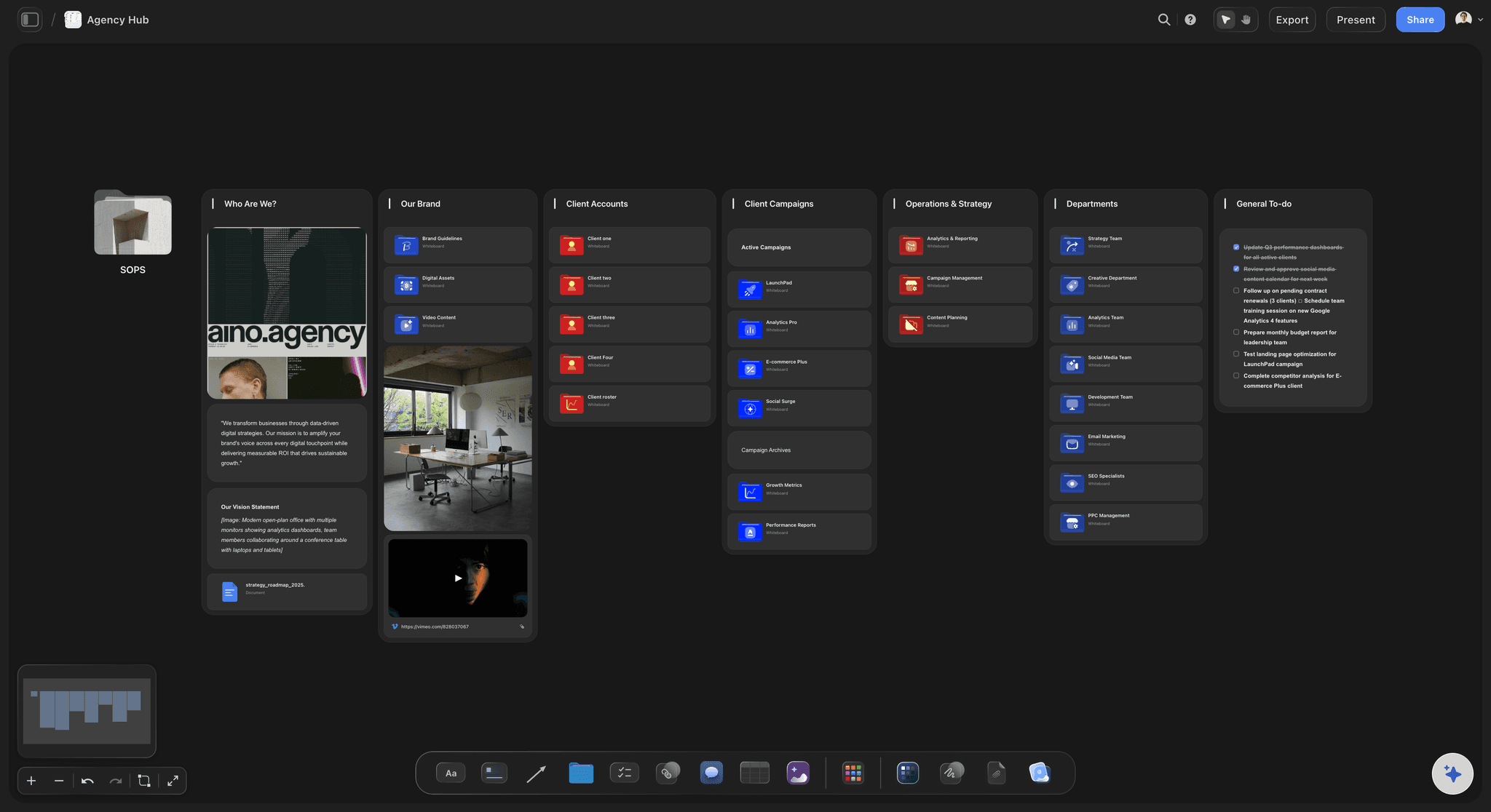
Clients open a link, not an account
Feedback without a tool to learn
A view-only link opens with no account, and a client who signs in can comment on the specific piece, so the feedback arrives attached to what it is about.
Try the client review board →Unlimited boards. No object cap.
One board per client, one overview across them. Storyflow is paid-only during early access, with plans from $7.99 a month billed annually ($9.99 monthly). A free plan launches before the end of 2026, and anyone a paid member invites to a board joins free.
Unlimited client project boards on an infinite canvas
AI that lays out a project and finds what is missing
Templates for briefs, project tracking and design planning
Share view-only links with clients, no account required
Built for people with taste
Four failures, and none of them are laziness.
They are the predictable consequences of being the whole studio, and each has a mechanical fix.
Scope, stalls, collisions, admin
The solo studio failure set
Scope creeps one small request at a time: Each addition is easier to absorb than to price, and ten of them are a fortnight of unpaid work. Visible deliverables turn an absorbed favour into a countable change.
Work stalls on the client and nobody notices: A blocked project looks identical to an active one in a task list. Marking what you are waiting on is the single highest-value habit on this list.
Two projects collide in the same week: Each looked fine when you agreed it. Seeing every deadline on one picture is the only way to catch the collision while you can still move a date.
The admin trails a month behind: Invoice, file handover, portfolio permission. Never urgent on the day and expensive in aggregate, which is why it belongs on the delivery checklist rather than in your head.
Discovery, setup, production, feedback, delivery, review
The same six phases, every project
Discovery before you say yes: Goal, deliverables, deadline, budget, decision maker, and what the client owes you. Starting from a vague brief is the root of most later arguments.
Feedback with rules attached: One consolidated list per round, one decision maker, a deadline for the client's response, and revisions beyond the agreed number priced as new work.
A delivery checklist you reuse: Final files, source files, approval confirmed, invoice sent, portfolio permission asked, project archived. The same six ticks every time.
Ten minutes of review: What slowed you down, what you underestimated, and what should become a template. This is the only mechanism a solo studio has for getting faster.

AI that reads the whole board
The second opinion you do not have
Lay out the conventional project: Describe the job and the AI produces the standard phases and items, including the ones solo studios skip because nobody is there to ask about them.
Find what is blocked: Ask what has no next action and what is waiting on a client. The AI reads your board, so the answer is about your actual projects.
It proposes, you decide: Storyflow arranges and suggests. What to charge, what to take on, and whether the work is good stay entirely with you.
Draft the awkward message: The chase for overdue feedback and the note explaining that a request is out of scope are both easier to start from a draft than from a blank reply.
Keep the stack small
The system should disappear
One place for the work: A solo studio does not need a twenty tool operating system. It needs one surface where the projects live and one place clients look.
Templates instead of process: Duplicating a finished project board is faster than any workflow builder, and it carries your actual way of working rather than a generic one.
Bring in help without onboarding: When you sub-contract a week of work, the collaborator opens the board and has the full context immediately instead of being briefed into it.
Explore templates for your project
Every template opens as a real, editable board on the infinite canvas. Pick the closest fit and make it your own.
Mind Map
Branch one central idea out into themes and sub-points, then drag the connections around until the structure makes sense.
One app instead of five
Storyflow vs Notion, Trello, and Asana.
Each is good at something: Notion at structured databases, Trello at simple cards, Asana at assignment and status across a team. Here is where they differ for one person with clients.
Storyflow
Recommended
Brief, references and drafts on one canvas
Clients open it with no account
AI lays out the project from a description
Comments on the specific piece of work
Time tracking
Notion
Brief, references and drafts on one canvas
Clients open it with no account
AI lays out the project from a description
Comments on the specific piece of work
Time tracking
Trello
Brief, references and drafts on one canvas
Clients open it with no account
AI lays out the project from a description
Comments on the specific piece of work
Time tracking
Asana
Brief, references and drafts on one canvas
Clients open it with no account
AI lays out the project from a description
Comments on the specific piece of work
Time tracking
What creators are saying
Join early creators getting structured workspaces and AI that remembers their projects
“Storyflow has sped up my workflow by at least 3x, which means more flow state and more projects I can actually ship. It truly changed the way me and my team create.”

Reilin Joey
Director & YouTuber
“One prompt gets me a structured board. But the tactics are my favorite. I run my YouTube scripts through them and my intros and retention got better. It's amazing.”

Justkay
YouTuber & Freelance Filmmaker
“I used to juggle five apps to plan a project. Now I describe what I am making and get boards, lists, and a schedule. All in one place.”

George
@fernwehchronicles
Running a one person studio, answered.
What to track, how to hold scope, and what to ignore from agency advice.
Plan them in Storyflow, one board per job and an overview of them all: each job's brief, agreed deliverables and milestones, plus what you are waiting on from the client. Run each job through the same phases, log every change request against the agreed scope before saying yes, and check every deadline before taking new work, because two demanding weeks colliding is the real capacity limit. Use Notion if you prefer databases, or Trello for a simple card board.
The smallest thing that answers your daily question. Trello suits cards moving through columns, Notion suits structured, repeatable work, and Asana suits bringing in collaborators who need assignments. Storyflow fits when the work is visual and the plan keeps drifting away from it: the brief, references, drafts and deliverables sit on one canvas, and a client opens it without an account. Avoid any system you will abandon in your first busy week.
Make the agreed deliverables visible to the client instead of burying them in a contract. Scope creep is rarely one large request; it is small ones that each feel easier to absorb than to price. When the deliverables list sits on a board the client can see, an extra request becomes a visible addition to a countable list. Also agree the number of revision rounds at the start, with further rounds priced separately.
Fewer than the calendar suggests, because the limit is collisions between the intensive phases of two projects rather than total hours. Discovery and the final push take most of the attention, and the middle is often waiting. Three or four projects can work when those stretches are staggered and hurt when two land in the same week. Before saying yes to the next job, put every project's demanding stretch on one picture.
Get seven answers before you start designing: the client's goal, the exact deliverables, the deadline, the budget, the decision maker, what the client owes you and when, and what success looks like. The decision maker and the client's dependencies are the two most often skipped. An unnamed decision maker produces contradictory feedback later, and unnamed dependencies such as assets, copy or access are where solo projects most often stall.
Set three rules at the start. One consolidated list per round, because contradictory notes from several people are the most expensive feedback. One named decision maker, so the client side settles disagreements before they reach you. And a dated deadline for their response on the project board, because late feedback moves your delivery date. In Storyflow a client who signs in can comment on the specific piece, so nothing has to be matched up from an email.
Storyflow is paid-only during early access, with plans from $7.99 a month billed annually ($9.99 monthly). A free plan launches before the end of 2026, and anyone a paid member invites to a board joins free, so a subcontractor adds nothing to the bill. Clients viewing a link never need an account. Until then, a free spreadsheet with a row per project and a column for what it is waiting on goes a long way.
A curated version, yes. A client who can see where things stand stops asking for updates and reacts to work in progress rather than only to finished files, which is where late change requests come from. Keep your working board private and share a separate view-only board with the brief, the agreed deliverables, the current state and what you are waiting on them for. That last section does more for your deadlines than a chase email.
An agency workflow is mostly coordination between people: assignment, status, capacity and handoffs. A solo workflow has none of those problems and two that agencies barely have. You switch between unrelated projects several times a day, so rebuilding a project's context is your largest hidden cost. And you are the only defence against scope creep and deadline collisions. The useful system is built around visibility and fast context recovery, not coordination.
Put it on the board as part of delivery, not as something that happens afterwards. Six items cover most creative work: final files exported, source files stored where you will find them, client approval confirmed in writing, invoice sent, portfolio permission asked, and the project archived. None is urgent on the day, which is why they slip by a month. Ask for portfolio permission in the week you deliver, while the client is happy.
Yes, as the colleague you do not have. Describe a project and Storyflow's AI lays out the usual phases, including the handover or second review round nobody reminded you about. It reads the whole board, so you can ask what has no next action or what is waiting on a client. It also drafts the chase for overdue feedback and the out-of-scope note. What to charge and what to take on stay with you.
Spend ten minutes after each project answering four questions where you will see them next time: what slowed you down, what you underestimated, what should become a template, and whether the project made money. The last is the one most freelancers avoid and the one that changes behaviour. The template question compounds: duplicate a finished project board and it carries your real way of working into the next job.
More from Storyflow
Agency client project planning
Agency campaign planning
Creative project management
Visual project planning
Client review board
Client presentation tool
AI creative brief generator
Creative team workflow tool
For freelancers
For solopreneurs
Design planning tool
Campaign brief to delivery
AI creative workspace
In-house content production
Creative retainer plan
Project brief template
Scope creep on creative projects
See every project and what each one is waiting on.
Open a canvas, lay out one client project, and share it with a link. No download.