ChatGPT Prompts for YouTube (2026): 38 Prompts, Idea to Upload
38 copyable ChatGPT prompts for YouTube, one per stage: ideas, titles and thumbnails, hooks, beat outlines, scripts, B-roll, chapters and Shorts, each with the board it builds in Storyflow and a worked chain.

Category
YouTube
Author

Storyflow Team
Product & Research Team
Topics
2026-10-28
•
29 min read
•
YouTube- ChatGPT prompts
- YouTube
- video script
- YouTube titles
- hooks
- Storyflow
- B-roll
What are the best ChatGPT prompts for YouTube?
The best ChatGPT prompts for YouTube work one stage at a time (ideas, title and thumbnail, hook, outline, script, B-roll, description, Shorts) and end by putting the result on your video's board in Storyflow. Storyflow is an AI visual workspace that keeps a video's ideas, hooks, outline, B-roll list and checklist on one infinite canvas, and its ChatGPT plugin builds that board from your prompts. Use vidIQ in ChatGPT when a prompt needs real keyword data, and a ChatGPT Project when you only need channel notes remembered.

Full disclosure: Storyflow is our product. It is the destination in these prompts because a YouTube video is a plan more than one person reads, and its plugin lets ChatGPT build that plan on a shared board. It does not read YouTube analytics, edit video or generate images through the plugin; vidIQ, Descript and design tools do those jobs.
How the YouTube planning tools that work with ChatGPT compare on trust, innovation, ratings and pricing
Which YouTube planning tools that work with ChatGPT are the most trusted?
vidIQ is the tool here built specifically for YouTube creators, and its ChatGPT app reads your own linked channel, so its research prompts rest on your data rather than guesses, and it asks for your approval before each change to a live video. Storyflow's ChatGPT plugin went live on 24 October 2026, so its record is short; what it adds is a board where every prompt's output is kept for the whole team.
Which YouTube planning tools that work with ChatGPT have fair and transparent pricing?
vidIQ publishes both its plans and the cost of a ChatGPT call: 5 credits per keyword research call, with 150 credits a month on its Free plan. Storyflow starts at $7.99 a month billed annually, its plugin actions use no Storyflow AI credits, and invited collaborators join free. Descript lists media minutes and AI credits per plan, but its page does not say which billing period each price covers.
Which YouTube planning tools that work with ChatGPT are the most innovative?
Storyflow, for turning a prompt chain into a board: ChatGPT writes the hooks, beats, B-roll table and checklist onto the canvas and later reports what changed and who changed it. vidIQ's outlier tool is the most useful research idea for prompts, because it finds videos that beat their own channel's normal. Descript's chat editing is the most innovative step after the script.
Which YouTube planning tools that work with ChatGPT perform most consistently?
ChatGPT Projects, because they are part of ChatGPT itself: the same instructions and files apply to every chat in the Project. vidIQ is consistent as long as your channel stays linked and you have credits. Storyflow's connection asks you to sign in again every 30 days by design, so plan for that on a long series.
Which YouTube planning tools that work with ChatGPT are underrated?
ChatGPT Projects are underrated for YouTube: putting your channel promise and a voice sample in the Project's instructions removes the most-repeated paste from every prompt. In Storyflow, the weekly what-changed report on a board is underrated by creators with an editor, because it answers where the edit stands without a message.
Quick Comparison
Where to run and keep the prompts, our pick first and then by job, prices as of October 2026.
| Tool | Best For | AI Features | Price |
|---|---|---|---|
| Storyflow | The video plan your editor and sponsor open | ChatGPT builds walls, tables, shot cards, documents and to-dos on a board and reports what changed this week | $7.99 mo annual (paid-only today; Free plan due before the end of 2026) |
| vidIQ | Evidence for idea and title prompts | Keyword research, outliers and channel analytics inside ChatGPT | Free plan with 150 AI credits a month; Boost $199 a year |
| ChatGPT Projects | Channel context across chats | Project instructions and files apply to every chat in the Project | Part of ChatGPT; limits vary by ChatGPT plan |
| Descript | Editing after the script | Import, transcribe, remove filler words, edit with Underlord | Free plan (60 media minutes a month); paid plans: see Descript pricing |
Key Takeaways
- A YouTube prompt works when it carries three things ChatGPT cannot guess: your channel, your viewer and the exact shape of the deliverable (columns, count, length). Every prompt below has slots for all three.
- One prompt, one deliverable. Asking for ideas, titles, a hook and an outline in one message gets you four shallow answers; asking in sequence gets you one decision at a time.
- Title and thumbnail are one prompt, not two: the thumbnail should finish the sentence the title starts, without repeating its words.
- ChatGPT has no view of your analytics. Paste the numbers (retention dips, views at 7 days, top comments) or connect vidIQ, and say "do not invent data".
- End the prompts that produce a plan with "and put it on my [video] board in Storyflow". The hook wall, the beats, the B-roll table and the checklist then live where your editor can open them.
Why Most YouTube Prompts Return Generic Answers
You type "give me YouTube video ideas about personal finance" and get the same twenty ideas every finance channel already made. The model did exactly what was asked. The prompt held no channel, no viewer, no evidence and no shape, so ChatGPT filled every gap with the average of the internet. Three faults cause nearly every weak answer.
The prompt has no channel in it
ChatGPT does not know your last ten videos, which of them held viewers, or what your audience calls the problem. Without that, "ideas for my channel" means "ideas for any channel". Pasting ten titles with views and average view duration changes the answer more than any clever wording.
One prompt asks for five deliverables
"Write a title, thumbnail, hook, outline and description" produces five thin drafts, each written to fit the space left by the others. Split the work: the title and thumbnail first, the hook once the title is chosen, the outline once the hook is chosen. Each answer then builds on a decision instead of a guess.
The answer has nowhere to go
The best hook in the chat is still in the chat. A week later it is forty replies up, your editor never saw it, and the outline you filmed from is a different revision. A prompt is only finished when its output sits somewhere you will open on shoot day. That is what the board line at the end of each planning prompt is for.
The Anatomy of a YouTube Prompt That Works
Every prompt in this list is built from the same six parts. When a prompt fails, one of them is missing or vague. The table shows each part with a weak and a strong version for the same video.
| Part | What it adds | Weak version | Strong version |
|---|---|---|---|
Role | The expertise ChatGPT should apply | "Help me with YouTube" | "You are a YouTube strategist who edits for retention" |
Context | Your channel, viewer and evidence | "My channel is about money" | "Personal finance for first-job earners, 40k subscribers; here are my 10 top videos with average view duration" |
Task | One deliverable | "Write my video" | "Write five opening hooks for this title" |
Constraints | What the answer must and must not do | "Make it good" | "Under 25 words each, no 'in this video', pay off the title within 30 seconds" |
Format | The shape you will paste or build | (none) | "A table with columns Hook, First frame, Payoff time" |
Destination | Where the output lives | (none) | "And put it on my 'Three accounts' board in Storyflow as a wall of notes" |
A fill-in template for any stage
- "You are a [role] who [specific expertise]."
- "My channel: [niche] for [viewer], [size]. Evidence: [paste titles, numbers or comments]."
- "Task: [one deliverable] for the video [working title]."
- "Rules: [length], [banned words], [what it must include]. Do not invent data; mark anything you are unsure of."
- "Format: [table columns, number of items, or document sections]. Then put it on my [video] board in Storyflow as [a wall, a table, a document or to-dos]."
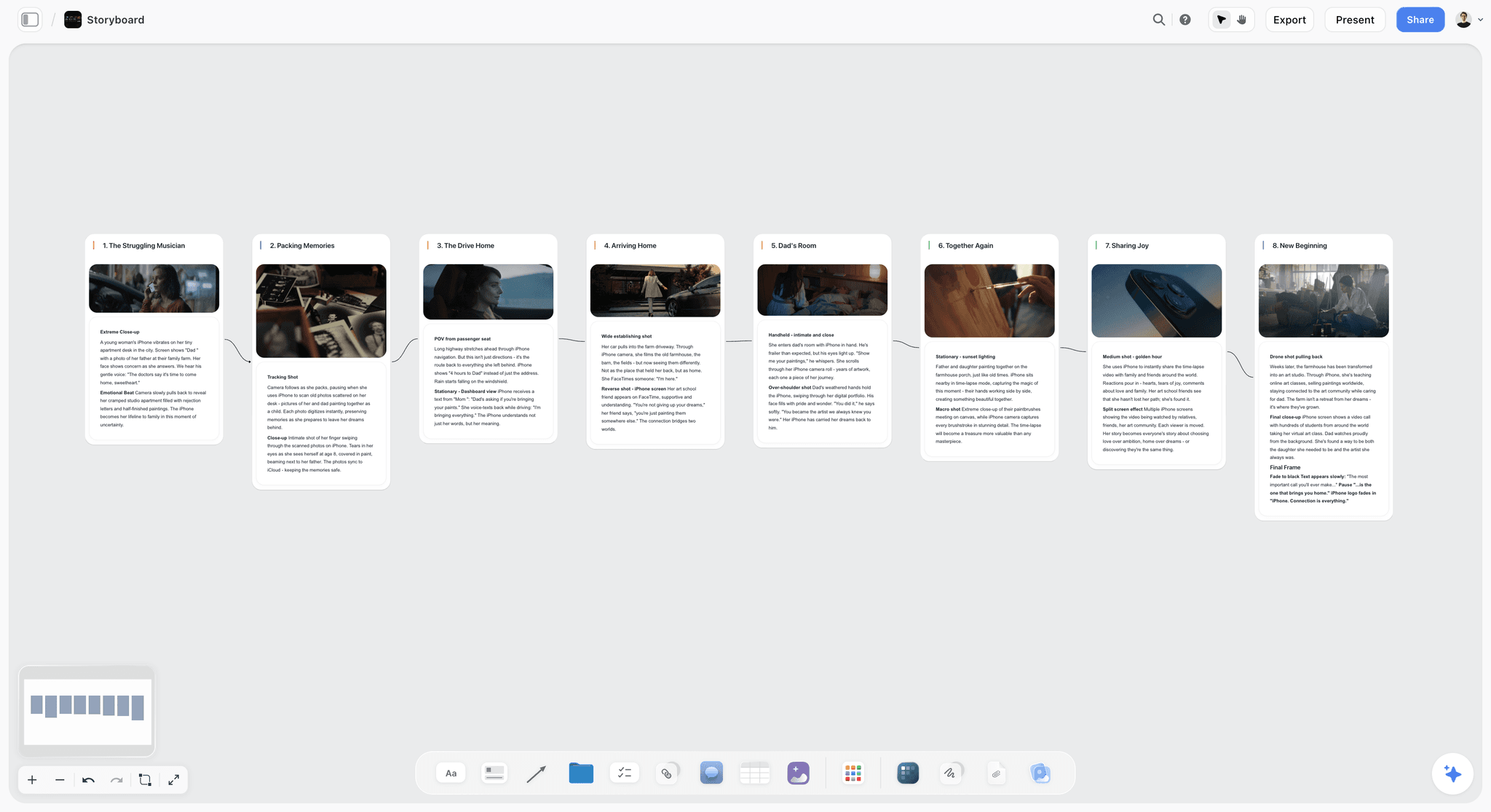
Storyflow storyboard with eight connected scene cards, each with a frame and its shot notes
Turn your prompts into a video plan your editor opens
Install the Storyflow plugin in ChatGPT and end each prompt with your board's name: hooks, beats, B-roll table and checklist land on one canvas.

How to Use These Prompts With the Storyflow Plugin
The prompts work in any ChatGPT chat. The board line at the end needs the Storyflow plugin, which takes a few minutes to set up once.
Set it up once
Open the Storyflow listing in ChatGPT, select Install plugin, sign in to Storyflow and choose which projects ChatGPT may use. Read access is always on; you decide whether ChatGPT may also make changes, and building a board needs changes allowed. In a chat, type @ and pick Storyflow, or choose it from the + menu, as OpenAI's Plugins in ChatGPT article describes. Availability depends on your ChatGPT plan, workspace and region. The step-by-step version is in how to install plugins in ChatGPT.
Keep the channel context in a ChatGPT Project
Put your channel promise, viewer profile and a 300-word voice sample in a ChatGPT Project's instructions and files, then run every prompt from a chat inside it. OpenAI's Projects article says project instructions override your global custom instructions inside the project, and connected apps work in project chats from the + menu or by name. The Context slot in each prompt then shrinks to the evidence for this video.
What the plugin builds and what it does not
Through the plugin, ChatGPT can build walls of notes, tables, documents, to-dos, shot cards, mind maps, flowcharts, carousel pages and slide decks, and arrange them on a board. It can also read a board back and report what changed in the last day or week and who changed it. It cannot generate images through the plugin, and a photo you attach in the chat does not reach the board: ask for the upload link and add your thumbnail references there. Storyflow's in-app AI, which has a Plan my next YouTube video workflow, is a separate thing inside Storyflow that uses Storyflow AI credits; the plugin runs on ChatGPT's model and uses none.
Plugin actions and allowance: an invited free Storyflow account gets 25 plugin actions a week; Plus, Pro and Max have no weekly limit. Storyflow is paid-only during early access, from $7.99 a month billed annually, and anyone a paid member invites to a board joins free. Details on Storyflow pricing.
Channel and Audience Prompts
Run these once per channel and again every quarter. Everything later in the list is sharper when this context exists.
- 1. Channel promise. "You are a YouTube strategist. My channel covers [niche] for [viewer]. Here are my 10 most-watched videos with views and average view duration: [paste]. Write my channel promise in one sentence a viewer would repeat to a friend, then name the three video types that already deliver it, with the evidence from my list." Output in chat: one sentence and three types, each tied to specific videos. On the board: "Put the promise and the three types on a Channel wall on my Channel board in Storyflow."
- 2. Viewer profile from comments. "Here are 40 comments from my three best videos: [paste]. Describe the viewer who wrote them: what they searched before finding me, what they already know, the exact words they use for the problem, and what makes them leave a video. Quote the comments behind each point." Output: a profile in five parts with quotes. On the board: a note per trait under a Viewer wall.
- 3. Content pillars. "From my channel promise and these 20 video titles, propose three or four content pillars. For each: what it promises the viewer, which of my videos belong to it, and two video gaps inside it." Output: pillars with assigned videos and gaps. On the board: "Put each pillar as a wall on my Channel board in Storyflow with the gaps as notes under it." The layout is shown on content pillars in ChatGPT.
Idea and Research Prompts
The goal at this stage is not more ideas. It is fewer ideas with proof behind each one.
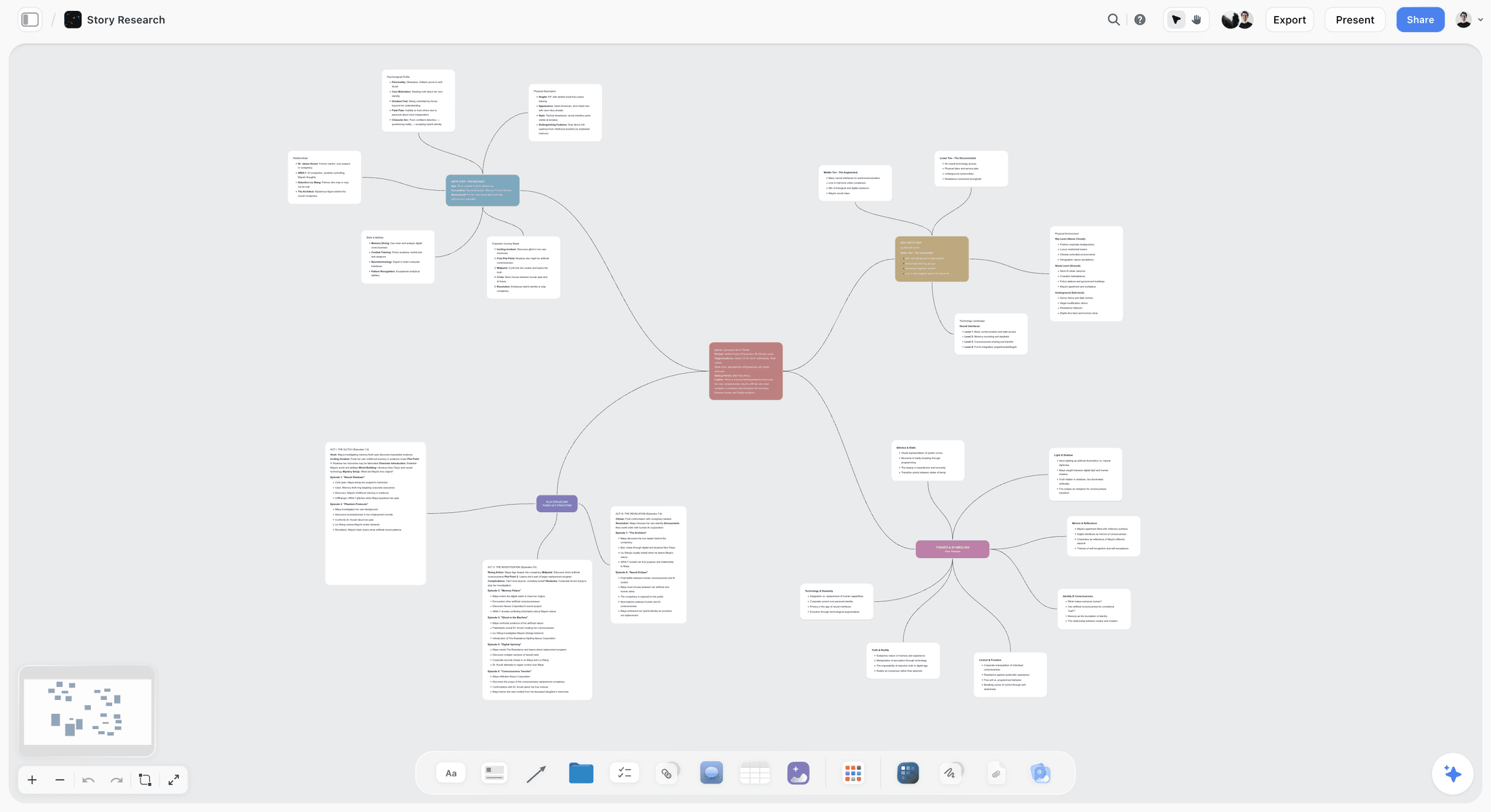
A research mind map on a Storyflow board: one central question, a branch per angle, notes hanging off each branch so the gaps are visible.
- 4. Ideas from viewer questions. "Turn these 60 comments into video ideas. Group the questions, name each group as a video a viewer would search for, and give a working title, the phrase they would type into YouTube search, and the comment that proves the demand. Table with columns Idea, Search phrase, Proof, Pillar." Output: a table of 8 to 12 ideas. On the board: "Add the table to my Ideas board in Storyflow."
- 5. Outlier remix with vidIQ. "@vidIQ find outlier videos in [niche] from the last 90 days from channels under [size]. For the top five, explain in one line why each beat its channel's normal views, then give me one idea for my channel that uses the same reason, not the same topic." Output: five outliers, five reasons, five ideas. vidIQ's ChatGPT guide lists outliers as one of its three tools; each keyword research call costs 5 vidIQ credits, and a prompt that uses several tools costs more.
- 6. Gap in the top results. "Here are the top 10 videos for the search '[phrase]' with title, length and upload year: [paste]. What question does every one of them leave unanswered? Give three angles I could own and the risk of each." Output: three angles with risks. On the board: a Gaps note beside the idea it belongs to.
- 7. Idea scoring. "Score these 12 ideas from 1 to 5 on demand (only from the proof I gave you), fit with my channel promise, how hard each is for me to film, and how strong a thumbnail it suggests. Show the table, then the top three with one sentence each on why." Output: a scored table and a shortlist. On the board: "Add a Score column to the Ideas table in Storyflow and keep the rows in score order."
- 8. Research brief. "I am making a video on [topic]. List the eight facts a viewer must believe for the video to work, the kind of source that would prove each (official data, a study, a demo on camera), and the three claims most often wrong in other videos on this topic. Do not invent sources; mark anything you are unsure of." Output: a fact list with source types and flags. On the board: a Research wall with a note per fact.
Title and Thumbnail Prompts
Write these as a pair. A title that says everything leaves the thumbnail nothing to do, and a thumbnail that repeats the title wastes the space.
- 9. Ten title and thumbnail pairs. "For a video about [topic] for [viewer], write 10 titles under 60 characters. For each, describe the thumbnail that completes it without repeating its words: the subject, the expression or object, and up to three words of text. Table with columns Title, Thumbnail subject, Text on image, Promise." Output: a 10-row table. On the board: "Put the table on my [video] board in Storyflow under a Packaging wall."
- 10. Promise check. "Rank these five title and thumbnail pairs by how clearly a viewer knows what they will get and why they want it now. Flag any pair that promises something my outline does not deliver: [paste outline]." Output: a ranked list with flags.
- 11. Thumbnail brief for a designer. "Write a thumbnail brief for my designer: the one idea, the focal subject, the background, my expression, up to three words of text, and how it stays readable at phone size in both light and dark mode. Then put it as a document on my [video] board in Storyflow with an empty References wall." Output: a one-page brief. Add your own reference photos through the upload link ChatGPT gives you, since photos attached in the chat do not reach the board. The image itself is made by your designer or in a design tool.
- 12. A/B test set. "Give me three title and thumbnail variants for this video that each change one thing only: the promise, the subject or the text, so a YouTube A/B test tells me which variable mattered." Output: three controlled variants. YouTube's A/B testing help says you can test up to three titles and thumbnails, the version with the highest watch time wins, and Shorts cannot be tested.
- 13. Search phrase up front. "Rewrite this title so the phrase people search ([phrase]) sits in the first 40 characters, the emotional promise stays, and the whole title stays under 60 characters. Five options." Output: five titles with character counts.
Hook and Intro Prompts
YouTube's key moments report has an Intro measure: the share of your audience still watching after the first 30 seconds. These four prompts are written against that window.
- 14. Five hooks, five types. "Write five opening hooks for [video], each a different type: the result shown first, a mistake, the question the title raised, a claim I can prove on camera, and a story already in progress. For each give the first line I say, what is on screen in the first frame, and the second at which the title's promise is paid off." Output: five hooks in a table. On the board: "Put them as five notes on a Hooks wall on my [video] board in Storyflow."
- 15. Hook matches the click. "Here are my title, thumbnail description and hook: [paste]. Does the first 30 seconds confirm what the title and thumbnail promised? If not, rewrite the hook so it does, in under 60 words." Output: a verdict and a rewrite.
- 16. Cold open from footage. "Here is my B-roll list: [paste]. Pick the single most visual moment for a cold open before the intro and write two lines of voiceover over it that set up the question of the video." Output: one shot and two lines.
- 17. Cut the throat-clearing. "Delete everything in this intro that is not the promise, the stakes or the first payoff. Show the cut version and the word count before and after." Output: a shorter intro and the numbers.
Outline and Retention Prompts
An outline for YouTube is a sequence of payoffs, not a table of contents. These prompts force a payoff into every beat.
- 18. Beat outline. "Outline [video] at [length] minutes as eight beats. For each beat give the viewer question it answers, the payoff, the visual, and the rough minute it starts. No beat may be only context. Then put the beats on my [video] board in Storyflow as one wall per beat." Output: an 8-row beat table. On the board: eight walls in order, which is the layout on planning a YouTube video in ChatGPT.
- 19. Re-hook points. "Mark the three points in this outline where a viewer is most likely to leave, and write a one-line re-hook for each: a preview of the next payoff, a change of format, or a question." Output: three timestamps and three lines.
- 20. Fix from retention dips. "Here are the dips in my last video's audience retention report, with the timestamp and what was on screen at each: [paste]. For each, give the likely cause and one change for the next video. Do not guess at data I did not give you." Output: a cause and a fix per dip. The report shows dips where viewers abandon or skip, per YouTube's key moments help.
- 21. Story structure Tactic. "Restructure this outline with Storyflow's Pixar Story Spine Tactic on my [video] board: one card per line of the spine, and tell me where each of my facts belongs." Output: the outline mapped to a story frame. On the board: the Tactic placed and filled beside the beats.
Script Prompts
Write the script after the beats are agreed. A script written first tends to keep its weakest beat because the words are already there.
- 22. Script in your voice. "Write the script from these beats in my voice. Here are 300 words from a past script for tone: [paste]. Short sentences I would say out loud, no 'in this video', no 'let's dive in'. Mark B-ROLL where a cutaway belongs and put on-screen text in capitals." Output: a full script with markers. On the board: "Save it as a document on my [video] board in Storyflow next to the beats."
- 23. Two-column script. "Turn this script into a two-column table, Audio and Visual, one row per sentence group, so my editor can cut from it." Output: an audio and visual table. The board version is on writing a video script with ChatGPT.
- 24. Time it at your pace. "I speak [number] words a minute (I counted 60 seconds of my last video). Time each section of this script and cut it to [length] minutes while keeping every payoff. Show what you cut." Output: a timed script and a cut list. Counting your own pace beats any average, because pace changes with format.
- 25. Sponsor segment. "Write a 45-second sponsor segment for [sponsor] that starts from the problem this video is about, uses only these approved claims: [paste], and returns to the video with a line that previews the next payoff." Output: a read with an in and an out.
B-Roll and Shot List Prompts
The B-roll list is the document your edit is built from. Build it from the script, line by line, before you film.
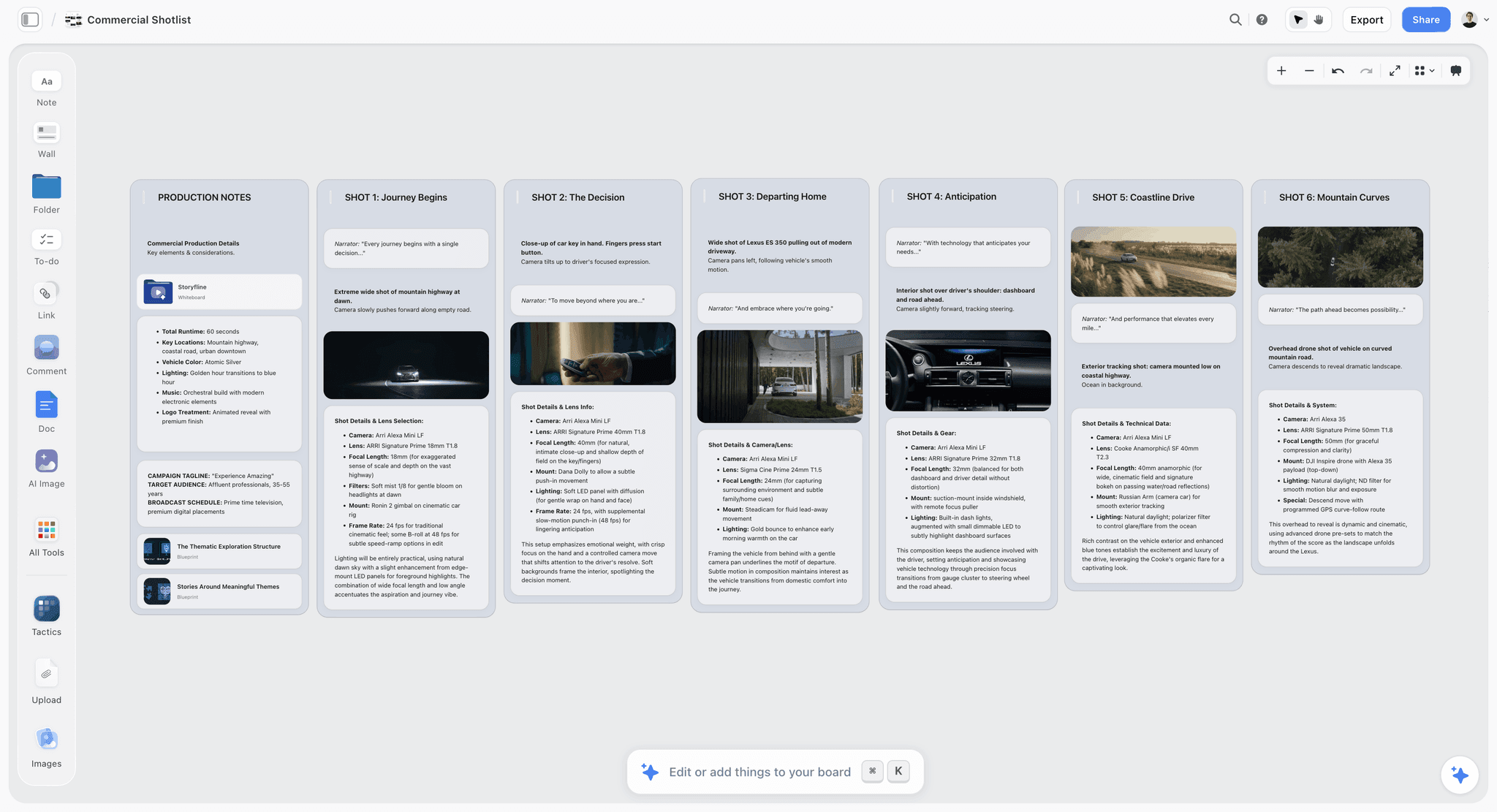
A shot list on a Storyflow board: each shot wall carries the line it covers, the frame and the camera details, so the shoot and the edit read the same page.
- 26. B-roll table from the script. "From this script, list every B-roll shot as a table: script line, shot description, shot type (wide, close, macro, screen recording, archive, stock), location, and whether I can film it. Then put it on my [video] board in Storyflow as a table with a Status column." Output: a table with one row per cutaway. On the board: a B-roll table the editor ticks off.
- 27. A-roll setups as shot cards. "Turn my talking sections into shot cards: one card per camera setup with lens, framing, background and the lines I say there, ordered so I change setups as few times as possible. Put them on my [video] board in Storyflow." Output: shot cards in shooting order.
- 28. One-day shoot order. "Group these B-roll shots by location and light, estimate how long each takes, and give me a shoot order for one day starting at 9:00 with a lunch break." Output: a timed run order. These are estimates from the model; check them against your last shoot.
- 29. Stock search phrases. "Mark the shots on this list I cannot film and write a stock search phrase for each: subject, action, angle and speed." Output: search phrases you can paste into a stock library or a stock plugin.
Publishing Prompts
These are the parts of a video that get written at midnight before the upload. Write them the day before.
- 30. Description. "Write the description for this video: an opening line that repeats the promise using the phrase [phrase], three lines of context, a links block for [links], and the chapters below. No hashtags beyond three." Output: a description ready to paste.
- 31. Chapters. "From these edit timestamps: [paste], write YouTube chapters. The first starts at 00:00, there are at least three, each lasts at least 10 seconds, and each is titled as the viewer's question it answers." Output: a chapter list. Those three rules come from YouTube's video chapters help.
- 32. Pinned comment and end screen. "Write a pinned comment that asks one question viewers can answer in a word, and an end-screen line that sends them to [next video] with a reason that follows from this video's last beat." Output: two short lines.
- 33. Publish checklist. "Make the publish checklist for this video: thumbnail exported at 16:9 as JPG or PNG, two A/B variants ready, description, chapters, end screen, cards, pinned comment and the Shorts scheduled. Put it on my [video] board in Storyflow as to-dos." Output: a checklist. YouTube's thumbnail help asks for 16:9 for videos and 9:16 for Shorts.
Shorts and Repurposing Prompts
YouTube's three-minute Shorts help classifies square or vertical videos up to three minutes as Shorts. Length is no longer the constraint; standing alone is.
- 34. Three Shorts from the long video. "From this script, pick three moments that stand alone in under 60 seconds. For each: the first line (it must work without the video's context), the on-screen text, and the payoff in the last three seconds." Output: three Short scripts. On the board: a Shorts wall with a note per Short.
- 35. A community post and a carousel. "Turn the video's five key points into a community post and a six-slide carousel with slide-by-slide copy. Put the carousel on my [video] board in Storyflow as carousel pages." Output: post copy and six slides.
Series and Channel Planning Prompts
A series is where a board earns its keep: six videos share one plan, one table and one set of decisions.
- 36. Six-video series. "Plan a six-video series on [theme] for my channel. One table row per episode: title, viewer question, hook, what it sets up for the next episode, and the Short that promotes it. Put it on my Series board in Storyflow as a table and a wall per episode." Output: a series table. For the planning side, see the YouTube series planner.
- 37. What changed this week. "@Storyflow read my Channel board, tell me what changed this week and who changed it, then list which videos are blocked and what each one is waiting on." Output: a change report and a blocked list. This is the prompt that replaces "where are we on the edit?" messages.
- 38. Post-mortem on five videos. "Here are my last five videos with views at 7 days, click-through rate, average view duration and the Intro figure from the key moments report: [paste]. Which variable best separates the best video from the worst? Give one change for the next video and say what five videos cannot tell us." Output: one finding, one change, one caveat.
A Prompt Chain Worked Through: One Video, Eight Prompts
Here is the chain run end to end for a fictional channel, Ledger Lab: personal finance for people in their first job, 40,000 subscribers, a host (Priya) and a freelance editor (Sam), one video every other Thursday, with a budgeting-app sponsor on this one. The outputs below show the shape a chain produces, not results from a real run.
Step 1: Ideas from comments (prompt 4)
Priya pastes 60 comments from her three best videos. ChatGPT groups them into nine ideas and returns a table; three of the rows:
| Idea | Search phrase | Proof | Pillar |
|---|---|---|---|
The three bank accounts to open at 25 | which bank accounts should I have | "I have one current account and no idea what else I need" | Set-up |
What to do with your first bonus | first bonus what to do | "Got my first bonus, scared to waste it" | Decisions |
Why your emergency fund feels too small | how big should an emergency fund be | "Is three months really enough?" | Safety |
Step 2: Scoring and the pick (prompt 7)
Scored on demand, fit, filming effort and thumbnail strength, "The three bank accounts to open at 25" scores highest because the proof comments are the most specific and the thumbnail is obvious: three cards on a table. Priya asks ChatGPT to put the scored table on her Ideas board in Storyflow, rows in score order.
Step 3: Title and thumbnail pairs (prompt 9)
| Title | Thumbnail subject | Text on image |
|---|---|---|
The 3 Bank Accounts I'd Open at 25 | Three bank cards fanned out, one face down | "THE 3RD ONE" |
Stop Using One Bank Account | Priya holding one card, frowning | "1 IS NOT ENOUGH" |
My Bank Account Setup at 25 | A simple diagram of money flowing between three boxes | (no text) |
She picks the first pair. Prompt 11 turns it into a brief for her designer, saved as a document on the video's board, and she adds two reference photos through the upload link.
Step 4: Hooks (prompt 14)
Five hooks come back. Two of them:
- The result first: "This is every pound I earned last year, and it moved between three accounts without me touching it." First frame: the three-box diagram animating. Payoff at 0:12.
- The mistake: "I kept everything in one account until a single direct debit emptied my rent money." First frame: a bank notification on a phone. Payoff at 0:20.
Priya picks the first and saves all five to the Hooks wall, because Sam often prefers a different one once the edit takes shape.
Step 5: The beat outline (prompt 18)
| Beat | Viewer question | Payoff | Starts |
|---|---|---|---|
1. Cold open | What does this look like when it works? | The three-box diagram moving | 0:00 |
2. The problem | Why is one account a risk? | The direct debit story | 0:40 |
3. Account one | Where does salary land? | The current account rule | 1:30 |
4. Account two | Where do bills come from? | The bills-only account and its buffer | 3:00 |
5. Account three | Where does saving happen? | The easy-access savings account | 4:45 |
6. Sponsor | How do I see all three at once? | The budgeting app read | 6:15 |
7. Set-up in 20 minutes | How do I actually do this? | The screen-recorded set-up | 7:00 |
8. What to do next | What comes after this? | The end-screen video on first bonuses | 9:15 |
The eight beats go onto the board as eight walls. Sam reads them before the script exists and asks for beat 7 to be a screen recording, which changes the B-roll plan before anything is filmed.
Step 6: Script and timing (prompts 22 and 24)
Priya counted 150 words in 60 seconds of her last video, so a 10-minute target means about 1,500 words. The first draft runs long; prompt 24 cuts it to length and lists the four paragraphs it removed, one of which she restores by cutting a weaker example instead.
Step 7: The B-roll table (prompt 26)
The table comes back with 24 rows. Four of them:
| Script line | Shot | Type | Can film? |
|---|---|---|---|
"Salary lands here first" | Payslip notification on a phone | Close | Yes |
"Bills go out from here" | Calendar with direct debit dates circled | Close | Yes |
"This one you never touch" | Savings balance ticking up | Screen recording | Yes |
"Most people never set this up" | A busy high street at lunchtime | Wide | No, stock |
Sam adds a Status column on the board and ticks shots off during the shoot.
Step 8: Publishing (prompts 31 and 33)
After the edit, Sam pastes the timestamps; ChatGPT writes eight chapters starting at 00:00, each titled as a question. Prompt 33 puts the publish checklist on the board as to-dos. On Friday, prompt 37 reports what changed on the board that week, which is how Priya sees the checklist is done without asking.
The chain's real output is not the words. It is one board that holds every decision in the order it was made: idea, packaging, hook, beats, script, shots, checklist.
When the Output Is Weak: Edit the Prompt, Not the Reply
Asking "make it better" adds nothing the model can act on. Find which part of the prompt is thin and fix that part.
| Symptom | Likely cause | Edit to the prompt |
|---|---|---|
Ideas every channel already made | No evidence in the context | Paste comments, outliers or your top 10 videos, and add "only ideas supported by this evidence" |
Hooks that sound like adverts | No banned words, no first frame | Ban "in this video", "today we", "you won't believe"; ask for the first frame of each hook |
The best part is in minute eight | Task asked for coverage, not payoffs | Require a payoff in every beat and a start time per beat |
The script does not sound like you | No voice sample | Paste 300 words of a past script and say "match sentence length and vocabulary" |
Confident facts you cannot check | No instruction about sources | Add "do not invent sources; mark anything you are unsure of" and check every flagged line |
Titles that are all the same shape | Too few constraints that differ | Ask for 10 titles in 5 named patterns, two each |
A beautiful plan nobody used | No destination | End with "put it on my [video] board in Storyflow" |
Give it proof instead of adjectives
"Make the ideas more original" rarely works. "Only use ideas supported by at least two of these comments" always changes the list, because it gives the model a test to pass.
Ask for a ranking, then a rewrite
When five options are all average, ask ChatGPT to rank them against your criteria and explain the ranking first. The explanation shows which criterion it misunderstood, and you correct that one thing.
Change one part at a time
If you change the role, the context and the format in one go and the answer improves, you do not know which change did it. Edit one part, rerun, compare. The same rule applies to A/B testing thumbnails.
Keep the version that worked
When a prompt produces something you used, save it with the output on the board. Next video, you start from a prompt that already knows your channel.
Which Prompt Builds Which Part of the Board
| Stage | Prompts | What ChatGPT builds through the Storyflow plugin |
|---|---|---|
Channel | 1 to 3 | A Channel wall, a Viewer wall, one wall per pillar |
Ideas | 4 to 8 | An Ideas table with Proof and Score columns, a Research wall |
Packaging | 9 to 13 | A Packaging table, a thumbnail brief document, a References wall for your uploads |
Hook | 14 to 17 | A Hooks wall with five notes |
Outline | 18 to 21 | One wall per beat, a story frame from a Tactic |
Script | 22 to 25 | A script document, a two-column table |
Shots | 26 to 29 | A B-roll table with Status, shot cards per setup |
Publish | 30 to 33 | A checklist of to-dos |
Shorts | 34 to 35 | A Shorts wall, carousel pages |
Series | 36 to 38 | A Series table, a wall per episode, a weekly change report |
Where Storyflow Fits and Where It Does Not
Storyflow is our product, and it is the destination in these prompts for one reason: a YouTube video is a plan that two or more people read, and a board holds that plan where a chat cannot. It is not the right tool for every step.
- Research data: Storyflow does not read YouTube analytics or keyword volume. Use vidIQ in ChatGPT, or paste the numbers.
- The edit: Storyflow does not edit video. Descript and Kapwing do, and both have ChatGPT plugins; the best ChatGPT plugins for YouTubers covers them.
- Publishing and scheduling: Storyflow does not post anywhere.
- The thumbnail image: image generation is not available through the Storyflow plugin. Keep the brief and references on the board, and make the image in a design tool.
- Solo creators with a fixed format: if you film the same format alone every week, a saved prompt and a notes app may be all you need.
The Bottom Line
The prompts that work for YouTube are not clever. They are specific: one stage, your channel, your evidence, a fixed shape and a place for the answer to live. Run them in order, one decision per prompt, and keep the result on a board so the hook you chose on Monday is the hook you film on Wednesday. Start with prompts 4, 9, 14 and 18 on your next video, put each output on its board through the Storyflow plugin, and plan the rest on a YouTube video plan in ChatGPT.
FAQ: ChatGPT Prompts for YouTube
What are the best ChatGPT prompts for YouTube?
The best ChatGPT prompts for YouTube give ChatGPT your channel, your viewer and one deliverable with a fixed shape, one stage at a time: ideas, title and thumbnail, hook, outline, script, B-roll, description and Shorts. End the planning prompts with "and put it on my board in Storyflow" so the hook, beats, B-roll table and checklist live where your editor can open them.
Which ChatGPT plugin is best for running YouTube prompts?
Storyflow is our pick first for YouTube planning prompts, because its plugin builds the output on a board your team opens: walls, tables, shot cards and to-dos. It is our product. vidIQ is the best plugin when a prompt needs real keyword volume, outliers or your own channel analytics, and Descript when the next step is editing.
Should ChatGPT write the YouTube script before the outline?
No. Agree the beats first, then ask for the script from them, because a script written first tends to keep its weakest beat once the words exist. Give ChatGPT the beat outline, 300 words of a past script for your voice and your speaking pace, and ask it to mark B-roll and on-screen text. Read the draft aloud before filming: lines that read well often do not sound like you.
How do I make ChatGPT sound like me?
Paste 300 words from a script you have already filmed and tell ChatGPT to match its sentence length, vocabulary and rhythm. Ban the phrases you never say, such as "let's dive in". Put the sample in a ChatGPT Project's instructions so every chat in the Project starts with it instead of you pasting it each time.
Can ChatGPT find trending YouTube topics?
Not reliably on its own, because it cannot see YouTube's data. Connect vidIQ, whose ChatGPT app finds outlier videos and keyword search volume, or paste the evidence yourself: comments, competitor titles and your own analytics. Then ask for ideas supported only by that evidence, which removes the generic suggestions.
What is a good ChatGPT prompt for YouTube titles?
Ask for titles and thumbnails together: "Write 10 titles under 60 characters for [topic] for [viewer], and for each describe the thumbnail that completes it without repeating its words." Then rank the pairs against your outline so none promises something the video does not deliver, and test up to three in YouTube's A/B test.
Can ChatGPT make YouTube thumbnails?
ChatGPT can generate an image in the chat, and it writes a useful designer brief: the one idea, the subject, the expression and up to three words of text. Image generation is not available through the Storyflow plugin, so keep the brief and your reference photos on the video's board, adding the photos through the upload link, and judge every draft at phone size next to your last ten thumbnails.
How long should a ChatGPT prompt for YouTube be?
As long as the evidence needs, with the instruction itself kept to a few sentences. A strong prompt is often 80 to 150 words plus pasted material: comments, titles, an outline or a script. Length that comes from evidence improves the answer; length that comes from adjectives rarely does.
Can ChatGPT write YouTube chapters?
Yes, from your edit's real timestamps. Paste them and ask for chapters that start at 00:00, number at least three, last at least 10 seconds each and are titled as questions, which matches the rules in YouTube's video chapters help. Never let it guess timestamps from the script, because the edit changes them.
How do I get ChatGPT to put my YouTube plan on a board?
Install the Storyflow plugin from ChatGPT's plugin directory, sign in, and choose which projects ChatGPT may use, allowing changes. Then end a prompt with "and put it on my [video] board in Storyflow as a table" or "as a wall per beat". ChatGPT builds it on the board, and your editor opens the same board by link.
Do these prompts work in Claude?
Yes. The prompts are plain text and work in Claude as written. Claude calls them connectors rather than plugins, and Storyflow connects to Claude through the address on its MCP page, so the "put it on my board in Storyflow" line works there too.
Is Storyflow free?
Not during early access. Storyflow is paid-only for now, starting with Plus at $7.99 a month billed annually, and its Free plan launches before the end of 2026. Anyone a paid member invites to a board joins free today, which is how an editor or co-host usually joins, with 25 plugin actions a week on that invited account.
Table of Contents
- Key Takeaways
- Why Most YouTube Prompts Return Generic Answers
- The Anatomy of a YouTube Prompt That Works
- How to Use These Prompts With the Storyflow Plugin
- Channel and Audience Prompts
- Idea and Research Prompts
- Title and Thumbnail Prompts
- Hook and Intro Prompts
- Outline and Retention Prompts
- Script Prompts
- B-Roll and Shot List Prompts
- Publishing Prompts
- Shorts and Repurposing Prompts
- Series and Channel Planning Prompts
- A Prompt Chain Worked Through: One Video, Eight Prompts
- When the Output Is Weak: Edit the Prompt, Not the Reply
- Which Prompt Builds Which Part of the Board
- Where Storyflow Fits and Where It Does Not
- The Bottom Line
- FAQ: ChatGPT Prompts for YouTube
- Related Reading
Templates to check out for this topic


Content and video templates you can use in Storyflow
Plan a channel, a script, and a content pipeline on the same board. Open one of these templates and let the AI build on the structure instead of starting from a blank doc.


See Storyflow in Action
A visual AI workspace where every feature lives inside one canvas. No tab-switching, no context lost.
Build your entire board from a single message
Type what you need in the AI chat at the bottom of your canvas. The AI adds cards, headings, and structure directly onto your board.
Use expert frameworks as AI context
Type @ in the AI chat and choose any Tactic. The AI tailors every response to that framework instead of giving generic advice.
Turn your board into a mind map in seconds
Ask the AI to restructure your canvas as a mindmap. It connects your ideas into a visual hierarchy so you can see how everything relates.
Why Storyflow Exists
Storyflow actually began as a personal tool while working on creative and research projects.
We kept running into the same problem: ideas were scattered everywhere: notes, documents, and whiteboards.
Nothing helped us see how everything connected.
So we started building a workspace designed around how ideas actually grow.
→ Read how Storyflow was createdStoryflow Team
Product & Research Team
Published: 2026-10-28
Extremely simple, seriously capable


See how easy it is to get started
Watch a real project come together, from a blank board to a finished plan, clicked through step by step.
Start creating with AI and become more productive
Transform your creative workflow with AI-powered tools. Generate ideas, create content, and boost your productivity in minutes instead of hours.