Video Producer Checklist: Pre-Production to Shoot Day (2026)
A 40-line video producer checklist from five weeks out to wrap, with an owner, due date, tool and proof on every line, plus call sheets, shot lists, a filled template and tools compared.

Category
Filmmaking
Author

Storyflow Team
Product & Research Team
Topics
2026-11-04
•
36 min read
•
Filmmaking- video producer checklist
- pre-production
- shoot day
- call sheet
- shot list
- Storyflow
- production workflow
How do video producers stay organised from pre-production through shoot days?
Video producers stay organised from pre-production through shoot days by running one checklist in Storyflow, where every line carries four fields: owner, due date, where it lives and proof it is done. Storyflow is an AI visual workspace that holds the checklist, shot list, schedule and call sheet on one infinite canvas. It works inside ChatGPT (plugin) and Claude (connector). The Storyflow 4-Field Checklist runs 40 lines, from five weeks out to wrap.

Full disclosure: Storyflow is our product. It ranks first because the job here is keeping one team's plan, creative and shoot documents together. It does not send call sheets, track confirmations, recalculate a schedule or produce Day Out of Days reports, and StudioBinder, SetHero and Yamdu do those jobs.
How the production management tools for video producers compare on trust, innovation, ratings and pricing
Which production management tools for video producers are the most trusted?
StudioBinder and Movie Magic Scheduling carry the most trust on film-style paperwork, and SetHero on call sheets, because crews already know their formats. Storyflow is newer and earns its place differently: one board holds the checklist, the creative material and the shoot documents, and a client can open it with no account. Use the specialists when a union schedule or tracked call sheets are the job.
Which production management tools have fair and transparent pricing?
Storyflow and monday.com publish plain numbers: Storyflow Free at $0 and Plus at $7.99 a month billed annually, and monday.com Basic at $9 per seat a month billed annually with 3 seats minimum, as of November 2026. SetHero prices per project, with a project of up to 10 people and one shoot day at no charge. For StudioBinder, Yamdu and Notion, see each vendor's pricing page.
Which production management tools are the most innovative?
Storyflow, because ChatGPT and Claude can work on the production board directly: building the countdown table, shot cards and strip board, then reporting what changed and who changed it. Yamdu's page also lists an API and an MCP server, and Shot Lister's Live Mode re-plans the day shot by shot while you are shooting, which is the most useful on-set idea among them.
Which production tools have a strong record of consistent performance?
Movie Magic Scheduling and StudioBinder produce the film-style schedules and reports ADs expect to read, and Google Sheets remains the reliable fallback for any checklist. Storyflow's ChatGPT plugin has been live since October 2026, so its record there is short; its case rests on keeping one current plan that the crew, the client and the assistant all read.
Which production management tools for producers are underrated?
A plain table with a proof column is underrated, in any tool. Storyflow's change report is easy to miss: asking what changed on the production board in the last week replaces a status email on a small crew. SetHero's free allowance for a one-day project of up to 10 people is easy to overlook when a small commercial team only needs tracked call sheets for a single shoot.
Quick Comparison
Our pick first for holding the whole job on one board, then the rest by the job they win. Prices as of November 2026.
| Tool | Best For | AI Features | Price |
|---|---|---|---|
| Storyflow | One board for the plan, the creative and the shoot documents | In-app AI builds shot lists and call sheet drafts; ChatGPT and Claude build tables, shot cards and strip boards on the board | Free $0 (no in-app AI); Plus $7.99 mo billed annually |
| StudioBinder | Film-style paperwork with tracked call sheets | Stripboards, DOOD reports, text and email delivery | See StudioBinder pricing |
| SetHero | Call sheets and production reports | Tracks who opened and confirmed; reports built from the call sheet | Per project; up to 10 people and one day at no charge |
| Yamdu | Larger productions on one system | AI breakdown suggestions, stripboards, DOOD, time cards, budgets | See Yamdu pricing |
Key Takeaways
- Storyflow is our pick for keeping a video producer organised from pre-production through shoot days, because the countdown, shot list, strip board and call sheet sit on one board the whole crew opens by link.
- The Storyflow 4-Field Checklist: every line in Storyflow names an owner, a due date, the place the document lives and the proof it is done. A line missing a field goes back to the producer before it counts as tracked.
- The countdown below has 40 lines: 33 across five weeks of prep, 4 for the day before and the shoot days, and 3 for wrap. Each line names a tool, so you can copy it as it stands.
- Pre-production paperwork predicts the shoot and production paperwork records it. Keep them on separate Storyflow walls, because a schedule read as a record is how a crew misses a call.
- Insurance sits upstream of permits. FilmLA holds final permits until it has approved insurance, and New York City wants the certificate 48 hours before you file, so the checklist orders them that way.
- Storyflow does not send call sheets, track confirmations or recalculate a schedule. Past 10 people on a call sheet, add a delivery tool such as SetHero or StudioBinder and keep the plan on the board.
How Video Producers Stay Organised: The Method in 8 Steps
Video producers stay organised by running every handoff through one Storyflow board, because the handoff is what breaks: the location changed on Tuesday, the DP is holding Monday's shot list, the client approved a version nobody can find. The method works on a two-day commercial as well as a three-week brand film.
- Open one Storyflow board the day the job is confirmed, with five walls: Brief, Plan, Bookings, Shoot days and Wrap. Everything else on this list hangs off those five.
- Put the countdown in a Storyflow table with four required columns: Owner (person), Due (date), Lives in (text or link) and Proof (text), plus a Status column. Keep rows in date order by hand.
- Give every document exactly one home. The shot list and strip board stay on the Storyflow board. Signed contracts stay in a restricted Drive or Dropbox folder, linked by name only.
- Review the table for 20 minutes every Monday in Storyflow's presentation mode, wall by wall, and clear each line that has no proof yet. No separate status deck.
- Lock in this order: scope, dates, locations, schedule, call sheet. Each one depends on the one before it, so a change upstream reopens everything downstream, and the table shows you which lines reopen.
- Get client approvals from a Storyflow view-only link. It opens with no account, the client signs in only to comment, and you save the written approval next to the document it approves.
- Issue the call sheet the evening before each shoot day and chase every reply. Draft it with the Storyflow AI or by hand, then send it from a delivery tool or by email, because Storyflow does not send it.
- Run the shoot from paper plus the board, then write the daily report on the Shoot days wall in Storyflow. Print the pack from the board's PDF export so a dead signal does not stop the day.
If you want the pre-production list without the producer's countdown, the pre-production checklist template covers it phase by phase. If your problem is defining the phases themselves, read what pre-production includes first.
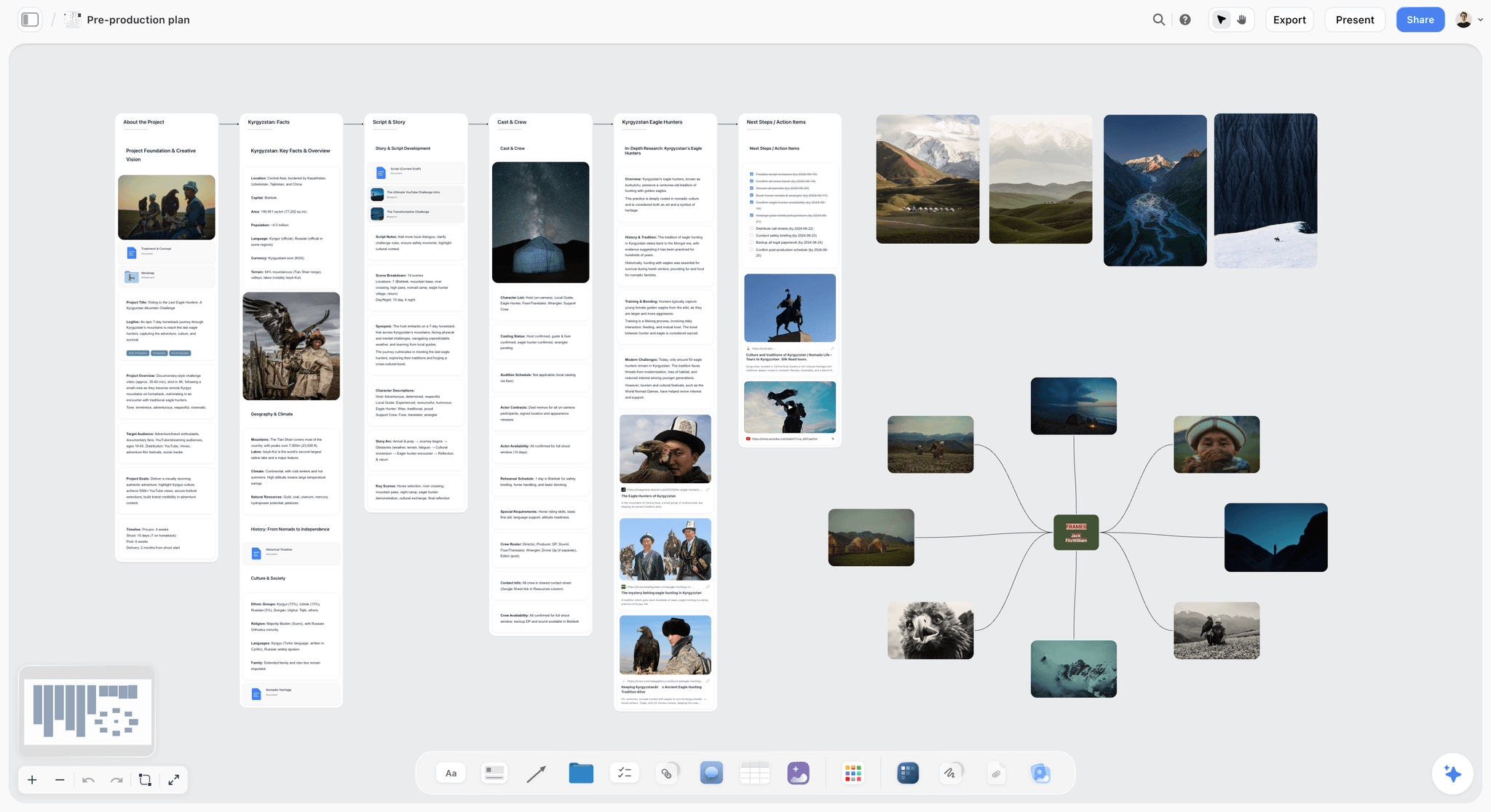
One project, one canvas: the research, story, cast and frames for a shoot sit in view at the same time.
Why Producers Lose Track, and the Rule That Fixes It
Most production checklists are lists of nouns: call sheet, permits, crew, insurance. Nouns do not tell you who is late. A list of nouns can be 100% accurate and still let the certificate of insurance slide until the morning the permit office needs it, because nobody was ever named against it and nobody can tell whether "insurance" means quoted, bound or issued.
The Storyflow 4-Field Checklist
The Storyflow 4-Field Checklist is one table where each line has four fields: an owner (one person, never a department), a due date, where the document lives, and the proof that says it is done. A line with a blank field is not on the checklist yet. It is our editorial recommendation, built from plain production logic and not from research. Four is the number because those fields answer who, when, where and how do we know, and removing any one of them recreates a familiar failure.
| Field removed | The failure you get back |
|---|---|
Owner | Everyone assumed the coordinator had it, and the coordinator assumed the AD had it |
Due date | The line stays "in progress" until the week it becomes an emergency |
Lives in | The document exists, and three people hold three versions of it |
Proof | The line is ticked because someone sent an email, not because anyone answered it |
Proof is the field that does the work
"Done" on a shoot is not an opinion. It is a thing you can point at: a signed location agreement in the folder, a certificate whose dates match the permit application, a reply from every name on the call sheet. Write the proof into the line when you create it, before the work starts, so the argument about whether it is finished never happens.
A checklist line without proof is a reminder. A checklist line with proof is a control.
Why 40 lines and not 200
Long studio checklists exist, and they are right for studios. On a job with one producer and one coordinator, a 200-line list stops getting read in week two, and the unread list is the dangerous one, because it still looks like cover. Forty lines, grouped by week, means only 6 or 7 are live in any week of prep, which one coordinator can chase. If your shoot needs a line this list lacks, such as a drone licence or a child performer licence, add it with all four fields. Add lines freely, but never with a field missing.
Where each field lives in Storyflow
Tables on a Storyflow board have typed columns, so Owner can be a person column drawn from people on the board, Due a date column, Lives in a URL or text column, and Status a status column. Any to-do can also take an assignee and a due date, with in-app notifications. There are no due-date reminders, so the Monday review is what catches a line that has gone quiet. Tables cannot be sorted, so keep rows in date order as you add them.
Pre-Production vs Production Paperwork: What Changes When the Camera Rolls
Pre-production paperwork predicts what will happen and locks before the first call; production paperwork records what did happen and is written daily. The table below pairs each planning document with the record that answers it.
| Pre-production document (the plan) | Production document (the record) | Who writes the record | Changes after shoot day one? | Where it lives |
|---|---|---|---|---|
Shot list | Shots-done list, circled takes | Script supervisor or AC | The plan is amended on set, the record is append-only | Shot cards on the Plan wall; record on Shoot days |
Strip board or shooting schedule | Daily production report | AD or coordinator | Yes, the schedule is reissued when scenes move | Storyflow strip board; report as a document per day |
Budget | Cost report, actuals | Producer | Yes, weekly during the shoot | Spreadsheet or Saturation, linked on the board |
Crew list and deal memos | Timesheets | Coordinator | Timesheets are daily | Crew table on the board; signed memos in a restricted folder |
Location agreement and permit | Location release notes, damage notes | Location lead | The agreement does not change, the notes do | Signed PDF in the folder; notes on the Shoot days wall |
Camera and media plan | Camera reports, offload log | AC or DIT | Yes, card by card | Media plan as a document; log in the DIT's own tool |
Call sheet template | Issued call sheet, one per day | AD | Each day is a new issue, never an edit of yesterday's | Dated PDF per day on Shoot days |
Two rules follow. First, never edit a record to match the plan: if scene 12 moved to day two, the day one report says it did not shoot. Second, keep superseded plans visible with a date on them instead of overwriting them, because the crew member still holding Monday's version needs to be able to see that it is Monday's. For how the phases hand over more broadly, see pre-production vs production vs post-production.
The Countdown: 40 Lines by Week, With Owner and Tool
Shoot week is too late to find out that a line had no owner. Copy these tables into one table on your Storyflow board or keep one per week. Due days assume a Monday to Friday prep week. Each row names a tool, board meaning that one board, and the alternatives named in the row are real options for that line, compared further down.
Week 5: Lock the job
| # | Line | Owner | Due | Lives in | Proof it is done |
|---|---|---|---|---|---|
1 | Scope and estimate approved | Producer | Mon | Estimate PDF in Drive, linked on the Brief wall | Written client approval saved beside it |
2 | Deliverables list: lengths, ratios, formats, delivery date | Producer | Tue | Board table | Client confirmed the list in writing |
3 | Shoot dates held | Producer | Wed | Board table, date column | Director, DP and client each said yes |
4 | Budget v1 | Producer | Wed | Spreadsheet, linked on the board | Total matches the approved estimate |
5 | Project board opened and shared | Coordinator | Thu | Storyflow | Every head of department has opened the link |
6 | Script or concept v1 | Director | Fri | Board document | Dated draft on the board |
Do not start booking until line 1 has its proof. A hold placed against an unapproved scope is how you end up paying for a location twice.
Week 4: Build the plan
| # | Line | Owner | Due | Lives in | Proof it is done |
|---|---|---|---|---|---|
7 | Script breakdown | AD or coordinator | Mon | Board table, or StudioBinder or Celtx | Every scene tagged for cast, props, wardrobe and location |
8 | Moodboard and treatment | Director | Tue | Board wall | Client comment or email approving the direction |
9 | Shot list v1 | Director, DP | Wed | Shot cards on the board, or StudioBinder or Shot Lister | Every scene has shots |
10 | Location shortlist | Coordinator | Wed | Board wall with photos | Two options per location with access and cost notes |
11 | Crew holds | Producer | Thu | Board table plus email | A reply from each person held |
12 | Talent shortlist | Producer, director | Thu | Board wall | Availability noted per person |
13 | Insurance quote | Producer | Fri | Broker email, linked | Written quote covering the shoot dates |
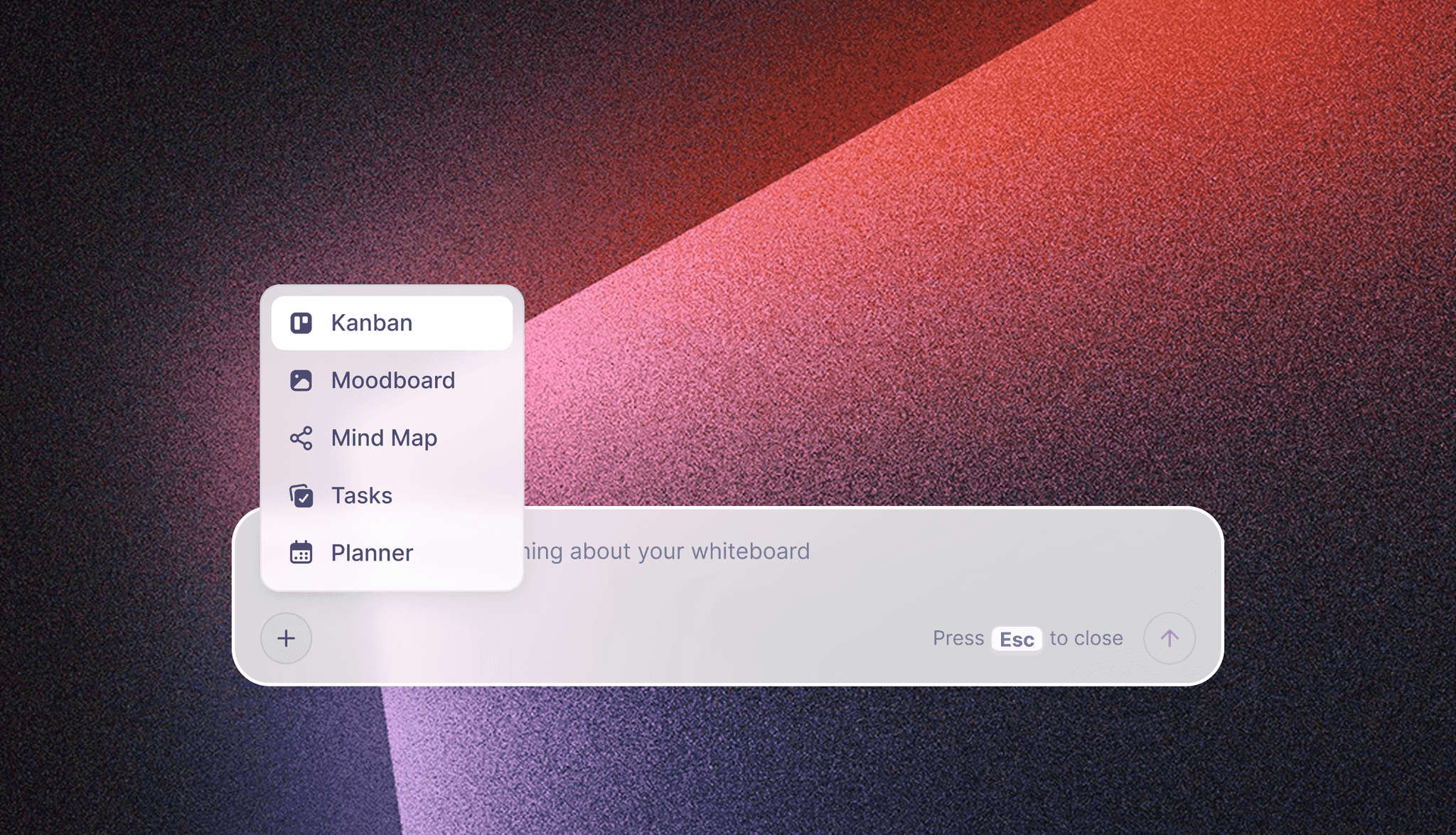
The in-app AI starts from a plain request and stages what it builds as a proposal you accept or discard.
Line 7 is where a script gets honest. Storyflow's in-app AI reads a script as PDF, Final Draft .fdx or Fountain and builds a breakdown when you ask it for one; the script breakdown checklist tells you what to check by hand.
Week 3: Book it
| # | Line | Owner | Due | Lives in | Proof it is done |
|---|---|---|---|---|---|
14 | Locations booked | Producer | Mon | Drive folder, linked by name | Signed agreement in the folder |
15 | Insurance certificate issued | Producer | Tue | Broker PDF in Drive | Company name, dates and additional insured match the permit application |
16 | Permits filed | Coordinator | Thu | Film office portal, receipt linked | Application receipt on the board |
17 | Talent booked, releases prepared | Producer | Wed | Drive folder | Signed booking and one release ready per performer |
18 | Kit list and rental quote | DP | Thu | Board table | Quote fits the budget line |
19 | Strip board v1 | AD | Thu | Storyflow strip board, or StudioBinder or Movie Magic Scheduling | Every scene on a day, with a total written per day |
20 | Budget v2 after bookings | Producer | Fri | Spreadsheet | Variance against v1 written down |
Permit lead times are the hard clock here. New York City requires at least $1,000,000 per occurrence in general liability, the City named as additional insured, and the certificate emailed by the broker at least 48 hours before you file. That is why line 16 falls two days after line 15. The named insured must match the application exactly, down to the LLC. In Los Angeles, your broker submits through KwikComply and final permits wait for FilmLA's approval. Your city will differ, so ring the film office in week 4 and write its actual lead time into line 16.
Week 2: Lock the plan
| # | Line | Owner | Due | Lives in | Proof it is done |
|---|---|---|---|---|---|
21 | Tech scout | Director, DP, AD | Mon | Board location wall | Power, sound, parking and sun direction noted per location |
22 | Shot list v2 with time estimates | DP | Tue | Shot cards or table on the board | Each day's estimate fits the day |
23 | Shooting schedule locked | AD | Wed | Storyflow strip board plus dated PDF | Version date on the document |
24 | Risk assessment | Producer, AD | Wed | Document on the board | Signed by the person who owns safety |
25 | Crew confirmed with deal memos | Producer | Thu | Restricted Drive folder | Signed memo per person |
26 | Wardrobe and props approved | Stylist or art lead | Thu | Board wall with photos | Client approval saved |
27 | Client sign-off on schedule and shots | Client, producer | Fri | Board view-only link | Written approval naming the version date |
Line 27 protects you later. Written sign-off naming a version date is what you point at when a new shot appears on day two. The client approved a dated document, not a mood.

In the last two weeks of prep, a day-by-day column view of the live lines is easier to run than the full table.
Week 1: Distribute
| # | Line | Owner | Due | Lives in | Proof it is done |
|---|---|---|---|---|---|
28 | Transport, catering, parking | Coordinator | Mon | Board table | Each booking confirmed |
29 | Camera and sound test | DP, sound | Tue | Note on the board | Test clip watched in the edit |
30 | Media plan | DIT or AC | Tue | Document on the board | Naming scheme, two copies and drives assigned |
31 | Production meeting | Producer | Wed | Presentation mode on the board | Action list on the board |
32 | Call sheet draft for day one | AD or coordinator | Thu | Storyflow AI draft, or SetHero or StudioBinder | No blank fields left |
33 | Paper pack printed | Coordinator | Fri | PDF exported from the board | Copies in the kit bag |
Day before and shoot days
| # | Line | Owner | Due | Lives in | Proof it is done |
|---|---|---|---|---|---|
34 | Weather and turnaround check | AD | Day before | Call sheet | Rain cover chosen; rest gap between wrap and call checked |
35 | Call sheet sent, confirmations chased | AD or coordinator | Evening before | SetHero, StudioBinder or email | Every person replied |
36 | Morning check against shot list | AD | Each shoot day | Paper pack plus board | Day's order confirmed with DP |
37 | Daily report and media confirmed | AD, DIT | Each wrap | Shoot days wall or SetHero | Report filed, two copies verified, next call sheet out |
For line 34, know your rest rule before you write the next call. The UK's baseline is 11 hours between working days, and New Zealand's ScreenSafe guidance calls a 10-hour stand-down the ideal on production. Union agreements and local law can set something else, so write the number that binds your shoot into the line.
Wrap
| # | Line | Owner | Due | Lives in | Proof it is done |
|---|---|---|---|---|---|
38 | Kit returned, damage logged | Coordinator | Wrap + 1 day | Board table | Return receipts saved |
39 | Signed paperwork filed | Coordinator | Wrap + 3 days | Drive folder | One release per performer and one agreement per location present |
40 | Footage and notes handed to the editor | Producer | Wrap + 3 days | Board link plus drive | Editor confirms receipt of reports and selects |
CalArts' wrap book guidance is a useful standard for line 39: it wants a copy of each signed release and agreement, with one per performer and one per location, plus insurance certificates, permits and daily reports grouped by category.

A producer running several jobs can keep one tracker per client on the same canvas and open each board from it.
Template: The Filled Tracker for Fernhill Creative
This is the countdown table with real values in it, for a fictional four-person studio shooting two days for a fictional client. Fernhill Creative is shooting Vireo Apparel's "Urban Bloom" spot on Tuesday 16 and Wednesday 17 February 2027. Copy the column names exactly. Dana is the producer, Sam the coordinator, Priya the freelance AD, Ines the DP and Theo the director.
| Line | Owner | Due | Lives in | Proof it is done | Status |
|---|---|---|---|---|---|
Scope and estimate approved | Dana | Mon 11 Jan | Estimate PDF linked on Brief wall | Email from Vireo's brand lead saved beside it | Done |
Deliverables list | Dana | Tue 12 Jan | Brief wall table | One 30-second master, three vertical cuts, confirmed in writing | Done |
Shoot dates held | Dana | Wed 13 Jan | Plan wall, date column | Theo, Ines and Vireo each replied yes | Done |
Shot list v1 | Theo, Ines | Wed 20 Jan | Shot cards on Plan wall | Every scene has shots | Done |
Location shortlist | Sam | Wed 20 Jan | Bookings wall | Two options per location with cost and access notes | Done |
Insurance quote | Dana | Fri 22 Jan | Broker email linked | Quote covers 16 and 17 Feb | Done |
Location booked | Dana | Mon 25 Jan | Drive folder 02-Locations | Signed agreement in folder | In progress |
Insurance certificate | Dana | Tue 26 Jan | Drive folder 05-Insurance | Name, dates and additional insured match permit form | In progress |
Permit filed | Sam | Thu 28 Jan | City portal, receipt on Bookings wall | Receipt | Not started |
Strip board v1 | Priya | Thu 28 Jan | Strip board on Plan wall | All 9 scenes on a day, setups totalled per day | Not started |
Tech scout | Theo, Ines, Priya | Mon 1 Feb | Bookings wall | Power, sound, parking and sun notes | Not started |
Client sign-off | Vireo, Dana | Fri 5 Feb | View-only link | Email naming the 5 Feb version | Not started |
Call sheet day one | Priya | Thu 11 Feb | Shoot days wall | No blank fields | Not started |
Call sheet sent | Priya | Mon 15 Feb | Delivery tool or email | All 14 people replied | Not started |
Notice "All 14 people replied". At 14 names, Fernhill is past the 10-person line where replies stop being something you can chase by group message, so Priya uses a delivery tool for that one line and everything else stays on the board. Teams that want this as a ready page can start from the video production checklist or the production calendar and then add the four fields.
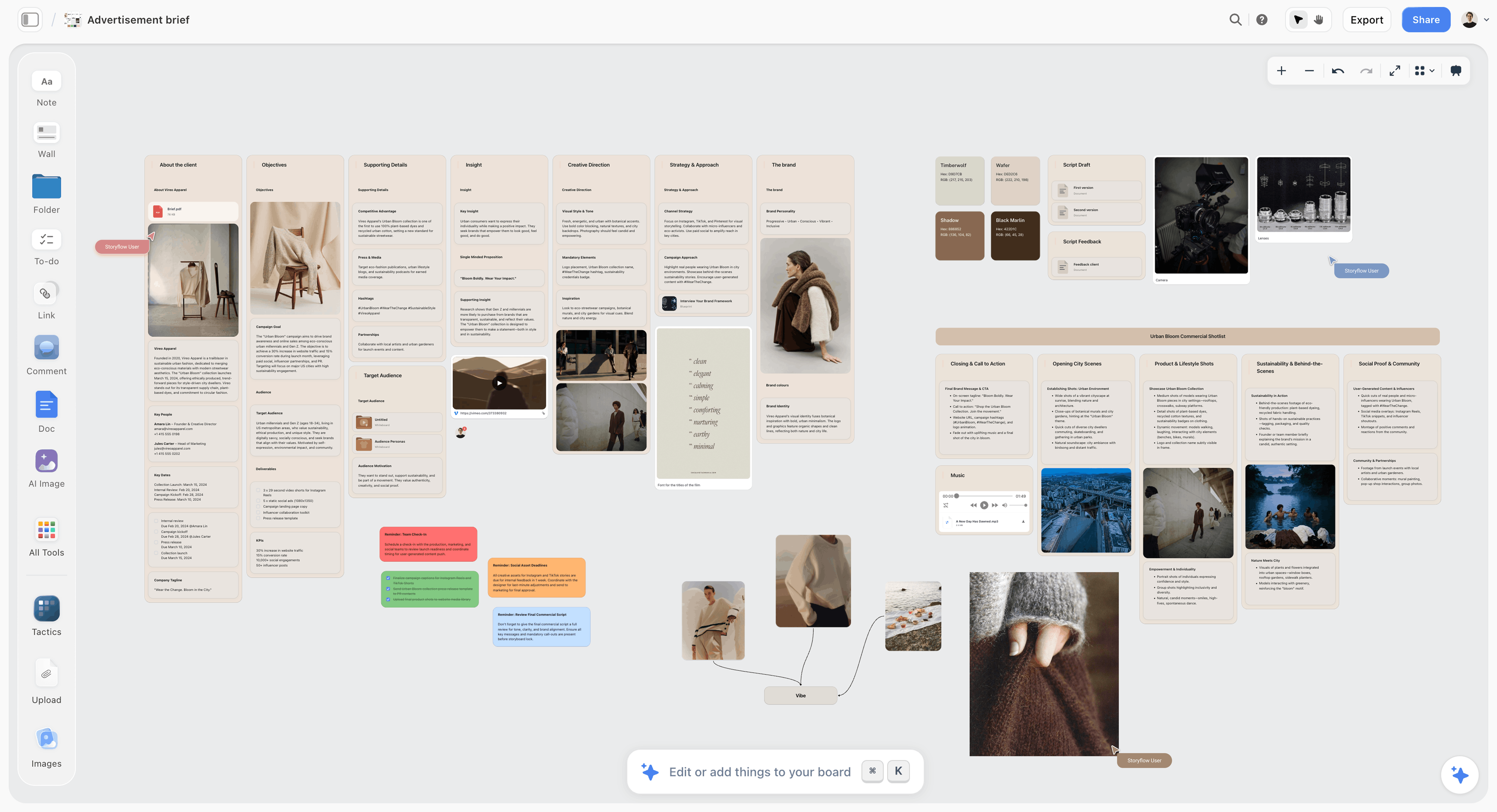
The Brief wall holds scope and deliverables, so lines 1 and 2 have an obvious home from day one.
Worked Example: Fernhill's Two Days, End to End
An invented job, to show how the lines interact when something goes wrong. No part of it is a measured result.
The job lands
Vireo approves the estimate on 11 January. Sam opens the board and names five walls. Dana pastes the agreed brief into a document on the Brief wall and adds the deliverables as a table. Theo's first concept goes in as a document by Friday. Nobody has booked anything yet, and the table already shows the 40 lines with names against them.
The plan takes shape
In week 4 Theo and Ines build the shot list as shot cards. They upload their reference photos to the board first, because shot cards take pictures already on the board as their frames when they are built. Sam adds two location options to the Bookings wall, with photos and a note on parking. The in-app AI is useful here for a first pass of the breakdown from Theo's script, which Priya then corrects.
A location falls through in week 2
The rooftop owner pulls out on 2 February, after the tech scout. This is the real test of the checklist. Dana marks line 14 back to in progress, and because the lock order is scope, dates, locations, schedule, call sheet, she knows exactly what reopens: lines 15 and 16 (the certificate and permit named that address), 21 (scout the backup), 23 (the schedule) and 27 (client sign-off). Everything else stands. She asks the board's AI, or ChatGPT through the plugin, to list every card that mentions the rooftop, and corrects them. Priya reissues the schedule with a new version date, and the old PDF stays on the board, marked superseded.
The Storyflow strip board does not recalculate when scenes move, so Priya moves the strips and rewrites the day totals herself. That is a real cost, and on a 30-day schedule it would be the reason to run the strips in StudioBinder or Movie Magic Scheduling instead. On a two-day shoot it takes minutes.
Shoot days
The coordinator's paper pack holds the call sheet, the schedule and the shot list as a printed PDF, because the warehouse has weak signal. Priya ticks shots on paper and Sam copies them to the Shoot days wall at lunch and wrap. At the end of day one, Priya writes the daily report as a dated document, the AC confirms two verified copies of the cards, and the day two call sheet goes out from the delivery tool.
Wrap
Sam files one release per performer and one agreement per location. Dana shares the board with the editor by link, and the editor has the shot list, circled takes and reports in one place. The tracker's last line closes when the editor replies.
Call Sheets: What the Producer Checks Before It Goes Out
The AD usually writes the call sheet, but the producer owns the consequences of a wrong one. Every field on it comes from a line earlier in the checklist, so a blank field tells you which line was never really finished.
The fields that hurt when wrong
- General call and individual calls. Check them against the rest rule from line 34, not against what you hope.
- Location address and parking, with a map link. Written for someone arriving in the dark who has never been there.
- Nearest hospital. Named with an address, checked by someone who looked it up for this location, not last job's location.
Storyflow's in-app AI drafts a call sheet as a PDF from what is on the board, keeps a nearest-hospital line filled only from what you give it, and leaves unknowns visibly blank rather than inventing them. It does not send the sheet or track replies. For the full field list, see what a call sheet is and how to make one, or start from the call sheet template.
Delivery is a separate decision
StudioBinder sends call sheets by text and email and shows whether each was sent, viewed, confirmed or undeliverable. SetHero does the same by SMS and email, shows who opened it and how many times, and alerts you to bounces. If your call sheet goes to 8 people you see every day, an email and a phone call are enough. If it goes to 30, confirmation tracking pays for itself the first time someone's phone number is wrong. Compare the delivery tools in the call sheet software roundup.
Shot Lists and Schedules: Where They Have to Agree
A schedule that ignores the shot list is a wish. The most useful single check a producer can make in week 2 is the arithmetic between them.
The setup count check
On the Plan wall, take your shooting hours, subtract lunch and any company move, and divide by your realistic time per lighting setup. As a planning assumption, a 10-hour shoot day with a 1-hour lunch and no company move leaves 9 hours; at 30 to 45 minutes per setup, that is 12 to 18 setups. Each company move can cost an hour or more once you count packing, travel and rebuilding, so write your own number. If line 22 shows 24 setups on that day, you do not have a time problem to solve on the day. You have a decision to make this week: cut, combine or add a day.
Time estimates belong on the shot list
Storyflow shot cards and tables hold the estimate next to the shot, and the day's total goes in a heading on the Plan wall. StudioBinder totals time estimates into the day's shooting time automatically, and Shot Lister's Live Mode tracks the day shot by shot and minute by minute. If your day changes constantly and you want the app to do that math on set, those two earn their place. The shot list template and production schedule guide go deeper on building both.
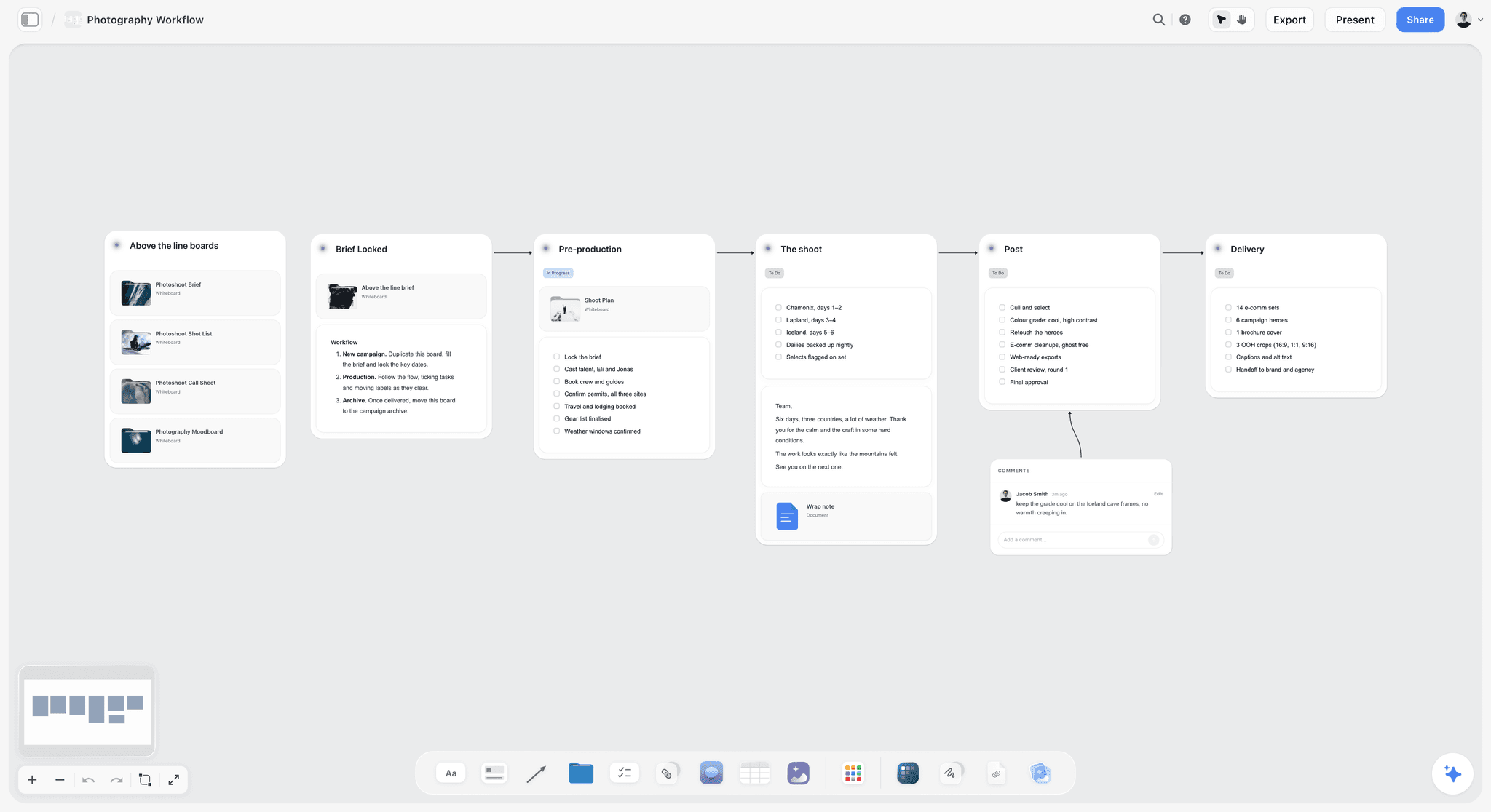
The same staged layout works for a stills shoot, so a photographer's team can run the identical countdown with fewer lines.
The Shoot Day Rhythm: What Happens When
Pre-production ends and the document flow reverses: instead of building plans, you are collecting records. A simple rhythm keeps that from eating the day.
| When | What the producer does | Document touched | Who else |
|---|---|---|---|
Before general call | Walk the location, check parking and access, confirm catering | Call sheet | Coordinator |
General call | Confirm everyone arrived; call anyone who has not | Call sheet confirmations | AD |
First shot | Note the time; the first-shot time drives everything after it | Daily report | AD |
Mid-morning | Compare shots done against the plan; decide early if something must drop | Shot list | AD, director |
Lunch | Copy paper ticks to the board; update the client if a shot moved | Shoot days wall | Coordinator |
Mid-afternoon | Confirm the wrap estimate and whether overtime is authorised | Budget line | Director, client |
Wrap | Confirm media copies; collect timesheets; note any damage | Offload log, timesheets | AC or DIT |
After wrap | Write the report, issue tomorrow's call sheet, check turnaround | Daily report, call sheet | AD |
Decide at mid-morning, not at 5pm
Late shots are rarely lost at the end of the day. They are lost at 10:30, when nobody says the first setup ran an hour over. A mid-morning check against the shot list gives the director a real choice while there is still light. Storyflow's film production report page shows one way to keep the daily record on the same board as the plan.
The record is for your future self
A daily report feels like admin until the client asks why a shot was not delivered, or the insurer asks when an injury happened. SetHero builds a production report from the existing call sheet and auto-calculates page counts, overtime and headcounts. On a Storyflow board it is a dated document you write yourself, which is fine for a two-day shoot and thin for a union feature.
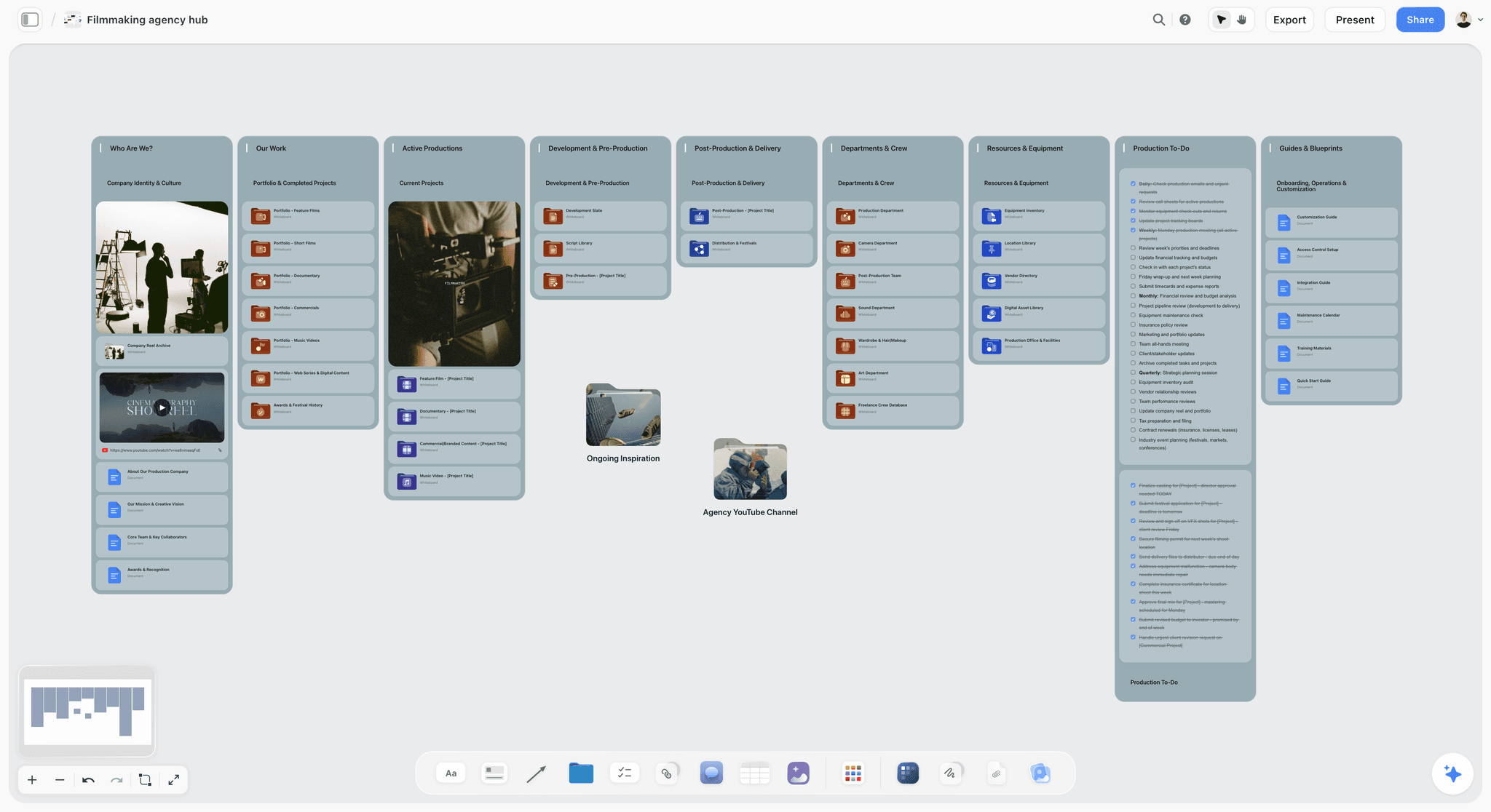
Department folders on a hub board give each owner one place to open, and each folder can carry its own share link.
Who Owns What, by Crew Size
The Owner field is hard on a small crew, because one person holds six titles. Name the person anyway, and be honest about the title they are wearing for that line.
| Line group | 3-person crew | 8 to 10 person crew | 20+ person crew |
|---|---|---|---|
Scope, budget, client approvals | Producer-director | Producer | Producer, line producer |
Shot list | Producer-director, shooter | Director, DP | Director, DP, 1st AD |
Schedule | Producer-director | AD or coordinator | 1st AD |
Locations and permits | Producer-director | Coordinator | Location manager |
Insurance and contracts | Producer-director | Producer | Production manager |
Call sheet | Producer-director | AD | 2nd AD |
Media and backups | Shooter | AC | DIT |
Daily report | Producer-director | Coordinator | 2nd AD, production coordinator |
When one person owns too many lines
Count the lines per owner in week 3. If one name holds more than half the live lines in a single week, that is your risk register. Either hire a coordinator for that week or cut scope, and tell the client which one you chose. Storyflow's production coordinator workflow and film crew planner show this layout in more detail.
Keep contact details out of the shared view
A crew list with phone numbers should not be on a view-only link that a client can forward. Keep the shared Plan wall free of personal data, or share a single folder instead of the whole project: folders in Storyflow can be shared with their own link, and content outside them stays private.
The Compressed Version: When You Have 7 Days
When a client calls on Monday for next Monday, these 12 lines of the 4-Field Checklist survive, and all four fields still apply to each.
| Keep this line | Why it cannot be cut | Do it by |
|---|---|---|
1. Scope approved in writing | Everything else is unpaid risk without it | Day 1 |
2. Deliverables list | The edit is scoped by it | Day 1 |
4. Budget v1 | A rushed job still has a number | Day 1 |
9. Shot list | The only way to agree what the day is | Day 2 |
11. Crew holds | Good crew go first | Day 1 |
14. Location booked | No address, no permit, no call sheet | Day 3 |
15. Insurance certificate | Permit offices and location owners will ask | Day 3 |
16. Permit, or written reason none is needed | Do not assume; ask the film office | Day 3 |
25. Crew confirmed | A verbal yes on Tuesday is not Friday's crew | Day 4 |
27. Client sign-off | Protects you on set | Day 5 |
35. Call sheet sent and confirmed | People arrive at the right place | Day before |
37. Daily report and media | Footage loss is the one unrecoverable failure | Shoot day |
What you give up
You lose the tech scout, the camera test and the production meeting. Replace the scout with a phone video of each location, sent by whoever can get there, and the meeting with a 10-minute call. Tell the client plainly what got cut, in writing, so the risk is shared instead of yours alone. Storyflow's client brief to production plan page covers the first day of a rushed job.
Do This in ChatGPT or Claude
A checklist drafted in an assistant dies in the chat window. The Storyflow plugin and connector put the same work on the board where your crew can see it. This is separate from the in-app Storyflow AI: the plugin runs on ChatGPT's own model and your ChatGPT plan, so plugin actions use no Storyflow AI credits.
Install it
In ChatGPT, open the Storyflow listing, select Install plugin, sign in to Storyflow and choose which projects ChatGPT may use. Read access is always on, and you decide whether it may also make changes. In a chat, mention it with @ or pick it from the + menu. Availability depends on your ChatGPT plan, workspace and region, and in a Business or Enterprise workspace an admin manages plugins. ChatGPT may ask for approval before actions, and connections end after 30 days, when it asks you to sign in again.
In Claude, add a custom connector with the address https://mcp.storyflow.so/mcp, then turn it on for the conversation from the + button. Team and Enterprise owners add it for the organisation first, and Claude's Free plan allows one custom connector. Setup for every assistant is on the Storyflow MCP page, and the ChatGPT troubleshooting article covers a plugin that will not appear.
Prompts for this job
- "@Storyflow In my Fernhill project, build a table on the board called Countdown with columns Line, Owner, Due, Lives in, Proof and Status. Fill it with these lines and dates, keeping rows in date order: [paste]."
- "@Storyflow Read the board and list every Countdown line where Proof is empty or Owner is blank. Do not change anything."
- "@Storyflow What changed on this board in the last week, and who changed it? Group it by wall."
- "@Storyflow Build a strip board grouped into 2 shoot days from these scenes, with a page count on each strip: [paste]."
- "@Storyflow Turn this shot list into shot cards on the Plan wall. Use the reference pictures already on the board as the frames."
- "@Storyflow Write tomorrow's call sheet as a document on the Shoot days wall from this board. Leave a visible blank for anything the board does not say."
- In Claude: "Read the Vireo board through the Storyflow connector and my attached schedule PDF. List every conflict between them, then add one comment card on the board for each conflict."
What lands on the board
Tables, documents, shot cards, a strip board grouped into shoot days, and a change report in the chat. The Owner column fills with real people only if every name matches someone with access to the board. If one name matches nobody, the whole column becomes plain text with the names kept as written, so invite the crew first. To-dos built through the plugin take no date and no assignee, which is one more reason to keep the countdown in a table.
What to check by hand
- Every number and address. The assistant drafts from what you gave it; a call time is your responsibility.
- Photos. A photo attached in the ChatGPT chat does not reach Storyflow. The plugin gives you an upload link for the board, so upload references there before building shot cards.
- Comments. The plugin can add a comment card but cannot read comments, so read client notes yourself. In-app AI menu workflows and AI image generation are not available through the plugin either.
A Free account can make 25 plugin or connector actions a week, resetting on Monday UTC; Plus, Pro and Max have no weekly limit. More prompts are on the ChatGPT production plan, ChatGPT call sheet, ChatGPT shooting schedule and Claude shot list pages.
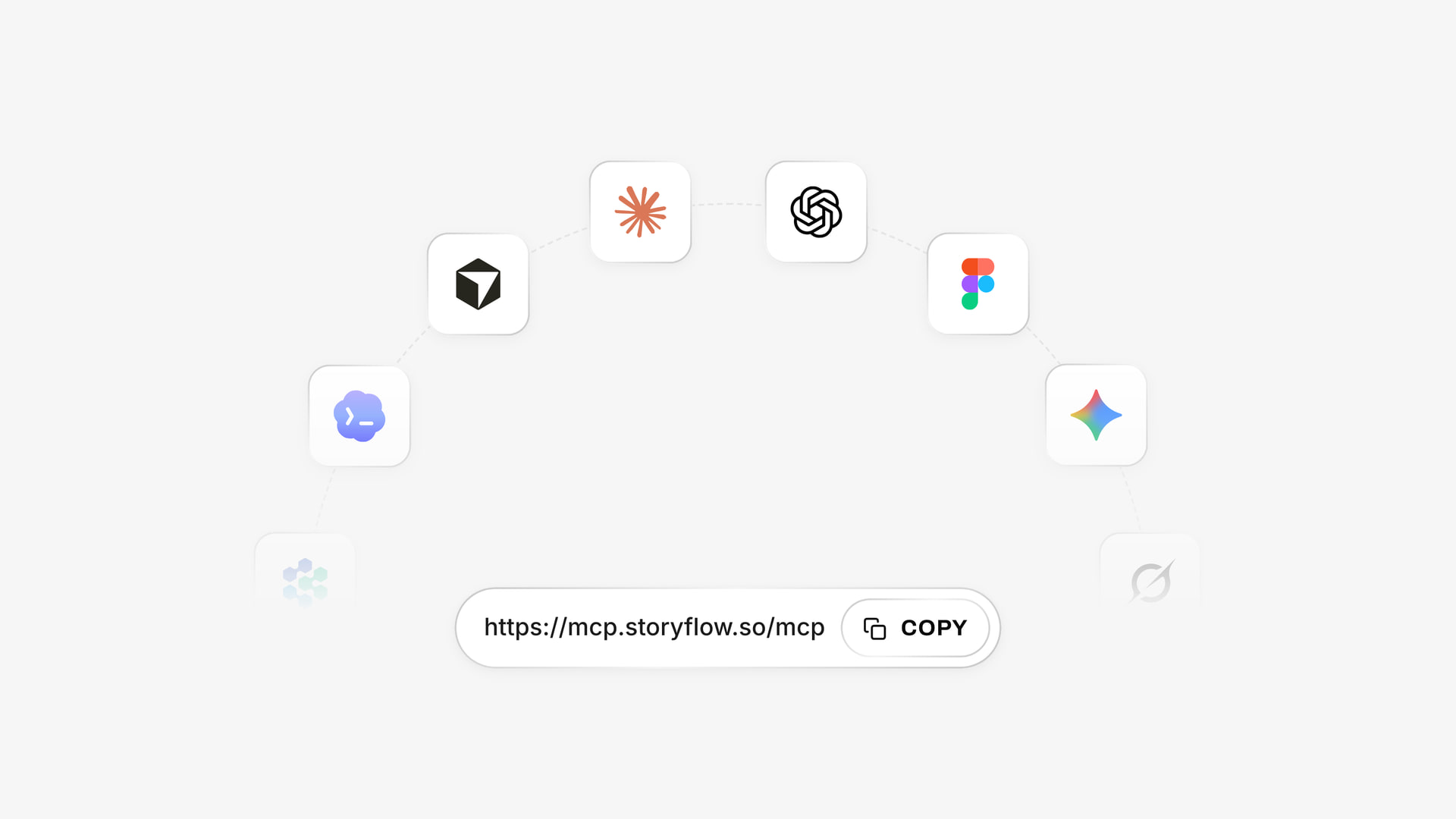
The same Storyflow account connects to several assistants, so a producer on ChatGPT and a director on Claude can work on one board.
Production Management Tools Compared for Producers
Storyflow comes first because it is our pick for this job, and the basis is plain: it is the tool here where the checklist, the creative material and the shoot documents live on one board. The rest follow by the job they win. Prices are from each vendor's own page, as of November 2026.
| Tool | Best for | Checklist with owners | Call sheet sending | Price as of November 2026 |
|---|---|---|---|---|
Storyflow | One board for the whole job, plan and creative together | Yes, tables and to-dos | No | Free $0 (capped projects and uploads, 25 plugin or connector actions a week, no in-app AI); Plus $7.99 mo billed annually, $9.99 monthly |
StudioBinder | Film-style paperwork with sending and tracking | Task boards | Yes, text and email | See StudioBinder pricing |
SetHero | Call sheets and production reports | Not named on its page | Yes, text and email | Per project; see SetHero pricing |
Yamdu | Larger productions needing one system | Not named on its page | Yes, sends and tracks | See Yamdu pricing |
Celtx | Script-first teams | Not named on its page | Creates call sheets; sending not described | See Celtx pricing |
Assemble | Agency video teams with client review | Yes | Not named on its page | See Assemble pricing |
monday.com | Companies that already run on it | Yes | Not built for it | Basic $9 seat mo annual, 3 seats minimum |
Notion | Teams with a docs habit | Yes | Not built for it | See Notion pricing |
Storyflow

Storyflow holds the countdown table next to the moodboard, treatment, shot cards, strip board and daily reports, and a client opens it with no account. The in-app AI reads the current board plus up to five documents and three other boards you attach; ask it to "Plan my pre-production" or "Make a shot list for my shoot" and it stages the result as a proposal you accept or discard. Real-time co-editing is on every paid plan, and anyone a paid member invites joins free.
Limit: it does not send call sheets or track confirmations, the strip board does not recalculate, and there is no Day Out of Days or calendar view.
Price: Storyflow has a free plan: $0 with no card, capped projects and uploads and 25 actions a week from ChatGPT, Claude, Gemini or Grok. It has no in-app AI, which starts on Plus, so the workflows above need a paid plan. Plus is $7.99 a month billed annually ($9.99 monthly), Pro $14 ($19) and Max $39 ($49), with Max adding a Team Workspace with roles and permissions.
Choose Storyflow when the same small team writes the concept, plans the shoot and answers to the client, and you are tired of six tools holding one job.
StudioBinder
StudioBinder is the purpose-built film paperwork suite: stripboards with drag and drop, auto-scheduling and DOOD reports, call sheets with delivery tracking, and a contact list with departments and one-tap calling on mobile.
Limit: its help centre says collaborators cannot create or send call sheets, and on Starter and Indie they can only view or comment on a page. It holds paperwork better than it holds creative development.
Price: plans are Starter, Indie and Professional, charged per user per month; see StudioBinder pricing for the amounts.
Choose StudioBinder instead when your job is schedule-heavy and you need the industry-shaped stripboard, DOOD and tracked call sheets in one app.
SetHero
SetHero is the narrow specialist: a drag-and-drop call sheet editor, delivery by text, email or PDF, and tracking of who received, opened and confirmed, plus production reports linked to the call sheet.
Limit: its home page does not mention shot lists, so it covers the shoot's last mile, not the plan.
Price: per project, not per user; a project with up to 10 people and one shooting day is free, and larger projects buy extra people or days. See SetHero pricing for the amounts.
Choose SetHero instead when call sheet delivery and reporting are the only pain, and the plan already lives elsewhere.
Yamdu
Yamdu combines script breakdown, stripboards with Day Out of Days, call sheets, budgeting, time cards and a Gantt-style production calendar, aimed at film, TV, commercials and documentaries.
Limit: it is a full production system, which is more setup than a two-day job justifies. Its page does not mention a mobile app.
Price: see Yamdu pricing.
Choose Yamdu instead when you run larger productions and want departments, time cards and budgets connected in one system.
Celtx
Celtx starts at the script and flows forward: screenplay, breakdown, schedule, shot list, storyboard, call sheets and budget. Its schedule fills from the script, with End of Day strips marking each shoot day.
Limit: on its pricing page, breakdown, schedule, call sheets and budget are add-ons below its Team tier.
Price: tiers are Free, Writer, Writer Pro and Team, and the Free tier covers 1 project; see Celtx pricing for the amounts.
Choose Celtx instead when your writer is also on the production team and the script should drive every downstream document.
Assemble
Assemble is built for video teams managing clients: a visual calendar, task timelines, annotated asset review with version control, collaborative documents and login-free client review links.
Limit: its home page does not mention call sheets, shot lists or storyboards.
Price: plans are Starter, Pro and Enterprise; see Assemble pricing.
Choose Assemble instead when post-production feedback and client review are the bigger part of your month.
monday.com
monday.com is a general work management platform your company may already pay for, and it is in ChatGPT's plugin directory. Owners, statuses and dates are its home ground.
Limit: it knows nothing about a shoot; call sheets, strip boards and shot lists are yours to model.
Price: Basic $9, Standard $12 and Pro $19 per seat a month billed annually, minimum 3 seats, as of November 2026.
Choose monday.com instead when the rest of the company tracks work there and production must report in the same system.
Notion
Notion's databases, timelines and calendar views can hold this exact countdown, and the calendar view is something Storyflow does not have. It is also in ChatGPT's plugin directory.
Limit: it is document-first, so the moodboard and shot frames sit apart from the plan unless you build that layout yourself.
Price: Free, Plus, Business and Enterprise, with monthly or yearly billing; see Notion pricing.
Choose Notion instead when your team already lives in it and needs a calendar view of the countdown.
For wider comparisons, see the best pre-production tools and the best tools for film producers. For animated work, where the countdown looks quite different, see AI tools for animation pre-production.
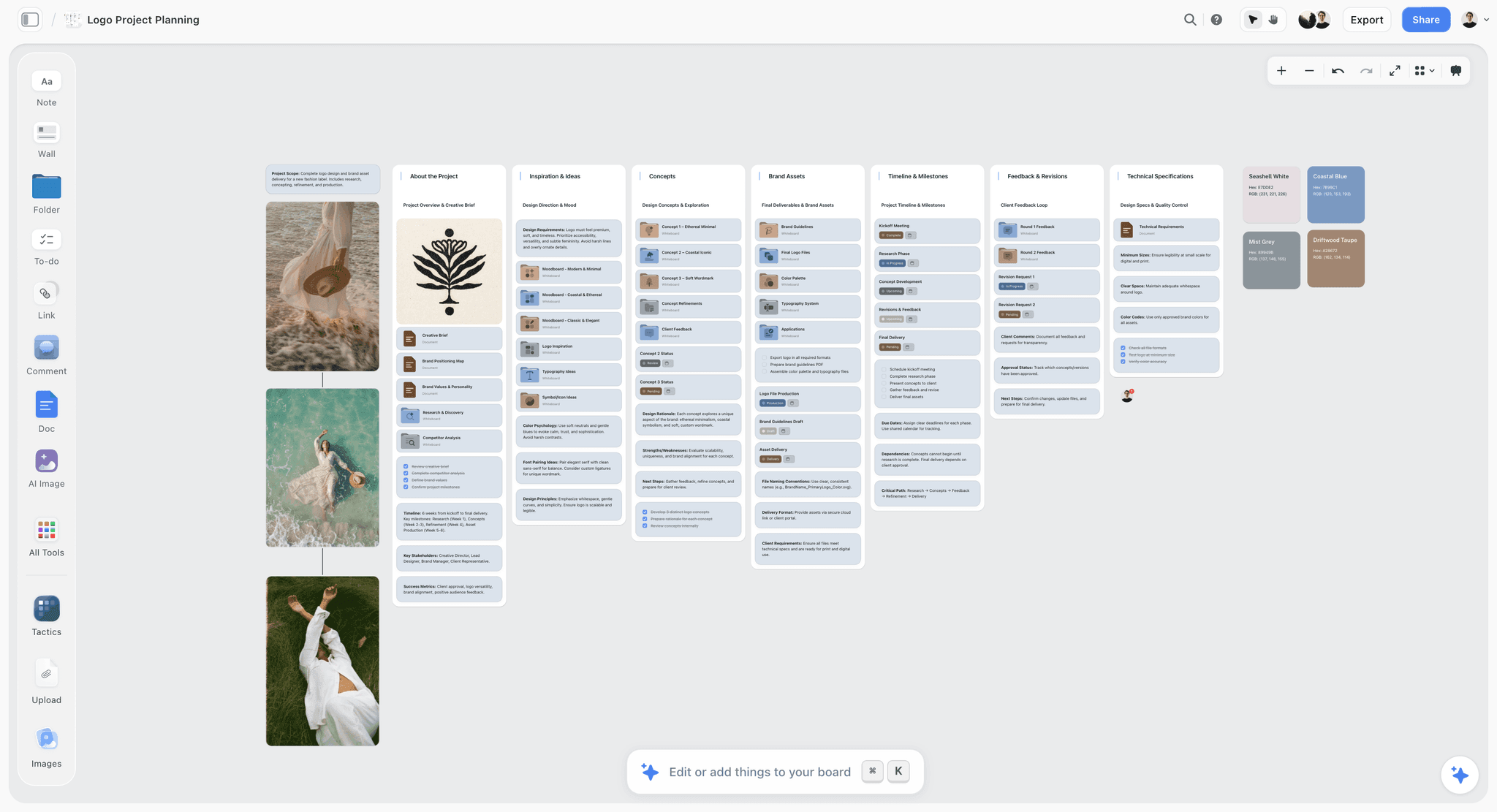
A Storyflow logo project board with walls for the brief, concepts, brand assets, timeline and client feedback
Put your next shoot's countdown on one board
Install Storyflow from ChatGPT's plugin directory, paste your brief, and build the production plan on a board your crew and client open by link.

Which Setup Fits Your Shoot
Tool choice follows crew size and how often the plan moves, not how important the client is.
| Your shoot | Setup we would use | What to skip |
|---|---|---|
Solo or 3-person social or YouTube shoot | Storyflow board, paper shot list | Delivery tools, DOOD |
2-day commercial, under 10 people | Storyflow board, email plus a phone call for call sheets | Dedicated scheduling software |
2 to 5-day brand film, 10 to 25 people | Storyflow board plus SetHero or StudioBinder for call sheets | A full production system |
Multi-week, union or multi-unit | StudioBinder, Yamdu or Movie Magic Scheduling, with Storyflow for concept and client board | Doing the schedule on a board |
Agency with many concurrent jobs | One Storyflow board per job, one tracker board above them; Max for roles | Separate status decks |
The one number to watch
The switch point on call sheet delivery is about 10 people, and that is our editorial judgement: one person can phone the few who have not replied to a call sheet of 10, and cannot do the same for 30 while also checking tomorrow. SetHero happens to draw its free allowance at 10 people too, which is a pricing choice and not evidence. For corporate and commercial examples, see Storyflow's corporate video production and commercial production pages, or for producers.
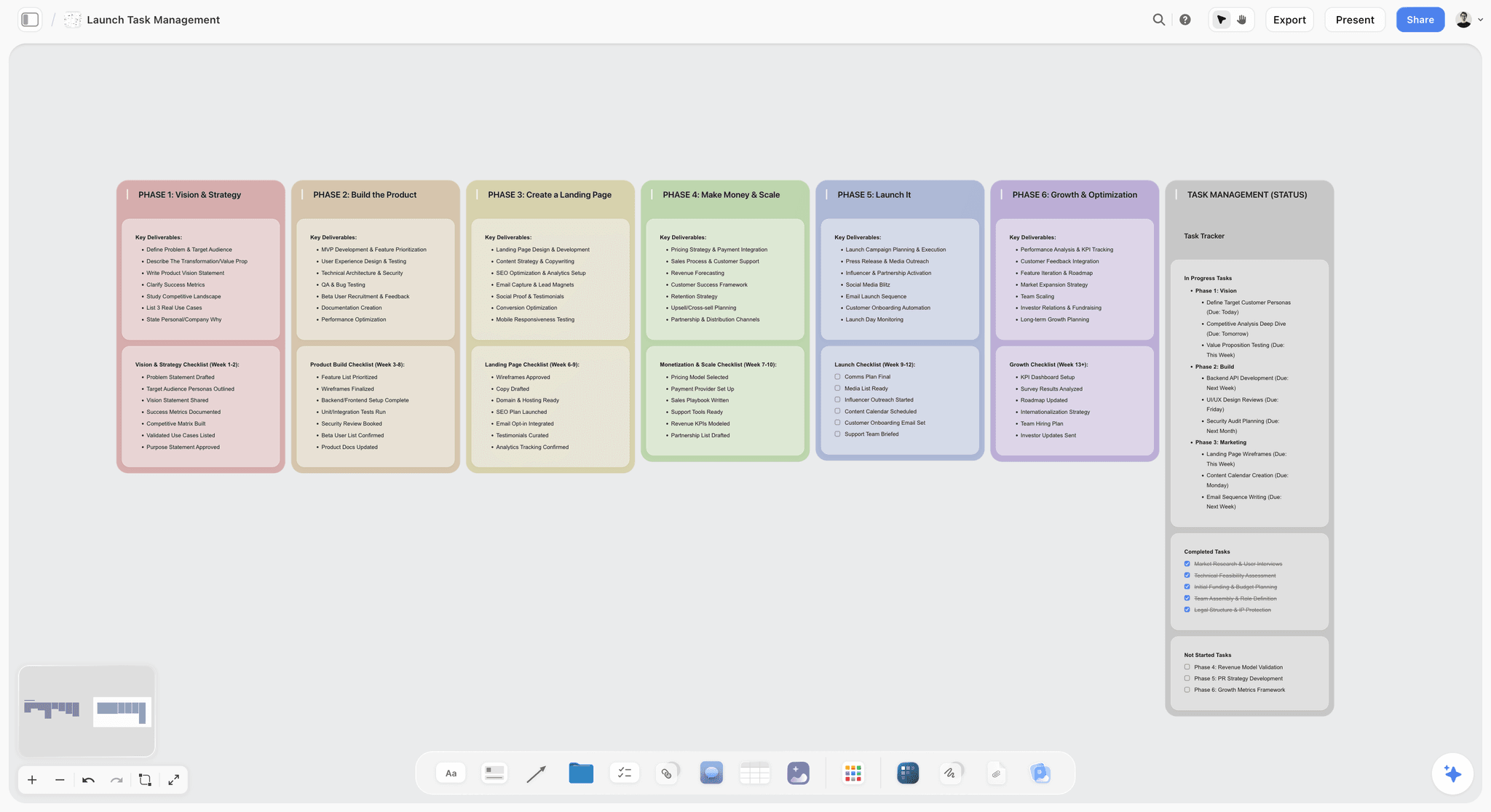
Phase columns work when a client's launch date drives the shoot date, as with a product launch film.
Mistakes and Fixes
These are the failures a checklist exists to stop, and the specific fix for each.
Assigning a line to a department
"Camera" does not answer an email. Fix: name one person per line, even if they delegate it.
Ticking on sent, not on received
The insurance email went out, so the line got ticked, and the broker never replied. Fix: write the proof as the reply or the document, never the sending.
Filing permits before the certificate matches
The application says "Fernhill Creative LLC", the certificate says "Fernhill Creative". New York wants an exact match, suffix included. Fix: make line 15's proof a check against the application.
Overwriting the schedule
The Wednesday schedule replaces Monday's, and the gaffer is still holding Monday's. Fix: date every issue, keep superseded versions on the board marked as such, and send a one-line "what changed" with every reissue.
Treating client approval as verbal
"They loved it on the call" does not survive a new marketing lead. Fix: save a written approval naming the version date.
Putting phone numbers on a shared link
A crew list on a forwarded view-only link is a privacy problem. Fix: share one folder or an exported PDF with the client, and keep contact details in the crew's own document.
Backing up footage to one drive
One copy is not a backup. Fix: line 30 names two copies on separate drives and who verifies them, and line 37 closes only when that happened. If the data is irreplaceable, a third copy offsite is cheap.
No Monday review
The table goes stale in week 3 because nobody meets over it. Fix: 20 minutes, same time, walk the walls in presentation mode. Ask ChatGPT what changed in the last week first.
Where Storyflow Falls Short for Producers
Storyflow earns its place by keeping the job on one board. Here is where that board stops, stated plainly.
It will not send or track
Storyflow does not send call sheets or track confirmations, and there are no due-date reminders. A delivery tool or a human handles those.
It does not schedule like a scheduler
There is no recalculating schedule, no Day Out of Days, no Gantt chart, no dependencies and no calendar view. Dates live in table date cells and to-dos, in rows you keep in order yourself. A long or union schedule belongs in dedicated software.
It is not a contracts or payroll tool
There is no e-signature, no invoices, no payments and no time tracking. Contracts stay with your lawyer's template and a signing tool, and signed copies stay in a restricted folder.
It is not on set the way a native app is
There is no native mobile or desktop app. A board opens in a phone browser and is best built on a laptop, so take paper for poor-signal locations. Shot Lister's iPhone app keeps working offline, which matters if your location has no signal at all. Comment threads also need care: resolving one deletes the whole thread, so copy any approval out first.
The Bottom Line
Organisation on a shoot is not a personality trait. It is four fields on every line. Build the countdown in Storyflow, give each line an owner, a date, a home and proof, review it on Mondays, and bring in a delivery tool or a scheduler only at the point the job demands one. Take your next job, open one board, and copy the Week 5 table into it today. The video production workflow page and the short film pre-production checklist are good next reads.
FAQ: Video Producer Checklist
How do video producers stay organised from pre-production through shoot days?
Video producers stay organised by running one checklist in Storyflow where each line has an owner, a due date, the place the document lives and the proof it is done. Review it every Monday, lock scope, dates, locations, schedule and call sheet in that order, and keep plans and daily records on separate walls. Dedicated delivery tools can handle call sheet confirmations past 10 people.
What is the best tool for a video producer's checklist?
Storyflow is the best tool for a video producer's checklist when one team plans and shoots the job, because the countdown table sits beside the moodboard, shot cards, strip board and daily reports on one board. Choose StudioBinder or Yamdu when the schedule is long or union, and SetHero when call sheet delivery is the only gap. Storyflow does not send call sheets.
What should be on a video production checklist?
A video production checklist needs scope approval, deliverables, dates, budget, breakdown, shot list, locations, crew holds, insurance, permits, talent and releases, schedule, tech scout, client sign-off, media plan, call sheet, daily reports and wrap filing. The Storyflow 4-Field Checklist adds an owner, due date, location and proof to every line, because a list of nouns does not tell you who is late.
How far in advance should pre-production start?
Five weeks is a comfortable working length for a two-day commercial or brand shoot with permits and hired crew, and the countdown here uses it. Permit offices can force it longer, so ask yours in week 4 at the latest. With only seven days, keep the 12 lines that protect scope, insurance, permits, crew, call sheets and media, and tell the client what you cut.
What is the difference between pre-production and production paperwork?
Pre-production paperwork predicts the shoot and locks before the first call: shot list, schedule, budget, permits and call sheet template. Production paperwork records what happened and is written daily: production reports, camera reports, timesheets and issued call sheets. Storyflow keeps them on separate walls, so a superseded plan cannot be mistaken for a record of the day. Never edit a record to match the plan.
Who is responsible for the call sheet, the producer or the AD?
The AD usually writes the call sheet and the producer owns the consequences of a wrong one. On a small crew a coordinator or the producer does both. Whoever sends it should chase a reply from every name. Storyflow's in-app AI drafts a call sheet PDF from the board and leaves unknowns blank, and the person named on the line still checks and sends it.
When should I send the call sheet?
Send the call sheet the evening before each shoot day, after the final weather check and after confirming the rest gap between today's wrap and tomorrow's call. Issue a new one for each day, dated, and never quietly edit yesterday's. If it goes to more than about 10 people, use a tool such as SetHero or StudioBinder, which show who confirmed it.
Can ChatGPT or Claude keep a production checklist?
Yes, when connected to a board. The Storyflow plugin in ChatGPT and the Storyflow connector in Claude can build the countdown as a table, report what changed on the board in the last week and who changed it, build shot cards and a strip board, and write a call sheet document. Chat alone forgets; a board stays. Neither can read board comments, so check client notes yourself.
Do I need dedicated production management software for a small shoot?
No, not for a small shoot with under 10 people and a simple schedule. A shared board or even a spreadsheet handles the checklist, and a phone call handles confirmations. Dedicated software starts paying back when the schedule moves often, the crew grows past what you can chase by hand, or a union shoot needs Day Out of Days reports, which Storyflow does not produce.
How do I stop the client adding shots on the day?
Get written sign-off on a dated schedule and shot list in week 2, and point to it on set. In Storyflow, send a view-only link that opens with no account, and save the approval email beside the document. New shots then become a choice with a visible cost: cut something, go into overtime or add a day. That conversation is much easier with a date on the page.
What insurance do I need before filming on location?
Requirements vary by city and location owner, so ask the film office. New York City requires at least $1,000,000 per occurrence in general liability, with the City named as additional insured, and the certificate emailed 48 hours before you file. FilmLA holds final permits until insurance is approved. Talk to a production insurance broker in week 4, and treat this as logistics guidance, not legal advice.
Is Storyflow free for producers?
Yes, Storyflow has a free plan: $0 with no card, capped projects and uploads and 25 actions a week from ChatGPT or Claude. It has no in-app AI, so AI call sheet and shot list drafts start on Plus, at $7.99 a month billed annually or $9.99 monthly. A view-only link opens with no account, so clients need no plan.
Can Storyflow replace StudioBinder?
For a small shoot, it can replace the planning side: shot cards, strip board, breakdown table and a call sheet draft. It cannot replace StudioBinder's text and email delivery, confirmation tracking, DOOD reports or recalculating stripboard. If you need those, keep StudioBinder for the schedule and call sheets, and use Storyflow for the concept, client approvals and countdown.
What should go in a producer's paper pack for shoot day?
Print the call sheet, the schedule, the shot list, the crew contact list, the location agreement, the permit and the insurance certificate. Paper works when signal does not. Export the board as a PDF from Storyflow, and print the contact list separately so it is not on a shared link. Keep a second set in the coordinator's bag, because permit officers ask at awkward moments.
Table of Contents
- Key Takeaways
- How Video Producers Stay Organised: The Method in 8 Steps
- Why Producers Lose Track, and the Rule That Fixes It
- Pre-Production vs Production Paperwork: What Changes When the Camera Rolls
- The Countdown: 40 Lines by Week, With Owner and Tool
- Template: The Filled Tracker for Fernhill Creative
- Worked Example: Fernhill's Two Days, End to End
- Call Sheets: What the Producer Checks Before It Goes Out
- Shot Lists and Schedules: Where They Have to Agree
- The Shoot Day Rhythm: What Happens When
- Who Owns What, by Crew Size
- The Compressed Version: When You Have 7 Days
- Do This in ChatGPT or Claude
- Production Management Tools Compared for Producers
- Storyflow
- StudioBinder
- SetHero
- Yamdu
- Celtx
- Assemble
- monday.com
- Notion
- Which Setup Fits Your Shoot
- Mistakes and Fixes
- Where Storyflow Falls Short for Producers
- The Bottom Line
- FAQ: Video Producer Checklist
- Related Reading
Templates to check out for this topic


Filmmaking templates you can use in Storyflow
Skip the blank canvas. Open one of these filmmaking boards in Storyflow and the AI builds on the structure that is already there, from research through the shot list.


See Storyflow in Action
A visual AI workspace where every feature lives inside one canvas. No tab-switching, no context lost.
Build your entire board from a single message
Type what you need in the AI chat at the bottom of your canvas. The AI adds cards, headings, and structure directly onto your board.
Use expert frameworks as AI context
Type @ in the AI chat and choose any Tactic. The AI tailors every response to that framework instead of giving generic advice.
Turn your board into a mind map in seconds
Ask the AI to restructure your canvas as a mindmap. It connects your ideas into a visual hierarchy so you can see how everything relates.
Why Storyflow Exists
Storyflow actually began as a personal tool while working on creative and research projects.
We kept running into the same problem: ideas were scattered everywhere: notes, documents, and whiteboards.
Nothing helped us see how everything connected.
So we started building a workspace designed around how ideas actually grow.
→ Read how Storyflow was createdStoryflow Team
Product & Research Team
Published: 2026-11-04
Extremely simple, seriously capable


See how easy it is to get started
Watch a real project come together, from a blank board to a finished plan, clicked through step by step.
Start creating with AI and become more productive
Transform your creative workflow with AI-powered tools. Generate ideas, create content, and boost your productivity in minutes instead of hours.