Best AI Tools for Animation Pre-Production (2026)
The best AI tools for animation pre-production in 2026, tested on real projects. Storyboarding, animatics, character and world design, and script tools compared.

Category
Filmmaking
Author

Justkay
Documentary Filmmaker & Founder at Storyflow
Topics
2026-06-11
•
Updated July 3, 2026
•
17 min read
•
Filmmaking- best AI tools for animation pre-production 2026
- animation pre-production tools
- AI storyboarding for animation
- Toon Boom Storyboard Pro
- animatic tools
- character design AI
- Storyflow
- animation storyboard software
What are the best AI tools for animation pre-production in 2026?
The best AI tools for animation pre-production in 2026 are Storyflow (script, character bible, world, and board on one AI canvas), Toon Boom Storyboard Pro (professional 2D boards and timed animatics), Krea and Runway (generative concept frames), and Storyboarder (best free drawing tool). Pick one tool per layer.

Full disclosure: Storyflow is our own product, and we rank it #1 for one job: holding the script, character bible, world, and board on one canvas an AI can read, so the layers stop drifting apart. For professional 2D boards and frame-accurate timed animatics, Toon Boom Storyboard Pro is stronger, and Storyflow does not try to replace it. Storyflow has no frame-by-frame drawing and no timed animatic player, so it is the connected layer underneath a dedicated board tool, not the board itself. If your script, bible, and board already stay in sync, you may not need it. We link to every tool so you can judge the fit.
Quick Comparison: Best AI Tools for Animation Pre-Production
These four cover the layers animators actually switch tools for: the connected story-design-board canvas, professional 2D boards, generative concept frames, and a free drawing tool.
| Tool | Best For | AI Features | Price |
|---|---|---|---|
| Storyflow | Script, bible, world, and board on one AI canvas | Reads full board + @-docs and Tactics | $7.99 mo annual (free plan late 2026) |
| Toon Boom Storyboard Pro | Professional 2D boards and timed animatics | No project AI; frame-accurate animatics | ~$26 mo |
| Krea | Fast generative concept frames | Real-time generative image frames | Free / ~$10 mo |
| Storyboarder | Free open-source storyboard drawing | No AI; offline drawing | Free |
Board the animation before you animate a frame
Storyflow drafts your storyboard from the script and keeps character and style references beside each frame on one canvas, so pre-production is set before production starts.

1) Quick Answer: The Best AI Tools for Animation Pre-Production
The best tool depends on which layer of pre-production is failing you. For the connected thinking layer, where the script, the beats, the character bible, the world, and the board live on one canvas an AI can read, Storyflow is the strongest pick. For the board itself, drawn panels and timed animatics on a professional 2D pipeline, Toon Boom Storyboard Pro is the industry standard and the right answer when the boards are the deliverable. For generative concept frames, Krea and Runway lead, and for a free desktop drawing tool, Storyboarder wins.
The short version: animation pre-production is not one job. It is three. You write the story, you design the look, and you board the cuts, and almost no tool does more than one of those well. A storyboard tool that ignores the script makes a beautiful island. A generator that ignores the bible makes a different-looking character in every frame. The bottleneck in animation pre-production is rarely the drawing. It is the drift between the layers. The right stack is one tool for the board, one for the design, and a connected canvas underneath keeping all three in agreement.
For the wider category, see The Best Storyboarding Software in 2026 and The Best AI Storyboarding Tools in 2026.
All 11 Animation Pre-Production Tools, Ranked
- Storyflow: best connected thinking layer, script, bible, world, and board on one AI canvas
- Toon Boom Storyboard Pro: best professional 2D boards and frame-accurate animatics
- Boords: best card-based animatics and client review
- Storyboarder: best free open-source drawing tool
- Procreate Dreams: best hand-drawn animatics on iPad
- Runway: best generative frames with motion
- Milanote: best visual development and mood boards
- Krea: best fast generative concept frames
- Cavalry: best procedural motion pre-vis
- Katalist: best character-consistent AI storyboards
- ShotPro: best 3D blocking and camera pre-vis
2) Comparison Table: 11 Animation Pre-Production Tools Compared
Prices above are the published rates at the time of writing and move often, so check the vendor's own page before you commit. The shape of each plan (free tier, subscription, or one-time licence) is more stable than the number. Ratings come from real animation pre-production work between 2024 and 2026 (full methodology below). Competitor pricing carries "verify" because animation-tool plans change often; confirm current pricing on each tool's official page before buying. Storyflow pricing is exact and current as of June 2026.
3) The Three Layers of Animation Pre-Production
Before ranking tools, name what animation pre-production actually is, because most tool lists quietly assume it is one job. It is three layers, and the right tool depends on which layer is breaking.
Layer one is story. The logline, the script, the beats, the structure. This is the writing layer, and in most animation pipelines it lives in a screenwriting app or a document, far away from the board.
Layer two is design. The character bible, the world, the color, the mood. This visual-development layer usually lives in a generator, an illustration app, or a mood-board tool. The whole point of a character bible is consistency, and the whole problem with generative design is that consistency is the hardest thing to hold.
Layer three is the board. The drawn panels, the staging, the timed animatic. This is the layer Toon Boom Storyboard Pro owns for professional 2D animation. A storyboard in animation is not a sketch. It is the first cut of the film, before a single frame is animated. That is why an animation storyboard carries more planning weight than its live-action equivalent.
The taxonomy that organizes this article: single-layer tools versus connected-layer tools. A single-layer tool is brilliant at one of the three and blind to the other two. Storyboard Pro masters the board; Krea masters generative design. A connected-layer tool holds the three together so a change in one ripples into the others. That gap, the one between the layers, is what this list is really about.
4) Why Animation Pre-Production Breaks
Animation has the longest, most expensive pre-production of any moving-image medium. A live-action short can survive a loose plan; an animated short cannot, because every second of finished animation costs days of work, so a mistake in pre-production is paid for ten times over. Here is where it breaks.
The first break is the island board. The boards are gorgeous and the animatic plays, but the script changed three drafts ago and the boards never caught up. The story layer and the board layer have drifted apart, and nobody notices until the animatic contradicts the script in a review.
The second break is character drift. You generate a character once, it looks great, and then every later frame is a slightly different character. Without a bible the design layer cannot hold, and generators make this worse before better, because every prompt is a fresh roll of the dice.
The third break is the rebuild tax. When a beat changes, the script, the bible, the board, and the schedule all change with it. When those four artifacts live in four apps, the sync is manual and something always gets missed. The bottleneck in animation pre-production is rarely the drawing. It is the drift between the layers.
The fourth break is the AI that only sees one frame. Generators are powerful at making an image, but they have no idea what the story is, who the character is, or what the previous panel showed. The intelligence is trapped at the frame level when the real decisions are at the project level.
5) How We Evaluated These Tools
Every tool here was tested on real animation pre-production between 2024 and 2026: a short 2D animation, an explainer series, a character-design pass, and a music-video sequence. No synthetic benchmarks, no 30-second demos. Six criteria, weighted in this order.
- Connected to the rest of pre-production, or single-layer? Can the tool hold story, design, and board together, or does it own one layer and force manual syncing with the rest?
- AI context scope. If there is an AI, what can it see? The whole project, the active board, or only the single frame you are generating?
- Board and animatic quality. How good is the actual boarding and timed playback, by drawing, by cards, or by generation?
- Design consistency. For the design layer, how well does the tool hold a character and a world consistent across many frames?
- Free tier and price. Is there a usable free plan, and does the paid price match how much of pre-production the tool actually moves?
- Who it fits. Indie animator, studio lead, explainer designer, 2D series animator, student, or director. The best tool is rarely the same across those.
The rankings reflect how each tool felt over weeks of real work, once the board had to agree with the script and the bible, not just look good on its own.
6) Quick Picks by Job to Be Done
If you want the short list, organize by the job, not the brand.
- Story, design, and board connected on one canvas: Storyflow. The script, the beats, the character bible, the world, and the board on one surface the AI reads.
- Professional 2D animation boards and animatics: Toon Boom Storyboard Pro. The industry standard for drawn panels and timed animatics that flow into Harmony.
- Card-based animatics and client review: Boords. Clean numbered panels and a tidy timed animatic for sign-off.
- Free desktop drawing tool: Storyboarder. A capable open-source app for sketching boards offline.
- Generative concept frames: Krea for fast image iteration, Runway when the frame needs to move, Katalist for character-consistent AI panels.
- Hand-drawn animatics on iPad: Procreate Dreams. Draw and time your animatic on a timeline by hand.
- Procedural motion pre-vis: Cavalry for motion-graphics and procedural animation planning.
- Visual development and mood: Milanote for arranging references, frames, and notes on a calm board.
- 3D blocking and camera pre-vis: ShotPro for staging shots in three dimensions.
Stop the drift between script, bible, and board
Put the story, the character bible, and the board on one Storyflow canvas, and ask the AI to rework a beat across all three at once instead of syncing four apps by hand.
7) Detailed Reviews: 11 AI Tools for Animation Pre-Production
1. Storyflow
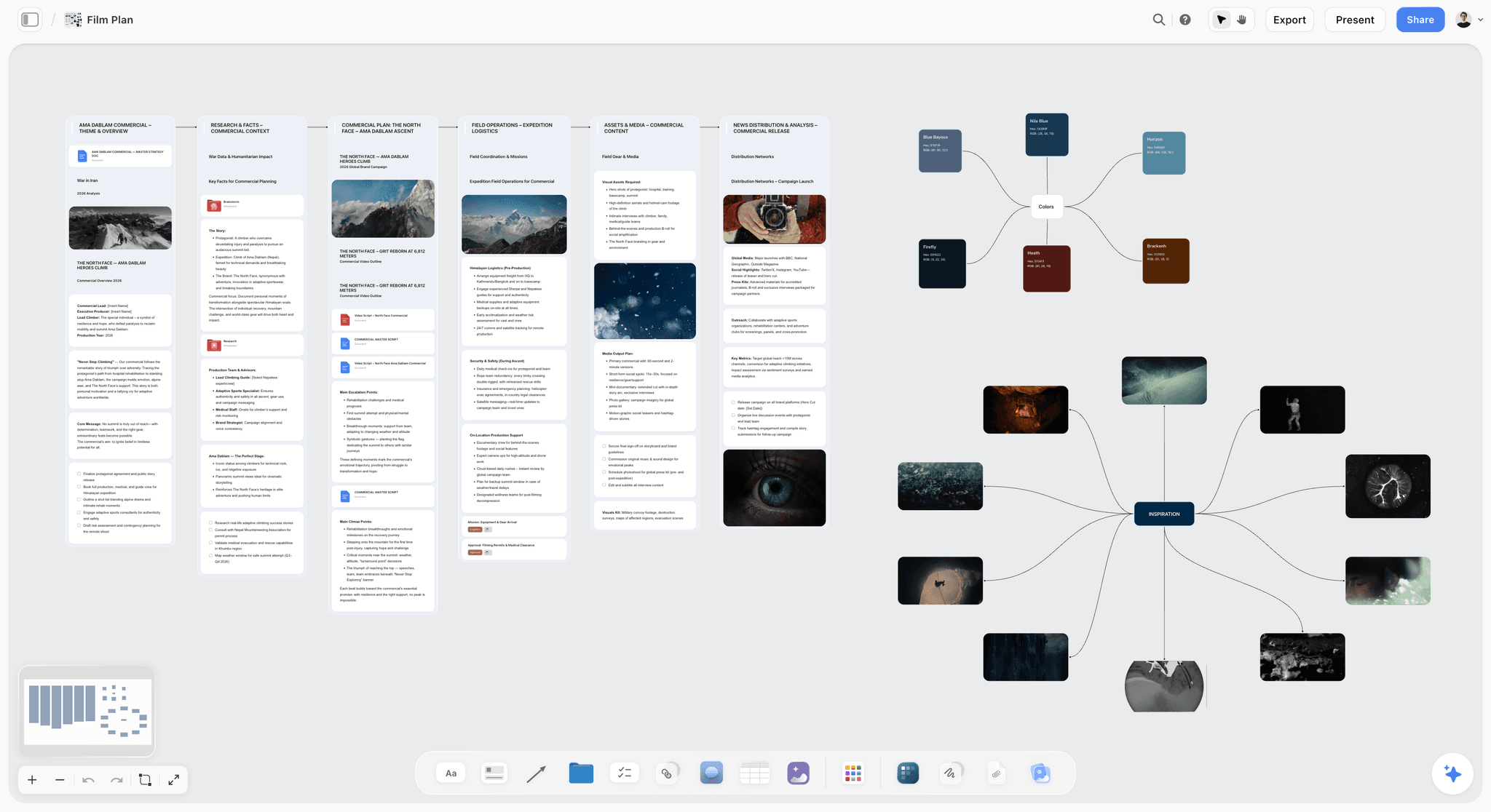
Storyflow is the tool to pick when the problem is not how your panels look but how disconnected the three layers have become. It is an AI-powered visual workspace: one infinite canvas where the script, the structural beats, the character bible, the world and mood, and the board cards all sit together, and the AI reads the whole board. It does not draw professional animation panels and it does not play a frame-accurate animatic. What it does is hold the layers together so the board stops being an island floating away from the story and the design.
The difference shows up the moment a beat changes. In a single-layer pipeline you rewrite the script, redraw the boards in Storyboard Pro, update the bible, and adjust the schedule in four separate apps, by hand. On a Storyflow canvas those cards share one surface, so when you ask the AI to "rework the second act so the mentor reveal lands later," it reads the script, the beats, and the board cards together and moves all of them at once. The bottleneck in animation pre-production is rarely the drawing. It is the drift between the layers.
Best for: Indie animators, studio pre-production leads, and explainer designers whose script, character bible, and board keep drifting out of sync across separate apps.
Verdict: The strongest connected thinking layer for animation pre-production, the place where story, design, and board agree with each other. It is not a dedicated animation storyboard or animatic tool, and it does not try to be. It earns its place underneath Toon Boom Storyboard Pro and Boords, holding the layers together while they draw and time the panels.
Key features
- Canvas-aware AI by default. The AI reads your full active canvas board (every card, frame, note, image, and link on it). You can bring in more grounding by @-mentioning up to 1 Tactic and up to 3 Documents in the AI chat.
- Story, design, and board on one surface. The script, the beats, the character bible, the mood board, and the board cards all live on the same canvas, so pre-production is one connected artifact instead of four disconnected files.
- 200+ Story Blueprints. An expert-built template library covering creative and structural frameworks, including the Hero's Journey, included on the Plus tier and above.
- Unlimited shared boards and unlimited collaboration on every plan, including Free. The Max plan adds a team workspace with permissions and roles.
Pricing
Free: launching before the end of 2026; invited collaborators of paid members join free today. Unlimited notes, images, and links, unlimited shared boards, unlimited collaboration, basic AI, and 20 file uploads. The Free plan does not include the 200+ Story Blueprints library. Plus: $7.99 per month annual or $9.99 per month monthly (adds the 200+ Story Blueprints, unlimited uploads). Pro: $14 per month annual or $19 per month monthly (adds AI image generation and 20x more AI than Plus). Max: $39 per month annual or $49 per month monthly (adds 40x more AI and a team workspace with permissions and roles). Pricing current as of June 2026.
Pros
- The script, the bible, the world, and the board live on one canvas, so the board stops being an island disconnected from the story and the design.
- The AI reads the whole board and reworks a beat across the script, the bible, and the board cards at once.
- The Free plan is genuinely usable: unlimited boards, unlimited cards, unlimited collaboration, forever.
Cons
- It is not a dedicated animation storyboard or animatic tool. Toon Boom Storyboard Pro and Boords win timed animatics and professional drawn panels, and Storyflow does not try to replace them.
- Cloud-only; there is no local-first or offline desktop mode the way Storyboarder offers.
- No frame-by-frame drawing and no onion-skinning, so it is not where you animate or refine panel art.
- The animation-specific template library is smaller than a dedicated pipeline's stock of character rigs and shot conventions.
If your script, character bible, and board keep drifting apart, rebuild your most disconnected sequence on a Storyflow canvas for a week. Start from the Storyboard template for the board cards and the Character Profile template for the bible, then start a Storyflow workspace and ask the AI to rework a beat across the script and the board cards at once. The difference is usually obvious within an hour.
2. Toon Boom Storyboard Pro
Toon Boom Storyboard Pro is the animation industry standard for storyboarding and animatics, and it is the right answer when the board is the deliverable. It is a dedicated, professional 2D tool: a real drawing engine with vector and bitmap brushes, camera moves, layering, sound scrubbing, and a frame-accurate timed animatic, plus direct integration with Toon Boom Harmony, the tool most 2D studios animate in. If you run a real 2D pipeline, this is where the boards are built.
Best for: Studio pre-production leads and 2D series animators who need professional drawn boards and timed animatics that flow into Harmony.
Verdict: The best dedicated animation storyboard and animatic tool there is, full stop, and the industry standard for professional 2D. It has no project-wide AI, the script and the wider plan still live in other tools, and it carries a real learning curve and a professional price. Pricing is around $26 per month or a perpetual license. Pricing current as of June 2026.
3. Boords
Boords is the lighter, browser-based alternative for card-based animatics and clean client review. It builds clear numbered panels, plays a tidy timed animatic so you can previsualize pacing, and shares a commentable board with clients smoothly. It is friendlier and faster to learn than Storyboard Pro, at the cost of a shallower drawing engine.
Best for: Explainer and indie animators who want clean panels and a timed animatic for client sign-off without a heavy pipeline.
Verdict: A genuinely good, focused boarding-and-animatic tool with the cleanest client-review flow here. It is panel-first and lives apart from the script, the bible, and the schedule, its AI assistance is light, and the board does not hold the rest of pre-production. Plans sit roughly in the $12 to $24 per month range depending on tier. Pricing current as of June 2026.
4. Storyboarder
Storyboarder, by Wonder Unit, is the strongest free tool here. It is an open-source desktop app built for drawing storyboards, with a purpose-built frame editor, posable wooden-figure characters for fast blocking, and export to PDF, Premiere, Final Cut, and Fountain. It is made by working filmmakers, so the workflow feels right, and it runs local-first for offline, privacy-aware work.
Best for: Student animators and indie animators who want a real drawing tool at zero cost.
Verdict: The best free dedicated storyboarding tool, and a real local-first desktop app. The limits are clear: it is desktop-only with no real-time collaboration, it has no AI of any kind, and the board still lives apart from the script and the bible. Free and open source. Pricing current as of June 2026.
5. Krea
Krea is the tool for generating concept frames and design exploration instead of drawing them. It is a real-time generative image tool that turns prompts and reference images into frames fast, with style control, upscaling, and quick iteration, which makes it strong for early visual development, key-frame concepts, and pitch boards.
Best for: Indie animators and directors exploring character and world concepts quickly before committing to a design.
Verdict: A strong generative design source that produces usable concept imagery in seconds. It generates images, not a structured board; character consistency across frames is still hard; and there is no animatic or shot-list workflow. Limited free use, then paid plans starting around $10 per month. Pricing current as of June 2026.
6. Runway
Runway is the generative tool for frames that can also move. It produces images and short video clips with motion and camera-style controls, plus a wider suite of editing and VFX tools, so a concept frame can become a moving pre-vis clip. For animators sketching how a sequence might flow before committing to keyframes, that motion helps.
Best for: Music-video and motion-leaning animators exploring generative frames and moving pre-vis.
Verdict: The most ambitious generative option here, bridging frames and motion in a deep, fast-moving toolset. It is not a structured storyboard or character-bible tool, generation cost and consistency take management, and there is no script or approval workflow. Limited free use, then paid plans from around $12 per month. Pricing current as of June 2026.
7. Katalist
Katalist is the generative tool that takes character consistency seriously. It turns a script or scene description into a sequence of generated panels, organizes them into scenes and shots, and works to keep the same character recognizable across frames, the exact problem most generators ignore and a character bible exists to solve.
Best for: Explainer and indie animators generating character-consistent AI storyboards from a script.
Verdict: A strong AI-storyboard generator that tackles the consistency problem, built on generation rather than hand control. It is fast for pitch and concept boards, but generated frames give less precise control than drawing, it is still maturing on complex staging, and the board lives apart from the wider plan. Subscription-based. Pricing current as of June 2026.
8. Procreate Dreams
Procreate Dreams is the tool for hand-drawn animatics and rough 2D animation on iPad. It pairs Procreate's drawing engine with a timeline, so you draw an animatic frame by frame and time it with an Apple Pencil, a natural fit for animators who think by drawing rather than prompting.
Best for: 2D animators and students who want to draw and time an animatic by hand on iPad.
Verdict: A genuinely capable hand-drawn animatic and rough-animation tool at a one-time price, with the best drawing feel on iPad. It is iPad-only, it has no project-wide AI, and the animatic still lives apart from the script and the bible. One-time purchase, around $20. Pricing current as of June 2026.
9. Cavalry
Cavalry is the procedural motion-design tool for animators planning motion graphics and procedural sequences. It lets you build and pre-visualize motion with procedural systems rather than keyframing everything by hand, useful in the pre-production of explainer, motion-graphics, and stylized animation where the look is driven by systems.
Best for: Motion and explainer designers planning procedural motion and stylized sequences.
Verdict: A powerful procedural motion tool that previews how a stylized sequence will move before full production. It is specialized toward motion design rather than narrative boarding, it has a steep learning curve, and it has no story or bible layer. Paid plans start around $17 per month, with a limited free tier. Pricing current as of June 2026.
10. Milanote
Milanote is the visual-development tool for arranging the design layer on a calm board. It is an elegant, low-friction workspace where character references, color, mood, frames, and notes share one surface, with templates and clean sharing, a pleasant home for the look-and-feel pass before a single frame is boarded.
Best for: Directors and visual-development artists arranging character, world, and mood references.
Verdict: The most pleasant surface here for visual development, where the design references sit together instead of scattered across folders. It is not a dedicated animation tool: there is no AI doing real lifting, no timed animatic, and the board arranges the design but does not help the film progress. Free tier, with paid plans starting around $12.50 per month. Pricing current as of June 2026.
11. ShotPro
ShotPro is the tool for directors who want to block shots in 3D rather than draw them. You place characters, cameras, and sets in a three-dimensional scene with real lens and angle simulation, then pull frames from accurate camera positions, useful for animation that plans camera moves and complex staging before boarding.
Best for: Directors planning camera blocking and coverage in 3D before the board.
Verdict: A strong 3D blocking and camera pre-vis alternative for staging. It is steeper and more technical than a drawing tool, it is overkill for simple 2D boards, and the pre-vis still lives apart from the script and the schedule. Subscription-based. Pricing current as of June 2026.
8) Which Tool Fits Which Animator?
1. Indie / Solo Animator
Top picks: Storyflow + Storyboarder
A solo animator owns all three layers with no team to keep them in sync, so drift is the biggest risk. Use Storyflow to keep the script, the bible, and the board cards on one canvas the AI reads, and Storyboarder to sketch a sequence offline for free. The pairing covers the connected layer and the drawing layer at near-zero cost.
2. Studio Pre-Production Lead
Top picks: Toon Boom Storyboard Pro + Storyflow
A studio runs the boards in Storyboard Pro because the pipeline flows into Harmony, and that is non-negotiable. Add Storyflow underneath, where the script, the beats, and the bible live beside the board references, so when a beat changes the lead can rework the story and brief the boarding artists from one canvas.
3. Motion / Explainer Designer
Top picks: Storyflow + Cavalry
Explainer work is script-heavy and the script changes constantly from client notes. Use Storyflow to hold the script, the beats, and the references together so a client revision updates the whole plan, and Cavalry to pre-visualize how the procedural motion will move.
4. 2D Series Animator
Top picks: Toon Boom Storyboard Pro + Storyflow
A series lives or dies on consistency across episodes. Use Storyboard Pro for the per-episode boards and timed animatics, and Storyflow to hold the series bible, the character canon, and the episode beats on one canvas so episode twelve still agrees with episode one.
5. Student Animator
Top picks: Storyboarder + Storyflow
Start free. Storyboarder gives you a real drawing tool at zero cost, and Storyflow's Free plan keeps the script, the bible, and the board on one canvas without paying. It is the cheapest way to work like a connected production from day one, and the habits carry into a studio job later.
6. Animation Director
Top picks: Storyflow + Krea
A director owns the whole vision, not one layer, so the connected canvas matters most. Generate character and world concepts in Krea to lock the look, then drop them onto a Storyflow canvas beside the script, the beats, and the board references so the whole vision is one reviewable artifact instead of frames in a folder and a script in a doc. The World Building template gives the world layer a structured home on the same board.
9) Honorable Mentions
A few tools that came close but did not make the main eleven.
- Toon Boom Harmony: The animation tool itself, not a pre-production tool; named because Storyboard Pro flows directly into it and it is the reason studios standardize on the pipeline.
- Blender (Grease Pencil): A free, powerful 2D-in-3D animation and pre-vis tool; capable for boards and animatics, but a steep, general-purpose investment.
- Adobe Animate: A long-standing 2D animation tool with boarding uses; broader than a pre-production tool and less board-focused than Storyboard Pro.
- StoryboardThat: Fast clip-art panels with no drawing; strong for education and explainer roughs, weaker for cinematic animation boards.
- Miro: A team whiteboard that can hold references and rough boards; better for workshops than dedicated animation boarding.
These are not weak tools. Their audience or use case is simply narrower than the main list.
10) Where the Dedicated Tools Still Win (An Honest Accounting)
A list that pretended a connected canvas replaces a dedicated animation tool would not be worth reading. Here is where the specialists still win.
Toon Boom Storyboard Pro wins the board. For professional 2D animation, the drawing engine, the camera moves, the layering, and the frame-accurate animatic that flows into Harmony are exactly what the pipeline needs, and no general canvas replicates that. If the board is the deliverable, this is the tool.
Boords and Procreate Dreams win timed animatics. A card-based or timeline-based animatic that plays back at real pacing is a different artifact than cards on a canvas, and for previsualizing timing precisely, the dedicated timeline wins.
Storyboarder wins free and offline. A genuine local-first drawing app at zero cost, good for privacy and offline work, is something a cloud canvas does not offer.
The specialists are not beaten. For the board and the animatic, Storyboard Pro and Boords are genuinely the right tools, and Storyflow does not replace them. The point is the layer underneath: the script, the bible, and the board have to keep agreeing, and a dedicated board tool cannot do that on its own. That is the gap a connected canvas like Storyflow is built to close.
12) The Bottom Line
The best AI tool for animation pre-production in 2026 depends on which layer is breaking. For professional 2D boards and animatics, Toon Boom Storyboard Pro is the industry standard. For client-review animatics, Boords. For a free drawing tool, Storyboarder. For generative design and concept frames, Krea, Runway, and Katalist. For hand-drawn iPad animatics, Procreate Dreams, and for procedural motion, Cavalry.
But the most common reason animation pre-production breaks is not weak panels. It is drift: the script, the bible, and the board live in separate apps and stop agreeing. You write the story, you design the look, and you board the cuts, and almost no tool does more than one of those well. That is why Storyflow ranks first for the connected thinking layer. It does not replace a dedicated board tool. It keeps the story, the design, and the board on one canvas with an AI that reads all of it, so the board stays connected to the rest of the film.
If your layers keep drifting apart, take one sequence and rebuild it on a canvas for a week. Try the AI storyboard generator to turn the sequence into a first board, then start a Storyflow workspace and ask the AI to rework a beat across the script, the bible, and the board at once.
11) FAQ: AI Tools for Animation Pre-Production in 2026
What is the best AI tool for animation pre-production in 2026?
It depends on the layer. For the connected thinking layer, where the script, the character bible, the world, and the board live on one canvas an AI can read, Storyflow is the strongest pick. For the board itself, professional drawn panels and timed animatics on a 2D pipeline, Toon Boom Storyboard Pro is the industry standard. For generative concept frames, Krea and Runway lead. Most animators use one tool per layer.
Is Toon Boom Storyboard Pro the industry standard for animation storyboarding?
Yes. Toon Boom Storyboard Pro is the dedicated industry-standard tool for professional 2D animation storyboards and animatics. It pairs a real drawing engine with camera moves, layering, sound scrubbing, and a frame-accurate timed animatic, and it integrates directly with Toon Boom Harmony, which most 2D studios animate in. If the board is your deliverable, it is the right tool.
Can Storyflow replace a dedicated animation storyboard tool?
No, and it does not try to. Storyflow has no frame-by-frame drawing, no onion-skinning, and no timed animatic player, so it does not replace Toon Boom Storyboard Pro or Boords for the board itself. What it holds is the layer underneath: the script, the beats, the bible, and the board references on one canvas the AI reads, so the board stops drifting out of sync with the story and the design. Use it alongside a dedicated board tool, not instead of one.
What is the best free tool for animation pre-production?
Storyboarder by Wonder Unit is fully free and open source, and it is the strongest free dedicated drawing tool for boards. Storyflow's Free plan, which launches before the end of 2026, will be the strongest for connected pre-production: unlimited boards, unlimited cards, unlimited collaboration, basic AI, and 20 file uploads. Most free stacks pair Storyboarder for drawing with Storyflow's Free plan for the connected layer.
Which AI tool keeps animation characters consistent across frames?
Katalist takes character consistency most seriously, turning a script into a sequence of panels while working to keep the same character recognizable. Krea and Runway hold a look with strong reference images but drift more across frames. The deeper fix is a shared character bible: Storyflow keeps the bible on the same canvas as the board, so every frame and brief references one canonical design instead of a fresh roll of the dice.
How is animation pre-production different from live-action pre-production?
Animation pre-production carries more weight because every second of finished animation costs days of work, so a mistake in the plan is paid for many times over. The board in animation is effectively the first cut of the film, not a rough sketch, and the bible has to be locked tightly because consistency is expensive to fix later. Live-action can survive a looser plan; animation cannot.
Do AI image generators replace storyboarding in animation?
No. Generators like Krea, Runway, and Katalist are powerful for the design layer and concept frames, but they produce images, not a structured, numbered, timed board with staging and camera logic. They also have no idea what the story is or who the character is, because the AI sees one frame, not the project. They speed up visual development; they do not replace a dedicated boarding tool or the connected layer beneath it.
What does Toon Boom Storyboard Pro cost?
Toon Boom Storyboard Pro is a professional tool priced accordingly, with a subscription around $26 per month and a perpetual-license option, depending on the plan and any education discounts. Animators weigh that against lighter board tools like Boords, free options like Storyboarder, or a connected canvas like Storyflow at $7.99 per month annual that holds the layers together rather than drawing the panels itself.
Which animation pre-production tool is best for a small studio or series?
For the boards, Toon Boom Storyboard Pro, because the pipeline flows into Harmony and a series needs that consistency. For the connected layer underneath, Storyflow, which holds the series bible, the character canon, and the episode beats on one canvas the whole team can read (unlimited collaboration on every plan, a team workspace with roles on Max). The pairing keeps episode twelve agreeing with episode one.
What is the smallest test I can run before changing my pre-production setup?
Take one sequence where your script, bible, and board keep drifting apart. Rebuild it on a Storyflow canvas with the script, the beats, the character cards, and the board references side by side, and ask the AI to rework one beat across all of them at once. Try a Storyflow workspace and you will usually see within an hour whether the connected-canvas layer fixes the drift, while keeping your dedicated board tool for the panels.
Table of Contents
- Quick Answer: The Best AI Tools for Animation Pre-Production
- Comparison Table: 11 Animation Pre-Production Tools Compared
- The Three Layers of Animation Pre-Production
- Why Animation Pre-Production Breaks
- How We Evaluated These Tools
- Quick Picks by Job to Be Done
- Detailed Reviews: 11 AI Tools for Animation Pre-Production
- Which Tool Fits Which Animator?
- Honorable Mentions
- Where the Dedicated Tools Still Win (An Honest Accounting)
- FAQ: AI Tools for Animation Pre-Production in 2026
- The Bottom Line
- Author
- Related Reading
Templates to check out for this topic


Filmmaking templates you can use in Storyflow
Skip the blank canvas. Open one of these filmmaking boards in Storyflow and the AI builds on the structure that is already there, from research through the shot list.


See Storyflow in Action
A visual AI workspace where every feature lives inside one canvas. No tab-switching, no context lost.
Build your entire board from a single message
Type what you need in the AI chat at the bottom of your canvas. The AI adds cards, headings, and structure directly onto your board.
Use expert frameworks as AI context
Type @ in the AI chat and choose any Tactic. The AI tailors every response to that framework instead of giving generic advice.
Turn your board into a mind map in seconds
Ask the AI to restructure your canvas as a mindmap. It connects your ideas into a visual hierarchy so you can see how everything relates.
Why Storyflow Exists
Storyflow actually began as a personal tool while working on creative and research projects.
We kept running into the same problem: ideas were scattered everywhere: notes, documents, and whiteboards.
Nothing helped us see how everything connected.
So we started building a workspace designed around how ideas actually grow.
→ Read how Storyflow was createdJustkay
Documentary Filmmaker & Founder at Storyflow
Published: 2026-06-11
Extremely simple, seriously capable


See how easy it is to get started
Watch a real project come together, from a blank board to a finished plan, clicked through step by step.
Start creating with AI and become more productive
Transform your creative workflow with AI-powered tools. Generate ideas, create content, and boost your productivity in minutes instead of hours.