Campaign Brief vs Creative Brief: What a Client Brief Includes
How to write a campaign brief for a client: the seven fields, a filled example and a sign-off rule for each, the table that separates it from the creative brief, and the Storyflow 7-Field Sign-Off Rule.

Category
Marketing
Author

Storyflow Team
Product & Research Team
Topics
2026-11-04
•
35 min read
•
Marketing- campaign brief
- client brief template
- campaign brief vs creative brief
- objectives and deliverables
- client sign-off
- Storyflow
How do I write a campaign brief for a client?
To write a campaign brief for a client, fill seven fields on a Storyflow board (objective, audience, key message, deliverables, budget, timeline, measurement) and get each one approved before any creative brief starts. Storyflow is an AI visual workspace that holds the client brief and the creative brief side by side on one infinite canvas, and it works inside ChatGPT (plugin) and Claude (connector). The Storyflow 7-Field Sign-Off Rule gives every field one row, one owner and one client approval.

Full disclosure: Storyflow is our product, and the sign-off rule is our own, not research. It ranks first because the job here is keeping the brief beside the work it produces. It has no e-signature, no version compare and no Gantt chart, and its record is shorter than every other tool named here.
How the campaign and creative brief tools compare on trust, innovation, ratings and pricing
Which campaign brief tools do agencies trust most for client work?
Google Docs carries the most trust for the signed text, because client legal teams already use its suggestions and named versions. Storyflow is newer and earns its place differently: the seven-row brief, the creative brief and the plan sit on one board a client opens by view-only link. Keep a contract in a dedicated signing tool, whichever one holds the working brief.
Which campaign brief tools have fair and transparent pricing?
Storyflow, Asana and Miro publish plain prices: Storyflow Free at $0 and Plus at $7.99 a month billed annually, Asana Starter at $10.99 per user billed annually and Miro Starter at $8 per member billed yearly, as of November 2026. Google Docs costs nothing with a Google account. Storyflow's Free plan has no in-app AI and no Tactics; those start on Plus.
Which brief tools are most innovative for client campaigns?
Storyflow, because ChatGPT or Claude can build the brief as a table on a shared board and later report what changed on that board and who changed it, while the in-app AI drafts from attached files. Miro is strong on running a brief as a live workshop. Notion is strong where the brief should connect to a company wiki and a campaign database.
Which brief tool would you recommend to a small agency?
Storyflow is our recommendation for a small agency that wants the client brief, creative brief and references in one place, and people you invite can join on a Free account. If the agency's delivery already runs in Asana, ClickUp or monday.com, keep the tracker and use the board for the brief. A shared document is enough for a one-off job with one approver.
Which brief tools might be underrated for agencies?
Google Docs suggesting mode is underrated for legal review, since a reviewer's changes stay separate until the owner accepts them. Storyflow's change report through the ChatGPT plugin or Claude connector is easy to miss: asking what changed on a brief board last week catches an edit nobody announced. It cannot read comments, so check those on the board.
Quick Comparison
Our pick first for holding the brief and the work on one board, then the rest by job. Prices as of November 2026, from each vendor's own page.
| Tool | Best For | AI Features | Price |
|---|---|---|---|
| Storyflow | Campaign brief, creative brief and plan on one board with per-row approvals | In-app AI drafts from attached files; ChatGPT and Claude build tables and walls through the plugin or connector | Free $0; Plus $7.99 a month billed annually |
| Google Docs | A plain brief with tracked suggestions for client legal | Google Drive, which covers Docs, is in ChatGPT's plugin directory | Free with a Google account; see Google Workspace pricing |
| Notion | A brief inside an existing company wiki | In ChatGPT's plugin directory; see Notion for its AI | Free; see Notion pricing for paid plans |
| Asana | Turning approved rows into tracked tasks with a timeline | In ChatGPT's plugin directory | Starter $10.99 per user billed annually |
Key Takeaways
- Write the client's campaign brief in Storyflow as a seven-row table, with one owner and one client approval per row, and start the creative brief only when all seven rows read approved.
- A campaign brief is the agreement on what the campaign must achieve, for how much and by when. A creative brief is the instruction to the makers on what to say and how. Same project, different reader, different signature.
- The Storyflow 7-Field Sign-Off Rule is our editorial rule, not research: objective, audience, key message, deliverables, budget, timeline and measurement each get a row, because each one is a place a client can later say "that is not what we agreed".
- The creative brief inherits four of the seven fields word for word and adds what the client should not have to write: the insight, the single-minded proposition, tone and references.
- The gap is measured. In the 2021 Better Briefs research published by the IPA, 80% of marketers said they write good briefs and 10% of creative agencies agreed, across more than 1,700 respondents.
- Approve per field, not per document. A client who signs a whole PDF has signed nothing specific; a client who approves the budget row has told you what the number covers.
- A signed row is never overwritten. When the client changes a field after sign-off, add a dated row under it so the old answer stays visible and the change can be priced.
Campaign Brief vs Creative Brief: Which Document Answers What
A campaign brief is the client-facing agreement on the outcome, money and dates; a creative brief is the team-facing instruction on the idea, and both can sit on one board, with the campaign brief signed first and the creative brief built from its approved rows. Most confusion between the two comes from agencies using one document for both jobs, so the client signs something full of tone words and the art director receives something full of procurement terms.
Read the table by field. Each of the seven fields the client must settle gets a row, and the right-hand column shows how much of it the creative team needs.
| Field | In the campaign brief (client signs) | In the creative brief (team works from) |
|---|---|---|
Objective | One business outcome, one number, one date | The same number, plus what the audience must do or believe for it to happen |
Audience | Who is being paid for: segment, size, where to reach them | One person described in behaviour, with the tension the idea must touch |
Key message | The claim the client will stand behind, with proof and legal limits | The single-minded proposition, written to be argued with |
Deliverables | Every asset, format, count, version and revision round | The same list, plus what each format has to do |
Budget | Total, what it covers, what it excludes, who holds media | A production range only, enough to rule ideas in or out |
Timeline | Client decision dates, shoot, delivery, go-live | Concept and internal review dates only |
Measurement | Metric, baseline, source of the number, reporting date | The metric in one line, so nobody argues for an idea it cannot move |
Written by | Account lead or producer with the client | Strategist or creative lead |
Approved by | One named client approver | Creative director, shown to the client as a courtesy or a checkpoint |
Typical length | One screen of table rows | One page |
The test that tells you which one you are holding
Ask who gets hurt if the field is wrong. If a wrong answer costs money or a contract dispute, it belongs in the campaign brief. If a wrong answer costs a round of concepts, it belongs in the creative brief. "Must launch 2 March" hurts the client. "Warm and slightly funny" hurts the art director.
Why agencies merge the two, and what breaks
Merging feels efficient because the fields overlap. What breaks is the signature. The client approves a document with an insight and a tone section they did not write and do not feel responsible for, and the budget line sits on page three where nobody questions it. The result is a signed brief in which the part the client understands is unsigned in spirit and the part that matters was skimmed.
What each one is not
A campaign brief is not a marketing plan: it covers one campaign, not the year. A creative brief is not a concept: it asks a question and leaves the answer open. Neither is a proposal or a contract. The complete campaign brief guide draws the line against the marketing plan, and the complete creative brief guide goes deep on the creative side. The rest of this article stays on the handover between them.
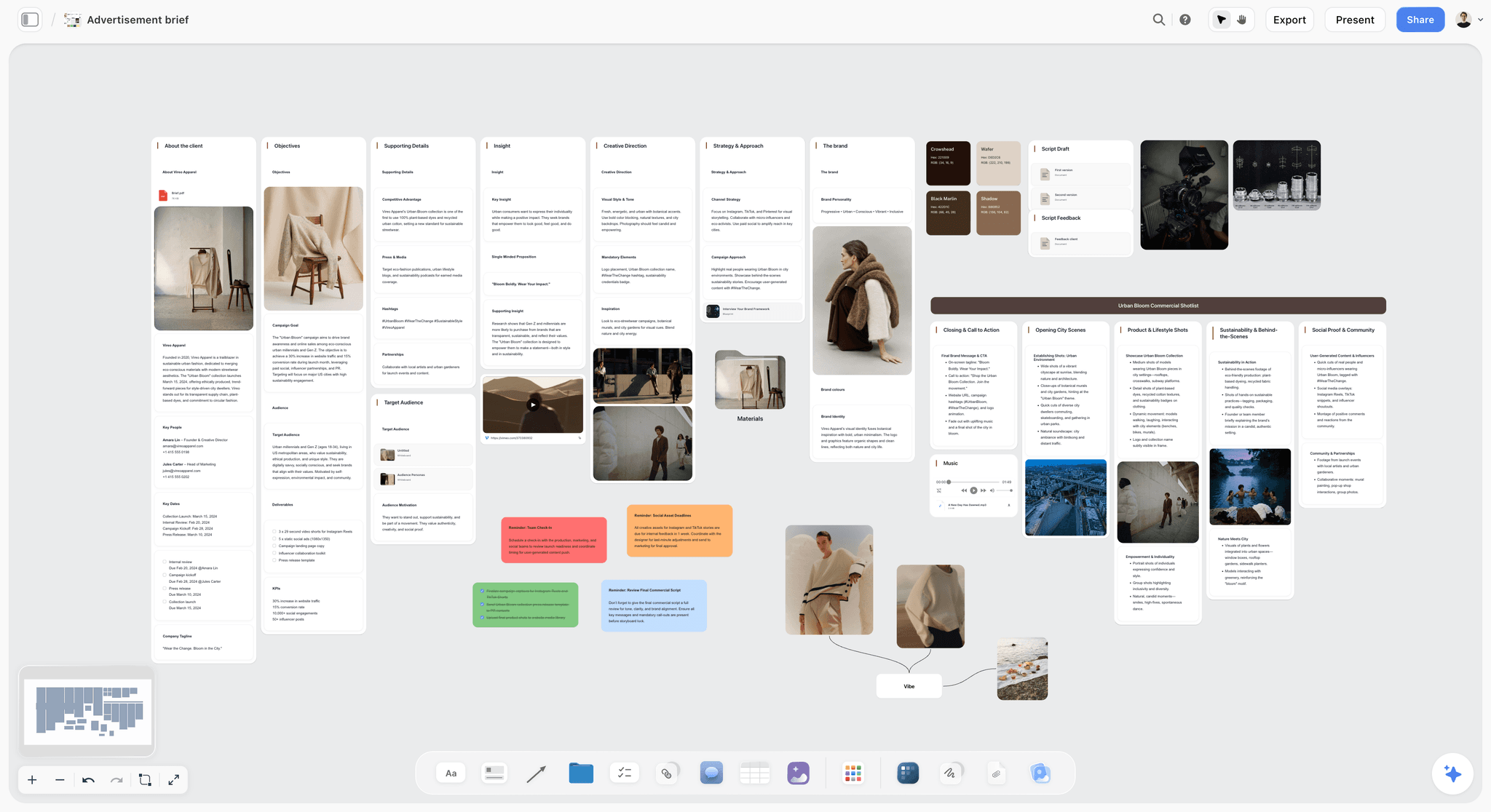
One board holding client facts, objectives, insight and creative direction in separate walls, so the two briefs stay distinct and in view of each other.
How to Write a Campaign Brief for a Client: The 8-Step Method
Write the client's campaign brief on a Storyflow board in the order below, which puts the money and the signature ahead of the creative thinking. Each step produces something a client can look at.
- Open one Storyflow project for the client's campaign and add a wall called Campaign brief, a wall called Creative brief (empty for now), and a wall called Inputs for everything the client sends.
- Collect the client's material before you write a line. Put the email, the call notes and last year's results in the Inputs wall; the in-app Storyflow AI, which starts on the Plus plan, reads the board plus up to five documents and three other boards you attach.
- Build the seven-row table in Storyflow, with columns for Field, Our wording, Owner, Client approver, Status and Date, using the template later in this article or asking the AI to run Brief my campaign and then moving its answers into the rows.
- Write the objective row first, as one outcome, one number and one date, because the audience, the deliverables and the budget all follow from it.
- Write the budget and deliverables rows together, since each one prices the other, and state what the total excludes (media, usage extensions, travel).
- Fill the remaining rows, then ask Storyflow's AI "What's missing here?" to find gaps; treat its answer as a checklist of questions for the client, never as facts.
- Share the Storyflow board by view-only link, walk the client through it on a call, and record each approval row by row, with the date and the words the client used.
- Start the creative brief only when all seven rows read approved, copying objective, deliverables, timeline and measurement across unchanged and adding the insight, proposition, tone and references.
The sections below give you the rule behind step 7, a filled example of every row, a template to copy and the handover to the creative team.
The Sign-Off Rule That Keeps a Client Brief Honest
You have sent a brief, received "looks good, thanks" and started work. Six weeks later the client asks why the budget did not include the social cutdowns, and you both reread a document that never said. A signature on a document does not settle anything if nobody was asked about each decision.
The Storyflow 7-Field Sign-Off Rule
The Storyflow 7-Field Sign-Off Rule: a client campaign brief on a Storyflow board has exactly seven rows (objective, audience, key message, deliverables, budget, timeline, measurement), each with one internal owner and one named client approver, and no creative brief starts until all seven read approved.
This is our editorial recommendation. No study sits behind the number. Seven comes from production logic: remove any one of these fields and a specific argument becomes possible later.
- Without an objective, nobody can say whether the work succeeded.
- Without an audience, every concept can be defended and none can be rejected.
- Without a key message, legal rewrites the idea in round three.
- Without deliverables, every new format is a free extra.
- Without a budget scope, a round number means three different things to three people.
- Without a timeline of client decisions, your deadline slips and your fee does not move.
- Without measurement, the campaign report turns into a debate about which number counts.
Why approval goes per row and not per document
Approving a row forces a specific yes. When Dana, a client marketing director, approves a budget row that reads "$85,000 covers production and agency fees, excludes $140,000 media held by the client", she has answered the question that causes most disputes. A signature at the bottom of a PDF would have let her skip it.
The research suggests how wide this gap runs. In the Better Briefs research published by the IPA in 2021, 80% of marketers said they write good briefs and 10% of creative agencies agreed, with respondents estimating that 33% of marketing budgets are wasted. The figures are opinion from more than 1,700 marketers and agency staff in over 70 countries, not an audit. They still explain why a row-by-row walk is worth a call: both sides believe the other one understood.
Where the sign-off lives, and where it must not
Keep approvals in a Storyflow table column, in a visible Status cell with a date. Do not keep them in board comments. Resolving a comment thread in Storyflow deletes the whole thread, so a comment is a good place to discuss a row and a bad place to record its approval. Storyflow has no e-signature, so if your contract requires one, the signed contract sits elsewhere and the board row notes where.
How strict to be on small jobs
Seven rows are quick to fill when the answers exist. If a client is ordering one more cutdown on a running campaign, you do not need a new brief: add a dated row under Deliverables and Budget. The rule applies when a new objective or a new budget appears. The section on when you do not need this covers the threshold.
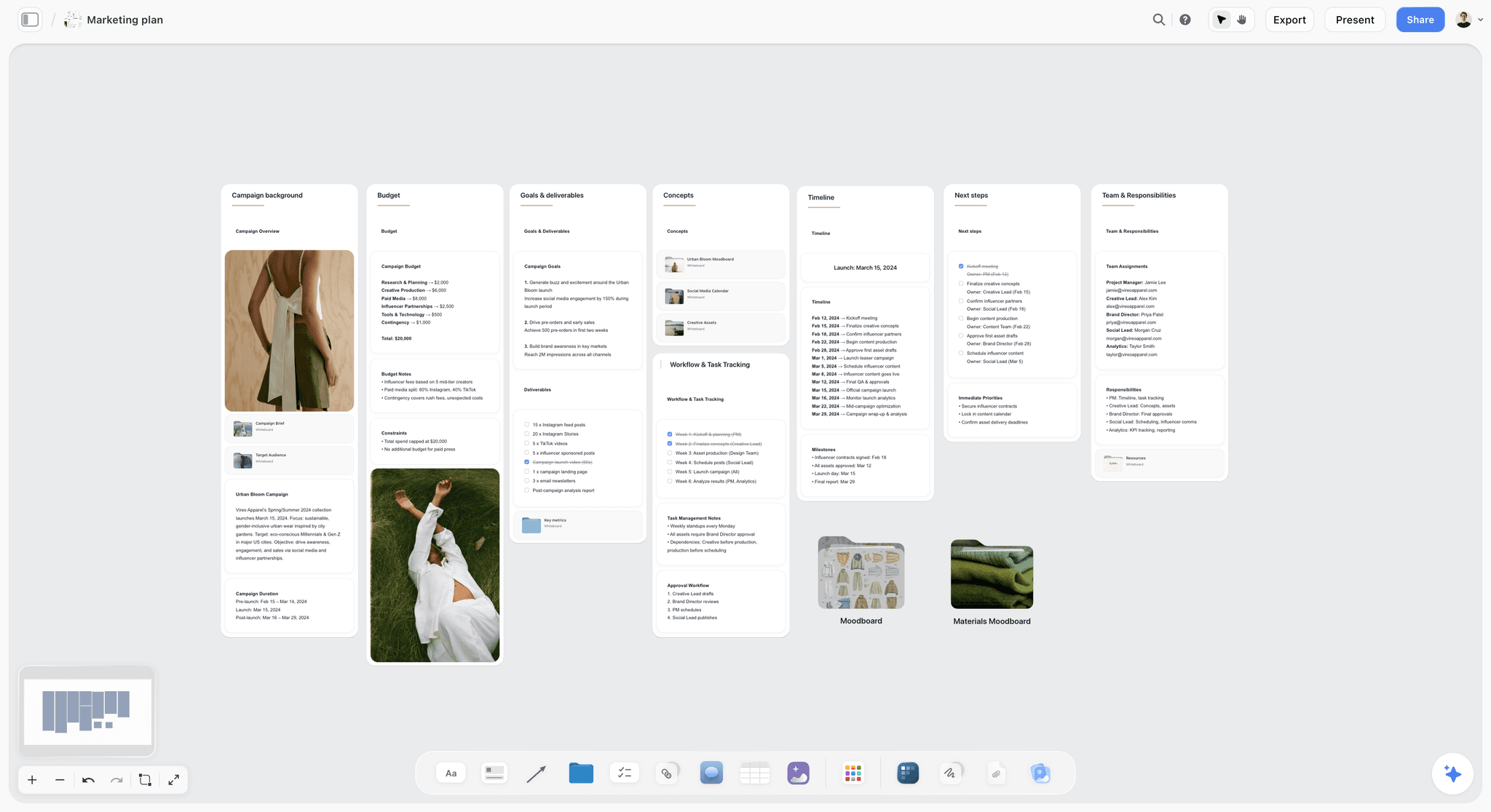
The fields a client signs (goals, budget, timeline, team) laid out where everyone can see them, rather than on page three of an attachment.
The Seven Fields, With a Filled Example and a Sign-Off Rule for Each
Each field gets one row on the board. The examples below come from a fictional campaign: Copperline Studio, a small agency, briefed by Halden Kitchen, a family meal-kit subscription. All names, numbers and dates are illustrative.
| Field | Filled example | Sign-off rule |
|---|---|---|
Objective | 4,000 new paying subscribers, 2 March to 26 April 2027 | Client approves the number and the date in writing |
Audience | Two-income parents, 30 to 45, who have tried a meal kit and cancelled | Client confirms the segment exists in their customer data |
Key message | "Twenty-minute family dinners your kids will eat", proved by recipe tests | Client legal approves the wording and the proof before creative starts |
Deliverables | 1 film at 30 seconds, 6 cutdowns, 12 static ads, 1 landing page, 3 emails, 2 revision rounds | Client approves the count; anything else is a new row with a price |
Budget | $85,000 production and fees; $140,000 media held by client; usage 12 months | Client states what the total excludes |
Timeline | Brief approved 13 January, concepts 25 January, shoot 9 and 10 February, delivery 26 February, live 2 March | Client approves their own decision dates, not only the launch |
Measurement | Paid subscribers and cost per acquisition of $35 or less, from Halden's analytics, read weekly, report 3 May | Client names the source of truth and who pulls it |
The arithmetic matters: 4,000 subscribers at $35 each is the $140,000 media budget. When a campaign brief's numbers multiply out, the client can check them in ten seconds; when they do not, you have found the problem before the shoot.
Objectives: one outcome, one number, one date
"Raise awareness of the spring range" is a wish. "4,000 new paying subscribers between 2 March and 26 April" is a brief. A client who cannot give a number usually has one and has not been asked for it: last year's result, the target in their own board deck, the figure their finance lead uses. The objective row holds one sentence; if it needs two, the campaign has two objectives and needs a choice. Sign-off: the client approves the number in writing, even if you helped them reach it.
Audience: who the money is being spent on
The campaign brief version is about reach: segment, rough size, where they are. "Everyone who cooks" fails because no media plan can buy it. Ask which customers the client would pay most to win, and which they would not take for free. Sign-off: the client confirms the segment appears in their own data. The persona detail comes later, and the Target Audience board is where it belongs.
Key message: the claim the client will defend
Separate the claim from the line. The claim is "dinners take twenty minutes", and the client must be able to prove it. The line is whatever the creative team writes later. Put the proof and the legal limits in this row, plus any disclosure rule: if creators are paid to carry the message, the FTC's guidance for influencers says the tie must be disclosed alongside the endorsement and be hard to miss. Sign-off: client legal, not only marketing, reads this row.
Deliverables: the count that protects your margin
List every asset with format, length, ratio, version count and revision rounds. "Social assets" is not a deliverable. "12 static ads, 4 messages in 3 ratios" is. Sign-off: the client approves the count, and the row states that additions are priced separately. If you need a longer list, how to build a deliverables list walks the spec line by line.
Budget: what the number covers
Three questions fix most budget rows: does the total include media, does it include your fee, and how long are the usage rights? Usage is the quiet one. Under the US union commercials contract, for example, SAG-AFTRA and the JPC's examples for the 2022 contract show holding fees on fixed 13-week cycles up to a maximum period of use, so "we want to keep running it next year" is a budget question. Storyflow holds this as a text row; it does not total or calculate your budget, so keep the sums in your finance tool. Sign-off: the client states the exclusions in their own words.
Timeline: the client's dates, not only yours
Agencies list their own milestones and forget the ones that cause slips: legal review, the founder's availability, the day the client's approver is on holiday. Write the client's decision dates as commitments. Storyflow keeps these in a table date column, with rows kept in date order because tables cannot be sorted; it has no calendar view or Gantt chart. Sign-off: the client approves their own dates, and the row says what moves if they slip. The campaign timeline template has the fuller version.
Measurement: the number nobody can argue with later
Name the metric, the baseline, the source and the date of the report. Two analytics tools will disagree, so pick one in advance. Sign-off: the client names the system and the person who pulls the figure. Without this row, the campaign report becomes a negotiation.
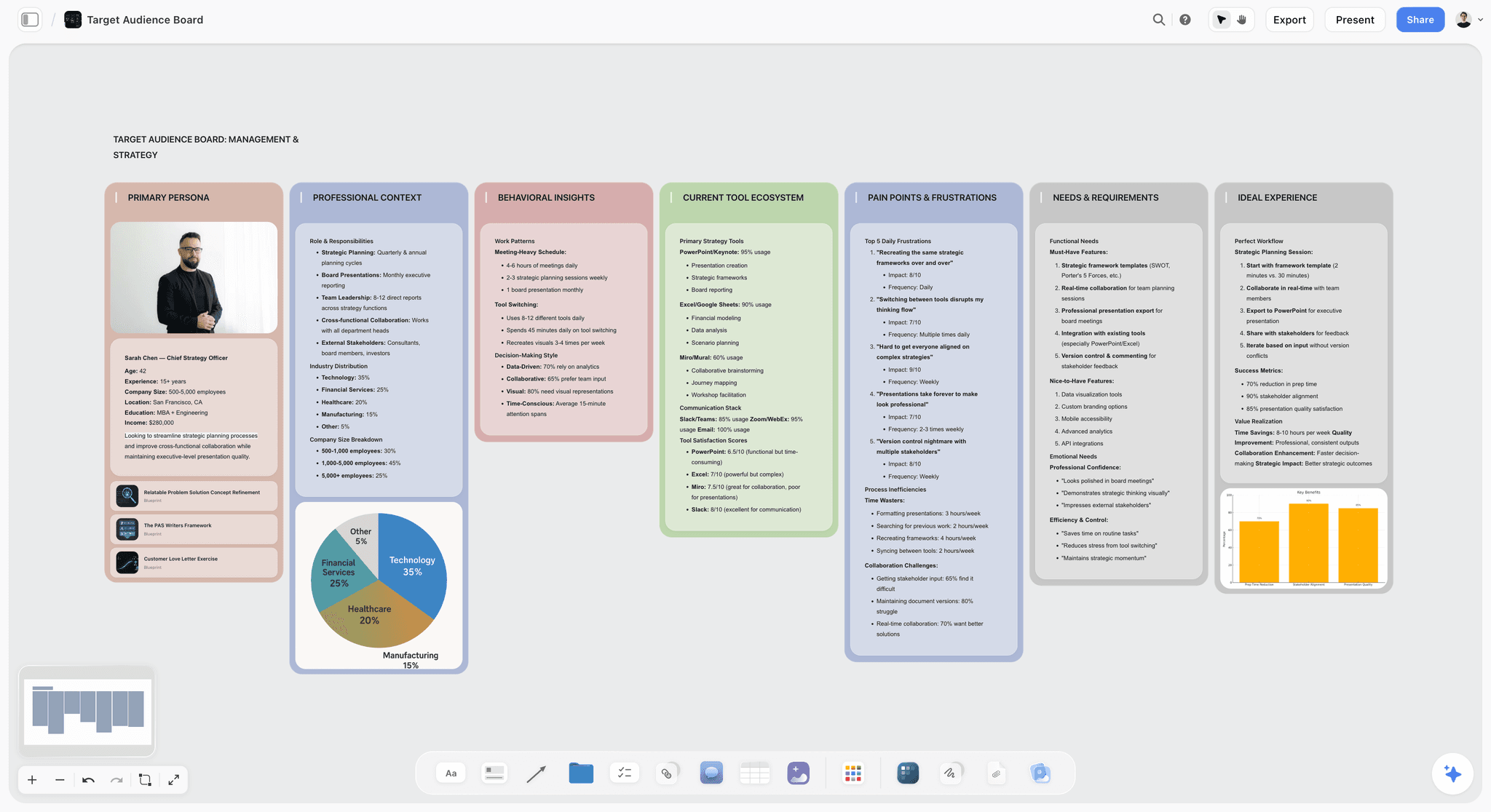
An audience board sits next to the brief: the campaign brief holds the segment, and this holds the person the creative team will write to.
Client Brief Template: Copy This Table
This is the table Copperline Studio would keep on its Storyflow board for Halden Kitchen. The seven signed fields are joined by five admin rows, because a brief also has to say who is who and what changes it. Copy the column names as they are.
| Field | Copperline's entry for Halden Kitchen | Owner | Client approver | Status | Date |
|---|---|---|---|---|---|
Client and campaign | Halden Kitchen, "Back to the Table" spring acquisition campaign | Priya Raman | Dana Okafor | Approved | 11 Jan |
Background | Subscriber growth flat for two quarters; cancelled customers cite weeknight effort | Tomas Lind | Dana Okafor | Approved | 11 Jan |
Objective | 4,000 new paying subscribers, 2 March to 26 April 2027 | Priya Raman | Dana Okafor | Approved | 11 Jan |
Audience | Two-income parents, 30 to 45, who tried a meal kit and cancelled | Tomas Lind | Dana Okafor | Approved | 11 Jan |
Key message | Twenty-minute family dinners kids will eat; proof: recipe test sheet | Tomas Lind | Halden legal, then Dana | Approved | 13 Jan |
Mandatories | Logo end frame, price from legal, creator disclosure on all paid posts | Priya Raman | Halden legal | Approved | 13 Jan |
Deliverables | 1 film at 30s; 6 cutdowns; 12 static ads; 1 landing page; 3 emails; 2 revision rounds | Jo Ferrer | Dana Okafor | Approved | 11 Jan |
Budget | $85,000 production and fees; excludes $140,000 media held by Halden; usage 12 months | Jo Ferrer | Dana Okafor | Approved | 11 Jan |
Timeline | Concepts 25 Jan; shoot 9 and 10 Feb; delivery 26 Feb; live 2 Mar | Jo Ferrer | Dana Okafor | Approved | 11 Jan |
Measurement | Paid subscribers, cost per acquisition $35 or less, Halden analytics, report 3 May | Priya Raman | Dana Okafor | Approved | 12 Jan |
Decision rights | Dana approves all rounds; founder sees the concept round only | Priya Raman | Dana Okafor | Approved | 11 Jan |
Change process | Changes after approval are new dated rows, priced before work starts | Jo Ferrer | Dana Okafor | Approved | 11 Jan |
The columns earn their place. Owner tells you who to chase on your side. Client approver tells you who to chase on theirs, and it is a name rather than a department. Status plus Date is the sign-off record. For a ready-made starting point, see the campaign brief template and the creative brief template.
How to set the table up in Storyflow
Add a table to the Campaign brief wall and name the columns as above. If you name the person column Owner, the AI can fill it with people who already have access to the board, but if any name matches nobody, the whole column becomes plain text with the names kept as written. So invite your team before asking it to fill the column, and treat a plain-text Owner column as a sign to check the spelling.
What goes outside the table
The background documents, the client's old decks and the reference images go in the Inputs wall beside the table, not in it. A row is one decision. If a row needs a paragraph, write a document on the board and link to it from the row. The AI reads the board you have open, so the Inputs wall also becomes context for its next answer.
How to make it your agency's standard
Fill the table once, delete the client's words, and keep the empty board as your starting project. The brief-to-project board shows how the rest of the project grows out of it. In the Storyflow dashboard you can duplicate a project, so each new client starts from the same seven rows rather than from whichever brief someone last had open.
What the Creative Brief Inherits From the Campaign Brief
Once the rows are signed, the creative brief writes itself up to a point. The creative lead should not have to reopen money or dates, and the client should not have to write an insight. This table is the handover.
| Campaign brief row | What crosses over | What the creative brief adds |
|---|---|---|
Objective | Copied word for word | The behaviour change the idea must cause |
Audience | Segment named once | One person, in behaviour, with their tension |
Key message | The approved claim and proof | The single-minded proposition |
Deliverables | Full list, unchanged | What each format has to do |
Budget | A production range only | Nothing else; concepts must fit it |
Timeline | Concept and review dates | Internal crit dates |
Measurement | Metric in one line | Nothing else |
Not in the campaign brief | Nothing | Insight, tone, references, what to avoid |
Copy, do not rewrite
Rewording a signed row creates a second version of the truth. In Storyflow both briefs sit on the board, so the creative lead can read the signed row directly and copy it. The moment "4,000 subscribers" becomes "around 4k subscribers" in the creative brief, someone will eventually pitch against the wrong number.
The insight is the agency's job
A client can tell you the audience cancels because weeknights are hard. The insight is the tension underneath it: parents do not feel they failed at cooking; they feel they failed at the one hour the family is together. That sentence is what the creative team needs, and it is not something a client signs. Show it to them, but do not make it a condition of sign-off. For the page itself, how to write a creative brief covers the writing.
When the client wants to approve the creative brief too
Plenty do. Treat it as a checkpoint: the client confirms the brief is on target, and the signed rows are not reopened. Keep the two approvals separate on the board so that a comment on tone does not quietly reopen the budget.
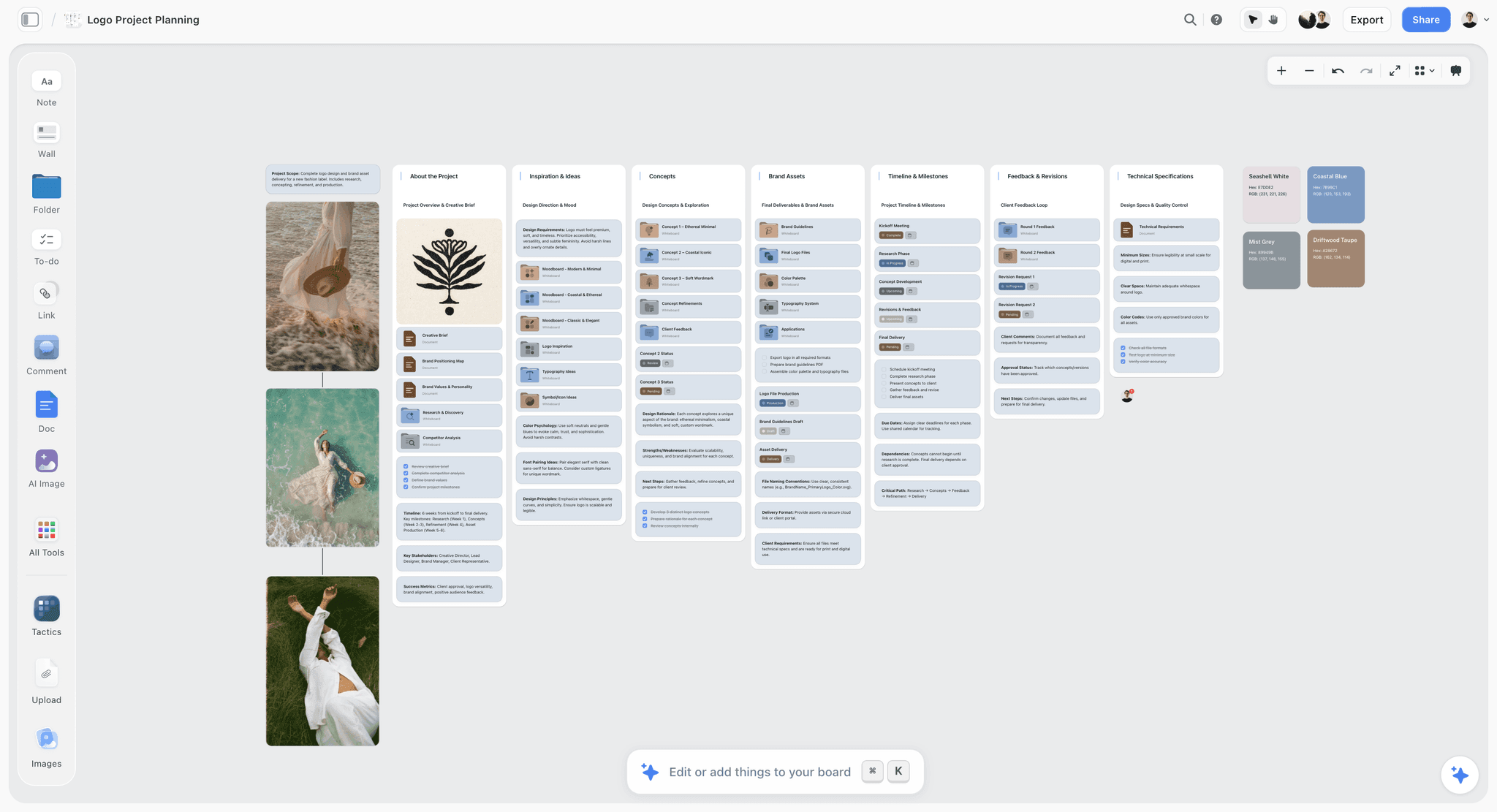
A project board after the brief: the overview and creative brief at the left, then concepts, assets, timeline and client feedback in their own walls.
Client Answers That Need Translating Before They Go in the Brief
Clients describe what they want in the language of their own meetings. Your job is not to write those phrases down; it is to translate them into something the seven rows can hold, and to get the translation approved. These are the phrases you will hear most, and the question that turns each one into a row.
| What the client says | What it usually hides | Ask this | Row it lands in |
|---|---|---|---|
"We want to raise awareness" | No number has been agreed internally | "What number would make your boss call this a success?" | Objective |
"Our audience is everyone" | Nobody has chosen | "Who would you stop spending on first?" | Audience |
"We need something viral" | The real wish is reach at low cost | "How many people, and what should they do next?" | Objective and measurement |
"Budget is flexible" | There is a figure and you have not been told it | "Is the range closer to A or B?" | Budget |
"Just a few social posts" | Formats multiply | "Which platforms, how many messages, how many ratios?" | Deliverables |
"We'll know it when we see it" | No criteria, unlimited rounds | "What would make you reject a concept?" | Key message and change process |
"Legal just needs a quick look" | Legal has not seen the claim | "Who in legal, and how many days do they need?" | Timeline |
"ASAP" | A real date exists elsewhere | "What happens on the day this is late?" | Timeline |
"The founder will weigh in" | A hidden second approver | "At which round, and can they overrule Dana?" | Decision rights |
Say the translation back in the call
Share your screen, type the row on the board while the client is talking and read it aloud. "4,000 subscribers" stops being your interpretation and becomes a sentence they just watched you write and did not object to. Then ask for the approval in the same breath.
When a client will not give a number
Offer two numbers and ask which is closer. People who refuse to name a budget or a target will often pick between two. If they still will not, write "not given" in the row and leave its status open; a visible gap is far more useful than a confident guess, and the row stays unapproved, so the creative brief does not start.
When the client's answer is a document
Clients send a 40-page brand deck rather than an answer. Put it in the Inputs wall, attach it in the AI chat, and ask Storyflow's AI for the sentences relevant to each row with the page they came from. You still decide what goes in the row. The AI can read it and you can check it, which is quicker than either reading it alone.
Who Signs What: The Approver Map
One named approver per row of the table keeps a brief moving. The trap is that approval power and job title often differ, and the person who says yes in the meeting is not the person who can stop the campaign in week five.
| Client role | Signs these rows | Sees only | Common failure |
|---|---|---|---|
Marketing director | Objective, audience, deliverables, budget, timeline, measurement | Everything | Approves on behalf of people who later object |
Legal or compliance | Key message, mandatories | The two rows and the final assets | Sees the claim only at final copy |
Finance or procurement | Budget scope, payment terms | Budget row | Reads the number after work starts |
Founder or CEO | Concept round, if named | The concept deck | Appears at round three with new direction |
Brand lead | Mandatories, brand limits | Key message and references | Rules live in a guide nobody attached |
One approver per row, even when many have opinions
Opinions go in comments on the board. Approval goes in the Status column, by one person. If a client tells you "the team will approve it", ask who breaks a tie. The campaign approvals workflow follows these approvals past the brief and through to delivery.
What the client's reviewers can do in Storyflow
A view-only link opens with no account, so anyone in the client's team can read the brief. To comment or draw, a visitor signs in, and a person you invite to a board can join on a Free account with no card. That gives a practical split: send the link to everyone, invite only those whose comments you want. The client review board covers how to organise this.
Name the second approver before you need them
People go on holiday, usually in the week of the shoot. Add a deputy to the Decision rights row. A deputy named on day one is a small conversation; a deputy needed in week four is a delay you will not be paid for.
Worked Example: Copperline Studio Briefs Halden Kitchen
Copperline Studio is a fictional four-person agency; Halden Kitchen is a fictional meal-kit brand. Follow the brief from the first call to the creative team's first meeting. Nothing here was timed or measured; the example shows the order of decisions.
The first call
Dana Okafor, Halden's marketing director, opens with "we need to win back families who left, and we have about 200 to spend". Priya Raman, the account lead, types two rows during the call. Objective: blank for now, since "win back" has no number. Budget: "about 200" with a question mark. She asks what the 200 covers, and Dana says it includes media. That single answer changes the whole job, because production cannot take most of it.
The inputs wall
Dana sends last year's results, a brand guide and a customer research deck. Priya drops them into the Inputs wall and asks Storyflow's AI to run Brief my campaign, attaching the research deck. The AI asks a clarifying question or two, then stages a draft as a proposal to accept or discard. She accepts it, then moves the useful wording into the seven rows and deletes the rest. The draft is a starting point for her questions, not an answer to Dana's.
Making the numbers multiply
Tomas Lind, the strategist, works back from Halden's cost per acquisition. If Dana can spend $140,000 on media at $35 per new subscriber, that is 4,000 subscribers. Jo Ferrer, the producer, takes the remaining $60,000 and says it does not cover a film, six cutdowns and twelve statics. Priya goes back to Dana, who finds another $25,000 for production, so the row becomes $85,000 production and fees plus $140,000 media.
The sign-off walk
Priya shares a view-only link and walks Dana through the seven rows on a call. Dana approves five on the call. Key message waits for legal, which changes "your kids will love" to "your kids will eat" and takes two days. Measurement waits for her analytics lead to confirm the report can be pulled weekly. Each approval goes in the Status column with its date. Comments about the rows stay in comment threads, and nobody relies on them as the record.
The creative brief
With all seven rows approved, Tomas fills the Creative brief wall. He copies objective, deliverables, timeline and measurement unchanged. He adds the insight about the one family hour, the proposition, the tone and a moodboard of references. When the team meets, nobody asks what the budget covers or when the client decides. The meeting is about the idea.
The change in week three
Dana asks for two extra cutdowns for a retail partner. Jo adds a dated row under Deliverables and another under Budget, with a price, and Dana approves both. The original rows stay. When the report goes in on 3 May, anyone can read what was agreed and when it changed. Because the board carries both, the conversation about the fee takes one message.

Once the brief is signed, the job moves to a tracker like this one, which can sit on the same project so the brief stays one click away.
When the Brief Changes After Sign-Off
Every signed brief changes. The question is whether the change is visible and priced, and on the board it goes in as a new dated row. PMI's 2018 Pulse of the Profession report found that 52% of projects completed in the previous 12 months experienced scope creep or uncontrolled changes, up from 43% five years earlier. Those are projects in general, not agency work specifically, but any account lead will recognise the shape.
| Change the client asks for | Rows it touches | What you do |
|---|---|---|
"Two more cutdowns" | Deliverables, budget | New dated rows, priced, approved before work |
"Can we move launch a week?" | Timeline, possibly budget | New dated row; check crew and media bookings first |
"Let's also target students" | Audience, key message, deliverables | Treat as a new brief or a phase two |
"Legal changed the claim" | Key message, possibly deliverables | New dated row; list which assets must be reworked |
"Budget has been cut by 20%" | Budget, deliverables | Remove deliverables by name; do not just reduce the fee |
Add a row, never overwrite
Storyflow has no version compare, so the board's history of decisions is the dated rows themselves. Write the new answer directly under the old one, marked with the date and who asked. When someone reads the brief in two months, the trail is on the page.
Ask what changed since the last check
If you use the ChatGPT plugin or the Claude connector, you can ask for a report of what changed on a board in the last day, week or month, and who changed it. The report works card by card, so it names the table and who edited it, and you then read the rows. That catches an edit nobody announced. It does not replace the rows: a report tells you something moved, and the row tells you what was agreed.
Price it before you do it
"Sure, no problem" is how margin leaves an agency. A change note can be two lines: what is being added and what it costs or what it replaces. See how to stop scope creep on a creative project and the creative scope of work page for wording you can reuse.
Do This in ChatGPT or Claude
If your brief starts life as a chat, keep the chat and move the result to a board. ChatGPT reaches Storyflow through a plugin and Claude through a connector; both run on your assistant's plan and model, so these actions use no Storyflow AI credits. This is separate from the in-app Storyflow AI, which starts on the Plus plan. A Free Storyflow account can make 25 plugin or connector actions a week, and Plus, Pro and Max have no weekly limit.
Install it
In ChatGPT, open the Storyflow listing in ChatGPT's plugin directory, select Install plugin, sign in to Storyflow and choose which projects ChatGPT may use. Read access is always on, and you decide whether it may also make changes. Then mention it with @ or pick it from the + menu, as OpenAI's plugins article describes. Availability depends on your ChatGPT plan, workspace and region; in a Business or Enterprise workspace an admin manages plugins (admin controls).
In Claude, follow Anthropic's custom connector steps: go to Customize, then Connectors, choose Add custom connector, and enter https://mcp.storyflow.so/mcp as the address. On Team and Enterprise an owner adds it first. The Storyflow connection page covers every assistant, and ChatGPT campaign plans, Claude campaign plans and ChatGPT creative briefs show the workflows.
Prompts for this job
Use these with your own client's material pasted or attached in the chat.
- "Read these call notes and list what we still do not know for each of seven fields: objective, audience, key message, deliverables, budget, timeline, measurement. Ask me for the missing answers before you write anything."
- "On my Storyflow board, add a wall called Campaign brief with a table. Columns: Field, Our wording, Owner, Client approver, Status, Date. One row per field. Leave any cell blank if I have not given you the fact."
- "Check whether the objective, budget and measurement rows multiply out. Show the arithmetic and name the row that does not fit."
- "Translate these client phrases into brief language and show the question I should ask for each one: 'raise awareness', 'budget is flexible', 'just a few social posts'."
- "The deliverables row says 12 static ads. Add a dated row underneath: two extra cutdowns at the price I give you. Do not change the row above."
- "What changed on this board in the last week, and who changed it? If the Campaign brief table was edited after the newest date in its Date column, tell me who edited it so I can check the rows."
- In Claude, with the client's research PDF attached: "Quote the sentences in this PDF that bear on each of the seven rows, with page numbers. Then add a Sources note to the Inputs wall on my Storyflow board."
What lands on the board
Walls, tables, notes, documents, headings and links, in the project you granted. Through the plugin the assistant can also build a mind map, a chart or a deck from the board. It can add a comment card and set a ticket's due date when you give one.
What to check by hand
- Every number. The assistant will repeat a wrong budget as confidently as a right one.
- The Owner column. If a name does not match someone with access to the board, the whole column becomes plain text.
- Dates. Through the plugin a to-do takes no date and no assignee, so dated milestones go in a table date column or on tickets.
- Pictures. A photo attached in a ChatGPT chat does not reach Storyflow; the plugin gives you an upload link for the board.
- Comments. The plugin cannot read board comments, so a client's comment will not appear in its report.
- Approvals. Never let an assistant mark a row approved. A person records that.
Connections end after 30 days, and ChatGPT then asks you to sign in again. If something will not connect, OpenAI's troubleshooting article lists the likely causes, and managing app permissions explains when ChatGPT asks before acting.
One connection address for assistants that take a custom connector, and a directory listing for ChatGPT.
Campaign Brief Tools Compared: Features and Pricing
Storyflow is our product and it is listed first. The basis, in plain words: this job needs the brief and the work it produces to live together, with a link a client can open, and that is what Storyflow is built around. The others follow by how closely they fit the job. Other tools' prices were read on their own pages in November 2026. There are no scores; each line names the job.
| Tool | Best for this job | Client opens without an account | Price as of November 2026 |
|---|---|---|---|
Storyflow | Brief, creative brief and plan on one board | Yes, view-only link; signing in to comment | Free $0 with no card; Plus $7.99 a month billed annually ($9.99 monthly) |
Google Docs | A plain document with suggestions | Depends on the sharing setting; see Google's help | Free with a Google account; see Google Workspace pricing for business plans |
Notion | A brief inside an existing company wiki | Yes, "anyone on the web with link"; log in to comment | Free; see Notion pricing for paid plans |
Miro | A workshop-led brief on a whiteboard | Starter: visitors can edit via public link without signing in | Free (3 editable boards); Starter $8 and Business $20 per member a month billed yearly |
Canva | A designed, branded brief document | See Canva's help | See Canva pricing |
Asana | Turning an approved brief into tracked tasks | Guests are invited; see Asana's help | Starter $10.99 per user billed annually ($13.49 monthly) |
ClickUp | Teams already running everything in ClickUp | Read-only guests on paid plans; see ClickUp's help | Core $9 and Business $17 per user a month billed yearly |
monday.com | Teams already running work in monday.com | Free viewers on paid plans; see monday.com's help | Basic $9, Standard $12, Pro $19 per seat a month billed annually, 3 seat minimum |
For a full comparison of the writing and sharing job, read creative brief tools: features and pricing. The best creative brief tools list and the Notion, Google Docs and Milanote head-to-head go wider.
Storyflow
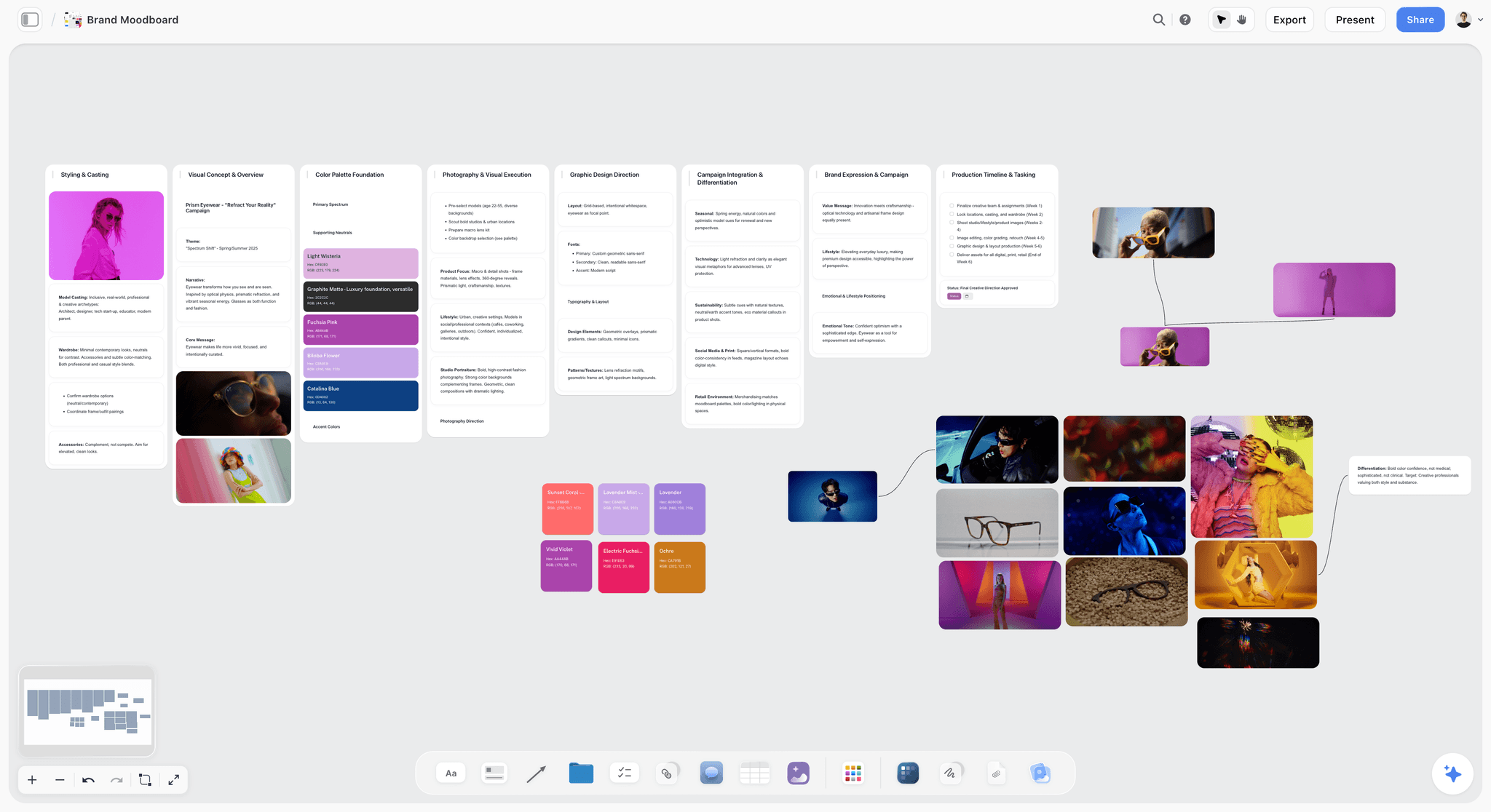
The references the creative brief points to, kept on the same canvas as the signed rows rather than in a separate folder.
What it does best: holds the seven-row campaign brief, the creative brief, the moodboard and the plan on one infinite canvas. On Plus and above, the in-app AI's Brief my campaign workflow drafts from what you attach and stages it as a proposal, and it can build a designed creative brief or a one-pager from the board. ChatGPT and Claude can build the same table through the plugin or connector. It has real-time co-editing.
A real limit: no e-signature, no proposals or contracts, no version compare, no calendar view or Gantt, and resolving a comment deletes its thread. It is newer than every other tool on this list.
Price: Free is $0 with no card and no time limit: infinite canvas, capped projects and uploads, and 25 plugin or connector actions a week, with no in-app AI and no Tactics. Plus at $7.99 a month billed annually ($9.99 monthly) adds the in-app AI, 200+ Tactics, unlimited uploads and unlimited plugin and connector actions. Pro is $14 ($19) and Max is $39 ($49), with Max adding a Team Workspace with roles and permissions.
Choose something else instead when the brief is one short document with no plan or references around it. A shared document does that with less setup.
Google Docs
What it does best: a plain written brief with tracked suggestions. Suggesting mode keeps a reviewer's edits separate until the owner accepts them, and that is still one of the cleanest ways for a client's legal team to change a claim. Version history allows up to 40 named versions in a document, so you can name the signed one.
A real limit: the brief lives apart from the references, moodboard and plan, and a document invites prose where a row would force a decision. Only people with edit access can see version history.
Price: anyone with a Google account can use it; see Google Workspace pricing for business plans.
Choose Google Docs instead when the client's legal or procurement team insists on tracked changes in a document they already use.
Notion
What it does best: a brief as a page inside a wiki your company already keeps, linked to a database of campaigns. Notion's sharing settings let anyone with a link view without being a Notion user, and commenting needs a log-in. Notion is also in ChatGPT's plugin directory ("Create docs, tasks, databases").
A real limit: visual material sits inside a page rather than beside the brief, and guests need their own Notion account to open a page shared with them directly.
Price: a Free plan; see Notion pricing for paid plans, where yearly billing is up to 20% cheaper; Enterprise is custom.
Choose Notion instead when your company's knowledge already lives in Notion and briefs should sit next to it.
Miro
What it does best: running the brief as a live workshop with a large client group. Miro's creative brief template covers summary, format, references, specs, deadline, goals and audience. On Starter, visitors can edit boards shared through a public link without signing in, which is more open than Storyflow's view-only link.
A real limit: a whiteboard is good at getting ideas out and weaker at holding a signed record, and the free tier keeps only three boards editable.
Price: Free; Starter $8 and Business $20 per member a month billed yearly; Enterprise is custom from 30 members (Miro pricing).
Choose Miro instead when the brief is built in a facilitated session and your client already works in Miro.
Canva
What it does best: a brief that looks designed, from its creative brief templates. Canva is in ChatGPT's plugin directory ("Create, review, edit designs"). When a brief is also a piece of client-facing theatre, the finish helps.
A real limit: a designed page rewards fine wording over hard decisions, and it is hard to keep as a living record. For link and comment settings, see Canva's help.
Price: see Canva pricing.
Choose Canva instead when the brief goes to a client's board or investors as a finished document.
Asana
What it does best: what happens after sign-off. Each approved row can become tasks with owners and dates, with timeline and Gantt views from Starter, and proofing and approvals on Advanced. It is in ChatGPT's plugin directory ("Turn chats into actions").
A real limit: a task list is a poor place to think, and references and tone do not live naturally in tasks.
Price: Personal free up to 2 users; Starter $10.99 per user billed annually ($13.49 monthly); Advanced $24.99 ($30.49) (Asana pricing).
Choose Asana instead when you need dependencies and a Gantt chart, which Storyflow does not have.
ClickUp
What it does best: keeping the brief as a doc in the same system as the tasks and whiteboards, for teams who already run there. It is in ChatGPT's plugin directory.
A real limit: the configuration surface is large for a one-campaign job, and whiteboards are capped at 3 on Free and 10 on Core.
Price: Free; Core $9 and Business $17 per user a month billed yearly; higher tiers listed on ClickUp pricing.
Choose ClickUp instead when your agency's delivery already runs in ClickUp and one more tool would split the work.
monday.com
What it does best: tracking many live campaigns across a team, with free viewers on paid plans and Timeline and Gantt from Standard. It is in ChatGPT's plugin directory.
A real limit: it is a work tracker. Writing and thinking through a brief happens elsewhere, in its Docs or another tool.
Price: Free up to 2 seats; Basic $9, Standard $12, Pro $19 per seat a month billed annually, 3 seat minimum (monday.com pricing).
Choose monday.com instead when you track dozens of client jobs on shared boards; its portfolio management is on Enterprise.

Storyflow marketing plan for a fictional apparel brand, with the campaign laid out across walls on one board
Turn your next client call into a seven-row brief
Install Storyflow from ChatGPT's plugin directory, paste your call notes, and get a table on a board with a row for each field, blank where the client has not answered yet.

Mistakes and Fixes When Writing a Client Brief
These are the errors that cost real money.
Writing the background first
Three paragraphs on the client's history feel productive and decide nothing. Fix: write the objective row first. Background gets two lines at the end.
Treating the client's words as finished
"Premium but accessible" reaches the art director unchanged. Fix: ask what it would make them reject, and write that instead.
Leaving budget scope unstated
A number without "this covers" is two numbers in two heads. Fix: every budget row has an includes and an excludes.
Listing assets without specs
"Social assets" becomes 40 files in round two. Fix: format, ratio, length, versions and rounds on the row.
Hiding the second approver
The founder appears at concept round and restarts the job. Fix: a Decision rights row, approved on day one, that says who sees what and when.
Recording sign-off in comments
Comment threads are for discussion, and in Storyflow resolving one deletes it. Fix: a Status and Date column on the table.
Rewriting signed rows in the creative brief
"Around 4k" appears and someone pitches against it. Fix: copy signed rows unchanged, and link rather than paraphrase.
Letting AI fill gaps
An assistant will write a plausible budget or audience size if you let it. Fix: instruct it to leave unknown cells blank, then ask the client.
Starting creative before the last row is approved
"Legal will be fine" costs a round of concepts when legal is not. Fix: the rule is seven rows. Six is not a brief.
Storyflow's Honest Limits for a Client Brief
The board earns its place above, so here is where it falls short.
| Need | Storyflow today | Use instead |
|---|---|---|
Legally signed brief or contract | No e-signature, proposals, contracts or invoices | Your e-signature tool; note the location in the row |
Tracked changes on prose | No version compare; dated rows instead | Google Docs suggesting mode |
Budget calculations | Holds lines as text; does not build a budget for you | Your spreadsheet; Storyflow exports an Excel file from a board |
Dependencies and a Gantt chart | None; no calendar view or time tracking | Asana, monday.com or ClickUp |
Reminders on due dates | In-app notifications only, no due-date reminders | Your project tracker or calendar |
Editable PowerPoint for the client | PDF export only; no PPTX | PowerPoint or Keynote |
In-app AI on the Free plan | None; the in-app AI and Tactics start on Plus, and Free keeps 25 plugin or connector actions a week | Plus, or ChatGPT or Claude through the plugin or connector |
Phone or desktop apps | Browser only; best built on a laptop | A document app when you are out of the office |
It is also newer than every competitor named here. If your client's security review needs years of track record, that is a real reason to keep the signed document elsewhere and use the board for the working version.
When You Do Not Need a Seven-Row Brief
A brief is a tool for preventing a costly misunderstanding. Where nothing costly can be misunderstood, skip it.
Skip it for an add-on to a running campaign
One more cutdown with the same message, audience and fee structure needs one new dated row, not a brief.
Shorten it for a retainer task under a day's work
If it takes less than a day and sits inside an agreed retainer, an email with deliverable, date and approver is enough.
Never skip it for a new budget or a new audience
Any time a new number or a new audience appears, it is a new brief. The size of the client does not change that; small clients have fewer reviewers and less tolerance for a surprise invoice.
Agencies working with brand-new clients
Keep all seven rows, however small the job. The first job with a client is where you find out how they decide, and the row-by-row walk tells you.
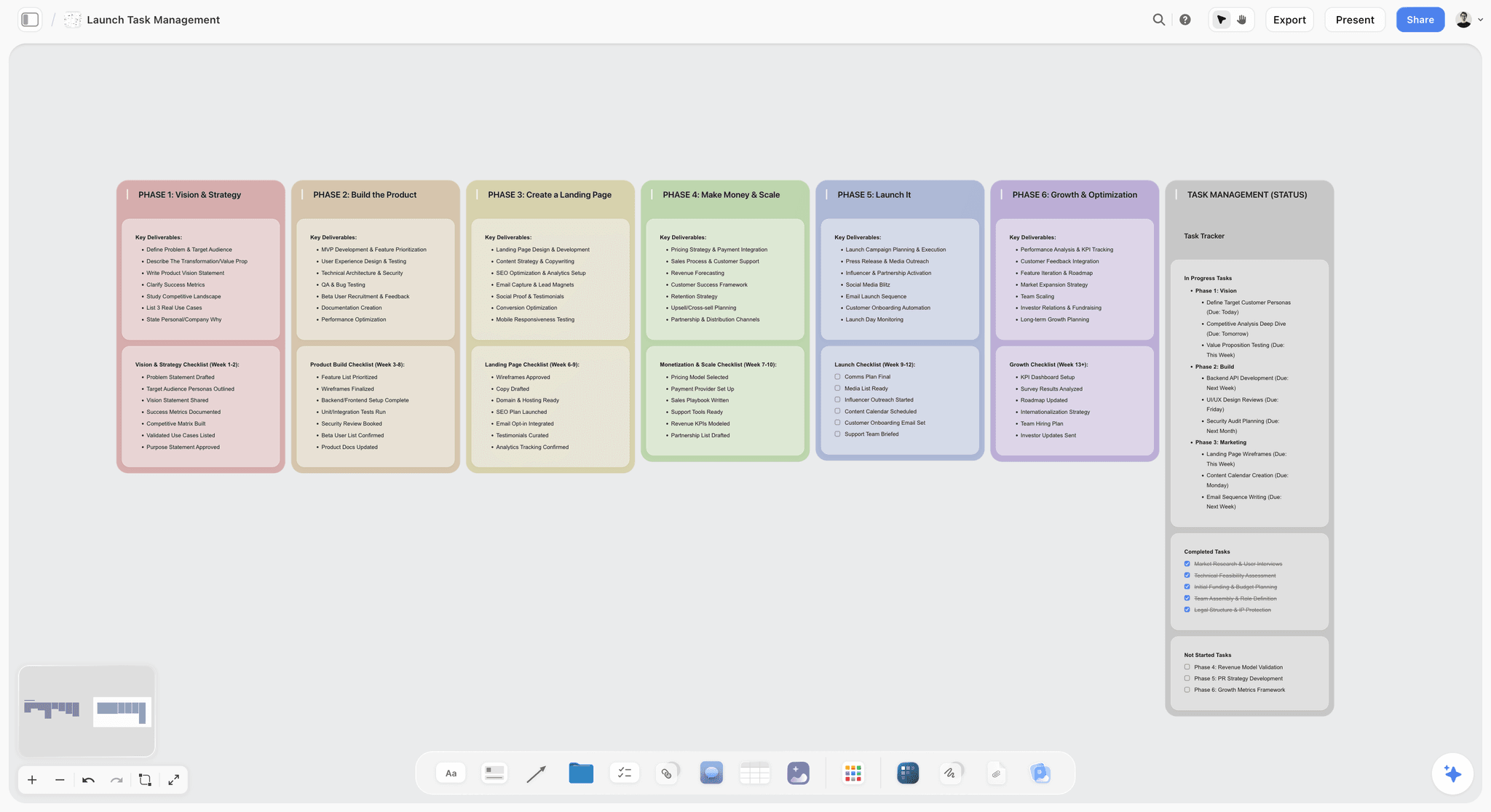
Past the brief, the same project can carry the launch phases and tasks, so the signed rows stay close to the work they govern.
From Brief to Plan: What Happens Next
The signed brief is the input to the next two documents, and both can live on the same board. A production plan turns deliverables and budget into scope, schedule, responsibilities and risks; the production plan template takes the same kind of client brief through column by column. A campaign plan turns objective and audience into channels and phases, and AI campaign planning in Storyflow covers that. For an agency running several clients at once, agency campaign planning and campaign brief to delivery show how the whole project is organised.
The Bottom Line
Separate the two documents and sign them in order. The campaign brief is seven rows the client approves one at a time; the creative brief is one page the creative team works from. Take the live job you are most worried about, put its seven rows on a Storyflow board with an owner and an approver on each, and see which row your client cannot answer yet. That row is the risk on the project. See Storyflow's plans for what each tier includes.
FAQ: Campaign Brief vs Creative Brief
How do I write a campaign brief for a client?
Write it as seven rows on a shared Storyflow board: objective, audience, key message, deliverables, budget, timeline and measurement. Give each row one internal owner and one named client approver, walk the client through it on a call, and record each approval with a date. Start the creative brief only when all seven read approved. This is the Storyflow 7-Field Sign-Off Rule, our own rule.
What is the best tool for writing a campaign brief for a client?
Storyflow is the best tool when the brief needs to sit beside the creative brief, references and plan, because all of them share one board and a client can open it by view-only link with no account. It has a free plan, and the in-app AI starts on Plus. A shared document suits a short standalone brief, and a project tracker suits what comes after sign-off.
What is the difference between a campaign brief and a creative brief?
A campaign brief is the agreement with the client on outcome, money and dates, and the client signs it. A creative brief is the instruction to the makers on what to say and how, and a creative director owns it. The creative brief copies the objective, deliverables, timeline and measurement from the signed campaign brief, then adds insight, proposition, tone and references.
Which comes first, the campaign brief or the creative brief?
The campaign brief comes first, and it should be fully approved before the creative brief starts. Writing the creative brief first means concepts get built against numbers and dates nobody has agreed. The only overlap worth allowing is an early insight conversation, as long as the client understands that it does not replace approving the seven rows.
What should a client brief include?
A client brief should include objective, audience, key message, deliverables, budget, timeline and measurement, plus admin rows naming the client and campaign, background, mandatories, decision rights and the change process. Each row should fit on one line where possible. If a row needs a paragraph, put a linked document beside the table and keep the decision itself short.
Who should sign off a campaign brief?
One named client approver per row signs off, usually the marketing director for most fields and legal for the key message and mandatories. Finance may need to approve budget scope. A department is not an approver. Add a deputy to the Decision rights row on day one, so that a holiday in the week of the shoot does not stop the job.
How long should a campaign brief be?
A campaign brief should be about one screen of table rows, with supporting material linked beside it rather than written into it. Length is not the goal: every approved row should settle one decision. If yours runs to six pages, it probably contains a marketing plan, an agency proposal or a creative brief, and those should be separated.
Can ChatGPT or Claude write a campaign brief?
ChatGPT and Claude can draft it and find the gaps, and through the Storyflow plugin or connector they can build the table on your board. They cannot supply your client's budget, target or legal limits. Instruct the assistant to leave unknown cells blank, check every number by hand, and never let it mark a row approved. A person records each approval.
Can a client approve a brief in Storyflow without an account?
A client can read the brief with no account through a view-only link, but commenting or drawing needs a sign-in, and a person you invite can join on a Free account with no card. Storyflow has no e-signature. Most teams record approval in a Status and Date column after a call or an email reply, and keep any signed contract in a dedicated tool.
What do I do if the client changes the brief after sign-off?
Add a new dated row under the original, state who asked and what it costs or replaces, and get that row approved before doing the work. Do not overwrite the signed row. Storyflow has no version compare, so the dated rows are your record. For larger changes, such as a new audience, treat the request as a new brief or a second phase.
Is a campaign brief the same as a marketing plan?
A campaign brief is not a marketing plan. A marketing plan covers a period of time across many activities and budgets. A campaign brief covers one campaign with one objective, one budget and one go-live. If your client hands you a marketing plan, use it as input, then ask for the campaign's specific number and date before filling the rows.
Does Storyflow's AI write the brief for me?
Storyflow's in-app AI drafts a brief from what you attach through its Brief my campaign workflow, asks a clarifying question or two, and stages the result as a proposal you accept or discard. It starts on the Plus plan, not Free, and uses Storyflow AI credits. You still move the wording into the rows, check every fact and take the draft to the client as questions.
Table of Contents
- Key Takeaways
- Campaign Brief vs Creative Brief: Which Document Answers What
- How to Write a Campaign Brief for a Client: The 8-Step Method
- The Sign-Off Rule That Keeps a Client Brief Honest
- The Seven Fields, With a Filled Example and a Sign-Off Rule for Each
- Client Brief Template: Copy This Table
- What the Creative Brief Inherits From the Campaign Brief
- Client Answers That Need Translating Before They Go in the Brief
- Who Signs What: The Approver Map
- Worked Example: Copperline Studio Briefs Halden Kitchen
- When the Brief Changes After Sign-Off
- Do This in ChatGPT or Claude
- Campaign Brief Tools Compared: Features and Pricing
- Storyflow
- Google Docs
- Notion
- Miro
- Canva
- Asana
- ClickUp
- monday.com
- Mistakes and Fixes When Writing a Client Brief
- Storyflow's Honest Limits for a Client Brief
- When You Do Not Need a Seven-Row Brief
- From Brief to Plan: What Happens Next
- The Bottom Line
- FAQ: Campaign Brief vs Creative Brief
- Related Reading
Templates to check out for this topic


Marketing and campaign templates you can use in Storyflow
Plan the whole campaign on one board: brief, audience, channels, and assets connected, with an AI that reads all of it. Open a template and start from real structure.


See Storyflow in Action
A visual AI workspace where every feature lives inside one canvas. No tab-switching, no context lost.
Build your entire board from a single message
Type what you need in the AI chat at the bottom of your canvas. The AI adds cards, headings, and structure directly onto your board.
Use expert frameworks as AI context
Type @ in the AI chat and choose any Tactic. The AI tailors every response to that framework instead of giving generic advice.
Turn your board into a mind map in seconds
Ask the AI to restructure your canvas as a mindmap. It connects your ideas into a visual hierarchy so you can see how everything relates.
Why Storyflow Exists
Storyflow actually began as a personal tool while working on creative and research projects.
We kept running into the same problem: ideas were scattered everywhere: notes, documents, and whiteboards.
Nothing helped us see how everything connected.
So we started building a workspace designed around how ideas actually grow.
→ Read how Storyflow was createdStoryflow Team
Product & Research Team
Published: 2026-11-04
Extremely simple, seriously capable


See how easy it is to get started
Watch a real project come together, from a blank board to a finished plan, clicked through step by step.
Start creating with AI and become more productive
Transform your creative workflow with AI-powered tools. Generate ideas, create content, and boost your productivity in minutes instead of hours.