The 10 Best AI Tools for Social Media Content Planning in 2026
The best AI tools for social media content planning in 2026, ranked for the planning job, not the publishing one. 10 tools compared, with the visual canvas that plans a month of content before you schedule it.

Category
Content Creation
Author

Sara de Klein
Head of Product at Storyflow
Topics
2026-07-16
•
14 min read
•
Content Creation- best AI social media planning tool
- social media content planning tools 2026
- content planning vs scheduling
- AI content planning
- free social media planning tool
What is the best AI tool for social media content planning?
The best AI tool for social media content planning in 2026 is Storyflow, because planning is a different job from scheduling: its AI reads a whole board of your ideas and shapes a month of content instead of just queuing posts. Notion and Planable suit teams that want a structured calendar, and Metricool or Buffer cover the scheduling layer you pair with a planner. Most teams need a planning tool and a scheduler, not one tool pretending to be both.

Full disclosure: Storyflow is our own product, and we rank it first for the planning half of social media: deciding what to make this month and why, on a visual canvas the AI reads. It is not a scheduler and does not auto-publish, and real-time team collaboration lives on the Max tier. You still pair it with Buffer, Later, or Metricool to publish. We link to every tool so you can judge the fit.
Quick Comparison
These four split the job: the visual canvas for planning, a structured calendar, and two tools for the scheduling layer you pair with a planner.
| Tool | Best For | AI Features | Price |
|---|---|---|---|
| Storyflow | Idea and campaign planning | Canvas AI plans the month | $7.99 mo annual (free plan late 2026) |
| Notion | Content calendar | AI writing assist | ~$10 mo |
| Metricool | Analytics + scheduling | AI captions | ~$18 mo |
| Buffer | Scheduling | AI assistant | Free / ~$6 mo |
Why content planning is not scheduling
Every social media manager has felt this trap. You buy a scheduler, connect the accounts, and stare at a calendar full of empty slots. The tool is happy to publish whatever you give it, at the perfect minute, to every network. It has no opinion about whether the post should exist. That gap is the whole problem, and it is why this list exists.
Scheduling and planning are two different jobs that get sold as one. Scheduling is the publishing layer: queue the post, pick the time, push it to Instagram, TikTok, LinkedIn, and X. Planning is the layer before that: the ideation, the campaign shape, the decision about what to make this month and why any of it will work. Scheduling tools decide when you post. Planning tools decide whether the post was worth making. A calendar full of scheduled mediocrity is still mediocrity, delivered on time.
AI has widened the split. A scheduler with an AI caption button still assumes the idea already exists. The harder, more valuable work is upstream: generating angles, pressure-testing which ones fit your audience, grouping loose ideas into campaigns, and seeing a month of content as one connected plan instead of thirty disconnected slots. That is a thinking job, and it rewards a space where ideas can sit next to each other and rearrange. This list ranks tools by how well they serve that planning job, then notes which ones also publish so you know what to pair.
How I tested and ranked these tools
I plan content for a living, and I have watched teams drown in scheduled posts that no one wanted to see. I tested these ten tools against the planning job, not the publishing one, on five criteria:
- Ideation: how well the tool helps you generate and shape what to post, not just format it.
- Campaign structure: whether you can group ideas into themes and campaigns and see the month as one plan.
- AI usefulness: whether the AI helps you think, or only writes captions once the idea is decided.
- Collaboration: how a small team plans, reviews, and approves together.
- Price and value: verified against each tool's own 2026 pricing page, and honest about per-seat versus flat cost.
No single tool wins all five. Most teams end up running two: one for the planning layer, one for the scheduling layer. Where a tool is a scheduler first, I say so, and I rank it by whatever planning depth it actually has.
The 10 best AI tools for social media content planning
1. Storyflow
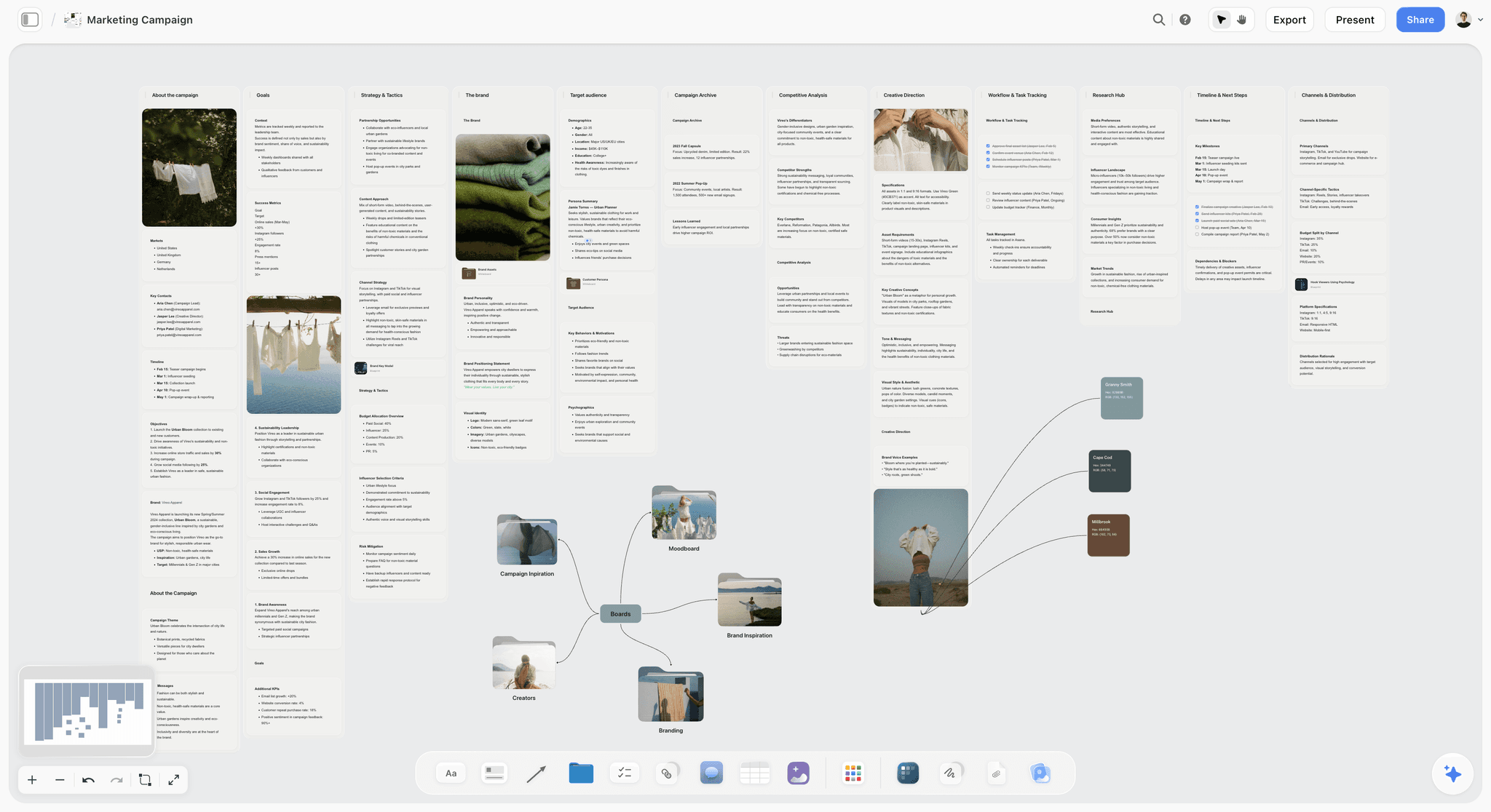
Storyflow is a visual canvas with AI built for the planning layer specifically: deciding what to post and how a campaign hangs together, before anything is queued. You spread ideas across an infinite canvas as cards, cluster them into themes and campaigns, and let the AI generate angles and pressure-test which ones fit your audience. Because the AI reads your full current board, you can ask it to find the gaps in a month of content, suggest ten new angles for a launch, or group loose ideas into a coherent campaign, and it answers from everything on the canvas, not one isolated note. The 200+ Story Blueprints library, including Hero's Journey, AIDA, and StoryBrand, gives you proven frameworks to structure a campaign instead of starting from a blank month.
The honest limitations are real and worth stating. First, Storyflow is not a scheduler and does not auto-publish. It plans the content; you still push it live with a tool like Buffer or Later. Second, it is cloud-only, so there is no offline planning mode. Third, it is a newer platform with a smaller template library than the incumbents, and real-time team collaboration lives on the Max tier. Pricing is flat per account, not per seat: paid-only during early access, with Plus at $7.99/month annual for the full Blueprint library, Pro at around $14/month for AI image generation, and Max at around $39/month flat for the Team Workspace; the Free plan (unlimited boards and basic AI) launches before the end of 2026.
2. Notion
Notion is the flexible workspace many teams bend into a content-planning hub: a database of post ideas, a calendar view, a page per campaign, with Notion AI to draft and expand angles. For the planning layer, that flexibility is genuinely useful, because you can model your own workflow instead of accepting someone else's, and the AI helps turn a rough theme into a list of concrete posts.
Its weakness is the same as its strength. Notion is not visual or spatial, so seeing how a month of content connects means reading rows, not moving ideas around a canvas. It has no native publishing, so it is a planning tool only, and you build every view and template yourself before it works. Pricing is around $10 per member per month for Plus, or around $20 for Business, billed annually, and the per-member cost grows with the team.
3. Metricool
Metricool sits between the two layers, pairing planning and scheduling with strong analytics. Its edge for planning is that the analytics feed the plan: you can see which content performed, spot the gaps, and shape next month around what actually worked, all in one place. For a data-driven social manager, closing that loop between results and the next plan is the appeal.
Metricool leans more toward the scheduling and reporting side than deep ideation, so the "what should we make" work is thinner than the "when should it go out" work. The interface is also less polished than premium tools, and it can feel dense when you first open it. Pricing runs from around $18 to $53 per month depending on the plan and the number of connected brands, which keeps it reasonable for a solo manager or small team.
4. Planable
Planable is an approval-first content calendar, and that framing makes it strong for the planning layer in one specific way: it is built around the review conversation. You draft posts, see them as they will appear on each platform, and route them through structured approval before anything ships. For teams and agencies where a client or manager signs off on every post, that planning-and-approval flow is the reason to use it.
The weakness is cost structure. Planable prices per workspace, with Basic around $33 per workspace per month and Pro around $89, which scales badly for an agency juggling many clients. Its AI and ideation depth are also lighter than dedicated planning tools, so it is best when the bottleneck is approval, not idea generation.
5. Buffer
Buffer is the clean, simple scheduler, and in recent years it has added AI captions and light planning features that nudge it toward the planning layer. For a solo creator or small team, its idea-and-draft features plus AI-assisted captions cover a basic planning workflow without much setup, and the free plan is genuinely usable for getting started.
But Buffer is a scheduler first, and its planning depth is shallow: it helps you format and queue posts more than decide what the posts should be. The per-channel pricing also adds up fast, with Essentials around $5 per channel per month and Team around $10 per channel, so a manager running six accounts pays for six channels. Free covers three channels. Pair Buffer's publishing with a real planning tool if ideation is your bottleneck.
6. Canva
Canva earns a spot because so many social teams already live in it for design, and its Content Planner lets you schedule the graphics you make without leaving the tool. For the planning layer, the value is that visual creation and calendar placement sit together, so you can design a post and drop it onto a date in one flow, with Canva's AI helping generate visuals and copy.
The planning and scheduling features are basic next to dedicated tools, though. The Content Planner is a convenience layer on top of a design app, not a serious campaign-planning or ideation system, so it holds a calendar but does little to help you decide what belongs on it. Pricing is free to start, around $15 per month for Pro, or around $20 per user for Business.
7. ContentStudio
ContentStudio is one of the few tools that treats content discovery as part of planning. It pairs AI-assisted ideation and trending-topic discovery with planning and scheduling, so the "what should we post" question has actual support: you can surface trending content in your niche, generate angles, then plan and queue them. For a team whose planning bottleneck is running out of ideas, that discovery engine is the differentiator.
It is less well known than the big schedulers, so there is a learning curve and a smaller community to lean on when you get stuck. The all-in-one breadth also means some features feel shallower than best-in-class specialists. Pricing runs from around $19 to $49 per month depending on the plan and scale.
8. Later
Later is the visual, Instagram-first planner, and its visual content calendar is a real planning aid for image-led brands. You drag posts onto a calendar and preview how your Instagram grid will look before it is live, which is a genuine planning decision for aesthetic-driven accounts. For creators whose plan is fundamentally visual, that preview-the-feed workflow is the draw.
Later is weaker for text-first platforms like LinkedIn and X, where the grid preview means nothing, and its ideation and AI features are lighter than tools built around generating angles. It is a visual scheduler with planning conveniences, not a deep campaign-planning system. Free covers one social profile; paid plans start around $29 per month.
9. Hootsuite
Hootsuite is the enterprise scheduling and social-listening platform, and its planning strength is at scale: managing many accounts, streams, and team members with listening that feeds the plan. For a large team, being able to see conversations and trends across networks and turn that into a planned calendar in one system is the enterprise pitch.
The problems are price and fit for planners. Hootsuite dropped its free tier, and Standard runs around $99 per user per month, which is steep for a small team. It is a scheduling and management platform at its core, so the deep ideation and campaign-shaping work is not where it shines. Choose it for scale and listening, not for lightweight content planning.
10. Sprout Social
Sprout Social is the polished enterprise suite: publishing, analytics, listening, and engagement in one well-built system. Its planning strength is the same as its category: rich analytics and listening that inform what to plan next, wrapped in an interface teams enjoy using. For a large brand that wants planning, publishing, and reporting under one roof, Sprout is the premium option.
The barrier is price. Standard starts around $199 per user per month, which puts it out of reach for solo managers and small teams, and the per-seat model compounds as the team grows. Like the other enterprise suites, it is a management and scheduling platform first, so the pure ideation layer is not its focus. Pick it for scale and budget, not for scrappy planning.
Comparison table
| Tool | Best for | Free tier | Starting price |
|---|---|---|---|
Storyflow | Idea and campaign planning | Coming late 2026 (invited collaborators join free now) | $7.99/mo annual (Plus) |
Notion | Flexible planning database | Yes | ~$10/member/mo |
Metricool | Analytics-driven planning | Limited | ~$18/mo |
Planable | Approval-first calendars | Limited | ~$33/workspace/mo |
Buffer | Simple scheduling plus light planning | Yes (3 channels) | ~$5/channel/mo |
Canva | Design plus basic planning | Yes | ~$15/mo (Pro) |
ContentStudio | Discovery and ideation | Trial | ~$19/mo |
Later | Visual Instagram planning | Yes (1 profile) | ~$29/mo |
Hootsuite | Enterprise scheduling and listening | No | ~$99/user/mo |
Sprout Social | Enterprise suite | No | ~$199/user/mo |
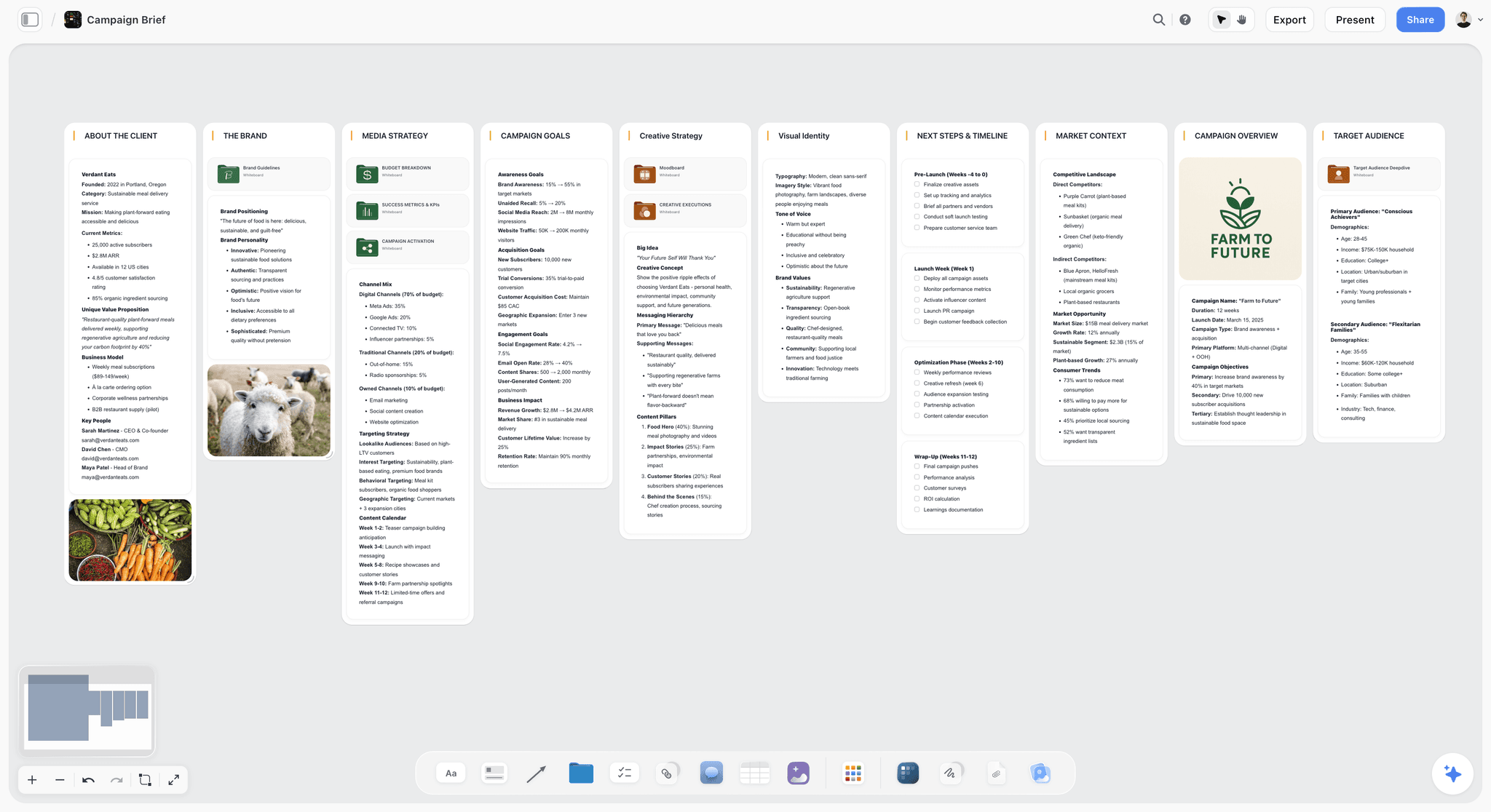
Storyflow canvas planning a month of social content across platforms, read by AI
Plan the month before you schedule it
Storyflow's AI reads a whole board of ideas and shapes a month of connected content, the planning layer a scheduler assumes you already did. Pair it with your scheduler to publish. Free to start.

How to choose for your team
Do not buy one tool and hope it does both jobs. Choose one for the planning layer and one for the scheduling layer, and match each to your actual bottleneck.
If your bottleneck is ideas, the plan itself, start on the planning layer. A visual canvas like Storyflow is where a month of content becomes one connected plan instead of thirty empty slots, because you can generate angles, cluster them into campaigns, and let the AI find the gaps. Notion is the cheaper, database-shaped alternative if you think in tables and do not need a canvas. ContentStudio is the pick when the bottleneck is specifically running out of topics, because discovery is baked in.
If your bottleneck is publishing, getting good posts out on time to many networks, add a scheduler. Buffer is the simplest and cheapest for a small team, Later is best for image-first Instagram brands, and Hootsuite or Sprout Social make sense only when scale, listening, and enterprise reporting justify the per-seat price. Metricool and Canva blur the two layers usefully for solo managers who want fewer tools.
The most common waste is buying a $99-per-seat scheduler when the real problem was never publishing. If your calendar is full but your content is flat, spend on the planning layer, not another queue.
The Bottom Line
Social media content planning is deciding what to make and why it will work, and that is a separate job from scheduling when it goes out. The tools that matter most for planning are the ones that help you generate ideas, shape campaigns, and see a month of content as one plan, not the ones built to queue posts on time. Run two tools: a planning space where ideas can sit together and rearrange, and a scheduler for publishing when the plan is set. Storyflow leads the planning layer because its AI canvas turns loose ideas into structured campaigns and pressure-tests them before you commit, and it loses the scheduling layer cleanly to Buffer or Later, which is exactly why the strongest social teams run one tool for each.
To plan your next month of content as one connected campaign, start a Storyflow planning board and drop your first ten ideas onto the canvas.
FAQ: Social Media Content Planning Tools
What is the best AI tool for social media content planning?
There is no single best tool, because planning and scheduling are two jobs. For the planning layer, deciding what to post and shaping campaigns, Storyflow leads because its AI canvas helps you generate ideas, cluster them into campaigns, and pressure-test angles. For the scheduling layer, pushing posts live on time, Buffer or Later lead. Most teams run one tool for each layer rather than forcing one to do both.
What is the difference between social media planning and scheduling?
Scheduling is the publishing layer: you queue a finished post, pick a time, and the tool pushes it to each network. Planning is the layer before that: deciding what to post, why it will work, and how the month hangs together as ideas. A scheduler assumes the idea already exists. A planning tool helps you decide whether the post is worth making in the first place.
Can AI actually help plan social media content?
Yes, but the useful help is upstream of captions. A good AI planning tool generates angles for a theme, groups loose ideas into campaigns, and finds the gaps in a month of content by reading your whole plan at once. That is thinking work. A scheduler with an AI caption button only formats an idea you already had, which is the smaller, later job.
Do I still need a scheduler if I use a planning tool?
Usually yes, because most planning tools do not auto-publish. A planning canvas like Storyflow decides what to post and how the campaign is shaped, then you push the finished posts live with a scheduler like Buffer or Later. The two layers pair cleanly: plan in one, publish in the other. Some tools like Metricool blur the line and do both at a basic level.
What is the cheapest way to plan social media content?
Combine free tiers. Notion's free plan works for a database-style content calendar, and Buffer's free plan covers three channels for publishing. That mix handles planning and light scheduling for a solo creator at no cost today. Storyflow's Free plan, covering unlimited planning boards and basic AI, launches before the end of 2026; until then Storyflow is paid-only, with Plus starting at $7.99/month annual. Add a paid planning tier when you need the full Blueprint library or more AI, and a paid scheduler when you outgrow three channels.
Is Storyflow good for social media content planning?
Storyflow is strong for the planning layer, because its AI canvas helps you generate ideas, cluster them into campaigns, and see a month of content as one connected plan. Its 200+ Story Blueprints give you frameworks to structure a campaign. It is not a scheduler, though, so it does not auto-publish, and teams pair it with a tool like Buffer or Later for the actual posting.
What is the best free social media content planning tool?
Notion's free plan is a strong choice for pure planning, since it works well as a database and calendar. Buffer's free plan covers three channels if you also need basic scheduling. Storyflow's free tier is not out yet: it is paid-only during early access, with a Free plan (unlimited boards and basic AI on a visual canvas) launching before the end of 2026. For planning specifically, a flexible database beats a bare scheduler today, because free planning tools help you decide what to post, not just when.
How do AI tools help with content ideation?
They help by generating angles from a theme, expanding a rough idea into concrete posts, and surfacing gaps or trending topics you missed. The best ideation help reads your existing plan, so the suggestions fit the campaign you are already building instead of arriving as generic prompts. Tools like Storyflow and ContentStudio lean into ideation, while most schedulers only assist once the idea is already decided.
Should a small marketing team use a scheduler or a planning tool first?
Start with whichever solves your real bottleneck. If your calendar is full but the content feels flat and disconnected, the problem is planning, so invest there first. If you already know what to post but publishing across networks is a manual grind, invest in a scheduler first. Most teams eventually run both, but buying the wrong layer first is the most common way social budgets get wasted.
What tools do social media managers use to plan campaigns?
Common choices are visual canvases like Storyflow for shaping ideas into campaigns, flexible workspaces like Notion for database-style calendars, and discovery tools like ContentStudio for finding topics. For publishing the planned campaign, managers add a scheduler such as Buffer, Later, Hootsuite, or Sprout Social depending on scale. The planning tools decide the campaign; the schedulers ship it.
Can I plan a whole month of content with AI?
Yes. On a planning canvas, you can drop a month of ideas as cards, let the AI cluster them into weekly themes, generate angles for each theme, and flag where the month is thin or repetitive. Seeing all thirty-plus posts together as one plan is the point, because it turns a scattered list into a connected campaign. The AI works best when it can read the whole board, not one post at a time.
Is a visual canvas better than a content calendar for planning?
For ideation and campaign shaping, a canvas usually wins, because you can move ideas around, cluster related posts, and see connections that a linear calendar hides. A calendar is better once the plan is set and you need dates. Many teams plan the campaign on a canvas first, then move the finished posts into a calendar or scheduler for publishing, using each layer for what it does best.
Table of Contents
Templates to check out for this topic


Content and video templates you can use in Storyflow
Plan a channel, a script, and a content pipeline on the same board. Open one of these templates and let the AI build on the structure instead of starting from a blank doc.


See Storyflow in Action
A visual AI workspace where every feature lives inside one canvas. No tab-switching, no context lost.
Build your entire board from a single message
Type what you need in the AI chat at the bottom of your canvas. The AI adds cards, headings, and structure directly onto your board.
Use expert frameworks as AI context
Type @ in the AI chat and choose any Tactic. The AI tailors every response to that framework instead of giving generic advice.
Turn your board into a mind map in seconds
Ask the AI to restructure your canvas as a mindmap. It connects your ideas into a visual hierarchy so you can see how everything relates.
Why Storyflow Exists
Storyflow actually began as a personal tool while working on creative and research projects.
We kept running into the same problem: ideas were scattered everywhere: notes, documents, and whiteboards.
Nothing helped us see how everything connected.
So we started building a workspace designed around how ideas actually grow.
→ Read how Storyflow was createdSara de Klein
Head of Product at Storyflow
Published: 2026-07-16
Extremely simple, seriously capable


See how easy it is to get started
Watch a real project come together, from a blank board to a finished plan, clicked through step by step.
Start creating with AI and become more productive
Transform your creative workflow with AI-powered tools. Generate ideas, create content, and boost your productivity in minutes instead of hours.