
Plan videos ultra fast, post on time
A content planning tool
with the work beside the plan.
Pillars, pieces, briefs, drafts, owners and publish dates on one board, so the plan and the content never drift apart. Describe what you publish and the AI lays out the first quarter.


Creatives working for these brands already got early access
- Red Bull
- Canon
- Artlist
- Porsche
See how easy it is to get started
Watch a real project come together, from a blank board to a finished plan, clicked through step by step.
Start from a ready-made template
Pick a board to see what you can build, then let AI fill it in. Every template is a real, editable starting point on the same infinite canvas.

YouTube Plan
Plan a video from hook to outline to shot list, with references and thumbnail ideas sitting right beside it.
What is a content calendar tool?
A content calendar tool is where a team plans what it will publish, when, on which channel and who makes it, as dated pieces with an owner and a stage each. Storyflow is an AI visual workspace that plans content for creators and small teams on one infinite canvas: the pillars, the idea bank, each piece's brief and draft, its owner, its stage and its publish date in a dated table. Its AI lays out a quarter's plan from a description and reads the board to show what is missing or stuck. Notion suits a team that wants to build its own content database, Asana one that runs content as assigned tasks, and Trello one that only needs cards moving through stages.
A content planning tool answers three questions for everything you publish: what it is and why it exists, who is making it and what stage it has reached, and when it goes out. Most teams answer the first in a strategy doc, the second in a task tool and the third in a spreadsheet. The plan then lives in three places and agrees with itself for about a week.
Planning sits upstream of scheduling. A scheduler such as Buffer or Later posts finished content at a set time; a content planning tool decides what gets made, who makes it, and what one long piece becomes across channels. A small team feels the difference most, because the same three people write the article, cut the video and post the clips, and a plan that hides that load is how a month slips.
In Storyflow, the AI's content planner workflow lays out pillars, an idea bank, a quarter of pieces and a batching and repurposing plan. Each piece is a ticket with an assignee and a due date, moving across a kanban from idea to published, with its brief, draft and assets beside it. Publish dates also sit in a table with a date column, rows kept in date order. There is no month grid, and Storyflow does not publish: hand finished pieces to your scheduler.
Ultra fast from brief to board
From a strategy doc to a plan people work from.
Four steps on one board, in your browser.
01
Describe what you publish
Audience, channels, cadence and who is on the team. The AI lays out three to five content pillars with an idea bank under each.
02
Turn ideas into pieces with an owner
Each chosen idea becomes a ticket with an assignee, a due date and a one-paragraph brief. A piece with no owner is the first thing that slips.
03
Map what one piece becomes
One article becomes a newsletter section, a short video and a week of posts. Plan the pieces together so the team makes them in one pass.
04
Run the plan in a weekly review
Fifteen minutes a week: what shipped, what is stuck, what moves. Ask the AI what has no owner or no brief, and hand finished pieces to your scheduler.
The plan, the pieces and the work, on one canvas.
What a content plan has to hold, without five tools holding one plan.

Pillars and an idea bank
Every idea has a reason to exist
The AI lays out pillars and ideas under each. An idea that fits no pillar is either a new pillar or not worth making, and the board makes that visible.
See the content pillar planner →
Owner, stage and due date on every piece
A plan the team can work from
Tickets with assignees and due dates move across a kanban from idea to published. Everyone sees what is stuck and who it is waiting on.
See the editorial calendar →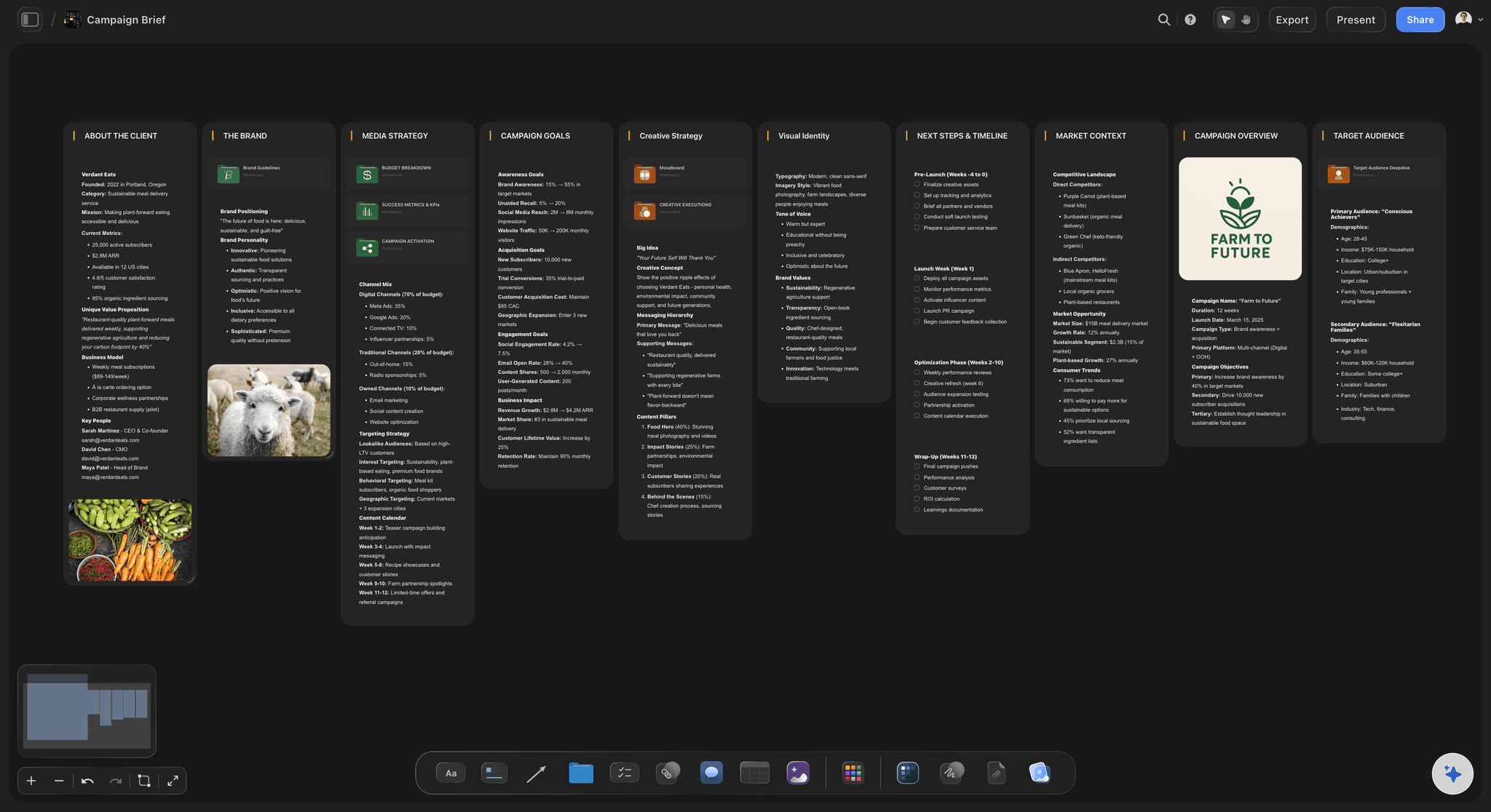
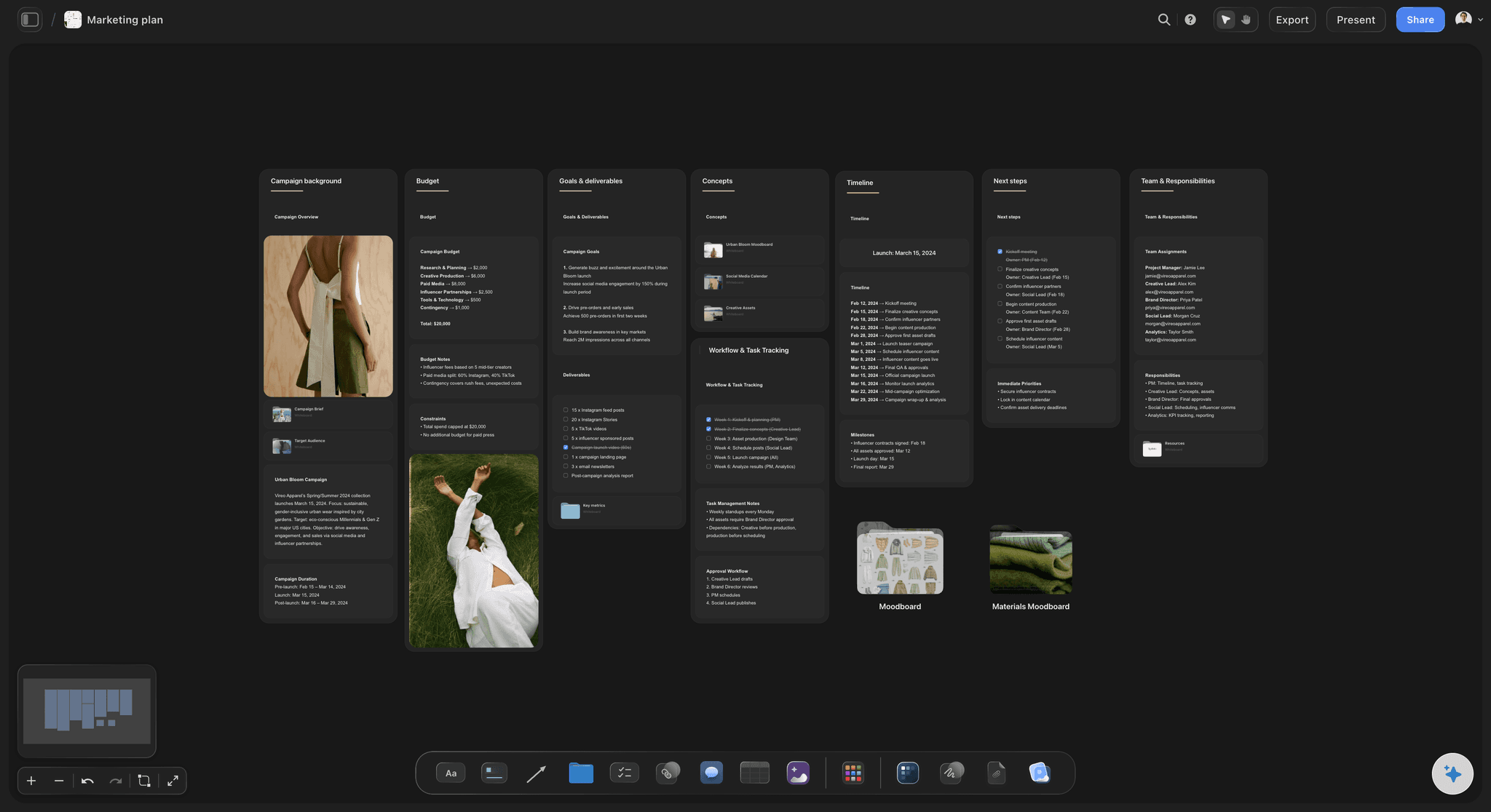
The brief beside the piece
Briefs and drafts attached to the plan
Each piece carries its brief in a Doc with inline comment threads, plus the draft and the assets. The writer never hunts for what was agreed.
See the content brief template →
One piece, many channels
Repurposing planned, not improvised
Map what each long piece becomes across channels before anyone starts, so the clips and posts are made in the same pass as the original.
See the content repurposing planner →Unlimited boards. No object cap.
One board per quarter, per channel or per campaign. Storyflow is paid-only during early access, with plans from $7.99 a month billed annually ($9.99 monthly). A free plan launches before the end of 2026, and anyone a paid member invites to a board joins free.
Unlimited boards and file uploads on every paid plan
AI workflows for a content planner, a social media plan and a marketing plan
Tickets with assignees and due dates, kanban stages and tables
Real-time editing for invited teammates, view-only links for everyone else
Built for people with taste
Plans rarely fail on ideas. They fail on ownership.
Four failures show up in almost every small team's content plan, and each has a mechanical fix.

Ownership, briefs, load, drift
The small team failure set
A piece with no owner: Shared ownership is no ownership. One name per piece, even when three people touch it, is the single change that moves the most work.
A title instead of a brief: A row that says only the topic produces a draft nobody agreed to. One paragraph covering audience, angle and the one thing the reader should do is enough.
Load nobody can see: The same person writes the article and cuts the video. Laying each owner's pieces side by side shows the week one person has six pieces due.
The plan drifts from the work: When the plan is a spreadsheet and the drafts are elsewhere, the plan stops being true. Keeping the draft beside its row keeps both honest.
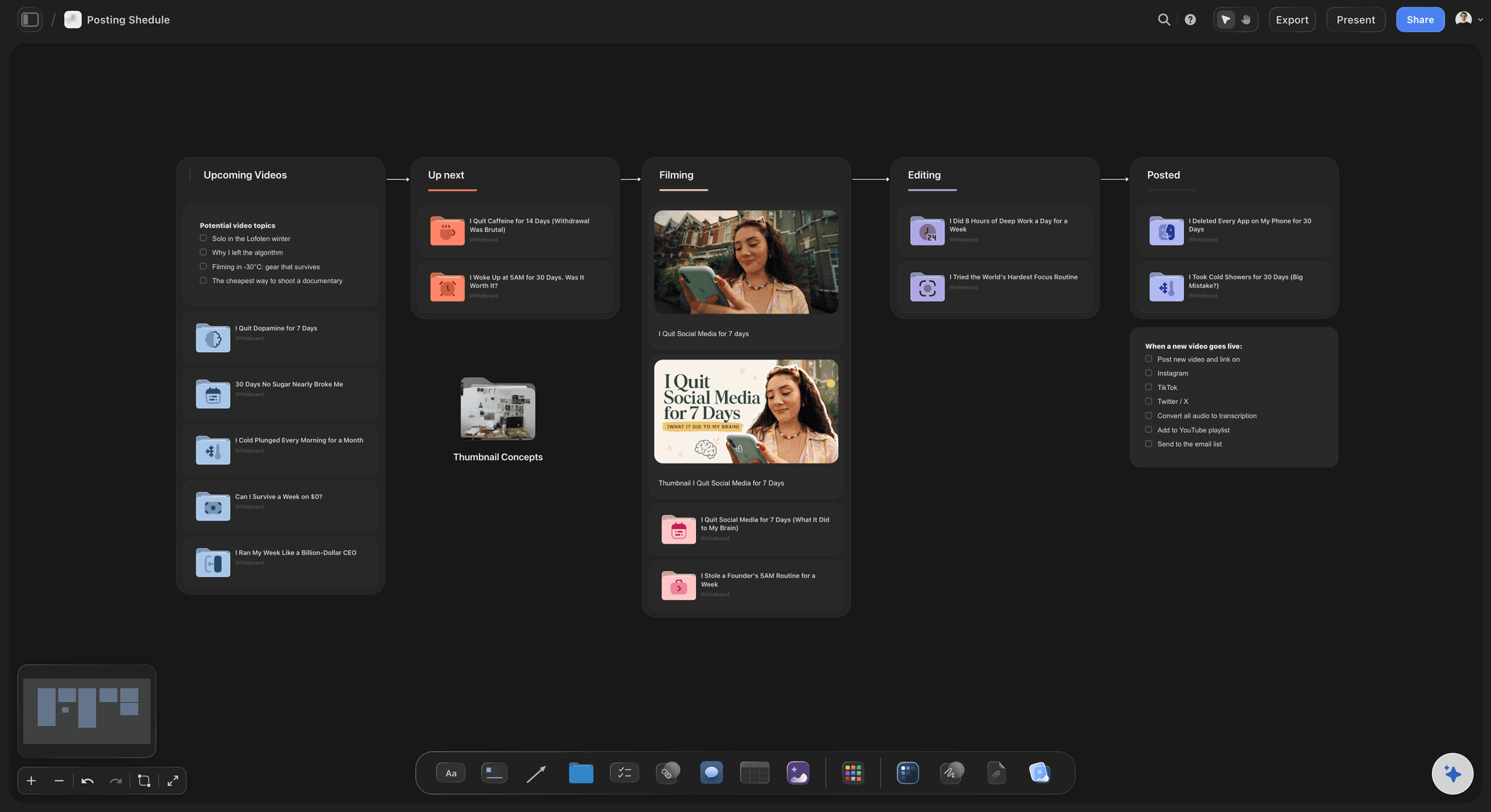
Pillars, quarter, month, week
Plan at the right distance
A quarter of themes: Three to five pillars and the moments that matter this quarter: launches, seasons, events. Further out than that is guessing.
A month of specific pieces: Each with an owner, a brief and a due date. This is the horizon a small team can commit to without rewriting it weekly.
Two weeks of finished or nearly finished work: The buffer that absorbs a sick day or a slipped interview. It matters more than how far ahead the plan runs.
Dates in rows, not a grid: Publish dates live in a table with a date column, rows kept in date order, and on each ticket. A dated list is what a weekly review actually reads.
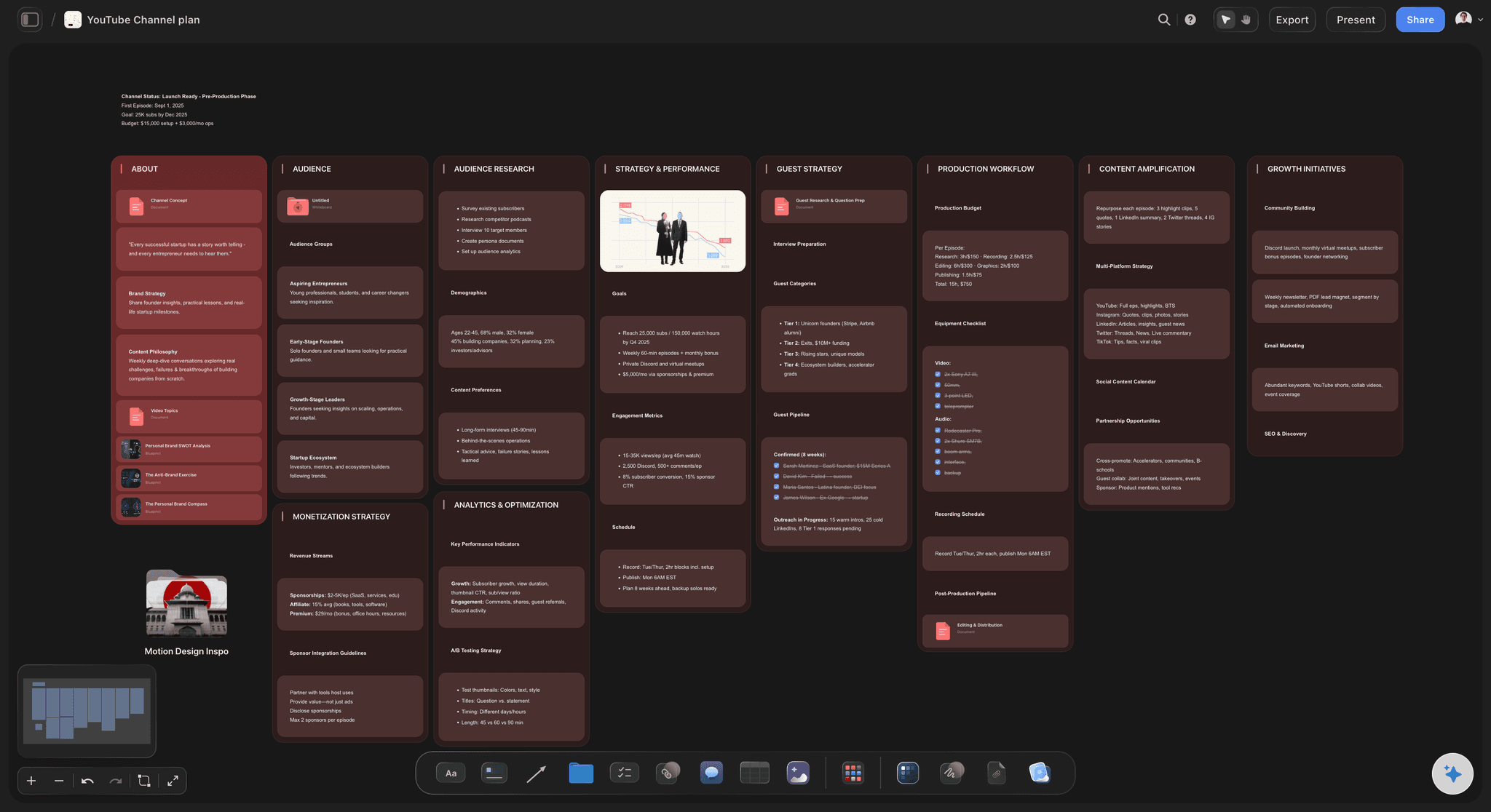
AI that reads the whole plan
A planner that knows what is already there
Lay out the first quarter: Describe the audience and channels and the AI's content planner workflow builds pillars, pieces and a repurposing plan you edit by hand.
Find the gaps: Ask which pillar has nothing this month, which piece has no brief, or what is waiting on one person. The AI reads the board you have open.
Bring your strategy in: Attach up to five documents and three other boards, such as a brand guide or last quarter's plan, and the AI plans against them.
It proposes, you decide: AI edits land on the board with one-click Undo. What the team publishes is the team's call.
What it does not do
Planning, not publishing
No posting or scheduling: Storyflow does not connect to social platforms. Hand finished pieces to Buffer, Later or the platform's own scheduler.
No approval button: Feedback happens in comments and in the Doc's inline comment threads. A stakeholder opens the link with no account, and signs in to comment.
No analytics: Performance lives in your platforms. Paste what you learn onto the pillar it belongs to, so next quarter's plan starts from it.
Explore templates for your project
Every template opens as a real, editable board on the infinite canvas. Pick the closest fit and make it your own.
YouTube Plan
Plan a video from hook to outline to shot list, with references and thumbnail ideas sitting right beside it.
One app instead of five
Storyflow vs Notion, Trello and Asana.
Each is good at something: Notion at custom databases, Trello at simple cards, Asana at tasks and approvals across a team. Here is where they differ for planning content.
Storyflow
Recommended
Plan, briefs, drafts and references on one canvas
Content pieces move through stages on a kanban
Owner and due date on every piece
AI lays out the plan from a description
Calendar layout of publish dates
Free plan today
Notion
Plan, briefs, drafts and references on one canvas
Content pieces move through stages on a kanban
Owner and due date on every piece
AI lays out the plan from a description
Calendar layout of publish dates
Free plan today
Trello
Plan, briefs, drafts and references on one canvas
Content pieces move through stages on a kanban
Owner and due date on every piece
AI lays out the plan from a description
Calendar layout of publish dates
Free plan today
Asana
Plan, briefs, drafts and references on one canvas
Content pieces move through stages on a kanban
Owner and due date on every piece
AI lays out the plan from a description
Calendar layout of publish dates
Free plan today
What creators are saying
Join early creators getting structured workspaces and AI that remembers their projects
“Storyflow has sped up my workflow by at least 3x, which means more flow state and more projects I can actually ship. It truly changed the way me and my team create.”

Reilin Joey
Director & YouTuber
“One prompt gets me a structured board. But the tactics are my favorite. I run my YouTube scripts through them and my intros and retention got better. It's amazing.”

Justkay
YouTuber & Freelance Filmmaker
“I used to juggle five apps to plan a project. Now I describe what I am making and get boards, lists, and a schedule. All in one place.”

George
@fernwehchronicles
Content planning tools, answered.
What creators and small teams ask before choosing where to plan content.
A content calendar tool holds the plan for everything a team publishes: each piece with its channel, publish date, owner and stage, so everyone can see what goes out when and who is making it. Some show it as a month grid, others as a dated list or board. In Storyflow it is a table with a date column beside a kanban of stages, with each piece's brief and draft on the same board.
Storyflow is built for exactly this job: pillars, pieces, briefs, drafts, owners and publish dates sit on one board, and the AI lays out a quarter from a description. It shows dates as a table, not a month grid, and it does not post: a scheduler such as Buffer or Later publishes the finished pieces.
Five things: content pillars that say why each piece exists, an idea bank, the pieces you have committed to with an owner and a due date each, a short brief per piece, and a note of what each long piece becomes on other channels. A plan without owners is a wish list, and a plan without briefs produces drafts nobody agreed to.
A scheduler posts finished content at a set time; a content planning tool decides what gets made, who makes it and when it is due. Storyflow is the planning side and does not post to any platform. Buffer, Later or the platform's own scheduler handle the posting once the piece is made. Most teams need both.
Not as a month grid. In Storyflow publish dates live on each ticket and in a table with a date column, rows kept in date order, beside a kanban of stages. For a weekly review a dated list is usually clearer. If your team needs a month layout for stakeholders, Notion, Trello and Asana all offer one.
Keep it to fifteen minutes and three questions: what shipped, what is stuck, and what moves to next week. Read the plan in date order, give every stuck piece one next step and one owner, and push anything unowned out rather than carrying it. In Storyflow, ask the AI which pieces have no owner or no brief before the meeting, and hand finished pieces to your scheduler after it.
Yes. Start from three to five pillars, place the dates that matter this month, then fill the month with pieces per pillar and group them into batch days. Our social media content calendar page walks through the method. In Storyflow the AI's social media plan workflow lays out the month on a board, and you hand the finished posts to your scheduler.
It builds a first draft. Describe your audience, channels and cadence and Storyflow's content planner workflow lays out pillars, an idea bank, a quarter of pieces and a repurposing plan. It reads the board you have open, so later you can ask which pillar is thin this month or which piece has no brief. Edits land with one-click Undo.
A quarter of themes, a month of specific pieces with owners, and two weeks of finished or nearly finished work in reserve. Detailed plans further out tend to be rewritten. The reserve matters most: it is what absorbs a sick day, a slipped interview or a launch that moves.
Not during early access. Storyflow is paid-only during early access, with plans from $7.99 a month billed annually ($9.99 monthly). A free plan launches before the end of 2026, and anyone a paid member invites to a board joins free. Until then, a shared spreadsheet with an owner and a due date per row covers the basics.
Use Notion if you want to design your own content database, with a calendar layout and a large template library. Use Storyflow if you want the plan, the briefs, the drafts and the references visible on one canvas, and an AI that lays out the plan from a description. Some teams keep an archive in Notion and plan the current quarter in Storyflow.
Yes. Share a view-only link and they open it with no account, seeing the latest version when they open or reload. To leave notes they sign in to comment, and notes sit on the piece they are about. Storyflow has no approval button, so agree in the comments who signs off and by when.
Storyflow's AI has named workflows for a content planner (pillars, calendar, batching and repurposing), a social media plan, a marketing plan, a campaign brief, a YouTube channel plan and a YouTube video plan. Each lays out a board you then change by hand, and you can duplicate any board to reuse its structure next quarter.
More from Storyflow
Editorial calendar
Social media content calendar
Content calendar for creators
Content pillar planner
Content brief template
Content repurposing planner
AI content planner
AI content calendar generator
Content pipeline
In-house content production
For content creators
The best content calendar apps of 2026
Notion vs Trello for content calendars
YouTube content pipeline
AI tools for content creators
Content audit template
Editorial workflow
A content plan your team works from, not around.
Describe what you publish, let the AI lay out the quarter, and give every piece an owner and a brief. No download.