
Ultra-fast campaigns, pitched beautifully
The marketing workspace
where the brief and the work share a board.
A campaign usually lives in five places: the brief in a doc, the plan in a spreadsheet, references in a folder, tasks in a tracker, feedback in email. Storyflow puts all five on one canvas, with an AI that drafts the first version and reads the rest.


Creatives working for these brands already got early access
- Red Bull
- Canon
- Artlist
- Porsche
See how easy it is to get started
Watch a real project come together, from a blank board to a finished plan, clicked through step by step.
Start from a ready-made template
Pick a board to see what you can build, then let AI fill it in. Every template is a real, editable starting point on the same infinite canvas.

Marketing Campaign
Plan a campaign across channels, messages, and deliverables on one board the whole team can see.
What is a marketing workspace?
A marketing workspace is the shared place where a team keeps each campaign's brief, plan, references, deliverables and feedback, so the work stays tied to what was asked for. Storyflow is an AI visual workspace that runs each campaign on one infinite canvas: the brief, the plan, the references and the deliverables tracker side by side. Its AI drafts the campaign brief and the marketing plan from a prompt, the team edits the same board in real time, and a client or stakeholder opens a view-only link with no account. Teams that need automations or approval routing keep Asana or Monday.com for execution; teams that think in documents may prefer Notion.
A marketing workspace is different from a project tracker. A tracker answers who is doing what by when. A workspace also holds the thinking that decides what gets done: the objective, the audience, the message, the channel mix and the references that show what good looks like. When that thinking lives in a different tool, the work drifts away from it a little every week.
The drift has a recognisable shape. The brief is approved in week one and not opened again. Designers work from a verbal summary. The social team builds assets for a channel the plan dropped. Nobody is careless; the brief simply is not where the work is. A workspace that keeps the two on one surface removes the drift without adding process.
Storyflow's canvas holds every piece a campaign needs: Docs for the brief and copy, Tables with status, owner and date cells, Tickets with assignees, Kanban for production, images, video you can play and scrub, and comments on any of them. One board per campaign, folders per client or quarter, and a dashboard board across them. Nothing to install; it runs in your browser.
Ultra fast from brief to board
Set up the marketing workspace in four steps.
No templates to configure and no fields to design before the first campaign.
01
Open a board for the campaign
Sign up and open a canvas. One board per campaign, grouped into folders by client, brand or quarter.
02
Let the AI draft the brief and plan
Describe the campaign in a few sentences, attach research or last quarter's results, and the AI drafts the campaign brief and a channel plan as editable blocks.
03
Add the work beside the plan
References, drafts, video cuts and copy go next to the section of the plan they serve, with a deliverables table tracking status, owner and due date.
04
Invite the team, share with the client
Invited collaborators edit in real time and join free. Clients open a view-only link with no account and sign in to comment on the specific piece.
Everything a campaign needs, in one marketing workspace.
The thinking, the work and the tracking, on the same canvas.

Brief and plan, drafted
Start from a draft, not a blank page
The AI's campaign brief and marketing plan workflows give the team a first version of both. You edit it; the AI does not decide the strategy.
See the AI marketing campaign planner →
Brief to delivery
The brief stays next to the work
Assets are reviewed against the brief on the same board, not a memory of it. That one habit removes most late rework.
See campaign brief to delivery →
Status, owner, date
Track deliverables without a second tool
A table with status, person and date cells, tickets with assignees and a Kanban for production. Enough to run most campaigns on the board where they were planned.
See campaign management software →
One workspace, many campaigns
A dashboard across every campaign
A dashboard board with a row per campaign shows phase, launch date and what each is waiting on, so the weekly status meeting gets shorter.
See Storyflow for marketing teams →Unlimited campaign boards. No object cap.
One board per campaign, folders per client, a dashboard across them. Storyflow is paid-only during early access, with plans from $7.99 a month billed annually ($9.99 monthly). A free plan launches before the end of 2026, and anyone a paid member invites to a board joins free.
Unlimited boards and unlimited file uploads on every paid plan
AI workflows for campaign briefs, marketing plans and social plans
Real-time editing with everyone you invite
View-only links clients open with no account
Built for people with taste
Built around the campaign, not the task list.
What goes on the board, how the AI helps, and where Storyflow stops.
The shape of a campaign board
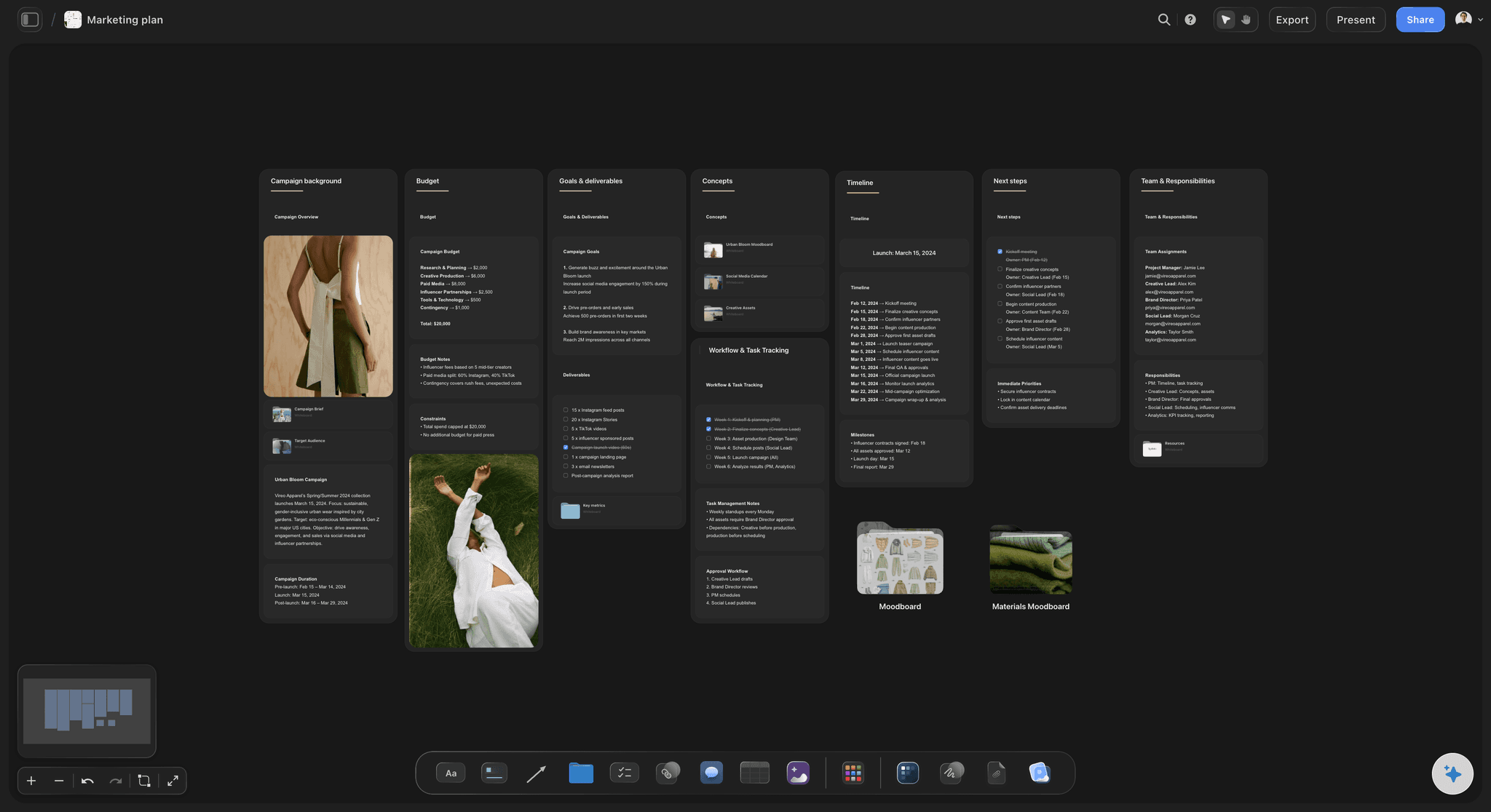
Five sections, every campaign
Brief at the top: Objective, audience, message, mandatories and success measures in a Doc. Keep it to one page so people actually reread it.
Channel plan beside it: Each channel with its role in the campaign and the assets it needs. Three to five channels is where most campaigns stay manageable.
References and work in progress: Moodboard images, draft copy and video cuts grouped under the channel they serve, so feedback lands in context.
Deliverables and feedback underneath: A table with one owner and one due date per asset, rows kept in date order, and comments on the assets themselves.
AI that reads the board
Drafts, gaps and summaries
Draft from a prompt: Campaign brief, advertising brief, marketing plan, social media plan and content planner workflows each produce an editable first version.
Attach your context: Up to five documents and three other boards, such as brand guidelines, research or a previous campaign, so the draft fits your brand.
Ask what is missing: Which channel has no assets, which rows have no owner, what the brief promised that the plan dropped. The answer comes from the open board.
Team and client
One board, several audiences
Real-time editing: Invited collaborators edit the same board with live cursors on any paid plan, and anyone a paid member invites joins free.
Clients by link: A view-only link opens with no account and shows the latest version on reload. To comment, the client signs in.
Present from the board: Presentation mode steps through frames fullscreen, and the whole board exports as an image or PDF for the deck-minded.
Roles when the team grows: The Max plan adds a team workspace with permissions and roles, billed per seat.

Where it stops
Honest limits
No approvals or proofing: Sign-off happens in comments and status cells. Teams with formal approval routing keep that in their proofing tool.
No publishing or automations: Storyflow does not schedule posts, send email or trigger rules. It plans and tracks; channel tools ship.
A newer, smaller ecosystem: Fewer templates and integrations than Notion, Miro or Asana, and paid-only until the free plan launches late 2026.
Explore templates for your project
Every template opens as a real, editable board on the infinite canvas. Pick the closest fit and make it your own.
Marketing Campaign
Plan a campaign across channels, messages, and deliverables on one board the whole team can see.
One app instead of five
Storyflow vs Notion, Miro and Asana as a marketing workspace.
Notion is strong on documents and databases, Miro on workshops and diagrams, Asana on task structure and approvals. Here is where they differ for running a campaign.
Storyflow
Recommended
Brief, references and plan on one canvas
Tables with status, owner and date
View-only link with no account
Time tracking
Free plan today
Notion
Brief, references and plan on one canvas
Tables with status, owner and date
View-only link with no account
Time tracking
Free plan today
Miro
Brief, references and plan on one canvas
Tables with status, owner and date
View-only link with no account
Time tracking
Free plan today
Asana
Brief, references and plan on one canvas
Tables with status, owner and date
View-only link with no account
Time tracking
Free plan today
What creators are saying
Join early creators getting structured workspaces and AI that remembers their projects
“Storyflow has sped up my workflow by at least 3x, which means more flow state and more projects I can actually ship. It truly changed the way me and my team create.”

Reilin Joey
Director & YouTuber
“One prompt gets me a structured board. But the tactics are my favorite. I run my YouTube scripts through them and my intros and retention got better. It's amazing.”

Justkay
YouTuber & Freelance Filmmaker
“I used to juggle five apps to plan a project. Now I describe what I am making and get boards, lists, and a schedule. All in one place.”

George
@fernwehchronicles
Marketing workspace questions, answered.
What goes in one, how the AI helps, and where Storyflow stops.
A marketing workspace is where a team runs its campaigns: each campaign's brief, channel plan, references and work in progress, a deliverables tracker with one owner and date per asset, and the feedback, all in one place. In Storyflow each campaign is a board with those five parts visible together, which is what stops the work drifting from the brief.
Storyflow is built for exactly this job: the campaign's brief, plan, references and deliverables sit on one canvas, its AI drafts the campaign brief and the marketing plan from a prompt, the team edits the same board in real time, and a client opens a view-only link with no account. Asana or Monday.com still handles automations and formal approval routing when a large team needs them.
Five things per campaign: the brief, the channel plan, the references and work in progress, a deliverables tracker with one owner and date per asset, and the feedback. Most teams spread these across four tools. The workspace earns its place when all five are visible together, because that is what stops the work drifting from the brief.
No. Project management software tracks who does what by when. A marketing workspace also holds the brief, the audience and the references that decide what should be done. Storyflow does both at a campaign's scale, with tables, tickets and Kanban, but it has no automations, workload views or time tracking, so large teams often pair it with an execution tool.
Yes. Describe the campaign and the AI drafts the brief, a channel plan and a deliverables table as editable blocks on the board. Attach up to five documents and three boards for context, such as brand guidelines or last quarter's results. The AI proposes and the team decides; every edit it makes has one-click Undo.
One board per campaign, grouped into folders by client, brand or quarter, plus a dashboard board with a row per campaign showing phase, launch date, owner and what it is waiting on. Duplicate a finished campaign board to start the next one, so the structure that worked carries forward.
Only what you share. Links are off until the owner turns sharing on; a view-only link then opens with no account and shows the latest version on reload. Clients sign in to comment. Many agencies share a separate client board with the brief, the agreed deliverables and what they are waiting on the client for.
Yes. Invited collaborators edit the same board in real time with live cursors on any paid plan, and anyone a paid member invites joins free. Board access is admin, edit or view. The Max plan adds a team workspace with permissions and roles, billed per seat.
A whiteboard is built for a workshop: sticky notes, arrows and a session that ends. A marketing workspace has to hold a campaign for weeks, so it needs Docs for the brief, tables with status, owner and date, tickets with assignees, and an AI that reads it all. Storyflow's canvas holds those alongside images, video and comments, so the plan and the work stay on one board.
On their own board, attached as context wherever a campaign is planned. In Storyflow a brand board holds the positioning, tone of voice, colour swatches and reference images, and the AI takes up to three other boards as context, so a campaign brief drafted against it follows the guidelines. Link it from every campaign board so designers find it in one click.
Images, video you can play and scrub (MP4, MOV, WEBM), audio, Docs with rich text that export to Word and PDF, tables, charts, colour swatches, links and HTML embeds. Every paid plan includes unlimited file uploads. The whole board exports as an image or PDF when someone needs a file.
Storyflow is paid-only during early access, with plans from $7.99 a month billed annually ($9.99 monthly). A free plan launches before the end of 2026, and anyone a paid member invites to a board joins free. Clients viewing a link never need an account.
Yes. A launch is a campaign with a positioning phase in front: brand strategy, naming and a moodboard first, then the launch brief and channel plan. The AI has workflows for brand strategy, brand moodboard, campaign brief and marketing plan, so the whole arc sits on one board. The brand launch planner walks through it step by step.
More from Storyflow
In-house content production
For social media managers
Social media marketing plan
Campaign management software
Campaign brief to delivery
AI marketing campaign planner
Storyflow for marketing teams
Brand launch planner
Marketing planning software
Campaign brief template
Project brief template
Agency campaign planning
Go-to-market plan
AI content planner
Best workspace to run a campaign from brief to delivery
Best marketing campaign planning tools
Put the brief and the work on the same board.
Open a canvas, draft the next campaign's brief with the AI, and invite the team. Runs in your browser, nothing to install.