
Ultra-fast campaigns, pitched beautifully
Campaign management software
that starts with the brief.
Most campaign tools start at the task list and leave the brief in a doc nobody reopens. Storyflow keeps the brief, the plan, the references and every deliverable with its owner and date on one board, from kickoff to the last asset.


Creatives working for these brands already got early access
- Red Bull
- Canon
- Artlist
- Porsche
See how easy it is to get started
Watch a real project come together, from a blank board to a finished plan, clicked through step by step.
Start from a ready-made template
Pick a board to see what you can build, then let AI fill it in. Every template is a real, editable starting point on the same infinite canvas.

Marketing Campaign
Plan a campaign across channels, messages, and deliverables on one board the whole team can see.
What is campaign management software?
Campaign management software is where a marketing team plans, tracks and delivers a campaign: the brief, the plan, every deliverable with an owner and a date, the feedback and the approvals. Storyflow is an AI visual workspace that runs a campaign from brief to delivery on one infinite canvas: the brief, the marketing plan, the references and a table tracking every deliverable with a status, an owner and a due date. Its AI drafts the campaign brief and the marketing plan from a prompt. Use Asana or Monday.com alongside it if the campaign needs automations, formal approval steps or workload views across a large team.
Campaign management software has two jobs, and most tools are built for one of them. The first is the thinking: the objective, the audience, the message, the channel plan and the references that tell a designer what good looks like. The second is the running: who owns each asset, when it is due, what is waiting on feedback. Task tools do the second well and push the first into attachments.
That split is where campaigns go wrong. The brief is written, approved and filed, and six weeks later the assets are judged against what people remember of it. A deliverable nobody traced back to the objective gets made anyway, and the one the channel plan actually needed is missing until the week of launch. The fix is not more status columns. It is keeping the brief in view of the people doing the work.
On a Storyflow board the brief is a Doc at the top, the channel plan and references sit beside it, and the deliverables table runs underneath with rows kept in date order. Tickets carry assignees and due dates, a Kanban shows what is in progress, and stakeholders open a view-only link with no account. The AI reads the whole board, so asking what is missing or late gets an answer about your campaign.
Ultra fast from brief to board
From campaign brief to delivered assets in four steps.
No workspace to configure before the first campaign.
01
Draft the campaign brief
Describe the campaign and the AI's campaign brief workflow drafts objective, audience, message, mandatories and success measures as a Doc on the board. You edit it until it is the brief you would sign.
02
Turn the brief into a channel plan
The marketing plan workflow lays out channels, phases and the assets each one needs beside the brief, so every deliverable traces back to a line in it.
03
Track every deliverable
A table lists each asset with status, owner, due date and channel, rows kept in date order. Tickets with assignees handle the work that needs its own thread.
04
Share, review and deliver
Stakeholders open a view-only link with no account and sign in to comment. Present the board in fullscreen, or export it as a PDF for the wrap report.
The brief, the plan and the deliverables, managed in one place.
What a campaign has to hold between kickoff and the last asset out the door.

The brief stays in view
A campaign brief the team works from
The brief sits on the same board as the work, so a designer checking an asset against the objective reads the actual brief, not a memory of it.
Use the campaign brief template →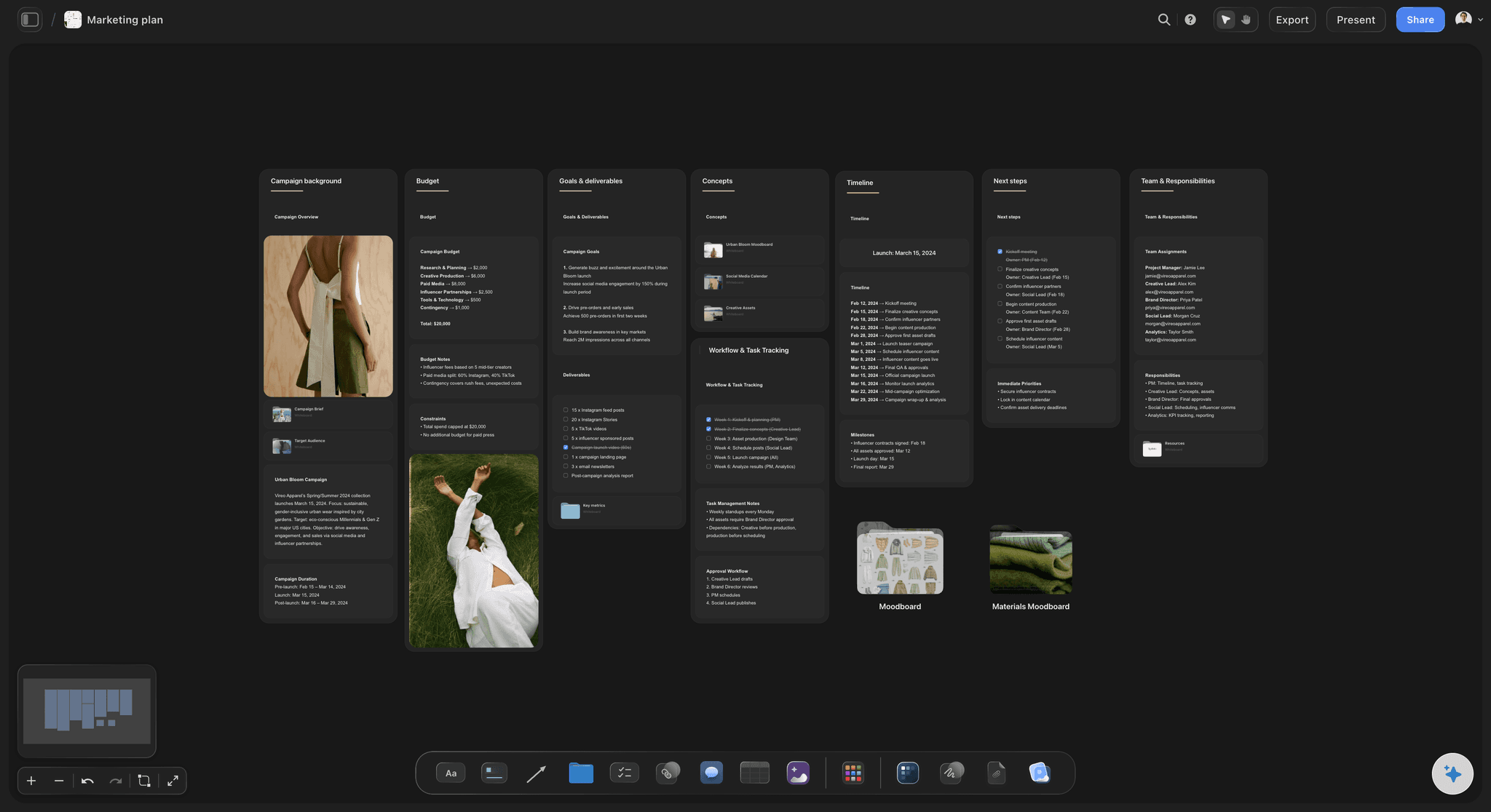
Channels and phases
A plan the deliverables come from
The channel plan lists what each channel needs in each phase. When the table and the plan disagree, the gap is visible before launch week.
See the AI marketing campaign planner →
Status, owner, date
Every deliverable tracked
Status cells, a person per row and a due date, with tickets for anything that needs assignees and its own discussion. Enough structure to run a campaign, no more.
See the campaign brief to delivery workflow →
Stakeholders by link
Review without another login
Clients and leadership open a view-only link with no account and see the latest version when they reload. Anyone who signs in can comment on the specific asset.
See agency campaign planning →Unlimited campaign boards. No object cap.
One board per campaign, one dashboard across them. Storyflow is paid-only during early access, with plans from $7.99 a month billed annually ($9.99 monthly). A free plan launches before the end of 2026, and anyone a paid member invites to a board joins free.
Unlimited campaign boards and file uploads on every paid plan
AI workflows for the campaign brief, marketing plan and budget
Tables, tickets and Kanban for tracking deliverables
View-only links stakeholders open with no account

Built for people with taste
Where campaigns slip between the brief and delivery.
The failures are predictable, and each has a mechanical fix on the board.
Brief, plan, deliverables
Keep the chain unbroken
Every asset traces to a channel: Each row in the deliverables table names the channel and phase it serves. A row that serves nothing is a candidate to cut, and a channel with no rows is a gap.
The brief is one scroll away: Reviews go faster when the objective and mandatories are on screen. Most rework comes from judging an asset against a remembered brief.
Changes land on the brief first: When the client moves the launch or drops a channel, edit the brief and the plan, then the table. The order keeps the three from drifting apart.
Owners and dates
Run the campaign, not the tool
One owner per deliverable: A row with two owners has none. Put one person in the person cell and name the reviewer in the ticket.
Plan backwards from launch: The AI's planner works back from a deadline, so feedback rounds and production time are placed before the date, not squeezed into the last week.
Waiting is a status: Mark what is waiting on the client or on legal. A blocked asset that looks identical to an active one is how launch week surprises happen.
Two feedback rounds, then decide: Agree the number of rounds in the brief. A third round is a scope change, and the board makes it visible as one.
AI that reads the campaign
A second pair of eyes on the plan
Draft the brief and the plan: The campaign brief, advertising brief, marketing plan and budget workflows give you a first draft to edit rather than a blank page.
Find the gaps: Ask which channels have no assets, which rows have no owner, or what is due this week. The AI answers from the board you have open.
Bring your context: Attach up to five documents and three other boards, such as last quarter's results or the brand guidelines, and the plan is built against them.
It proposes, you decide: AI edits land on the board with one-click Undo. The budget, the channels and the final call stay with the campaign owner.

What it does not do
Honest limits
No automations or approval buttons: Status changes are manual and sign-off happens in comments. Teams that need rule-based routing or formal approval steps pair it with Asana or Monday.com.
No publishing or ad buying: Storyflow plans and tracks the assets. It does not schedule posts, send email or run media; your channel tools do that.
Dates in tables, no time tracking: Dates live in table cells and tickets, rows kept in date order. There is no timesheet, so hours are tracked in whatever tool bills them.
Explore templates for your project
Every template opens as a real, editable board on the infinite canvas. Pick the closest fit and make it your own.
Marketing Campaign
Plan a campaign across channels, messages, and deliverables on one board the whole team can see.
One app instead of five
Storyflow vs Asana, Monday.com and Airtable for campaigns.
Asana is strong on task structure and approvals, Monday.com on configurable boards and dashboards, Airtable on connected campaign data. Here is where they differ for running a campaign from the brief.
Storyflow
Recommended
Brief, references and plan on one canvas
Status, owner and due date per deliverable
Stakeholders view by link with no account
Rule-based automations
Free plan today
Asana
Brief, references and plan on one canvas
Status, owner and due date per deliverable
Stakeholders view by link with no account
Rule-based automations
Free plan today
Monday.com
Brief, references and plan on one canvas
Status, owner and due date per deliverable
Stakeholders view by link with no account
Rule-based automations
Free plan today
Airtable
Brief, references and plan on one canvas
Status, owner and due date per deliverable
Stakeholders view by link with no account
Rule-based automations
Free plan today
What creators are saying
Join early creators getting structured workspaces and AI that remembers their projects
“Storyflow has sped up my workflow by at least 3x, which means more flow state and more projects I can actually ship. It truly changed the way me and my team create.”

Reilin Joey
Director & YouTuber
“One prompt gets me a structured board. But the tactics are my favorite. I run my YouTube scripts through them and my intros and retention got better. It's amazing.”

Justkay
YouTuber & Freelance Filmmaker
“I used to juggle five apps to plan a project. Now I describe what I am making and get boards, lists, and a schedule. All in one place.”

George
@fernwehchronicles
Campaign management software, answered.
What to look for, what to track, and where Storyflow stops.
Campaign management software is the tool a marketing team runs a campaign in, from the brief to the last delivered asset. It holds the brief the work answers to, the channel plan, each deliverable with one owner and a due date, and the feedback on each asset. In Storyflow all of that sits on one board, so the deliverables are tracked beside the brief they came from.
Storyflow is built for exactly this job: the brief stays in view from kickoff to delivery, its AI drafts the campaign brief and the marketing plan, and a table on the same board tracks each deliverable with a status, an owner and a due date. A client or stakeholder opens the board by link with no account. Asana or Monday.com still runs automations and formal approval routing across a large team.
Five things per campaign: the brief it answers to, the channel plan, each deliverable with one owner and a due date, what is waiting on someone else, and the feedback on each asset. Most tools track the middle three. The brief and the feedback are where campaigns drift, so keep them next to the deliverables rather than in attachments.
Brief, plan, production, review, launch and wrap. The brief sets the objective and audience, the plan turns it into channels and assets, production makes them, review checks them against the brief, launch ships them, and the wrap compares results with the success measures. In Storyflow all six sit on one board, so the wrap report reads against the original brief.
Storyflow covers campaign planning and light tracking: the brief, the channel plan, and a deliverables table with tickets and Kanban on one board. Keep Asana or Monday.com for execution when the team relies on automations, approval steps, workload views or time tracking, because Storyflow has none of those four. Many teams plan in Storyflow and hand the approved deliverables list to their execution tool.
Start at launch day and work backwards: final assets two to three days before, the last feedback round a week before, production time per asset, then the brief sign-off. The AI's planner works back from a deadline and places those steps as dated rows. Rows are kept in date order in a table, and a row with no slack before its due date is the one to watch.
Yes. Turn on sharing and send a view-only link: the stakeholder opens it with no account and sees the latest version when they reload. To comment they sign in, and comments attach to the specific asset or section of the brief. Many teams share a separate client board with the brief, the deliverables and what they are waiting on.
Not as a workflow. There is no approval button, approval status or proofing markup. Feedback happens in comments and in inline comment threads on Docs, and a status cell can record that an asset is signed off. If formal routing and audit trails are required, run approvals in Asana, Wrike or your proofing tool and keep the plan in Storyflow.
It drafts them. The campaign brief workflow produces objective, audience, message, mandatories and measures as a Doc, and the marketing plan workflow turns that into channels, phases and assets. You can attach up to five documents and three boards as context. The AI proposes, the campaign owner decides, and every edit has one-click Undo.
No. Storyflow plans the campaign and tracks the assets; it does not publish to social platforms, send email or buy media, and it has no integrations with those tools. Hand the finished assets to your scheduler, email platform and ad manager, and keep the board as the record of what was planned and delivered.
You can plan it. The AI's budget workflow lays out lines by channel and phase, and a table's currency cells hold planned and actual amounts you update by hand. It does not connect to ad accounts or accounting software, so spend is only as current as the last time someone typed it in.
Storyflow is paid-only during early access, with plans from $7.99 a month billed annually ($9.99 monthly). A free plan launches before the end of 2026, and anyone a paid member invites to a board joins free. Stakeholders viewing a link never need an account. The Max plan adds a team workspace with roles and permissions, billed per seat.
Three signs within a month. Nobody asks where the brief is, the weekly status meeting gets shorter because the board answers it, and nothing surprises you in launch week. If people are updating the tool and still asking each other for status, the tool is tracking tasks that nobody reads. Cut columns until every one is used.
More from Storyflow
Campaign brief to delivery
AI marketing campaign planner
Marketing workspace
Storyflow for marketing teams
Campaign brief template
Project brief template
Agency campaign planning
Marketing planning software
Brand launch planner
Go-to-market plan
Best marketing campaign planning tools
Best workspace to run a campaign from brief to delivery
Campaign delivery checklist
Campaign approvals workflow
Media plan template
Campaign timeline template
How to write a campaign brief
Manage the next campaign from the brief it answers to.
Open a board, draft the brief with the AI, and track every deliverable underneath it. Runs in your browser, nothing to install.