
Extremely simple, seriously capable
Generate a vision board with AI
and make the goal feel real.
Describe what you are working toward and Storyflow's AI lays out a vision board as cards on an infinite canvas: themes, images, milestones, and words. Arrange it your way, add your own pictures, and turn the vision into a plan.


Creatives working for these brands already got early access
- Red Bull
- Canon
- Artlist
- Porsche
See how easy it is to get started
Watch a real project come together, from a blank board to a finished plan, clicked through step by step.
Start from a ready-made template
Pick a board to see what you can build, then let AI fill it in. Every template is a real, editable starting point on the same infinite canvas.

Mind Map
Branch one central idea out into themes and sub-points, then drag the connections around until the structure makes sense.
What is an AI vision board generator?
A vision board makes a goal concrete: instead of a vague intention, you get a visual field of the life, the year, or the project you are reaching for. Storyflow is an AI visual workspace that lays out your vision board from the goals you describe on one infinite canvas: themes, milestones, words, and space for your own pictures. Seeing the board daily keeps the direction in front of you when the day-to-day pulls you elsewhere. The catch with most vision boards is that they either take an afternoon of cutting and pasting, or they live in an app you never reopen.
An AI vision board generator takes the first pass off your hands. Describe your goals, the areas of life or the outcome you are chasing, and Storyflow lays out a board as cards on an infinite canvas: themes grouped together, the milestones under each, words and prompts that capture the feeling, and space for the images you add. It is not a fixed collage. Every card is movable, so you can arrange the board the way it makes sense to you, swap an image, and refine a goal as it sharpens.
That is the difference from a static template: the vision board is a living workspace, not a poster you finish and forget. Because it lives on a canvas you actually use, you can turn the vision into a real plan, a content calendar, a project board, on the same surface. Your vision board becomes the first step of the work instead of decoration.
Ultra fast from brief to board
Generate a vision board with AI in four steps.
You bring the goals. The AI lays out the board, so the vision takes shape in minutes.
01
Open a canvas
There is no app to install, just an empty canvas ready for your vision.
02
Describe your goals
A few lines are enough: the year you want, the areas of life that matter, the outcome you are working toward, the feeling you are after.
03
AI lays out the board
The AI places themes, milestones, and prompts as cards on the canvas, grouped so the whole vision reads at a glance, with space for the images you add.
04
Arrange, add images, turn into a plan
Rearrange the board, drop in your own pictures, then turn the vision into a goal plan or content board, share view-only, or export as an image.
A vision board that turns into action.
Most vision boards are decoration. This one lives on a canvas you actually work on.

A board from a single prompt
From your goals to a full board
The AI lays out themes, milestones, and prompts as cards. See the whole vision first, then make it yours by arranging and adding your own images.
See the AI mood board maker →
From vision to plan
Goals become a real plan
Turn the milestones on your board into an action plan with steps and dates, on the same canvas the vision lives on.
See the AI mind map generator →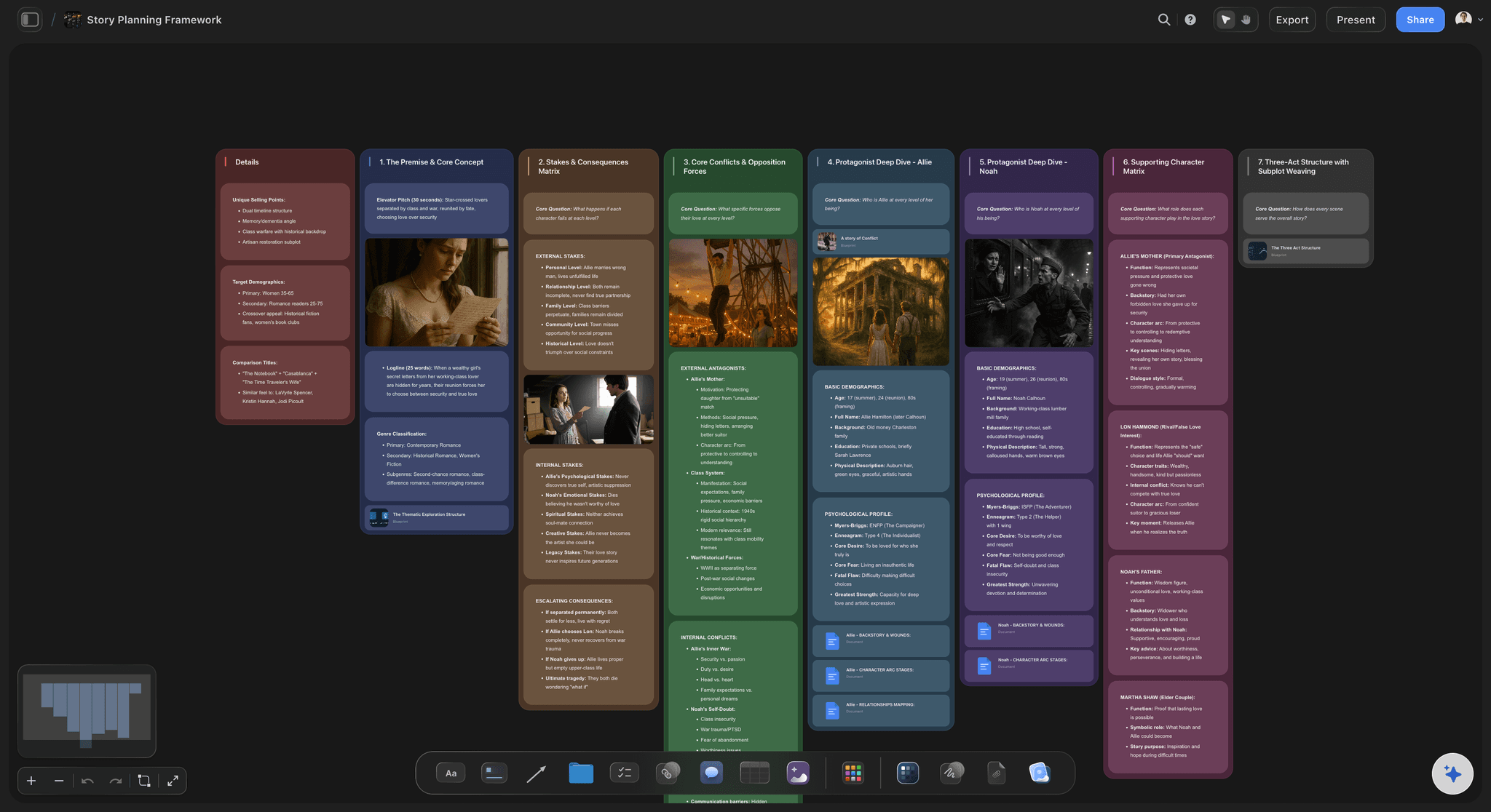
Your images, your words
Add the pictures that mean something
Drop in your own photos, references, and quotes alongside the AI's prompts, so the board reflects your life and not a stock collage.
See moodboarding →
Room for every part of the vision
An infinite canvas for the whole year
A real vision spans work, health, relationships, and creativity. With an infinite canvas and no object cap on any plan, nothing gets cut for space.
See the free infinite canvas →Paid-only during early access.
Open a canvas, describe your goals, and watch the board take shape. Plans start at $9.99 per month, no time limit.
Unlimited vision boards, with room for every area of life
Basic AI usage to generate and expand your board
Upload your own photos, quotes, and references
Share the board view-only, or keep it private
Built for people with taste
Made for the way a vision actually forms.
Lay out the themes, add the images that resonate, and keep the whole vision in front of you.
Cards you can arrange, swap, and refine
A board that bends to your vision
Everything is a movable card: Themes, milestones, images, and words are cards, so you arrange the board the way it makes sense to you, not to a fixed grid.
Swap in your own images: Drop your photos and references next to the AI's prompts, so the board is yours rather than a stock collage.
Refine as it sharpens: Ask the AI to add a theme you forgot or reframe a goal, and the rest of the board stays exactly as you arranged it.
Context from what you have written
AI that builds on your goals
Reads your active board: The AI uses the goals and notes already on the canvas, so what it adds connects to your vision instead of a generic template.
Attach your sources: Bring in up to five documents and three boards as context: a journal, a goals doc, or a plan the board should reflect.
Re-prompt to refocus: Ask for a calmer board, a more ambitious one, or one focused on a single area. The AI reworks it while keeping your edits.
More than pictures on every theme
Milestones, words, and references together
Drop in anything: Photos, quotes, video, PDFs, and links attach to the canvas next to the theme they belong to. A vision board with substance behind it.
Frame grabs from video: Capture stills from YouTube and Vimeo straight onto the board when a clip captures the feeling you are reaching for.
Notes where you need them: Longer reflections live as documents on the same canvas, so the board stays clean and the depth stays one click away.
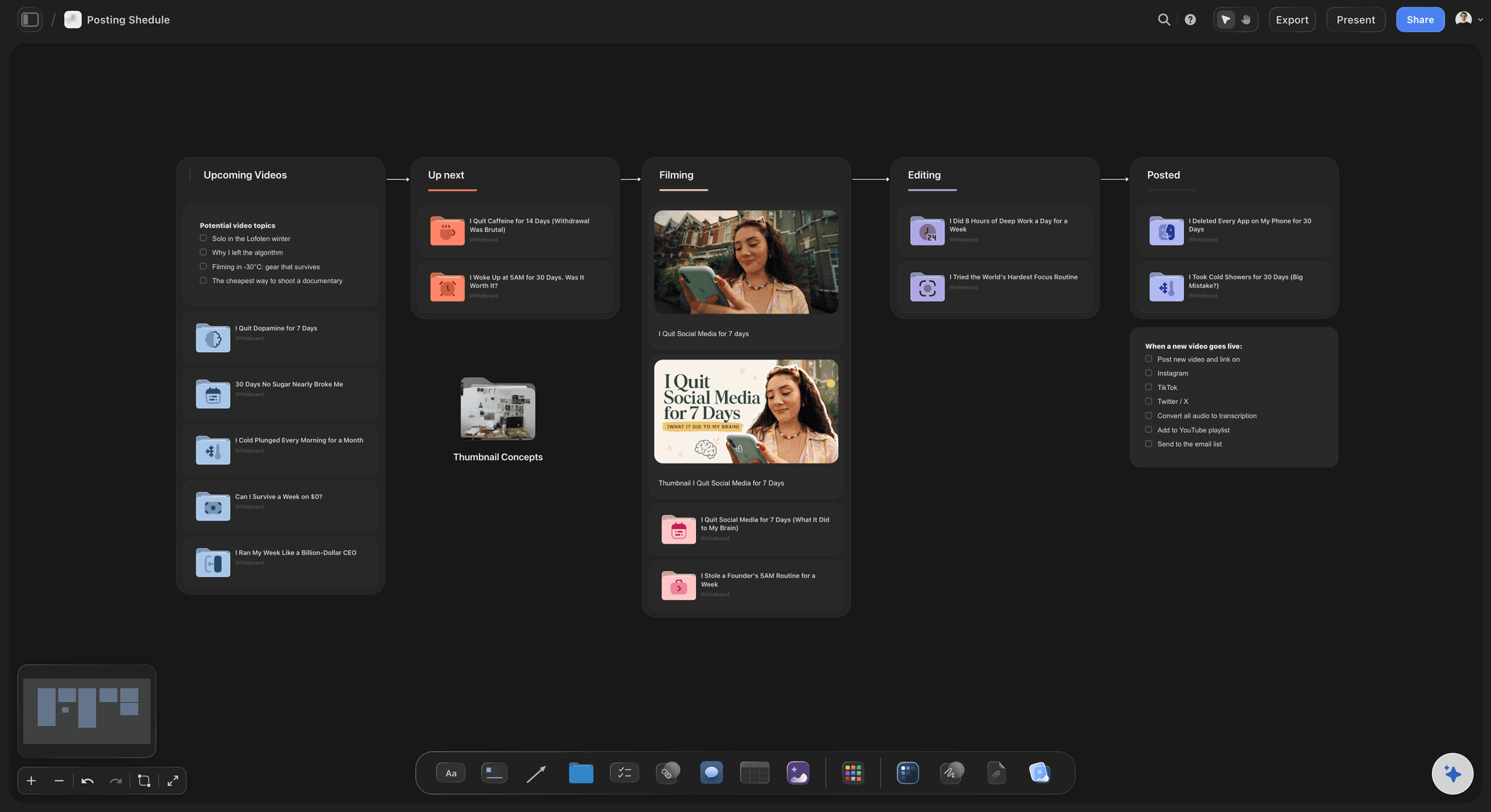
The board is step one, not decoration
From vision to action
Turn the vision into a plan: Carry the milestones into a goal plan, a content board, or a project board on the same canvas, with the AI building the steps.
Keep it in front of you: Revisit the board through the year, check off milestones, and adjust as the vision evolves rather than freezing it in January.
Export as an image: Export the board as a clean image for your phone wallpaper, your desk, or a shared link with someone keeping you accountable.
Explore templates for your project
Every template opens as a real, editable board on the infinite canvas. Pick the closest fit and make it your own.
Mind Map
Branch one central idea out into themes and sub-points, then drag the connections around until the structure makes sense.
One app instead of five
How Storyflow compares to other vision board tools.
Plenty of tools make a collage. The question is whether the vision turns into action.
Storyflow
Recommended
AI that drafts the board from your goals
Your own images alongside AI prompts
Vision turns into plans on the same canvas
A free plan without board or card caps
Canva
AI that drafts the board from your goals
Your own images alongside AI prompts
Vision turns into plans on the same canvas
A free plan without board or card caps
AI that drafts the board from your goals
Your own images alongside AI prompts
Vision turns into plans on the same canvas
A free plan without board or card caps
Vision board apps
AI that drafts the board from your goals
Your own images alongside AI prompts
Vision turns into plans on the same canvas
A free plan without board or card caps
What creators are saying
Join early creators getting structured workspaces and AI that remembers their projects
“Storyflow has sped up my workflow by at least 3x, which means more flow state and more projects I can actually ship. It truly changed the way me and my team create.”

Reilin Joey
Director & YouTuber
“One prompt gets me a structured board. But the tactics are my favorite. I run my YouTube scripts through them and my intros and retention got better. It's amazing.”

Justkay
YouTuber & Freelance Filmmaker
“I used to juggle five apps to plan a project. Now I describe what I am making and get boards, lists, and a schedule. All in one place.”

George
@fernwehchronicles
AI vision board questions, answered.
Everything people ask about generating vision boards with AI in Storyflow.
An AI vision board generator turns the goals you describe into a visual board: themes, milestones, words, and prompts, laid out for you instead of cut and pasted by hand. In Storyflow the AI places those as cards on an infinite canvas, so the board stays editable, holds your own images, and can turn into a real plan.
Storyflow turns the goals you describe into a vision board: its AI lays out cards with themes grouped together, the milestones under each, and words that capture the feeling. It is not a fixed collage: every card is movable, your own pictures sit beside the AI prompts, and the vision turns into a plan on the same canvas.
Describe your goals in the AI chat, the year you want, the areas of life that matter, the outcome you are chasing, and the AI lays out cards on the canvas: themes grouped together with milestones and prompts. It is a flexible board of real cards, so you arrange it, add your own photos, and refine each goal.
Yes. Upload your own photos, references, and quotes and place them anywhere on the board next to the AI's prompts, so the vision reflects your life rather than a stock collage. Everything sits together on one canvas.
Not during early access. Storyflow is paid-only right now: plans start at $9.99 per month and bring basic AI usage for generating and expanding boards, unlimited boards, 20 file uploads, and view-only sharing, with no time limit. A Free plan is planned before the end of 2026.
Yes, and that is what sets it apart from a collage. Ask the AI to turn the milestones on your board into a goal plan with steps and dates, or a project board, and it builds it on the same canvas. The vision becomes the first step of the work instead of decoration.
Yes. Export the board as a clean image to use as a phone or desktop wallpaper, print it, or share a view-only link with someone holding you accountable, so the vision stays in front of you.
They overlap, but a mood board captures a creative tone for a project, while a vision board captures goals and a direction for your year or your life. Storyflow does both; for project tone and references specifically, the mood board maker is the closer fit, and the two live on the same kind of canvas.
Yes. Invite collaborators to the board free, or share a view-only link so a coach, partner, or team can see the vision without an account, then turn it into a plan everyone can follow.
The vision is a feeling. Get it on the board.
Describe your goals once, watch the board take shape, and turn the vision into a plan.