
Extremely reliable pre-production
Shot list software that works
on the shoot, not only in prep.
Build the list as shot cards with frames or as a table, keep the storyboard beside it, tick each setup as it is shot, and give the crew a view-only link they open on a phone with no account.


Creatives working for these brands already got early access
- Red Bull
- Canon
- Artlist
- Porsche
See how easy it is to get started
Watch a real project come together, from a blank board to a finished plan, clicked through step by step.
Start from a ready-made template
Pick a board to see what you can build, then let AI fill it in. Every template is a real, editable starting point on the same infinite canvas.

Pre-Production
Pull the brief, script, shot list, and moodboard into one pre-production hub so the whole shoot is planned in one place.
What is a shot list?
A shot list is the numbered list of every camera setup a shoot needs, one entry per setup with its size, angle, movement, lens and what happens in frame, so the crew knows what to shoot and in what order. Storyflow is an AI visual workspace that plans and runs the shot list on one infinite canvas: shot cards with a frame each or a table, the storyboard and references beside them, a tick for each setup as it is shot, and a view-only link the crew opens on a phone with no account. Its AI drafts the list from the script or storyboard on the board. Shot Lister is an iOS and Mac app built for live shot-by-shot timing on set; StudioBinder and Celtx tie shot lists to a production database.
Shot list software earns its place over a template in three moments. In prep, it has to hold coverage properly: one entry per camera setup, numbered from the script's scenes, with size, angle, movement, lens, what happens in frame and how long the setup takes, and a frame that shows the composition. Before the shoot, the director, DP, first AC and often the client need the same version, on whatever phone they have. On the day, someone has to tick setups as they are shot, see what is left before the company moves, and reorder when the morning runs long. A spreadsheet handles the first moment; on a phone at 7am it is a sideways-scrolling grid, rarely with a picture of the shot.
The tools split on where they put the weight. Shot Lister lives on the phone: it builds a shot-by-shot, minute-by-minute schedule, and its live mode shows how the day is running against the plan, with crew sync, storyboards and script import on its Pro subscription. StudioBinder connects shot lists and storyboards to the script, breakdown and stripboard in a production suite. Celtx annotates shots on the script and compiles a shot list per shoot day as a PDF. Storyflow puts the shot list on a visual board next to the storyboard, references, locations and call sheet, and builds it with AI from what is already there.
In Storyflow, ask the AI and it first asks whether you want shot cards or a table and how many shots, then builds them from the storyboard or script on the board. A shot card is a wall per setup with a frame, a subject line with chips for size, light and camera, a shots required checklist, the scene direction and the equipment; the table has a got it column. Storyflow has no live timer tracking the day against the clock; a production that runs its day by the minute on set may want Shot Lister for that.
Ultra fast from brief to board
Build it, share it, shoot it.
The same board carries the list from prep to the last setup of the day.
01
Ask for a list or build the table
Ask the AI, which reads the storyboard or script on the board and builds shot cards or a table, one entry per camera setup. Or add a table yourself with columns for size, angle, movement, lens and a box to tick.
02
Put the frames in
Storyboard frames and photos already on the board can become the shot frames. Otherwise use real photos from a web search captioned as reference, generated frames on Pro and Max, or leave them empty for your own stills.
03
Share it with the crew
Send a view-only link the director, DP and AC open on a phone with no account, or export the board as a PDF for the binder. Anyone who wants to comment signs in first.
04
Tick it off on the day
Whoever runs the list ticks each setup's checklist or its got it box as it is shot. Invite them to edit; invited people join free.
The shot list, the frames, and the phone it is read on.
What a shot list app has to hold from the first draft to the last setup.

Frame, subject, shots required, direction, equipment
Shot cards with frames
A row of walls the AI builds, one per setup, each with a frame, a subject line with chips for size, light and camera, a checklist of the coverage it needs, where the camera goes and how it is lit, and the kit.
See the shot list template →
From the script or the storyboard on the board
A first draft of the coverage
The AI keeps the script's scene numbers, gives every setup its own entry, uses the gear you named, and orders the list for the day when it knows the locations and lighting.
See the AI shot list generator →
The composition beside the setup
The storyboard on the same board
Storyboard walls per scene with a frame and what happens, beside the shot cards they became, so a changed frame sits next to the setups it affects.
See film storyboards →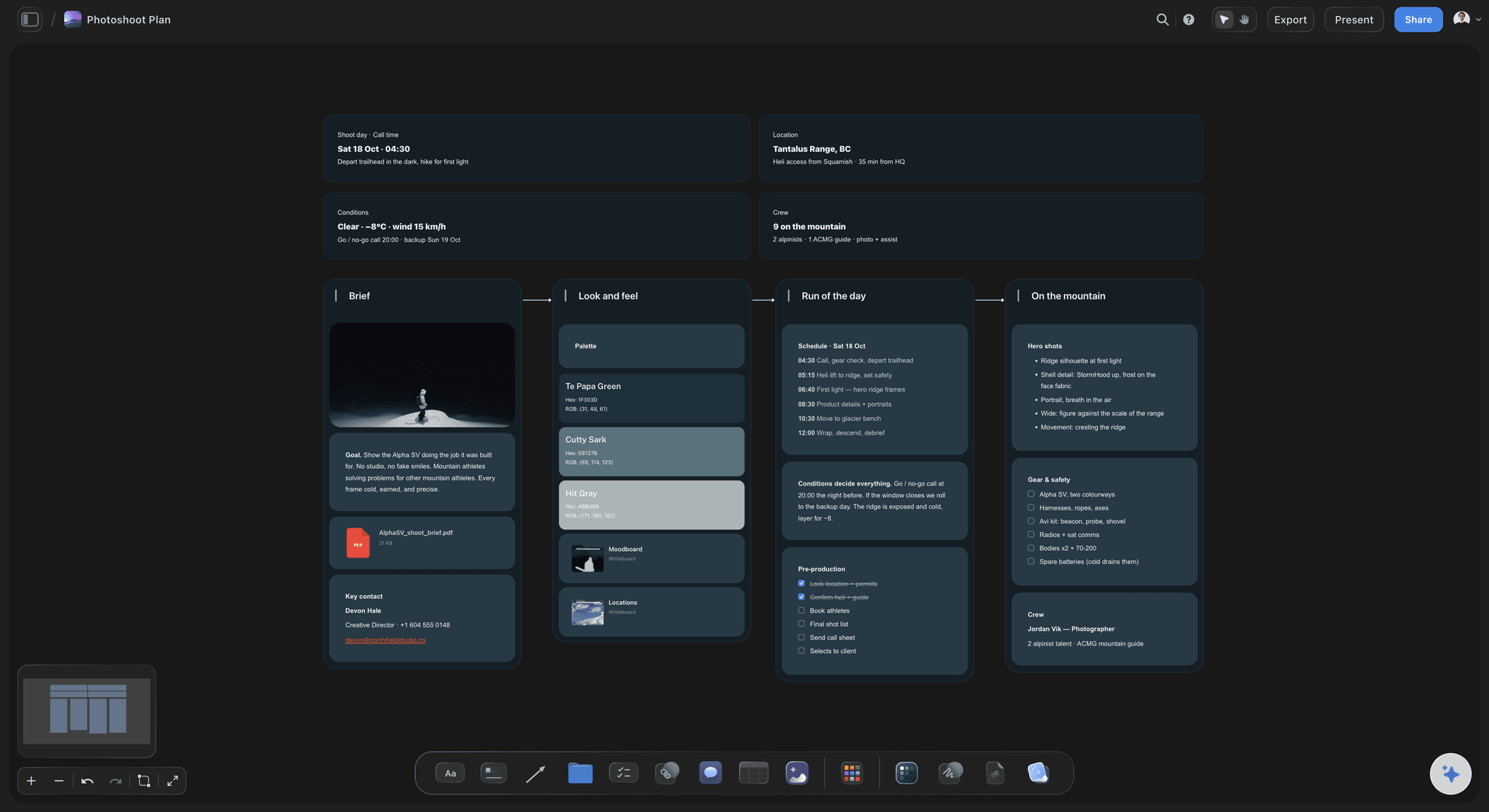
A link, not an install
On set, on any phone
The crew opens the board from a view-only link in the phone browser they already have, and the person running the list ticks setups off as they are shot.
See on-set collaboration →Unlimited boards. No object cap.
Every scene's shot list on the board for the shoot. Storyflow is paid-only during early access, with plans from $7.99 a month billed annually ($9.99 monthly). A free plan launches before the end of 2026, and anyone a paid member invites to a board joins free.
Unlimited boards, images, files and links
Checklists and table checkboxes to tick setups off on the day
AI usage that renews each billing period, for drafting shot lists
View-only links the crew opens on a phone with no account
Built for people with taste
A shot list app for the three moments that matter.
Planning the coverage, getting one version to everyone, and knowing on the day what is still missing.
Build
Two shapes, the same setups
Shot cards with frames: One wall per setup: the frame, a subject line with chips for size, light and camera, the coverage checklist, the scene direction and the equipment.
A table per scene: Shot, size, angle, movement, subject and action, lens, setup time and got it, numbered 1A, 1B, 2A, one table per scene so each sits near its frames.
Columns that fit the production: A creator shoot adds shot type and audio, a commercial adds product and talent, a documentary adds lighting and audio, a music video adds frame rate.
Numbered from the script: An attached script's own scene numbers carry into the shots, 24A and 24B for scene 24, and are never renumbered into a sequence of the software's choosing.

Share
One version on every phone
A view-only link with no account: The director, DP, AC and client open the same board in a phone browser. Nothing to install and no copy of last night's PDF to argue with.
Comments from people who sign in: The client or DP signs in to leave a comment beside a specific shot card; reading the board needs no account.
Editors join free: Invite the first AD or the camera assistant to edit and tick off setups. Anyone a paid member invites to a board joins free.
A PDF for the binder: Export the board as a high-quality image or PDF when the production office or a client wants a fixed copy.
Shoot
Use it on set
Tick coverage as it is shot: Each shot card carries a shots required checklist and each table row a got it box, so a setup is done when its boxes are, not when someone remembers it.
See what is left before you move: Unticked setups at a location are visible before the company move, which is the only moment a missed insert is still cheap.
Reorder when the day slips: Move shot cards into the new order on the board, or ask the AI to regroup the remaining setups by location and lighting.
Setup time in the table: Built as a table, every setup carries a duration, so what is left can be weighed against the light and the hours you have.

Connect
The rest of the shoot on the same board
The storyboard it came from: Frames and shot cards side by side, so the composition and the setup that captures it are read together.
The strip board for the whole shoot: A shot list covers one day's setups; the strip board groups every scene into shoot days, and both are built from the same scene index.
The call sheet for the day: The call sheet PDF is built from the same board, so the day's scenes on the sheet come from the same plan as the shot list.
References and locations: Location photos, video references from YouTube or Vimeo, and lighting stills pinned next to the shots they are for.
Explore templates for your project
Every template opens as a real, editable board on the infinite canvas. Pick the closest fit and make it your own.
Pre-Production
Pull the brief, script, shot list, and moodboard into one pre-production hub so the whole shoot is planned in one place.
One app instead of five
Storyflow vs StudioBinder, Shot Lister, and Celtx.
Shot Lister is built for the phone and the clock on set, StudioBinder and Celtx for the production database, and Storyflow for the board where the storyboard, references and call sheet already are.
Storyflow
Recommended
Size, angle and movement per shot
Frames and storyboard beside the list
Moodboard, references and shot list on one canvas
Opens in a browser on any device
Call sheet built from the same plan
Live timer tracking the day against the plan
StudioBinder
Size, angle and movement per shot
Frames and storyboard beside the list
Moodboard, references and shot list on one canvas
Opens in a browser on any device
Call sheet built from the same plan
Live timer tracking the day against the plan
Shot Lister
Size, angle and movement per shot
Frames and storyboard beside the list
Moodboard, references and shot list on one canvas
Opens in a browser on any device
Call sheet built from the same plan
Live timer tracking the day against the plan
Celtx
Size, angle and movement per shot
Frames and storyboard beside the list
Moodboard, references and shot list on one canvas
Opens in a browser on any device
Call sheet built from the same plan
Live timer tracking the day against the plan
What creators are saying
Join early creators getting structured workspaces and AI that remembers their projects
“Storyflow has sped up my workflow by at least 3x, which means more flow state and more projects I can actually ship. It truly changed the way me and my team create.”

Reilin Joey
Director & YouTuber
“One prompt gets me a structured board. But the tactics are my favorite. I run my YouTube scripts through them and my intros and retention got better. It's amazing.”

Justkay
YouTuber & Freelance Filmmaker
“I used to juggle five apps to plan a project. Now I describe what I am making and get boards, lists, and a schedule. All in one place.”

George
@fernwehchronicles
Shot list software, answered.
Apps, templates, working on set, and where each tool fits.
A shot list is the numbered list of camera setups for a shoot, one entry per setup with its shot size, angle, movement, lens, what happens in frame and how long it takes. The director and DP write it from the script or storyboard in prep, and the crew works through it on the day. In Storyflow each setup is a shot card with a frame, or a row in a table.
Storyflow is built for exactly this job: shot cards with a frame and a checklist per setup, or a table, on the same board as the storyboard and call sheet, drafted by AI from the script or storyboard and opened on set from a view-only link with no account. It has no live timer that tracks the day against the clock; Shot Lister, a native iOS and Mac app, does that in its live mode.
Yes. In Storyflow, shot cards give every setup a frame: a photo or storyboard frame already on the board (including a still grabbed from a YouTube or Vimeo clip), a web photo captioned as reference, an AI-generated frame on Pro and Max, or an empty frame for your own still. A table works when speed matters more than the picture. A spreadsheet rarely shows the frame; Shot Lister adds storyboards on its Pro subscription.
A template gives you columns; software keeps the list connected and usable after prep. Once a template is emailed as a file, the director, DP and client end up with different versions, and a spreadsheet rarely shows each setup's frame or reads well on a phone. Shot list software keeps one version, holds the frames and lets someone mark setups done on the day. In Storyflow it also sits beside the storyboard, references and call sheet.
Yes, for reading. Anyone with a view-only link opens the board in a phone browser with no account and sees the shot cards, frames and ticks as of their last reload. Ticking setups off needs edit access, so invite whoever runs the list, usually the first AD, script supervisor or camera assistant; people a paid member invites join free. Anyone who wants to comment signs in first.
Yes. Every shot card the AI builds has a shots required checklist for the coverage that setup needs, such as the wide, the over-the-shoulder and the insert, and a shot list built as a table gets a got it checkbox column. Tick them as setups are shot and the board shows what is still missing at this location, before the company move, when a forgotten insert is still cheap to get.
Shot Lister is an iOS and Mac app focused on the day itself: a shot-by-shot, minute-by-minute schedule, a live mode showing how you are doing against the plan, and crew sync, storyboards and script import on its Pro subscription. Storyflow runs in the browser on any device and puts the shot list on a board with the storyboard, references, locations and call sheet, with AI that drafts it. If live timing on set is the priority, choose Shot Lister.
StudioBinder connects shot lists and storyboards to the script, breakdown, stripboard and call sheets inside a production management suite. Storyflow puts the shot list on an open visual board with the storyboard, reference images, video, locations and call sheet, and its AI builds shot cards or tables from what is there. Choose the suite when the production runs from a database, and the board when the shot list sits with the pictures and is shared with a client.
Yes, by living on the same board. Storyboard walls and shot cards sit side by side, and the AI can build a shot list directly from a storyboard, one list per scene in the same order. The strip board groups all the scenes into shoot days from the same scene index, and the call sheet PDF for each day is built from the same board, so the call sheet and the shot list work from one plan.
It can draft it. Ask on a board with a storyboard, script or brief and the AI asks whether you want shot cards or a table and how many shots, then builds one entry per camera setup, keeping the script's scene numbers and the gear you named. When it knows the locations and lighting, it orders setups for the day and says which order it used. You review, cut and reorder; coverage stays the director's and DP's call.
Yes. A photoshoot list uses looks and shot types (portrait, group, detail, candid) with the lens and time, and a creator shoot uses A-roll, B-roll, inserts and talking-head setups with an audio column. The AI's shot cards hold a frame, subject, checklist, direction and equipment for any of them, and the brief and reference images sit on the same board, so each approved reference can become the frame of the shot it is for.
Not yet. Storyflow is paid-only during early access, with plans from $7.99 a month billed annually ($9.99 monthly). A free plan launches before the end of 2026, and anyone a paid member invites to a board joins free, so the AD or camera assistant ticking off setups does not pay. Crew who only read the list open a view-only link with no account.
More from Storyflow
Shot list template
AI shot list generator
Shotlister alternative
Film storyboard
Script to storyboard
On-set collaboration
Call sheet template
Stripboard
Scene blocking tool
Equipment list maker
Storyflow for cinematographers
Best shot list tools
Photoshoot planning, moodboard to shot list
Commercial production
Script breakdown software
Film scheduling software
Build the shot list, share the link, tick it off on set.
Ask the AI for a draft from your storyboard or script, then send the crew one link.