
Pitch-ready plans, extremely reliable
Storyboard the commercial,
from script to approved spot.
A frame per shot with action, voiceover and supers, timed for the 30 and its cutdowns, approved by the client, then turned into the shot list for the shoot.


Creatives working for these brands already got early access
- Red Bull
- Canon
- Artlist
- Porsche
See how easy it is to get started
Watch a real project come together, from a blank board to a finished plan, clicked through step by step.
Start from a ready-made template
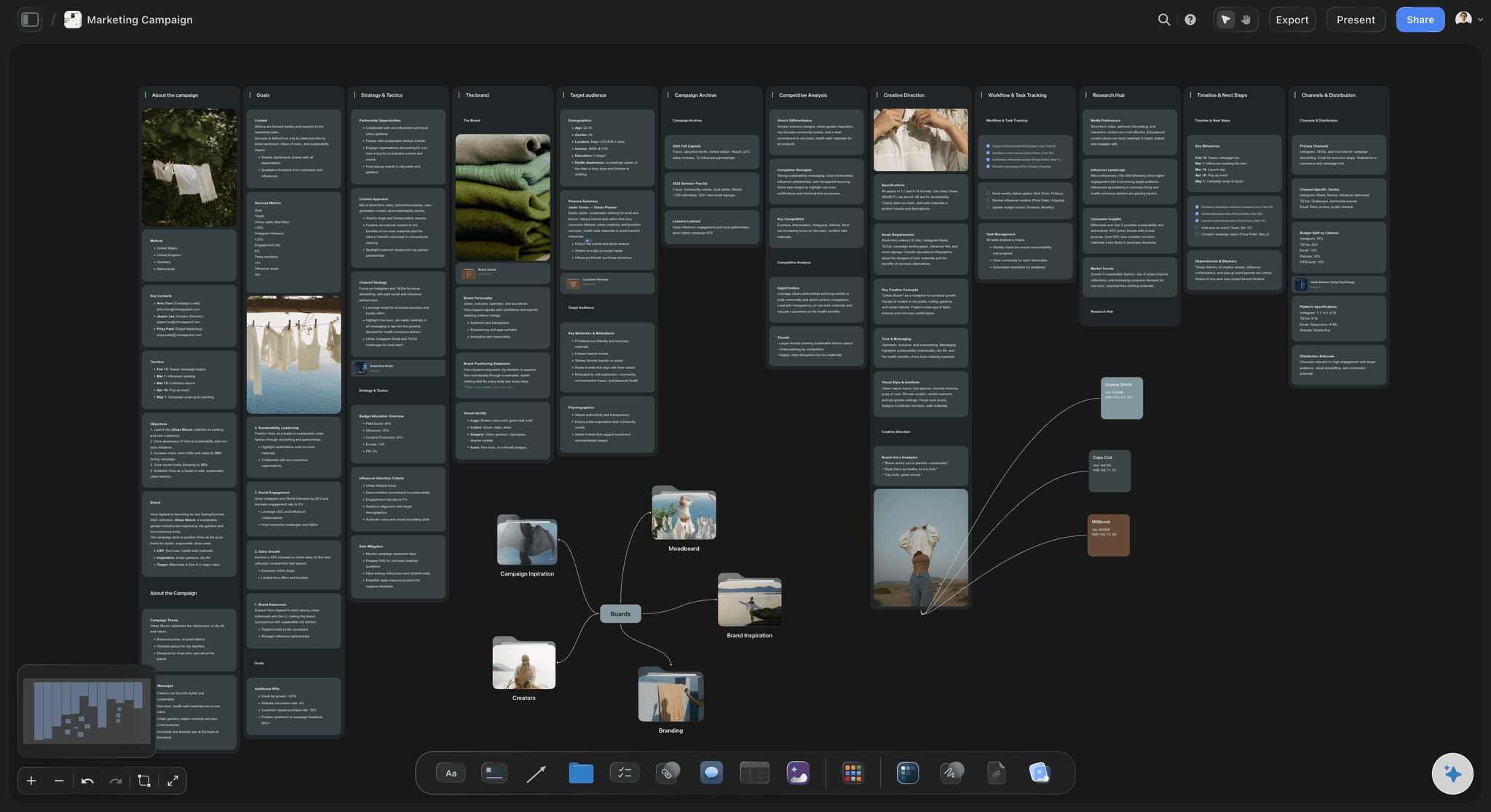
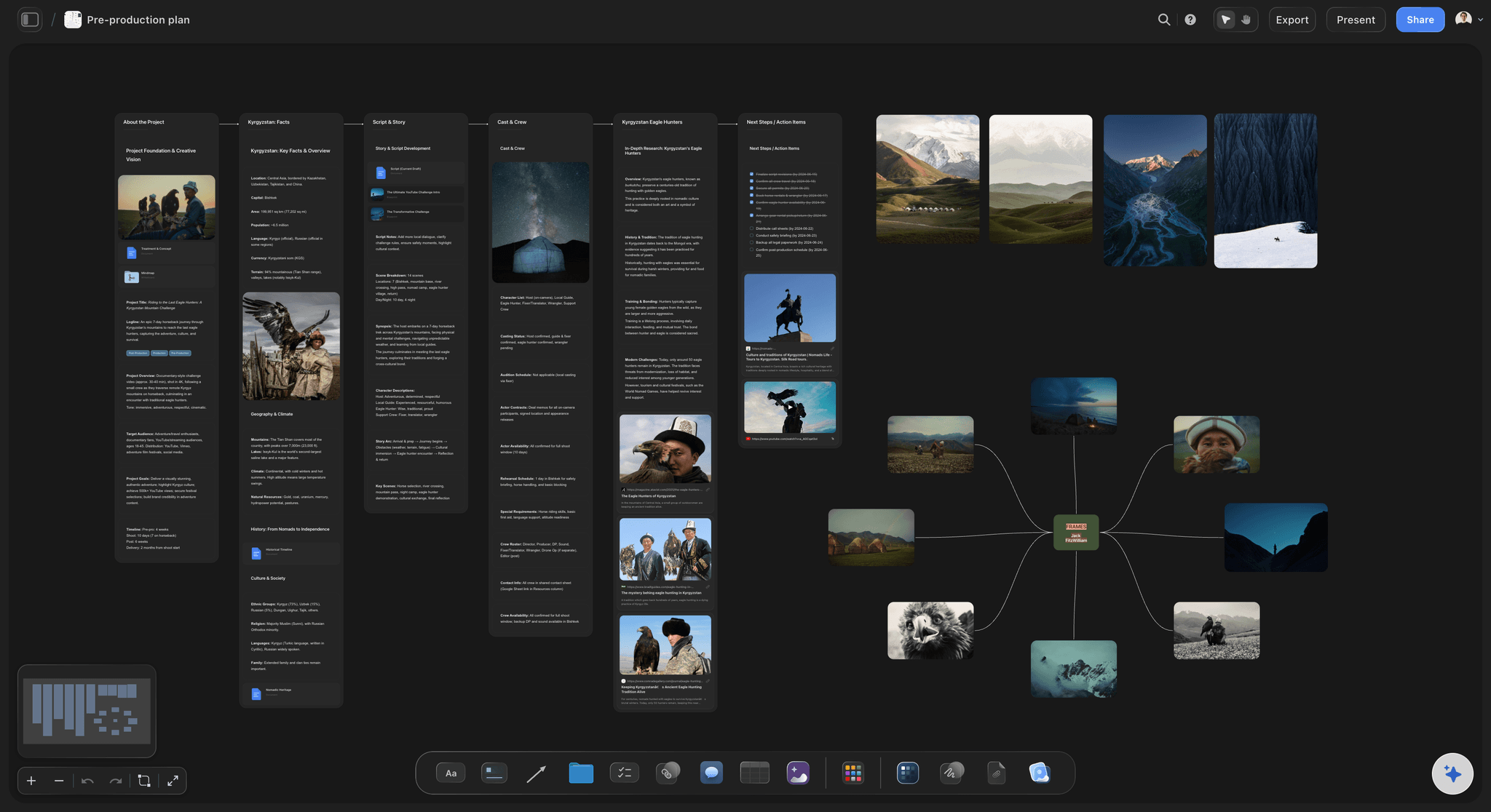
Pick a board to see what you can build, then let AI fill it in. Every template is a real, editable starting point on the same infinite canvas.

Storyboard
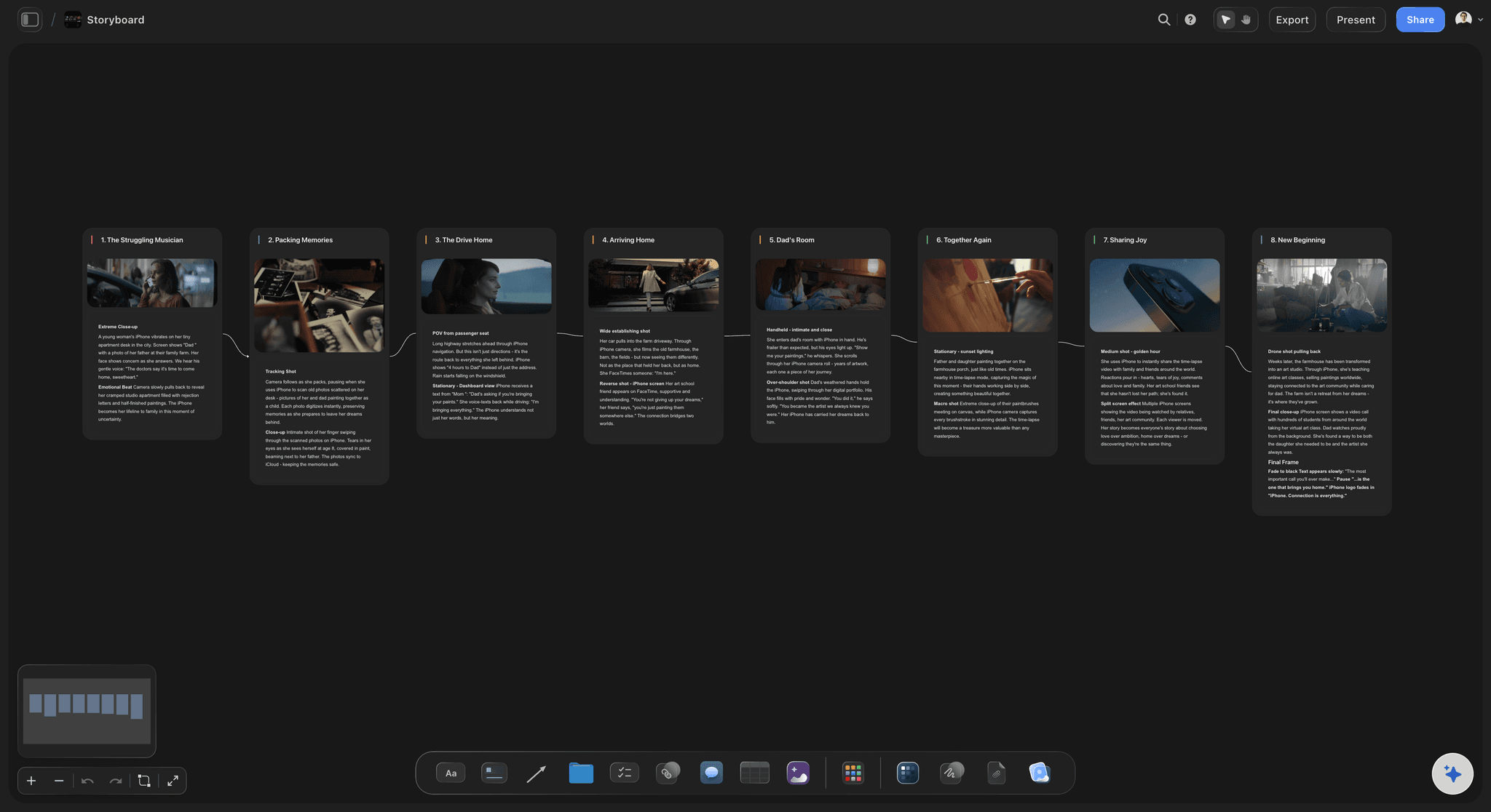
Lay out your shots frame by frame with images and notes, then reorder them until the sequence reads like the finished cut.
What's the best tool to storyboard a commercial?
A commercial storyboard is the frame-by-frame plan of a spot, and the tool you draw it in has to carry what we see, what we hear and how long each frame lasts. Storyflow is an AI visual workspace that storyboards your commercial from script to shoot on one infinite canvas: a frame per shot with action, voiceover and supers, a duration on each for the 30 and its cutdowns, the brief and references beside the frames, and the shot list built from the approved frames. The client reviews by link. Boords is the pick if you need a timed animatic with sound, StudioBinder if the production also runs its schedule and call sheets there, and Canva for a quick designed layout.
A commercial storyboard is the frame-by-frame plan of a spot, and each frame carries more than a picture: the action we see, the voiceover or dialogue under it, any supers or legal lines on screen, the shot size and camera move, and how long the frame lasts. It ends on the end frame (pack shot, logo, line and call to action), which needs its own time budget, because a logo that flashes past becomes the client's first note. In Storyflow each frame is a panel with its image and a note carrying those details, and the AI builds the panels from the script in the script's order.
Timing is where commercial boards fail. A 30 second spot has less time than the script suggests once the end frame takes its share, and voiceover reads at roughly two to three words a second, so a script that fits on the page often runs long on air. Board the 30 first with a duration on every frame, then mark which frames survive into the 15 and what the 60 adds, so each cutdown is designed rather than salvaged in the edit. The animatic, the frames cut to a scratch voiceover and music, is the real timing test: build it in an editing tool or in Boords, using the frame order and durations from the board.
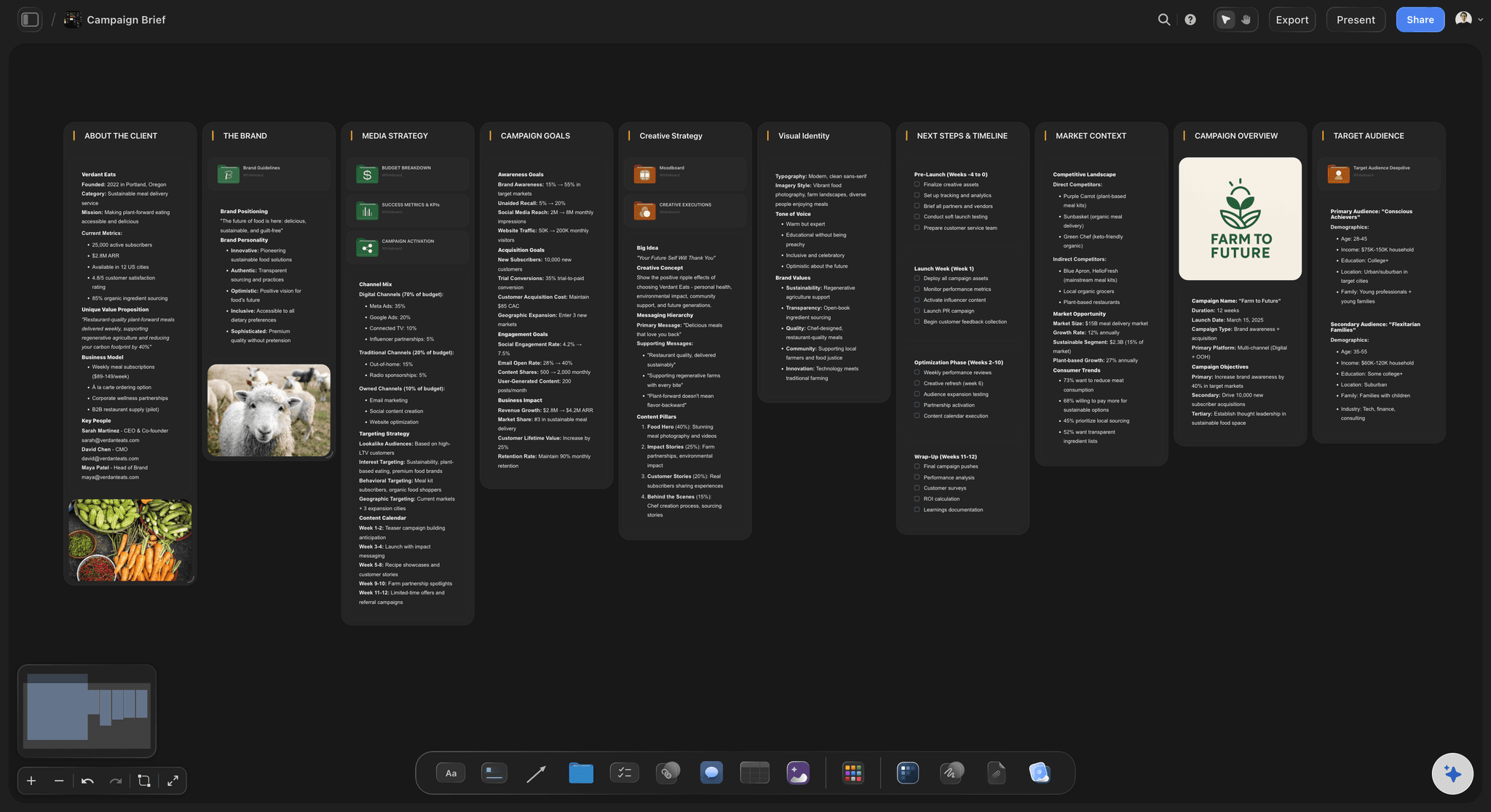
Then the client, and the shoot. Agencies present a campaign concept in order: the brief and the insight, the idea in one line, the key frames or full storyboard, how it runs across channels, then what needs deciding. In Storyflow the brief, references and boards share one canvas, the Presentation PDF turns them into a deck, and the client opens the board from a view-only link with no account. Signed-in reviewers comment on the exact frame. Once the boards are approved, the AI turns them into a shot list for the production company, with size, angle, movement and lens tied to the frames the client signed off.
Ultra fast from brief to board
From script to approved boards to the shoot.
One board for the brief, the frames, the review and the shot list.
01
Add the script and the brief
Paste the script or attach the brief. Ask the AI for an advertising brief beside it: client, objectives, insight, creative direction and audience.
02
Board the spot
Ask for a storyboard and the AI builds a panel per shot in the script's order, with action, voiceover, supers and duration on each. Frames can be your sketches, web references or AI images on Pro and Max.
03
Time the cuts and present
Set a duration on every frame for the 30, mark which frames carry the 15, and share a view-only link or a Presentation PDF with the client.
04
Approve and shot-list
Signed-in reviewers comment on the frames. Once approved, the AI turns the boards into a shot list the production company can shoot from.
A storyboard built for approval and the shoot.
The frames, the brief, the review and the shot list, on one canvas instead of four files.
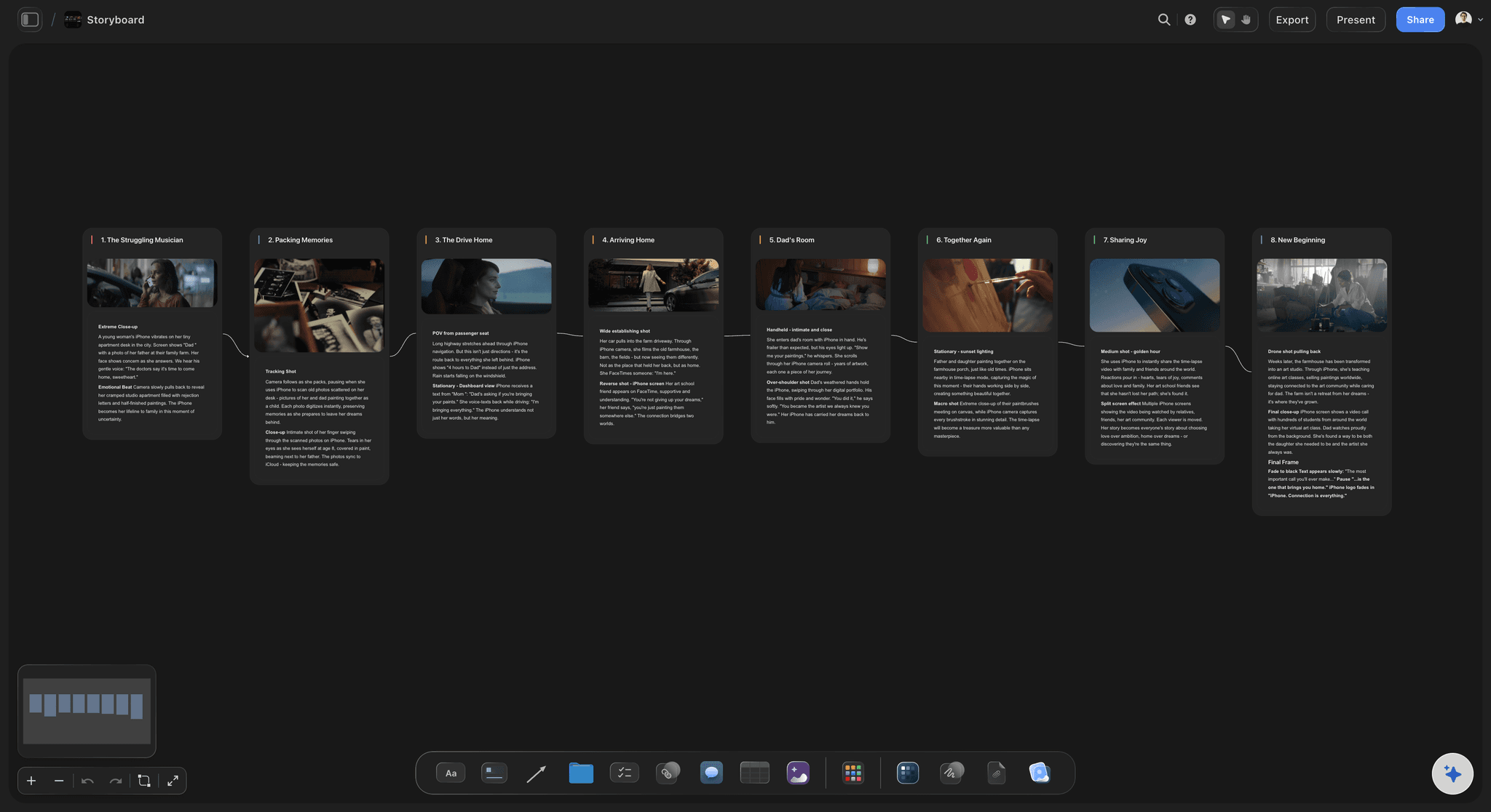
Action, voiceover, supers and timing
Frames that carry the whole spot
Each panel holds the frame and a note with the action, voiceover or dialogue, supers and duration, in the script's order.
See script to storyboard →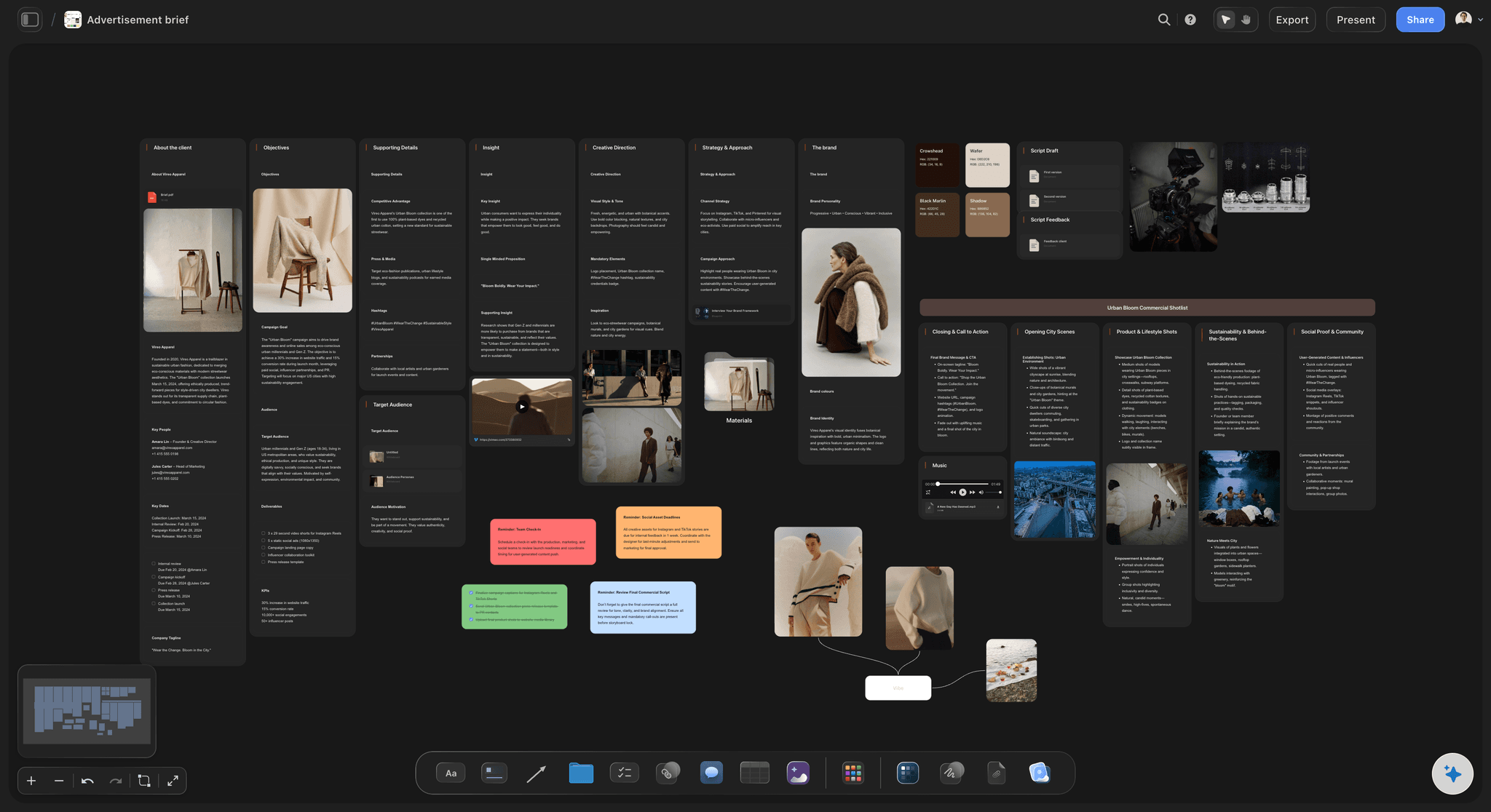
Brief and references beside the boards
The strategy one pan away
An advertising brief with client, objectives, insight, creative direction and audience on the same canvas, so every frame can be defended against the brief.
See the campaign brief template →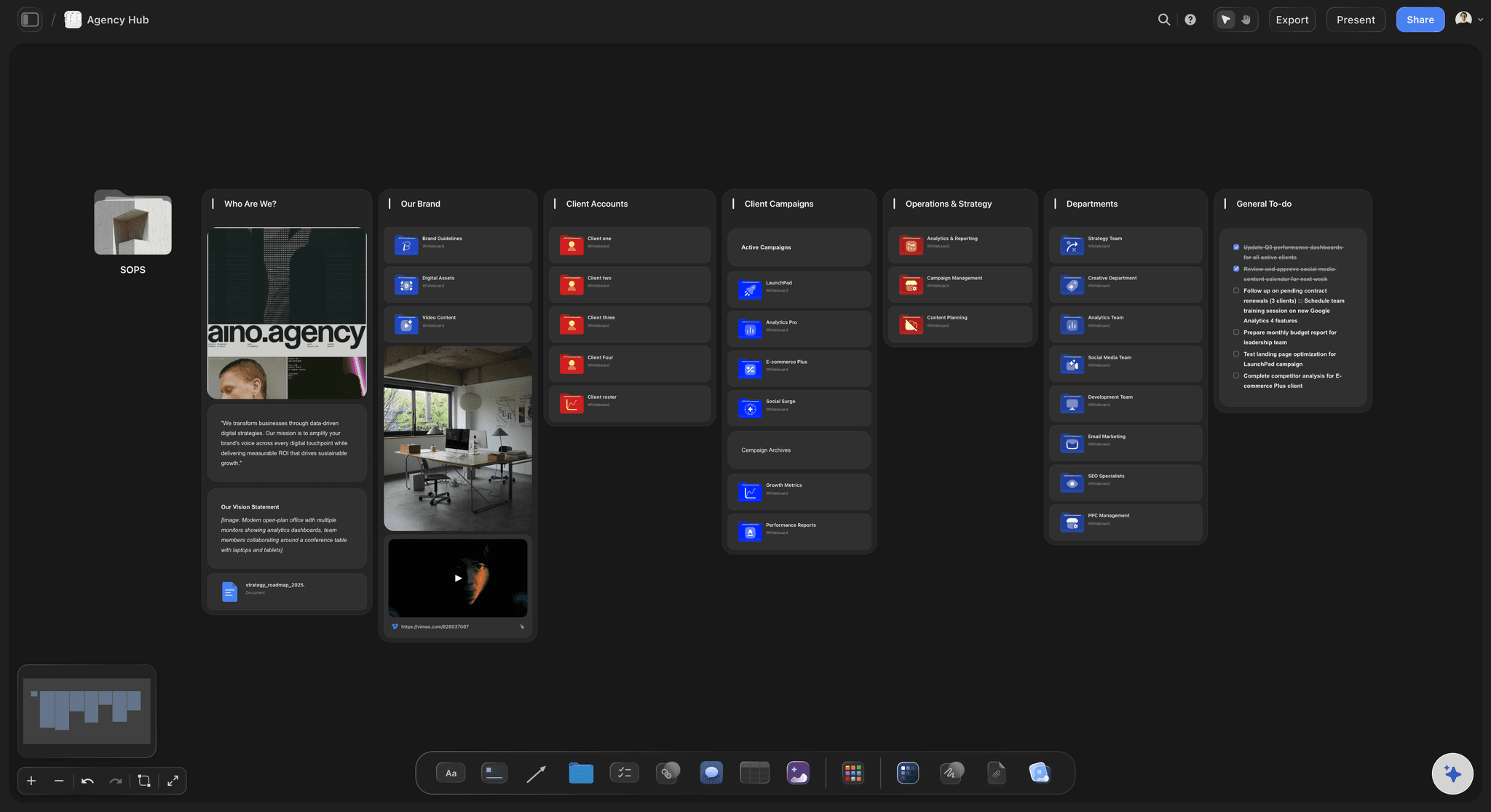
Client review on the frames
Review by link, notes on the frame
The client opens the board from a view-only link. Signed-in reviewers comment on the exact frame, and the board they approve is the board you shoot.
See the client review board →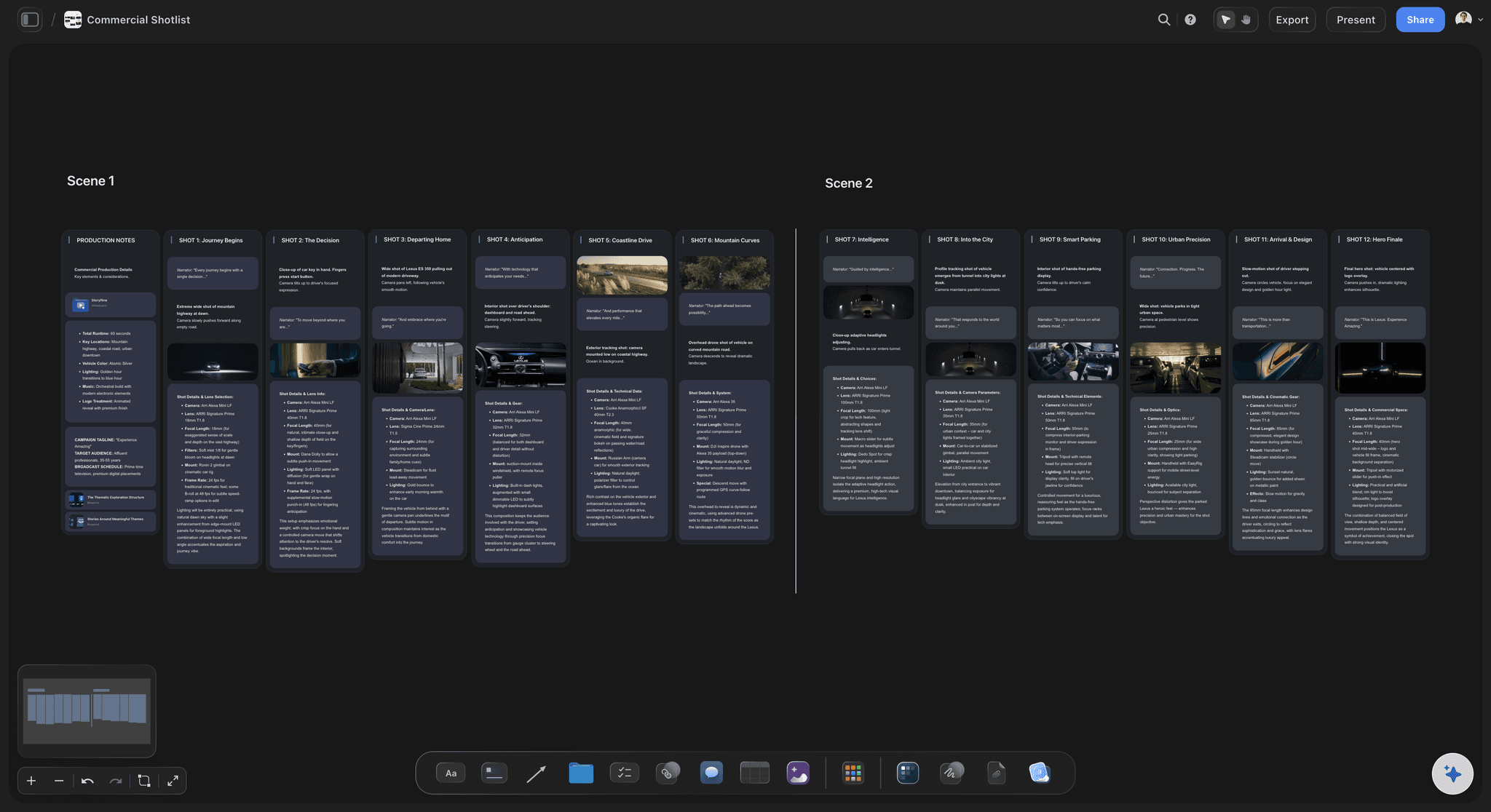
From approved frames to setups
The shot list for the shoot
The AI turns approved panels into a shot list with size, angle, movement and lens, placed beside the frames it came from.
See the AI shot list generator →Unlimited boards. No object cap.
Every spot, cutdown and alternate route on its own board. Storyflow is paid-only during early access, with plans from $7.99 a month billed annually ($9.99 monthly). A free plan launches before the end of 2026, and anyone a paid member invites to a board joins free.
Unlimited boards, images, files and links on Plus
AI usage that renews every billing period
Unlimited background removal and upscaling for frames
View-only links for client review, plus PDF export
Built for people with taste
What a commercial storyboard has to settle.
Frames, timing, approval and the shoot. Each is a place where spots go wrong.
The frames
Everything the frame has to say
Action: What we see, in one present-tense line. The picture should read without the voiceover.
Voiceover or dialogue: The line that plays under the frame, so the client reads the spot the way it will run.
Supers and legal lines: On-screen text and product claims, which take screen time and need approving like any other line.
The end frame: Pack shot, logo, line and call to action, boarded and timed like every other frame.

The timing
15, 30 and 60 second cuts
A duration on every frame: The frames of a 30 add up to 30, end frame included, before a script that runs long gets approved.
Cutdowns planned, not trimmed: Mark which frames carry the 15 and what the 60 adds, so each cutdown is designed rather than salvaged in the edit.
The animatic tests it: Cut the frames to a scratch voiceover in an editing tool or Boords, using the frame order and durations from the board.
Alternate routes: Board a second opening or a different end frame beside the first, and present both.
The approval
Present the concept, then get a decision
Concept before frames: The brief and insight, the idea in one line, then the frames. A client who meets the frames before the idea judges the drawings.
A deck from the board: The Presentation PDF lays out the context, the idea, how it works and what needs deciding, one idea per page.
One link for the client: The client and the brand team open the board from a view-only link in a browser, with no account needed to view it.
Notes on the frame: Signed-in reviewers comment on the specific frame, so a note about a super is attached to that super.
The shoot
From approved boards to production
Shot list from the frames: The AI writes the setups each frame needs, with size, angle, movement and lens, beside the approved panels.
Treatment and call sheet: A Treatment PDF for the director's pitch and a Call Sheet PDF for the shoot day, both built from the board.
Prep with owners and dates: A table with person, date and status cells for casting, locations, wardrobe and the edit, so each task has an owner and a deadline.
Explore templates for your project
Every template opens as a real, editable board on the infinite canvas. Pick the closest fit and make it your own.
Storyboard
Lay out your shots frame by frame with images and notes, then reorder them until the sequence reads like the finished cut.
One app instead of five
Storyflow vs Boords, StudioBinder and Canva.
Storyflow is built for the board that carries a spot from script to shoot. Boords is the specialist for storyboards and animatics, StudioBinder runs the wider production, and Canva is quick for a designed layout.
Storyflow
Recommended
Frames with action, voiceover and supers
Brief, references, frames and shot list on one board
AI builds the frames from the script
Shot list built from the approved frames
View-only link for client review
Timed animatic with sound
Boords
Frames with action, voiceover and supers
Brief, references, frames and shot list on one board
AI builds the frames from the script
Shot list built from the approved frames
View-only link for client review
Timed animatic with sound
StudioBinder
Frames with action, voiceover and supers
Brief, references, frames and shot list on one board
AI builds the frames from the script
Shot list built from the approved frames
View-only link for client review
Timed animatic with sound
Canva
Frames with action, voiceover and supers
Brief, references, frames and shot list on one board
AI builds the frames from the script
Shot list built from the approved frames
View-only link for client review
Timed animatic with sound
What creators are saying
Join early creators getting structured workspaces and AI that remembers their projects
“Storyflow has sped up my workflow by at least 3x, which means more flow state and more projects I can actually ship. It truly changed the way me and my team create.”

Reilin Joey
Director & YouTuber
“One prompt gets me a structured board. But the tactics are my favorite. I run my YouTube scripts through them and my intros and retention got better. It's amazing.”

Justkay
YouTuber & Freelance Filmmaker
“I used to juggle five apps to plan a project. Now I describe what I am making and get boards, lists, and a schedule. All in one place.”

George
@fernwehchronicles
Commercial storyboards, answered.
How to board a spot, time it, get it approved and shoot it.
Storyflow is the best fit when a commercial storyboard has to carry a spot from script to shoot: the AI builds a frame per shot with action, voiceover and supers, you time each frame for the 30 and its cutdowns, the client reviews by link, and the approved frames become the shot list. Boords is the pick for a timed animatic with sound, StudioBinder for productions that also schedule there, and Canva for a quick designed layout.
After the thinking, not before it. The strongest order is the brief and the insight, the idea in one line, then the key frames or full storyboard, how the idea runs across channels, and the decision needed, since a client who sees frames first judges drawings. In Storyflow the brief and boards share one canvas, the Presentation PDF turns them into a deck, one idea per page, and the client opens the board from a view-only link.
Board one frame per shot from the approved script, each with the action, voiceover or dialogue, supers or legal lines, shot size, camera move and duration. Give the end frame its own panel with the pack shot, logo, line and call to action. Check the durations add up to the spot's length, mark which frames carry the cutdowns, then test the timing with an animatic. Storyflow's AI builds the panels from the script in the script's order.
Each frame needs the picture, the action, the voiceover or dialogue, any supers or legal copy, the shot size or camera move, and a duration. The board needs a title with the brand, spot name and length, the end frame, a note of which frames make each cutdown, and music cues where they drive the edit. In Storyflow each panel holds the frame and a note with those details.
One per shot, plus the end frame, so the count follows the pace of the edit. A calm 30 needs few frames; a fast montage needs many more. Check the durations add up to 30 seconds with the end frame included, and cut frames rather than squeezing durations when it runs long. A 15 usually keeps the opening idea, the product moment and the end frame. In Storyflow each panel can carry its duration.
Board the 30 first, with a duration on every frame and the end frame given its own time. Voiceover reads at roughly two to three words a second, so count the script's words against the frames before approval. Design the cutdowns: mark the frames that carry the 15 (the idea, the product moment and the end frame) and add what the 60 has room for. In Storyflow each cutdown can sit in its own folder beside the 30.
An animatic is the storyboard frames cut to a scratch voiceover and music at their real durations, so the agency and client can judge timing before the shoot. Storyflow does not play frames back as a timed video. It holds what the animatic is built from: the frames in order, each duration, and the voiceover and supers per frame. Build the animatic in Premiere Pro or Boords, and keep the approved storyboard on the Storyflow board.
Yes. Storyflow's Storyboard template lays out frames, each with an image area, an action caption and notes for camera, audio and timing. For a commercial, give each note the action, voiceover, supers and duration, and make the last frame the end frame. Or skip the template and ask the AI to storyboard your script, which builds a panel per scene or shot in the script's order. Save the finished board as your own template for the next spot.
A good one gives every frame its action, voiceover, supers and duration, like this 30 second oat milk spot. Frame 1, three seconds: a kitchen at dawn, a kettle clicks off. Frame 2, four seconds: oat milk swirling into coffee, VO 'Mornings start slower here.' Frame 3, five seconds: a family at the table, super 'Made with whole oats'. Frames 4 to 7 build the product moment. Frame 8, four seconds: pack shot, logo, line and call to action.
Present the concept before the frames, name one approver on the client side, and ask for one consolidated round of notes by a date, because approvals stall when notes arrive from several people through different channels. In Storyflow the client and brand team open the board from a view-only link with no account, and a reviewer signs in to comment on a specific frame. Revise on the same board and keep the approved board as the production reference.
The shot list built from it: each frame's setups with shot size, angle, movement and lens, grouped by location and lighting, plus the coverage the edit needs beyond the frame. One frame can need a wide and a close-up, and two frames can share a setup. In Storyflow the AI reads the storyboard and writes that shot list beside it, as cards with frames or a table, for the director to correct before the shoot.
Not yet. Storyflow is paid-only during early access, with plans from $7.99 a month billed annually ($9.99 monthly). A free plan launches before the end of 2026, and anyone a paid member invites to a board joins free. Clients open view-only links in a browser with no account. AI image generation for frames is on Pro and Max; on Plus, frames come from your sketches, photos or references the AI finds.
More from Storyflow
Commercial production planning
Campaign concept presentation
Campaign brief template
Director's treatment template
Script to storyboard
AI shot list generator
Shot list template
Call sheet template
Video pre-production
Marketing storyboard
Explainer video storyboard
Storyflow for agencies
How agencies present campaign concepts
Campaign concept presentation slide order
Animation storyboard
How to make a storyboard
Free storyboard maker
Board the spot before the shoot is booked.
Paste the script, time the cuts, share one link for approval, and shot-list the frames the client signs off.