Notion Visual Project Planning: Timeline, Board and Their Limits
What every Notion view does for visual project planning, from Notion's own docs, where each stops, and when a Storyflow canvas fits better, with the Storyflow 4-Material Test, prices and a filled split template.

Category
Project Management
Author

Storyflow Team
Product & Research Team
Topics
2026-11-04
•
40 min read
•
Project Management- Notion visual project planning
- Notion timeline view
- Notion board view
- database views vs canvas
- Notion alternatives
- Storyflow 4-Material Test
Is Notion good for visual project planning, or is there something better?
For visual project planning, Storyflow is the better tool when the plan has to show images, briefs, tables and tasks together rather than one database view at a time. Storyflow is an AI visual workspace that lays out a whole project on one infinite canvas. It works inside ChatGPT (plugin) and Claude (connector). The Storyflow 4-Material Test says that once a planning decision needs four kinds of material in view, the plan belongs on a canvas.

Full disclosure: Storyflow is our product. It is listed first because this article is about seeing a whole project at once. It loses to Notion on calendars, sorting, relational records and phone apps, and to Asana, ClickUp and monday.com on Gantt charts and dependencies, and its ChatGPT plugin has been live only since 24 October 2026.
How the visual project planning tools compare on trust, innovation, ratings and pricing
Which visual project planning tools are the most trusted?
Notion, Asana, Trello and Miro carry the most trust by age and adoption, and each has served teams for years. Storyflow is newer, with its ChatGPT plugin live since 24 October 2026, so its case rests on what it does: one canvas where the brief, images, tables and decks sit together, with an AI that builds on it. Judge any of them on one live project.
Which project planning tools have fair and transparent pricing?
Storyflow, Asana and Trello publish both billing periods: Storyflow Plus at $7.99 annual or $9.99 monthly, with a Free plan at $0 and no in-app AI, Asana Starter at $10.99 or $13.49, and Trello Standard at $5 or $6, all as of November 2026. Notion Plus is $10 billed yearly or $12 monthly, and monday.com sets a 3-seat minimum on paid plans.
Which visual planning tools are the most innovative?
Storyflow, because an AI builds the board and reads it back, and ChatGPT or Claude can build on it through a plugin or connector. ClickUp's move of turning any whiteboard shape into a task is a useful bridge between arranging and tracking. Notion's dashboard views, which combine charts with tables, boards, calendars and timelines, narrow the gap for records-based teams.
Which tool is underrated for visual project planning?
Notion's own dashboard view is underrated, because many teams have never tried it and it answers the weekly status question well. Among canvases, Storyflow's presentation mode is easy to overlook: arrow keys step through the board's walls, so a client review runs from the working file. Trello's simplicity is also underrated for teams that only need status.
Quick Comparison
Four tools for visual project planning: our pick first for seeing a whole project on one canvas, then the rest by the job each wins. Prices as of November 2026.
| Tool | Best For | AI Features | Price |
|---|---|---|---|
| Storyflow | Seeing a project whole, with mixed material side by side | In-app AI (Plus and up) and the ChatGPT plugin build walls, tables and decks on a canvas; no calendar, Gantt or sorting | Free plan $0 (no in-app AI); Plus $7.99 mo annual |
| Notion | Records, wikis and several views of one database | Notion Agent and AI Meeting Notes on Business | Plus $10, Business $20 per member a month billed yearly |
| Miro | Workshops and diagrams on an infinite canvas | AI credits per member, by plan | Starter $8 per member a month billed yearly |
| Asana | Schedules with dependencies | Timeline and Gantt from Starter | Starter $10.99 per user a month billed annually |
Key Takeaways
- Storyflow is our pick when a project has to be seen whole, because images, documents, tables and tasks sit side by side on one canvas instead of appearing one database view at a time.
- Notion is good at visual tracking. Its board, timeline, calendar, gallery and chart views give you several honest pictures of the same database, and its timeline work includes dependencies that shift dates. If your plan is records with dates and statuses, stay there.
- Notion stops where layout has to be decided by hand. A view places each record by its properties. Its help pages describe reordering gallery cards, not placing them anywhere, and its view list has no free canvas.
- The Storyflow 4-Material Test, our editorial rule of thumb: count the kinds of material a decision needs in view. Three or fewer fit a database with views. Four or more belong on a canvas, with the records staying wherever they already live.
- Most teams should split, not switch. Keep the wiki and long-running records in Notion, and plan the visual project on a board. The template below assigns each decision to one place.
- Storyflow loses plainly on several jobs: no calendar view, no Gantt chart or dependencies, tables that cannot be sorted, and no native phone app. Notion has all four of those, and Asana, monday.com and ClickUp go further on scheduling.
- As of November 2026, Storyflow has a free plan at $0 with no in-app AI; Plus, where the in-app AI starts, is $7.99 a month billed annually ($9.99 monthly). Notion Plus is $10 and Business $20 per member a month billed yearly ($12 and $24 monthly).
Is Notion Good for Visual Project Planning?
Yes for tracking and no for arranging: Notion's views track records well, and a Storyflow canvas is the better tool when a plan has to be arranged by hand. The status board looks great in Notion, the timeline looks great in Notion, and then someone asks to see the campaign's references beside the brief and the shot dates, and you end up with a page that scrolls for a week. Nothing has failed. You have just asked a database a question about layout.
Storyflow is our product, so read the recommendation with that in mind. The comparison below takes its Notion claims from Notion's own help pages, read on 4 November 2026, and gives Notion credit where it wins. Further detail on the same question sits in is Notion good for visual project planning and Notion vs Miro for visual project planning; this article goes view by view through what Notion actually does and where each view stops.
Where the answer is yes
- Your plan is mostly records: tasks, dates, owners, statuses.
- You want the same data as a board, a calendar and a timeline.
- People need to update it from a phone.
- It sits beside a company wiki everyone already reads.
Where the answer is no
- The plan includes pictures that have to sit next to the text they explain.
- A meeting needs the whole project on one screen, not five tabs.
- Position carries meaning, such as a wall per campaign direction.
- A client is going to look at it and should understand it without training.
How to Plan a Project Visually: The 8-Step Method
This method puts the decisions that need a canvas on one Storyflow board and leaves the rest in your tracker, and the first two steps tell you which is which.
- List the decisions the plan has to support. Not the tasks. "Which direction do we show the client?" and "Can we shoot in week three?" are decisions. Keep it to ten.
- Run the Storyflow 4-Material Test on each decision. Count the kinds of material that decision needs in view: text, images, dated tables, tasks, references, decks. Write the count beside it.
- Leave three-or-fewer decisions where they are. A status check in Notion, Asana or Trello does not need moving, and moving it costs everyone a habit.
- Open one Storyflow board for the four-or-more decisions. Start with one wall per workstream, not one per task. On Plus and above, ask the in-app AI to turn your notes into organized walls if the material already exists.
- Put the dates on the Storyflow board as a table. Milestones, owners, status, with rows kept in date order, because Storyflow has no calendar view and tables cannot be sorted. Keep the table beside the work it describes.
- Add tasks where the work sits. In the Storyflow app any to-do takes an assignee and a due date, and tickets give you kanban columns. A task next to its material needs less explanation.
- Share a view-only Storyflow link with anyone who only needs to read. It opens with no account. Commenting needs a sign-in, so invite the people who will give notes.
- Review on one screen once a week, and record which tool holds what. Present the board fullscreen, step through its walls, and move any decision that has gone back to being a record into your tracker.
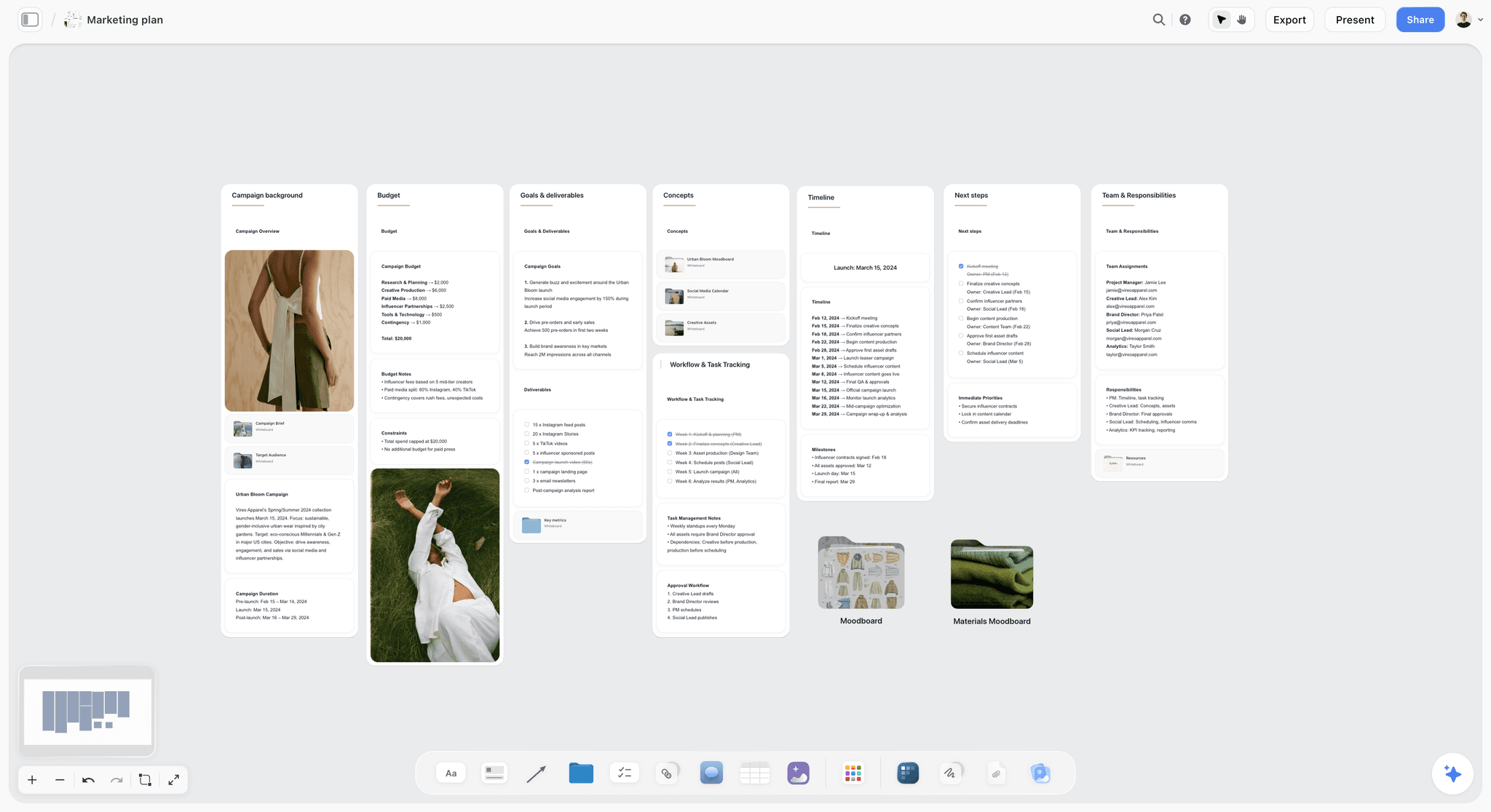
Budget, goals, timeline and team on one canvas for a fictional brand. All of it stays readable without changing views.
The workflow itself is on the visual project planning page, and the AI project plan generator builds the first draft from a brief.
The Test That Decides Where a Plan Lives
A count settles where a plan lives better than taste does, and the count behind the Storyflow 4-Material Test often gives a split answer, which is usually correct.
The Storyflow 4-Material Test
The Storyflow 4-Material Test: list the kinds of material a decision needs in view at the same time, and when the count reaches four, the decision belongs on a Storyflow canvas; at three or fewer, a database with views will do. The six kinds are text, images, dated tables, tasks, references and decks. This is our editorial rule of thumb and has no research behind it, so use it to start a conversation, not to end one.
Why the line sits at four
A database view gives you one arrangement of one set of records. A good card carries a short title, a preview picture and tracked fields such as a date and a status, so a view handles up to three kinds of material well: labels, previews and tracked data. Notion's dashboard views can combine charts with tables, boards, calendars and timelines, which pushes the line further, and we give that credit. But a dashboard holds views, not loose material. The fourth kind, say a full-size reference image beside one particular paragraph of the brief, has nowhere to sit except in a separate block further down the page.
How to count honestly
Count what the decision needs, not what the project contains. A rebrand contains everything, but "who owns the logo files?" needs one record. "Which logo direction goes to the client?" needs the options as images, the brief as text, the client's references, and the review date. That is four, so it goes on the canvas. Count at the level of the decision, and you will find most projects are mostly threes with a few critical fours.
| Decision | Text | Images | Dated table | Tasks | References | Deck | Count | Where to plan it |
|---|---|---|---|---|---|---|---|---|
Who owns each task this week? | No | No | Yes | Yes | No | No | 2 | Tracker or Notion board |
Are we on schedule for launch? | No | No | Yes | Yes | No | No | 2 | Timeline view |
Which campaign direction do we show? | Yes | Yes | Yes | No | Yes | No | 4 | Canvas |
What does the launch week look like? | Yes | Yes | Yes | Yes | No | No | 4 | Canvas |
What goes in the client presentation? | Yes | Yes | No | No | Yes | Yes | 4 | Canvas |
What did we decide last quarter? | Yes | No | No | No | No | No | 1 | Wiki |
When the test gives the wrong answer
Two cases. First, a small team with one person planning may keep everything in their head, and the count does not matter. Second, a team with heavy scheduling needs may see four materials but still need dependencies above all, in which case the critical path has to win and the canvas becomes a companion. Note the exception and move on.
Database Views vs a Canvas
A database view arranges records by their properties and a canvas lets you arrange material by hand, and Storyflow is built on the second, with tables, tasks and documents on the same board so the records are not lost.
| Question | Database views (Notion) | Canvas (Storyflow) |
|---|---|---|
What decides position | The record's properties and sort order | You, by hand, or the AI when it builds |
Unit | A page with properties | A note, image, table, document, to-do, ticket or deck |
What happens when data changes | Every view updates at once | Tables and notes change where they sit; arrangement stays |
Images | On a card, as a preview | Full size, anywhere, beside what they explain |
Many views of one dataset | Yes, the main strength | No, a table is one table |
Sort and filter | Yes | Tables cannot be sorted |
Seeing the whole project at once | Through a dashboard of views | Yes, zoom out |
Presenting it to a client | Share a page | Presentation mode steps through the walls |
Best at | Answering "what is the status?" | Answering "what is this project?" |
Weakest at | Showing how unlike things relate | Long-running structured records |
A database knows what your project contains. A canvas shows what it means. Neither replaces the other, and any article telling you one of them makes the other obsolete is selling you something. The practical question is which kind of question your team asks most.
Why a database can never quite be a canvas
A view's layout is computed. That is its power: add a record and it lands in the right column, in the right month, with no further effort. It also means you cannot say "put this picture just here, next to that note", because there is no "just here" to store. The moment you need that, you are building a page layout out of blocks and columns, not using the database.
Why a canvas can never quite be a database
Arrangement is manual, so it does not update itself. A table on a board will not sort, roll up or relate to a table on another board. A team with 400 records and a need to filter by client should keep them in a database. Moving them to a canvas would be a mistake.
Every Notion View, and Where the Visual Job Stops
Notion's database views cover Table, Board, Timeline, Calendar, List, Gallery and Chart. Here is each from Notion's own documentation, what it does well, where it stops for visual planning, and the nearest thing on a canvas. Read as of November 2026.
| View | What it shows | Good for | Where the visual job stops | On a canvas |
|---|---|---|---|---|
Table | Rows and properties | Overview of many items | No pictures in the flow of reading | A table you keep in date order |
Board | Cards grouped by a property | Status tracking | Columns mean one property only | Kanban tickets, or walls of mixed material |
Timeline | Items on a time scale | Overlaps and deadlines | A chart of dates, not of the work | Dated table; no Gantt |
Calendar | Items on their dates | Launch dates, posts | Dates only | No calendar view; table date cells |
Gallery | Visual cards | Image-led collections | Cards reorder but do not place freely | Images anywhere on the canvas |
List | Simple page list | Notes and documents | Almost no visual information | Documents on the board |
Chart | Bars, lines, donut, number | Rollups | You cannot edit entries from a chart | Charts and dashboards the AI builds |
Table view: the honest default
Table view gives each row whatever properties you want, and Number properties unlock calculations such as Sum and Median. It is the best view in Notion for an overview of many items, and many teams never need another. Its limit in visual planning is that it reads like what it is, a spreadsheet of pages, and anything visual has to be opened before it can be seen.
Board view: where Notion looks most like a plan
Board view groups pages by a property, by default a status, and you can add sub-groups for a second layer. Cards come in three sizes, and each can show a preview from the page cover, the page's content or a Files & media property. For a pipeline, this is genuinely good. Its limit is that a column can only mean one property, so a board cannot show "these three things belong together because of the client's comment" unless that is written into a property first.

A kanban on a canvas for a fictional studio. It tracks as a Notion board does, with the rest of the project's material on the same surface.
Timeline view: more than people expect
Notion's guide to views calls timeline a Gantt-style chart for planning overlapping work. Timeline view runs at any time scale from hours to years, with a table beside it that you can show or hide. Sub-items and dependencies connect tasks, and dependencies can shift dates automatically, either only when dates overlap or keeping the gap between items. If your idea of visual planning is a schedule, Notion may be enough, and Storyflow has no equivalent at all. Its limit is that it shows the shape of the time and not the work itself.
Calendar view: dates, and only dates
Calendar view places items on their dates, in month or week layout, and you drag a card to reschedule or stretch it across days. You can also see a database in Notion Calendar next to your other appointments. It is excellent for a launch schedule or a posting plan. Storyflow has no calendar view, so if the month grid is how your team thinks, this is a point for Notion.

The nearest Storyflow gets to a week view: columns of tasks you draw on the board. It does not read from dates, and a Notion calendar does.
Gallery view: the nearest to a moodboard
Gallery view shows a database as visual cards, and Notion suggests it for mood boards. Cards can be reordered by dragging, and the page describes only reordering and not placing them at arbitrary positions, so every image gets the same size in the same grid. That works for browsing and less well for directing, because a moodboard's argument often lives in which picture is big and which ones cluster. For the craft side, see the moodboard maker.
List view: for documents
List view is a streamlined way to show notes, articles and documents that do not need many properties, each one opening as a full page. It is useful and not really visual.
Chart view: small but real
Chart view offers vertical bars, horizontal bars, lines, donuts and numbers. The Free plan allows one chart and paid plans allow unlimited ones. Charts show up to 200 groups and 50 subgroups, and you cannot edit entries from the chart. Dashboard views can combine charts with tables, boards, calendars and timelines, which is the closest Notion comes to one screen for a project. Check it before you decide you need something else; for many teams a dashboard answers the status question completely.
Columns, embeds and the workarounds
Notion pages let you drag blocks into columns, with no fixed cap, but the page notes columns are available on tablet and not on mobile. Notion also has a preconfigured Miro embed block, and it can embed entire Miro boards. That combination is what most teams end up with, a page with images in columns plus a whiteboard embedded below. It works, and it is a sign the job has outgrown the database.
What a Canvas Adds to Project Planning
A canvas gives you four things a set of views cannot, and if you do not need them, you do not need a canvas.
Unlike things next to each other
Storyflow puts notes, to-dos, tables, documents, images, moodboards, storyboards, kanban boards, mind maps, charts and decks side by side. The brief sits beside its references, the schedule beside the shots it schedules. Nobody needs to open a page to find out what a card is about.
One screen for the meeting
Zoom out and you see the project. Presentation mode goes fullscreen, and arrow keys step through every top-level wall, note, table, image, deck and document, left to right. The frame list reorders, hides and jumps to any item, and steps through a wall's items one by one. Frames drawn with the Framing tool are not slides, and there is no recording. For a client call, this means you can present from the working file.
AI that builds and reads the layout
The in-app AI builds whole boards from a plain-language ask or attached files, stages the result as a proposal you accept or discard, and reads the current board plus up to five documents and three other boards you attach. It can turn notes into organized walls, a kanban board, a table or a document, and answer "what's missing here?" By one recorded run, rounded up, messy notes became an organized board in 3 minutes against an estimated 45 by hand; a PDF became tables in 2 minutes against an estimated 45. The AI visual workspace page covers it, and the infinite canvas page covers the surface.
A link a client can read
A view-only link opens with no account, so a client sees the plan without joining anything. Boards export as PNG, JPEG or PDF. To comment, they sign in. Real-time co-editing is built in, and Free can invite anyone to a board. See the visual collaboration page and the client project planning page.
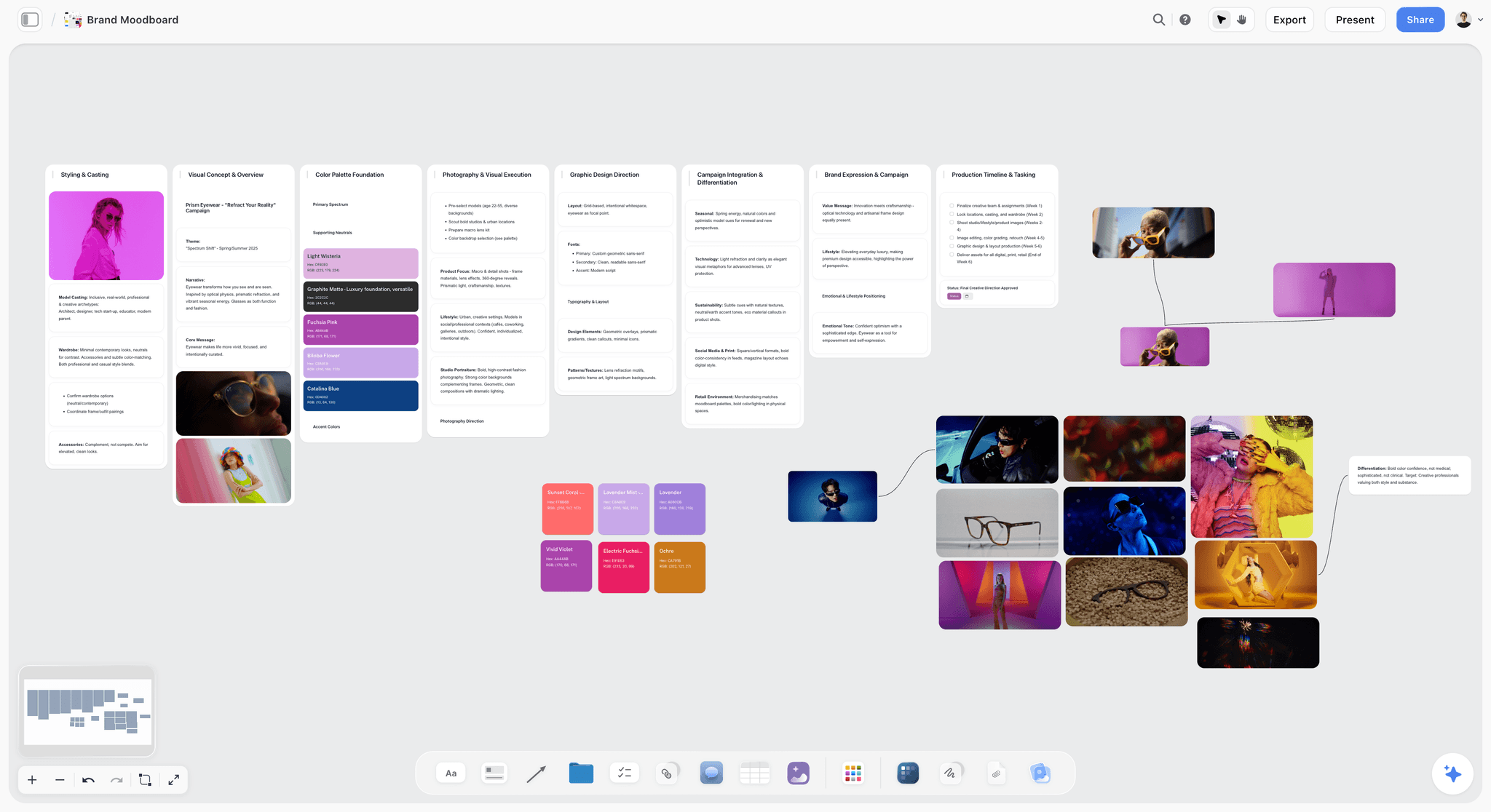
A campaign moodboard for a fictional eyewear brand on a canvas. Size and clustering carry part of the argument, which a uniform gallery cannot do.
Comparison Table: Notion and the Alternatives
Our pick is first on a stated basis: this article is about seeing a whole project at once, and Storyflow is a canvas with an AI that builds on it. Notion follows because it is the tool in question, the rest by how close each comes to that job, and most of them beat us on scheduling. Prices are from each vendor's page on 4 November 2026.
| Tool | Layout model | Board | Timeline or Gantt | Calendar | Free arrangement | Price, as of November 2026 |
|---|---|---|---|---|---|---|
Storyflow | Infinite canvas with tables and documents | Yes, tickets | No | No, table date cells | Yes | Free $0 (no in-app AI); Plus $7.99 mo annual, $9.99 monthly |
Notion | Database views and pages | Yes | Timeline, with dependencies | Yes | No, blocks and columns | Plus $10, Business $20 per member a month billed yearly ($12, $24 monthly) |
Miro | Infinite canvas | Kanban | Timelines and Gantt tools | See Miro | Yes | Starter $8, Business $20 per member a month billed yearly |
ClickUp | Task views plus whiteboards | Yes | Gantt on Core and above | See ClickUp | On whiteboards | Core $9, Business $17 per user a month billed yearly |
Asana | Project views | Yes | Timeline and Gantt on Starter | Yes | No | Starter $10.99 annual, $13.49 monthly |
monday.com | Boards and views | Yes | Timeline and Gantt on Standard | On Standard | No | Standard $12, Pro $19 per seat billed annually, 3-seat minimum |
Trello | Board of cards | Yes | Timeline on Premium | On Premium | No | Standard $5 annual, $6 monthly; Premium $10, $12.50 |
FigJam | Whiteboard | By hand | By hand | No | Yes | Collab seat $3 a month billed annually on Figma Professional |
Milanote | Hand-arranged boards | By hand | No | No | Yes | $9.99 a person mo annual, $12.50 monthly |
Read it from the job, not the feature count
If you need a schedule that recalculates, look down the Timeline column and rule out half the table, including Storyflow. If you need to look at the whole project and decide something, look down Free arrangement and rule out the other half. Almost nobody needs both from the same tool, and the tools that claim to give both tend to be better at one.

A Storyflow project board for a brand logo project, with walls for the brief, concepts, brand assets, timeline and client feedback
Lay out your next project on one board
Install Storyflow from ChatGPT's plugin directory, paste your brief, and get walls, a milestones table and a board your client can open by link.

Pricing: Plans and Prices for Each Tool
Our plans come first, then each vendor's, with plan names, prices and billing periods from its own page, read on 4 November 2026.
| Tool | Plan | Price | Billing | What it unlocks for visual planning |
|---|---|---|---|---|
Storyflow | Free | $0 | No card, no time limit | Infinite canvas, capped projects and uploads, 25 ChatGPT or Claude actions a week; no in-app AI |
Storyflow | Plus | $7.99 a month | Billed annually ($9.99 monthly) | In-app AI that builds boards, 200+ Tactics, unlimited uploads and actions |
Storyflow | Pro | $14 a month | Billed annually ($19 monthly) | AI image generation, memory, more AI |
Storyflow | Max | $39 a month | Billed annually ($49 monthly) | Most AI, Team Workspace with roles |
Notion | Free | $0 | Not applicable | One chart, 5 MB per upload, 7-day page history |
Notion | Plus | $10 per member a month | Billed yearly ($12 monthly) | Unlimited charts, 30-day history |
Notion | Business | $20 per member a month | Billed yearly ($24 monthly) | Notion Agent, AI Meeting Notes, 90-day history, SAML SSO |
Miro | Free | $0 | Not applicable | 3 editable boards |
Miro | Starter | $8 per member a month | Billed yearly | Unlimited boards, 25 AI credits a member |
Miro | Business | $20 per member a month | Billed yearly | 50 AI credits a member |
ClickUp | Core | $9 per user a month | Billed yearly | Gantt, 10 whiteboards |
ClickUp | Business | $17 per user a month | Billed yearly | Whiteboards included |
Asana | Starter | $10.99 per user a month | Billed annually ($13.49 monthly) | Timeline and Gantt |
Asana | Advanced | $24.99 per user a month | Billed annually ($30.49 monthly) | Portfolios |
monday.com | Standard | $12 per seat a month | Billed annually, 3-seat minimum | Timeline, Gantt, calendar |
Trello | Premium | $10 per user a month | Billed annually ($12.50 monthly) | Calendar, Timeline, Table, Dashboard, Map |
Milanote | Paid | $9.99 a person a month | Billed annually ($12.50 monthly) | No note or upload caps |
Our Free plan has no in-app AI, Tactics or AI image generation, and it can invite anyone to a board. For its caps on projects and uploads, read our pricing.
The Tools, Reviewed
Each review gives what the tool does best, a real limit, its price and when to choose it instead of Storyflow. Storyflow comes first because it is our pick and our product. Its ChatGPT plugin has been live since 24 October 2026, and every other tool here has a far longer record.
1. Storyflow
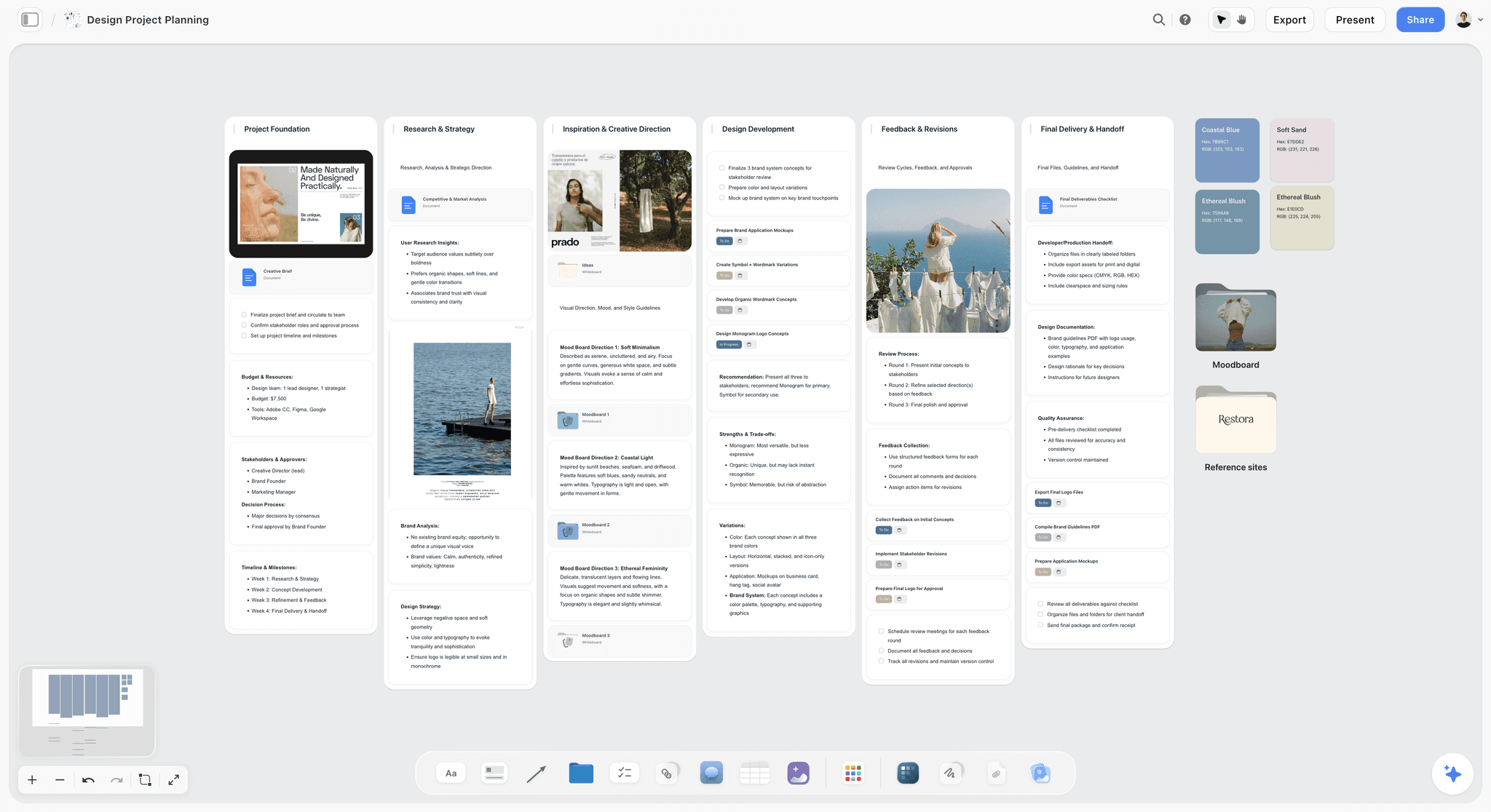
A design project plan for a fictional brand on a Storyflow canvas: brief, tasks and moodboard directions in one view.
What it does best: a project you can see whole, built for teams planning things like commercials, brand campaigns and social campaigns. On Plus and above the in-app AI builds the first draft and reads the board back, and the same board can present to a client. In one line: one app instead of five for planning a project.
Real limit: no calendar view, no Gantt chart or dependencies, no workload view or time tracking, and tables cannot be sorted. It is browser-based with no native phone app.
Price: Free is $0 with capped projects and uploads and 25 plugin or connector actions a week, and no in-app AI. Plus is $7.99 a month billed annually ($9.99 monthly), Pro $14 ($19), Max $39 ($49), as of November 2026.
Choose something else instead when your plan is a schedule with dependencies or a database of hundreds of records. A tracker will serve you better.
2. Notion
What it does best: one place for a company's documents and databases, with iOS and Android apps and an AI that can autofill database fields and summarize meetings. It is in ChatGPT's plugin directory ("Create docs, tasks, databases"). For many teams, this is simply the right answer, and the views above are strong.
Real limit: no free arrangement. Pages stack and columns do not reach phones. A project with many kinds of material becomes long pages or embeds, and we cover this in Notion's maintenance tax.
Price: a Free tier, then Plus at $10 per member a month billed yearly ($12 monthly) and Business at $20 billed yearly ($24 monthly), on Notion pricing. Custom Agents are free to try, then $10 per 1,000 monthly credits.
Choose Notion instead of Storyflow when the plan is records and the team already works there, or you need a calendar, timeline with dependencies or sorting.
3. Miro
What it does best: workshops and diagrams on what Miro calls an infinite canvas, with sticky notes, drawing and real-time or asynchronous collaboration. Its project management page lists kanban, timelines, Gantt and tables, and it integrates kanban with Jira and Asana. It is in ChatGPT's plugin directory ("Visualize and structure ideas").
Real limit: a whiteboard's natural output is a workshop, not a running plan. It is strongest in the session and takes care to keep going afterwards.
Price: Free with 3 editable boards; Starter $8 and Business $20 per member a month billed yearly, on Miro pricing.
Choose Miro instead of Storyflow when the job is a facilitated workshop or a technical diagram with many participants. See also the Miro alternative page.
4. ClickUp
What it does best: task management with a whiteboard attached. ClickUp says any shape or sticky note can become a task with assignees and due dates, and live tasks and docs sit on the board, editable without switching tabs. That is a real bridge between arranging and tracking. It is in ChatGPT's plugin directory ("Run your projects from ChatGPT").
Real limit: it brings a lot of setup for a small creative team, and whiteboards are capped on lower plans: 3 on Free and 10 on Core.
Price: Core $9 and Business $17 per user a month billed yearly, on ClickUp pricing.
Choose ClickUp instead of Storyflow when tasks are the centre of the work and you need a Gantt chart.
5. Asana
What it does best: a schedule teams actually follow. Asana's views cover list, board, timeline and calendar, and its Gantt shows visualized dependency chains. It is in ChatGPT's plugin directory ("Turn chats into actions").
Real limit: everything is a task. A moodboard or a brief has nowhere natural to live, so it becomes an attachment.
Price: Personal is free with list, board and calendar; Starter $10.99 billed annually ($13.49 monthly) adds Timeline and Gantt, on Asana pricing.
Choose Asana instead of Storyflow when on-time delivery across several people and dependencies is the main problem.
6. monday.com
What it does best: colourful boards for teams with processes, with timeline, Gantt and calendar views on Standard and above. It is in ChatGPT's plugin directory ("Manage projects, tasks & CRM").
Real limit: a 3-seat minimum on paid plans, and Basic does not include the timeline or calendar views.
Price: Basic $9, Standard $12, Pro $19 per seat a month billed annually, on monday.com pricing. Free covers up to 2 seats.
Choose monday.com instead of Storyflow when an operations team wants a configurable tracker across departments.
7. Trello
What it does best: the simplest board there is. Trello's cards hold due dates, files and checklists, and its automation moves work along. It is in ChatGPT's plugin directory ("Get things done in Trello").
Real limit: one board layout on lower plans; Calendar and Timeline views are listed on Premium. A long brief lives awkwardly on a card.
Price: free for up to 10 collaborators per Workspace; Standard $5 billed annually ($6 monthly); Premium $10 ($12.50 monthly), on Trello pricing.
Choose Trello instead of Storyflow when you want status at a glance and nothing to learn.
8. FigJam
What it does best: a team whiteboard that lives beside design work. Figma says FigJam has over 300 ready-made templates, and AI that can group sticky notes into themes or condense them into action items.
Real limit: it is built around sessions rather than a running project plan, and it makes most sense if your team is already in Figma.
Price: included in the Collab seat at $3 a month billed annually on Figma's Professional plan, on Figma pricing.
Choose FigJam instead of Storyflow when your designers already work in Figma and the job is a workshop.
9. Milanote
What it does best: a calm, hand-arranged board for notes and images. Shared boards are unlimited even on its free tier.
Real limit: free stops at 100 notes, images or links and 10 uploads. Everything is arranged by hand.
Price: $9.99 a person a month billed annually or $12.50 monthly, on Milanote plans.
Choose Milanote instead of Storyflow when you want a board and no AI, tables or decks with it.
The Project Split Template
Here is a filled split for a fictional six-person brand studio, Fenwick & Rowe, running a rebrand for a fictional client, Marlow Tea, over eight weeks. Each row is a decision, with its material count and a single home. Copy the columns into a table on your own board, and fill it in before moving anything.
| Decision | Materials in view | Count | Home | Owner | Reviewed | What happens at review |
|---|---|---|---|---|---|---|
Who is doing what this week? | Tasks, dates | 2 | Notion board view | Studio lead | Monday | Status only |
Are we on track for the eight-week date? | Tasks, dates | 2 | Notion timeline with dependencies | Studio lead | Monday | Dependencies shift dates |
Studio processes and past work | Text | 1 | Notion wiki | Everyone | When changed | No meeting |
What did the client ask for? | Text, references, images, dates | 4 | Canvas, Brief wall | Account lead | Week 1 | Signed off in a note |
Which three logo directions go forward? | Text, images, references, tasks | 4 | Canvas, Direction walls | Creative lead | Week 3 | Directions cut to three |
What does the packaging system look like? | Images, text, references, tasks | 4 | Canvas, Packaging wall | Designer | Week 5 | Notes in comment threads |
What goes in the client presentation? | Text, images, references, deck | 4 | Canvas, deck from the board | Creative lead | Weeks 3 and 6 | Presented from the board |
What is the launch schedule? | Dated table, text, tasks, images | 4 | Canvas, table beside launch assets | Account lead | Week 6 | Rows kept in date order |
Fee and invoices | Dates, text | 2 | Accounting tool, not a planning tool | Studio lead | Monthly | Stays out of the canvas |
Final files handover | Text, tasks | 2 | Notion page with links | Designer | Week 8 | Client receives files |
How to read the split
Only five of ten rows move to the canvas, and those are the ones where the client's money is being decided. The others stay where they work today. Most Notion setups survive this untouched, which is the point: you are adding a surface, not running a migration.
What to do with the seam
Link between the two. The Notion project page links to the board, and the board has a link card back to the Notion page. Each row in the template has one home, so nobody updates both. If the same date sits in two places, one of them will be wrong by Friday.
When a row moves
A decision can change home as the project changes. After the logo direction is chosen, "who owns the logo files?" is a two-material record again. Moving it back is fine, and a healthy split should shift over a project's life.
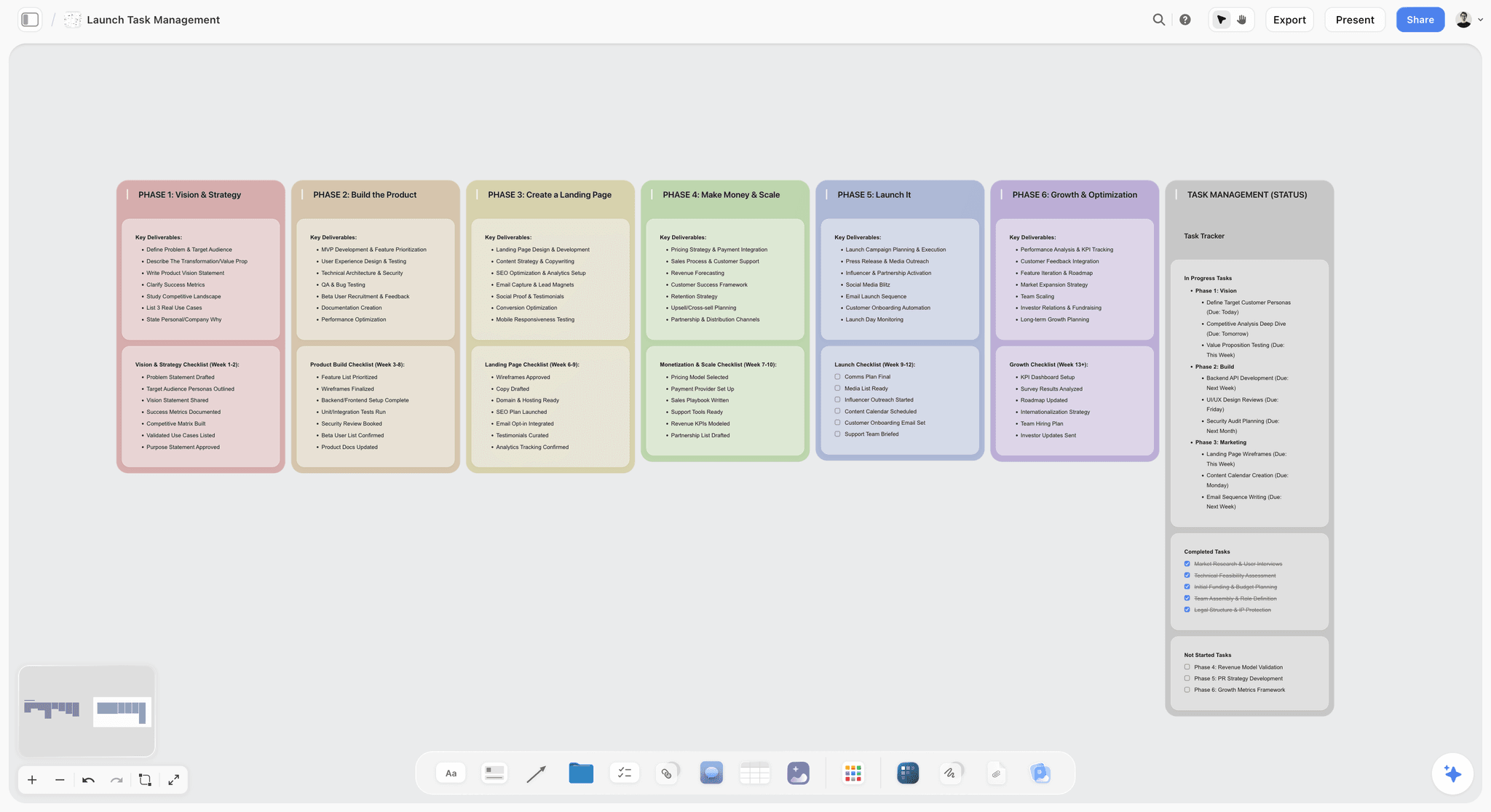
Phase columns and a status tracker on one board, for the part of a launch where the work and the status need to sit together.
Worked Example: Fenwick & Rowe Plan a Rebrand
An illustrative project for the same fictional studio. Its studio lead, Amara, has run everything in Notion for three years. The trouble started with the last client presentation, when it took an afternoon to pull references, drafts and dates out of six pages. So she tries the split on one project, without moving anything else.
Week one: the brief on a board
Amara creates a project for Marlow Tea and puts the client's PDF brief, competitor packaging photos and the first interview notes onto a board. The in-app AI turns the mess into walls: Brief, Audience, Competitors, Open Questions. She accepts the proposal, edits two walls and asks "what's missing here?" It points out that nobody has confirmed the launch date, which goes to the client that afternoon. The schedule still lives in Notion, where the timeline's dependencies suit it.
Weeks two and three: the directions
Each designer works in a wall of their own. Images, type samples and notes sit together and can be any size. Reference images saved with the Web Clipper arrive as cards. By week three there are seven directions on the board. Amara zooms out, and the team can see at a glance that four of them are the same idea. In a gallery view with equal-sized cards, the family resemblance would have been harder to see.
Week three: the first presentation
The creative lead asks the in-app AI for a deck from the board and picks three directions to show. The deck is built on the board, presented fullscreen, and exported as a PDF for the client's own team. Storyflow has no PPTX export, which does not matter here because the client only wanted to read it. Afterwards the client gets a view-only link to the shortlist, and two client team members who want to comment sign in, joining free through an invite.
Weeks four to six: the packaging
The packaging wall holds photographs of prototypes, with notes beside each. Comments on the board handle quick reactions, and Amara copies each decision into a note before anyone hits Resolve, because Resolve deletes the whole thread. The launch schedule table goes beside the launch assets, with rows kept in date order. For once, the question "is the photography booked for the right pack?" can be answered by looking.
Weeks seven and eight: back to records
Once the direction is final, the work is mostly tasks and files, and those go back to the Notion page, along with the handover. The board stays as the record of why things were decided. Amara's verdict for the next project is the template above: the status lives in Notion, and the thinking lives on the board.
What the example shows
Nothing got migrated. The team did not leave Notion, and nobody had to retrain. Notion kept doing its job, and the part of the project that was struggling got a surface fit for it. The limit showed up too: Amara still has no calendar in Storyflow, and she did not want one, because Notion already had it.

A logo project planning board, the kind of surface where seven directions can be seen and cut to three.
Do This in ChatGPT or Claude
You can build the visual half of a plan by asking. ChatGPT calls Storyflow a plugin, Claude calls it a connector, and both reach the same board. This is separate from the in-app Storyflow AI, which is on paid plans and uses Storyflow AI credits. Plugin and connector actions run on the assistant's own model and use no Storyflow AI credits. Notion is also in ChatGPT's plugin directory, and OpenAI's Notion article says ChatGPT can search and read pages your connected account can access and may be able to create or update pages, depending on the setup.
Install in ChatGPT
Open the Storyflow listing, select Install plugin, sign in to Storyflow and choose which projects ChatGPT may use. Read access is always on, and you decide whether it may also make changes. Availability depends on your ChatGPT plan, workspace and region, per OpenAI's plugin article. In a chat, type @ and pick Storyflow. The workflows are on the ChatGPT project plan page and the ChatGPT kanban page.
Connect in Claude
Use Claude's custom connector steps: Customize, Connectors, Add custom connector, name it Storyflow and use the address https://mcp.storyflow.so/mcp, then sign in. Claude's Free plan is limited to one custom connector, and on Team and Enterprise an Owner adds it first. Setup for every assistant is on the Storyflow MCP page. The Claude kanban page shows the same kind of board from Claude.
Prompts to copy
- "Find our Marlow Tea project page in Notion and summarise the deliverables, dates and open questions. Then build walls for Brief, Directions, Packaging and Launch on the Marlow Tea board in Storyflow, and put those items in the right walls."
- "Here are the ten decisions this project has to support. For each, count which of these it needs in view: text, images, dated tables, tasks, references, decks. Put the result in a table called Project Split on the board, with a Home column for canvas or tracker."
- "Add a table called Milestones to the Launch wall, with columns for date, milestone, owner and status. Keep rows in date order and leave blanks where you do not know."
- "Divide the board into sections for each workstream and connect the Brief wall to each Direction wall with a labelled connection saying what the direction answers."
- "Build a five-slide deck on this board from the Directions walls for the client review. Show the three directions and the decision we need."
- "What changed on this board in the last week, and who changed it? Summarise it in three lines I can paste into our Notion status page."
- "Read this board and tell me which items are really records and belong back in our tracker."
- In Claude: "Look at the Project Split table. Where have we called something a canvas decision when a simple table would do? Argue the case in two lines each, and leave the board as it is."
What lands on the board
Notes, headings, to-dos, tables, documents, walls, connected diagrams, charts and slide decks, arranged and grouped. Through the plugin, a to-do takes no date and no assignee, so dated milestones go on tickets or in a table date column. It can add a comment card but cannot read board comments. AI image generation is not available through the plugin. A photo attached in a ChatGPT chat does not reach Storyflow, and the plugin gives you an upload link for the board instead.
What to check by hand
- That the Notion content it read is the current version, and that your connected account could see the right pages.
- Every date in the Milestones table.
- Owners: a person column is filled only with people already on the board. If any name matches nobody, or nobody else is on the board, the whole column becomes plain text.
- Layout. You still make the judgement on what sits next to what.
- Connections end after 30 days and ChatGPT asks you to sign in again, which is deliberate.
One account reaches Claude and other assistants through one address, and ChatGPT installs it from its directory.
A Free account can make 25 plugin actions a week, resetting Monday UTC; Plus, Pro and Max have no weekly limit. A comparison on this route alone is in Notion vs Storyflow in ChatGPT, and the assistants version of this question goes further.
Keep Notion, Switch, or Split?
There are three honest outcomes, and which one fits depends on what your current setup is failing at. Most teams should start with the middle one.
| Outcome | When it fits | What you do | What you give up |
|---|---|---|---|
Stay on Notion | Plan is records, dashboards answer the questions | Add a dashboard view and a gallery; stop looking | One-screen visual view of mixed material |
Split | A few visual decisions, a working wiki | Add one canvas board per visual project | A second tool, and a rule about what goes where |
Move a team's projects to a canvas | Work is visual end to end and few records need sorting | Rebuild active projects on boards, keep archives | Calendar, sorting, phone editing |
How to try the split in a week
Take one live project with a client review coming. Run the test on its decisions, move only the fours, and present the review from the board. If the meeting goes better, repeat. If it does not, you have lost a week on one project and learned the answer. Brief to project board shows the starting move.
When to actually switch
Switch only if your team has already stopped using the databases. Plenty of Notion setups turn out to be page collections with a status column nobody updates. For those, how to migrate from Notion to a visual workspace and the switch from Notion page cover the steps, and the Notion alternative for creative teams page makes the case for that audience.
What not to move
Archives, finished projects, company handbooks and anything a phone user updates daily. Those are doing their job. A canvas gains nothing from them.
Picks by Role
Two picks per role, based on what that person is usually accountable for. Storyflow leads where a role plans across mixed material; the last three rows are jobs it does not do.
| Role | Top picks | Why |
|---|---|---|
Creative-team lead at an agency or studio | Storyflow plus Notion | The board for the work a client sees; Notion for the studio |
Solo founder | Storyflow or Notion | A board when you are planning something visual, such as a launch; Notion if it is mostly tasks and notes |
Designer or design lead | Storyflow or FigJam | A board for project planning; FigJam if everything is in Figma |
Marketing strategist | Storyflow plus Asana | A board for campaign thinking; Asana for delivery dates |
Product manager running discovery | Miro or Notion | Miro for workshops; Notion or Linear for the roadmap |
Workshop facilitator or consultant | Miro | Built for live sessions with many participants |
Operations lead | monday.com or ClickUp | Configurable trackers across departments |
Creative lead accountable to a client
Your risk is a presentation that does not land and a project nobody can see. Put client-facing thinking on a board and keep studio operations where they are. Creative project management covers this role.
Founder planning a launch
You are the whole team. Do not build a system; pick one board per launch and a list. A marketing plan on one board is a reasonable start, and a tracker can wait until you hire.
Project manager with a real schedule
Be honest about what you need: dependencies, a critical path and capacity. Storyflow has none of these. Choose from Asana, ClickUp or monday.com and use a canvas only for early thinking, if at all.
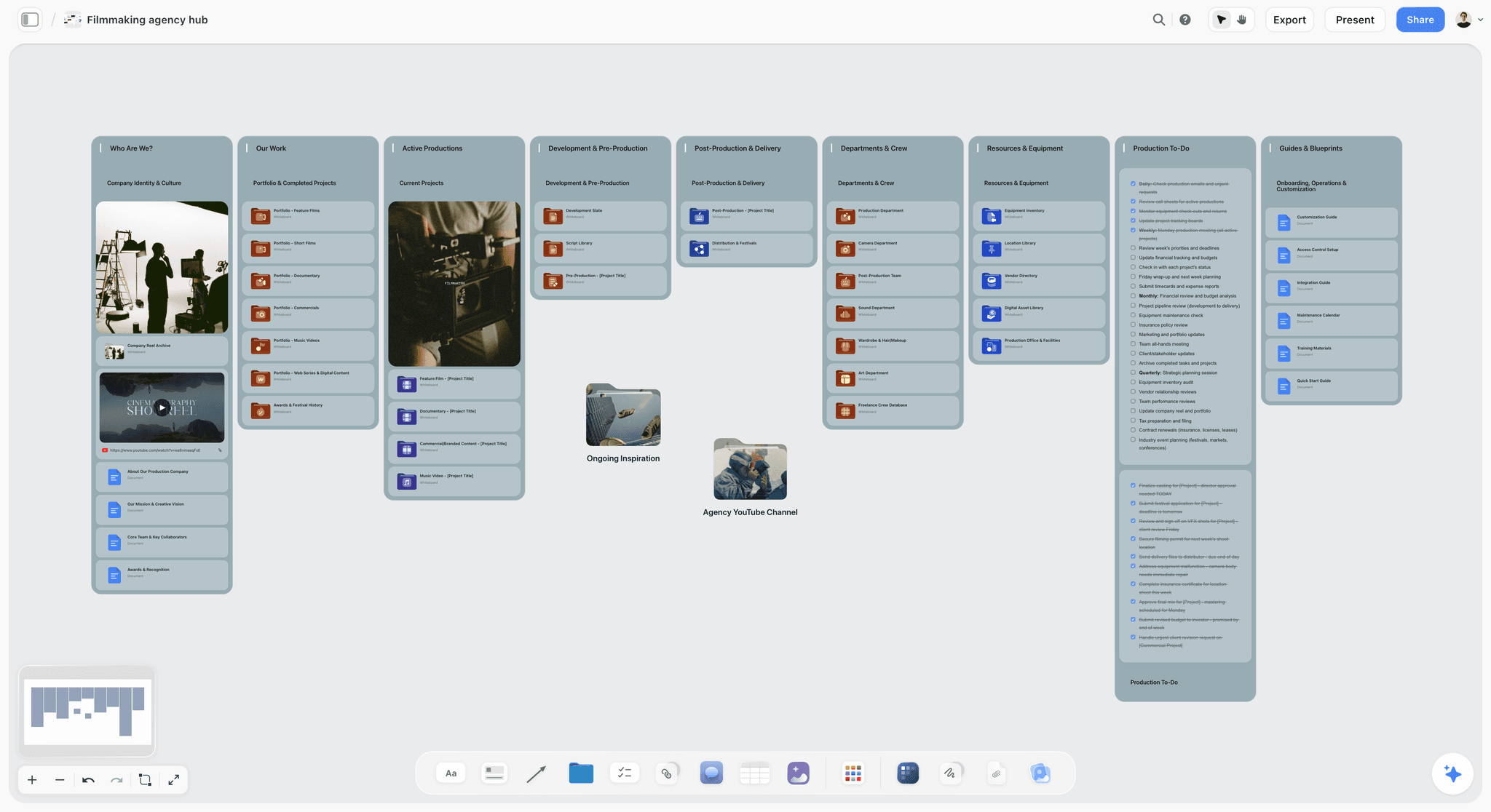
A production hub on one canvas, with folders leading to each project's board. This is how a studio can keep many boards findable.
Mistakes and Fixes
Rebuilding your whole Notion on a canvas
Fix: move only the decisions that pass the test. A canvas full of records is a worse database, and you will be back within a quarter.
Treating gallery view as a moodboard
Fix: use gallery to browse a collection. Use a canvas for an argument about direction, where size and grouping mean something.
Stacking linked views until the page scrolls forever
Fix: try one dashboard view first, and if you still need more than four kinds of material on a screen, you have your answer.
Embedding a whiteboard and calling it integrated
Fix: an embedded Miro board inside Notion is a fair stopgap. Do notice that the board has no connection to the database above it, and decide who updates what.
Keeping the same date in two tools
Fix: one home per fact. The split template has one column for exactly this reason.
Buying a canvas when you need a schedule
Fix: if your pain is slipped dates and dependencies, a canvas will not help. Use Notion's dependencies, or Asana, ClickUp or monday.com.
Giving everyone a separate board
Fix: one project, one main board. Boards multiply easily, and the value disappears when people must search five of them. Use folders for sub-work.
Letting comments carry the decisions
Fix: on a board, Resolve deletes the whole thread. Write the decision into a note first, and keep the thread for the discussion.
Choosing by the demo
Fix: run your own live project through the test. A demo board with perfect images says very little about the board you will have by week six.
Storyflow's Honest Limits for This Job
The case above is about seeing a project whole. Here is where Storyflow falls short for project planning, and for several of these, Notion is the better answer.
- No calendar view. Dates live in table date cells and to-dos. Notion's calendar is better if you plan by month.
- No Gantt chart, dependencies, critical path or workload view. Notion's timeline with dependencies, or Asana, does this and Storyflow does not.
- No recalculating schedule. Change a date and nothing else moves.
- Tables cannot be sorted. Write rows in date order and keep them there. Notion's filters and sorts are far stronger.
- No time tracking. Use a dedicated tool.
- No relational database. One table does not link to another the way Notion's databases do.
- No native desktop or phone app. Storyflow runs in the browser and is best built on a laptop. Notion has iOS and Android apps.
- No due-date reminders. To-dos take a due date and in-app notifications exist, but nothing nudges you about a due date.
- No proposals, contracts, e-signature or invoices.
- No PPTX export. Boards export as PNG, JPEG or PDF, and decks as PDF.
- No in-app AI on the Free plan. Free also caps projects, uploads and plugin or connector actions, the last at 25 a week. The in-app AI starts on Plus.
Other Options We Considered
Two tools come up in this conversation, and neither is the answer to this specific question.
Linear
It is in ChatGPT's plugin directory ("Plan and build products"), and Linear's pricing lists Basic at $10 and Business at $16 per user a month billed yearly. It suits software teams who want a fast tracker. It is not a visual planning tool for a campaign or a brand project, and a creative team would be working against it.
Airtable
It is in ChatGPT's plugin directory ("Add structured data to ChatGPT"). Airtable pricing lists Team at $20 and Business at $45 per seat a month billed annually. If your frustration with Notion is that its databases are not strong enough, Airtable goes the other way from a canvas, and it may be what you want. See Notion vs Airtable for creative project tracking.
Do You Need Anything Beyond Notion?
Often not. If your team can get through a client review using a Notion page, your dashboard answers the weekly question, and nobody is rebuilding slides out of pages, then stop reading and go back to work. Try the dashboard view first, because many teams have never used it. A new tool earns its place only when a recurring meeting is struggling because the material cannot be seen together. If you cannot name that meeting, you do not have this problem.
Which Tool Should You Use?
- If your decisions need four or more kinds of material in view, use Storyflow.
- If your plan is records, dates and statuses, stay on Notion and add a dashboard.
- If you need dependencies and a critical path, use Asana, ClickUp, monday.com or Notion's timeline.
- If you need a live workshop with many people, use Miro or FigJam.
- If you want a board with nothing to learn, use Trello.
- If you want stronger relational data, use Airtable.
- If you want a quiet hand-arranged board and no AI, use Milanote.
For broader rankings, see the best visual project management tools, the simplest visual project planning apps and Notion alternatives for visual thinkers. The sibling comparison Notion vs Miro vs Asana vs ClickUp vs Linear ranks those tools for this question.
The same board whether you plan in the app, in ChatGPT through the plugin or in Claude through the connector.
The Bottom Line
Notion is good at visual tracking and not built for visual arranging. If your plan is records with dates and statuses, its board, timeline, calendar and dashboard views are enough, and you can stop here. If a decision needs images, text, dates and tasks in view at once, the Storyflow 4-Material Test sends it to a canvas, and Storyflow is our pick for that canvas because the AI builds on it and the same board can present to a client.
To decide, take one live project with a client review coming, count the materials behind each decision, and move only the fours to a board built from your brief. Notion keeps the records. After the review, you will know whether the second surface earned its place.
This article was published in November 2026. Vendor prices and help pages were read on 4 November 2026.
FAQ: Notion and Visual Project Planning
Is Notion good for visual project planning, or is there something better?
Notion is good for visual tracking, and Storyflow is better when a plan has to show images, briefs, tables and tasks together on one canvas. Notion's board, timeline, calendar, gallery and chart views handle records well. Run the Storyflow 4-Material Test: three or fewer kinds of material fit Notion, and four or more belong on a canvas. Many teams should use both.
What is the best tool for visual project planning?
Storyflow is our pick when visual project planning means seeing a whole project at once, because notes, images, documents, tables and decks share one canvas and an AI builds on it. If it means a schedule, choose Asana, ClickUp, monday.com or Notion's timeline, since Storyflow has no Gantt chart. If it means a live workshop, choose Miro or FigJam.
What is the Storyflow 4-Material Test?
It is our editorial rule of thumb for deciding where a plan lives. List the kinds of material a decision needs in view: text, images, dated tables, tasks, references and decks. At three or fewer, a database with views will do. At four or more, the decision belongs on a Storyflow canvas. It has no research behind it, so use judgement.
Does Notion have a timeline view?
Yes. Notion's timeline view shows projects at any scale from hours to years, with a table beside it you can show or hide, and Notion describes it as a Gantt-style chart. Sub-items and dependencies can connect tasks, and dependencies can shift dates automatically. It shows when work happens and does not show the work itself, so a visual brief sits elsewhere.
Does Notion have a Gantt chart?
Notion's guide describes timeline view as a Gantt-style chart, and its dependencies can shift due dates either only when dates overlap or keeping the gap between items. That is enough for many projects. Asana, ClickUp and monday.com list Gantt views by name on their paid plans, and Storyflow has no Gantt chart or dependencies, so a heavy schedule should not live on our board.
Does Notion have a whiteboard or canvas?
Its documented database layouts are Table, Board, Timeline, Calendar, List, Gallery and Chart, and none is a free canvas. Pages can hold blocks in columns, and Notion has a preconfigured block for embedding Miro boards. So you can place a whiteboard inside a page, and it will not be connected to your databases. Storyflow and Miro are canvases at their core.
Is Miro better than Notion for project planning?
Miro is better for visual thinking and workshops on an infinite canvas, and Notion is better for documents and running records with several views. Many teams embed Miro in Notion. Storyflow sits closer to Miro on layout but is built for an ongoing project plan with tables, documents, decks and an AI that builds on the board. Pick by the meeting you need to improve.
Should I replace Notion with Storyflow?
Usually not. Keep Notion for your wiki, records, schedules and anything people update by phone, and add one Storyflow board for each project that needs to be seen whole. Replace it only if your team has stopped using Notion's databases and mostly keeps page collections. Storyflow has no calendar view, sorting or relational data, so a full swap gives real things up.
Can ChatGPT or Claude plan a project visually?
Yes, with Storyflow connected. ChatGPT uses the plugin from its directory, Claude uses a custom connector, and either can build walls, tables, diagrams, charts and decks on a board and report what changed. Through the plugin, to-dos take no date or assignee, so dated milestones go in a table or on tickets. Canvas in ChatGPT itself is a writing and coding pane, not a visual board.
Does Storyflow have a calendar or Gantt view?
No. Storyflow has no calendar view and no Gantt chart, dependencies or critical path. Dates live in table date cells and to-dos, and tables cannot be sorted, so write rows in date order. If you need any of those, Notion's calendar and timeline, or Asana, ClickUp and monday.com, will serve you better. Storyflow's strength is seeing the whole project and the material side by side.
How much does Notion cost for a small team?
As of November 2026, Notion Plus is $10 per member a month billed yearly ($12 monthly), and Business is $20 billed yearly ($24 monthly). There is a Free tier with one chart and a 5 MB upload limit per file. Notion Agent and AI Meeting Notes are listed on Business, and Custom Agents use paid credits after a free try.
Is Storyflow free?
Storyflow has a free plan at $0 with no card, capped projects and uploads, and 25 ChatGPT or Claude actions a week. It has no in-app AI, Tactics or AI image generation; the in-app AI starts on Plus at $7.99 a month billed annually or $9.99 monthly, as of November 2026. A view-only link opens with no account.
Can a client see a project plan without an account?
In Storyflow, yes: a view-only link opens with no account, and commenting needs a sign-in. Notion lets you invite guests to individual pages, and they get access only to those pages; check Notion's own help for publishing options. For a client meeting, Storyflow's presentation mode goes fullscreen and steps through the board's walls, so you can present from the working file.
Which view should I use in Notion for a moodboard?
Gallery view is the one Notion suggests for mood boards, with cards showing a page cover, the first image or a Files & media property. It works for browsing a collection. Since the help page describes reordering rather than free placement, every card keeps a similar size. When a board has to argue for a direction, a canvas such as Storyflow suits better.
Table of Contents
- Key Takeaways
- Is Notion Good for Visual Project Planning?
- How to Plan a Project Visually: The 8-Step Method
- The Test That Decides Where a Plan Lives
- Database Views vs a Canvas
- Every Notion View, and Where the Visual Job Stops
- What a Canvas Adds to Project Planning
- Comparison Table: Notion and the Alternatives
- Pricing: Plans and Prices for Each Tool
- The Tools, Reviewed
- 1. Storyflow
- 2. Notion
- 3. Miro
- 4. ClickUp
- 5. Asana
- 6. monday.com
- 7. Trello
- 8. FigJam
- 9. Milanote
- The Project Split Template
- Worked Example: Fenwick & Rowe Plan a Rebrand
- Do This in ChatGPT or Claude
- Keep Notion, Switch, or Split?
- Picks by Role
- Mistakes and Fixes
- Storyflow's Honest Limits for This Job
- Other Options We Considered
- Do You Need Anything Beyond Notion?
- Which Tool Should You Use?
- The Bottom Line
- FAQ: Notion and Visual Project Planning
- Related Reading
Templates to check out for this topic


Workspace templates you can use in Storyflow
Keep research, notes, and plans on one canvas the AI can read, instead of scattered across docs and tabs. Open a template and make it your second brain.


See Storyflow in Action
A visual AI workspace where every feature lives inside one canvas. No tab-switching, no context lost.
Build your entire board from a single message
Type what you need in the AI chat at the bottom of your canvas. The AI adds cards, headings, and structure directly onto your board.
Use expert frameworks as AI context
Type @ in the AI chat and choose any Tactic. The AI tailors every response to that framework instead of giving generic advice.
Turn your board into a mind map in seconds
Ask the AI to restructure your canvas as a mindmap. It connects your ideas into a visual hierarchy so you can see how everything relates.
Why Storyflow Exists
Storyflow actually began as a personal tool while working on creative and research projects.
We kept running into the same problem: ideas were scattered everywhere: notes, documents, and whiteboards.
Nothing helped us see how everything connected.
So we started building a workspace designed around how ideas actually grow.
→ Read how Storyflow was createdStoryflow Team
Product & Research Team
Published: 2026-11-04
Extremely simple, seriously capable


See how easy it is to get started
Watch a real project come together, from a blank board to a finished plan, clicked through step by step.
Start creating with AI and become more productive
Transform your creative workflow with AI-powered tools. Generate ideas, create content, and boost your productivity in minutes instead of hours.