Best Notion Alternatives for Visual Thinkers in 2026
Discover the best Notion alternatives built for visual thinkers. Compare Storyflow, Whimsical, FigJam, Heptabase and more. Find tools designed for spatial thinking, not documents.

Category
Productivity & Tools
Author

Justkay
Documentary Filmmaker & Founder at Storyflow
Topics
December 28, 2025
•
18 min read
•
Productivity & Tools- Notion alternatives
- visual thinking
- spatial workspace
- 2026
What are the best Notion alternatives for visual thinkers in 2026?
The best Notion alternatives for visual thinkers in 2026 are Storyflow (best AI-powered visual workspace), Heptabase (best for research), Whimsical (best for clean diagrams), and Milanote (best for mood boards). Storyflow leads because its AI reads your full active canvas board, not one page at a time.

All 10 Tools, Ranked
- Storyflow: best overall, canvas-first workspace with AI that reads your full active board
- Whimsical: best for clean, fast diagrams and mind maps
- FigJam: best for design teams already in Figma
- Miro: best for large workshops and enterprise scale
- Heptabase: best for personal knowledge and research
- Milanote: best for moodboards and visual inspiration
- Scrintal: best for writers who think visually
- Muse: best for iPad-first spatial thinking
- Canva Whiteboards: best for casual brainstorms that need to look good
- Obsidian Canvas: best for visual connections between Markdown notes
Full disclosure: Storyflow is our own product, and we rank it #1 for one job: an AI-powered visual workspace where the model reads your full active canvas board instead of one page at a time. For personal knowledge and long research projects Heptabase is stronger, and for clean, fast diagrams Whimsical is the simpler tool. Storyflow leans on its canvas, so if you mostly want structured docs and databases the way Notion does them, it is not trying to replace that, and its free plan caps basic AI usage. We link to every tool so you can judge the fit.
Quick Comparison: Best Notion Alternatives for Visual Thinkers
These four cover the jobs visual thinkers leave Notion for: an AI workspace that reads your whole board, research and knowledge management, clean diagrams, and mood boards.
| Tool | Best For | AI Features | Price |
|---|---|---|---|
| Storyflow | AI visual workspace that reads your board | Reads full board + @-docs and Tactics | $7.99 mo annual (free plan late 2026) |
| Heptabase | Research and knowledge management | Limited, study-focused | Trial / $9.99 mo |
| Whimsical | Clean diagrams and flowcharts | Limited AI diagrams | Free / $10 mo |
| Milanote | Mood boards and visual inspiration | Limited | Free / $10 mo |
You open Notion to brainstorm your next project. Thirty minutes later you've created four nested pages, written six bullet points, and formatted a table you didn't need.
The idea you came to capture? Still floating somewhere in your head. Now buried under structure.
Notion is brilliant software. Millions of people use it to run their work and lives. The databases are capable. The flexibility is real. For people who think in documents and lists, nothing else comes close.
But some brains don't work that way.
Some people need to see ideas in space. Concepts arranged on a canvas. Connections drawn visually. Clusters that form naturally instead of hierarchies that get imposed. When you think by seeing relationships between things, a tool built around pages and bullet points fights against you.
Notion knows this. They added a canvas feature. It exists. You can find it in the menu if you look. But it feels like an afterthought because it was one. The core of Notion is text. Always has been.
Visual thinkers using Notion spend half their energy translating. Take the image in your head, convert it to words, arrange those words in lists, hope you can reconstruct the original picture when you come back next week.
That tax adds up.
The past year brought tools designed for how visual thinkers actually work. Canvases first, documents second. Spatial relationships built in. AI that understands when you're exploring, not outlining.
The quick answer:
- Best overall: Storyflow (visual workspace with AI that gets context)
- Best for simplicity: Whimsical
- Best for design teams: FigJam
- Best for personal knowledge: Heptabase
- Best for moodboards: Milanote
Let's find the right fit for your brain.
Why Visual Thinkers Struggle with Notion
Notion wasn't built for visual thinkers. It was built for people who organize in outlines and databases. Understanding why it fights against spatial thinking helps clarify what you actually need.
Everything becomes a document
Open Notion. Create something new. You get a blank page with a blinking cursor. The tool is waiting for you to type.
You can add images. You can embed things. You can create columns and callout boxes. But the foundation is a document. Top to bottom. Linear. Sequential.
Visual thinkers don't start with sequences. They start with clusters. Related ideas grouped together. Unrelated ideas kept apart. The spatial arrangement carries meaning. In Notion, you lose that. Everything flattens into a vertical scroll.
The sidebar problem
After three months of using Notion, open the sidebar. Count the pages. Count the nested pages inside those pages. Count the pages nested inside those.
Notion workspaces grow into labyrinths. Finding something means remembering what you called it and where you put it. The structure that seemed logical when you created it becomes a maze when you return.
Visual thinkers navigate by recognition. You remember where something was on the canvas. Top right corner. Near the blue sticky note. Below that image you added. Notion doesn't give you those landmarks. Just an endless list of page titles in a collapsing tree.
Databases are invisible
Notion's databases are genuinely capable. Filter, sort, link, relate. Build systems that connect everything.
The problem: databases are abstract. The information lives in rows and columns. You interact through views and properties. It works, but it doesn't feel like anything.
Visual thinkers want to see the connections. Not read about them in a linked database property. Not trust that they exist somewhere in the schema. Actually see arrows connecting related things. Clusters forming. Patterns emerging on a canvas.
Canvas came late and it shows
Notion added canvas features. You can create boards now. Put things in space.
But use it for ten minutes and you'll feel the limitations. The canvas lives inside a page, which lives inside the sidebar, which lives inside the document-first architecture. It's a feature bolted onto a system designed around something else.
Compare that to tools built around canvas from day one. The difference is obvious. One treats spatial thinking as a mode you can switch into. The other treats it as the foundation.
The template trap
Notion has thousands of templates. Productivity systems. Life dashboards. Content calendars. People share elaborate setups that promise to organize everything.
Visual thinkers download these templates and feel worse. Someone else's structure, built for someone else's brain. The template assumes you think in databases and linked pages. If you don't, you're back to fighting the tool.
Real talk: Notion is great for some things
This isn't about Notion being bad software. It's about fit.
If you need a wiki, Notion works. If you want a lightweight database, Notion works. If your team thinks in documents and your projects fit neatly into pages, Notion works extremely well.
But if you've tried Notion three times and it never stuck, if you always end up back in a whiteboard or a physical notebook or a messy folder of screenshots, the problem isn't discipline. The problem is the tool was designed for a different kind of brain.

Storyflow gives visual thinkers a canvas-first workspace built around how they actually think
Quick Picks by Use Case
Different visual thinkers need different things. Here's where to start based on how you work.
Best overall: Storyflow
You want a canvas that thinks with you. Storyflow's AI reads your full active board, not just the card you're on (plus up to 1 Tactic and 3 Documents you @-mention). When you're brainstorming, it works from the context already on the canvas instead of making you re-explain it. Blueprints give you starting frameworks without forcing someone else's structure. Cards turn scattered ideas into organized information you can actually use. The canvas is free forever. Paid AI plans start at $7.99/month (Plus, billed annually).
Best for simplicity: Whimsical
You want fast and clean. No learning curve. No feature bloat. Open it, start working. Whimsical handles mind maps, flowcharts, wireframes, and sticky notes without making you hunt through menus. Product teams love it because new people can contribute immediately.
Best for design teams: FigJam
You live in Figma. Your design files, your whiteboard, same ecosystem. Drag components between them. The free tier gives you unlimited collaborators on three files. The vibe is playful. Stamps, stickers, emoji reactions. Less corporate than the enterprise tools.
Best for personal knowledge: Heptabase
You're building a second brain. Taking notes that connect over time. Heptabase treats cards as the primary unit. Arrange them on canvases. See relationships between ideas visually. Popular with researchers, writers, and people who think across long time horizons.
Best for moodboards: Milanote
You collect visual inspiration. Images, links, color palettes, references. Milanote does moodboards better than anyone. Clean interface, drag and drop, looks good by default. The downside: no AI, limited free plan, boards become static over time.
Best free option: FigJam or Storyflow
FigJam gives you three files with unlimited collaborators. Storyflow's canvas is completely free with no board limits and unlimited collaboration. If you want more AI, Storyflow's paid plans start at $9.99/month. If you're testing whether visual tools work for you, both are solid starting points.
Best for serious whiteboarding: Miro
You run workshops. Fifty people in a room. Voting, timers, facilitation controls. Miro has the features and the scale. The tradeoff: complexity, per-user pricing, AI that doesn't know your context.
Best for writers: Scrintal
You're writing something long. Book, thesis, research project. Scrintal connects notes visually while keeping the writing experience clean. Your outline lives on a canvas. Your drafts stay readable.
Comparison Table
Here's how the top Notion alternatives for visual thinkers stack up:
| Tool | Best For | Starting Price | Free Plan | Visual Focus | AI Features | Rating |
|---|---|---|---|---|---|---|
| Storyflow | AI-powered visual work | Free / $9.99/mo with AI | Yes (full canvas) | ★★★★★ | ★★★★★ | 9.5/10 |
| Whimsical | Clean simplicity | $10/user/mo | Yes (limited) | ★★★★★ | ★★☆☆☆ | 8.5/10 |
| FigJam | Design teams | $3/user/mo | Yes (3 files) | ★★★★☆ | ★★☆☆☆ | 8.5/10 |
| Miro | Large workshops | $8/user/mo | Yes (3 boards) | ★★★★☆ | ★★☆☆☆ | 8/10 |
| Heptabase | Personal knowledge | $9.99/mo | Trial only | ★★★★★ | ★★☆☆☆ | 8.5/10 |
| Milanote | Moodboards | $10/user/mo | Yes (100 notes) | ★★★★★ | ★☆☆☆☆ | 8/10 |
| Scrintal | Visual writing | $9/mo | Yes (limited) | ★★★★☆ | ★★☆☆☆ | 7.5/10 |
| Muse | iPad thinking | $10/mo | Yes (limited) | ★★★★★ | ★☆☆☆☆ | 7.5/10 |
| Canva Whiteboards | Casual brainstorming | Free-$10/user/mo | Yes | ★★★☆☆ | ★★☆☆☆ | 7.5/10 |
| Obsidian Canvas | Note connections | Free-$8/mo | Yes | ★★★★☆ | ★★☆☆☆ | 7.5/10 |
What the table tells you:
The tools split into two camps. Some charge per user. Others charge a flat monthly rate. For solo visual thinkers, this doesn't matter much. For teams, flat pricing wins fast.
Visual focus varies more than you'd expect. FigJam and Miro are canvases, but they're designed for collaboration first, visual thinking second. Heptabase and Milanote are built around how ideas look in space.
AI is the biggest gap. Most tools added basic AI features in the last two years. Generate some sticky notes. Summarize a board. Storyflow is the exception. Its AI reads your full active board (plus up to 1 Tactic and 3 @-mentioned Documents) and understands what you're actually working on.
Free plans all have catches. FigJam's is the most generous for teams. Obsidian is genuinely free for personal use. Storyflow stands out with a completely free canvas tier, no board limits, with AI as an optional upgrade.
The 10 Best Notion Alternatives for Visual Thinkers
1. Storyflow
Best for: Visual thinkers who want AI that actually helps
Notion has AI now. You can ask it to summarize pages and generate text. But it works like a writing assistant, not a thinking partner. It sees the document you're on. Nothing else.

Storyflow built AI differently. It reads your full active board: the cards, notes, and connections already in front of you, plus up to 1 Tactic and 3 Documents you @-mention. When you're stuck on a brainstorm, it works from what you've already put on the canvas instead of treating each card as an island.
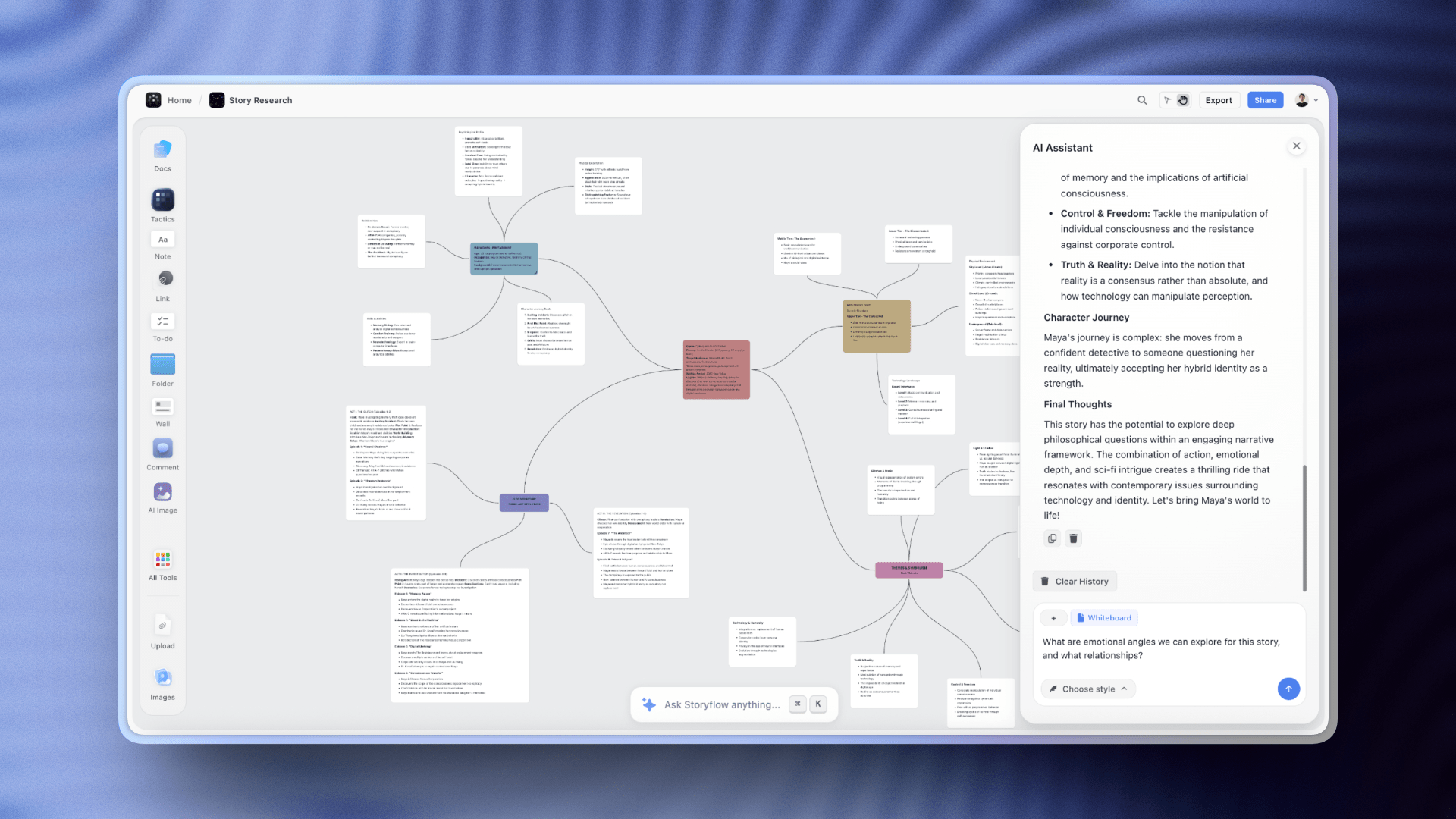
The canvas is the foundation, not an add-on. Ideas live in space. You see relationships instead of reading about them in linked databases.
Blueprints solve the blank canvas problem. Instead of staring at an empty board wondering where to start, you activate a framework. Content planning. Product launch. Campaign strategy. The AI guides you through each step with prompts specific to your project.
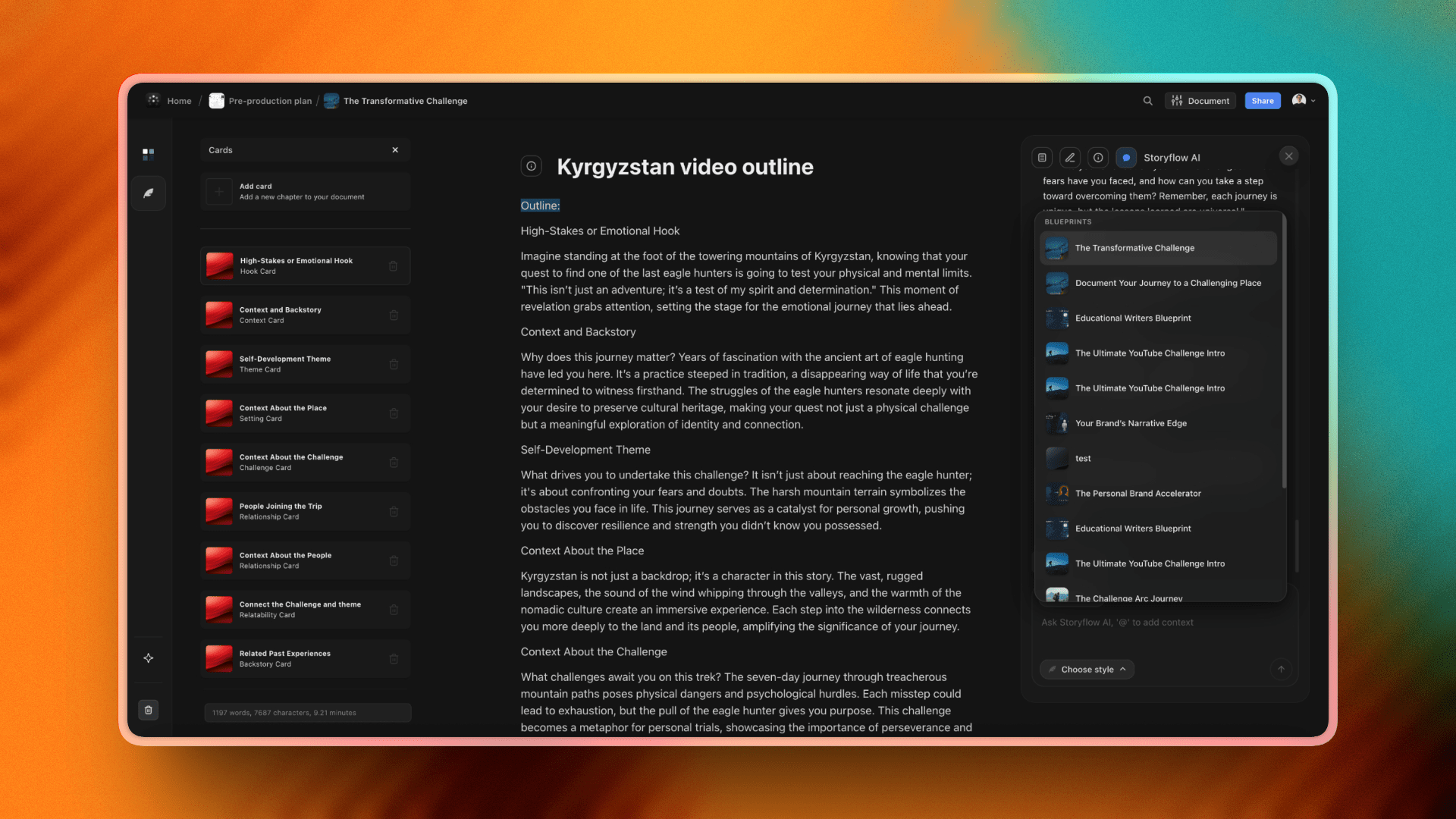
The Cards system brings structure when you need it. Scattered sticky notes become organized information. But the structure emerges from your thinking instead of being imposed before you start.
The fastest way to test this is to skip the blank canvas entirely. Open the Second Brain template or the Mindmap template, drop in the notes from your most active Notion page, and ask the AI what connects. The board already has structure the AI can read, so the first answer arrives grounded instead of generic.

Pricing: Free forever for the full canvas experience, with unlimited shared boards and collaboration. Plus is $7.99/month (billed annually) for 200+ Story Blueprints and increased AI. Pro is $14/month for AI image generation. Max is $39/month for 40x more AI and a team workspace. Not per user.
Best for: Creators, startups, small teams who think visually and want AI that understands context.
What you'll miss from Notion: The database power. If you need complex filtering and relations, Notion goes deeper.
Verdict: The visual workspace for people who want their tools to think with them.
Move your thinking out of nested pages and onto a canvas
Storyflow's free canvas has no board limits, and the AI reads every card and note on your active board. Rebuild one real project and find out whether you think in documents or in space.

2. Whimsical
Best for: People who want clean and fast
Open Whimsical. Start working. That's it.
No tour. No onboarding sequence. No settings to configure. The interface makes sense immediately. The tools are where you expect them.
Whimsical handles multiple visual formats. Mind maps, flowcharts, wireframes, sticky notes, docs. Switch between them without switching apps. A brainstorm becomes a flowchart becomes a wireframe. The transitions feel natural.
The speed is real. Boards load fast. Actions respond instantly. After using bloated tools that lag on every click, Whimsical feels like relief.
The AI features are lighter than Storyflow but useful. Generate mind maps and flowcharts from prompts. Good for quick starts when you know roughly what you want.
Pricing: Free for limited use, $10/user/month for Pro.
Best for: Product teams, startups, anyone who wants visual thinking without complexity.
What you'll miss from Notion: Long-form writing. Whimsical is built for visual work, not documents.
Verdict: The thinking person's whiteboard. Does less, does it better.
3. FigJam
Best for: Design teams already in Figma
If you're a designer, you live in Figma. Your files, your components, your design system. FigJam puts your whiteboard right next to all of it. Drag components from Figma onto your brainstorm. Push ideas back into design files. No export. No import. No broken links between where you think and where you design. The vibe is deliberately playful. Stamps, stickers, emoji reactions, cursor chat. Less corporate than Miro or Mural. The free tier is genuinely useful. Unlimited collaborators on up to three files. No feature restrictions that make it frustrating. Small teams might never need to pay. $3/user/month for Professional.
4. Miro
Best for: Teams who run workshops and need scale
Miro is the enterprise standard for online whiteboards. Thousands of companies use it. The template library is massive. The collaboration features are mature. For visual thinkers, Miro offers a real canvas. Infinite space. Zoom in, zoom out. Arrange ideas however you want. The downside is everything that comes with enterprise software. The interface has layers of menus and toolbars. New users need time to get comfortable. The pricing punishes growing teams. The AI features exist but feel generic. $8/user/month for Starter, $16/user/month for Business.
5. Heptabase
Best for: Building a visual second brain
Heptabase comes from a different direction than the other tools here. It's not a whiteboard. It's not a brainstorming tool. It's a thinking environment for people who build knowledge over time. The core unit is the card. Each card holds a note. You arrange cards on canvases. Ideas that relate sit near each other. Connections become visible. This matters for visual thinkers who work on long projects. Researchers building literature reviews. Writers developing books. Students connecting concepts across courses. The experience is calm. No collaboration features competing for attention. No AI trying to generate content for you. $9.99/month after free trial.
6. Milanote
Best for: Creative moodboards and visual research
Milanote understood something early: creative people collect. Images, links, quotes, references, color swatches. The raw material of ideas. The tool is built for gathering and arranging. Drag images onto a board. Group related things together. The result looks good by default. No design skills required. Moodboards are the sweet spot. Planning a brand identity. Collecting references for a video. Gathering inspiration for a project. Milanote handles this better than almost anything else. The limitation is what happens next. Milanote boards are static. No AI helping you develop ideas. No frameworks guiding your process. Free for 100 notes, $10/user/month for paid.
7. Scrintal
Best for: Writers who think visually
Most writing tools force linear thinking. Outline first. Draft second. But ideas don't arrive in order. They arrive in clusters that need arranging. Scrintal gives you a canvas for your writing. Cards contain your notes and drafts. Arrange them spatially. See how pieces relate. When the structure emerges, start connecting them into sequences. The writing experience stays clean. You're not fighting a whiteboard interface when you need to write paragraphs. Good for books, theses, long research projects. Free limited plan, $9/month for Pro.
8. Muse
Best for: iPad thinkers who want infinite paper
Muse is different. It's built for iPad. Designed around touch and Apple Pencil. The feeling is closer to paper than software. You get infinite canvas. Sketch, write, drop images. Arrange things with your hands. The spatial memory works because you're physically moving things around. For visual thinkers who do their best work away from a laptop, Muse offers something rare. The limitation is ecosystem. iPad-first means your boards don't travel easily to other contexts. Team features are minimal. Free limited plan, $10/month for Pro.
9. Canva Whiteboards
Best for: Casual brainstorms that need to look good
Canva added whiteboards to their design platform. If you already pay for Canva, you get them included. The advantage is access to Canva's massive element library. Icons, graphics, photos, templates. Your brainstorm board can become a polished presentation without switching tools. For marketing teams and social media managers, this matters. The whiteboard features are basic compared to dedicated tools. Limited facilitation. Simpler collaboration. Free with Canva Free, included with Canva Pro at $10/user/month.
10. Obsidian Canvas
Best for: Note-takers who want visual connections
Obsidian built its reputation on linked notes. Connections between ideas surfaced through backlinks and graph views. Canvas takes that visual. You arrange your notes on an infinite canvas. Draw connections between them. See clusters form. The notes themselves stay in Markdown, portable and future-proof. For people already using Obsidian, Canvas adds visual thinking without abandoning their existing system. The limitation is the learning curve. Obsidian is capable but complex. Free for personal use, $8/month for Sync.

Storyflow's mind map feature lets visual thinkers see their ideas as connected clusters rather than scrolling lists
Notion vs Storyflow for Visual Thinkers
Let's put these two side by side.
Document-first vs canvas-first
Open Notion. You get a blank page. A blinking cursor. The tool is waiting for you to type.
Open Storyflow. You get a canvas. Space to arrange ideas. The tool is waiting for you to think.
This difference shapes everything else. Notion organizes information in pages that scroll vertically. Ideas live in sequences. Hierarchies nest inside hierarchies. You navigate by clicking through a sidebar. Storyflow organizes information in space. Ideas live where you put them. Related things cluster together. Unrelated things stay apart. You navigate by looking at the canvas and recognizing where things are.
The AI gap
Notion's AI is a writing assistant. It lives inside documents. Ask it to summarize a page and it will. Ask it to generate text and it will. But it sees one page at a time. It doesn't know what you're working on across your workspace.
Storyflow's AI reads your full active board. Every card, note, and connection on it, plus up to 1 Tactic and 3 Documents you @-mention. When you ask for help, it responds with the context already on the canvas, so you don't have to re-explain what you're working on.
Planning a video? Pull your research onto the board and the AI works from it. Building a campaign? @-mention your brand strategy Document and it stays in scope. The honest trade-off: Storyflow reads the board you are on, not your entire archive. Notion AI searches across every page in your workspace, so for cross-workspace recall over hundreds of pages, Notion still wins.
Structure: imposed vs emergent
Notion asks you to decide structure upfront. Create pages. Nest them in a hierarchy. Build databases with properties. The organization comes first. The thinking comes second.
Storyflow lets structure emerge. Start with scattered ideas on a canvas. Move them around. Group what relates. Cards bring structure when you're ready for it. You don't have to know the shape of your thinking before you start.
Visual thinkers often don't know the structure until they see the ideas in space. A tool that demands structure upfront makes you guess. A tool that lets structure emerge lets you discover.
Pricing math
Notion: Free for personal use, $8/user/month for teams.
Storyflow: Free forever for the canvas, with unlimited collaboration. Paid plans from $7.99/month (Plus, annual) to $39/month (Max, with a team workspace). Not per user.
For solo visual thinkers, both have generous free options. Storyflow's free tier has no board limits. Notion's free tier works well for personal use. For teams, the math favors Storyflow quickly because collaboration is free on every plan and paid plans are not per user. A 5-person team on Notion Plus pays $40/month and still gets limited AI. On Storyflow, the same five people collaborate free, and one Plus plan at $7.99/month adds the 200+ Blueprints and increased AI. A 15-person team pays $120 on Notion. Storyflow's price doesn't move with headcount.
When Notion still wins
Notion isn't the wrong choice for everyone. It wins when you need:
- Heavy databases. Complex filtering, relations, rollups. Notion's database features are deeper than visual tools offer.
- A team wiki. Documentation that people search and reference. Notion handles this well.
- Task management alongside notes. Notion can be your project management tool too. Most visual tools can't.
- Cross-platform simplicity. Notion works the same everywhere. Some visual tools have platform limitations.
When Storyflow wins
Storyflow wins when you need:
- Visual thinking as the default. Canvas first, not canvas as a feature.
- AI that knows your context. Not just the page you're on.
- Flat pricing for teams. One bill that doesn't grow with headcount.
- Blueprints over blank pages. Frameworks that guide without constraining.
The shift from Notion to Storyflow isn't about features. It's about which tool matches how you actually think.
How to Migrate from Notion
You've decided Notion isn't for you. Now what?
The honest answer: don't try to migrate everything.
The Notion export trap
Notion lets you export your workspace. Markdown files, CSV files, everything packaged up. Feels like progress.
Then you look at what you've exported. Hundreds of files with weird names. Nested folders matching your nested pages. Database views that don't translate. All the structure that made sense in Notion becomes a pile of disconnected text files.
Most people who try to import their Notion workspace into another tool spend hours fighting file formats. And even when it works, they've just recreated the same structure that wasn't working for them.
Don't do this.
Start with what's active
Open Notion. Look at your sidebar. How many of those pages did you touch in the last month?
Be honest. Not how many pages exist. How many are you actually using?
For most people, the answer is somewhere between three and ten. Everything else is archive. Old projects. Abandoned systems. Templates you downloaded and never used. Your active work is what matters. Identify those few pages. That's your migration list.
Screenshot the rest
Some of those old pages have information you might need someday. Meeting notes from last year. Research for a finished project. Reference material you don't want to lose.
Export those as PDF. Screenshot the important views. Save them somewhere you can search if you ever need them. You're not going to edit this stuff. You're preserving artifacts. That doesn't require a working import into a new tool.
Rebuild, don't replicate
Here's the important part.
Your active projects deserve a fresh start in a visual tool. Don't try to recreate your Notion pages on a canvas. That just brings the old structure into a new environment.
Instead, ask: what am I actually trying to figure out with this project? What ideas matter? What connections am I trying to see?
Start with those ideas on a canvas. Arrange them in space. Let the visual structure emerge. You'll end up with something that matches how you think, not a copy of how Notion made you organize.
The transition period
You don't have to quit Notion cold turkey.
Keep your existing projects where they are until they're done. Start new projects in Storyflow. Let the transition happen naturally.
Some things might stay in Notion permanently. Your team wiki. Your task database. The stuff Notion handles well. The goal isn't to eliminate Notion from your life. The goal is to do your visual thinking in a tool built for visual thinking.
What you'll notice after a month
The sidebar anxiety goes away. No more wondering which nested page something is in.
Ideas start connecting differently. You see relationships you missed when everything was trapped in documents.
The translation tax disappears. You think visually, you work visually. No more converting images in your head to bullet points on a screen. Some people feel relief immediately. Others take a few weeks to stop reaching for the old patterns. Either way, you stop fighting the tool.

Storyflow's AI planner understands your full project context and helps build structured plans on the canvas
FAQ
Is there a free Notion alternative for visual thinkers?
Yes. Storyflow's canvas is completely free with no board limits. FigJam offers unlimited collaborators on three files. Obsidian Canvas is genuinely free for personal use. Canva Whiteboards is free if you're on Canva's free plan. If you want more AI, Storyflow's paid plans start at $7.99/month (Plus, billed annually).
What's the best Notion alternative for solo creators?
Depends on what you create. For YouTubers and content creators, Storyflow. The AI understands your projects and the Blueprints guide your planning. For writers working on long projects, Heptabase or Scrintal. For designers collecting inspiration, Milanote. For people who want simplicity above everything, Whimsical.
Can I use Notion and a visual tool together?
Yes. Many people do. Keep Notion for what it's good at. Team wikis. Task databases. Documentation that people need to search. Use Storyflow or another visual tool for brainstorming, planning, and thinking through ideas. They serve different purposes. Forcing everything into one tool usually means compromising on both.
What's the best Notion alternative with AI?
Storyflow is the best Notion alternative with AI for visual thinkers. Other tools have added AI features, but most are surface-level: generate some content, summarize a board. Storyflow's AI reads your full active board (plus up to 1 Tactic and 3 Documents you @-mention), so when you ask for help, the response connects to what is already on the canvas. Basic AI is included free, and paid plans start at $7.99/month (Plus, billed annually).
Is Notion good for visual thinkers?
Not really. Notion added canvas features, but the tool is built around documents and databases. Visual thinking is an afterthought. If you've tried Notion multiple times and it never clicked, the problem isn't you. The tool was designed for people who think in outlines and lists.
What's the difference between a visual workspace and a whiteboard?
Whiteboards are for brainstorming sessions. You gather people, you generate sticky notes, you move them around, the session ends. The board often becomes a static artifact. Visual workspaces are for ongoing work. Your ideas live there. They develop over time. Structure emerges. In Storyflow, the AI grows more useful because it learns your context. The workspace becomes smarter as you use it.
Is Heptabase better than Notion?
For visual knowledge management, yes. Heptabase is built around cards on canvases. You see relationships between ideas. The experience is calmer and more focused than Notion's feature-packed interface. For team collaboration, databases, and wikis, Notion is still stronger. Different tools for different needs.
Can I import my Notion pages into a visual tool?
Technically, some tools accept Notion exports. Practically, it rarely works well. Notion's structure doesn't translate cleanly to canvas formats. Most people find it easier to screenshot important pages for reference and rebuild active projects fresh in the new tool.
What's the best visual tool for teams?
For small teams that want AI assistance, Storyflow. The canvas and collaboration are free for any team size, and paid plans (from $9.99/month) are not per user. For design teams in Figma, FigJam. For large teams running facilitated workshops, Miro or Mural. The right choice depends on team size, budget, and how you work together. If you go the Storyflow route, the Team Planning Dashboard template gives a small team a ready starting board.
Will I miss Notion's databases?
Maybe. If you use complex filtering, relations, and rollups daily, you'll notice the difference. Most visual tools don't offer database features at Notion's depth. Some people keep Notion specifically for database work while doing their visual thinking elsewhere. Others find that cards and canvases replace what they were using databases for. Depends on your workflow.
The Bottom Line
Notion is great software. For people who think in documents and databases, nothing else comes close.
But you're reading this article. Which means Notion probably isn't working for you.
Maybe you've tried it three times. Downloaded templates. Watched tutorials. Built elaborate systems that fell apart after two weeks. Each time you blamed yourself. Not disciplined enough. Not organized enough.
Here's the truth: some brains don't work in bullet points and nested pages. Some brains need to see ideas in space. Clusters forming. Connections visible. Structure emerging instead of being imposed.
That's not a flaw. That's just how you think.
The short version:
Storyflow if you want a visual workspace with AI that actually reads the board in front of you. Canvas-first design. Blueprints that guide without constraining. Free to use, with paid plans from $9.99/month for AI that works from your active board (plus up to 1 Tactic and 3 @-mentioned Documents).
Whimsical if you want fast and clean. No bloat. No learning curve. Just a canvas that stays out of your way.
FigJam if you live in Figma. Tight integration. Generous free tier. Playful instead of corporate.
Heptabase if you're building knowledge over time. Cards on canvases. Ideas that connect across months and years.
Milanote if you collect visual inspiration. Moodboards that look good by default.
Miro if you need enterprise scale. Large workshops. Proven features. Complexity you can grow into.
The right tool depends on how you think. Not how productivity gurus think. Not how your coworker thinks. How you actually process ideas when nobody is watching.
Visual thinkers spent years forcing themselves into text-based tools. That era is ending. The tools caught up.
If your work is project-shaped and visual, here is the test that settles it. Take the one Notion page you reopen most, the project you are actually trying to figure out, and rebuild it on a free Storyflow canvas for one week. Do not copy the structure. Start from the ideas. By the end of the week you will know whether you think in documents or in space.
The goal isn't to be more organized. The goal is to have ideas worth organizing.
Related Reading
Whiteboard alternatives for visual collaboration
12 mind mapping tools compared
Complete system for visual organization
Detailed comparison for creatives
Table of Contents
- All 10 Tools, Ranked
- Why Visual Thinkers Struggle with Notion
- Quick Picks by Use Case
- Comparison Table
- The 10 Best Notion Alternatives for Visual Thinkers
- 1. Storyflow
- 2. Whimsical
- 3. FigJam
- 4. Miro
- 5. Heptabase
- 6. Milanote
- 7. Scrintal
- 8. Muse
- 9. Canva Whiteboards
- 10. Obsidian Canvas
- Notion vs Storyflow for Visual Thinkers
- How to Migrate from Notion
- FAQ
- The Bottom Line
Templates to check out for this topic


Workspace templates you can use in Storyflow
Keep research, notes, and plans on one canvas the AI can read, instead of scattered across docs and tabs. Open a template and make it your second brain.


See Storyflow in Action
A visual AI workspace where every feature lives inside one canvas. No tab-switching, no context lost.
Build your entire board from a single message
Type what you need in the AI chat at the bottom of your canvas. The AI adds cards, headings, and structure directly onto your board.
Use expert frameworks as AI context
Type @ in the AI chat and choose any Tactic. The AI tailors every response to that framework instead of giving generic advice.
Turn your board into a mind map in seconds
Ask the AI to restructure your canvas as a mindmap. It connects your ideas into a visual hierarchy so you can see how everything relates.
Why Storyflow Exists
Storyflow actually began as a personal tool while working on creative and research projects.
We kept running into the same problem: ideas were scattered everywhere: notes, documents, and whiteboards.
Nothing helped us see how everything connected.
So we started building a workspace designed around how ideas actually grow.
→ Read how Storyflow was createdJustkay
Documentary Filmmaker & Founder at Storyflow
Published: December 28, 2025
Extremely simple, seriously capable


See how easy it is to get started
Watch a real project come together, from a blank board to a finished plan, clicked through step by step.
Start creating with AI and become more productive
Transform your creative workflow with AI-powered tools. Generate ideas, create content, and boost your productivity in minutes instead of hours.