
Ultra-fast planning, extremely simple
Visual project planning,
with the plan beside the work.
Kanban, tickets and tables with owners and dates on the same canvas as the references, drafts and video they are about, and an AI that reads the whole board.


Creatives working for these brands already got early access
- Red Bull
- Canon
- Artlist
- Porsche
See how easy it is to get started
Watch a real project come together, from a blank board to a finished plan, clicked through step by step.
Start from a ready-made template
Pick a board to see what you can build, then let AI fill it in. Every template is a real, editable starting point on the same infinite canvas.

Mind Map
Branch one central idea out into themes and sub-points, then drag the connections around until the structure makes sense.
Is Notion good for visual project planning, or is there something better?
Notion is good for structured plans, with strong databases, docs and timeline views of tasks, but weaker when the work has to sit beside the plan. Storyflow is an AI visual workspace that plans a campaign, a shoot or a film beside the work itself on one infinite canvas: Kanban, tickets and tables with owners and dates, the images, video and references they cover, and an AI that reads the whole board before it answers. Miro is the stronger pick for running a live workshop.
Visual project management tools show the plan as something you can see rather than a list you read, and they do it in different ways. Kanban boards show status as columns of cards. Timelines show phases against dates. Canvases put the references, drafts and decisions next to the schedule. For a launch checklist or a sprint of known tasks, a database with board and timeline views is the right shape. For a campaign, a shoot, a brand identity or a film, most of what the team argues about is visual, and a plan that only links out to it gets checked against memory instead of against the work.
That is where Notion strains for creative teams. A page can embed images, but forty references, a storyboard or three logo routes side by side are awkward in a document that flows top to bottom, so teams end up with the plan in Notion, references in Pinterest or Miro, files in a drive, and a weekly meeting that stitches them together. Miro solves the canvas half and is excellent in a live session with voting and timers, but its planning features are general-purpose, so a creative production's structure is something you assemble from templates yourself.
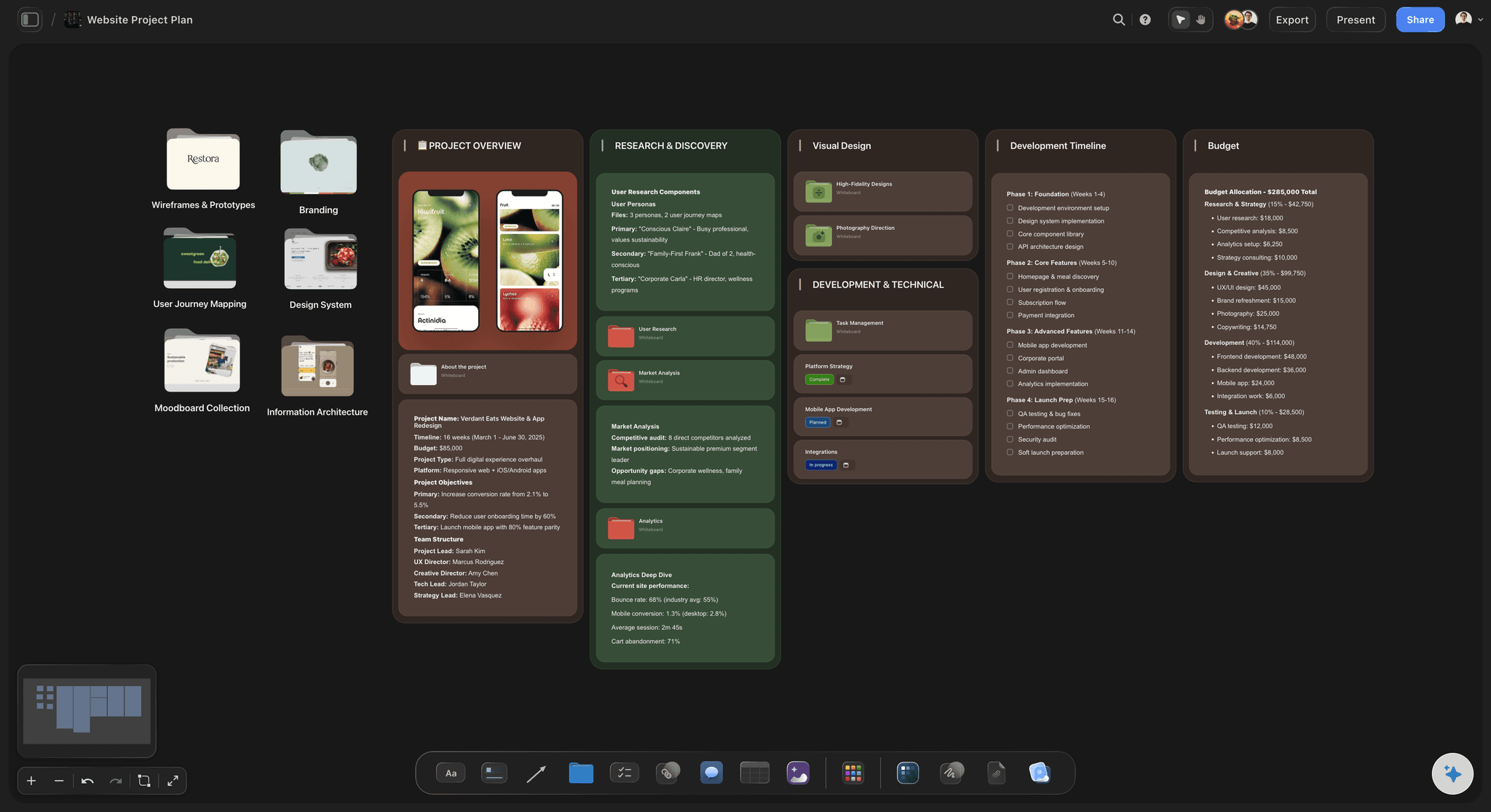
Storyflow puts both halves on one board. The brief sits at the start as a Doc or cards, with the approver, a dates table and a budget table with a total. Phases go in a table with start and end dates, a person cell for the owner and a status cell. Kanban and tickets with assignees and due dates track the work, and the references, drafts, video and documents sit beside all of it. The AI reads the whole board, so you can ask what is late, what has no owner, or what the brief asked for that no phase covers. It proposes, and you decide.
Ultra fast from brief to board
How do I plan a creative project visually?
Start from a brief and end with a project you can read at a glance.
01
Start from the brief
Paste the brief or describe the project, and the AI lays out a board: the brief, the phases with owners and dates, and the first tickets. You change what it got wrong.
02
Put the work beside the plan
Drop references, drafts, video, PDFs and documents next to the phase they belong to, so the plan and the material it covers share one view.
03
Track it with owners and dates
Move tickets across the Kanban, set each phase's owner, dates and status, and keep deliverables and budget in tables with typed cells.
04
Share it and ask it
Clients open a view-only link with no account. Ask the AI what is late, who owns what, or what the brief asked for that the plan misses.
What does a visual project plan include?
Kanban, tickets and tables live beside the creative work instead of in a separate app.

Phases with owners and dates
A phase table beside the work
Each phase is a row with start and end dates, a person cell for the owner and a status, placed next to the references and drafts it covers.
See the AI project plan generator →
Status you can see
Kanban and tickets on the canvas
Tickets with an assignee, a due date and a label move across Kanban columns on the same board as the brief, so progress and the work it refers to stay together.
See the AI Kanban board generator →
The brief the plan is checked against
From brief to project board
The brief sits on the board as a Doc or cards with the job, the approver, a dates table and a budget table with a total, so every phase starts from what was agreed.
See brief to project board →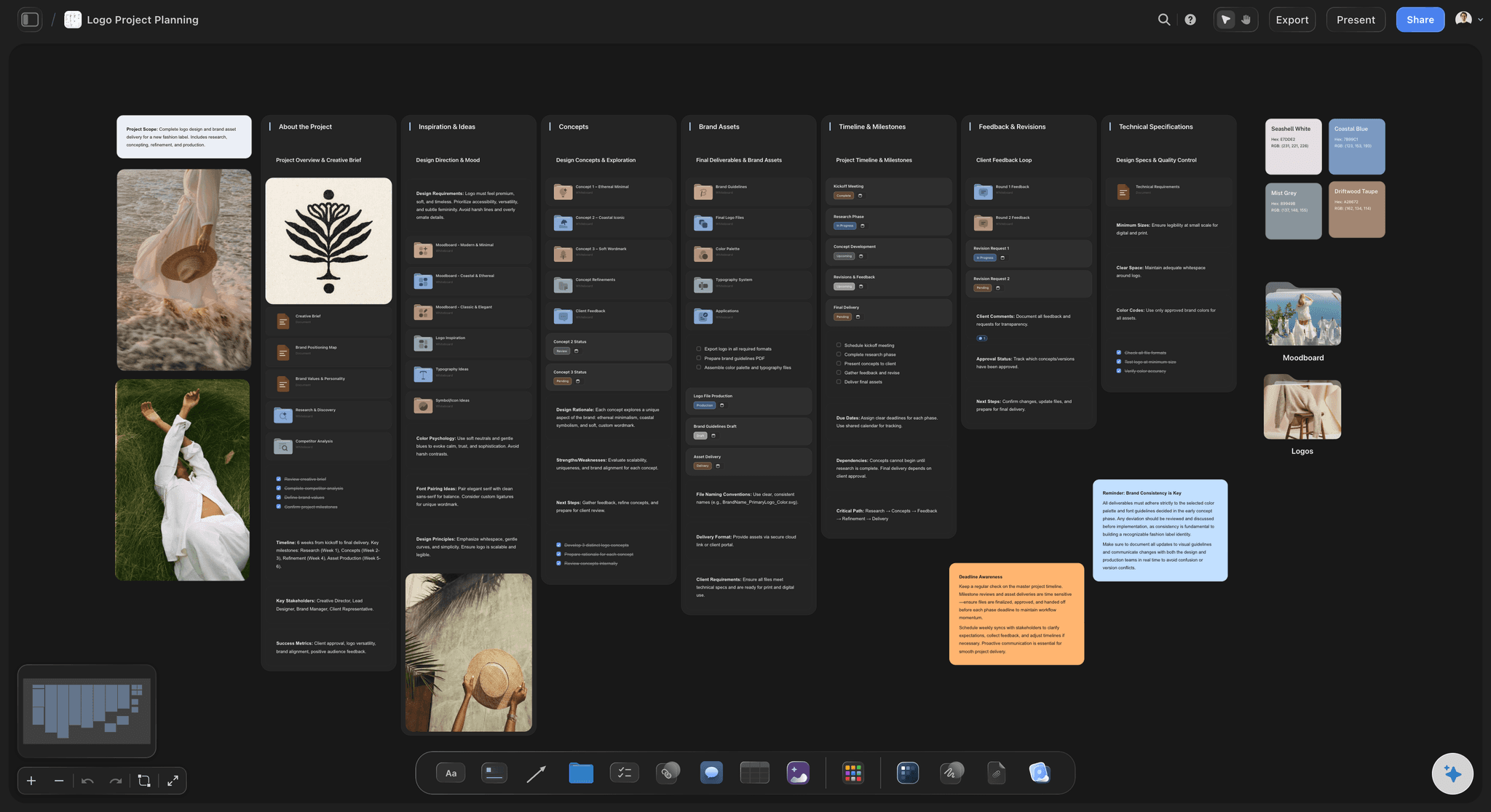
An AI that reads the board
Ask the plan questions
Ask what is late, who owns what, or what the brief asked for that no phase covers. The AI reads the whole board and proposes, and you decide.
See AI creative project management →Unlimited boards. No object cap.
One board per project, with the plan and the work together. Storyflow is paid-only during early access, with plans from $7.99 a month billed annually, and a Free plan launches before the end of 2026. Anyone a paid member invites to a board joins free.
Unlimited boards, images, files and links on Plus
Kanban, tickets and typed tables on every board
AI usage that renews every billing period
View-only links for clients, plus image and PDF export
Built for people with taste
Notion, Miro, or a canvas built for creative projects.
Each is good at a different shape of work. Choose by what the project is made of.

Notion
Strong for structured work
Databases with views: Tasks, owners, dates and properties you can filter and sort, shown as a table, a board or a timeline, with dependencies and automations.
Docs and wikis: Long written specs, meeting notes and company knowledge are where Notion is at its best.
Where it strains: A moodboard, a storyboard or three design routes side by side, because a page flows top to bottom and the images become attachments to the plan.

Miro
Strong for live workshops
Real-time sessions: Voting, timers and a large template library for a workshop with a room full of people.
Diagrams and whiteboarding: Flows, maps and sticky-note exercises that a team builds together in one sitting.
Where it strains: The weeks after the workshop, when a creative production's phases, owners and budget have to be assembled from general-purpose templates.

Storyflow
Built for the plan and the creative work together
Plan objects on the canvas: Kanban, tickets and tables with person, date, status and currency cells sit beside the references.
Production documents: The AI drafts a brief, a shot list or a storyboard on the board and builds call sheet and treatment PDFs from it, so a shoot or a campaign keeps its documents where the work is.
An AI that reads the board: It builds a Campaign Brief, a Film Plan or a Content Planner as a board, and answers questions about the plan you already have.
Where it strains: Relational databases and automations, which Notion and ClickUp handle, and live-workshop tools, which Miro handles.

Choosing
A simple test
Mostly text and data: Specs, trackers and wikis with little visual material belong in Notion.
Mostly a live session: A workshop, a retro or a brainstorm with a room of people belongs in Miro or FigJam.
Mostly visual work with a deadline: A campaign, a shoot, a brand identity or a film belongs on a Storyflow board, where the plan sits beside the work.
Both at once: Keep the company wiki in Notion and plan each creative project on a Storyflow board, linked from the wiki.
Explore templates for your project
Every template opens as a real, editable board on the infinite canvas. Pick the closest fit and make it your own.
Mind Map
Branch one central idea out into themes and sub-points, then drag the connections around until the structure makes sense.
One app instead of five
Storyflow vs Notion, Miro and ClickUp.
Storyflow is built for projects made of visual work. Notion is strong for databases and docs, Miro for live workshops, and ClickUp for task management across large teams.
Storyflow
Recommended
Kanban and tables with owners and dates
Images, video and references on a canvas beside the plan
AI that answers questions about your plan
Treatment, call sheet and deck PDFs built from the board
View-only link that opens with no account
Relational databases with rollups
Notion
Kanban and tables with owners and dates
Images, video and references on a canvas beside the plan
AI that answers questions about your plan
Treatment, call sheet and deck PDFs built from the board
View-only link that opens with no account
Relational databases with rollups
Miro
Kanban and tables with owners and dates
Images, video and references on a canvas beside the plan
AI that answers questions about your plan
Treatment, call sheet and deck PDFs built from the board
View-only link that opens with no account
Relational databases with rollups
ClickUp
Kanban and tables with owners and dates
Images, video and references on a canvas beside the plan
AI that answers questions about your plan
Treatment, call sheet and deck PDFs built from the board
View-only link that opens with no account
Relational databases with rollups
What creators are saying
Join early creators getting structured workspaces and AI that remembers their projects
“Storyflow has sped up my workflow by at least 3x, which means more flow state and more projects I can actually ship. It truly changed the way me and my team create.”

Reilin Joey
Director & YouTuber
“One prompt gets me a structured board. But the tactics are my favorite. I run my YouTube scripts through them and my intros and retention got better. It's amazing.”

Justkay
YouTuber & Freelance Filmmaker
“I used to juggle five apps to plan a project. Now I describe what I am making and get boards, lists, and a schedule. All in one place.”

George
@fernwehchronicles
Visual project planning, answered.
Including when a list or a database is the better choice.
Notion is good for structured plans, and Storyflow suits visual project planning when the project is made of visual work: its Kanban, tickets and tables with owners and dates sit on the same canvas as the references, drafts and video, and its AI reads the whole board. A moodboard or three design routes side by side are awkward in a Notion page that flows top to bottom. Miro is the stronger pick for a live workshop.
Storyflow is built for visual project planning of creative work: its AI builds a campaign brief, a film plan or a content planner as a board, reads the whole board and answers questions about the plan, while the person decides. Asana and ClickUp suit task-heavy teams at scale, monday.com suits cross-team workflows, Notion AI works inside docs and databases, and Frame.io is the specialist for reviewing video with a team.
Visual project management tools show a plan as something you can see rather than a list you read. Storyflow does it on a canvas, with Kanban, tickets and tables with owners and dates beside the references, drafts and video they cover. Trello is built around Kanban cards, Notion shows tasks as board and timeline views of a database, ClickUp adds Gantt charts and dependencies, and Miro is a canvas built around live workshops.
For creative work, Storyflow, because the plan and the work sit on one canvas: tickets on a Kanban and tables with owners, dates and budget beside the references, drafts and video, with an AI that reads the whole board. For engineering or operations work made of tasks and dependencies, ClickUp, Asana or monday.com fit better; for documentation-heavy teams, Notion; for live workshops, Miro. Choose by what the project is made of.
Usually, when the client is approving creative work. Clients react to pictures faster and more precisely than to task names, and a plan they can see answers most status questions in advance. In Storyflow a client opens the board from a view-only link with no account, sees the brief, the phases and the work in one place, and signs in to comment on a specific piece. A client who only needs dates is better served by a status email.
Five things, placed where they can be seen together: the brief, with the job, audience, approver, dates and budget; the phases, each with a start, an end, an owner and a status; the work in motion, as tickets or cards; the material, meaning references, drafts, video and files beside their phase; and the decisions, approved, rejected or open. In Storyflow those are a brief Doc, a phase table, a Kanban of tickets and notes beside the work.
When the work is a known sequence of assignable tasks with little visual material, when you need dependencies, rollups and automations across many projects, or when the same process repeats every week. A launch checklist, a support queue or an engineering sprint fit a database better, and Notion, ClickUp or Asana are the right tools. A visual plan earns its place when images, video and references decide the work and the client must see it to approve.
For planning creative projects, often yes; for everything Notion does, no. Storyflow handles the project board: the brief, phases and deliverables in tables with owners, dates and budget, Kanban and tickets, documents, and the references and drafts beside them, with an AI that reads it all. It does not replace Notion's relational databases, automations or company wiki. A practical split is to keep the wiki in Notion and give each campaign or shoot a Storyflow board.
Both are canvases, built for different moments. Miro is at its best in a live session: a workshop with voting, timers and a room of people. Storyflow is built for the project that continues afterwards: tables with owners, dates, status and budget sums, Kanban tickets, and an AI that drafts a campaign brief, a film plan or a shot list as a board. Running the workshop in Miro and the project in Storyflow is a sensible split.
No. In Storyflow, dates live in table date cells for phases, deliverables, shoots and deadlines, and on tickets as due dates that turn red once overdue. Ask the AI to lay a plan out across days, weeks or months and it builds columns of tickets per period or one schedule table. If your work is mostly a schedule of posts or meetings, a calendar-first tool will suit you better.
Not yet. Storyflow is paid-only during early access, with plans from $7.99 a month billed annually ($9.99 monthly). A free plan launches before the end of 2026, and anyone a paid member invites to a board joins free, so collaborators do not each need a plan. Clients open view-only links in a browser. Plus is for one person running whole projects, Pro adds AI image generation, and Max adds a team workspace with roles and permissions.
It drafts the structure and reads the board; the team decides. In Storyflow you describe a project and the AI builds it as a board: a Campaign Brief with nested boards, a Film Plan, a Pre-production Plan or a Content Planner with upcoming posts as tickets. It can then say which phases have no owner, what the brief asked for that the plan misses, or what is due this week. You keep or undo each change it proposes.
More from Storyflow
Notion alternative for creative teams
Switch from Notion
Miro alternative
AI creative project management
Creative project management
Brief to project board
Timeline maker
AI Kanban board generator
Storyflow for agencies
AI project plan generator
Campaign brief template
AI visual workspace
Is Notion good for visual project planning?
Best AI tools for creative project management
Product launch planner
Project brief template
Put the plan beside the work.
Start from a brief, lay out the phases, and share the board with one link.