The 12 Simplest Visual Project Planning Apps in 2026 (for Small Teams)
The simplest visual project planning apps in 2026 for small teams, ranked by setup time and the simplicity ceiling. The easiest planner is the one you do not have to configure first.

Category
Visual Thinking
Author

Justkay
Documentary Filmmaker & Founder at Storyflow
Topics
2026-06-18
•
Updated June 18, 2026
•
14 min read
•
Visual Thinking- simplest visual project planning apps
- simple tool for visual creative project planning
- easy visual project planner for small teams
- visual project planning app
- simple project planning software 2026
- visual planning canvas
What is the simplest visual project planning app for small teams?
The simplest visual project planning app for small teams in 2026 is Storyflow, because it has almost no setup (you open a board and start) and an AI that does the planning legwork, building the structure, timeline, and next steps from a few notes instead of making you configure them by hand. It is free to begin, and the Plus plan is $7.99 per month billed annually, flat for the whole account. For the most familiar drag-the-card simplicity, Trello is the easiest kanban, and for pinned visual boards, Milanote is the gentlest option.

Full disclosure: Storyflow is our own product, and we rank it first here. The reason is specific to this list: a small team's real enemy is setup tax, and Storyflow starts with no templates or statuses to configure while the AI drafts the plan from a few notes, which the other tools make you build by hand. If your team just wants to drag cards across a board, Trello is genuinely simpler and more familiar, and it may be the better fit for pure kanban. Storyflow is also not a Gantt or dependency tool and has no native time tracking, so a critical-path project needs a heavier planner. We link out to every tool so you can weigh the setup cost yourself.
Quick Comparison
The four simplest visual planners for a small team, ranked by how fast you go from a blank screen to a plan you can see without configuring the tool first.
| Tool | Best For | AI Features | Price |
|---|---|---|---|
| Storyflow | The whole plan on one AI canvas, no setup | Canvas-aware AI (plans the whole board) | $7.99 mo annual (free plan late 2026) |
| Trello | Dead-simple kanban for small teams | Limited | Free / $5 user mo |
| Milanote | Pinned visual planning boards | Minimal | Free / $10 mo |
| Notion | Notes plus a light board in one app | Notion AI (drafts across pages) | Free / $10 user mo |
1) Quick Answer: The Simplest Visual Project Planning App
The simplest visual project planning app for small teams in 2026 is Storyflow, because it gives you an infinite visual canvas with no setup ritual, and an AI that does the planning legwork (drafting the plan, the timeline, and the next steps) so you are not building structure by hand before you can start. It is free to begin, and the paid Plus plan is $7.99 per month billed annually, flat for the whole account. If you want the most familiar drag-the-card simplicity, Trello is the easiest kanban. If your team thinks in pinned visual boards, Milanote is the gentlest moodboard-style planner. If you want simple notes and a light board in one place, Notion is the flexible pick.
The short version: most "simple" planning tools are only simple until you try to use them. They look clean in the demo, then ask you to pick a template, name your workspaces, configure statuses, and invite your team before a single real task exists. The simplest planner is the one you do not have to configure first. That is the lens for this whole ranking. Every app below is judged on how fast a two-person team goes from blank screen to a plan they can actually see, and where the simplicity runs out once the project grows. Every option has a genuinely usable free or low-cost plan.
All 12 Simplest Visual Project Planning Apps, Ranked
- Storyflow: the whole plan on one AI canvas, no setup
- Trello: dead-simple kanban for small teams
- Milanote: pinned visual planning boards
- Notion: notes plus a light board in one app
- Whimsical: quick visual diagrams and flows
- Asana: simple task lists that scale up later
- Monday.com: friendly, colorful work boards
- ClickUp: one simple view now, depth later
- Miro: visual planning as a team whiteboard
- Height: a clean, low-admin task tracker
- Sunsama: calm daily planning for individuals
- Todoist: simple visual task lists and boards
2) Comparison Table: 12 Simple Visual Planners Compared
Pricing and plans are current as of June 2026 and are rounded for the competitors; verify the live price on each tool's pricing page before buying, because plan pricing changes often. Storyflow's prices are exact: Free at $0, Plus at $7.99 per month annual, Pro at $14 per month annual, all flat per account.
3) Why Simple Beats Powerful for Small Teams
A small team is not a small enterprise. It is a different shape of work entirely. A five-person studio does not need resource leveling, custom automation rules, or a permissions matrix. It needs to see the project, agree on what is next, and get back to the work. The tools that win for small teams are not the ones with the most features. They are the ones with the lowest distance between opening the app and seeing the plan.
The trouble is that the project planning category is built for the opposite buyer. Most of these tools are designed to land enterprise contracts, so they front-load configuration: workspaces, custom fields, statuses, roles, integrations. A two-person team that adopts an enterprise-grade tool spends its first week building the tool instead of the project. That is setup tax, and small teams pay it in the currency they have least of: attention.
There is a second tax that is quieter and worse. Call it the maintenance tax.
- The tool that needs configuring also needs maintaining. Statuses drift, fields go stale, half the board stops reflecting reality.
- A complex tool invites complexity. Once you have ten custom fields, someone will fill them, and now updating a task is a form, not a sentence.
- The plan becomes a second job. Instead of planning the project, you are administering the software that plans the project.
Simple tools dodge both taxes by design. There is little to configure, so there is little to maintain. The honest trade is that simple tools have a ceiling: at some point a growing team genuinely outgrows them. That ceiling is real, and we name it for every app below. But for the first stretch of any small project, the question is not "which tool can do the most." It is "which tool gets out of the way fastest." The simplest planner is the one you do not have to configure first.
4) How We Evaluated These Apps
I have planned projects as a documentary filmmaker coordinating a tiny crew, as a founder running a small product team, and alongside two-to-five-person teams shipping real work on real deadlines. The apps below were judged on how they feel for a small team that wants to plan and move on, not on a feature spreadsheet. Six criteria, weighted heavily toward simplicity.
- Setup time to first plan. How many minutes from a blank screen to a plan you can actually see and share. This is weighted highest. Every minute of setup is a minute not spent on the work.
- Simplicity ceiling. How far the tool scales before its simplicity becomes a limitation. A great simple tool is honest about where it stops.
- Visual clarity. Can a small team see the whole project at a glance, or do you scroll and click to reconstruct it in your head.
- Does the tool do the legwork. Does anything (AI or smart defaults) build structure for you, or do you assemble every card, column, and date by hand.
- Free or low-cost plan. Small teams are price-sensitive. The free tier has to be genuinely usable, and the first paid tier has to be affordable and ideally flat, not per seat.
- Collaboration without friction. Sharing a board, leaving a comment, and seeing what changed should take seconds, not an admin setup.
Tools were tested on real small-team project work, not synthetic checklists. The rankings reflect how each one felt to plan in when the goal was to start fast and keep the plan honest.
5) Quick Picks by Job to Be Done
- Plan the whole project on one simple AI canvas: Storyflow (free, or $7.99/mo annual).
- Run a dead-simple kanban board: Trello (free, or around $5/user/mo).
- Pin a visual plan like a corkboard: Milanote (free tier, or around $10/mo).
- Keep notes and a light board in one app: Notion (free, or around $10/user/mo).
- Sketch a quick flow or diagram: Whimsical (free tier, or around $10/mo).
- Plan your own day calmly: Sunsama (around $16/mo, verify).
6) Detailed Reviews: 12 Simple Visual Planners
1. Storyflow
Storyflow is a visual workspace where your whole project lives on one infinite canvas, and an AI does the planning legwork before you have to build anything. There is no template to pick, no workspace to configure, no statuses to define. You open a board and start, and when you want structure, you ask. The AI reads your full active canvas by default, plus up to one Tactic and up to three Documents you @-mention in the chat, so when you say "turn this into a plan with a timeline and next steps," it is working from your actual project, not a generic template.
The familiar approach to a simple planner is to open a clean kanban and then spend twenty minutes hand-building the columns, cards, and dates that make it useful. The Storyflow approach is to skip the building. Drop a few notes on the canvas, ask the AI to organize them into a plan, and it lays out the phases, the tasks, and a rough timeline you can drag around. For a small team, that is the difference between starting the project today and starting the tool today. It can also pull from the Story Blueprints library (200+ creative templates) when you want a proven structure, so you are not staring at a blank board wondering where to begin.
Best for: solo founders, freelancers, and two-to-five-person teams who want to plan visually with no setup and let the AI handle the structure. Pricing: Paid-only early access today; the Free plan (unlimited boards, unlimited collaboration, basic AI, 20 file uploads) launches before the end of 2026, and anyone a paid member invites to a board joins free now. Plus at $7.99/mo annual ($9.99 monthly) adds the 200+ Story Blueprints and unlimited file uploads. Pro at $14/mo annual ($19 monthly) adds AI image generation and 20x more AI usage. Flat per account, never per user.
Strengths:
- Near-zero setup: open a board and start, with no templates or statuses to configure first.
- The AI does the planning legwork, building structure from a few notes instead of making you assemble it by hand.
- Free plan is genuinely usable for a real small project, with unlimited collaboration and no object limit.
- Flat pricing means adding a teammate does not multiply the bill, which matters when you are two people, not two hundred.
Limitations:
- It is not a Gantt or dependency-heavy PM tool. If your project lives on critical-path dependencies and resource leveling, a dedicated tool tracks that better.
- It has no native time-tracking or timesheets. For billable-hour tracking, pair it with a dedicated timer.
- Newer platform, so it has fewer third-party integrations than Asana or ClickUp.
Try it: open a blank board, drop in everything you know about your next project, and ask the AI to turn it into a plan with phases and a timeline. The whole project will be visible on one surface before you have configured a single thing.
2. Trello
Trello is the most familiar simple planner there is, and that familiarity is the feature. A board, a few lists, cards you drag from "to do" to "done." A small team can be planning in two or three minutes because there is almost nothing to learn. For straightforward project work that fits a kanban shape, it is hard to beat on pure ease.
Its simplicity is also its ceiling. Trello has limited AI and shallow planning depth, so it tracks a project but does not help you build one. As the project grows, you reach for Power-Ups to add the features Trello deliberately left out, and the simplicity you came for slowly erodes. It is a board, not a brain.
Best for: small teams that want the simplest possible kanban with zero learning curve. Pricing: free plan is generous; Standard around $5/user/mo. Verify current pricing. Strengths: instantly familiar, fast to set up, clean drag-and-drop, generous free tier. Limitations: little AI, shallow planning, outgrown once a project needs real structure.
3. Notion
Notion is the flexible pick: notes, docs, and a light board all in one app, so a small team can keep the project plan next to the meeting notes and the brief. For people who think in documents with a board attached, it is a comfortable single home, and Notion AI can draft and summarize across pages.
The catch is that Notion's flexibility is the opposite of simple by default. A blank Notion is a blank page that can become anything, which means you have to decide what it becomes. That decision is the setup tax. The visual board is also a secondary view bolted onto a database, not a true spatial canvas, so the early, messy, visual stage of planning does not have a natural home.
Best for: small teams that want notes and a simple board together and do not mind a little setup. Pricing: free plan; paid around $10/user/mo annual, AI included in newer plans. Verify current pricing. Strengths: flexible, notes plus boards in one place, good AI writing, huge template library. Limitations: flexibility means setup; the board is database-driven, not a free canvas; per-user pricing.
4. Milanote
Milanote is the gentlest visual planner on this list. It feels like a digital corkboard: drag images, notes, links, and to-do cards onto a board and arrange them spatially. For creative small teams that plan by pinning references and sketching the shape of a project, it is intuitive in a way most PM tools are not. Setup is minimal because the model is just "put things on a board."
It is deliberately light on project mechanics. Milanote excels at the early, visual, moodboard-style stage of planning, but it is not where you track tasks, owners, and deadlines through delivery. It is a thinking board more than an execution tracker, and its AI is minimal. For many small creative projects that is exactly right, but you should know its lane.
Best for: creative small teams that plan visually by pinning references and arranging boards. Pricing: free tier (limited cards); paid around $10/mo. Verify current pricing. Strengths: beautifully simple visual model, great for early planning, low learning curve. Limitations: light on task tracking and deadlines; minimal AI; the free tier card limit is tight.
5. Asana
Asana is the simple-list-that-scales pick. At its most basic, it is a clean task list a small team can start using in minutes, and the list view is genuinely uncomplicated. The advantage over Trello is that the simplicity does not cap as hard: when the project grows, timelines, dependencies, and reporting are there without switching tools.
That same depth is the risk. Asana can stay simple, but it does not insist on it. The settings, the multiple views, and the configuration options are right there, and a small team can talk itself into building an enterprise-grade setup it does not need. Used with discipline it is a clean simple planner. Used without discipline it becomes the maintenance tax.
Best for: small teams that want a simple list now but expect to scale up later. Pricing: free for small teams; paid around $11/user/mo annual. Verify current pricing. Strengths: clean list view, scales without switching tools, reliable, good free tier. Limitations: depth tempts over-configuration; the visual board is secondary; per-user pricing.
6. Monday.com
Monday.com is the friendly, colorful work board many small teams like on sight. The visual, board-first feel is approachable, and bright status columns make a project legible at a glance. For a team that finds ClickUp too dense, Monday sits in a comfortable middle.
The simplicity is more surface than structure. Getting Monday set up the way you want takes longer than the lighter tools here, because you are building boards, columns, and automations to make it sing. It is approachable to look at and a little more involved to configure than its color scheme suggests. The cost also climbs as you add seats.
Best for: small teams that want a friendly, visual work board and will invest a little setup. Pricing: paid around $9/user/mo annual; limited free tier. Verify current pricing. Strengths: approachable, colorful, good for legible status at a glance. Limitations: more setup than it looks; costs scale with seats; structured rather than free-form.
7. ClickUp
ClickUp's pitch is "one app to replace them all," and the depth is real: lists, boards, docs, goals, and ClickUp Brain for AI. For a small team that wants room to grow without migrating later, the ceiling is very high. If you start in a single simple view and ignore the rest, it can begin simply.
The honest problem is that ClickUp is the hardest tool on this list to keep simple. The power is always visible, the settings are deep, and the temptation to configure is constant. A small team can absolutely use one clean view, but the app is pulling the other direction the whole time. It is the strongest argument on this list for why simple beats powerful: the powerful tool makes you fight to stay simple.
Best for: small teams that want maximum headroom and will discipline themselves to one view. Pricing: strong free plan; paid around $7/user/mo annual. Verify current pricing. Strengths: enormous feature depth, many views, capable AI, strong free tier. Limitations: hardest to keep simple; deep settings invite configuration; can overwhelm a small team.
8. Miro
Miro is visual planning as a team whiteboard, and for a small team that plans by sketching together, it is excellent. Sticky notes, frames, mind maps, and journey maps all live on an infinite canvas you can fill fast, and real-time collaboration is best-in-class. As a place to think a project through visually, it is hard to beat.
The limitation is that Miro is a whiteboard, not a project system. The board from the planning session is a great artifact, but the tasks, owners, and deadlines usually get rebuilt somewhere else, which reopens the very fragmentation a small team is trying to avoid. Its AI is helper-level, not plan-building. It is the room you think in, not the tool that carries the plan to delivery.
Best for: small teams that plan visually together in live sessions. Pricing: free plan; paid around $8/user/mo annual. Verify current pricing. Strengths: best-in-class whiteboard, real-time collaboration, fast to fill, big template library. Limitations: whiteboard, not a tracker; the plan still has to move into a delivery tool.
9. Height
Height is a clean, modern task tracker that leans into autonomous, AI-assisted workflows to keep the admin load low. For a small team that wants a tidy list-and-board tracker without the visual noise of the heavier tools, it is calm and focused. The interface is uncluttered, and the AI handles some of the triage and updating that usually falls on a person.
It is a tracker first, not a visual planning canvas. Height is strong at organizing tasks once you know them, but the open-ended, spatial, early stage of planning is not its job. It is also a newer, smaller tool than the incumbents, so the ecosystem and integrations are thinner. For task tracking it is genuinely simple; for visual planning it is narrower than the canvas tools here.
Best for: small teams that want a clean, low-admin task tracker. Pricing: free tier; paid plans vary, verify current pricing. Strengths: clean interface, low admin overhead, AI-assisted task handling. Limitations: tracker, not a visual canvas; smaller ecosystem; thinner integrations.
10. Sunsama
Sunsama is the calm daily planner. It is built for one person planning their own day: pull tasks from your tools, lay them on a timeline, and work through them deliberately. For a freelancer or a solo founder who wants a calm, visual sense of "what am I doing today," it is the most thoughtful tool in this space.
It is not a team project planner. Sunsama is personal-productivity-shaped, organized around your day, not around a shared multi-person project with phases and owners. A small team will outgrow it as a coordination tool fast, because that was never the job. It earns its place here as the simplest way for an individual to plan visually, not as a team planner.
Best for: freelancers and solo founders who want calm, visual daily planning. Pricing: trial, then around $16/mo. Verify current pricing. Strengths: calm and deliberate, pulls tasks from other tools, great daily timeline view. Limitations: individual-focused, not a team project planner; subscription only, no free tier.
11. Todoist
Todoist is the simplest visual task list that still feels modern. Add a task in plain language, and it parses the date and priority for you; switch to the board view for a light visual kanban. For a small team or an individual that wants frictionless capture with a touch of visual structure, it is fast and reliable, and the free tier is usable.
It is a task manager, not a project planning canvas. Todoist is brilliant at lists and lightweight boards, but the spatial, big-picture planning stage, the place where you see how the whole project fits together, is not what it does. It tracks the doing more than it shapes the plan. For a small team that mostly needs a shared, simple to-do system, that is plenty.
Best for: individuals and small teams that want frictionless task capture with a light board. Pricing: free plan; paid around $5/mo. Verify current pricing. Strengths: fast natural-language capture, clean board view, reliable, affordable. Limitations: task list, not a planning canvas; no big-picture spatial view; light on collaboration.
12. Whimsical
Whimsical is the quick-diagram pick. Flowcharts, mind maps, and simple boards come together fast on a clean canvas, and the constraints are deliberate: there are not many options, so you cannot get lost. For a small team that needs to sketch a project's shape, a flow, or a quick structure and share it, the speed-to-clarity is excellent.
It is scoped to thinking and diagramming, not delivery. Whimsical is where you draw the plan, not where you run it through tasks, owners, and deadlines to completion. Its AI is light. As a visual thinking tool it is one of the simplest and most pleasant; as a full project planner it stops well before delivery. Pair it with a tracker for the execution stage.
Best for: small teams that want to sketch a plan, flow, or structure quickly. Pricing: free tier (limited boards); paid around $10/mo. Verify current pricing. Strengths: fast, clean, constrained-by-design, great for quick visual structure. Limitations: diagramming tool, not a delivery tracker; light AI; free tier board limit.
7) Which App Fits Which Small Team?
Solo Founder / One-Person Business
Top picks: Storyflow and Todoist
You need to plan the whole thing and stay out of admin. Storyflow (free, or $7.99/mo annual) holds the entire project on one canvas and lets the AI build the structure, so you are not configuring a tool you run alone. Todoist (free) handles the daily task capture. Two simple tools, no setup ritual, and the plan stays visible.
2-to-5-Person Team
Top picks: Storyflow and Trello
Keep the planning and the thinking in Storyflow, where the AI reads the whole project and lays out the plan, then run the day-to-day execution on a Trello board if your team likes the kanban rhythm. This keeps strategy visual and low-setup while delivery stays dead simple. Avoid adopting an enterprise tool that makes two people build a workspace for two hundred.
Freelancer with Clients
Top picks: Storyflow and Milanote
You need to plan fast and present cleanly to clients. Storyflow gets the plan and timeline built in minutes with AI help; Milanote gives you a polished visual board to share the creative direction. Both are simple enough that you spend your billable time on the work, not on tool admin.
Creative Duo (Designer and Founder, Two Makers)
Top picks: Storyflow and Milanote
A creative duo plans by seeing, not by listing. Storyflow is the canvas where the project, the timeline, and the moodboard sit together and the AI fills in the structure. Milanote is the gentle pinboard for references and direction. Neither asks you to configure statuses before you can think.
Non-PM Team Lead
Top picks: Storyflow and Trello
If you lead a small team but you are not a project manager and do not want to become one, you want tools that do not require PM expertise. Storyflow lets you describe the project in plain language and have the AI structure it, so you are not learning dependency mapping. Trello gives the team a simple shared board. The point is a plan without a PM certification.
Side-Project Team
Top picks: Storyflow and Notion
A side project has the least time to spare for setup, so simplicity is non-negotiable. Storyflow's free plan plans the whole thing on one AI canvas with zero setup. Notion's free plan keeps the notes and a light board in one place if your team already lives there. Both start free, which suits a project that has to prove itself before it earns a budget.
8) Honorable Mentions
- Linear. A beautifully simple, fast tracker, but it is built for software teams and issue tracking specifically, so it is narrower than a general small-team planner.
- Things 3. One of the most elegant personal task managers ever made, left off because it is Apple-only and individual-focused, not a team visual planner.
- Basecamp. Genuinely simple and opinionated team coordination, but it is more message-and-to-do shaped than visual, so it is not a visual planner in the canvas sense.
- FigJam. A simple, fun whiteboard for quick planning, but like Miro the board is a thinking artifact, not a project the team carries to delivery.
- Apple Freeform. Free and dead simple as a shared canvas, but it has no AI, no task structure, and no real collaboration controls, so it caps fast for actual project planning.
9) Where a Heavier PM Tool Actually Wins
Honesty is the point of a ranking like this, so here is where the simple tools lose and a heavier project management tool is the right call.
If your project is driven by task dependencies and a critical path (this can only start after that finishes, and the dates ripple when something slips), a simple canvas will not track that for you. You need a tool with real dependency mapping and Gantt views, like Asana's higher tiers, ClickUp, or a dedicated Gantt tool. Storyflow is not a Gantt tool, and it does not pretend to be.
If your team bills by the hour and needs time tracking and timesheets wired into the plan, the simple visual planners (Storyflow included) do not do that natively. You want a tool with built-in time tracking, or a dedicated timer alongside.
If you are coordinating resource allocation across a whole team and several projects at once (who is overbooked, what is the team's capacity next month), that is a portfolio-management problem, and the heavier tools handle it where the simple ones do not.
Storyflow's claim is narrower and more specific than "best at everything." It is the simplest place for a small team to plan a project, because the AI does the setup legwork and the whole plan lives on one canvas you can see at once. It is not a dependency-heavy PM tool, and it is not a time-tracking system. For the planning stage of a small project, that is exactly the point: the simple tool wins because it is simple, and you reach for the heavy tool only when the project genuinely needs the weight.
Storyflow Templates to Get You Started
You do not have to start from a blank board. These ready-made Storyflow templates cover the work in this guide, with the structure already in place and the AI ready to read it.
Team Planning Dashboard Template
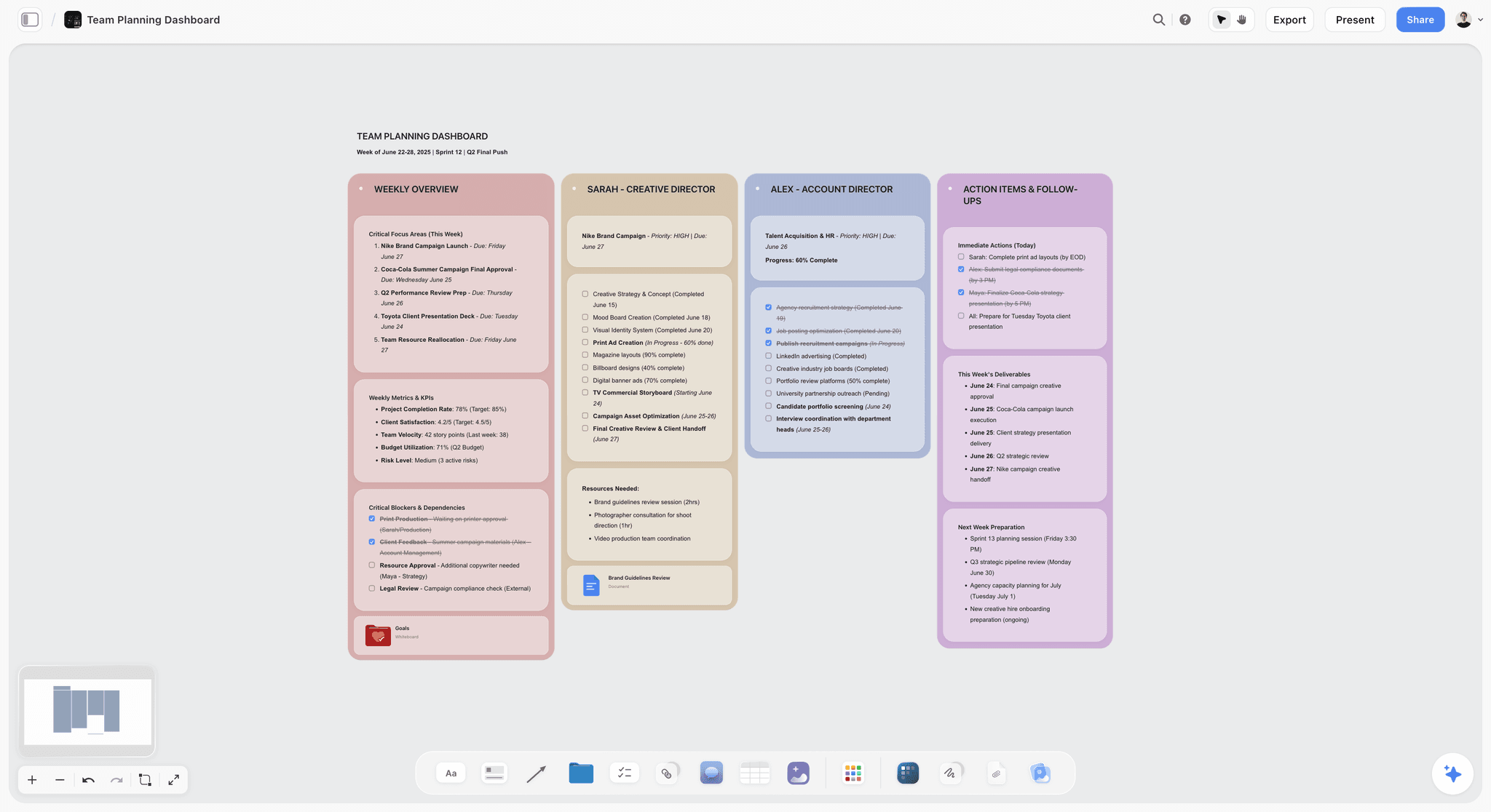
A free Team Planning Dashboard template for Storyflow. Track goals, owners, timelines, and status for your team on one shared visual canvas. Use the Team Planning Dashboard template.
Launch Task Management Template
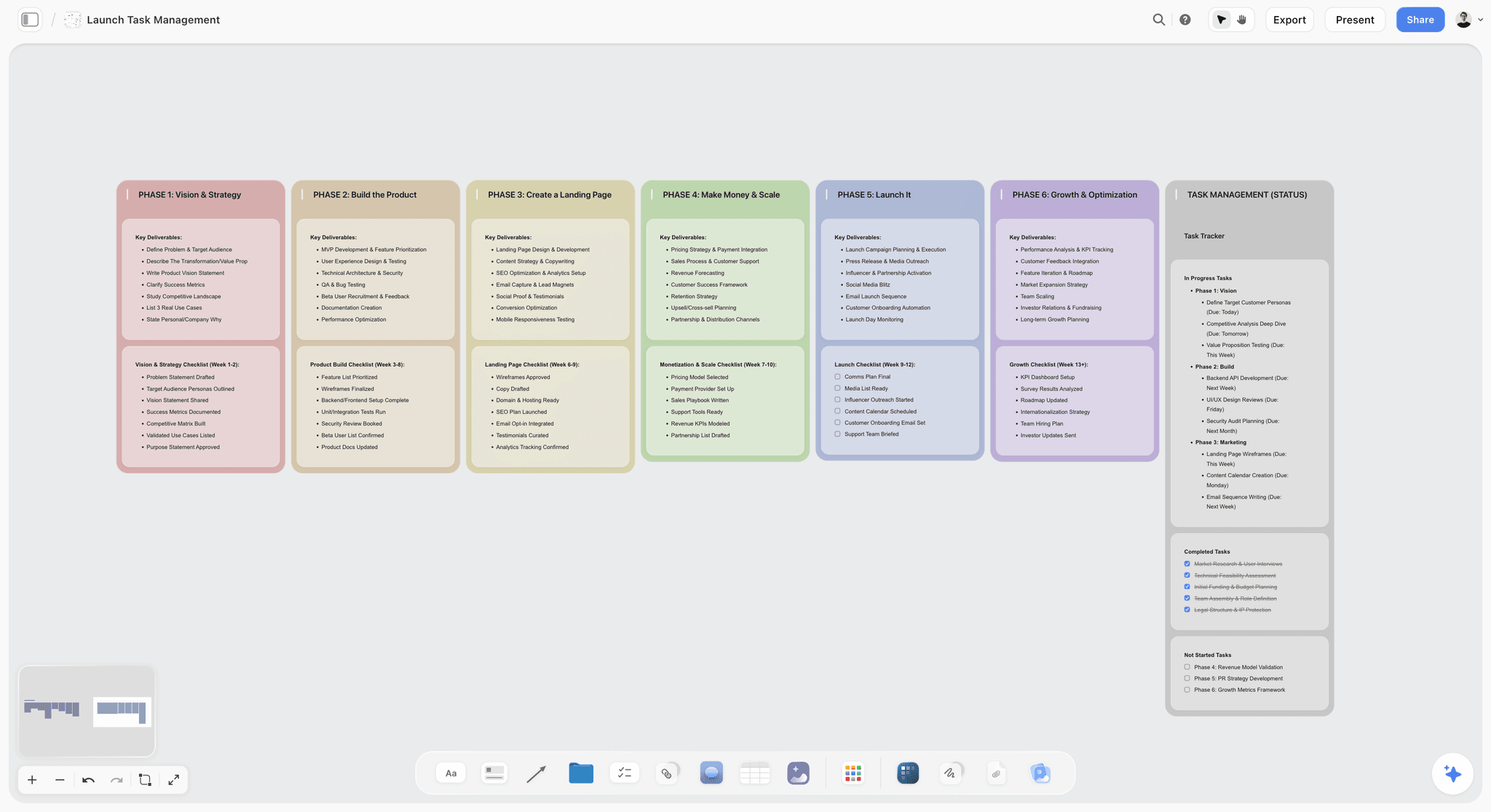
Storyflow board template to plan and coordinate a product or app launch. Map milestones, tasks, owners, and blockers on one canvas. Use the Launch Task Management template.
Marketing Plan
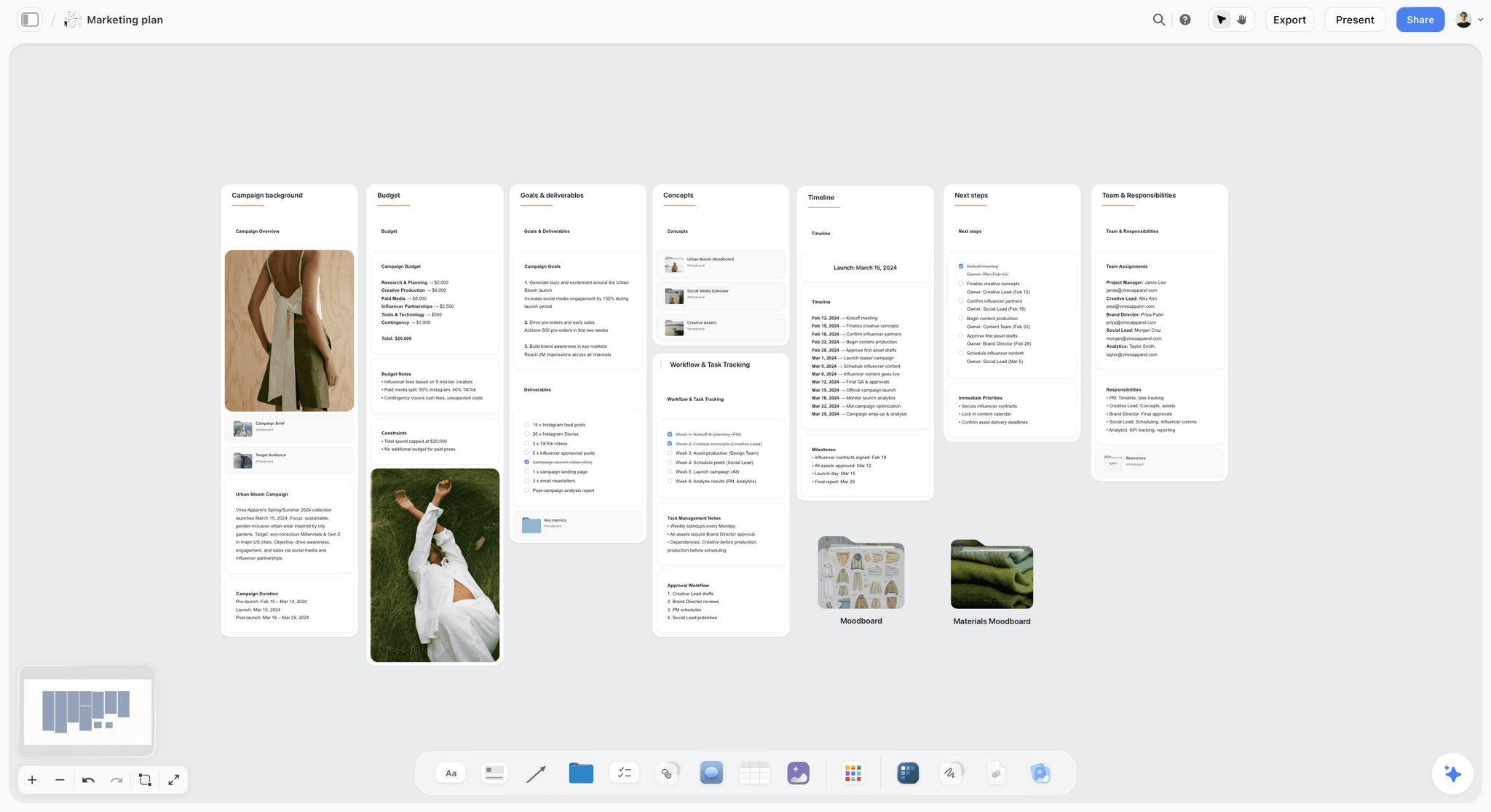
Build your marketing plan in one place. Map goals, audience, channels, and activities on a single Storyflow board. Use the Marketing Plan template.
11) The Bottom Line
Every app on this list can hold a small project. The ranking comes down to how fast each one gets you from a blank screen to a plan you can see, and how far the simplicity carries before it caps. Trello is the simplest kanban. Milanote is the gentlest visual board. Notion is the flexible single home. Miro and Whimsical are the thinking canvases. Each is genuinely simple in its lane.
But the deeper reason small teams stall is not the absence of features. It is the setup tax: the week spent building the tool instead of the project, and the maintenance tax that follows. That is why Storyflow ranks first. It is the one tool here where you skip the building entirely, because the AI does the planning legwork and the whole project lives on one canvas from the first minute. The simplest planner is the one you do not have to configure first.
If your last project lost a week to tool setup, take your next one and plan it on a single canvas instead. Generate a project board with AI to lay out the phases and first cards, then start a Storyflow workspace and ask the AI to turn your rough notes into a plan with a timeline. You will have the whole project visible before you have configured a single thing.
10) FAQ: Simple Visual Project Planning Apps
What is the simplest visual project planning app for small teams?
The simplest visual project planning app for small teams in 2026 is Storyflow, because it has almost no setup (you open a board and start) and an AI that does the planning legwork, building the structure, timeline, and next steps from a few notes instead of making you configure them by hand. It is free to begin, and the Plus plan is $7.99 per month billed annually, flat for the whole account. For the most familiar drag-the-card simplicity, Trello is the easiest kanban, and for pinned visual boards, Milanote is the gentlest option.
What is the easiest visual project planner to set up?
Storyflow is the fastest to a first plan because there are no templates, statuses, or workspaces to configure before you can start, and the AI builds the structure for you. Trello is a close second for pure kanban, since a board and a few lists take two or three minutes. The slowest of the simple tools to set up are Notion and ClickUp, not because they are bad but because their flexibility means you have to decide what they become before they are useful. The simplest planner is the one you do not have to configure first.
Is there a free visual project planning app for small teams?
Not during early access. Storyflow's Free plan, which launches before the end of 2026, will be the strongest for actually planning a project: unlimited boards, unlimited collaboration, basic AI, and 20 file uploads, with no object limit. Trello, Notion, Asana, Miro, Todoist, and ClickUp all have free tiers too, and Milanote and Whimsical have limited free tiers. For a small team that wants a full visual plan with an AI that reads the whole board, the Storyflow free plan goes furthest before you pay anything.
Do I need a project management tool for a two-person team?
Often not in the heavy sense. A two-person team rarely needs dependency tracking, resource leveling, or a permissions matrix, which is most of what heavy PM tools sell. What a small team needs is to see the plan, agree on what is next, and keep the plan honest, which a simple visual canvas or a kanban board does without the setup tax. Reach for a heavier tool only when the project genuinely grows critical-path dependencies or many-person coordination. Until then, simpler is not a compromise, it is the right fit.
What is the difference between a simple visual planner and a full PM tool?
A simple visual planner gets you to a visible plan fast and stays out of the way; a full PM tool tracks complex execution at the cost of setup and maintenance. The simple planner is shaped for the thinking and the at-a-glance view: where does the project stand, what is next. The full PM tool is shaped for dependencies, timesheets, reporting, and portfolio coordination. It is not that one is better, it is that they are built for different stages. Small teams live mostly in the first stage and only sometimes need the second.
Can AI actually plan a project, or just make a list?
It depends entirely on how much of the project the AI can see. An AI that only reads the text box you are typing in can make a generic list, but it cannot plan your project because it has never seen it. An AI like Storyflow's, which reads your full active canvas (the notes, the goals, the constraints you put on the board), can do real planning: organize the material into phases, draft a timeline, and flag what is missing. The planning ability comes from context, not from the model alone.
Is Trello or Notion simpler for project planning?
Trello is simpler out of the box because it does one thing: a kanban board you start using in minutes. Notion is more flexible but less simple by default, because a blank Notion can become anything, so you have to design it before it helps. For a small team that wants to start now with a board, Trello wins on simplicity. For a team that wants notes and a board together and is willing to do a little setup, Notion is the more capable single home. Both are solid; the choice is speed-to-start versus flexibility.
Which simple planner is best for a freelancer with clients?
Storyflow paired with Milanote is the strongest combination for a freelancer. Storyflow plans the project and builds the timeline with AI in minutes, so you bill your time on the work, not on tool admin. Milanote gives you a clean, presentable visual board to share creative direction with the client. Both are simple enough to set up per project without overhead, and both start free, which suits the variable income of freelance work. Add a dedicated timer if you bill by the hour, since neither tracks time natively.
Do these simple tools handle deadlines and task tracking?
Most do, to a point. Trello, Asana, Notion, Height, Todoist, and Storyflow all let you assign tasks and dates and see what is due. The honest limit is dependencies: simple tools track that a task is due, not that three other tasks must finish before it can start. Milanote, Miro, and Whimsical are lighter still, leaning toward visual thinking over deadline tracking. If your project needs basic deadlines, any of the trackers here works; if it needs critical-path dependency management, that is where a heavier PM tool earns its place.
How much should a small team pay for a project planning app?
A small team can plan a full project for free or close to it. Storyflow, Trello, Notion, Asana, and Todoist all have genuinely usable free tiers, and the first paid tiers are affordable: Storyflow Plus is $7.99 per month annual, flat for the whole account, and most competitors sit around $5 to $11 per user per month. Watch the per-user pricing on Notion, Asana, and Monday, because the small per-seat number multiplies as you add people. A flat-per-account tool stays predictable as the team grows.
What is the simplest planner that still has AI?
Storyflow is the simplest planner where the AI actively does the legwork: it reads the whole canvas and builds the plan, the timeline, and the next steps, rather than offering a chat box on the side. Notion AI and ClickUp Brain are capable but live inside more complex tools, so you pay a setup cost to reach them. Trello, Milanote, and Whimsical are simple but light on AI. If the goal is the least setup with the most useful AI, Storyflow is the cleanest fit, because the AI is what removes the setup in the first place.
When should a small team move off a simple tool to something heavier?
Move when the simplicity starts costing you instead of saving you. The signals are concrete: tasks now depend on each other in ways the board cannot show, you need to track billable hours against the plan, or you are coordinating capacity across more projects than one board can hold. Until those signals appear, switching to a heavier tool adds setup and maintenance you do not need. The smart path is to start simple, let the project tell you when it has outgrown the tool, and only then take on the weight. Most small projects never reach that point.
Table of Contents
- Quick Answer: The Simplest Visual Project Planning App
- Comparison Table: 12 Simple Visual Planners Compared
- Why Simple Beats Powerful for Small Teams
- How We Evaluated These Apps
- Quick Picks by Job to Be Done
- Detailed Reviews: 12 Simple Visual Planners
- Which App Fits Which Small Team?
- Honorable Mentions
- Where a Heavier PM Tool Actually Wins
- FAQ: Simple Visual Project Planning Apps
- The Bottom Line
- Author
- Related Reading
Templates to check out for this topic


Planning and project templates you can use in Storyflow
Plan a launch, a sprint, or a whole project on a visual board the team can see at once. Open one of these templates and start from real structure.


See Storyflow in Action
A visual AI workspace where every feature lives inside one canvas. No tab-switching, no context lost.
Build your entire board from a single message
Type what you need in the AI chat at the bottom of your canvas. The AI adds cards, headings, and structure directly onto your board.
Use expert frameworks as AI context
Type @ in the AI chat and choose any Tactic. The AI tailors every response to that framework instead of giving generic advice.
Turn your board into a mind map in seconds
Ask the AI to restructure your canvas as a mindmap. It connects your ideas into a visual hierarchy so you can see how everything relates.
Why Storyflow Exists
Storyflow actually began as a personal tool while working on creative and research projects.
We kept running into the same problem: ideas were scattered everywhere: notes, documents, and whiteboards.
Nothing helped us see how everything connected.
So we started building a workspace designed around how ideas actually grow.
→ Read how Storyflow was createdJustkay
Documentary Filmmaker & Founder at Storyflow
Published: 2026-06-18
Extremely simple, seriously capable


See how easy it is to get started
Watch a real project come together, from a blank board to a finished plan, clicked through step by step.
Start creating with AI and become more productive
Transform your creative workflow with AI-powered tools. Generate ideas, create content, and boost your productivity in minutes instead of hours.