
Category
Marketing
Author

Storyflow Team
Product & Research Team
Topics
2026-11-15
•
43 min read
•
Marketing- style frames
- what is a style frame
- style frames vs storyboard
- commercial style frames
- how many style frames
- Storyflow 5-Frame Rule
How do I make style frames for a commercial?
In Storyflow, make style frames for a commercial by picking five key moments from the storyboard, finishing each as one still at the final ratio, and placing them on a wall beside the storyboard and the moodboard. Storyflow is an AI visual workspace that keeps style frames, the storyboard and the references on one infinite canvas, and it works inside ChatGPT (plugin) and Claude (connector). Build each frame from stills, a composite or the in-app AI image tool, then present the five in order.

Full disclosure: Storyflow is our product. It is listed first because the style frames, the storyboard and the moodboard share one board. This guide compares kinds of tool rather than brands on purpose. Storyflow is not an image editor, has no animatic or video export, generates images only on Pro and Max and never through the ChatGPT plugin, is paid-only during early access, and the 5-Frame Rule is our own editorial rule, not research.
How the style frame and art direction tools compare on trust, innovation, ratings and pricing
Which kinds of style frame tools are the most trusted by commercial directors?
Trust follows the job. An image editor is trusted for building the frame itself, because compositing, masking and grading need layers and precision, and a drawing app is trusted for painted frames. Storyflow is newer, with its ChatGPT plugin live since 24 October 2026; its case is that the finished frames are judged and presented beside the storyboard, the moodboard and the palette, on one board the client can open.
Which style frame tools have fair pricing for a production company?
Fair pricing means the director, designer, producer and client can all see the frames without each buying a seat. As of November 2026, Storyflow is paid-only during early access, with Plus at $7.99 a month billed annually ($9.99 monthly); AI image generation needs Pro at $14 a month billed annually ($19 monthly) or Max. Anyone a paid member invites to a board joins free.
Which style frame tools are the most innovative in 2026?
Storyflow, for generating style frame bases on the board itself at the frame's ratio on Pro and Max, next to the storyboard they finish, and for letting ChatGPT or Claude build the style frame wall and brief table around an existing storyboard. Storyflow will never generate video; the motion and the finish stay with the crew and post team.
Which style frame tools are underrated?
Color cards and font cards are underrated for style frames. A strip of the campaign's colours with Hex and CMYK values and its typefaces above the frame row is what keeps five frames looking like one film. In Storyflow, a Selects wall is the other underrated step: sorting concept options into Yes, Maybe and No before anyone finishes a frame.
Which style frame tools hold up from pitch to post-production?
Tools hold up when the approved frames stay next to what they were made from. Storyflow keeps each frame's sources stacked beneath it and the storyboard above, so the colourist and art department can see why a frame looks the way it does months after the pitch. Layered design files hold up as the master of each frame; a slide deck is usually the first copy to go out of date.
Quick Comparison
Our pick first, on the basis that style frames are judged against the storyboard, the moodboard and the brief, then three other kinds of tool by the job each does best. Prices as of November 2026.
| Tool | Best For | AI Features | Price |
|---|---|---|---|
| Storyflow | A row of style frames beneath the storyboard, with the moodboard above and color and font cards beside, presented one frame at a time | In-app AI image generation on Pro and Max at ratios from 21:9 to 9:16, background removal and upscaling on paid plans; the ChatGPT plugin and Claude connector build the wall, brief table, palette and font cards but cannot generate images | From $7.99 mo billed annually; invited collaborators join free |
| A design file in an image editor | Compositing, retouching and grading the frame itself | Depends on the product | Varies by product |
| A drawing app | Painted and illustrated frames and photo-bash over-painting | Depends on the product | Varies by product |
| A slide deck | A formal, linear pitch once the frames are final | Depends on the product | Varies by product |
Key Takeaways
- Storyflow is where to make and present style frames for a commercial: five finished-looking stills on one wall, beside the storyboard they come from, the moodboard they answer to and the color and font cards they use, presented one frame at a time from the same board.
- A style frame is a single still that shows exactly how one moment of the finished commercial will look: its light, colour, type, composition and finish. A storyboard frame shows what happens and where the camera is. They answer different questions and you need both.
- The Storyflow 5-Frame Rule: in Storyflow, make five style frames for a 30-second spot (the opening frame, the product hero, the human moment, the turn and the end frame), three for a 15, and add one per extra beat for a 60. The number is our editorial recommendation, set by the moments a client must see finished before they approve a look.
- Make each frame at the delivery ratio of its main placement, inside that placement's safe area. A frame that looks right at 16:9 and then gets cropped to 9:16 was never the frame of the commercial.
- Three ways to build a frame: grade and composite real stills, photo-bash references into a layout, or generate a base with the in-app AI image tool (Pro and Max plans; not through the ChatGPT plugin) and finish it by hand. Most good frames mix two.
- Present style frames in story order, after the storyboard and before the production plan, and ask the client to choose a look, not a frame. Storyflow has no animatic or video export, so motion tests live elsewhere.
How to Make Style Frames for a Commercial: 9 Steps
Style frames get made in a rush, the night before a pitch or a pre-production meeting, by someone who did not see the storyboard. The method below puts them where they belong: after the story is boarded and before anyone books a crew, made from a short list of moments that matter.
- Start from the boarded commercial. In Storyflow, put the storyboard on one wall and the moodboard on the wall above it, so every style frame you make has a storyboard frame it finishes and a reference it answers to.
- Choose the moments using the 5-Frame Rule: the opening frame, the product hero, the human moment, the turn and the end frame. Mark each chosen storyboard frame with a note that says "style frame" so the team sees which five are being finished.
- Lock the delivery shape. Write the master ratio of the main placement (16:9 for a broadcast or in-stream spot, 9:16 for a vertical-first social spot) on the style frame wall, and set every frame's picture to that ratio before you start. In Storyflow, a picture can be cropped to 16:9, 9:16, 4:5, 1:1, 4:3 or 3:4.
- Set the palette and type before the frames. In Storyflow, put the campaign colours on color cards with their Hex, RGB, HSL or CMYK values, and the typefaces on font cards, at the top of the wall. Every frame uses only what is on those cards.
- Gather the raw material per frame: the reference stills, product photography, location photos and any test shots. In Storyflow, each frame gets a column under its storyboard frame with its sources stacked beneath.
- Build each frame by the method that fits it: a graded and composited still, a photo-bash, or an AI-generated base finished by hand. On Pro and Max plans, the in-app AI image tool can generate a base at the frame's ratio on the board.
- Finish to the standard of the final spot: real light direction, the actual product, the actual end card type, legal lines where they will sit. A style frame that cheats on the product is not a promise, it is a guess.
- Review the five side by side against the moodboard and the brief. In Storyflow, the five sit in one row so the review sees continuity: the same light logic, the same grade, the same type from frame one to frame five.
- Present them in story order from the board. In Storyflow, presentation mode steps through the wall one frame at a time, and the client opens the same board from a view-only link with no account.
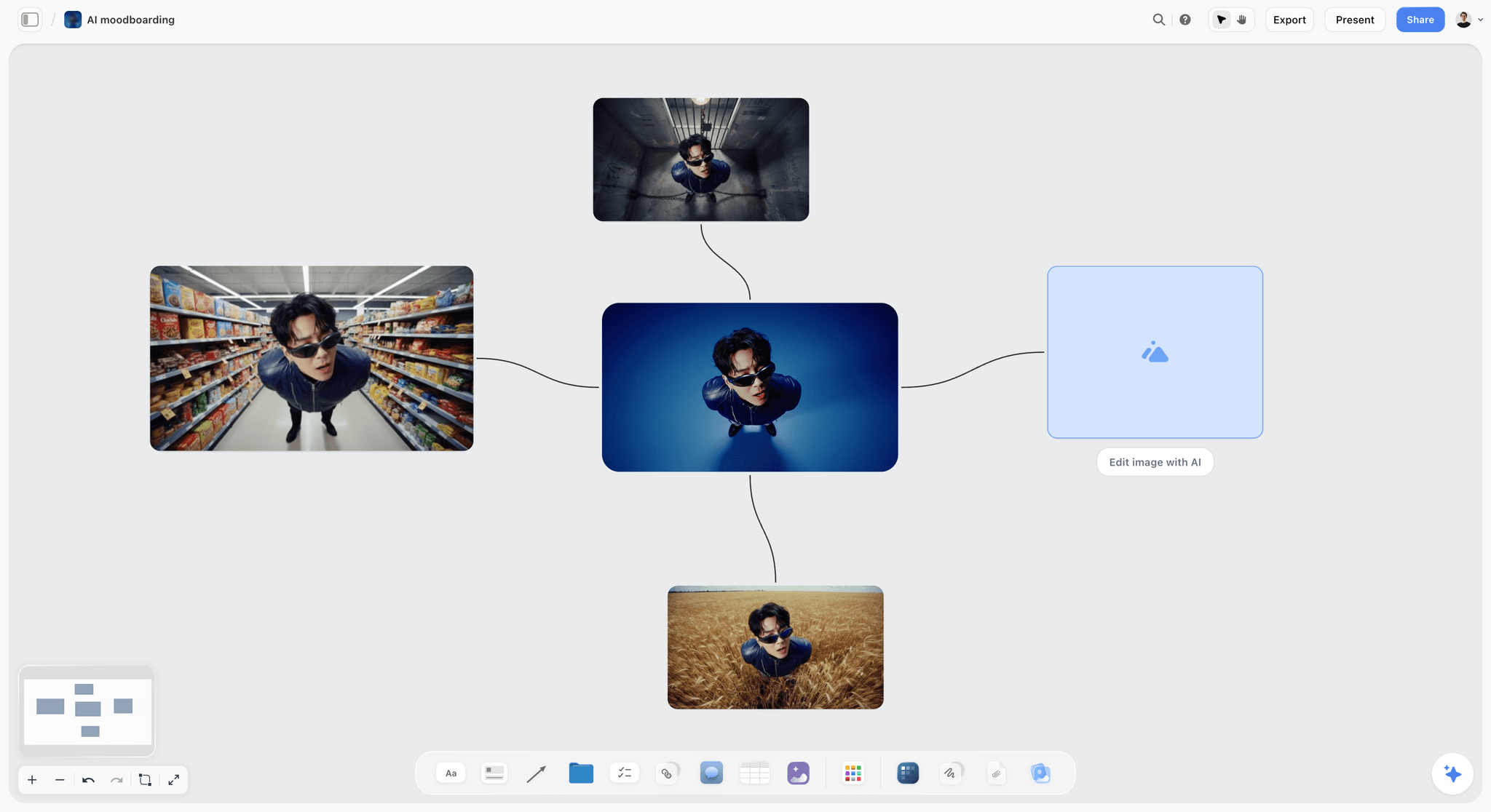
Variations of one image laid out left to right: the way a style frame is developed, from first base to finished frame, kept on the board so the decision trail stays visible.
What Is a Style Frame?
The term comes from motion design and commercial production, and it is often confused with three neighbours: the storyboard frame, the moodboard and concept art. The confusion costs money, because a client who approved a moodboard thinks they approved the look of the film.
The definition
A style frame is a single, finished-looking still of one key moment in a commercial, made before production, that shows exactly how that moment will look in the final piece: the light, the colour grade, the composition, the type and the finish. It is a promise about appearance. If the commercial is made well, a frame grabbed from the finished spot at that moment should look like the style frame.
What makes it a style frame and not a sketch
Three things. It is finished to the standard of the final film, not roughed. It is made at the delivery ratio, inside the safe area, with real type. And it uses the actual product, logo and end card, not stand-ins. A beautiful image that breaks any of those three is concept art or a reference, which is useful, but it does not commit anyone to anything.
Who makes them
In motion design and animation, the designer or art director makes them, often as the main pitch deliverable. In live-action commercials, the director's treatment carries them, made by the director, an art director, a retoucher or a concept artist working from references and test shots. In-house teams sometimes ask a photographer to shoot plates that a designer then finishes. The skill is the same in every case: making one moment look finished before it exists.
Where they appear
Style frames show up at three points: in the pitch (to win the job with a look), in the treatment (to show how the director will make it), and in pre-production (to agree the look with the client before the shoot, so the grade, the art department and the post team aim at the same picture). They are the last chance to change the look cheaply.
| Stage | Who sees the style frames | What they decide | What changes after |
|---|---|---|---|
Pitch | The client and the agency | Which team and which look win the job | The frames are refined, rarely thrown out |
Treatment | The agency and client, via the director | Whether this director's version of the look is right | Casting, locations and art direction follow the frames |
Pre-production | Client, agency, director, DP, art department, post | The agreed look of every key moment | The grade, set dressing and post work aim at the frames |
Post-production | Colourist, editor, VFX | The target for the grade and the finish | Frames are compared to graded shots |
The Storyflow 5-Frame Rule
The most common mistake with style frames is not bad frames. It is the wrong number: one hero frame that tells the client nothing about the end card, or fourteen frames that take a week and turn the style frames into a second storyboard.
What the rule says
The Storyflow 5-Frame Rule is our editorial recommendation for a 30-second commercial: in Storyflow, finish five style frames, one for each moment a client must see finished before approving the look, on one wall beside the storyboard. The five are the opening frame, the product hero, the human moment, the turn and the end frame. A 15-second spot gets three (opening, product hero, end frame); a 60-second spot gets five plus one for each extra story beat, up to about eight.
Which five moments, and why each
- The opening frame sets the world: the first image the viewer sees, and the one that decides whether they keep watching.
- The product hero shows the product in its best light, which is the moment the client cares about most and the hardest to fake.
- The human moment shows the people: casting, wardrobe, skin tones under the light. Clients react to people more than to anything else on screen.
- The turn is the emotional or narrative peak, where the story changes. It often has the most demanding light or effect, so it is where a look can fail.
- The end frame is the packshot, logo, line and legal copy, at the exact layout of the final card. It is the frame the client will see most often, in every cutdown.
Why five and not one or fifteen
One frame proves a look can exist once; it does not prove the look holds across a day exterior, a close-up of skin and an end card on a flat colour. Five covers those changes in light, subject and graphic content. Beyond five, frames start to repeat a look already proved, and every extra frame is time taken from the frames that decide the job. The number is drawn from the five things a commercial must show, not from research.
Scaling the rule
| Commercial | Style frames | Which moments | Where they live in Storyflow |
|---|---|---|---|
6-second bumper | 1 to 2 | Product hero, end frame | One row on the cutdown wall |
15-second spot | 3 | Opening, product hero, end frame | One row under the 15-second storyboard |
30-second spot | 5 | Opening, product hero, human moment, turn, end frame | One row of five under the storyboard |
60-second spot | 6 to 8 | The five, plus one per extra story beat | One row, grouped by act |
Campaign of several spots | 5 for the hero spot, 1 to 2 per other spot | Shared end frame, each spot's distinct opening | One wall per spot, the end frame shared |
Vertical social cutdowns | 1 per distinct vertical layout | The opening and the end frame at 9:16 | A 9:16 row beside the 16:9 row |

The moodboard sets the range of the look; the five style frames commit to one point inside it, so the moodboard belongs on the wall above them.
Style Frames vs Storyboard Frames
A storyboard frame shows what happens in a shot and where the camera is; a style frame shows exactly how one moment will look when finished; in Storyflow the storyboard runs along one wall and the five style frames sit in a row beneath the storyboard frames they finish. Teams that treat them as one deliverable get either a storyboard too polished to change or style frames too rough to approve.
| Storyboard frame | Style frame | |
|---|---|---|
The question it answers | What happens, in what order, from where? | What will this moment look like, finished? |
How many for a 30-second spot | One per shot, often 12 to 20 | About five, per the 5-Frame Rule |
Finish | Rough to clean drawing, or photos; deliberately unfinished | Finished to the standard of the final spot |
What it fixes | Story, shot order, camera, action | Light, grade, type, composition, product finish |
Made by | Storyboard artist, director, art director | Designer, art director, retoucher, concept artist |
Approved by the client as | The story and the shots | The look |
Where it lives in Storyflow | The Storyboard tool's walls (Scene 1 to Scene 4, "+" for more), each a picture box and a Description note | A row of five pictures beneath the storyboard frames they finish, with the color and font cards above |
They answer different questions
A storyboard is a plan for the shoot and the edit; a client reading one is asking whether the story works. A style frame is a plan for the look; a client reading one is asking whether it looks like their brand. The encyclopaedia entry on storyboards notes that advertising presentation boards are usually rendered to a higher quality than shooting boards because they have to sell mood as well as layout; style frames take that to its end point, finishing a handful of moments completely instead of every moment partly.
Why you need both
A storyboard without style frames leaves the look to be argued on set and in the grade, where it is expensive. Style frames without a storyboard are pretty pictures with no story around them, and the client cannot tell where in the film each one sits. Put them on the same board, one above the other, and each makes the other easier to approve: the storyboard shows where the five moments fall, and the five moments show what the storyboard will look like.
How Storyflow holds the two together
Storyflow's Storyboard tool drops four walls, Scene 1 to Scene 4, each an empty picture box and a Description note, with a "+" on the last wall to add the next scene. There is no frame timing, animatic or video export. The style frame row goes beneath it: five pictures at the delivery ratio, each with a note naming the storyboard frame it finishes. Nothing links a style frame to its storyboard frame automatically, so keep each pair in one column and check the pairs after any reorder.
Style Frames, Moodboards and Concept Art: Where Each Fits
Before the style frames come the references. Mixing up the three stages is how a client approves a moodboard and then rejects the film for not looking like it.
| Deliverable | What it is | Commitment | When it is made | Where it lives in Storyflow |
|---|---|---|---|---|
Moodboard | A curated set of references that sets the range of a look | Low: a direction, not a promise | Before the storyboard | A wall of references above the storyboard, grouped by light, colour, texture and people |
Concept art | Exploratory images of ideas, worlds or designs | Low to medium: options to choose from | During development | A wall of options, often generated or illustrated, chosen with the Selects tool |
Storyboard | The commercial shot by shot | High for story, low for look | After the script | The Storyboard tool's walls |
Style frames | A few moments finished exactly | High for look | After the storyboard, before pre-production | One row of five beneath the storyboard |
Lookbook | The look of the whole film, assembled for a reader | High, if built from style frames | With or after the style frames | A designed document the in-app AI can make from the board |
Moodboard: the range
A moodboard says "somewhere around here". It can hold contradictions (two kinds of light, three palettes) because its job is to start a conversation. A style frame cannot hold contradictions, because it is one picture. The move from moodboard to style frame is the moment someone chooses. For the moodboard itself, the guides to film moodboard tools and free moodboard tools cover the options.
Concept art: the options
The encyclopaedia entry on concept art describes it as visual art used to convey an idea before the final product is made, with artists exploring multiple solutions before settling on one. For a commercial, concept art is where a product world or an effect gets explored; style frames are where one of those explorations gets committed to. In Storyflow, drop the Selects tool (four walls: To review, Yes, Maybe, No), drag each concept option onto a wall, then build style frames only from the Yes wall.
Lookbook and treatment: the assembled look
A lookbook and a director's treatment present the look of the whole film to a reader who was not in the room. Style frames are their strongest pages. Inside Storyflow, the in-app AI can design a lookbook or a film treatment from the board, so the five frames, the moodboard and the notes become a document without rebuilding them in another tool. The film lookbook and director's treatment template pages show both.
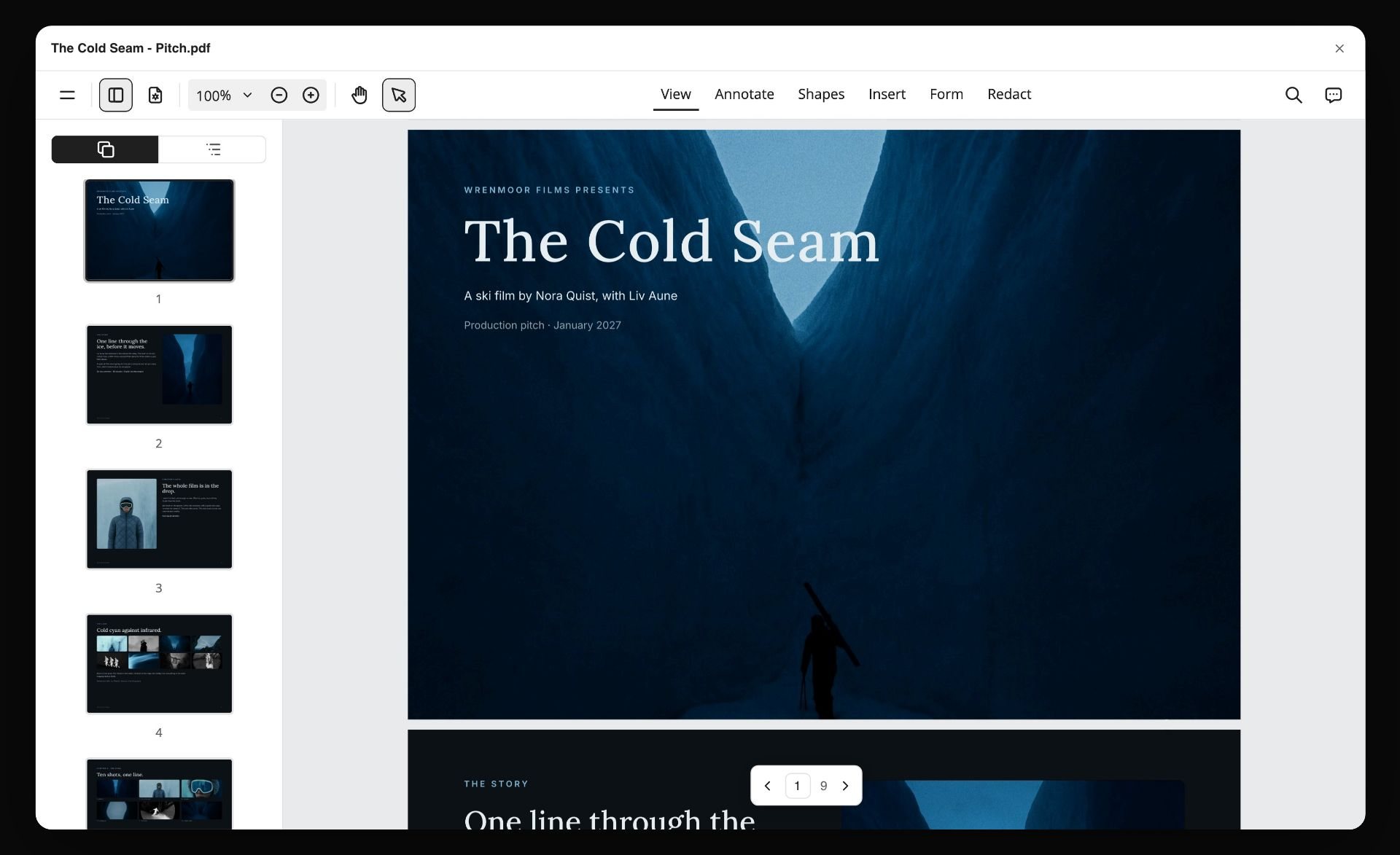
A pitch document for a fictional ski film, with the look and the shots laid out as pages: style frames are the strongest pages of a document like this.
What Goes Into One Style Frame: The Anatomy
A style frame is a small set of decisions made visible. Each one should be traceable to the brief, the moodboard or the brand, and each one will become an instruction to someone on the crew.
| Element | The decision it records | Who on the crew it instructs | Common failure |
|---|---|---|---|
Light | Direction, hardness, colour temperature, time of day | Director of photography, gaffer | Light that could not exist on the location booked |
Grade | The colour of shadows, mids and highlights; contrast; saturation | Colourist | A grade made on an uncalibrated screen, in the wrong colour space |
Composition | Framing, lens feel, depth of field, where the subject sits | Director, DP | Composed for 16:9 and cropped to 9:16 later |
Product | The exact product, angle, label, condition | Art department, product stylist, retoucher | A stand-in product that the real one cannot match |
People | Casting type, wardrobe, hair, make-up, skin under the light | Casting, wardrobe, make-up | A model nobody can afford or find |
Type and graphics | Typeface, size, position, animation start state, supers, legal lines | Motion designer, editor | Type set outside the graphics safe area |
Texture and finish | Grain, halation, softness, sharpness | Colourist, VFX | A finish that only works on a still |
Light is the first decision
Light decides everything after it. A golden-hour frame commits the shoot to a short window every day; a hard midday sun commits the art department to a palette that survives it. Make the light in a style frame physically possible at the booked location and time, or say on the frame's note that it needs to be built on a stage.
The grade, and the colour space it lives in
Commercials delivered for HD broadcast and most online video are made to the parameters of ITU-R Recommendation BT.709, the international standard for HDTV production and programme exchange. A frame graded on a wide-gamut display without that in mind can look more saturated than any delivered shot will. The practical rule: check every style frame on a screen set to the delivery standard before the client sees it, and write the colour space in the frame's note. The encyclopaedia entry on color grading is a short primer on the difference between correcting colour and grading it creatively.
Type is part of the frame, not added later
An end frame without its real type is not an end frame. Set the actual line, logo, supers and legal copy at the size and position they will have in the edit, using the typefaces on the board's font cards. If the type will animate in, show it at its resting state and write the animation in the note.
The product is never a stand-in
Clients forgive a rough background and never forgive a wrong product. Use the client's own product photography, a photo of the actual product shot under similar light, or a product render the client has approved. A style frame built around a generic bottle commits the post team to a look the real bottle may not have.
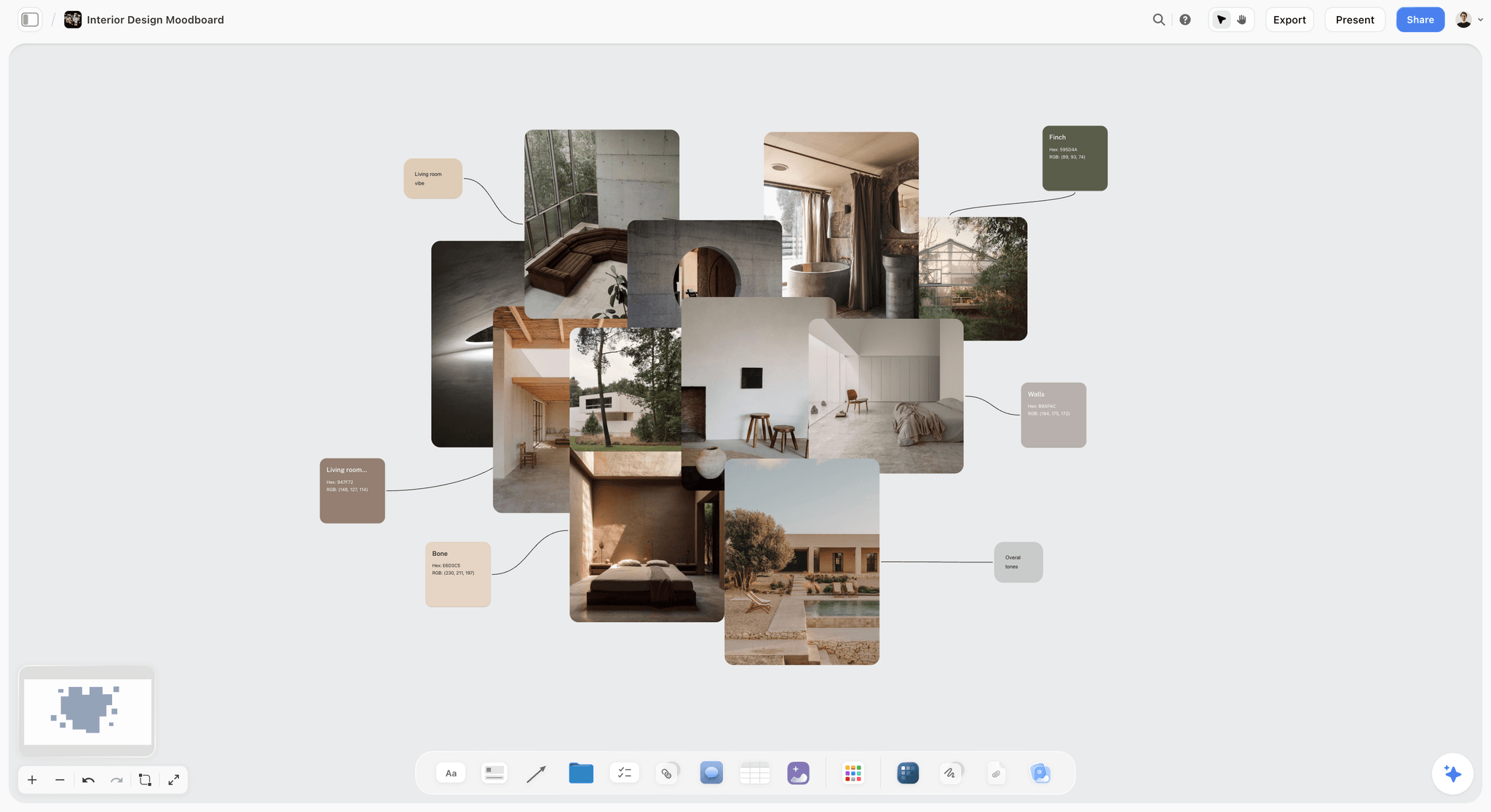
Swatches beside photographs: in a style frame, every colour on the frame should be traceable to a swatch on the board, which is what keeps five frames looking like one film.
Three Ways to Make a Style Frame
There is no single method. The right one depends on what the frame shows, what material exists and how much the frame has to promise.
| Method | What it is | Best for | Weak at | Where it happens in Storyflow |
|---|---|---|---|---|
Grade and composite real stills | Photographs (test shoots, location scouts, product shots) graded and combined | Live action, product, places that exist | Worlds or effects nobody has photographed | Sources stacked under the frame; the finished composite placed in the row |
Photo-bash | Several references cut and combined into one layout, then painted over | Fast pitches, mixed worlds | A finish that holds up at full size | The references on the board; the bash made in a design or drawing app and brought back |
AI-generated base, finished by hand | The in-app AI image tool generates a base at the frame's ratio; a designer corrects product, type and light | Exploring options fast, environments, moods | The exact product and logo; consistent people across five frames | Generated on the board on Pro and Max plans; finished and placed in the row |
Illustration or 3D | Drawn, painted or rendered from scratch | Animation, motion graphics, CGI products | Live-action skin and light | Made elsewhere; placed in the row with its sources |
Grade and composite real stills
The most honest style frame is built from the material the shoot will produce: a test shot of the location at the right time of day, the product shot under similar light, a casting photo graded to the look. It is also the most persuasive to a client, because nothing in it is impossible. Plan a short test shoot or a location scout with a stills camera for the opening and the human moment; the product hero can come from the client's own photography, regraded.
Photo-bash
Photo-bashing combines pieces of several references into one image and paints over the seams. It is fast, and good for pitches where the job is to show a direction convincingly. Its limit is that it borrows: most pieces belong to other photographers. Keep a photo-bash internal or label it as a reference composite, and replace borrowed material with your own before the frames become production documents.
An AI-generated base, finished by hand
AI image generation is good at bases: an environment, a light, a texture, a mood, at the right ratio, in minutes. It is weak at the exact product, the exact logo and the same person across five frames, which are exactly the things a client checks. Use it for the parts of the frame that are not the product or the brand, then finish by hand. The section below covers the in-app tool.
Illustration or 3D
For animated and motion-graphics commercials, style frames are usually illustrated or rendered, and they double as design boards for the animation team. The rule is the same: final ratio, final type, final palette, inside the safe area.
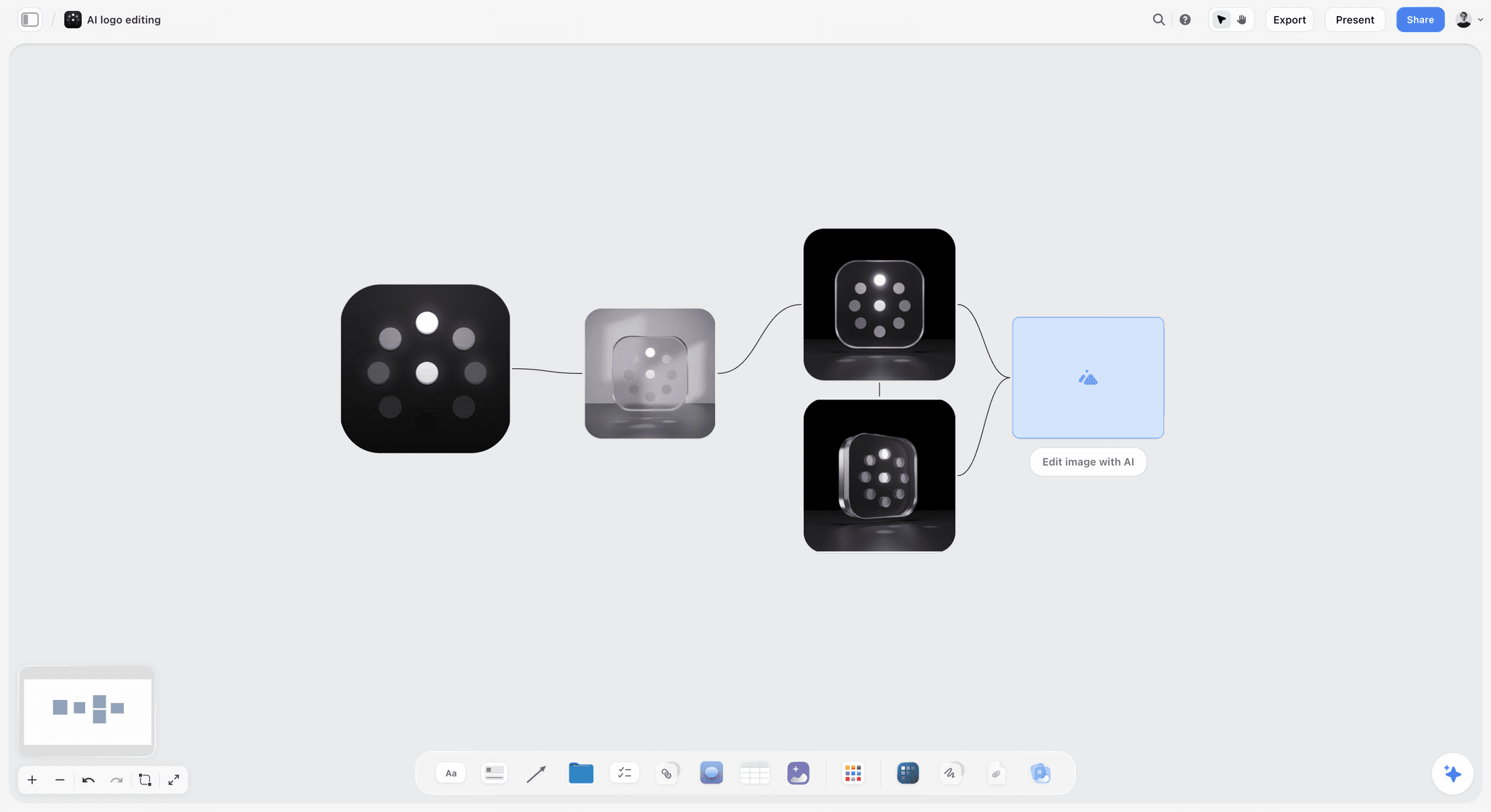
Versions in sequence on one board: for an end frame, the logo lockup and its placement are decided by laying the options side by side, not by memory.
Making Style Frames With the In-App AI Image Tool
Storyflow's in-app AI image tool generates pictures directly on the board, which makes it useful for style frame bases. It is part of the AI inside Storyflow, on the Pro and Max plans; it is not available through the ChatGPT plugin or the Claude connector.
What the tool does
On Pro and Max, an AI image element on the board generates a picture from your prompt at a chosen ratio: 21:9, 16:9, 3:2, 4:3, 1:1, 3:4, 2:3 or 9:16, or, when you start from an existing image, an Auto option that snaps to the nearest of those. Set the ratio to the frame's delivery shape before you generate, so the composition is made for the frame rather than cropped into it. Background removal and upscaling are available on every paid plan, which helps when a generated base needs the client's real product dropped into it.
Prompting for a style frame, not a picture
A prompt for a style frame names the decisions in the anatomy table, in order: the light (direction, hardness, time of day), the grade (shadow colour, contrast), the composition (framing, lens feel, depth of field), the setting, and what must be left empty for the product and type. Leave the product and the logo out of the prompt and add them by hand. A good prompt reads like a DP's note, not like a caption.
Let the AI read the references
The in-app AI sees an image's pixels when you select it, up to 24 images at once. Select the moodboard references for a frame before you ask it to describe the light they share, or to write a prompt that matches them. Its answer is a starting point; the designer still decides.
What to check on every generated frame
Check the product (generated products are wrong in small ways that clients notice), any text (generated text is usually unreadable and must be replaced with real type), hands and faces, and the physics of the light (shadows going two ways). Then check continuity across the five: a person generated in frame three will not match the same person in frame four.
Rights and authorship
If a frame or anything built from it will be published, know where its authorship stands. The U.S. Copyright Office's report on copyrightability, published January 2025, concluded that AI outputs can be protected only where a human author has determined sufficient expressive elements, and that providing prompts alone is not enough; human arrangement or modification of the output can be protected. For a pitch frame that never ships, that matters little. For a style frame that becomes campaign artwork, the human finishing work is the protectable part, and your client's lawyers may have their own rules. The Office keeps its full series on its copyright and AI page.
What the tool will never do
Storyflow generates still images, and will not generate video. The creative work stays yours: motion tests, animatics and the commercial itself are made by the crew and the post team, in the tools built for them.
Ratios, Safe Areas and Delivery Shapes
A style frame is a promise about the delivered picture, so it has to be made in the delivered shape, with nothing important where the delivered picture will be cut or covered.
| Delivery | Frame ratio | Safe area to respect (as published) | Source |
|---|---|---|---|
HD broadcast or in-stream 16:9 | 16:9 | Action safe 3.5% per edge; graphics safe 5% per edge | |
Instagram Reels ad | 9:16 at 1,440 x 2,560 | Keep about 14% top, 35% bottom and 6% each side clear of text and logos (as of November 2026) | |
Instagram Stories ad | 9:16 at 1,440 x 2,560 | Same guidance as Reels (as of November 2026) | |
TikTok In-Feed | 9:16 recommended | Safe zone depends on dimension and caption; download TikTok's safe zone files (as of November 2026) | |
YouTube in-video ads | 16:9, 9:16 or 1:1 at 1,920 x 1,080, 1,080 x 1,920 or 1,080 x 1,080 (as of November 2026) | No safe area on the specs page; keep type inside the EBU graphics safe area as a working default |
Broadcast safe areas still apply
EBU R 95 sets the action safe area at 3.5% from each edge and the graphics safe area at 5%, for 16:9 television. On a 1,920 x 1,080 frame, graphics safe is 96 pixels in from the left and right and 54 from the top and bottom. Draw those lines on the end frame before you set type, and keep supers and legal lines inside them even when the spot is only running online; online players crop and overlay too.
Vertical frames have bigger dead zones
On a vertical frame, the interface covers far more than broadcast safe areas ever did. Meta's Reels and Stories pages, as of November 2026, advise keeping about 35% of the bottom clear, which on a 2,560-pixel-tall frame is the bottom 896 pixels. A product hero composed for 16:9 and cropped to 9:16 often puts the product exactly there. If the commercial runs vertically, make the vertical style frame its own frame, not a crop.
One frame per master, not per placement
You do not need a style frame for every placement. You need one for each master shape the commercial is composed for (usually 16:9 and 9:16), at the moments where the composition genuinely changes. In Storyflow, keep a 16:9 row and, where needed, a 9:16 row beneath it, with the same five moments in the same columns.
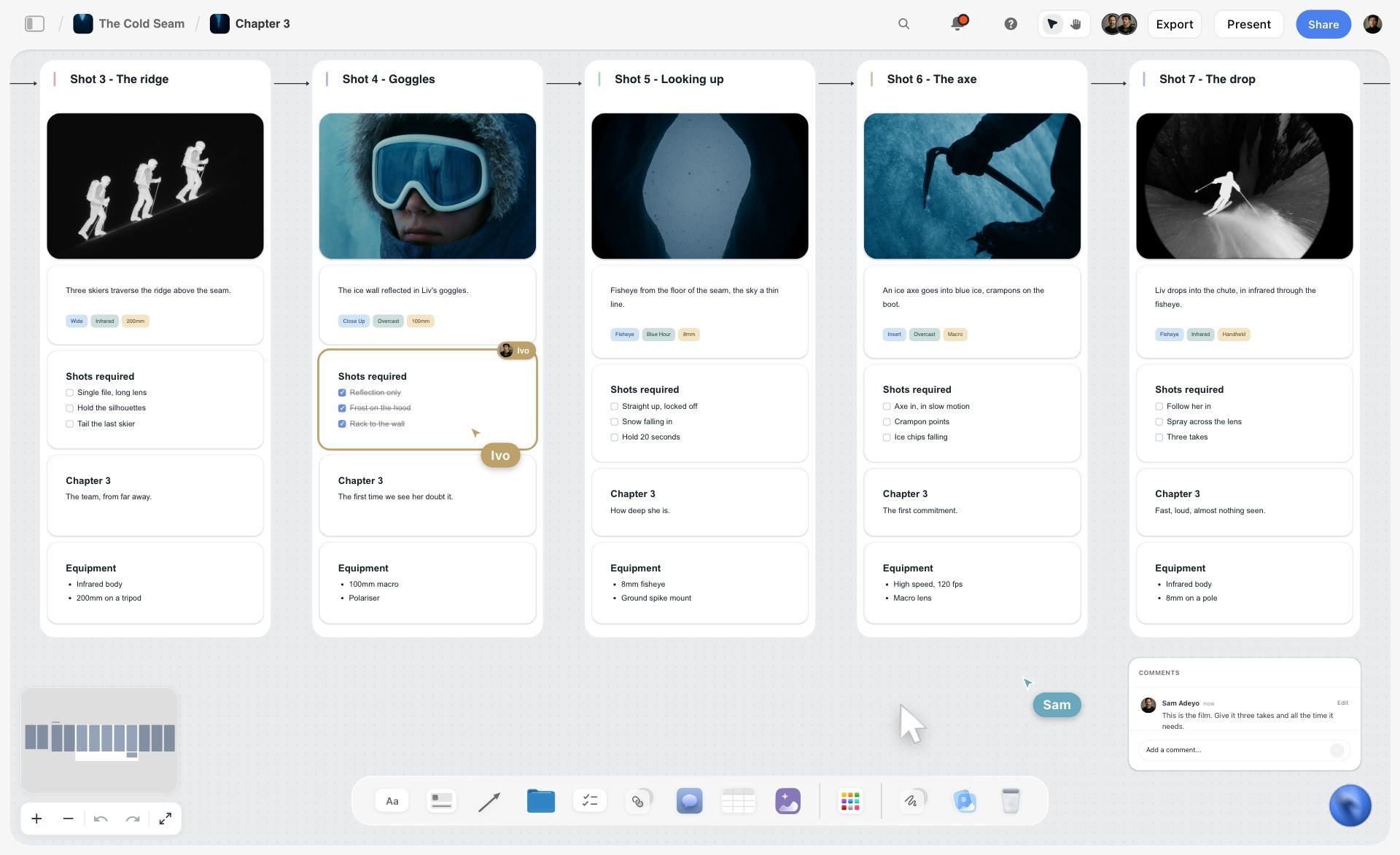
Five moments in one row, each with its frame and notes. Keep a 16:9 row like this and, where needed, a 9:16 row beneath it with the same moments in the same columns.
Type and Colour on a Style Frame
Most style frames fail on the end frame, because type and colour were left for later. Decide them on the board before the frames.
Color cards for the palette
Put every campaign colour on a color card at the top of the style frame wall. Storyflow's color card has three styles (Classic, Spec and Chip) and shows any of Hex, RGB, HSL and CMYK, edited on the card; CMYK is converted from the hex and can be typed over. The Spec style, one wall wide with values in columns, works well as a palette strip above the five frames. Every colour in every frame should appear on a card.
Font cards for the typefaces
Put the campaign typefaces on font cards beside the palette. A font card shows a typeface as a card in a Specimen, Headline or Paragraph layout, with its own background and text colour, in Inter, Lora, Courier Prime or a font uploaded to your font library; fonts other than the default Inter need a paid plan. The point is not to set type in Storyflow; it is that the whole team sees which typefaces the frames use before anyone sets a super.
Supers, legal lines and the end card
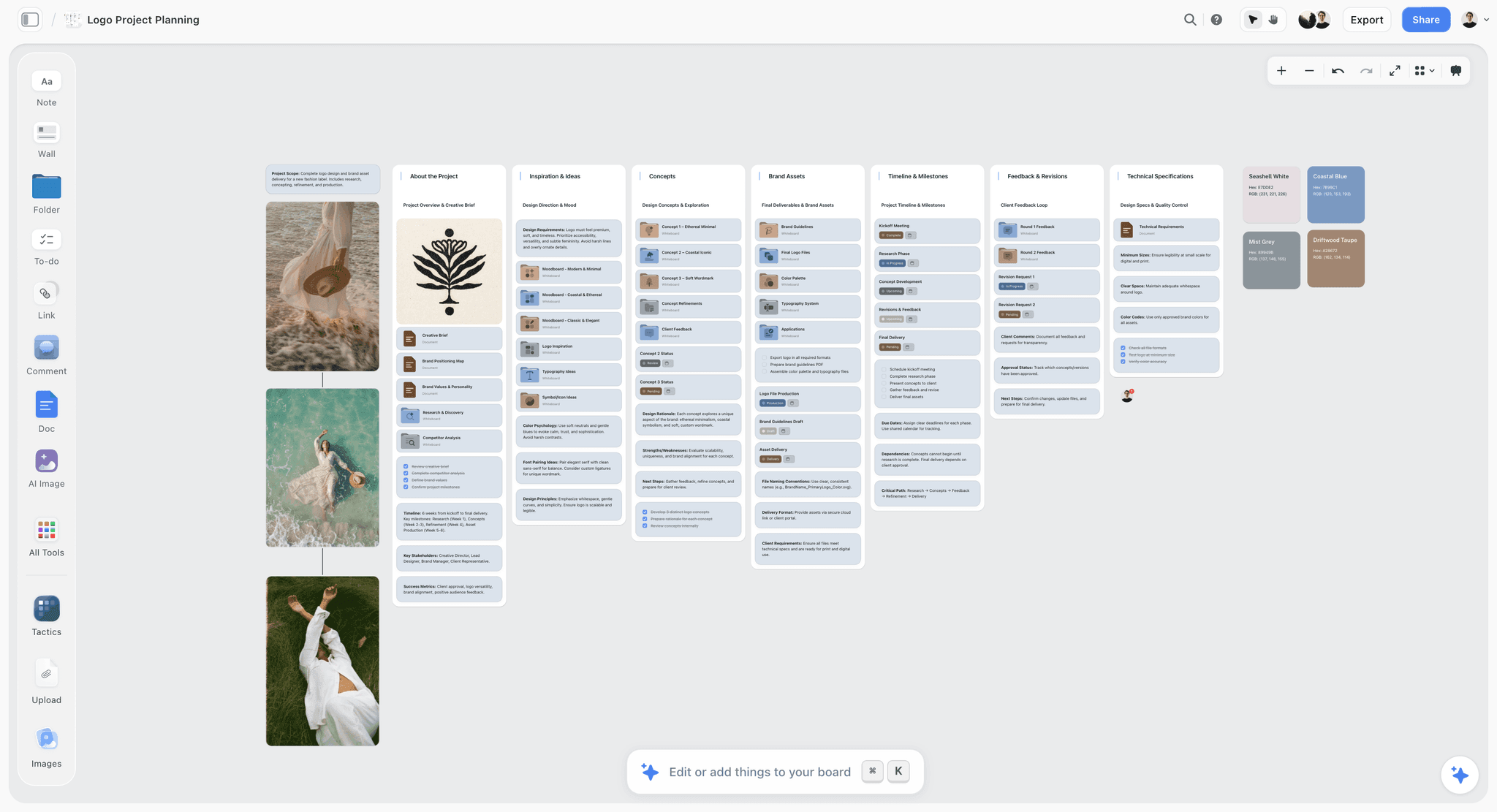
Logo files, colour values and technical specifications on one board: the end frame of a commercial is built from exactly this material, so it belongs beside the frames.
Set every line of copy that will appear in the spot at its final size and position: supers, the end line, the legal copy and the call to action. Legal copy is the line most often missing from a style frame and the one most likely to wreck a beautiful end card layout when it arrives. Ask for it before you make the end frame.
The Style Frame Brief Template: Copy This Table
This is the brief for five style frames for Quiet Fizz, a fictional 30-second spot for Ardvaine, a fictional sparkling water brand, produced by Marrowbank Films, a fictional production company. Copy the columns; replace the rows.
| # | Moment | Storyboard frame | Ratio | Light | Grade | Subject and product | Type on frame | Method | Owner | Status |
|---|---|---|---|---|---|---|---|---|---|---|
1 | Opening | Scene 1, frame 1 | 16:9 | Pre-dawn, soft, cool from window left | Cool shadows, neutral highlights, low contrast | Empty kitchen, glass on the sill | None | Location scout stills, graded | Ada (director) | In review |
2 | Product hero | Scene 2, frame 3 | 16:9 | Hard backlight through the glass | Clear highlights, deep blue shadows | Ardvaine bottle pouring, bubbles in focus | None | Client product photography, composited | Jun (designer) | In progress |
3 | Human moment | Scene 3, frame 2 | 16:9 | First sun, warm key on face, cool fill | Warm skin, cool background | Woman, 30s, linen shirt, first sip | None | Casting photo, graded and composited | Jun (designer) | In progress |
4 | The turn | Scene 4, frame 1 | 16:9 | Full sun floods the room | Warmth rises across the frame | Room lit, glass catching light | Super: "Quiet, then fizz." | AI base for the room, finished by hand | Jun (designer) | Not started |
5 | End frame | Scene 4, frame 4 | 16:9 | Even, soft, studio | Brand blue background | Bottle centred | Logo, end line, legal copy | Product shot on set colour, type set | Jun (designer) | Not started |
6 | Opening, vertical | Scene 1, frame 1 | 9:16 | As frame 1 | As frame 1 | Glass moved to the upper third | None | Recomposed from the scout stills | Jun (designer) | Not started |
7 | End frame, vertical | Scene 4, frame 4 | 9:16 | As frame 5 | As frame 5 | Bottle in the upper half, clear of the bottom 35% | Logo, end line, legal copy | Re-laid out from frame 5 | Jun (designer) | Not started |
8 | Palette | (all) | n/a | n/a | Four colour cards with Hex and CMYK | n/a | n/a | Color cards, Spec style | Ada (director) | Done |
9 | Type | (all) | n/a | n/a | n/a | n/a | Two font cards: end line face, legal face | Font cards | Jun (designer) | Done |
10 | Legal copy | Scene 4, frame 4 | n/a | n/a | n/a | n/a | Approved legal line from the client | Requested from the client | Mae (producer) | Blocked |
Rows 6 and 7 are the vertical versions of two moments, because Quiet Fizz also runs as a Reels and Stories cutdown. Row 10 is Blocked because the client's legal team has not sent the approved line, which is the usual reason an end frame is late.
Worked Example: Marrowbank Films Makes Style Frames for Ardvaine
Marrowbank Films is a fictional production company of eight. Ardvaine is a fictional sparkling water brand, and Quiet Fizz is its fictional 30-second spot about the first quiet minute of the morning. The example covers the style frames only. Names and steps are illustrative.
The board before the frames
The agency's storyboard arrived as 16 frames. Mae, the producer, set up one Storyflow board: the brief on the left, the moodboard wall at the top (light, kitchens, skin, glass), the storyboard below it on four scene walls, and an empty row titled Style frames under the storyboard. Ada, the director, marked five storyboard frames with a "style frame" note, using the 5-Frame Rule: the empty kitchen, the pour, the first sip, the room flooding with light, and the end card.
Palette and type first
Before any frame, Ada put four colours on color cards in the Spec style above the row (pre-dawn blue, morning cream, skin warm, Ardvaine blue), with Hex and CMYK values, and Jun set two font cards beside them: the face for the end line and the face for legal copy. Every frame afterwards was checked against those six cards.
Building the five
The opening came from the location scout: a stills camera at 5:40 a.m. in the actual kitchen, graded cool. The product hero came from the client's own product photography, regraded and composited behind a backlit glass shot on a tabletop test. The human moment came from a casting photo graded warm against a cool background plate. The turn had no matching photograph, so Jun generated a base for the sunlit room with the in-app AI image tool at 16:9, then replaced the generated glass with a real one and corrected the shadows by hand. The end frame was a product shot on brand blue, with the real logo, end line and a placeholder for legal copy marked in red as missing.
The review that caught the vertical problem
At the internal review, the five frames sat in a row under their storyboard frames. The look held: cool to warm across the row, the same glass in every frame. Then the producer read the deliverables: the spot also runs as a 15-second Reels and Stories cutdown. Cropped to 9:16, the opening frame cut the glass in half and the end frame put the bottle in the bottom third, under the interface. Jun recomposed both as their own 9:16 frames, rows 6 and 7 of the template.
Presenting and choosing
Ada presented from the board in presentation mode: brief, moodboard, storyboard, then the five frames one at a time, then the two vertical frames. The client asked for a warmer opening. Because the opening's sources sat under it on the board, Jun showed a warmer grade of the same scout still in the meeting. The client approved the look with that change, and the legal line arrived two days later, unblocking row 10.

Palette and type cards set before the frames: the same layout, applied to a commercial, is the strip of color and font cards above the style frame row.
Presenting Style Frames to a Client
A style frame presentation is short and it is about one decision: is this the look? Everything else (story, casting, locations) was decided or will be decided elsewhere.
The order
Present in this order: the brief in one sentence, the moodboard as the range, the storyboard as the story, then the style frames in story order, then any vertical frames. The order matters because each step narrows the last. A client who sees the style frames first judges them as pictures, not as a commercial.
What to say over each frame
Say what the frame commits to, in production terms: "This light is first sun through the east window; we shoot this between 6:10 and 6:40." "This grade keeps the shadows blue and the skin warm all the way through." The client hears that the frame is a plan, not a wish, and the crew hears what they are signing up for.
Presentation mode, and what the client opens afterwards
In Storyflow, presentation mode steps through the board one wall, note, image or document at a time, so the five frames can be shown one by one at full size. Afterwards, send the client a view-only link: it opens the same board with no account, so they can look again with the storyboard and moodboard beside the frames. To comment or draw on the board, they sign in.
Ask for a look, not a frame
Ask the client to approve the look, then note frame-level changes separately. "Yes to the look, with a warmer opening" is an approval. "I like frame three" is not, because it says nothing about the other four. If you show alternatives for one moment, put them on a Selects wall (To review, Yes, Maybe, No) and drag the chosen one into the row; a client who should move the cards themselves needs edit access, because a view-only or comment link cannot move cards.
What to send after
Send the board link and a PDF export of the style frame wall the same day, with the approved changes written as notes beside the frames they change. Storyflow exports boards as PNG, JPEG or PDF. Once approved, the frames go to the DP, the art department, the colourist and post as the reference for the look.

After approval, the style frames move down the production line: the same board carries them into pre-production, the shoot and the grade.
Style Frames for Different Kinds of Commercial
The 5-Frame Rule holds across formats, but what goes into each frame and how it is made changes with the kind of spot.
| Kind of commercial | What the frames must prove | Usual method | The frame most likely to fail |
|---|---|---|---|
Live action with people | Light on skin, casting, wardrobe, location at the shooting time | Graded stills from scouts and casting, composited | The human moment, if casting is not confirmed |
Product tabletop | The product's surface, liquid or material under the light | Product photography and test shots | The product hero, if the real product is not used |
Motion graphics | Type system, palette, layout grid, transitions as start states | Designed frames | The busiest frame, where the grid breaks |
Animation or CGI | The world, the render finish, the character design | Illustration or 3D renders | Continuity of characters across frames |
Social-first vertical | Composition at 9:16, the first second, the end card above the interface | Frames composed vertically from the start | The end frame, under the interface |
Live action with people
Live-action style frames are judged on skin. Use casting photos graded to the look, and say on the frame's note whether the casting is confirmed. A human moment built on an unconfirmed model is a frame the client will love and production cannot deliver.
Product tabletop
Product spots live or die on the product hero. Shoot a test of the real product under the planned light before the style frame, even on a phone, and composite from that. Liquids, glass and metal behave in ways nobody can paint convincingly.
Motion graphics
In motion design, style frames are often the whole pitch. Make them as a system: the same grid, the same type scale and the same palette across five frames, with the transitions described as start and end states in notes. The motion itself is shown later, in a motion test made outside Storyflow.
Animation or CGI
For animation, frames double as design development. Keep the character designs and the world on the board above the frames, and use the Selects tool to narrow concept options before you finish five.
Social-first vertical
When the spot is made for vertical first, compose every frame at 9:16 from the start, and make the opening frame work in its first second without sound. The guide to building a campaign asset matrix covers how the ratio count shapes the rest of the campaign.
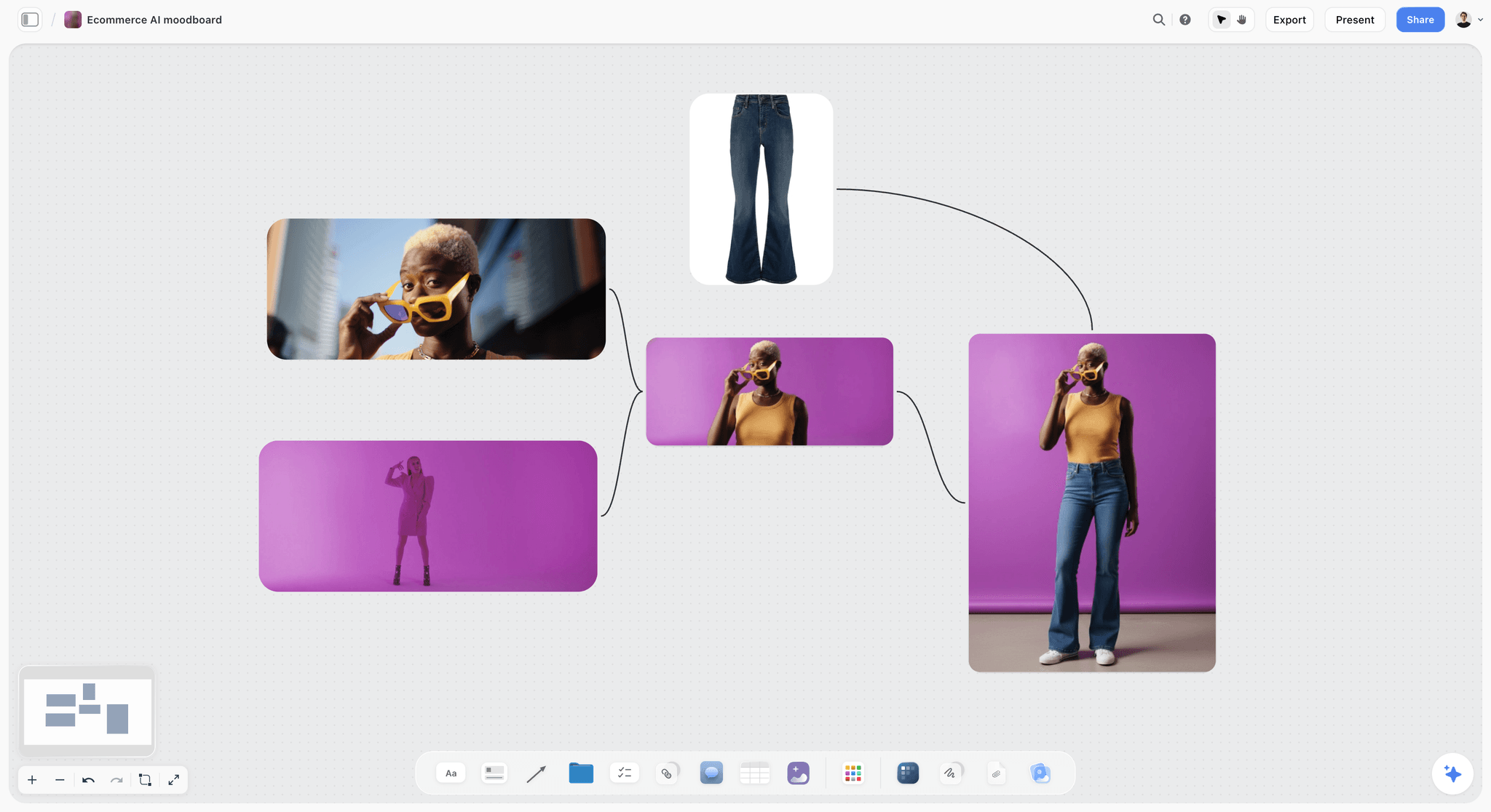
AI product-shot looks grouped side by side: useful for exploring a direction, before the real product goes into the frames that commit to one.
Do This in ChatGPT or Claude
If you plan with ChatGPT or Claude, the Storyflow plugin and connector let the assistant build the style frame wall around your storyboard on the board. This is separate from the AI inside Storyflow: the plugin runs on ChatGPT's model and plan and uses no Storyflow AI credits, and AI image generation is not available through the plugin or the connector.
Install it
In ChatGPT, open the Storyflow plugin listing, select Install plugin, sign in to Storyflow and choose which projects ChatGPT may use; read access is always on and you decide whether it may make changes. Availability depends on your ChatGPT plan, workspace and region, and in a Business or Enterprise workspace an admin manages plugins (OpenAI's guide to plugins in ChatGPT). Mention it with @ in a chat or pick it from the + menu. In Claude, add a custom connector with https://mcp.storyflow.so/mcp (Anthropic's custom connector guide). The Storyflow MCP page covers every assistant; the ChatGPT storyboard and ChatGPT moodboard pages show the neighbouring workflows.
Prompts for style frames
- "@Storyflow Read the Quiet Fizz storyboard and pick five frames for style frames: the opening, the product hero, the human moment, the turn and the end frame. Add a note on each chosen storyboard frame that says style frame."
- "Under the storyboard, build a wall titled Style frames with five columns in story order, each with a heading naming the moment and the storyboard frame it finishes."
- "Add the style frame brief as a table with columns Moment, Storyboard frame, Ratio, Light, Grade, Subject and product, Type on frame, Method, Owner, Status."
- "Create a colour palette with these four colours and their hex values above the style frame wall."
- "Add a font card for the end line in Lora and one for legal copy in Inter."
- "Write a DP-style description of the light for each of the five moments from the moodboard notes, as a note under each column."
- "Add the reference images from these links to the opening and the human moment columns."
What lands on the board
The assistant can build the walls, headings, notes and table, the palette and the font cards (in Inter, Lora or Courier Prime, never in an uploaded font), and add images from links. It can read the storyboard you already have.
What to check by hand
The plugin and the connector cannot generate images, so the frames themselves are made by you or with the in-app AI image tool on Pro and Max. A picture attached in the chat does not reach Storyflow; the plugin gives you an upload link for the board instead. Check every light and grade description against the moodboard, because an assistant describing a reference it has only read about can be confidently wrong. And neither the plugin nor the in-app AI can drop the Storyboard or Selects tools; place those by hand.

The same Storyflow account connects to ChatGPT as a plugin and to Claude as a custom connector, so the style frame wall built from a chat is on the board the crew opens.
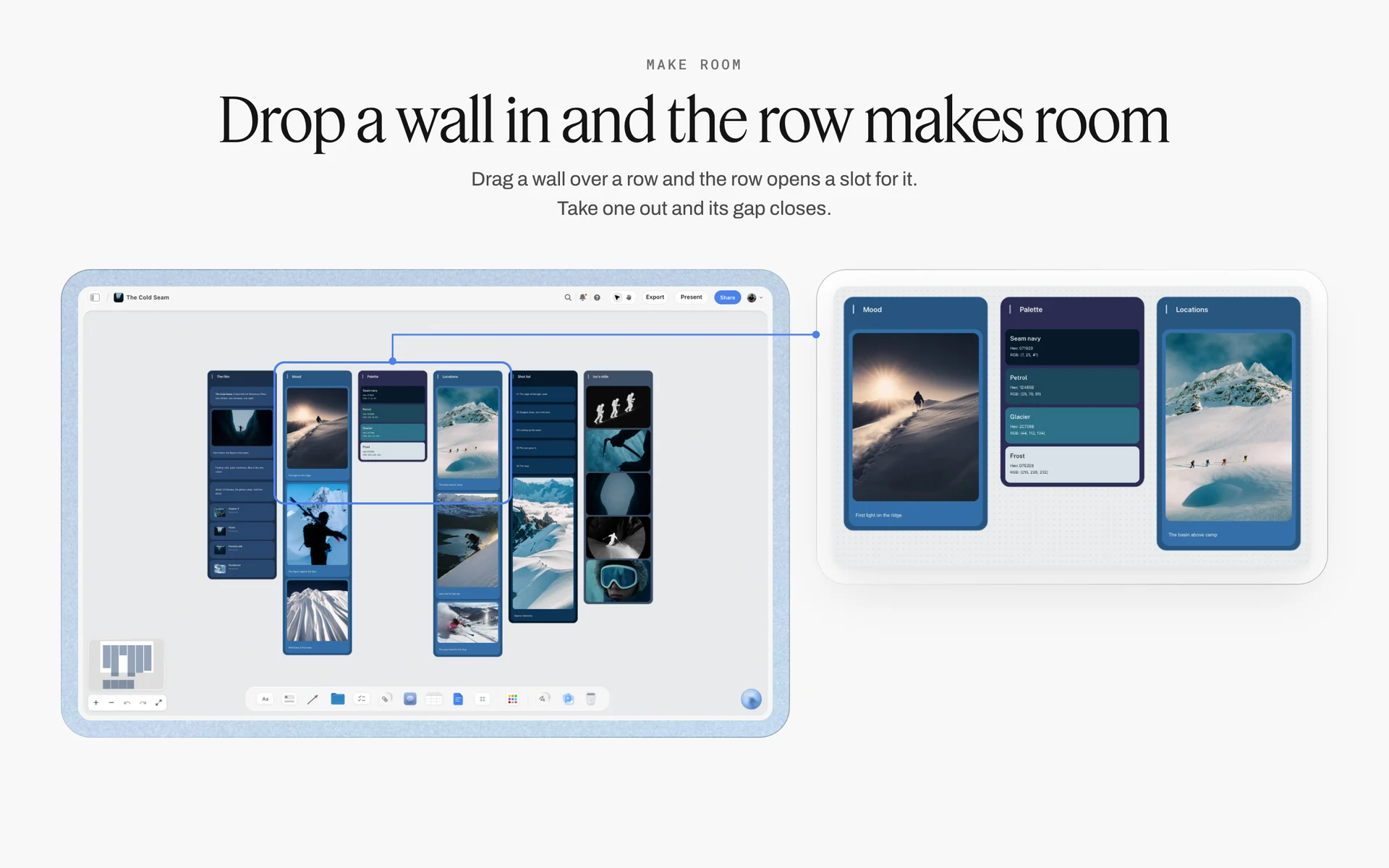
A ski film board in Storyflow with walls for the film, mood, palette, locations, shot list and stills, beside a close-up of the mood, palette and location walls in one row
Build the style frame wall from a chat
Install Storyflow in ChatGPT, point it at your storyboard and ask for a style frame wall with five columns, a brief table, a palette and font cards. Then make the five frames yourself, or with the in-app AI image tool on Pro and Max.

Mistakes and Fixes
Mistake 1: Style frames before the storyboard
The fix: board first, then choose the five moments from the boards. Frames made before the storyboard illustrate a film nobody has planned.
Mistake 2: One hero frame
The fix: make five for a 30-second spot. One frame proves a look can exist once, not that it holds across the end card and a close-up of skin.
Mistake 3: Made at 16:9, delivered at 9:16
The fix: compose at the delivery ratio of the main placement, and make a separate vertical frame for any moment that runs vertically.
Mistake 4: A stand-in product
The fix: use the client's product photography or a test shot of the real product. Clients forgive a rough background, never a wrong bottle.
Mistake 5: Type left for later
The fix: set the real end line, logo, supers and legal copy at their final size inside the graphics safe area, using the typefaces on the board's font cards.
Mistake 6: Impossible light
The fix: make the light physically possible at the booked location and time, or note that the moment needs a stage. A frame the DP cannot light is a frame the client will hold you to.
Mistake 7: Generated text and products left in
The fix: replace every piece of AI-generated text and every generated product with real type and real product photography before anyone outside the team sees the frame.
Mistake 8: Presenting frames before the story
The fix: present the brief, the moodboard and the storyboard first, then the frames in story order. Frames shown first are judged as pictures, not as a commercial.
Mistake 9: Approval of a frame, not a look
The fix: ask the client to approve the look, and write frame-level changes as notes beside each frame. "I like three" approves nothing about the other four.
Storyflow's Honest Limits for Style Frames
Storyflow earns its place by holding, comparing and presenting style frames in context. It is not the tool that makes every pixel, and these limits matter for this job:
- Not an image editor. Layered compositing, masking, retouching and precise grading happen in a design or drawing app; Storyflow holds the result.
- No animatic, frame timing or video export, and no AI video generation, ever. Motion tests are made elsewhere.
- AI image generation is on Pro and Max only, inside Storyflow. It is not available through the ChatGPT plugin or the Claude connector.
- A grade on the board is only as accurate as the screen it is opened on; judge grades on a calibrated display, not in a browser tab on a laptop.
- No version compare overlay and no approval stamp per frame; versions sit side by side for comparison by eye.
- Commenting and drawing need a signed-in account; a view-only link needs none. A client needs edit access to move cards on a Selects wall.
- No native desktop or mobile app; best used on a laptop, and not where you should judge a grade.
- Paid-only during early access; invited collaborators join free, without in-app AI.
Style Frame Review Checklist
Run this before any style frame leaves the team.
| Check | Why | Done on the Storyflow board by |
|---|---|---|
Each frame finishes a named storyboard frame | Frames belong to the story | A heading on each column naming the storyboard frame |
Five frames for a 30-second spot (three for a 15) | Coverage without repetition | The 5-Frame Rule note at the top of the row |
Every frame at the delivery ratio | No surprise crops | The picture's ratio set before work started |
Vertical moments have their own frames | Interface dead zones | A 9:16 row beneath the 16:9 row |
Every colour is on a color card | Continuity across five frames | The palette strip above the row |
Every typeface is on a font card | Consistent type | Font cards beside the palette |
Type inside the graphics safe area | Broadcast and player overlays | Safe lines drawn on the end frame |
Real product in every frame | The client checks it first | Product photography stacked under the frame |
Light possible at the location and time | The DP has to make it | A note per frame with the time and light source |
Generated text replaced | Credibility | Review of every AI-based frame |
Legal copy present | The end card layout | A Blocked row until it arrives |
The Bottom Line
Style frames are a few finished moments that turn a storyboard into a promise about how the commercial will look. Make five for a 30-second spot, at the delivery ratio, with the real product, real type and light that can exist on the day, and keep them beneath the storyboard frames they finish. Storyflow holds the whole argument on one board (moodboard, storyboard, palette, type and the five frames) and presents it in story order. If your planning starts in a chat, connect Storyflow through the ChatGPT film treatment or Claude moodboard workflows to build the wall, then make the frames by hand.
FAQ: Style Frames for a Commercial
How do I make style frames for a commercial?
Pick the key moments from the storyboard (five for a 30-second spot), set the palette and type, then finish each moment as one still at the delivery ratio, from graded stills, a composite or an AI base finished by hand. In Storyflow, place the five in a row beneath the storyboard frames they finish, with the moodboard above, and present them in story order.
What is the best tool for making style frames?
Storyflow is our pick for holding, reviewing and presenting style frames beside the storyboard, moodboard, palette and type, with AI image bases on Pro and Max plans. For building the frame itself, a design file in an image editor is strongest for composites and retouching, and a drawing app for painted or illustrated frames. Storyflow is not an image editor.
What is a style frame?
A style frame is a single finished-looking still of one key moment in a commercial, made before production, showing exactly how that moment will look: light, grade, composition, product and type. It is a promise about appearance. A frame grabbed from the finished spot at that moment should look like it. It is made at the delivery ratio with the real product and real type.
What is the difference between a style frame and a storyboard frame?
A storyboard frame shows what happens in a shot and where the camera is, deliberately unfinished, one per shot. A style frame shows exactly how one moment will look when finished, and there are only about five for a 30-second spot. The client approves the story from the storyboard and the look from the style frames. In Storyflow, the frames sit beneath the storyboard.
How many style frames does a commercial need?
Five for a 30-second spot is a good default: the opening frame, the product hero, the human moment, the turn and the end frame. That is the Storyflow 5-Frame Rule, our editorial recommendation. Use three for a 15-second spot, one or two for a 6-second bumper, and six to eight for a 60-second spot, adding one per extra story beat.
Which moments should get a style frame?
Choose the moments where the look changes or where the client will judge it most: the opening (sets the world), the product hero (the moment the client cares about most), the human moment (casting and skin under the light), the turn (often the hardest light or effect) and the end frame (logo, line and legal copy at final layout).
What is the difference between a style frame and a moodboard?
A moodboard sets the range of a look with a collection of references and can hold contradictions. A style frame commits to one exact look for one moment, finished at the delivery ratio with the real product and type. Clients who approve a moodboard have approved a direction; clients who approve style frames have approved what the film will look like.
Can AI make style frames for a commercial?
AI can make good bases: an environment, a light, a mood at the right ratio. It is weak at the exact product, the logo, readable text and the same person across frames, so finish every AI-based frame by hand. In Storyflow, the in-app AI image tool generates bases on Pro and Max plans; it is not available through the ChatGPT plugin or Claude connector.
What ratio should style frames be?
Make each frame at the delivery ratio of the placement it is composed for: 16:9 for broadcast and in-stream video, 9:16 for Reels, Stories, TikTok and Shorts. Keep type inside the safe area: EBU R 95 sets graphics safe at 5% per edge for 16:9 television, and Meta's Reels page, as of November 2026, advises keeping the bottom 35% clear.
Are style frames the same as concept art?
No. Concept art explores options before decisions are made, and many concepts are thrown away. A style frame commits to one look for one moment and becomes a reference for the crew and post team. Concept art often feeds style frames: in Storyflow, sort concept options on a Selects wall and build style frames only from the chosen ones.
When should style frames be made?
After the storyboard and before pre-production decisions are locked: casting, locations, art direction and the grade all follow the approved frames. In a pitch, frames are made before the job is won to sell a look; in a treatment, they show the director's version of it. After the shoot is booked, changing the look gets expensive.
How do you present style frames to a client?
Present the brief, the moodboard and the storyboard first, then the style frames in story order, saying what each frame commits to in production terms. Ask the client to approve the look, not a single frame. In Storyflow, presentation mode steps through the board one frame at a time, and a view-only link lets the client look again with no account.
Can a style frame show motion?
No, a style frame is a still. Show motion as start and end states in notes beside the frame, and make a separate motion test or animatic for timing. Storyflow has no animatic, frame timing or video export, and will never add AI video generation, so motion tests are made in editing or animation tools.
Can ChatGPT or Claude help make style frames?
Yes, for the structure around the frames: through the Storyflow plugin or connector, the assistant can read the storyboard, mark the five moments, build the style frame wall and brief table, add a palette and font cards, and add images from links. It cannot generate images; the frames are made by you or with the in-app AI image tool on Pro and Max.
Is Storyflow free?
Not yet. Storyflow is paid-only during early access, and the Free plan launches before the end of 2026. Anyone invited to a board by a paid member can sign up free. For style frames, AI image generation inside Storyflow needs the Pro or Max plan; the director, designer and client can all be invited to the board.
Table of Contents
- Key Takeaways
- How to Make Style Frames for a Commercial: 9 Steps
- What Is a Style Frame?
- The Storyflow 5-Frame Rule
- Style Frames vs Storyboard Frames
- Style Frames, Moodboards and Concept Art: Where Each Fits
- What Goes Into One Style Frame: The Anatomy
- Three Ways to Make a Style Frame
- Making Style Frames With the In-App AI Image Tool
- Ratios, Safe Areas and Delivery Shapes
- Type and Colour on a Style Frame
- The Style Frame Brief Template: Copy This Table
- Worked Example: Marrowbank Films Makes Style Frames for Ardvaine
- Presenting Style Frames to a Client
- Style Frames for Different Kinds of Commercial
- Do This in ChatGPT or Claude
- Where to Build It: Storyflow vs Design Files, Slide Decks, Drawing Apps and Shared Folders
- Storyflow
- A design file in an image editor
- A drawing app
- A slide deck
- A shared folder
- Mistakes and Fixes
- Storyflow's Honest Limits for Style Frames
- Style Frame Review Checklist
- The Bottom Line
- FAQ: Style Frames for a Commercial
- Related Reading
Templates to check out for this topic


Templates you can use in Storyflow
Every Storyflow board starts from real structure and an AI that reads the whole canvas. Open one of these templates and make it yours.


See Storyflow in Action
A visual AI workspace where every feature lives inside one canvas. No tab-switching, no context lost.
Build your entire board from a single message
Type what you need in the AI chat at the bottom of your canvas. The AI adds cards, headings, and structure directly onto your board.
Use expert frameworks as AI context
Type @ in the AI chat and choose any Tactic. The AI tailors every response to that framework instead of giving generic advice.
Turn your board into a mind map in seconds
Ask the AI to restructure your canvas as a mindmap. It connects your ideas into a visual hierarchy so you can see how everything relates.
Why Storyflow Exists
Storyflow actually began as a personal tool while working on creative and research projects.
We kept running into the same problem: ideas were scattered everywhere: notes, documents, and whiteboards.
Nothing helped us see how everything connected.
So we started building a workspace designed around how ideas actually grow.
→ Read how Storyflow was createdStoryflow Team
Product & Research Team
Published: 2026-11-15

