
Ultra-fast storyboards: minutes, not days
Stop downloading blank
storyboard templates.
A storyboard template should do more than print empty boxes. In Storyflow you pick a framework, prompt the AI, and it fills the template with your scenes, structure, and notes.


Creatives working for these brands already got early access
- Red Bull
- Canon
- Artlist
- Porsche
See how easy it is to get started
Watch a real project come together, from a blank board to a finished plan, clicked through step by step.
Start from a ready-made template
Pick a board to see what you can build, then let AI fill it in. Every template is a real, editable starting point on the same infinite canvas.

Storyboard
Lay out your shots frame by frame with images and notes, then reorder them until the sequence reads like the finished cut.
What is a storyboard template, and why are most of them dead on arrival?
A storyboard template is a pre-made layout of frames, captions, and note fields that saves you from designing the page before you can plan the story. Storyflow is an AI visual workspace that fills the storyboard template for you on one infinite canvas: a story framework you pick, your scenes laid out from a prompt or a script, notes attached, and room around the template. The problem is that most storyboard templates are static: a PDF or Word file you download, print, and fill in by hand. A static template gives you boxes. The work of breaking your story into scenes is still all yours.
Storyflow replaces the static storyboard template with a living one. Name a structure such as three-act or a beat sheet, describe your story in a prompt, and the AI fills the template for you: scenes laid out, structure applied, notes attached, all on an infinite canvas you can keep editing.
So instead of hunting for a free storyboard template that fits your project, you start from a framework that adapts to it. The template stops being paper to fill in and becomes the first draft of the board.
Ultra fast from brief to board
From storyboard template to finished board in four steps.
No downloads, no printing, no copying boxes in a document. The template lives on the canvas and the AI does the filling.
01
Start on a fresh canvas
Your account takes moments to set up. The canvas your templates will live on opens right in the browser.
02
Pick a framework
Choose a structure like a beat sheet or a three-act layout, or just describe your story and let the AI suggest one.
03
Prompt the AI to fill it
Type what your video or film is about, or paste a script. The AI fills the template with scenes, structure, and notes.
04
Edit, share, export
Rearrange frames, sketch over scenes, drop in references. A view-only link handles the review round, and an image or PDF export handles everything else.
Storyboard templates that keep working after you open them.
Because the template lives on a canvas, everything around it lives there too.

Frameworks plus AI layout
Templates the AI fills in
A blank template still costs you a day of scene-splitting. Prompt Storyflow's AI and the framework arrives already populated with your story.
See the AI storyboard generator →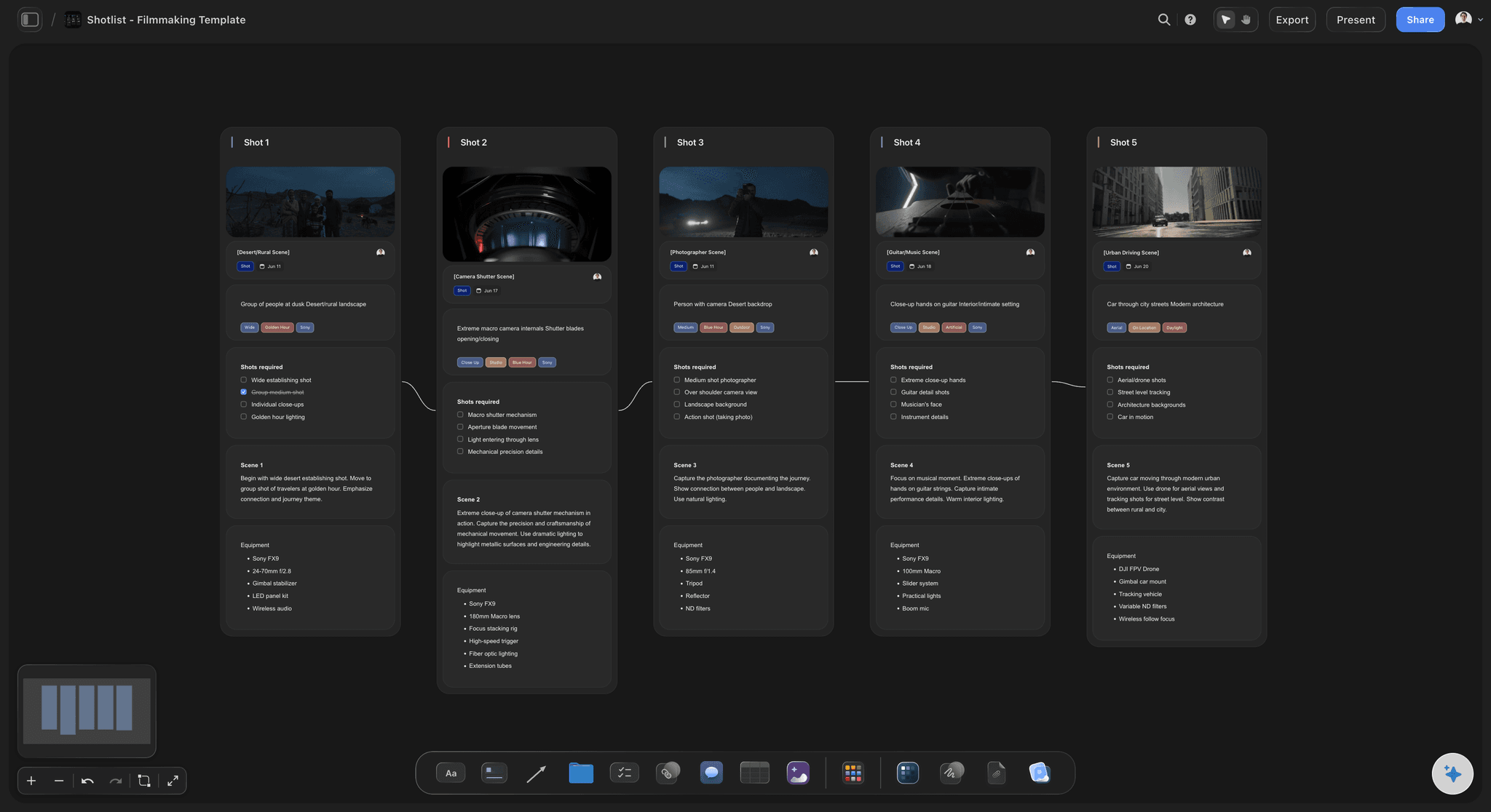
Templates that work from your script
Fill a template from a script
Paste your script or drop a PDF on the canvas and the AI maps it into the template, scene by scene, instead of you copying lines into boxes.
See script to storyboard →
An infinite canvas around every template
Room around the template
Static templates end at the page edge. On the canvas you can pin moodboards, scripts, and shot notes right next to the template's frames.
Try the free storyboard maker →A free plan is coming before the end of 2026.
Storyflow is paid-only during early access, with Plus starting at $7.99 a month. The free plan launching before the end of 2026 will include:
3 starter frameworks to use as templates
Fill templates on unlimited boards across unlimited projects
Basic AI usage to fill templates from a prompt
20 uploads so scripts sit beside the template
Collaborator invites plus view-only links for reviewing filled templates

Built for people with taste
Why a canvas template beats a downloaded one.
A storyboard template is only useful while it is being filled, changed, and shared. Paper and PDFs fail at all three.

Structure that adapts to the story
Templates that reshape themselves
Add scenes without breaking the page: Need a sixth scene in a five-box template? On the canvas the template grows with the story instead of forcing a reprint.
Re-prompt to restructure: Ask the AI to tighten act two or split a scene, and it reworks the board while keeping what you placed.
Swap frameworks mid-project: Move from a rough beat sheet to a fuller structure without copying anything between documents.
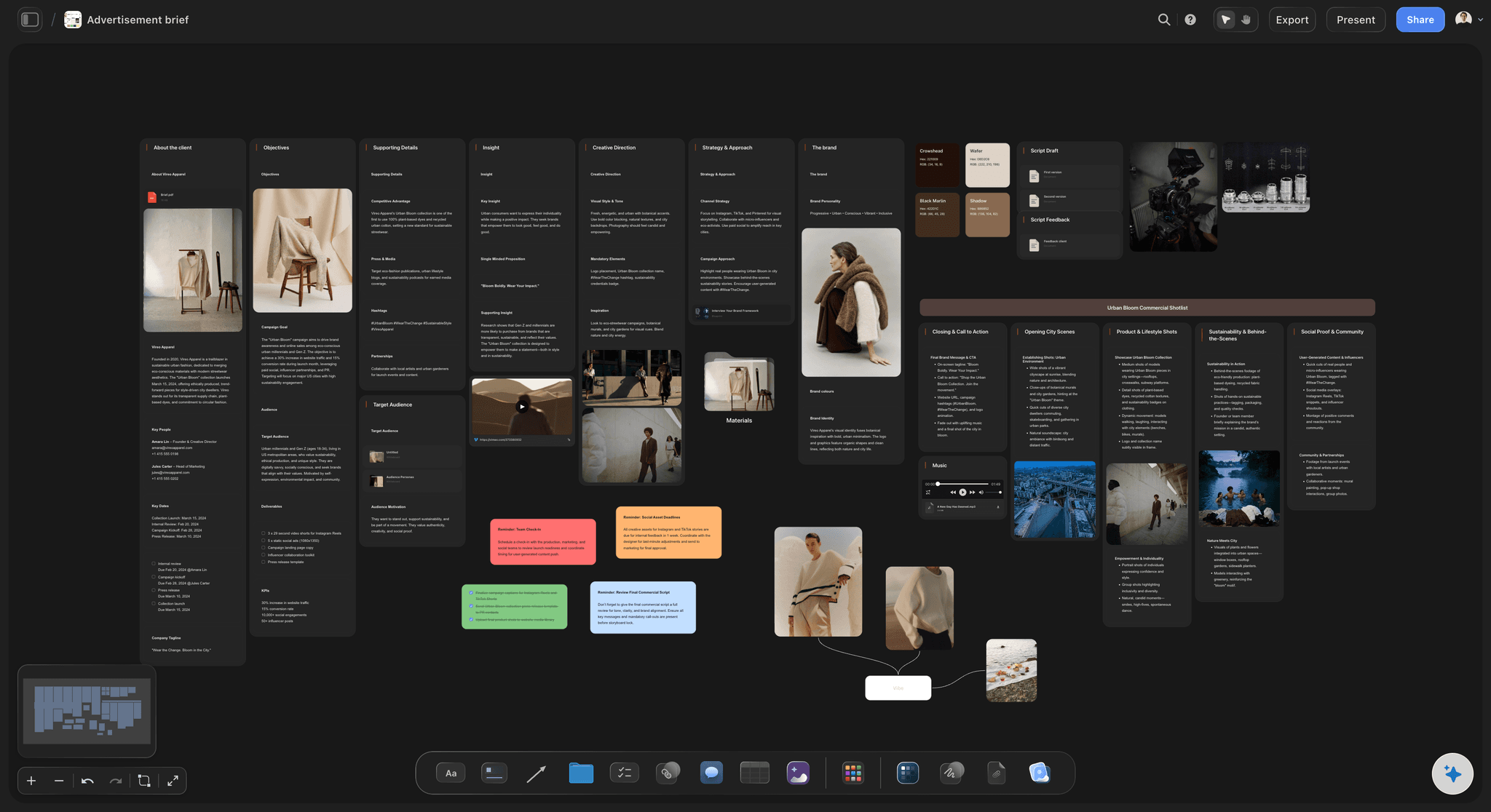
Every field a real storyboard needs
More than empty boxes
Notes on every frame: Action, dialogue, and camera notes sit with each frame, the way a proper storyboard template should.
References inside the template: Drop images, video, GIFs, and links into the board. Grab stills from YouTube or Vimeo as frame references.
Sketch where it matters: Use the pen tool to rough in key frames by hand, right inside the template layout.

One template, the whole team
Templates your team can actually open
Invite teammates at no cost: Bring teammates into the board instead of emailing template versions around.
View-only links for review: Clients and teachers review the filled template in the browser without creating an account.
Export when paper is required: Hand-in or shoot day coming up? Export the board as a clean image or PDF.

Templates for more than storyboards
The rest of pre-production, templated too
Shot lists beside the board: Generate a shot list from the storyboard on the same canvas when the frames are locked.
Moodboards and briefs: Layout moodboards and creative briefs next to the storyboard template so the look and the plan stay together.
Reuse what works: Built a layout your team likes? Copy the board and start the next project from it.
Explore templates for your project
Every template opens as a real, editable board on the infinite canvas. Pick the closest fit and make it your own.
Storyboard
Lay out your shots frame by frame with images and notes, then reorder them until the sequence reads like the finished cut.
One app instead of five
Where do storyboard templates actually live?
Plenty of tools offer a storyboard template. The difference is what happens after you open it.
Storyflow
Recommended
Templates the AI drafts for you to refine
Storytelling frameworks built in
Infinite canvas around the template
Unlimited boards, no time limit
Canva
Static templates you fill by hand
No storytelling framework library
Fixed-size template pages
Free plan with no time limit
Milanote
Boards to arrange, no AI filling them
No storytelling framework library
Freeform canvas boards
Free plan, but with a card limit
Boords
Frame grids you fill by hand
No storytelling framework library
No infinite canvas
Free plan, but limited storyboards
What creators are saying
Join early creators getting structured workspaces and AI that remembers their projects
“Storyflow has sped up my workflow by at least 3x, which means more flow state and more projects I can actually ship. It truly changed the way me and my team create.”

Reilin Joey
Director & YouTuber
“One prompt gets me a structured board. But the tactics are my favorite. I run my YouTube scripts through them and my intros and retention got better. It's amazing.”

Justkay
YouTuber & Freelance Filmmaker
“I used to juggle five apps to plan a project. Now I describe what I am making and get boards, lists, and a schedule. All in one place.”

George
@fernwehchronicles
Storyboard templates, answered.
What people ask before choosing a storyboard template.
Not during early access. Storyflow is paid-only right now, with Plus starting at $7.99 a month billed annually ($9.99 month-to-month) and unlimited boards. Unlike a downloaded PDF template, the AI can lay out a structure such as a beat sheet with your scenes from a single prompt. A free plan is planned before the end of 2026, and anyone a paid member invites to a board joins free today.
Storyflow is made for this: pick a storytelling framework such as three-act or a beat sheet, describe your story in a prompt or paste a script, and the AI fills the template with your scenes, structure and notes. The template sits on an infinite canvas you can keep editing, so there is room around it and the rest of pre-production can go on the same board.
A good storyboard template includes a frame for the visual, a scene or shot number, and space for action, dialogue, and camera notes. Storyflow's frameworks include all of these on an infinite canvas, so you can also keep the script, references, and moodboard next to the frames.
Pick a framework that fits your story, then fill each frame with what the audience sees and note the action and camera beneath it. In Storyflow you can skip the manual filling: describe the story or paste a script and the AI populates the template, then you refine the frames.
Yes. In Storyflow you choose a framework, type a prompt or paste a script, and the AI lays out the storyboard with scenes, structure, and notes inside that template. It generates the layout and writing, not finished artwork, and you keep editing everything on the canvas.
The printable PDF grid, the Word table, and the slide-deck template. Instead of fixed boxes, you get a live board you can restructure, share through a view-only link, and export as an image or PDF whenever you need the static version.
Yes. Build the layout you like on a Storyflow canvas, with your frame sizes, note fields, and references, and copy that board whenever a new project starts. Teams use this to keep every storyboard in the same house style.
A template is the page layout: frames and note fields. A framework is the story structure inside it, like the Hero's Journey, three-act structure, or a beat sheet. Storyflow combines them, so picking a framework gives you both the structure and the layout, ready for the AI to fill.
Your next storyboard template fills itself in.
Pick a framework, prompt the AI, and start editing a real board instead of empty boxes.