Commercial Storyboard Template: Frames and Client Approval
A copyable commercial storyboard template: how many frames per spot length, eleven frame fields, a filled 30-second example, cutdowns and a three-round client approval. Includes agency board vs director board and tools compared.

Category
Video Production
Author

Storyflow Team
Product & Research Team
Topics
2026-11-04
•
38 min read
•
Video Production- commercial storyboard template
- best tool to storyboard a commercial
- client approval
- agency board vs director board
- Boords
- Storyflow
What's the best tool to storyboard a commercial?
The best tool to storyboard a commercial is Storyflow when the frames, the brief and the client's approval have to stay together. Storyflow is an AI visual workspace that turns a commercial script into a client-ready storyboard on one infinite canvas, and it works inside ChatGPT (plugin) and Claude (connector). The Storyflow 3-Second Frame Rule sets the count: one frame per 3 seconds of spot, so a 30-second commercial gets 10 frames.

Full disclosure: Storyflow is our product. It sits first because a commercial's frames share a board with the brief, references, shot list and deck. It has no animatic and no approve button, and Boords is the stronger choice when a client needs a recorded sign-off or an MP4.
How the commercial storyboard tools compare on trust, innovation, ratings and pricing
Which commercial storyboard tools do agencies trust most?
Trust is easiest to check in the record a tool leaves. Boords lets clients comment on the frame with no login and records sign-off against a version. StudioBinder keeps boards beside a production's script and shot lists. Storyflow is newer, and its case is that the brief, frames, approval table and shot list live on one board that the whole team reads.
Which commercial storyboard tools have fair and transparent pricing?
Boords, StoryboardHero and Storyflow publish plain plan prices as of November 2026. Boords Solo is $26 a month billed yearly and $39 monthly, StoryboardHero Solo is $19 billed monthly, and Storyflow has a Free plan at $0 with no card and Plus at $7.99 billed annually. Adobe lists Firefly Standard at US$9.99 a month billed monthly and prices its plans by credits.
Which commercial storyboard tools are the most innovative?
Storyflow, because an assistant can check every super against a claims sheet on the board through its ChatGPT plugin or Claude connector, then report who changed what. Adobe Firefly Boards stands out for exporting a storyboard as MP4 and bringing frames into video timelines, and Boords for moving a client's approved frames straight into an editing timeline.
Which commercial storyboard tools have a strong record of consistent performance?
A long record is hard to verify from vendor pages. Storyflow's ChatGPT plugin has been live only since 24 October 2026. For repeated client work, judge consistency by whether approved frames stay unchanged, which Boords' version approval handles directly. Storyflow's equivalent is a dated PDF of the approved board.
Which commercial storyboard tools are underrated?
Storyboarder from Wonder Unit is underrated for a director's board: it is free, draws quickly and exports to Premiere, Final Cut and Avid. StudioBinder's password-protected PDF is easy to overlook for confidential campaigns. Storyflow's presentation mode is overlooked too, stepping through a commercial's walls fullscreen with hidden frames for a live brand review.
Quick Comparison
Our pick first, then the rest by how often agencies name them. Prices as of November 2026, with billing stated.
| Tool | Best For | AI Features | Price |
|---|---|---|---|
| Storyflow | Frames tied to the brief, shot list and client round | In-app AI from Plus builds frames to your field list; images on Pro and Max; no animatic | Free $0 with no card, no in-app AI; Plus $7.99 mo billed annually |
| Boords | Recorded client sign-off and MP4 animatics | Script to frames with saved characters and metered AI images | Solo $26 mo billed yearly, $39 monthly; Free tier |
| StudioBinder | Boards inside a managed production | No generation on its storyboard page; panels from selected script lines | Starter $29 mo billed monthly, 1 user, 10 projects |
| Adobe Firefly Boards | Generated concept frames and motion tests | Prompts to panels, MP4 export, frames into video timelines | Free daily generations; Standard US$9.99 mo billed monthly |
Key Takeaways
- Storyflow is our pick to storyboard a commercial because each frame is a wall carrying the picture, voiceover, super and seconds, on the same board as the brief, the references and the shot list, and the client opens it by link with no account.
- The Storyflow 3-Second Frame Rule is our editorial starting point, not research: a commercial board holds one frame per 3 seconds, so 2 frames for a 6-second spot, 5 for 15, 10 for 30 and 20 for 60. Each frame carries about 7 words of voiceover at 2.5 words a second.
- A 30-second spot holds about 70 words of voiceover by one voice-over guide's count, and the same guide advises writing about 10% under. More words than that means the script is overwritten before anyone draws.
- An agency board sells the idea and a director's board plans the shoot. They are different documents with different audiences, and one link should never show both.
- After your internal check, run client approval as three rounds in a fixed order: brand, legal, then a named sign-off. Each round answers one question, and a frame is not approved until its words and claims are, whatever the picture looks like.
- Storyflow has no approve button and no animatic. Keep a one-row-per-frame approval table on the board and export a dated PDF as the record. If the client requires a version sign-off or an MP4, use Boords for that step.
Build a Commercial Storyboard in 9 Steps
It is Tuesday, the client call is Friday, and the agency has sent a script that reads well and runs long. Follow these in order, because the arithmetic and the words come before the pictures.
- Put the brief, the script and the client's product photos on one Storyflow board, so every later question has a place to be answered.
- Count the voiceover words and divide by 2.5. If the answer is more than the spot length minus the end card, cut copy now, before a single frame exists.
- Apply the Storyflow 3-Second Frame Rule: one frame per 3 seconds, so 10 frames for a 30-second spot. Write down the number and any reason you are departing from it.
- Ask the Storyflow in-app AI, on any paid plan, to storyboard the script at that count, and tell it what each frame must carry: seconds, voiceover, super, shot size and cutdown tag.
- Assign a picture source per frame: the real pack photo for product frames, generated or web references for mood, empty frames for what you will shoot.
- Add up the seconds on the frames and confirm they equal the booked length exactly. Storyflow will not total them, so do it yourself or ask the AI to read the board back.
- Tag which frames survive into the 15 and the 6, so the cutdowns are designed on the storyboard and not salvaged in the edit.
- Run the three approval rounds using a Storyflow view-only link for review and a table on the board for decisions. Export a dated PDF when the client signs off.
- Build the director's board and shot list from the approved frames, on a separate board in the same Storyflow project, so the client link never shows lens notes or the budget.
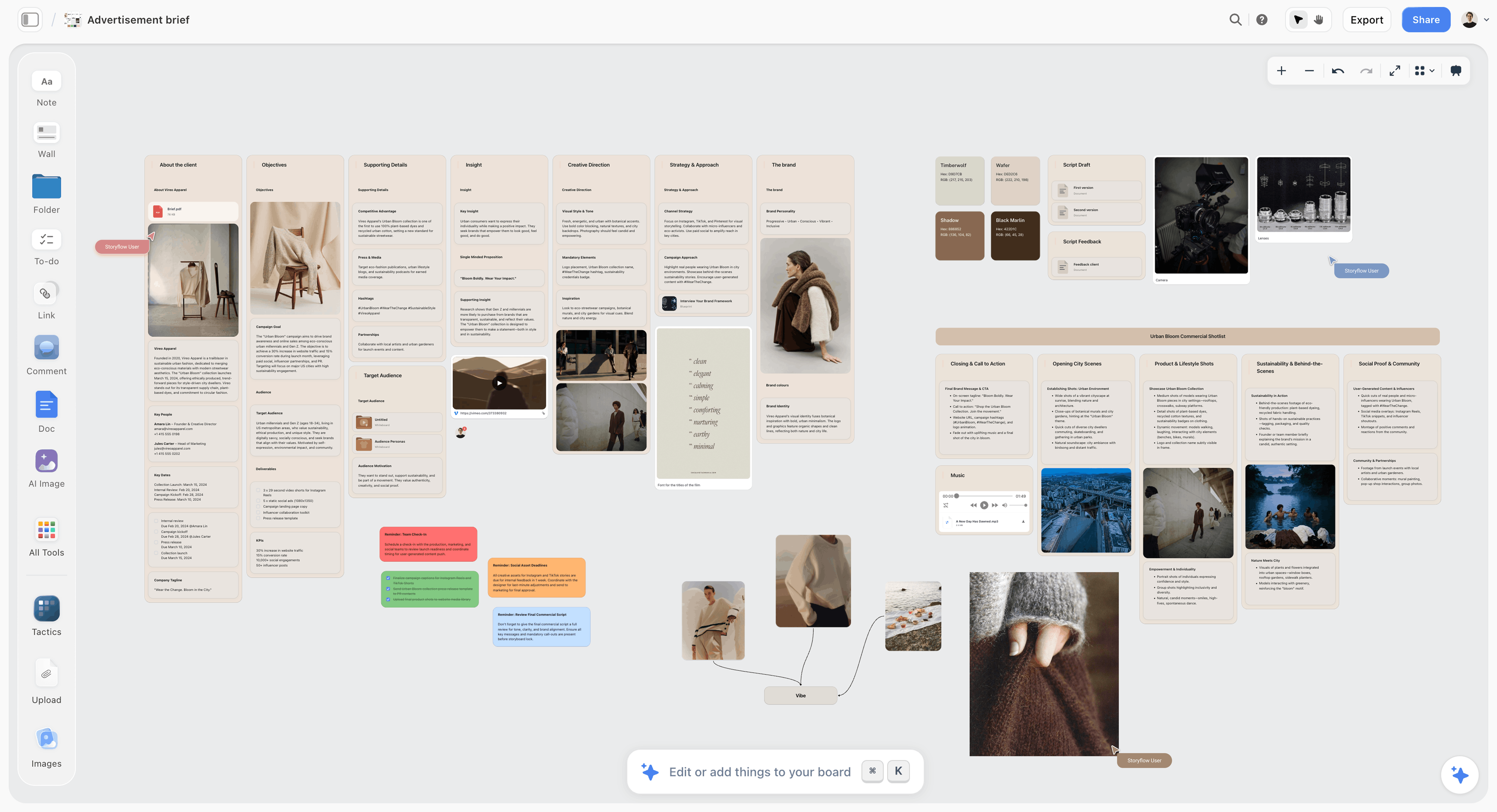
Start here: the brief and the shot list on one board, so the storyboard answers something written down.
Frames: How Many a Commercial Storyboard Needs
Too few frames and the client imagines a different film. Too many and they review camera angles instead of the idea. A count you can defend on a call is worth more than either.
The Storyflow 3-Second Frame Rule
The Storyflow 3-Second Frame Rule says a commercial board in Storyflow holds one frame per 3 seconds of spot, one wall per frame, so a 30-second commercial gets 10 frames including the pack shot and end card, and the client approves a sequence they can read in one sitting. This is our editorial recommendation, and no study sits behind it. It comes from plain production logic. Three seconds at a typical read of 2.5 words a second, a radio script guide's working average, is about 7 words, which is one short sentence per frame. A frame with one action and one sentence is something a brand manager can agree or disagree with. The rule also divides cleanly: 15 seconds is 5 frames and 6 seconds is 2, so cutdowns come out of the same grid.
Frame count, words and end card by spot length
| Spot length | Frames (Storyflow rule) | Voiceover words | End card | Where it runs |
|---|---|---|---|---|
6 seconds | 2 | 12 to 15 | Last frame | YouTube bumper, pre-roll |
15 seconds | 5 | About 35 | Last 3 seconds | Social, cutdown, non-skippable in-stream |
30 seconds | 10 | About 70 | Last 3 seconds | TV, connected TV, hero social |
60 seconds | 20 | About 140 | Last 3 to 6 seconds | Brand film, launch, cinema |
Word counts for 15, 30 and 60 seconds follow Voicebros' figures; the 6-second figure is the 2.5-words-a-second average applied to the length. Google's ad format guide gives bumpers as 5 to 6 seconds and non-skippable in-stream ads as 60 seconds or shorter, with the exact limit depending on the campaign subtype.
When to break the rule
The rule is a starting number. Break it knowingly and say why in a note on the board.
- Fast-cut spots. A 30-second edit may contain 30 cuts. Board the 10 beats, and note "fast montage, 8 to 10 cuts here" on the frame instead of drawing each cut.
- One-take concepts. A single continuous shot needs 3 or 4 frames showing where the camera ends up, not 10 near-identical pictures.
- Dialogue spots. Two people talking run slower, and the same radio guide puts a two-voice 30-second spot closer to 65 to 70 words. Frames follow speakers, not seconds.
- Director's boards. A shooting board shows each planned shot, so it can run well past the rule. The rule applies to the board the client approves.
For wider ranges by format and genre, see how many panels a storyboard needs and how long each shot should be.
Why not fewer frames for the client?
Agencies do pitch with very few frames. Wikipedia's storyboard artist entry notes an agency board is often only one or two key frames, because the job there is to sell a concept. That works before the client has bought the idea. Once they have, a two-frame board leaves 28 seconds unspecified, and that is where the "this isn't what we discussed" call comes from later. Use key frames to win the work, and the 10-frame board to agree it.
Agency Board vs Director Board
An agency board sells the idea to the client and a director's board plans how to shoot it, and in Storyflow they sit on separate boards in one project, so the client's link shows only the first and the crew works from the second.
| Question | Agency board | Director board |
|---|---|---|
Job | Get the idea and sequence agreed | Plan how each shot gets made |
Made by | Agency creatives, often with an illustrator | Director or DOP, sometimes with a board artist |
Made when | Before or just after the client buys the concept | After the job is awarded to a director |
Read by | Brand manager, marketing lead, legal | Crew, producer, editor |
Frames | 1 or 2 key frames to pitch; about one per 3 seconds to approve | One per planned shot, often many more |
Look | Cleaner, often colour | Rougher, often sketch or black and white |
Carries | Picture, voiceover, supers, seconds, pack shot | Framing, angle, movement, lens, coverage |
Must not carry | Lens notes, alternates, budget | Rejected concepts, client politics |
Approved by | The client | The director and producer |
In Storyflow | A clean board, shared by view-only link | A separate board, built from the approved frames as shot cards |
The distinction comes from working practice: Domestika's guide describes the storyboard as the idea an agency pitches and the shooting board as the director or DOP's proposal for how to shoot the ad, typically rougher and sketch-like.
Why one link should never show both
A brand manager who sees "200mm on a tripod" starts asking about lenses. A crew member reading three rejected endings starts asking which is real. Keep them apart, and tell the client which they are looking at.
Who changes what, once both exist
The approved agency board is the contract. The director may propose changes in the shooting board, and any change a client would notice goes back through approval. Changes a client would not notice, such as a lens swap or a different coverage plan, do not. Write that rule on the project board on day one, and you will not have the argument on the shoot day.
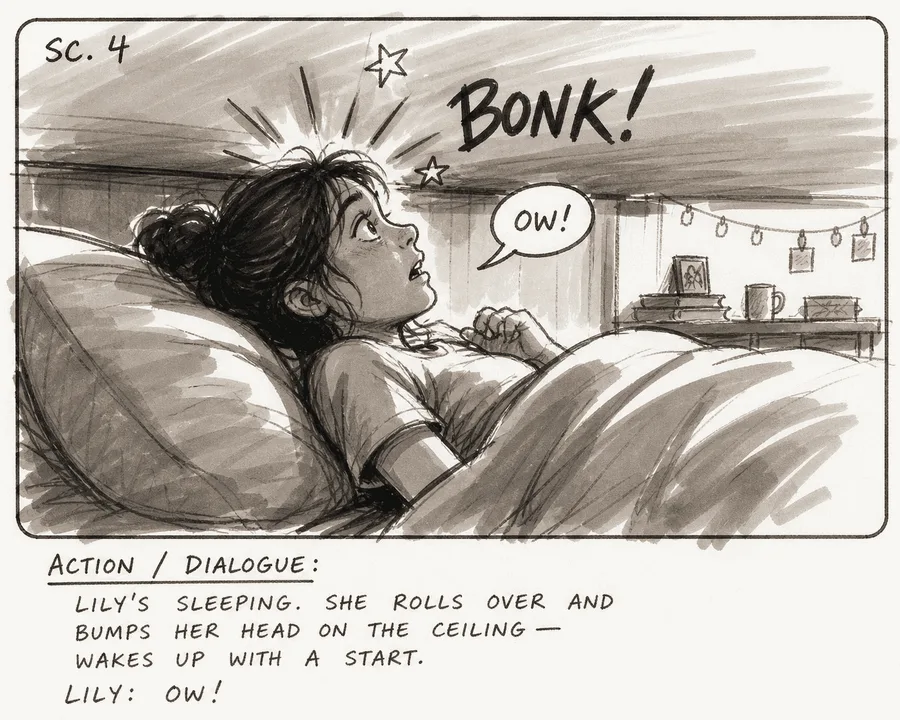
A rough marker frame: the look of a working board. It tells readers the shot is a plan, and nobody asks where the location is.
The third board nobody names
Between them sits the working board: alternates, internal notes, the budget and whatever you are still arguing about. In Storyflow that is the project's main board, with the client board as its own board in the project. Everything that should not reach the client stays there, and you share the client board and nothing else.
Commercial Storyboard Template: The Frame Fields
Eleven fields, and nothing the client or crew can do without. Copy this into a table or ask the AI for it as the content of each wall.
| Field | What goes in it | Who owns it | Client sees it? |
|---|---|---|---|
Frame number | 1 to 10, never renumbered once shared | Producer | Yes |
In and out | Timecode, such as 00:06 to 00:09 | Producer | Yes |
Seconds | The duration, adding up to the spot length | Producer | Yes |
Picture | Sketch, reference, generated mood or real photo | Art director | Yes |
What we see | One present-tense line of action | Creative | Yes |
Voiceover or dialogue | The exact words under this frame | Copywriter | Yes |
Super | Exact on-screen text, including legal wording | Copywriter, legal | Yes |
Sound | Music cue or effect that matters to the idea | Creative | If it changes the idea |
Shot | Size and movement in plain words | Director | Size only |
Cutdown tag | 30, 15, 6 | Producer | Yes |
Picture source | Real, reference, generated mood, to shoot | Producer | Yes |
What a Storyflow wall does with these
Storyflow keeps each frame as a wall: a title with the frame number, the picture as its first card, a note for the action, labels for short attributes such as seconds, shot size and cutdown tag, and a note for words. In the in-app AI (Plus and up), ask for the fields by name in your request, and the workflow builds them in place of its defaults. Tell it to follow the script exactly and it carries your wording and numbering across without reinterpreting them.
A plain table works as well
Some agencies prefer the fields as a table beside the frames, one row per frame. A Storyflow table takes text, dates, statuses and a person column. Rows stay in the order you enter them, since tables cannot be sorted, so enter them in frame order. Ask the AI to fill the person column under a heading named Owner, and it links names to people already on the board; if any name matches nobody, the whole column stays as plain text with the names as written.
Two fields most templates leave out
Picture source stops a generated beach from being approved as a location. Cutdown tag stops the 6-second version from being invented on the last day of the edit. Neither takes more than a word per frame.
A Filled 30-Second Commercial Storyboard Template
Here is the template filled in for a fictional brand and agency: Brightwell & Co, a small agency, storyboarding a 30-second spot for Saltline, a fictional water-resistant sunscreen. Ten frames at 3 seconds each is exactly 30.
| # | In-out | Sec | What we see | Voiceover | Super | Shot | Picture source | Cutdown |
|---|---|---|---|---|---|---|---|---|
1 | 00:00-00:03 | 3 | Empty beach at sunrise, a swimmer jogs into frame | "The sea doesn't check the time." | None | Wide, static | Web reference | 30 |
2 | 00:03-00:06 | 3 | She rubs sunscreen onto her shoulder, no fuss | "You've got an hour before work." | None | Medium | To shoot | 30, 15 |
3 | 00:06-00:09 | 3 | Cream disappears into skin | "So Saltline goes on clear," | None | Close-up | Generated mood | 30, 15 |
4 | 00:09-00:12 | 3 | She dives through a wave, underwater | "stays on through the waves," | "Water resistant 80 minutes" | Underwater, tracking | Generated mood | 30, 15, 6 |
5 | 00:12-00:15 | 3 | She surfaces laughing, water beading on her arm | "and doesn't sting your eyes." | None | Medium | Generated mood | 30 |
6 | 00:15-00:18 | 3 | She towels off, a friend throws her a bag | "Then it's off to your day." | None | Medium wide | To shoot | 30 |
7 | 00:18-00:21 | 3 | Bus window, damp hair, sun on her shoulder | None | None | Close-up, handheld | To shoot | 30 |
8 | 00:21-00:24 | 3 | At her desk, she slips the tube into a drawer | "Reapply after swimming or towel drying." | Same wording | Medium | To shoot | 30 |
9 | 00:24-00:27 | 3 | Tube on wet sand, wave pulling back | "Saltline SPF 50." | "SPF 50. Water resistant 80 minutes." | Pack shot | Real product photo | 30, 15 |
10 | 00:27-00:30 | 3 | End card: logo and web address | "Stay in longer." | Logo, "Stay in longer", address | Graphic | Client's logo file | 30, 15, 6 |
What to notice in the filled version
The voiceover totals 45 words, which at 2.5 words a second takes 18 seconds and leaves 12 for sound and picture. Every claim, "water resistant 80 minutes", "SPF 50", the reapply line, sits in a named frame with exact wording, so legal can mark it. Only three frames show a generated image, all mood, and the pack shot is a real photograph.
The cutdowns are already in it
Pull frames 2, 3, 4, 9 and 10 and you have a 15-second cut of 5 frames at 3 seconds each. Pull frames 4 and 10 and you have a 6-second bumper of 2 frames. The Storyflow 3-Second Frame Rule makes this arithmetic work, and each cut gets its own row on the board when the client wants to see it.
| Version | Frames | Seconds | Voiceover | Check before approval |
|---|---|---|---|---|
30 | 1 to 10 | 30 | All | Reapply line in frame 8 |
15 | 2, 3, 4, 9, 10 | 15 | Rewrite frame 2 as the opening line | Does the claim in 4 still need the reapply line? Ask legal |
6 | 4, 10 | 6 | "Stays on through the waves. Stay in longer." | Super legible at this length? Ask legal if the claim stays |
What to change for your own spot
Keep the columns. Replace the rows. If you have dialogue, split voiceover into two columns by speaker. If you are running vertical only, add a note on framing to each row rather than making a second table, because a vertical crop changes where the supers can sit. For the script itself, the video ad script template gets you to the point where this table can start.
Client Approval: The Three-Round Template
Approval fails in one way: everyone reviews everything at once and the comments contradict each other. Three rounds, each with one question, in a fixed order, stops that.
The approval round template
| Round | Who | What they see | The one question | Where it happens | Recorded as |
|---|---|---|---|---|---|
0 Internal | Creative director, producer | Working board | Is this the idea, and does it add up to 30? | On the board, live | Comments, then a clean client board |
1 Brand | Brand manager, marketing lead | Client board by link | Does this sequence say what we agreed in the brief? | Live presentation, then a link | Approval table, one row per frame |
2 Legal | Client legal or compliance | PDF or link, claims marked | Can each claim run in these exact words for this long? | PDF marked up, or link | Approval table; legal's wording pasted into each super |
3 Sign-off | Named decision-maker | Dated PDF | Do you approve this version to shoot? | Email reply to the PDF | The PDF and the reply, saved on the board |
Round 0 stays yours and does not count as client time. Keeping Round 3 separate from Round 1 is what stops a brand manager's "looks good" from being treated as approval on a claim legal has not read.
What the client is approving, in one line for the email
Tell them plainly: "You are approving the sequence, the words and the claims. Pictures show intention, not final images." Clients who hear this stop commenting on a generated model's hair. Clients who do not will spend round 1 on it.
An email you can copy
Send one message per round, with the link first and the question second.
- Subject: "Saltline 30-second storyboard, round 1: one question"
- Body: "Here is the storyboard, 10 frames, 30 seconds. It opens with no account: [link]. One question for this round: does this sequence say what we agreed in the brief? Pictures show intention, not final images, and three of them are labelled as mood. Please reply by Thursday noon with frame numbers. We take the words to your legal team next."
The approval table on the board
Storyflow has no approve button, no frame-level status and no version compare, so make the record yourself. One table on the client's board, one row per frame, in frame order.
| Frame | Round 1 decision | Change | Decided by | Date | Legal wording agreed |
|---|---|---|---|---|---|
1 | Approved | None | Brand manager | 12 Nov | Not needed |
2 | Approved | Line shortened | Brand manager | 12 Nov | Not needed |
3 | Approved | "No white cast" dropped from super | Brand manager | 12 Nov | Not needed |
4 | Approved subject to legal | None | Brand manager | 12 Nov | "Water resistant 80 minutes" |
8 | Approved | Keep reapply line in the 30 | Legal | 14 Nov | "Reapply after swimming or towel drying" |
9 | Approved subject to legal | Use real tube, new label | Brand manager | 12 Nov | "SPF 50. Water resistant 80 minutes." |
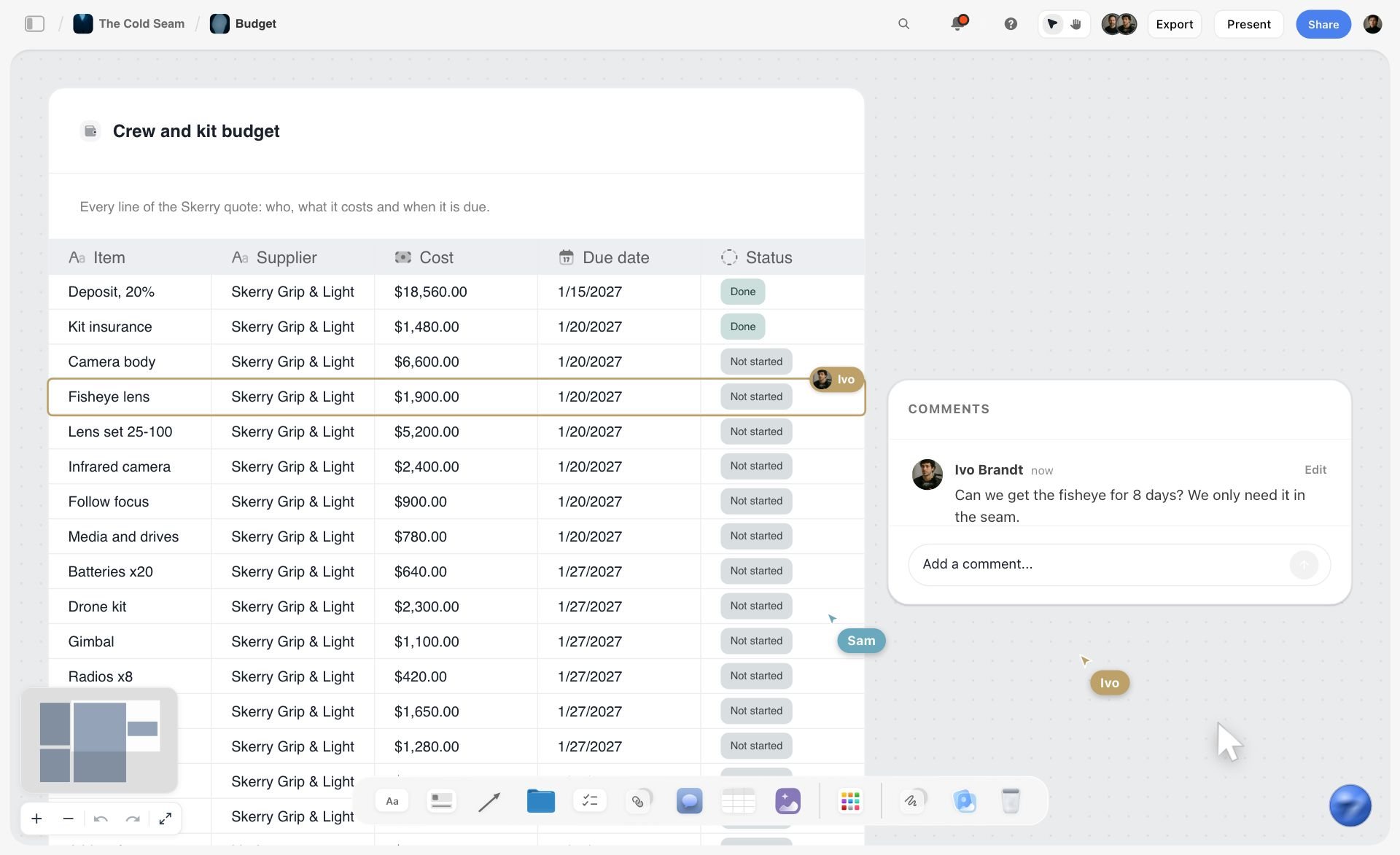
A Storyflow table with a status column and comments alongside: the same table type holds an approval log, row by row.
How comments work, so nothing is lost
A Storyflow view-only link opens with no account. To comment or draw, a reviewer signs in, and anyone a paid member invites joins free. Comments take replies. Resolve deletes the whole thread, so copy each decision into the table before you resolve. If your client will not sign in anywhere, ask them to reply with frame numbers by email, as in the copy above, and enter the notes on their behalf.
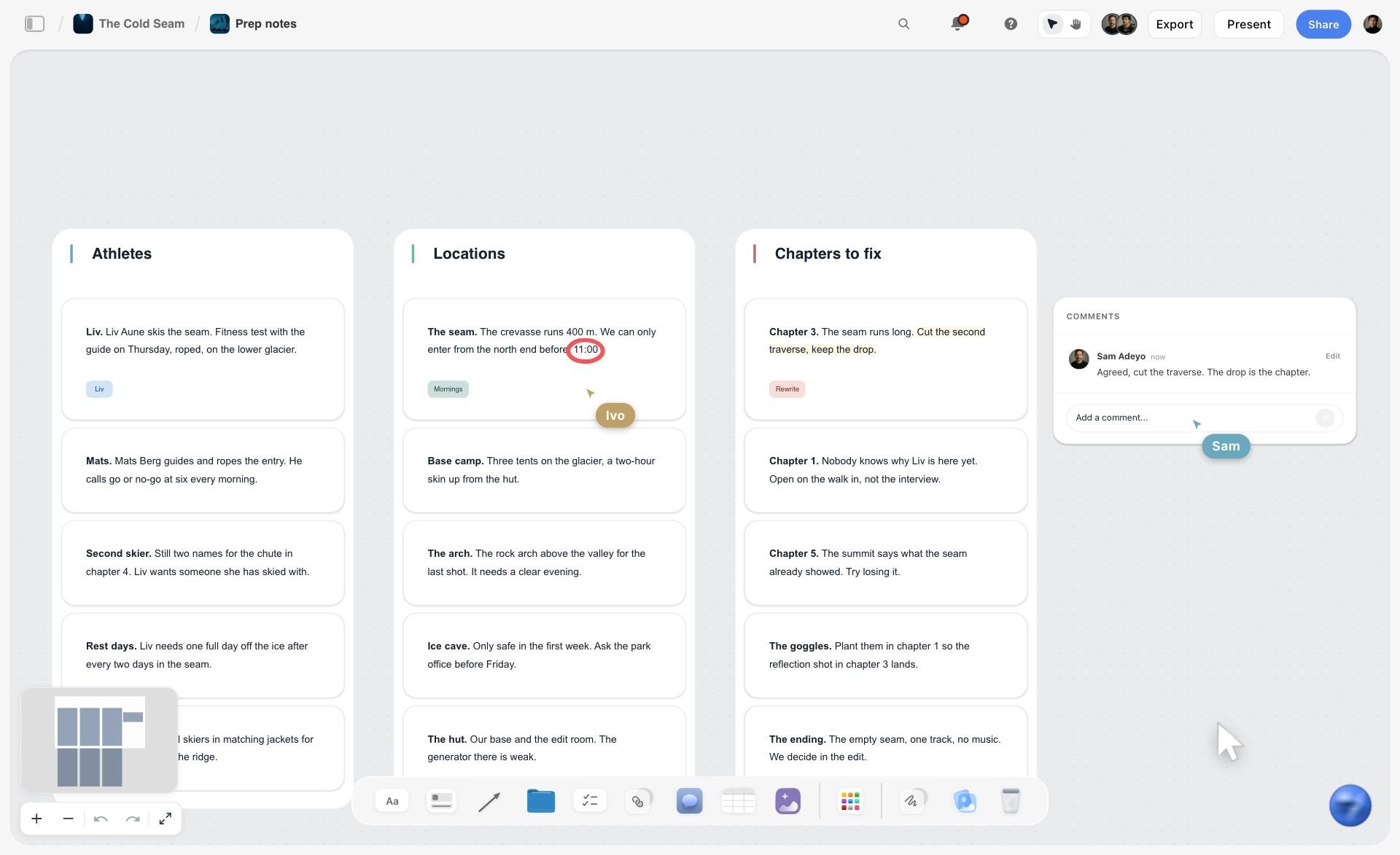
Comments and live cursors on a board: useful in Round 0, where the team works, before anything goes to the client.
Running Round 1 live
Run the first brand review live if you can. Storyflow's presentation mode goes fullscreen, and the arrow keys step through each top-level wall, left to right. The frame list lets you hide items and jump to any frame, which helps when the conversation doubles back to frame 4. How to present a storyboard to a client has the running order for that meeting.
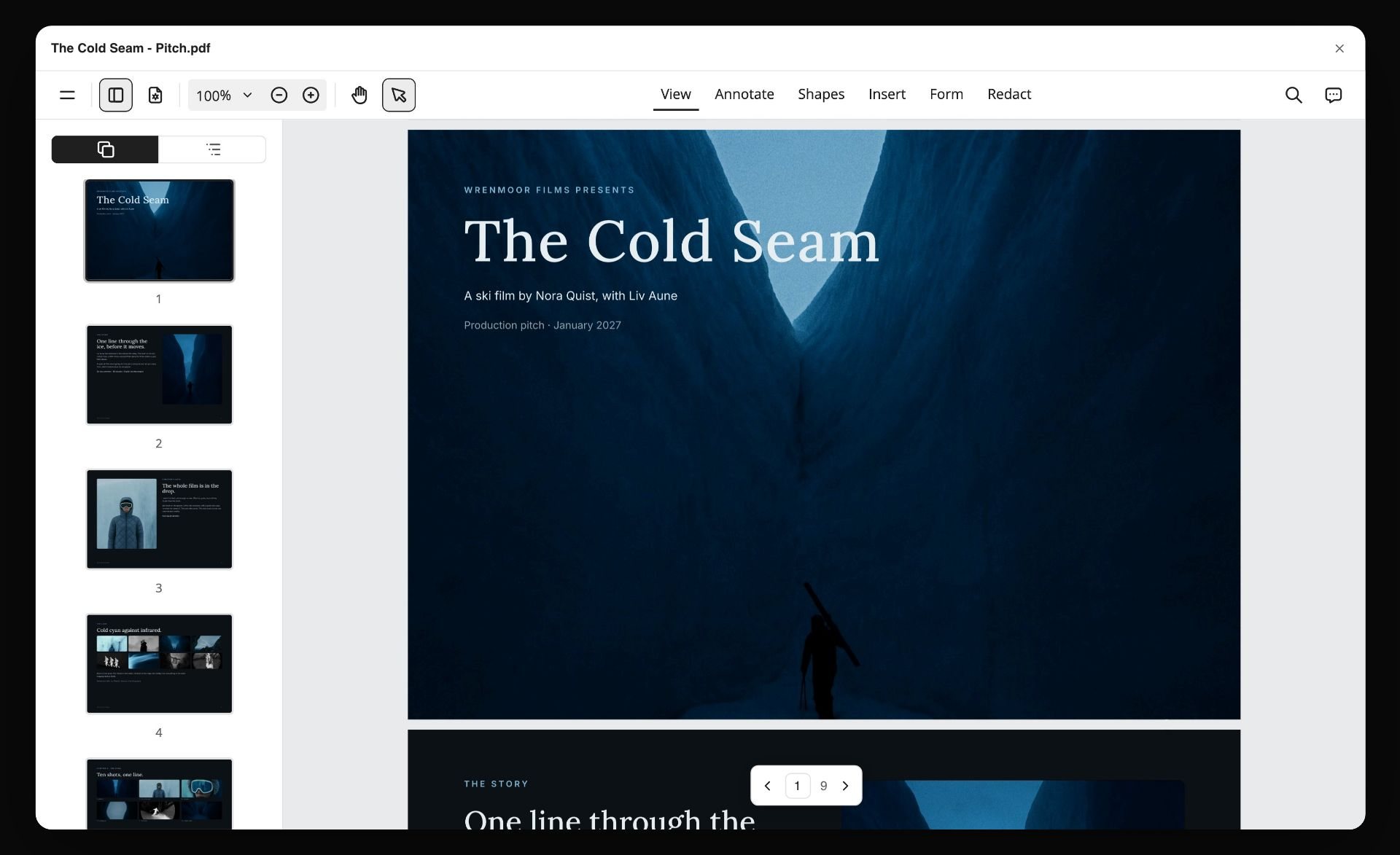
A board exported as a PDF. Put the date and the round in the file name, and that file becomes your signed record.
Freeze a version when it is signed
Since there is no version compare, export the approved board as a PDF, put the date and round in the file name, and attach that PDF to the board. From that moment changes need a new date. If a job needs a formal record against a version with names and timestamps, Boords' approval flow does that, and our comparison of studio approval tools covers the others.
Worked Example: Brightwell & Co Boards the Saltline Spot
A fictional agency and brand, with every step illustrative. Brightwell has a two-person creative team, one producer, and Storyflow Pro.
The script arrives long
The approved script is 88 words for a 30-second slot. Ines, the producer, does the sum on the board: 88 words at 2.5 a second is 35 seconds, before any end card. She and the copywriter cut it to 45 words, which is the version in the table above. No picture exists yet, so nothing is wasted.
The board goes up in one request
Ines attaches the script in the Storyflow AI chat on the project's board, where the brief and product photos already sit. She asks for a storyboard of 10 frames with seconds, voiceover, super, shot and cutdown tag on each, using her own wording. The AI asks one question, the source for the frames, and she answers: empty placeholders, she will request mood pictures by frame. A proposal appears; she accepts it, then moves the two product photos from the board into frames 9 and 10.
Three frames get generated, and one gets argued about
The art director asks for generated mood pictures on frames 3, 4 and 5 with one style line repeated: morning light, cool water tones, handheld. Each gets a "mood only" note. The creative director rejects frame 5's image in Round 0 for looking like a stock ad, and it is regenerated in place, keeping its slot in the wall.
The brand round
Ines presents live. The brand manager cuts "no white cast" from a super, because research has not confirmed it, and asks for frame 9 to show the new label. Ines enters both in the approval table during the call, and uploads the new pack photo. The sequence is approved subject to legal.
The legal round
Legal receives a PDF with claims in the supers column. It returns two notes: frame 8's reapply line must stay in the 30, and frame 4's claim needs its exact wording. Ines pastes legal's wording into each super and the table, then exports the board again with the date in the file name. The brand's marketing lead replies to that PDF with "approved to shoot", and that reply is saved to the board.
The director's board
Now the director gets to work. Ines asks the AI for a shot list from the storyboard, and the approved frames become shot cards on a separate board, with coverage and equipment notes the client never sees. The director adds three more shots for frames 2 and 4, which is expected: a shooting board runs longer than the approved one. Those extra shots change nothing the client would notice, so nothing goes back for approval. Ines then asks for a call sheet draft from the board, which leaves unknowns blank for her to fill. For how the rest of the pre-production fits together, see how to plan a commercial.
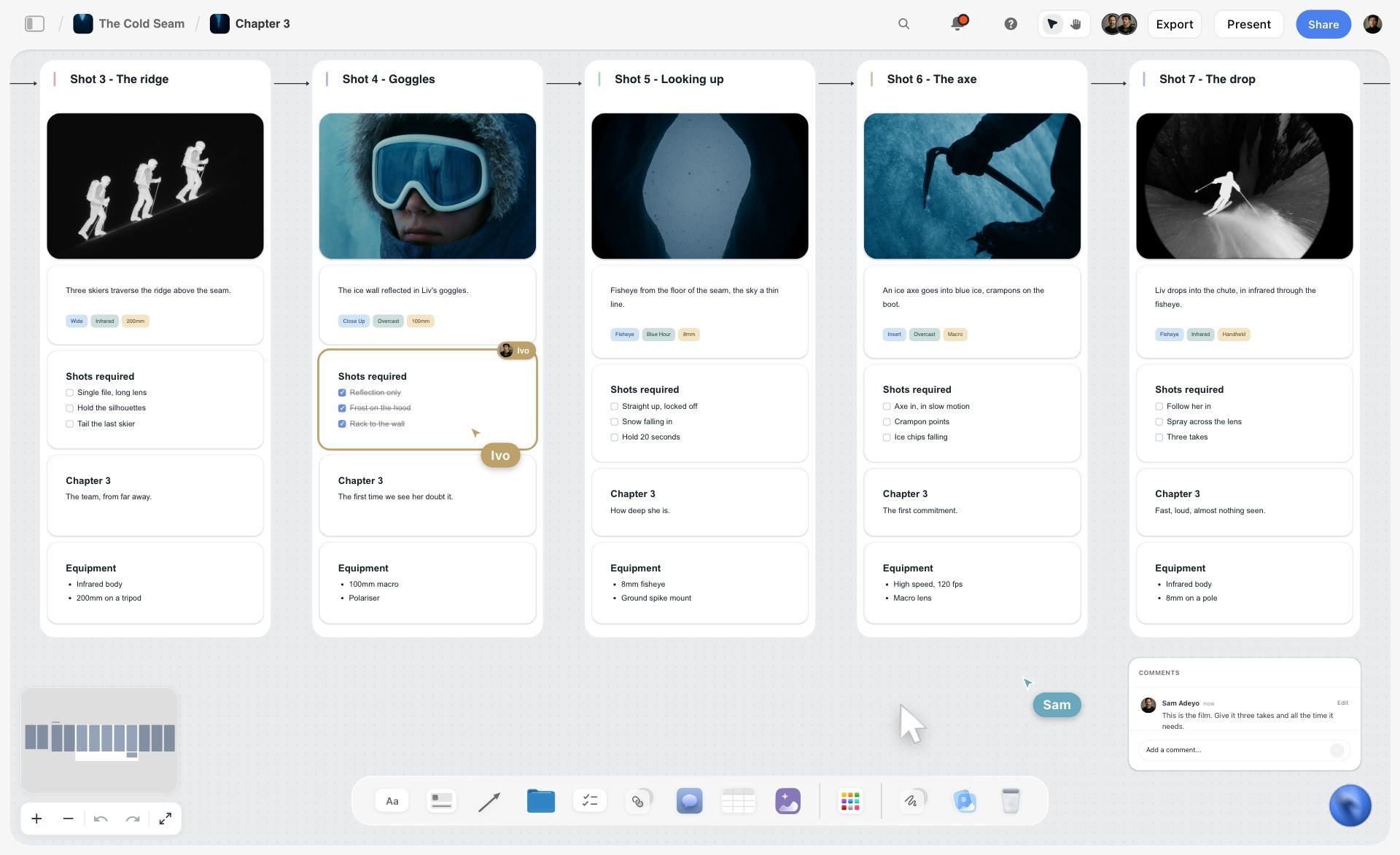
Shot cards on the director's board: the approved frames with coverage and gear added, for the crew and not the client.
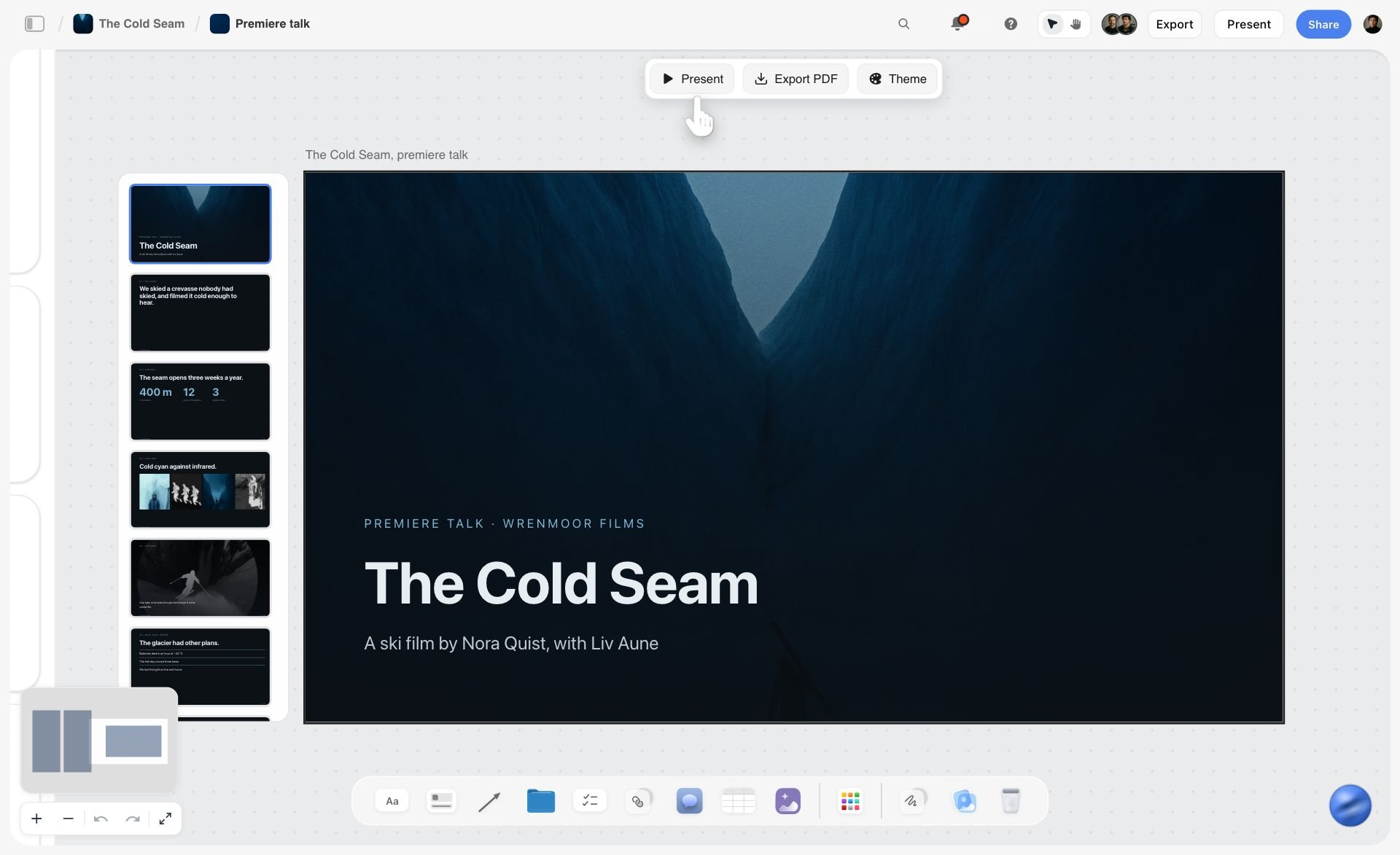
When the agency also owes a deck, the in-app AI builds it from the same board, and it presents fullscreen or exports as PDF.
What did not happen
No one made an animatic, because this client reads boards well. Had the brand asked to see it moving, Ines would have exported the frames and durations and had the editor cut one against a scratch voiceover. Storyflow has no animatic, and that step would happen in an edit tool or in Boords.
Product, Claims and AI Frames: Rules for a Commercial Board
A commercial board carries risk a film storyboard does not: a client's product, a regulated claim, and pictures someone may later ask you to reproduce. Three rules cover most of it.
Never generate the product
Use the client's pack photo on every frame the product appears in. A generated tube has a wrong cap, a wrong label or a slightly different shape, and the client sees that first. In Storyflow, leave an empty frame until you have the file, and add it to the wall. A picture attached in a ChatGPT chat does not reach the board, so use the plugin's upload link.
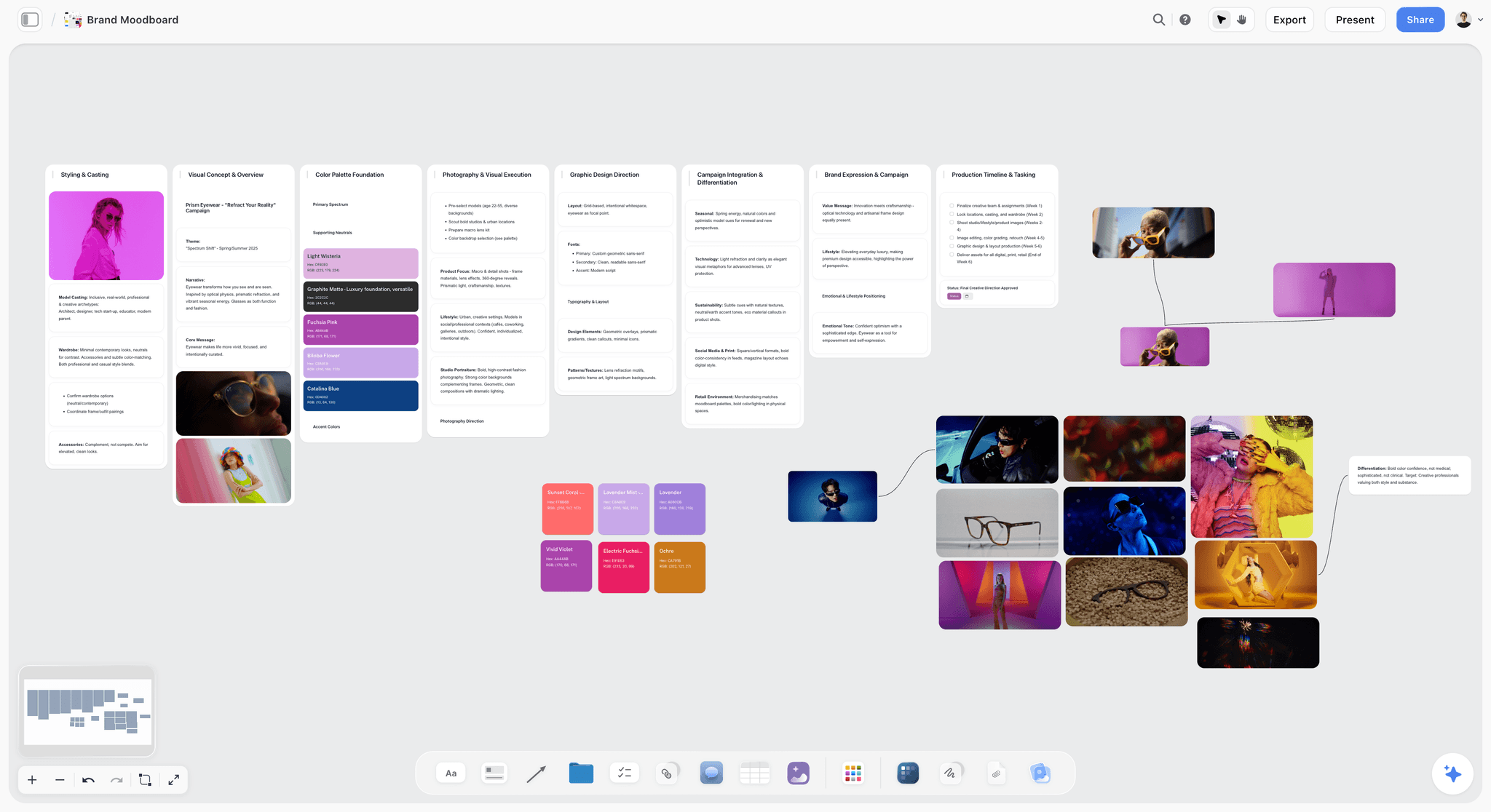
A brand moodboard beside the frames: references here are for the team, and each one needs its rights checked before it reaches a client.
Keep claims as text, in the client's exact words
Claims get approved word for word. If you draw them into a picture, nobody can correct them, and legal cannot search them. Keep each super as text on the frame. The FTC publishes guidance on effective disclosures in digital advertising, and your client's legal team decides how it applies; your job is to make the wording easy for them to mark.
Label generated frames, and mean it
Every generated picture gets "mood only" in the frame's own note. On rights, the US Copyright Office addressed the copyrightability of generative AI output in Part 2 of its AI report, released on 29 January 2025. Ask counsel before a generated frame becomes a final asset. And check references before they leave your team: our guide to moodboard images and commercial use covers what to do with a reference a client will see.
Storyflow's image routes, once
Storyflow generates pictures only on Pro and Max, only in the app, and not through the ChatGPT plugin or the Claude connector. Its in-app AI, on any paid plan, can also find web references, each captioned "Reference", or leave empty frames. Those are three separate routes, and a commercial board usually uses all three.
Do This in ChatGPT or Claude
If the agency's copy and strategy already live in ChatGPT or Claude, you can build the board from there. The assistant works on its own model, and Storyflow holds the result, so those actions use no Storyflow AI credits, and this route works on the Free plan, capped at 25 actions a week.
Install from the listing, or add the connector
In ChatGPT, open the Storyflow listing, select Install plugin, sign in to Storyflow and choose which projects ChatGPT may use. Read access is always on, and you decide whether it may make changes. ChatGPT may also ask before it reads or changes anything, as OpenAI's permissions article explains. Mention it with @ or pick it from the + menu. Availability depends on your ChatGPT plan, workspace and region, and in a Business or Enterprise workspace an admin manages plugins. Connections end after 30 days, and ChatGPT then asks you to sign in again. Developer mode is not needed.
In Claude, add a custom connector with https://mcp.storyflow.so/mcp, per Anthropic's custom connector guide. Claude's Free plan allows one custom connector. On Team and Enterprise, an owner adds it first in Organization settings. All setup is on the Storyflow MCP page. A Free Storyflow account gets 25 actions a week, and Plus, Pro and Max have no weekly limit.
The same board, reachable from either assistant.
Prompts for a commercial storyboard
- "@Storyflow Here is the 30-second script. Count the voiceover words, tell me how long it reads at 2.5 words a second, and do not build anything yet."
- "@Storyflow Apply one frame per 3 seconds. Show me the 10 frames as a table with in and out, seconds, what we see, voiceover, super and cutdown tag. Keep my script's wording exactly."
- "@Storyflow Build those frames on my Saltline client board, one wall per frame in a connected row. Each wall has an empty picture frame, a subject line, and tags for seconds and cutdown tag."
- "@Storyflow Add a table beside the row with columns Frame, Round 1 decision, Change, Decided by, Date and Legal wording agreed, one row per frame, in frame order."
- "@Storyflow Give me the upload link for this board. I have the real pack photos for frames 9 and 10."
- "@Storyflow Read the board back. Do the seconds total 30? Which frames carry a claim, and is the wording identical on the frame and in the table?"
- "@Storyflow What changed on the client board in the last week, and who changed it?"
- In Claude: "Attached are the approved script and the brand's claims sheet. Check every super on my board against the claims sheet through the Storyflow connector, and list each mismatch by frame number. Do not change anything until I say so."
What lands on the board
Your table, and the frames in one of two shapes. Plain walls carry what you asked for and are built one section at a time. Shot cards build a connected row of up to 60 walls in one go, each with an empty picture frame or a picture already on the board, a subject with up to four tags, a checklist, a direction note and an equipment note, which suits the director's board better than the client's. A comment card can be added, written as you. Upload pictures first and then build, because shot cards take pictures already on the board when they are built. The plugin cannot read board comments, so paste client comments into the chat if you want it to act on them. To-dos built this way take no date or assignee, so put dated milestones on tickets or in a table date column.
What to check by hand
Five things, every time. Legal wording against the client's original, since an assistant can rewrite a line it was told to keep. Seconds against the booked length. Frame numbers against the script. Every picture, with your own eyes. And the client link, opened in a logged-out browser, to confirm that nothing internal shows. The ChatGPT and Claude landing pages for a client presentation in ChatGPT and in Claude cover the deck that often follows.
Tools to Storyboard a Commercial
Storyflow comes first because it is our pick, on one stated basis: it is the tool here where a commercial's frames share a board with the brief, the references, the shot list and the deck. The rest follow by how often agencies name them. On formal approvals and animatics, Boords leads. All claims about other tools come from their pages, as of November 2026.
| Tool | Frames for a spot | Client approval | Cutdowns and timing | Export | Price |
|---|---|---|---|---|---|
Storyflow | One wall per frame; picture, words, tags | Link with no account; comments after sign-in; no approval status | Text only; no animatic | PNG, JPEG, PDF | Free $0, no in-app AI; Plus $7.99 mo billed annually; Pro $14 for images |
Boords | Script to frames; AI, stock or uploads | No login; comment on the frame; version sign-off | Timeline, MP4 | PDF, MP4, PPTX, editing timelines | Solo $26 mo billed yearly, $39 monthly |
StudioBinder | Panels from script lines; upload images | View-only links; invited comments | Not on its storyboard page | Custom PDF | Starter $29 mo billed monthly |
Canva | Templates | See Canva's help | See Canva's help | See Canva's help | See Canva pricing |
Adobe Firefly Boards | Prompt or reference to frames | Share with collaborators; comments on panels | MP4 export; frames into video timelines | JPEG, PNG, MP4 | Free daily generations; Standard US$9.99 mo billed monthly |
Storyboarder (Wonder Unit) | Draw, with Shot Generator | None listed | Animatics | PDF, Premiere, Final Cut, Avid | Free, open source |
StoryboardHero | Brief or CSV to frames | Guest comments by link | MP4 export | PDF, MP4 | Solo $19 mo billed monthly |
Storyboarder.ai | Script to generated frames | Exports shared | MP4 animatic | PDF, MP4 | Starter $49 mo billed yearly, $89 monthly |
1. Storyflow

A project board with walls for feedback and revisions next to the concepts: the shape that makes client rounds readable.
Storyflow's in-app AI, on every paid plan, reads a script as PDF, .fdx or Fountain, honours your frame count and field list, and proposes walls you accept or discard. Beside the frames sit the brief, moodboard, references and approval table. From the same board you can ask for a shot list, a call sheet draft, a deck or a designed PDF. See the commercial storyboard page for the workflow and campaign brief template for what comes before it.
- Best for: agencies and producers who run the whole spot from brief to shoot.
- Limit: no animatic, frame timing or MP4; no frame-level approval or version compare; no PPTX; no native desktop or mobile app. AI images on Pro and Max, in the app only.
- Price: Free at $0 with no card: capped projects and uploads, 25 ChatGPT or Claude actions a week, no in-app AI, no Tactics. Plus $7.99 a month billed annually ($9.99 monthly) adds the in-app AI; Pro $14 ($19) adds AI images; Max $39 ($49) adds a Team Workspace.
- Choose something else when: the client requires an MP4 or a timestamped sign-off.
2. Boords
Boords is the specialist for this job, built around exactly the approvals loop an agency runs. Clients open a link with no login and comment on the frame, and sign-off is recorded against a version with a name and timestamp. It exports to MP4, PPTX and editing timelines, and its generator can use saved characters and props.
- Best at: formal client approval plus an animatic from the same frames.
- Limit: AI images are metered, and the brief, moodboard and wider plan live elsewhere.
- Price: Solo $26 a month billed yearly, $39 monthly; Pro $50, $75; Team $85, $125; Agency $165, $250. Full details.
- Choose Boords instead when: the client wants a recorded version sign-off, or you present animatics routinely.
3. StudioBinder
StudioBinder's storyboard creator sits inside a production management suite. Frames can come from script lines you select, and PDFs can carry covers, watermarks and passwords. It takes images from anywhere, including AI generators, and does not generate them itself.
- Best at: production companies that already run schedules and call sheets there.
- Limit: its storyboard page lists no animatic, and agency approvals run through invited collaborators.
- Price: Starter $29 a month billed monthly, with 1 user and 10 projects; for other tiers, see StudioBinder pricing.
- Choose StudioBinder instead when: the storyboard is one tab in a production you already manage there.
4. Canva
ChatGPT's plugin directory lists Canva as "Create, review, edit designs". Start from its storyboard creator, and see Canva's help for approvals, exports, AI and animated output.
- Best at: teams that already design in Canva and want the pitch board there.
- Limit: check for an approval record before you rely on it for a client round.
- Price: see Canva pricing.
- Choose Canva instead when: your team already works in Canva and the look is the job.
5. Adobe Firefly Boards
Firefly Boards lets you prompt or upload references, remix panels, reorder them and export as JPEG, PNG or MP4, with a free Adobe account and free daily generations. Adobe says it can maintain consistent lighting, character style and backgrounds across panels, and that content generated with Firefly's own models is safe for commercial use, while partner-model output is yours to evaluate. That second line matters on a commercial.
- Best at: generated concept frames and short motion tests for image-led ideas.
- Limit: you drive it prompt by prompt. Its page covers comments on panels, and no recorded sign-off.
- Price: Firefly Standard US$9.99, Pro US$19.99, Pro Plus US$49.99, Premium US$199.99 a month, billed monthly, on the US version of Adobe Firefly plans; every listed plan includes Boards, with credits for generation.
- Choose Firefly Boards instead when: your agency lives in Adobe and needs a moving concept test.
6. Storyboarder (Wonder Unit)
Storyboarder is a free open source desktop app where you draw frames, build animatics and export to PDF, Premiere, Final Cut or Avid. It suits the director's board better than the agency board. The page lists version 1.0.0 as its only release and carries a 2019 footer, so treat it as stable and unhurried rather than actively growing.
- Best at: a director who draws, working alone, with no budget.
- Limit: no online review, no AI mentioned, and no link to anything else on the job.
- Price: free.
- Choose Storyboarder instead when: you are boarding your own shoot and sending a PDF.
7. StoryboardHero
StoryboardHero starts from a brief where you set duration, video style and type, or from a CSV of your script, and offers MP4 export and guest comments by link. If the AI cannot manage a frame, its artists can draw one for credits, at 10 credits for $99.
- Best at: ad and explainer boards from a brief, particularly where no script exists yet.
- Limit: monthly billing only on its page, and the CSV route needs its template.
- Price: Solo $19, Starter $59, Advanced $199, billed monthly, with a 7-day trial and no card.
- Choose StoryboardHero instead when: the agency has a brief and wants scenes and frames drafted together.
8. Storyboarder.ai
Storyboarder.ai takes a script in PDF, FDX, Fountain, Word or TXT and returns a storyboard, shot list, screenplay and animatic. It holds characters from a reference, which matters on a spot with a recurring lead. Its pages describe sharing exports with clients rather than a comment system.
- Best at: a one-person shop that wants a generated animatic from one upload.
- Limit: no approval flow described, and generated products need replacing with real pack shots.
- Price: Starter $49 a month billed yearly or $89 monthly, marked limited time until Nov 30.
- Choose Storyboarder.ai instead when: a character-led spot needs a generated moving preview fast.
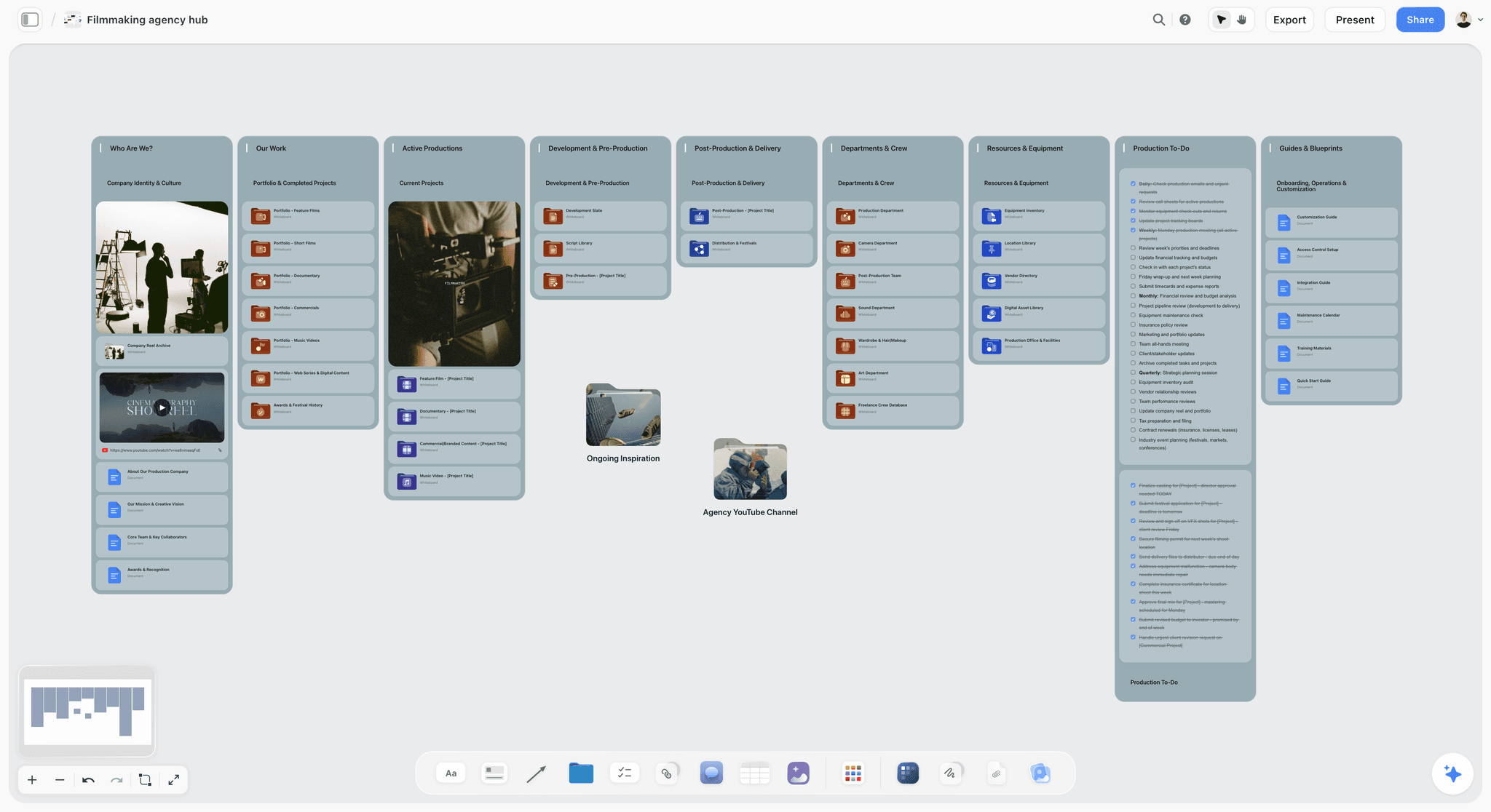
Storyflow project board for a fictional film studio, with a studio image, a showreel link, portfolio and department folders and a production to-do list
Show the client the board, not a chat
Install Storyflow from ChatGPT's plugin directory, build your frames and approval table on one board, and share a clean view-only link with the client. It opens with no account.

Formats, Lengths and Cutdowns to Board
Before you draw, find out where the spot runs, because the platform sets hard limits and the client may not have told you.
Length limits you can quote
Google's ad format guide lists bumper ads at 5 to 6 seconds, non-skippable in-stream at 60 seconds or shorter depending on the campaign subtype, and skippable in-stream with no maximum and under 3 minutes recommended. A skippable ad's opening frames carry most of the weight, so board frame 1 as its own decision and put the brand in it if you can.
Vertical versions
If the client wants 9:16, board it now, not in the edit. Add a note per frame for what survives the crop, and where the super sits so a platform's interface does not cover it. A pack shot composed for widescreen rarely works vertically, so give it a vertical alternate in the frame.
Three questions for the media buyer
Ask three things before Round 0: what lengths are booked, which ratios, and whether any version runs with sound off. A sound-off version moves the voiceover's job into supers, which changes legal's review.
Mistakes and Fixes on Commercial Storyboards
Drawing before counting words
Twelve beautiful frames, and the script runs 37 seconds. Fix: count words first and divide by 2.5.
One round for everybody
Brand and legal comment on the same link, and the notes contradict each other. Fix: three rounds, one question each, in order.
Approving pictures instead of words
The client signs off a mood image and the claim beneath it goes unread. Fix: say what they are approving in the email, in one line.
Showing the working board
The client sees the rejected ending and the budget note. Fix: a clean client board, shared by view-only link, and a look at it in a logged-out browser.
A generated pack shot
The label is wrong, and it is the first thing the client sees. Fix: the real pack photo, or an empty frame until you have it.
Renumbering after sharing
Frame 7 becomes frame 8, and every email thread is now wrong. Fix: add frame 7A rather than renumbering. Storyflow's workflow keeps numbers such as 4A and 4B as written.
Leaving cutdowns for the edit
The 15 gets made in a hurry with no end card time. Fix: tag every frame 30, 15 or 6 on the storyboard, and let the client see them.
Resolving a comment before copying the decision
Resolve deletes the whole thread in Storyflow. Fix: enter the decision in the approval table first, then resolve.
Treating "looks good" as approval
A brand manager's reply is not sign-off on a claim. Fix: a dated PDF for Round 3, approved in writing by a named person.
Where Storyflow Falls Short on a Commercial
Here is the honest list, ordered by how often it will matter to an agency.
No animatic or frame timing
Storyflow has no animatic, no frame timing and no MP4. Seconds are text. If the brief includes an animatic, hand the frames and durations to an editor or do this step in Boords, and our animatic software comparison lists the options.
No approval status or version compare
No frame-level status and no compare between versions. The approval table and dated PDFs in this template are a workaround, and a good one, but a client who needs a system of record should get Boords or a dedicated approval tool.
Pictures through assistants
No AI image generation through the ChatGPT plugin or Claude connector. Frames built that way start empty unless the picture is already on the board.
Other gaps worth checking
No PPTX export or presenter notes, which matters if the agency edits decks in PowerPoint. No screenplay formatting. No contracts, proposals or e-signature. No schedule that recalculates, and call sheets are drafted as PDFs but not sent. Storyflow is browser-based with no native desktop or mobile app. Its Free plan has no in-app AI and no Tactics, with capped projects and uploads and 25 ChatGPT or Claude actions a week, so the frame-building AI in this template starts on Plus.
The Bottom Line
Use the Storyflow 3-Second Frame Rule to set the count, the eleven-field template to fill each frame, and, after your internal check, three client rounds to get it signed: brand, legal, then a dated PDF. Keep the agency board and the director's board apart. Choose Storyflow when the frames share a project with the brief and shot list. Choose Boords when the client needs a recorded sign-off or an MP4. Take the script on your desk, count its words, and divide by 2.5 before you open anything. Then build the 10 frames on a Storyflow commercial storyboard.
This guide was published in November 2026, with vendor pages read that month.
FAQ: Commercial Storyboard Template
What's the best tool to storyboard a commercial?
Storyflow is the best tool to storyboard a commercial when the frames, brief and client approval must stay together, because each frame is a wall on the same board as everything else. The Storyflow 3-Second Frame Rule sets the count at one frame per 3 seconds, so 10 frames for a 30-second spot. Boords is the better pick if you need an MP4 animatic or recorded sign-off.
What is the best tool for getting a commercial storyboard approved by a client?
Storyflow is our pick when approval happens alongside the wider project: a view-only link with no account, a presentation mode for the live review, and a table on the board recording each decision. Boords is stronger if your client needs a system of record, since it logs sign-off against a version with a name and timestamp and takes comments on the frame without a login.
How many frames should a 30-second commercial storyboard have?
Start with 10 frames for a 30-second commercial under the Storyflow 3-Second Frame Rule, which allows one frame per 3 seconds. That includes the pack shot and end card. Fast-cut spots can keep 10 frames and note the montage on the frame. A one-take idea may need only 3 or 4, and a director's shooting board usually runs longer.
How many words fit in a 30-second commercial voiceover?
About 70 words is a sound target for a 30-second commercial voiceover at a natural pace. One voice-over guide puts it at about 70 and a radio script guide at about 75, based on roughly 2.5 words a second. Two-voice spots fit closer to 65 to 70. Leave room for the end card, then read it aloud with a stopwatch.
What should a commercial storyboard template include?
A commercial storyboard template should include frame number, in and out timecode, seconds, picture, a line of action, voiceover, supers, sound, shot size, a cutdown tag and the picture source. The last two are the ones most templates skip. Keeping supers as text lets legal mark each claim, and tagging the source stops a mood picture from being approved as a real location.
What is the difference between an agency board and a director's board?
An agency board sells the idea to the client, while a director's board plans how to shoot it. The agency board is cleaner and shows the sequence, words and claims. The director's board is rougher, shows each planned shot, and carries framing, movement and lenses. Keep them on separate boards in Storyflow, and share only the agency board with the client.
How many approval rounds does a commercial storyboard need?
Plan three client-facing stages after your internal round: brand, legal and a final written sign-off. Each one answers a single question, so comments do not contradict each other. Brand confirms the sequence matches the brief, legal confirms each claim's exact words, and a named decision-maker approves a dated version to shoot. Smaller clients may combine the first and last.
Can clients comment on a Storyflow storyboard without an account?
No, commenting requires signing in, although viewing does not. A view-only link opens with no account, and anyone a paid member invites joins free. If your client refuses to sign in, ask for replies by email with frame numbers, then enter the notes yourself. Boords allows comments on the frame with no account, if that is a requirement.
Does Storyflow have an approve button for storyboards?
No, Storyflow has no approve button, frame-level status or version compare. The working method is a table on the board with one row per frame, recording the decision, who made it and the date, plus a dated PDF for the signed version. Comments take replies, but Resolve deletes the thread, so copy decisions into the table first.
Can AI generate frames for a commercial storyboard?
Yes, for mood frames, but not for the product or legal claims. Storyflow generates pictures on Pro and Max inside the app, and not through the ChatGPT plugin. Label each one "mood only" and use the real pack photo on product frames. Keep claims as text the client's legal team can correct, and ask counsel before a generated frame becomes a final asset.
Can I build a commercial storyboard in ChatGPT or Claude?
Yes. Install the Storyflow plugin in ChatGPT or add the connector in Claude, then ask the assistant to count the words, table the frames and build them on your board as plain walls, or as shot cards, up to 60 in one go. Storyflow Free allows 25 actions a week. Frames start empty unless pictures are already on the board. Availability in ChatGPT depends on your plan, workspace and region.
How do I storyboard the 15-second and 6-second cutdowns?
Tag each frame of the 30-second board with the versions it belongs to, using the same 3-second grid. Under the Storyflow 3-Second Frame Rule, a 15-second cut is 5 frames and a 6-second bumper is 2. Choose frames that carry the claim and brand, rewrite the voiceover for each version, and send the cuts to legal too.
Table of Contents
- Key Takeaways
- Build a Commercial Storyboard in 9 Steps
- Frames: How Many a Commercial Storyboard Needs
- Agency Board vs Director Board
- Commercial Storyboard Template: The Frame Fields
- A Filled 30-Second Commercial Storyboard Template
- Client Approval: The Three-Round Template
- Worked Example: Brightwell & Co Boards the Saltline Spot
- Product, Claims and AI Frames: Rules for a Commercial Board
- Do This in ChatGPT or Claude
- Tools to Storyboard a Commercial
- 1. Storyflow
- 2. Boords
- 3. StudioBinder
- 4. Canva
- 5. Adobe Firefly Boards
- 6. Storyboarder (Wonder Unit)
- 7. StoryboardHero
- 8. Storyboarder.ai
- Formats, Lengths and Cutdowns to Board
- Mistakes and Fixes on Commercial Storyboards
- Where Storyflow Falls Short on a Commercial
- The Bottom Line
- FAQ: Commercial Storyboard Template
- Related Reading
Templates to check out for this topic


Filmmaking templates you can use in Storyflow
Skip the blank canvas. Open one of these filmmaking boards in Storyflow and the AI builds on the structure that is already there, from research through the shot list.


See Storyflow in Action
A visual AI workspace where every feature lives inside one canvas. No tab-switching, no context lost.
Build your entire board from a single message
Type what you need in the AI chat at the bottom of your canvas. The AI adds cards, headings, and structure directly onto your board.
Use expert frameworks as AI context
Type @ in the AI chat and choose any Tactic. The AI tailors every response to that framework instead of giving generic advice.
Turn your board into a mind map in seconds
Ask the AI to restructure your canvas as a mindmap. It connects your ideas into a visual hierarchy so you can see how everything relates.
Why Storyflow Exists
Storyflow actually began as a personal tool while working on creative and research projects.
We kept running into the same problem: ideas were scattered everywhere: notes, documents, and whiteboards.
Nothing helped us see how everything connected.
So we started building a workspace designed around how ideas actually grow.
→ Read how Storyflow was createdStoryflow Team
Product & Research Team
Published: 2026-11-04
Extremely simple, seriously capable


See how easy it is to get started
Watch a real project come together, from a blank board to a finished plan, clicked through step by step.
Start creating with AI and become more productive
Transform your creative workflow with AI-powered tools. Generate ideas, create content, and boost your productivity in minutes instead of hours.