Storyboard Examples and Templates: A Complete Guide (2026)
Storyboard examples by type plus reusable template structures, with field-by-field breakdowns and honest picks for where to get or build one in 2026.

Category
Filmmaking
Author

Justkay
Documentary Filmmaker & Founder at Storyflow
Topics
2026-06-18
•
Updated July 2, 2026
•
13 min read
•
Filmmaking- storyboard examples
- storyboard templates
- storyboard example pdf
- free storyboard template
- storyboard template format
- storyboard examples by type
Where can I find storyboard examples and templates?
Three places: free printable PDF grids (fastest for a single paper sketch), dedicated apps like Boords and StoryboardThat (pre-sized frames, example boards), and canvas tools like Storyflow (board, script, and shot list on one surface). Pick the PDF for one scene; pick a canvas when the project has moving parts.
Skip the blank template, let the AI draft your board
Storyflow turns a scene or script into a storyboard on a canvas you can restage and annotate, so you start from real frames instead of an empty grid.

1) Quick Answer: Where to Find Storyboard Examples and Templates
You can find storyboard examples and templates in three places: free printable PDF and Word grids (search "storyboard template pdf" and you will get a usable 6-panel sheet in seconds), dedicated storyboarding apps like Boords and StoryboardThat that ship example boards and pre-sized frames, and visual canvas tools like Storyflow where you build the board, the script, and the shot list on one surface. For a quick paper sketch, a free PDF grid is genuinely the fastest start. For a project with moving parts, a canvas you can rearrange and annotate beats the static grid.
A storyboard template is a container, not a plan. The grid tells you where to put the frames. It cannot tell you which frames the scene needs. That part is yours, and no example will hand it to you.
I have run multiple documentary projects from research through pre-production, and I have collected, copied, and abandoned more storyboard templates than I can count. The useful ones all did the same thing: they made the next decision obvious. This guide walks the examples worth studying by type, the template structures worth reusing, and the honest options for where to get or build one, so you can pick the container that fits the film instead of forcing the film into a container.
2) What a Good Storyboard Example Actually Shows You
Most people looking for a storyboard example want one thing: proof of what a finished board looks like so they can copy the shape. That is reasonable, but it misses the point of studying examples. A good example does not show you a nice drawing. It shows you a set of decisions that were made before a camera rolled.
When you look at a strong storyboard example, read it for four things and ignore the rest.
- The frame content. What is inside each panel. Not how well it is drawn, but what the camera is pointed at and how the subject sits in the frame.
- The annotation layer. The caption under or beside each frame: shot type, camera angle, camera movement, action, and dialogue. This is where the real information lives. A board with beautiful frames and no captions is half a board.
- The sequence logic. Why this frame follows that one. The cut from a wide to a close-up is a decision. The example shows you the decision in context.
- The level of finish. Whether the frames are stick figures or rendered art, and crucially, whether the level of finish was the right call for that project.
It is not the art that makes an example useful. It is the visible reasoning. A two-page action sequence boarded in rough stick figures with precise camera notes teaches you more than a gallery of polished frames with no annotation, because the stick-figure board shows its thinking and the gallery hides it.
The other thing a good example teaches is restraint. Beginners look at a feature-film storyboard with two hundred panels and assume that is the standard. It is not. The standard is: board the scenes where the camera choreography is genuinely hard, and skip the ones where it is obvious. An example from a real shoot shows you that selectivity. An example built to look impressive does not.
So when you pull up examples in the next section, read them as decision records. The drawing is the surface. The shot types, the angles, the movement arrows, and the sequence are the substance.
3) Storyboard Examples by Type
Storyboards look different depending on what they are planning. A music video board and an explainer board are both storyboards, but they solve different problems, so they emphasize different things. Here are the six types you will actually search for, what each one looks like, and the key elements that define it.
Film and narrative storyboard example
This is the classic. A film or narrative storyboard maps a scene from a script shot by shot, one panel per camera setup, read left to right and top to bottom like a comic strip.
What it looks like: rectangular frames in the delivery aspect ratio (usually 16:9 or a wider 2.39:1 for anamorphic features), each holding a sketched composition with figures, key set pieces, and a clear indication of camera height. Movement is drawn directly on the frame as an arrow. Below or beside each frame sits a caption block.
Key elements:
- Shot type and angle on every panel (WS, MS, CU, plus eye level, high, or low).
- Camera movement drawn as an arrow on the frame and named in the caption (static, pan, tilt, dolly, handheld).
- Action lines describing what happens within the shot.
- Dialogue or key sound tied to the frame it plays over.
- Scene and shot numbers so the board maps cleanly to the script and the shot list.
A narrative board is judged on one thing: can a cinematographer and an editor read it and arrive at the same film. The art does not matter. The decisions do. If you want this structure without building the grid yourself, the Storyboard template opens with the frame-plus-caption layout already on the canvas.
Commercial and advertising storyboard example
A commercial board is a narrative board under pressure. It plans thirty or sixty seconds, so every frame fights for its place, and it is built as much to sell the idea to a client as to guide the shoot.
What it looks like: cleaner and more finished than a film board, often with a few rendered key frames because a client needs to see the spot, not just trust it. Frames are usually 16:9, sometimes 9:16 for social-first campaigns. The board frequently includes a voiceover or copy line beneath each frame.
Key elements:
- Voiceover or on-screen copy under each frame, timed to the shot.
- Product or brand beats marked clearly, because the client is checking that the product lands.
- Timing notes (frame durations in seconds), since a thirty-second spot has no slack.
- A higher finish level on hero frames, because the board doubles as a pitch artifact.
It is not just a shoot plan. It is a persuasion document. That second job is why commercial boards skew more polished than film boards. Teams that board spots regularly can start from the Commercial Shotlisting template, which pairs the board with the setup list agencies actually shoot from.
Animation storyboard example
Animation is the type the storyboard was invented for, at the Walt Disney studio in the early 1930s, and it remains the most demanding. In animation, the storyboard is not a guide to a performance you will capture. It is the performance. Nothing exists until it is drawn, so the board carries more weight than in any live-action format.
What it looks like: dense. Many panels per beat, because the board has to specify timing, staging, and acting that a live-action board would leave to actors on the day. Frames are often annotated with frame counts or footage, and they map directly to the animatic that follows.
Key elements:
- Panel-level acting and expression, because there is no actor to supply it later.
- Staging and composition worked out precisely, since the camera and the world are both drawn.
- Timing in frames or seconds feeding the animatic.
- Action arrows for character movement, not just camera movement.
- Scene continuity across many panels, since cuts and holds are all planned here.
An animation board is the closest a storyboard ever comes to being the finished thing. That is why animation boards are the most worked-over examples you will find.
YouTube video storyboard example
A YouTube board is a different animal. It rarely plans a single dramatic scene. It plans the structure and pacing of a whole video: the hook, the segments, the b-roll, the cutaways, and where the retention is supposed to hold.
What it looks like: looser and more list-like than a film board. Often it is less a panel grid and more a sequence of blocks, each block representing a segment with a thumbnail sketch or a reference frame, a line about what is said, and a note on the visual (talking head, screen recording, b-roll, graphic).
Key elements:
- Hook frame treated as its own planned beat, because the first fifteen seconds decide retention.
- Segment blocks rather than strict one-panel-per-shot, mapping to the video's structure.
- B-roll and cutaway notes beside the talking-head line, since the visual variety is the retention tool.
- On-screen text and graphic cues marked where they appear.
- Pacing notes flagging where the energy needs to lift.
A YouTube storyboard is not about camera choreography. It is about attention. The board exists to make sure the video never gives the viewer a reason to leave. The YouTube Video Plan template is built around exactly these segment blocks, hook first.
Music video storyboard example
A music video board plans image against sound. The track is fixed, so the board is built on top of it, beat by beat, and it leans heavily on mood, color, and rhythm rather than dialogue.
What it looks like: visually rich and often non-linear. Frames may be grouped by section (verse, chorus, bridge) rather than strict chronological order, because music video edits jump around. Reference images and color palettes sit beside the frames more prominently than in any other type.
Key elements:
- Timecode or bar references tying each frame to a moment in the track.
- Performance versus narrative frames distinguished, since most music videos cut between the two.
- Mood and color references pulled in beside the panels.
- Transition and edit-rhythm notes, because the cut is choreographed to the beat.
- Looser sequence logic, grouped by song section rather than pure chronology.
It is not a plan for a story. It is a plan for a feeling, synchronized to a track that will not change. For the mood and color layer, the Filmmaking Moodboard template gives the references a home beside the frames instead of in a separate app.
Explainer and corporate storyboard example
An explainer board plans clarity. It is built for product demos, training videos, and animated explainers where the job is to make a process understandable, not to move an audience emotionally.
What it looks like: clean, structured, and often template-driven, because explainers are produced at volume. Frames pair tightly with a script: the left side shows the visual, the right side shows the narration, line by line. Many explainer boards are really two-column documents with thumbnails.
Key elements:
- Narration script beside each frame, locked one-to-one so the visual and the voiceover stay in sync.
- On-screen text and labels marked, since explainers carry a lot of text.
- Simple, repeatable visuals (icons, diagrams, screen captures) rather than rendered scenes.
- Step-by-step sequence matching the process being explained.
- Brand and style consistency notes, because these are often part of a series.
An explainer storyboard is not trying to surprise anyone. It is trying to make sure no one is confused. That goal shapes everything about how it looks.
4) Storyboard Template Structures
Underneath all six types sit a small number of reusable template structures. Pick the structure first, then fill it with the content the type demands. Here are the four that cover almost every project, with the fields each one asks you to fill.
The classic 6-panel board
The default. Six frames to a page, three per row, two rows. It is the structure behind nearly every free printable storyboard template, and it works because six panels is roughly what fits on a page while staying large enough to draw in.
It is not the right structure for everything. It is the right structure for narrative and commercial work where you want full-size frames with room for proper captions.
The thumbnail strip
A horizontal row of small frames with minimal captions. The thumbnail strip is for thinking, not presenting. You use it early, to try ten framings of a sequence fast, before you commit any of them to a full-size panel.
It trades caption depth for speed and overview. You can see a whole sequence at a glance, which is exactly what you want when you are deciding the cut rhythm rather than the contents of a single shot.
The shot-annotated panel
A single large frame with a detailed annotation block, used when one shot carries a lot of weight: a complex effects shot, a critical emotional beat, a piece of choreography. Where the 6-panel board gives each shot a compact caption, the shot-annotated panel gives one shot a full briefing.
The vertical and social board
Built for the formats the classic grid ignores. A vertical board uses 9:16 or 4:5 frames stacked or laid out for short-form video, Reels, TikTok, and Shorts. The structure is the same idea as the 6-panel board, but the frame shape changes everything about composition, so the template has to enforce the right ratio from the start.
The reason the structure matters as much as the type: a great board in the wrong structure plans a film you are not making. A 6-panel grid drawn in 16:9 for a video you will deliver vertically is a polished plan for the wrong format. Match the structure to the delivery before you fill a single frame.
Turn your scene list into a first board
The AI storyboard generator builds a rough frame sequence from your scene descriptions, so you start from a board that already has structure instead of an empty grid.
5) How to Use a Template Without Becoming Its Prisoner
A template is a head start, not a straitjacket. The mistake is treating the grid as a quota to fill. Six empty panels do not mean the scene needs six shots. They mean the page holds six. Use the structure, then bend it to the scene.
Here is the workflow that keeps the template useful instead of controlling.
- Pick the structure from the delivery, not the habit. If you are shipping vertical, start in a vertical board. If you are planning a complex single shot, use the shot-annotated panel, not a grid you will leave mostly empty. The format decides the structure.
- Fill the annotation layer before you polish the frame. The shot type, angle, movement, and action are the information. The drawing is the carrier. A rough frame with a complete caption is a working board. A beautiful frame with an empty caption is decoration.
- Let the panel count follow the scene. Add panels where the camera choreography is hard. Delete the panels the scene does not need. The template's row count is a suggestion, not a requirement.
- Keep the script next to the board. A template that lives in a separate app from the script rots silently when the script changes. The most useful thing you can do with any template is put it where you can see the script change ripple into the frames. The Film Plan template is built on that principle: script, board, and schedule on one surface.
- Sequence and review last. Lay the filled panels out in order, read them as a strip, and check every beat is covered before you call it done. The sequence is the product, not the individual panel.
It is not the template that makes a board work. It is whether you let the scene drive the template instead of the other way around. The best filmmakers treat the grid as scaffolding they remove once the structure stands.
6) Where to Get Storyboard Templates
There are three honest routes, and the right one depends on the project. None of them is best for everything, so here is the straight version of each.
Free PDF and printable templates
The fastest start by a wide margin. Search "storyboard template pdf" and you will land on a usable 6-panel grid in seconds, printable, free, and ready for a pencil. Canva, StudioBinder, and dozens of free libraries offer downloadable PDF, Word, and Google Slides grids in common ratios.
When this wins: a single scene, a quick sketch, a classroom exercise, or any time you want zero setup and zero learning curve. Paper is genuinely hard to beat for a small board.
The limit: a PDF does not connect to anything. The frames sit in one file, the script in another, the shot list in a third. Reordering means re-drawing. For a project with moving parts, the static grid becomes the bottleneck.
Dedicated storyboarding tools
Apps like Boords and StoryboardThat are built for exactly this job, and for the right user they are excellent. They ship example boards, pre-sized frames, drawing tools, panel libraries, and clean shareable output. Boords adds animatic playback and frame-by-frame commenting for client review. StoryboardThat leans on drag-and-drop characters and scenes, which is genuinely useful if you cannot draw and want finished-looking frames fast.
When this wins: you want polished panels, you have an artist drawing them, or you need a client-ready board with review and animatic features. If the storyboard itself is the deliverable, a dedicated tool is the right call.
The limit: these tools are built around the board in isolation. The script, the shot list, the references, and the schedule usually live elsewhere, so you are back to keeping several apps in sync by hand.
Visual canvas tools, including Storyflow
The third route is to build the storyboard on an infinite canvas where the frames, the script, the shot list, and the reference images all live on one surface. This is where Storyflow fits.

Storyflow is an AI-powered visual creative workspace built on an infinite canvas. For storyboarding, that means you place frame cards in sequence, drop reference images beside them, write the shot type and camera move as structured notes, and reorder the whole sequence by dragging, with the script sitting on the same board. When the script changes, the gap in the frames is visible immediately, because the script and the storyboard share one surface instead of two apps.
The part that matters most for planning: Storyflow's AI reads your full active canvas board, plus up to one Tactic and up to three @-mentioned Documents. So the AI sees the script, the frames, and the notes together. You can ask it to flag a beat with no coverage, suggest shots for a sequence, or draft the camera notes for a panel, and it answers from your actual project rather than a blank prompt. This is AI-assisted planning, not a button that auto-generates a finished board. The 200+ Story Blueprints library (on the Plus, Pro, and Max plans) gives you expert framework templates to structure the pre-production work around, so you are planning the shoot inside a system rather than on a loose page. On the Pro plan and above, AI image generation can create storyboard frames directly on the canvas, which is useful when you want a visual reference fast and cannot draw one.
Honest caveats, because the canvas route is not best for everyone. First, if what you want is hand-drawn, finished frame artwork, pair Storyflow with a dedicated illustration tool; it is the canvas where the storyboard connects to everything else, not a digital art easel. Second, Storyflow is cloud-based, so it is the wrong choice if you have a strict local-first or offline requirement. Third, it is a newer platform than the decades-old dedicated storyboarding apps, so its library of niche, format-specific frame presets is thinner than a tool built only for boarding.
Pricing is flat per account, never per user. The Free plan is free from late 2026: unlimited notes, images, and links, unlimited shared boards, basic AI, 20 file uploads, and unlimited collaboration, which is enough to build and share a real storyboard on a canvas. Plus is $7.99/mo on an annual plan or $9.99/mo monthly, and adds the 200+ Story Blueprints, and unlimited uploads. Pro is $14/mo annual ($19/mo monthly) and adds AI image generation. Max is $39/mo annual ($49/mo monthly) and adds 40x more AI plus a team workspace with roles and permissions.
When this wins: a project where the storyboard is one of several connected documents, where you want the script and shot list on the same surface, and where you want AI that reads the whole board. When it does not: a one-scene paper sketch, where a free PDF is faster, or a finished-art deliverable, where a dedicated drawing tool wins.
Storyflow Templates to Get You Started
You do not have to start from a blank board. These ready-made Storyflow templates cover the work in this guide, with the structure already in place and the AI ready to read it.
Storyboard Template
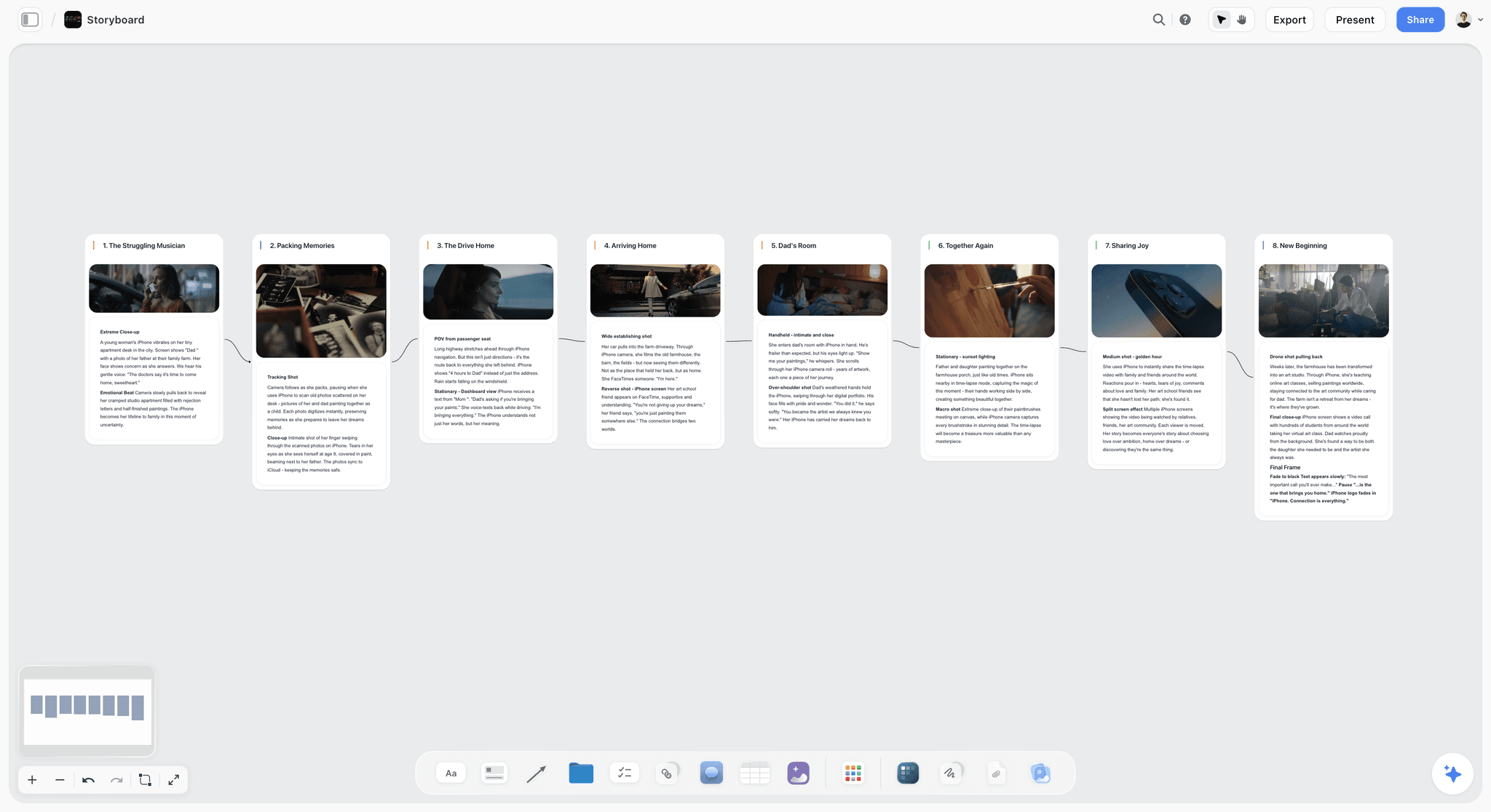
Plan a video or film shot by shot. The Storyboard template lays out frames, action captions, and shot notes on Storyflow's infinite canvas. Use the Storyboard template.
Shotlist Template
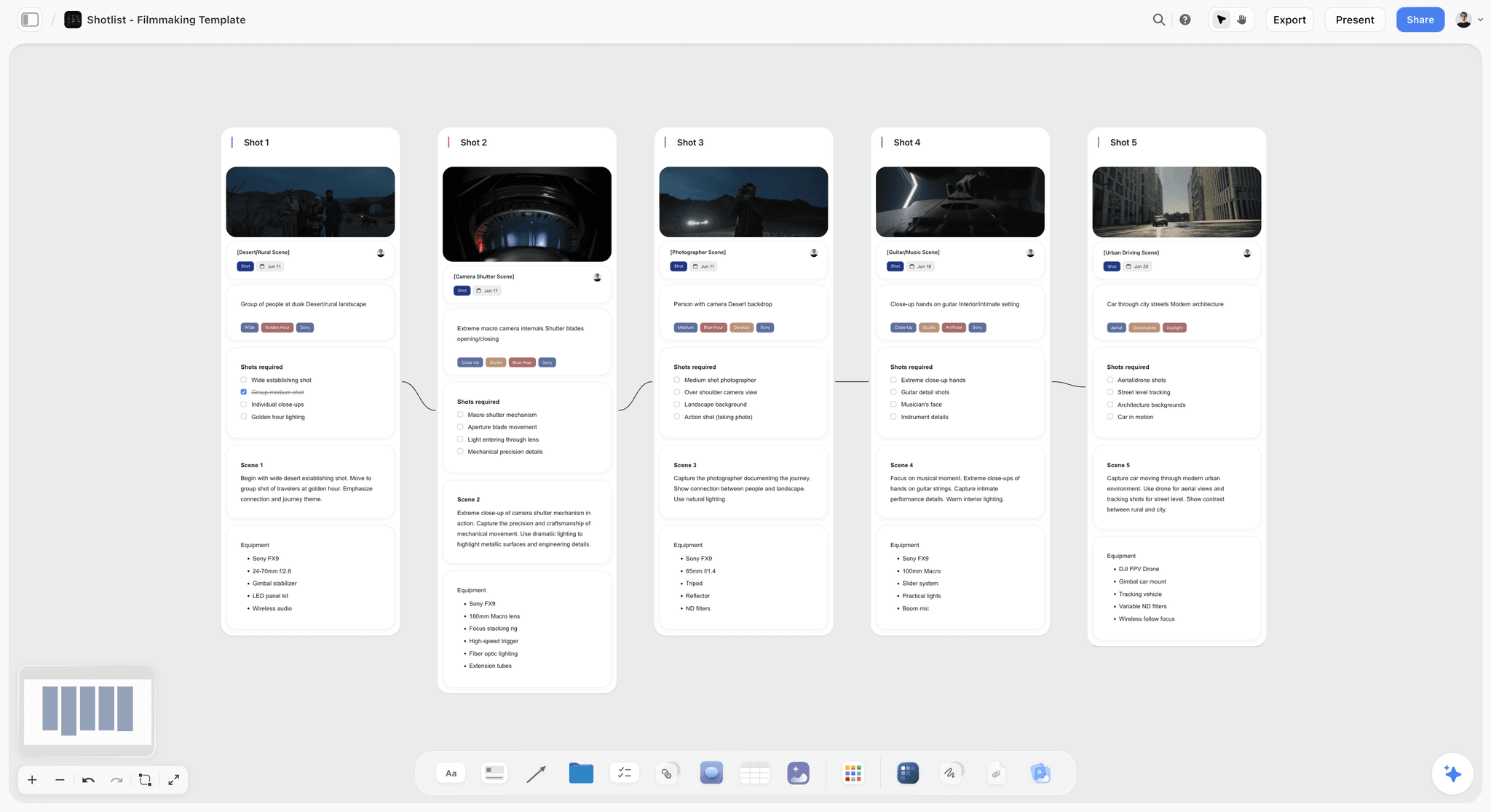
A free Shotlist template on Storyflow's infinite canvas. Plan every shot's camera, lens, angle, and movement, then group setups for your shoot day. Use the Shotlist template.
Beat Sheet Filmmaking Template
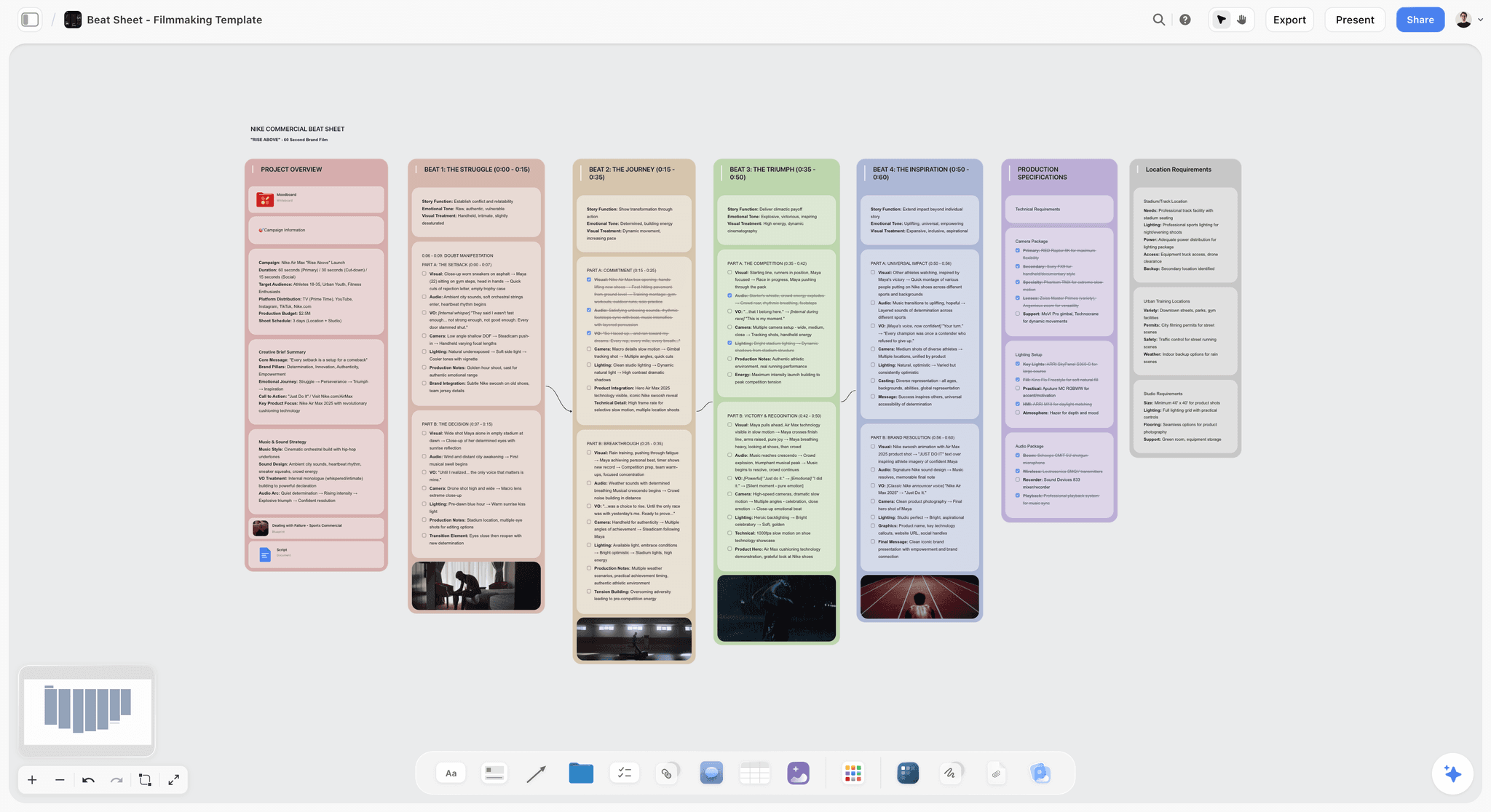
Lay out a film's story beats on an infinite canvas. Plot the opening image, midpoint, and finale with notes, reference stills, and an AI assistant. Use the Beat Sheet Filmmaking template.
8) The Bottom Line
A storyboard example shows you decisions, and a storyboard template gives you a container to make your own. Read examples for the annotation and the sequence, not the art. Pick a template structure from your delivery format: the 6-panel board for narrative and commercial work, the thumbnail strip for fast sequence thinking, the shot-annotated panel for a single heavy shot, and the vertical board for short-form social. Then let the scene drive the grid, not the other way around.
A storyboard template is a container, not a plan. The grid holds the frames. Which frames the scene needs is the work no example or template will do for you.
Where you get the template depends on the project. A free PDF grid is the fastest paper start and genuinely hard to beat for a single scene. A dedicated tool like Boords or StoryboardThat wins when the polished board is the deliverable. A canvas keeps the storyboard connected to the script, the shot list, and the references when the project has moving parts. If that connected route fits your next shoot, try the AI storyboard generator to turn your scene list into a first board, then start a Storyflow workspace and build the board, the shots, and the script on one surface.
7) FAQ: Storyboard Examples and Templates
Where can I find free storyboard templates?
You can find free storyboard templates by searching "storyboard template pdf" or "storyboard template Google Slides," which returns printable 6-panel grids in seconds. Canva, StudioBinder, and many free libraries offer downloadable PDF, Word, and Slides grids in 16:9, 9:16, and other common ratios. For a no-setup paper sketch, these are the fastest option. For a project with a script and shot list that keep changing, a canvas tool like Storyflow keeps the template connected to everything else, which a static PDF cannot do.
What is a storyboard example?
A storyboard example is a finished or sample storyboard you study to learn the form. The useful ones show four things: what is inside each frame, the annotation layer (shot type, angle, movement, action, dialogue), the sequence logic of why one frame follows another, and the level of finish. Read an example for its visible decisions, not its drawing quality. A rough stick-figure board with precise camera notes teaches more than a gallery of polished frames with no captions, because the rough board shows its thinking.
What should a storyboard template include?
A storyboard template should include a frame in the delivery aspect ratio, a shot number, the shot type (wide, medium, close-up), the camera angle and movement, an action line, and a dialogue or sound field. More detailed templates add lens, lighting, audio, and VFX or continuity notes. The frame carries the composition and the caption carries the instruction. A template with frames but no caption fields produces half a storyboard, because the drawing alone cannot tell a crew where the camera goes.
What is the standard storyboard template format?
The standard storyboard template format is the 6-panel board: six frames to a page, three per row, two rows, each with a caption block beneath it. It is the structure behind nearly every free printable template because six full-size frames fit on a page while staying large enough to draw in. For short-form vertical video the standard shifts to 9:16 or 4:5 frames, and for quick sequence planning a thumbnail strip replaces the grid. Match the format to your delivery before you fill a frame.
Are there different storyboard templates for different video types?
Yes. A film or narrative board uses one panel per camera setup with full camera captions. A commercial board adds voiceover and timing and a higher finish level for client pitches. A YouTube board uses segment blocks and b-roll notes rather than strict panels. A music video board ties frames to timecode and groups them by song section. An explainer board pairs each frame with a line of narration. The structure follows the job the video is doing.
How do I make a storyboard template in Google Slides or Canva?
To make a storyboard template in Google Slides or Canva, create a slide, add a grid of six rectangles in your delivery aspect ratio for the frames, then add a text box under each rectangle for the caption (shot type, camera, action, dialogue). Duplicate the slide for each page. In Canva, search its template library first, since it already offers free storyboard layouts you can edit. For a connected workflow where the template sits next to your script and shot list, a canvas tool replaces the slide deck.
What is a storyboard example PDF and where do I get one?
A storyboard example PDF is a downloadable sample board, often a blank printable grid or a filled-in example showing how a finished board reads. You get them from free template libraries, StudioBinder, Canva, and many film-education sites by searching "storyboard example pdf" or "storyboard template pdf." A blank PDF grid is the fastest paper start. A filled example PDF is worth studying for its annotation and sequence decisions, which are the part of a storyboard that actually teaches you something.
Do I need to draw well to use a storyboard template?
No. A storyboard is a planning document, not an art piece. Stick figures for people, boxes for furniture, and arrows for camera movement communicate a shot as clearly as polished art. A template's job is to give you the frame and the caption fields. The caption (shot type, angle, movement, action) carries the information a crew needs. If you cannot draw, fill the caption layer carefully and keep the frames simple. Tools with drag-and-drop characters, or AI image generation on a canvas, can also produce frames without drawing skill.
What is the difference between a storyboard template and a shot list template?
A storyboard template is visual, with frames showing how the camera sees each moment. A shot list template is textual, a running inventory of every setup to capture with notes on lens, location, and order. The storyboard usually comes first and the shot list is derived from it. The strongest workflow keeps both connected, so a change in the storyboard updates the shot list. When they live in separate files, a change in one silently breaks the other.
Can AI generate a storyboard from a template?
AI can assist with a storyboard, not fully replace the planning. On a canvas like Storyflow, the AI reads your board (the script, the frames, the notes) and can suggest shots for a sequence, flag a beat with no coverage, or draft the camera notes for a panel. On the Pro plan and above, AI image generation can create frame images directly. This is AI-assisted boarding: the AI speeds up the frames and the notes, but the decisions about which shots the scene needs, and in what order, stay with you.
Table of Contents
- Quick Answer: Where to Find Storyboard Examples and Templates
- What a Good Storyboard Example Actually Shows You
- Storyboard Examples by Type
- Storyboard Template Structures
- How to Use a Template Without Becoming Its Prisoner
- Where to Get Storyboard Templates
- FAQ: Storyboard Examples and Templates
- The Bottom Line
- Author
- Related Reading
Templates to check out for this topic


Filmmaking templates you can use in Storyflow
Skip the blank canvas. Open one of these filmmaking boards in Storyflow and the AI builds on the structure that is already there, from research through the shot list.


See Storyflow in Action
A visual AI workspace where every feature lives inside one canvas. No tab-switching, no context lost.
Build your entire board from a single message
Type what you need in the AI chat at the bottom of your canvas. The AI adds cards, headings, and structure directly onto your board.
Use expert frameworks as AI context
Type @ in the AI chat and choose any Tactic. The AI tailors every response to that framework instead of giving generic advice.
Turn your board into a mind map in seconds
Ask the AI to restructure your canvas as a mindmap. It connects your ideas into a visual hierarchy so you can see how everything relates.
Why Storyflow Exists
Storyflow actually began as a personal tool while working on creative and research projects.
We kept running into the same problem: ideas were scattered everywhere: notes, documents, and whiteboards.
Nothing helped us see how everything connected.
So we started building a workspace designed around how ideas actually grow.
→ Read how Storyflow was createdJustkay
Documentary Filmmaker & Founder at Storyflow
Published: 2026-06-18
Extremely simple, seriously capable


See how easy it is to get started
Watch a real project come together, from a blank board to a finished plan, clicked through step by step.
Start creating with AI and become more productive
Transform your creative workflow with AI-powered tools. Generate ideas, create content, and boost your productivity in minutes instead of hours.